air condition AUDI A3 2015 Owners Manual
[x] Cancel search | Manufacturer: AUDI, Model Year: 2015, Model line: A3, Model: AUDI A3 2015Pages: 288, PDF Size: 71.46 MB
Page 7 of 288
In addition to this Owner's Man ual, your Audi
comes with the
- MM I Operating Ins truc tions
- Warranty
& Ma intenance book let.
If you are miss ing one of these publicat ions,
or if you believe that the information is not
complete, contact your authorized Audi dealer
for assistance.
MMI Operating In struction s
contain detailed description of the Audi Mu lti
Media Interface (MMI) including the naviga
tion system, the sound system and the hand
held pho ne.
The Warranty & M aintenance booklet
explains how yo u can keep your A udi in top
driving condition by having it serviced regular
ly and conta ins detai led information about
the warranties covering your Aud i. Always
have the book let with you when you take your
ve hicle to an author ized Audi dealer for serv
i ce. Your Audi Servi ce Adviso r will record each
sched uled service and can answe r any q ues
tions you may have regarding how to ma intain
your vehicle .
In Canada,
the vehicle lite ratu re is also avai lab le in
Fr ench. To obtain a co py, contact your dea le r
or write to:
Au Canada, on peut se p rocure r un exempla ire
e n frarn;ais de ce document aupres du conces
sionn aire ou de:
Volkswagen Canada Inc.
Client Assistance
Assistance a la Clientele
7 77 Bayly S treet, West,
Ajax, Ontario LlS 7G7
If you sell y our Aud i
all lite rature should be left in the veh icle to
make the Warranty terms as we ll as a ll oper
ating, safety and ma intenance information
av ail ab le to the next owner.
Vehicle literature 5
If you change your address or if you
bought thi s Audi u sed
be sure to send in a "Notice of Address
Change"/ "Notice of Used Car Purchase" post
card. This card can be found in the Warranty
&
Maintenance booklet or obtained from your
authorized Audi dea ler.
It i s in your own inte rest that we are able to
contact you should the need arise .
•
•
•
Page 66 of 288
64 Warm and cold
Warm and cold
Climate control system
Description
Different systems cou ld be installed.
- manual climate control system* or
- automatic climate control system*
The
clim ate co ntrol system * cools and re
moves humidity from the air in the vehicle in
terior. It is the most effective when the win
dows and panorama sunroof* are closed. If
there is a build-up of heat inside the vehicle,
ventilation can help to speed up the cooling process . For this reason, the windows and
panorama sunroof can be opened from the
outside
r::} page 3 9, Convenience opening/
closing.
The pollutant filter removes pollutants such
as dust and pollen from the air .
A WARNING
Reduced visibility is dangerous and can
cause accidents.
-
- For safe dr iv ing it is very important that
all windows be free of ice, snow and con
densation.
- Completely fami liarize yourself with the
proper use and function of the heating
and ventilation system and especia lly
how to defog and defrost the windows .
- Never use the windshie ld w iper/w asher
system in freezing weather until you
have warmed the windshield first, using
the heat ing and ventilation system . The washer sol
ution may freeze on the wind
shie ld and reduce visib ility.
@ Note
- If you suspect that the air conditioner
has been damaged, switch the system
off to avoid further damage and have it
inspected by a q ualified dealership.
- Repairs to the Audi air conditioner re
quire specia l technical know ledge and
special tools. Contact an authorized Aud i
dealer for ass istance.
@ For the sake of the environment
By reducing the amount of f uel you use,
you also reduce the amount of pollutants
emitted into the air.
(1) Tips
- To prevent interference with the heat ing
and cooling output and to prevent the
w indows from fogging over, the air in
take in front of the windshield must be
free of ice, snow or leaves.
- Condensation from the cooling system*
can drip a nd form a puddle of wa ter un
der the vehicle . This is normal and does
not mean t here is a leak.
- The energy ma nagement system may
switch the seat h eating* or rear window
defroster off temporar ily. These systems
are available again as soon as the energy
balance has been resto red.
- Air escapes through vents under the rear
w indow. When plac ing items of cloth ing
on the luggage compartmen t cover, en
sure t hat the openings are not covered .
Page 68 of 288
66 Warm and cold
Foot vents are located under the front seats
to heat the rear of the vehicle.
l= I Switching recirculation mode on and
off
I n recirculation mode, the air inside the vehi
cle is circu lated and filtered. This prevents the
unfiltered air outside the vehicle from enter
ing the vehicle interior. We recommend
switching recirculation mode on when driving
through a tunnel or when sitt ing in traffic
~ & .
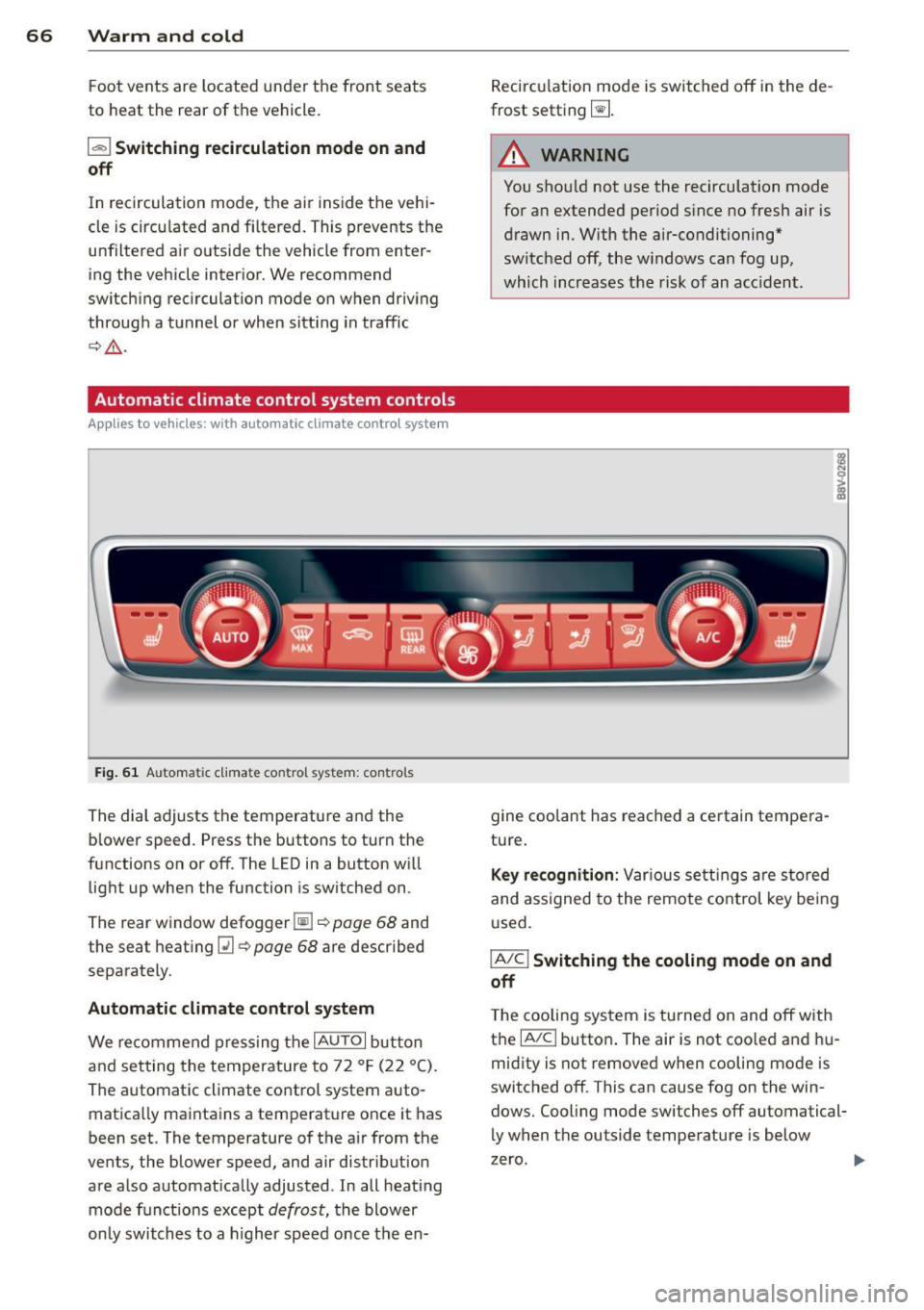
Automatic climate control system controls
Ap plies to vehicles: with a uto mat ic climate contro l system
Fig. 61 Au toma tic climate contro l system : cont rols
The dial adjusts the temperature and the
blower speed. Press the buttons to turn the
functions on or off. The LED in a button will
light up when the function is switched on .
The rear window defogger~~
page 68 and
the seat heating
[ii~ page 68 are described
separately.
Automatic climate control system
We recommend pressing the IAU TO I button
and setting the temperature to 72 °F (22 °C).
The automatic climate control system auto
matically maintains a temperature once it has
been set. The temperature of the air from the
vents, the blower speed, and air distr ibution
are also automatically adjusted . In all heat ing
mode funct ions except
defrost, the blower
only switches to a higher speed once the en- Recirculation
mode is switched off in the de
frost setting ~-
.&_ WARNING
-
You shou ld not use the recirculation mode
for an extended period s ince no fresh air is
drawn in. With the air-conditioning*
switched off, the w indows can fog up,
which increases the risk of an acc ident.
gine coolant has reached a certain tempera
ture.
Key recognition: Var ious settings are stored
and assigned to the remote control key being
used.
IA/CI Switching the cooling mode on and
off
T he cooling system is turned on and off with
the
IA/Cl button . The air is not coo led and hu
midity is not removed when cooling mode is
switched off . This can cause fog on the win
dows. Cooling mode switches off automatical
ly when the outside temperature is below
zero .
Page 70 of 288
68 Warm and cold
through a t unnel or when sitting in traffic
c:;> &. .
The 1- 1 button, IAUTO I or the~ button
sw itches recircu lation mode off.
The system switches to recircu lat ion mode
when dr iving in reverse when the engine is
cold .
.8, WARNING
You should not use the rec irculat ion mode
for an extended period since no fresh air is drawn in. With the air -conditioning sw itch
ed off, the windows can fog up, which in
creases the risk of an accident.
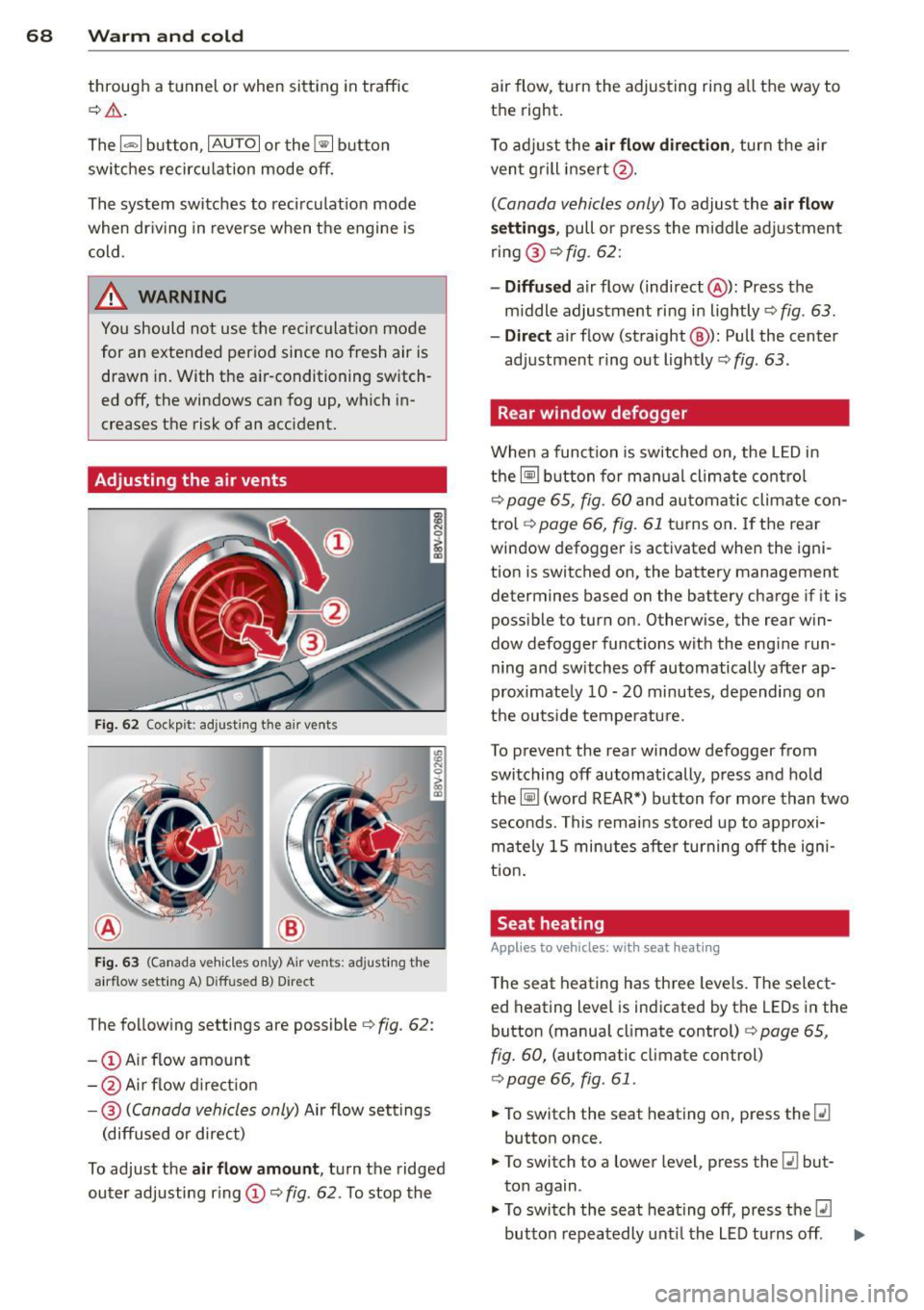
Adjusting the air vents
Fi g. 62 Cockp it: adjust ing the air vents
Fig. 6 3 (Ca nada ve hicles on ly) A ir ve nts: ad justing the
a irflow sett ing A) D iffused B) Direct
The follow ing settings are possibler=> fig. 62:
- @ Air flow amount
- @ Air flow d irect io n
- @
(Canada vehicles only) Air flow settings
(diffused or direct)
To adjust the
air flow amount , turn the ridged
outer adjusting r ing (D r=>
fig. 62. To stop the air flow, turn the adjusting ring a
ll the way to
the right.
T o adj ust the
air flow direction , turn the air
ven t grill insert @.
(Canada vehicles only) To adjust the air flow
se tting s,
pull o r press the m iddle adjustment
ring @
c::> fig. 62:
-Diffu sed air flow (indirect @): Press the
m iddle adjustment ring in lightly
c::> fig . 63.
- Dir ect
air flow (straight @): Pull the center
adjustment ring out lightly
c::> fig . 63 .
Rear window defogger
When a funct ion is switched on, the L ED in
the~ button for ma nual climate co ntrol
c::> page 65, fig. 60 and au toma tic climate con
tro l
c::>page 66, fig. 61 tu rns on . If the rear
window defogger is act ivated when the igni
tion is switched on, the battery management
determines based on the battery charge if it is
poss ible to turn on. Otherw ise, the rear win
dow defogger funct ions with the eng ine run
ning and switches off automatically after ap
proximate ly 10 -20 minutes, depending on
the outside temperatu re.
To p revent the rear window defogger from
switching off automatically, press and hold
the~ (word REAR*) button for more than two
seconds. This remains s to red up to approxi
mately 15 minutes after turning off the igni
tio n.
Seat heating
Applies to veh icles : w it h sea t heat ing
The seat heating has three leve ls. T he select
ed heating level is indicated by the LEDs in the
button (manua l climate control)
c::> page 65,
fig. 60,
(automatic climate control)
c::> page 66, fig . 61 .
.,. To switch the seat heating on, press the [li
button once .
.,. To switch to a lower level , press the
[li but
ton again .
.,. To switch the seat heating off, press the
lll
button repeatedly unt il the LED turns off . ..,.
Page 81 of 288
-Starting on inclines in stop-and-go traf
fic: To help prevent the vehicle from roll
ing back when starting, press and hold
the brake pedal for several seconds when
the vehicle is stationary .
(D Tips
You can find out if your vehicle is equipped
with Hill Hold by checking at an authorized
Audi dealer or qualified repair facility .
Speed warning system
Introduction
The speed warning system helps you to stay
under a specified maximum speed.
The speed warning system warns you if you
are exceeding the maximum speed that you
have set. You will hear a warning tone when
your speed exceeds the stored value by ap proximately 3 mph (3 km/h). An indicator
light . (USA models) . (Canada models) in
the instrument cluster display also turns on at
the same time. The indicator light./.
turns
off when the speed decreases below the
stored maximum speed .
Setting a threshold is recommended if you
would like to be reminded when you reach a
certain maximum speed. Situations where you may want to do so include driving in a country
with a general speed limit or if there is a
specified maximum speed for winter tires .
@ Tips
Even though your vehicle is equipped with
a speed warning system, you should still
watch the speedometer to make sure you
are not driving faster than the speed limit.
Setting the threshold
You can set, change and delete the threshold
in the MMI.
"' Select: Systems or Car systems > Driver as
sist> Speed warning .
Driving 79
You can set any threshold between 20 mph (30 km/h) and 150 mph (240 km/h). Settings
can each be adjusted in increments of 6 mph
(10 km/h).
Cruise control system
Description
Applies to vehicles: with cruise control system
The cruise control system makes it possible to
drive at a constant speed starting at 15 mph
(20 km/h).
The speed is kept constant by modifying en
gine power or through an active brake inter
vention.
.&_ WARNING ~
- Always pay attention to the traffic
around you when the cruise control is in
operation. You are always responsible for
your speed and the distance between
your vehicle and other vehicles.
- For reasons of safety, cruise control
should not be used in the city, in stop
and-go traffic, on winding roads and
when road conditions are poor (such as ice, fog, gravel, heavy rain and hydro
planing) -you could have an accident.
- Switch the cruise control
off temporarily
when driving in turning lanes, highway
exits or in construction zones.
- Please note that unconsciously "resting"
your foot on the accelerator pedal pre
vents the cruise control from braking.
This is due to the control system being
overridden by the driver's acceleration.
- If a brake system malfunction such as
overheating occurs when the cruise con
trol system is switched on, the braking
function in the system may be switched
off. The other cruise control functions re
main active as long as the indicator light
II (US models) !l'I (Canadian models)
ison.
~ •
Page 84 of 288
82 Audi adaptive cruise control
Audi adaptive cruise
control
Introduction
Ap plies to vehicles: with Audi adaptive cruise co ntrol
The adaptive cruise control system is a combi
nation of speed and distance regulation. It as
sists the driver by both regulating the speed
and maintaining a distance to the object
ahead, within the abilit ies of the system. If
the system detects an object, adaptive cruise
con trol can brake and accelerate your vehicle.
This together with the automatic transmis
sion* makes driving more comfortable both
on long stretches of highway and in stop-and
go traffic.
General Information
General information
A ppl ies to vehicles: with Audi adaptive cruise co ntrol a nd
Audi pre se nse fro nt
Fig. 70 Vehicle fro nt: sensor
The general information applies to adaptive
cruise control* and pre sense front*
c:>page90.
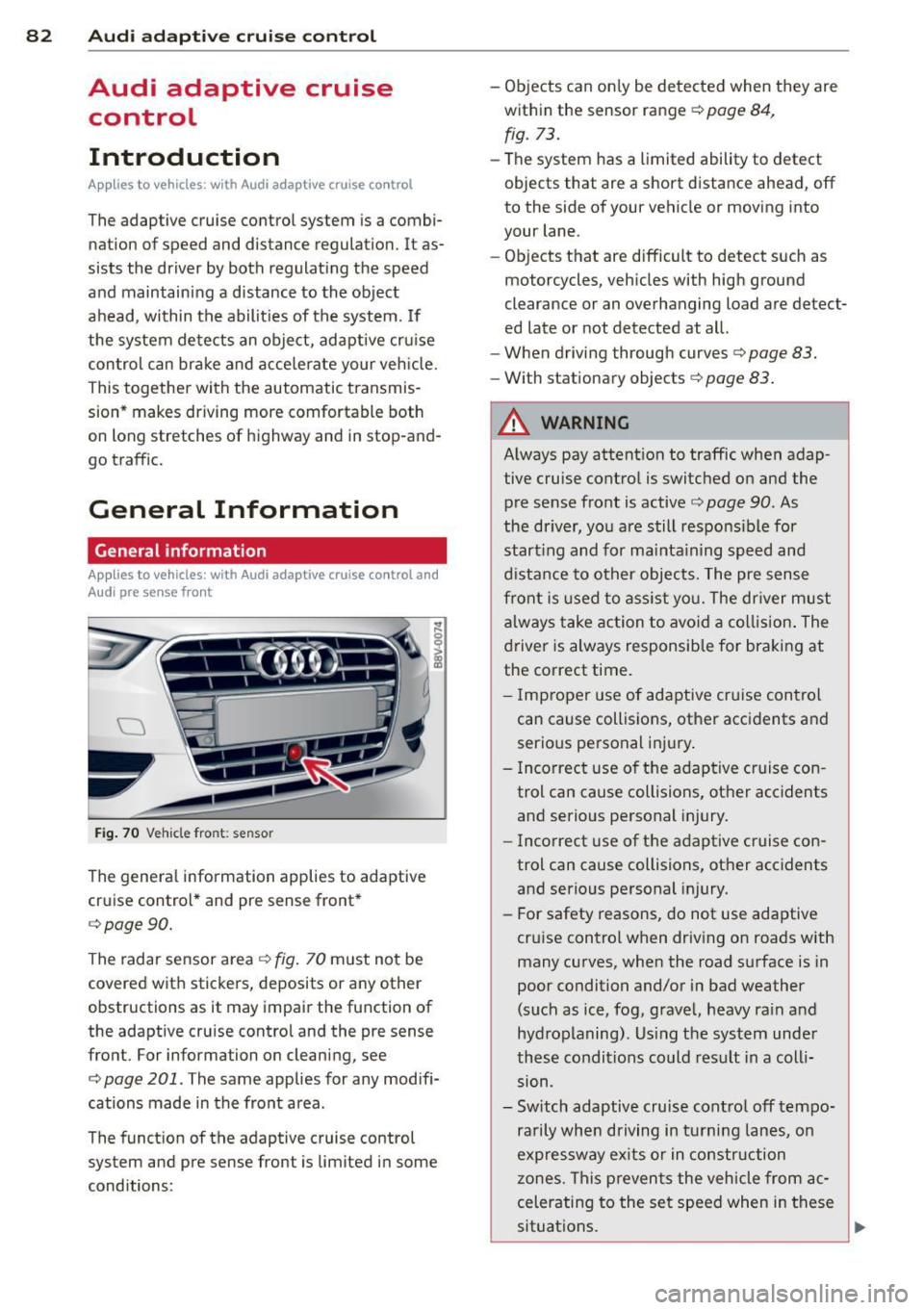
The radar sensor area c:>fig. 70 must not be
covered with stickers, deposits or any other
obstructions as it may impair the function of
the adaptive cru ise control and the pre sense
front. For information on cleaning, see
c:> page 201 . The same applies for any modifi
cations made in the front area .
The function of the adaptive cruise control
system and pre sense front is limited in some
conditions: -
Objects can only be detected when they are
within the sensor range
c:> page 84,
fig. 73.
-The system has a limited ability to detect
objects that are a short distance ahead, off
to the side of your vehicle or moving into
your lane.
- Objects that are difficult to detect such as
motorcycles, vehicles with high ground
clearance or an overhanging load are detect
ed late or not detected at all.
- When driving through curves
c:> page 83.
-With stationary objects r=;, page 83 .
A WARNING
-
Always pay attent ion to traffic when adap
tive cruise control is switc hed on and the
pre sense front is active
c:> page 90. As
the driver, you are still responsible for
start ing and for maint.;1 ining speed and
distance to other objects. The pre sense
front is used to assist you. The driver must
always take action to avoid a collision. The
driver is always responsible for braking at
the correct time.
- I mp roper use of adaptive cruise con trol
can cause collisions, other accidents and
serio us personal injury.
- Incorrect use of the adaptive cruise con
trol can cause collisions, other acc idents
and serio us personal injury.
- Incorrect use of the adaptive cruise con
trol can cause collisions, other accidents
and serio us personal injury.
- For safety reasons, do not use adaptive
cru ise control when driv ing on roads with
many curves, when the road surface is in
poor condition and/or in bad weather
(such as ice, fog, gravel, heavy ra in and
hydroplaning). Us ing the system under
these conditions could result in a colli
sion .
- Sw itch adaptive cruise contro l off tempo
ra rily when driving in turning lanes, on
expressway ex its or in construction
zones. This preven ts the vehicle from ac
celerating to the set speed when in these
situations .
Page 92 of 288
90 Audi pre sense
Audi pre sense
Introduction
Applies to vehicles: with Audi pre sense basic or Audi pre
sense front
Within the limits of the system, pre sense ba
sic and pre sense front can initiate steps to
protect vehicle occupants in certain danger
ous situations.
Critical driving situations can be recognized by
the pre sense front via a network of different
vehicle systems and can take steps to prepare
the vehicle occupants for a potential collision.
The pre sense front works with a radar sensor
and a video camera*.
It also functions within
the limits of the system when adaptive cruise
control* is switched
off.
General information
General information
App lies to vehicles: with Audi pre sense front or Audi
adaptive cruise control
A WARNING
Also follow the general information found
on
~ page 82, General information.
Audi pre sense basic
Descript ion
Applies to vehicles: with Audi pre sense basic
The function of the pre sense basic is activat
ed at a speed of 10 mph (30 km/h) or higher.
The following functions can be triggered un
der certain conditions within the limits of the
system:
- Tensioning of the safety belts (for example,
during heavy braking) : The front safety belts
have reversible belt pretensioners. If a colli
sion does not occur, the safety belts loosen
slightly and are ready to trigger again .
- Closing the windows and the sunroof* (for
example, when over- or understeering): The
windows and the sunroof" close until there is only a small gap open. Audi drive select:
The deployment time is
adapted in dynamic mode.
A WARNING
-The pre sense basic cannot overcome natu- ral physical laws.
It is a system designed to
assist and it cannot prevent a collision. Do not let the increased safety provided
tempt you into taking risks. This could in
crease your risk of a collision.
- The system can deploy incorrectly due to system-specific limits .
(D Tips
-Certain pre sense basic functions switch
off when ESC is switched off (sport
mode) or when driving in reverse .
- The pre sense basic functions may not be
available if there is a malfunction in the
ESC system or the airbag control mod
ule .
- Note that with pre sense basic, the rever
sible safety belt pretensioner on the
front passenger's side deactivates when
the front passenger's a irbag is deactivat
ed.
Audi pre sense front
Description
Applies to vehicles: with Audi pre sense front or Audi
adapt ive cru ise control
Pre sense front informs you if the distance to
the vehicle ahead falls below the safe distance
for an extended period of time. It can warn of a possible collision and initiate braking ma
neuvers, within the limits of the system .
When detected in time, the system can assess
dangerous situations where an object ahead
brakes suddenly or if your own vehicle is trav
eling at a high speed and approaching an ob
ject that is moving more slow ly . If detection is
not possible, then pre sense front does not re
act.
Page 98 of 288
96 Audi active lane assist
@ So lid lines: act ive la ne assist is sw itch-
ed on and ready to provide wa rn in gs on
t he s ide th at is indica ted.
@ B linking lines ( left or right): active lane
assist is warning you by a vibration in
t he stee ring wheel that yo u are l eaving
t h e l ane.
® Unfilled line(s): active lane assist is
switched on but is not rea dy to prov ide
warnings.
N o lines: t he active lane assist is
switched
off .
Multicolored display
Refe r to¢ fig. 8 4
@ Solid white lines : active la ne assist is
switched on and ready to provide warn-
ings on the side that is ind icated.
@ Red lin es (left or r igh t): ac tive lane as-
sis t is warning you by a vibration in t he
steering whee l th at you a re leav ing the
lane.
® Gray unfilled lines: active lane ass ist is
s witched on but is not ready to prov ide
w ar nings.
N o lines: the active lane assist is
switched
off.
Messages in the instrument cluster
display
I f the active lane ass ist has a mal func tion, the
B indicato r light in the inst rumen t cluste r
di spl ay t urn s
off and one of the followi ng
me ssages appe ars:
Audi active lane assist: currently not avai la
ble. No camera view
This message appears if the camera is unable
to detect the li nes . This co uld happe n if:
- The came ra field of view ¢
page 95, fig. 82
is dirty o r covered i n ice. Clean the area on
t h e windshie ld.
l ) Thi s function is not available in all cou ntr ies.
- The camera field o f view is fo gged ove r. Wa it
until the fog has cleared before switching
the act ive lane assist on agai n.
- The system has bee n una ble to detect t he
lanes for an exten ded period of t ime due to
road conditions. Switch the active lane as
sist bac k on when the lines are more v is ible.
Audi active lane assist: currently unavailable
T he re is a te mporary a ct ive lane assis t mal
f unc tion. Try swi tching the active lane assi st
o n again later .
Audi active lane assist: system fault!
Drive to an authorized A udi dealer or qualified
repair fac ility immediately to have the mal
funct ion corrected.
B Audi active lane assist: Please continue
steering vehicle!
T his messa ge ap pears if yo u are not stee ring
by yoursel f. If th is is t he case, act ive lane as
s ist does not switch
off, but it is "not ready" to
provide a warning. The system can help you
kee p the vehicle in the lane. However, yo u are
r esponsible for dr iv ing the vehicle and must
stee r it yourse lf .
Adjusting the steering time and
vibration warning
App lies to veh icles: w ith Audi ac tive la ne ass ist
You can adju st individual active lane assis t
se ttings in the MMI.
"' Select: !ME NUI button> Systems cont ro l
but to n or
Car sy stem s > Driver assistance >
Audi active lane assist .
Steering timel)
Early :
in this setting, the correct ive steering
happens con tinuously to he lp keep the vehicle
i n t he c ent er of t he lane.
Late : in this setting, the system provides cor
rect ive steer ing just befo re a vehicle whee l
touches a detected lane marke r line . ..,.
Page 102 of 288
100 Audi side assist
-If vehicles are approaching or being
left behind very quickly. The display
may not turn on in time.
- In poor weather conditions such as
heavy rain, snow or heavy mist.
- On very wide lanes, in tight curves, or if
there is a rise in the road surface.
Vehicles in the adjacent lane may not
be detected because they are outside
of the sensor range.
- Side assist cannot detect all vehicles un
der all conditions- danger of accident!
- Please note that side assist indicates
there are approaching vehicles, or
vehicles in your blind spot, only after
your vehicle has reached a driving speed
of at least 19 mph (30 km/h).
- In certain situations, the system may not
function or its function may be limited.
For example:
- if vehicles are approaching or being left
behind very quickly. The display may
not turn on in time.
- in poor weather conditions such as heavy rain, snow or heavy mist.
- on very wide lanes, in tight curves or if
there is a rise in the road surface.
Vehicles in the adjacent lane may not
be detected because they are outside
of the sensor range.
The sensors can be displaced by impacts or damage to the bumper, wheel housing and
underbody. This can affect the system. Have your authorized Audi dealer or quali
fied repair facility check their function.
(D Tips
-If the window glass in the driver's door
or front passenger's door has been tint
ed, the display in the exterior mirror may
be misinterpreted.
- For Declaration of Compliance to United
States FCC and Industry Canada regula
tions, see
9 page 271.
Switching on and off
Applies to vehicles : wi th Audi side ass ist
The system and be switched on and off in the
MMI.
"'Select: !MENUI button> Systems control
button or
Car systems > Driver assistance >
Audi side assist. With off, the system is
switched off.
An activated system will signal every time the ignition is switched on by turning the displays
in the exterior mirrors on briefly.
Adjusting the display brightness
App lies to vehicles: wi th Audi s ide ass ist
The brightness can be adjusted in the MMI.
"'Selec t: !ME NUI button> Systems control
button or
Car systems > Driver assistance >
Audi side assist .
The display brightness adjusts automatically
to the brightness of the surroundings, both in
the information and in the warning stage . In
very dark or very bright surroundings, the dis
play is already set to the minimum or maxi
mum level by the automatic adjustment. In
such cases, you may notice no change when
adjusting the brightness, or the change may
only be noticeable once the surroundings
change.
Adjust the brightness to a level where the dis
play in the information stage will not disrupt
your view forward. If you change the bright
ness, the display in the exterior mirror will
briefly show the brightness level in the infor
mation stage. The brightness of the warning
stage is linked to the brightness in the infor
mation stage and is adjusted along with the
information stage adjustment.
(D Tips
- Side assist is not active while you are
making the adjustment.
- Your settings are automatically stored
and assigned to the remote control key
being used.
Page 113 of 288
Launch Control-Program
App lies to vehicles: with launch control
The Launch Control Program enables maxi
mum acceleration.
Requirement : The engine must be at operat
ing temperature and the steering wheel must
not be turned .
.. With the engine running, press the
!~ OFFI
button briefly one time 1).
.. Pull the selector lever back out of the 0/S
position briefly to select the S position, or
press it toward the right into the tipt ronic
pos it ion or select the
d ynamic dr iv ing mode
i n drive select*
~page 102.
.. Press the brake peda l firmly with your left
f oot and hold it all the way down for at least
1 second.
.. At the same time, press the gas peda l all the
way down with your right foot unti l the en
gine reaches and stays at a high RPM level.
.. Remove your left foot from the brake.
A WARNING
- Always adapt your driving to the traffic
flow.
- Only use Launch Cont ro l when road and
t raff ic conditions a llow it and other driv
ers wi ll not be endangered or impacted
by you r driving and the veh icle's acceler
ation.
- Please note tha t the dr ive whee ls can
spin and the vehicle can break away
when sport mode is switched on, espe
c ially when the road is sl ippery.
- Once the vehi cle has started moving,
press the
I ~ OFF I button br iefly to turn
the sport mode off.
(j) Tips
- The transm ission tempe rat ure may in
crease significantly after using the
l ) In vehicles with a dr iver info rmat ion system, an ESC
light in the in stru m ent cl us ter stays on contin uo usly
and the m essage
Stabilizatio n cont rol (ESC): spor t.
Warning! Restricted stability
appears temporarily.
Automa tic tran sm iss ion 11 1
Launch Control Program . If that hap
pens, the program may not be availab le
for a few m inutes. It will be ava ilable
again after a cool-down per iod.
- When accelerating using the Launch
Contro l Program, all vehicle parts are
subject to heavy loads. Th is can lead to
increased wear .
Emergency mode
Applies to vehicles: with S tronic transm ission
In the event of a system malfunction, there is
an emergency program.
If all of the selector lever positions are high
li ghted with a light backgro und in the instru
ment cluster d isplay, there is a system mal
funct ion and the S tronic transmission is run
ning in the emergency program . The vehicle
can still be driven in emergency mode, but on
ly w ith reduced speed and not in all gears. In
some cases, the veh icle
c ann ot driv e in re
v e rs e .
(D Note
If the transmission runs in emergency
mode, drive to your author ized Audi dealer
or q ua lified repa ir facil ity immed iate ly to
have the ma lf u nction corrected.
Transmission malfunction
• Tran smiss ion malfuncti on! Please stop
the vehicle and select P
T here is a malfunction in the transmiss ion .
Park the vehicle securely and do not continue
driv ing. See your authorized A udi dealer or
qualified repair facility.
• Transmi ssion overh eatin g! Plea se stop
the vehicle!
The transm iss io n is too hot and can become
damaged . Stop and let the transmission cool .,.
•