lights AUDI A3 2015 Owner's Manual
[x] Cancel search | Manufacturer: AUDI, Model Year: 2015, Model line: A3, Model: AUDI A3 2015Pages: 288, PDF Size: 71.46 MB
Page 46 of 288
44 Lights and Vision
You can indicate a lane change or a turn when
the emergency flashers are switched on by us
i ng the turn signa l lever. The emergency f lash
ers stop temporarily.
The eme rgency f lashers also work when the
ignition is tu rned off .
(D Tips
You shou ld tu rn on the emergen cy fl ashe rs
when:
- you are the last vehicle st anding in a tr af
fic jam so that any o ther veh icles coming
ca n see you, or when
- you r vehicle has broken down or yo u are
i n an emergency si tua tion, or when
- you r vehicle is bei ng towe d by a tow
tru ck or if yo u are towi ng anothe r vehicle
b ehin d you.
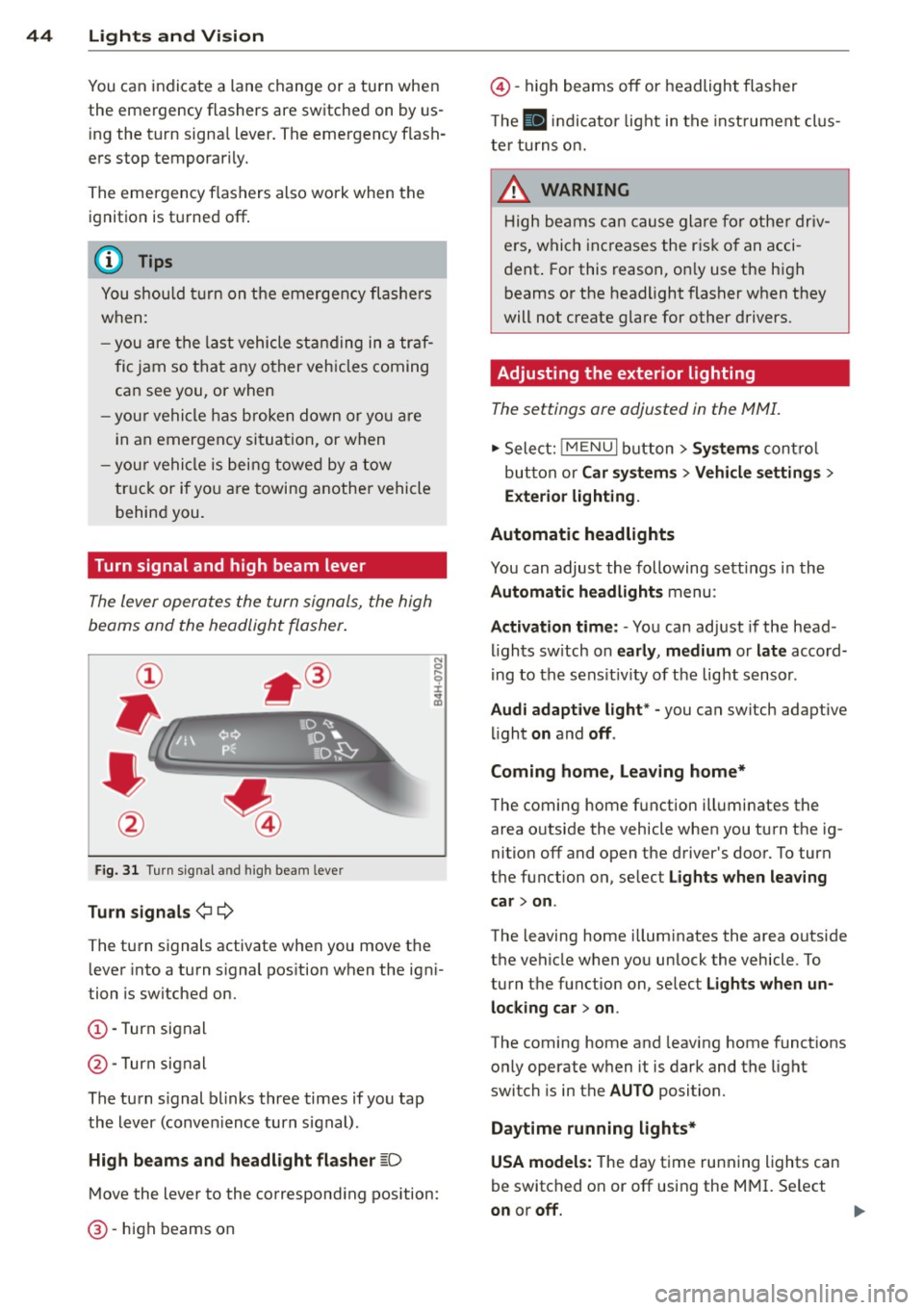
Turn signal and high beam lever
The lever operates the turn signals, the high
beams and the headlight flasher .
Fig. 31 Turn s ig na l an d high beam leve r
Turn signals ¢¢
The turn signals activate when you move the lever into a turn s ignal pos ition when the ign i
tion is switched on.
(D -Turn signal
@-Turn signal
The turn s ignal b links three times if you tap
the lever (conven ience turn s ignal).
High beam s and headlight flasher
~D
M ove the lever to the correspond ing position:
@ -high beams on
@-high beams off or headlight flasher
T he
II in di cator light in t he inst rument cl us
te r tu rns on.
A WARNING
H igh be ams ca n cause glare for othe r driv
e rs, which inc reases the r is k of an acci
dent . For this reason, on ly use the h igh
beams or the headlight flasher when they
will not create g lare for other drivers.
· Adjusting the exterior lighting
The settings ore adjusted in the MMI.
.,. Select: iME NUI button> Systems control
bu tton or Car system s > Vehicle settings >
Exterior lighting.
Automatic headlights
You can adjust the following sett ings in the
Automatic headlights menu:
Activation time: - You can adjust if the head
ligh ts sw itch on early, medium or late accord
i ng to the sens it iv ity of the light sensor .
Audi adapt ive light * -you can switch adaptive
li ght on and off.
Coming home, Leaving home*
T he coming home f unction ill uminates the
area o utside the vehicle when you turn t he ig
nition off and open the driver's door. To turn
the function on, se lect Lights when leaving
car > on .
The leaving home illum inates the area outside
the vehicle when yo u unlock the vehicle . To
turn the function on, se lect Lights when un
locking car > on .
The coming home and leaving home functions
only operate when it is dark and the light
switch is in the AUTO position.
Daytim e running lights*
USA models: The day time running lights can
be switched on or off using the MMI. Se lect
on or off.
1111>
Page 47 of 288
Canada models: The function cannot be
turned
off. It is activated automatical ly each
time the ignition is switched on .
Interior lighting
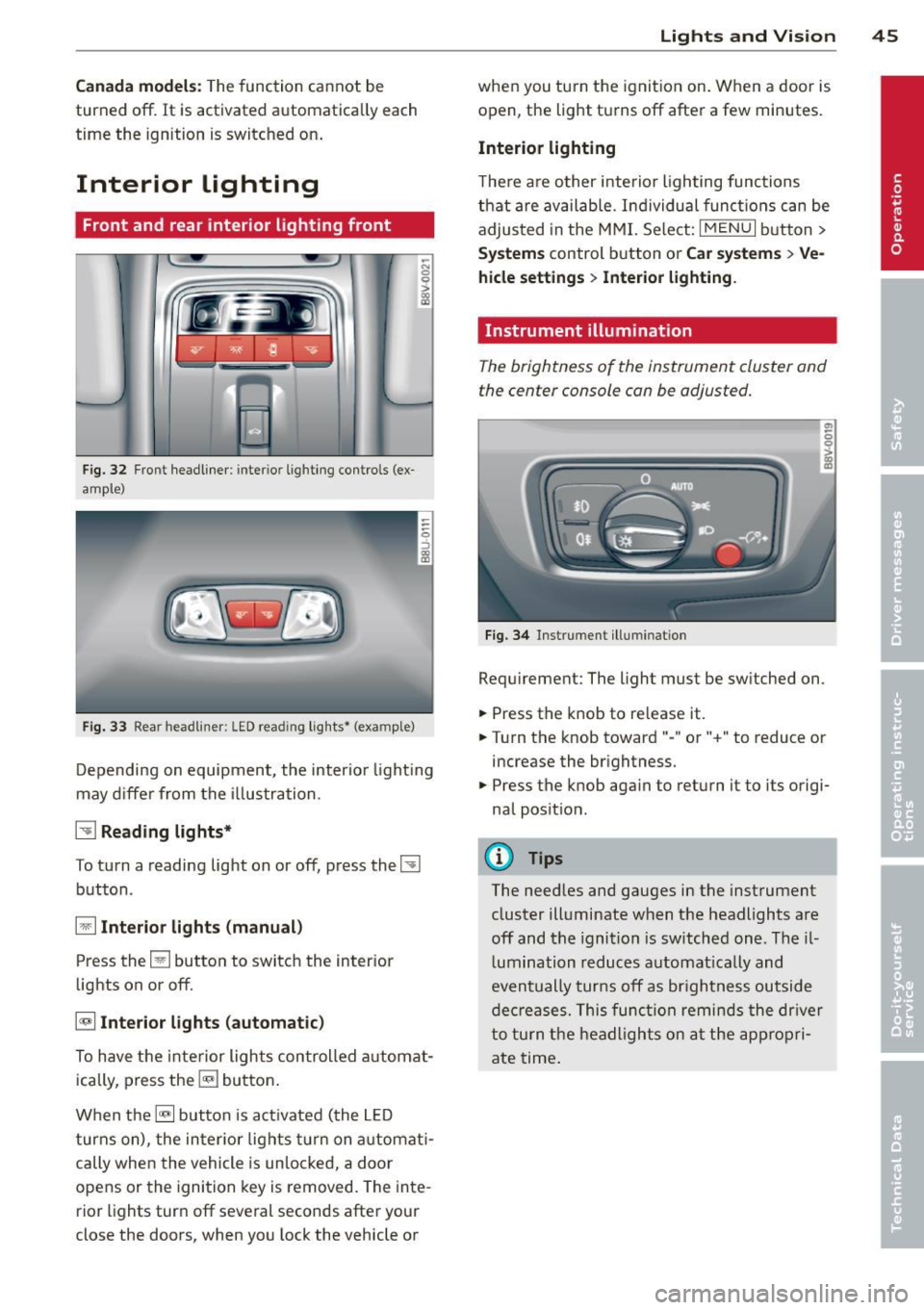
Front and rear interior light ing f ront
Fig. 32 Fr ont headliner : inter io r lighting controls (ex
ample)
Fig. 33 Rear headliner: LED read ing lights~ (example)
-N 0 0
i
Depending on equipment, the interior lighting
may differ from the illustration .
~ Reading lights*
To turn a reading light on or off, press the~
button .
§J Interior lights (manual)
Press the El button to switch the interior
lights on or
off.
§] Interior lights (automatic)
To have the interior lights controlled automat
ically, press the§] button .
When the§] button is activated (the LED
turns on), the interior lights turn on automat i
cally when the vehicle is un locked, a door
opens or the ignition key is removed. The inte
rior lights turn
off several seconds after your
close the doors, when you lock the vehicle or
Lights and Vision 45
when you turn the ignit ion on. When a door is
open, the light turns
off after a few minutes.
Interior lighting
T here are other interior lighting functions
that are available. Individual functions can be
adjusted in the MMI. Select:
IMENUI button>
Systems control button or Car systems > Ve
hicle settings> Interior lighting.
Instrument illumination
The brightness of the instrument cluster and
the center console con be adjusted.
Fig. 34 Instrument illuminat ion
Requirement: The light must be switched on .
.. Press the knob to release it.
.. Turn the knob toward"-" or"+" to reduce or
increase the brightness.
.. Press the knob again to return it to its origi
nal position .
(!} Tips
The needles and gauges in the instrument
cluster illuminate when the headlights are
off and the ignition is switched one. Theil
lumination reduces automatically and
eventually turns
off as brightness outside
decreases. This function reminds the driver
to turn the headlights on at the appropri
ate time.
Page 48 of 288
46 Lights and Vi sion
Vision
Sun visors
(..___ __ _.)
Fig . 35 Left side: su n visor
The sun visors can be moved out of their
brackets and turned toward the doors
(D .
The mirror l ight switches on when the cover
over the vanity mirror* @opens.
Windshield wipers
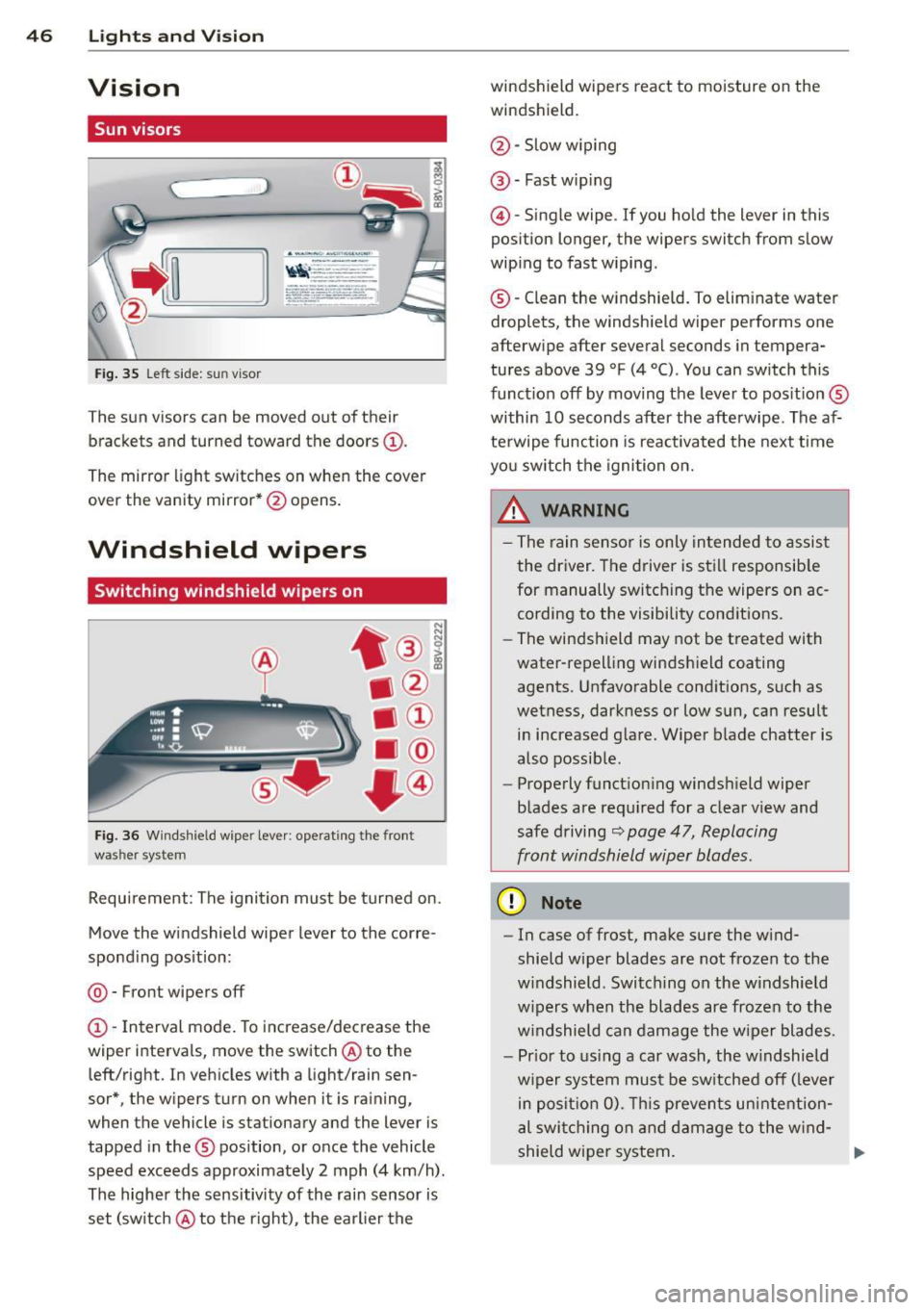
Switching windshield wipers on
Fig. 36 Windsh ie ld wipe r lever : operati ng the front
was her system
Requirement : The ignition must be turned on.
Move the windshield wiper lever to the corre
spond ing position:
@ -Front wipers off
(D -Interval mode. To increase/decrease the
wiper intervals , move the switch @ to the
left/right. In vehicles with a light/rain sen
sor*, the wipers turn on when it is raining,
when the vehicle is stationary and the lever is
tapped in the ® position, or once the vehicle
speed exceeds approximate ly 2 mph (4 km/h) .
The higher the sensitivity of the rain sensor is
set (sw itch @ to the right), the earlier the windshield wipers react to moisture on the
windshield.
@ -Slow w iping
@ -Fast wip ing
@ -Single wipe . If you ho ld the lever in this
position longer, the wipers switch from slow
wiping to fast wiping .
® -Clean the windshield. To elim inate water
droplets, the windshield wiper performs one
afterwipe after several seconds in tempera
tures above 39 °F (4 °() . You can switch th is
function off by moving the lever to pos it ion ®
within 10 seconds after the afterwipe . The af
terwipe function is reactivated the next time
you sw itch the ignition on.
_& WARNING
- The rain sensor is only intended to assist
the driver. The driver is still responsib le
for manually switching the wipers on ac
cording to the visibility conditions .
- The windshield may not be treated with
water-repelling windshield coating
agents. Unfavorable conditions, such as
wetness, darkness or low sun, can result in increased glare. Wiper blade chatter is
also possible .
- Properly functioning windshield wiper
blades are requ ired for a clear view and
safe driving
c::> page 47, Replacing
front windshield wiper blades .
(D Note
-In case of frost, make sure the w ind
shield wiper blades are not frozen to the
w indshield . Switching on the windshield
w ipers when the blades are frozen to the
windshield can damage the wiper blades.
- Pr ior to using a car wash, the w indshield
w iper system must be sw itched off ( lever
in posit ion 0). This prevents unintention
al swi tchi ng on and damage to the wind-
shield wiper system. ..,_
Page 51 of 288
CD Note
-For vehicles with power folding exterior
mirrors *:
If the m irror housing was
moved by outside forces (such as an im
pact w hen maneuvering), you must use
the power folding function to fold the mirro r all the way out. You will hear a
l oud noise when the mirrors are latched
back in place . T he mirror housing must
no t be moved back into place by hand
because th is would affe ct the mirror
mechanism.
- Applies to vehicles witho ut powe r fold
ing exterior mirro rs :
If the mirror hous
i ng was moved by o utside forces (s uch as
i n impact d uring maneuvering), you
must move the mirror housing back into
place by hand.
- If you wash the ve hicle in an automatic
car wash, you must fold the exterior m ir
ro rs in to reduce the r isk of damage to
the mirrors . Never fold power foldi ng ex
te rior mirrors by hand . Only fold them in
and out using the power cont ro ls.
(D Tips
If the power adjustment fails, both mir
rors can be adjusted by hand by pressing
on the edge of the mi rror surface.
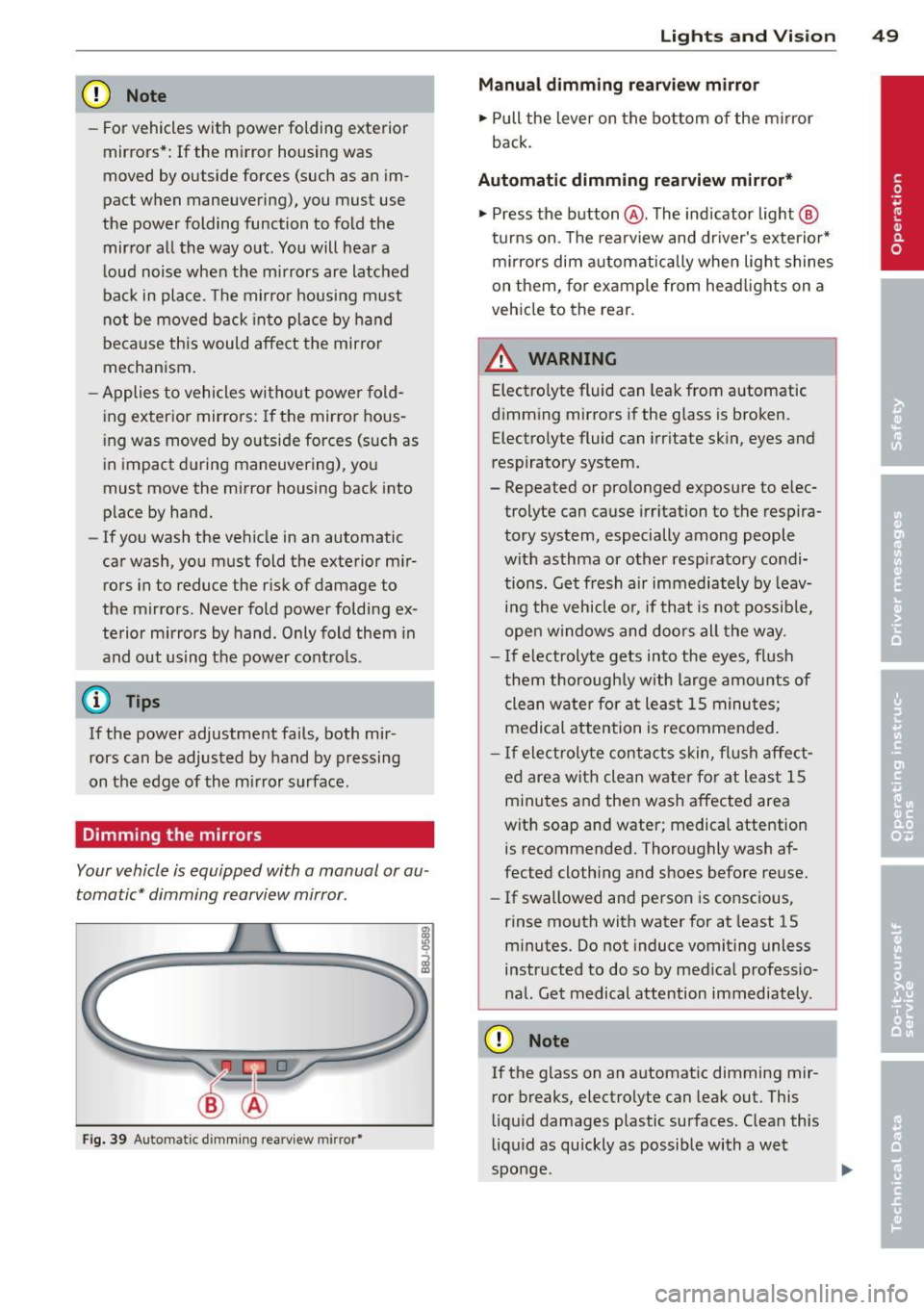
Dimming the mirrors
Your vehicle is equipped with a manual or au
tomatic* dimming rearview mirror .
Fig. 39 Au toma tic d imm ing rea rv iew mirr or•
Ligh ts and Visi on 49
Manu al dimming rearview mirror
.,. Pull the lever on the bottom of the m irror
back.
Automatic dimming rearview mirror*
.,. Press the button @. The indicator light @
t urns on . Th e rea rv iew and dr iver's exterior*
m irrors dim automatically when lig ht shines
on them, for ex ample from head lights on a
vehicle to the rear.
/! WARNING
Electro lyte fluid can leak from automatic
d imming mirrors if the glass is broken .
Electrolyte fluid can irritate skin, eyes and
respirato ry system.
- Repeated or prolonged exposure to e lec
trolyte can cause irr itation to the respira
tory system, especially among people
with asthma or o ther resp iratory condi
tions. G et fresh air immediately by leav
ing the vehicle o r, if that is no t possib le,
ope n w indows and doors all the way.
- I f ele ctrolyte gets into the eyes, flush
them thorough ly with large amou nts of
clean w ate r for at leas t 15 minu te s;
medical at tention is recommended.
- If electroly te con tacts skin, fl ush affect
ed are a with clean wa ter fo r at le ast 15
minutes and then wash affected area
with soap and water ; medical attention
is recommended. Thoroughly wash af
fected clothing and shoes before re use .
-If swallowed and person is conscious,
rinse mouth with water for at least 15
minutes. Do not induce vomiting unless
instructed to do so by med ica l professio
nal. Get medical attention immediately .
CD Note
If the glass on an a utomat ic dimming mir
ror breaks, electro lyte can leak out. This
li q ui d damages plastic surfaces. C lean this
l iqu id as qu ickly as possible with a wet
sponge .
Page 52 of 288
50 Lights an d Vi sion
@ Tips
- If the light reaching the rearview mirror
i s obstructed, the automatic dimming
mirror will not function correctly,
- The automatic dimming mirrors do not
dim when the interior lighting is turned
on or the reverse gear is selected .
Digital compass
Switching the compass on and off
Applies to vehicles: with digital compass
Fig. 40 Re arv iew m ir ro r: d igit al c om pass act ivated
"To turn the compass on or off, press the but
ton @unt il the compass in the mirror ap
pears or disappears .
The digi tal compass only works when the igni
tion is turned on. The directions are indicated
with abbreviations :
N (north), NE (northeast),
E (east), SE (southeast), S (south), SW (south
west),
W (west), NW (no rthwest) .
You must recalibrate the compass if it does not display the correct direction¢
page 50,
Calibrating the compass .
(D Tips
To prevent inaccurate compass readings,
do not bring any remote controls, electri
cal devices or meta llic objects nea r the
m irror.
Adjusting the magnetic zone
Applies to vehicles: with digital compass
The magnetic zone mu st be adjusted correctly
for the compass to read accurately .
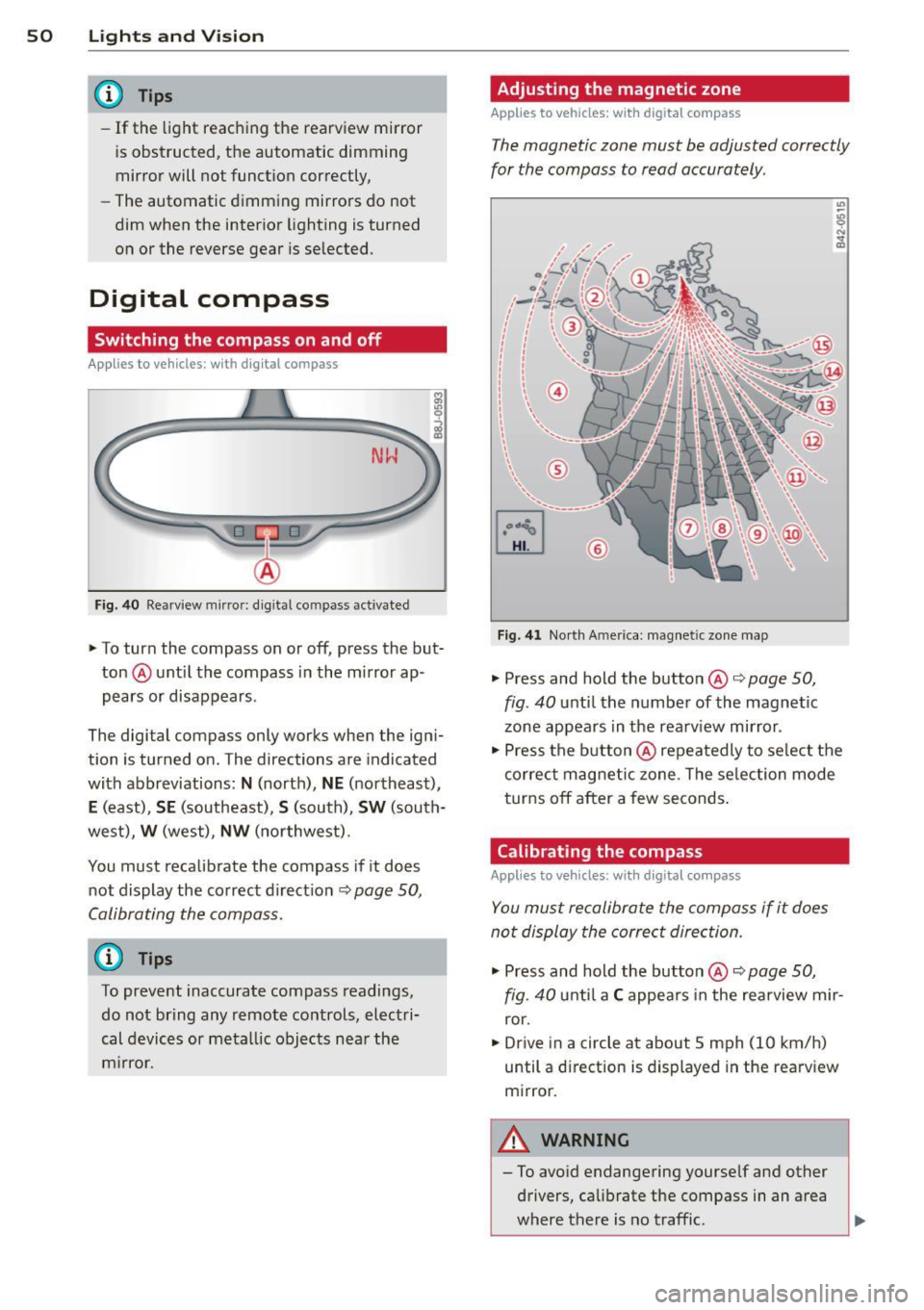
Fig. 41 North A meri ca: m agnet ic zo ne m ap
• Press and hold the button @ ¢ page 50,
fig . 40
until the number of the magnetic
zone appears in the rearv iew mirror .
• Press the button @ repea tedly to se lect the
correct mag netic zone . The se lec tion mode
turns
off after a few seconds .
Calibrating the compass
Applies to vehicles: with digital compass
You must recalibrate the compass if it does
not display the correct direction.
• Press and hold the button @ ¢ page 50,
fig . 40
u nti l a C appea rs in the rearview mir
ror.
• Drive in a circle at about 5 mph (10 km/h)
until a direction is displayed in the rearv iew
m irror.
A WARNING
-- To avoid endangering yourse lf and other
drivers, calibrate the compass in an area
where there is no traffic .
Page 76 of 288
74 Driving
(D Tips
-After starting a cold engine, there may
be a brief period of increased noise be
cause the oil pressure must first build up in the hydraulic valve adjusters. This is
normal and not a cause for concern.
- If the . indicator light blinks in the in
strument cluster before switching the ig
nition off, the ignition will not switch on
again
Qpage 189.
-If you leave your vehicle with the ignition
switched on, the ignition will switch off
after a certain amount of time. Make
sure that electrical equipment such as
the exterior lights are switched off.
Turning th n ine off using the
button
Applies to vehicles: with conven ience key
.. Bring the vehicle to a fu ll stop.
.. Automatic transmission: Move the selector
lever into the P position.
.. Press the !START ENGINE STOPI button
Q page 73, fig. 66.
If the engine does not stop, proceed as fol
lows
q page 75, Starting the engine if there
is a malfunction .
Steering wheel lock1
)
The steering locks when you turn the engine
off using the
I START ENGINE STOP !* button,
move the selector lever into the P position
(automatic transmission*) and open the driv
er's door.
The locked steering helps prevent vehicle
theft.
Emergency off function
If it is necessary in unusua l circumstances, the
engine can be switched off while the vehicle is
moving at speeds less than 6 mph (10 km/h).
If you press the
I START ENGINE STOP I* but
ton while driving, the message
Pressing
start/stop button again will switch off en-
l) This function is not availa ble in all coun tries.
gine! appears . To switch the engine off, press
the
I START ENGINE STOP !* button twice in a
row briefly or press and hold for longer than
two seconds.
A WARNING
- Never turn off the engine before the ve
hicle has come to a complete stop . The
full function of the brake booster and the
power steering is not guaranteed . You
must use more force to turn or brake, if
necessary. Because you cannot steer and
b rake as you usually would, this could
lead to accidents and serious injuries.
- The brake booster and power steering
only work when the engine is running . If
the engine is off, you have to use more
force when steering or braking. Because
you cannot steer and brake as you usual
ly would, this could lead to crashes and
serious injuries .
- Always take the vehicle key with you
when leaving the vehicle, even for a
short period of time . This applies partic
ularly when children remain in the vehi
cle. Otherwise the children could start
the engine or operate electrical equip
ment such as power windows.
- For safety reasons, you should always
park your vehicle with the selector lever
in P. Otherwise, the vehicle could inad
vertently roll away.
-After the eng ine has been switched off,
the radiator fan can continue to run for
up to 10 minutes -even with the ignition
switched off. It can also switch on again
after some time if the coolant tempera
ture rises as the result of a heat buildup or if the engine is hot and the engine
compartment is additionally heated by
the sun's rays.
0 Note
If the engine has been under heavy load
for an extended period of time, heat builds up in the engine compartment after the ..,_
Page 78 of 288
76 Driving
removed from the vehicle when the engine
was running.
If the convenience key is no lon
ger in the veh icle, you cannot switch the igni
tion on or start the engine once you stop it.
You also cannot lock the vehicle from the out
side .
Press brake pedal
This message appears if you do not press t he
brake peda l to start the engine in a vehicle
with an automatic transmission .
Please engage N or P
This message appears whe n starting or stop
p ing the engine if t he selecto r lever is not in
the Nor P pos ition. The eng ine will not star t/
stop.
Shift to P, otherwis e vehicle can roll away.
Door s do not lock if lev er i s not in P
This message appears for safety reasons
along w ith a warning tone . It appears if the
selecto r lever for the automat ic transm iss io n
is not in the P position when switch ing the ig
ni tion off with the
!S TAR T ENGINE STOPI*
button . Sh ift the sele ctor leve r to t he P posi
tion. Otherwise, the vehicle could ro ll. You al
so cannot lock the vehicle using the locking
sensor on the door handle o r using the con
venience key .
Electromechanical
parking brake
Operation
The electromechanical parking brake replaces
the hand brake .
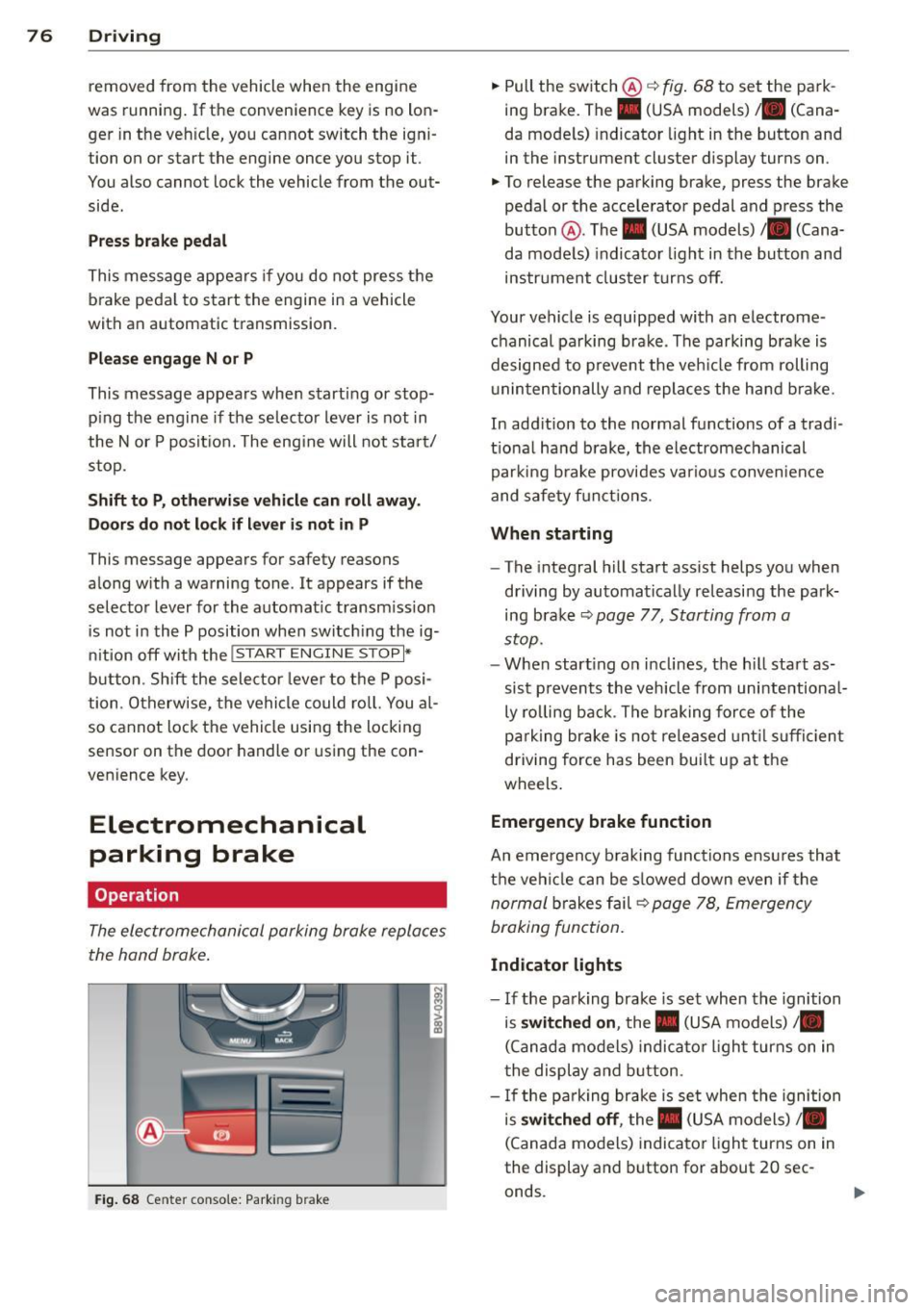
Fig. 68 Center conso le: Park ing brake
.,. Pull the switch @¢ fig. 68 to set the pa rk
ing brake. The. (USA models) . (Cana
da mode ls) indicator light in the button and
in the instrument cluster display turns on .
.,. To release the parking brake, press the brake
pedal or the acce lerator pedal and press the
button @. The . (USA models) /. (Cana
da mode ls) indicato r light in th e button and
ins trument clus ter tur ns off.
Your vehicle is equipped with an electrome
chanical pa rking brak e. The parking bra ke is
designed to p revent the veh icle from rolling
u ninte ntionally and repla ce s the hand b rake.
In add ition to the normal functions of a tradi
tio na l ha nd b rake, the electromechanical
parki ng b rake provides va rious conven ien ce
and safe ty f unct ions .
When starting
-The integral hill start assist helps you when
d riving by au tomatical ly re leasi ng the park
ing bra ke ¢
page 77, Starting from a
stop.
- W hen start ing on i nclines, t he h ill sta rt as
si st preven ts the v ehicl e from unintentiona l
ly ro lling back . T he b raking force of the
p ar king br ake is no t released unt il su ffi cien t
driving force has been bui lt up at the
wheels .
Emergency brake function
An emergency b rak ing functions ensu res that
t h e vehi cle can be s lowed down even if the
n ormal brakes f ail¢ page 78, Emergen cy
braking fun ction.
Indicator lights
- I f the pa rk ing brake is set when the ignition
is
switched on , the. (USA models) /.
(Canad a models) indica to r li ght turns on in
t he display and b utton .
- If the pa rk ing brake is se t when the ignition
is
switched off , the. (USA models) /.
(Canada mo dels) indica tor ligh t turns on in
the display and button for about 20 sec
onds.
Page 79 of 288
& WARNING
-Do not press the accelerator pedal inad
vertently when the vehicle is stationary and the engine is running and a gear is
selected. Otherwise the vehicle will start
to move immediately and could result in
a crash.
- If the power supply fails, the released
parking brake can no longer engage. In
this case, park the vehicle on level ground and secure it by placing these
lector lever in the P position (automatic
transmission). See your authorized Audi dealer or qualified repair facility.
(D Note
If the symbol . in the display or the indi
cator light. (USA models)/ . (Canada
models) in the instrument cluster flashes,
there is a malfunction in the brake system.
Please refer to the detailed description of
the indicator lights¢
page 18.
-If the indicator light . (USA models)/
• (Canada models) or
Ill turns on,
there may be a malfunction in the park
ing brake ¢
page 19.
(D Tips
-You can set the parking brake at any time
-even with the ignition turned
off. To re-
lease the parking brake, the ignition
must be turned on and the brake pedal
must be pressed.
- If driver 's door is opened while the igni
tion is switched on, the parking brake
sets automatically. This prevents unin
tended rolling of the vehicle .
- Occasional noises when the parking
brake is set and released are normal and
are not a cause for concern.
- When the vehicle is parked, the parking
brake goes through a self -test cycle at
regular intervals. Any noises associated
with this are normal.
- If there is a power failure, the parking
brake will not set if it is released, and it
will not release if it is set ¢,&. . See your
Driving 77
authorized Audi dealer or qualified repair
facility.
· Parking
.. Press the brake ped al to stop the vehicle .
.. Pull the switch @ ¢
page 76 , fig . 68 to set
the parking brake.
.. Place the selector lever in the P position .
.. Turn the engine off¢.&_ .
.,. Turn the steering wheel when parking on in
clines so that the wheels will roll into the
curb if the vehicle starts moving.
& WARNING ~ -
-Always take the vehicle key with you
when leaving the vehicle, even for a short period of time. This applies partic
ularly when children remain in the vehi
cle. Otherwise children could start the
engine, release the parking brake or op
erate electrical equipment such as power
windows, which increases the risk of an
accident .
- No one should remain in the vehicle
when it is locked, especially children.
Locked doors make it more difficult for
emergency workers to get into the vehi
cle, which puts lives at risk.
Starting from a stop
The start assist function ensures that the
parking brake is released automatically upon starting.
Stopping and applying the parking brake
.. Pull the switch@¢ page 76, fig . 68 to set
the parking brake.
Starting and automatically releasing the
parking brake
Requirement: The driver's door must be
locked and the driver's safety belt must be
fastened.
.. When you press the accelerator pedal , the
parking brake is automatically released and
your vehicle begins to move.
•
Page 82 of 288
80 Driving
@ Tips
-The cruise control system is idea l for
stretches with speed limits . The driver is
responsible for adhering to the correct
speed.
- The cruise control remains active when
shifting gears.
- The brake lights turn on when the brakes
are activated.
Switching on
Applies to vehicles: with c ruise cont ro l syste m
0
f
~
0
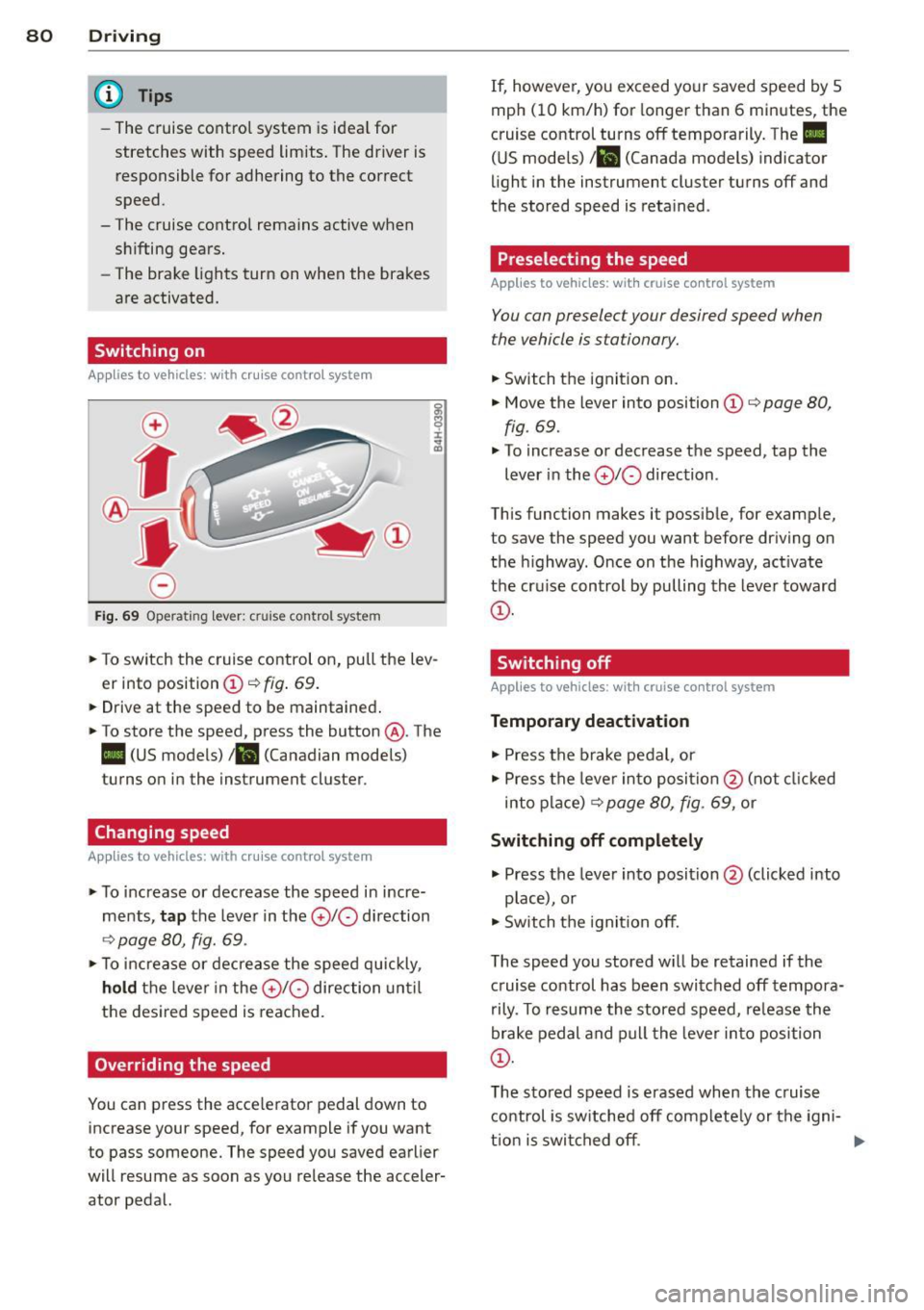
Fig. 69 Operating lever: cruise control system
., To switch the cruise control on, pull the lev
er into position
CD ¢ fig . 69.
... Drive at the speed to be maintained .
., To store the speed, press the button @. The
II (US models) !Bl (Canadian models)
turns on in the instrument cluster.
Changing speed
Applies to vehicles: with cruise contro l syste m
., To increase or decrease the speed in incre
ments,
tap the lever in the 010 direction
¢ page 80, fig. 69 .
., To increase or decrease the speed quickly,
hold the lever in the 010 direction until
the desired speed is reached.
Overriding the speed
You can press the acce lerator pedal down to
increase your speed, for example if you want
to pass someone. The speed you saved earlier
will resume as soon as you release the acceler
ator pedal. If, however, you exceed your saved speed by
5
mph (10 km/h) for longer than 6 minutes, the
cruise control turns off temporarily. The
II
(US models) 1 81 (Canada models) indicator
light in the instrument cluster turns off and
the stored speed is retained .
Preselecting the speed
Applies to vehic les: wit h cruise co ntrol system
You can preselect your desired speed when
the vehicle is stationary.
., Switch the ignit ion on .
., Move the lever into position
CD ¢ page 80,
fig . 69.
., To increase or decrease the speed, tap the
lever in the
010 direction .
This function makes it possible, for example,
to save the speed you want before driving on
the highway . Once on the h ighway, act ivate
the cru ise control by pulling the lever toward
CD -
Switching off
App lies to vehicles: wi th cruise co n trol system
Temporary deactivation
., Press the brake pedal, or
., Press the lever into position @(not clicked
into place)
¢ page 80, fig. 69, or
Switching off completely
., Press the lever into position@(clicked into
p lace), or
., Switch the igni tion off.
The speed you stored w ill be retained if the
c ruise control has been switched off tempora
rily . To resume the stored speed, re lease the
brake pedal and pull the lever into position
CD.
The stored speed is erased when the cruise
control is switched off complete ly or the igni-
t ion is switched off. ..,
Page 86 of 288
84 Audi adaptive cruise control
Adaptive cruise control
Description
Applies to vehicles: with Audi adaptive cruise co ntrol
)
Fig. 73 Detect ion range
What can ad apti ve crui se contr ol do ?
The adaptive cruise contro l system uses radar
and a video camera. The radar is subject to
designated system limits¢
page 82.
On open roads with no traffic, it functions like
a cruise contro l system. The stored speed is
maintained. When approaching an object
ahead and the system detects it, the adapt ive
cru ise control system automatically brakes to
match that object's speed and then maintains
the stored d istance. As soon as the system
does not detect an object ahead, adaptive
cr uise contro l accelerates up to the stored
speed.
Applies to vehicles w ith an automatic trans
miss ion*: Within the limits of the system,
adap tive cr uise control ca n bra ke in stop-and
go traffic until t he vehi cle is station ary and
then begin driving again under cer tain condi
tions ¢
page 86, Driving in stop-and-go
traffic .
Which functions can be controlled?
When you sw itch adaptive cru ise con tro l on,
you can set the cu rren t speed as the "control
speed"
¢ page 84, Switching on and off .
When driving, you can stop cruise co ntrol
¢
page 86 or change the speed ¢ page 85
at any t ime.
l ) Speed lim its depend on t he cou ntry and t he speedom
eter .
You can also adjust the following settings:
- Distance
¢ page 87
-Dr iv ing program¢ page 88
-Dr iving mode ¢ page 88.
Switching on and off
App lies to vehicles: wit h Audi adapt ive cr uise contro l
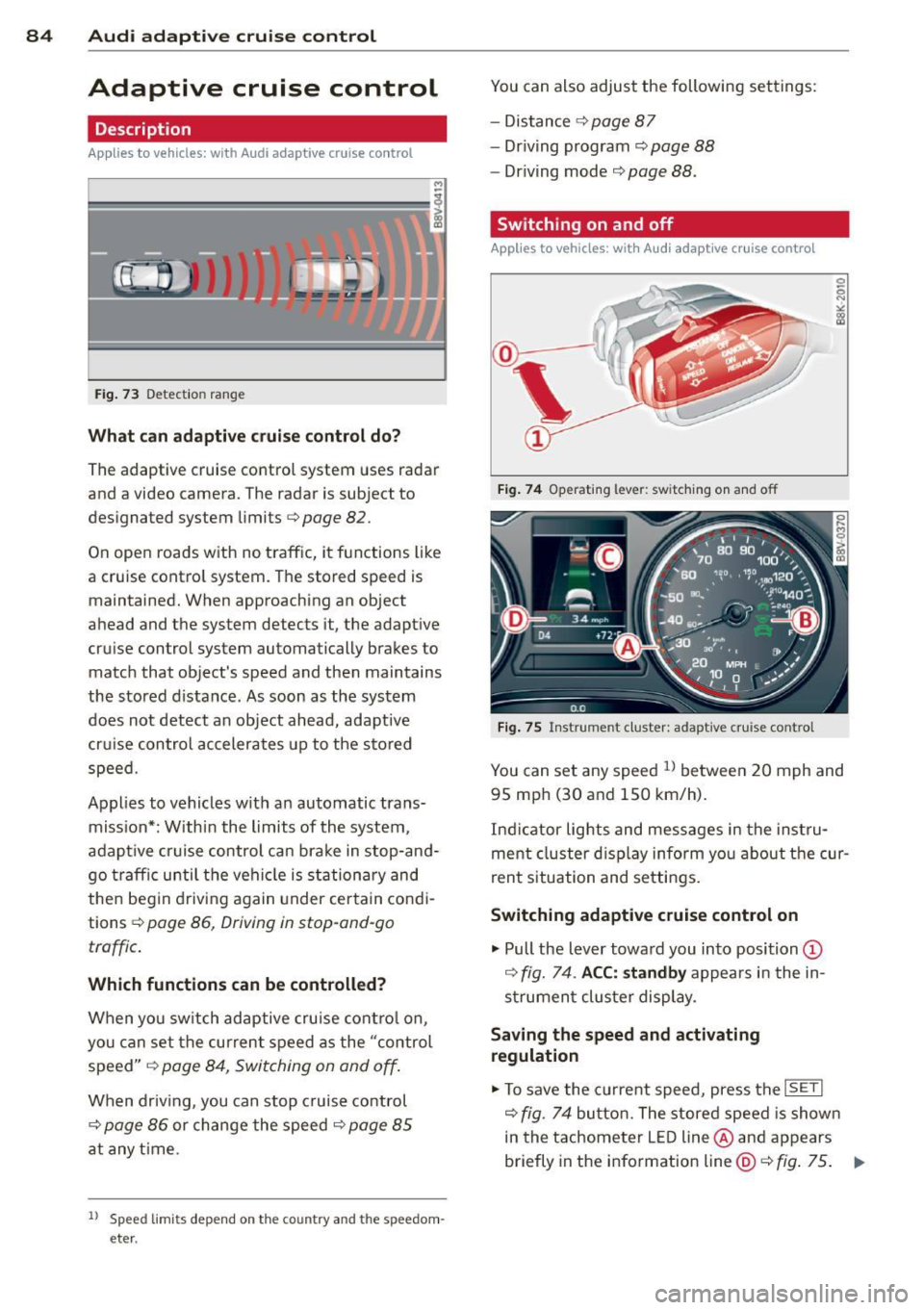
Fig . 74 Operating lever: switc hing on and off
Fig. 75 Instrument cluster: adaptive cruise control
You can set any speed ll betwee n 20 mph and
95 mp h (30 and 150 km/h).
In dicator lights and mess ages in the ins tru
ment cluster d isp lay inform yo u about t he cur
r en t situation and settings.
Switching adaptive cruise control on
"' Pull the lever towa rd you into position (D
¢ fig. 74 . ACC: standb y appea rs in the in
s trumen t cluster display.
Saving the speed and activating
regulation
"' To save the current speed, press the !SETI
¢fig. 74 butto n. The stored speed is show n
in the tachometer L ED line @and appears
briefly in the information line@¢
fig. 75 . .,..