lights AUDI A3 2015 Service Manual
[x] Cancel search | Manufacturer: AUDI, Model Year: 2015, Model line: A3, Model: AUDI A3 2015Pages: 288, PDF Size: 71.46 MB
Page 204 of 288
202 Caring and cle aning
_& WARNING
- Only wash the vehicle when the ignition
is off and follow the instructions from
the car wash operator to reduce t he risk
of accidents.
- To reduce the risk of cuts, protect your
self from sharp meta l components when
wash ing the underbody or the inside of
the wheel housings.
- After washing the vehicle, the braking ef
fect may be de layed due to mo isture on
the brake rotors or ice in the winter. The
brakes must be dried first with a few
careful brake applicat ions .
@ Note
- If you wash t he vehicle in an automatic
ca r wash, you must fold the exterior m ir
r o rs in to reduce the r isk of damage to
t h e m irrors. Power foldi ng exterior m ir
r o rs* must on ly be folded in and o ut us
i ng the p ower folding function.
- To prevent pa int damage, do not wash
t h e ve hicle in direc t sunli ght. -
To reduce the ris k of damage to the sur
face, do not use insect removing spong
es, kitchen sponges or similar items.
- Matte finish painted veh icle compo
nents:
- To reduce the risk of damage to the
surface, do not use polishi ng agents or
h a rd wax.
- Never use protect ive wax. It can de
stroy the matte fi nish effec t.
- Do not place any stickers o r mag net ic
s igns on vehicle parts painted w ith
matte fi nish pa int. The paint cou ld be
d amaged when the sticke rs o r mag nets
ar e removed. @ For the sake of the environment
Only wash the ve hicl e in facilities spec ia lly
de signed for that purpose. This will red uce
the r is k of dirty w ate r contam ina ted with
oi l from entering the sewer sys tem.
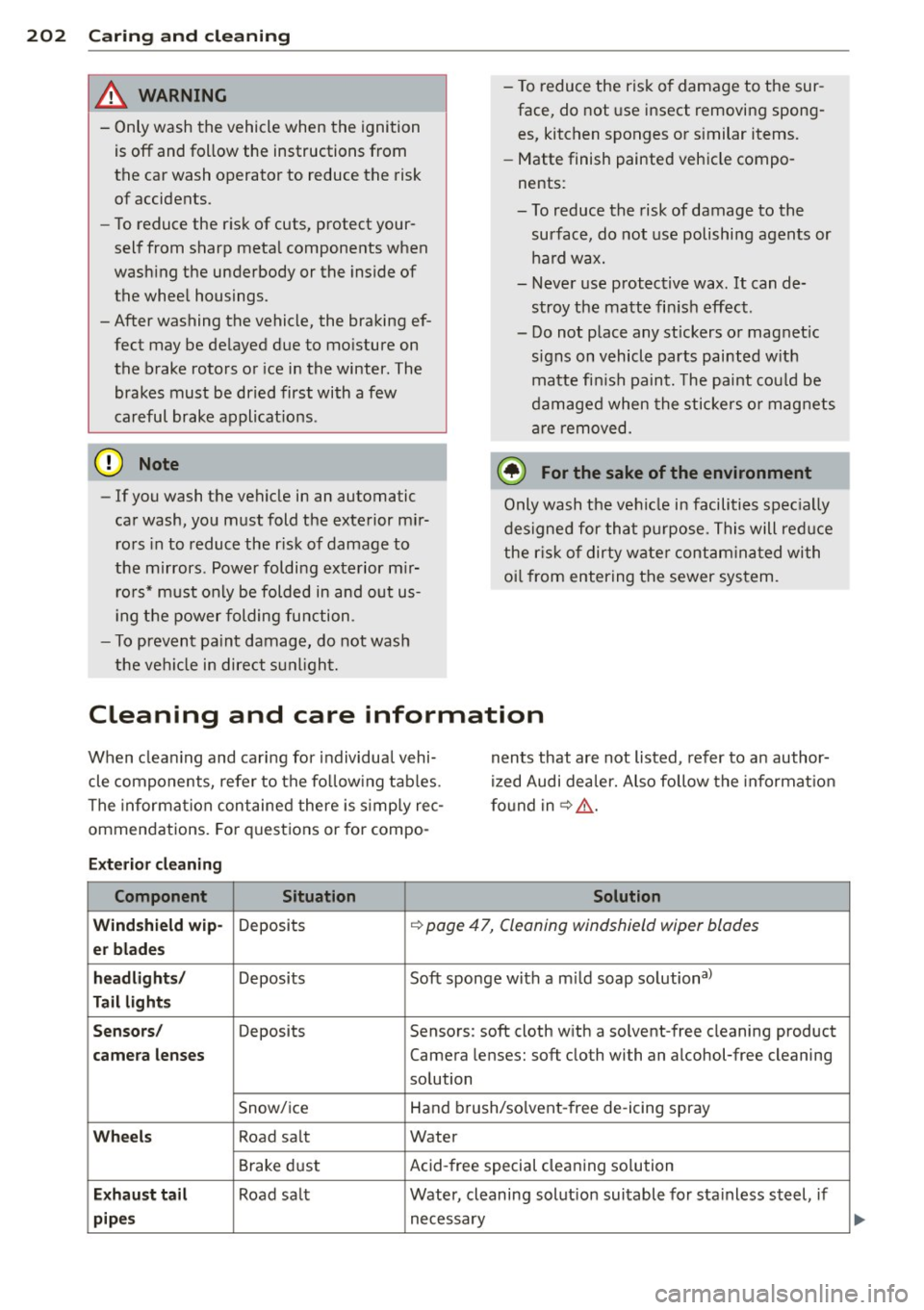
Cleaning and care information
When clea ning and ca rin g for individua l vehi
cle components, refer to the fo llow ing tab les.
The informa tion con taine d there is s imp ly rec
ommendations. Fo r quest ions or for compo -nents that ar
e not listed, refer to an author
i z ed Audi dea ler. Also follow the in format io n
f o und in¢ ,&..
Exterior cleaning
Component Situation Solution
Wind shield wip-
Deposi ts ¢ page 47, Cleaning windshield wiper blades
er blades
headlights /
Deposits Soft sponge with a m ild soap solutiona>
Tail lights
Sensors /
Deposits Sensors: soft cloth with a so lvent-free cleaning product
camera lenses Camera lenses: soft cloth with an alcohol-free cleaning
so lution
Snow/ ice Hand brush/solvent -free de -icing spray
Wheels Road sa lt Water
Brake d ust Acid-free special cleaning so lution
E x haust ta il Road sa lt Water, cleaning solut ion suitable fo r sta inless steel, if
pipes necessary
Page 206 of 288
204 Caring and cle aning
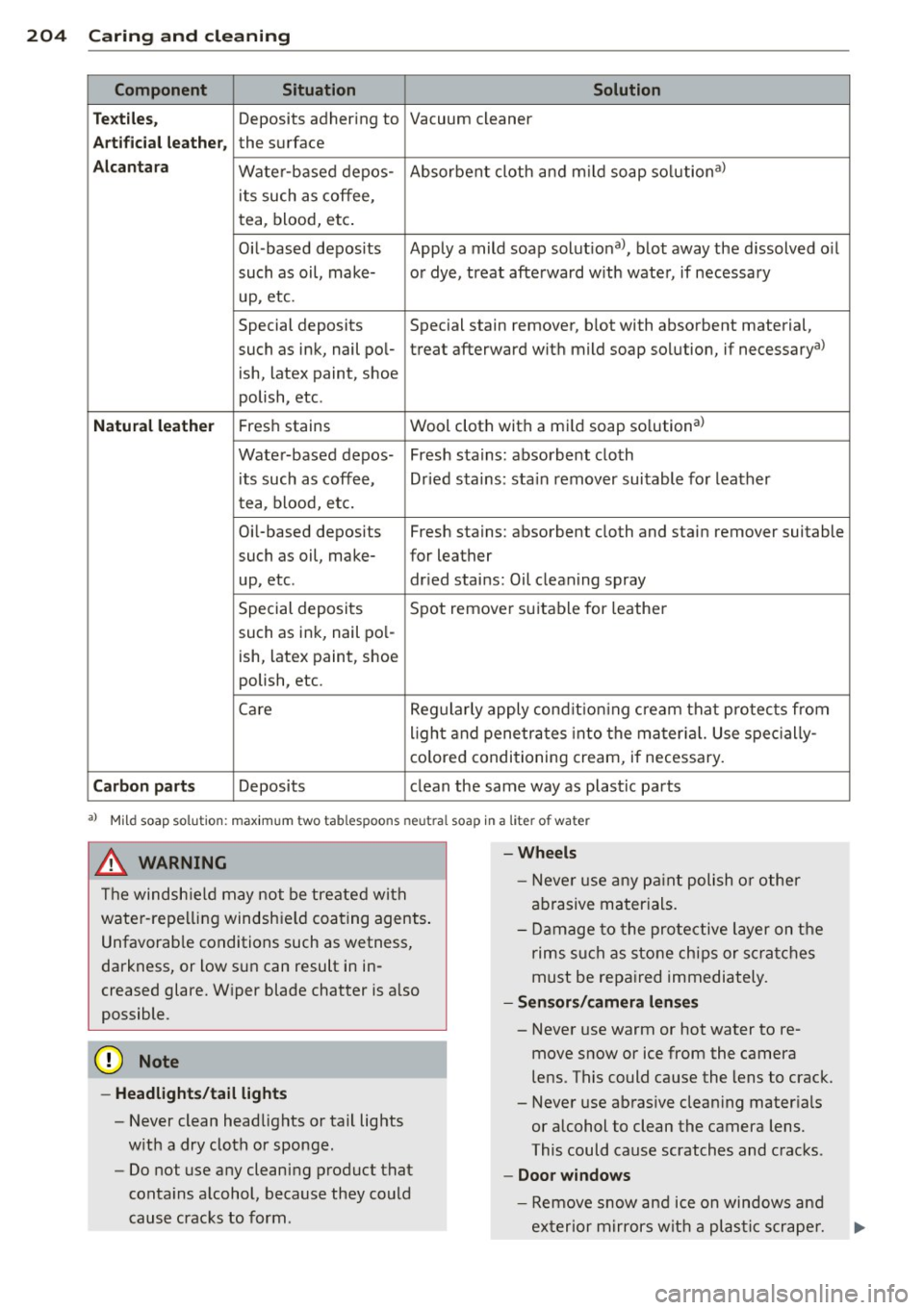
Component Situ ation Solution
Tex tile s,
Deposits adhering to Vacuum cleaner
Art ifi cial leat her, the surface
Alcan ta ra Water-based depos- Absorbent cloth and m
ild soap so lution a>
its such as coffee,
tea, blood, etc.
Oil-based deposits Apply
a mild soap solutiona >, blot away the dissolved o il
such as oil, make- o r dye, treat afterward w ith water, if necessary
up, etc.
Special deposits Special stain remover, blot with absorbent material,
such as ink, nail pol-treat afterward with mild soap so lution, if necessarya>
ish, latex paint, shoe
polish, etc.
Natura l leathe r Fresh stains Wool
cloth with a mild soap so lution a>
Water-based depos- Fresh stains: absorbent cloth its such as coffee, Dr ied stains: stain remover suitable for leather
tea, blood, etc.
Oi l-based deposits Fresh stains: absorbent cloth and stain remover suitable
such as oil, make- for leather
up, etc . dried stains: Oil clean ing spray
Special deposits Spot remover suitable for leathe r
such as ink, nail pol-
ish, latex paint, shoe
polish, etc.
Care Regularly apply condit ion ing cream that protects from
light and penetrates into the mater ial. Use spec ially-
co lored! conditioning cream, if necessary.
Carb on p art s Deposits clean th e same way as plastic parts
a) Mild soap solution: maximu m two tablespoons neutral soap in a liter of water
_& WARNING
The windsh ie ld may not be treated with
water-repelling windshield coating agents .
Unfavorab le conditions such as wetness,
darkness, or low sun can result in in
creased glare. Wiper blade chatter is also
possible.
([) Note
-Headlight s/tail li ght s
-Never clean headlights or tail lights
w ith a dry cloth or sponge.
- Do not use any cleaning product that
conta ins alcohol, because they could
cause cracks to form.
-
- Whee ls
- Never use any pa int polish or other
abrasive materials.
- Damage to the protective layer on the
rims s uch as stone chips or scratches
must be repaired immediately.
- Sen sors/ cam era len ses
-Never use warm or hot water to re-
move snow or ice from the camera
lens. This could cause the lens to crack.
- Never use abrasive cleaning mater ials
or alcohol to clean the camera lens.
This could cause scratches and cracks.
-Door windo ws
-Remove snow and ice on windows and
exter ior mirrors with a plastic scrape r.
Page 222 of 288

220 Checking and Filling
Battery
General information
Under normal operating conditions, the bat
tery in your Audi does not need any mainte
nance. With
high outs ide temperatu res or
long daily drives we recommend that you have
the electro lyte level checked by a service fa
cility. The e lectrolyte level shou ld also be
checked each time the battery is charged
c:>page222.
Have the battery checked when you take your
vehicle in for service. You are well advised to replace a battery that is older than 5 years.
With certain types o f airbag deployment, the
battery is disconnected from the vehicle elec
trica l system for safety reasons
c;, .&. in Re
pair , care and disposal of the airbags on
page 156.
Disconnecting the battery terminals
Some vehicle functions such as power win
dows are unavai lable if the battery termina ls
are d isconnected. These functions have to be
relearned after the battery terminals are con
nected again. To prevent this, the battery
should only be disconnected from the vehicle
electrical system when absolutely necessary
for repairs .
To reprogram the functions, proceed as fol lows:
Function Reprogramming
Power window one-c;, page 40, Correcting
touch up/down power window mal-
function functions
Remote control key If the vehicle does not
or react to the key, it
convenience key must be synchroni zed
c:>page 33
Digital clock c:>page 10
ESC indicator light The indicator light
goes out after driving
a few meters
Vehicles not driven for long periods
If you do not drive your vehicle over a period
of severa l days or weeks, e lectrica l compo
nents are gradually sca led back or switched
off. This reduces energy consumption and
maintains starting capability over a longer pe
riod
c;, page 190. Some of the conven ience
functions may not operate, such as the interi
or lights or power seat adjustment. The con
venience functions will be availab le aga in
when you switch on the ignition and start the
engine.
Winter operation
During the winter months, battery capacity
tends to decrease as temperatures drop. This
is because more power is also consumed wh ile
sta rting, and the headlights, rear window de
fogger, etc. , are used more often.
Avoid unnecessary power consumpt ion, par
ticularly in city traffic or when traveling only
short distances. Let your authorized Aud i
dealer check the capacity of the vehicle bat
tery before winter sets in ~ page 222. A well
charged battery will not on ly prevent starting
problems when the weather is cold, but will
also last longer.
A WARNING -
-Work on the battery requ ires expert
know ledge. Contact your authorized Audi
dealer qualified repair facility for infor
mat ion regarding the vehicle battery.
There is a risk for chemical burns or ex
p losions.
- Never open the vehicle batte ry . Do not
try to change the battery electrolyte lev
el. Otherwise explosive gas will escape
from the battery and increase the risk of
an explosion .
(i) Tips
If your vehicle is left standing for several
weeks at extremely low temperatures, the
vehicle battery should be removed and
stored where it w ill not freeze. This will ..,.
Page 223 of 288
prevent it from being damaged and having
to be replaced .
Working on the battery
Be especially careful when working on or near
the battery.
The battery is loca ted in the luggage compart
men t under the floor. Before yo u check any
thing in the l uggage compartment,
read and
hee d all WARNINGS
¢ _A .
Always heed the sa fe ty warning s, when work
i ng on the vehicle battery or the vehi cle elec
trica l system to prevent injury.
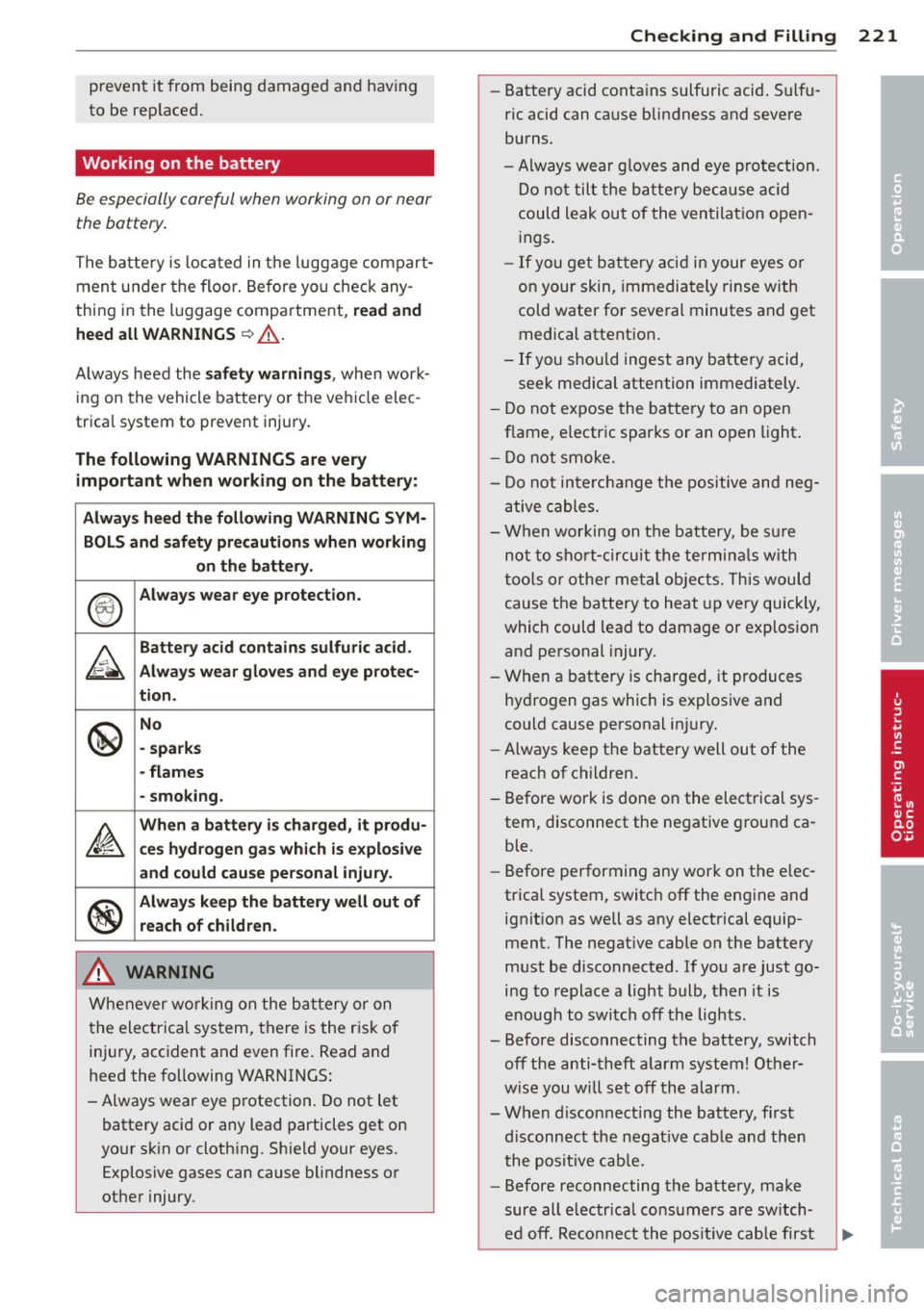
The following WARNINGS are very
impo rtant when working on the battery:
Alway s heed th e following WARNING SYM-
BOLS and saf ety precaution s when working
o n the b att ery.
®
Always wear e ye protection.
A
Batter y ac id contains sulfu ric acid .
Always w ear glo ves and e ye p rote c-
t ion .
@
No
- spark s
- flames
- smo king.
~
Wh en a battery i s charge d, it produ -
ce s hy d rogen ga s whi ch i s ex plo siv e
and could cau se perso na l injur y.
®
Alway s keep the b atter y w ell o ut of
r e ach of childr en.
A WARNING
Whenever working on the bat tery or on
the electrical system, there is the risk of
injury, accident and even fire. Read and
heed the following WARNINGS :
- Always wear eye p rotection. Do not let
battery acid or any lead particles get on
yo ur sk in or clothing. Sh ield your eyes.
Explosive gases can cause blindness or
other injury.
-
Checking and Fillin g 221
-Battery acid contains sulfuric acid . Sulfu
ric acid can cause blindness and severe
burns.
- Always wear g loves and eye protection.
Do no t tilt the ba ttery because acid
could leak out of the ventilat ion open
ings .
- If you ge t bat tery acid in your eyes or
on your skin, immediately rinse with
cold water for several minutes and get
med ical attention .
- If you should ingest any batte ry acid,
seek medical attention immediately.
- Do not expose the ba tte ry to an open
f lame, e lectric sparks or an open light .
- Do not smoke.
- Do not in terchange t he positive and neg-
ative cables.
- When working on t he battery, be su re
not to short-cir cuit the termina ls w ith
too ls or othe r metal objects. This would
cause the battery to heat up very quickly,
which could lead to damage or explosion
and pe rsonal injury.
- When a battery is charged, it produces
hydrogen gas which is explosive and
could cause personal inju ry.
- Always keep the battery well out of the
reach of children.
- Before work is done on the elect rical sys
tem, disconnect the negative ground ca
ble.
- Before performing any work on the e lec
trical system, switch off the engine and ignit ion as well as any electrical equip
ment. The negative cable on the battery
must be disconnected. If you are just go
ing to replace a light bulb, then it is
e nough to switc h off the lights.
- Before disconnecting the battery, switch off the anti-theft alarm system! Other
wise you will set off the alarm.
- When disconnecting the battery, first
disconnect the negat ive cab le and then
the posit ive cab le.
- Before reconnecting the battery, ma ke
sure all e lectr ica l consumers are sw itch
ed off. Reco nne ct the pos it ive cable first
•
•
•
Page 246 of 288
24 4 T ire s and wheel s
signal low tire pressure as intended. TPMS
malfunctions may occur for a variety of rea
sons, includ ing the installat ion of replace
ment or a lternate tires or whee ls on the veh i
cle that prevent the TPMS from funct ioning
properly . Always check the TPMS malfunct ion
telltale after replacing one or more t ires or
wheels on your veh icle to ensure that the re
p lacement or a lternate tires and wheels allow
the TPMS to continue to function properly.
If the Tire Pressure Monitoring System
indicator appears
Applies to vehicles: with tire pressure monitoring system
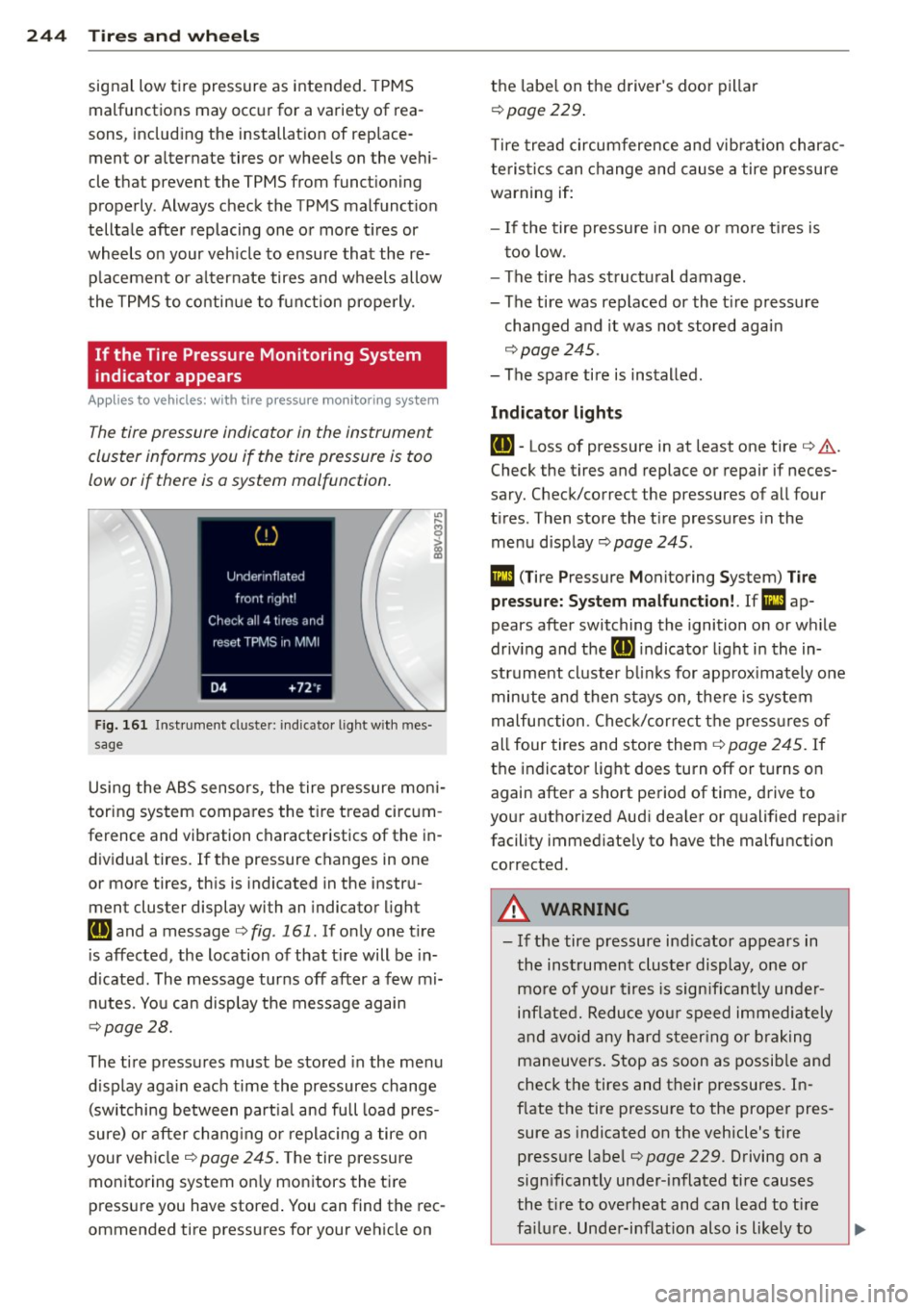
The tire pressure indicator in the instrument
cluster informs you if the tire pressure is too
low or if there is a system malfunction.
F ig. 161 Ins trumen t cluste r: ind icato r light w it h m es
s age
Using the ABS sensors, the tire pressure moni
toring system compa res the tire tread circum
ference and vibration characteristics of the in
dividual tires .
If the pressure changes in one
or more tires, th is is indicated in the instru
ment cluster display with an indicator light
IE and a message ¢ fig. 161 . If only one t ire
is affected, the location of that t ire will be in
d icated. The message turns off after a few mi
nutes. You can disp lay the message again
¢ page 28.
The tire pressures must be stored in the menu
d isplay aga in each time the pressures change
(switching between part ia l and full load pres
sure) or after chang ing or replac ing a tire on
your ve hicle ¢
page 245. The tire pressure
monitoring system on ly monitors the ti re
press ure you have stored . You can find the rec
ommended tire pressures for your vehicle on the
labe l on the driver's doo r pillar
¢ page 229 .
Tire tread circumference and vib ration charac
teristics can change and cause a tire pressure
warning if:
- I f the tire pressure in one or more ti res is
t oo low.
- The tire has structural damage.
- The tire was replaced or the t ire pressure
changed and it was not stored again
¢ page 245.
-The spare tire is installed .
Indicator lights
IE -Loss of pressure in at least one tire ¢ .&. .
Check the tires and replace or repair if neces
sary. Check/correct the pressures of all four
t ires . Then store the t ire pressures in the
menu display
¢ page 245.
Ill (T ire Pressure Monitoring System) T ire
pre ssure: S ystem mal function!. Ifm:!
ap
pears afte r switching the ignition on or w hile
driv ing and the [ti] indicato r light in the in
strument cluster b links for app rox imately one
minute and then stays on , the re is system
malfu nction . Check/cor rect the p ress ures of
all four tires and store them¢
page 245. If
t h e indicator lig ht does turn off or tu rns on
again after a short pe riod of time, drive to
your authori zed Aud i dea ler or qualified repair
facility immed iately to have the malfunction
corrected .
A WARNING
--- If the tire pressure ind icator appears in
the instrument cluster display , one or
mo re of your t ires is sign ifi cant ly unde r
i n flated. Reduce yo ur speed immedi ately
an d avoid any hard steer ing or b rak ing
maneuvers. Stop as soon as possib le and
check the tires and their pressures. In
f late the tire pressure to the proper pres
sure as indicated on the vehicle's tire
pressure labe l
¢page 229. Driving on a
significantly under-i nflated tire causes
the t ire to overheat and can lead to ti re
fa ilur e. Unde r-inflation also is li kely to
Page 258 of 288
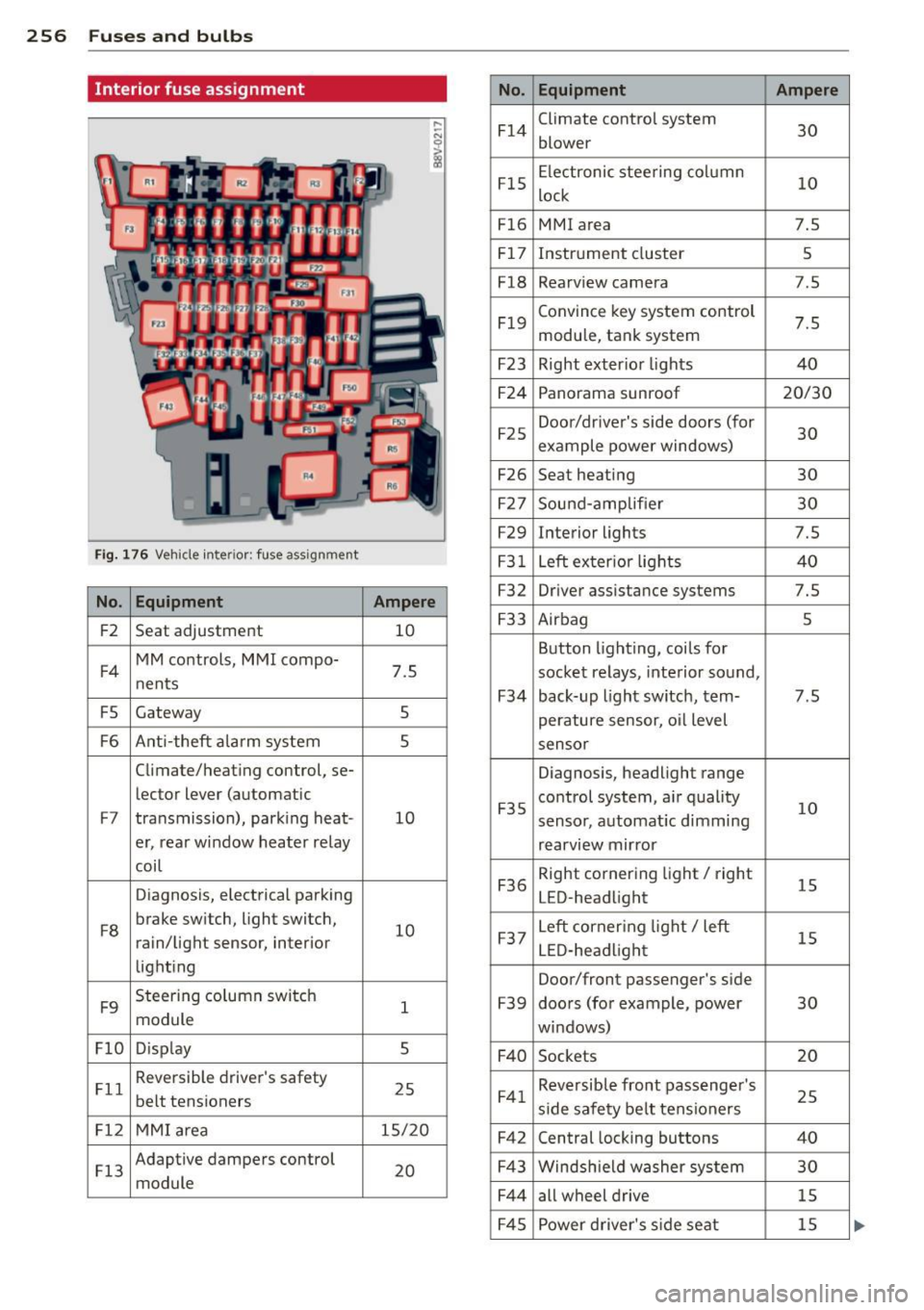
256 Fuses and bulbs
Interior fuse assignment
No. Equipment Ampere
F14
Climate control system
30 blower
F15
Electronic steering column
10 lock
F16 MMI area 7.5
F17
Instrument cluster 5
F18
Rearv iew camera 7 .5
F19
Convince key system control
7.5 module, tank system
F23 Right exter ior lights 40
F24
Panorama sunroof 20/30
F25
Door/driver's side doors (for
30 example power windows)
F26 Seat heating 30
F27
Sound-amp lifier 30
F29
Interior lights 7.5
Fig. 176 Vehicle inte ri or : fuse assignment F31 Left exter ior lights 40
No . Equipment Ampere F32 Driver assista nce systems 7.5
F2
Seat adjustment 10 F33 Airbag 5
F4
MM controls, MMI compo-
7.5 nents
F5 Gateway 5
Button lighting, coils for
socket relays, interior sound,
F34 back-up light switch, tern-7.5
perature sensor, o il level
F6 Ant i-theft alarm system 5 sensor
Climate/heating control, se-
Diagnosis, headlight range
le ctor lever (automatic
F7 transmission), parking heat -10 F35
control system, air quality
10 sensor,
automat ic dimming
er, rear window heater relay
rearview mirror
coil
Diagnosis, electrical parking
F36
Right cornering light/ right
15 LED-headlight
F8
brake switch, light switch,
10 rain/light sensor, interior
lighting
F9
Steering column switch
1 module
F37
Left corner ing light/ left
15 LED-headlight
Door/front passenger's side
F39 doors (for example, power 30
windows)
Fl0 D isp lay 5
F40 Sockets 20
Fll
Reversible driver's safety
25 belt tensioners F41 Reversible front passenger 's
25 side safety belt tensioners
Fl2 MMI area 15/20
F42 Central locking buttons 40
Fl3
Adaptive dampers control
20 module
F43 Windsh ield washer system 30
F44
all wheel drive 15
F45
Power driver's side seat 15
Page 259 of 288
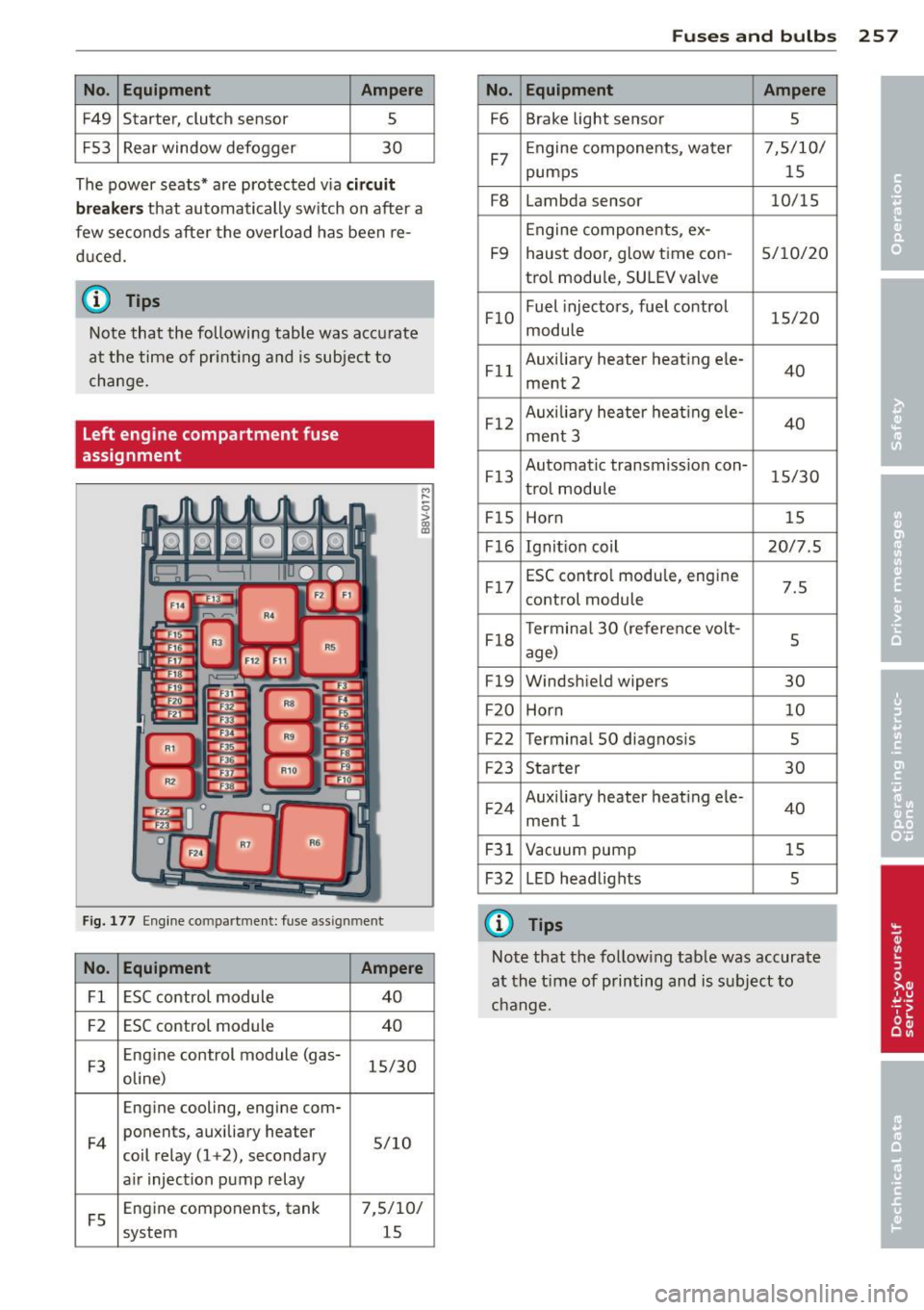
No. Equ ipment Ampere
F49 Starter, clutch sensor
5
FS3 Rear window defogger 30
The power seats* are protected v ia
circ uit
br ea ker s
that automatically sw itch on after a
few seconds after the overload has been re
d uced.
(D Tips
Note that the following table was accurate
at the time of pr int ing and is subject to
change.
Left engine compartment fuse
assignment
F ig. 177 Eng ine compartment: fuse assignment
M ,.._
-0
!
No. Equ ipment Ampere
Fl ESC control module 40
F2 ESC control module
40
F3 Eng
ine control module (gas-
15/30
oline)
Engine cooling, engine com-
F 4 ponents, auxiliary heater
5/10
coil relay (1 +2), secondary
a ir injection pump relay
FS Eng
ine components, tank
7,5/10/
system 15
Fuse s and bulb s 257
No. Equipment Ampere
F6 Brake light sensor
5
F7 Engine components, water 7,5/10/
pumps
15
F8 Lambda sensor 10/15
Engine components, ex-
F9 haust door, glow time con-
5/10/20
tro l module, SU LEV valve
FlO Fuel
injectors, fuel control
15/20
module
Fl l Auxiliary heater heating ele
-
40
ment 2
F12 Auxilia
ry heater heat ing ele-
40
ment 3
F13 Automatic transmiss
ion con-
15/30
trol module
FIS Horn 15
F16 Ignit ion coil 20/7.5
F17 ESC contro
l modu le, engine
7.5
control module
F18 T
ermina l 30 (reference volt-
5
age)
F19 Windshield wipers
30
F20 Horn 10
F22 Termina
l SO diagnosis
5
F23 Starter 30
F24 Auxiliary heater heating ele-
ment 1 40
F31 Vacuum pump 15
F32 L ED head lights
5
(i} Tips
Note that the follow ing tab le was accurate
at the time of printing and is subject to
change.
Page 260 of 288

258 Fuses a nd bul bs
Bulbs
Replacing light bulbs
For your safety, we recommend that you have
your authorized Audi dealer replace burned
out bulbs for you .
It is becoming increasingly more and more
difficult to replace vehicle light bulbs since in
many cases, other parts of the car must first
be removed before you are able to get to the
bu lb . T his appl ies especia lly to the l ight bu lbs
in the front of your car which you can on ly
reach through the engine compartment .
Sheet metal and bulb ho lders can have sharp
edges that can cause ser ious cuts, and parts
must be correctly taken apart and then prop
e rly put back together to help prevent break
age of parts and long term damage from wa
ter that can enter housings that have not been properly resealed.
F or your safety, we recommend that you have
your authorized Audi dealer replace any bulbs
for you, since your dealer has the proper tools,
the correct bu lbs and the expertise.
Gas disc harg e lam ps (X enon lig ht s):
Due to the high electrical vo ltage, have the
bu lbs rep laced by a qualified technician.
H eadlights with Xenon light can be identified
by the high voltage sticker.
LED headlights* require no ma intenance .
P lease contact your authorized Aud i dealer if a
bu lb needs to be replaced.
A WARNING
Contact with high-voltage components of
the electrical system and improper re placement of gas discharge (Xenon) head
light bulbs can cause serious personal in
jury and death .
- Xenon bulbs are pressurized and can ex
plode when being changed.
- Changing Xenon lamps requires the spe
cial training, instruct ions and equ ip
ment. -
On ly an authorized A udi dealer or other
qualified workshop should change the
bulbs in gas discharge lamps .
A WARNING
There are parts with sharp edges on the
openings and on the bulb holders that can
cause serious cuts.
- If you are uncertain about what to do,
have the work performed by an author
ized Audi dealer or other qualified work
shop. Serious personal injury may result
from imprope rly performed work.
(D Tips
- If you st ill prefer to replace the light
bulbs yourself, be aware that the engine
compartment is a hazardous area to
work in
~ page 21 a ~ .11::..
- It is best to ask your authorized Audi
dea ler whenever you need to change a
bulb.
-
Page 262 of 288
260 Emergency situations
@ Tips
The disc har ged battery must be properly
connected to the ve hicle's electrical sys
tem. W hen jump starting or charg ing t he
battery, never connect the negative
grou nd cab le to the batte ry negat ive post
because the batte ry ma nager sys tem must
be ab le to detect th e ba ttery 's state o f
charge. A lways connec t the nega tive
grou nd ca b le to t he neg ative ground pos t
of the batte ry ma nager con trol unit.
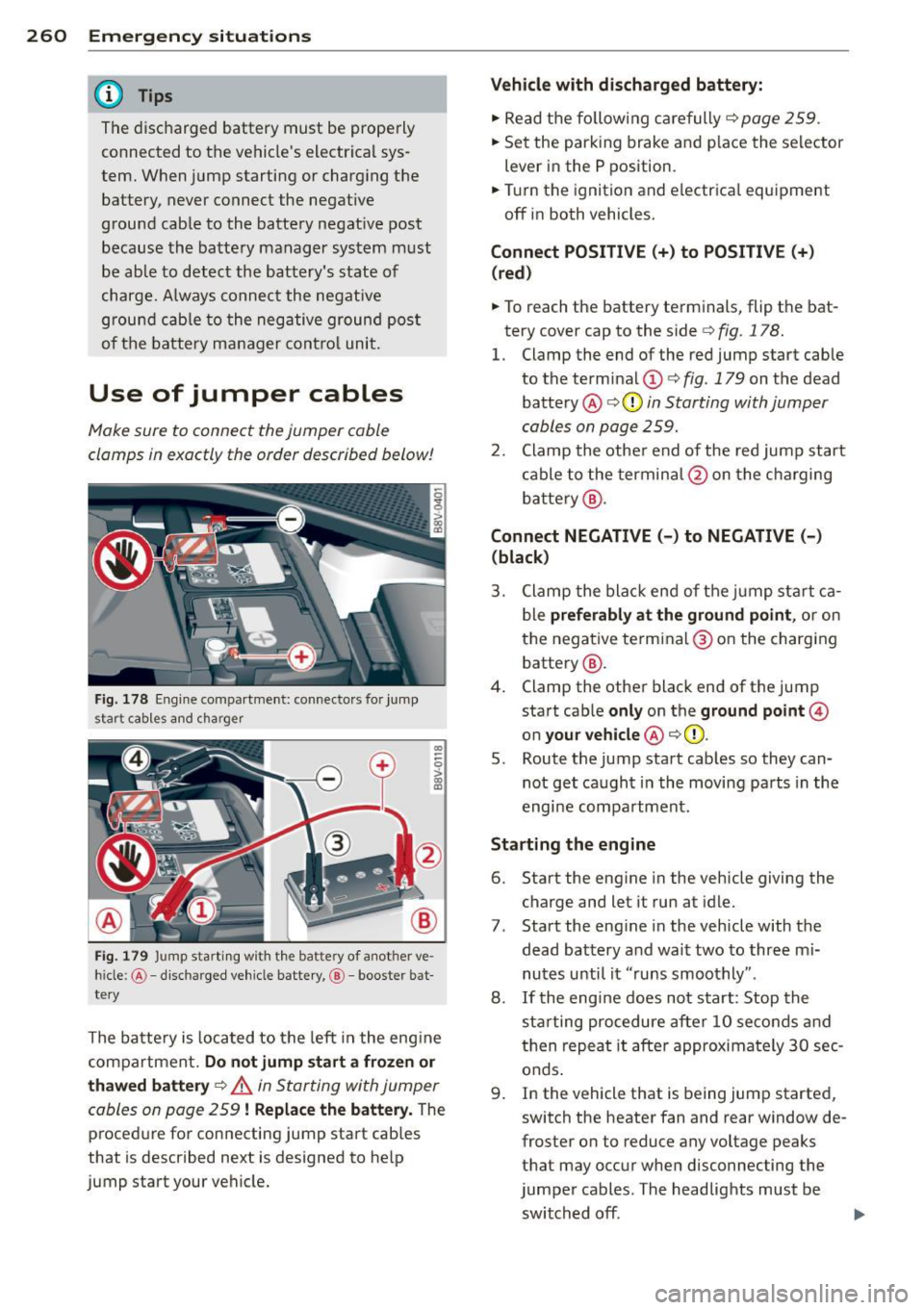
Use of jumper cables
Make sure to connect the jumper cable
clamps in exactly the order described below!
Fi g. 178 Eng ine compar tment: conne ctors for jump
start cables a nd charger
CD
--0 > ~
F ig. 1 79 Jump start ing with the battery of a nother ve·
h ide: @-di scharge d veh icle battery, @-booster bat
te ry
The ba tte ry i s loca ted to the left in the eng ine
compartment.
Do not jump start a frozen or
thawed battery
¢ .&. in Starting wi th jumper
cables on page 259
! Replace the battery. The
p roced ure fo r connecting jump start cab les
that is described next is designed to he lp
jump start your vehicle.
Vehicle with discharged battery:
.,. Read t he followi ng car efully¢ page 259.
.,. Se t the parking brake an d place the selector
lever in the P position.
.,. Tur n the ignition and electr ica l equ ipment
off in both vehicles.
Connect POSITIVE(+) to POSITIVE(+ )
(red )
.,. To reach the battery terminals, flip the bat
tery cover cap to the side¢
fig. 178.
1. Clamp the end of the red jump start cab le
to the term inal
(D ¢ fig. 179 on t he dead
batte ry @
¢ (Din Starting with jumper
cables on page 259.
2 . Clamp the othe r end of the re d jump start
c able to the termin al@ on the cha rging
b atte ry @ .
Connect NEGATIVE (-) to NEGATIVE(-)
(black)
3 . Clamp the bla ck end of the j ump st art ca
b le
preferably at the ground point , or on
the nega tive te rmi na l® on the chargi ng
battery @.
4. Clamp the othe r black end of the jump
start cab le
only on the ground point@
on your vehicle @¢(D.
S. Route the jump start cab les so they can
not get ca ught in the moving pa rts in the
engi ne compa rt m ent.
Starting the engine
6. Start the eng ine in the vehicle giving the
charge and let it run at idle.
7 . Start the eng ine in the vehicle with the
dead battery and wait two to three m i
nutes until it "runs smoothly" .
8.
If t he eng ine does not s tart: Stop the
sta rting procedure after 10 second s and
t h en re p eat it after approximately 3 0 sec
onds .
9 . In the vehicle that is being jump started,
switch the heater fan and rear window de
froster on to reduce any voltage peaks
that may occ ur whe n disconn ecting the
jumpe r cables. The headlights must be
switched off.
IJI,
Page 274 of 288
272 Index
A
A/C (a utomatic cl imate control system)
A/C (manual cl imate control system)
ABS 66
65
refer to An
ti-lock braking system . . . . . 185
Accessories . . . . . . . . . . . . . . . . . . . . S6, 270
Active lane ass ist . . . . . . . . . . . . . . . . . . . . 94
Activating vibration wa rning .. .. .. .. .. 96
Adj ust ing steering t ime .... .. .. .... .. 96
C lean ing the camera area .. .. .. .. .. . 20 2
Dr iver messages . . . . . . . . . . . . . . . . . . . . 95
I ndicator light . . . . . . . . . . . . . . . . . . . . . 95
switch ing on and off . ... .. .. .. .... .. 95
Adapt ive cruise control . . . . . . . . . . . . . . . . 82
Automatic t ra nsm ission ... .. .. .... .. 86
C lean ing the senso r ..... .. .. .. .. .. . 202
D river messages . . . . . . . . . . . . . . . . . . . . 88
General Information . . . . . . . . . . . . . . . . 82
Request for driver intervention . . . . . . . . 88
Stop-and-go-traffic . . . . . . . . . . . . . . . . . 86
Adapt ive dampers .......... .. .. .... . 102
I ndicator light . .. ..... ... .. .. .... .. 25
Adapt ive light . . . . . . . . . . . . . . . . . . 42, 102
I ndicator light . . . . . . . . . . . . . . . . . . . . . 25
Adding W indshield washer fluid ..... .. .... . 224
Ad justing ai r dist ribution (Climate con trol
system) ..... ... .. ..... ... .. .. .... .. 67
Ad justing a ir vents ......... .. .. .... .. 68
Ad justing a ir vents (manual climate co n-
trol system) . . . . . . . . . . . . . . . . . . . . . . . . . 65
Ad justing automatic headlights . .. ... ..
44
Ad justing the center conso le lighting .... 45
Ad justing the temperat ure
manual climate control system . . . . . . . . 65
advanced key
refer to Convenience key . . . . . . . . . . . . . 73
A irbag .. .. .. ... .......... .. .. .. .. . 14 0
I nd icator ligh t . . . . . . . . . . . . . . . . . . . . . 2 1
A irbag system ... ....... ... .. .. .. .. . 161
Advanced Airbag System ....... .. .. . 144
Advanced Airbag System components . 148
Ca re . .. .. .. ............. .. .. .. .. . 156
C hi ldren . .... ........... .... .... . 168
C hil d restra ints ........... .. .. .... . 168
Components (front airbags) . ... .. .. . 1 48 Danger of fitting a ch
ild seat on the front
passenger seat ... .. ... ..... ... .. .. 142
Disposa l .. .. .. .. ... .. ..... ... .. .. 156
Front a irbags . . . . . . . . . . . . . . . . 144, 146
How do the front airbags work? .. .... 150
How many a irbags does my vehicle
have? ...... .. .. .. ... ... ... .. .. .. 148
How the Advanced Airbag System com-
ponen ts wo rk togethe r ......... .. .. 150
Im port ant sa fe ty inst ru cti ons on the
k nee airbag system .. .. ..... ... .. .. 159
Impo rtant things to know .. ... ... . .. 140
Knee airbags ..... .. ... ..... ... .. .. 157
Monitoring .... .. ............. .... 152
PASSENGER AIR BAG OFF light ... .... 153
Repairs ... .... .. ............. .... 156
Safety instructions ................. 155
S ide a irbags ... .. ... .. .. ... ..... .. 160
S ide curtain airbags ... ...... ... .. .. 163
Warning/Indicato r lights ..... .. .. .. 152
When must the system be inspec ted? . 152
Alarm system
refer to Anti-theft alarm system . . . . . . . 31
Alcantara clean ing .............. .... 204
Al ignment pi n (changing the whee l) .. .. 24 7
All-weather lights (LED headlights) . .. .. . 42
All-wheel drive Winter tires ..... .. ... ..... ... .. .. 240
All wheel d rive . . . . . . . . . . . . . . . . . . . . . 190
Alternator
refer to A lternator (indicator light) . .. . 20
Alternato r (indicato r light) .. ... .. .. .. . 20
Amb ient lighting .. ............. .... . 45
Anti-free ze
refer to Eng ine coolant
216
Anti -lock b raking system . ..... ... .. .. 185
Indicator light ... ... .. ..... .... . .. . 22
An ti-s lip reg ulatio n ............. .. .. 185
Indi cator ligh t ... ............. .. ... 22
Anti -theft a la rm system . . . . . . . . . . . . . . . 31
Anti-theft systems Electronic immob ilizer .. ..... ... .. .. . 36
Artific ia l lea ther cleani ng ........... .. 20 4
ASR
refer to Anti -slip regulation
A udi active lane assist 185
refer to Active
lane ass ist ....... .... . 94