change time AUDI A3 2015 Owners Manual
[x] Cancel search | Manufacturer: AUDI, Model Year: 2015, Model line: A3, Model: AUDI A3 2015Pages: 288, PDF Size: 71.46 MB
Page 16 of 288
14 Instruments and indicator lights
> Service intervals > Reset oil change inter
val.
(D Note
- Only reset the oil change disp lay w hen
you have completed an o il change .
- Maintain ing the service intervals is of vi
ta l importance for the life and value of
you r vehicle espec ially the engine . Serv
ice interva ls shou ld not be exceeded,
even by a short distance .
- If the vehicle battery is disconnected,
the timing for the next oil change wi ll be
i nterrupted.
If the vehicle is stationary
for a long time, have all scheduled serv
ices performed.
- Even if the mileage driven is low, the
maximum period of one year from one
service to the next must not be exceed
ed.
{!) Tips
Do not reset the disp lay between oil
changes, otherwise the d isplay w ill be in
correct .
Indicator lights
Descript ion
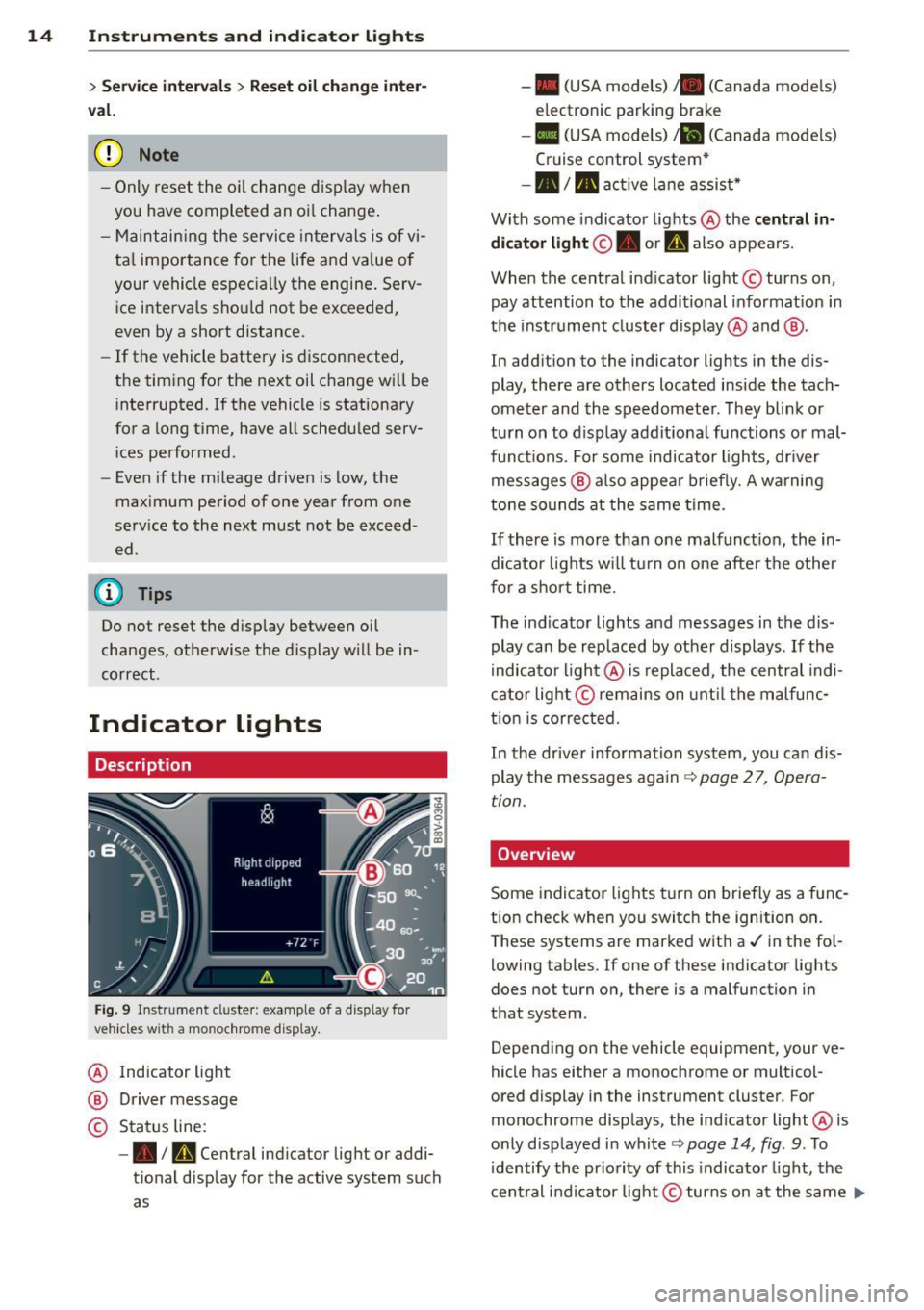
Fig. 9 Instrument cl uster : example of a display for
vehicles wit h a mo nochrome d isplay.
@ Indicator light
@ Driver message
© Status line:
-• Im, Central indicator light or addi
tional display for the active system such
as -
• (USA models) /. (Canada mode ls)
electronic parking brake
- II (USA models) Jil (Canada mode ls)
Cruise control system*
-•III active lane assist*
With some indicator lights @ the
central in
dicator light ©. or
U also appears.
When the central ind icator light © turns on,
pay attention to the additional informat ion in
the instrument cluster display @ and @.
In addition to the indicator lights in the dis
play, there are others located inside the tach
ometer and the speedometer. They blink or
turn on to display additional functions or mal
funct ions. For some indicator lights, dr iver
messages @ also appear briefly. A warning
tone sounds at the same time.
If there is more than one malfunct ion, the in
dicator lights will tu rn on one after the other
for a short time.
The indicator lights and messages in the dis
play can be rep laced by other displays .
If the
indicator light @ is replaced, the central indi
cator light@remains on until the malfunc
tion is corrected.
In the driver information system, you can dis
play the messages again
c:> page 2 7, Opera
tion.
Overv iew
Some indicator lights turn on briefly as a func
tion check when you switch the ignition on.
T hese systems are marked with a./ in the fol
lowing tables. If one of these indicator lights
does not turn on, there is a malfunction in
that system .
Depending on the vehicle equipment, your ve
hicle has either a monochrome or multicol-
ored display in the instrument cluster. For
monochrome displays, the ind icator light @ is
only displayed in white
c:> page 14, fig . 9 . To
identify the priority of this indicator light, the
central indicator light© turns on at the same ..,.
Page 35 of 288
LED and batteries in the remote control
key
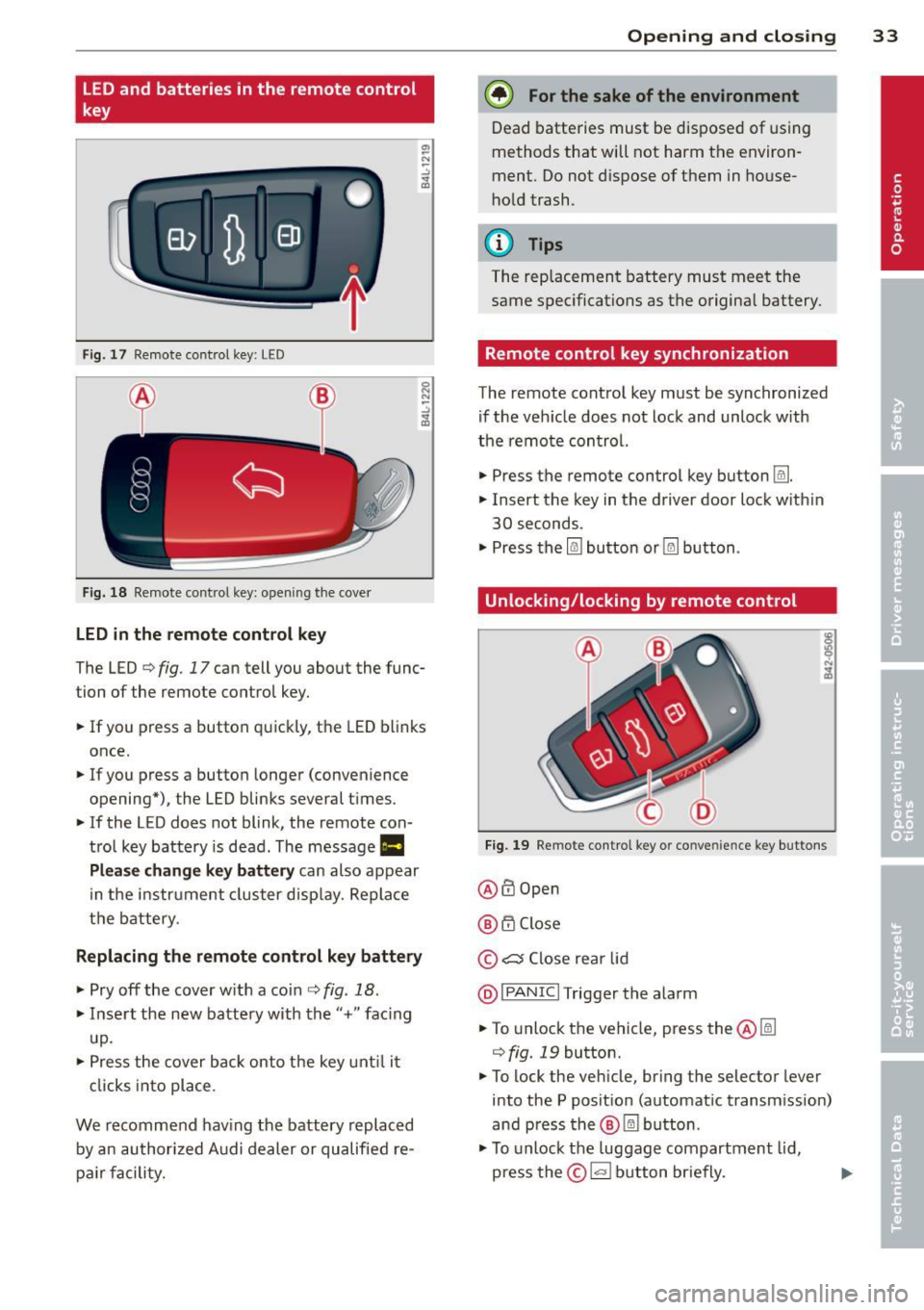
Fig. 17 Remote control key: LED
Fig. 18 Remote control key: opening the cover
LED in the remote control key
The LED ¢ fig. 17 can tell you about the func
tion of the remote control key .
.. If you press a button quickly, the LED blinks
once .
.. If you press a button longer (convenience
opening*) , the LED blinks several times .
.. If the LED does not blink, the remote con
trol key battery is dead. The message
1111
Plea se change key battery can also appear
in the instrument cluster display. Replace
the battery.
Replacing the remote control key battery
.. Pry off the cover w ith a coin ¢ fig. 18 .
.. Insert the new battery with the"+" fac ing
up.
.. Press the cover back onto the key until it
clicks into place .
We recommend having the battery replaced
by an authorized Audi dealer or qualified re
pa ir facility.
Opening and closing 33
@) For the sake of the environment
Dead batteries must be disposed of using
methods that will not harm the environ
ment. Do not dispose of them in house
hold trash .
{!) Tips
The rep lacement battery must meet the
same specifications as the origina l battery.
Remote control key synchronization
The remote control key must be synchronized
if the veh icle does not lock and unlock w ith
the remote control.
.. Press the remote control key button~-
.. Insert the key in the driver door lock w ith in
30 seconds .
"' Press the
l@J button or~ button .
Unlocking/locking by remote control
Fig. 19 Remote control key or conve nien ce key buttons
@ffi Open
@ 6".i Close
©
c:s Close rear lid
@I PANIC I Trigger the alarm
.. To unlock the vehicle, press the@~
¢
fig. 19 button .
"' To lock the veh icle, bring the selector lever
into the P posit ion (automatic transm ission)
and press the®~ button .
"' To unlock the luggage compartment lid,
press the©~ button briefly. ..,.
Page 46 of 288
44 Lights and Vision
You can indicate a lane change or a turn when
the emergency flashers are switched on by us
i ng the turn signa l lever. The emergency f lash
ers stop temporarily.
The eme rgency f lashers also work when the
ignition is tu rned off .
(D Tips
You shou ld tu rn on the emergen cy fl ashe rs
when:
- you are the last vehicle st anding in a tr af
fic jam so that any o ther veh icles coming
ca n see you, or when
- you r vehicle has broken down or yo u are
i n an emergency si tua tion, or when
- you r vehicle is bei ng towe d by a tow
tru ck or if yo u are towi ng anothe r vehicle
b ehin d you.
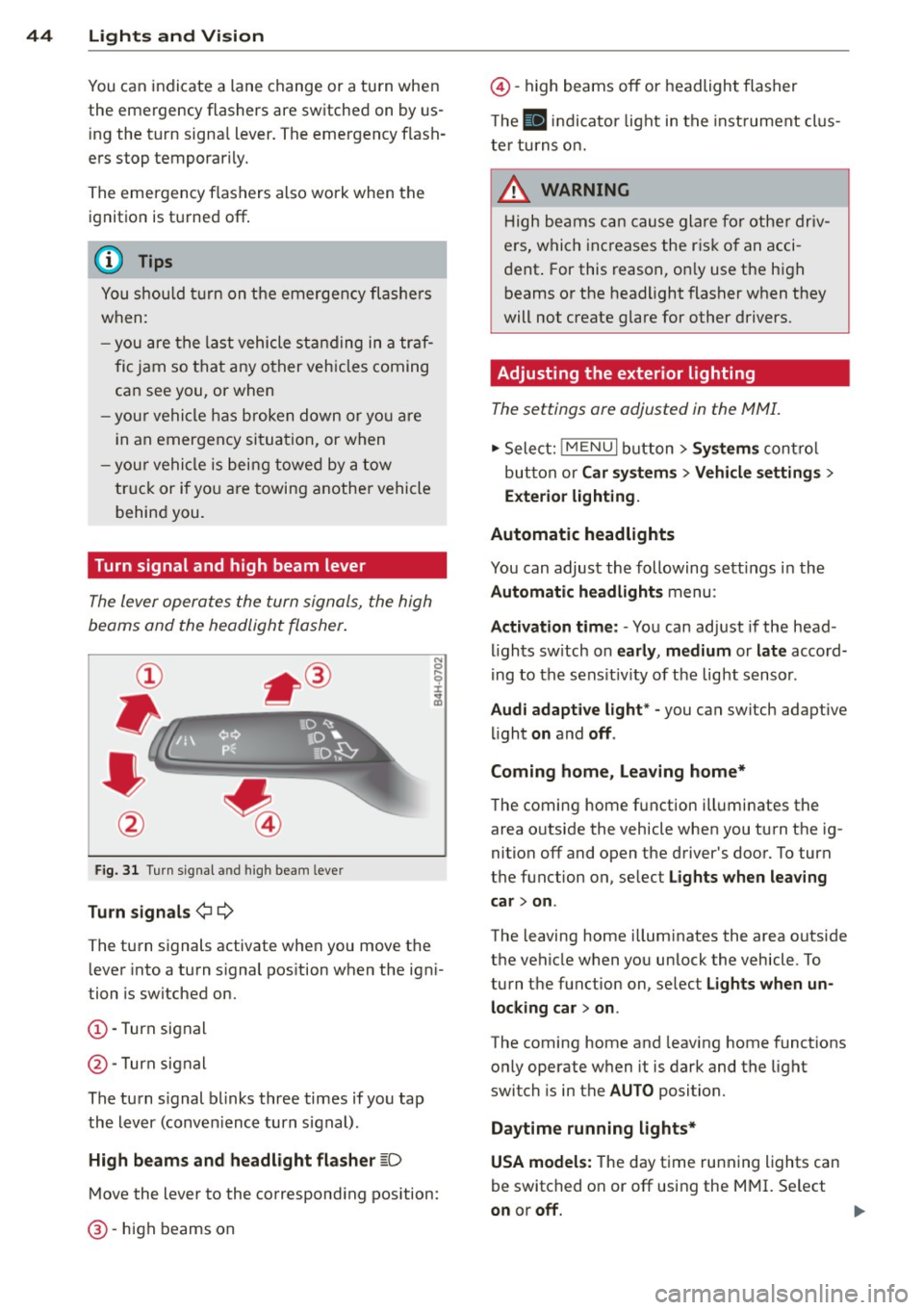
Turn signal and high beam lever
The lever operates the turn signals, the high
beams and the headlight flasher .
Fig. 31 Turn s ig na l an d high beam leve r
Turn signals ¢¢
The turn signals activate when you move the lever into a turn s ignal pos ition when the ign i
tion is switched on.
(D -Turn signal
@-Turn signal
The turn s ignal b links three times if you tap
the lever (conven ience turn s ignal).
High beam s and headlight flasher
~D
M ove the lever to the correspond ing position:
@ -high beams on
@-high beams off or headlight flasher
T he
II in di cator light in t he inst rument cl us
te r tu rns on.
A WARNING
H igh be ams ca n cause glare for othe r driv
e rs, which inc reases the r is k of an acci
dent . For this reason, on ly use the h igh
beams or the headlight flasher when they
will not create g lare for other drivers.
· Adjusting the exterior lighting
The settings ore adjusted in the MMI.
.,. Select: iME NUI button> Systems control
bu tton or Car system s > Vehicle settings >
Exterior lighting.
Automatic headlights
You can adjust the following sett ings in the
Automatic headlights menu:
Activation time: - You can adjust if the head
ligh ts sw itch on early, medium or late accord
i ng to the sens it iv ity of the light sensor .
Audi adapt ive light * -you can switch adaptive
li ght on and off.
Coming home, Leaving home*
T he coming home f unction ill uminates the
area o utside the vehicle when you turn t he ig
nition off and open the driver's door. To turn
the function on, se lect Lights when leaving
car > on .
The leaving home illum inates the area outside
the vehicle when yo u unlock the vehicle . To
turn the function on, se lect Lights when un
locking car > on .
The coming home and leaving home functions
only operate when it is dark and the light
switch is in the AUTO position.
Daytim e running lights*
USA models: The day time running lights can
be switched on or off using the MMI. Se lect
on or off.
1111>
Page 61 of 288
Roof rack
Description and mounting locations
Additional cargo can be carried with a roof luggage rack .
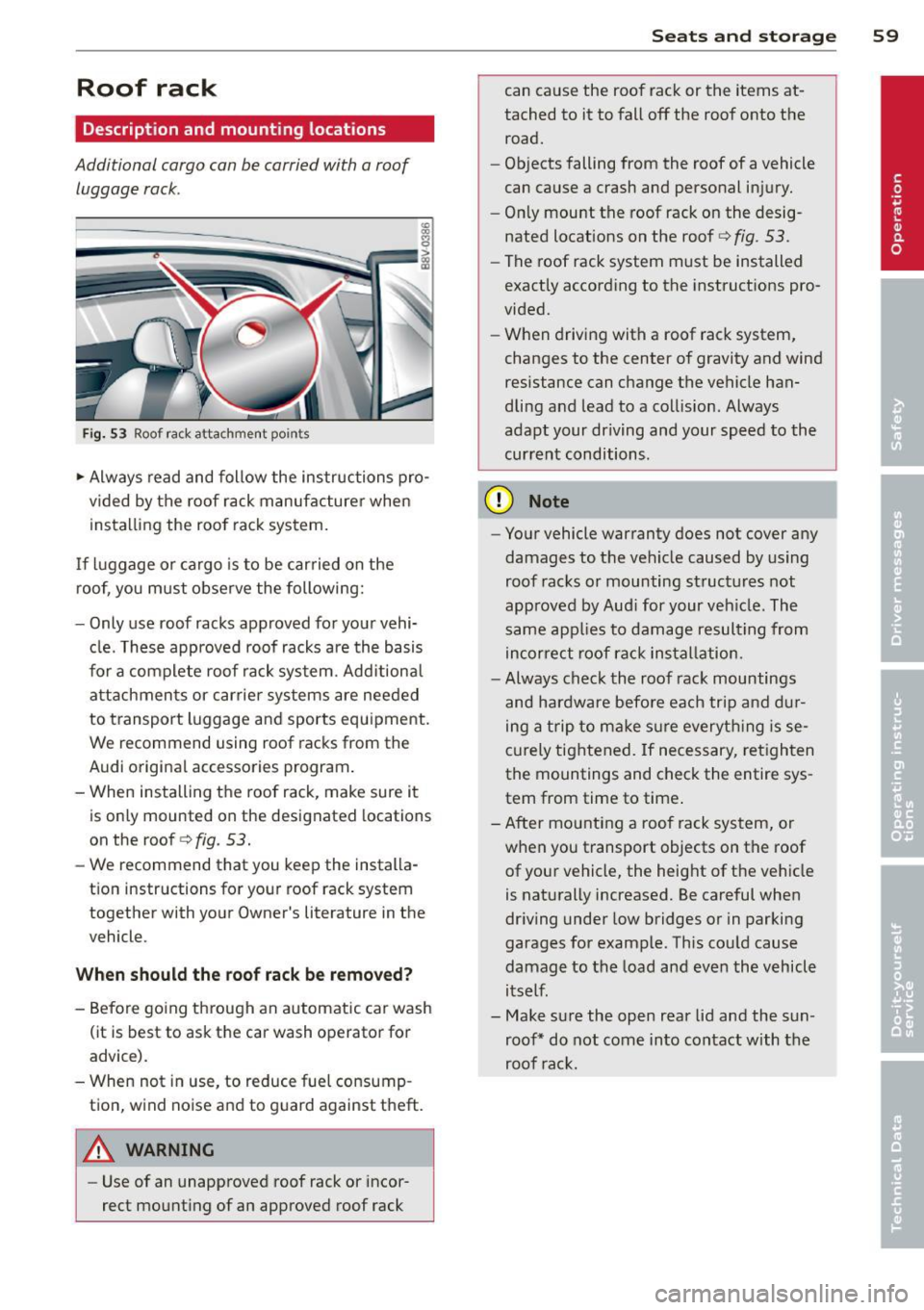
Fig. 53 Roof rack attachment po in ts
.,. Always read and follow the instructions pro
vided by the roof rack manufacturer when
insta lling the roof rack system.
If luggage or cargo is to be carried on the
roof, you must observe the following:
- Only use roof racks approved for your vehi·
cle. These approved roof racks are the basis
for a complete roof rack system. Add itional
attachments or carrier systems are needed
to transport luggage and sports equipment.
We recommend using roof racks from the
Audi original accessories program.
- When installing the roof rack, make sure it is only mounted on the designated locations
on the
roof c:;>fig. 53.
-We recommend that you keep the installa·
t ion instructions for your roof rack system
together with your Owner's literature in the
vehicle.
Wh en shoul d th e r oof rack b e re mo ved ?
-Before going through an automatic car wash
(it is best to ask the car wash operator for
advice).
- When not in use, to reduce fue l consump
tion, wind noise and to guard against theft.
A WARNING
- Use of an unapproved roof rack or incor·
rect mount ing of an approved roof rack
S ea ts a nd s to rage 59
can cause the roof rack or the items at·
tached to it to fall off the roof onto the
road.
- Objects falling from the roof of a vehicle
can cause a crash and personal injury.
- On ly mount the roof rack on the desig
nated locations on the roof¢
fig. 53.
- The roof rack system must be installed
exactly according to the instruct ions pro·
vided.
- When driving with a roof rack system,
changes to the center of gravity and wind
resistance can change the vehicle han·
dling and lead to a collision. Always
adapt your driving and your speed to the
current conditions .
(D Note
- Your vehicle warranty does not cover any
damages to the vehicle caused by using
roof racks or mounting structures not
approved by Aud i for your veh icle. The
same app lies to damage resul ting from
incor rect roof rack insta llation.
- Always check the roof rack mountings
and hardware before each trip and dur
ing a trip to make s ure everyth ing is se
curely tightened. If necessary, retighten
the mountings and check the entire sys
tem from time to time .
- After mounting a roof rack system, or when you transport objects on the roof of your vehicle, the height of the vehicle
is naturally increased. Be careful when
dr iving under low bridges or in parking
garages for example . This could cause
damage to the load and even the vehicle
itself.
- Make sure the open rear lid and the sun· roof* do not come into contact with the
roof rac k.
Page 81 of 288
-Starting on inclines in stop-and-go traf
fic: To help prevent the vehicle from roll
ing back when starting, press and hold
the brake pedal for several seconds when
the vehicle is stationary .
(D Tips
You can find out if your vehicle is equipped
with Hill Hold by checking at an authorized
Audi dealer or qualified repair facility .
Speed warning system
Introduction
The speed warning system helps you to stay
under a specified maximum speed.
The speed warning system warns you if you
are exceeding the maximum speed that you
have set. You will hear a warning tone when
your speed exceeds the stored value by ap proximately 3 mph (3 km/h). An indicator
light . (USA models) . (Canada models) in
the instrument cluster display also turns on at
the same time. The indicator light./.
turns
off when the speed decreases below the
stored maximum speed .
Setting a threshold is recommended if you
would like to be reminded when you reach a
certain maximum speed. Situations where you may want to do so include driving in a country
with a general speed limit or if there is a
specified maximum speed for winter tires .
@ Tips
Even though your vehicle is equipped with
a speed warning system, you should still
watch the speedometer to make sure you
are not driving faster than the speed limit.
Setting the threshold
You can set, change and delete the threshold
in the MMI.
"' Select: Systems or Car systems > Driver as
sist> Speed warning .
Driving 79
You can set any threshold between 20 mph (30 km/h) and 150 mph (240 km/h). Settings
can each be adjusted in increments of 6 mph
(10 km/h).
Cruise control system
Description
Applies to vehicles: with cruise control system
The cruise control system makes it possible to
drive at a constant speed starting at 15 mph
(20 km/h).
The speed is kept constant by modifying en
gine power or through an active brake inter
vention.
.&_ WARNING ~
- Always pay attention to the traffic
around you when the cruise control is in
operation. You are always responsible for
your speed and the distance between
your vehicle and other vehicles.
- For reasons of safety, cruise control
should not be used in the city, in stop
and-go traffic, on winding roads and
when road conditions are poor (such as ice, fog, gravel, heavy rain and hydro
planing) -you could have an accident.
- Switch the cruise control
off temporarily
when driving in turning lanes, highway
exits or in construction zones.
- Please note that unconsciously "resting"
your foot on the accelerator pedal pre
vents the cruise control from braking.
This is due to the control system being
overridden by the driver's acceleration.
- If a brake system malfunction such as
overheating occurs when the cruise con
trol system is switched on, the braking
function in the system may be switched
off. The other cruise control functions re
main active as long as the indicator light
II (US models) !l'I (Canadian models)
ison.
~ •
Page 89 of 288
.. To resume cruise control, release the lever
or take your foot off the acce lerator pedal.
Interrupting cruise control while driving
.. Move the lever into position @. The mes
sage
ACC: standby appears . Or
.. press the brake pedal.
.. To resume the stored speed, move the lever
into position @.
Interrupting cruise control when stopped
Applies to vehicles w ith an automatic trans
mission:
.,. Push the lever away from you into position
@ . The message
ACC: standby appears.
.. To resume cruise control, press the brake
pedal and pull the lever toward you into po
sition @.
_& WARNING
It is dangerous to activate cruise contro l
and resume the stored speed when the
current road, traffic or weather conditions
do not permit th is . This could result in a
crash .
Setting the distance
Appl ies to vehicles: with Audi adaptive cruise co ntrol
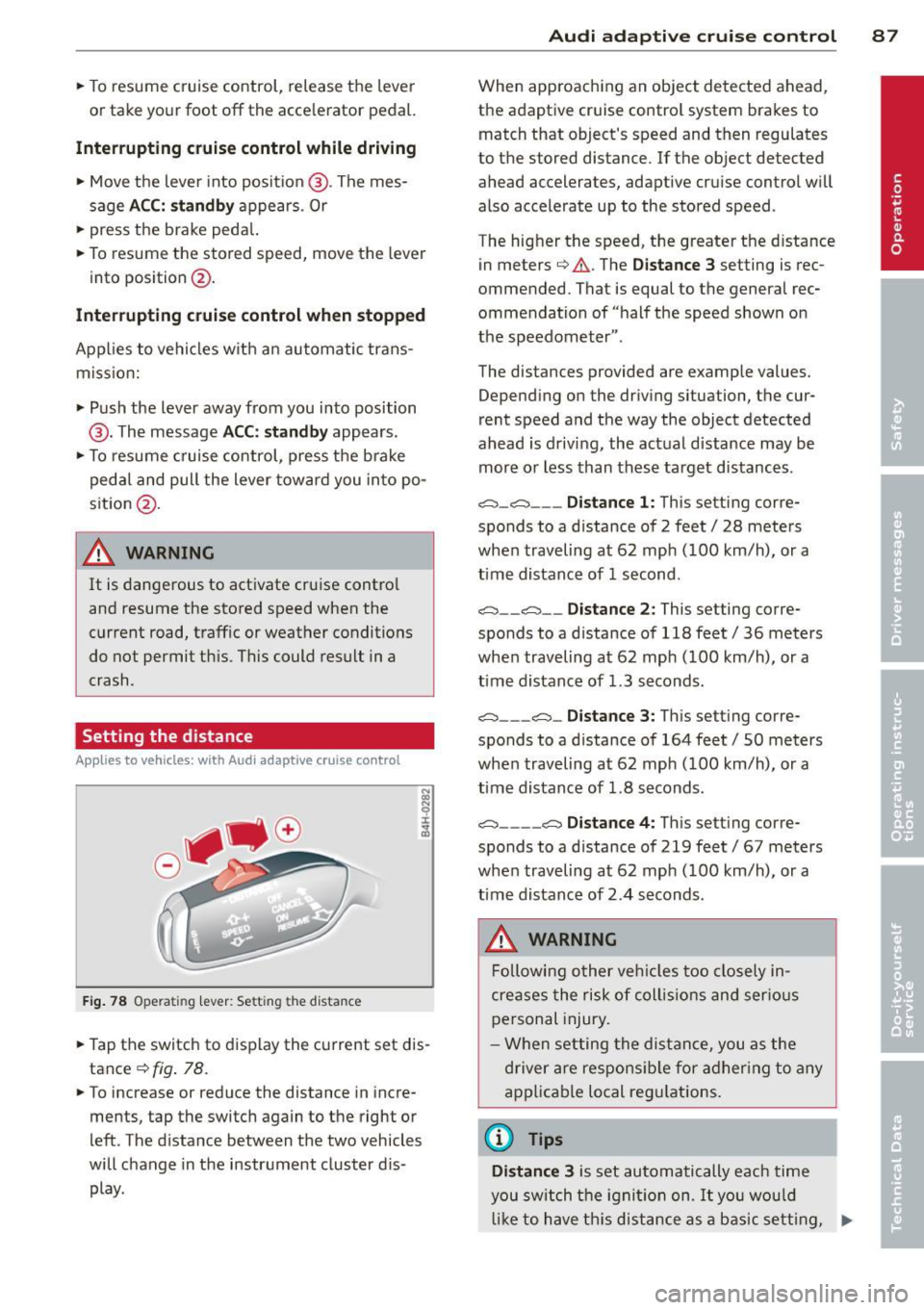
Fig. 78 Opera tin g lev er: Se tting the d ista nce
-
.. Tap the switch to display the current set dis
tance
¢ fig . 78.
.. To increase or reduce the distance in incre
ments, tap the switch again to the right or
left . The distance between the two vehicles
will change in the instrument cluster d is
play .
Audi adaptive cruise control 87
When approaching an object detected ahead,
the adaptive cruise control system brakes to
match that object's speed and then regulates
to the stored distance . If the object detected
ahead accelerates, adaptive cru ise control w ill
also accelerate up to the stored speed .
The hig her the speed, the greater the distance
in meters ¢
A. The Distance 3 setting is rec
ommended. That is equal to the general rec
ommendation of "half the speed shown on
the speedometer ".
The distances provided are example values. Depending on the driving situation, the cur
rent speed and the way the object detected
ahead is driving, the actual distance may be
more o r less than these target distances .
o:;:::::,_o:;:::::, ___ Distance 1: This setting corre-
sponds to a d istance of 2 feet/ 28 meters
when traveling at 62 mph (100 km/h), or a
time distance of 1 second .
o:;:::::, __ o:;:::::, __ Distance 2: This setting corre
sponds to a d istance of 118 feet/ 36 meters
when traveling at 62 mph (100 km/h), or a
time distance of 1.3 seconds.
o:;:::::, ___ o:;:::::,_ Distance 3: This setting corre-
sponds to a d istance of 164 feet/ 50 meters
when traveling at 62 mph (100 km/h), or a
time distance of 1.8 seconds.
o:;:::::, ____ o:;:::::, Distance 4: This setting corre-
sponds to a d istance of 219 feet/ 67 meters
when traveling at 62 mph (100 km/h), or a
time distance of 2 .4 seconds.
_& WARNING
Following other vehicles too closely in
cre ases the risk of collisions and serious
personal injury.
- When setting the distance, you as the
driver are responsible for adhering to any
applicable local regulations .
(D Tips
Distance 3
is set automatically each time
you switch the ignition on.
It you would
like to have th is distance as a basic setting, .,..
Page 101 of 288
General information
Applies to vehicles: with Audi side assist
®
®
©
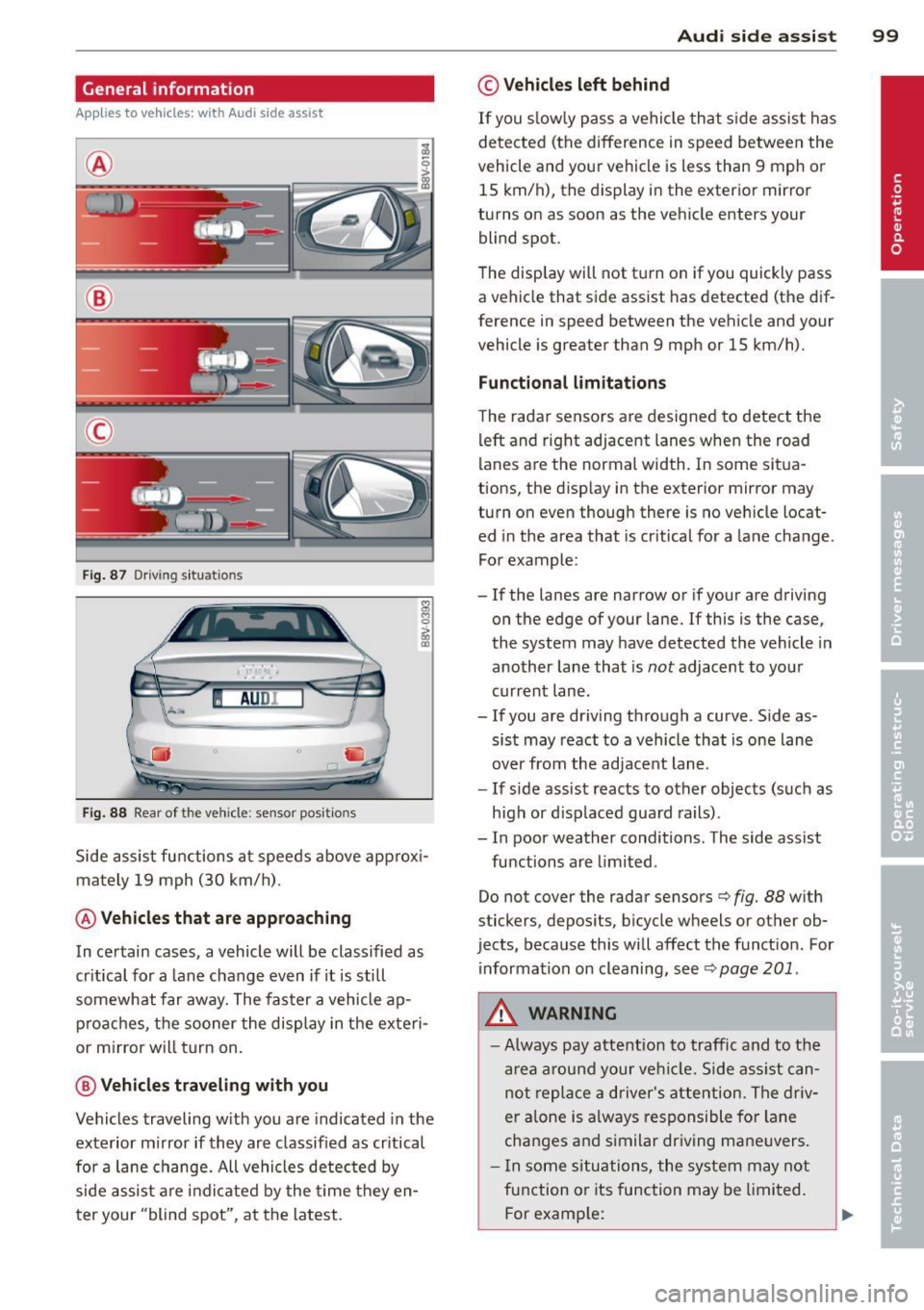
Fig . 87 Driving situations
I AUDI
Fi g. 88 Rear of the vehicle: sensor posit ions
Side assist functions at speeds above approx i
mately 19 mph (30 km/h).
@ Vehicl es th at ar e approaching
In certain cases, a vehicle will be classified as
cr itical for a lane change even if it is still
somewhat far away. The fas ter a vehicle ap
p roaches, t he sooner the display in the exteri
or m irror will t urn on.
@ V ehicles traveling with you
Vehicles traveling w ith you are indicated in the
exterior m irror if they are classified as cr itical
for a lane change. All vehicles detec ted by
side assist are indicated by the time they en
t er your "blind spot", at the latest.
Audi side assist 99
© Veh icles left behind
If you s low ly pass a vehi cle that s ide assist has
detected (the difference in speed between the
vehicle and you r vehicle is less than 9 mph or
15 km/h), the display in the exterio r mir ro r
turns on as soon as the vehicle enters your blind spot.
T he disp lay will not t urn on if you quickly pass
a vehicle that side assist has detected (the dif
ference in speed between the veh icle and your
vehicle is greater than 9 mph or 15 km/h).
Functional limitations
The radar sensors are designed to detect the
left and right adjacent lanes when the road
lanes are the normal width. In some sit ua
tions, the d isp lay in the exterior mirror may
turn on even though there is no ve hicle locat
ed in the area that is cr itical for a lane cha nge.
For example:
- If the lanes are narrow or if your are driving
on the edge of your lane.
If this is the case,
the system may have detected the vehicle in
another lane that is
not adjacent to you r
current lane .
-If you are dr iving through a curve . S ide as
sis t may react to a vehicle that is one lane
over from the adjacent lane.
- If side assist reacts to other objects (such as
high or d isp laced guard rails) .
- In poor weather conditions. The side assist
functions are limited .
Do not cover the radar sensors
c> fig. 88 with
stickers, depos its, bicycle wheels or other ob
jects, because this will affect the funct ion. For
information on cleaning, see
c> page 201 .
A WARNING
-Always pay attention to traffic and to the
a rea a round your ve hicl e. Side assi st can
not repla ce a d river's attention. The driv
er a lone is always responsible for la ne
cha nges and s imilar dr iv ing ma ne uvers.
- In some si tua tions, the system may not
function or its function may be limited.
F or examp le:
Page 102 of 288
100 Audi side assist
-If vehicles are approaching or being
left behind very quickly. The display
may not turn on in time.
- In poor weather conditions such as
heavy rain, snow or heavy mist.
- On very wide lanes, in tight curves, or if
there is a rise in the road surface.
Vehicles in the adjacent lane may not
be detected because they are outside
of the sensor range.
- Side assist cannot detect all vehicles un
der all conditions- danger of accident!
- Please note that side assist indicates
there are approaching vehicles, or
vehicles in your blind spot, only after
your vehicle has reached a driving speed
of at least 19 mph (30 km/h).
- In certain situations, the system may not
function or its function may be limited.
For example:
- if vehicles are approaching or being left
behind very quickly. The display may
not turn on in time.
- in poor weather conditions such as heavy rain, snow or heavy mist.
- on very wide lanes, in tight curves or if
there is a rise in the road surface.
Vehicles in the adjacent lane may not
be detected because they are outside
of the sensor range.
The sensors can be displaced by impacts or damage to the bumper, wheel housing and
underbody. This can affect the system. Have your authorized Audi dealer or quali
fied repair facility check their function.
(D Tips
-If the window glass in the driver's door
or front passenger's door has been tint
ed, the display in the exterior mirror may
be misinterpreted.
- For Declaration of Compliance to United
States FCC and Industry Canada regula
tions, see
9 page 271.
Switching on and off
Applies to vehicles : wi th Audi side ass ist
The system and be switched on and off in the
MMI.
"'Select: !MENUI button> Systems control
button or
Car systems > Driver assistance >
Audi side assist. With off, the system is
switched off.
An activated system will signal every time the ignition is switched on by turning the displays
in the exterior mirrors on briefly.
Adjusting the display brightness
App lies to vehicles: wi th Audi s ide ass ist
The brightness can be adjusted in the MMI.
"'Selec t: !ME NUI button> Systems control
button or
Car systems > Driver assistance >
Audi side assist .
The display brightness adjusts automatically
to the brightness of the surroundings, both in
the information and in the warning stage . In
very dark or very bright surroundings, the dis
play is already set to the minimum or maxi
mum level by the automatic adjustment. In
such cases, you may notice no change when
adjusting the brightness, or the change may
only be noticeable once the surroundings
change.
Adjust the brightness to a level where the dis
play in the information stage will not disrupt
your view forward. If you change the bright
ness, the display in the exterior mirror will
briefly show the brightness level in the infor
mation stage. The brightness of the warning
stage is linked to the brightness in the infor
mation stage and is adjusted along with the
information stage adjustment.
(D Tips
- Side assist is not active while you are
making the adjustment.
- Your settings are automatically stored
and assigned to the remote control key
being used.
Page 154 of 288
152 Airbag sys te m
sudden maneuver. Objects near the
air bags can become projectiles and cause
injury, particularly when t he s eat is re
cl in ed .
- Never place or trans port objects on the
front passenger seat. Obj ects on the
front passenger seat could cause the ca
pacitive sensor in the seat to s ignal to
airbag system that the seat is occupied
by a person when it in fa ct is not, o r th at
the person on the sea t is he avie r than he
or she actually is. The change in electric
capacitance because of such objects can
cause the passenger front airbag to be
t u rned on when it sho uld be off, or can
cause the airbag to work in a way that is
different from the way it wou ld have
worked w ithout objects on the seat.
- Always make sure that there is nothing
on the front passenge r seat that will
cause the capaci tive passenger detection
system in the s eat to s ignal to the A irbag
System that the seat is occupied by a
person when it is not, or to sign al that it
is occupied by someone who is heavier
than the person actually sitting on the seat . The prese nce of an object co uld
cause the passenger front a irbag to be
t u rned on when it sho uld be off, or co uld
cause the airbag to work in a way that is
differe nt from the way it wou ld have
worked w it h out the object on the seat.
.&, WARNING
The fine dust created when a irbags deploy
can ca use b reathing problems for peop le
w ith a hi story of ast hma o r othe r brea th
ing conditions.
- T o redu ce the r is k of breathing p rob lems,
th ose w it h asthma or o ther resp iratory
condit ions shoul d ge t fresh a ir right
away by gett ing out of the vehicle o r
opening windows or doo rs .
- If you are in a coll is ion in which a irbags
dep loy, wash yo ur hands and face w ith
mild soap and water befo re eating. -
Be ca reful not to get the dust into your
eyes, or into any c uts or scratches.
- If the resid ue s hould get into your eyes,
f lush them w ith wate r.
Monitoring the
Advanced Airbag
System
tli Airbag monitor ing indicator light
Two separate indicators monitor the function
of the Advanced Airbag System: the airbag
monitoring indicator light and the
PASSEN
GER AIR BAG OFF
light.
The Advanced Airbag System as well as the
s ide airbags and side curta in a irbags w ith
eject ion mit igat ion features (including the
electron ic contro l unit, se nsors a nd system
wiring) are all mon itored continuously to
make su re that they are functioning p roperly
whenever the ignition is on. Eve ry time you
tu rn o n the ignition, the a irbag sys tem indica
tor light II will come on fo r a few seconds
(funct ion check) .
The system must be inspected when the
indicator light
II:
- does not come on when the igni tion is
sw itched on,
- does not go out a few seconds after you
have switched on the ignit ion, or
- comes on while driv ing .
If an airbag system malfunction is detected,
the indicator lig ht w ill first sta rt flashing to
catch t he d rive r's attent io n and the n stay on
conti nuously to serve as a constant rem inder
to have the sys tem inspected immed iate ly.
If a malfunction occurs that tu rns the front
airbag on the passenge r side off, the
PASSEN
GER AIR BAG OFF
light will come on and stay
o n wheneve r th e ign it io n is on.
Page 157 of 288
on the front passenger seat that might cause the capa citive passenger detecti on
system to miscalcu late electrical capac i
tance .
Important safety instructions on
monitoring the Advanced Airbag System
A WARNING
-If the status of the Adv a need Airb ag Sys
tem has changed while the vehicle is
moving, the
PA SS ENGER AIR B AG OFF
light b links for about S seconds to catch
t h e driv er's attent ion. If this happens, al
ways stop as soon as it is safe to do so
and check the steps described above.
- If the
PAS SENGER AIR BAG OFF light
does not go off when an adult who is not
very small is sitting on the front passen ger seat after taking the steps descr ibed
above, make sure the adult is properly
seated and restrained at one of the rear seating pos it ions. Have the a irbag sys
tem inspected by your authorized Audi
dealer before transporting anyone on the
front passenger seat.
A WARNING
An airbag system that is not funct ioning
properly cannot provide supplemental pro
tection in a frontal crash.
- If the airbag indicator light
c> page 21
turns on when the vehicle is being used,
have the system inspected immediately
by you r autho rized Aud i dea le r. It is pos
sible that the a irbag will inf late when it
is not s upposed to, or w ill not inflate
when it sho uld.
A WARNING
If the front airbag infla tes, a ch ild witho ut
a c hild restraint , or in a rearwar d-fac ing
child safety seat, or in a forward-facing
child rest raint that has not been properly
installed will be serio usly injured and can
be killed.
-
A irbag system 15 5
-Even tho ugh you r vehicle is equipped
with an Advanced A irbag System, make
certain that all children, espec ia lly 12
yea rs and younger, always ride on the
back seat prope rly restrained for their
age and size .
- Always install forward or rear-facing
child seats on the rear seat -even with
an Advanced A irbag System.
- I f you must install a rearwa rd-facing
child seat on the front passenger seat because of ex ceptio nal circumstances
and the
PASSENGER AIR BAG OFF light
does not appear and s tay on, immediate
ly install the rear -facing child seat in a
rea r seating pos ition and have the airbag
system inspected by you r Audi dealer.
- If, in exceptiona l circumstances, you
m ust install a forward-facing ch ild re
straint on the front passenger seat, al
ways move the seat into its rearmost po
sition in the seat's fore and aft adjust
ment range, as fa r away from the a irbag
as poss ible. The backrest must be adjust
ed to an upright pos ition. Make su re that
the
PASSENGER AIR BAG OFF light
comes on a nd stays on all the time when
eve r the ignit ion is switched on .
A WARNING
=
- If the PASSENGER AIR BAG OFF light
does not go out when an a dult is sitting
on the front passenger seat after taking
the steps described above, make sure the
adu lt is properly seated and restra ined at
one of the rea r seat ing pos itions.
- Have the airbag system inspected by
your Aud i dea ler before transporting
anyone on the front passenger seat.
(D Tips
If the capac itive passenger detection sys
tem determ ines that the front passenger
seat is empty, the fronta l airbag on the
passenger side will be turned off, and the
PASSENGER AIR BAG OFF light will stay
on.
•
•
•