parking brake AUDI A3 2020 Owner´s Manual
[x] Cancel search | Manufacturer: AUDI, Model Year: 2020, Model line: A3, Model: AUDI A3 2020Pages: 400, PDF Size: 107.47 MB
Page 88 of 400
Driving
ZA WARNING
— Only apply the brakes for the purpose of
cleaning the brake system when road and
traffic conditions permit. You must not en-
danger other road users and increase the
risk of an accident.
— Due to the risk of injury, only have an au-
thorized Audi dealer or authorized Audi
Service Facility work on the brake system.
Incorrect repairs could impair the function.
— Never let the vehicle roll while the engine is
stopped because this increases the risk of an
accident.
— During automatic braking maneuvers, the
brake pedal may move downward automati-
cally. To reduce the risk of injury, do not
place your foot under the brake pedal.
@) Note
— Never let the brakes “rub” by pressing the
pedal lightly when braking is not actually
necessary. This can cause the brakes to over-
heat and increases braking distance and
causes wear.
— Observe the important information for driv-
ing downhill > page 89. This especially ap-
plies when towing a trailer.
@) Tips
— If you retrofit your vehicle with a front spoil-
er, wheel covers or similar items, make sure
that the air flow to the brakes is not ob-
structed. Otherwise the brake system can
overheat.
— Also refer to the information about brake
fluid > page 313.
Ga i © Brakes: malfunction! Safely stop ve-
hicle
There is a malfunction in the brake system. If
EES / & and Ef also turn on, there is a malfunc-
tion in the ABS, ESC, and braking distribution.
Do not continue driving. See an authorized Audi
dealer or authorized Audi Service Facility for as-
86
sistance. Read and follow the other safety pre-
cautions > A\.
EG if @ Warning! Brake servo inoperative
If the brake booster is not working, you have to
use much more force when braking the vehicle.
See an authorized Audi dealer or authorized Audi
Service Facility for assistance.
EG - @® Brake pads: wear limit reached. You
can continue driving. Please contact Service
The brake pads are worn. Drive to an authorized
Audi dealer or authorized Audi Service Facility as
soon as possible to have the malfunction correct-
ed.
Brake booster: limited functionality. You can
continue driving. Please contact Service
There is a brake booster malfunction. The brake
booster is available, but its effectiveness is re-
duced. The braking performance may be different
compared to the usual performance. Drive to an
authorized Audi dealer or authorized Audi Service
Facility immediately to have the malfunction cor-
rected.
Brake booster: deactivated. See owner's manual
The brake booster remains active for a brief peri-
od of time after switching off the ignition. Secure
the vehicle from rolling by selecting “P” and set-
ting the parking brake.
ZA\ WARNING
If a malfunction occurs in the ABS, ESC, and
braking distribution, interventions that stabi-
lize the vehicle will no longer be available.
This could cause the vehicle to swerve, which
increases the risk that the vehicle will slide.
Do not continue driving. See an authorized
Audi dealer or authorized Audi Service Facility
for assistance.
Page 89 of 400

8V2012721BK
Driving
Electromechanical
parking brake
Operating the parking brake
The electromechanical parking brake is used to
secure the vehicle from rolling away
unintentionally.
The @) switch is located under the selector lever
in the center console. It turns on when the park-
ing brake is set. You can release the parking brake
manually or automatically when you start to
drive.
Setting and releasing the parking brake
> Setting: pull the ©) switch.
> ris @ appears, the parking brake is hold-
ing the vehicle. You can remove your foot from
the brake pedal.
> Releasing: when the ignition is switched on,
press and hold the brake pedal and press the ©)
button.
If the red indicator light flashes, the braking
force has not built up enough or it has decreased.
You can also secure the vehicle by selecting the
“P” gear or pressing the brake pedal. Make sure
the indicator light is off before you start driving.
Automatically releasing the parking brake
when starting to drive
Requirement: the driver's door must be closed
and the driver’s safety belt must be fastened.
> Press the accelerator pedal to start to drive.
ZA\ WARNING
—To reduce the risk of an accident, always
make sure the vehicle is situated safely
while stationary.
— If the parking brake is set, it can release au-
tomatically when the accelerator pedal is
pressed. To reduce the risk of an accident,
do not inadvertently press the accelerator
pedal and always shift into “P” when the ve-
hicle is stopped.
— If the power supply fails, you cannot set the
parking brake once it is released, or release
it if it is set. In this case, park the vehicle on
level ground and secure it by engaging the
"P” gear. Contact an authorized Audi dealer
or authorized Audi Service Facility for assis-
tance.
@) Tips
— On steep inclines, especially when in trailer
mode, the vehicle may roll backwards unin-
tentionally when starting to drive. To re-
duces the risk of this happening, pull and
hold the ©) switch while pressing the accel-
erator pedal. If enough drive power has
built up at the wheels and the vehicle does
not roll backwards, then release the switch
to start to drive.
— If you leave the vehicle when “D” or “R” are
engaged, the parking brake will be set auto-
matically.
— Noises when the parking brake is set and re-
leased are normal and are not a cause for
concern.
— The parking brake goes through a self-test
cycle at regular intervals when the vehicle is
stopped. Any noises associated with this are
normal.
Emergency braking function
Emergency braking should only be used in an
emergency, if the standard brake pedal is mal-
functioning or obstructed. When the emergency
braking function is activated, the braking effect is
similar to a heavy braking maneuver.
> Pull and hold the ©) switch while driving.
> An audio warning signal will sound and emer-
gency
braking will begin.
> If you press the accelerator pedal, emergency
braking will be canceled.
Z\ WARNING
Heavy braking while driving through curves or
in poor road or weather conditions can cause
the vehicle to slide or the rear of the vehicle to
swerve, which increases the risk of an acci-
dent.
87
Page 90 of 400
Driving
Messages
EG / @ Parking brake: malfunction! Safely
stop vehicle. See owner's manual
There is a malfunction in the parking brake. If the
message appears while stationary, check if the
parking brake is released and can be reset. If this
is the case, switch the ignition off and back on.
If the message continues to appear, if the park-
ing brake cannot be released, or if the message
appears while driving, then stop the vehicle on
level ground and shift to “P”. Do not continue
driving. See an authorized Audi dealer or author-
ized Audi Service Facility for assistance.
GG ti © Parking brake: malfunction! Please
release parking brake
There is a malfunction in the parking brake. If the
message appears while stationary, check if the
parking brake is released and can be reset. If this
is the case, switch the ignition off and back on.
If the message continues to appear, if the park-
ing brake cannot be released, or if the message
appears while driving, then stop the vehicle on
level ground and shift to “P”. Do not continue
driving. See an authorized Audi dealer or author-
ized Audi Service Facility for assistance.
ww Parking brake: malfunction! Safely stop ve-
hicle. See owner's manual
There is a malfunction in the parking brake. Drive
to an authorized Audi dealer or authorized Audi
Service Facility immediately to have the malfunc-
tion corrected. Do not park the vehicle on inclines
and shift to “P”.
FS / (GETING / (@) Parking brake: caution! Ve-
hicle parked too steep
The braking force may not be enough to secure
the vehicle from rolling away. Park the vehicle in
a place with less of an incline.
fa f Parking brake: applied
The parking brake is set. Press and hold the brake
pedal to release the parking brake.
838
Releasing the parking
lock using the
emergency release
Description
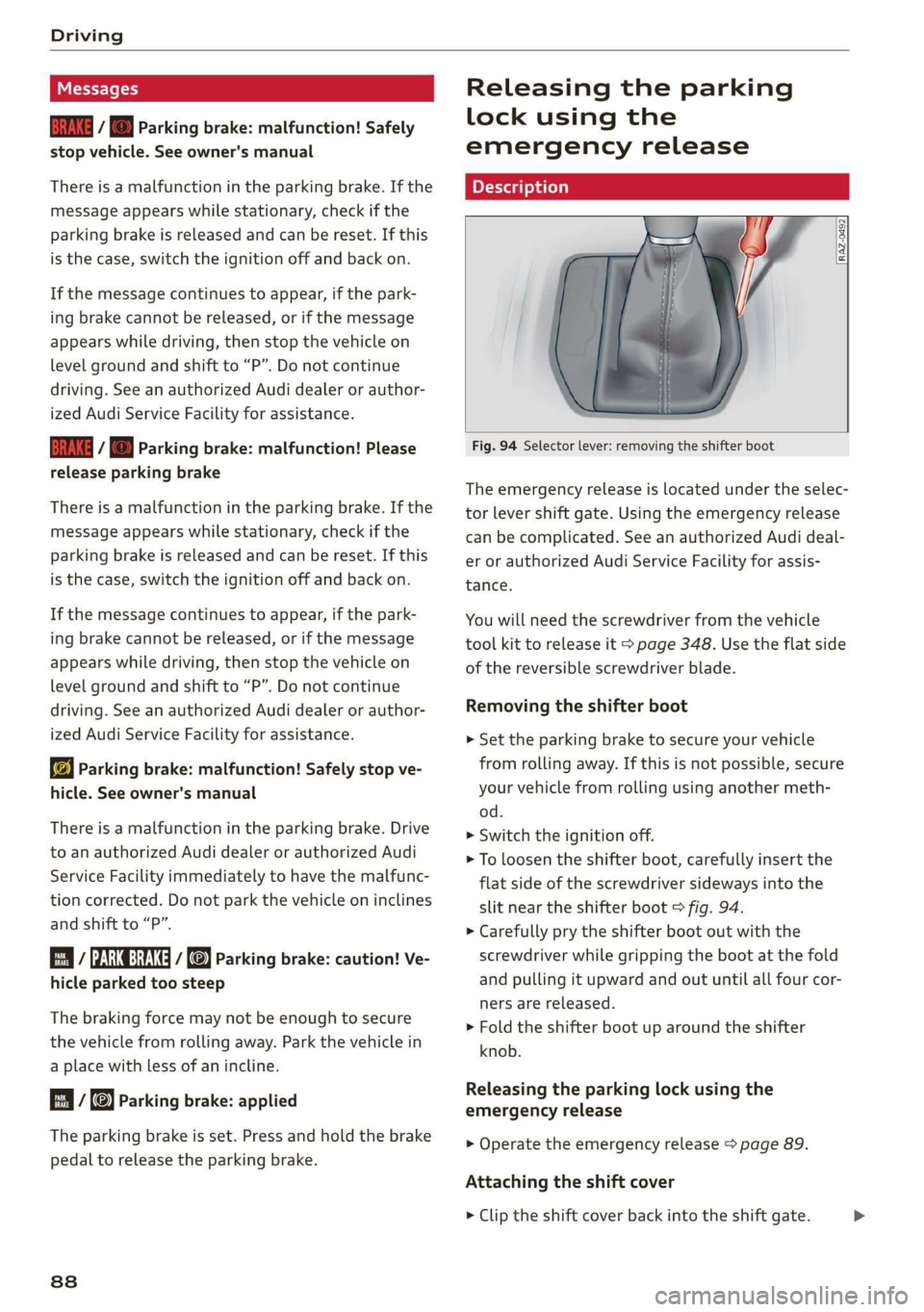
RAZ-0492
Fig. 94 Selector lever: removing the shifter boot
The emergency release is located under the selec-
tor lever shift gate. Using the emergency release
can be complicated. See an authorized Audi deal-
er or authorized Audi Service Facility for assis-
tance.
You will need the screwdriver from the vehicle
tool kit to release it > page 348. Use the flat side
of the reversible screwdriver blade.
Removing the shifter boot
> Set the parking brake to secure your vehicle
from rolling away. If this is not possible, secure
your vehicle from rolling using another meth-
od.
> Switch the ignition off.
> To loosen the shifter boot, carefully insert the
flat side of the screwdriver sideways into the
slit near the shifter boot > fig. 94.
> Carefully pry the shifter boot out with the
screwdriver while gripping the boot at the fold
and pulling it upward and out until all four cor-
ners are released.
> Fold the shifter boot up around the shifter
knob.
Releasing the parking lock using the
emergency release
> Operate the emergency release > page 89.
Attaching the shift cover
> Clip the shift cover back into the shift gate.
Page 91 of 400
8V2012721BK
Driving
Z\ WARNING
— The parking lock may only be released using
the emergency release if the parking brake
is set. If it is not working, secure the vehicle
from rolling using the brake pedal or other
suitable means, such as blocking a front and
a rear wheel. An unsecured vehicle may roll
away, which increases the risk of an acci-
dent.
— Only activate the emergency release while
ona level surface or a slight slope.
—To reduce the risk of an accident, you must
not drive when the emergency release is ac-
tivated.
Emergency release operation
®@
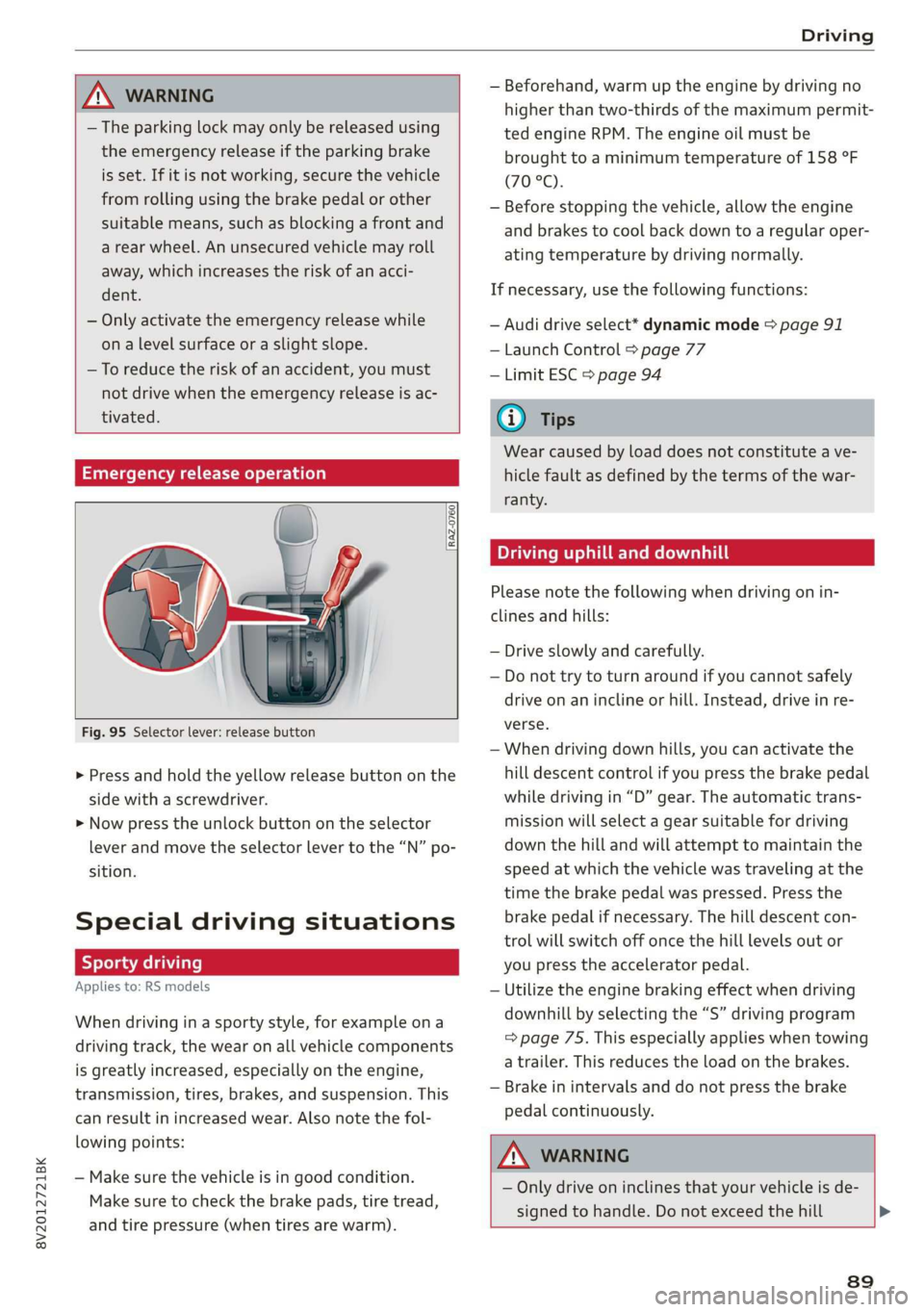
RAZ-0760
Fig. 95 Selector lever: release button
> Press and hold the yellow release button on the
side with a screwdriver.
> Now press the unlock button on the selector
lever and move the selector lever to the “N” po-
sition.
Special driving situations
Sy Toa AS ENA Las |
Applies to: RS models
When driving in a sporty style, for example ona
driving track, the wear on all vehicle components
is greatly increased, especially on the engine,
transmission, tires, brakes, and suspension. This
can result in increased wear. Also note the fol-
lowing points:
— Make sure the vehicle is in good condition.
Make sure to check the brake pads, tire tread,
and tire pressure (when tires are warm).
— Beforehand, warm up the engine by driving no
higher than two-thirds of the maximum permit-
ted engine RPM. The engine oil must be
brought to a minimum temperature of 158 °F
(70°C).
— Before stopping the vehicle, allow the engine
and brakes to cool back down to a regular oper-
ating temperature by driving normally.
If necessary, use the following functions:
— Audi drive select* dynamic mode = page 91
— Launch Control > page 77
— Limit ESC > page 94
@® Tips
Wear caused by load does not constitute a ve-
hicle fault as defined by the terms of the war-
ranty.
Driving uphill and downhill
Please note the following when driving on in-
clines and hills:
— Drive slowly and carefully.
— Do not try to turn around if you cannot safely
drive on an incline or hill. Instead, drive in re-
verse.
— When driving down hills, you can activate the
hill descent control if you press the brake pedal
while driving in “D” gear. The automatic trans-
mission will select a gear suitable for driving
down the hill and will attempt to maintain the
speed at which the vehicle was traveling at the
time the brake pedal was pressed. Press the
brake pedal if necessary. The hill descent con-
trol will switch off once the hill levels out or
you press the accelerator pedal.
— Utilize the engine braking effect when driving
downhill by selecting the “S” driving program
=> page 75. This especially applies when towing
a trailer. This reduces the load on the brakes.
— Brake in intervals and do not press the brake
pedal continuously.
A WARNING
— Only drive on inclines that your vehicle is de-
signed to handle. Do not exceed the hill >
89
Page 107 of 400
8V2012721BK
High-voltage system
> Unlock the vehicle if necessary > page 25.
> Make sure that the selector lever is in the “P”
position, the parking brake is set, and drive
ready mode is switched off > page 71.
> Turn the lock until it is vertical to open the cov-
er on the charging unit > fig. 102.
> Slide the cover carefully to the side if necessary.
> Remove the lock on the charging port
> fig. 103.
» Insert the plug @) or @) into the socket
=> page 101, fig. 96.
> Plug the vehicle charging connector ()
=> page 101, fig. 96 into the vehicle charging
port > fig. 103. The charging process starts au-
tomatically if no charging timer is set.
@) Tips
Remove ice and snow from the cover using a
hand brush and solvent-free deicing spray.
Audi e-tron compact
charging system
Charging overview
Applies to: vehicles with Audi e-tron compact charging sys-
tem
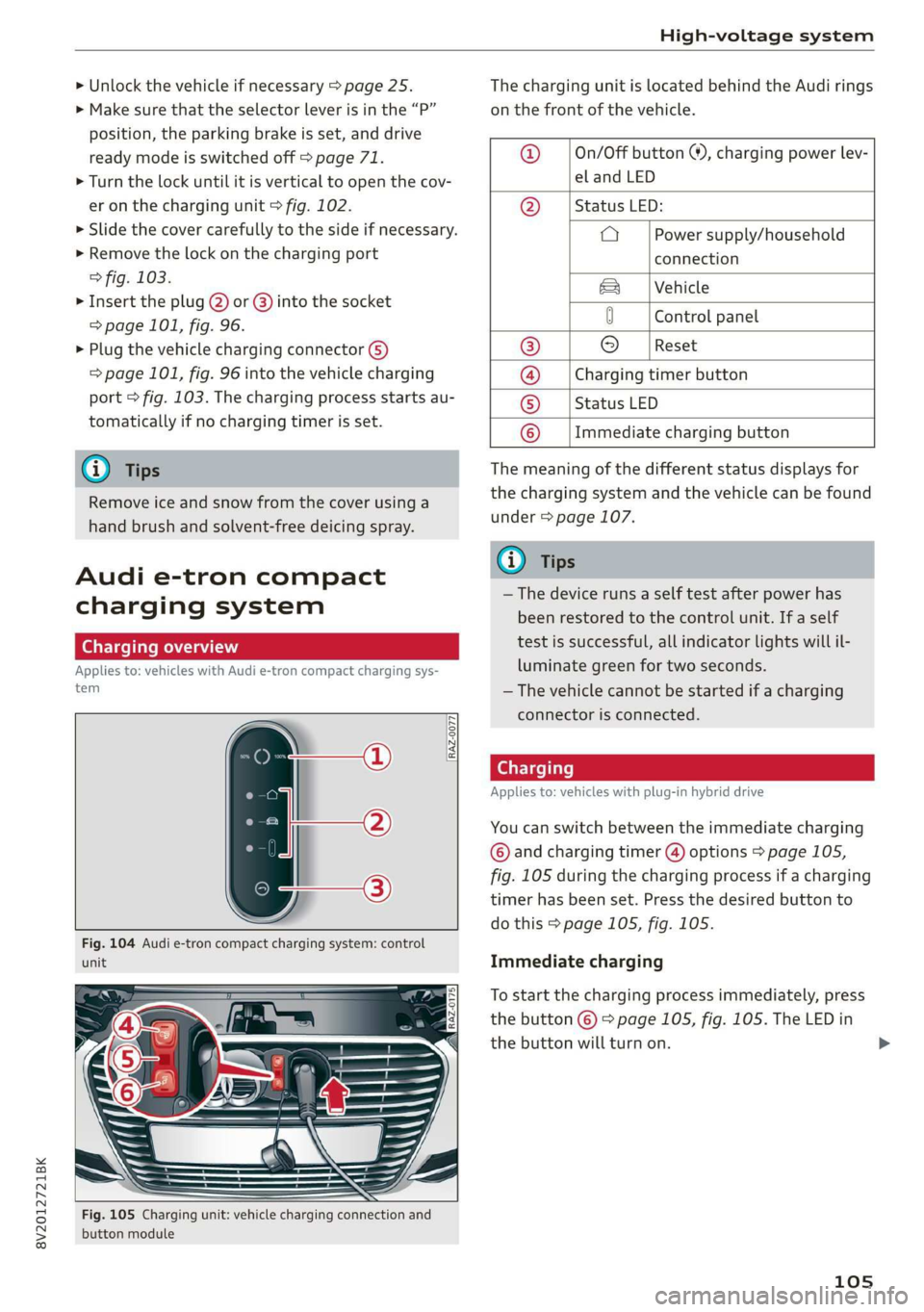
RAZ-0077,
unit
Fig. 105 Charging unit: vehicle charging connection and
button module
The charging unit is located behind the Audi rings
on the front of the vehicle.
@ ___|On/Off button ®, charging power lev-
el and LED
@ __ | Status LED:
a Power supply/household
connection
& | Vehicle
0 Control panel
® © [Reset
@ __ |Charging timer button
© __ |Status LED
© __ |Immediate charging button
The meaning of the different status displays for
the charging system and the vehicle can be found
under > page 107.
(i) Tips
— The device runs a self test after power has
been restored to the control unit. If a self
test is successful, all indicator lights will il-
luminate green for two seconds.
— The vehicle cannot be started if a charging
connector is connected.
Cee Testis)
Applies to: vehicles with plug-in hybrid drive
You can switch between the immediate charging
© and charging timer @) options > page 105,
fig. 105 during the charging process if a charging
timer has been set. Press the desired button to
do this > page 105, fig. 105.
Immediate charging
To start the charging process immediately, press
the button © % page 105, fig. 105. The LED in
the button will turn on.
105
>
Page 116 of 400
Trailer towing
Exterior lighting
Follow the legal regulations regarding the light-
ing equipment on your trailer. Contact an author-
ized Audi dealer or authorized Audi Service Facili-
ty for more information.
Before you start driving, check all lighting equip-
ment on the trailer while it is hitched to the vehi-
cle.
The headlight range control automatically ad-
justs the light range of the headlights.
Safety chains
Make sure the safety chains are correctly applied
when pulling a trailer. The chains should hang
enough so that the trailer can drive around
curves. However, they must not touch the
ground.
G) Tips
— Block the wheels with chocks when parking
on inclines if the trailer is loaded.
— Having the vehicle inspected between the
inspection intervals is recommended if you
tow a trailer frequently.
— Avoid driving with a trailer during the vehi-
cle break-in period.
Driving with a trailer
Driving with a trailer requires extra caution.
Speed
Adhere to the legal speed limits. Follow the legal
regulations specific to the country.
As the speed increases, the driving stability of
the trailer decreases. Therefore you should not
exceed the maximum legal speed limit when
there are unfavorable road, weather, and/or wind
conditions. This especially applies when driving
downhill.
Hill
When you start driving uphill or downhill, trailers
may tilt or sway sooner than when driving ona
level surface. If small swaying movements have
already occurred, you can stabilize the trailer by
114
firmly braking immediately. Never attempt to
“straighten out” the trailer by accelerating.
Downshift before driving on hills to utilize the en-
gine braking effect > A\.
Brakes
When using a trailer with overrun brakes, first
brake gently then quickly. This reduces the risk of
jerking while braking if the trailer wheels lock up.
Engine coolant temperature
Pay attention specifically to the coolant tempera-
ture display when there are high outside temper-
atures, and when driving on long inclines
=> page 15. Shift to a higher gear in a timely man-
ner.
Z\ WARNING
Constant braking causes the brakes to over-
heat and can substantially reduce braking per-
formance, increase braking distance, or cause
complete failure of the brake system.
Page 127 of 400
8V2012721BK
Assist systems
This message appears if the sensor view is ob-
structed, for example by leaves, snow, heavy
spray or dirt. Clean the sensor > page 119,
fig. 109.
ACC: currently unavailable. Incline too steep
The road exceeds the maximum possible angle
for safe adaptive cruise control operation. The
adaptive cruise control cannot be switched on.
ACC: only available in D, Sor M
The adaptive cruise control system only works in
the specified selector lever position. Select the
respective selector lever position.
ACC: parking brake applied
The adaptive cruise control system switches off
automatically if the parking brake is set. The
adaptive cruise control is available again after re-
leasing the parking brake.
ACC: currently unavailable. Stabilization
control input
This message appears if the Electronic Stabiliza-
tion Control (ESC) is taking action to stabilize the
vehicle. In this case, adaptive cruise control
switches off automatically.
ACC: Please take over!
This message appears if the vehicle rolls back
when starting on a slight incline, even though
ACC is active. Press the brake pedal to prevent
the vehicle from rolling or starting to move.
ACC: currently unavailable. Park assist active
The systems switch off when Park assist* is ac-
tive. The systems are available again after com-
pleting the parking process.
Distance warning: malfunction! Please contact
Service
The system cannot guarantee that it will detect
vehicles correctly and it has switched off. The ra-
dar sensor was moved or is faulty. Drive to an au-
thorized Audi dealer or authorized Audi Service
Facility immediately to have the malfunction cor-
rected.
Distance warning: currently unavailable. Sensor
view limited due to surroundings.
This message appears if the sensor view is ob-
structed, for example by leaves, snow, heavy
spray or dirt. Clean the sensor > page 119,
fig. 109.
Distance warning: currently unavailable. See
owner's manual
This message appears if the system has a tempo-
rary failure. If this occurs multiple times, drive to
an authorized Audi dealer or authorized Audi
Service Facility immediately to have the malfunc-
tion corrected.
Fasten seat belt
The system is not completely available if the driv-
er's seat belt is unfastened.
Stat. obj. ahead
This message appears if you would like to switch
the system on and there is a stationary object di-
rectly in front of your vehicle.
Door open
The system is not available when the vehicle is
stationary and the driver's door is open.
Audi pre sense
Introduction
Applies to: vehicles with Audi pre sense
Within the limits of the system, the pre sense
functions can initiate measures in particularly
dangerous situations to protect the vehicle pas-
sengers and other road users.
— Due to the interlinking of various vehicle sys-
tems, critical driving situations can be detected
by pre sense basic and measures for preventa-
tive occupant protection are can be initiated.
— The pre sense front uses the data from the ra-
dar sensors and calculates the probability of an
accident > page 119. An impending collision
with vehicles can be detected within the limits
of the system. In this case, the system warns
the driver visually, acoustically and with a jerk
on the brakes if necessary. If needed, it can ini-
tiate a partial or full deceleration to reduce the
collision speed or to avoid the collision under
certain circumstances. In conjunction with pre >
125
Page 136 of 400

Assist systems
G) Tips
— Side assist is not active while you are mak-
ing the adjustment.
— Your settings are automatically stored and
assigned to the remote control key being
used.
RET oa ar lie 4
Applies to: vehicles with rear cross-traffic assist
1. S 2
= + oO
Fig. 128 Example display
Fig. 129 Infotainment system: rear cross-traffic assist dis-
play
Activating rear cross-traffic assist
The rear cross-traffic assist is activated automati-
cally if you turn on the parking aid > page 136 or
shift into reverse gear.
The rear cross-traffic assist can warn the driver of
a potential collision with approaching cross-traf-
fic when driving in reverse at speeds up to ap-
proximately 7 mph (12 km/h). Within its limits,
the system monitors the areas behind and next
to the vehicle using the radar sensors when leav-
ing a parking space > page 132, fig. 127. Moving
objects that are approaching, such as cars, are
detected > fig. 128.
If the system detects critical cross traffic when
backing out of a parking space, it will react as fol-
lows:
134
— Visual indicator: an indicator appears in the In-
fotainment system display with a red arrow
symbol. The arrow points in the direction from
which the object is approaching > fig. 129.
— Audible warning signal: a continuous tone may
sound as an additional indicator when driving in
reverse.
— Automatic brake activation: a brief activation
of the brakes may also warn you of a potential
collision with an approaching object.
The audible warning signal and the automatic
brake activation occur only when driving in re-
verse.
iN WARNING
—The rear cross-traffic assist is an assist sys-
tem and cannot prevent a collision by itself.
The driver must always intervene. The driver
is always responsible for braking at the cor-
rect
time.
— Please note that the rear cross-traffic assist
may activate the brakes unexpectedly. Se-
cure any cargo that you are transporting to
reduce the risk of damage or injury.
— An additional brake activation may be trig-
gered within 10 seconds after an automatic
brake activation.
—If there is an acoustic warning signal from
the rear cross-traffic assist, then the parking
system may not warn you of detected obsta-
cles under certain circumstances.
— The view of the radar sensors may be im-
paired by leaves, snow, heavy spray or dirt.
Clean the area in front of the sensors
=> page 132, fig. 127.
ZA WARNING
— The rear cross-traffic assist will not provide
alerts about people and cannot warn you
about every type of approaching objects,
such as cyclists. Always monitor the traffic
as well as the vehicle's surroundings with di-
rect eye contact.
— The rear cross-traffic assist will not provide
alerts if your vehicle is parallel or diagonally
Page 137 of 400

8V2012721BK
Assist systems
parked or if your vehicle is pulled too far in-
to the parking space so that it is hidden by
adjacent vehicles.
@) Note
Also read the information in >@ in General
information on page 133.
@ Tips
— You can cancel the automatic brake activa-
tion with increasing braking force if you ap-
ply the brakes yourself or accelerate consid-
erably.
—In some situations, rear cross-traffic assist
may warn you even if there is no cross traffic
in a critical area, for example when backing
into a parking space or maneuvering.
— The rear cross-traffic assist also switches off
when you switch off the ESC.
— For an explanation on conformity with the
FCC regulations in the United States and the
Industry Canada regulations, see
=> page 377.
Applies to: vehicles with Audi side assist
& Audi side assist: malfunction! Please contact
Service
The system cannot guarantee that it will detect
vehicles correctly and it has switched off. The
sensors have been moved or are faulty. Have the
system checked by an authorized Audi dealer or
authorized Audi Service Facility soon.
Audi side assist: currently unavailable. No
sensor view
Audi side assist: currently unavailable. Sen-
sor vision restricted due to surroundings. See
owner's manual
The radar sensor vision is impaired. Do not cover
the area in front of the sensors with bike wheels,
stickers, dirt or other objects. Clean the area cov-
ering the sensors, if necessary > page 132,
fig. 127.
Audi side assist: currently unavailable
Side assist cannot be switched on at this time be-
cause there is a malfunction (for example, the
battery charge level may be too low).
Rear parking aid: obstacle detection restrict-
ed
The rear cross-traffic assist is not available. Ei-
ther the ESC is switched off, or the radar sensors
may be covered by a bike rack, stickers, leaves,
snow or other objects. Switch the ESC on, or
clean the area in front of the sensors if necessary
= page 132, fig. 127. If this message continues
to be displayed, drive immediately to an author-
ized Audi dealer or authorized Audi Service Facili-
ty to have the malfunction repaired.
135
Page 140 of 400

Parking aid
Switching on and off
Applies to: vehicles with parking system plus/park assist
2 + 3
S| 2 ©
a.
Fig. 132 Center console: parking aid button
Switching on and off
Requirement: the vehicle speed must be under
approximately 6 mph (10 km/h).
> Press the Pvt button in the center console. A
short confirmation tone sounds and the LED in
the button turns on.
Switching on automatically
The system switches on automatically when re-
verse gear is engaged while the engine is run-
ning. A brief tone will sound.
If Activate automatically is switched on in the
Infotainment system and if the vehicle ap-
proaches an obstacle at speeds under approxi-
mately 6 mph (10 km/h), the parking aid will
switch on automatically. Audible signals will
sound once the obstacle is within the sensor de-
tection area.
Switching off automatically
The system switches off automatically when driv-
ing forward faster than 6 mph (10 km/h).
@ Tips
If you press the Ps button to switch the park-
ing aid off, it can only be reactivated automat-
ically when one of the following conditions is
met:
— The vehicle speed exceeds 6 mph (10 km/h)
— The ignition is switched off and back on
again
— The parking brake is set and then released
138
—The "P" selector lever position is engaged
and released again
Rearview camera
Introduction
Applies to: vehicles with rearview camera
B8V-0629
Fig. 133 Illustration: cross parking
The rearview camera helps you to park or maneu-
ver using the orientation lines.
Cee Mc Lo)
Applies to: vehicles with rearview camera
B8V-0522
Fig. 134 Area covered @ and area not covered (2) by the
rearview camera (example)
'8V-0099 Bi
Fig. 135 Luggage compartment lid: location of the rear-
view camera (example)