parking brake AUDI A3 2020 Owner´s Manual
[x] Cancel search | Manufacturer: AUDI, Model Year: 2020, Model line: A3, Model: AUDI A3 2020Pages: 400, PDF Size: 107.47 MB
Page 4 of 400
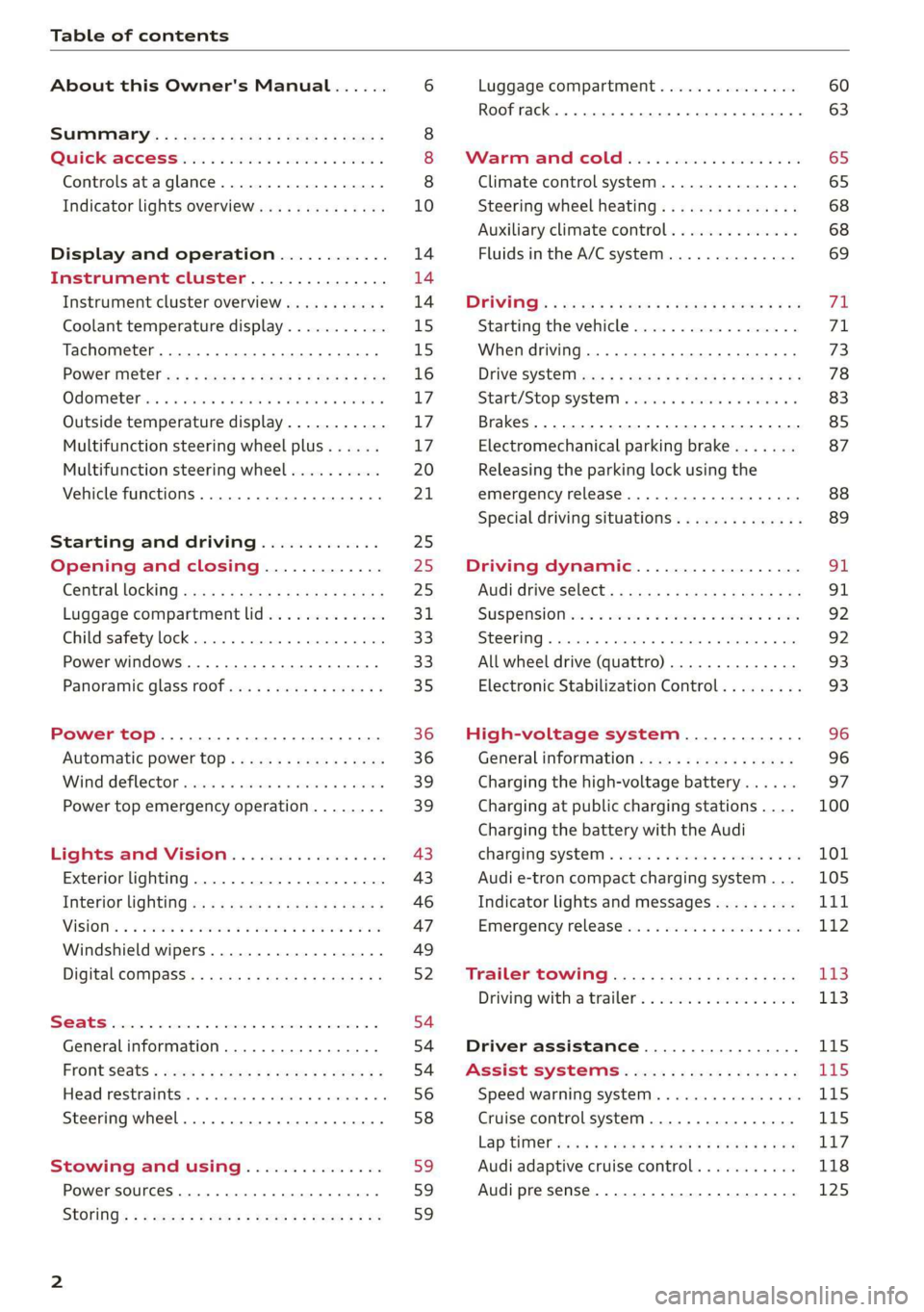
Table of contents
About this Owner's Manual......
SUMIMALY: ; « ss6% : osen ss sean cs poe s
QC CCeS Skis: si esis a 6 ores os ewe
Controls ataglance..................
Indicator lights overview...........0.
Display and operation............
Instrument cluster...............
Instrument cluster overview...........
Coolant temperature display...........
Tachometer.......... 0.0 eee eee eee
Power iiet@l ss « + wes + s wees 2 x ews 2 ae
Odometer icc oo sisiecs a wrens eo ooarae eo were
Outside temperature display...........
Multifunction steering wheel plus......
Multifunction steering wheel..........
Vehicle functions. ............000 000s
Starting and driving.............
Opening and closing.............
Central locking 2.2% ieee seven a eevee
Luggage compartment lid.............
Child safety lock... 0... 0... cece eee ee
Power windows..............2000005
Panoramic glass TOOf sis s « sayoe « x eoven xs
Power top........... 0. cece eee eee
Automatic power top.................
Wind deflector sicavi x 0 snare a 0 wesc a 0 acaven
Power top emergency operation........
Lights and Vision.................
Exterior lighting...................4.
Interior Ughtingcs « ¢ cean a cas cs ews 5
VISIONS « & comes oo man a 8 eee a a oa 3 oe
Windshield wipers...................
Digital compass.............0.-00 00
PrOntsS@ats = wise s x esven = ¢ eee + & ete os
Head restraimtst. +. coms + 0 anseans 4 2 omamm © # »
Steering wheel............00 2. eee ee
Stowing and using...............
Power sources ......... 00-00 e eee eaee
StOrinG’: « e meme =e sees + Sees Gy ee & Ee
10
14 14 14
15
15
16 17 17 17
20
21
25
25
25 31 33 33 35
36 36 39 39
43
43
46
47
49
52
54
54
54
56 58 59 59 59
Luggage compartment ...............
Roof rack... eee eee
MV APEC OUE 05 3 3 aise ¥ & maseen @ owe
Climate control system...............
Steering wheel heating.............-.
Auxiliary climate control.............-
Fluids in the A/C system. ...........-.
DFIVIFIG:: « yeas os « wow o ¢ Rome se RED oc ow
Starting the vehicle..................
Electromechanical parking brake.......
Releasing the parking lock using the
emergency release............2..000.
Special driving situations..............
Driving dynamic..................
Audi drive'select:, .c.icisiseicascnaene
SUSPONSIOM ac « 2 covsces so cmswsm oo soso oo cee
SEOORIIAG » sinsoes ue vanes a» wisenge ou upnenie & ¥ ote
All wheel drive (quattro)..............
Electronic Stabilization Control.........
High-voltage system.............
General information.................
Charging the high-voltage battery......
Charging at public charging stations....
Charging the battery with the Audi
ChargingsySteM « wsccuc x x sewers a w anaes vv oe
Audi e-tron compact charging system...
Indicator lights and messages.........
Emergency releases. & iseiis 6 + wae w 6 wos
Trailer towing....................
Driving with atrailer.................
Driver assistance.................
Assist systems...................
Speed warning system..............--
Cruise control system............0005
Lap timer eens so cong s pees ss ees oo eee
Audi adaptive cruise control...........
Audi presense............-.002-000-
60
63
65
65
68 68 69
FE 71 73
78
83 85
87
88 89
SI 91
92.
92
93 93
96 96 97
100
Page 11 of 400
8V2012721BK
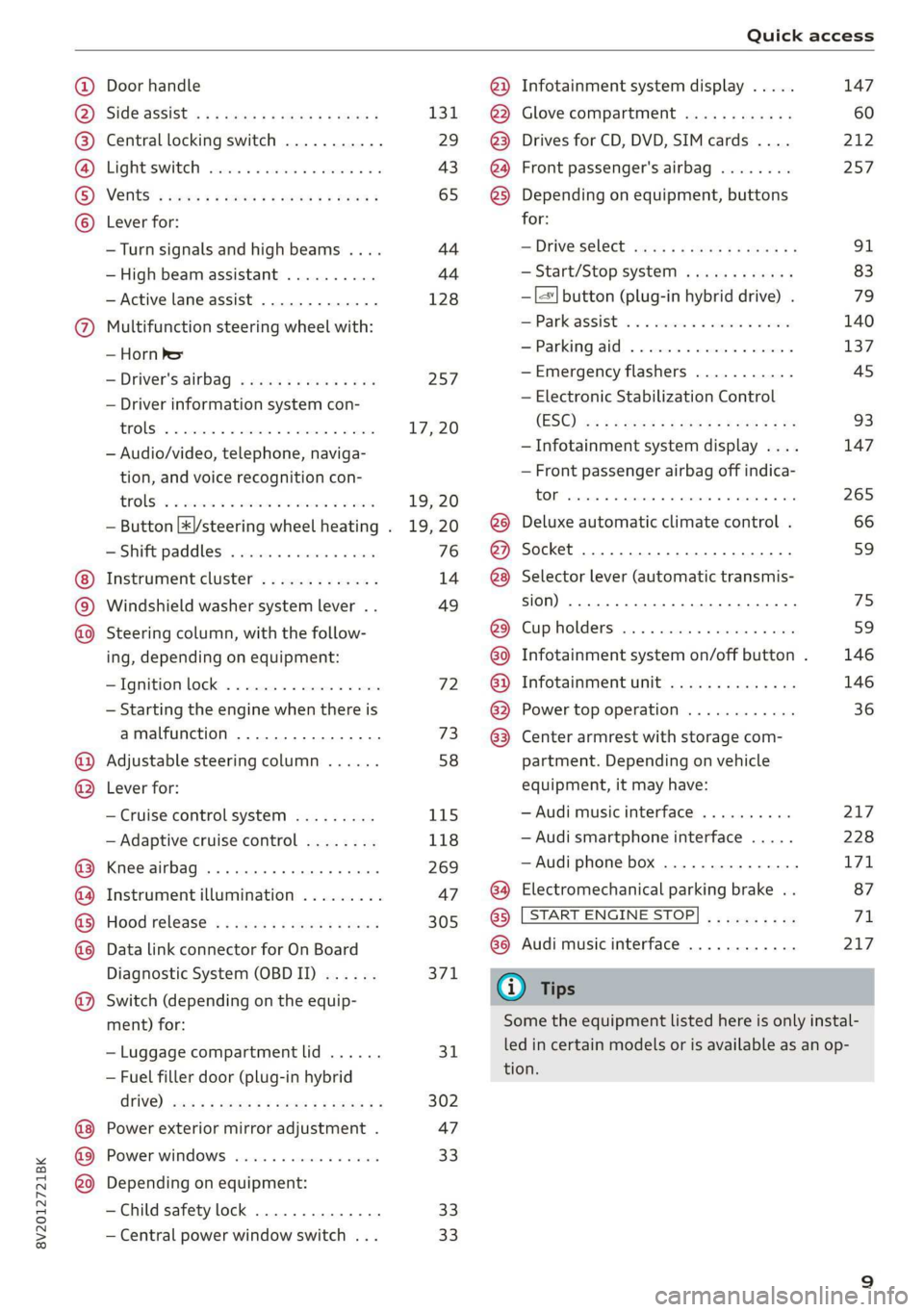
Quick access
Door handle
SIdG-ASSISE « = = ems 5 = saws 5 2 owE «
Central locking switch ...........
Lighteswiteh ccs xo seers oo ewenens « «0
VENUS! « vases 5 cee 2 o Hee © © ew
Lever for: ©OOOCOO
—Turn signals and high beams ....
— High beam assistant ..........
— Active lane assist .............
9 Multifunction steering wheel with:
— Horn be
—Driver's airbag ...............
— Driver information system con-
FENOUS) oo secrece + a sasmeie «3 smote = ome
— Audio/video, telephone, naviga-
tion, and voice recognition con-
EOUS! © 2 secs 2 awsenw 2 8 somes 3 3 veses
— Button [*|/steering wheel heating .
— Shift paddles ................
Instrument cluster .............
Windshield washer system lever ..
O©®@ Steering column, with the follow-
ing, depending on equipment:
IQMitiom lock: « s seis « svinne 0 seme
— Starting the engine when there is
amalfunction ................
Adjustable steering column ......
Lever for: ®®
— Cruise control system .........
— Adaptive cruise control ........
Knee airbag ......... cee eee ae
Instrument illumination .........
Hood release? s « swas s emew se ews
Data link connector for On Board
Diagnostic System (OBDII) ......
Switch (depending on the equip-
ment) for:
©
OO88O®@
— Luggage compartment lid ......
— Fuel filler door (plug-in hybrid
CriVe) ws 2 2 wee s y cous ye eee oe
Power exterior mirror adjustment .
Power windows ...............-
©O® Depending on equipment:
—Child safety lock ..............
— Central power window switch ...
131
29
43
65
44 44
128
257
17, 20
19, 20
19, 20
76
14
49
72 73
58
115
118
269
47
305 371
31
302
47
33 33 33
@) Infotainment system display .....
@) Glove compartment ............
@3) Drives for CD, DVD, SIM cards ....
@) Front passenger's airbag ........
@3) Depending on equipment, buttons
for:
— Driveselect® scajs ss sues eo gees ee
— Start/Stop system ............
—|<"| button (plug-in hybrid drive) .
EParkcassist « « sss os sexes vo come
—Parkingaid ..................
—Emergency flashers ...........
— Electronic Stabilization Control
(ES©) wp < 2 ume = seeps = ome & ¥ ne
— Infotainment system display ....
— Front passenger airbag off indica-
EOI sansae +o: senses 4 «aimee « neues © ese
@8 Deluxe automatic climate control .
@) Socket ..............02. 220
@8) Selector lever (automatic transmis-
(0) 1)
@) Cupholders ..............0000-
G0 Infotainment system on/off button .
@) Infotainment unit ..............
@ Power top operation ............
63. Center armrest with storage com-
partment. Depending on vehicle
equipment, it may have:
— Audi music interface ..........
— Audi smartphone interface .....
—Audi phone box ...............
G4 Electromechanical parking brake . .
@) [START ENGINE STOP
G8 Audi music interface ............
G) Tips
147
212
257
91
83
79
140 137
45
93
147
265
66 59
75
59
146 146
36
217 228
171
87
71
217
Some the equipment listed here is only instal-
led in certain models or is available as an op-
tion.
Page 12 of 400
Quick access
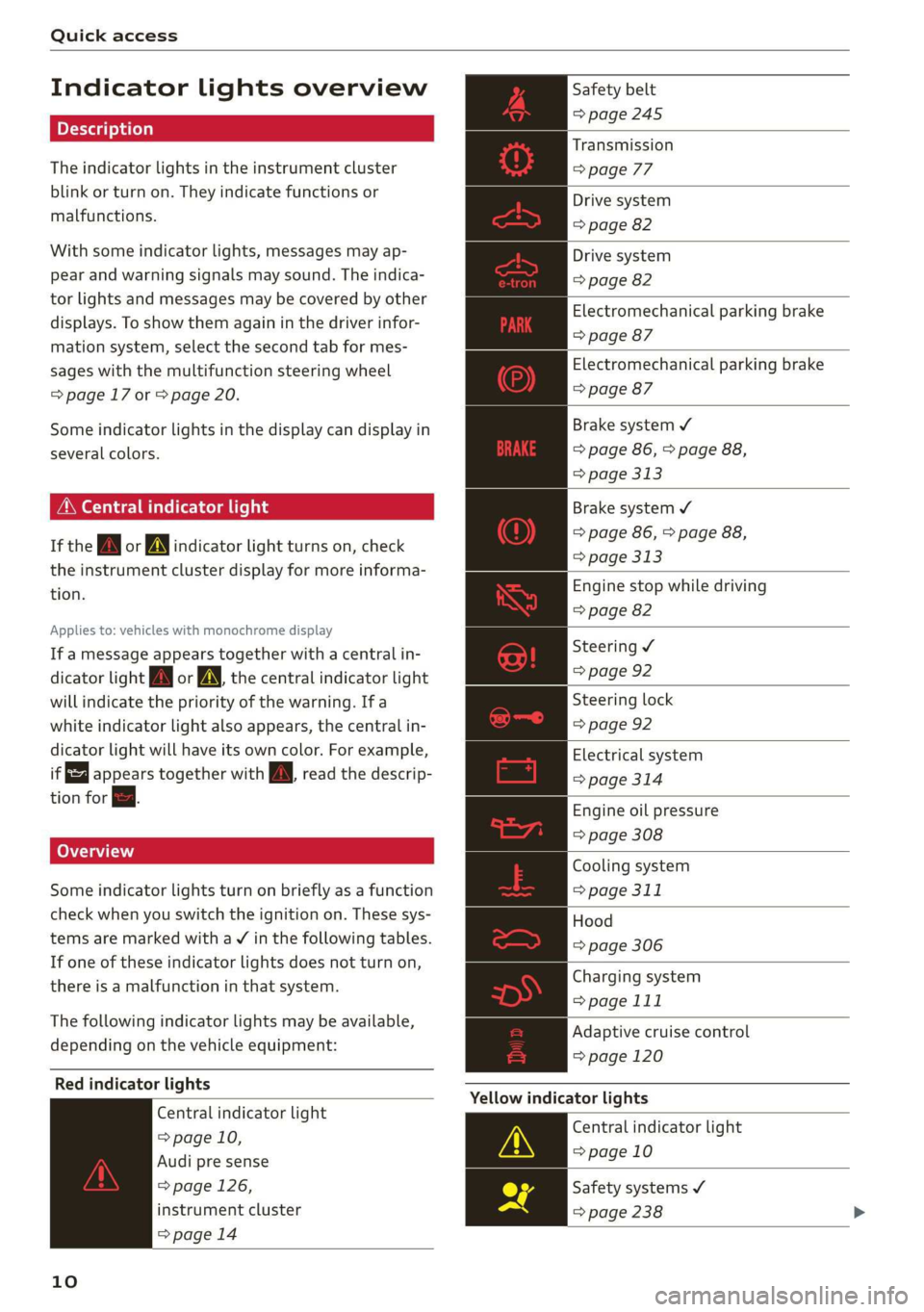
Indicator lights overview
The indicator lights in the instrument cluster
blink or turn on. They indicate functions or
malfunctions.
With some indicator lights, messages may ap-
pear and warning signals may sound. The indica-
tor lights and messages may be covered by other
displays. To show them again in the driver infor-
mation system, select the second tab for mes-
sages with the multifunction steering wheel
=> page 17 or > page 20.
Some indicator lights in the display can display in
several colors.
MMe O eel em lis
If the wa or MN indicator light turns on, check
the instrument cluster display for more informa-
tion.
Applies to: vehicles with monochrome display
If a message appears together with a central in-
dicator light A\ or A the central indicator light
will indicate the priority of the warning. Ifa
white indicator light also appears, the central in-
dicator light will have its own color. For example,
it appears together with Bw read the descrip-
tion for &.
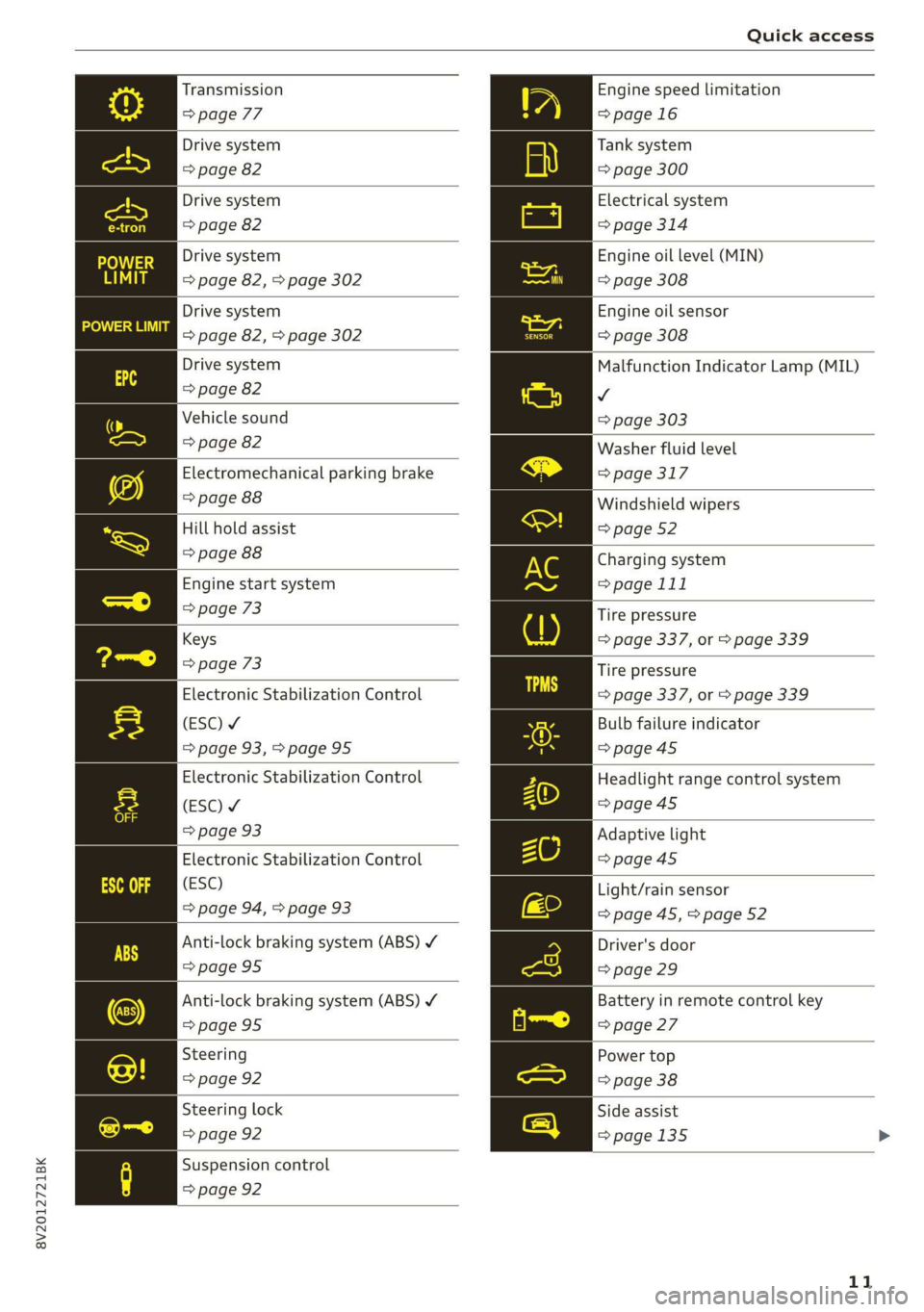
Some indicator lights turn on briefly as a function
check when you switch the ignition on. These sys-
tems are marked with a V in the following tables.
If one of these indicator lights does not turn on,
there is a malfunction in that system.
The following indicator lights may be available,
depending on the vehicle equipment:
Red indicator lights
Central indicator light
=> page 10,
Audi pre sense
=> page 126,
instrument cluster
=> page 14
10
Safety belt
=> page 245
Transmission
> page 77
Drive system
=> page 82
Drive system
=> page 82
Electromechanical parking brake
=> page 87
Electromechanical parking brake
=> page 87
Brake system ¥
=> page 86, > page 88,
=> page 313
Brake system ¥
=> page 86, > page 88,
> page 313
Engine stop while driving
=> page 82
Steering ¥
=> page 92
Steering lock
=> page 92
Electrical system
=> page 314
Engine oil pressure
=> page 308
Cooling system
=> page 311
Hood
=> page 306
Charging system
> page 111
Adaptive cruise control
=> page 120
Yellow indicator lights
Central indicator light
=> page 10
Safety systems ¥
=> page 238
Page 13 of 400
8V2012721BK
Quick access
Transmission
=> page 77
Drive system
=> page 82
Drive system
=> page 82
Drive system
=> page 82, > page 302
Drive system
=> page 82, > page 302
Drive system
=> page 82
Vehicle sound
=> page 82
Electromechanical parking brake
=> page 88
Hill hold assist
=> page 88
Engine start system
=> page 73
Keys
=> page 73
Electronic Stabilization Control
(ESC) ¥
=> page 93,>page 95
Electronic Stabilization Control
(ESC) ¥
=> page 93
Electronic Stabilization Control
(ESC)
=> page 94, > page 93
Anti-lock braking system (ABS) ¥
=>page 95
Anti-lock braking system (ABS) Y
=> page 95
Steering
=> page 92
Steering lock
=> page 92
Suspension control
=> page 92
Engine speed limitation
=>page 16
Tank system
=> page 300
Electrical system
=> page 314
Engine oil level (MIN)
=> page 308
Engine oil sensor
=> page 308
Malfunction Indicator Lamp (MIL)
v
=> page 303
Washer fluid level
=> page 317
Windshield wipers
=> page 52
Charging system
=> page 111
Tire pressure
=> page 337, or > page 339
Tire pressure
=> page 337, or > page 339
Bulb failure indicator
=> page 45
Headlight range control system
=>page 45
Adaptive light
=>page 45
Light/rain sensor
=> page 45, > page 52
Driver's door
=> page 29
Battery in remote control key
=> page 27
Power top
=> page 38
Side assist
=>page 135
11
Page 14 of 400
Quick access
Active lane assist
=> page 129
pre sense
=>page 128
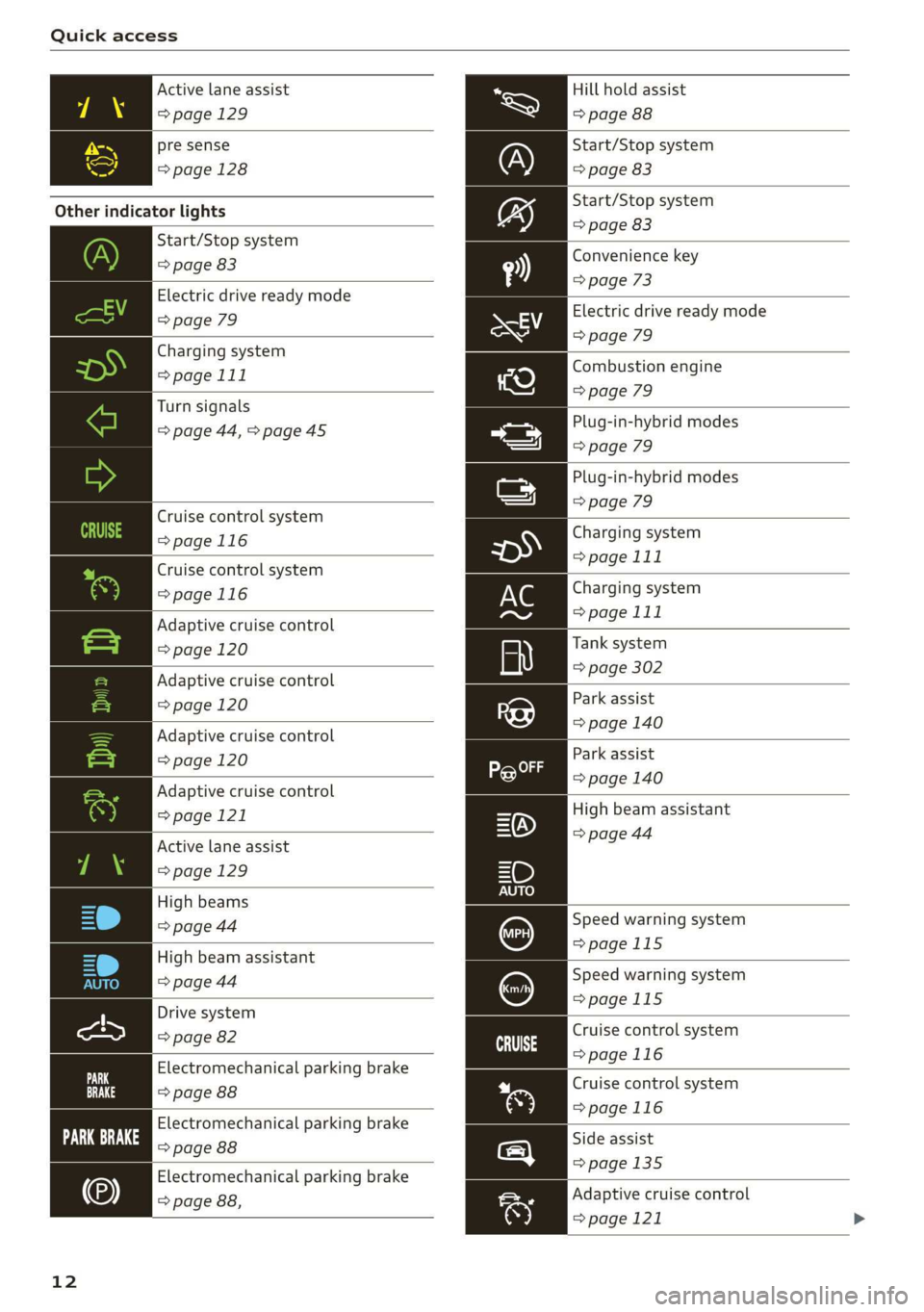
Other indicator lights
Start/Stop system
=> page 83
Electric drive ready mode
=> page 79
Charging system
=> page 111
Turn signals
=> page 44, > page 45
Cruise control system
=>page 116
Cruise control system
=>page
116
Adaptive cruise control
=> page 120
Adaptive cruise control
=> page 120
Adaptive cruise control
=> page 120
Adaptive cruise control
=> page 121
Active lane assist
=> page 129
High beams
=> page 44
High beam assistant
=> page 44
Drive system
=> page 82
Electromechanical parking brake
=> page 88
Electromechanical parking brake
Fe ove ae
Electromechanical parking brake
=> page 88,
12
Hill hold assist
=> page 88
Start/Stop system
=> page 83
Start/Stop system
=> page 83
Convenience key
=> page 73
Electric drive ready mode
=> page 79
Combustion engine
=> page 79
Plug-in-hybrid modes
=> page 79
Plug-in-hybrid modes
=> page 79
Charging system
=> page 111
Charging system
=> page 111
Tank system
=> page 302
Park assist
=> page 140
Park assist
=> page 140
High beam assistant
=> page 44
Speed warning system
=>page 115
Speed warning system
=>page 115
Cruise control system
>page 116
Cruise control system
>page 116
Side assist
=>page 135
Adaptive cruise control
=> page 121
Page 41 of 400
8V2012721BK
Power top
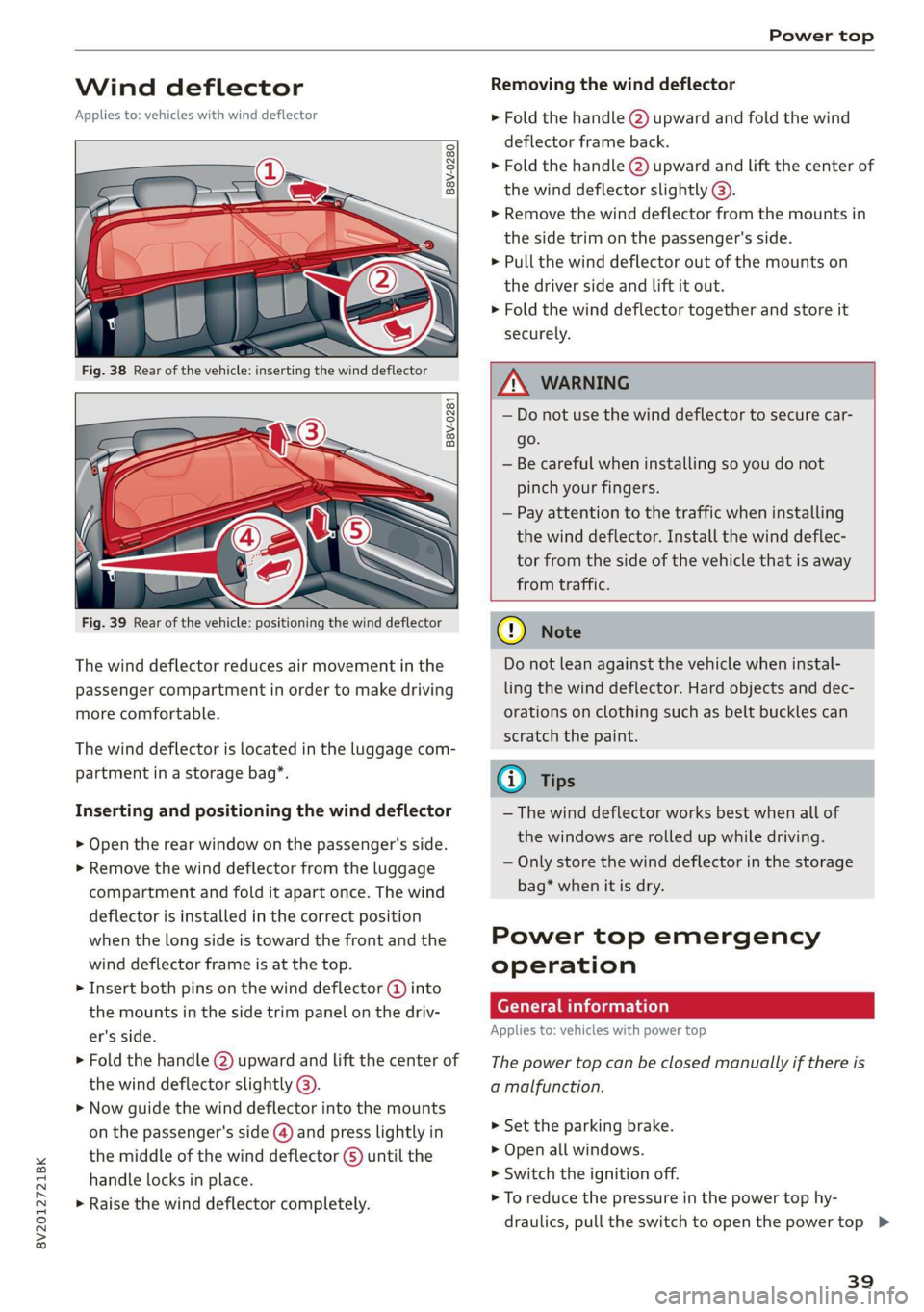
Wind deflector
Applies to: vehicles with wind deflector
ry o a
hg > & oO
Removing the wind deflector
> Fold the handle @) upward and fold the wind
deflector frame back.
> Fold the handle @) upward and Lift the center of
the wind deflector slightly @).
> Remove the wind deflector from the mounts in
the side trim on the passenger's side.
> Pull the wind deflector out of the mounts on
the driver side and lift it out.
> Fold the wind deflector together and store it
securely.
B8V-0281
as Sa
Fig. 39 Rear of the vehicle: positioning the wind deflector
The wind deflector reduces air movement in the
passenger compartment in order to make driving
more comfortable.
The wind deflector is located in the luggage com-
partment in a storage bag*.
Inserting and positioning the wind deflector
> Open the rear window on the passenger's side.
> Remove the wind deflector from the luggage
compartment and fold it apart once. The wind
deflector is installed in the correct position
when the long side is toward the front and the
wind deflector frame is at the top.
> Insert both pins on the wind deflector @ into
the mounts in the side trim panel on the driv-
er's side.
> Fold the handle @) upward and lift the center of
the wind deflector slightly @).
> Now guide the wind deflector into the mounts
on the passenger's side (@) and press lightly in
the middle of the wind deflector ©) until the
handle locks in place.
> Raise the wind deflector completely.
Z\ WARNING
— Do not use the wind deflector to secure car-
go.
— Be careful when installing so you do not
pinch your fingers.
— Pay attention to the traffic when installing
the wind deflector. Install the wind deflec-
tor from the side of the vehicle that is away
from traffic.
® Note
Do not lean against the vehicle when instal-
ling the wind deflector. Hard objects and dec-
orations on clothing such as belt buckles can
scratch the paint.
@ Tips
— The wind deflector works best when all of
the windows are rolled up while driving.
— Only store the wind deflector in the storage
bag* when it is dry.
Power top emergency
operation
General information
Applies to: vehicles with power top
The power top can be closed manually if there is
a malfunction.
> Set the parking brake.
> Open all windows.
> Switch the ignition off.
> To reduce the pressure in the power top hy-
draulics, pull the switch to open the power top >
39
Page 75 of 400
8V2012721BK
Driving
Switching the ignition on or off
If you would like to switch the ignition on or off
without starting the engine, follow these steps:
> Switching on: turn the key to position @.
> Switching off: turn the key to position ©).
ZA WARNING
—To reduce the risk of asphyxiation, never al-
low the engine to run in confined spaces.
— Never turn off the engine before the vehicle
has come to a complete stop. Switching it
off before the vehicle has stopped may im-
pair the function of the brake booster and
power steering. You would then need to use
more force to steer and brake the vehicle.
The fact that you cannot steer and brake as
usual may increase the risk of accidents and
serious
injuries.
— Never remove the ignition key from the igni-
tion lock while the vehicle is moving. Other-
wise, the steering lock could engage and you
would not be able to steer the vehicle, which
increases the risk of an accident.
@) Note
— Avoid high engine speed, full throttle, and
heavy engine load if the engine has not
reached operating temperature yet. You
could damage the engine.
— If the engine has been under heavy load for
an extended period of time, heat builds up
in the engine compartment after the engine
is switched off and there is a risk of damag-
ing the engine. For this reason, let the en-
gine run at idle for approximately two mi-
nutes before shutting it off.
@ Tips
— Brief noises are normal when starting and
stopping the vehicle and are no cause for
concern.
— For up to 10 minutes after stopping the en-
gine, the radiator fan may turn on again au-
tomatically or it may continue to run, even if
the ignition is switched off.
— It may not be possible to start the vehicle in
extremely low temperatures.
5 Engine start system: malfunction! Please
contact Service
There is a malfunction in the engine starting sys-
tem. Drive immediately to an authorized Audi
dealer or authorized Audi Service Facility to have
the malfunction repaired.
B Key not in vehicle?
2 Remote control key: key not detected. Is the
key
still in the vehicle?
The vehicle key was removed from the vehicle
while the engine is running. If the vehicle key is
no longer in the vehicle, you cannot switch the ig-
nition on or start the engine once you stop it. You
also cannot lock the vehicle from the outside.
Key not recognized. See owner's manual
Remote control key: hold back of key
against the designated area. See owner's man-
ual
The battery in the vehicle key may be drained or
there may be a malfunction. To start the vehicle,
you must also hold the vehicle key against the lo-
cation shown ?) © page 71, fig. 84.
If the malfunction remains, drive immediately to
an authorized Audi dealer or authorized Audi
Service Facility to have the malfunction correct-
ed.
When driving
Starting to drive, stopping, and parking
Starting from a stop
> Press and hold the brake pedal.
> Start the engine.
> Select a gear.
> Release the parking brake.
> Release the brake pedal. The vehicle may roll.
> Press the accelerator pedal to accelerate.
Stopping and parking
> Bring the vehicle to a full stop and press and
hold the brake pedal.
> Set the parking brake.
73
Page 76 of 400
Driving
> Select the “P” selector lever position to secure
the vehicle from rolling away.
> Turn the steering wheel when parking on in-
clines so that the wheels will roll into the curb
if the vehicle starts moving.
> Switch off the ignition before leaving the vehi-
cle.
On hills, activate the parking brake first and then
shift into the "P" selector lever position. This pre-
vents too much stress from being placed on the
locking mechanism.
ZA WARNING
— Always set the parking brake when leaving
your vehicle, even if for a short period of
time. If the parking brake is not set, the ve-
hicle could roll away, increasing the risk of
an accident.
— Do not leave your vehicle unattended while
the engine is running, because this increases
the risk of an accident.
— If the parking brake is set, it can release au-
tomatically when the accelerator pedal is
pressed. To reduce the risk of an accident,
do not inadvertently press the accelerator
pedal and always shift into “P” when the ve-
hicle is stopped.
— If you leave the vehicle, switch the ignition
off and take the key with you. This is espe-
cially important when leaving persons or an-
imals in the vehicle. Otherwise, the vehicle
could start unintentionally, the parking
brake could release, or electronic equipment
could activate, which increases the risk of an
accident.
— No persons or animals should be left in a
locked vehicle. Locked doors make it more
difficult for emergency workers to enter the
vehicle, which puts lives at risk.
— If you do not begin driving immediately af-
ter releasing the brake pedal, your vehicle
may begin to roll backward. Press the brake
pedal or set the parking brake immediately.
@) Note
If you have to stop on an incline, always press
the brake pedal to hold the vehicle in place to
74
reduce the risk of the vehicle rolling back-
ward. Do not try to hold the vehicle in place
by pressing and holding the accelerator pedal.
The transmission can overheat, which increas-
es the risk of damage.
Hill hold assist
If you take your foot off of the brake pedal when
driving on hills, the braking force will be held for
several seconds. At that time, you can start driv-
ing without the vehicle rolling backward.
Requirement: the driver's door must be closed,
the engine must be on, and the vehicle must be
traveling uphill.
> To activate hill hold assist, press and hold the
brake pedal for several seconds while the vehi-
cle is stationary.
Z\ WARNING
— If you do not begin driving immediately af-
ter releasing the brake pedal, your vehicle
may begin to roll backward. Press the brake
pedal
or set the parking brake immediately.
— The hill hold assist cannot hold the vehicle
on inclines in every scenario (for example,
on slippery or icy ground).
Messages
Bw Hill hold assist: unavailable
The hill hold assist is temporarily unavailable.
Press the brake pedal to secure the vehicle from
rolling away unintentionally.
Manual control!
The vehicle cannot be held in place automatically.
Press the brake pedal to secure the vehicle from
rolling away unintentionally.
Page 77 of 400
8V2012721BK
Driving
Gears and driving programs
RAZ-0405
HEeEes
D/S .
a
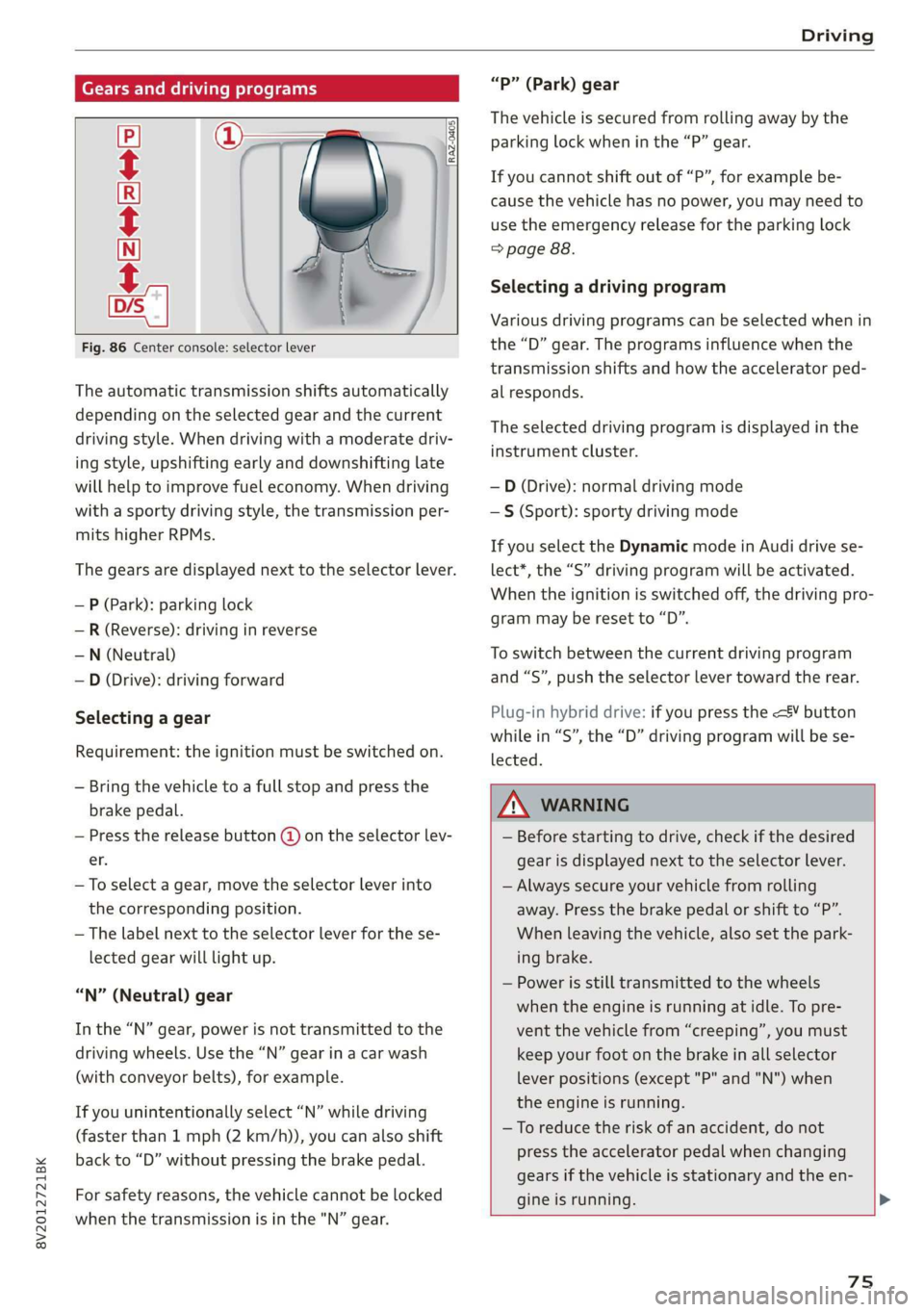
Fig. 86 Center console: selector lever
The automatic transmission shifts automatically
depending on the selected gear and the current
driving style. When driving with a moderate driv-
ing style, upshifting early and downshifting late
will help to improve fuel economy. When driving
with a sporty driving style, the transmission per-
mits higher RPMs.
The gears are displayed next to the selector lever.
— P (Park): parking lock
—R (Reverse): driving in reverse
—N (Neutral)
— D (Drive): driving forward
Selecting a gear
Requirement: the ignition must be switched on.
— Bring the vehicle to a full stop and press the
brake pedal.
— Press the release button (@) on the selector lev-
er.
—To select a gear, move the selector lever into
the corresponding position.
— The label next to the selector lever for the se-
lected gear will light up.
“N” (Neutral) gear
In the “N” gear, power is not transmitted to the
driving wheels. Use the “N” gear in a car wash
(with conveyor belts), for example.
If you unintentionally select “N” while driving
(faster than 1 mph (2 km/h)), you can also shift
back to “D” without pressing the brake pedal.
For safety reasons, the vehicle cannot be locked
when the transmission is in the "N” gear.
“Pp” (Park) gear
The vehicle is secured from rolling away by the
parking lock when in the “P” gear.
If you cannot shift out of “P”, for example be-
cause the vehicle has no power, you may need to
use the emergency release for the parking lock
=> page 88.
Selecting a driving program
Various driving programs can be selected when in
the “D” gear. The programs influence when the
transmission shifts and how the accelerator ped-
al responds.
The selected driving program is displayed in the
instrument cluster.
—D (Drive): normal driving mode
—S (Sport): sporty driving mode
If you select the Dynamic mode in Audi drive se-
lect*, the “S” driving program will be activated.
When the ignition is switched off, the driving pro-
gram may be reset to “D”.
To switch between the current driving program
and “S”, push the selector lever toward the rear.
Plug-in hybrid drive: if you press the
lected.
Z\ WARNING
— Before starting to drive, check if the desired
gear is displayed next to the selector lever.
— Always secure your vehicle from rolling
away. Press the brake pedal or shift to “P”.
When leaving the vehicle, also set the park-
ing brake.
— Power is still transmitted to the wheels
when the engine is running at idle. To pre-
vent the vehicle from “creeping”, you must
keep your foot on the brake in all selector
lever positions (except "P" and "N") when
the engine is running.
—To reduce the risk of an accident, do not
press the accelerator pedal when changing
gears if the vehicle is stationary and the en-
gine is running.
75
Page 80 of 400
Driving
may no longer shift at all. The engine may stall.
Drive to an authorized Audi dealer or authorized
Audi Service Facility immediately to have the
malfunction corrected.
fs} Transmission: malfunction! You can contin-
ue driving with limited function. No reverse
gear
There is a system malfunction in the transmis-
sion. The transmission is switching to emergency
mode. This mode only shifts into certain gears or
may no longer shift at all. The engine may stall.
You cannot engage the reverse gear. Drive to an
authorized Audi dealer or authorized Audi Service
Facility immediately to have the malfunction cor-
rected.
i Transmission: malfunction! You can contin-
ue driving in D until engine is off
There is a system malfunction in the transmis-
sion. The transmission is switching to emergency
mode. If you turn the engine off, you will not be
able to select any other gears after restarting the
engine. Drive to an authorized Audi dealer or au-
thorized Audi Service Facility immediately to have
the malfunction corrected.
fs} Danger of rolling away! P not possible.
Please apply parking brake
— The parking lock was released using the emer-
gency
release > page 88. Or
— The parking lock can no longer be engaged.
Drive to an authorized Audi dealer or author-
ized Audi Service Facility immediately to have
the malfunction corrected.
Drive system
A new vehicle must be broken in within the first
1,000 miles (1,500 km) so that all moving parts
work smoothly together, which helps to increase
the service life of the engine and other drive com-
ponents.
Do not drive higher than two-thirds of the maxi-
mum permitted engine RPM during the first 600
miles (1,000 km) and do not use full accelera-
78
tion. The engine can be increased RPM gradually
during the next 300 miles (S500 km).
Conventional drive system
Applies to: vehicles with conventional drive system
Vehicles with a conventional drive system are
powered by a combustion engine. It uses fuel to
recover energy.
ate RMN elec: me Lah)
Applies to: vehicles with plug-in hybrid drive
With plug-in hybrid drive, you can select between
the electric and combustion engine drive systems
or combine them > page 79, > page 76.
Coasting
Applies to: vehicles with coasting function
Similar to vehicles with a conventional drive sys-
tem, plug-in hybrid drive vehicles can also disen-
gage the combustion engine to save fuel. The ve-
hicle rolls without an engine braking effect in this
mode, which is “similar to coasting”. However,
the electric portion of the drive system remains
engaged and recuperates if necessary. You can
activate the coasting function in the “D” driving
program up to approximately 112 mph
(180 km/h). This occurs automatically when you
take your foot off the accelerator pedal.
Applies to: vehicles with plug-in hybrid drive
The vehicle is able to recover energy by using “re-
cuperation”. The electric drive system operates
like a generator and converts a large portion of
kinetic energy into electrical energy that is stored
in the high-voltage battery. The vehicle is braked
during recuperation, which is similar to the en-
gine braking effect on a vehicle with a combus-
tion engine. This will happen automatically when
you press the brake pedal while driving in “D”
gear, or when you remove your foot from the ac-
celerator pedal.
The energy recovery is displayed in the energy
flow display > page 80. The recuperation