warning lights AUDI A3 2020 Owner´s Manual
[x] Cancel search | Manufacturer: AUDI, Model Year: 2020, Model line: A3, Model: AUDI A3 2020Pages: 400, PDF Size: 107.47 MB
Page 54 of 400

Lights and Vision
Installing the wiper blade
> Press the wiper blade mount into the retainer.
Securely hold the wiper arm at the upper plas-
tic end.
> Fold the window wiper arm back onto the rear
window.
Z\ WARNING
For safety reasons, the windshield wiper
blades should be replaced once or twice each
year.
Messages
If the & indicator light turns on, then there is a
windshield wiper malfunction. Drive to an au-
thorized Audi dealer or authorized Audi Service
Facility immediately to have the malfunction cor-
rected.
a Automatic wipers: malfunction! See owner's
manual
The light/rain sensor is malfunctioning.
You can still control all functions that are not
controlled by the rain sensor using the wind-
shield wiper lever.
Drive immediately to an authorized Audi dealer
or authorized Audi Service Facility to have the
malfunction repaired.
52
Digital compass
Switching the compass on and off
Applies to: vehicles with digital compass
BFV-0288
Fig. 62 Rearview mirror: digital compass is switched on
> To turn the compass on or off, press the button
@ until the compass display in the mirror turns
on or off.
The digital compass only works when the ignition
is turned on. The directions are indicated with ab-
breviations: N (north), NE (northeast), E (east),
SE (southeast), S (south), SW (southwest), W
(west), NW (northwest).
G) Tips
To prevent inaccurate compass readings, do
not bring any remote controls, electrical devi-
ces or metallic objects near the mirror.
Page 85 of 400

8V2012721BK
Driving
B / BI Drive system: malfunction! Please con-
tact Service
There is a malfunction in the drive system. Drive
slowly to an authorized Audi dealer or authorized
Audi Service Facility to have the malfunction cor-
rected.
B / BI Drive system: malfunction! Restart not
possible. Please contact Service
There is a malfunction in the plug-in hybrid sys-
tem. Do not open the hood. Drive to an author-
ized Audi dealer or authorized Audi Service Facili-
ty immediately to have the malfunction correct-
ed.
B / B Battery temperature too low. Vehicle
cannot be started. See owner's manual
The outside temperature is too low. The vehicle
can no longer start at temperatures below -18 °F
(-28 °C). Contact an authorized Audi dealer or au-
thorized Audi Service Facility.
| - POWER LIMIT| Warning! Limited performance
If the indicator light turns on and this message
appears, there may be an engine control mal-
function. The engine output is reduced. Drive to
an authorized Audi dealer or authorized Audi
Service Facility immediately to have the malfunc-
tion corrected.
Drive system: engine must be running.
Please exit EV e-tron mode
It may be necessary for the gasoline engine to
run longer for technical reasons, such as when
condensation accumulates in the engine. Driving
exclusively in electric mode is not possible in this
phase.
Other indicator lights
If the B i Ha indicator light turns on, there may
be an engine control malfunction. Drive slowly to
an authorized Audi dealer or authorized Audi
Service Facility to have the engine checked.
D In certain countries.
ZA WARNING
If the engine stops while driving, you will
need to use more force to brake the vehicle.
This increases the risk of an accident. There
will still be power steering if the ignition is
switched on while the vehicle is rolling and
there is sufficient vehicle battery charge. Oth-
erwise, you must use greater force when
steering.
Start/Stop system
Applies to: vehicles with Start/Stop system
The Start/Stop system can help increase fuel
economy and reduce CO2 emissions.
In Start/Stop mode, the engine shuts off auto-
matically when the vehicle is stopped, such as at
a traffic light. The ignition remains switched on
during this Stop phase. The engine will restart
automatically when needed.
The Start/Stop system is automatically activated
once the ignition is switched on.
Basic requirements for Start/Stop mode
— The driver's door must be closed.
— The driver's seat belt much be fastened.
— The hood must be closed.
— The vehicle must have driven faster than 2 mph
(3 km/h) since the last time it stopped.
@) Note
Always switch the Start/Stop system off when
driving through water > page 85.
@ Tips
The engine stops shortly before the vehicle
comes to astop ). The full function of the
brake booster and the power steering is still
available.
83
Page 96 of 400
Driving dynamic
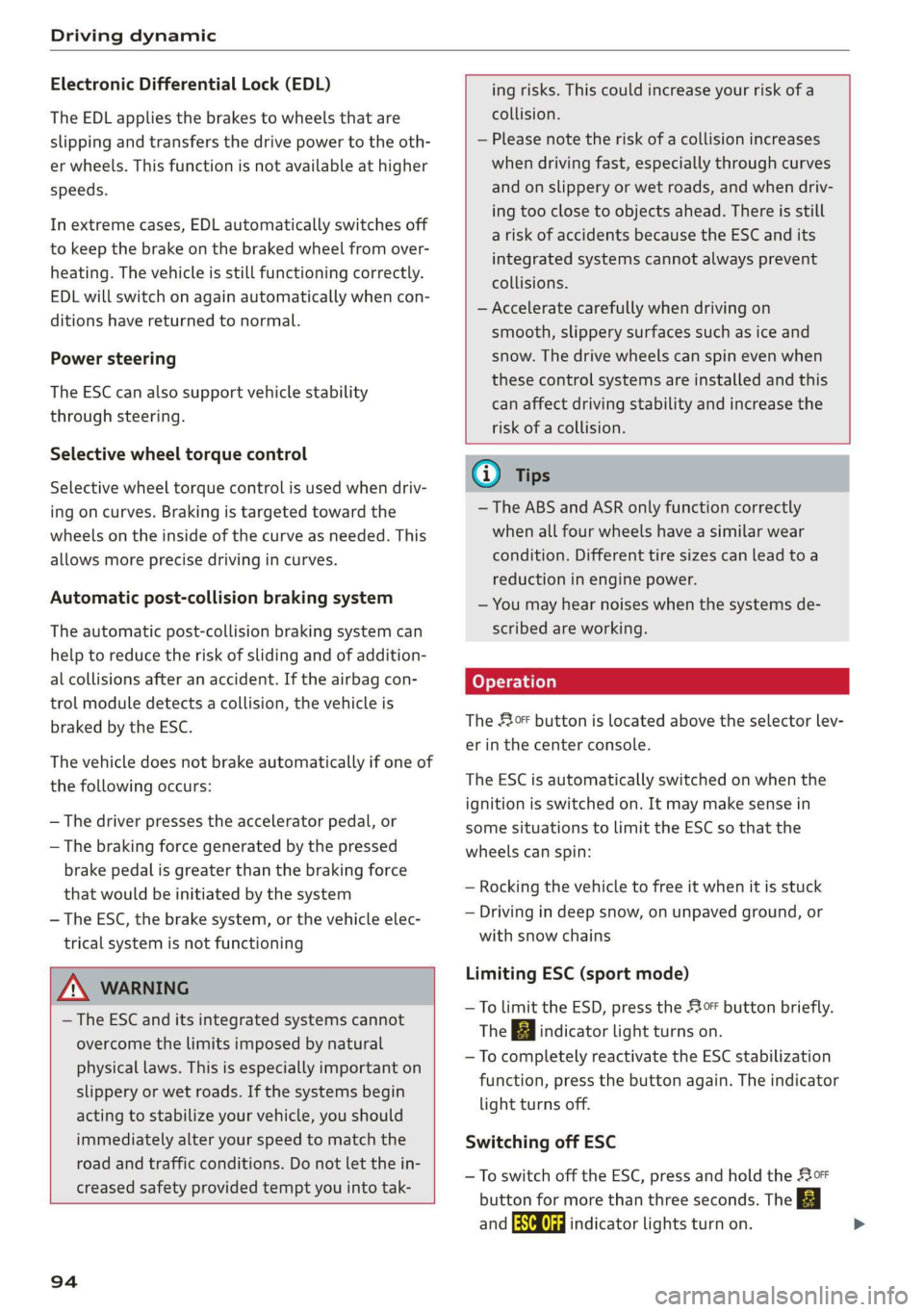
Electronic Differential Lock (EDL)
The EDL applies the brakes to wheels that are
slipping and transfers the drive power to the oth-
er wheels. This function is not available at higher
speeds.
In extreme cases, EDL automatically switches off
to keep the brake on the braked wheel from over-
heating. The vehicle is still functioning correctly.
EDL will switch on again automatically when con-
ditions have returned to normal.
Power steering
The ESC can also support vehicle stability
through steering.
Selective wheel torque control
Selective wheel torque control is used when driv-
ing on curves. Braking is targeted toward the
wheels on the inside of the curve as needed. This
allows more precise driving in curves.
Automatic post-collision braking system
The automatic post-collision braking system can
help to reduce the risk of sliding and of addition-
al collisions after an accident. If the airbag con-
trol module detects a collision, the vehicle is
braked by the ESC.
The vehicle does not brake automatically if one of
the following occurs:
— The driver presses the accelerator pedal, or
— The braking force generated by the pressed
brake pedal is greater than the braking force
that
would be initiated by the system
— The ESC, the brake system, or the vehicle elec-
trical system is not functioning
ing risks. This could increase your risk of a
collision.
— Please note the risk of a collision increases
when driving fast, especially through curves
and on slippery or wet roads, and when driv-
ing too close to objects ahead. There is still
a risk of accidents because the ESC and its
integrated systems cannot always prevent
collisions.
— Accelerate carefully when driving on
smooth, slippery surfaces such as ice and
snow. The drive wheels can spin even when
these control systems are installed and this
can affect driving stability and increase the
risk of a collision.
ZA\ WARNING
— The ESC and its integrated systems cannot
overcome the limits imposed by natural
physical laws. This is especially important on
slippery or wet roads. If the systems begin
acting to stabilize your vehicle, you should
immediately alter your speed to match the
road and traffic conditions. Do not let the in-
creased safety provided tempt you into tak-
94
G) Tips
— The ABS and ASR only function correctly
when all four wheels have a similar wear
condition. Different tire sizes can lead toa
reduction in engine power.
— You may hear noises when the systems de-
scribed are working.
The 0 button is located above the selector lev-
er in the center console.
The ESC is automatically switched on when the
ignition is switched on. It may make sense in
some situations to limit the ESC so that the
wheels can spin:
— Rocking the vehicle to free it when it is stuck
— Driving in deep snow, on unpaved ground, or
with snow chains
Limiting ESC (sport mode)
—To limit the ESD, press the 0 button briefly.
The B indicator light turns on.
— To completely reactivate the ESC stabilization
function, press the button again. The indicator
light turns off.
Switching off ESC
—To switch off the ESC, press and hold the oF
button for more than three seconds. The B
and Ea indicator lights turn on.
Page 97 of 400

8V2012721BK
Driving dynamic
— To completely reactivate the ESC stabilization
function, press the button again. The indicator
lights turn off.
Z\ WARNING
— When the ESC is switched off or limited,
there will be no vehicle stabilization or it will
be limited. The driving wheels could spin
and the vehicle could swerve, especially on
slick or slippery road surfaces, which in-
creases the risk of an accident.
— Because of the increased risk of an accident,
only drive with the ESC switched off or Limit-
ed when it is necessary. Reactivate the ESC
as soon as possible.
G) Tips
— If the ESC is limited, switched off, or mal-
functioning, systems with an automatic
braking intervention function may not be
fully available.
— If malfunctions occur in other systems or
certain driver assist systems are active, the
ESC must be switched on by the system. The
ESC
may switch on automatically and can-
not be operated with the button.
B /ABS} if BA © Stabilization control (ESC/
ABS): malfunction! See owner's manual
There is a malfunction in the ABS or EDL. This al-
so causes the ESC to malfunction. The brakes still
function with their normal power, but ABS is not
active.
Drive to an authorized Audi dealer or authorized
Audi Service Facility immediately to have the
malfunction corrected.
95
Page 113 of 400

8V2012721BK
High-voltage system
LED on vehicle © Meaning Solution
Have the power supply or power
supply system inspected. Check
No power supply was recognized | the status display on the control
On even though the charging cable is | unit > table on page 107. See an
Yellow plugged in. authorized Audi dealer or author-
ized Audi Service Facility for assis-
tance if necessary.
‘ The selector lever in notin the P | Move the selector lever into the P
Flashing vps ue
position. position.
Check if the charging connector is
inserted correctly. Remove the
The charging connector could not | charging connector and insert it in-
On be correctly locked in the vehicle | to the charging port again. See an
charging port. authorized Audi dealer or author-
ized Audi Service Facility for assis-
Red tance if necessary.
Fault in the charging system. The
ong penne meme See an authorized Audi dealer or
Flashing cargec. . . authorized Audi Service Facility for
Or: the outside temperature is too . .
: assistance if necessary.
low. The high-voltage battery
could not be fully charged.
@) Tips
The operation status indicated by the LED G)
on the vehicle is also displayed in the instru-
ment cluster/Infotainment system.
Indicator lights and
messages
Applies to: vehicles with plug-in hybrid drive
If the Ey indicator light turns on, the high-volt-
age battery is charging or is already completely
charged.
If the EX indicator light stays on, there is a mal-
function in the charging system. Have the prob-
lem corrected immediately by an authorized Audi
dealer or authorized Audi Service Facility.
Charging connector still attached. Vehicle
cannot be driven
This message appears when the charging system
is still connected to the vehicle. Remove the con-
nector > page 106.
Incompatible charging system. Please check
charging system
This message appears when the charging system
is incompatible. Only charge using the charging
system that is designed for your vehicle.
Eg AC charging system: malfunction! Please
contact Service
This message appears if there is a malfunction in
the charging system. Have the problem corrected
immediately by an authorized Audi dealer or au-
thorized Audi Service Facility.
Warning! Charging unit cover is unlocked.
See owner's manual
This message appears if the charging unit cover is
open. Close the cover and lock it > page 107.
111
Page 116 of 400
Trailer towing
Exterior lighting
Follow the legal regulations regarding the light-
ing equipment on your trailer. Contact an author-
ized Audi dealer or authorized Audi Service Facili-
ty for more information.
Before you start driving, check all lighting equip-
ment on the trailer while it is hitched to the vehi-
cle.
The headlight range control automatically ad-
justs the light range of the headlights.
Safety chains
Make sure the safety chains are correctly applied
when pulling a trailer. The chains should hang
enough so that the trailer can drive around
curves. However, they must not touch the
ground.
G) Tips
— Block the wheels with chocks when parking
on inclines if the trailer is loaded.
— Having the vehicle inspected between the
inspection intervals is recommended if you
tow a trailer frequently.
— Avoid driving with a trailer during the vehi-
cle break-in period.
Driving with a trailer
Driving with a trailer requires extra caution.
Speed
Adhere to the legal speed limits. Follow the legal
regulations specific to the country.
As the speed increases, the driving stability of
the trailer decreases. Therefore you should not
exceed the maximum legal speed limit when
there are unfavorable road, weather, and/or wind
conditions. This especially applies when driving
downhill.
Hill
When you start driving uphill or downhill, trailers
may tilt or sway sooner than when driving ona
level surface. If small swaying movements have
already occurred, you can stabilize the trailer by
114
firmly braking immediately. Never attempt to
“straighten out” the trailer by accelerating.
Downshift before driving on hills to utilize the en-
gine braking effect > A\.
Brakes
When using a trailer with overrun brakes, first
brake gently then quickly. This reduces the risk of
jerking while braking if the trailer wheels lock up.
Engine coolant temperature
Pay attention specifically to the coolant tempera-
ture display when there are high outside temper-
atures, and when driving on long inclines
=> page 15. Shift to a higher gear in a timely man-
ner.
Z\ WARNING
Constant braking causes the brakes to over-
heat and can substantially reduce braking per-
formance, increase braking distance, or cause
complete failure of the brake system.
Page 117 of 400
8V2012721BK
Assist systems
Assist systems
Speed warning system
Applies to: vehicles with speed warning system
The speed warning system helps you to stay be-
low a specified maximum speed that can be set,
changed or deleted in the Infotainment system.
The speed warning system warns you if you are
exceeding the maximum speed that you have set.
A warning tone will sound as soon as your speed
exceeds the stored value slightly. The ow in-
dicator light will appear at the same time in the
instrument cluster display along with a message.
The fe) indicator light and the message turn
off if the speed falls back below the stored maxi-
mum speed.
Setting a threshold is recommended if you would
like to be reminded when you reach a certain
maximum speed. Situations where you may want
to do so include driving in a country with a gener-
al speed limit or if there is a specified maximum
speed for winter tires.
Setting the warning threshold
> Select in the Infotainment system: [MENU] but-
ton > Vehicle > left control button > Driver as-
sistance > Speed warning > Manual.
G) Tips
Regardless of the speed warning system, you
should always monitor your speed using the
speedometer and make sure you are following
the legal speed limit.
Messages
Applies to: vehicles with speed warning system
Manually set speed limit XX mph
(km/h) exceeded
The stored speed was exceeded.
Cruise control system
Applies to: vehicles with cruise control system
The cruise control system assists the driver in
maintaining a constant speed above approxi-
mately 15 mph (20 km/h). The system maintains
the desired speed by braking and accelerating.
ZA WARNING
— Always pay attention to the traffic around
your vehicle when the cruise control system
is in operation. As the driver, you are always
responsible for controlling your vehicle
speed and the distance between your vehicle
and
other vehicles.
— For safety reasons, cruise control should not
be used in the city, in stop-and-go traffic, on
winding roads, and when road conditions are
poor (such as ice, fog, gravel, heavy rain,
and conditions that could lead to hydroplan-
ing), because this increases the risk of an ac-
cident.
— Switch the cruise control off temporarily
when driving in turning lanes, highway exits,
or in construction zones.
—To reduce the risk of an accident, you should
only resume the stored speed if it is suitable
for the current traffic conditions.
@) Note
— Conventional drive system: before driving
downhill a long distance on a steep hill, de-
crease your speed and select a lower gear.
This makes use of the engine braking effect
and reduces the load placed on the brakes.
— Plug-in hybrid drive: before driving downhill
a long distance on a steep hill, decrease
your speed and use the recuperation braking
effect > page 78. This reduces the load on
the brakes.
(i) Tips
The brake lights turn on when the brakes are
applied automatically.
115
Page 123 of 400
8V2012721BK
Assist systems
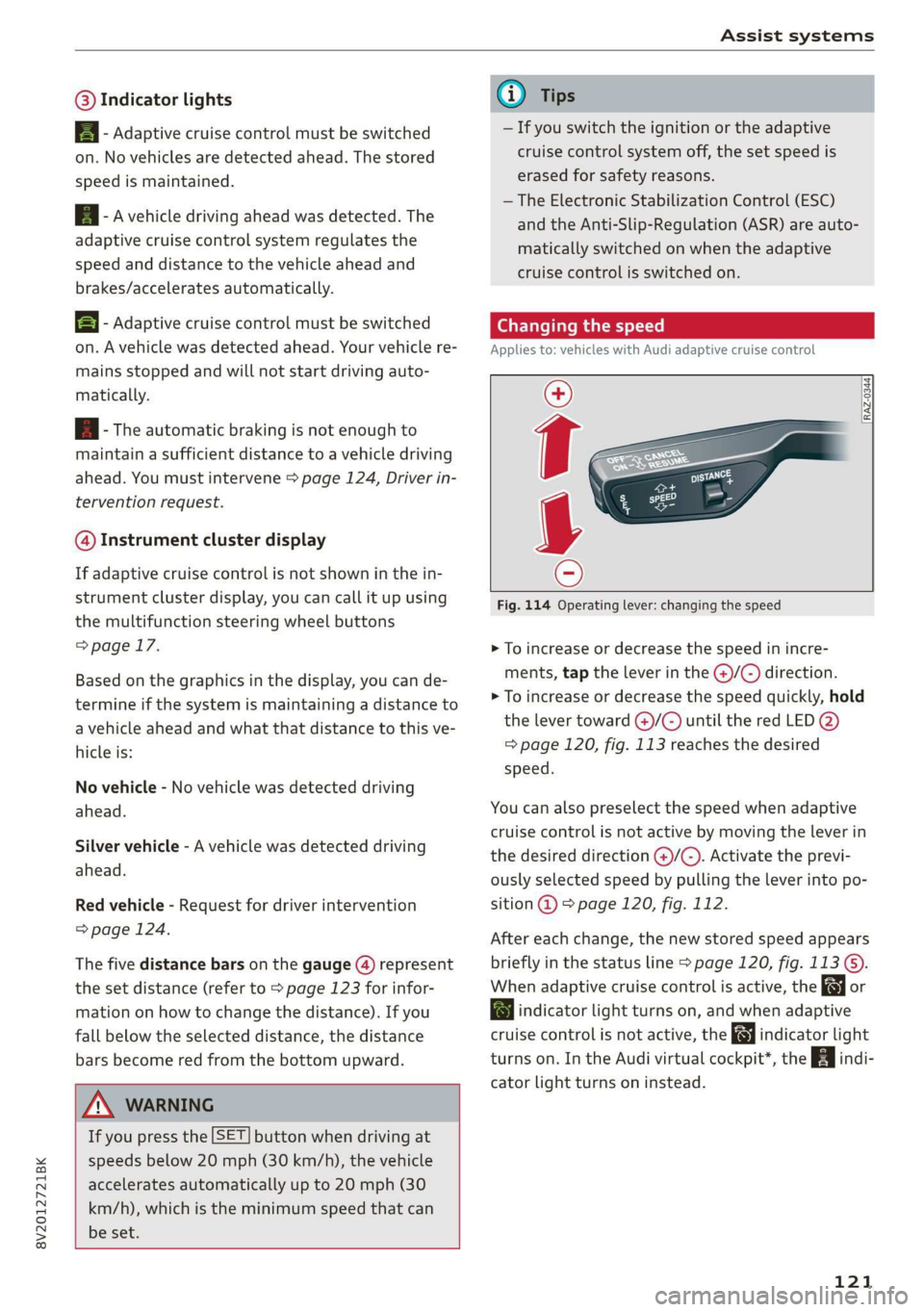
@® Indicator lights
B - Adaptive cruise control must be switched
on. No vehicles are detected ahead. The stored
speed is maintained.
B - Avehicle driving ahead was detected. The
adaptive cruise control system regulates the
speed and distance to the vehicle ahead and
brakes/accelerates automatically.
B - Adaptive cruise control must be switched
on. A vehicle was detected ahead. Your vehicle re-
mains stopped and will not start driving auto-
matically.
B - The automatic braking is not enough to
maintain a sufficient distance to a vehicle driving
ahead. You must intervene > page 124, Driver in-
tervention request.
@ Instrument cluster display
If adaptive cruise control is not shown in the in-
strument cluster display, you can call it up using
the multifunction steering wheel buttons
=> page 17.
Based on the graphics in the display, you can de-
termine if the system is maintaining a distance to
a vehicle ahead and what that distance to this ve-
hicle is:
No vehicle - No vehicle was detected driving
ahead.
Silver vehicle - A vehicle was detected driving
ahead.
Red vehicle - Request for driver intervention
=> page 124.
The five distance bars on the gauge (4) represent
the set distance (refer to > page 123 for infor-
mation on how to change the distance). If you
fall below the selected distance, the distance
bars become red from the bottom upward.
ZA\ WARNING
If you press the [SET] button when driving at
speeds below 20 mph (30 km/h), the vehicle
accelerates automatically up to 20 mph (30
km/h), which is the minimum speed that can
be set.
@) Tips
— If you switch the ignition or the adaptive
cruise control system off, the set speed is
erased for safety reasons.
— The Electronic Stabilization Control (ESC)
and the Anti-Slip-Regulation (ASR) are auto-
matically switched on when the adaptive
cruise control is switched on.
Changing the speed
Applies to: vehicles with Audi adaptive cruise control
[RAZ-0344
Fig. 114 Operating lever: changing the speed
> To increase or decrease the speed in incre-
ments, tap the lever in the @/G) direction.
> To increase or decrease the speed quickly, hold
the lever toward )/G) until the red LED @)
=> page 120, fig. 113 reaches the desired
speed.
You can also preselect the speed when adaptive
cruise control is not active by moving the lever in
the desired direction @)/©). Activate the previ-
ously selected speed by pulling the lever into po-
sition @ > page 120, fig. 112.
After each change, the new stored speed appears
briefly in the status line > page 120, fig. 113 ©.
When adaptive cruise control is active, the or
a indicator light turns on, and when adaptive
cruise control is not active, the gy indicator light
turns on. In the Audi virtual cockpit*, the indi-
cator light turns on instead.
121
Page 162 of 400
Multifunction steering wheel
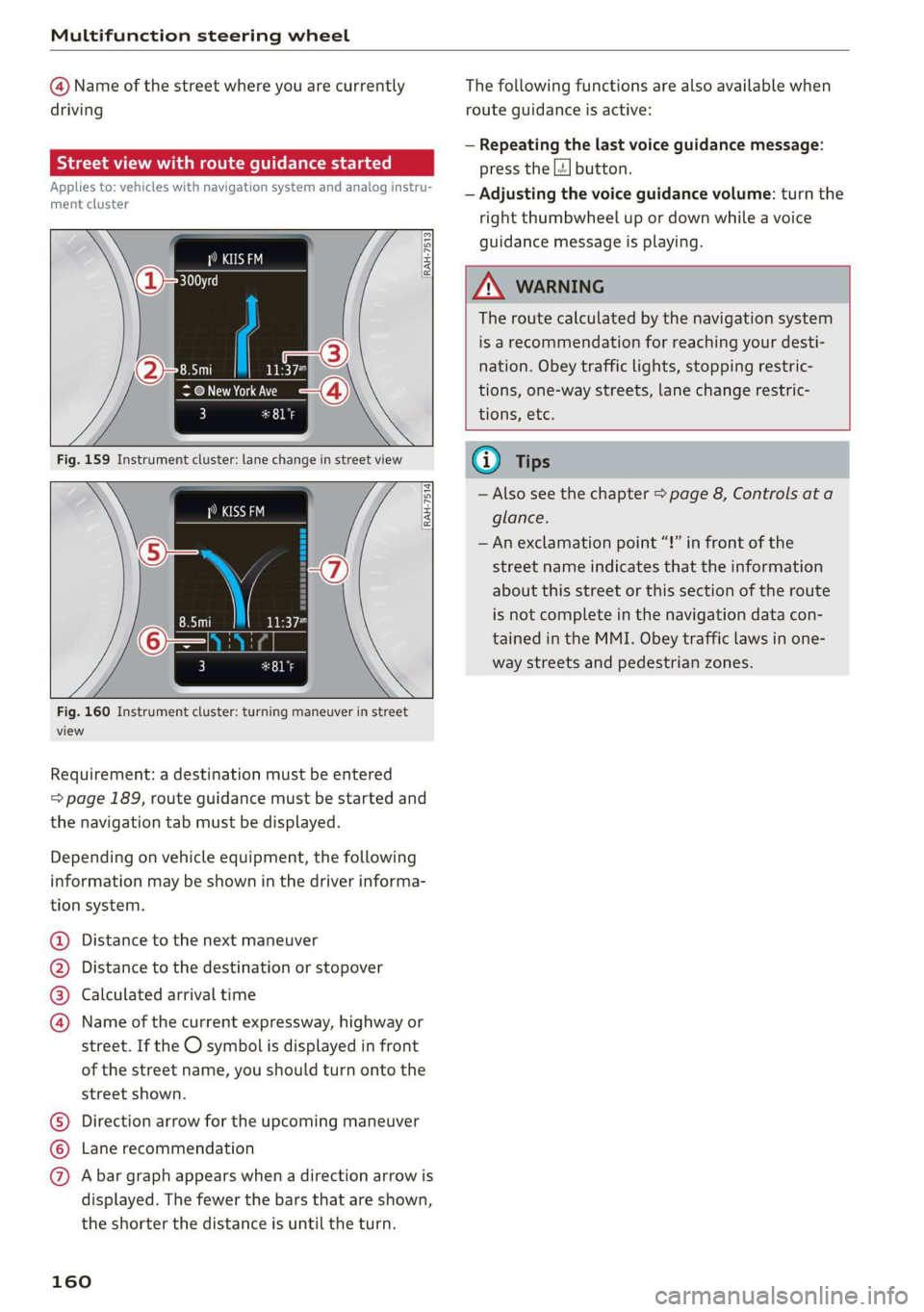
@ Name of the street where you are currently
driving
elec MU Amel ame Ler Tiasei eT a ace)
Applies to: vehicles with navigation system and analog instru-
ment cluster
asta
(as EI
RAH-7513
@ New York Ave
3 pala
[RAH-7514]
Fig. 160 Instrument cluster: turning maneuver in street
view
Requirement: a destination must be entered
=> page 189, route guidance must be started and
the navigation tab must be displayed.
Depending on vehicle equipment, the following
information may be shown in the driver informa-
tion system.
Distance to the next maneuver
Distance to the destination or stopover
Calculated arrival time
®©0O Name of the current expressway, highway or
street. If the O symbol is displayed in front
of the street name, you should turn onto the
street shown.
Direction arrow for the upcoming maneuver
Lane recommendation
CO®@ A bar graph appears when a direction arrow is
displayed. The fewer the bars that are shown,
the shorter the distance is until the turn.
160
The following functions are also available when
route guidance is active:
— Repeating the last voice guidance message:
press the |4] button.
— Adjusting the voice guidance volume: turn the
right
thumbwheel up or down while a voice
guidance message is playing.
ZA\ WARNING
The route calculated by the navigation system
is a recommendation for reaching your desti-
nation. Obey traffic lights, stopping restric-
tions, one-way streets, lane change restric-
tions, etc.
G@) Tips
— Also see the chapter > page 8, Controls ata
glance.
— An exclamation point “!” in front of the
street name indicates that the information
about this street or this section of the route
is not complete in the navigation data con-
tained in the MMI. Obey traffic laws in one-
way streets and pedestrian zones.
Page 164 of 400
Voice recognition system
Voice recognition system
General information
Applies to: vehicles with voice recognition system
You can operate many functions in the vehicle
easily using voice commands.
Using the voice recognition system optimally
> Speak clearly and distinctly at a normal volume.
Speak louder when driving faster.
> Emphasize the words in the commands evenly
and do not leave long pauses.
> Close the doors, the windows, and the sunroof*
to reduce background noise. Make sure that
passengers are not speaking when you are giv-
ing a voice command.
> Do not direct the vents toward the hands-free
microphone, which is in the roof headliner near
the front interior lights.
> Only the driver should speak to the system, be-
cause the handsfree microphone is aimed to-
ward this seating position.
ZA\ WARNING
— Direct your full attention to driving. As the
driver, you have complete responsibility for
safety in traffic. Only use the functions in
such a way that you always maintain com-
plete control over your vehicle in all traffic
situations.
— Do not use the voice recognition system in
emergencies because your voice may change
in stressful situations. The system may take
longer to dial the number or may not be
able to dial it at all. Dial the emergency
number manually.
G) Tips
There are no voice guidance* prompts when a
dialog is active.
Operating
Applies to: vehicles with voice recognition system
Requirement: the ignition and the MMI must be
switched on. A system language supported by
the voice recognition system must be set. There
162
must be no phone calls in progress and the park-
ing aid must not be active.
> Switching on: press the [2] button (2)
> page 19, fig. 13 or @) > page 20, fig. 15
briefly on the multifunction steering wheel and
say the desired command after the Beep.
> Switching off: press and hold the |] button,
‘OF:
> Press the |] button.
> Pausing: say the command Pause. To resume,
press the |%] button.
> Correcting: say the command Correction.
Input assistance
The system guides you through the input with
visual and audio feedback.
— Visual input assistance: after switching on
voice recognition, a display with a selection of
possible commands appears. This command
display can be switched on or off. Select:
MENU] button > Settings > left control button
> MMI settings > Speech dialog system.
— Audio input assistance: to have the possible
commands read, turn the voice recognition sys-
tem on and say Help.
Additional settings
See > page 235.
@) Tips
— The dialog pauses when there is an incom-
ing phone call and will continue if you ig-
nore the call. The dialog ends if you answer
the call.
— You can select an item in the list using ei-
ther the voice recognition system or the
control knob.
Command overview
information
Applies to: vehicles with voice recognition system
The following overviews describe the commands
that can be used to operate the MMI using the
voice recognition system.