warning lights AUDI A3 2020 Owner´s Manual
[x] Cancel search | Manufacturer: AUDI, Model Year: 2020, Model line: A3, Model: AUDI A3 2020Pages: 400, PDF Size: 107.47 MB
Page 4 of 400
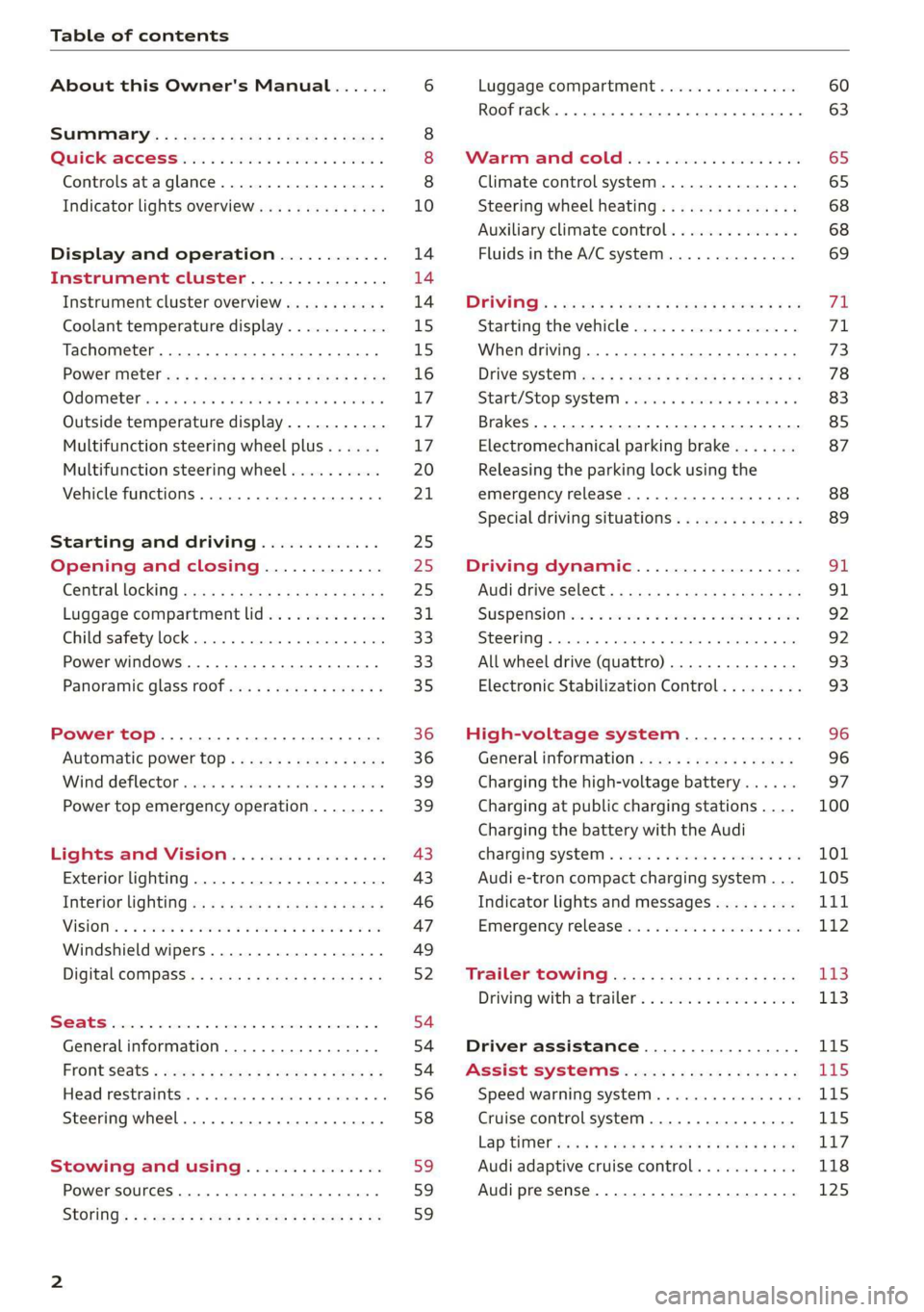
Table of contents
About this Owner's Manual......
SUMIMALY: ; « ss6% : osen ss sean cs poe s
QC CCeS Skis: si esis a 6 ores os ewe
Controls ataglance..................
Indicator lights overview...........0.
Display and operation............
Instrument cluster...............
Instrument cluster overview...........
Coolant temperature display...........
Tachometer.......... 0.0 eee eee eee
Power iiet@l ss « + wes + s wees 2 x ews 2 ae
Odometer icc oo sisiecs a wrens eo ooarae eo were
Outside temperature display...........
Multifunction steering wheel plus......
Multifunction steering wheel..........
Vehicle functions. ............000 000s
Starting and driving.............
Opening and closing.............
Central locking 2.2% ieee seven a eevee
Luggage compartment lid.............
Child safety lock... 0... 0... cece eee ee
Power windows..............2000005
Panoramic glass TOOf sis s « sayoe « x eoven xs
Power top........... 0. cece eee eee
Automatic power top.................
Wind deflector sicavi x 0 snare a 0 wesc a 0 acaven
Power top emergency operation........
Lights and Vision.................
Exterior lighting...................4.
Interior Ughtingcs « ¢ cean a cas cs ews 5
VISIONS « & comes oo man a 8 eee a a oa 3 oe
Windshield wipers...................
Digital compass.............0.-00 00
PrOntsS@ats = wise s x esven = ¢ eee + & ete os
Head restraimtst. +. coms + 0 anseans 4 2 omamm © # »
Steering wheel............00 2. eee ee
Stowing and using...............
Power sources ......... 00-00 e eee eaee
StOrinG’: « e meme =e sees + Sees Gy ee & Ee
10
14 14 14
15
15
16 17 17 17
20
21
25
25
25 31 33 33 35
36 36 39 39
43
43
46
47
49
52
54
54
54
56 58 59 59 59
Luggage compartment ...............
Roof rack... eee eee
MV APEC OUE 05 3 3 aise ¥ & maseen @ owe
Climate control system...............
Steering wheel heating.............-.
Auxiliary climate control.............-
Fluids in the A/C system. ...........-.
DFIVIFIG:: « yeas os « wow o ¢ Rome se RED oc ow
Starting the vehicle..................
Electromechanical parking brake.......
Releasing the parking lock using the
emergency release............2..000.
Special driving situations..............
Driving dynamic..................
Audi drive'select:, .c.icisiseicascnaene
SUSPONSIOM ac « 2 covsces so cmswsm oo soso oo cee
SEOORIIAG » sinsoes ue vanes a» wisenge ou upnenie & ¥ ote
All wheel drive (quattro)..............
Electronic Stabilization Control.........
High-voltage system.............
General information.................
Charging the high-voltage battery......
Charging at public charging stations....
Charging the battery with the Audi
ChargingsySteM « wsccuc x x sewers a w anaes vv oe
Audi e-tron compact charging system...
Indicator lights and messages.........
Emergency releases. & iseiis 6 + wae w 6 wos
Trailer towing....................
Driving with atrailer.................
Driver assistance.................
Assist systems...................
Speed warning system..............--
Cruise control system............0005
Lap timer eens so cong s pees ss ees oo eee
Audi adaptive cruise control...........
Audi presense............-.002-000-
60
63
65
65
68 68 69
FE 71 73
78
83 85
87
88 89
SI 91
92.
92
93 93
96 96 97
100
Page 12 of 400
Quick access
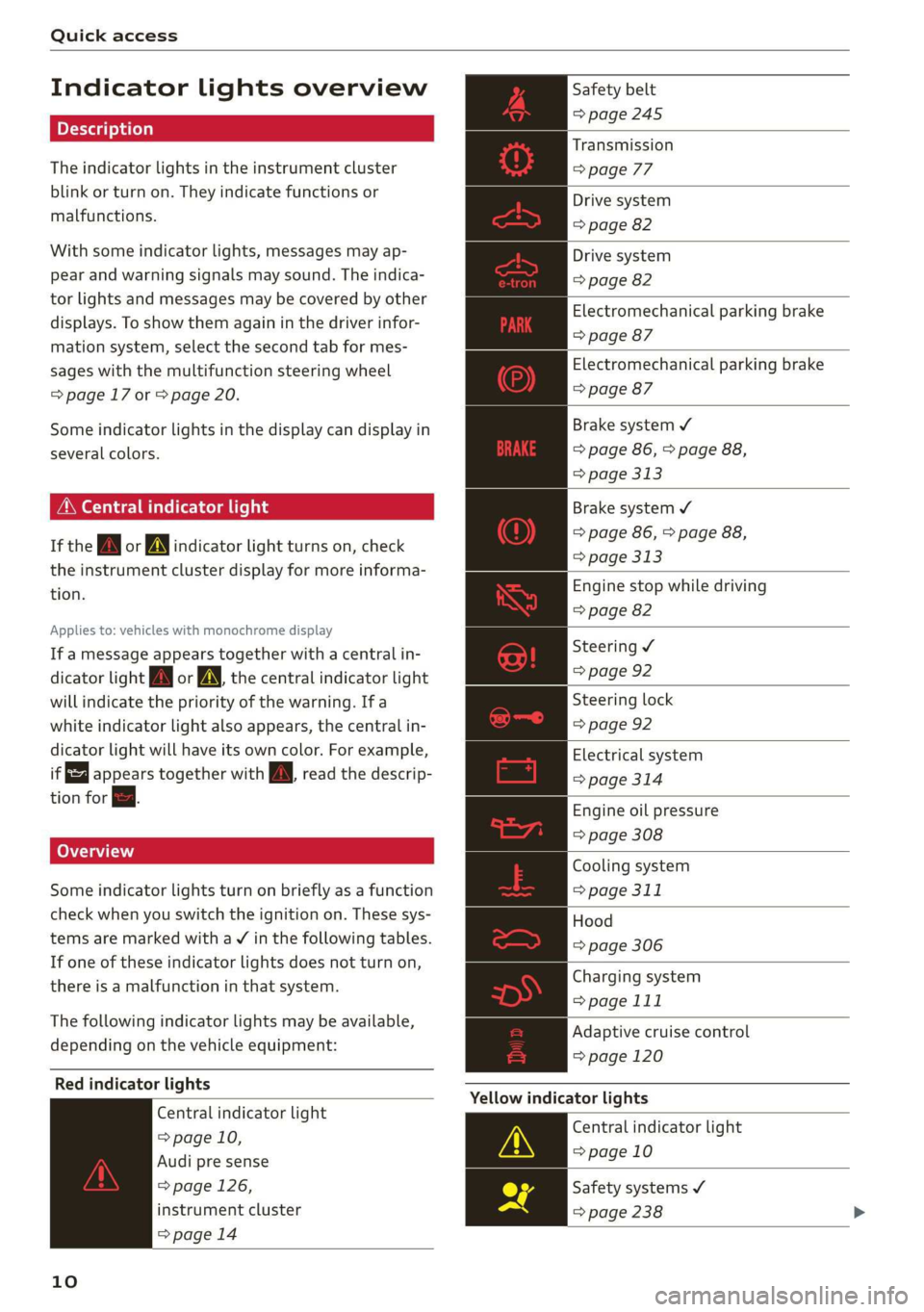
Indicator lights overview
The indicator lights in the instrument cluster
blink or turn on. They indicate functions or
malfunctions.
With some indicator lights, messages may ap-
pear and warning signals may sound. The indica-
tor lights and messages may be covered by other
displays. To show them again in the driver infor-
mation system, select the second tab for mes-
sages with the multifunction steering wheel
=> page 17 or > page 20.
Some indicator lights in the display can display in
several colors.
MMe O eel em lis
If the wa or MN indicator light turns on, check
the instrument cluster display for more informa-
tion.
Applies to: vehicles with monochrome display
If a message appears together with a central in-
dicator light A\ or A the central indicator light
will indicate the priority of the warning. Ifa
white indicator light also appears, the central in-
dicator light will have its own color. For example,
it appears together with Bw read the descrip-
tion for &.
Some indicator lights turn on briefly as a function
check when you switch the ignition on. These sys-
tems are marked with a V in the following tables.
If one of these indicator lights does not turn on,
there is a malfunction in that system.
The following indicator lights may be available,
depending on the vehicle equipment:
Red indicator lights
Central indicator light
=> page 10,
Audi pre sense
=> page 126,
instrument cluster
=> page 14
10
Safety belt
=> page 245
Transmission
> page 77
Drive system
=> page 82
Drive system
=> page 82
Electromechanical parking brake
=> page 87
Electromechanical parking brake
=> page 87
Brake system ¥
=> page 86, > page 88,
=> page 313
Brake system ¥
=> page 86, > page 88,
> page 313
Engine stop while driving
=> page 82
Steering ¥
=> page 92
Steering lock
=> page 92
Electrical system
=> page 314
Engine oil pressure
=> page 308
Cooling system
=> page 311
Hood
=> page 306
Charging system
> page 111
Adaptive cruise control
=> page 120
Yellow indicator lights
Central indicator light
=> page 10
Safety systems ¥
=> page 238
Page 14 of 400
Quick access
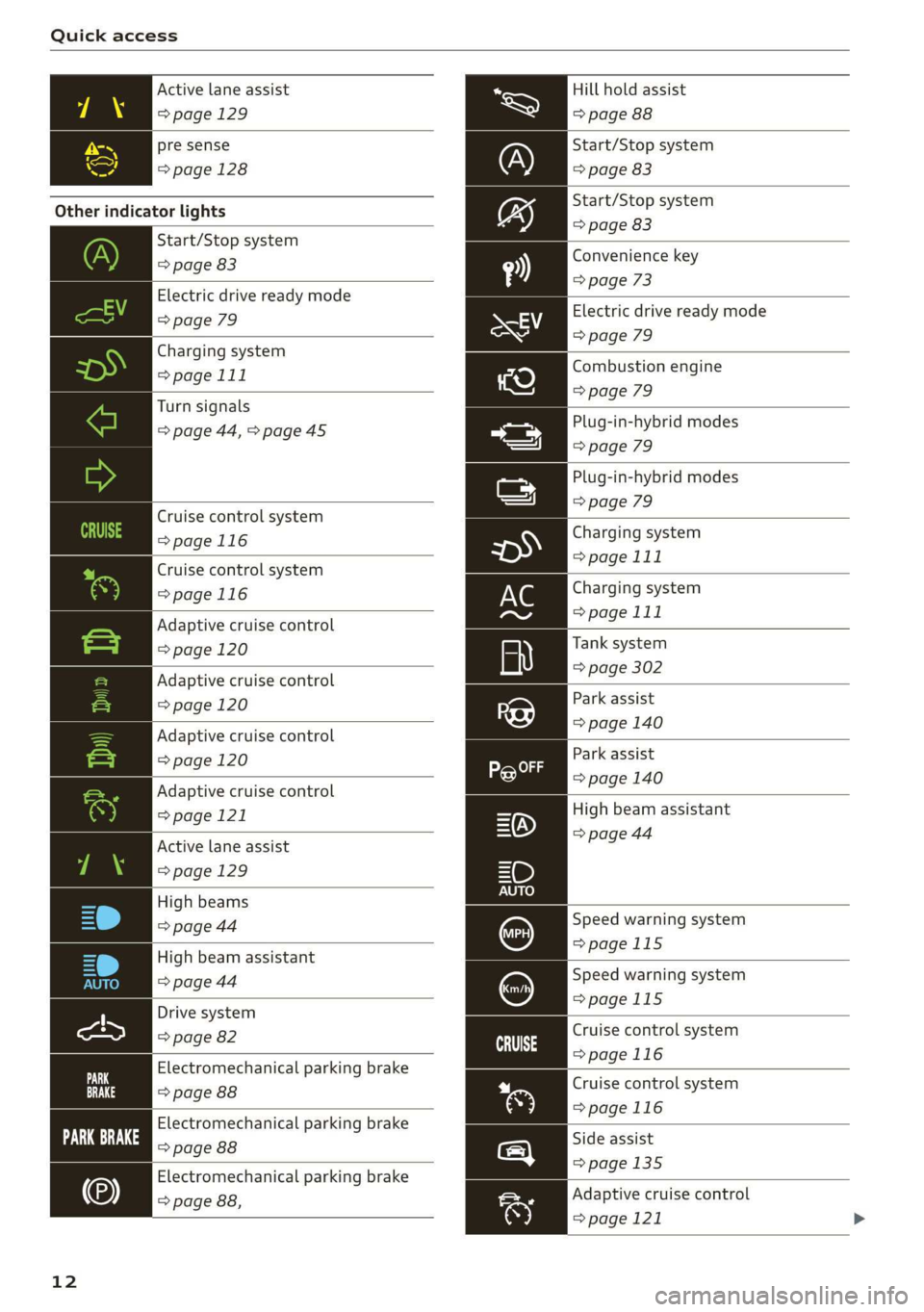
Active lane assist
=> page 129
pre sense
=>page 128
Other indicator lights
Start/Stop system
=> page 83
Electric drive ready mode
=> page 79
Charging system
=> page 111
Turn signals
=> page 44, > page 45
Cruise control system
=>page 116
Cruise control system
=>page
116
Adaptive cruise control
=> page 120
Adaptive cruise control
=> page 120
Adaptive cruise control
=> page 120
Adaptive cruise control
=> page 121
Active lane assist
=> page 129
High beams
=> page 44
High beam assistant
=> page 44
Drive system
=> page 82
Electromechanical parking brake
=> page 88
Electromechanical parking brake
Fe ove ae
Electromechanical parking brake
=> page 88,
12
Hill hold assist
=> page 88
Start/Stop system
=> page 83
Start/Stop system
=> page 83
Convenience key
=> page 73
Electric drive ready mode
=> page 79
Combustion engine
=> page 79
Plug-in-hybrid modes
=> page 79
Plug-in-hybrid modes
=> page 79
Charging system
=> page 111
Charging system
=> page 111
Tank system
=> page 302
Park assist
=> page 140
Park assist
=> page 140
High beam assistant
=> page 44
Speed warning system
=>page 115
Speed warning system
=>page 115
Cruise control system
>page 116
Cruise control system
>page 116
Side assist
=>page 135
Adaptive cruise control
=> page 121
Page 17 of 400
8V2012721BK
Instrument cluster
SSGOAM’ sx cscsone ov cxexens @ a aomnees vo s8sue 75
— Audi drive select mode ......... 91
ZA WARNING
Applies to: vehicles with Audi virtual cockpit
If there is a severe malfunction in the instru-
ment cluster, the display may turn off. The wa
indicator light may also turn on. Stop the ve-
hicle safely. See an authorized Audi dealer or
authorized Audi Service Facility for assistance.
@ Tips
— The following pages will primarily show il-
lustrations of the multi-color analog instru-
ment cluster*. The display and/or position
of the element shown may vary in mono-
chrome instrument clusters or in the Audi
virtual cockpit*.
— You can select the units used for tempera-
ture, speed, and other measurements in the
Infotainment system > page 230.
— Speeds are displayed in mph (miles per
hour) or km/h (kilometers per hour).
— If there is a malfunction in the instrument
cluster, DEF will appear in the trip odometer
display. Have the malfunction corrected as
soon as possible.
— Depending on vehicle equipment, the in-
strument illumination (needles and gauges)
may turn on when the lights are off and the
ignition is switched on. The illumination for
the gauges reduces automatically and even-
tually turns off as brightness outside in-
creases. This function reminds the driver to
turn the low beams on at the appropriate
time.
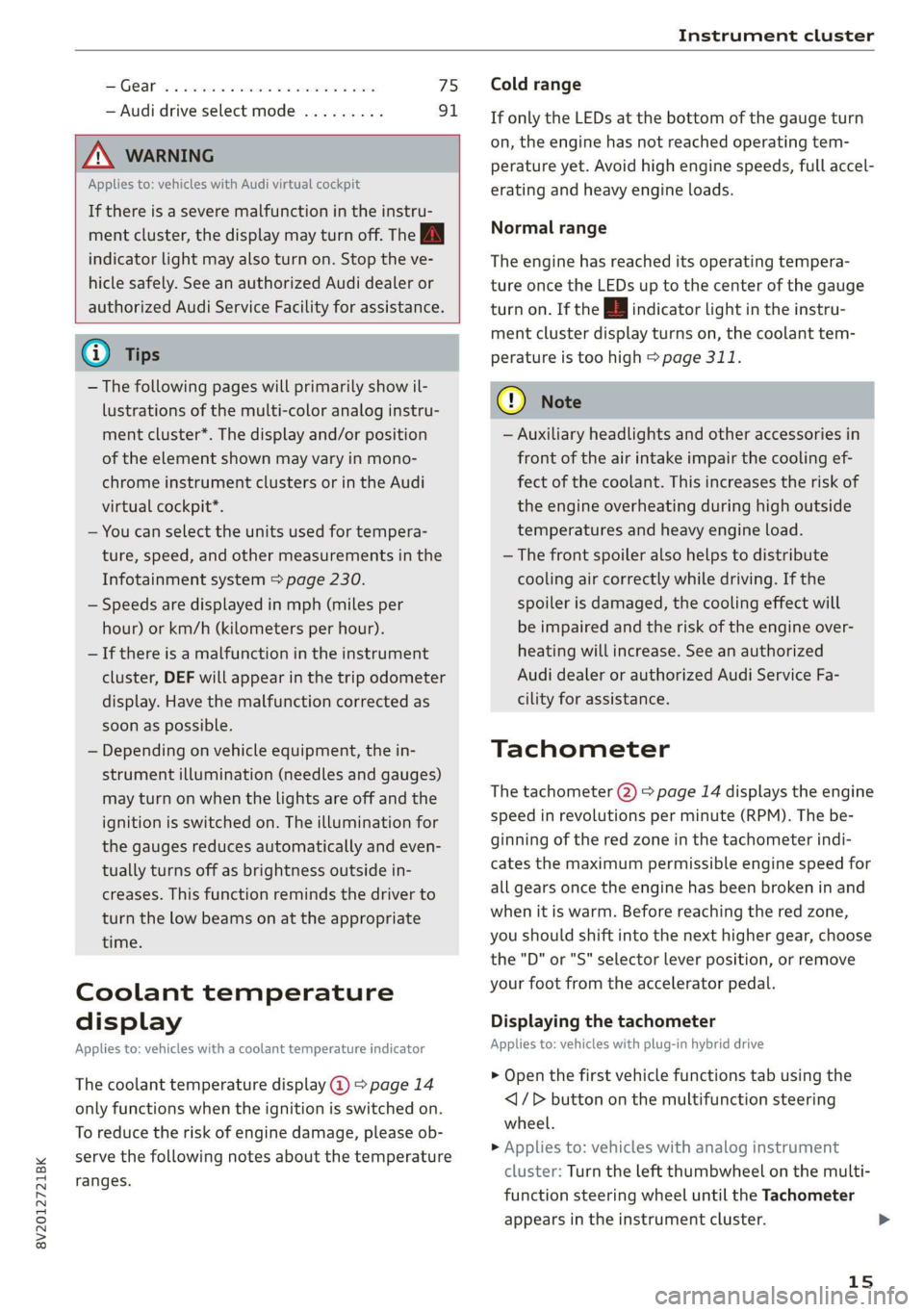
Coolant temperature
display
Applies to: vehicles with a coolant temperature indicator
The coolant temperature display @) > page 14
only functions when the ignition is switched on.
To reduce the risk of engine damage, please ob-
serve the following notes about the temperature
ranges.
Cold range
If only the LEDs at the bottom of the gauge turn
on, the engine has not reached operating tem-
perature yet. Avoid high engine speeds, full accel-
erating and heavy engine loads.
Normal range
The engine has reached its operating tempera-
ture once the LEDs up to the center of the gauge
turn on. If the || indicator light in the instru-
ment cluster display turns on, the coolant tem-
perature is too high > page 311.
@) Note
— Auxiliary headlights and other accessories in
front of the air intake impair the cooling ef-
fect of the coolant. This increases the risk of
the engine overheating during high outside
temperatures and heavy engine load.
—The front spoiler also helps to distribute
cooling air correctly while driving. If the
spoiler is damaged, the cooling effect will
be impaired and the risk of the engine over-
heating will increase. See an authorized
Audi dealer or authorized Audi Service Fa-
cility for assistance.
Tachometer
The tachometer (2) > page 14 displays the engine
speed in revolutions per minute (RPM). The be-
ginning of the red zone in the tachometer indi-
cates the maximum permissible engine speed for
all gears once the engine has been broken in and
when it is warm. Before reaching the red zone,
you should shift into the next higher gear, choose
the "D" or "S" selector lever position, or remove
your foot from the accelerator pedal.
Displaying the tachometer
Applies to: vehicles with plug-in hybrid drive
> Open the first vehicle functions tab using the
<1/D button on the multifunction steering
wheel.
> Applies to: vehicles with analog instrument
cluster: Turn the left thumbwheel on the multi-
function steering wheel until the Tachometer
appears in the instrument cluster.
15
>
Page 45 of 400
8V2012721BK
Lights and Vision
Lights and Vision
Exterior lighting
Stare MUL Las eal
B8V-0430
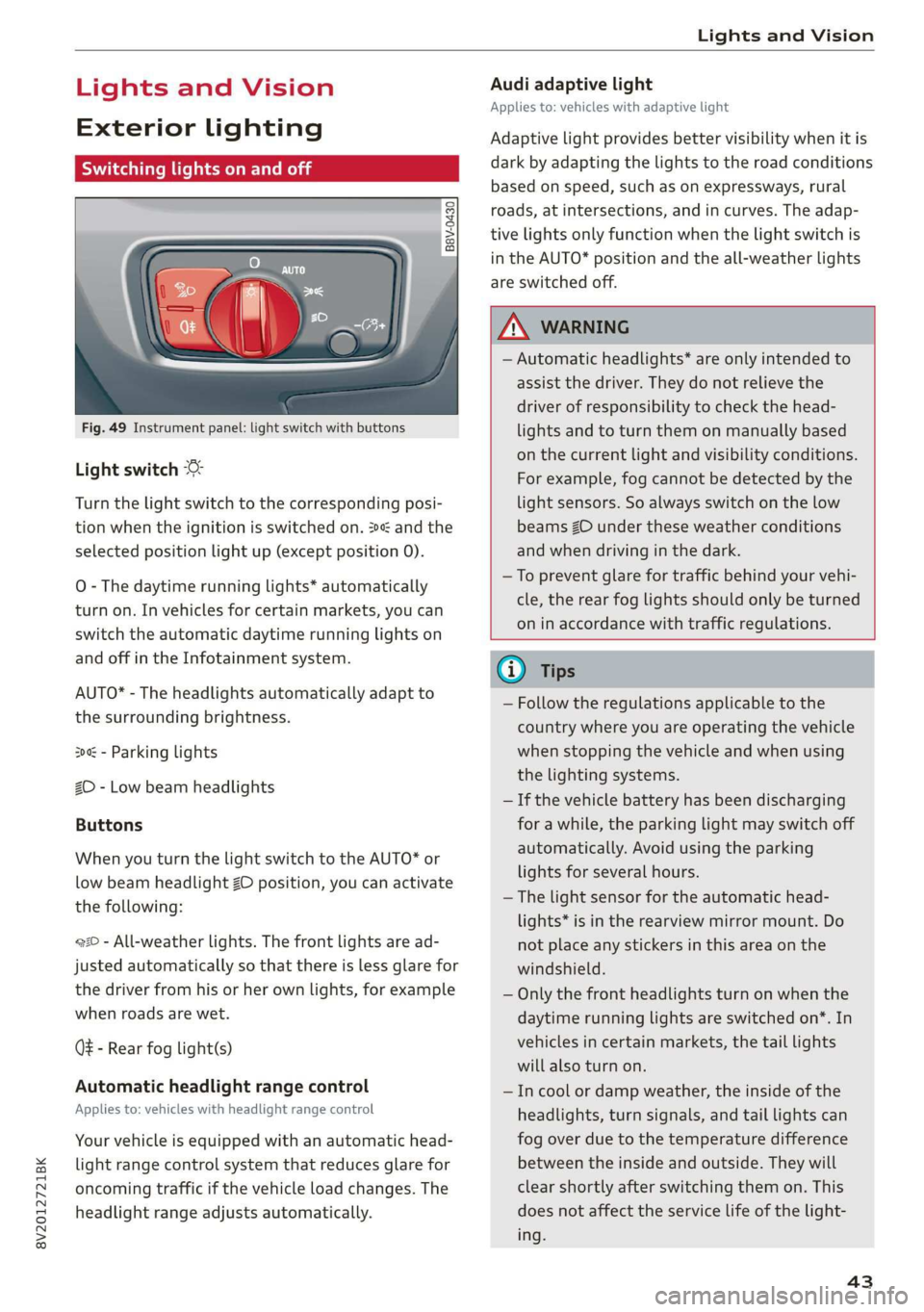
Fig. 49 Instrument panel: light switch with buttons
Light switch
Turn the light switch to the corresponding posi-
tion when the ignition is switched on. 2 and the
selected position light up (except position 0).
O
- The daytime running lights* automatically
turn on. In vehicles for certain markets, you can
switch the automatic daytime running lights on
and off in the Infotainment system.
AUTO* - The headlights automatically adapt to
the surrounding brightness.
300 - Parking lights
2D - Low beam headlights
Buttons
When you turn the light switch to the AUTO* or
low beam headlight ZO position, you can activate
the following:
220 - All-weather lights. The front lights are ad-
justed automatically so that there is less glare for
the driver from his or her own lights, for example
when roads are wet.
Q - Rear fog light(s)
Automatic headlight range control
Applies to: vehicles with headlight range control
Your vehicle is equipped with an automatic head-
light range control system that reduces glare for
oncoming traffic if the vehicle load changes. The
headlight range adjusts automatically.
Audi adaptive light
Applies to: vehicles with adaptive light
Adaptive light provides better visibility when it is
dark by adapting the lights to the road conditions
based on speed, such as on expressways, rural
roads, at intersections, and in curves. The adap-
tive lights only function when the light switch is
in the AUTO* position and the all-weather lights
are switched off.
Z\ WARNING
— Automatic headlights* are only intended to
assist the driver. They do not relieve the
driver of responsibility to check the head-
lights and to turn them on manually based
on the current light and visibility conditions.
For example, fog cannot be detected by the
light sensors. So always switch on the low
beams ZO under these weather conditions
and when driving in the dark.
—To prevent glare for traffic behind your vehi-
cle, the rear fog lights should only be turned
on in accordance with traffic regulations.
G) Tips
— Follow the regulations applicable to the
country where you are operating the vehicle
when stopping the vehicle and when using
the lighting systems.
— If the vehicle battery has been discharging
for a while, the parking light may switch off
automatically. Avoid using the parking
lights for several hours.
— The light sensor for the automatic head-
lights* is in the rearview mirror mount. Do
not place any stickers in this area on the
windshield.
— Only the front headlights turn on when the
daytime running lights are switched on*. In
vehicles in certain markets, the tail lights
will also turn on.
—Incool or damp weather, the inside of the
headlights, turn signals, and tail lights can
fog
over due to the temperature difference
between the inside and outside. They will
clear shortly after switching them on. This
does not affect the service life of the light-
ing.
43
Page 46 of 400
Lights and Vision
Turn signal and high beam lever
©
»
|
@
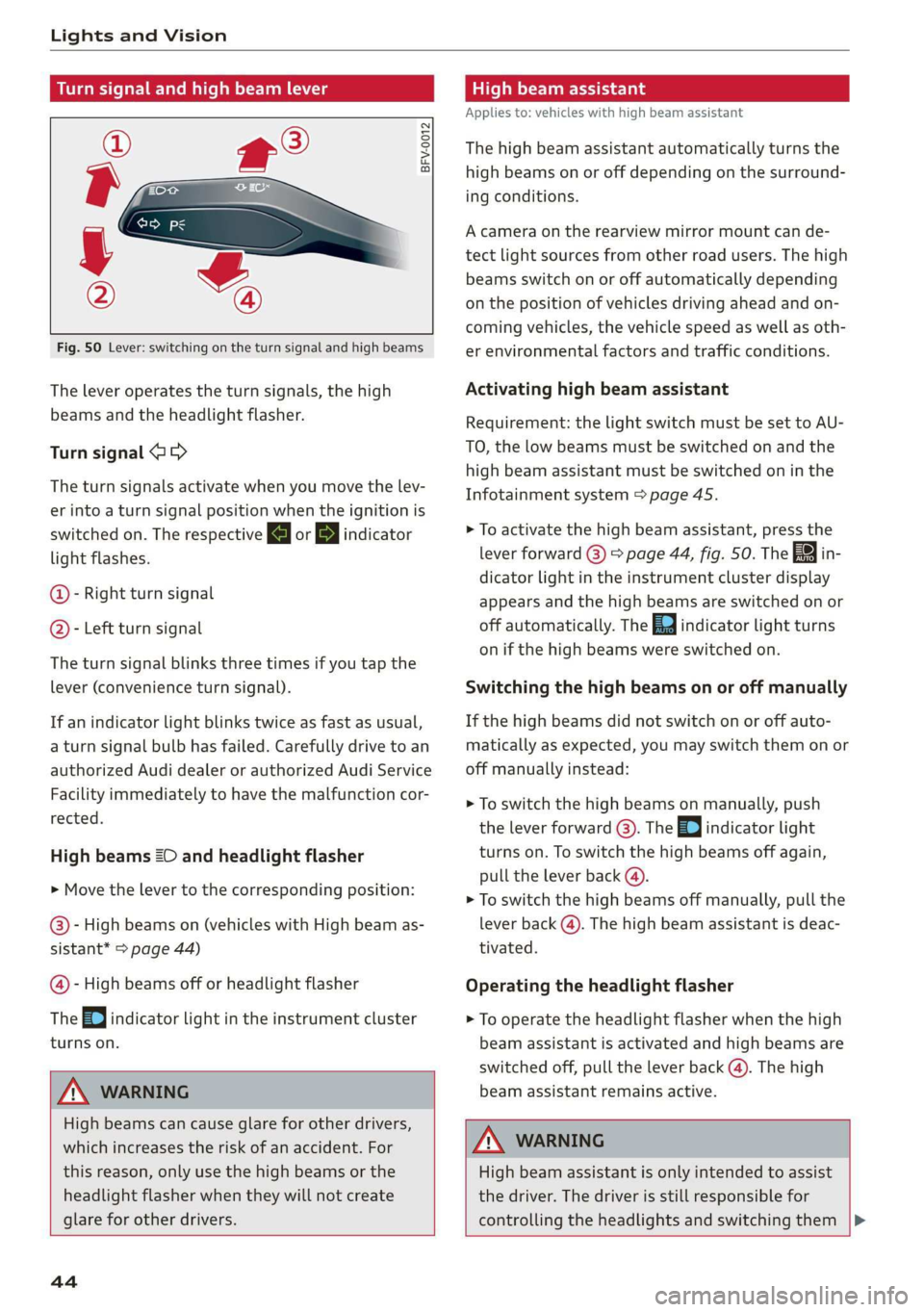
Fig. 50 Lever: switching on the turn signal and high beams
The lever operates the turn signals, the high
beams and the headlight flasher.
Turn signal @ >
The turn signals activate when you move the lev-
er into a turn signal position when the ignition is
switched on. The respective a or B indicator
light flashes.
@- Right turn signal
@- Left turn signal
The turn signal blinks three times if you tap the
lever (convenience turn signal).
If an indicator light blinks twice as fast as usual,
a turn signal bulb has failed. Carefully drive to an
authorized Audi dealer or authorized Audi Service
Facility immediately to have the malfunction cor-
rected.
High beams 2D and headlight flasher
> Move the lever to the corresponding position:
@- High beams on (vehicles with High beam as-
sistant* > page 44)
@- High beams off or headlight flasher
The
=0| indicator light in the instrument cluster
turns on.
Z\ WARNING
High beams can cause glare for other drivers,
which increases the risk of an accident. For
this reason, only use the high beams or the
headlight flasher when they will not create
glare for other drivers.
teh melee lad
Applies to: vehicles with high beam assistant
The high beam assistant automatically turns the
high beams on or off depending on the surround-
ing conditions.
A camera on the rearview mirror mount can de-
tect light sources from other road users. The high
beams switch on or off automatically depending
on the position of vehicles driving ahead and on-
coming vehicles, the vehicle speed as well as oth-
er environmental factors and traffic conditions.
Activating high beam assistant
Requirement: the light switch must be set to AU-
TO, the low beams must be switched on and the
high beam assistant must be switched on in the
Infotainment system = page 45.
> To activate the high beam assistant, press the
lever
forward @) > page 44, fig. 50. Th i
dicator light in the instrument cluster display
appears and the high beams are switched on or
off automatically. The Ea indicator light turns
on if the high beams were switched on.
Switching the high beams on or off manually
If the high beams did not switch on or off auto-
matically as expected, you may switch them on or
off manually instead:
> To switch the high beams on manually, push
the lever forward @). The Ea indicator light
turns on. To switch the high beams off again,
pull the lever back @).
> To switch the high beams off manually, pull the
lever back @). The high beam assistant is deac-
tivated.
Operating the headlight flasher
> To operate the headlight flasher when the high
beam assistant is activated and high beams are
switched off, pull the lever back (). The high
beam assistant remains active.
ZA WARNING
High beam assistant is only intended to assist
the driver. The driver is still responsible for
controlling the headlights and switching them
44
Page 48 of 400
Lights and Vision
Audi dealer or authorized Audi Service Facility to
have the malfunction repaired.
Bg) Audi adaptive light: malfunction! See own-
er's manual
Adaptive light* is not working. The headlights
still function.
Drive immediately to an authorized Audi dealer
or authorized Audi Service Facility to have the
malfunction repaired.
automatic headlights: malfunction! See
owner's manual
The light/rain sensor is malfunctioning.
The low beams remain switched on at all times
for safety reasons when the light switch is in the
AUTO position. However, you can continue to
turn the lights on and off using the light switch.
Drive immediately to an authorized Audi dealer
or authorized Audi Service Facility to have the
malfunction repaired.
Ba Headlight range control: malfunction! See
owner's manual
There is a malfunction in the dynamic headlight
range control system, which may cause glare for
other drivers.
Drive to an authorized Audi dealer or authorized
Audi Service Facility immediately to have the
malfunction corrected.
Headlight assistant: malfunction! See own-
er's manual
Drive immediately to an authorized Audi dealer
or authorized Audi Service Facility to have the
malfunction repaired. You can still switch the
high
beams on or off manually.
Headlight assistant: currently unavailable.
No camera view
Headlight assistant: currently unavailable.
Camera view restricted due to surroundings.
See owner's manual
The camera view is blocked, for example by a
sticker or debris. Please clean the windshield.
46
The sensor is located in the interior rearview mir-
ror mount. Do not place any stickers in this area
on the windshield.
Z\ WARNING
— Light bulbs are pressurized and can explode
when they are replaced, which increases the
risk of injury.
—To reduce the risk of fatal injury, the high-
voltage component on HID headlights (xe-
non lights) must be handled correctly.
Interior lighting
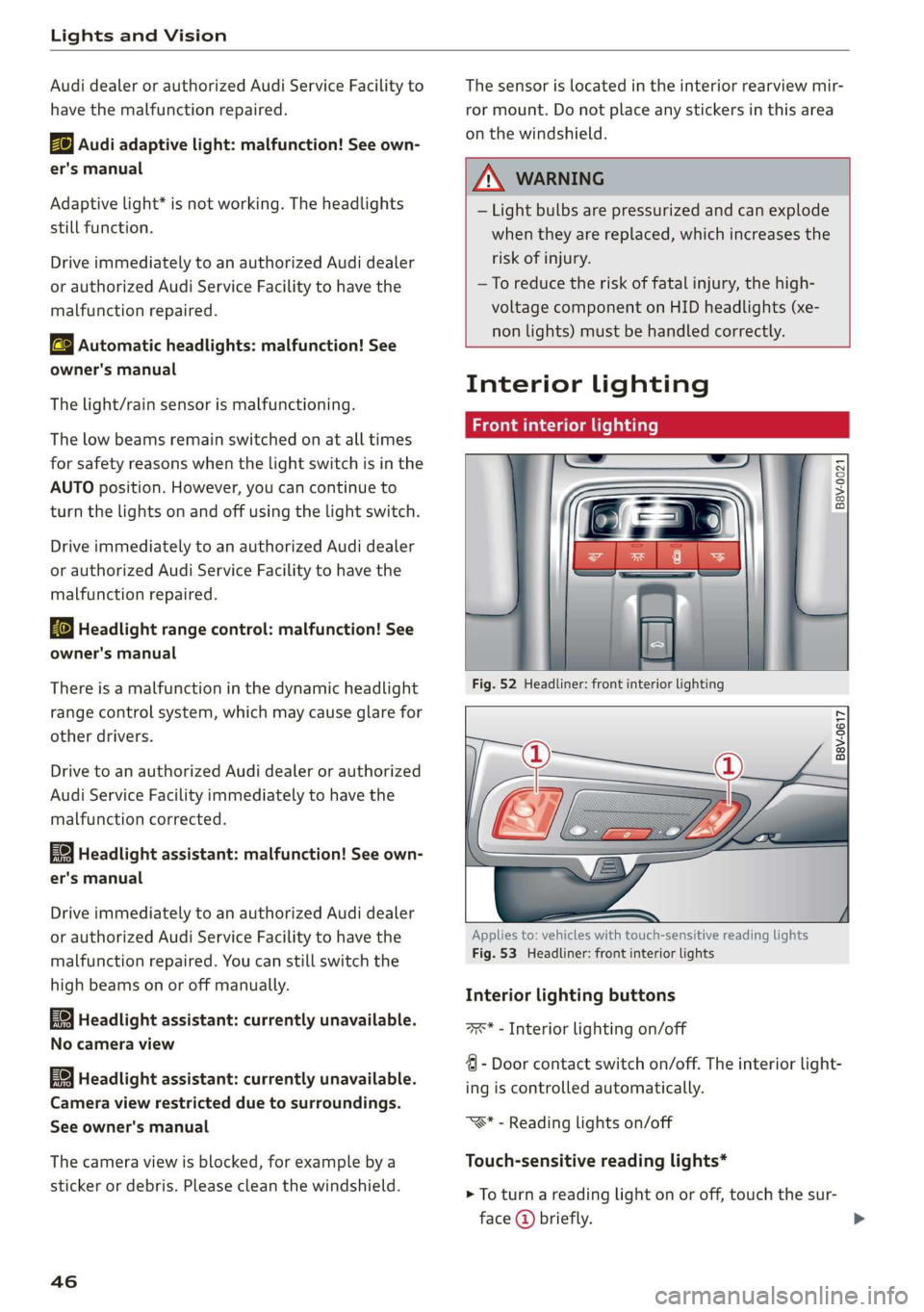
Front interior lighting
B8v-0021
B8V-0617
Applies to: vehicles with touch-sensitive reading lights
Fig. 53 Headliner: front interior lights
Interior lighting buttons
axs* - Interior lighting on/off
4 - Door contact switch on/off. The interior light-
ing is controlled automatically.
“S* - Reading lights on/off
Touch-sensitive reading lights*
> To turn a reading light on or off, touch the sur-
face @ briefly.
Page 50 of 400
Lights and Vision
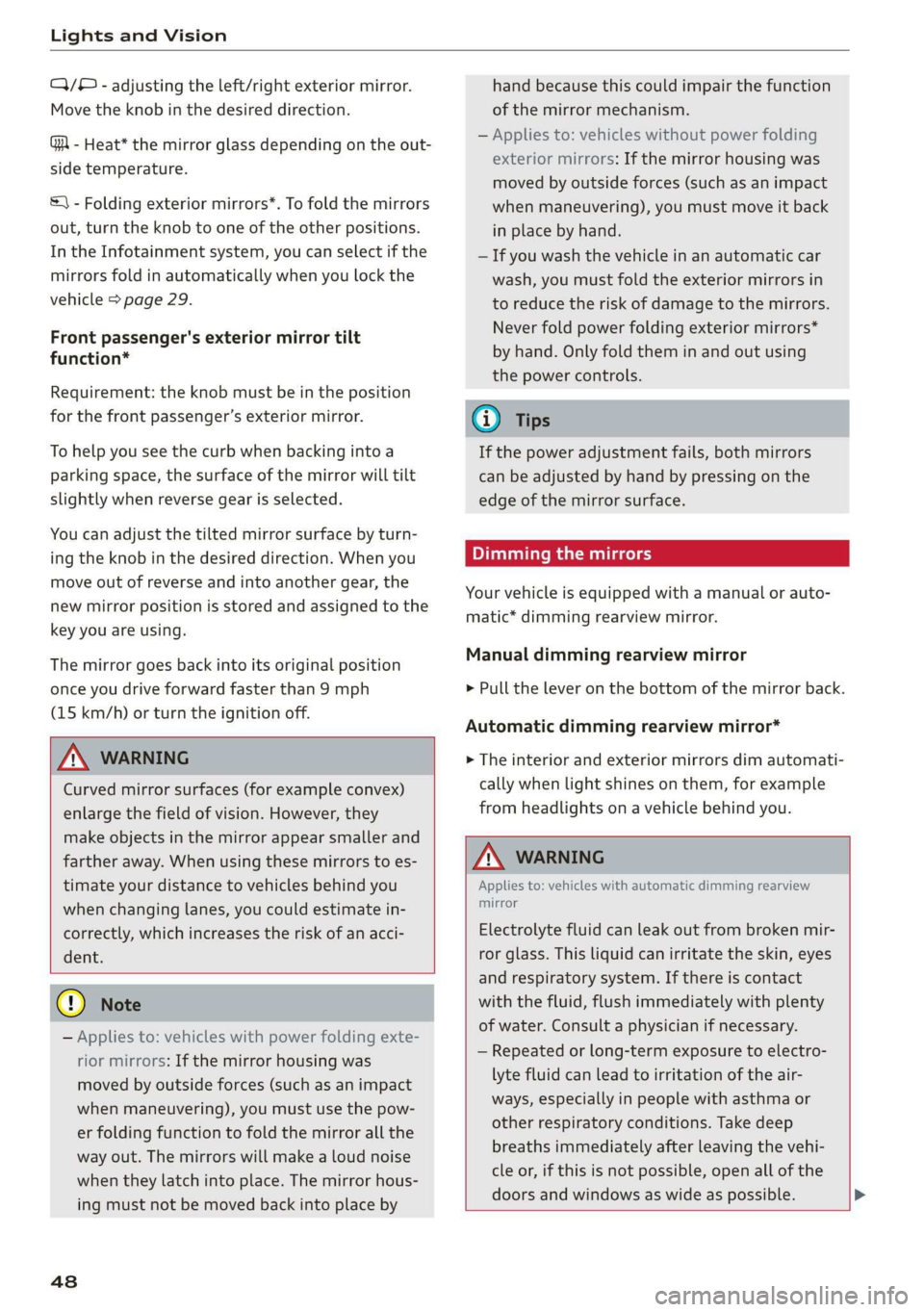
Q/® - adjusting the left/right exterior mirror.
Move the knob in the desired direction.
GA - Heat* the mirror glass depending on the out-
side temperature.
&) - Folding exterior mirrors*. To fold the mirrors
out, turn the knob to one of the other positions.
In the Infotainment system, you can select if the
mirrors fold in automatically when you lock the
vehicle > page 29.
Front passenger's exterior mirror tilt
function*
Requirement: the knob must be in the position
for the front passenger’s exterior mirror.
To help you see the curb when backing into a
parking space, the surface of the mirror will tilt
slightly when reverse gear is selected.
You can adjust the tilted mirror surface by turn-
ing the knob in the desired direction. When you
move out of reverse and into another gear, the
new mirror position is stored and assigned to the
key you are using.
The mirror goes back into its original position
once you drive forward faster than 9 mph
(15 km/h) or turn the ignition off.
Z\ WARNING
Curved mirror surfaces (for example convex)
enlarge the field of vision. However, they
make objects in the mirror appear smaller and
farther away. When using these mirrors to es-
timate your distance to vehicles behind you
when changing lanes, you could estimate in-
correctly, which increases the risk of an acci-
dent.
@) Note
— Applies to: vehicles with power folding exte-
rior mirrors: If the mirror housing was
moved by outside forces (such as an impact
when maneuvering), you must use the pow-
er folding function to fold the mirror all the
way out. The mirrors will make a loud noise
when they latch into place. The mirror hous-
ing must not be moved back into place by
48
hand because this could impair the function
of the mirror mechanism.
— Applies to: vehicles without power folding
exterior mirrors: If the mirror housing was
moved by outside forces (such as an impact
when maneuvering), you must move it back
in place by hand.
— If you wash the vehicle in an automatic car
wash, you must fold the exterior mirrors in
to reduce the risk of damage to the mirrors.
Never fold power folding exterior mirrors*
by hand. Only fold them in and out using
the power controls.
G) Tips
If the power adjustment fails, both mirrors
can be adjusted by hand by pressing on the
edge of the mirror surface.
Dimming the mirrors
Your vehicle is equipped with a manual or auto-
matic* dimming rearview mirror.
Manual dimming rearview mirror
> Pull the lever on the bottom of the mirror back.
Automatic dimming rearview mirror*
> The interior and exterior mirrors dim automati-
cally when light shines on them, for example
from headlights on a vehicle behind you.
Z\ WARNING
Applies to: vehicles with automatic dimming rearview
mirror
Electrolyte fluid can leak out from broken mir-
ror glass. This liquid can irritate the skin, eyes
and respiratory system. If there is contact
with the fluid, flush immediately with plenty
of water. Consult a physician if necessary.
— Repeated or long-term exposure to electro-
lyte fluid can lead to irritation of the air-
ways, especially in people with asthma or
other respiratory conditions. Take deep
breaths immediately after leaving the vehi-
cle or, if this is not possible, open all of the
doors and windows as wide as possible. >
Page 52 of 400
Lights and Vision
left control button > Driver assistance > Rain driving > page 51, Replacing the front
sensor. wiper blades.
@- Slow wiping
() Note
- Fast wipin
® ping — If there is frost, make sure the windshield
@®- Single wipe. If you hold the lever in this posi- wiper blades are not frozen to the wind-
tion longer, the wipers switch from slow wiping shield. Switching on the windshield wipers
to fast wiping. when the blades are frozen to the wind-
shield can damage the wiper blades.
— The windshield wiper system must be
switched off (lever in position @) before us-
©®- Clean the windshield . To eliminate water
droplets, the windshield wipers perform one af-
terwipe after several seconds while driving in
temperatures above 39 °F (4 °C). You can switch ing a car wash. This prevents the wipers
this function off by moving the lever to position from switching on unintentionally and caus-
®vwithin 10 seconds of the afterwipe. The after- ing damage to the windshield wiper system.
wipe function is reactivated the next time you G) Tips
switch the ignition on.
— The windshield wipers switch off when the
ignition is switched off. You can activate the
windshield wipers after the ignition is
switched on again by moving the windshield
wiper lever to any position.
Clean the headlights. The headlight washer sys-
tem operates only when the low beam headlights
are switched on. If you move the lever in position
©, the headlights will be cleaned in fixed inter-
vals. — Worn or dirty windshield wiper blades result
Applies to: vehicles with rear window wiper in streaking. This can affect the rain sensor
©@©- Wipe the rear window SD. The rear wiper function. Check your windshield wiper
moves about every 6 seconds. blades regularly.
—The washer fluid nozzles in the windshield
washer system are heated* at low tempera-
tures when the ignition is on.
— When stopping temporarily, such as at a
The rear wiper automatically switches on when
the reverse gear is selected and the front wind-
shield wipers are on and running.
@- Clean the rear window @. The number of traffic light, the speed of the windshield
wipes depends on how long the lever is held in wipers automatically reduces by one level.
position (7).
/\ WARNING Cleaning the wiper blades
— The rain sensor” is only intended to assist Clean the wiper blades when you see wiper
the driver. The driver may still be responsi- streaks. Use a soft cloth and a glass cleaner.
ble for manually switching the wipers on
eee an Windshield wiper
based on visibility conditions.
—The windshield must not be treated with > Place the windshield wiper arms in the service
water-repelling windshield coating agents. position > page 51.
Under unfavorable conditions, such as wet- > Fold the windshield wiper arms away from the
windshield. ness, darkness, and when the sun is low,
these coatings can cause increased glare,
which increases the risk of an accident. Wip-
er blade chatter is also possible.
— Properly-functioning windshield wiper
blades are required for a clear view and safe
Rear window wiper
Applies to: vehicles with rear window wiper
> Fold the wiper arm away from the rear window. >
sO
Page 53 of 400

8V2012721BK
Lights and Vision
ZA\ WARNING
Dirty windshield wiper blades can impair vi-
sion, which increases the risk of an accident.
() Note
If you see streaks again after cleaning the
wiper blades, the blades must be replaced
=>page 51.
Replacing the front wiper blades
2
B8R-0379
Fig. 60 Windshield wiper: removing the wiper blade
Windshield wiper service position/blade
replacement position
> To bring the wipers into the service position,
turn the ignition off and move the windshield
wiper lever into position @) for at least two sec-
onds © page 49, fig. 58.
> To bring the windshield wipers back to the nor-
mal position, switch the ignition on and hold
the windshield wiper lever in position @) until
the windshield wipers go back to the original
position, or drive faster than 8 mph (12 km/h).
Removing the wiper blade
> Fold the windshield wiper arm away from the
windshield.
> Press the locking knob @) & fig. 60 on the wiper
blade. Hold the wiper blade firmly.
> Remove the wiper blade in the direction of the
arrow.
Installing the wiper blade
> Insert the new wiper blade into the mount on
the wiper arm () until you hear it latch into
place.
>» Place the wiper arm back on the windshield.
> Turn the service position off.
ZA\ WARNING
For safety reasons, the windshield wiper
blades should be replaced once or twice each
year.
() Note
— Only fold the windshield wipers away when
they are in the service position. Otherwise,
you risk damaging the paint on the hood or
the windshield wiper motor.
— You should not drive your vehicle or press
the windshield wiper lever when the wiper
arms are folded away from the windshield.
The windshield wipers would move back in-
to their original position and could damage
the hood and windshield.
@) Tips
— You can also use the service position, for ex-
ample, if you want to protect the windshield
from icing by using a cover.
— You cannot activate the service position
when the hood is open.
Replacing rear wiper blade
Applies to: vehicles with rear window wiper
wx a Ss
- ed o a
Fig. 61 Rear window wiper: removing the wiper blade
Removing the wiper blade
> Fold the wiper arm away from the rear window.
> Hold the wiper blade below the center in the di-
rection of the arrow and pull it out of the re-
tainer. Hold the windshield wiper arm securely
while doing this.
51