charging AUDI A3 2020 Owner´s Manual
[x] Cancel search | Manufacturer: AUDI, Model Year: 2020, Model line: A3, Model: AUDI A3 2020Pages: 400, PDF Size: 107.47 MB
Page 109 of 400
8V2012721BK
High-voltage system
Deactivating sleep mode
> Unlock the vehicle > page 25. Or
> Open the driver's door. Or
> Press the button © > page 105, fig. 105.
Unlocking the vehicle charging connector
when the vehicle is unlocked
> If necessary, deactivate sleep mode.
> Press the button with the illuminated LED @) or
© > page 105, fig. 105. Or
> Press the {@ button in the driver's door
= page 29, fig. 22 or the & button on the re-
mote control key.
> The connector will unlock for 30 seconds.
> Remove the connector.
> If the connector is not removed within 30 sec-
onds, it will lock again automatically.
Closing the charging unit
> Put the cap back on the charging port
=> page 104, fig. 103.
> Carefully slide the cover back in its original po-
sition.
> Turn the lock to the horizontal position
=> page 104, fig. 102.
@) Note
If you drive with an open charging unit, both
the cover and the electronics installed behind
it could be damaged.
G) Tips
The instrument cluster will indicate if the
charging unit is open while driving. Check be-
fore every drive after charging if the cover is
locked.
Semele
Applies to: vehicles with plug-in hybrid drive
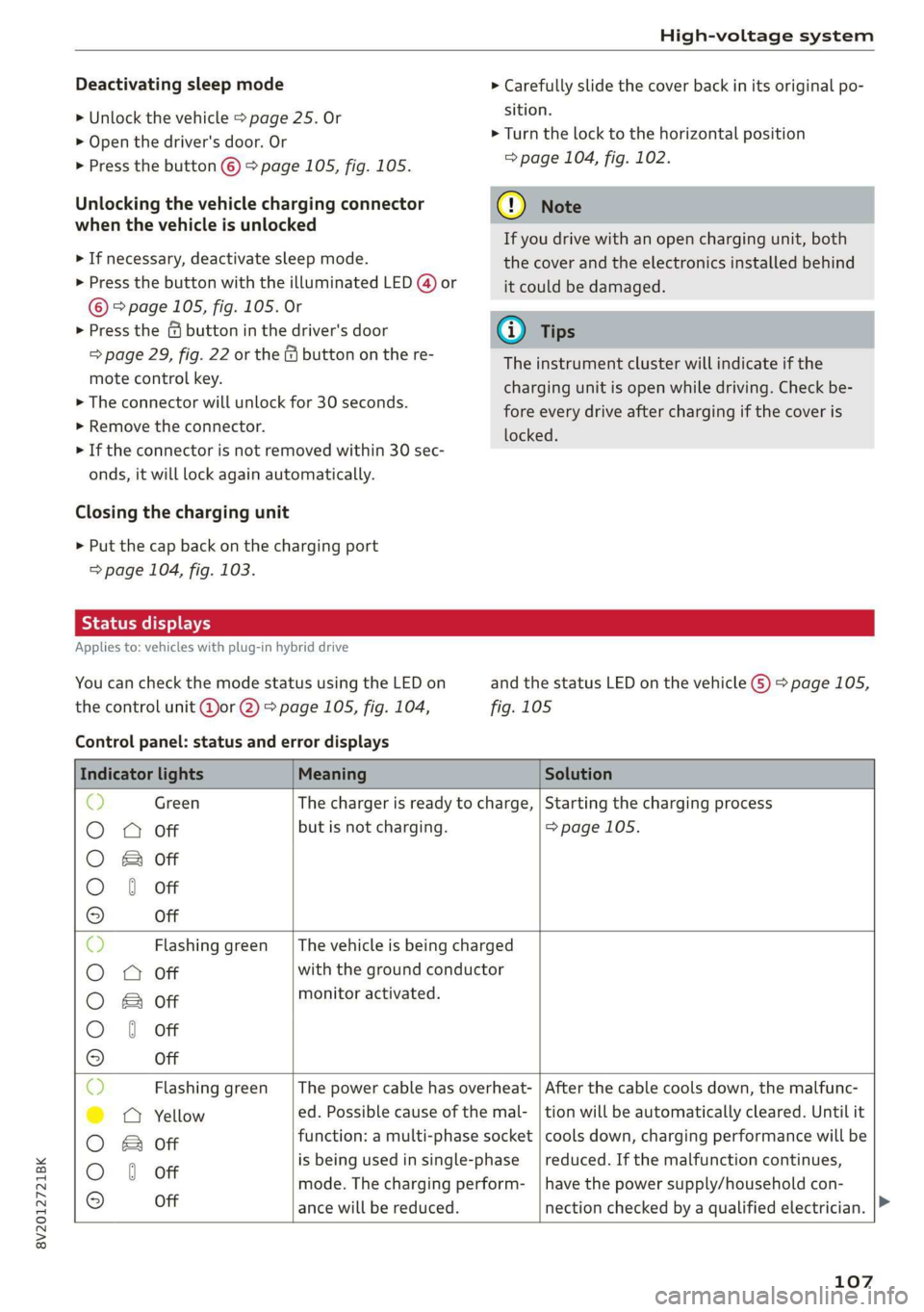
You can check the mode status using the LED on
the control unit @or @) > page 105, fig. 104,
Control panel: status and error displays
and the status LED on the vehicle G) > page 105,
fig. 105
Indicator lights Meaning Solution
© Green The charger is ready to charge, | Starting the charging process
O 0 Off but is not charging. => page 105.
O B&B off
O 0 of
9 Off
c) Flashing green __| The vehicle is being charged
O O off with the ground conductor
O Bor monitor activated.
O 0 Off
9 Off
Sy Flashing green _| The power cable has overheat- | After the cable cools down, the malfunc-
©) a Yellow ed. Possible cause of the mal- | tion will be automatically cleared. Until it
O B otf function: a multi-phase socket | cools down, charging performance will be
O 6 off is being used in single:phase reduced. If the malfunction continues,
mode. The charging perform- | have the power supply/household con-
© Off ance will be reduced. nection checked by a qualified electrician.
107
Page 110 of 400

High-voltage system
Indicator lights Meaning Solution
Q Flashing green |The control unit has overheat- | After the control unit cools down, the
O 0 off ed. The charging performance | malfunction will be automatically
will be reduced. cleared. Never leave the control panel in
O B Of P
direct sunlight for long periods or time.
© 1 Yeltow Until it cools down, charging perform-
9 Off ance will be reduced. If the malfunction
continues, have the control unit checked
by an authorized Audi dealer or author-
ized Audi Service Facility.
O Red The power cable has overheat- | After the cable cools down, the malfunc-
© © Yellow ed. The charging process has __| tion will be automatically cleared and the
been interrupted. charging process will resume. If the mal-
O & off
O 6 of function continues, have the control unit
checked by an authorized Audi dealer or
© Off authorized Audi Service Facility, or have
the power supply/household connection
checked by a qualified electrician.
O Red The control unit has overheat- | After the control unit cools down, the
O QO Off ed. The charging process has__| malfunction will be automatically cleared
been interrupted. and the charging process will resume.
O & Off
@ 0 Yew Never leave the control panel in direct
evo sunlight for long periods or time. If the
© Off malfunction continues, have the control
unit checked by an authorized Audi dealer
or authorized Audi Service Facility.
© Red The charging infrastructure of | After the power supply/household con-
© @ Flashing yellow |the power supply/household | nection stabilizes, the malfunction will be
connection is restricted. Possi- | automatically cleared and the charging
O & off
O 6 of ble cause of the malfunction: | process will resume. If the malfunction
low voltage or poor power fre- | continues, have the power supply/house-
© Off quency. The charging process | hold connection checked by a qualified
has been interrupted. electrician.
O Red There is a malfunction inthe | After the vehicle charging system stabiliz-
O 0 Off vehicle charging system. The | es, the malfunction will be automatically
: charging process has beenin- | cleared and the charging process will re-
© & Flashing yellow ging ging
O 0 of terrupted. sume. If the malfunction continues, have
the vehicle checked by an authorized Audi
© Off dealer or authorized Audi Service Facility.
O Red The power cable or vehicle ca- | Have the power or vehicle cable replaced
O Q Off ble is faulty. Possible cause of | by an authorized Audi dealer or author-
the malfunction: the coding ized Audi Service Facility.
O B&B off
. resistance of the power or ve-
© 0 Flashing yellow hicle cable is not compatible.
9 Off
The charging process has been
interrupted.
108
Page 111 of 400

8V2012721BK
High-voltage system
Indicator lights Meaning Solution
© Red There is a malfunction inthe | End the charging process at the vehicle
O O off vehicle charging system. The | and remove the vehicle cable from the ve-
@ B Red charging process has been in- | hicle charging port. Disconnect the charg-
O 6 of terrupted. er from the power supply and reconnect it
after 60 seconds. Restart the charging
9 Off process > page 105. If the malfunction
continues, have the vehicle checked by an
authorized Audi dealer or authorized Audi
Service Facility.
O Red There is an overvoltage inthe | Disconnect the charger from the power
© CQ Flashing red charging infrastructure of the | supply and reconnect it after 60 seconds.
power supply/household con- | If the malfunction continues, have the
O & off
O 6 off nection. The charging process | power supply/household connection
© has been interrupted. checked by a qualified electrician.
Off
© Red The control unit has atechni- | Disconnect the charger from the power
O 0 Off cal malfunction. The charging | supply and reconnect it after 60 seconds.
O Bot process has been interrupted. |If the malfunction continues, have the
@ 0 Red control unit checked by an authorized
© Audi dealer or authorized Audi Service Fa-
9 Off cility.
© Red The control unit has atechni- | Disconnect the charger from the power
O 0 off cal malfunction (self-test supply and reconnect it after 60 seconds.
O Bot failed). The charging process _ | If the malfunction continues, have the
© 6 Flashi d has been interrupted. control unit checked by an authorized
asning re Audi dealer or authorized Audi Service Fa-
© Off cility.
© Red The charging infrastructure of | Have the control unit checked by an au-
@ CO Red the power supply/household | thorized Audi dealer or authorized Audi
@ & Red connection is insufficient: the | Service Facility, and have the power sup-
O 6 of ground conductor is interrupt- | ply/household connection checked by a
ed or not present. The ground | qualified electrician. Do not use the pow-
9 Off conductor monitor has inter- | er supply/household connector until the
rupted the charging process. | malfunction is corrected.
© Red The indicator light in the reset | Have the control unit replaced by an au-
@ OC Red button on the control unit is | thorized Audi dealer or authorized Audi
@ B& Red faulty. The charging process _| Service Facility.
@ © Red has been interrupted.
e
9 Off
109
Page 112 of 400

High-voltage system
Indicator lights Meaning Solution
O Red The control unit has detected | Press and hold the © button for at least
@ X Red residual current. The charging | two seconds. If the malfunction contin-
@ EB Red process has been interrupted. | ues, have the control unit checked by an
@ © Red authorized Audi dealer or authorized Audi
€ / Service Facility, and have the power sup-
9 Flashing red ply/household connection checked by a
qualified electrician.
© Red The charging infrastructure is | Disconnect the charger from the power
© Q Flashing red wired incorrectly. The charging | supply. Have the power supply/household
© & Flashing red process has been interrupted. | connection checked by a qualified electri-
© § Flashing red eas
9 Off
O Red The control unit has a techni- | Disconnect the charger from the power
@ CX Red cal malfunction. Possible supply and reconnect it after 60 seconds.
@ EB Red cause of the malfunction: If the malfunction continues, have the
@ 0 Red software error or the load re-_ | control unit checked by an authorized
. lay has been switched incor- _| Audi dealer or authorized Audi Service Fa-
9 Red rectly. The charging process cility, and have the power supply/house-
has been interrupted. hold connection checked by a qualified
electrician.
O Flashing red The control unit has a serious | Have the control unit replaced by an au-
O 0 off malfunction. The charging thorized Audi dealer or authorized Audi
O Bot process has been interrupted. | Service Facility.
@ @ Red
9 Off
© Off The indicator light in the Have the control unit replaced by an au-
@ C Red On/Off button on the control | thorized Audi dealer or authorized Audi
@ B Red unit is faulty. The charging Service Facility.
@ 0 Red process has been interrupted.
e
© Red
Vehicle: charging unit
LED on vehicle G) Meaning Solution
. . Remove the charger, put the cap
On High voltage battery charging on and close the cover on the
process is completed. . .
charging unit.
The high-voltage battery is charg-
isan Flashing ing or the vehicle is being air con-
ditioned/heated.
Blinks for approxi-
mately one minute
after leaving the vehi-
cle
started yet.
Charging timer was programmed
but the charging process has not
110
Page 113 of 400

8V2012721BK
High-voltage system
LED on vehicle © Meaning Solution
Have the power supply or power
supply system inspected. Check
No power supply was recognized | the status display on the control
On even though the charging cable is | unit > table on page 107. See an
Yellow plugged in. authorized Audi dealer or author-
ized Audi Service Facility for assis-
tance if necessary.
‘ The selector lever in notin the P | Move the selector lever into the P
Flashing vps ue
position. position.
Check if the charging connector is
inserted correctly. Remove the
The charging connector could not | charging connector and insert it in-
On be correctly locked in the vehicle | to the charging port again. See an
charging port. authorized Audi dealer or author-
ized Audi Service Facility for assis-
Red tance if necessary.
Fault in the charging system. The
ong penne meme See an authorized Audi dealer or
Flashing cargec. . . authorized Audi Service Facility for
Or: the outside temperature is too . .
: assistance if necessary.
low. The high-voltage battery
could not be fully charged.
@) Tips
The operation status indicated by the LED G)
on the vehicle is also displayed in the instru-
ment cluster/Infotainment system.
Indicator lights and
messages
Applies to: vehicles with plug-in hybrid drive
If the Ey indicator light turns on, the high-volt-
age battery is charging or is already completely
charged.
If the EX indicator light stays on, there is a mal-
function in the charging system. Have the prob-
lem corrected immediately by an authorized Audi
dealer or authorized Audi Service Facility.
Charging connector still attached. Vehicle
cannot be driven
This message appears when the charging system
is still connected to the vehicle. Remove the con-
nector > page 106.
Incompatible charging system. Please check
charging system
This message appears when the charging system
is incompatible. Only charge using the charging
system that is designed for your vehicle.
Eg AC charging system: malfunction! Please
contact Service
This message appears if there is a malfunction in
the charging system. Have the problem corrected
immediately by an authorized Audi dealer or au-
thorized Audi Service Facility.
Warning! Charging unit cover is unlocked.
See owner's manual
This message appears if the charging unit cover is
open. Close the cover and lock it > page 107.
111
Page 114 of 400
High-voltage system
Emergency release
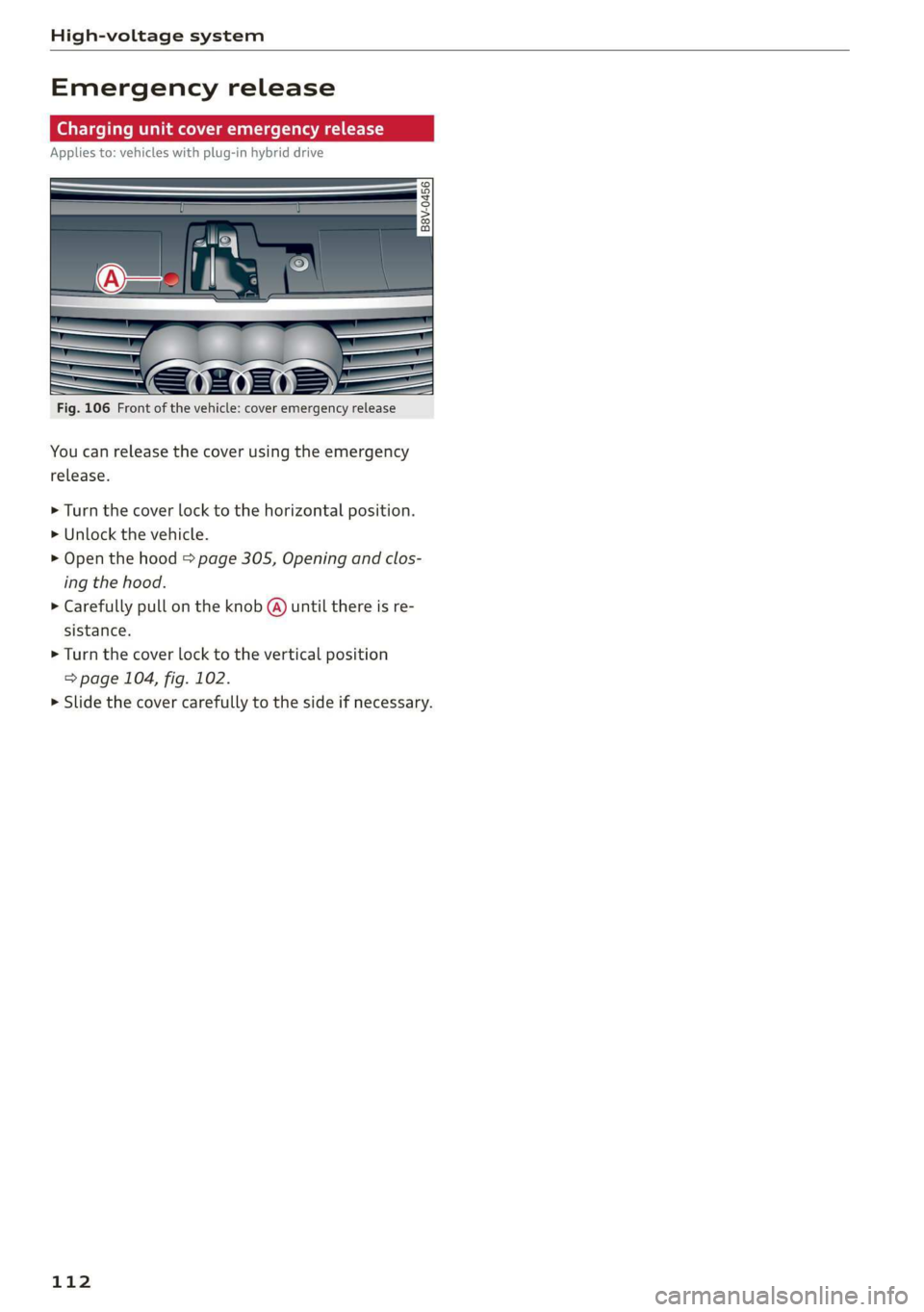
Charging unit cover emergency release
Applies to: vehicles with plug-in hybrid drive
Fig. 106 Front of the vehicle: cover emergency release
You can release the cover using the emergency
release.
> Turn the cover lock to the horizontal position.
> Unlock the vehicle.
> Open the hood > page 305, Opening and clos-
ing the hood.
> Carefully pull on the knob @ until there is re-
sistance.
> Turn the cover lock to the vertical position
=> page 104, fig. 102.
> Slide the cover carefully to the side if necessary.
112
Page 173 of 400
8V2012721BK
Telephone
secondary phone, since the directory from the
primary phone is always displayed.
Switching the primary and secondary phone
Requirement: a primary phone and a secondary
phone must be connected.
> Select: [MENU] button > Telephone > right con-
trol button > Switch primary and second.
phone.
@) Tips
— You can see if a cell phone is connected as
the primary phone or secondary phone in
the Connection manager > page 231.
— You can also make your connected cell
phone the default phone by selecting Set as
default telephone in the Connection man-
ager > page 233.
— The device name of the connected primary
phone is shown in the Telephone menu
(such as myPhone).
— If the primary phone does not connect auto-
matically to the MMI when the ignition is
switched on, for example because it is out
of the vehicle range or the Bluetooth func-
tion is switched off, then a previously paired
secondary phone is automatically connected
as the primary phone.
— You can send and receive messages on your
primary phone as well as on your secondary
phone > page 173, fig. 163. You do not
need to switch your primary phone and sec-
ondary phone for this.
Using the Audi phone
box
Applies to: vehicles with Audi phone box
RAH-8906|
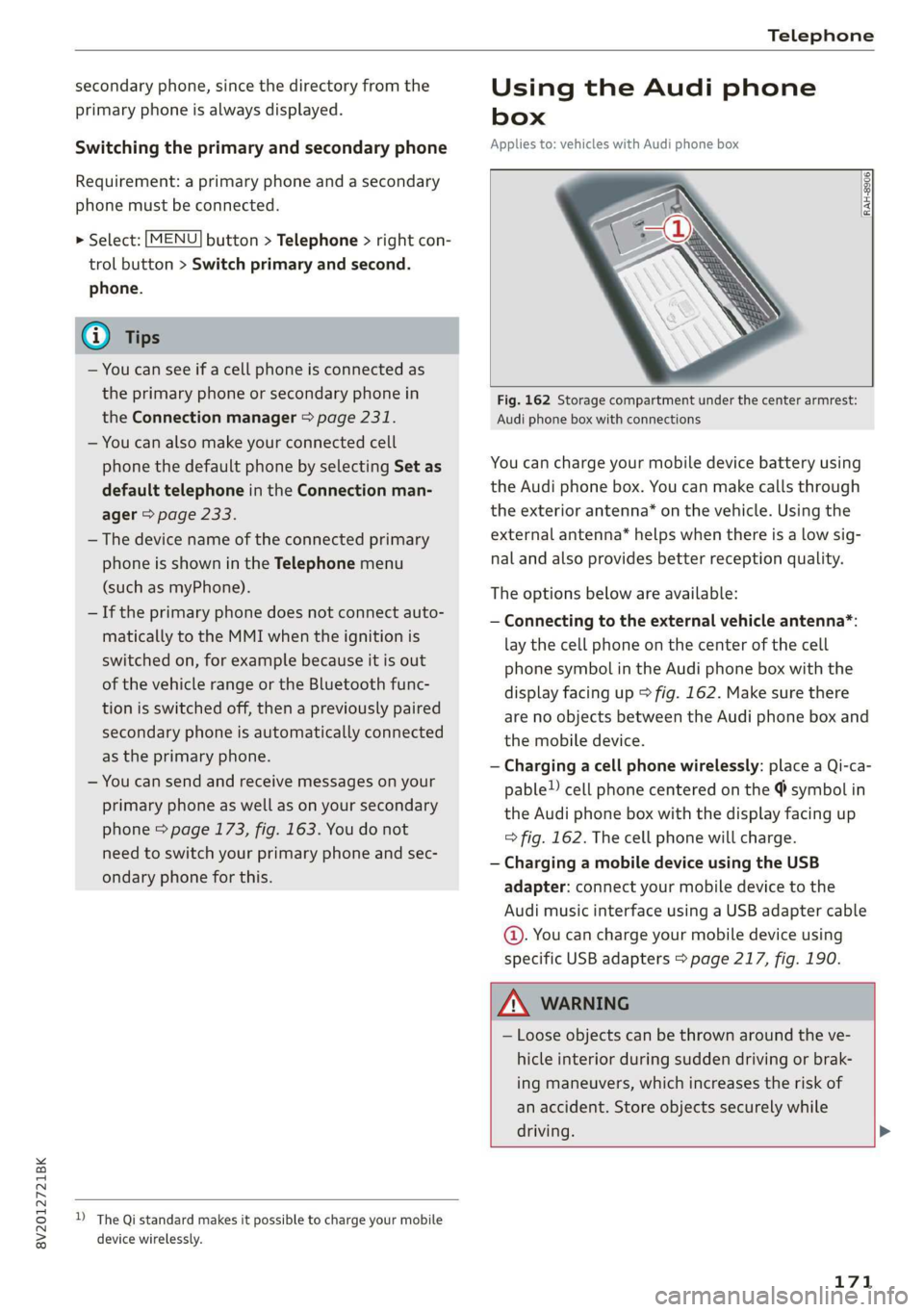
Fig. 162 Storage compartment under the center armrest:
Audi phone box with connections
You can charge your mobile device battery using
the Audi phone box. You can make calls through
the exterior antenna* on the vehicle. Using the
external antenna* helps when there is a low sig-
nal and also provides better reception quality.
The options below are available:
— Connecting to the external vehicle antenna*:
lay the cell phone on the center of the cell
phone symbol in the Audi phone box with the
display facing up > fig. 162. Make sure there
are no objects between the Audi phone box and
the mobile device.
— Charging a cell phone wirelessly: place a Qi-ca-
pable!) cell phone centered on the @ symbol in
the Audi phone box with the display facing up
=> fig. 162. The cell phone will charge.
— Charging a mobile device using the USB
adapter: connect your mobile device to the
Audi music interface using a USB adapter cable
©. You can charge your mobile device using
specific USB adapters > page 217, fig. 190.
Z\ WARNING
— Loose objects can be thrown around the ve-
hicle interior during sudden driving or brak-
ing maneuvers, which increases the risk of
an accident. Store objects securely while
driving. >
D_ The Qi standard makes it possible to charge your mobile
device wirelessly.
171
Page 174 of 400

Telephone
— The mobile device may become hot during
wireless charging. Pay attention to the tem-
perature of your mobile device and be care-
ful when removing it from the Audi phone
box.
—An alternating magnetic field is used for
wireless charging. Maintain a minimum dis-
tance of approximately 2.4 in (6 cm) to the
Audi phone box charging plate. The thresh-
olds for prolonged exposure at this distance
comply with ICNIRP1998. Therefore, inter-
actions such as irritation of sensory organs,
malfunctions of active implants (such as
pacemakers, infusion pumps, or neurosti-
mulators) or effects on passive implants
(such as prosthetic limbs) is highly unlikely.
If you have an implant, consult a medical
specialist if you have any questions.
@) Note
Applicable to U.S.A.
Operation of the Audi phone box is subject to
the following requirements of the Federal
Communications Commission:
— This is a CONSUMER device.
— BEFORE USE, you MUST REGISTER THIS DE-
VICE with your wireless provider and have
your provider’s consent. Most wireless pro-
viders consent to the use of signal boosters.
Some providers may not consent to the use
of this device on their network. If you are
unsure, contact your service provider.
— You MUST operate this device with approved
antennas and cables as specified by the
manufacturer. Antennas MUST be installed
at least 20 cm (8 inches) from any person.
— You MUST cease operating this device im-
mediately if requested by the FCC or a li-
censed wireless service provider.
— WARNING: E911 location information may
not be provided or may be inaccurate for
calls served by using this device.
@) Note
Applicable to Canada
In Canada, operation of a Zone Enhancer,
such as an Audi Phone Box, is subject to the
following requirements of the Innovation,
172
Science and Economic Development Canada
(ISED):
—This is a CONSUMER device.
— BEFORE USE, you MUST meet all require-
ments set out in CPC-2-1-05.
— You MUST operate this device with approved
antennas and cables as specified by the
manufacturer. Antennas MUST NOT be in-
stalled within 20 cm of any person.
— You MUST cease operating this device im-
mediately if requested by ISED or a licensed
wireless service provider.
— WARNING: £911 location information may
not be provided or may be inaccurate for
calls served by using this device.
G) Tips
— Placing the mobile device in a bag or protec-
tive sleeve inside the Audi phone box can in-
terfere with the connection to the external
antenna”.
— Metallic objects in the Audi phone box block
the wireless charging of your mobile device
and calls made using the exterior antenna”*.
—The charging time and temperature will vary
depending on the mobile device being used.
— Your mobile device can only be charged in
the Audi phone box when the ignition is
switched on.
— To reduce the risk of malfunctions, make
sure the mobile device is positioned correct-
ly in the Audi phone box.
—The maximum charging output is 5 W.
— Strong transmission quality* cannot be
guaranteed if more than one mobile device
is in the box.
— Only one mobile device at a time can be
charged wirelessly in the Audi phone box.
— Audi recommends using Audi Genuine Ac-
cessories. Audi has verified their reliability,
safety, and suitability.
— You can purchase a USB adapter from an au-
thorized Audi dealer or authorized Audi
Service Facility, or at specialty stores.
— If you place your remote control key togeth-
er with your mobile device in the Audi phone
box, it may cause your mobile device to stop
charging if wireless charging is active.
Page 183 of 400
8V2012721BK
Telephone
Download directory
To update the contacts in the MMI, you can man-
ually download your mobile device contacts. De-
pending on the mobile device, you may need to
disconnect and reconnect the Bluetooth connec-
Hide contacts without phone number
When this function is switched on, grayed-out
contacts that have no phone numbers stored for
them will be hidden in the directory.
tion to update the contacts.
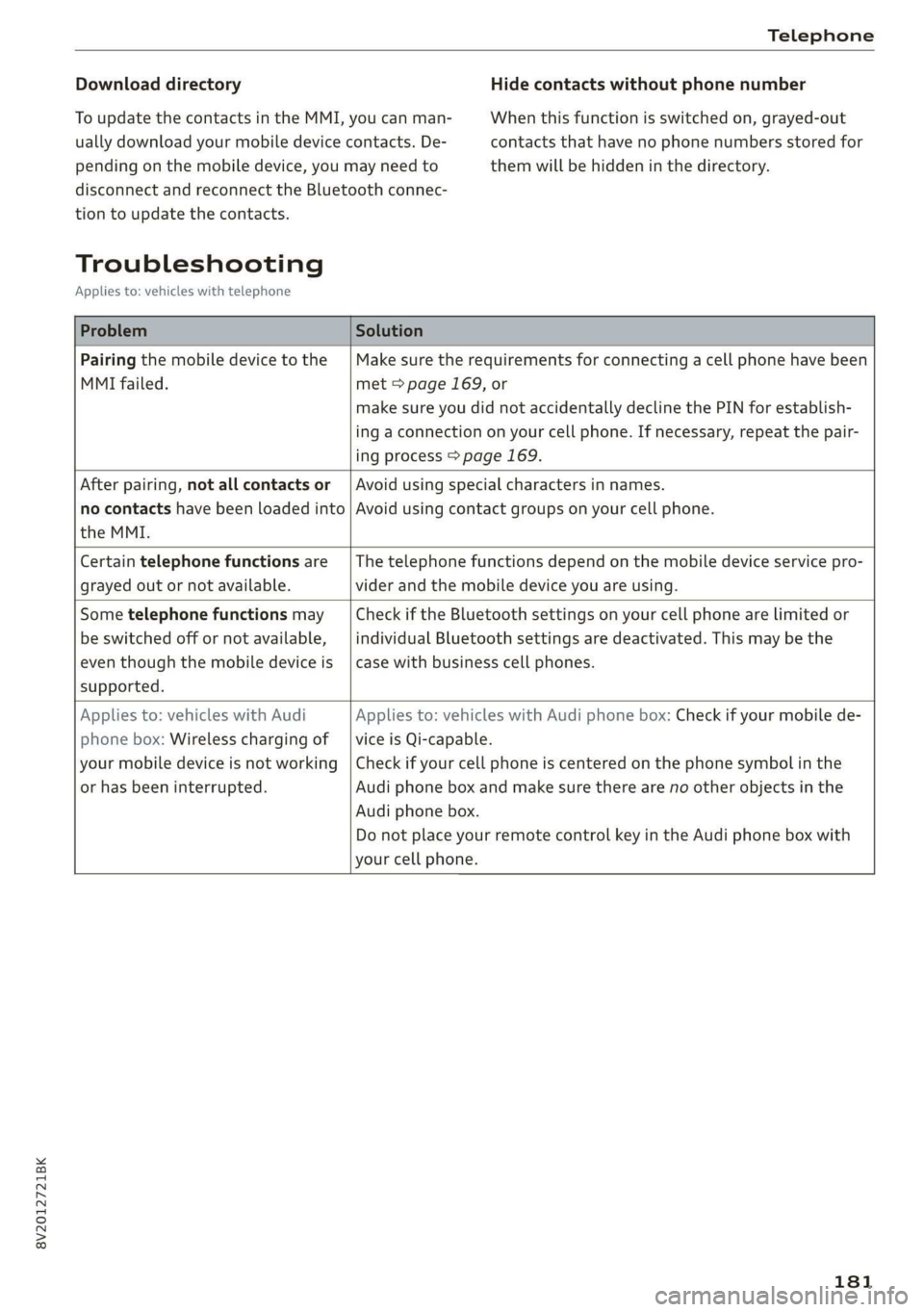
Troubleshooting
Applies to: vehicles with telephone
Problem Solution
Pairing the mobile device to the
MMI failed.
Make sure the requirements for connecting a cell phone have been
met > page 169, or
make sure you did not accidentally decline the PIN for establish-
ing a connection on your cell phone. If necessary, repeat the pair-
ing process > page 169.
After pairing, not all contacts or
no contacts have been loaded into
the MMI.
Avoid using special characters in names.
Avoid using contact groups on your cell phone.
Certain telephone functions are
grayed out or not available.
The telephone functions depend on the mobile device service pro-
vider and the mobile device you are using.
Some telephone functions may
be switched off or not available,
even though the mobile device is
supported.
Check if the Bluetooth settings on your cell phone are limited or
individual Bluetooth settings are deactivated. This may be the
case with business cell phones.
Applies to: vehicles with Audi
phone box: Wireless charging of
your mobile device is not working
or has been interrupted.
Applies to: vehicles with Audi phone box: Check if your mobile de-
vice is Qi-capable.
Check if your cell phone is centered on the phone symbol in the
Audi phone box and make sure there are no other objects in the
Audi phone box.
Do not place your remote control key in the Audi phone box with
your cell phone.
181
Page 187 of 400
8V2012721BK
Audi connect
If you logged in to myAudi in your vehicle
=> page 183, personalized newsfeeds can be dis-
played.
Access to Twitter
Requirement: you must have connected your ve-
hicle with myAudi > page 183. You must have
connected your myAudi account with Twitter.
You can only connect one Twitter account with
your myAudi account. Not all settings can be ad-
justed in the MMI. Some can only be adjusted
through the Twitter website.
> Select: Twitter > left control button > desired
function (for example, Trends).
Charging stations
Applies to: vehicles with charging stations and plug-in hybrid
drive
Information on charging stations in the selected
search area.
>» Select and confirm Charging stations.
ZA WARNING
Always follow the information found in > AV
in General information on page 182.
@ Note
Always follow the information found in >@ in
General information on page 182.
Additional options
Applies to: vehicles with Audi connect Infotainment
> Select: [MENU
control button.
button > Audi connect > right
Depending on the equipment and the country,
the following options may be available in the
overview of Audi connect Infotainment services:
About Audi connect
Here you will find legal information regarding
Audi connect Infotainment usage.
D Depends on the country and equipment. These services
are available for a limited time.
Log in
See > page 183.
Connection manager
See > page 231.
License subscription
The validity and expiration date of your licenses
are displayed.
Refresh
The content of the selected Audi connect Info-
tainment service or the entire Audi connect Info-
tainment list is updated.
Data privacy
See 5 page 372.
@) Note
Always follow the information found in >@ in
General information on page 182.
Audi connect e-tron
services
Applies to: vehicles with plug-in hybrid drive and Audi connect
With Audi connect vehicle control services 1), you
can utilize various services using the myAudi app
or online at my.audi.com.
ZA WARNING
Always follow the information found in > A\
in General information on page 182.
Gi) Tips
— Accessing specific data or controlling func-
tions remotely depends on the charge level
of the vehicle battery. Therefore, these
functions only have limited availability after
switching off the ignition.
— An eSIM card establishes the Internet con-
nection for Audi connect vehicle control
services. The costs for this are included in
185
>