sport mode AUDI A3 2020 Owner´s Manual
[x] Cancel search | Manufacturer: AUDI, Model Year: 2020, Model line: A3, Model: AUDI A3 2020Pages: 400, PDF Size: 107.47 MB
Page 26 of 400
Instrument cluster
Boost indicator
Applies to: vehicles with Audi virtual cockpit: The
boost indicator is only displayed in the enhanced
view or in the sport view* > page 19.
The current engine load (meaning the current
boost pressure) is indicated by a bar.
Siam ele heels
Applies to: vehicles with shift light indicator
The
shift light indicator informs the driver when
the rpm limit is reached.
Accessing the shift light indicator
Requirement: tiptronic mode must be activated
=> page 76.
>» Select the sport view > page 19. The shift light
indicator is displayed with green, yellow and
red ranges in the upper areas of the tachome-
ter.
The shift light indicator will blink red when ap-
proaching the engine speed limit. Shift to the
next highest gear at the right time.
Sy Pam EN
Applies to: vehicles with Audi virtual cockpit and sport dis-
plays
Depending on the vehicle equipment, the sport
displays may include the G-meter, the engine da-
ta and the tire pressure monitoring system.
Accessing the sport displays
> Open the first vehicle functions tab using the
[<>] button on the multifunction steering
wheel.
> Select on the multifunction steering wheel: left
control button > Sport displays.
> Turn the left thumbwheel on the multifunction
steering wheel until the desired sport display
appears in the instrument cluster.
G meter*
The G meter displays the longitudinal and lateral
acceleration. The maximum values that are
reached are stored and displayed when the vehi-
cle is stationary.
24
> To reset the stored values, select on the multi-
function steering wheel: right control button >
Reset values.
Engine data*
The engine data displays the current power and
torque.
Tire Pressure Monitoring System*
The tire pressure monitoring system displays the
current tire pressures and temperature. Also see
=> page 339, Tire pressure monitoring system.
Page 77 of 400
8V2012721BK
Driving
Gears and driving programs
RAZ-0405
HEeEes
D/S .
a
Fig. 86 Center console: selector lever
The automatic transmission shifts automatically
depending on the selected gear and the current
driving style. When driving with a moderate driv-
ing style, upshifting early and downshifting late
will help to improve fuel economy. When driving
with a sporty driving style, the transmission per-
mits higher RPMs.
The gears are displayed next to the selector lever.
— P (Park): parking lock
—R (Reverse): driving in reverse
—N (Neutral)
— D (Drive): driving forward
Selecting a gear
Requirement: the ignition must be switched on.
— Bring the vehicle to a full stop and press the
brake pedal.
— Press the release button (@) on the selector lev-
er.
—To select a gear, move the selector lever into
the corresponding position.
— The label next to the selector lever for the se-
lected gear will light up.
“N” (Neutral) gear
In the “N” gear, power is not transmitted to the
driving wheels. Use the “N” gear in a car wash
(with conveyor belts), for example.
If you unintentionally select “N” while driving
(faster than 1 mph (2 km/h)), you can also shift
back to “D” without pressing the brake pedal.
For safety reasons, the vehicle cannot be locked
when the transmission is in the "N” gear.
“Pp” (Park) gear
The vehicle is secured from rolling away by the
parking lock when in the “P” gear.
If you cannot shift out of “P”, for example be-
cause the vehicle has no power, you may need to
use the emergency release for the parking lock
=> page 88.
Selecting a driving program
Various driving programs can be selected when in
the “D” gear. The programs influence when the
transmission shifts and how the accelerator ped-
al responds.
The selected driving program is displayed in the
instrument cluster.
—D (Drive): normal driving mode
—S (Sport): sporty driving mode
If you select the Dynamic mode in Audi drive se-
lect*, the “S” driving program will be activated.
When the ignition is switched off, the driving pro-
gram may be reset to “D”.
To switch between the current driving program
and “S”, push the selector lever toward the rear.
Plug-in hybrid drive: if you press the
lected.
Z\ WARNING
— Before starting to drive, check if the desired
gear is displayed next to the selector lever.
— Always secure your vehicle from rolling
away. Press the brake pedal or shift to “P”.
When leaving the vehicle, also set the park-
ing brake.
— Power is still transmitted to the wheels
when the engine is running at idle. To pre-
vent the vehicle from “creeping”, you must
keep your foot on the brake in all selector
lever positions (except "P" and "N") when
the engine is running.
—To reduce the risk of an accident, do not
press the accelerator pedal when changing
gears if the vehicle is stationary and the en-
gine is running.
75
Page 81 of 400

8V2012721BK
Driving
strength can depend on various factors, for ex-
ample:
— If you are in tiptronic mode > page 76. Or
—If the sport driving mode "S" was selected.
Plug-in hybrid drive modes
Applies to: vehicles with plug-in hybrid drive
Adjusting the plug-in-hybrid mode
The <8" button is located above the selector lever
in the center console.
> Press the <$" button repeatedly until the de-
sired mode is displayed in the instrument clus-
ter.
The active mode is displayed the first time the
Hybrid driving
If the <8Y button does not turn on, you are driv-
ing in hybrid mode. The vehicle can be driven
with the combustion engine or with the electric
motor if the conditions for it have been met
=> page 79, Conditions for electric driving.
© e-tron mode: Hybrid - The electric motor and
combustion engine are working efficiently to-
gether. Hybrid mode is particularly effective for
long trips.
* e-tron mode: Battery Hold - The vehicle is
driven predominantly with the combustion en-
gine to maintain the high-voltage battery charge
level for as long as possible.
Electric driving
can be driven by the electric motor if the condi-
tions for this have been met > page 79, Condi-
tions for electric driving.
Conditions for electric driving
— Driving program “S” must not be selected.
— The charge level of the high-voltage battery
must be sufficient.
— The temperature of the high-voltage battery
must be adequate (outside temperatures not
below approximately 14°F / -10°C and not
above approximately 104°F / 40°C).
— The driving speed must be under approximately
80 mph (130 km/h).
— The accelerator pedal must not be pressed too
hard.
Indicator lights
Symbol |Meaning
EV mode is switched on and active.
You are driving only with electric
power.
EV mode is not available, because
the conditions for electric driving
have not been met.
The combustion engine is running.
The hybrid mode e-tron mode: Bat-
tery Hold is active.
The hybrid mode e-tron mode: Hy-
brid is active.
G) Tips
— When temperatures are below approximate-
ly 14 °F (-10 °C), the vehicle heat output in
EV mode is reduced in order to attain higher
ranges. If the windows fog up or a higher
heat output is desired, switch on the Hybrid
or Battery Hold mode.
— Applies to: Battery Hold mode: The high-
voltage battery charge level can still de-
crease depending on the driving behavior.
—If you select the sport driving mode "S", the
Battery Hold mode is automatically select-
ed
@
— It may be necessary for the gasoline engine
to run longer for technical reasons, such as
when condensation accumulates in the en-
gine. Driving exclusively in electric mode is
not possible in this phase.
— Before driving downhill a long distance ona
steep hill, decrease your speed and select a
lower gear. When driving with a trailer, the
"S" selector lever position must be selected.
This makes use of the engine braking effect
and reduces the load placed on the brakes.
Tips
79
>
Page 91 of 400
8V2012721BK
Driving
Z\ WARNING
— The parking lock may only be released using
the emergency release if the parking brake
is set. If it is not working, secure the vehicle
from rolling using the brake pedal or other
suitable means, such as blocking a front and
a rear wheel. An unsecured vehicle may roll
away, which increases the risk of an acci-
dent.
— Only activate the emergency release while
ona level surface or a slight slope.
—To reduce the risk of an accident, you must
not drive when the emergency release is ac-
tivated.
Emergency release operation
®@
RAZ-0760
Fig. 95 Selector lever: release button
> Press and hold the yellow release button on the
side with a screwdriver.
> Now press the unlock button on the selector
lever and move the selector lever to the “N” po-
sition.
Special driving situations
Sy Toa AS ENA Las |
Applies to: RS models
When driving in a sporty style, for example ona
driving track, the wear on all vehicle components
is greatly increased, especially on the engine,
transmission, tires, brakes, and suspension. This
can result in increased wear. Also note the fol-
lowing points:
— Make sure the vehicle is in good condition.
Make sure to check the brake pads, tire tread,
and tire pressure (when tires are warm).
— Beforehand, warm up the engine by driving no
higher than two-thirds of the maximum permit-
ted engine RPM. The engine oil must be
brought to a minimum temperature of 158 °F
(70°C).
— Before stopping the vehicle, allow the engine
and brakes to cool back down to a regular oper-
ating temperature by driving normally.
If necessary, use the following functions:
— Audi drive select* dynamic mode = page 91
— Launch Control > page 77
— Limit ESC > page 94
@® Tips
Wear caused by load does not constitute a ve-
hicle fault as defined by the terms of the war-
ranty.
Driving uphill and downhill
Please note the following when driving on in-
clines and hills:
— Drive slowly and carefully.
— Do not try to turn around if you cannot safely
drive on an incline or hill. Instead, drive in re-
verse.
— When driving down hills, you can activate the
hill descent control if you press the brake pedal
while driving in “D” gear. The automatic trans-
mission will select a gear suitable for driving
down the hill and will attempt to maintain the
speed at which the vehicle was traveling at the
time the brake pedal was pressed. Press the
brake pedal if necessary. The hill descent con-
trol will switch off once the hill levels out or
you press the accelerator pedal.
— Utilize the engine braking effect when driving
downhill by selecting the “S” driving program
=> page 75. This especially applies when towing
a trailer. This reduces the load on the brakes.
— Brake in intervals and do not press the brake
pedal continuously.
A WARNING
— Only drive on inclines that your vehicle is de-
signed to handle. Do not exceed the hill >
89
Page 93 of 400
8V2012721BK
Driving dynamic
Driving dynamic
Audi drive select
Introduction
Applies to: vehicles with Audi drive select
Drive select makes it possible to experience dif-
ferent types of vehicle characteristics in one vehi-
cle. With different driving modes, the driver can
switch the setting, for example from sporty to
comfortable. This allows you to adjust the set-
tings to your personal preferences. This makes it
possible to combine settings such as a sporty
drivetrain setting with comfortable steering.
Selecting an Audi drive select mode
Applies to: vehicles with Audi drive select
The ssise button is located above the selector lever
in the center console.
> Press the sis@ button repeatedly until the de-
sired mode appears in the instrument cluster or
center display, or:
> In the Infotainment system, select: [MENU
button > Vehicle > left control button > Audi
drive select.
You can change the driving mode when the vehi-
cle is stationary or while driving. If traffic per-
mits, briefly remove your foot from the accelera-
tor pedal after changing modes so that the mode
you have selected will be activated for the drive
system.
The following modes may be available depending
on the equipment:
comfort - Provides a comfort-oriented vehicle
setup and is suited for long drives on highways.
auto - Provides an overall comfortable yet dy-
namic driving feel and is suited for everyday use.
dynamic - Gives the driver a sporty driving feel
and is suited to a sporty driving style.
individual - Provides the option for personalized
vehicle settings > page 91.
@) Tips
When the ignition is being switched on, indi-
vidual systems, such as the drive system, will
be reset to a balanced setting. Select the cur-
rent mode again to attain its full configura-
tion.
Adjusting the “individual” mode
> Select in the Infotainment system: [MENU] but-
ton > Vehicle > Audi drive select> Individual >
right control button.
The equipment in your vehicle will determine
which settings you can adjust.
Engine/transmission
The drive system will react to accelerator pedal
moves more quickly or in a more balanced man-
ner. The shift points are Located in higher or low-
er engine speed ranges on vehicles with automat-
ic transmissions.
Steering
The power steering will adapt. Light steering is
suitable for long trips on highways or smooth
driving around curves, for example.
quattro
The all wheel drive system controls balanced to
sporty profiles.
Engine sound
The engine sound adapts and can be subtle to
sporty.
ACC
The driving behavior of the adaptive cruise con-
trol adjusts based on the acceleration and reac-
tion to vehicles driving ahead.
Suspension control
The suspension adjusts to be tighter or more
comfort-oriented when it comes to compensat-
ing for uneven spots on the road.
91
Page 96 of 400
Driving dynamic
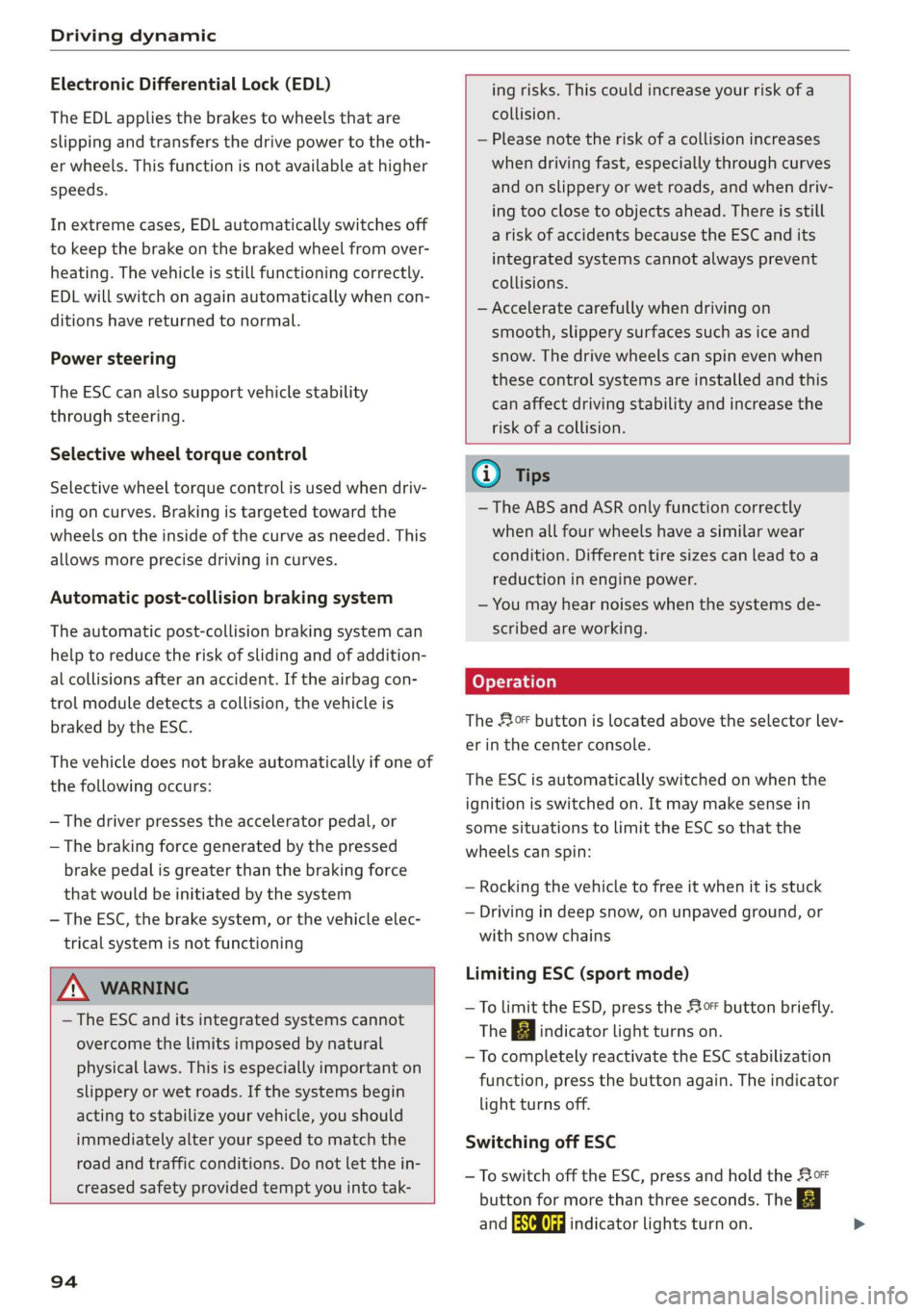
Electronic Differential Lock (EDL)
The EDL applies the brakes to wheels that are
slipping and transfers the drive power to the oth-
er wheels. This function is not available at higher
speeds.
In extreme cases, EDL automatically switches off
to keep the brake on the braked wheel from over-
heating. The vehicle is still functioning correctly.
EDL will switch on again automatically when con-
ditions have returned to normal.
Power steering
The ESC can also support vehicle stability
through steering.
Selective wheel torque control
Selective wheel torque control is used when driv-
ing on curves. Braking is targeted toward the
wheels on the inside of the curve as needed. This
allows more precise driving in curves.
Automatic post-collision braking system
The automatic post-collision braking system can
help to reduce the risk of sliding and of addition-
al collisions after an accident. If the airbag con-
trol module detects a collision, the vehicle is
braked by the ESC.
The vehicle does not brake automatically if one of
the following occurs:
— The driver presses the accelerator pedal, or
— The braking force generated by the pressed
brake pedal is greater than the braking force
that
would be initiated by the system
— The ESC, the brake system, or the vehicle elec-
trical system is not functioning
ing risks. This could increase your risk of a
collision.
— Please note the risk of a collision increases
when driving fast, especially through curves
and on slippery or wet roads, and when driv-
ing too close to objects ahead. There is still
a risk of accidents because the ESC and its
integrated systems cannot always prevent
collisions.
— Accelerate carefully when driving on
smooth, slippery surfaces such as ice and
snow. The drive wheels can spin even when
these control systems are installed and this
can affect driving stability and increase the
risk of a collision.
ZA\ WARNING
— The ESC and its integrated systems cannot
overcome the limits imposed by natural
physical laws. This is especially important on
slippery or wet roads. If the systems begin
acting to stabilize your vehicle, you should
immediately alter your speed to match the
road and traffic conditions. Do not let the in-
creased safety provided tempt you into tak-
94
G) Tips
— The ABS and ASR only function correctly
when all four wheels have a similar wear
condition. Different tire sizes can lead toa
reduction in engine power.
— You may hear noises when the systems de-
scribed are working.
The 0 button is located above the selector lev-
er in the center console.
The ESC is automatically switched on when the
ignition is switched on. It may make sense in
some situations to limit the ESC so that the
wheels can spin:
— Rocking the vehicle to free it when it is stuck
— Driving in deep snow, on unpaved ground, or
with snow chains
Limiting ESC (sport mode)
—To limit the ESD, press the 0 button briefly.
The B indicator light turns on.
— To completely reactivate the ESC stabilization
function, press the button again. The indicator
light turns off.
Switching off ESC
—To switch off the ESC, press and hold the oF
button for more than three seconds. The B
and Ea indicator lights turn on.
Page 128 of 400
Assist systems
sense basic, the front safety belts are also re-
versibly tensioned when needed. The pre sense
front is also active when adaptive cruise con-
trol* is switched off.
ZA\ WARNING
Also follow the general instructions found in
= A in General information on page 119.
G) Tips
— Certain pre sense functions switch off when
driving in reverse.
— The pre sense functions may not be availa-
ble if there is a malfunction in the ESC sys-
tem or the airbag control module.
— Note that the reversible belt tensioner on
the front passenger's side deactivates when
the front passenger's airbag is deactivated.
— Certain Audi pre sense front functions are
unavailable or have limited availability for
approximately 20 seconds after starting the
vehicle (may be longer depending on the
driving situation).
— Switch the pre sense off when you are not
using public streets or when loading the ve-
hicle onto a vehicle carrier, train, ship, or
other type of transportation. This can pre-
vent an undesired intervention from the pre
sense system.
ONT ees
Applies to: vehicles with Audi pre sense basic
The pre sense basic functions are activated at a
speed of approximately 20 mph (30 km/h) or
higher.
The following functions can be triggered under
certain conditions within the limits of the sys-
tem:
—Tensioning of the safety belts (for example,
during heavy braking): the front safety belts
have reversible belt tensioners. If a collision
does not occur, the safety belts loosen slightly
and are ready to trigger again.
— Initiating the closing of the windows and the
panoramic glass roof* (for example when un-
der- or oversteering).
126
Audi drive select*: the trigger times are adjusted
depending on the mode selected.
Audi pre sense front
Applies to: vehicles with Audi pre sense front
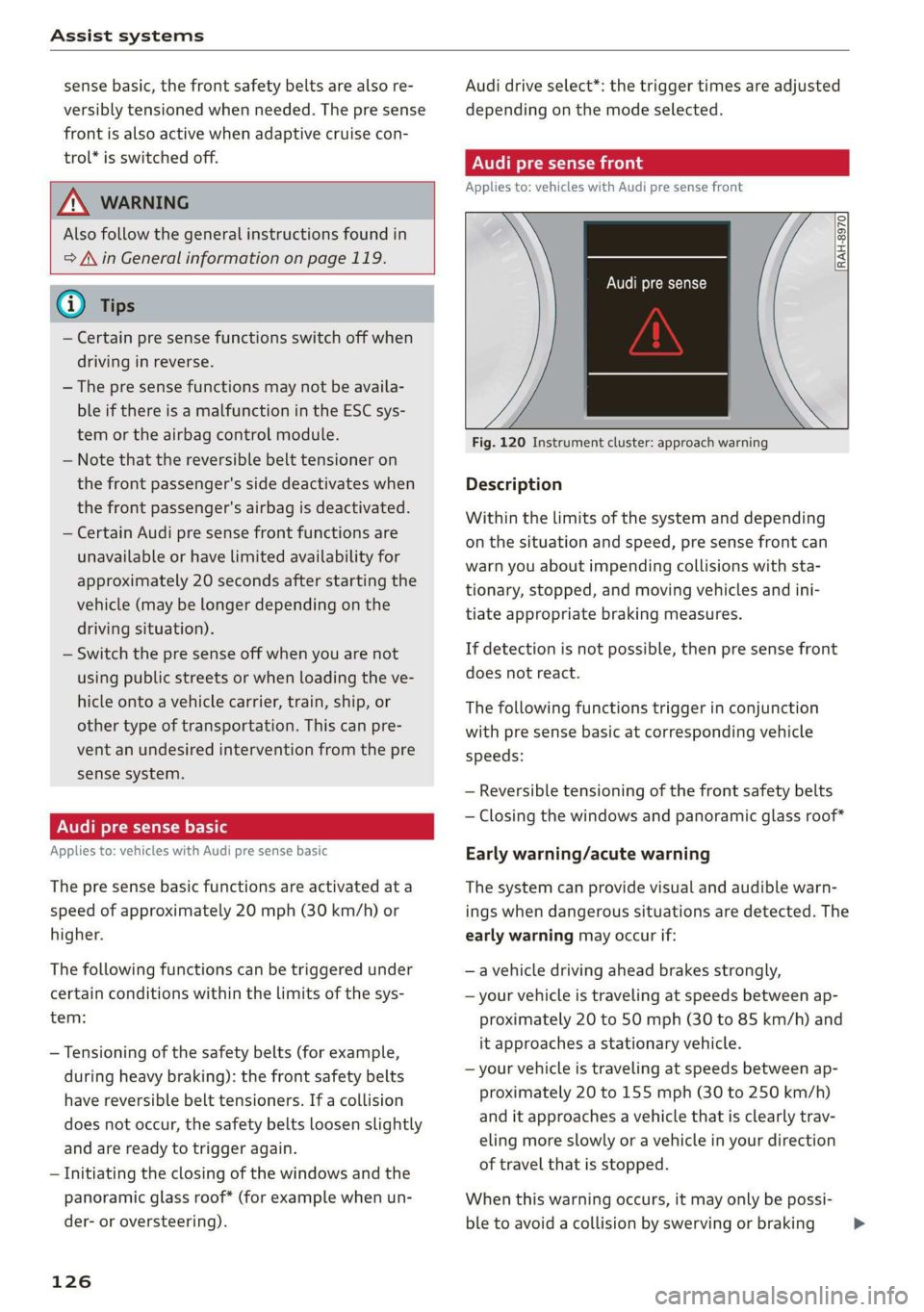
RAH-8970
Audi pre sense
Fig. 120 Instrument cluster: approach warning
Description
Within the limits of the system and depending
on the situation and speed, pre sense front can
warn you about impending collisions with sta-
tionary, stopped, and moving vehicles and ini-
tiate appropriate braking measures.
If detection is not possible, then pre sense front
does not react.
The following functions trigger in conjunction
with pre sense basic at corresponding vehicle
speeds:
— Reversible tensioning of the front safety belts
— Closing the windows and panoramic glass roof*
Early warning/acute warning
The system can provide visual and audible warn-
ings when dangerous situations are detected. The
early warning may occur if:
—a vehicle driving ahead brakes strongly,
— your vehicle is traveling at speeds between ap-
proximately 20 to 50 mph (30 to 85 km/h) and
it approaches a stationary vehicle.
— your vehicle is traveling at speeds between ap-
proximately 20 to 155 mph (30 to 250 km/h)
and it approaches a vehicle that is clearly trav-
eling more slowly or a vehicle in your direction
of travel that is stopped.
When this warning occurs, it may only be possi-
ble to avoid a collision by swerving or braking >
Page 270 of 400
Airbag system
fore and aft adjustment range, as far away
from the airbag as possible. The backrest
must be adjusted to an upright position.
Make sure that the PASSENGER AIR BAG
OFF light comes on and stays on all the time
whenever the ignition is switched on.
ZA WARNING
— If the PASSENGER AIR BAG OFF light does
not go out when an adult is sitting on the
front passenger seat after taking the steps
described above, make sure the adult is
properly seated and restrained at one of the
rear seating positions.
— Have the airbag system inspected by your
Audi dealer before transporting anyone on
the front passenger seat.
@) Tips
If the capacitive passenger detection system
determines that the front passenger seat is
empty, the frontal airbag on the passenger
side will be turned off, and the PASSENGER
AIR BAG OFF light will stay on.
Repair, care and disposal of the airbags
Parts of the airbag system are installed at many
different places on your Audi. Installing, remov-
ing, servicing or repairing a part in an area of the
vehicle can damage a part of an airbag system
and prevent that system from working properly
in a collision.
There are some important things you have to
know to make sure that the effectiveness of the
system will not be impaired and that discarded
components do not cause injury or pollute the
environment.
ZA WARNING
Improper care, servicing and repair proce-
dures can increase the risk of personal injury
and death by preventing an airbag from de-
ploying when needed or deploying an airbag
unexpectedly:
268
— Never cover, obstruct, or change the steer-
ing wheel horn pad or airbag cover or the in-
strument panel or modify them in any way.
— Never attach any objects such as cup holders
or telephone mountings to the surfaces cov-
ering the airbag units.
— For cleaning the horn pad or instrument
panel, use only a soft, dry cloth or one mois-
tened with plain water. Solvents or cleaners
could damage the airbag cover or change
the stiffness or strength of the material so
that the airbag cannot deploy and protect
properly.
— Never repair, adjust, or change any parts of
the airbag system.
— All work on the steering wheel, instrument
panel, front seats or electrical system (in-
cluding the installation of audio equipment,
cellular telephones and CB radios, etc.)
must be performed by a qualified technician
who has the training and special equipment
necessary.
— For any work on the airbag system, we
strongly recommend that you see your au-
thorized Audi dealer or qualified workshop.
— Never modify the front bumper or parts of
the vehicle body.
— Always make sure that the side airbag can
inflate
without interference:
— Never install seat covers or replacement
upholstery over the front seatbacks that
have not been specifically approved by
Audi.
— Never use additional seat cushions that
cover the areas where the side airbags in-
flate.
— Damage to the original seat covers or to
the seam in the area of the side airbag
module must always be repaired immedi-
ately by an authorized Audi dealer.
— The airbag system can deploy only once. Af-
ter an airbag has been deployed, it must be
replaced with new replacement parts de-
signed and approved especially for your Audi
model version. Replacement of complete
airbag systems or airbag components must
be performed by qualified workshops only.
Make sure that any airbag service action is
Page 283 of 400
8V2012721BK
Child safety
Safety Standards and has been certified by its
manufacturer for use with an airbag. Always be
sure that the child restraint is properly installed
at one of the rear seating positions. If in excep-
tional circumstances you must use it on the front
passenger seat, carefully read all of the informa-
tion on child safety and Advanced Airbags and
heed all of the applicable WARNINGS. Make cer-
tain that the child and child restraint are correct-
ly recognized by the capacitive passenger detec-
tion system in the front passenger seat, that the
front passenger airbag is turned off, and that the
airbag status is always correctly signaled by the
PASSENGER AIR BAG OFF light.
Many types and models of child restraints have
been available over the years, new models are in-
troduced regularly incorporating new and im-
proved designs and older models are taken out of
production. Child restraints are not standardized.
Child restraints of the same type typically have
different
weights and sizes and different “foot-
prints”, the size and shape of the bottom of the
child restraint that sits on the seat, when they
are installed on a vehicle seat. These differences
make it virtually impossible to certify compliance
with the requirements for advanced airbags with
each and every child restraint that has ever been
sold in the past or will be sold over the course of
the useful life of your vehicle.
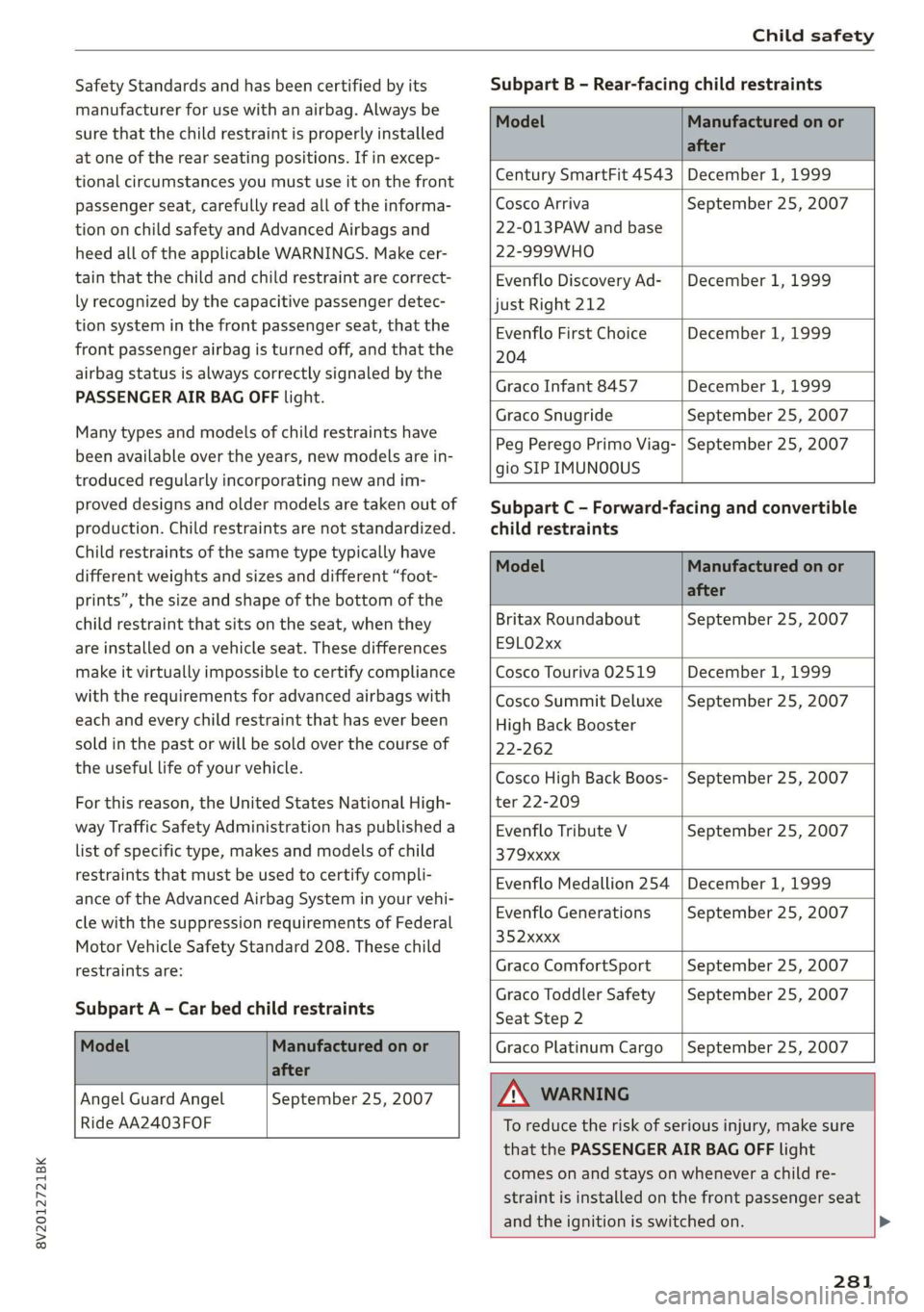
For this reason, the United States National High-
way Traffic Safety Administration has published a
list of specific type, makes and models of child
restraints that must be used to certify compli-
ance of the Advanced Airbag System in your vehi-
cle with the suppression requirements of Federal
Motor Vehicle Safety Standard 208. These child
restraints are:
Subpart A - Car bed child restraints
Subpart B - Rear-facing child restraints
Model Manufactured on or
after
Century SmartFit 4543 | December 1, 1999
Cosco Arriva
22-013PAW and base
22-999WHO
September 25, 2007
Evenflo Discovery Ad-
just Right 212
December 1, 1999
Evenflo First Choice
204
December 1, 1999
Graco Infant 8457 December 1, 1999
Graco Snugride September 25, 2007
Peg Perego Primo Viag-
gio SIP IMUNOOUS
September 25, 2007
child restraints
Subpart C - Forward-facing and convertible
Model Manufactured on or
after
Britax Roundabout
ESLO2xx
September 25, 2007
Cosco Touriva 02519 December 1, 1999
Cosco Summit Deluxe
High Back Booster
22-262
September 25, 2007
Cosco High Back Boos-
ter 22-209
September 25, 2007
Evenflo Tribute V
379Xxxxx
September 25, 2007
Evenflo Medallion 254 December 1, 1999
Evenflo Generations
352xxxx
September 25, 2007
Graco ComfortSport September 25, 2007
Graco Toddler Safety
Seat Step 2
September 25, 2007
Graco Platinum Cargo
September 25, 2007
Model Manufactured on or
after
Angel Guard Angel September 25, 2007
Ride AA2403FOF
Z\ WARNING
To reduce the risk of serious injury, make sure
that the PASSENGER AIR BAG OFF light
comes on and stays on whenever a child re-
straint is installed on the front passenger seat
and the ignition is switched on.
281
Page 334 of 400
Wheels
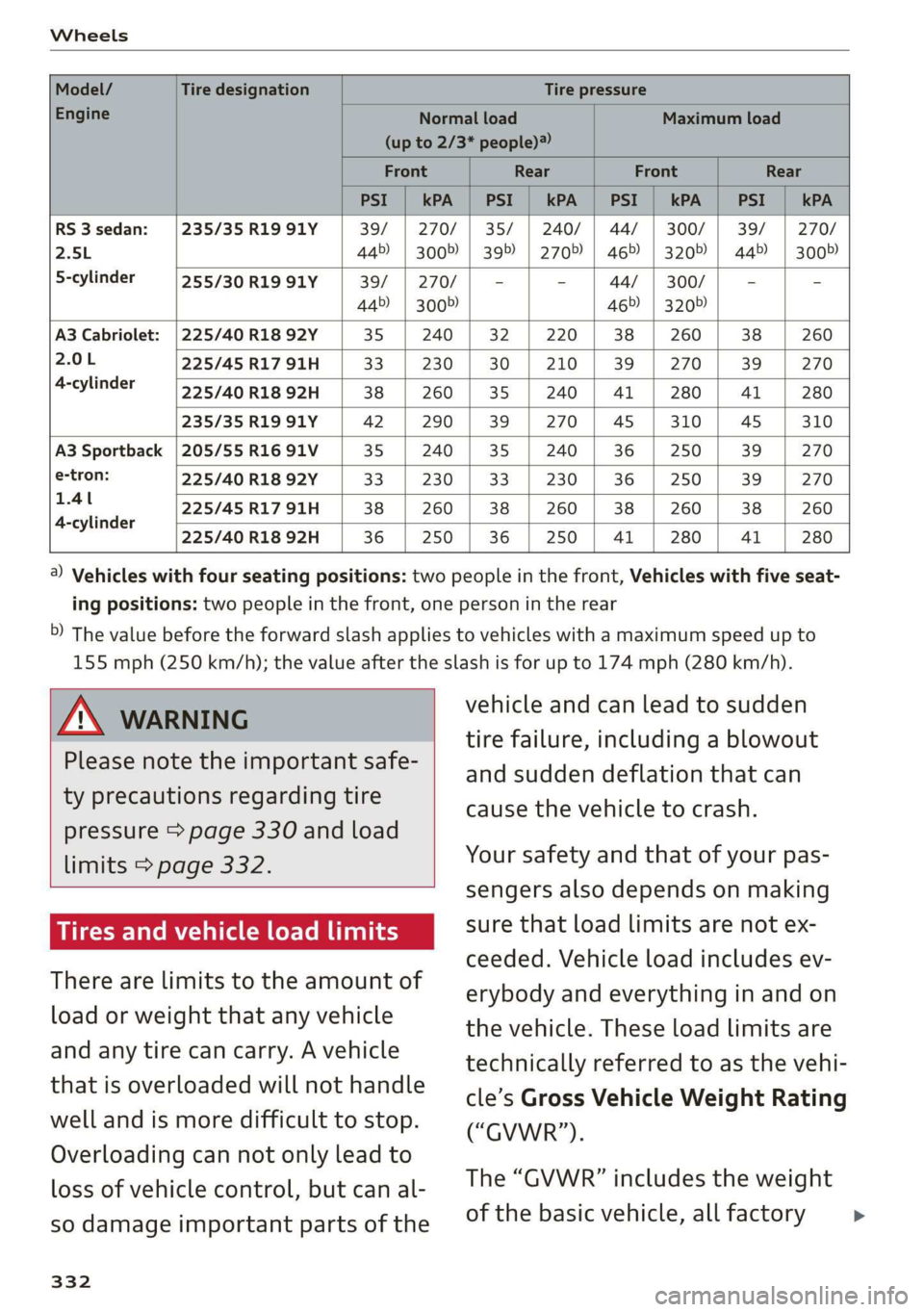
Model/ Tire designation Tire pressure
Engine Normal load Maximum load
(up to 2/3* people)?
Front Rear Front Rear
PSI | kPA | PSI kPA | PSI | kPA | PSI | kPA
RS 3sedan: /|235/35R1991Y 39/ | 270/ | 35/ | 240/ | 44/ | 300/ | 39/ | 270/
2.5L 44>) | 300%) | 395) | 2705) | 46>) | 3205) | 445) | 3005)
5-cylinder 255/30 R19 91Y 39/ | 270/ | - - 44/ | 300/ - -
445) | 3005) 465) | 320»)
A3 Cabriolet: |225/40 R18 92Y 35 | 240 | 32 | 220 | 38 | 260 38 260
2.0L 225/45 R17 91H 33. | 230 | 30 | 210 | 39 | 270 | 39 | 270
4-cylinder 225/40 R18 92H 38 | 260 | 35 | 240 | 41 | 280 | 41 | 280
235/35 R19 91Y 42 | 290 | 39 | 270 | 45 | 310 | 45 310
A3 Sportback | 205/55 R16 91V 35 | 240 | 35 | 240 | 36 | 250 39 270
e-tron: 225/40 R18 92Y 33 | 230 | 33 | 230 | 36 | 250 39 270
ae 225/45R1791H | 38 | 260 | 38 | 260 | 38 | 260 | 38 | 260
4-cylinder
225/40 R18 92H 36 | 250 | 36 | 250 | 41 | 280 | 41 280
@) Vehicles with four seating positions: two people in the front, Vehicles with five seat-
ing positions: two people in the front, one person in the rear
5) The value before the forward slash applies to vehicles with a maximum speed up to
155 mph (250 km/h); the value after the slash is for up to 174 mph (280 km/h).
Z\ WARNING
Please note the important safe-
ty precautions regarding tire
pressure > page 330 and load
limits > page 332.
Tires and vehicle load limits
There are limits to the amount of
load or weight that any vehicle
and any tire can carry. A vehicle
that is overloaded will not handle
well and is more difficult to stop.
Overloading can not only lead to
loss of vehicle control, but can al-
so damage important parts of the
332
vehicle and can lead to sudden
tire failure, including a blowout
and sudden deflation that can
cause the vehicle to crash.
Your safety and that of your pas-
sengers also depends on making
sure that load limits are not ex-
ceeded. Vehicle load includes ev-
erybody and everything in and on
the vehicle. These load limits are
technically referred to as the vehi-
cle’s Gross Vehicle Weight Rating
(“GVWR”).
The “GVWR” includes the weight
of the basic vehicle, all factory >