lock AUDI A3 CABRIOLET 2015 User Guide
[x] Cancel search | Manufacturer: AUDI, Model Year: 2015, Model line: A3 CABRIOLET, Model: AUDI A3 CABRIOLET 2015Pages: 302, PDF Size: 73.83 MB
Page 37 of 302
....,
N
r--. > co
rl I.O
"' rl
"' rl
WARNING
----Read and following all WARNINGS. ¢ & in
Key set on page 31
@ Tips
If your vehicle is left standing for a long
period of time, note the following:
- The proximity sensor switches off after a
few days to save energy. You then have
to pull once on the door handle to unlock
the vehicle and a second time to open it.
- To prevent the battery from draining and
to retain the starting ability of yo ur vehi
cle as long as possible, the energy man
agement system gradua lly tuns off un
necessary convenience functions You
may not be able to unlock your vehicle
using the convenience key .
- For an explanation on conformity with
the FCC regulations in the United States
and the Industry Canada regulations, re
fer to¢
page 285.
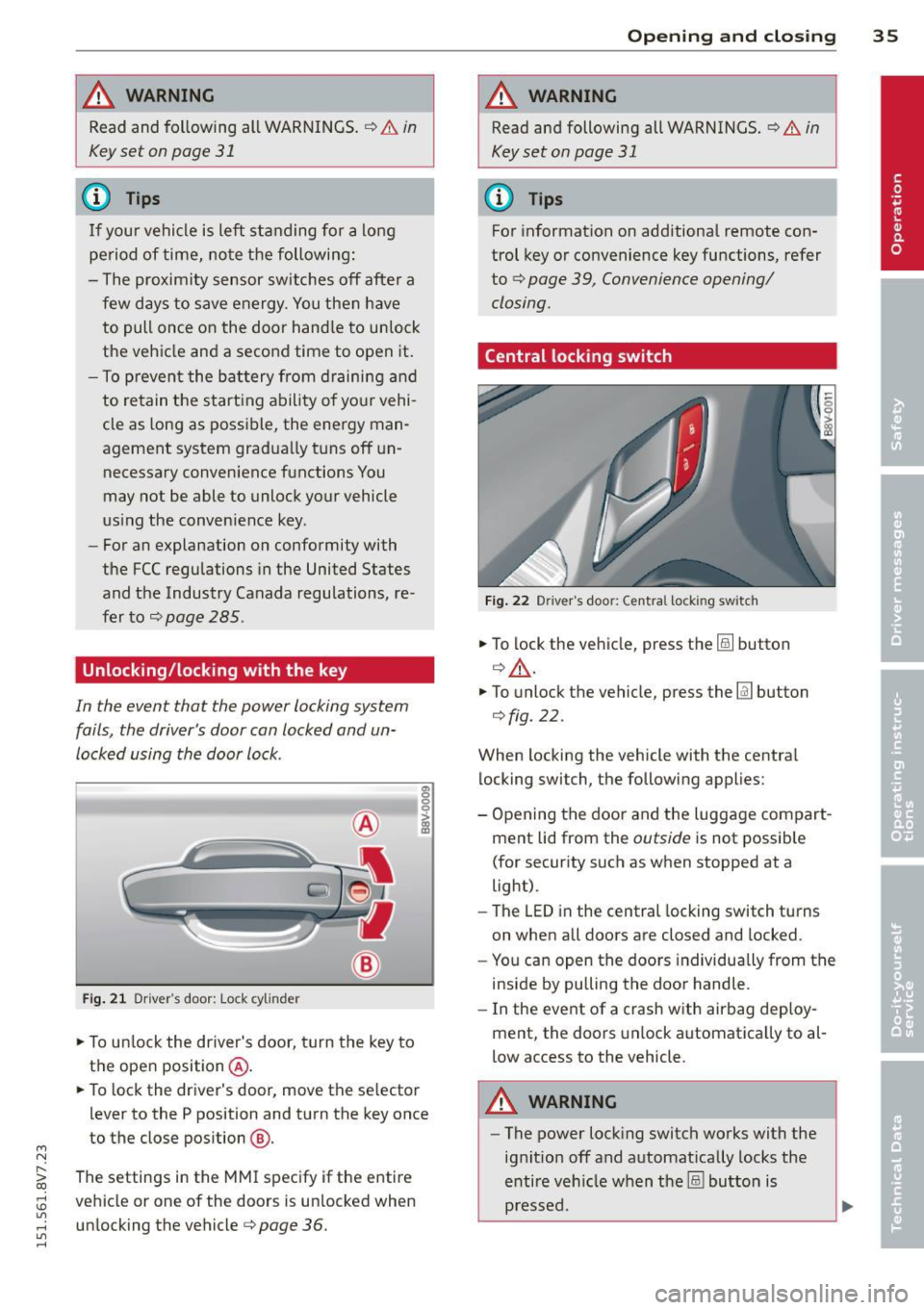
Unlocking/locking with the key
In the event that the power locking system
fails, the driver's door can locked and un
locked using the door lock .
Fig. 21 Driver 's door: Lock cy linder
.,. To unlock the driver's door, turn the key to
the ope n position @ .
en 0 g
~
.,. To lock the driver's door, move the se lector
lever to the P position and turn the key once
to the close position
@ .
The settings in the MMI specify if the entire
vehicle or one of the doors is un locked when
unlocking the vehicle¢
page 36.
Opening and closing 35
A WARNING
Read and following all WARNINGS. ¢ & in
Key set on page 31
(D Tips
For information on additional remote con
trol key or convenience key functions, refer
to ¢
page 39, Convenience opening/
closing.
Central locking switch
Fig. 22 Drive r's doo r: Centra l locki ng sw itch
.,. To lock the vehicle, press the@! button
¢.&, .
.,. To unlo ck the vehicle, press the @J button
¢fig. 22.
When locking the vehicle with the central
locking switch, the following applies:
- Opening the door and the Luggage compart
ment lid from the
outside is not possible
(for security such as when stopped at a
light).
- The
LED in the central locking switch turns
on when all doors are closed and locked .
- You can open the doors individually from the
inside by pulling the door handle.
- In the event of a crash with airbag deploy
ment, the doors unlock automatica lly to al
low access to the vehicle.
A WARNING
- The power locking switch works with the
ignit ion off and automat ically locks the
entire vehicle when the@! button is
pressed.
Page 38 of 302
36 Opening and closing
-The central locking switch is inoperative
when the vehicle is locked from the out
side .
- Locked doors make it more difficult for
emergency workers to get into the vehi
cle, which puts lives at risk . Do not leave
anyone beh ind in the vehicle, especially
children.
(D Tips
Your vehicle will lock automatically at a
speed of 9 mph (15 km/h) ¢
page 31. You
can unlock the vehicle again using the cen
tral locking opening function .
Setting central locking
Applies to ve hicles: wit h dr ive r info rmatio n system
Various settings can be adjusted in the MMI:
Adjusting door unlocking
You can determine which doors should unlock
when opening the vehicle .
"' Se lect : the
I MENU ! button >Car> Systems *
control button > Vehicle settings > Central
locking > Door unlocking.
Selecting All and pressing the~ button on
the remote control key unlocks the entire ve
hicle.
If you select
Driver and then press the~ but
ton on the remote control key, only the driv
er's door will unlock. In vehicles with a con
venience key, only the front door whose han
dle you pull will unlock. If you press the
~ button twice, the entire vehicle will unlock.
If you press the
l@l button, the entire vehicle
will always lock .
Adjusting Auto Lock
"'Se lect : the I MENU ! button >Car > Systems*
control bu tton > Vehicle settings > Lock
when driving .
l) Thi s func tion is not available in all co untries.
If you se lect On , the entire vehicle wi ll lock
automatica lly when the speed reaches 9 mph
(15 km/h).
If the opening function is triggered by the
power lock ing system or a door hand le, the
vehicle unlocks again.
Folding* the exterior mirrors
"'Select: the I MENU I button > Car> Systems*
control button > Vehicle settings> Central
locking > Fold mirrors.
For more informa
tion , refer to¢
page 55, Adjusting the ex
ter ior mirrors .
If you select On , the outside mirrors will fo ld
in automat ica lly when you press the~ button
on the remote contro l key
¢ page 55.
Tone when locking
"'Select: the I MENU I button> Car> Systems*
contro l button > Vehicle settings > Central
lo ck ing > Tone when locking .
When checked off../, a tone will sound when
you lock the vehicle .
If you press the l@l button twice , the entire ve
hicle will lock . There is a lock ing tone at the
same t ime
l )_
Electronic immobilizer
The immobilizer prevents unauthorized use of
your vehicle .
A microchip in the key automatically deacti
vates the electronic immobilizer when the key
is located in the vehicle . If you remove the key
from the vehicle, the electronic immobilizer
activates again automatically.
_&. WARNING
A lways take the key with you whenever you
l eave your vehicle. The e lectronic immobil-
izer can be deactivated with the key, so
~
Page 39 of 302
....,
N
" > co
rl I.O
"' ,....,
"' rl
this could make it possible for unauthor
ized persons to start the engine and oper
ate vehicle systems such as the power win
dows or sunroof . This can increase the risk
of serious injury .
(D Tips
-The vehicle cannot be started if an unau
thorized key is used. It may not be poss i
ble to start the vehicle under certain cir
cumstances, for example if there is an
other radio module like the key from an
other vehicle or a transponde r on the
same keychain.
- For an explanation on conformity with
the FCC regu lations in the United States
and the Industry Canada regulations, re
fer to
c::; page 285.
Safety central locking
Applies to vehicles: with safety central locking
Safety central locking provides the possibility,
to only unlock the driver's door and the fuel
filler door. The rest of the vehicle remains
locked.
Unlocking the driver's door and the fuel
filler door
.. Press the remote contro l key or convenience
key @! but ton
once or turn the key once in
the opening direction .
Unlocking all doors, the luggage
compartment lid and the fuel filler door
.. Press the remote control key or convenience
key @! button
twice within five seconds or
turn the key
twice within five seconds in the
opening direction .
When unlocking just the driver's door, the an
ti -theft alarm system* is also immediately de
activated .
In vehicles with an MMI, you can d irectly ad
just the safety central locking
o page 36 .
Opening and closing 3 7
Front passenger's door emergency
locking
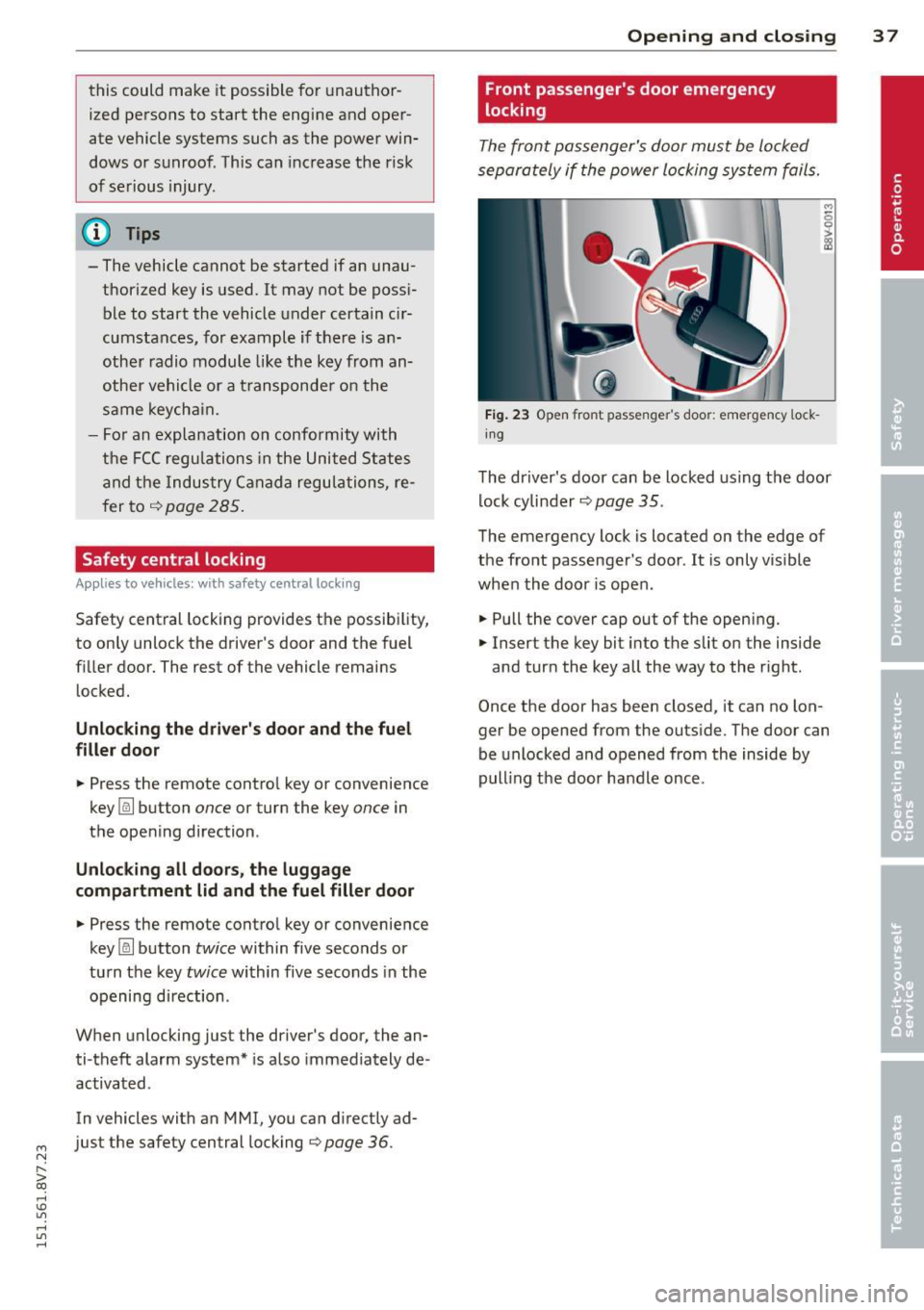
The front passenger's door must be locked
separately if the power locking system fails.
Fig. 23 Open fro nt passen ger' s doo r: emergency lock
in g
The driver's door can be locked using the door
lock cylinder
o page 35.
The emergency lock is located on the edge of
the front passenger 's door . It is only visible
when the door is open .
.. Pull the cover cap out of the opening.
.. Insert the key bit into the slit on the inside
and turn the key all the way to the right .
Once the door has been closed, it can no lon ger be opened from the outside. The door can
be unlocked and opened from the inside by
pulling the door handle once .
Page 40 of 302
38 Opening and closing
Luggage compartment
lid
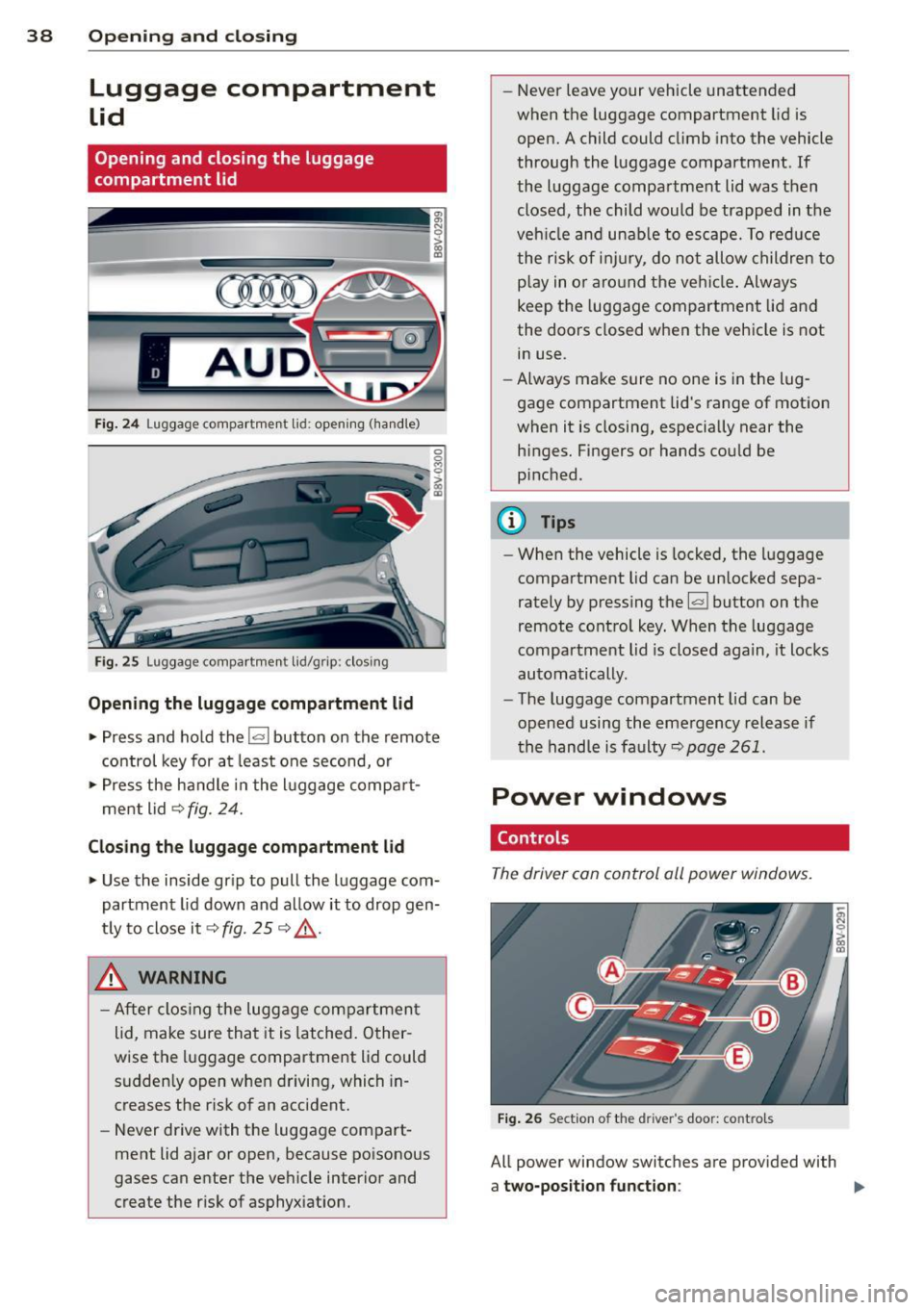
Opening and closing the luggage
compartment lid
AUD .
Fig. 24 Luggage compartment lid: opening (ha ndle)
Fig. 25 Luggage compartment lid/grip: clos ing
Opening the luggage compartment lid
.,. Press and hold the !a l button on the remote
control key for at least one second, or
.,. Press the handle in the luggage compart
ment lid ¢
fig. 24.
Closing the luggage compartment lid
.,. Use the inside grip to pull the luggage com
partment lid down and al low it to drop gen
t ly to close it¢
fig. 25 ¢ .&_.
& WARNING
-After clos ing the luggage compartment
lid, make sure that it is latched. Other
wise the luggage compartment lid could sudden ly open when driving, which in
creases the risk of an accident.
- Never drive with the luggage compart
ment lid ajar or open, because poisonous
gases can enter the vehicle interior and
create the r isk of asphyx iation. -
Never leave your vehicle unattended
when the luggage compartment lid is
open. A child could climb into the vehicle
through the luggage compartment. If
the luggage compartment lid was then closed, the child would be trapped in the
veh icle and unable to escape. To reduce
the risk of injury, do not allow children to
p la y in o r aro und the vehicle. Always
keep the luggage compartment lid and
the doors closed when the vehicle is not
in use.
- Always make sure no one is in the lug
gage compartment lid's range of motion
when it is closing, especia lly near the
h inges. Fingers or hands could be
p inched.
{!) Tips
- When the vehicle is locked; the luggage
compartment lid can be unlocked sepa
rately by pressing the~ button on the
remote control key. When the luggage
compartment lid is closed again, it locks
automatically.
- The luggage compartment lid can be
opened using the emergency release if
the hand le is faulty~
page 261.
Power windows
. Controls
The driver can control all power windows .
Fig. 26 Section of the dri ver 's doo r: contro ls
All power window switches are prov ided with
a two-position function : ""
Page 41 of 302
M N
" > co ,...., \!) ..,.,
,...., ..,., ,....,
Opening th e windows
"' Press the sw itch to the fir st sto p and hold i t
until the window reaches the desi red posi
tion .
"' Press the switch briefly to the
se cond stop
to automatically open the window .
Clos ing th e windows
"' Pull the swi tch to t he fir st sto p and hold it
until the window reaches the desi red posi
tion .
"' Pull the switch briefly to the
sec on d s top to
automatica lly close the window.
P ow er wi nd ow switch es
@ Sw itch c::> fig. 26 for the window in the
driver's door.
@ Sw itch for the window in the front pas-
senger's door.
© Switch for the left rear w indow.
@ Sw itch for the right rear window.
© Centra l switch for opening or clos ing a ll
side windows at the same time
_& WARNING
- Always remove the ignition key when you
leave your vehicle, even for a short peri
od of time . This applies particularly when
children remain in the vehicle . Otherw ise
the chi ldren could start the engine or op
erate electrical equ ipment such as power
windows. The power windows continue
to function unt il the driver's door or
front passenger's door has been opened .
- Pay carefu l attent ion when closing the
window.
It could cause injury by pinch
ing.
- When locking the veh icle from outs ide,
the vehicle must be unoccupied s ince the
windows can no longer be opened in an eme rgency.
(D Tips
After turning the ignition off you can still
open and close the windows for approxi
mate ly 10 seconds. The powe r windows
are not switc hed off until the dr iver's door
Opening and clo sin g 39
or front passenger's door has been
opened.
· Convenience opening /closing
With the convenience opening/closing func
tion, you can centrally and easily open the
windows from the outside.
Con ven ience opening
"' Press the Iii button on the remote contro l
key until all windows have reached the de
sired position or
"' Hold the key in the driver's door lock unt il all
w indows have reached the desired position.
Convenience clo sing
"' Ho ld the key in the driver's door lock in the
lock posit ion unti l all windows are closed .
Convenienc e closing with the convenience
ke y*
"'Touch the sensor* in one of the door handles
until all windows are closed. Do not p lace
your hand in the door handle when do ing
this.
Adju sting the conv enience opening in the
MM I
"'Select: the I MENU I button >Ca r> Sys tem s*
control button > Vehicle setting s > Central
lo cking
> Long-press to open windows
To enable convenience opening of the win-
dows, the
Front windows and Rear window s
functions must be switched On.
_& WARNING
- Never close the w indows carelessly or in
a n uncontrolled manner, because this in
creases the risk of inju ry.
- For secur ity reasons, the w indows can
only be opened with the remote control
key at a ma ximum d istance of approxi
mate ly 6 fee t (2 meters) from the vehi
cle.
- Always watch the windows while they are
clos ing using the loc k cylinder so that no
one is pinched in the window. C losing
•
Page 43 of 302

....,
N
r--. > co
rl I.O
"' rl
"' rl
Power top
Automatic power top
General information
The power top opens and closes automatical ly . When open, the power top is stored com
pletely in the power top compartment. The
power top can be opened or closed at speeds
up to 30 mph (SO km/h).
Under normal conditions, the power top is
wind and waterproof. In rare cases, small
droplets of water may form under extreme
weather conditions such as torrential or pro longed rain. That is normal and no cause for
concern.
Follow the care instructions to keep the power
top free of leaks and to maintain its appear
ance
c::> page 204, Core and cleaning. Also ob
serve the following:
- Op en and stow the power top only when it is
clean and dry . Sharp-edged dirt particles can
cause damage to the rear window and the
power top. Stowing the power top when it is
damp can create imprints in it, and if it is
left that way for long periods of time, mil
dew and other damage can form.
- Do not leave the power top open for several
weeks or the creases in it may become dis
colored.
- Remove ice and snow before opening the
power top. Do not use any sharp edged ob
jects to remove ice and snow or the power
top could be scratched or damaged. The rear
window may be cleared with a standard ice
scraper.
- Do not open the power top when the tem
perature is below 32 °F (0 °C). The fabric in
the power top loses elasticity in sub-ze ro
temperatures.
_& WARNING
- When positioning the power top, avoid
contact with the supports or other mov
ing parts. Make sure all of the windows
.
Power top 41
are lowered. Otherwise you could pinch
your hands.
- Never drive when the power top is not
locked correctly. The wind from driving
could cause the power top to open. This
can result in injuries and damage to the
vehicle.
Opening and closing the power top
Fig. 27 Center console: power top switch
Requirement: The power top storage com
partment must be lowered
c::> page 43 and
the luggage compartment lid must be closed.
.. Switch the ignition on.
.. To open or close the power top, pull or press
the button @during the entire process.
T he status of the power top is shown in the in
strument cluster display when operating the
power top switch.
You can close the power top when the wind
deflector is installed
~ page 44.
A message will appear in the instrument clus
ter if the power top cannot be opened or
closed
c::> page 43.
A WARNING
- When operating the power top, make
sure the function is not affected by wind
or other factors and that it does not in
terfere with other drivers.
- Never drive when the power top is not
locked correctly. The wind from driving
could cause the power top to open. This
can result in injuries and damage to the
vehicle.
-
Page 44 of 302
42 Power top
-Make sure no one will be injured by the
power top supports and other moving
components when opening and closing
the top.
- The headroom in the rear is reduced
when opening and closing the power top. Make sure the rear passengers keep
enough distance from the power top to
reduce the risk of injury.
- When operating the power top, visibility
to the rear is limited . Avoid operating the
top while driving in reverse.
(D Note
-To prevent damage to the power top:
- do not store any objects in the power
top storage compartment.
- make sure there is enough space above
the vehicle when opening or closing
the power top.
- To reduce the risk of damage, make sure
there are no sensitive objects in the pow
er top storage compartment's range of motion.
@ Tips
- To prevent the battery from draining un
necessarily, do not open or close the
power top repeatedly when the engine is
switched off.
- A message will appear in the instrument
cluster if there is a malfunction in the
power top c:>
page 43.
-The power top can also be operated
manually temporarily if there is a mal
function c:>
page 45, Power top emer
gency operation.
An authorized Audi
dealer or authorized Audi Service Facility
should diagnose and correct the cause of
the malfunction as soon as possible .
- If the vehicle is parked with the power
top open, the vehicle interior is not pro
tected from damaging weather or unau
thorized access. Lock any items you leave
behind in the luggage compartment.
Close the power top before leaving the
vehicle. - The
side windows automatically lower
slightly when opening or closing the
power top.
Power top convenience opening and
closing
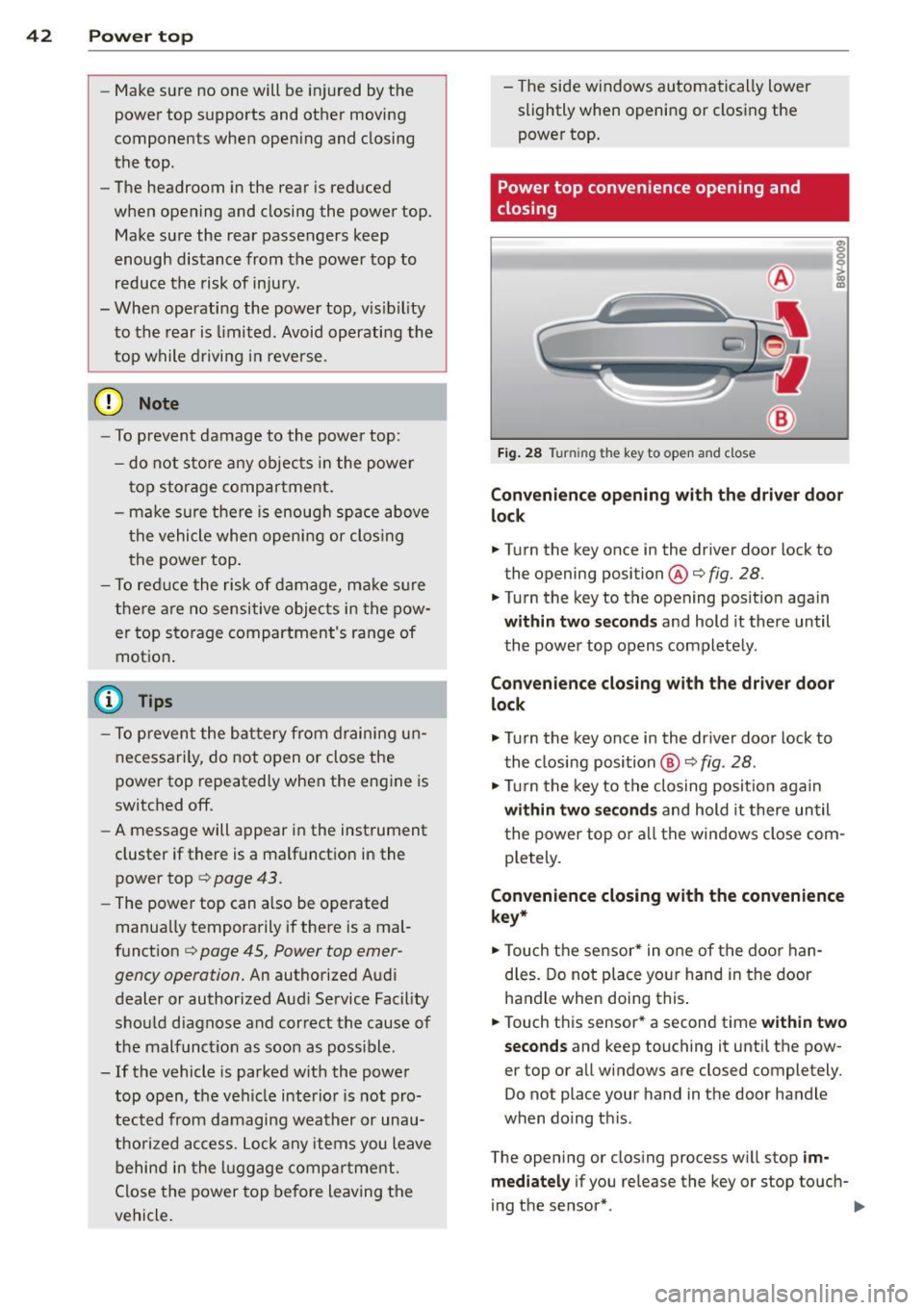
Fig. 28 Tu rnin g the key to open and close
Convenience opening with the driver door
lock
.. Turn the key once in the driver door lock to
the opening position@c:>
fig. 28.
.. Turn the key to the opening position again
within two seconds and hold it there until
the power top opens completely.
Convenience closing with the driver door
lock
.,. Turn the key once in the driver door lock to
the closing position @
c:> fig. 28.
.,. Turn the key to the closing position again
within two seconds and hold it there until
the power top or all the windows close com
pletely .
Convenience closing with the convenience
key*
.. Touch the sensor* in one of the door han
dles. Do not place your hand in the door
handle when doing this.
.. Touch this sensor* a second time
within two
seconds
and keep touching it until the pow
er top or all windows are closed completely .
Do not place your hand in the door handle
when doing this .
The opening or closing process will stop
im
mediately
if you release the key or stop touch-
ing the sensor*. ..,.
Page 46 of 302
44 Power top
Soft top: operation not p ossible. Sp eed t oo
h igh
I f you go above 30 mp h (SO km/h), the power
top cannot be operated due to safety reasons. Reduce the vehicle speed to close or open the
power top.
S oft top: not at limit po siti on. s peed too
high
This m essage appears if you go above 30 mph
(50 km/h) when operati ng the power top. Re
d uce the vehicle speed and opera te the power
top again .
Soft top s ystem malfunction! You can con
tinue dri ving
This message appears if there is a malfunction
in the system . T ry to open or close the power
top again . If the message still appears, have
the ma lf u nction corrected by an aut horized
Aud i dealer o r aut ho rized Aud i Service Fac ility.
Soft top sys tem malfunction! You can con
tinue driving
This message appears if there is a malfunction
in the system . Try to open or close the power
top again.
If the message still appears, then
have an author ized Audi dealer or authorized
Aud i Service Fac ility co rrect the ma lfun ction.
D o not drive more t han 30 mph (50 km/h) u n
til it is corrected.
8_ WARNING
Never drive when the power top is not
locked correctly . The w ind from dr iv ing
co uld cause the power top to open. Th is
can result in injuries and damage to the
vehicle.
-
Wind deflector
App lies to veh icles: w ith wind deflecto r
The wind deflector reduces turbulence in the
passenger compartment and makes driving
more comfortable.
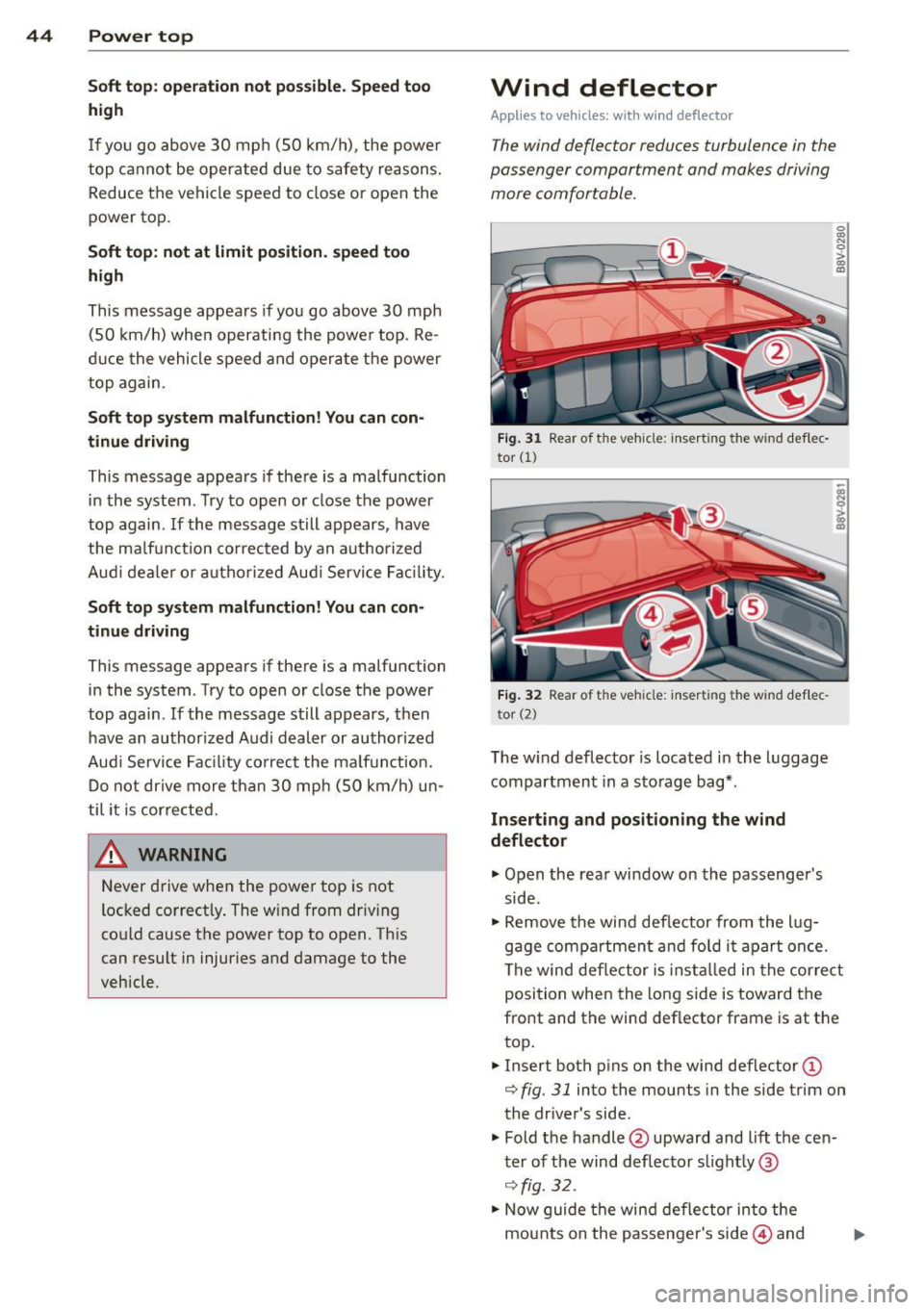
Fig . 31 Rear of t he veh icle: inse rt in g the wind de flec·
tor
(1)
F ig . 32 Rear of t he veh icle: insert ing the wind def lec
to r (2)
The w ind deflector is located in the l uggage
compartm ent in a sto rage bag*.
Inserting and positioning the wind
deflector
"" Open the rear window on the passenger's
side .
~ 0 > a,
"'
.. Remove the wind def lector from the l ug
gage compa rtment and fo ld i t a part once.
The wind deflector is insta lled in the cor re ct
position when the long side is toward the
front and the wind deflector frame is at the
top .
.. Insert both p ins on the wind def lector
(D
r::;, fig. 31 into the mounts in the side trim on
the dr ive r's side.
" Fold the handle @upward and lift the cen
t er of the wind d eflector s light ly @
¢ fig. 32 .
.,_ Now guide the wind deflector into the
mounts on the passenger's side@ and
Page 47 of 302
M N ,....
> co ...... \!) 1.1'1
...... 1.1'1 ......
press lightly in the midd le o f the wind de
flector ® until the hand le locks in place .
... Raise the wind deflector completely .
Removing the wind deflector
... Fold the hand le @ ¢fig. 31 upward and
f o ld the w ind deflector frame back .
... Fold the hand le @ ¢fig.
31 upward and lift
the center of the wind deflector slightly @
¢fig . 32.
... Remove the w ind deflector from the mounts
in the side trim on the passenger's side.
... Pull the wind deflector out of the mounts on
the driver side and lift it out .
... Fold the w ind deflector together and store it
secu rely.
A WARNING
- Do not use the w ind de flector to secure
cargo.
- Be careful when ins tall ing so yo u do not
pinch your finge rs .
- Pay atten tion to the traffic when instal
ling the wind deflector. Install the win d
deflecto r from the s ide of the vehicle
that is away from traffic .
(D Note
Do not lean against the veh icle when in
s t all ing the wind deflecto r. H ard objec ts
and decorations on clothing s uch as belt
buckles can scratch the pai nt.
(D Tips
- The wind defle ctor works best when al l
of the windows are ro lled up wh ile driv
ing.
- Only store the wind deflector in the stor
age bag* when it is dry.
Power top 45
Power top emergency
operation
General information
The power top can be closed manually if there
is a malfun ction.
... Set the park ing brake.
... Open a ll wi ndows.
... Switch the ignit ion off .
... Pull the but ton @ for app rox ima tely 10 to
15 seconds to reduce the pressure in the
power top hydraulics ¢
page 41, fig. 2 7 .
Only close the power top manually in an emer
gency . Have a second person assist. Drive to
an a uthorized Audi dea ler or a uthorized Audi
Service Facility immediately to have the ma l
function corrected.
A WARNING
- There is a r isk of pinching the hands or
other peop le during all of the power top
emergency operation steps.
- Make sure all windows are lowe red d ur
ing eme rgency ope ration .
- Do no t rea ch into t he power top sup
po rts or other mov ing components .
- Never d rive when the powe r top is not
loc ked correctly. The w ind from dr iving
could cause the power top to open. This
can result in injuries and damage to the
vehicle.
(D Tips
The powe r top storage compartmen t cover
i s not latched afte r the emergency opera
tion is complete . Drive to an a uthorized
A udi dealer or authorized A udi Service Fa
cility immediately to have the malfunct ion
corrected.
-
•
Page 48 of 302
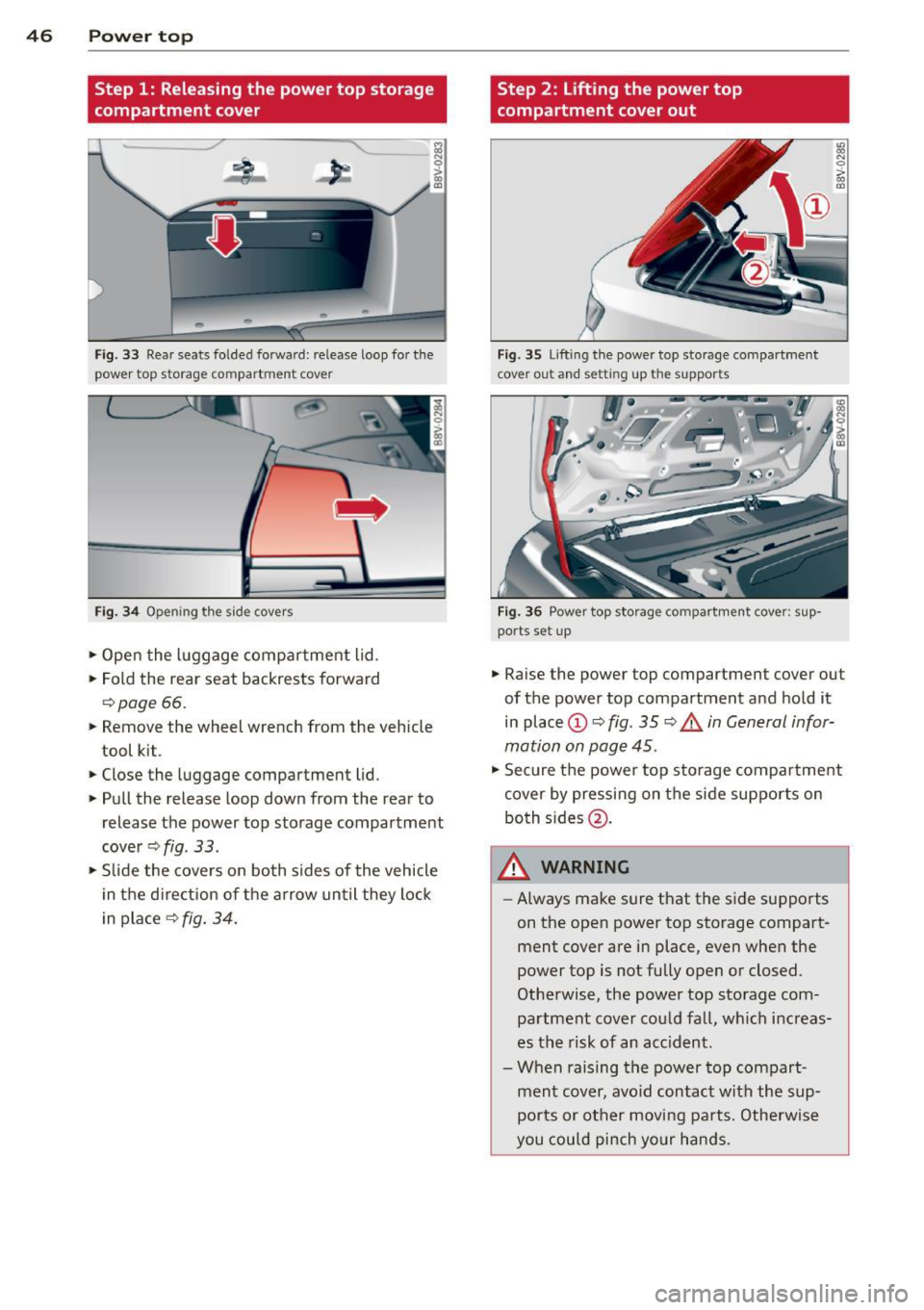
46 Power top
Step 1: Releasing the power top storage
compartment cover
Fig. 33 Rear seats folded forward: release loop for the
power top storage compartment cover
Fig . 34 Opening the side covers
.,. Open the luggage compartment lid.
.,. Fold the rear seat backrests forward
r=;, page 66.
> Remove the wheel wrench from the vehicle
tool kit.
> Close the luggage compartment lid.
.,. Pull the release loop down from the rear to
release the power top storage compartment
cover
r=;, fig . 33.
.,. Slide the covers on both sides of the vehicle
in the direction of the arrow until they lock
in place
r=;, fig. 34.
Step 2 : Lifting the power top
compartment cover out
Fig. 35 Lifting the power top storage compartment
cover out and setting up the supports
Fig. 36 Power top storage compartment cover: s up·
ports set up
.,. Raise the power top compartment cover out
of the power top compartment and hold it
in place
(D r=;, fig. 35 r=;, .& in General infor
mation on page 45.
.,. Secure the power top storage compartment
cover by pressing on the side supports on
both sides @.
A WARNING ~
-Always make sure that the side supports
on the open power top storage compartment cover are in place, even when the
power top is not fully open or closed.
Otherwise, the power top storage com
partment cover could fall, which increas
es the risk of an acc ident.
- When raising the power top compart ment cover, avoid contact with the sup
ports or other moving parts. Otherwise
you could pinch your hands.