lock AUDI A3 CABRIOLET 2015 Owner's Manual
[x] Cancel search | Manufacturer: AUDI, Model Year: 2015, Model line: A3 CABRIOLET, Model: AUDI A3 CABRIOLET 2015Pages: 302, PDF Size: 73.83 MB
Page 49 of 302
....,
N
r--. > co
rl I.O
"' rl
"' rl
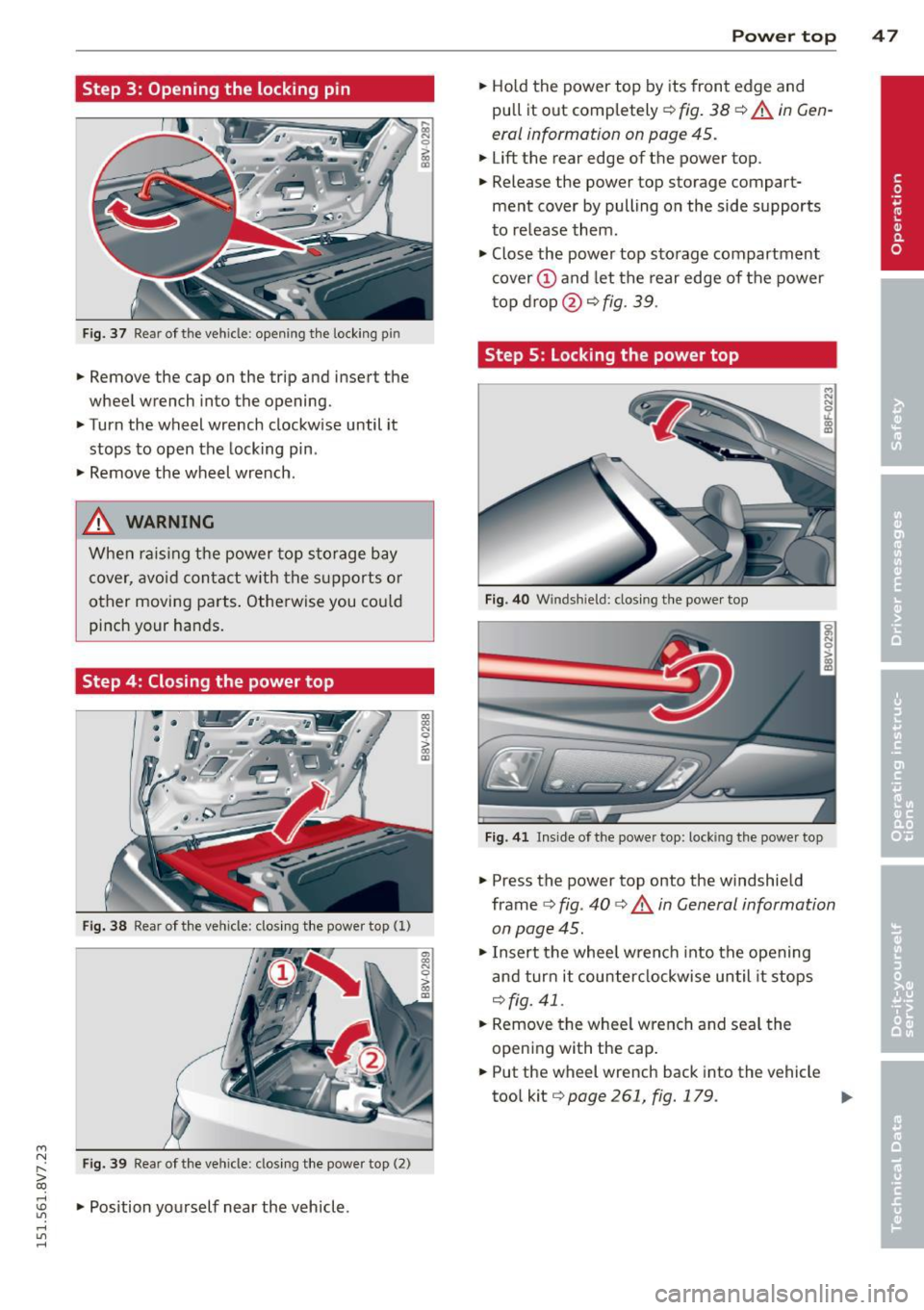
Step 3: Opening the locking pin
Fig. 37 Re ar of the ve hicle : open ing the lock ing p in
.. Remove the cap on the trip and insert the
wheel wrench in to the opening .
.. Turn the wheel wrench clockw ise until it
stops to open the lock ing pin .
.. Remove the wheel wrench .
& WARNING
When rais in g the power top s to rage b ay
cover, avoid con tact w ith the supports o r
-
Power top 4 7
.. Hold the power top by its front edge and
pull it out completely ¢
fig. 38 ¢ A in Gen
eral information on page
45 .
.. Lift the rear edge of the power top .
.. Release the power top storage compart
ment cover by pulling on the side supports
to release them .
.. Close the power top sto rage compartment
cover @ and let the rear edge of the power
t op d rop @
¢fig . 39.
Step 5 : locking the power top
other movi ng parts . Othe rwise you cou ld Fi g. 4 0 Winds hield : clos ing t he powe r top
pinch your han ds.
Step 4: Closing the power top
Fig . 3 8 Rear o f the vehicle : closing t he powe r top ( 1)
Fi g. 39 Rear of the vehicle : clos ing t he powe r top (2)
.. Position you rself near the veh icle .
Fig . 4 1 In side of the powe r top: lock ing the power top
.. Press the power top onto the windshie ld
frame
¢ fig . 40 ¢&. in General information
on page
45 .
.. Insert the whee l wrench into the opening
and tur n it counter clockwise until it stops
¢ fig. 41 .
.. Remove the whee l wrench and seal the
openi ng with the cap .
.. Put the wheel wrench back into the vehicle
too l kit ¢
page 261 , fig. 179 . 111>
Page 50 of 302
48 Power top
A WARNING
-When positioning the power top, avoid
contact with the supports or other mov
ing parts . Otherwise you could pinch
yo ur hands .
- When pressing the power top down onto the windsh ield frame, ma ke s ure that
yo u do not pi nch yourse lf or anyone else.
@ Tips
Make sure the lock ing mechan isms a re
loc ked securely .
-
Page 51 of 302
....,
N
r--. > co
rl I.O
"' rl
"' rl
Lights and Vision
Exterior Lighting
Switching lights on and off
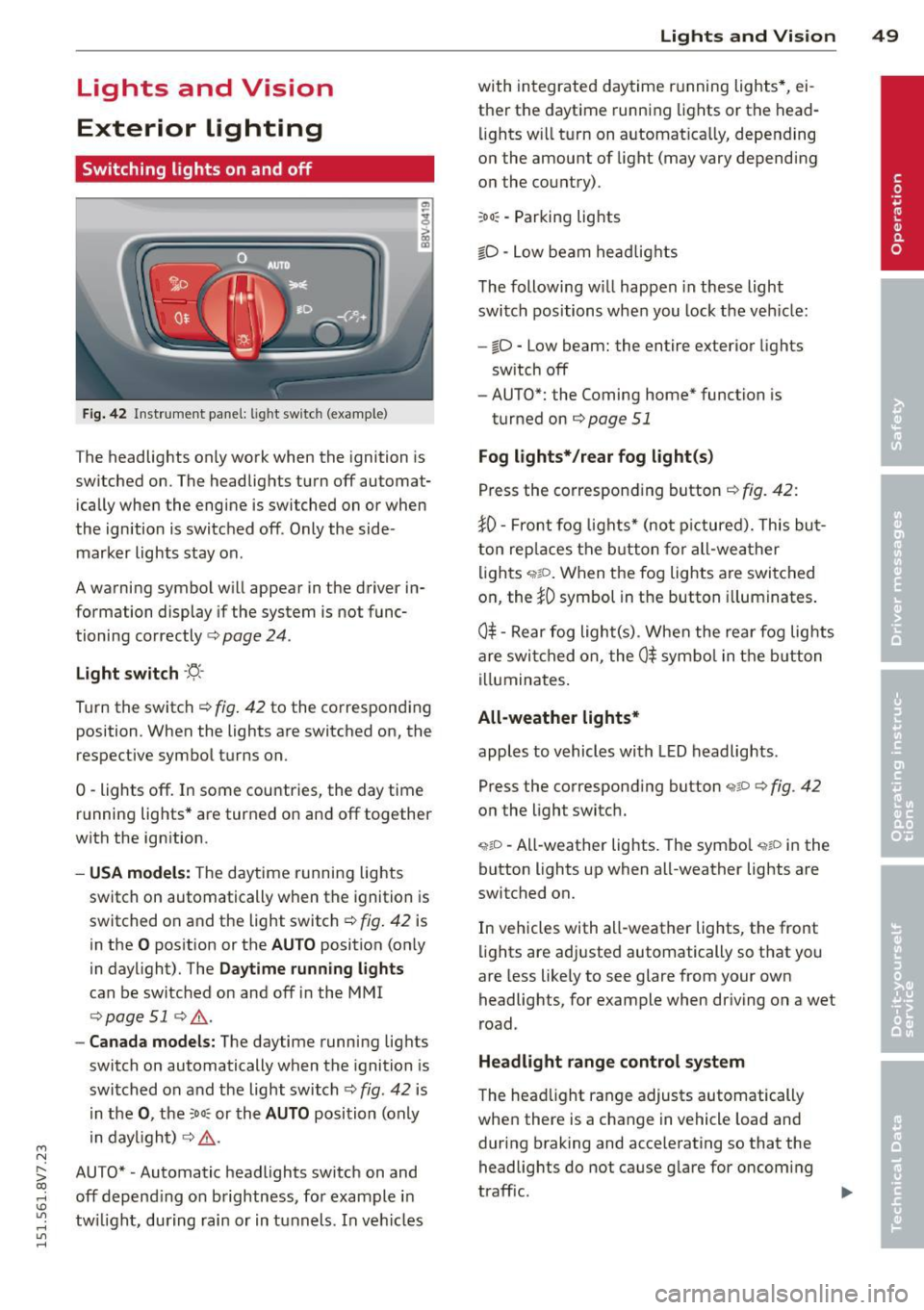
Fig. 42 Instrument panel: lig ht switc h (example)
The headlights only work when the ignition is
switched on. The headlights turn off automat ically when the engine is switched on or when
the ignition is switched off. Only the side marker lights stay on .
A warning symbol will appear in the driver in
formation display if the system is not func
tioning correctly <=>
page 24.
Light switch ·'ti- ·
Turn the switch¢ fig. 42 to the corresponding
position . When the lights are switched on, the
respective symbol turns on.
0 -lights off. In some countries, the day time
running lights* are turned on and off together
with the ign ition.
- USA models: The daytime running lights
switch on automatically when the ignition is
switched on and the light switch¢
fig. 42 is
in the
O position or the AUTO position (on ly
in daylight). The
Daytime running lights
can be switched on and off in the MMI
¢ page 51 ¢ ,& .
-Canada models: The daytime running lights
switch on automatically when the ignition is
switched on and the light switch¢
fig. 42 is
in the
0, the :Do: or the AUTO position (only
in daylight) ¢
,&.
AUTO* • Automatic headlights switch on and
off depend ing on brightness, for example in
tw ilight, during rain or in tunnels. In vehicles Lights
and Vision 49
with integrated daytime running lights*, ei
ther the daytime running lights or the head
li ghts will turn on automat ically, depending
on the amount of light (may vary depending
on the country).
: Do : -Parking lights
iD -Low beam headlights
The following w ill happen in these light
switch positions when you lock the vehicle:
-io -Low beam: the entire exterior lights
sw itch off
- AUTO*: the Coming home* function is
turned on ¢
page 51
Fog lights*/rear fog light(s)
Press the corresponding button¢ fig. 42:
JO· Front fog lights* (not pictured). This but
ton replaces the button for all-weather
lights
q;!D . When the fog lights are switched
on, the
JO symbol in the button illuminates.
0$ -Rear fog light(s) . When the rear fog lights
are switched on, the
0$ symbol in the button
illuminates.
All-weather lights*
apples to vehicles with LED headlights.
Press the corresponding button
<;?P c;, fig. 42
on the light switch.
~io -All-weather lights . The symbol <;;t,;D in the
button lights up when all-weather lights are
switched on.
In vehicles with all-weather lights, the front
lights are adjusted automatically so that you
are less likely to see glare from your own
headlights, for example when driving on a wet
road .
Headlight range control system
The head light range adjusts automatically
when there is a change in vehicle load and
during braking and accelerating so that the
headlights do not cause glare for oncoming
traff ic.
Page 53 of 302
M N ,....
> co ,...., \!) ..,.,
,...., ..,., ,....,
The emergency flashers makes other drivers
aware of your vehicle in dangerous situations.
.,. Press the~ button to sw itch the emergency
f lashers on or off.
You can indicate a lane change or a turn when
the eme rgency flashers are sw itched on by us
i ng the turn signa l lever. The emergency flash
ers stop temporarily .
The emergency flashers also work when the ignit io n is tu rned off.
(D Tips
You should switch the emergency flashers
on if:
- You are the last ca r in a traffic jam so
that all other veh icles approach ing from
behind can see you, or if
- Your vehicle has broken down or you are
having an emergency, or if
- Your vehicle is being towed or if you are
tow ing another vehicle .
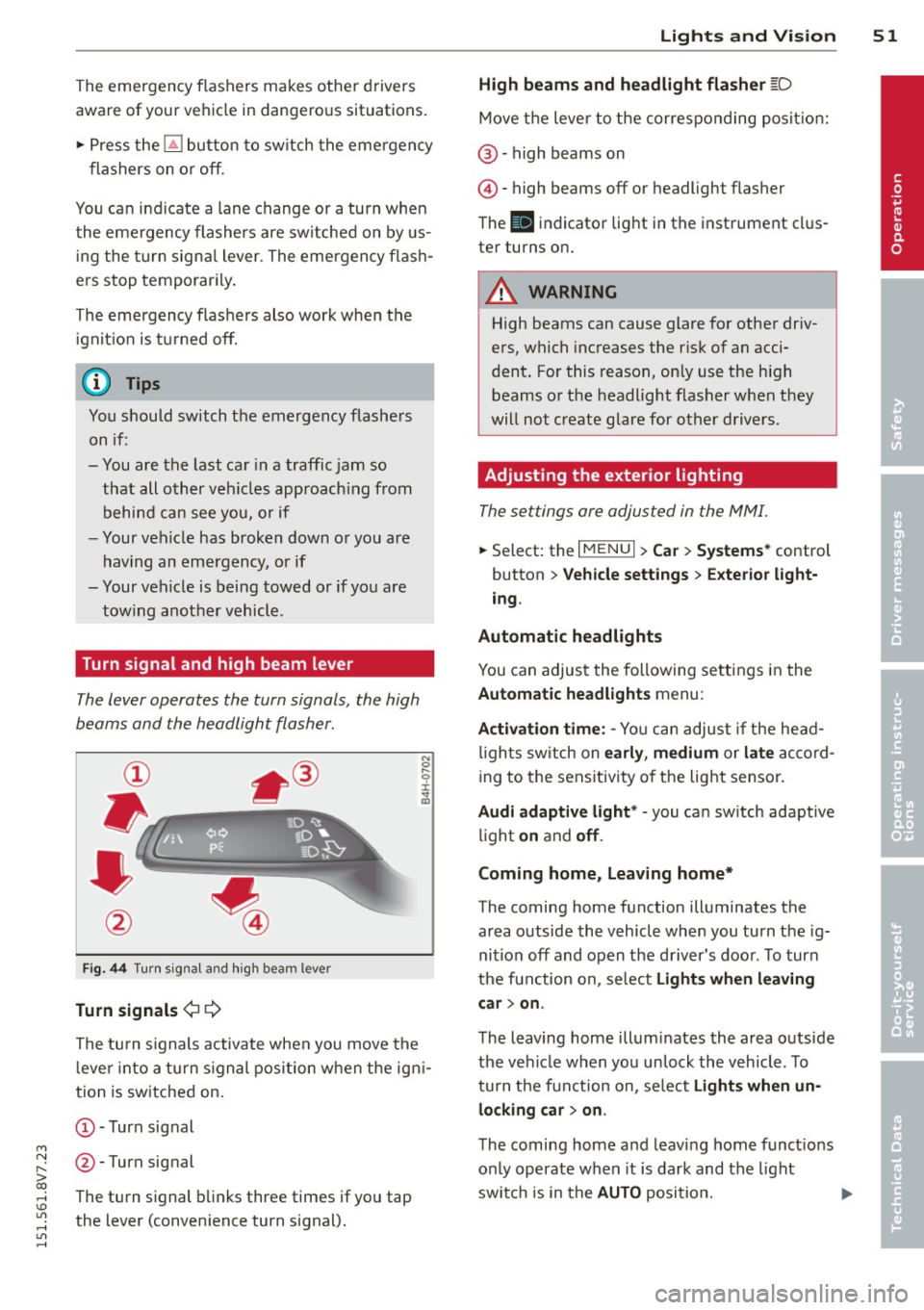
Turn signal and high beam lever
The lever operates the turn signals, the high
beams and the headlight flasher.
Fig. 44 Turn sig na l and high beam lever
Turn signal s¢¢
The turn s ignals activate when you move the
l ever into a turn s ignal position when the igni
tion is switched on.
(D-Turn signal
@-Turn signal
The turn signal blinks three times if you tap
the lever (convenience turn signal).
Lights and Visi on 5 1
High beams and headlight flasher [D
Move the lever to the correspo nding posit io n:
@ -high beams on
©-high beams off or headlight flasher
T he
II indicator light in the instrument cl us
ter turns on.
A WARNING
High beams can cause glare for other driv
ers, which increases the risk of an acci
dent. For this reason, on ly use the high
beams or the headlight flasher when they
will not create glare for other drivers.
Adjusting the exterior lighting
The settings ore adjusted in the MMI.
... Select: the I MENU I> Car> Syste ms* control
button
> Vehicle sett ings > Exte rior light
ing .
Automatic headlights
You can adjus t the following se ttings in the
Automatic headlights menu :
Activation time : -Yo u can adjust if the head
l igh ts sw itch on
ea rly , medium or la te ac co rd
ing to the sens itivity o f the light sensor.
Audi adapti ve light * -you ca n sw itch adaptive
li gh t
on and off .
Coming home, Leaving home*
The coming home function illuminates the
area outside the vehicle whe n you tu rn the ig
nition off and open the d river 's doo r. T o turn
the function on, se lect
Light s when l eaving
c ar > on .
The leaving home illum inates the area outs ide
the vehi cle when you un lock the vehicle . To
turn the function on, se lect
Light s when un
locking car > on .
The coming home and leaving home funct ions
on ly operate when it is dark and the light
switch is in the
AUTO position. ..,.
•
Page 57 of 302
....,
N
r--. > co
rl I.O
"' rl
"' rl
Removing the wiper blade
• Fold the windshield wiper arm away from
the windshie ld .
• Press the locking knob@¢
fig. 50 on the
wiper blade. Hold the wiper blade firm ly.
• Remove the wiper blade in the direction of
the arrow.
In sta ll ing th e wiper blade
• Insert the new wiper blade into the mount
on the wiper arm @until you hear it latch
into place.
• Place the wiper arm back on the windshie ld.
• Turn the service pos ition
off.
A WARNING
For safety reasons, the windshield wiper
blades should be replaced once or twice
each year.
(D Note
- The windshield wiper blades must only
be folded away when in the serv ice posi
tion. Otherw ise, you risk damaging the
paint on the hood or the wi ndshield wip
er motor.
- You should not drive your veh icle or
press the w indshield w iper lever when
the w iper arms are folded away from the
windsh ield . The w indshield w ipers would
move back into their origina l position
and could damage the hood and wind
shield.
- To prevent damage to the windshield
washer system, always loosen w iper
blades that have frozen to the wind
s h ield before turning the wipers on.
- To prevent damage to the wiper blades,
do not apply gasoline, petroleum, thin
ning agents or other solvents on the wip
er blades or near them.
- To prevent damage to the wiper arms or
other components, do not try to move
the windshie ld w ipers by hand .
-
Lights and Visi on 55
@ Tips
-Commercial hot wax such as t he types
used by car washes make it more d ifficult
to clean t he windshie ld.
- Yo u can also use the service position, for
example, if yo u want to protect the
w indshield from icing by using a cover .
- Yo u cannot activate the serv ice position
when the hood is open.
Outside mirror
Adjusting the exterior mirrors
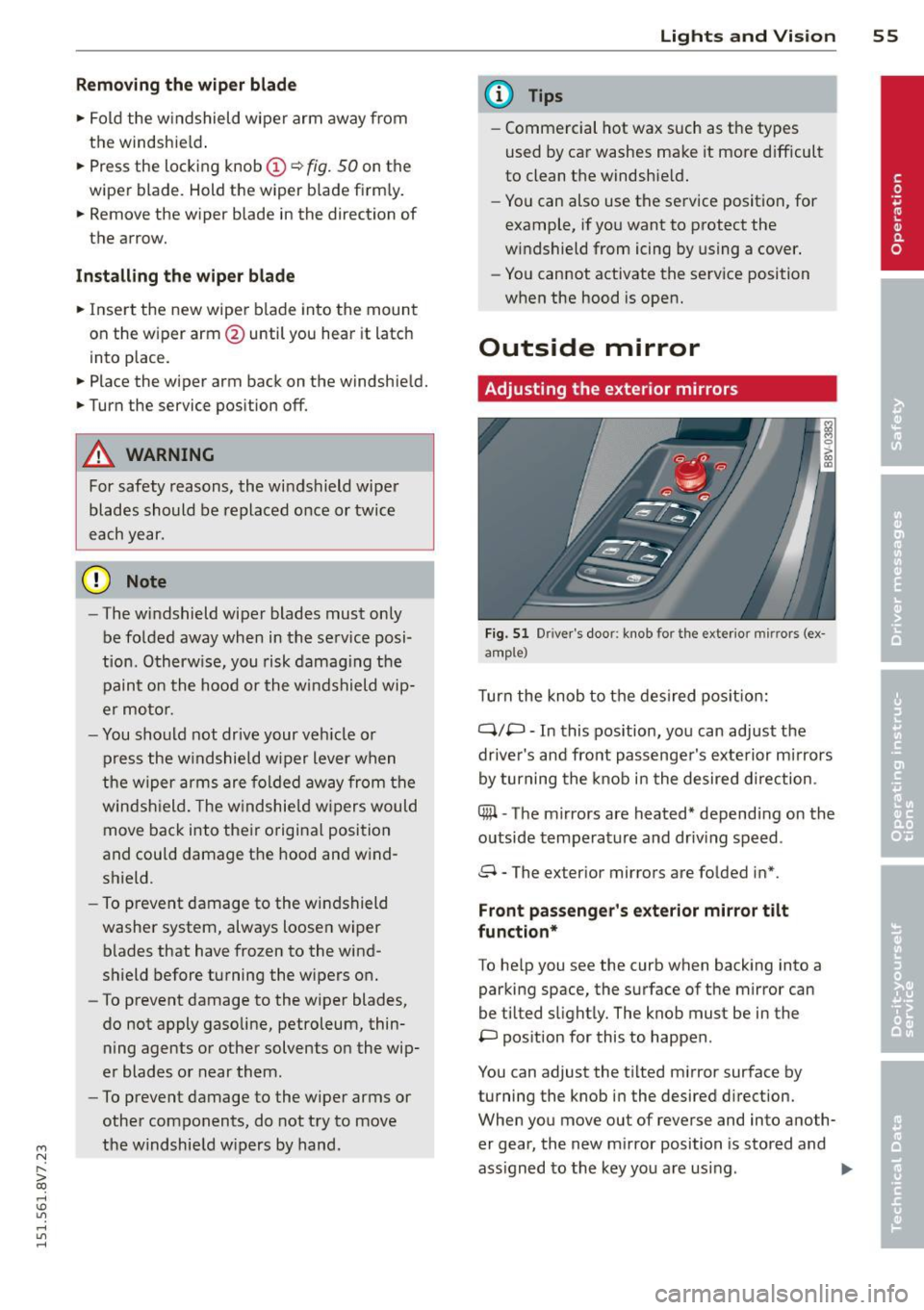
Fi g. 51 Dr iver's door : knob for the ex te ri or mi rrors (ex
a m ple)
T urn the knob to t he des ired pos it io n:
Q/P -In this position, you can adjust the
driver's and front passenge r's exte rior mirrors
by turning the knob i n the desired d irection .
C@ -The mirrors are heated* depend ing on the
outside temperature and driv ing speed .
8 - The exterior mirrors are folded in* .
Front passeng er's exterior mirror tilt
fun ction*
To he lp you see the curb when backing into a
parking space, the surface of the mirror can
be tilted s light ly. The knob must be in the
P pos ition for this to happen .
You can adjust the t ilted mirror surface by
turning the knob i n the desired d irection.
When you move out of reverse and into anoth
er gear, the new m irror position is sto red and
ass igned to the key you are using .
II>
Page 58 of 302
56 Lig hts an d Vi sion
The mirror goes back into its origina l position
once you drive forward faster than 9 mph
(15 km/h) or turn the ign ition
off.
Folding mirr ors in and out
To fold the mirrors in w ith the knob, turn the
knob in the 8 pos ition.
To fold the m irrors out, turn the knob in the
q or
P or O position .
You can set in the MMI if the mirrors shou ld
fold in when locking the vehicle or not
c::> page 36. When you lock the vehicle , the
mirrors fold in . When you sta rt the ignit ion,
the m irrors fold out .
A WARNING
Curved mirror s urfaces (convex or asphe
ric*) enlarge the field of vision. However,
they make objects in the mirror appear sma ller and farther away . Your may esti
mate incorrectly when you use these m ir
rors to gauge your d istance from the
veh icles behind you when changing lanes -
accident risk!
@ Note
- For vehicles with power folding exterior
mirrors*: If the m irror housing was
moved by outside forces (such as an im
pact when maneuvering), you must use
the power folding function to fold the mirro r all the way out. You will hear a
l oud noise when the m irrors are latched
back in place. The mir ror housi ng must
not be moved back into place by hand
because this would affect the mirror
mechan ism.
- Applies to vehicles witho ut power fold
i ng exter ior mirrors: If the mirror hous
ing was moved by outside forces (suc h as
in impact during maneuvering), you
must move the m irror housing back into
place by hand.
- If you wash the vehicle in an automatic
car wash, yo u m ust fold the e xterior m ir
r o rs in to reduce the risk of damage to
the m irrors. Never fold power fo ld ing ex-
-
terior mirrors by hand . On ly fold them in
and out using the power controls.
(D Tips
If t he power ad justmen t fails, bot h mir
ro rs can be adjusted by hand by pressing
on the edge of the mirror surface.
Dimming the mirrors
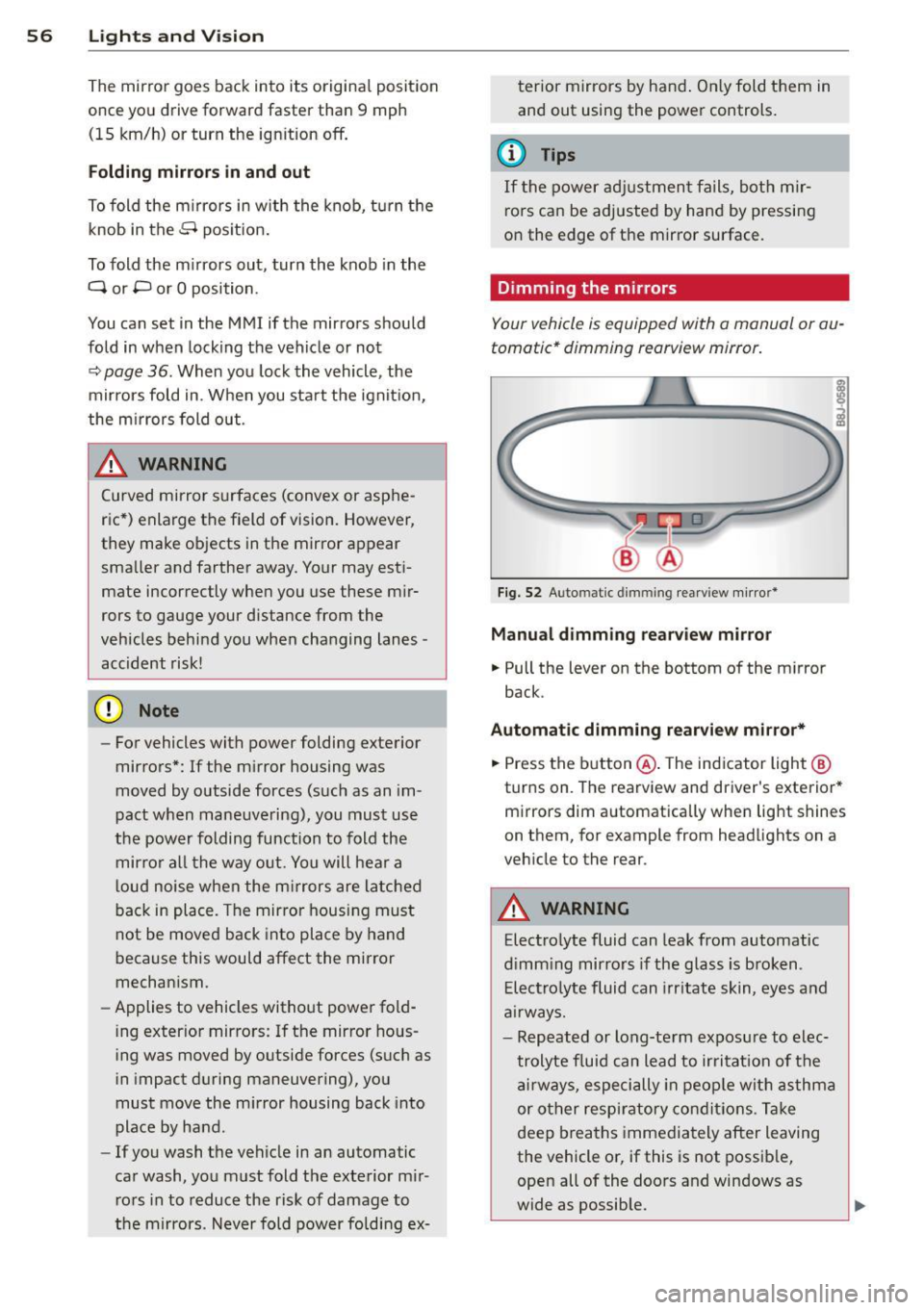
Your vehicle is equipp ed with a manual or au
tomatic* dimming rearview mirror.
F ig . 52 A uto matic dimmin g rea rv iew mi rro r*
Manu al dimming rearv iew mirro r
.. Pull the lever on the bottom of the m irror
back .
Automat ic dimming r earview mirror*
.. Press the b utton @. The ind icator light @
turns on . The rearview and driver's exterior*
mirrors dim a utomatically when light shines
on them, for example from headlights on a
veh icle to the rear .
A WARNING
Electrolyte fluid can leak from automatic
d imm ing mirrors if the glass is b roken .
E le ctro lyte fluid can irr itate skin, eyes and
a irways.
- Repeated or long-te rm exposure to e lec
t rolyte f luid can lead to ir ritat io n of the
a ir ways, especi ally in peo ple wit h asthma
or other respiratory co nd it ions. T ake
deep breaths immediately after leaving
the vehicle or, if this is not possib le,
open all of the doo rs and windows as
wide as possible.
Page 64 of 302
62 Seats and storage
Folding the front seat backrests forward
.,. Pull the handle@ ¢fig. 57forward.
.,. Fold the backrest forward until it locks into
place and then slide the seat all the way for
ward using the backrest @.
Folding the front seat backrests back
.,. Slide the seat all the way back using the
backrest @
c;> fig. 58.
.,. Fold the backrest back until it locks into
place @.
The seat will return to its original position af
ter using easy seat entry .
A WARNING -
The front seat backrests must always be
locked in lace while driving for safety rea
sons.
- When using easy seat entry, the seat
must always slide all the way back when
returning it to its original position. Oth
erwise, the set will not be able to lock in
place. Only drive once the seat is locked
into place.
@ Tips
If the seat will not lock in place after using
easy seat entry, slide the seat all the way
back until it stops. Then ad just the seat to
the desired position.
Front center armrest
Applies to vehicles: with front center armrest
The center armrest can be adjusted to several
levels.
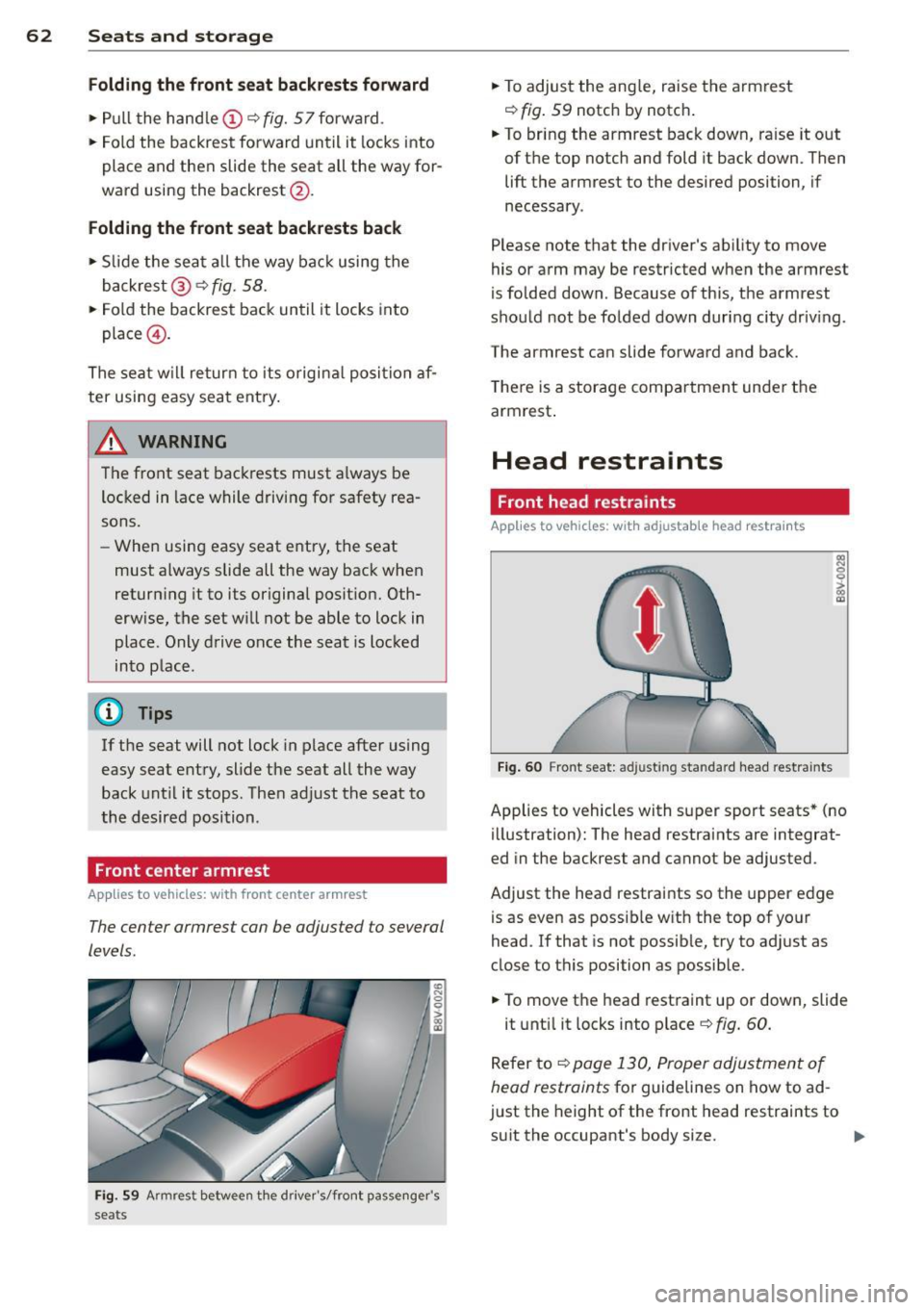
Fi g. 59 Armrest between th e driver 's/fro nt passe nge r's
seats
.,. To adjust the angle, raise the armrest
c;> fig. 59 notch by notch .
.,. To bring the armrest back down, raise it out
of the top notch and fold it back down. Then
lift the armrest to the desired position, if
necessary .
P lease note that the driver's ability to move
his or arm may be restricted when the armrest
is folded down. Because of th is, the armrest
should not be folde d down during city driv ing.
The armrest can slide forward and back.
T here is a storage compartment under the
armrest .
Head restraints
Front head restraints
Applies to vehicles: wit h adjusta ble head restra ints
Fig. 60 Front seat: ad justing standard head restraints
Applies to vehicles with super sport seats* (no
illustration): The head restraints are integrat
ed in the backrest and cannot be adjusted.
Adjust the head restraints so the upper edge
is as even as possible with the top of your
head. If that is not possible, try to adjust as
close to this position as possible .
.,. To move the head restraint up or down, slide
it until it locks into place
c;>fig . 60.
Refer to
c;> page 130, Proper adjustment of
head restraints
for guidelines on how to ad
ju st the height of the front head restraints to
s ui t the occupant's body size.
Page 67 of 302
....,
N
r--. > co
rl I.O
"' rl
"' rl
a collision, sudden braking or other vehi
cle movement. Spilled hot liquid can also
increase the risk of accidents and inju
ries .
- Only use soft conta iners in the cup hold
ers. Hard cups and glasses can increase
the risk of injury during a coll is ion.
- Never use the cup holder or the adapter
as an ashtray- this is a fire hazard .
(D Note
Make sure your beverage container has a
lid. If not, your beverage could spill and
cause damage to vehicle equipment or
stain the seat covers.
Glove compartment
Fig. 66 G lo ve compar tmen t
Op ening /clo sing
• To open the glove compartment, pu ll the
hand le in the direction of the arrow.
• To close the glove compartment, swing the
lid upward until it clicks into place .
The glove compartment can be locked us ing
the vehicle key .
.&., WARNING
Always leave the lid on the glove compart
ment cover closed while driving to reduce
the risk of injury.
Additional storage compartments
T here are additional storage compartments,
compartments and holders at other locations
in the vehicle:
S ea ts a nd s to rage 65
- In the upper part of the g love compart
ment .
- In the center conso le under the center arm
rest*.
- On the back of the right front seat. The com partment" can hold a max imum weight of
2 lbs (1 kg).
.&., WARNING
-----
- Do not place any objects on the instru
ment panel. Objects that are not stored
securely can slide around in the vehicle
while driving, when accelerating or brak
ing or when turning .
- Make sure that objects cannot fall out of
the center console storage compartment
or other compartments and into the
footwell while dr iving . These objects
could prevent you from b ra ki ng o r accel
erating d uring sudden b raking mane u
vers.
- Always keep the g love compartment
closed while driv ing to reduce the risk of
injury during a collision or heavy braking.
- Read and following the WARNINGS in
~ page 167, Important safety instruc
tions on the side airbag system.
Luggage compartment
Loading luggage compartment
Luggage items must be stowed securely.
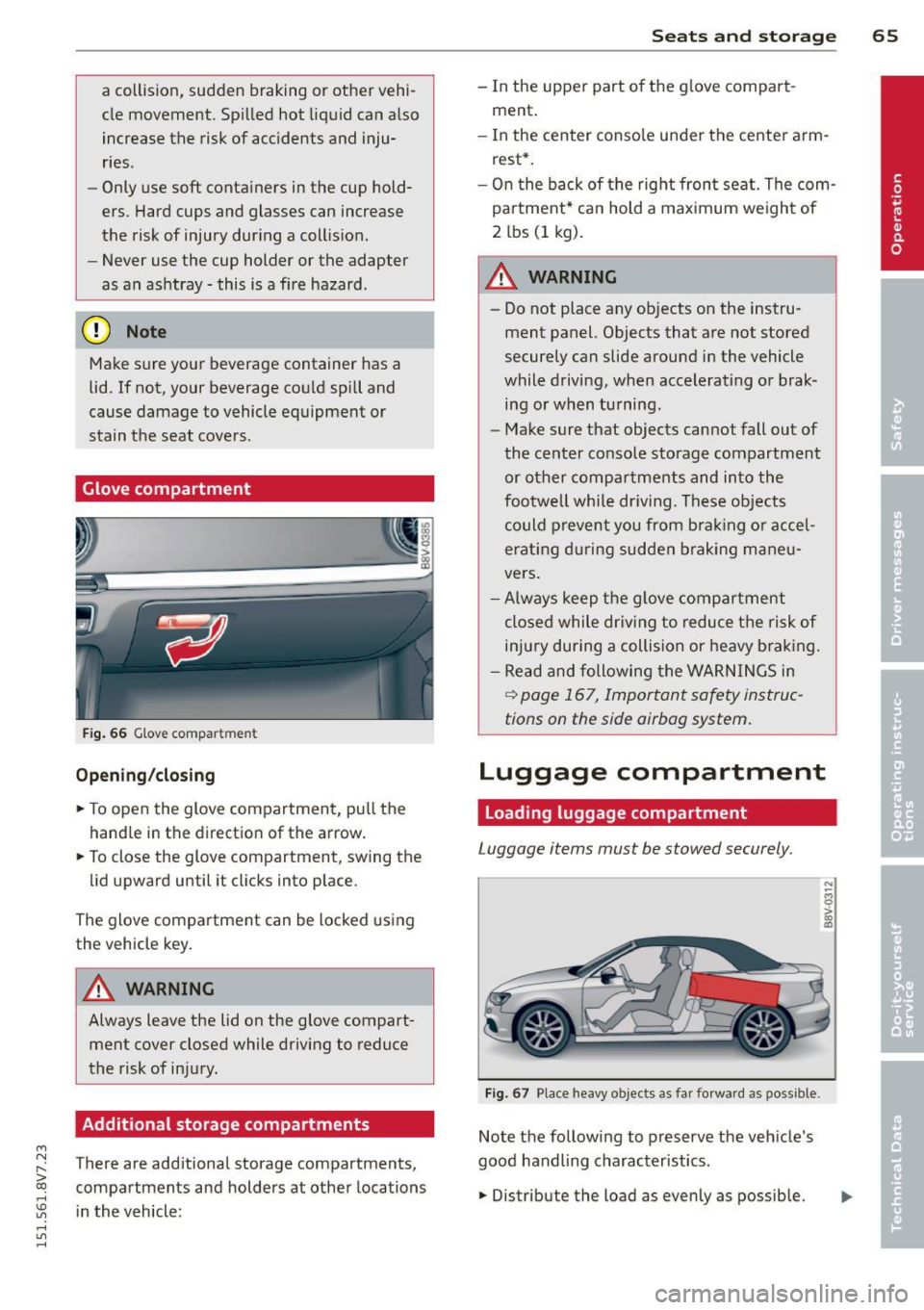
F ig. 67 Pla ce heavy o bjects as far forward as poss ible.
Note the following to preserve the veh icle's
good handling characteristics .
• Distribu te the load as evenly as possible.
N ;;; 0 ;;;. a,
"'
Page 69 of 302
....,
N
r--. > co
rl I.O
"' rl
"' rl
-Torn or frayed safety belts can break, and
belt anchors can break dur ing a coll is ion.
Check the safety belts regularly. Safety
belts w ith noticeable damage to the
webbing, bind ings, buckles or retractors
must be replaced.
(D Note
- If you
move the front seat back when the
rear seat backrest is folded forward, you
could damage the head restra ints on the
rear seat. If necessary, remove the rear
seat head restraint before mov ing the
front seat back
- Make sure the safety belt is not pinched
in the backrest lock and damaged when
the rea r seat backrest if fo lded back.
Other objects should be
r emoved from
the rear bench seat to protect the rear backrest from damage .
Tie-downs
Applies to vehicles: with tie-dow ns
~--~-----
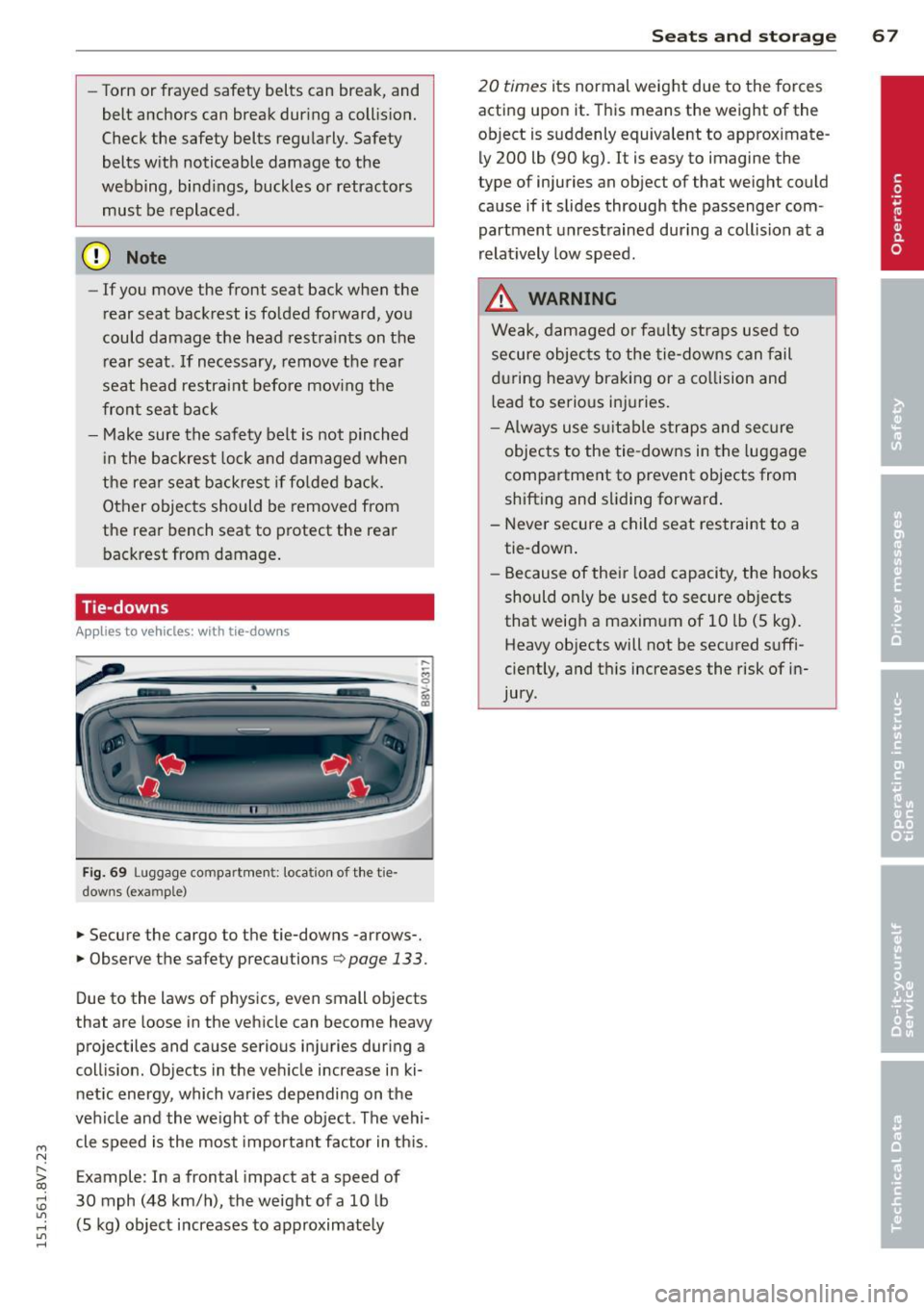
Fig . 69 Luggage compartme nt: location of the t ie
downs (example)
... Secure the cargo to the tie-downs -arrows- .
.,. Observe the safety precautions ¢
page 133.
Due to the laws of physics, even small objects
that are loose in the vehicle can become heavy
projectiles and cause serious injuries during a
coll is ion. Objects in the ve hicle increase in ki
netic energy, which varies depending on the
vehicle and the we ight of the object. The vehi
cle speed is the most important factor in this .
Example: In a frontal impact at a speed of
30 mph (48 km/h), the weight of a 10 lb (5 kg) object increases to approximately
S ea ts a nd s to rage 67
20 times its normal weight due to the forces
acting upon it. This means the weight of the
object is suddenly equivalent to approximate
ly 200 lb (90 kg). It is easy to imagine the
type of injuries an object of that weight could
cause if it slides through the passenger com partment unrestrained during a collision at a
relat ively low speed.
A WARNING
Weak, damaged or faulty straps used to
secure objec ts to the tie-downs can fail
during heavy braking or a co llision and
l ead to serious injuries.
-A lways use s uitable straps and secure
objects to the tie -downs in the luggage
compartment to prevent objects from
shifting and sliding forward .
- Never secure a child seat restraint to a tie -down .
- Because of their load capaci ty, the hooks
should only be used to secure ob jects
that weig h a maximum of 10 lb
(5 kg).
Heavy objects wilt not be secured suffi
ciently, and this increases the risk of in
jury.
Page 78 of 302
76 Driving
Driving
Steering
Adjusting the steering wheel position
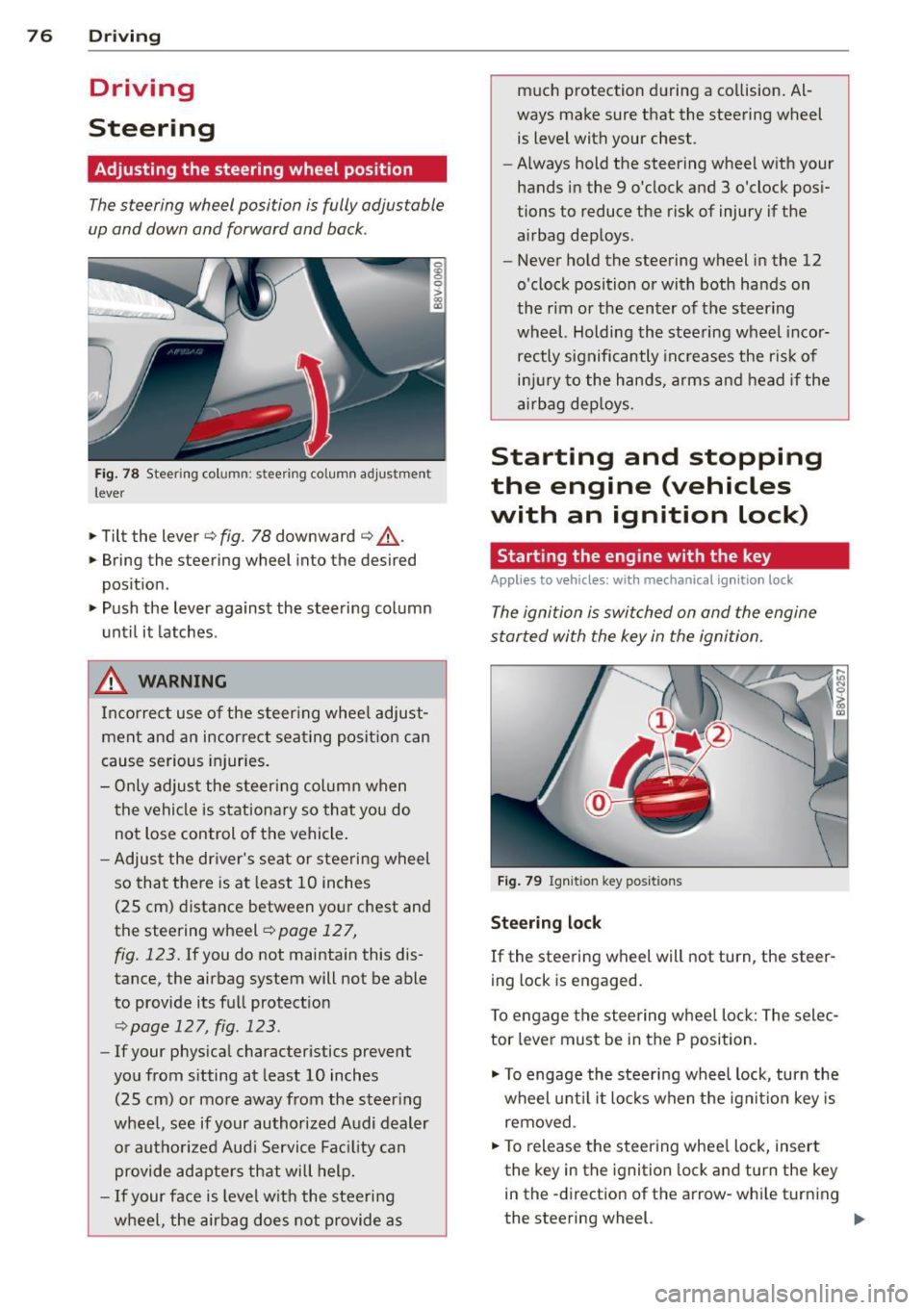
The steering wheel position is fully adjustable
up and down and forward and bock .
Fig. 78 Steering column: stee ring column adjustmen t
lever
.. Tilt the lever ¢ fig. 78 downward ¢ &_.
.. Bring the steering wheel into the desired
position .
.. Push the lever against the steering column
until it latches .
_& WARNING
Incorrect use of the steer ing whee l adjust
ment and an incorrect seating position can
cause serious injuries.
- Only adjust the steering column when
the vehicle is stationary so that you do
not Lose control of the vehicle.
- Adjust the driver's seat or steering wheel
so that there is at least 10 inches
(25 cm) distance between your chest and
the steering wheel
r=.> page 12 7,
fig. 123. If you do not maintain this dis
tance, the airbag system will not be able
to provide its full protection
<=> page 127, fig. 123.
- If your physical characteristics prevent
you from sitting at least 10 inches
(25 cm) or more away from the steering
wheel, see if your authorized Audi dealer or authorized Audi Service Fac ility can
provide adapters that will help.
- If your face is level with the steering
wheel, the airbag does not provide as much protection during a collision. Al
ways make sure that the steering wheel
is level with your chest .
- Always hold the steering wheel with your
hands in the 9 o'clock and 3 o'clock posi
tions to reduce the risk of injury if the
airbag deploys.
- Never hold the steering wheel in the 12
o'clock position or with both hands on
the rim or the center of the steering
wheel. Holding the steering wheel incor
rectly significantly increases the r isk of
injury to the hands, arms and head if the
airbag deploys.
Starting and stopping
the engine (vehicles
with an ignition lock)
Starting the engine with the key
Applies to vehicles: wit h mechanical ignition loc k
The ignition is switched on and the engine
started with the key in the ignition.
Fig. 79 Ignit ion key positions
Steering lock
If the steering wheel will not turn, the steer
ing lock is engaged.
To engage the steering wheel Lock: The selec
tor lever must be in the P position.
"' To engage the steering wheel lock, turn the
wheel until it locks when the ignition key is
removed .
"' To release the steering wheel Lock, insert
the key in the ignition lock and turn the key
in the -direction of the arrow-whi le turning
the steering wheel. ""