steering AUDI A3 CABRIOLET 2015 User Guide
[x] Cancel search | Manufacturer: AUDI, Model Year: 2015, Model line: A3 CABRIOLET, Model: AUDI A3 CABRIOLET 2015Pages: 302, PDF Size: 73.83 MB
Page 78 of 302
76 Driving
Driving
Steering
Adjusting the steering wheel position
The steering wheel position is fully adjustable
up and down and forward and bock .
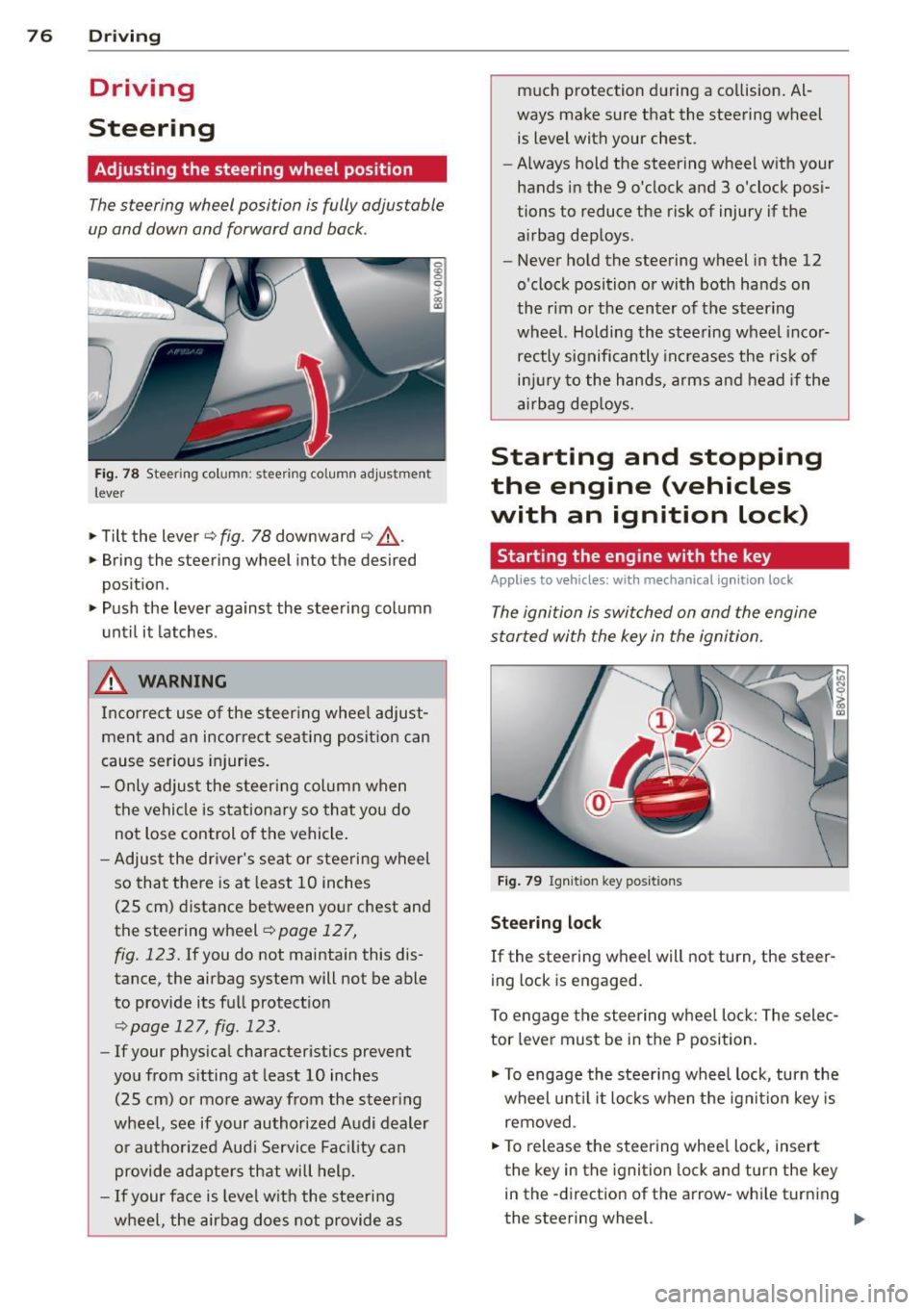
Fig. 78 Steering column: stee ring column adjustmen t
lever
.. Tilt the lever ¢ fig. 78 downward ¢ &_.
.. Bring the steering wheel into the desired
position .
.. Push the lever against the steering column
until it latches .
_& WARNING
Incorrect use of the steer ing whee l adjust
ment and an incorrect seating position can
cause serious injuries.
- Only adjust the steering column when
the vehicle is stationary so that you do
not Lose control of the vehicle.
- Adjust the driver's seat or steering wheel
so that there is at least 10 inches
(25 cm) distance between your chest and
the steering wheel
r=.> page 12 7,
fig. 123. If you do not maintain this dis
tance, the airbag system will not be able
to provide its full protection
<=> page 127, fig. 123.
- If your physical characteristics prevent
you from sitting at least 10 inches
(25 cm) or more away from the steering
wheel, see if your authorized Audi dealer or authorized Audi Service Fac ility can
provide adapters that will help.
- If your face is level with the steering
wheel, the airbag does not provide as much protection during a collision. Al
ways make sure that the steering wheel
is level with your chest .
- Always hold the steering wheel with your
hands in the 9 o'clock and 3 o'clock posi
tions to reduce the risk of injury if the
airbag deploys.
- Never hold the steering wheel in the 12
o'clock position or with both hands on
the rim or the center of the steering
wheel. Holding the steering wheel incor
rectly significantly increases the r isk of
injury to the hands, arms and head if the
airbag deploys.
Starting and stopping
the engine (vehicles
with an ignition lock)
Starting the engine with the key
Applies to vehicles: wit h mechanical ignition loc k
The ignition is switched on and the engine
started with the key in the ignition.
Fig. 79 Ignit ion key positions
Steering lock
If the steering wheel will not turn, the steer
ing lock is engaged.
To engage the steering wheel Lock: The selec
tor lever must be in the P position.
"' To engage the steering wheel lock, turn the
wheel until it locks when the ignition key is
removed .
"' To release the steering wheel Lock, insert
the key in the ignition lock and turn the key
in the -direction of the arrow-whi le turning
the steering wheel. ""
Page 79 of 302
M N ,....
> co ,...., \!) 1.1'1 ,...., 1.1'1 ,....,
Switchin g th e ig nition on /off
"'T o sw itch the ignition on, turn the ignition
key to position
(D .
"'To switch the ignition off, turn the ignition
key to position @.
Starting the engin e
Your vehicle is equipped w ith launch cont ro l.
As soon as you have turned the ign ition key to
position @, the engine will start automatical
l y.
"' Press the brake peda l and move the se lector
lever to the P or N pos it ion.
"'T urn the key briefly to position @. The igni
t ion key automatically r eturns to posit ion
(D . Do not press the accelerator pedal wh en
doing this .
Major electrical equipment switches off tem
porarily when starting the eng ine.
If the engine does not sta rt immedia tely , stop
the starting procedure by turning the ignition key to position @and repeat after 30 sec
onds .
Automatic start m alfunction
If the ~ indicator l ight turns on (gasoline en
g ine) and the message
Engin e start sys te m
m alfu nction. Ple ase contac t Se rvice
appears ,
there is an automatic start ma lfunction.
To start t he eng ine, hold the ignition key in
position @until the engine runs .
Drive to an authorized Aud i dealer or author
ized Audi Service Facility immed iate ly to have
the ma lfunction corrected .
_& WARNING
-Never allow the engine to run in confined
spaces -there is a risk o f asphyxiation.
- Never remove the ign ition key from the
ignition lock whi le the vehicle is moving .
Otherw ise the steering lock wi ll engage
and you will not be able to steer the vehi
cle.
- Please note that the brake booster and
power steering only work when the en-
Dri vin g 77
gine is running. When the engine off, you
must use more force to steer or brake
the vehicle. Because the usual steering
and brak ing capability is not avai lab le,
the risk of accidents or injur ies increases.
- Always take the vehicle key with you
when leaving the vehicle, even for a
short period of time. This applies part ic
ularly when children remain in the veh i
cle. Otherwise the ch ild ren could start
the engine or operate electrical equip
men t such as power w indows.
(D Note
- Avo id h igh engine speed, full throttle,
and heavy eng ine load as long as the en
gine has no t reached operat ing tempera
t u re yet . You could damage the engine.
- T he engine cannot be started by pushi ng
or towing.
(® For the sake of the environment
Do not let the eng ine run w hile pa rked to
warm u p. Begin driv ing immediately . T his
r educes unne cessary emissions.
(D Tips
- If it is d iff icult to turn the key to position
(D , turn the steering wheel back and
forth slightly to release the s teer ing
wheel lock .
- After s tarting a cold engine, there may
be a brief period of inc reased no ise be
cause the oil press ure must first bui ld up
in the hydraulic va lve adj usters . This is
normal and not a cause for concern.
- If the battery is disconnected and recon
nected, you have to hold the ignition key
in posit ion
(D for five seconds for the en
gine to start.
- After sw itching the ignition off, you can
only remove the key when the selector
lever is in the "P" (Park) position. After
that, the selector lever is locked.
•
Page 80 of 302
78 Driving
Stopping the engine with the key
A pplies to vehicles: with mechanical ignit ion lock
Stopp ing the engine
> Bring the vehicle to a ful l stop .
> Turn the key to position @.
Rele asing the steering lock
Requirement : The selector lever must be in
the P pos ition .
> Remove the ignit ion key in position @
Q page 78, fig. 80 Q _&.
> Turn the steering wheel until you hear the
stee ring wheel lock.
The locked steering helps prevent vehicle
theft.
A WARNING
- Never turn off the eng ine before the ve
hicle has come to a complete stop . The
full function of the brake booster and the powe r steering is not guaranteed. You
must use more fo rce to turn or brake, if
necessary. Because you cannot steer and
brake as you usually would, this could
lead to acc idents and se rious injuries.
- Never remove the ign ition key from the
ign ition lock whi le the vehicle is movi ng .
Otherwise, the steering lock co uld sud
denly engage and you would not be able
to steer the vehicle.
- Please note that the brake booster and
power steering only work when the en
gine is runn ing. When the engine off, you
must use more force to steer or brake
the vehicle. Because t he usual steering
and braking capability is not available,
the risk of accidents or injuries increases .
- Always take the vehicle key with you
when leaving the veh icle, even for a
short per iod of time. This applies partic
ularly when chi ldren remain in the vehi
cle. Otherwise the children could start
the engine or operate electrical equip
ment such as power windows .
- For safety reasons, always park the vehi
cle with the selector lever in the P posi- tion. Otherwise, there is the risk t
hat the
veh icle could roll.
- After the engine has been switched off,
the radiator fan can continue to run for
up to 10 minutes -even with the ignition
sw itched off. It can also sw itch on again
after some t ime if the coolant tempera
ture rises as a resu lt of heat buildup or if
the engine compartment is heated by
sunlight and the engine is hot.
(D Note
- If the engine has been under heavy load
for an extended per iod of t i me, heat
builds up in the engine compartment af
ter the engine is switched off - there is a
r isk of damaging the engine . For this
reason, let the engine r un for at id le for
approximately two minutes before shut
ting it off .
Starting and stopping
the engine (vehicles
with a convenience key)
St t· th · ith the
button
Appl ies to vehicles: wit h co nvenience key
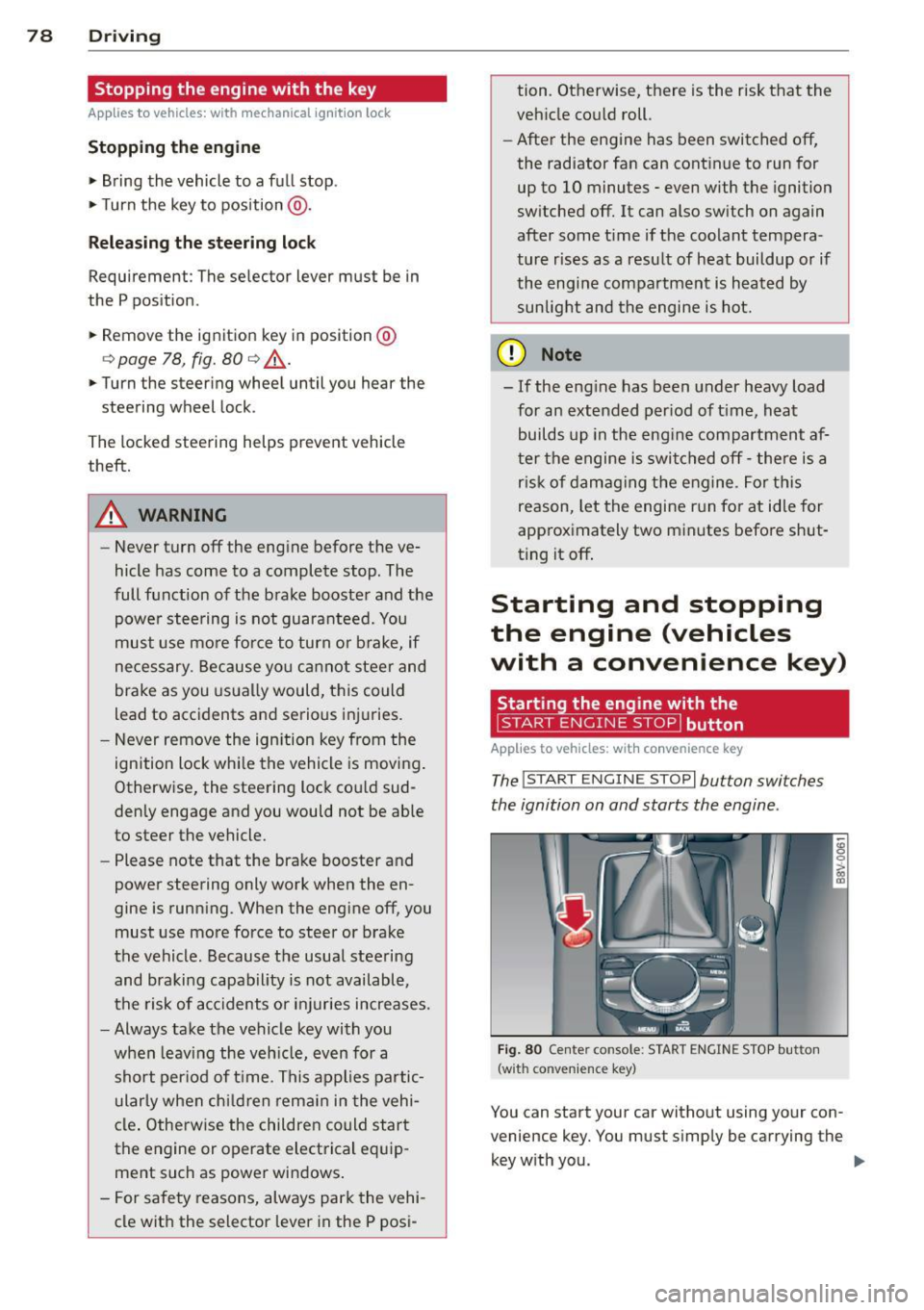
The !START E NGIN E STOPI button switches
the ignition on and starts the engine .
Fig. 80 Center conso le: STAR T ENGIN E STOP bu tton
(w ith co nvenie nce key)
You can start your car without using your con
venience key. You must s imply be carrying the
key with you. .,._
Page 81 of 302
M N ,....
> co ,...., \!) 1.1'1 ,...., 1.1'1 ,....,
Switchin g th e ig nition on /off
If the> ,:r- u indicator l ight blinks and the mes
sage
Ple ase move s teering wheel appea rs
when switching the ignition on, the steering is locked by th e steering lock. In this case, turn
the steering wheel slight ly to the left/ right.
.. To switch the ignition on or
off, press the
I S TAR T ENG INE S T OPI button. Do not press
the brake pedal whil e doing this .
Starting the engin e
Your vehicle is equipped with launch cont ro l.
The engine starts automa tically when you
press the
I S T AR T ENG INE S T OP I button brief
l y.
.. Press the brake peda l and move the se lector
lever to the P or N pos ition .
.. Press the
I STAR T ENGINE STOP I button
briefly . The eng ine will star t.
Majo r electrical equ ipment switches
off tem
porarily when starting the eng ine .
I f the engine does not start immediately , stop
the starting procedu re by push ing the
I S TAR T ENGINE ST OP ! button again and re
peat after 30 seconds .
Automatic start m alfunction
If the Ila indicator l ight turns on (gasoline en
g ine) when you start the engine, there is an
automatic sta rt malfunction .
To start the eng ine, press and hold the
!STAR T ENGIN E STOP ! button until the eng ine
runs.
Drive to an authorized Aud i dealer or author
i z ed Audi Service Fac ility immed iately to have
the malfunction corrected .
A WARNING
-Never allow the engine to ru n in confined
spaces -there is a r isk of asphyxiation.
- Always take the veh icle key with you
when leaving the vehicle, even for a
short per iod of t ime . This applies partic
ularly when chi ldren remain in the vehi
cle . Otherwise the children could start
Dri vin g 79
the engine or operate electrical equip
ment such as power w indows.
- Please note that the brake booster and
power steering only work when the en
gine is running. When the engine
off, you
must use more force to steer or brake
the vehicle . Because the usual steer ing
and brak ing capability is not avai lable,
the risk of accidents or injur ies increases .
(D Note
-Avo id h igh engine speed, full throttle,
and heavy eng ine load as long as the en
gine has not reached operat ing tempera
ture yet. You could damage the engine .
- The engine cannot be started by pushing
or towing .
@ For the sake of the environment
Do not let the eng ine run wh ile parked to
warm up . Begin dr iv ing immediately . Th is
reduces unnecessary emissions .
(D Tips
-After starting a cold engine, there may
be a brief period of increased no ise be
cause the oil press ure must f irst bu ild up
in the hydraulic va lve ad justers. This is
normal and not a cause for concern.
- If the . indicator light blinks in the in
st rument cluste r before switching the ig
nition
off, the ignit ion wi ll not switch on
again .
qpoge 192
- If you leave your vehi cle wit h the ignition
switched on, the ign it ion w ill switch
off
after a certain amount of time . Make
sure that electrical equipment such as
the exterior lights are switched
off .
T · th · ff using the
button
App lies to vehicles: wit h convenience key
.. Bring the veh icle to a full stop .
.. Move the se lector lever into the P posit ion .
.. Press the
I STA RT E NGINE ST OP ! button
q page 78, fig. 80. ..,.
•
Page 82 of 302
80 Driving
Steering lock1
)
The steering locks when you turn the engine
off using the
I START ENGINE STOPI* button,
move the selector lever into the P position
and open the driver's door.
The locked steering helps prevent vehicle
theft.
Emergency off function
If it is absolutely necessary, the engine can al
so be turned off while driving at speeds lower
than 6 mph (10 km/h).
If you press the
I START ENGINE STOPI* button while driving,
the message
Pressing start/stop button
again will switch off engine!
appears. To
switch the engine off, press the
I STAR T ENGINE STO PI* button twice in a row
briefly or press and hold for longer than two
seconds.
A WARNING
- Never turn off the engine before the ve
hicle has come to a complete stop. The
full function of the brake booster and the power steering is not guaranteed. You
must use more force to turn or brake, if
necessary. Because you cannot steer and
brake as you usually would, this could
lead to accidents and serious injuries .
- Please note that the brake booster and
power steering only work when the en
gine is running. When the engine off, you
must use more force to steer or brake
the vehicle. Because the usual steering and braking capability is not available,
the risk of accidents or injuries increases.
- Always take the vehicle key with you when leaving the vehicle, even for a
short period of time. This applies partic ularly when children remain in the vehi
cle. Otherwise the children could start
the engine or operate electrical equip
ment such as power windows.
- For safety reasons, always park the vehi
cle with the selector lever in the P posi-
ll This function is not available in all cou ntr ies.
tion. Otherwise, there is the risk that the
vehicle could roll.
- After the engine has been switched off,
the radiator fan can continue to run for
up to 10 minutes - even with the ignition
switched off. It can also switch on again
after some time if the coolant tempera
ture rises as a result of heat buildup or if
the engine compartment is heated by sunlight and the engine is hot.
(D Note
If the engine has been under heavy load
for an extended period of time, heat builds
up in the engine compartment after the
engine is switched off - there is a risk of
damaging the engine. For this reason, let
the engine run for at idle for approximate
ly two minutes before shutting it off.
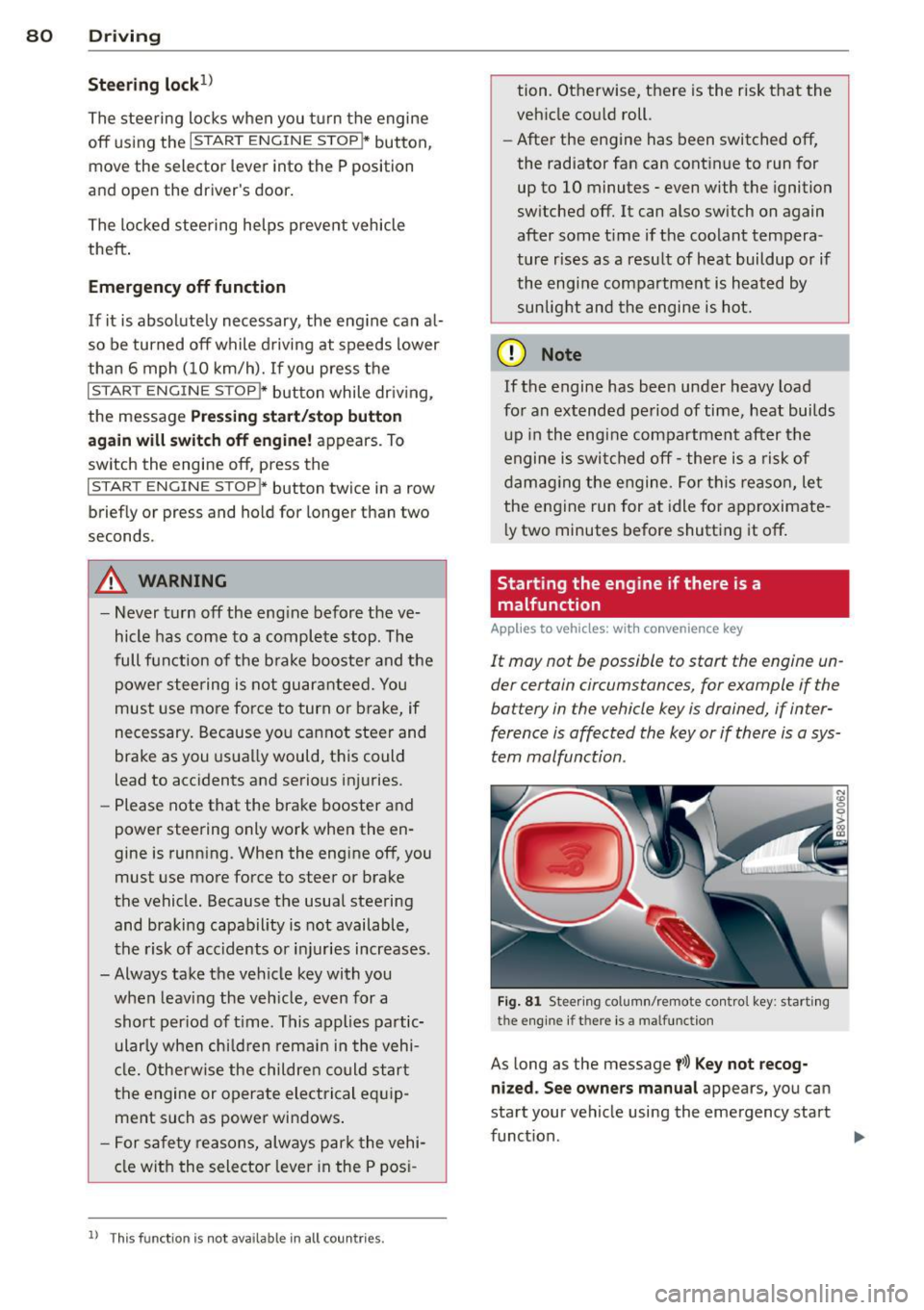
Starting the engine if there is a
malfunction
Applies to vehicles: with convenience key
It may not be possible to start the engine un
der certain circumstances, for example if the
battery in the vehicle key is drained, if inter
ference is affected the key or if there is a sys
tem malfunction.
Fig. 81 Steer ing colum n/remote control key : start ing
the e ngine
if t h ere is a malfu nction
As long as the message y>l) Key not recog
nized. See owners manual
appears, you can
sta rt your vehicle using the emergency start
function . .,.
Page 85 of 302
M N
" > co ,...., \!) ..,.,
,...., ..,., ,....,
-Occasiona l noises when the parking
brake is set and re leased are norma l and
are not a ca use for concern .
- When the vehicle is parked, the parking
brake goes through a se lf-test cycle at
regular intervals. Any noises associated
with th is are normal.
- If there is a power failure, the parking
brake will not set if it is released, and it
will not release if it is set c::>
,&. See an
authorized Audi dea ler or authorized
Audi Service Facility for assistance .
Parking
"'Press the bra ke peda l to stop the vehicle.
"' Pull the switch@c::>
page 82, fig. 82 to set
t h e parking bra ke.
"' Place the selector lever in the P position .
"'T urn the eng ine
off c::> _& .
"'Turn the steering whee l when parking on in
clines so that the whee ls will ro ll into the
curb if the vehicle starts moving.
A WARNING
-Always take the vehicle key with you when leaving the veh icle, even for a
short per iod of t ime. This applies partic
u larly when ch ild ren remain in the vehi
cl e. Otherwise chi ld ren could sta rt the
engine, re lease the par king brake or op
erate electrical eq uipment such as powe r
w indows, which increases the risk of an
acc ident.
- No one sho uld remain in the vehicle
when it is locked, especia lly children.
Locked doors make it more diffic ult for
emergency workers to get into the vehi
cle, which puts lives at risk.
Dri vin g 83
Starting from a stop
The start assist function ensures that the
parking brake is released automatically upon starting .
Stopping and setting the parking brake
"' Pull the sw itch @c::> page 82 , fig. 82 to set
the parking brake.
Sta rting and automatically rel easi ng the
parking brake
Req uirement: The dr iver's door must be
locked and the driver's safety belt must be
fastened.
"' When you press the accelerator peda l, the
parking brake is automatically re leased and
your vehicle begins to move.
When stopping at a traffic signal or stopping in city traff ic, the parking brake can be ap
plied . The vehicle does not have to be held
with the brake pedal. The parking brake elimi nates the tendency to creep when a selector
lever pos it io n is engaged. As soon as you
press the accelerato r peda l, the par king b rake
r eleases a utomat ica lly and the vehicle starts
to move.
Starting on slopes
When sta rting on incl ines, the hill start assist
prevents the vehicle from un intent ionally roll
i ng ba ck. The bra kin g fo rce of the par kin g
brake is not re leased unt il su ff ic ient d riving
f o rce has been built up a t the wheels.
(D Tips
Fo r safety reaso ns, t he pa rking bra ke is re
l eased automatic ally o nly when the d riv
er's safety bel t is fa stened an d the driver's
d oor is locked.
•
Page 92 of 302
90 Audi adaptive cruise control
Switching adaptive cruise control off
.,. Push the lever away from you into position
@ until it clicks into p lace. The message
ACC: off appears.
The stored speed in the LED line is erased.
@ Indicator lights
II -adaptive cru ise contro l is switched on . No
objects are detected ahead. The stored speed
is maintained .
•- An object ahead was detected . The adap
tive cruise control system regulates the speed
and distance to the object ahead and brakes/
accelerates automatically.
r •j-adaptive cruise contro l is switched on . An
object ahead was detected. Your vehicle re
mains stopped and will not start driving auto
matica lly.
•- The automatic braking is not enough to
maintain a sufficient distance to an object
ahead. You must intervener:!>
page 93, Re
quest for driver intervention.
© Instrument cluster display
If adaptive cruise control is not shown in the
instrument cluster disp lay, you can call it up
using the mu ltifunction steering wheel but
tons
r:!> page 2 7.
Based on the graphics in the disp lay, yo u can
determine if the system is maintaining a dis
tance to a vehicle ahead and what that dis
tance to this vehicle is:
No vehicle -No object ahead was detected .
White vehicle -An object ahead was detected.
Red vehicle -Request for the driver to take ac
tion
c> page 93 .
Both arrows on the scale© indicate the dis
tance to the object ahead. No arrow appears
when the vehicle is on an open road and there
is no object ahead.
If an object is detected
ahead, the arrow moves on the scale .
The green zone on the scale indicates the
store distance. For information on changing the d
istance, refer to
i=;, page 92. If the dis
tance selected is exceeded or not reached, the
arrow moves into the red zone on the scale.
A WARNING
- Using adaptive cru ise control incorrectly
can cause collisions, other accidents and
serious injuries.
- If you press the
~IS-ET~I button when driv
ing at speeds below 20 mph (30 km/h),
the vehicle accele rates automatically up
to 20 mph (30 km/h), which is the mini
mum speed that can be set.
(D Tips
-If you switch the ignit ion or the adaptive
cruise control system off, the set speed
is erased for safety reason.
- The Electronic Stabilization Control (ESC)
and Anti-Slip Regulat ion (ASR) both
switch on when the adaptive cruise con
trol is switched on. ESC and ASR cannot
be switched
off when adaptive cruise
contro l is switched on.
- With the adaptive cruise control activat
ed the ESC sport mode canno t be activat
ed.
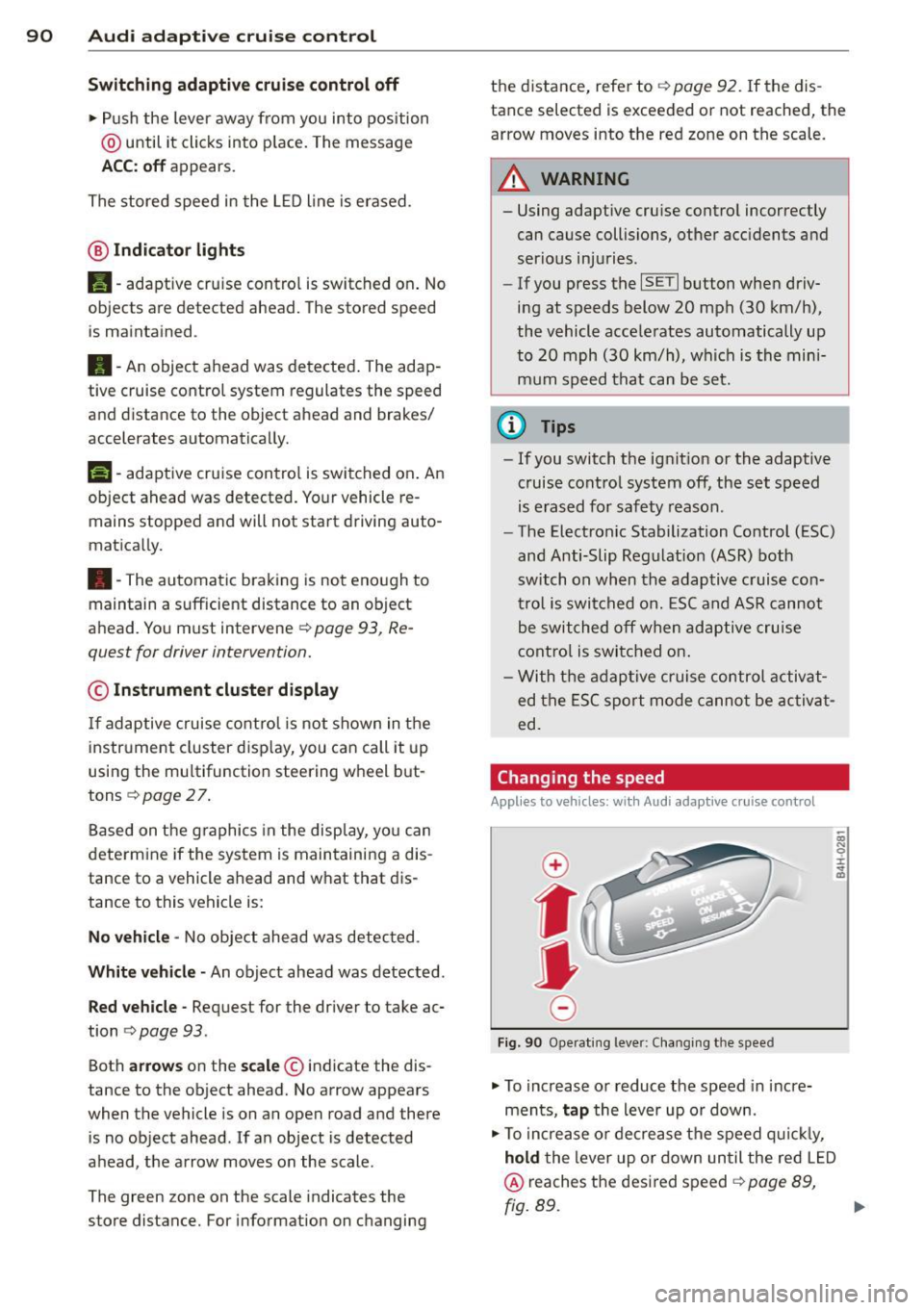
Changing the speed
App lies to vehicles: wi th Aud i ada ptive c ruise con tro l
0
f
• 0
Fig . 90 Ope rating lever: Changing the speed
.,. To increase or reduce the speed in incre
ments,
tap the lever up or down.
.,. To increase or decrease the speed quickly,
hold the lever up or down un til the red LED
@ reaches the desired speed i=;, page 89,
fig. 89.
Page 97 of 302
M N ,....
> co ,...., \!) 1.1'1 ,...., 1.1'1 ,....,
Audi pre sense Introduction
Applies to vehicles: with Audi pre se nse basic or Aud i pre
sense front
W ithin the limits of the system, pre sense ba
sic and pre sense front can initiate steps to
protect vehicle occupants in certa in danger
ous situations.
Critical driving situat ions can be recognized by
the pre sense front via a network of different
veh icle systems and can take steps to prepare
the vehicle occupants for a potentia l co llision.
The pre sense front wo rks with a radar sensor
and a video camera*.
It also functions within
the limits of the system when adaptive cruise
control* is switched off.
General information
General information
Applies to vehicles: with Audi pre sense front or Audi adaptive cruise control
A WARNING
Also follow the general information found
on
~ page 8 7, General information.
Audi pre sense basic
Description
Applies to vehicles : with Audi pre se nse basic
The function of the pre sense basic is activat
ed at a speed of 20 mph (30 km/h) or higher.
The following functions can be triggered un
der certain conditions within the limits of the
system:
- T ensioning of the safety be lts (for example,
during heavy braking) : The front safety belts
have reversible belt pretensioners. If a colli
s ion does not occur, the safety belts loosen
slight ly and are ready to trigger again .
- Closing the windows (for example, if under
or oversteering): The windows close until
there is only a small gap open.
Audi pre sense 95
Audi drive select: The dep loyment time is
adapted in dynamic mode.
A WARNING
The pre sense basic cannot overcome natu ral physical laws. It is a system designed to
assist and it cannot prevent a collis ion. Do
not let the increased safety provided
tempt you into taking risks. This could in
crease your r isk of a collis ion.
- The system can deploy incorrectly due to
system-specific limits.
(D Tips
- Certa in pre sense bas ic functions switch
off when ESC is switched off (sport
mode) or when dr iving in reverse.
- The pre sense basic functions may not be
available if there is a ma lfunction in the
ESC system or the airbag control mod
ule.
- Note that with pre sense bas ic, the rever
sible safety belt pretensioner on the
front passenger's side deactivates when
t he fron t passenger's airbag is deactivat
ed.
Audi pre sense front
Description
Applies to vehicles : wit h Audi pre sense front or Audi
adaptive crui se con trol
Pre sense front informs you if the distance to
the vehicle ahead falls below the safe distance
for an extended period of time. It can warn of
a possible collision and initiate braking ma neuvers, within the limits of the system.
When detected in time, the system can assess
dangerous situat ions where an object ahead
brakes suddenly or if your own veh icle is trav
el ing at a high speed and approaching an ob
ject that is moving more slow ly . If detection is
not poss ible, then pre sense front does not re
act.
•
Page 101 of 302
M N
" > co ,...., \!) ..,.,
Audi active Lane assist Lane assist
Description
Applies to vehicles: with Audi active lane assist
Active lane assist detects lane marker lines
within the limits of the system using a camera
in the windshield.
If you are approaching a de
tected lane marker line and it appears likely
that you will leave the lane, the system will
warn you with corrective steering. You can
override this steering at any time. If you pass
over a line, the steering wheel will vibrate
lightly. In order for this warning vibration to
occur, it must first be switched on in the
MMI.
Active lane assist is operable when the lane
marker line is detected on at least one side of
the vehicle.
The system will not warn you before crossing
a lane marker line if you have activated the
turn signal. In this case, it assumes that you
are changing lanes intent ionally.
The system is designed for driving on express
ways and highways and therefore only acti
vates at speeds above approximately 40 mph (65 km/h).
_& WARNING
- The system warns the driver that the ve
hicle is leaving the lane using corrective
steering. The driver is always responsible
for keeping the vehicle within the lane.
- The system can help you keep the vehicle
in the lane, but it does not drive by itself.
Always keep your hands on the steering
wheel.
- Corrective steering may not occur in cer
tain situations, such as during heavy
braking.
- There may be cases where the camera
does not recognize all lane marker lines.
Corrective steering can only take place
on the side of the vehicle where lane
marker lines are detected.
,....,
..,., 1) This function is not available in all countries. ,....,
Audi active lane assist 99
-Other road structures or objects could
possibly be identified unintentionally as
lane marker lines. As a result, corrective
steering may be unexpected or may not
occur.
- The camera view can be restricted, for
example by vehicles driving ahead or by
rain, snow, heavy spray light shining into
the camera or by dirt on the window. This
can result in active lane assist not detect
ing the lane marker lines or detecting
them incorrectly.
- In certain situations where visibility is
low, the vehicle may switch from "early"
to "late" corrective steering
l).
-Under certain conditions such as ruts in
the road, an inclined roadway or cross
winds, the corrective steering alone may
not be enough to keep the vehicle in the
middle of the lane.
- For safety reasons, active lane assist
must not be used when there are poor
road and/or weather conditions such as
slippery roads, fog, gravel, heavy rain,
snow and the potential for hydroplaning. Using active lane assist under these con
ditions may increase the risk of a crash.
Page 102 of 302
100 Audi active lane assist
Switching on and off
App lies to vehicles: with Audi active lane assist
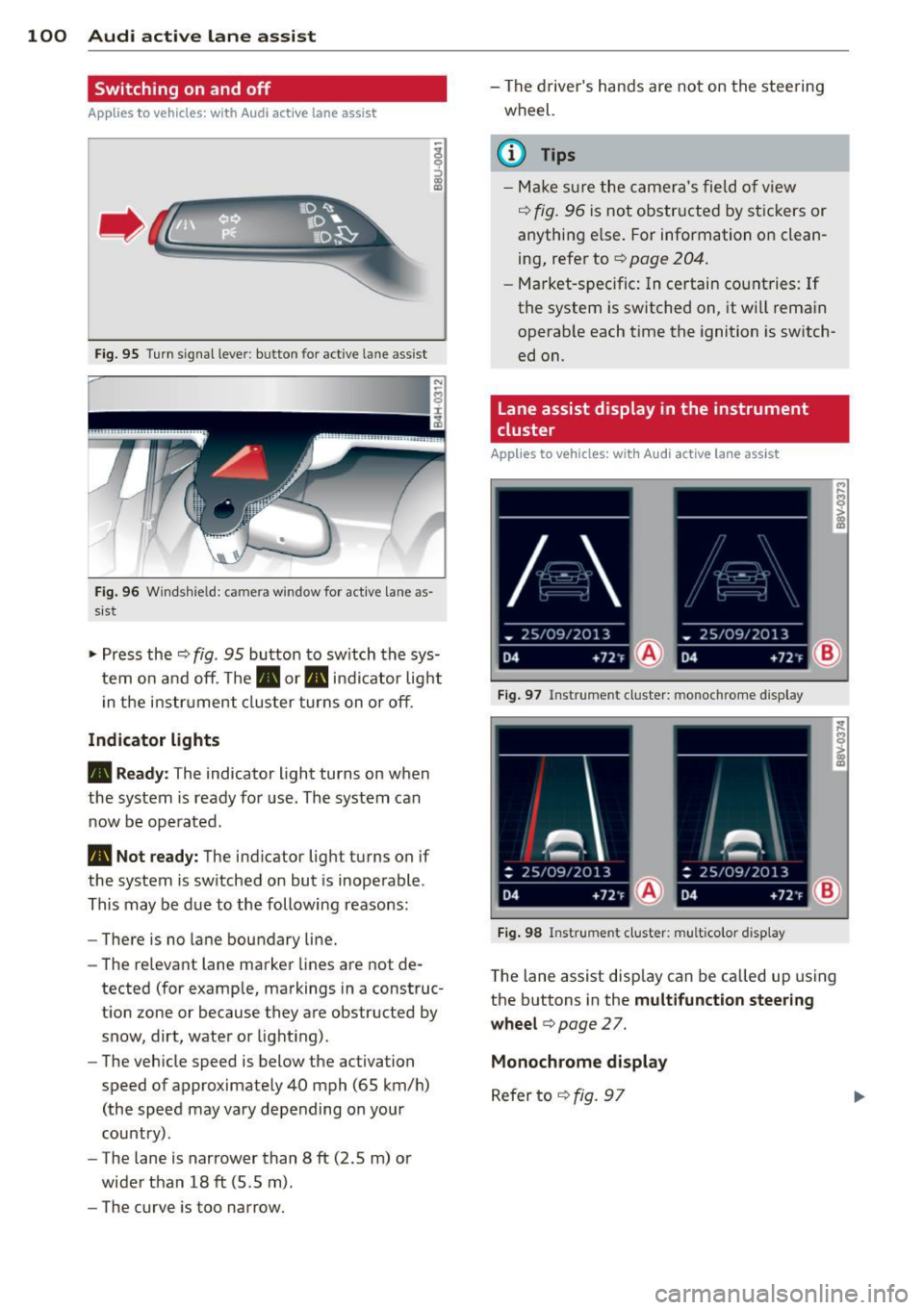
Fig. 95 Tu rn s igna l leve r: butto n fo r act ive lan e ass is t
F ig. 9 6 Windsh ie ld: ca mera window for act ive lane as
sist
-
I
~ Pr ess the ¢ fig. 95 button to sw itch the sys
tem o n and off. The . or. indica tor lig ht
in the i nstru ment clus ter turns on o r off .
Indicator lights
• Ready: The indicator light turns on when
the system is rea dy for use . The system can
now be ope rated .
• Not ready: The ind icator ligh t turns on if
the system is sw itched on but is inoperable .
This may be d ue to the following reasons:
- There is no la ne boundary line.
- The re levant lane marke r lines a re not de-
tected (for examp le, markings in a construc
t ion zone or because they a re obstruc ted by
snow, dirt, water or light ing) .
- The veh icle speed is below the ac tivation
speed of appr oximate ly 40 mph (65 km/ h)
(the speed may vary depending on your
country) .
- The lane is nar rower than 8
ft (2 .5 m) o r
wide r than 18
ft (5 .5 m).
- The curve is too narrow. - T
he driver 's hands are not on the stee ring
wheel.
(D Tips
- Mak e sure th e ca me ra 's fie ld of view
¢
fig. 9 6 is n ot obstr ucte d by st ic kers or
anythi ng e lse. For information on clean
ing , refe r to ¢
page 204.
-Mark et-s pe ci fic: In certain co unt ries: If
the system is switched on, it wi ll rema in
o perab le each time the ignition is sw itch
ed on.
Lane assist display in the instrument
cluster
Applies to vehicles: with Audi active lane assist
Fig. 97 Instrume nt cl uster: monoc hrom e di spl ay
I
Fig. 98 Ins trume nt clust er: mult ic olor d is p lay
T he lane assist disp lay can be called up using
the buttons in the
multifunction steering
wheel
c> page 2 7.
Monochrome display
R efer to ¢ fig. 97