warning AUDI A3 CABRIOLET 2016 Manual Online
[x] Cancel search | Manufacturer: AUDI, Model Year: 2016, Model line: A3 CABRIOLET, Model: AUDI A3 CABRIOLET 2016Pages: 272, PDF Size: 67.88 MB
Page 107 of 272
<( co ..... N
" N ..... 0 r--. > 00
also responds to the driving behavior of the vehi
cl e ahead in a more cons ervative or sporty man
ner.
@ Tips
I n some models, the maximum vehicle speed
can only be reached in the auto and dynamic
modes .
Selecting the driving mode
Applies to: ve hicles with Audi drive select
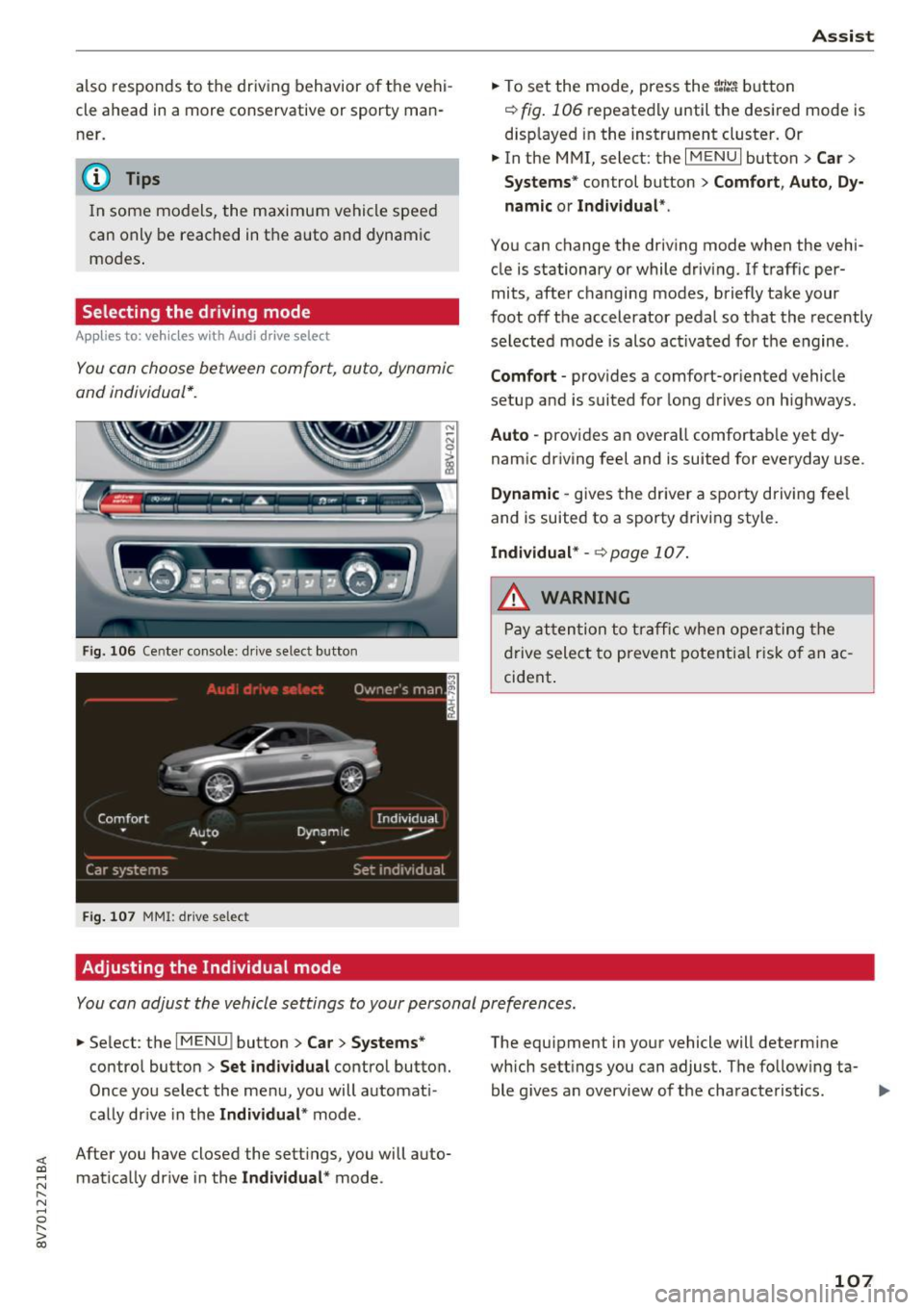
You can choose between comfort, auto, dynamic
and individual*.
Fi g. 10 6 Ce nte r co nsole : d rive se lec t button
Fig. 107 MM I: driv e selec t
Adjusting the Individual mode
Ass ist
.,. To set the mode, press the r:/tc'i button
~ fig . 106 repeatedly until the desired mode is
disp layed i n the instrument cluster. Or
.,. In the MMI, select : the
I MENU I button > Car >
Systems "
control button > Comfort , A uto , Dy
namic or Individual *.
You can change the driving mode when the vehi
cle is stationary or while driv ing. If traff ic per
mits, after changing modes, briefly take your
foot off the accelerator pedal so that the recently
selected mode is also ac tivated for t he engine .
Comfort -provides a comfort-or iented vehicle
setup and is suited for long drives o n highways.
Auto -provides an overa ll comfortab le yet dy
namic dr iving feel and is suited for everyday use .
Dynamic -gives the drive r a spo rty driving fee l
and is suited to a sporty driving style.
Individual* -~ page 107.
A WARNING
Pay atten tion to traffic w he n ope rating the
d rive select to p revent pote ntia l risk o f an ac
cident .
You can adjust the vehicle settings to your personal preferences .
.,. Se lect : the I MENU ! button> Car> Systems *
control button > Set individual contro l button.
Once you select the men u, you will automat i
ca lly dr ive in the
Individual * mode.
After you have closed the sett ings, you will auto
mat ica lly dr ive in the
Individual * mode . The equipment in you
r vehicle will determine
which sett ings you can adjus t. The follow ing ta
ble g ives an overview of t he characteristics .
107
Page 109 of 272
<( co .... N r--N .... 0 r--> co
Parking systems
General information
Applies to: ve hicles with a rea r parking sys te m /pa rking sys
tem plus/rearv iew camera
Depending on your vehicle's equipment, various
parking aids will help you when parking and ma
neuvering.
The
rear parking system is an audible parking aid
that warns you of obstacles
behind the vehicle
¢page 110.
The parking system plus assists you when park
ing by audibly and visually indicating objects de
tected
in front of and behind the vehicle
¢page 110.
The rearview camera shows the area behind the
vehicle in the MMI display. This display assists
you when you are cross or parallel parking. The parking system plus functions are also available
¢page 111.
A WARNING ,--
- Always look for traffic and check the area
around your vehicle by looking at it directly
as well. The parking system cannot replace
the driver's attention. The driver is always
responsible when entering or leaving a park
ing space and during similar maneuvers.
- Please note that some surfaces, such as
clothing, are not detected by the system.
- Sensors and cameras have blind spots in
which people and objects cannot be detect
ed . Be especially cautious of small children
and animals.
- Always pay attention to the area around the
vehicle -using the rearview mirror, too.
- The sensors can be displaced by impacts or
damage to the radiator grille, bumper,
wheel housing and the underbody . The park
ing system may become impaired as a re
sult. Have an authorized Audi dealer or au
thorized Audi Service Facility check their
function.
- Make sure the sensors are not obstructed by
stickers, deposits or other materials. If they
are the sensor function could be impaired.
I
Parking systems
For additional information on cleaning, re
fer to¢
page 224.
@ Note
-Some objects are not detected or displayed
by the system under certain circumstances:
- Objects such as barrier chains, trailer draw
bars, vertical poles or fences
- Objects above the sensors such as wall ex
tensions
- Objects with specific surfaces or struc
tures such as chain link fences or powder
snow
- If you continue driving closer to a low-lying
object, it may disappear from the sensor
range . Note that you will no longer be
warned about this obstacle.
- The sensors can be displaced by impacts or
damage to the radiator grille, bumper,
wheel housing and the underbody. The
parking system may become impaired as a
result . Have an authorized Audi dealer or
authorized Audi Service Facility check their
function.
(D Tips
- The system may provide a warning even
though there are no obstacles in the cover
age area in some situations, such as:
- certain road surfaces or for long grass .
- external ultrasonic sources e.g. from
cleaning vehicles.
- heavy rain, snow, or thick vehicle exhaust.
- We recommend that you practice parking in
a traffic-free location or parking lot to be
come familiar with the system. When doing
this, there should be good light and weath
er conditions .
- You can change the volume and pitch of the
signals as well as the display¢
page 115.
-What appears in the MMI display is some
what time-delayed.
- The sensors must be kept clean and free of
snow and ice for the park assist to operate.
109
Page 110 of 272

Parking system s
Rear parking system
Description
Applies to: ve hicles w ith rear park ing system
The rear parking system is an audible parking
aid.
Descri ption
There is a sensor in the rear bumper cover . If
these detect an obstacle, audible signals warn
you .
Make sure the sensors are not covered by stick
ers, deposits or any other obstructions as it may
impair the sensor function. For information on
cleaning , refer to¢
page 224.
The range at which the sensors begin to measure
is approximately:
Side rear 3 ft (0.90 m)
Side center 5.2
ft (1.60 m)
The closer
you get to the obstacle, the shorter
the interval between the audible signals . A con
tinuous tone sounds when the obstacle is less
than approximately 1 foot (0.30 meters) away.
Do not continue backing up¢.&.
in General infor
mation on page 109,
¢0 in General information
on page 109!
If the distance to an obstacle remains constant,
the volume of the distance warning gradually drops after about four seconds (this is not apply
in the continuous tone range).
Activ ating
The parking system activates automatically when
the reverse gear is selected. You will hear a brief
confirmation tone.
110
Parking system plus
Description
App lies to: vehicles with parking system plus
The parking system plus provides audio and visu
al signals when parking .
Fig. 108 D isp lay fie ld
Sensors are located in the front and rear bump
ers. If these detect an obstacle, audible and visu
al signals warn you .
Make sure the sensors are not covered by stick
ers, deposits or any other obstruct ions as it may
impair the sensor function. For information on
cleaning, refer to¢
page 224.
The display field begins approx imately at:
® 4 ft (1.20 m)
® 3 ft (0 .90 m)
© 5.2 ft (1.60 m)
® 3 ft (0 .90 m)
The closer you get to the obstacle , the shorter
the interval between the audible signals. A con
tinuous tone sounds when the obstacle is less
than approximately 1 foot (0.30 meters) away.
Do not continue driving forward or in reverse
¢.&. in General information on page 109, ¢@) in
General information on page 109!
If the distance to an obstacle remains constant,
the volume of the distance warning gradually
drops after about four seconds (this is not apply
in the continuous tone range).
Page 112 of 272
Parking system s
General information
Applies to: ve hicles w ith park ing system p lus with rearv iew
camera
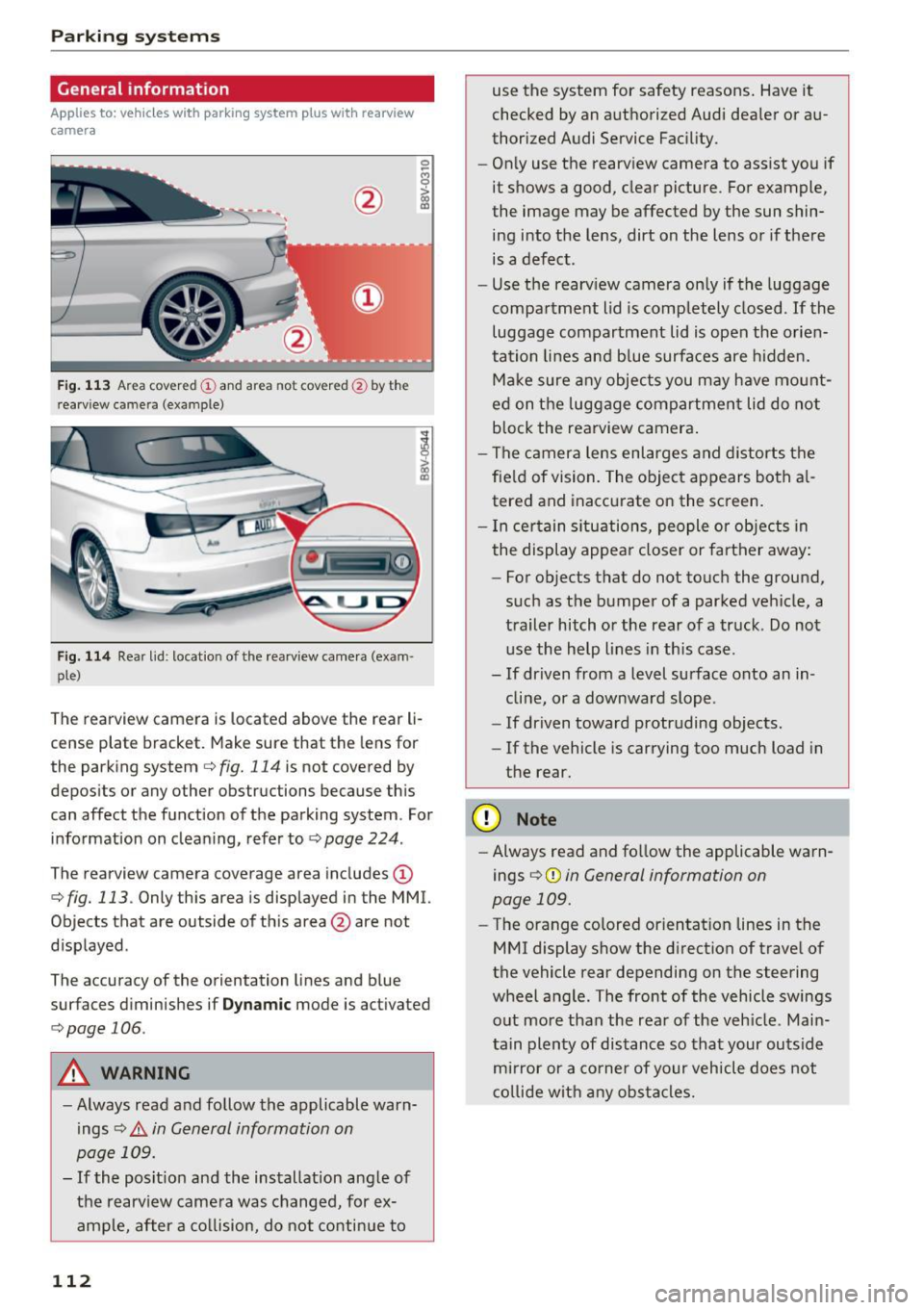
F ig . 1 13 Area covered © and area not covered @by the
r earv iew came ra (example)
Fig. 114 Rear lid : locat io n of the rearview camera (exam ·
ple)
0
-8
>
lll
The rearview camera is located above the rear li
cense plate bracket. Make sure that the lens for
the parking system
c.:> fig. 114 is not covered by
depos its or any other obstructions because th is
can affect the function of the parking system . For
information on cleaning, refer to
c.:> page 224 .
The rearview camera coverage area includes(!)
c.:> fig. 113. Only this area is displayed in the MMI.
Objects that are outside of th is area @are not
displayed .
The accuracy of the orientation lines and b lue
surfaces d iminishes if
D ynamic mode is activated
¢ page 106.
A WARNING
-Always read and follow the applicable warn
ings
c.:> .&. in General information on
page 109.
- If the posit ion and the installation ang le of
the rearv iew camera was changed, for ex
ample, after a co llision, do not continue to
112
use the system for safety reasons . Have it
checked by an a uthorized Audi dea ler or au
thorized Audi Service Fac ility.
- Only use the rearview camera to assist you if
it shows a good, clear picture . For example,
the image may be affected by the sun shin
ing into the lens, dirt on the lens or if there is a defect.
- Use the rearv iew camera on ly if the luggage
compa rtment lid is completely closed.
If the
luggage compartment lid is open the orien
tation lines and b lue surfaces are hidden.
Ma ke sure a ny objects you may h ave mo unt
ed on t he luggage compartment lid do not
b lock the rearview camera .
- The camera lens enlarges and distorts the
fie ld of vision. The object appears both a l
tered and inaccurate on the screen .
- I n cer tain s itu ations, people or objects in
the display appea r closer or farther away:
- For objects that do not touch the ground,
such as the bumper of a parked vehicle, a
trailer hitch or the rear of a truck . Do not
use the help lines in th is case.
- If driven from a level surface onto an in cline, or a downward slope .
- If driven toward protruding objects.
- If the vehicle is carrying too much load in
the rear .
(D Note
-Always read and fo llow the applicable warn
ings
c.:> (D in General information on
page 109.
- The orange colored orientat ion lines in the
MMI display show the direction of trave l of
the vehicle rear depending on the steering
wheel angle . The front of the vehicle swings
out more than the rear of the veh icle. Main
tain plen ty of dis tance so tha t your outside
mi rror or a co rne r of your veh icle does not
c o llide wit h any obs tacle s.
Page 115 of 272

<( co .... N ,.__
N .... 0 ,.__
> co
Adjusting the display and the warning tones
A ppl ies to: ve hicl es with parkin g system plus/rearview cam·
era
The display and warning tones con be adjusted in
the MMI.
~ Select: the I MENU ! button >Car > Systems *
control button > Driver assistance > Parking
aid .
Display
On * -
An op tical d isp lay is shown for the parking
system plus, a rearview camera image is s hown
for parking system plus with rearv iew camera* .
Off -Whe n the par king system is switched off,
only audib le sign als are give n.
Signal tones
Front volume -
volume for the front and side*
a rea
Rear volume -volume for t he rear area
Front frequenc y-frequency for the front and
side * area
Rear frequency -frequency fo r the rear area
Music volume during nav . prompts -the volume
of the a udio/v ideo so urce is lowe red when t he
pa rking system is turned o n.
The new ly selected leve l is demons trated briefly
by the sound generator.
- The warning tones ca n also be adjusted d i
r ec tly from the visua l display or t he rearv iew
cam era image *. Simply pr ess the
Settings
co ntrol bu tton.
- The setti ngs a re auto mat ica lly stored and
ass igned to the remote co ntro l key t hat is in
u se .
Error messages
App lies to: ve hicles with par kin g system plus/rearview cam
era
There is an erro r in the system if the LED in the
P111A. button is b linking and you hear a continuous
Parking systems
alarm for a few seconds after sw itch ing on the
par king system or w hen the pa rking system is a l
ready activated. If the error is not cor rected be
fo re you switch off the ignition, the LED in the
Pw ,
button w ill blink the next time you switch on the
park ing system by shifting into reverse.
Parking sy stem plus*
If a sensor is fa ulty, the~ symbol will appear i n
f ront of/behind the vehicle in the MMI display. If
a rear sensor is faulty, only obstacles that are in
areas @and @are shown
<=>page 110, fig. 108.
If a front sensor is fa ulty, only obstacles that are
i n a reas © and @are shown .
Drive to an authorized Audi dealer or authorized
Audi Service Facility immed iate ly to have the
malfu nction corrected.
115
Page 116 of 272
Intelligent Technology
Intelligent Technology
Electronic stabilization
control (ESC)
Description
The Electronic Stabilization Control (ESC) rein for
ces driver safety . It reduces the risk of slipping
and improves driving stability. ESC detects crit i
cal s ituations such as the vehicle oversteering
and understeering or the wheels are spinning.
The vehicle is stabilized by applying the brakes or reducing eng ine torq ue. When the ESC engages,
the
D1 ind icator light blinks in the instrument
cluste r.
The fo llow ing systems are integrated in the ESC :
Ant i-loc k braking system (ABS)
ABS p revents the whee ls from locking whe n brak
ing. The vehicle can sti ll be steered even during
hard brak ing. Apply steady press ure to the brake
pedal. Do not pump the pedal. A puls ing in t he
b rake pedal indicates that the system is acting to
s tabilize the vehicle .
Brake assist system
The brake assist system can decrease brak ing dis
tance . It increases braking power when the d river
presses the brake pedal quick ly in emergency sit
uations . You must press and hold t he b rake pedal
until the dangerous situat io n is over . In veh icles
with adapt ive c ruise control*, the bra ke as sist
sy stem is more sensitive if t he di sta nce detec ted
t o the vehicle ahea d is too sm all.
Anti-slip regulation (ASR)
ASR reduces eng ine power when the drive wheels
beg in sp inning a nd adapts the force to the road
conditions . This makes it easie r to start, acceler
a te and dr ive u p in clines.
Electronic differential lock (EDL )
The EDL brakes w heels that a re spinning and
transfers the drive power to the other drive
wheel or whee ls if t he ve hicle is equipped with a ll
wheel drive*) . T his funct ion is not av ailable at
h igher speeds.
116 I
n extreme cases, ED L automat ically swi tches off
to keep the brake on the braked whee l from over
heating. The veh icle is still working correct ly. ED L
will switc h on again automatically when condi
tions have returned to normal.
Steering recommendation
The ESC he lps to stabili ze the vehicle by cha nging
the steering torque.
Selective wheel torque control
Se lective w hee l to rque cont rol is used when d riv
i ng o n curves. The fron t whee l on the inside of
the curve or bo th whee ls on the inside of the
cu rve are braked se lective ly as needed. This al
l ows mo re precise driving in cu rves.
Automatic post-collision braking system
The "A utomat ic pos t-coll is io n braking sy stem"
c a n hel p to reduce t he risk of sliding and o f othe r
collisions after an accident . If the a irbag cont rol
module detects a collision a bove a certain vehicle
speed, the vehicle is bra ked by the ESC.
The vehicle does not bra ke automatically if:
- the dr ive r presses the acce lerator pedal, or
- the braking force generated by the pressed
brake pedal is grea ter than the braking force
that wo uld be i nitiated by the system, or
- the ESC, the brake system o r the ve hicle elect ri
cal system are not func tioning .
A WARNING
- The ESC and its integ rated syste ms can not
o vercome the lim its posed by natural physi
c a l la ws. Thi s is espe cial ly import ant on sli p
pe ry o r we t roads. If the systems beg in act
ing to stabilize your ve hicle, yo u should im
mediately a lter your speed to matc h the
road and traffic condit ions. Do not let the
increased safety pr ovided tempt you into
taking risks . This cou ld increase your risk of
a co llision .
- Please note the r isk of a collis ion increases
when dr iv ing fast, especia lly t hrough c urves
and on slippery or wet roads, and when dr iv
ing too close to objects ahead. The ESC and
i t s in tegr ated systems cannot always .,..
Page 117 of 272
<( co ..... N
" N ..... 0 r--. > 00
prevent collisions -there is still a risk of ac
cidents!
- Press the accelerator pedal carefully when
accelerating on even, slippery surfaces such
as ice and snow. The drive wheels can spin
even when these control systems are instal
led and this can affect driving stability and
increase the risk of a collision.
Switching on /off
Intelligent Technology
(D Tips
- The ABS and ASR only function correctly
when all four wheels have a sim ilar wear
condition. Different tire sizes can lead to a
reduction in engine power.
- You may hear noises when the systems de
scribed are working.
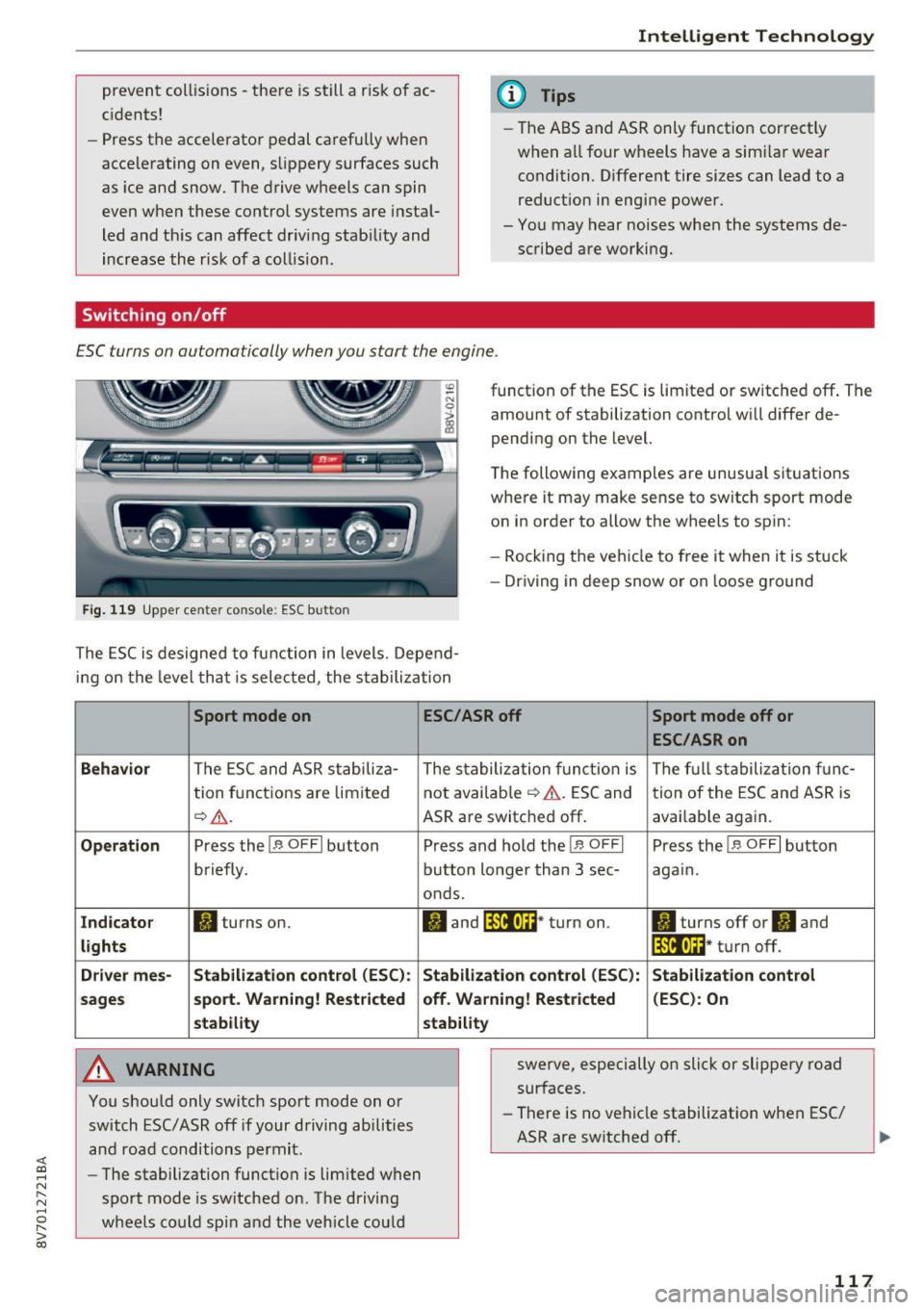
£SC turns on automatically when you start the engine.
Fig. 119 Upper center console : ESC button
function of the ESC is limited or switched off . The
amount of stabilization control will differ de
pending on the level.
The following examples are unusual situations
where it may make sense to switch sport mode
on in order to allow the wheels to spin:
- Rocking the vehicle to free it when it is stuck
- Dr iving in deep snow or on loose ground
The ESC is designed to function in levels. Depend
ing on the level that is selected, the stabilization
Sport mode on
Behavior
The ESC and ASR stabiliza-
tion functions are limited
~A .
Operation Press the!.$ OFFI button
briefly .
Indicator II turns on.
lights
Driver mes- Stabilization
control (ESC):
sages sport. Warning! Restricted
stability
A WARNING
You should only switch sport mode on or
switch ESC/ ASR off if your driving abilities
and road conditions permit.
- The stabilization function is limited when
sport mode is switched on. The driving
wheels could spin and the vehicle could
ESC/ASR off Sport mode off or
ESC/ASRon
The stabilization function is The full stabilization func-
not available
~ A. ESC and tion of the ESC and ASR is
ASR are switched off. avai lab le again.
Press and hold the!.$ OFFI Press the!.$ OFFI button
button longer than 3 sec- again.
onds.
II and lf'illtla~* turn on . II turns off or'II and
lf'tl•I~~ · turn off.
Stabilization control (ESC):
Stabilization control
off. Warning! Restricted (ESC): On
stability
swerve, especially on slick or slippery road
surfaces.
- There is no vehicle stabilization when ESC/
ASR are switched off.
117
Page 118 of 272
Intelligent Technology
(D Tips
-ESC/ASR cannot be switched off or sport
mode cannot be switched on if the cruise
control system* or the adaptive cruise con
trol* is switched on.
- Malfunctions in the Audi magnetic ride may make it impossible to switch the ESC/ASR
off or to switch sport mode on.
Brakes
New brake pads
New brake pads do not achieve their full braking
effect during the first 250 mi (400 km). They must be "broken in" first. However, you can com
pensate for the slightly reduced braking force by
pressing firmly on the brake pedal. Avoid heavy
braking during the break-in period .
Wear
Brake pad
wear depends largely on the way the
vehicle is driven and on operating conditions .
This is especially true if you are driving frequently
in the city and on curves or with a sporty driving
style .
Operating noise
Noises may occur when braking depending on the
speed, braking force and outside conditions such
as temperature and humidity .
Effect of water and road salt
In certain situations, for example after driving
through water, in heavy rain, after overnight con densation or after washing your car, the braking
effect can be reduced by moisture or ice on the
brake rotors and brake pads. The brakes must be
"dried" first with a few careful brake applica
tions.
At higher speeds and with the windshield wipers
turned on, the brake pads press against the brake
rotors for a short amount of time. This action
which is not felt by the driver happens at regular
intervals and facilitates a better reaction time for
the brakes in wet weather .
The braking effect can also be reduced if you are
driving on salted roads and you do not apply the
118
brakes for long periods of time. The layer of salt
on the brake rotors and pads must be worn off
first when the brakes are applied.
Corrosion
Leaving the vehicle parked for long periods of
time , low mileage and avoiding heavy braking
can contribute to corrosion on the brake rotors
and dirty brake pads.
If you usually avoid heavy braking or if there is
corrosion present, occasional heavy braking at
high speeds is recommended to clean the brake
rotors and pads¢.&. .
Brake system malfunction
if you notice that the brake pedal travel has sud
denly gotten larger, then a brake circuit may have
failed. Drive to an authorized Audi dealer or au
thorized Audi Service Facility immediately to have
the problem corrected. On the way there, drive
with reduced speed and keep in mind that a long
braking distance and increased pressure on the
brake pedal will be necessary.
Low brake fluid level
When the brake fluid level is low, malfunctions in
the brake system may occur. The brake fluid level
is electronically monitored.
Brake booster
The brake booster amplifies the pressure you ap
ply to the brake pedal.
It only works when the en
gine is running.
A WARNING
- New brake pads do not achieve their full
braking effect during the first 250 mi
(400 km). They must be "broken in" first.
However, you can compensate for the
slightly reduced braking force by pressing
firmly on the brake pedal. Avoid heavy brak
ing during the break-in period.
- Only apply the brakes for the purpose of
cleaning the brake system when road and
traffic conditions permit. You must not en
danger other road users. This increases the
risk of an accident.
Page 120 of 272
Intelligent Technology
Do not tow your veh icle bec ause it cannot be
steered. See an authorized Audi dealer or author
ized Audi Service Fac ility for assistance .
,IM Steering: Sy stem fault You can continu e
dri ving
If the indi cator lig ht t urns on , the steering whee l
may be mo re diff icu lt to move o r more sensitive
than usual. The steering wheel may also be a t an
angle when dr iving straight.
D rive s low ly to an authorized A udi dealer or au
thor ized A udi Se rvice Fa cility to have the m al
f u nction co rrected.
m Steering lock: sy stem fault! Please contact
Servic e
There is a malfunction in the electronic steering
lock.
Drive to an a uthori zed Aud i dea ler or authori zed
Aud i Serv ice Facility immedia tely to have the
malfunct io n corrected .
A WARNING
Have the system malfunction corrected as
soon as poss ible by an author ized Audi dealer
or au thori zed Aud i Serv ice Fa cili ty, as this in
c re ases the risk of an accident.
{D Tips
If the . or ,:rM i ndica to r light only turns on
for a short time, you may continue dr iv ing.
All wheel drive (quattro)
Applies to: veh icles with all whee l drive
In all wheel drive, all four wheels are powered .
General information
In all wheel drive, the driving power is divided be
tween all four wheels. This happens automatical
ly depe nding on your driving behavior as well as
the c urrent road cond itions . Also see
s>
page 116, Electronic stabilization control
( ES C).
The all wheel drive concept is designed for high
engine power . Your ve hicle is exceptionally pow
erful and has ex cellent driving characterist ics
120
both under normal d riving conditions and on
snow and ice . A lways read and follow safety pre
ca utions s>
.&..
Winter tires
By using all wheel dr ive, your veh icle has good
forward motion w it h standard t ires in win ter con
ditions . However, in winter we recommend using
winter or all season tires on
oil four whee ls, be
ca use this will improve the
broking effect.
Snow chains
I f there are snow ch ain laws , snow ch ains m ust
a lso be used on veh icles with all wheel drive
s>
page 219 , Snow chains .
Replacing tires
For vehicles with a ll w heel drive, o nly wheels with
t h e same ro lli ng ci rcumfe rence sho uld be used.
Avo id whee ls with diffe rent t read depths
¢ page 211 .
Offroad vehicle?
You r Audi is no t an off road vehicle - there is not
enough ground clearance. For th is reaso n, avoid
difficul t ter rain . Also see s>
page 251.
A WARNING
-Also, in veh icles with all wheel drive, ad apt
your d riving sty le to the cu rren t road and
traffic conditions. Do not let the increased
safety provi ded tempt you into taking r is k s,
because this inc reases the risk of an acc i
dent.
- The braking abi lity of your vehicle is limited
to the traction of the whee ls. I n this way, it
is not different from a two w heel drive vehi
cle . Do not be tempted to accelerate to a
hig h speed when the road is slippery, be
cause t his i ncreases the r is k of an accident .
- Note that on wet s treets, the front wheels
can " hydrop la ne" if dr iv ing at spee ds that
are too high. Unlike front w heel d rive
veh icles, t he engine does no t rev h ig her sud
de nly when t he vehi cle begins hydrop lan ing.
F or this reason, pay atte ntion to the road
conditions rega rdless of your speed to re
duce t he risk of an accident .
Page 124 of 272
Driving sa fe ty
Driving safety
Basics
Safe driving habits
Please remember -safety first!
This chapter contains important information,
tips, instruct ions and warn ings that you need to
read and observe for your own safety, the safety
of your passengers and others. We have summar ized here what you need to know about safety
be lts, a irbags, child restra ints as well as child
safety. Your safety is for us
priority number 1 . Al
ways observe the i nfo rmation and wa rn ings in
this section - for your own safety as well as that
of your passengers.
The information i n this section applies to all
model versions of yo ur vehicle . Some of the fea
tures descr ibed in t his sections may be s tanda rd
equipment on some models, or may be optional
equipment on others . If you are not sure, ask
your authorized Audi dealer.
A WARNING
- Always make sure that you follow the in
structions and heed the WARNINGS in th is
Manual.
It is in your interest and in the in
te rest of your passengers.
- Always keep the comp lete Owner's Litera
ture in your A udi when you lend or se ll your
vehicle so that this important information
will always be available to the d river and
passenge rs.
- Always keep the Owner 's literature handy so
that you can find it easily i f you have ques
t ions.
- Always adjust your speed to the wea ther
t raff ic and conditions. Follow the speed lim
its.
- Always dr ive in such a way that you can s top
yo ur vehicle safely.
- Always adjust your speed to the genera l
flow of traffic. Follow the speed l imits.
124
· Safety equipment
The safety features are part of the occupant re
straint system and work together to help reduce the risk of injury in a wide variety of accident sit
uations.
You r safety and the safety of your passengers
should not be left to chance . Advances in tech
no logy have made a va riety of features available
to help red uce the risk of inj ury in an accident.
The following is a lis t of jus t a few of the safe ty
fea tures in yo ur Audi :
- sophisticated safety be lts fo r drive r and all pas-
senge r seat ing pos itions,
- safety belt pretensioners,
- safety bel t force lim ite rs fo r the front seats,
- front airbags,
- knee airbags for the front seats*
- side airbags in the front seats,
- special LATCH anchorages fo r child res trai nts,
- head rest raints fo r each seati ng position,
- adjustab le steering column.
- pre sense bas ic * (preventative passenger pro-
tect ion)
These ind iv idual safety features, can work to
gether as a system to he lp protect you and your
passengers i n a wide range of acc idents. These
fea tures cannot wo rk as a system if they are not
always correctly adjusted and cor rect ly used.
Safet y is e verybody's responsibility!
Important things to do before driving
Safety is everybody 's job! Vehicle and occupant
safety always depends on the informed and care
ful driver .
For your safety and the safety of your passen
gers,
be fo re dri ving always:
.. Make sure that a ll lights and signals a re operat
ing correctly.
.. Make sure that the tire pressure is correct.
.. Make sure that all windows are clean and afford
good vis ibility to the outs ide .
.. Secu re all luggage and other items carefully
,=;,page 58, ,=;,page 57 . .,.