warning AUDI A3 CABRIOLET 2016 Repair Manual
[x] Cancel search | Manufacturer: AUDI, Model Year: 2016, Model line: A3 CABRIOLET, Model: AUDI A3 CABRIOLET 2016Pages: 272, PDF Size: 67.88 MB
Page 82 of 272
<( co ..... N
" N ..... 0 r--. > 00
Shifting manually (tiptronic mode)
Applies to: vehicles with automatic transmissions
The tiptronic allows the driver to shift the gears
manually.
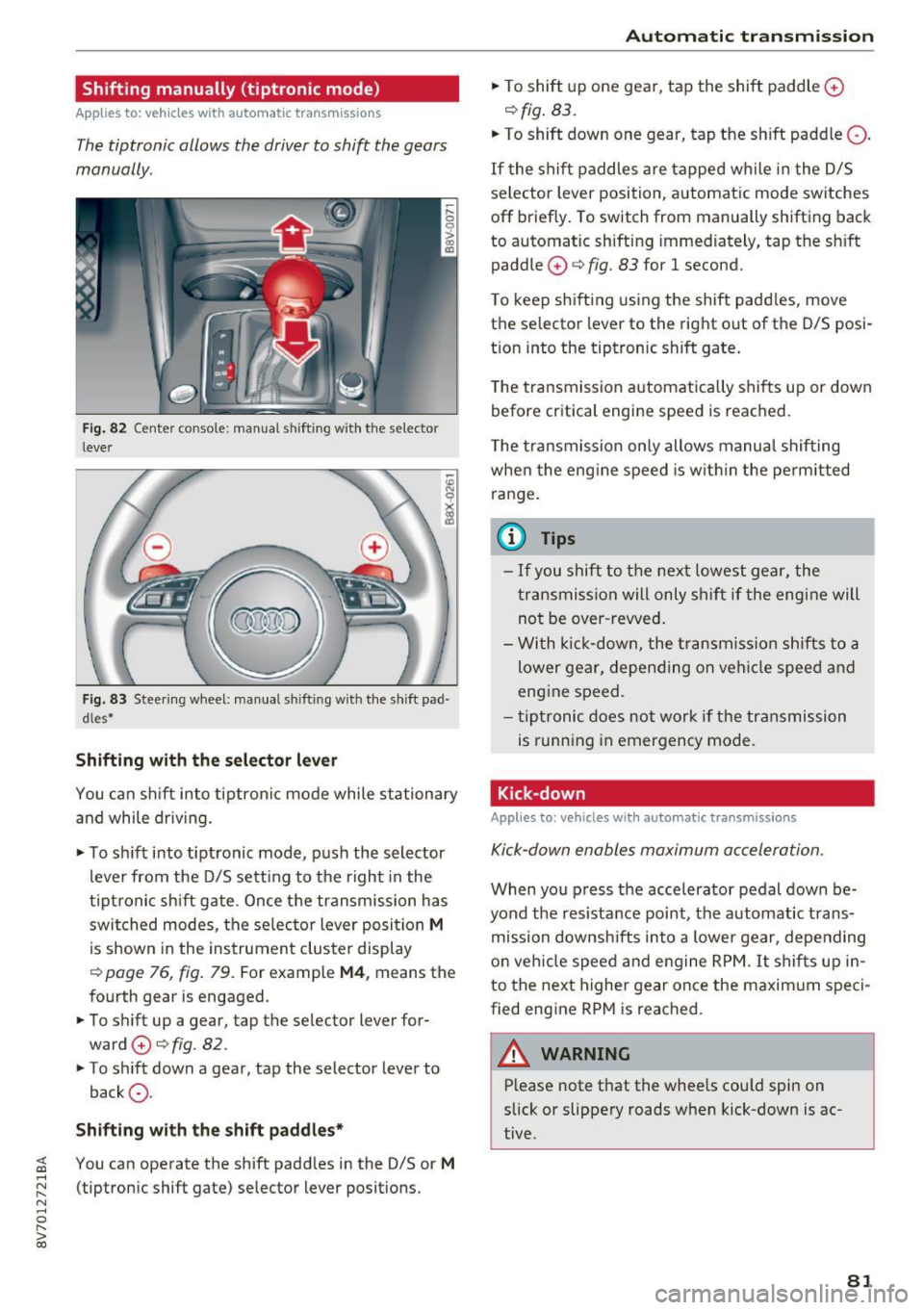
Fig . 82 Center conso le: manua l shifting with the selector
lever
Fig. 83 Steering wheel: manual sh ifting with the shift pad·
dles*
Shifting with th e select or lever
You can sh ift into tiptron ic mode while stationary
and while driv ing.
• To sh ift into tiptronic mode, push the selector
lever from the D/S sett ing to the right in the
tiptronic shift gate. Once the transmission has
switched modes, the se lector lever posi tion
M
is shown in the instrument cluster display
r:::>page 76, fig. 79. For example M4, means the
fourth gear is engaged.
• To shift up a gear, tap the selector lever for
ward
0 r:::> fig. 82.
• To shift down a gear, tap the selector lever to
back
a .
Shifting with the sh ift padd le s*
You can operate the shift padd les in the D/S or M
(tiptronic shift gate) selector lever positions.
Aut oma tic tr ansm iss ion
• To shift up one gear, tap the shift paddle 0
r:::> fig. 83.
• To shift down one gear, tap the shift paddle Q.
If the shift paddles are tapped while in the D/S
selector lever position, automatic mode switches
off briefly. To switch from manually shifting back
to automatic shifting immed iately, tap the sh ift
paddle
0 ¢ fig. 83 for 1 second.
T o keep shifting using the shift padd les, move
the selector lever to the rig ht out of the D/S posi
t ion into the tiptronic shift gate .
T he transmission automatically shifts up or down
before critica l engine speed is reached.
T he transmission only allows manua l shifting
whe n the eng ine speed is w it hi n the pe rmitted
ra nge.
(0 Tips
- If you shift to the next lowest gear, the
transmission will only shift if the eng ine will
not be over -revved .
- With k ick-down, the t ransmiss ion shifts to a
lower gear, depending on vehi cle speed and
engine speed.
- tiptronic does not work if the transmission
is running in emergency mode.
Kick-down
Applies to: vehicles with automatic transmissions
Kick-down enables maximum acceleration.
When you press the accelerator pedal down be
yond the res istance point, the automatic trans
mission downsh ifts into a lower gear, depending
o n veh icle speed and engine RPM.
It shifts up in
to the next higher gear once the maxim um speci
fied eng ine RPM is reached.
A WARNING ~
P lease note that the wheels cou ld spin on
slick or slippery roads when kick-down is ac
tive.
-
81
Page 83 of 272
Automatic transmissio n
Launch Control-Program
Applies to: vehicles with Launch Control
The Launch Control Program enables maximum
acceleration .
Requirement: the engine must be at operating
temperature and the steer ing wheel must not be
turned .
.,. With the engine runn ing, press the
i ,; OFF ! but
ton br iefly one time
l) .
"' Pull the selector lever back out of the 0/5 posi
tion briefly to select the 5 posit ion, or press it
toward the rig ht into the tiptronic pos ition or
select the
Dynami c driving mode in d rive se
lect*
~ page 106.
"' Press the b rake pedal firmly with your left foot
and hold it all the way down for at least 1 sec
ond.
"' At the same time, press the gas pedal a ll the
way down w ith your right foot unti l the engine
reaches and stays at a high RPM level.
"' Remove your left foot from the brake.
_.&. WARNING
-Always adapt you r driv ing to the traffic flow .
- Only use Launch Control when road and traf-
fic cond itions allow it and other dr ivers will
not be endangered or impacted by your d riv
ing and the vehicle's a cce le ration.
- Please note that the dr ive wheels can sp in
and the vehicle can break away when sport
mode is switched on, especia lly when the
road is s lippery.
- Once the vehi cle has sta rted moving, press
the
l .!'3 OFF ! button briefly to tu rn the sport
mode off.
(D Tips
- The t ransmiss ion temperature may increase
significantly after using t he launch control
program.
If tha t happens, the p rogram may
l ) In vehicles with a driver info rma tion system, an ESC light
i n the in st rument cl uste r stays on cont inuous ly and t he
message Sta bilization co ntrol (ES C): sport . Warning! Re
st ricted stab il ity app ears temp orar ily .
82
not be avai lab le for a few minutes. It will be
available again after a coo l-down period.
- When accelerating using the launch contro l
program, all vehicle parts are s ubject to
heavy loads. This can lead to increased
wear .
Emergency mode
App lies to: vehicles with auto matic transmissions
In the event of a system malfunction, there is an
emergency program.
If all of the selector lever positions are hig hlight
ed with a light background in the instrument
cluster disp lay, there is a system malfunction and
the 5 tronic transmission is running in the emer
gency program. The veh icle can still be driven in
emergency mode, but only with reduced speed
and not in all gears . In some cases, the vehicle
cannot dri ve in rever se .
(D Note
If the transmission runs in emergency mode,
drive to an authorized A udi dealer or author
ized Audi Se rvice Facility immed iate ly to have
the malfunct ion corrected.
Transmission malfunction
• Tran smi ssion malfun ction ! Pl ea se stop the
vehicle and sele ct P
There is a ma lfunction in the transm ission . Park
the ve hicle secure ly and do not cont inue driving.
See an author ized Audi dealer or authorized A udi
Se rvice Facility for assistance.
• Tran smi ssion overheating! Pleas e stop the
v e hicle!
The transmission is too hot and can become dam
aged . Stop and let the transmiss ion cool w ith the
engine r unning (at idle) in the P se lector lever po
s it ion. Then the ind icator light and the message ..,.
Page 85 of 272
Automatic transmission
Selector lever emergency release
.,. Press and hold the yellow release button with
the screwdriver ~
fig. 85 .
.,. Press the release button in the se lector lever @
and move the lever into the N position .
.,. Clip the shift cover back into the shift gate after
using the emergency release .
If the vehicle must be pushed or towed due to a
power failure (for example, the battery is dead),
the selector lever must first be moved to the N
position using the emergency release mecha
n ism.
A WARNING
Only move the selector lever out of the P posi
t ion when the parking brake is set.
If that
does not work, secure the vehicle with the
brake pedal. Otherwise, the vehicle could
start to move unintentionally when the selec
tor lever is moved out of the P position.
84
Page 86 of 272
<( co .... N ,.__
N .... 0 ,.__
> co
Trailer mode Driving with a trailer
General information
Your Audi was designed primarily for passenger
transportation .
If you plan to tow a trailer, please remember that
the additiona l load will affect durability, econo
my and performance.
T railer tow ing not only p laces more stress on the
vehicle, it a lso calls for more concentration from
the dr iver.
F or this reason, always follow the operating and
driving instructions provided and use common
sense.
Technical requirements
Trailer hitch Use a weight -carrying hitch conforming to the
gross tra iler weig ht. The h itch must be suitab le
for your vehicle and tra iler and must be mo unted
securely on the vehicle's chassis at a technically
sound
location . Use on ly a trailer hitch with a re
movable ba ll mou nt. Always che ck wit h the t rail
e r hitch manufac turer to make s ure that you are
usi ng the correct hitch .
Do not u se a bumper hitch .
The hitc h must be installed in such a way t hat it
does not interfere with the impact -absorbing
bumper system . No modifications should be
made to the vehicle exhaust and brake systems .
Fr om time to time, chec k that a ll hitc h mount ing
bo lts rema in securely faste ned.
When you are not towing a trailer,
remove the
tra iler hitch ba ll mount . This prevents the hitch
from ca using damage s hou ld your veh icle be
s truck from beh ind
~ ,&. .
Trailer brakes
If your trailer is equipped with a braking system,
check to be su re that it conforms to all regula
tions .
Trailer mode
The t rai ler hydra ulic brake sys tem must not be
directly connected to the vehicle's hydra ulic
bra ke system.
Safety chains
Always use safety ch ains be tween your ve hicle
and the trailer.
Trailer lights
T ra ile r ligh ts must meet all regulations . Be sure
to chec k w it h your Aud i dea le r fo r correct wir ing,
swi tches and relays .
Mirrors
If you are unab le to see the traffic behind you us
i ng the regular outside mir rors, then you
must in
sta ll extended mirro rs . It i s important that you
always have clear vision to t he rear.
,8. WARNING
Afte r remov ing the tra ile r hi tch , do no t st o re
i t in yo ur vehicle. In ca se of sudden brak ing,
the hitch could fly fo rward and injure you or
your passengers .
Operating instructions
Maximum trailer we ight
A tra iler for your vehicle is lim ited to a typical
class 1 or class 2 trailer.
Trailer load distribution B e sure the load in the tra ile r i s held se curely in
pla ce to p reve nt i t from shifting forward, bac k
ward or si deways.
Never allow a passenger to ride in a trailer~.&.
in Driving instructions on page 86.
Engine cooling system
Towing a tra iler makes the engine work harder. It
is important that the cooling system's perform
ance is up to the additional load . Make sure that
the coo ling syst em has enoug h flu id.
Tire pressure
When towing a trailer, inflate the tires of your
vehicle to the cold tire pressure listed under
"Full ..,.
85
Page 87 of 272
Trailer mod e
load" on the la bel located on the driver's side B
pillar (visib le when the door is open) . Inflate
tra iler tires to trailer and tire manufacturers'
specif ications.
Lights
Check to make sure both vehicle and t railer lights
are working p roper ly.
Safety chains
Be sure t railer safety chains are properly connect
ed from the trai le r to the hi tch on the veh icle.
L eave enough sla ck in the cha ins to permi t turn
ing corners. When yo u install safety chains, ma ke
sure they wi ll not drag on the road when yo u are
driving .
The cha ins s hou ld cross under the trailer tongue
t o prevent it from dropping in case of separation
from the h itch .
Driving instructions
Driving with a trailer always requires extra care
and consideration .
To obtain t he best poss ible handling of vehicle
and traile r, please note the fo llow ing :
.,. Do not tow a loaded trailer when your car itself
is not loaded.
.. Be especi ally ca ref ul when pass ing othe r
vehicles.
.. Observe speed limi ts .
.. Do not d rive at the maximum permissible
speed.
.. Always apply brakes early.
.. Monitor the temperature gauge .
Weight distribution
Towing a loaded t railer w ith an empty car res ults
in a high ly unstable distribution of weight . If this
cannot be avoided, drive at very low speeds on ly
to avoid the risk of losing steering control.
A "balanced" rig is easie r to operate and cont rol.
This means that the tow vehi cle should be loaded
to the extent possible and permissible, while
keep ing the tra iler as light as possib le under the
circumstances. Whenever possible, transfer
some cargo to the l uggage compartment of the
86
tow veh icle wh ile observing tong ue load require
ments and vehicle loading considerations.
Speed
The higher the speed, the mo re diff icu lt i t be
comes for the driver to con trol the r ig. Do not
drive at t he maxim um permissible speed. Reduce
you r speed even more if load, weather or wind
con dit ions are unfavorab le - partic ularly when
go ing downh ill.
Reduce vehicle speed
immediately if the trailer
shows the slightest sign of swaying.
Do not try
to stop the swaying by accelerating.
Observe speed limi ts. In some areas, s peeds fo r
vehicles towing trailers are lower than for regular
vehicles .
A lways apply bra kes early. Whe n driving down
hill, shift in to a lower gea r to use the engine
b raki ng effect to slow the vehi cle. Use of the
brakes alone ca n cause them to over heat and fai l.
Coolant temperature
The coolant temperature gauge 9 page 12 must
be obse rved caref ully. The coolant temperature
c a n incre ase if yo u drive o n long incl ines in a low
gear a t high engine speeds . Red uce your speed
immediately if the LE Ds in the top part of the dis
play turn on .
Fo r more info rm ation abou t indicator lights, re
fer to .
¢ page 16 .
A WARNING
-
Anyone not prope rly restrai ned in a moving
vehicle is at a much greate r risk in an acci
dent. Never let anyone ride in your car who is
not properly wear ing the restraints provided
by Aud i.
Trailer mode notes
Important to know
Your vehicle handles differen tly when towing a
trailer because o f the additiona l weight and di f
ferent weight distribution. Safety, performance
and economy will g reatly depend on how caref ul-
l y you load your trai ler and operate you r rig. ..,_
Page 89 of 272
Ass is t
Assist
Electronic speed limiter
Applies to: vehicles with electronic speed limiter
Your vehicle may be factory equipped wi th tires
that are rated for a maximum speed of 130 mph (210 km/h). This is less than the maximum speed
of your vehicle. To reduce the risk of sudden tire
fa ilure and loss of control if the veh icle is operat
ed at excessive speeds, your vehicle also has an
electron ic speed limiter. The electron ic speed
lim iter prevents your veh icle from going faster
than the t ire speed rating. For mo re information
~page 211.
If the engine control unit receives faulty vehicle
road speed s ignals, the Ma lfunction Ind icator
L amp (MIL)
¢;5 will illum inate. If this occurs,
con ta ct the nearest au thori zed A ud i d ealer for
assis tance.
A WARNING
Always observe the posted speed limits and
adjust your speed to s uit prevailing road, traf
fic and weather cond itions. Never drive your
vehicle faster than t he maximum speed rat ing
of the tires installed.
Speed warning system
Introduction
The speed warning system helps you to stay un
der a specified maximum speed.
-
The speed warning system warns you if you are
exceeding the maximum speed that you have set .
You will hear a wa rning tone when your speed ex
ceeds the stored va lue by app roxima tely 3 mph
(3 km/h). The. (U SA mode ls)/ . (Canada
models) ind ic a tor light and the message
Speed
limit e xceeded!
appear in the inst rument cluste r
disp lay at the same time. The./. indicato r
light t urns off when the speed decreases be low
the stored maximum speed.
Se tting a thresho ld is recommended if you would
like to be reminded when yo u reach a certain
maximum speed. Situations where you may want
to do so include driving in a country wit h a gener-
88
al speed limit or if there is a spec ified maximum
speed for winter tires.
(D Tips
Regar dless o f th e speed war ning system, you
shou ld always monitor your spee d using the
speedometer and make s ure yo u are fo llow ing
the legal speed limit .
Setting the threshold
You can set, change and delete the threshold in
the MMI .
.. Sele ct: the I M ENU I button >Car > Systems*
control button > Drive r assi stance > Speed
wa rning.
You can se t any thresho ld between 20 mp h
(3 0 km/h) and 150 mph (2 40 km/ h). Settings
can each be adj usted in increments of S mph ( 10
km/ h).
Cruise control system
· Description
Applies to: vehicles with cruise control system
The cru ise cont rol system ma kes it possib le to
dr ive at a constan t speed star tin g at 15 mph
(2 0 k m/h).
The speed is kep t constant by mod ifying engine
power or through an active bra ke interven tion.
A WARNING
- Always p ay att ention to the tr affi c ar ou nd
you whe n the cruise co ntro l is in opera tion.
Y ou are always responsible fo r your speed
and the distance between your veh icle and
other vehicles.
- For safety reasons, cruise cont rol should not
be used in the city, in stop-and-go traff ic, on
winding roads and when road conditions a re
poor (such as ice, fog, g ravel, heavy ra in and
hyd roplaning), because this inc reases the
ris k of an accident.
- Switch the cruise control off temporarily
when dr iv ing in turning lanes, highway exits
or in constr uct ion zones.
-
Page 90 of 272
<( co ..... N
" N ..... 0 r--. > 00
-Please note that unconsciously "resting"
your foot on the accelerator pedal prevents the cruise control from braking. This is be
cause pressing the accelerator pedal over
rides the cruise control system .
-If there is a brake system malfunction such
as overheating when the speed warning sys
tem is switched on, the braking function in
the system will be deactivated. The remain
ing speed warning system functions will re
main active , as long as the~ (USA mod
els) /
fil (Canada models) indicator light is
on.
{i) Tips
- The cruise control system is ideal for
stretches with speed limits. The driver is re
sponsible for adhering to the correct speed.
- The cruise control remains active when
shifting gears.
- The brake lights turn on when the brakes
are activated.
Switching on
A pp lies to: ve hicles with c ru ise control system
0
f
®t
0
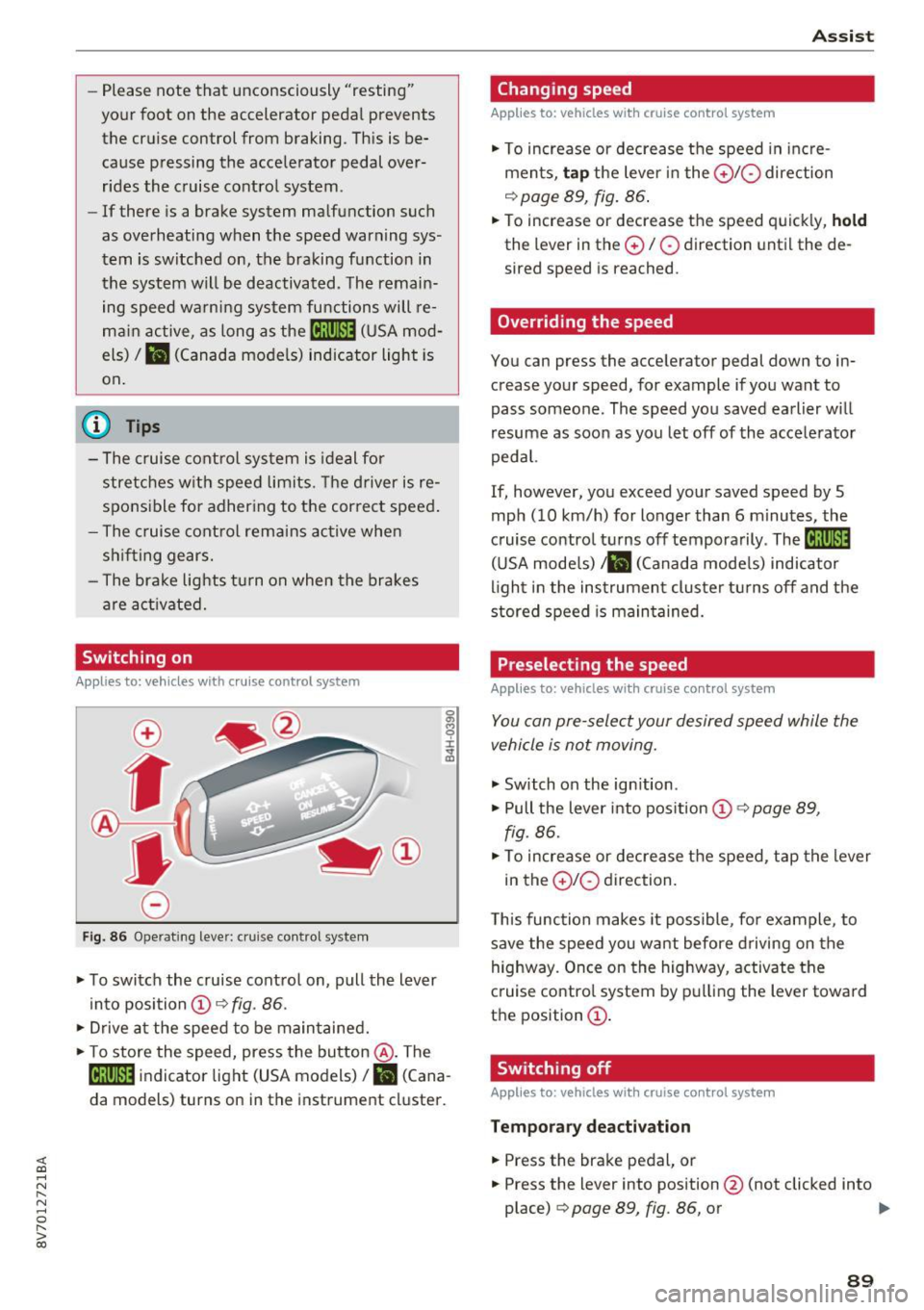
Fig. 86 Operat ing lever: c ru ise control syste m
.. To switch the cruise control on, pull the lever
into position @~
fig. 86 .
.. Drive at the speed to be maintained .
.. To store the speed, press the button @. The
@;\1)~14 indicator light (USA models)/ fil (Cana
da models) turns on in the instrument cluster.
Assist
Changing speed
Applies to : vehicles wit h cruise co ntrol sys tem
., To increase or decrease the speed in incre
ments,
tap the lever in the 010 direction
~ page 89, fig. 86.
.. To increase or decrease the speed quickly, hold
the lever in the 0 / 0 direction until the de
sired speed is reached.
Overriding the speed
You can press the acce lerator pedal down to in
crease your speed, for example if you want to
pass someone. The speed you saved earlier will
resume as soon as you let off of the accelerator
pedal.
If, however, you exceed your saved speed by 5
mph (10 km/h) for longer than 6 minutes, the
cruise control turns off temporarily .
The@;\!)~14
(USA models) ;fil (Canada models) indicator
light in the instrument cluster turns off and the
stored speed is maintained.
Preselecting the speed
Appl ies to: vehicles wi th cruise co ntrol sys te m
You can pre-select your desired speed while the
vehicle is not moving.
., Switch on the ignition .
.. Pull the lever into position
(D 9 page 89,
fig. 86 .
.. To increase or decrease the speed, tap the lever
in the
0 10 direction.
This function makes it possible, for example, to
save the speed you want before driving on the
highway. Once on the highway, activate the
cruise control system by pulling the lever toward
the position
(D .
Switching off
Applies to : vehicles wi th cruise co ntrol syste m
Temporary deactivation
.. Press the brake pedal, or
.. Press the lever into position @ (not clicked into
place)
~ page 89, fig. 86, or ..,
89
Page 91 of 272
Assist Switching off completely
.,. Press the leve r into position @(clicked into
place), or
.,. Switch the ignition off.
The speed you sto red w ill be retained if the cruise
control has been switched off tempora rily . To re
sume the stored speed, re lease the brake pedal
and pu ll the lever into position
(D .
The stored speed is erased when the cruise con
trol is sw itched off comp letely or the ignit ion is
switched off .
A WARNING
You should only resume the stored speed if it
is not too high for existing traffic conditions.
Otherwise you risk an accident .
@ Tips
-If the brakes become too heated whi le driv
ing, the cruise control switches off. If this
happens while driving downhill, you can re
lieve the brakes by shifting into a lower
gear.
- When the cruise control is activated, ESC
sport mode cannot be switched on.
Audi adaptive cruise control
Description
A ppl ies to: ve hicles w ith Audi a daptive cruise co ntrol
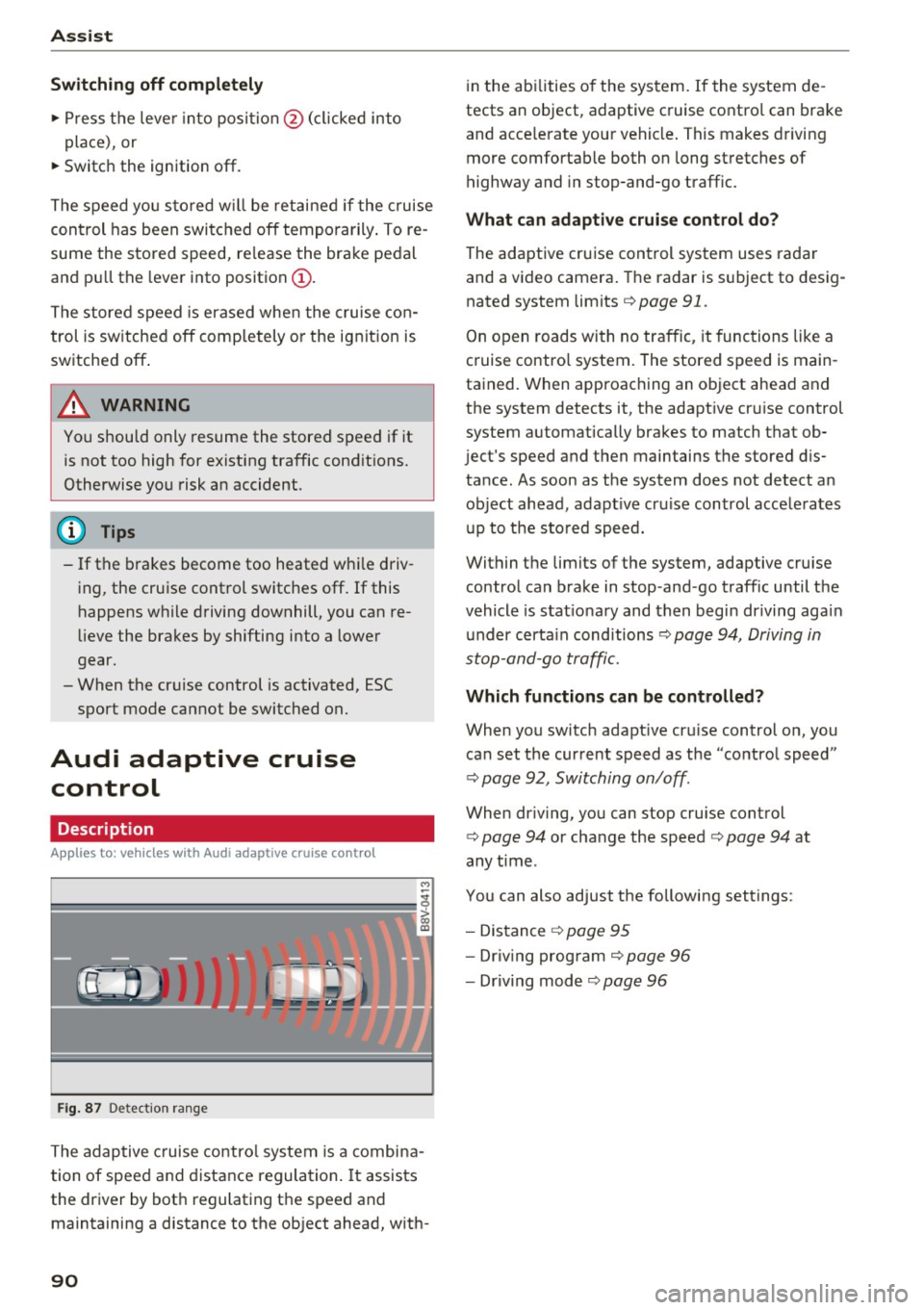
F ig. 87 Detection range
The adaptive cruise control system is a combina
tion of speed and distance regulation .
It assists
the driver by both regulating the speed and
maintaining a distance to the object ahead, with-
90
in the abilities of the system. If the system de
tects an object, adaptive cruise contro l can brake
and acce lerate your vehicle. This makes driving
more comfortable both on long stretches of
highway and in stop-and-go traffic.
What can adaptive cruise control do?
The adaptive cruise control system uses radar
and a video camera. The radar is subject to desig
nated system limits
c:> page 91.
On open roads with no traffic , it functions like a
cruise contro l system. The stored speed is main
tained. When approaching an object ahead and
the system detects it, the adapt ive cr uise control
system automatically brakes to match that ob
ject's speed and then maintains the stored dis
tance . As soon as the system does not detect an
object ahead, adapt ive cruise control acce lerates
up to the stored speed.
Within the limits of the system, adaptive cruise control can brake in stop -and -go traffic until the
vehicle is stat ionary and then begin driving agai n
under certain conditions
c:>page 94, Driving in
stop-and-go traffic.
Which functions can be controlled?
When you switch adapt ive cru ise control on, you
can set the current speed as the "control speed"
c:> page 92, Switching on/off .
When driving, you can stop cruise control
c:> page 94 or change the speed c:> page 94 at
any time .
You can also adjust the following settings :
- Distance
c:> page 95
-Dr iv in g program c:> page 96
- Dr iving mode c:> page 96
Page 92 of 272
<( co ..... N
" N ..... 0 r--. > 00
General information
Appl ies to: ve hicles with Audi adaptive cruise contro l an d Audi
p re se nse front
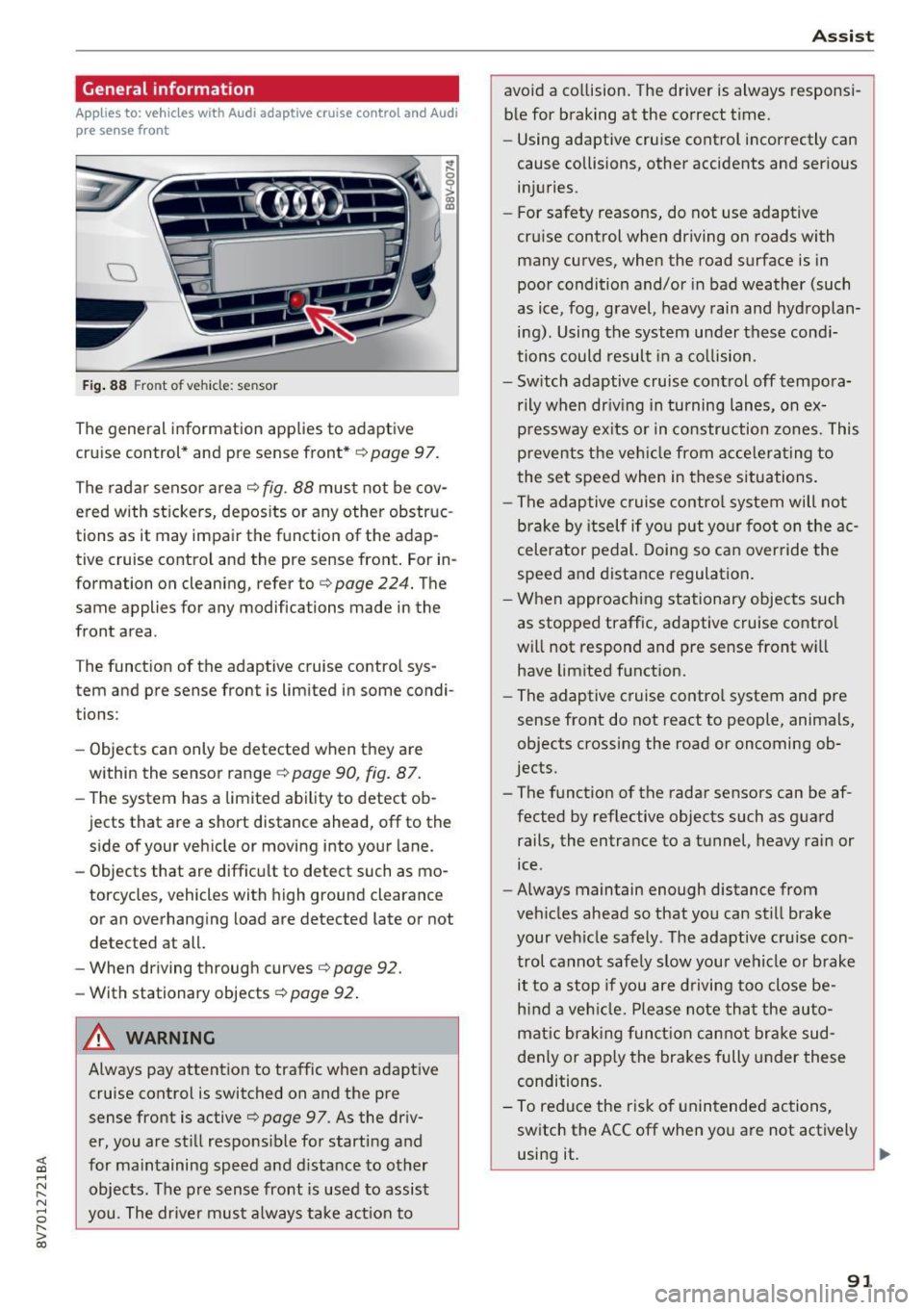
Fig. 88 Front of vehicle: sensor
The general information applies to adaptive
cruise control* and pre sense front*
i::;, page 97.
The radar sensor area
i::!:> fig. 88 must not be cov
ered with stickers, deposits or any other obstruc
tions as it may impair the function of the adap
tive cruise control and the pre sense front. For in
formation on cleaning, refer to
c> page 224. The
same applies for any modifications made in the
front area .
The function of the adaptive cruise control sys
tem and pre sense front is limited in some condi
tions :
- Objects can only be detected when they are
within the sensor range ¢
page 90, fig. 87.
-The system has a limited ability to detect ob
jects that are a short distance ahead, off to the side of your vehicle or moving into your lane.
- Objects that are difficult to detect such as mo
torcycles, vehicles with high ground clearance
or an overhanging load are detected late or not detected at all.
- When driving through curves'=>
page 92.
- With stationary objects ¢
page 92.
A WARNING
Always pay attention to traffic when adaptive
cruise control is switched on and the pre
sense front is active
'=> page 9 7. As the driv
er, you are still responsible for starting and
for maintaining speed and distance to other objects. The pre sense front is used to assist
you. The driver must always take action to
Assist
avoid a collision. The driver is always responsi
ble for braking at the correct time.
- Using adaptive cruise control incorrectly can
cause collisions, other accidents and serious
injuries.
- For safety reasons, do not use adaptive
cruise control when driving on roads with
many curves, when the road surface is in
poor condition and/or in bad weather (such
as ice, fog, gravel, heavy rain and hydroplan
ing). Using the system under these condi
tions could result in a collision.
- Switch adaptive cruise control off tempora
rily when driving in turning lanes, on ex
pressway exits or in construction zones. This
prevents the vehicle from accelerating to
the set speed when in these situations.
- The adaptive cruise control system will not
brake by itself if you put your foot on the ac
celerator pedal. Doing so can override the
speed and distance regulation.
- When approaching stationary objects such
as stopped traffic, adaptive cruise control
will not respond and pre sense front will
have limited function.
- The adaptive cruise control system and pre
sense front do not react to people, animals,
objects crossing the road or oncoming ob
jects.
- The function of the radar sensors can be af
fected by reflective objects such as guard
rails, the entrance to a tunnel, heavy rain or
ice.
- Always maintain enough distance from
vehicles ahead so that you can still brake
your vehicle safely . The adaptive cruise con
trol cannot safely slow your vehicle or brake it to a stop if you are driving too close be
hind a vehicle. Please note that the auto
matic braking function cannot brake sud
denly or apply the brakes fully under these
conditions.
- To reduce the risk of unintended actions,
switch the ACC off when you a re not actively
using it.
~
91
Page 94 of 272

Switching adaptive crui se control on
"' Pull the lever toward you into position @
¢
fig. 91. A CC: s tandby appea rs in the instru
ment cluster disp lay .
Saving the speed and activating regulati on
"'T o save the c urrent speed , press the ISETI
¢ fig. 91 button . The stored speed is shown in
t h e tachomete r LED line @and appears briefly
in the information line ®¢
fig. 92 .
"' To activate the regulation whi le stationary, you
must press the brake pedal.
Sw itching adaptiv e cruise control off
"' Push the lever away from you into position @
until it clicks i nto place ¢
fig. 91 . The message
AC C: off appears.
The stored speed in the LED line is e rased.
@ Indicato r lights
II -adaptive cruise control is switched on. No
objects are detected ahead. The stored speed is
maintained.
• -An object a head was detected . The adaptive
cruise control system regulates the speed and
d istance to the object ahead and brakes/acce ler
ates automatica lly.
fij -adaptive cru ise control is switched on. An
object ahead was detected. Your vehicle remains
stopped and w ill not start driving automatica lly.
• -T he automatic bra king is no t enough to
maintain a sufficient distance to a n object ahead.
You must intervene ¢
page 96, Request for
driver intervention.
© Instrument cluster display
I f adaptive cruise control is not shown in the in
s trument cluster disp lay, yo u can call it up using
the mu ltifunction steering wheel b uttons
¢ page 24.
Based on the g raph ics in the d isp lay, you can de
termine if the system is m ainta ining a distance to
;;!; a vehicle ahead and what that distance to this ve-....
~ hide is: N ....
R No vehi cle -No object ahead was detected.
> 00
Assist
White vehicl e -An object ahead was de tected .
Red vehicl e -Request for the dr iver to take action
¢page 96.
Both
arrows on t he scal e@ indicate the d istance
to the object ahead . No arrow appears when the
vehicle is on an open road and t here is no object
ahead. If an object is detec ted ahead, the a rrow
moves on the sca le.
T he green zone o n the scale indicates the store
distance. For informat ion on changing the dis
t a nce, refer to ¢
page 95. If the dis tance se
l ected is exceeded or not reached, the arrow
moves into the red zone on the scale.
A WARNING
- Using adaptive cruise control incorrectly can
cause collisions, other accidents and ser ious
in ju ries.
- If you press the
!SET ! button w hen driving at
speeds be low 20 mph (30 km/h), the vehi
cle acce lerates automatically up to 20 mph
(30 km/h), wh ich is the minimum speed
that can be set.
{!) Tips
- If you switch the ignit ion or the adaptive
cruise control system off, the set speed is
erased for safety reason.
- The Elect ronic Stabilization Control (ESC)
and Anti-S lip Regulat ion (ASR) both sw itch
on when the adaptive cruise control is
switched on . ESC and ASR ca nnot be switch
ed off when adapt ive cruise control is
switched on.
- With the adaptive cruise control act ivated
t he ESC spo rt mode cannot be activated.
93