USB AUDI A3 SEDAN 2017 User Guide
[x] Cancel search | Manufacturer: AUDI, Model Year: 2017, Model line: A3 SEDAN, Model: AUDI A3 SEDAN 2017Pages: 400, PDF Size: 67.32 MB
Page 238 of 400
Media
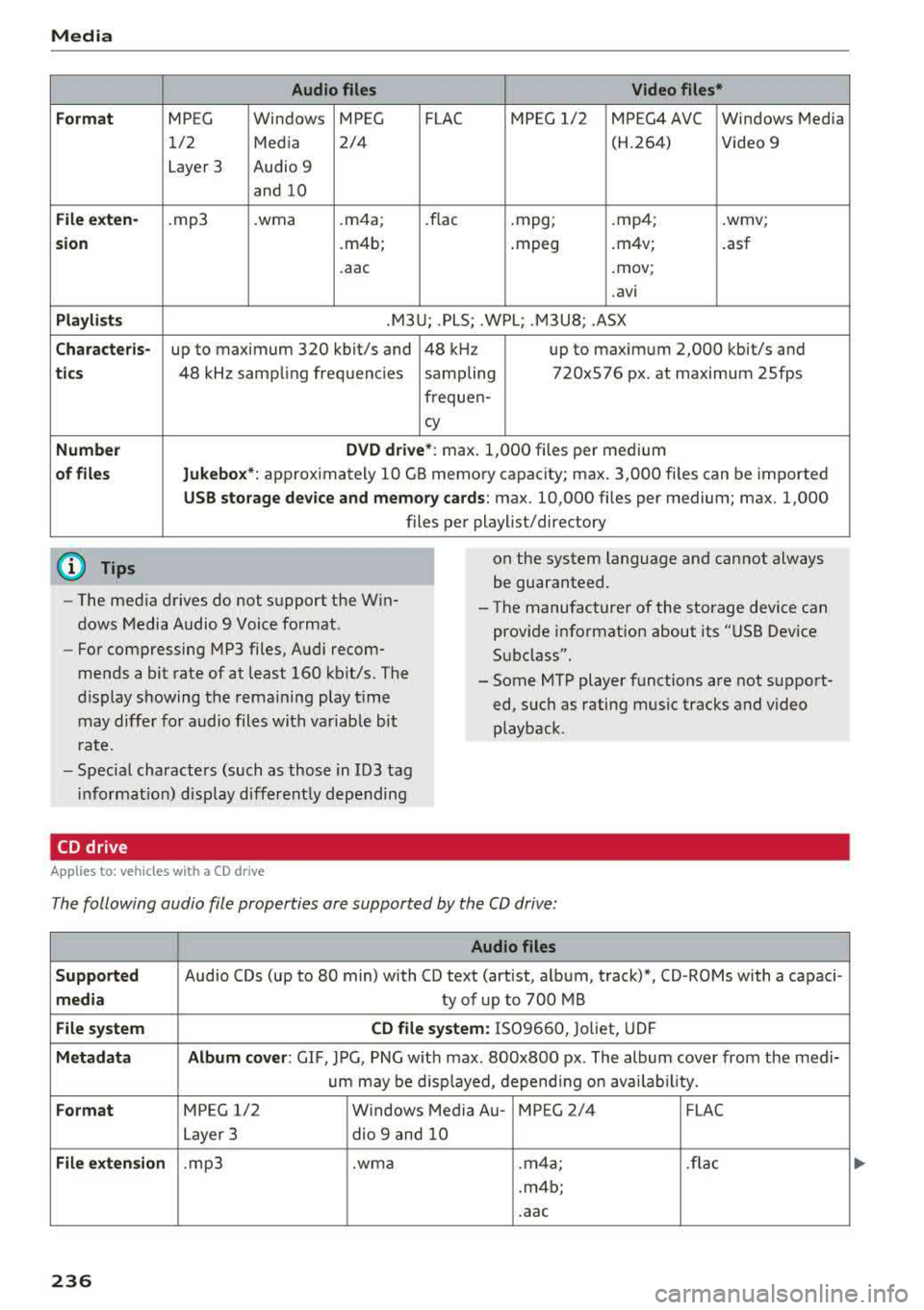
Form at
Fil e ex te n-
s ion
Pla ylists
C ha ra cteri s-
ti cs
Number
of fil es
(D Tips Audio files
Video files*
MPEG Windows MPEG FLAC MPEG 1/2 MPEG4 AVC Windows Media
1/2 Media 2/4 (H.264) Video 9
Layer 3 Audio 9
and 10
. mp3 .wma .m4a; .flac .mpg; .mp4; .wmv;
.m4b; .mpeg .m4v;
.asf
.aac .mov;
.avi
.M3U; .PLS; .WPL; .M3U8; .ASX
up to maximum 320 kbit/s and 48 kHz up to maximum 2,000 kbit/s and
48 kHz sampling frequencies sampling 720x576 px. at maximum 25fps
freq uen-
cy
D VD d riv e* : max . 1,000 files per medium
Jukebo x*: approximately 10 GB memory capacity; max. 3,000 files can be imported
USB stor age de vice a nd m emor y cards : max. 10,000 files per medium; max. 1,000
files per playlist/directory
on the system language and cannot always
be guaranteed.
- The med ia drives do not support the Win
dows Media Audio 9 Voice format. - The
manufacturer of the storage device can
prov ide information about its "USB Dev ice
Subclass".
-
For compressing MP3 files, Audi recom
mends a bit rate of at least 160 kb it/s. The
display showing the remaining play t ime
may differ for audio files with variable bit
r a te. -
Some MTP player functions are not support
ed, such as rating mus ic tracks and video
playback.
- Special characters (such as those in 103 tag
i nformat ion) disp lay different ly depending
CD drive
A pp lies to: ve hicles w ith a CD drive
The following audio file properties are supported by the CD drive:
Audio files
S upported
Audio CDs (up to 80 min) with CD text (artist, album, track)*, CD-ROMs with a capaci-
medi a ty of up to 700 MB
File system CD file syste m: IS09660, Joliet, UDF
Metadat a A lbum co ver : GIF , JPG, PNG w ith max. 800x800 px . The album cover from the medi-
um may be d isp layed, depend ing on avai lab ility.
Form at MPEG 1/2 Windows Media Au- MPEG 2/4 FLAC
Layer 3 dio
9 and 10
File exten sion .mp3 .wma .m4a; .flac
.m4b;
.aac
236
Page 240 of 400
Media
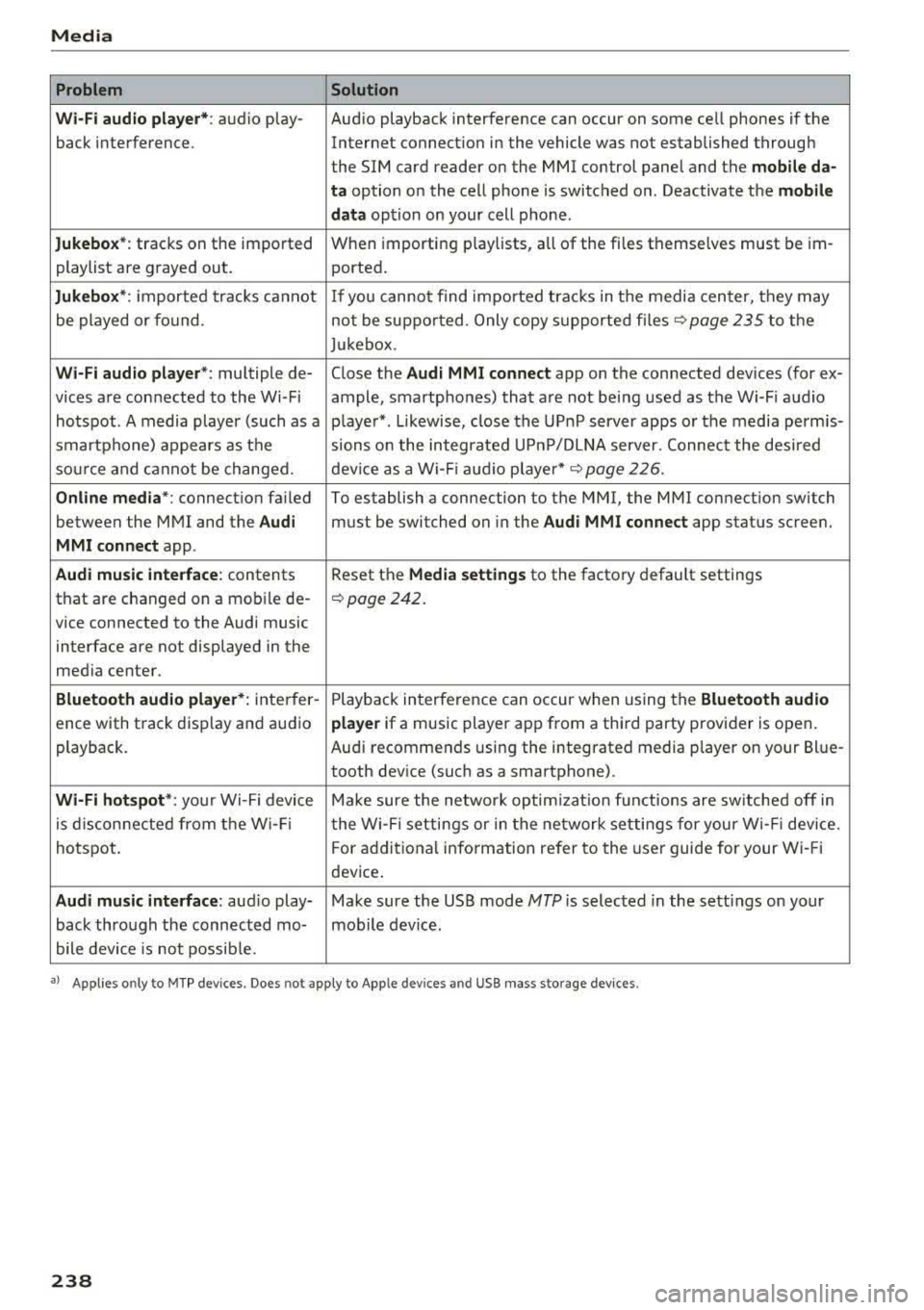
Problem Solution
Wi -Fi audio pl ayer* :
audio play- Aud io playback interference can occur on some ce ll phones if the
back interference . Internet connectilon in the vehicle was not established through
the SIM card reader on the MMI control panel and the
mob ile da-
ta
option on the cell phone is switched o n. Deactivate the mobile
dat a
option on your cell phone.
Jukebox *: tracks on the imported When importing
play lists, a ll of the files themse lves must be im-
playlist are g rayed out . ported.
Jukebox *: imported tracks ca nnot If you canno t find impo rted trac ks in t he media center, they may
be played o r fo und . not be supported . Only copy s upported fi les
~ page 235 to the
Juk eb ox .
Wi-Fi aud io pl ay e r*: multiple de- Close the Audi MMI connect app on the connected dev ices (for ex-
vices a re connected to the Wi-Fi ample, smartphones) that a re not being used as the Wi -F i audio
hotspot . A media player (such as a p laye r*. L ikewise, close the UP nP server apps or the media perm is-
smartphone) appears as the sions o n the integrated U PnP/DLNA server. Connec t the desi red
sou rce and cannot be change d. dev ice as a Wi -Fi
:aud io playe r* c::> page 226 .
Online med ia *: connect io n fa iled To establish a connection to the MMI, the MMI connection switch
between the M MI and the
Audi must be switched on in the Audi MMI connect app status scree n.
MMI conn ect app .
Audi music inte rface: contents Reset the Media settings to the factory default settings
that are changed on a mob ile de-
c::> page 242.
vice connected to the Audi music
interface are not displayed in the
med ia ce nter.
Bluetooth audio player *: inte rfer- Playb ack in terference can occur when us ing the Bluetooth audio
ence with track disp lay and au dio player if a music player app from a thi rd party provider is open .
playback. Au
di recommends using the integrated media p layer on your Bl ue-
tooth dev ice (suc h as a smartphone).
Wi-Fi hotspot *: your Wi-Fi device M ake sure the network optim izati on fun ctions are sw itched off in
is d iscon necte d from t he W i- Fi t he Wi-Fi setti ngs or in t he network setti ngs for your W i- Fi dev ice.
hotspot . For add itional info rm ation refer to the user guide for your Wi- Fi
dev ice .
Audi music interface : audio play- Make sure the USB mode MTP is selected in the sett ings on your
back thro ugh the connec ted mo- mob ile device .
bile device is not possib le.
• > A pp lies o nly to M TP dev ices . Doe s no t app ly to Ap ple dev ices and USB mass storage devices .
238
Page 241 of 400
CXl CXl .... N ,.__
Audi smartphone interface
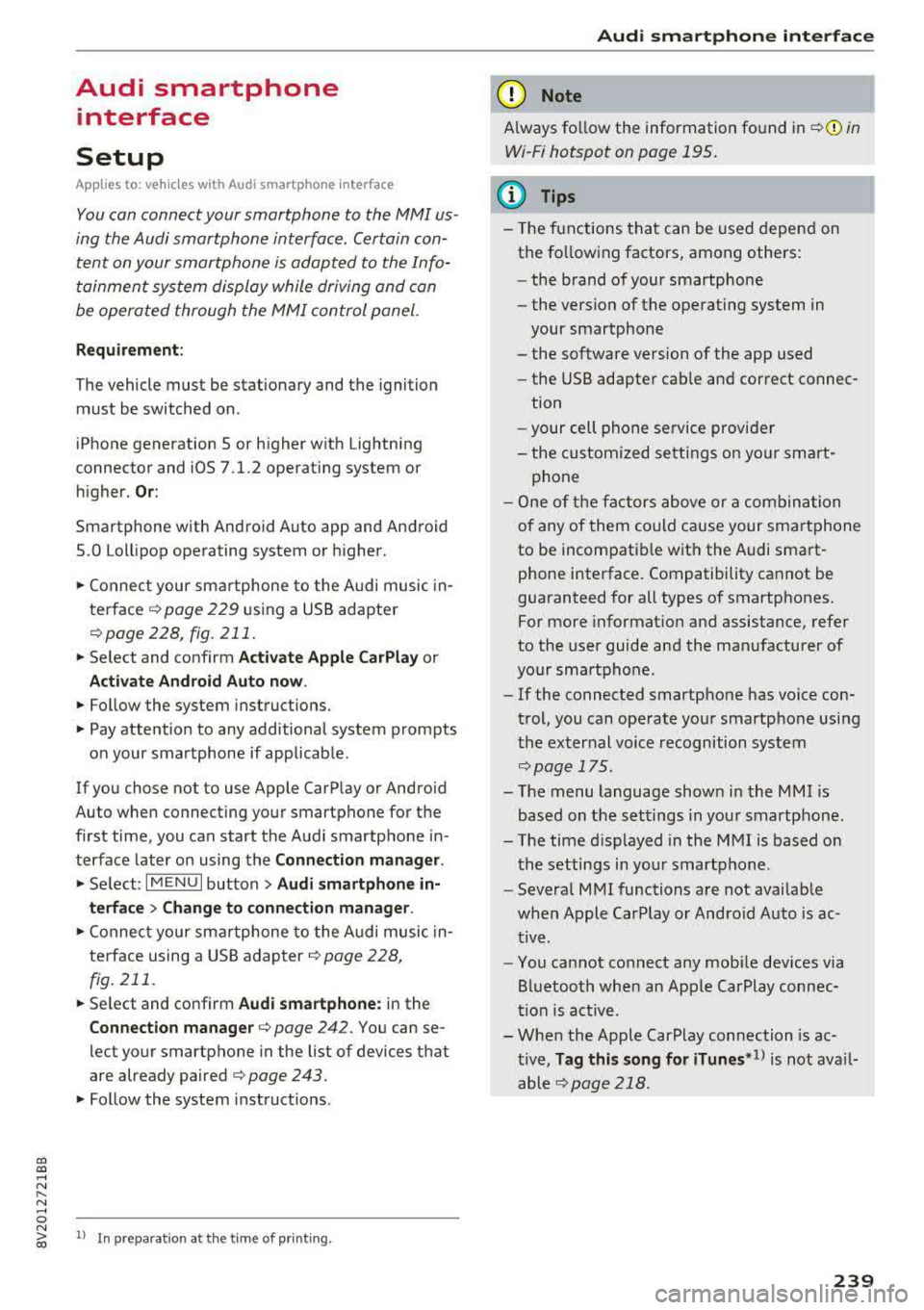
Setup
App lies to: ve hicles with Audi smartpho ne interface
You can connect your smartphone to the MMI us
ing the Audi smartphone interface . Certain con
tent on your smartphone is adapted to the Info
tainment system display while driving and can
be operated through the
MMI control panel.
R equirement:
The vehicle must be stationary and the ignition
must be switched on.
iPhone generation 5 or higher with Lightning
connector and iOS 7.1.2 operating system or
h igher.
O r:
Smartphone with Android Auto app and Android
5 .0 Loll ipop operating system or higher.
.,. Connect your smar tphone to the Audi music in
te rface
c:> page 229 using a USB adapter
c:> page 228, fig. 211 .
.. Select and confirm A cti va te Apple CarPl ay or
Acti vate And roid Auto no w.
.. Follow the system instruct ions.
.,. Pay attention to any add itional system prompts
on your smartphone if applicable.
If you chose not to use Apple CarPlay or Android
Auto when connecting your smartphone for the
first time, you can start the Audi smartphone in
terface later on using the
Connection m an ager .
.. Select: I MENU I button > Audi smartphone in ·
terfa ce
> Change to connecti on manager .
.. Connect your smar tphone to the Audi music in
terface using a USB adapter
c:> page 228,
fig .211.
.. Se lect and confirm Audi smartphone : in the
Connection manager c:> page 242. You can se
lect your smartphone in the list of devices that
are already paired
c:> page 243.
.,. Follow the system instruct ions.
N .... 0 N iii l) In preparat io n at t he t ime of pr inting.
Aud i smartphon e int erfac e
(D Note
Always fo llow the information found in c:> @ in
Wi-Fi hotspot on page 195.
(D Tips
-The functions that can be used depen d on
the fo llowing factors, among others:
- the brand of your smartphone
- the vers ion of the operating system in
your smartphone
- the software version of the app used
- the USB adapter cab le and correct connec-
tion
- your cell phone service provider
- the customized se ttings on your sma rt-
phone
- O ne of the factors
above or a comb ina tion
o f any of them could cause your sma rtphone
to be incompatib le with the Audi smart
phone interface. Compatibility cannot be
guaranteed for all types of smartphones.
For more informat ion and assistance, refe r
to the user guide and the ma nufacturer of
your smartphone.
- If the connected smartphone has voice con
trol, you can operate you r smartpho ne usi ng
t he exter nal voice recognition system
c:> page 175.
- The menu language shown in the MMI is
based on the sett ings in you r smartphone.
- The time d isplayed in the MMI is based o n
the settings in yo ur smartphone .
- Severa l MMI functions are not avai lab le
when Apple CarPlay or Andro id Auto is ac
t ive.
- You cannot co nnect any mob ile dev ices
via
Bluetooth when an App le CarPlay connec
tion is act ive.
- Whe n the Apple CarPlay connection is ac
t ive,
Tag this song for iTunes*1> is not ava il
able
c:>page 218 .
239
Page 242 of 400
Audi smartphone interface
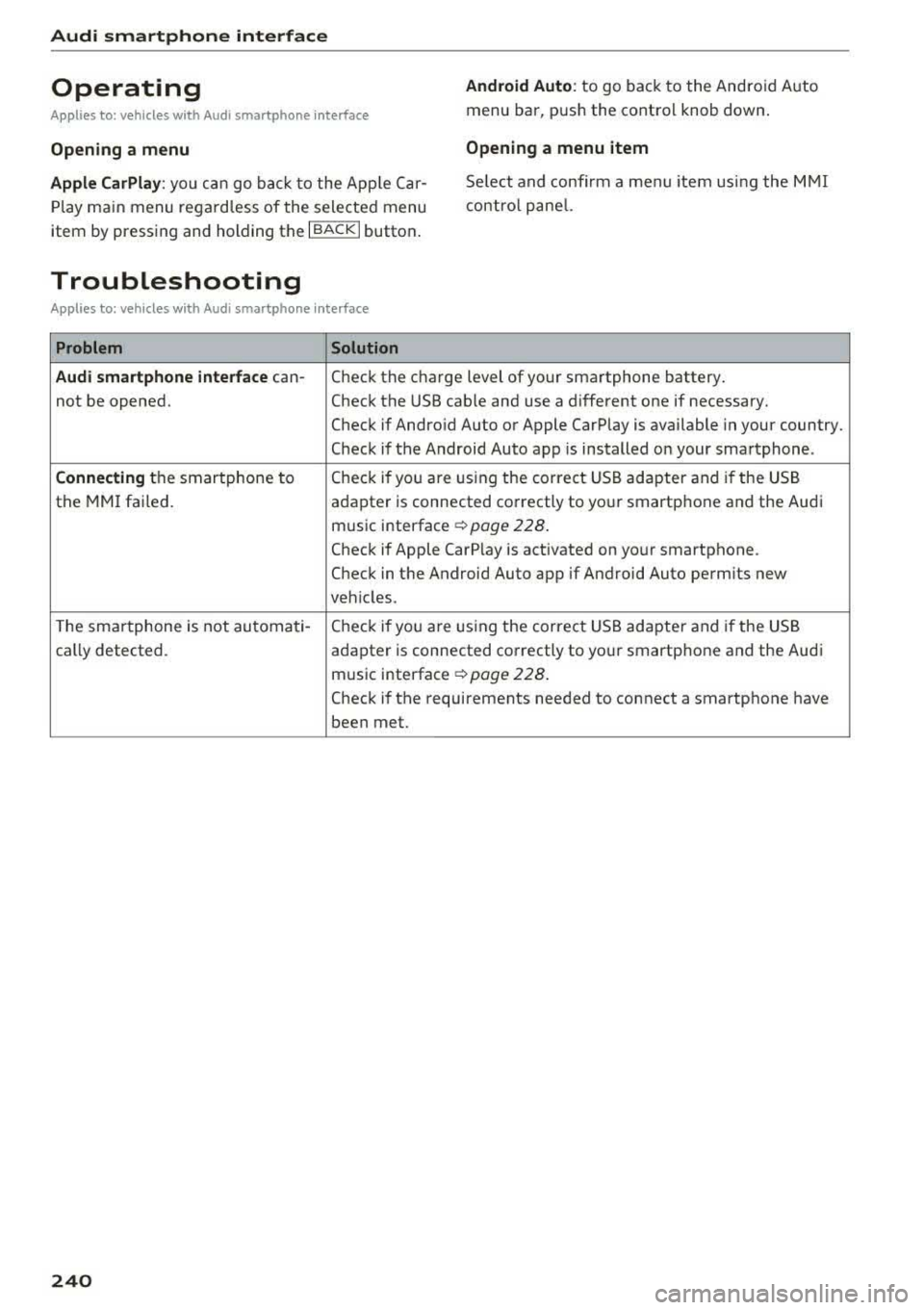
Operating
Applies to: vehicles w ith Audi smartphone interface
Android Auto: to go back to the Android Auto
menu bar, push the contro l knob down.
Opening a menu Opening a menu item
Apple CarPlay:
you can go back to the App le Car
Play main menu regardless of the selected menu
item by pressing and holding the
I BACKI button. Se
lect and confirm a menu item using the MMI
contro l panel.
Troubleshooting
Applies to: vehicles with Audi smartphone interface
Problem Solution
Audi smartphone interface
can-
Check the charge level of your smartphone battery.
not be opened. Check the USB cable and use a different one if necessary.
Check if Android Auto or Apple CarPlay is available in your country.
Check if the Android Auto app is installed on your smartphone .
Connecting the smartphone to Check if you
are U1sing the corre ct USB adapter and if the USB
the MMI failed.
adapter is connected correctly to your smartphone and the Audi
mus ic interface
c:> page 228 .
Check if Apple CarP lay is activated on your smartphone .
Check in the Android Auto app if Android Auto permits new
veh icles .
T he smartphone is not automati-
Check if you are U1sing the correct USB adapter and if the USB
cally detected . adapter is connected correctly to your smartphone and the Aud i
music interface
c:> page 228 .
Check if the requirements needed to connect a smartphone have
been met.
240
Page 245 of 400
CXl CXl .... N ,.__
N .... 0 N > 00
-List of dev ice s already pa ired : select your cell
phone from the list of all the devices that are
already pa ired .
Secondary telephone
-Connect ne w de vic e: search for and connect a
cell phone.
-Lis t of dev ice s alread y pa ired : select your cell
phone from the list of all the devices that are
already pa ired.
Data connection
App lies to: vehicles with Audi connect (Infotainment)
The data connection is made us ing the embedded
SIM ca rd
~ page 190. You do not need to adjust
any add it ional se ttings .
(D Note
Always follow the i nformat ion found inc:> @ in
Wi-Fi hotspot on page 195.
MMI connect app
Applies to: vehicles with Audi connect (Infotainment)
Requiremen t: the Audi MMI connect app m ust
be i nstalled and open on your mobile device .
-Connect new d evice: search for and connect a
mobile device (s uch as a smartp ho ne).
-Li st of device s already pa ir e d : select your mo
bile device from the list of a ll the devices that
are already paired.
Music
Applies to vehicles with B luetooth or Wi -Fi audio playe r
Audio player *
Requirement: the Bluetooth func tion and v is ib il i
ty must be sw itched on in the MMI
c:> page 244
and on the ce ll phone.
-Connect n ew de vice : press the contro l knob.
Se lect
Bl uetooth audio pla yer . Search for and
connect a mobile device .
-List of devic es alrea dy pa ired : selec t a Blue
too th device from the l ist of a ll the devi ces that
are already paired .
Sys te m set ting s
Wi-Fi audio playe r*
Re quirement: the Wi- Fi hotspot* on the M MI
c:>
page 195 and on yo ur cell phone m ust be
switched on .
-Connect new device : press the cont rol knob .
Search for and connect a W i- Fi capab le dev ice.
-Disconn ect Wi-Fi audio player : deactivate the
Wi- Fi on you r Wi-Fi capable device. The device
w ill be automati cally removed from the list .
(Q) Note
Always fo llow the information found in ~ © in
Wi-Fi hotspo t on page 195.
Directory
Applies to: vehicles with telephone
Display contacts from a cell phone (or an addi
tional cell phone).
Requirement: no cell phones can be connected to
the MMI using the
Hand sfr ee profile.
-Connect new de vice : search for and connect a
new cell phone .
-List of devices alre ad y paired : select your ce ll
phone from the list of all the cell phones that
are already paired .
Audi smartphone
Applies to: vehicles with Aud i smartphone interface
-Connect your ce ll phone to the Audi music in
terface ~ page 229 using a USB adapter
c:> page228, fig. 211 .
-Select your cell phone from the list of cell
p hones that have a lready bee n connected .
Additional options
Depending on the selected function, yo u can use
the right control button to access the availab le
additional options in the connection manager.
Delete Bluetooth device*
T he selected cell phone/mobile device is d iscon
nected from the MM I and is removed from the
list of a ll devices that are a lready paired.
..,.
243
Page 246 of 400
System settings
Show Bluetooth profiles*
You can Connect or Disconnect the Handsfree ,
Messages *, Directory/contacts
and Bluetooth
audio player
profiles separately.
Bluetooth settings*
- Bluetooth :
select and confirm a setting for the
Bluetooth connection v is ibility. Select
Visible
for the MMI to be v isib le to other dev ices. Se
lect
Inv isible for the MMI to not be visible to
other devices. However, it is still possib le to es
tablis h a Bl uetooth connection with paired de
vices when the v is ibility is switched off. Select
Off to turn visibility off. Then a B luetooth con
nect ion is not possible .
-Bluetooth audio player : when this function is
switched
on~, the Bluetooth audio player is
available as a source in the
Media menu .
-Bluetooth name : the MMI Bluetooth name (for
example ,,AUDI MMI 2017") is displayed and
can be changed .
Online settings*
- Data usage counter :
the amount of data pack
ets that are sent and received through the MMI
is d isplayed. You can reset the data usage infor
mation to zero using the
Reset data counter
option.
-Network status : the mobile network provider
for data service as well as the network status
are displayed .
Wi-Fi settings*
Refer to<=> page 195, Wi-Fi hotspot.
Storing as a default telephone
Applies to: vehicles with telephone
Req uiremen t: a cell phone must be connected to
the MMI
¢page 177 .
As soon as th e cell phone is i n range and the
Bluetooth function on the cell phone and in the
MMI is swi tched on, this cell phone is given prior
ity over the other Bluetooth devices and is con
nected direct ly to the MMI. The connected cell
phone is displayed first in the device list.
244
Network settings*
- Login :
you can chose an automatic log in to
your cell phone service provider's network, or
you can choose a
manual l ogin from the list of
avai lab le networks .
-Network selection: available networks in the
present location can be selected under network
selection. This function is on ly availab le for the
Manual l ogin setting .
Apple CarPlay sound settings/ Android Auto
sound settings
Applies to: vehicles with Audi smartphone interface
Refer to ¢ page 245.
About Apple CarPlay/ About Android Auto
Applies to: vehicles with Audi smartphone interface
Here you w ill find legal information regarding
the use of Apple CarPlay or Andro id Aut o and in
formation about device -specific data exchange.
Delete CarPlay device/Delete Android Auto
device
Applies to: vehicles with Audi smartphone interface
Requirement: your cell phone must not be cona
nected to the Audi m usic interface with a USB
adapter .
To remove your cell phon e from the list of all cell
phones that are already paired, select and con
firm
Delete CarPlay device or Delete Android Au
to device .
(D Tips
Some SIM cards do not allow the SIM PIN
queries to be switched off.
System update
.,. Select: !MENUI button> Settings> left control
button >
System maintenance.
- System update :
slide the storage device with
t he update data into the appropriate drive
¢page 223. Select and confirm the drive>
Start update. The length of the process de
pends on the size of the update.
-Reset driver installation: the selected media
driver package is reset to the settings at the
time of delivery .
Page 385 of 400
CXl CXl .... N ,.__
N .... 0 N > 00
Audi smartphone interface . . . . . . . . . 239, 243
Audi virtual cockpit
refer to Instrument cluster . . . . . . . . . . . . . 10
AUTO Automatic climate control system . . . . . . . 71
Automatic headlights . . . . . . . . . . . . . . . . . 51
Auto Lock (central locking system) . . . . . . . . 34
Automatic belt retractor . . . . . . . . . . . . . . . 262
Automatic climate control system
refer to Climate control system
(automatic) . . . . . . . . . . . . . . . . . . . . . . 70, 71
Automatic power top
refer to Power top . . . . . . . . . . . . . . . . . . . . 44
Automatic transm iss ion . . . . . . . . . . . . . . . . . 85
Driving tips . . . . . . . . . . . . . . . . . . . . . . . . . . 88
Emergency mode . . . . . . . . . . . . . . . . . . . . . 91
Hill descent control . . . . . . . . . . . . . . . . . . . 89
Kick-down . . . . . . . . . . . . . . . . . . . . . . . . . . . 90
Launch control program . . . . . . . . . . . . . . . 90
Malfunction . . . . . . . . . . . . . . . . . . . . . . . . . 86
Manual shifting (tiptronic mode) . . . . . . . . 90
Selector lever . . . . . . . . . . . . . . . . . . . . . . . . 88
Selector lever emergency release . . . . . . . . 92
Selector lever lock . . . . . . . . . . . . . . . . . . . . 86
Selector lever posit ions . . . . . . . . . . . . . . . . 86
Shift padd les . . . . . . . . . . . . . . . . . . . . . . . . 90
Automatic wipe/wash system . . . . . . . . . . . . 57
Auto Safety Hotline . . . . . . . . . . . . . . . . . . . 255
Auxiliary climate control . . . . . . . . . . . . . . . 118
AUX input . . . . . . . . . . . . . . . . . . . . . . . . . . . 229
Average consumption ............ .... 17, 18
Average speed . . . . . . . . . . . . . . . . . . . . . 17, 18
B
BACK button . . . . . . . . . . . . . . . . . . . . . . . . . 158
Bag hooks . . . . . . . . . . . . . . . . . . . . . . . . . 65, 67
Balance (sound) . . . . . . . . . . . . . . . . . . . . . . 245
Bass (sound) . . . . . . . . . . . . . . . . . . . . . . . . . 245
Battery In the key . . . . . . . . . . . . . . . . . . . . . . . . . . . 35
Jump starting . . . . . . . . . . . . . . . . . . . . . . . 368
also refer to High-voltage battery . . . . . . . 94
also refer to Vehicle battery . . . . . . . . . . . 325
Before driving . . . . . . . . . . . . . . . . . . . . . . . . 247
Belt tensioners . . . . . . . . . . . . . . . . . . . . . . . 265
Blended gasoline . . . . . . . . . . . . . . . . . . . . . 312
Index
Blower
Automatic climate control system . . . . . . . 72
Bluetooth Audio player . . . . . . . . . . . . . . . . . . . . . . . . 225
Connecting a ce ll phone . . . . . . . . . . . . . . 177
Settings . . . . . . . . . . . . . . . . . . . . . . . . . . . 244
Boost . . . . . . . . . . . . . . . . . . . . . . . . . . . . . . . . 11
Booster seats . . . . . . . . . . . . . . . . . . . . . . . . 302
Boost pressure ind icator . . . . . . . . . . . . . . . . 11
Brakes . . . . . . . . . . . . . . . . . . . . . . . . . . . . . . 153
Brake fluid . . . . . . . . . . . . . . . . . . . . . . . . . 325
Electromechanical parking brake . . . . . . . . 83
New brake pads . . . . . . . . . . . . . . . . . . . . . 153
Braking Brake assist . . . . . . . . . . . . . . . . . . . . . . . . 151
Emergency braking function . . . . . . . . . . . . 84
Breaking in New brake pads . . . . . . . . . . . . . . . . . . . . . 153
New engine . . . . . . . . . . . . . . . . . . . . . . . . . 74
New tires . . . . . . . . . . . . . . . . . . . . . . . . . . 335
Browser
refer to Media center . . . . . . . . . . . . . . . . . 231
Bulbs . . . . . . . . . . . . . . . . . . . . . . . . . . . . . . . 366
Buttons Control panel (MMI) . . . . . . . . . . . . . . . . . 158
Multifunct ion steer ing wheel . . . . . . . . 13, 16
Programming (multifunction steering
wheel) . . . . . . . . . . . . . . . . . . . . . . . . . . . . . . 15
C
Cable (USB adapter/AUX connector cable) 228
California Proposition 65 Warning ... .. .. 317
Battery specifi c . . . . . . . . . . . . . . . . . . . . . 326
Call list . . . . . . . . . . . . . . . . . . . . . . . . . . . . . 180
Call options . . . . . . . . . . . . . . . . . . . . . . . . . . 187
Capacities Fuel tank. . . . . . . . . . . . . . . . . . . . . . . . . . . 375
Washer fluid reservoir . . . . . . . . . . . . . . . . 375
Care . . . . . . . . . . . . . . . . . . . . . . . . . . . . . . . . 347
also refer to Cleaning . . . . . . . . . . . . . . . . 347
Car Finder Audi connect e -tron services . . . . . . . . . . . 199
Cargo area . . . . . . . . . . . . . . . . . . . . . . . . . . . 253
Caring for and cleaning leather . . . . . . . . . . 350
Catalytic converter . . . . . . . . . . . . . . . . . . . . 316
CD drive (media drives) . . . . . . . . . . . . . . . . 224
383
Page 396 of 400
Index
Temperature display Coolant . . . . . . . . . . . . . . . . . . . . . . . . . . . . .
10
Outside temperature . . . . . . . . . . . . . . . . . . 12
Tether anchors . . . . . . . . . . . . . . . . . . . . . . . 309
Tether strap . . . . . . . . . . . . . . . . . . . . . . . . . 309
Text messages . . . . . . . . . . . . . . . . . . . . . . . 182
Tie-downs . . . . . . . . . . . . . . . . . . . . . . . . 66, 254
Time . .... .. .. ............... .... ... 241
tiptron ic (automatic transmission) . . . . . . . . 90
Tire Mobility System (tire mobility kit) . . . . 354
Tires. . . . . . . . . . . . . . . . . . . . . . . . . . . . . . . . 328
Low aspect ratio tires . . . . . . . . . . . . . . . . 343
Mobility kit . . . . . . . . . . . . . . . . . . . . . . . . . 354
quattro (all wheel drive) . . . . . . . . . . . . . . 154
Repair set . . . . . . . . . . . . . . . . . . . . . . . . . . 353
Replacing . . . . . . . . . . . . . . . . . . . . . . . . . . 356
Service life . . . . . . . . . . . . . . . . . . . . . . . . . 335
Tire pressure . . . . . . . . . . . . . . . . . . . . . . . 336
Tire pressure monitoring system . . . . . . . 344
Tire Pressure Monitoring System ( TPMS) . 345
Tire pressure table . . . . . . . . . . . . . . . . . . . 338
Treadwear indicators . . . . . . . . . . . . . . . . . 335
Unidirectional. . . . . . . . . . . . . . . . . . . . . . . 330
Uniform tire quality grading . . . . . . . . . . . 344
Tires and wheels Transmission malfunction (indicator light)
. .
91
Transport Canada . . . . . . . . . . . . . . . . . . . . . 255
Travel guide
refer to Travel (travel guide) . . . . . . . . . . . 193
Travel (travel guide) . . . . . . . . . . . . . . . . . . . 193
Treble (sound) . . . . . . . . . . . . . . . . . . . . . . . 245
Tr ip computer (analog instrument cluster) . . 18
Tr ip computer (Audi v irtual cockpit) . . . . . . . 17
Trunk lid
Trunk escape latch . . . . . . . . . . . . . . . . . . .
353
Turn signal . . . . . . . . . . . . . . . . . . . . . . . . . . . 52
u
Unfastening safety belts
Uniform tire quality grading ......... .. .
Unlocking/locking 264
344
At the lock cylinder . . . . . . . . . . . . . . . . . . . 38
With remote control . . . . . . . . . . . . . . . . . . 36
With the central locking switch . . . . . . . . . 37
With the convenience key . . . . . . . . . . . . . . 36
Updating stations (radio) .. ........... .. 217
USB stick
refer to Audi m usic interface . . . . . . . 228, 229
Glossary of tire and loading terminology . 330 V
Tires and vehicle load limits . . . . . . . . . . . 339
TMC
refer to T raff ic information . . . . . . . . . . . . 214
Tone (sound)
refer to Adjusting the sound . . . . . . . . . . . 245
Tool . . . . . . . . . . . . . . . . . . . . . . . . . . . . . . . . 353
Torn or frayed safety be lts . . . . . . . . . . . . . . 261
Touch
refer to MMI touch 161
Towing
Front towing loop ................ ...
371
Rear towing loop . . . . . . . . . . . . . . . . . . . . 371
Tow trucks . . . . . . . . . . . . . . . . . . . . . . . . . 370
TPMS
refer to Tires . . . . . . . . . . . . . . . . . . . . . . . 345
Traffic information ............. ... 214, 215
Trailer mode (navigation) . . . . . . . . . . . . . . . 208
Trailer towing . . . . . . . . . . . . . . . . . . . . . . . . 120
Information . . . . . . . . . . . . . . . . . . . . . . . . 121
Operating instructions . . . . . . . . . . . . . . . . 120
Technical requirements ........... 120, 121
394
Vanity mirror . . . . . . . . . . . . . . . . . . . . . . . . . . 56
Vehicle
Care/cleaning .. .. .. .. ........ ..... ..
347
Out of service . . . . . . . . . . . . . . . . . . . . . . . 352
Raising . . . . . . . . . . . . . . . . . . . . . . . . . . . . 372
T ransporting (plug-in hybrid drive) . . . . . . 104
Vehicle battery . . . . . . . . . . . . . . . . . . . . . . . 325
Charge level . . . . . . . . . . . . . . . . . . . . . . . . 155
Charging . . . . . . . . . . . . . . . . . . . . . . . . . . . 326
Vehicle control modules . . . . . . . . . . . . . . . . 156
Vehicle data . . . . . . . . . . . . . . . . . . . . . . . . . 374
Vehicle jack . . . . . . . . . . . . . . . . . . . . . . 353, 359
Vehicle sound . . . . . . . . . . . . . . . . . . . . . . . . . 96
Vehicle tool kit . . . . . . . . . . . . . . . . . . . . . . . 353
Version information . . . . . . . . . . . . . . . . . . . 244
VIEW button . . . . . . . . . . . . . . . . . . . . . . . . . .
13
VIN . . . . . . . . . . . . . . . . . . . . . . . . . . . . . . . . 374
Voice guidance
refer to Multifunction
steering wheel . . . . . . . . . . . . . . . . .
13, 15, 16