ac setting AUDI A3 SEDAN 2017 User Guide
[x] Cancel search | Manufacturer: AUDI, Model Year: 2017, Model line: A3 SEDAN, Model: AUDI A3 SEDAN 2017Pages: 400, PDF Size: 67.32 MB
Page 40 of 400
Opening and clo sin g
again using the ca button in the central
locking switch .
Central locking settings
In the Infotainment system, you can set which
functions are controlled by the central locking
system .
.,. Select in the Infota inment system: I MENU I but
ton
> V ehicle > left contro l button > Ve hicl e
s ettings
> Cent ral lock ing .
Door unlo ckin g
-you can decide if All doors or
only the
Dri ver 's door should unlock. The lug
gage compartment lid also unlocks when
All is
selected. If you se lect
Dri ver 's door in a vehicle
with a convenience key*, only the door whose
handle you pull will unlock.
If you select D riv er 's door , all the doors and lug
gage compartment lid will unlock if you press the
[@] button on the remote control key twice.
long press to open w indow s -the convenience
opening/closing function can be switched on/off
c::>page 42.
Fold mirr ors* -if yo u sw itch the funct io n on, the
exterior m irrors fo ld in automatically when the
ve hicle is locked.
To ne when l ockin g -when checked off./, a tone
will sound when you lock the vehicle
l) .
Emergency unlocking/locking the doors
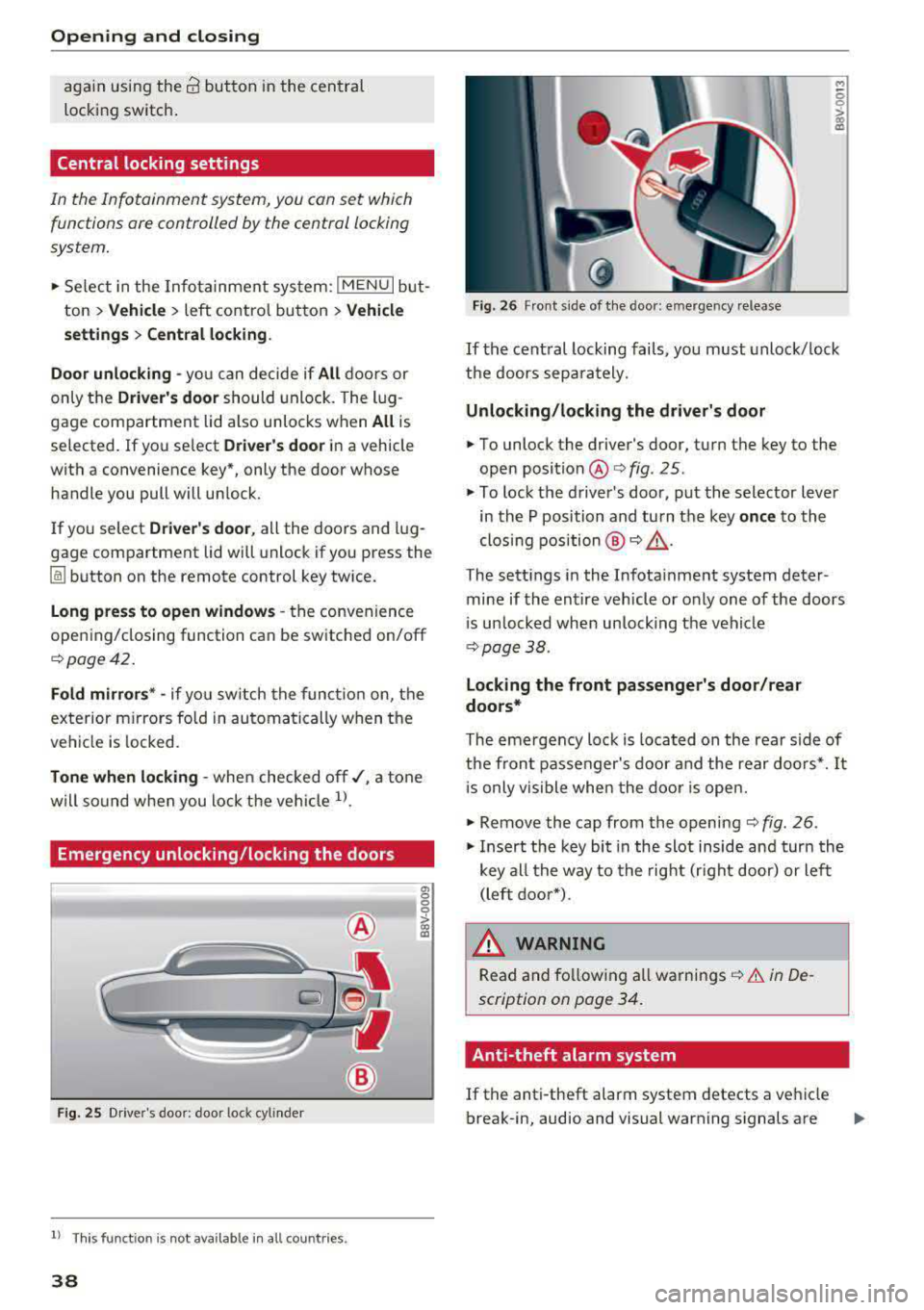
Fig . 25 Driver's doo r: door lock cylinder
l) This function is not availab le in all countries.
38
a, 0 0 0
> 00 a:,
Fig. 26 Front side of the door: emergency release
M ~ 0
~ CX) a,
If the central locking fails, you must unlock/ lock
the doors separately.
Unlocking /lo cking the d riv er 's door
... To unlock the driver's door, turn the key to the
open
position @ofig . 25.
.,. To lock the driver 's door, put the selector lever
in the P position and turn the key
onc e to the
clos ing position @
o A.
The settings in the Infota inment system deter
mine if the entire vehicle or only one of the doors
i s un locked when unlocking the veh icle
c:>page38.
Locking the front pa ssenger 's door /rear
doo rs *
The eme rgency loc k is located on the rear side of
the fron t passenger's door and the rear doo rs*. It
i s only vis ible when the door is open.
... Remove the cap from the opening c::> fig. 26 .
.,. Insert the key bit in the slot inside and turn the
key all the way to the right (right door) or left (left door*).
A WARNING
Read and fo llowing all warnings c::> .&. in De
scription on page 34.
Anti-theft alarm system
If the anti-theft alarm system detects a vehicle
break-in, audio and visual warning signals are
Page 51 of 400
a, a, ..... N
" N ..... 0 N > 00
.. Pull the release loop down from the rear to re
lease the power top storage compartment cov
er ¢ fig. 41 .
.. Slide the covers on both sides of the vehicle in
the direction of the arrow until they lock in
place
¢ fig . 42 .
Step 2 : Lift the power top storage
compartment cover out
Appl ies to: vehicles wit h powe r top
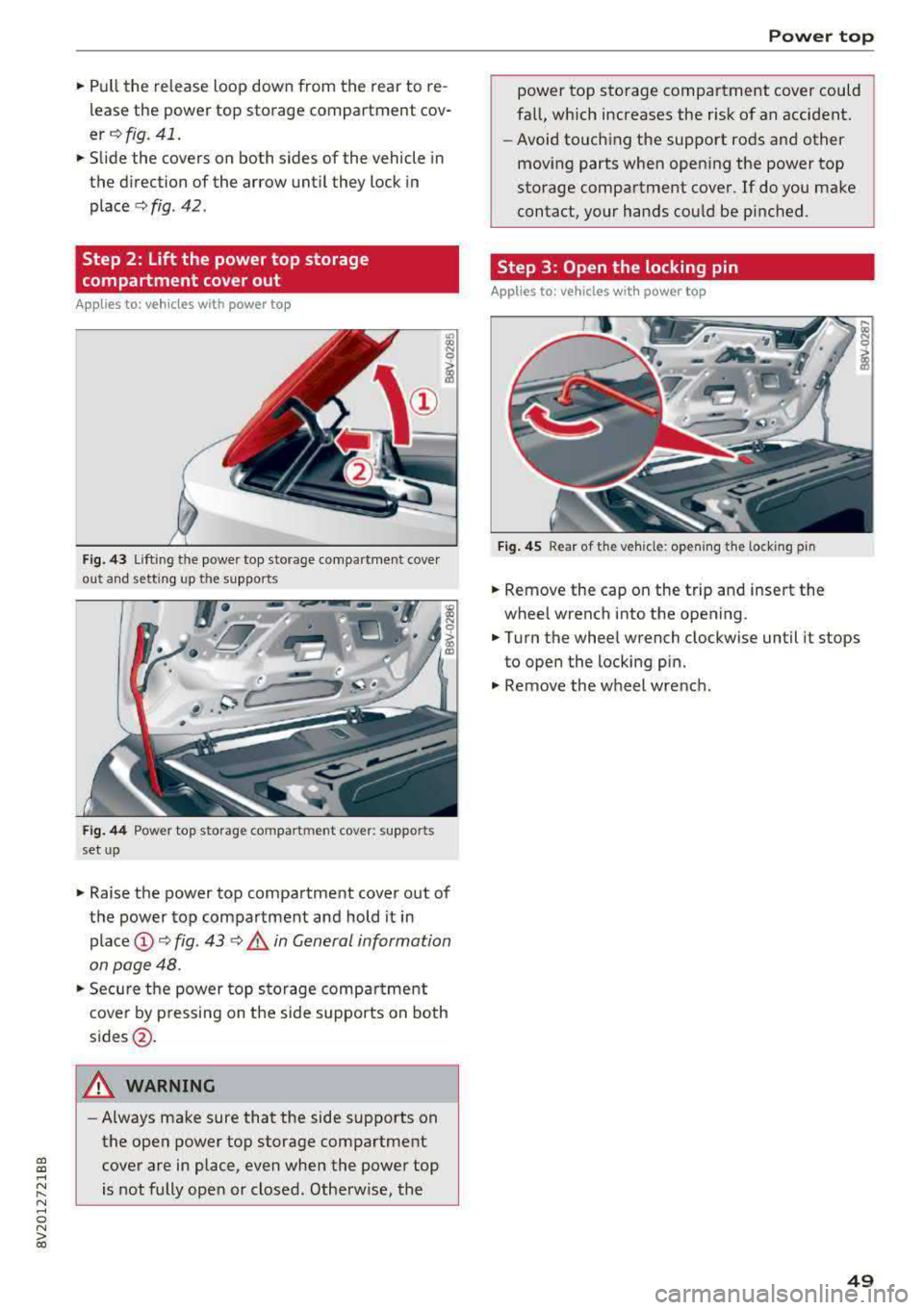
Fig. 43 Lift ing t he powe r top sto rage compa rtment cove r
ou t ahd setting up t he supports
Fig. 44 Power to p storag e com pa rtm ent cove r: suppor ts
set up
.. Raise the power top compartment cover out of
the power top compartment and hold it in
place@¢ fig. 43 <:> .&, in General information
on page 48 .
.. Secure the power top stora ge compa rtment
cover by pressing on the side supports on both
sides@.
A WARNING
-Always make sure that the side supports on
the open power top storage compartment cover are in place, even when the power top
is not fully open or closed. Otherw ise, the
Power top
power top storage compartment cover could
fall, which increases the r isk of an accident.
- Avoid touching the support rods and other
moving parts when open ing the power top
storage compartment cover . If do you make
contact, your hands could be pinched.
Step 3: Open the locking pin
Applies to: veh icles w ith power top
Fig. 4 5 Rear of the veh icle : open ing the lock ing pin
.. Remove the cap on the trip and insert the
wheel wrench into the opening .
.. Turn the wheel wrench clockwise until it stops
to open the locking pin .
.. Remove the wheel wre nch .
49
Page 55 of 400
a, a, ..... N
" N ..... 0 N > 00
~ Headlight assista nt: m alfun cti on! See own
e r's manual
Drive to an autho rized Aud i deale r or a uthorized
Aud i Service Facility immedia tely to have the
malfunct ion corrected. You can still switch the
high beams on or off manually.
ID High beam as sis t : currently unavailable. No
ca mera vie w
~ Headlight a ssi stant: currently un available .
Camera view re strict ed du e to surroundin gs.
See owner 's manual
The camera view is blocked, for example by a
sticker or debris. Please clean the windshie ld .
The sensor is located in the inter ior rearview mir
ror mount . Do not place any stickers in this area
on the windsh ield .
& WARNING
High beam assistant is only intended to assist
the drive r. The dr iver is still responsible for
con troll ing the headlights and may need to
switch t hem on and off manually depending
on light and visibility conditions . It may be
necessaty to operate them manua lly in s itua
tions such as:
- In adverse weather conditions such as fog,
heavy rain, b low ing snow or spraying water.
- On roads where oncoming traffic may be partially obscu red, such as expressways .
-If there are road users with poor lighting,
such as bicyclists .
- In tight c urves and on s teep hills.
- In poorly lit areas.
- With strong reflecto rs, such as s igns.
- If the area of the windsh ield near the sensor
is fogged over, dirty, icy or covered with a
st icker.
ll Th is fun ctio n is not a vail able in al l countries.
Lights and V ision
Adjusting the exterior lighting
T he functions are adjusted in the Infotainment
system .
.,. Select in the Infotainment system: I MENU ! but
ton
> V ehicle > left control button > V ehicle
setting s> Exterior light ing .
Aut omat ic h eadlight s*
You can adjust the following settings in the Au
tomati c headlights
menu :
Activation tim e* -you can adjust if the head
lights sw itch on
Earl y, Medium or Late acco rding
to the sensitivity of the light s ensor .
Headlight a ss is tant * -you can switch the h igh
beam assistant * on and off .
Entry/exit lighting*
You can switch the entry/exit lighting* on and
off. When it is dar k, it illum inates the area
around the vehicle when un loc king t he ve hicle
and after sw itchi ng off the ignition and opening
the driver's door .
T he entry/exit lighting only work s whe n it is da rk
and the light sw itch is in the
AUTO * position .
Daytime running lights1
)
The daytime runni ng lig hts can be turned on and
off . When daytime r unning lights are turned on,
the lights w ill stay on continuously whenever the
i gni tion is sw itched on .
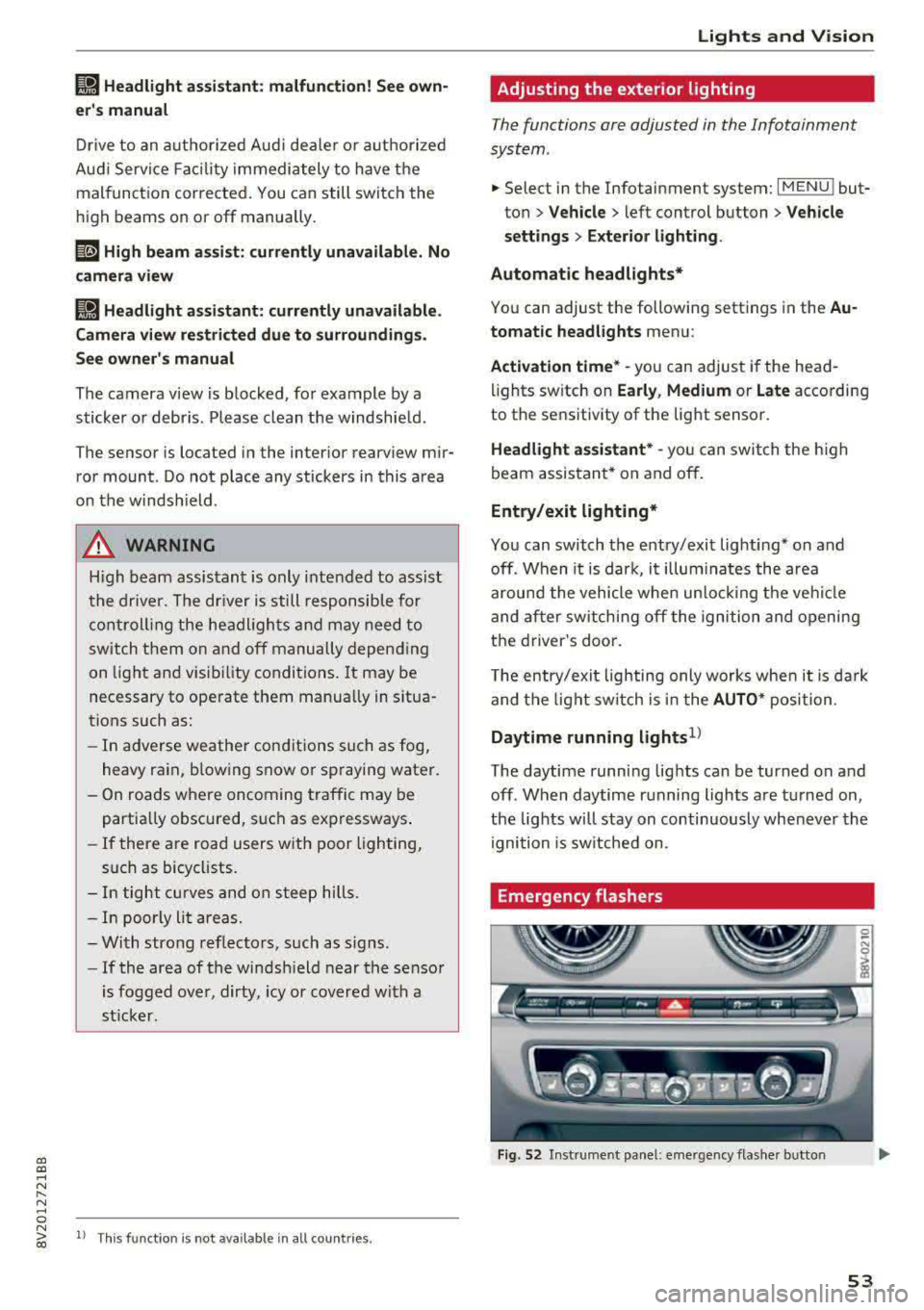
Emergency flashers
Fig. 52 Instrume nt pa nel : eme rge ncy flas her b utto n
53
Page 56 of 400
Lights and Vision
The emergency flashers makes other drivers
aware of your veh icle in dangerous situations.
• P ress t h e ~ button to switch the eme rgency
f lashers on o r off.
You can indicate a lane change or a tu rn when the
emergency flas hers are sw itched on by using the
tur n sig nal lever. The emergency flashers stop
tempo rarily .
The emergency flashers also work when the igni
tion is turned off.
Interior lighting
Front interior lighting
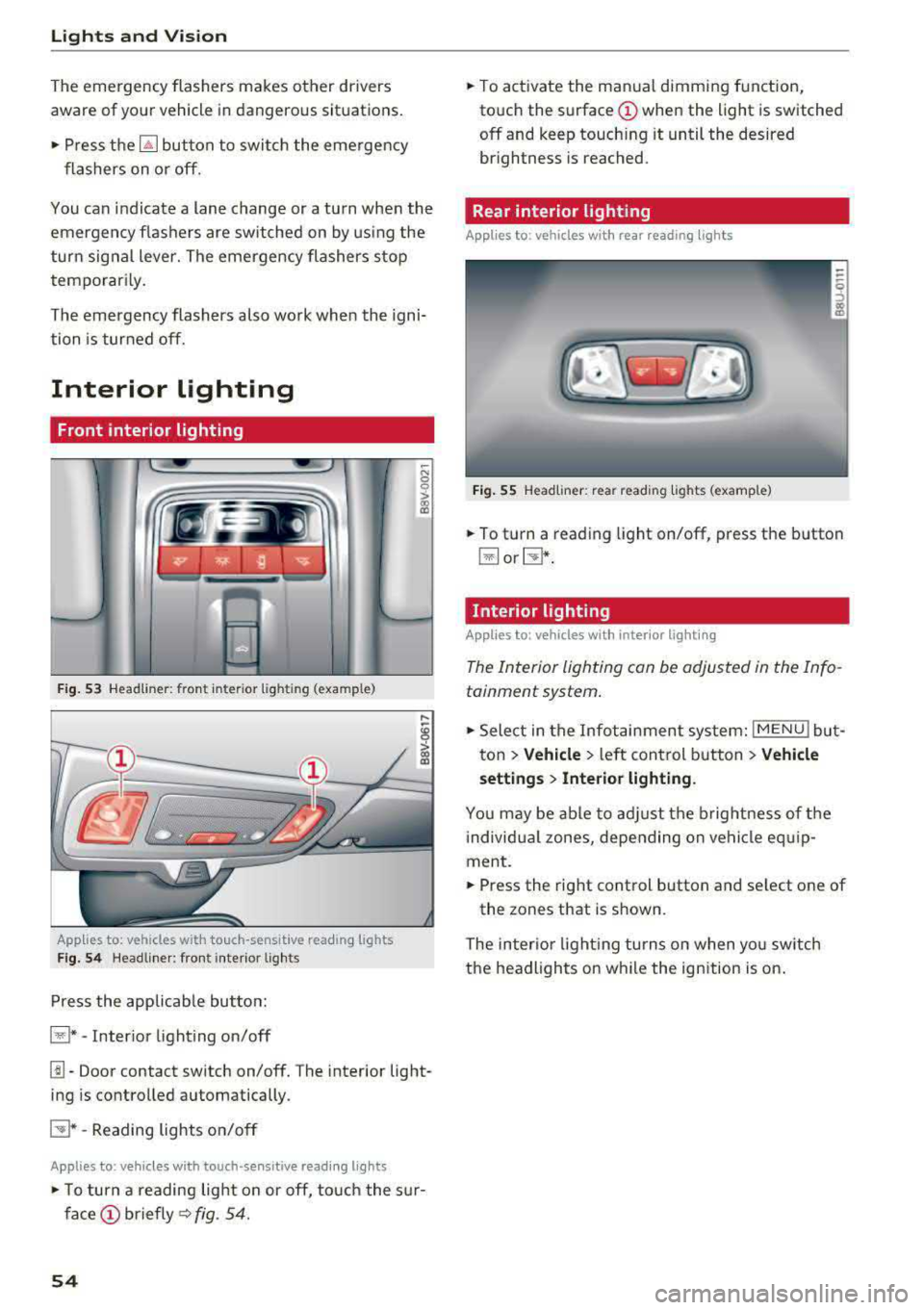
F ig. 53 Headli ner : fr on t in te ri or l ig htin g (exa mple )
Applie,s to: vehicles with touch -sensitive reading lights
Fig . 5 4 Headli ner: fro nt i nte rior lig hts
Press the app licab le bu tton:
@ * -Inter ior light ing on/off
~ N 0
0
> ~
l!I -Door contact switch on/off. The interior light
ing is controlled automatically.
E:!J* -Reading lights o n/o ff
Applies to: vehicles with touch-sensitive reading lights
• T o turn a reading lig ht on or off, to uch the s ur
face (!) briefly ~ fig. 54.
54
• To activate the man ua l dimming function,
to uch the
surface (!) when the light is switched
off and keep touch ing it until the desired
brightness is reached.
Rear interior lighting
Applies to : vehicles with rear reading lights
Fig. 55 Headliner : re ar reading lig hts ( example)
• To t urn a reading light on/off , press the b utton
@ or~ .
Interior lighting
Applies to: vehicles with interior lighting
The Interior lighting can be adjusted in the Info
tainment system .
• Select in the Infotainment system : IMENU! but
t on
> Vehicle > left control b utton > Vehicle
setting s
> Interior lighting.
You may be ab le to ad just the b rig htness of t he
i ndivid ua l zones, depending on ve hicle eq uip
ment .
• Press the right cont rol button and se lect one of
the zones that is shown .
The inter io r li ght ing turns o n when yo u sw itch
t h e headlights on w hile the ignition is on .
Page 72 of 400
Warm and cold
Warm and cold Climate control system
Description
The climate control system circulates, warms or
cools, and removes humid ity from the air in the
veh icle inter ior .
It is the most effective when the
windows and panorama glass roof* or power top*
are closed. If there is a build-up of heat inside
the vehicle, ventilation can help to speed up the
cooling process.
Pollutant filter
The pollutant filter removes pollutants such as
dust and pollen from the a ir.
Key recognition
Various settings are stored and assigned to the
remote control key be ing used .
These settings are different when the power top* is open or closed .
Presetting
Several functions can be preset in the Infotain
ment system.
Select in the Infotainment system:
I MENU I but
ton
> Vehicle > left control button > Air condi
tioning
A WARNING
Poor visibility can lead to accidents .
- For safer driving, keep all windows free of
ice, snow and fog.
- Become familiar with the correct use and
function of the climate control system as
quickly as possible, especially with the de
frosting and defogging functions.
- When the temperature is below freezing, only use the windshield washer system after
70
the windshield has been warmed by the cli
mate control system. The washer fluid could
freeze on the windshield and impair visibili
ty .
Cl) Note
-If you suspect that the climate control sys
tem is damaged, switch the system off to
prevent further damage and have it checked
by an authorized Audi dealer or authorized
Audi Service Facility.
- Repairs to the Audi climate control system
require special technical knowledge and
special tools . See an authorized Aud i dealer
or authorized Aud i Service Facility .
@ For the sake of the environment
-To save fuel, turn off the climate control
system cooling mode by press ing the A/C
button. This will also reduce emissions . The
climate control system is off when the LED
in the button turns off.
- In vehicl es w ith the efficiency prog ram*,
you can find other consumption information
and more economy tips <=? page 19.
(D Tips
- T o prevent interference with the heating
and cooling output and to prevent the win
dows from fogging over, the a ir intake in
front of the windshie ld must be free of ice,
snow or leaves.
- Condensation from the cooling system* can
drip and form a pudd le of water under the
vehicle. This is norma l and does not mean
there is a leak.
- The energy management system may tem
porarily switch off certain functions, such as
the seat heating* or rear window defogger.
These systems are available again as soon
as the energy supply has been restored.
Page 73 of 400
Warm and cold
Automatic climate control system
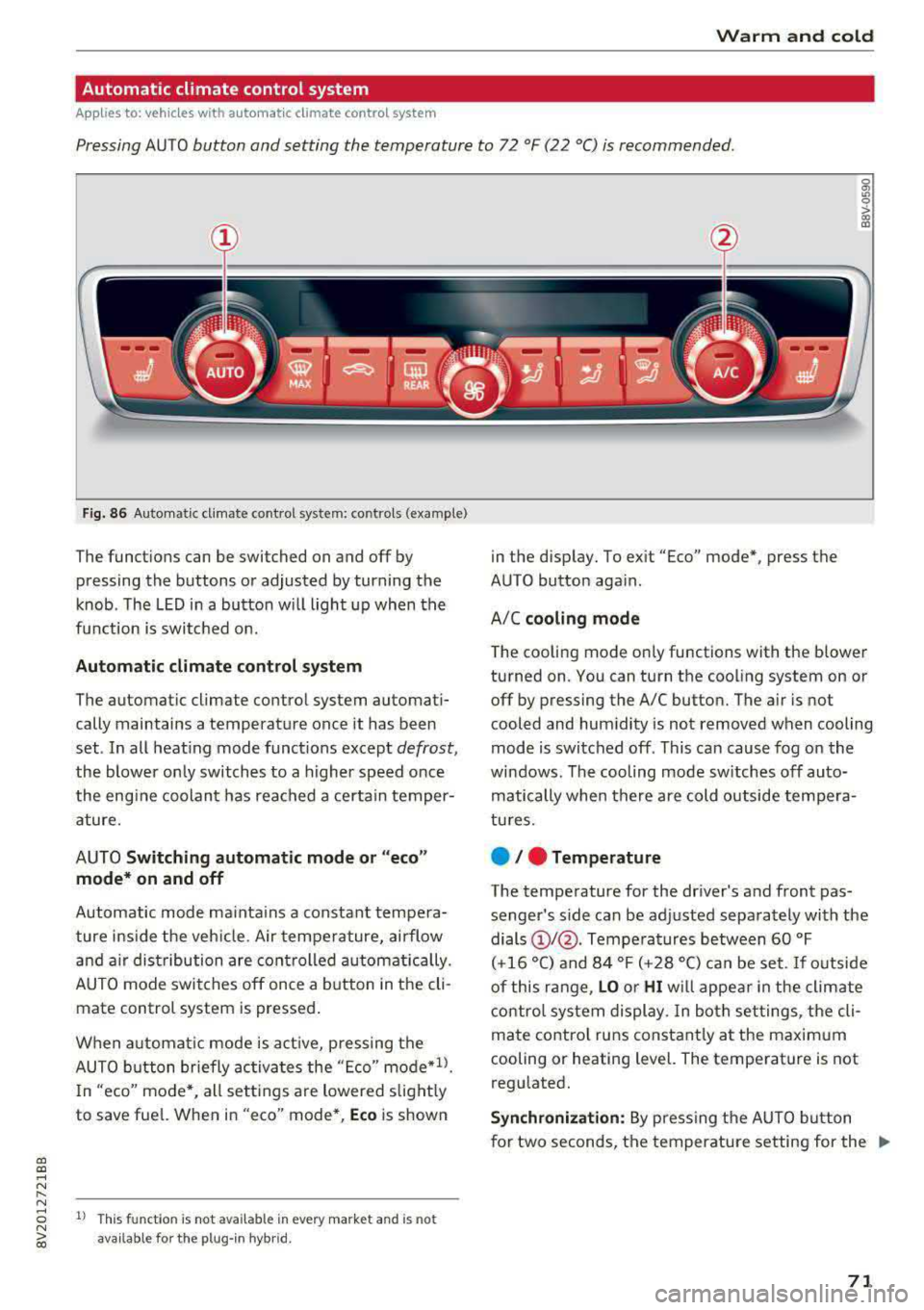
App lies to: ve hicles with a utomat ic clima te contro l syste m
Pressing AUTO button and setting the temperature to 72 °F (22 °C) is recommended.
a, a, ..... N
" N
Fig. 86 Automatic cl imate con trol system: controls (exa mple)
The funct io ns can be switched on and off by
pressing the buttons or adjusted by turning the
k n ob. The LED i n a butto n w ill light up wh en the
f u nction is switched o n.
Automatic climate control system
The automat ic climate control system automati
cally maintains a temperatu re once it has been
set . In all heat ing mode funct ions e xcep t
defrost,
the blower on ly switches to a higher speed once
the eng ine coolan t has reached a cer ta in temper
ature.
AUTO
Switching automatic mode or "eco "
mode* on and off
Automatic mode ma inta ins a constant tempera
ture ins ide the veh icle. Air tempe rature, airflow
and a ir dist ribution are cont rolled automat ically.
AUTO mode switches off once a b utton in t he cli
mate control system is pressed .
When a utomat ic mode is a ct ive, pressing the
AUTO b utton briefly activa tes the "E co"
mode*ll.
In "eco" mode'<-, all sett ings are lowered slight ly
to save fue l. When in "eco" mode*,
Eco is shown
8 1l Thi s funct ion is not available in every market and is not N ~ availab le fo r the plug- in hyb rid.
in the disp lay. To ex it "Eco" mode*, press the
AUTO button aga in.
A/C
cooling mode
T he cooling mode on ly functions with the blower
turned on. You can turn the cooling system on or
off by pressing the A/C button. The air is not
cooled and humidity is not removed when cooling
mode is switched off. This can cause fog on the
windows . The cooling mode sw itches off auto
matically when there are cold outside tempera
tu res.
e / e Temperature
The temperature for the driver's and front pas
senger's side can be ad justed separately with the
dials
(D I@ . Tempe ra tures between 60 °F
(+16 °() and 84 °F (+ 28 °() ca n be set. If o utside
of this range,
LO o r HI w ill appe ar in the climate
contro l system display. In bot h set tings, the cli
mate contro l runs constant ly a t the maxim um
cooling or heating level. The temperature is not
regu lated.
Synchronization: By pressing t he AUTO b utton
for two seconds, the temperature setting for the
.,..
71
Page 74 of 400
Warm and cold
driver is transferred to the front passenger's
side . This applies a t emperature change to the
front passenger's side .
8/r Blower
Using the regulator 8£?, you can manually adjust
the volume of air generated by the blower to your
p reference . The blower shou ld always run at a
low setting to prevent the windows from fogging
and to ensure a continuous exchange of air inside
the vehicle . To have the blower regulated auto
mat ically , press the AUTO button.
~/ :,0/ ~ Air distribution
The air distribution can adjusted with the but
tons. To have the air distribution regulated auto mat ically, press the AUTO button.
The round air vents in the cockpit are adjustable
qpage 73.
To keep the front s ide windows from fogging up
in damp weathe r, we recommend opening the
side air vents and tilting them to the side .
Foot vents are located under the front seats and
adjustable vents on the end of the center console
to heat the rear of the vehicle .
::!_ Defrosting
The windsh ield and s ide windows are defrosted
or cleared of condensation as qu ickly as possible .
The max imum amount of air flows ma inly from
the vents below the windshield. Recirculation
mode switches off. The temperature shou ld be
set at +72°F (22°() o r higher. The temperature is
controlled automatica lly. In the
;Ix setting, the
A/C cooling mode switches on automatically , d e
pending on the outside air temperature.
The AUTO button switches the defroster off.
cE) Recirculation mode
The recirculation mode can be turned on manua l
ly or automatically*.
- Switching manual recirculation mode on and
off: Press
the~ button.
72
- Automatic * reci rculation mode: auto recircula
tion needs to be activated in the Infotainment
system. Select in the Infotainment system:
I MENU I but ton > Vehicle > left control button >
Air conditioning > Auto recirculation
The air
quality sensor that is designed for diesel and
gasoline exhaust automatically sw itches the re
circulation mode on or off depending on the
level of pollutants in the outside air.
In rec irculat ion mode, the air inside the vehicle is
c ir culated and filtered. This prevents the unfil
tered air outs ide the veh icle from entering the
vehicle inte rior. Switching rec irculation mode on
whe n driving through a tunnel or when sitting in
traffic is recommended
q .&..
Pressing the~ button, AUTO or the ;fx button
switches recircula tion mode off.
T he system switches to recirculation mode when
driv ing in reverse when the engine is cold .
SP. Rear window defogger
If the rear window defogger is activated when
the igni tion is switched on, the battery manage
ment determines based on the battery charge if
i t is possible to turn on . Otherwise, the rear w in
dow defogger functions with the engine running
and switches off automatically after approxi
mately 10 -20 minutes, depending on the out
side temperature .
To prevent the rear window defogger from
switching off automat ica lly, press and hold the
!fP. button for more than two seconds. This re
mains stored up to approximate ly 15 minutes af
te r turning off the ignition.
J Seat heating*
Pressing the J button switches the seat heat ing
on at the highest setting (level 3) . The LEDs indi
cate the temperat ure level. To reduce the tem
perature , press the button again. T o switc h the
seat heating off, press the button repeatedly un
ti l the LED turns off .
After approximately 10 minutes, the seat heating
a utomat ically switches from level 3 to level 2.
.,..
Page 75 of 400
a, a, ..... N
" N ..... 0 N > 00
_& WARNING
-You should not use the recirculation mode
for an extended period of time, because no
fresh a ir is drawn in and the windows can
fog when coo ling mode* is switched off .
T his increases the r is k of an accide nt.
- Individuals with reduced sensitivity to pain
o r temperat ure cou ld develop burns when
using the seat heating fu nction . To reduce
the risk of injury, these ind iv iduals should
not use seat heating.
(D Note
To avoid damage to the heat ing elements in
the seats, do not kneel on the sea ts or place
heavy loads on a small area of the seat.
@ Tips
-The setting for the seat heating on the driv
er's side is ass igned to the key that is in use.
-If the front passenger's seat heat ing is
turned on, it will not turn on again automat
i ca lly if more than 10 m inutes have passed
between sw itching the ign ition off and
switching it on again .
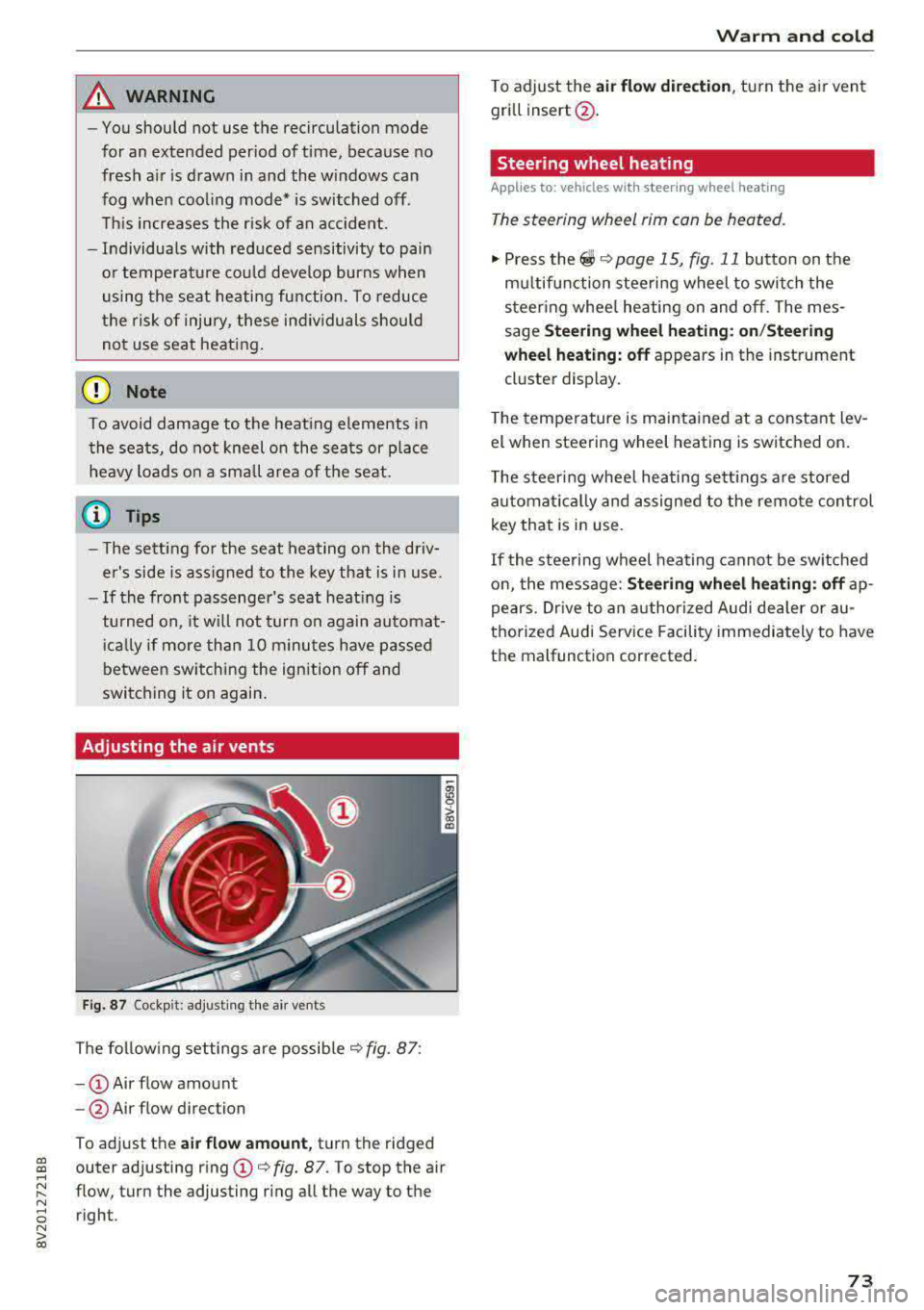
Adjusting the air vents
Fig. 87 Cockp it: adjust ing the air vents
The fol low ing settings are possib le ¢fig. 87:
- CD Air flow amount
-@ Air flow direction
To adjust the
air fl ow a mount , turn the ridged
outer adjusting ring
CD ¢ fig. 87. To stop the air
flow, turn the adjusting ring all the way to the right .
Warm and cold
To adjust the air fl ow directio n, turn the air vent
gri ll insert @.
Steering wheel heating
Applies to: vehicles with steering wheel heating
The steering wheel rim can be heated.
"' Press the ~ ¢ page 15, fig. 11 button on the
mu ltifunction steering wheel to switch the
steering whee l heating on and off. The mes
sage
St ee ring wheel h eatin g: on/St eering
w hee l heating: off
appears in the instrument
cluster display.
T he temperature is mainta ined at a constant lev
el when steering wheel heating is switched on.
T he s teering wheel heating settings a re stored
automat ica lly and assigned to the remote control
key that is in use .
If the steering wheel heating cannot be sw itched
on, the message:
S te e ring wh eel h eating : off ap
pears. Dr ive to an authorized Audi dea ler or au
thorized Audi Service Facility immediately to have
the malfunction corrected.
73
Page 77 of 400
CXl CXl .... N ,.__
N .... 0 N > 00
next traffic light is red. This produces an engine
braking effect, which helps to protect the brakes
and tires and reduces the emissions and fuel con
sumption to zero (fuel shut-off during decelera
tion).
Shift efficiently
An effective way to save fuel is to upshift earlier.
Staying in a gear too long uses fuel unnecessari
ly .
Press down on the accelerator pedal slowly and
avoid "kick-down".
Avoid full acceleration
You should rarely travel at the maximum vehicle
speed. High speeds cause a disproportionately
high increase in fuel consumption, emissions and
traffic noise. Slower driving saves fuel.
Reduce idling time
The Start/Stop system* helps to reduce the idling
time automatically. In vehicles without the Start/
Stop system, it is efficient to switch the engine
off when stopped
at railroad crossings and long
red lights. Depending on the version of the en
gine, stopping the engine for as little as five sec
onds once it has reached operating temperature
still saves more fuel than leaving the engine run ning
-even when taking into account the amount
of extra fuel that is used to restart the engine.
It takes a very long time in idle to warm the en
gine up to operating temperature. Wear and
emissions are especially high in the warm-up
phase. Therefore, you should begin driving im
mediately after starting the engine. Avoid high
RPMs while doing this.
Have maintenance performed regularly
By having maintenance performed regularly on
your vehicle, you can help to reduce fuel con
sumption before you even start to drive. The maintenance condition of your vehicle not only
affects traffic safety and long-term value but al
so impacts
fuel consumption. A poorly main
tained engine can lead to fuel consumption that
is 10% higher than normal.
Driving
Avoid short trips
The engine and emissions control system must
reach their optimal
operating temperature to ef
fectively reduce consumption and emissions.
A cold engine uses a disproportionately high
amount of fuel. The engine reaches operating
temperature and consumption normalizes only
after approximately 2.5 miles (4 km).
Check the tire pressure
To save fuel, make sure the tires are always in
flated to the correct pressure
r=;, page 33 5. The
fuel consumption can increase by S% if the pres
sure is only 0.5 bar too low. Due to the increased
rolling resistance, low tire pressures will also
lead to greater tire
wear and will affect driving
behavior.
Do not drive on
winter tires year-round, as this
will consume up to 10% more fuel.
Eliminate unnecessary weight
Since every kilogram of extra weight increases
fuel consumption, a quick inspection of the lug
gage compartment may be worth it to avoid un
necessary weight.
When not being used, a roof rack should be re
moved to decrease the wind resistance of the ve
hicle. You will save approximately 12% of your
fuel when at speeds from 62-75 mph
(100-120 km/h).
Save energy
The engine drives the generator, which generates
electricity; the fuel consumption also increases
with the demand for electricity. Therefore, switch
electrical equipment off when you no longer
need it. Examples of equipment that uses a lot of
energy are air blowers at a high setting, the rear
window defogger and seat heating*.
(D Note
- Do not leave engine idling unattended after
starting. If warning lights should come on
to indicate improper operation, they would go unheeded. Extended idling also produces
heat, which could result in overheating or
IJ,-
75
Page 85 of 400
a, a, ..... N
" N ..... 0 N > 00
If the Start/Stop system has not turned off the
engine or if you have switched the Start/Stop sys
tem off manually, the ignition will not be auto
mat ically switched off and the engine w ill contin
ue to run
c:> ,& .
A WARNING
To reduce the risk of poisoning, never allow
the engine to run in confined spaces.
{!) Tips
If you select the D or N se lector lever position
in a vehicle with an automat ic transmission
after sh ift ing into reverse, the vehicle m ust
be driven fas ter than 6 m ph (10 km/h) in or
de r fo r the e ngine to switch off again.
Manually switching the Start/Stop system
on/off
Applies to: vehicles with Sta rt/Stop system
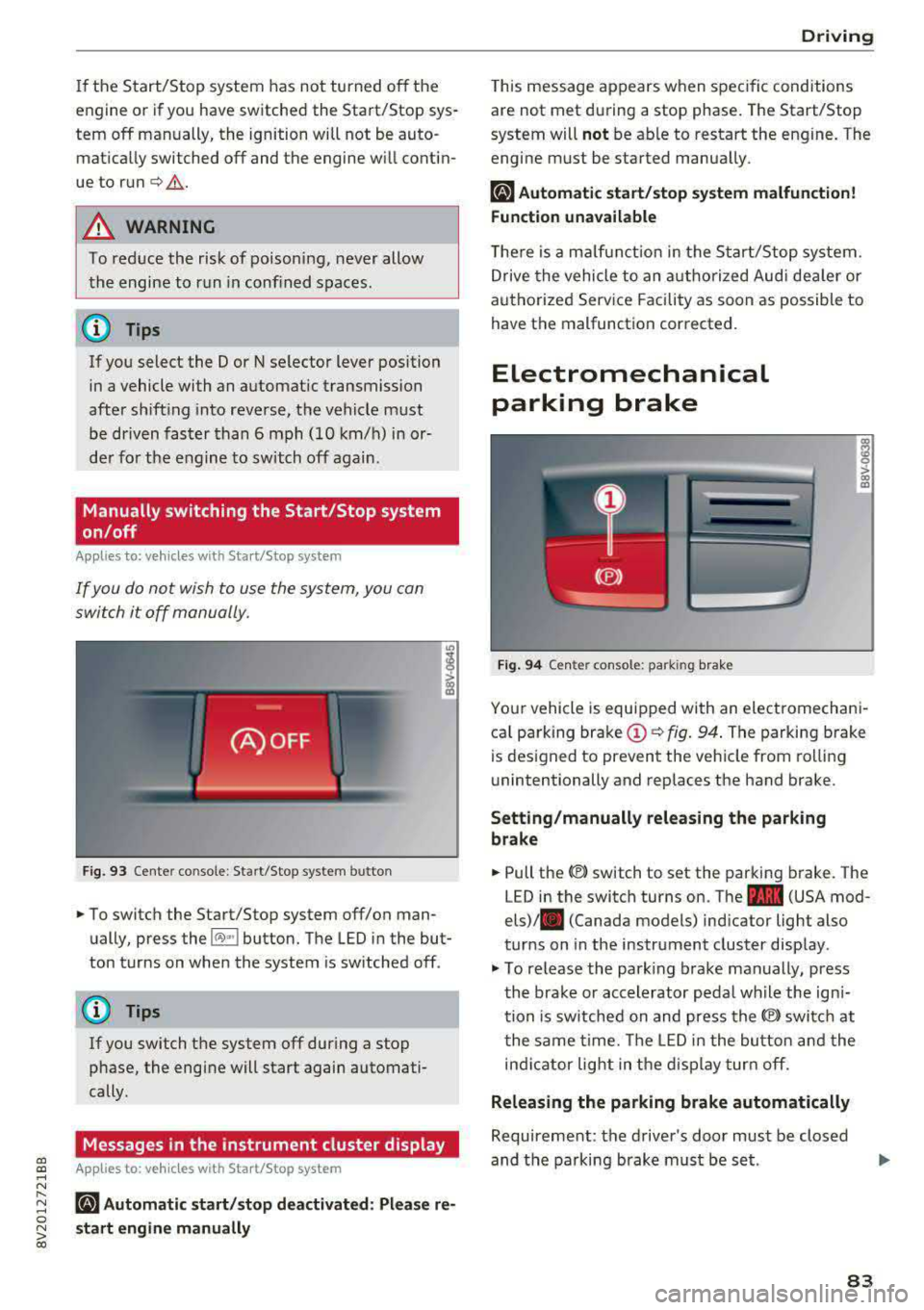
If you do not wish to use the system, you can
switch it off manually.
F ig . 93 Cen ter co nsole: Start/S top system button
-
"' To switch the Start/Stop system off/on man
ually, press the
l (A) ~I button. The LED in the but
ton turns on when the system is sw itched off .
@ Tips
If you switch the system off during a stop
phase, the engine will start again automati
cally.
Messages in the instrument cluster display
Applies to: veh icles with Start/Stop system
ml Automatic start /stop deactivated : Please re
s tart engine manually
D rivi ng
This message appears when spec ific conditions
are not met du ring a stop phase . The Start/Stop
system will
not be ab le to restart the engine. The
engi ne must be started manua lly .
ml Automati c start /stop system malfun ction!
Function unavailable
T he re is a m alfu nction in the S tart/Stop system.
Drive the vehicle to an a uth orized Aud i dea ler or
a uthori zed Serv ice Facility as soon as possible to
have the malfunction corrected.
Electromechanical
parking brake
F ig . 94 Cen ter console : park ing bra ke
ra 0 > co m
Yo ur vehicle is equipped with an electromechani
ca l parking brake
(D c:> fig. 94 . The parking brake
is des igned to prevent the veh icle from rol lin g
unintentionally and replaces the hand brake.
Setting /manually releasing the parking
brake
"' Pull the(®) switch to set the parking b rake. The
LED in the switch turns on. The
-(USA mod
els)/ . (Canada models) ind icator light also
turns on in the instrument cluster disp lay .
"'To re lease the park ing brake man ually, press
th e bra ke or accelerator peda l wh ile the ign i
tion is sw itched on and press the
(®) switc h at
t he same time. The LED i n the bu tton and the
in di cator light in the d isp lay turn off.
Releasing the parking brake automatically
Requireme nt: the driver's door must be closed
and the parking brake must be s et.
83