ac setting AUDI A3 SEDAN 2017 Owner's Manual
[x] Cancel search | Manufacturer: AUDI, Model Year: 2017, Model line: A3 SEDAN, Model: AUDI A3 SEDAN 2017Pages: 400, PDF Size: 67.32 MB
Page 92 of 400
Driving
Manual shifting (tiptronic mode)
Applies to: vehicles w ith a utomat ic t ransm iss io ns
The tiptronic mode allows the driver to shift the
gears manually .
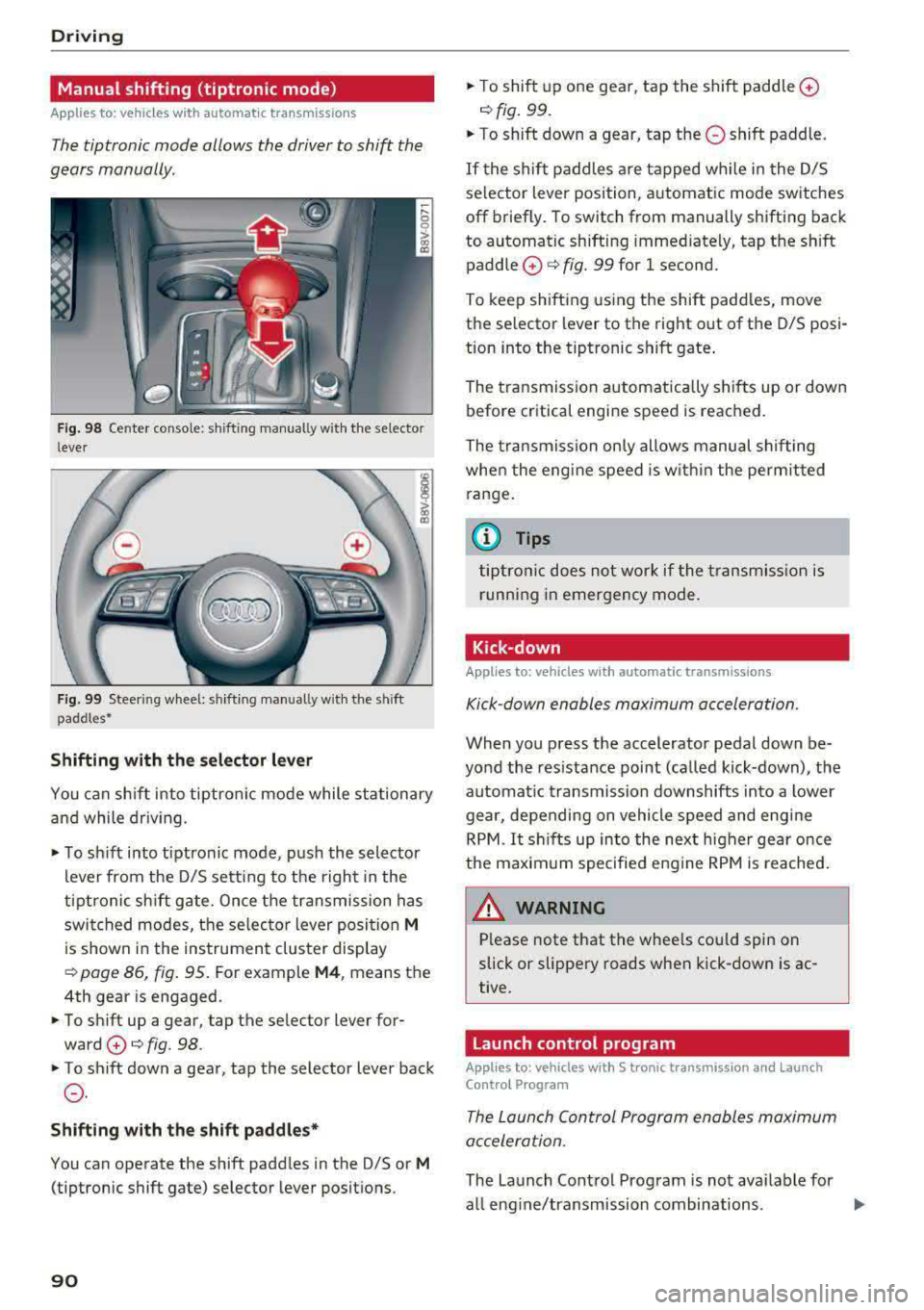
Fig. 98 Cente r conso le : shifting manually w ith the se lector
l ever
F ig. 99 Steer ing wheel: sh ifting manually w ith t he s hift
paddles •
Shifting with the selector lever
You can sh ift into tiptronic mode while stationary
and while driv ing.
.. To sh ift into tiptronic mode , pus h the selector
lever from the D/S setting to the r ight in the
tiptronic sh ift gate. Once the transmission has
swi tched modes, the se lec tor lever posi tion
M
is shown in the instrument cluster display
¢ page 86, fig. 95. For example M4 , means the
4th gear is engaged .
.. To sh ift up a gear, tap the se lector lever for
ward
0 ¢ fig. 98 .
.. To shift down a gear, tap the selector lever back
0 .
Shifting with the shift paddle s*
You can operate the shift padd les in the D/S or M
(tiptronic shift gate) selector lever positions.
90
.. T o shift up one gear, tap the shift paddle 0
¢ fig. 99 .
.. To shift down a gear, tap the 0 shift paddle.
If the shif t paddles a re tapped w hile i n the D/S
selector lever position, a utomatic mode switches
off briefly . To switch from manually shifting back
to automatic shifting immediately, tap t he sh ift
paddle
0 ¢ fig. 99 for 1 second.
To keep sh ifting us ing the shift padd les, move
the selector lever to the right out of the D/S posi
tion into the tiptronic shift gate .
The tr ansmission a utomatica lly shi fts up or dow n
before critical engi ne speed is reached.
The transmission on ly allows manual shifting
whe n the engi ne speed is w ith in the pe rmitted
range.
(j) Tips
tiptro nic does not wo rk if the transmiss ion i s
r unning in emergency mode .
Kick-down
Applies to : vehicles wi th auto matic transm issions
Kick -down enables maximum acceleration.
When you p ress the accelerator pedal down be
yond the res istance point (ca lled kick-down), the
automat ic transmission downshifts into a lower
gear, depending on vehicle speed and engi ne
R PM .
It shi fts up in to the next higher ge ar once
the maxim um specified eng ine RPM is reached .
A WARNING ,._
Please note that the whee ls could spin on
slick or slippe ry roads when kick-down is ac
tive.
Launch control program
App lies to: vehicles with S t ronic transmiss ion an d Launch
Co ntro l P rogram
The Laun ch Control Program enabl es maximum
acceleration.
The Launch Contro l Program is not ava ilable for
all eng ine/transmission combinations .
..,.
Page 102 of 400
e-tron
Setting plug -in hybrid drive modes
Applies to: vehicles with plug -in hybrid drive
You con select between one electric mode and
two hybrid modes .
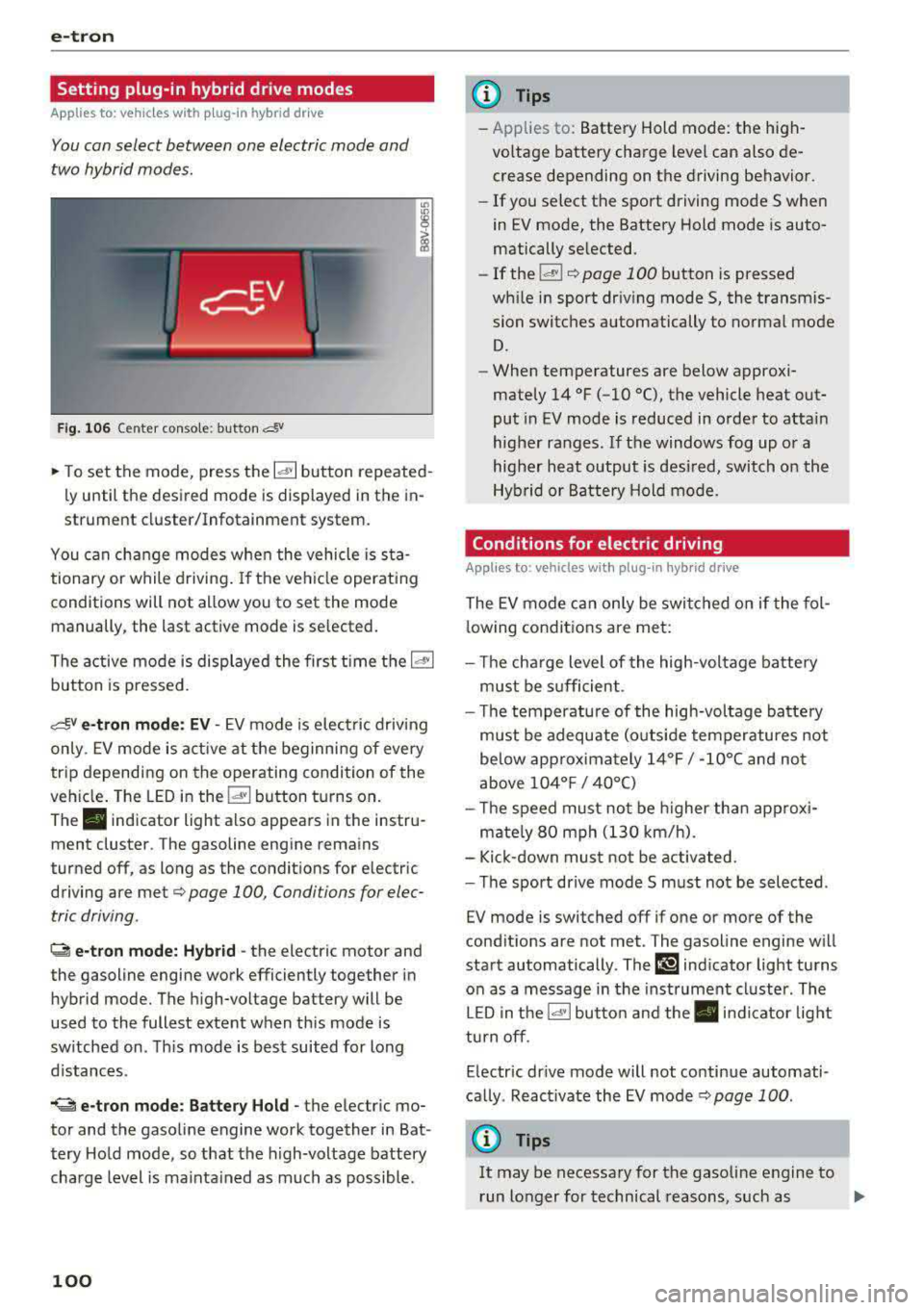
Fig. 10 6 Center conso le: button &
"' "'
i (0
~ To set the mode, press the ld' I button repeated
ly until the desired mode is displayed in the in
strument cluster/Infotainment system.
You can change modes whe n the vehicle is s ta
tionary or while driving . If the ve hicle operat ing
conditions will not allow you to set the mode
manually, the last active mode is selected.
The active mode is displayed the first t ime t he
ld• I
button is pressed.
av e -tron mode : EV -EV mode is elec tric dr iv ing
only. EV mode is active at the beginning of every
tr ip depending on the operating condition of the
veh icle . The LED in the
lal button turns on.
The . indicator light also appears in the instru
ment cluster. The gasoline engine remains
turned off, as long as the condit ions for electric
driving are met
c:;, page 100 , Conditions for elec
tric driving .
~ e-tron mode: Hybrid -the electric motor and
the gasoline engine work efficiently together in
hybrid mode. The high-voltage battery will be
used to the fullest extent when th is mode is
sw itched on . Th is mode is bes t suited for long
d istances .
.. ~ e-tron mode : Battery Hold -the electric mo
tor and the gasoli ne engine work together in Bat
tery Hold mode, so that the high-voltage battery
charg e level is ma inta ined as much as possible .
100
@ Tips
-Applies to: Battery Hold mode : the high
voltage battery charge level can also de crease depending on the driving behavior.
- If you select the sport driving mode S whe n
in EV mode, the Battery Hold mode is auto
matically se lected.
- If
the !& ! c:;, page 100 button is pressed
wh ile i n sport driv ing mode S, the transm is
sion switches automatically to normal mode
D.
- When temperatures are below approxi
mately
14 °F ( -10 °(), the vehicle heat out
put in EV mode is reduced in orde r to attai n
highe r ra nges. If the windows fog up o r a
highe r heat output is desi red, switch on the
Hyb rid or Battery Hold mode.
Conditions for electric driving
Applies to : vehicles with plug-in hybrid drive
The EV mode c an only be swi tc h ed o n if the fol
l owing condit ions are met:
- T he cha rge level of the high-vol tage batte ry
m ust be sufficient .
- Th e temperature of the hig h-vol tag e batte ry
m ust be adequate (o utside temper atures not
below app roxima tely
1 4 °F / -10°( an d no t
above
1 04° F / 40°()
- Th e speed must not be higher th an approxi-
mate ly
80 mph (13 0 km/h).
- Kick-down must no t be a ctivated.
- Th e sport drive mode S m ust no t be selected .
EV mode is switched off if one or more of the
cond it ions are not met . The gasoline engine w ill
start automatically . The
111 ind icator light turns
o n as a message in the instrument cl uster . The
L ED in t he
l.c! 'I bu tto n and the . in dicator lig ht
tu rn off.
E lectric dr ive mode will not co ntinue automati
ca lly . React ivate the EV mode
¢ pag e 100 .
(D Tips
It may be necessary for the gaso line e ngine to
r un lo nger for technical reasons, such as
..,.
Page 110 of 400
e-tron
-When charging the high-voltage battery us
ing househo ld/industrial sockets, the elec
trical installat ion can be used at full capaci
ty. Having a qualified electrician regularly inspect the electrical installations that are
used for charging is recommended.
- The vehicle radio and TV systems may have
limited reception when charging the vehi
cle .
Charging at public
charging stations
Applies to: vehicles with plug- in hybrid drive
Use the charging cable supplied at the public
charging stat ion for charging. Contact an author
ized Audi dealer or authorized Aud i Service Facili
ty for more information.
• Fol low the operating instructions at the charg
ing station to charge the high-voltage battery .
• Unlock the veh icle if necessary ¢ page 34.
• Make sure that the selector lever is in the P po
sition and drive r eady mode is switched off.
• Turn the lock until it is vertical to open the cov
er on the charging unit ¢page 112 , fig . 123.
• Slide the cover carefully to the side if necessa
ry .
• Remove the lock on the charging port
¢ page 112, fig . 124.
• Remove the cap from the charging cable.
• Connect the cable to the veh icle charging port .
• If a charging timer is not set, the charging
process will start automatically depending on
the charg ing station
¢ page 112, Setting the
charging timer.
• The vehicle operating s tatus is indicated by the
status
LED @¢ table on page 115.
• Also read the information found in
¢ page 114 , After charging .
(D Tips
Only charge your vehicle at charging stations
that conform to the follow ing standards, de
pending on the country :
- GB/T 18487 .1 and GB/T 20234 (China)
- IEC 61851 and IEC 62196 (Europe)
- SAE Jl 772 (North America, Japan)
108
@ Tips
- It is not possible to charge using the charg
ing timer at some charg ing stations.
- You can use your Audi e-tron charging sys
tem if there is a household or industrial con
nection available at the charging station.
Charging the battery
with the Audi e-tron
charging system
Charging system overview
Applies to: vehicles with plug-in hybrid drive
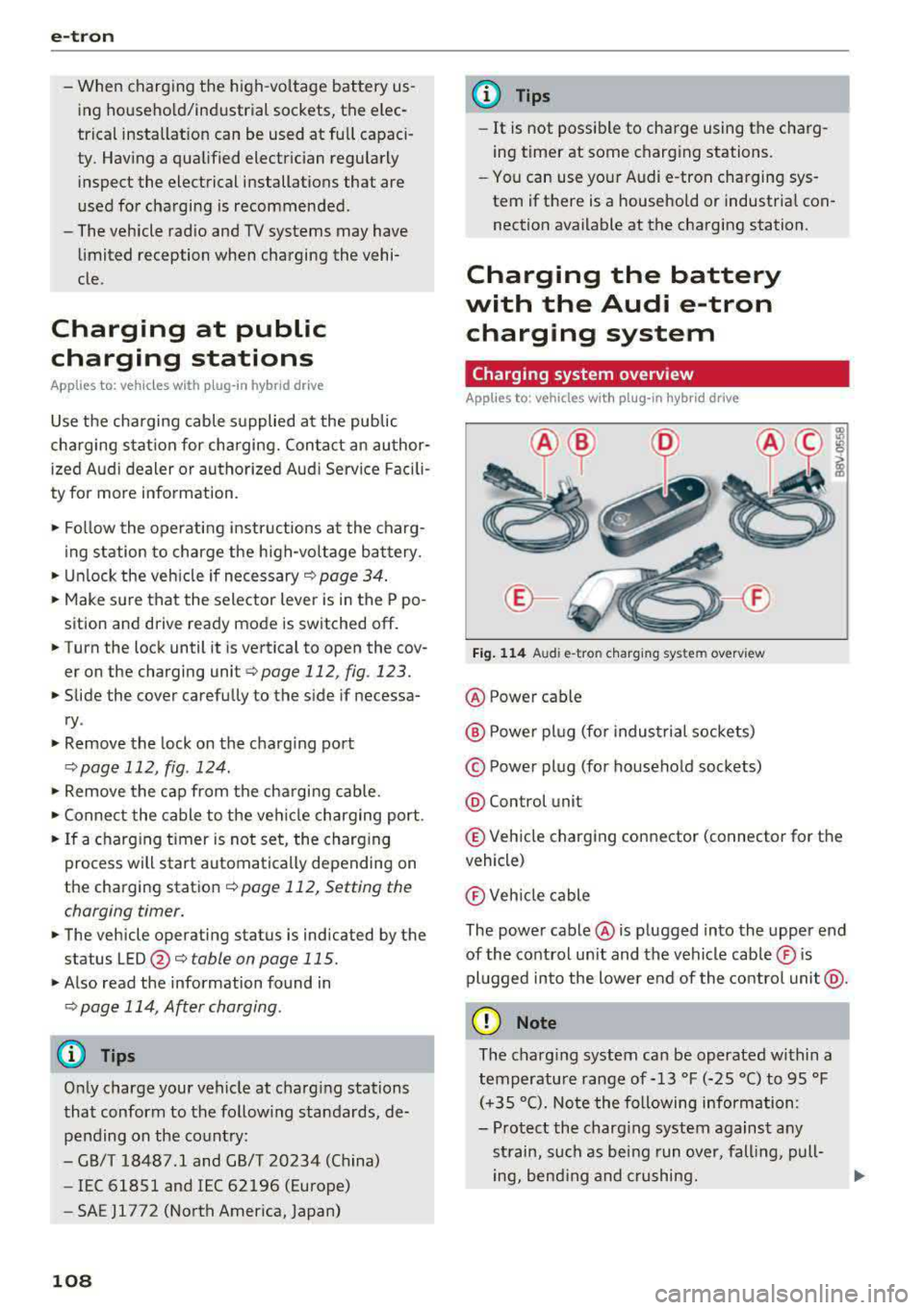
Fig. 114 Audi e-tro n charging sys tem overv iew
@ Power cable
@ P ower plug (for industrial sockets)
© Power plug (for household sockets)
@ Con trol unit
© Vehicle charging connector (connector for the
vehicle)
® Vehicle cable
The power cable @ is plugged into the upper end
of the control unit and the vehicle cable ® is
plugged into the lower end of the control unit@.
(D Note
The charg ing system can be operated within a
temperature range of-13 °F (-25 °C) to 95 °F (+35 °C). Note the following information:
- Protect the charging system against any
strain, such as being run over, falling, pull-
ing, bend ing and crushing.
II>-
Page 114 of 400
e-tron
@ Tips
-The device runs a se lf-test after power has
been restored to the control unit.
- You can activate a PI N for the control unit
¢ page 117 .
- The vehicle cannot be star te d if a cha rgi ng
connector is connected .
Before charging
App lies to: ve hicles w ith p lug- in hy brid drive
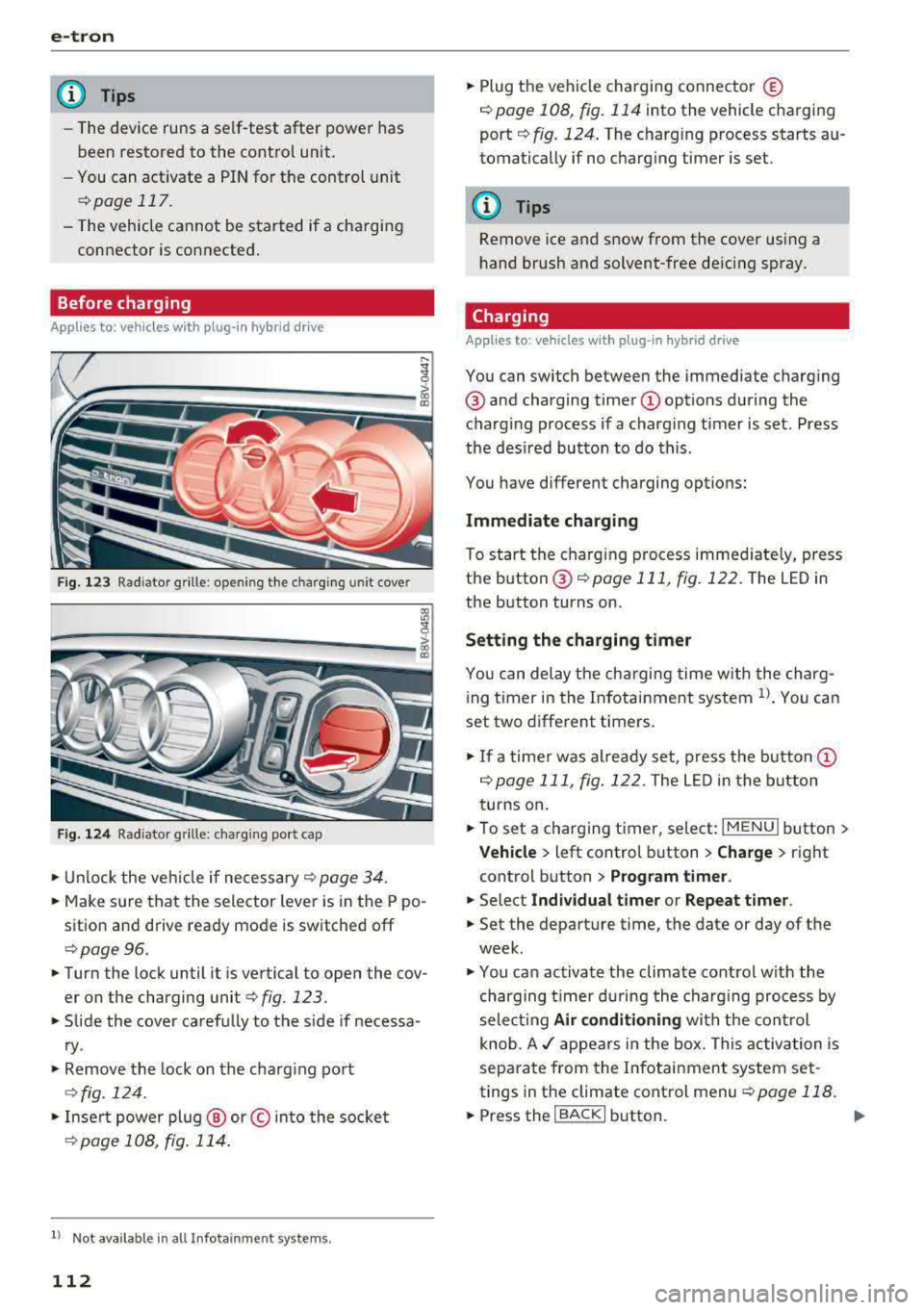
F ig. 1 23 Radiator g rille: ope ning the c harg ing uni t cove r
Fig. 124 Radiator g rille : cha rgi ng por t cap
"Unl ock the ve hicle if necessary ¢ page 34.
... Make s ure that the selector lever is in the P po
sition and drive ready mode is switched off
¢ page 96.
"Turn the lock until it is ve rtical to open the cov
er on the charging
unit ¢ fig. 123 .
... Slide the cover caref ully to t he s ide if necessa
ry .
... Remove the lock on the c harg ing po rt
¢fig. 124.
"Inser t power plug @ or© into the socke t
¢page 108 , fig. 114 .
l) Not availa ble in a ll Info ta in m en t sy ste m s.
112
... Plug the vehicle charging connecto r ©
¢ page 108, fig. 114 into the vehicle charging
port ¢ fig. 124. The c harging p rocess starts au
tomatically if no charg ing timer is set .
(D Tips
Remove ice and s now from the cover using a
h and brush and solvent-free de icing sp ray .
Charging
App lies to : vehicles wi th plug-in hybrid drive
You can switch between the immediate charg ing
@ and charging timer Q) options d uring the
charg ing process if a charg ing t imer is set . Press
the des ired button to do this .
You have different charging options:
Immediate charging
To start the c harging process immed iate ly, press
the b utton @
¢page 111 , fig. 122 . The LE D in
the button turns on.
Setting the charging timer
You can delay the ch arging time w ith the charg
i ng t imer in the Infota inment system
ll _ Yo u can
set two diffe rent timers.
" If a time r was alrea dy set, p ress t he bu tto n Q)
¢page 111, fig. 12 2. The LED in the button
t urns on .
... To set a charging timer , select: IMENU ! button>
Vehicle > left control button > Charge > r ight
control button >
Program timer .
... Select Individual timer or Repeat timer .
... Set the departu re time, the da te or day of the
week .
... You ca n activate the climate cont rol w ith the
charging t imer d uring the c harg ing process by
sele ct ing
Air conditioning wit h the cont rol
knob.
A ./ appears in the box. This activ ation is
separa te from the Infotai nment system set
tings in t he climate cont rol
menu ¢ page 118.
... Press the IBACKI b utton. ..,_
Page 115 of 400
CXl CXl .... N ,.__
N .... 0 N > 00
., To activate the desired timer, conf irm the set
ting with the control knob . A./ appears in the
box .
Preferr ed charg ing t ime
You can spec ify a preferred charging time for the
programmed timer, for example if yo u wou ld like
to use the off-peak rate.
., Se lect : IMENUI button> V ehicl e> left cont rol
button >
C ha rge > right contro l button > Pro
gr am tim er.
Power s ave mode
Powe r save mode is automatically switched o n
when the contro l unit has not been operated for
mo re than one m inute. The
L E D @ ~ page 111,
fig. 121 stays on. All other d isplays turn off.
.. To switch power save mode on or off, press the
~button @ ~page 111, fig. 121 .
Power save mode ends automatically when the
vehicle charging connector is plugged into the ve
h icle.
The high-voltage battery is charging when the
LED @ blinks.
(D Tips
-Air condit ioning and heating is powered
electrically if you select climate control us
i ng the charging timer . This may also be
used in confined spaces such as garages .
-Using the auxiliary air conditioning wh ile
charging can also reduce the charge level of
the high-vo ltage battery.
-The high-voltage battery also charges in
power save mode .
-If the charging process is in progress, it will
not be interrupted when power save mode
switches on.
-The charging process can be interrupted at
any time . Press the active button on the ve
hicle to do
this ~ page 111, fig. 122.
-The cl imate control output wh ile charging
depends on the capacity of the electrical
connection . Additional information on cl i
mate control can be found under
~ page 118.
e-tron
Setting the charging power level
Applies to: vehicles with plug -in hybrid drive
The cont rol un it automatically recognizes the
vo ltage and the available current strength. You
can set whethe r you wou ld like to charge w ith the
f ull or half of the charging power .
., Press the I OKI@ ~ page 111, fig. 121 butto n
on the control unit .
., Enter the PIN if necessary.
., PO WER and SET PIN appear in the disp lay
fie ld .
., Select POWER with the a rrow button ©
., Press the I OK ! button @.
., The charging power disp lay appears. The cur
rent set value (50% or 100%) is marked with a
frame .
., If necessa ry, change the setting using the ar
row button © to move downwa rd or upwa rd.
., Press the I OK I button @.
(D Tips
-If a household socket is used for the charg
ing process, the cha rging power level is au
t oma tically set to 100%. If m ultip le electri
cal consumers are connected to a circu it,
the charging power may be limited to 50%
when charging with a household socket in
order to relieve the load on the electrical in
stallation.
-If an industrial socket is used for the charg
ing process, the charging power level is au
tomatically set to 50%. To rece ive the maxi
mum charging power, the value must be set
to 100% .
-A selected value remains set until the power
cable is connected again .
113
Page 121 of 400
Setting the timer
Appl ies to: ve hicles with p lug -in hybrid drive
By setting the depa rture time, you dete rm ine
when yo ur vehicle shou ld reach the desi red tem
pe rature . You can set the time r in the auxiliary air
conditioning menu in the Infotainment system.
Auxiliary climate control : setting th e timer
• Select: I MENU I button > Veh icl e> left control
button >
Auxiliar y A/C > right cont rol b utton>
Program tim er.
• Set the time and the date .
• Press the I BACK I button.
• Confirm the setting with the control knob to ac-
tivate the timer. A
..f appears in the box.
When you reprogram a timer, the next calendar
day is automatica lly entered in the Infotainment
system . To activate the auxiliary climate control
for the next day, confirm the
setting( ../ in the In
fotainment system).
Error me ssag es
l;c1 -The hig h-voltage battery charge level is too
low to heat/air condition the vehicle using only
e lectric power.
I f one of the fo llow ing symbols appears in the
d isp lay, then you cannot switch on the auxiliary
climate cont rol:
,...c -T here is a system ma lf u nction.
Bu -The fuel level is too low .
(D Tips
-You can set the t imer a maximum of seven
days in advance.
- You can operate the climate control in the
vehicle interior when the high-vo ltage bat
tery is charging using the charging timer
9 page 112 . The climate control output de
pends on the powe r socket capac ity.
- Make su re the time and date match in the
Infotainment system settings so that the
timer can function
p roper ly ~ page 241 .
~ -The aux ilia ry climate control can continue to ....
~ run after the depart ure t ime is reached.
N .... 0 N > 00
e-tron
Cleaning/maintenance
information
Appl ies to : vehicles wi th plug-in hybrid drive
When was hing your vehicle with a pressure wash
er, always follow the operat ing instruct ions pro
vided with the pressure washer . This is especially
i mportant in regard to the pressu re and spray ing
distance. Do not dire ct cleaning spray at the
charg ing unit in the rad iator g rille or at t he
charg ing dock*/charging cl ip *. Keep a d istance of
a t least 16 in (40 cm) .
Do not remove snow and ice with a pressure
washer .
Never use cone nozzles or high pressure nozzles .
The water temperature must not be above 60
°C.
Remove contaminants on the Audi e -tron system
with a dry towel.
Remove contaminants on the charging do ck*/
charg ing clip* wi th a wet towel dampened w ith
alcohol-free clean ing solution .
A WARNING ~
-Never immerse t he Audi e-tron charging
system and connecto rs in water.
- The A udi e -tron charging system must on ly
be cleaned when the control unit is com
p letely disconnected from the power supp ly
and from the vehicle.
(D Note
To dec rease the risk of discoloration, never
clean the c harging doc k*/charging clip * with
harsh cleaning sol utions or so lutions that
contain alcoho l.
119
Page 125 of 400
a, a, ..... N
" N ..... 0 N > 00
Assistance systems Electronic speed limiter
Applies to: vehicles with electronic speed lim iter
Your vehicle may be factory equipped with tires
that are rated for a maximum speed of 130 mph
(210 km/h). This is less than the maximum speed
of your vehicle. To reduce the risk of sudden tire
failure and loss of control if the vehicle is operat
ed at excessive speeds, your vehicle also has an
electronic speed lim iter . The electronic speed
limiter prevents your vehicle from going faster
than the tir e speed rating. For more information
¢page 335.
If the engine control unit receives faulty vehicle
road speed s ignals, the Malfunction Indicator
L amp (MIL)
II! will illuminate . If this occurs,
contact the nearest authorized Audi dealer for
assistance .
& WARNING
Always observe the posted speed limits and
adjust your speed to suit prevailing road, traf
fic and weather conditions. Never drive your
vehicle faster than the max imum speed rat ing
of the tires installed.
Speed warning system
Applies to: vehicles with speed warning system
The speed warning system helps you to stay be
low a specified maximum speed that can be set,
changed or deleted in the Infotainment system .
The speed warning system warns you if you are
exceeding the maximum speed that you have set.
A warning tone will sound as soon as your speed
exceeds the stored value slightly . The
101 (USA
models) /
[01 (Canada mode ls) indicator light
and the corresponding message appear in the in
strument cluster display at the same time. The
[OJ (USA models)/ (•j (Canada models) indicato r
light and the message turn
off when the vehicle
speed drops below the stored maximum speed.
Setting a threshold is recommended if you would
like to be reminded when you reach a certain
maximum speed. Situations where you may want
to do so include driving in a country with a gener-
Assistance systems
al speed limit or if there is a specified maximum
speed for winter tires.
Setting the warning threshold
• Select in the Infotainment system: I MENU ! but
ton
> Vehicle > left control b utton > Driver as
sistance
> Speed warning > Manual.
(0 Tips
Regardless of the speed warning system, you
shou ld always monitor your speed using the
speedometer and make sure you are following
the lega l speed limit.
Cruise control system
Switching on
Applies to: vehicles wit h cruise control system
The cruise control system makes it possible to
drive at a constant speed starting at 15 mph (20kmlh) .
0
f
~
0
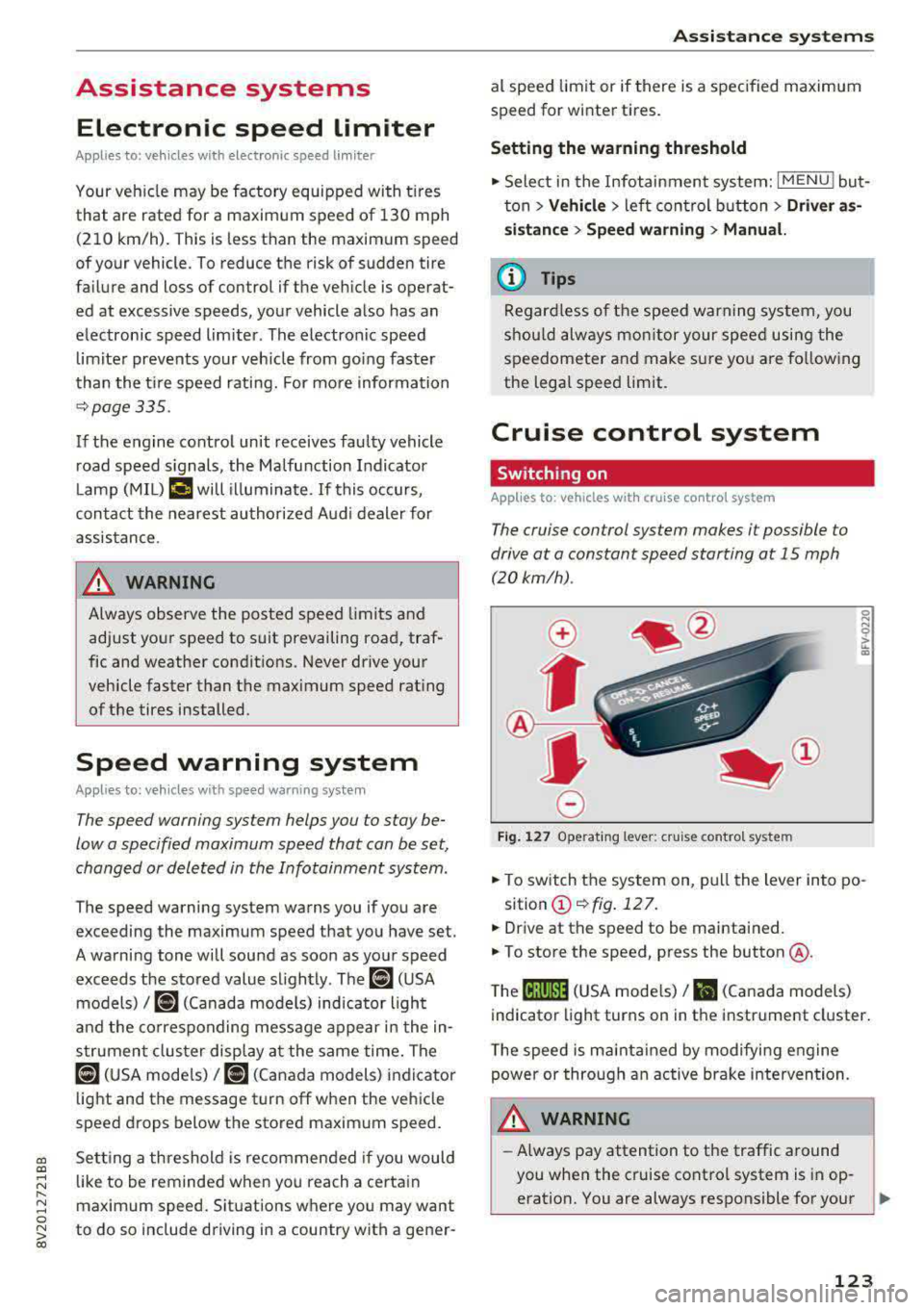
Fig. 127 Operat ing lever: cruise control system
i;:i N 0 > ... m
• To switch the system on, pull the lever into po-
sition
(D ¢fig . 127.
• Drive at the speed to be maintained.
.. To store the speed, press the button @.
T he
(ij;jl)~1i (USA mode ls)/ Bl (Canada models)
indicator light turns on in the instrument cluster.
T he speed is maintained by modifying engine
power or through an active brake intervention.
.i\, WARNING
-Always pay attention to the traffic around
-
you when the cruise control system is in op
eration. You are always responsible for your
..,
123
Page 127 of 400
CXl CXl .... N ,.__
N .... 0 N > 00
Switch ing the ign ition o ff will erase the stored
speed .
Switching off automatically
[ij;{ij~i~ (USA model s)11) (Canada models )
Speed control system : currently unavailable.
See owner's manual
The c ruis e contro l syst em was a utomat ica lly
turned off be ca use the system has dete cted a
mal funct ion th at is imp air in g t he cr uise con trol
f u nction. Try switc hing t he cr uise con trol system
on again la ter .
A WARNING
You s hould only resume the stored s peed if it
is not too high for exist ing traffic condit ions.
Otherwise you can increase the r isk of an acci
de nt.
Lap timer
Introduction
Appl ies to : vehicles with lap t imer
You can measure and analyz e lap times with the
lap tim er in the display.
Opening the lap timer
.. Open the first Vehicle tab (t rip computer) using
the
l <1 1> I butto n on the mult ifunct ion steer ing
wheel.
• Applies to: vehicles with analog instrument
cl uster: Press
thP l== I button on the m ultifu nc
t io n s teer ing whee l an d sele ct
Lap timer in t he
me nu.
• Applies to: vehicles with A udi virtual cockpit: on
t h e m ultif unct io n steer ing whee l, select: left
contro l button
> Lap times.
Operating the lap timer
• O n t he mult if u nct io n steer ing whee l, t urn t he
l eft thumbwhee l
0 ¢ page 13 or (D ¢ page 16
until t he desired menu i tem is dis played in the
inst rument cluste r.
• Press the left thumbwhee l to confirm the selec
t ion.
Assistance systems
A WARNING
Your focus shou ld always be on dr iv ing you r
vehicle safe ly . As the driver , you have com
pl ete res pons ibility for safety in traff ic . O nl y
use the functi ons such as the la p tim er in su ch
a way th at yo u always maint ain com plete con
t rol over yo ur vehicle in all traffic situations.
(D Tips
You can retr ieve informa tion from t he tr ip
com puter while t he la p timer stopwa tch is
run nin g.
Lap times and timing
Applies to: vehicles with lap t imer
R eq uireme nt: t he lap tim er mus t be ope n
¢page 1 25.
Timing laps
-
.. To s ta rt tim ing, select Lap 1 -press OK or Start
lap 1
in t he m enu .
• App lies to: veh icles with Audi virtual cockpit: to
s t ar t t im ing au tom atic ally w hen yo u start dr iv
in g, selec t
Start lap 1 by driving off or Start by
driving off
i n the menu .
• To measure t he lap time, select New lap -press
OK or New lap
in the menu . This sta rts tim ing
the next lap at the same t ime.
A fter completing , the difference betwee n the
l ast lap and the p revious best lap t ime will be in
dicated with
a" -"/ . or "+ "/ • .
Pausing timing and displaying a split time
• To i nsert a pause m , sele ct Pause in the menu .
• To cont in ue timing, se lect Press OK to resume
or Resume in the menu.
• To display a sp lit t ime, select Split time in the
menu. The split
time [~] appears for approx i
mate ly 10 seconds in the instr ument cluster.
The tim ing of the current lap continues .
Resetting tim ing
• Using the mult ifunct io n steer ing whee l, select
Reset or Reset times in the menu.
125
Page 128 of 400
Assistance systems
(D Tips
-A maximum of 30 lap times (ana log instru
ment cluster) or 99 lap t imes (Audi virtual
cockpit*) can be measured.
- If timing is paused, you can continue it later
even if you switch the ignition off.
- Saved lap times cannot be individually de
l eted from the total resu lts.
- The saved lap timer values will remain after
switching the ignition off .
Lap statistics
Applies to: vehicles with lap timer
Display ing lap statistics
You can d isplay the number of laps driven, the
fastest lap" +", the s lowest lap" -", and the aver
age time
"0" in the instrument cluster.
~ Applies to: vehicles with analog instrument
cluster: select
Statistics in the menu using the
multifunction steering wheel.
~ Applies to: vehicles with Audi virtual cockpit: on
the multifunction steering wheel, select: left
control button
> Lap statistics or Statistics .
~ Turn the thumbwheel down or up to display the
individual lap times.
~ To retur n to the lap t iming that was begun,
press the left thumbwheel.
Resetting lap statistics
Applies to: vehicles with Audi virtual cockpit
~ On the multifunction steer ing wheel, select:
the right control button
> Reset statistics.
(D Tips
- The lap statistics list the lap times for the
last 30 laps.
-Applies to: vehicles with Audi virtual cock
pit: the fastest and slowest lap times from
up to 99 timed laps will be disp layed.
126
Audi adaptive cruise
control
Description
Applies to: vehicles with Audi adaptive cruise control
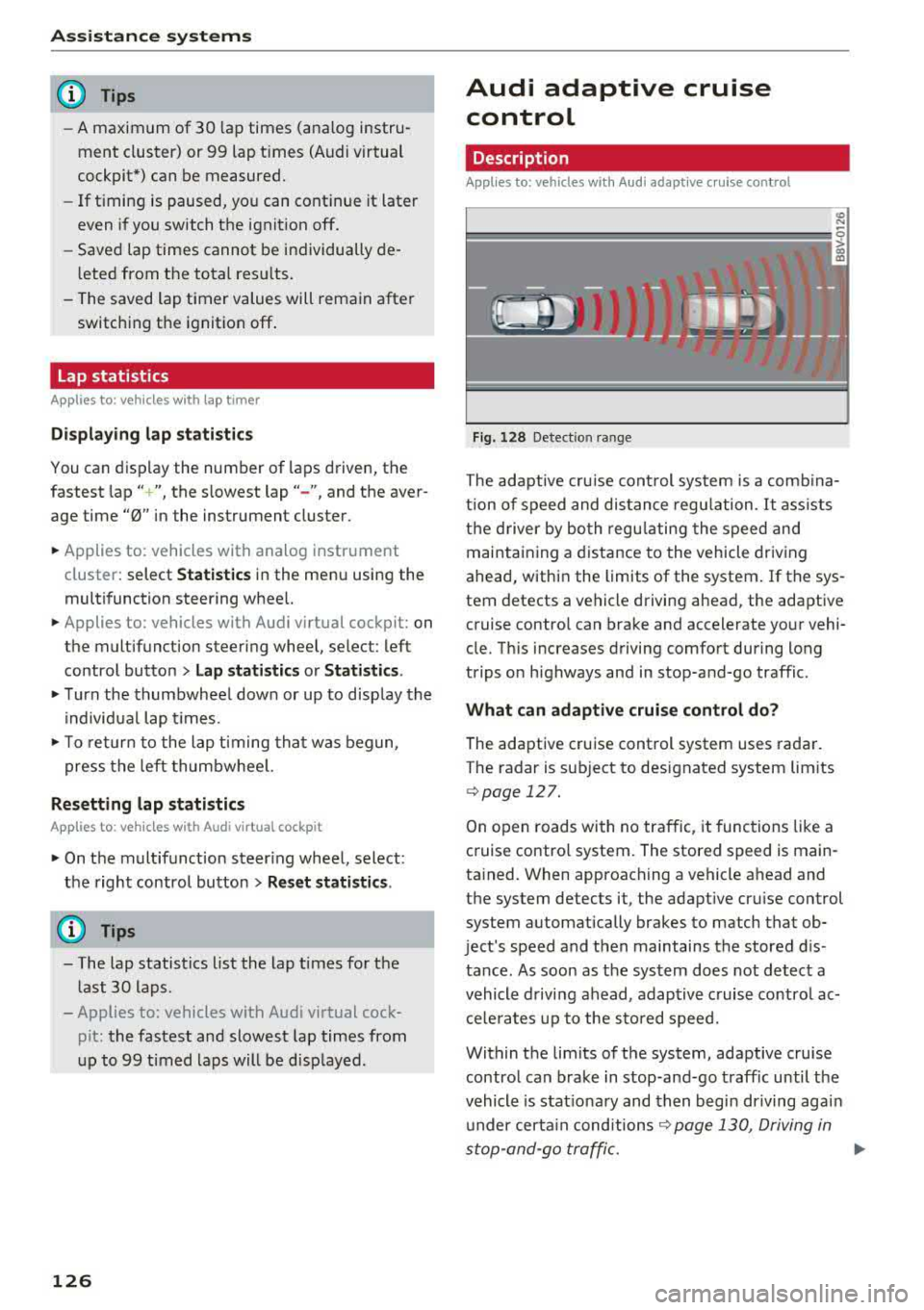
Fig. 128 Detect ion range
> (0 (0
The adaptive cru ise control system is a comb ina
tion of speed and dis tance regu lation.
It ass ists
the d river by both regulating the speed and
maintaining a distance to the vehicle driving
ahead, within the limits of the system. If the sys
tem detects a vehicle driving ahead, the adaptive
cruise contro l can brake and accelerate your vehi
cle. Th is increases driving comfort during long
trips on highways and in stop-and-go traffic.
What can adaptive cruise control do?
The adaptive cruise control system uses radar.
The radar is sub ject to designated system lim its
q poge 127.
On open roads with no traffic, it functions like a
cruise contro l system. The stored speed is main
tained. When approaching a vehicle ahead and
the system detects it, the adapt ive cru ise control
system automatically brakes to match that ob
ject's speed and then maintains the stored dis
tance. As soon as the system does not detect a
vehicle driving ahead, adaptive cruise contro l ac
celerates up to the stored speed.
Within the limits of the system, adaptive cruise control can brake in stop-and-go traffic until the
vehicle is stat ionary and then begin driving agai n
under certain
conditions ~ page 130, Driving in
stop-and-go traffic.
ll>
Page 130 of 400
Assistance systems
In curves
Applies to: vehicles with Audi adaptive cruise contro l/Audi pre
sense front
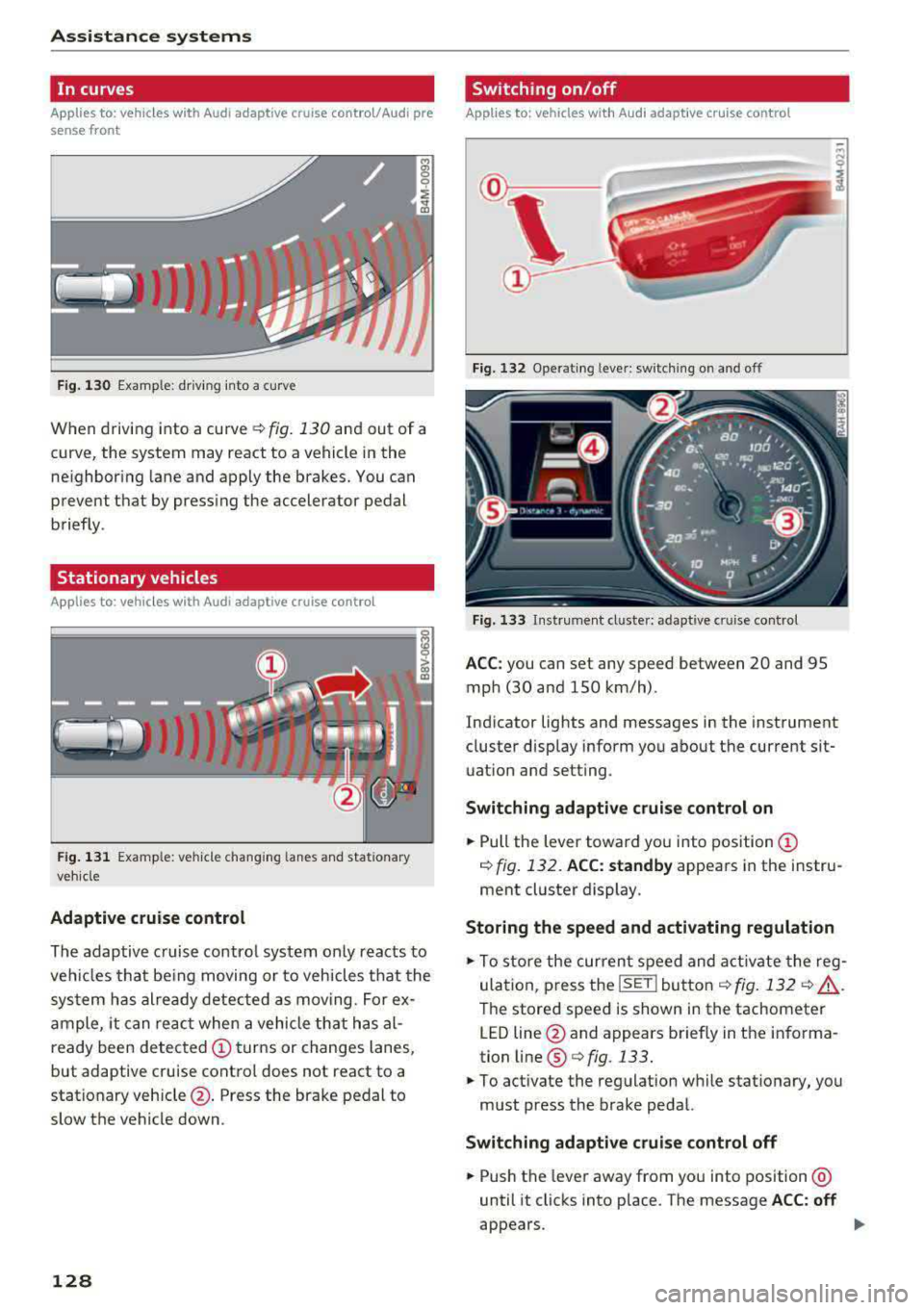
Fig . 130 Example: dr iv ing into a curve
When driving into a curve r:!;> fig. 130 and out of a
curve, the system may react to a vehicle in the
ne ighbor ing lane and apply the brakes. You can
prevent that by pressing the accelerator pedal briefly .
Stationary vehicles
Applies to: vehicles with Audi adaptive cruise control
))))
Fig. 131 Example: veh icle changing lanes and stationary
veh icle
Adaptive cruise control
The adaptive cruise control system only reacts to
ve hicl es that being moving or to vehicles that the
system has already detected as moving. For ex
ample, it can reac t when a vehicle that has al
ready been detected
@turns or changes lanes,
but adaptive cruise control does not react to a
stationary vehicle @. Press the brake pedal to
slow the vehicle down.
128
Switch ing on /off
Applies to: vehicles with Audi adaptive cruise control
Fig. 132 Ope rating leve r: sw itching on and o ff
Fig. 133 Instrument cl uste r: ad apt ive c ruise contro l
ACC: you can set any speed between 20 and 95
mph (30 and 150 km/h) .
Indicator lights and messages in the instrument
cluster disp lay inform you about the current sit
uation and setting .
Switching adaptive cruise control on
.,. Pull the lever toward you into position@
¢ fig. 132. ACC: standby appears in the instru
ment cluster display.
Storing the speed and activating regulation
.,. To store the current speed and activate the reg
ulation, p ress the
ISE TI button ¢ fig. 132 r:!;> .&,.
The stored speed is shown in the tachometer
LED line @and appears briefly in the informa
tion line ®
Q fig. 133.
.,. To activate the regulation while stationary, you
must press the brake pedal.
Switching adaptive cruise control off
.,. Push the lever away from you into position @
until it clicks into place . The message ACC: off
appears .