infotainment AUDI A3 SEDAN 2017 User Guide
[x] Cancel search | Manufacturer: AUDI, Model Year: 2017, Model line: A3 SEDAN, Model: AUDI A3 SEDAN 2017Pages: 400, PDF Size: 67.32 MB
Page 55 of 400
a, a, ..... N
" N ..... 0 N > 00
~ Headlight assista nt: m alfun cti on! See own
e r's manual
Drive to an autho rized Aud i deale r or a uthorized
Aud i Service Facility immedia tely to have the
malfunct ion corrected. You can still switch the
high beams on or off manually.
ID High beam as sis t : currently unavailable. No
ca mera vie w
~ Headlight a ssi stant: currently un available .
Camera view re strict ed du e to surroundin gs.
See owner 's manual
The camera view is blocked, for example by a
sticker or debris. Please clean the windshie ld .
The sensor is located in the inter ior rearview mir
ror mount . Do not place any stickers in this area
on the windsh ield .
& WARNING
High beam assistant is only intended to assist
the drive r. The dr iver is still responsible for
con troll ing the headlights and may need to
switch t hem on and off manually depending
on light and visibility conditions . It may be
necessaty to operate them manua lly in s itua
tions such as:
- In adverse weather conditions such as fog,
heavy rain, b low ing snow or spraying water.
- On roads where oncoming traffic may be partially obscu red, such as expressways .
-If there are road users with poor lighting,
such as bicyclists .
- In tight c urves and on s teep hills.
- In poorly lit areas.
- With strong reflecto rs, such as s igns.
- If the area of the windsh ield near the sensor
is fogged over, dirty, icy or covered with a
st icker.
ll Th is fun ctio n is not a vail able in al l countries.
Lights and V ision
Adjusting the exterior lighting
T he functions are adjusted in the Infotainment
system .
.,. Select in the Infotainment system: I MENU ! but
ton
> V ehicle > left control button > V ehicle
setting s> Exterior light ing .
Aut omat ic h eadlight s*
You can adjust the following settings in the Au
tomati c headlights
menu :
Activation tim e* -you can adjust if the head
lights sw itch on
Earl y, Medium or Late acco rding
to the sensitivity of the light s ensor .
Headlight a ss is tant * -you can switch the h igh
beam assistant * on and off .
Entry/exit lighting*
You can switch the entry/exit lighting* on and
off. When it is dar k, it illum inates the area
around the vehicle when un loc king t he ve hicle
and after sw itchi ng off the ignition and opening
the driver's door .
T he entry/exit lighting only work s whe n it is da rk
and the light sw itch is in the
AUTO * position .
Daytime running lights1
)
The daytime runni ng lig hts can be turned on and
off . When daytime r unning lights are turned on,
the lights w ill stay on continuously whenever the
i gni tion is sw itched on .
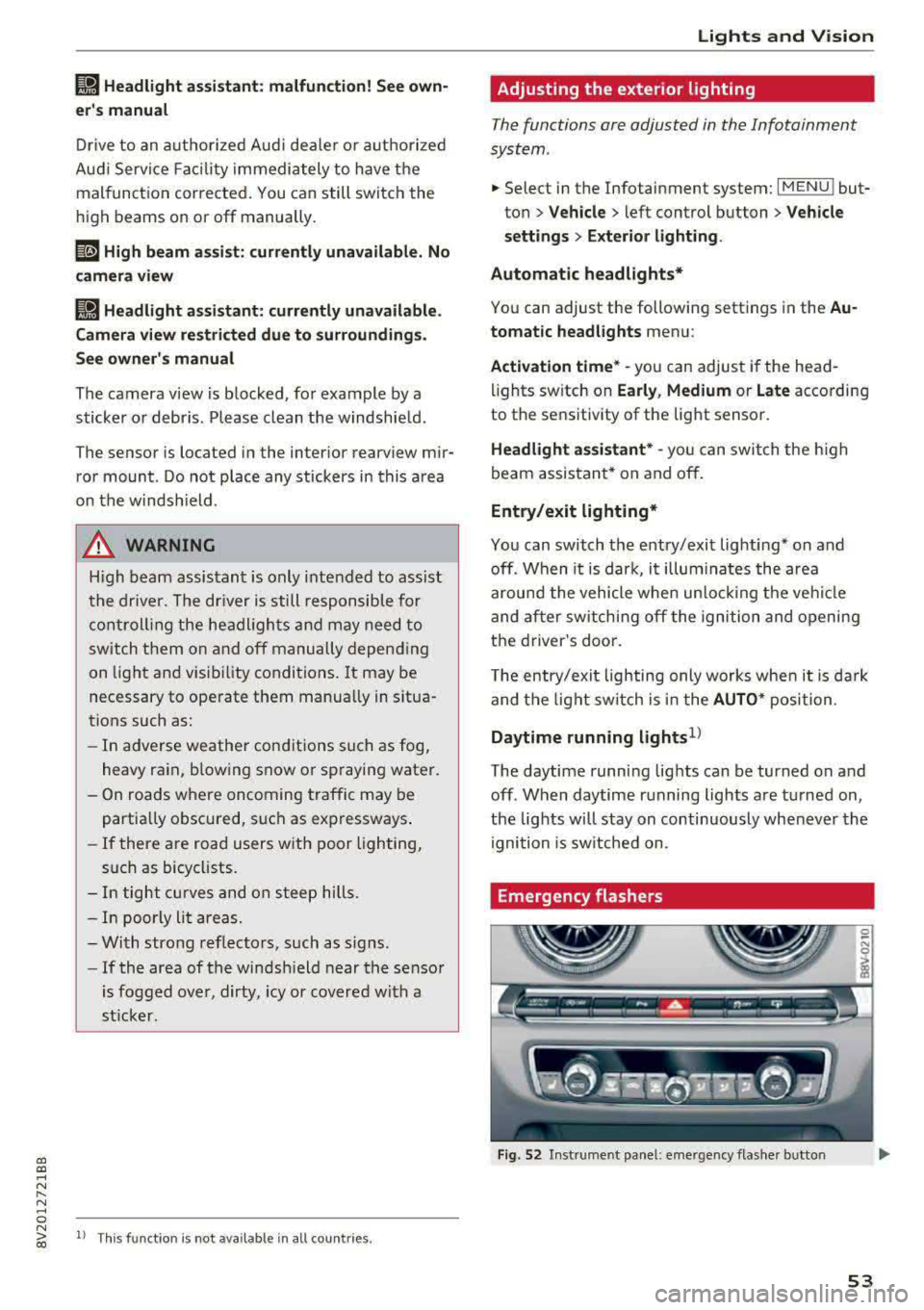
Emergency flashers
Fig. 52 Instrume nt pa nel : eme rge ncy flas her b utto n
53
Page 56 of 400
Lights and Vision
The emergency flashers makes other drivers
aware of your veh icle in dangerous situations.
• P ress t h e ~ button to switch the eme rgency
f lashers on o r off.
You can indicate a lane change or a tu rn when the
emergency flas hers are sw itched on by using the
tur n sig nal lever. The emergency flashers stop
tempo rarily .
The emergency flashers also work when the igni
tion is turned off.
Interior lighting
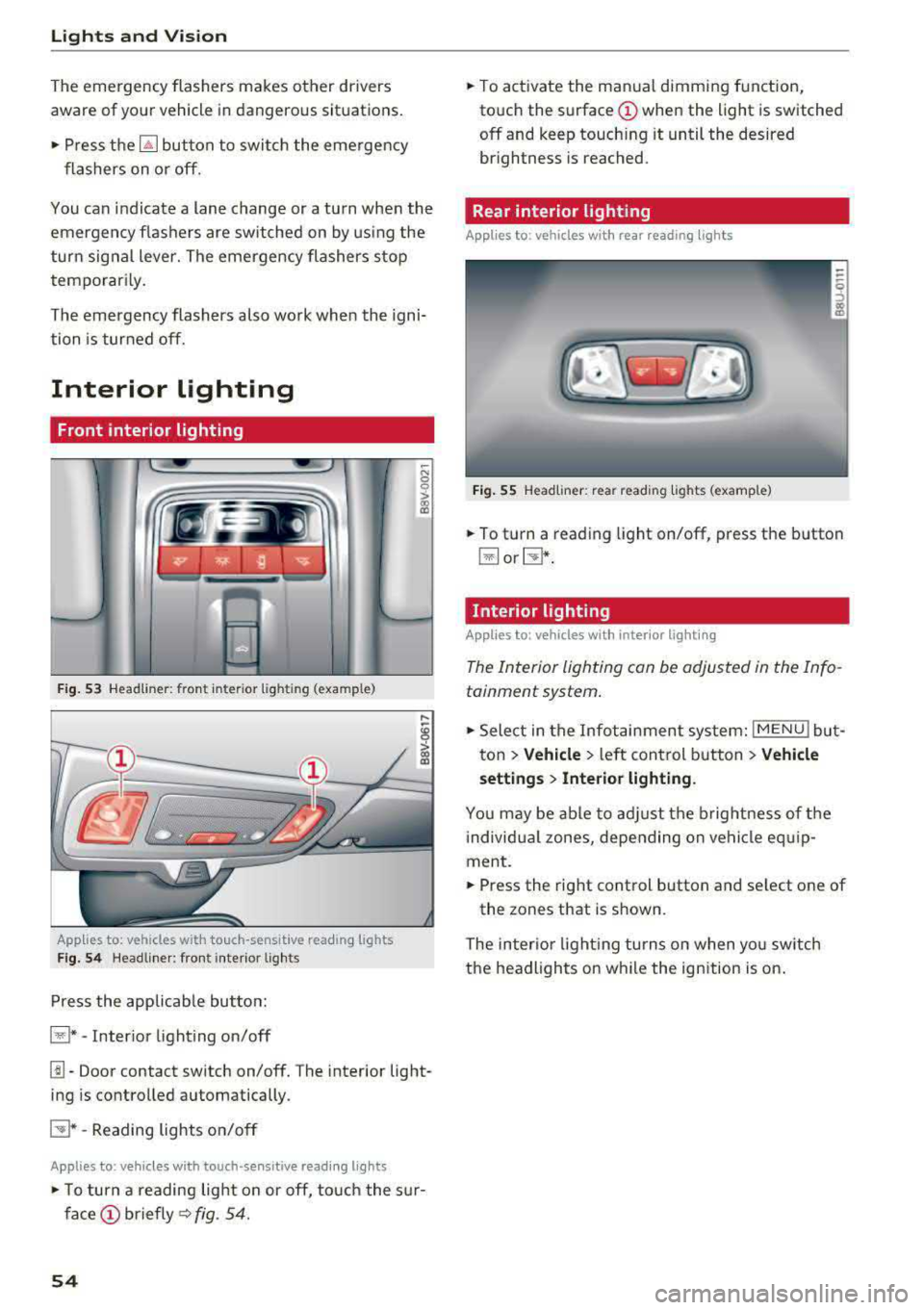
Front interior lighting
F ig. 53 Headli ner : fr on t in te ri or l ig htin g (exa mple )
Applie,s to: vehicles with touch -sensitive reading lights
Fig . 5 4 Headli ner: fro nt i nte rior lig hts
Press the app licab le bu tton:
@ * -Inter ior light ing on/off
~ N 0
0
> ~
l!I -Door contact switch on/off. The interior light
ing is controlled automatically.
E:!J* -Reading lights o n/o ff
Applies to: vehicles with touch-sensitive reading lights
• T o turn a reading lig ht on or off, to uch the s ur
face (!) briefly ~ fig. 54.
54
• To activate the man ua l dimming function,
to uch the
surface (!) when the light is switched
off and keep touch ing it until the desired
brightness is reached.
Rear interior lighting
Applies to : vehicles with rear reading lights
Fig. 55 Headliner : re ar reading lig hts ( example)
• To t urn a reading light on/off , press the b utton
@ or~ .
Interior lighting
Applies to: vehicles with interior lighting
The Interior lighting can be adjusted in the Info
tainment system .
• Select in the Infotainment system : IMENU! but
t on
> Vehicle > left control b utton > Vehicle
setting s
> Interior lighting.
You may be ab le to ad just the b rig htness of t he
i ndivid ua l zones, depending on ve hicle eq uip
ment .
• Press the right cont rol button and se lect one of
the zones that is shown .
The inter io r li ght ing turns o n when yo u sw itch
t h e headlights on w hile the ignition is on .
Page 59 of 400
a, a, ..... N
" N ..... 0 N > 00
The sun visors can be pulled out of their brackets
and turned toward the doors
(D *. The sun shade
can also be moved back and forth lengthwise in
this position.
The mirror light switches on w hen the cover over
the vanity mirror* @opens.
Windshield wipers
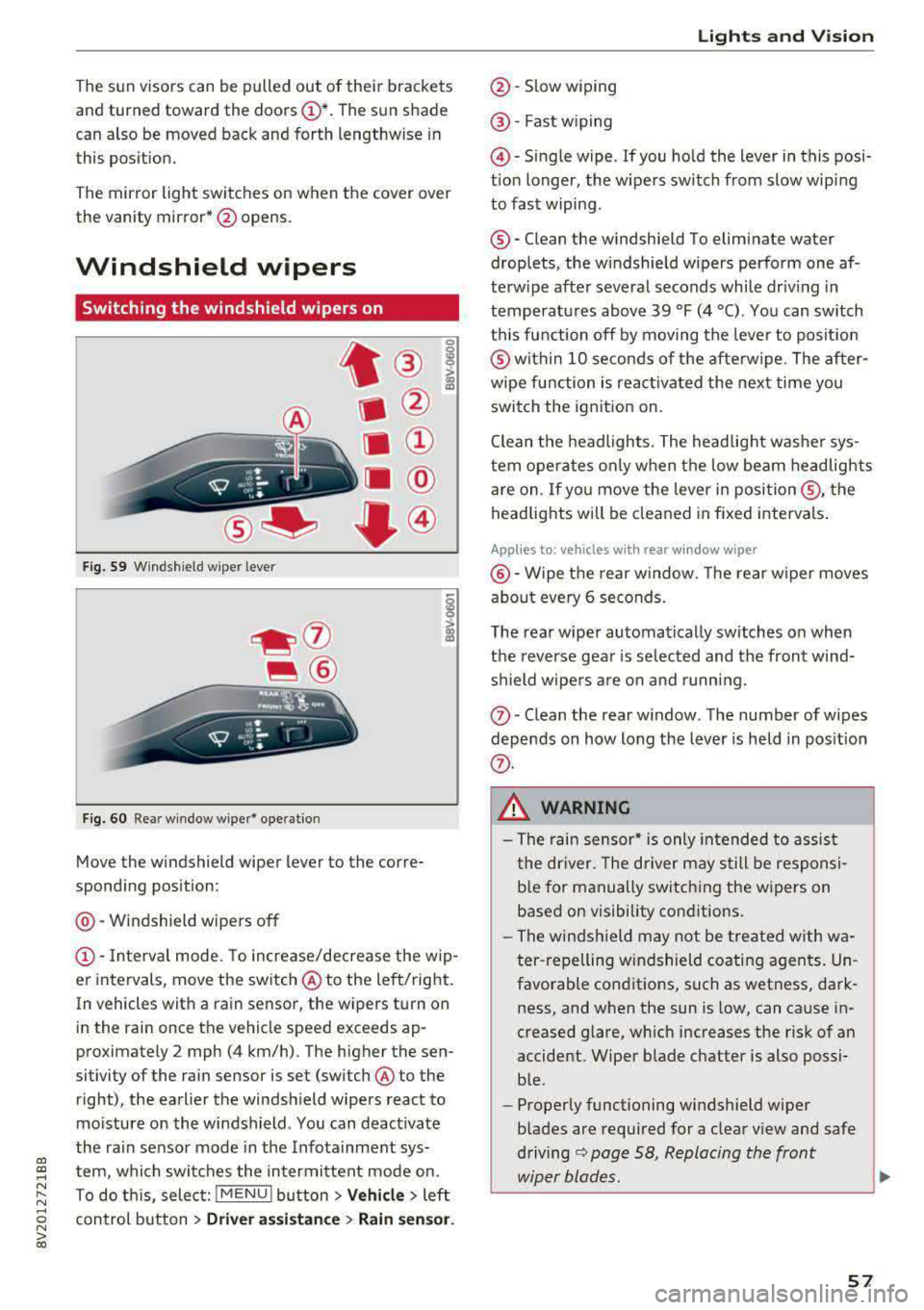
Switching the windshield wipers on
A
Fig. 59 Windshield wiper lever
Fig. 60 Rear window wiper* ope ration
t ® I
. @
Ill ®
[II @
•®
Move the windshield wiper lever to the corre
sponding position:
@ -Windshield wipers off
(D -Interva l mode. To increase/decrease the w ip
er intervals, move the switch
@ to the left/right.
In vehicles with a rain sensor, the wipers turn on
in the rain once the vehicle speed exceeds ap
proximately 2 mph (4 km/h). The higher the sen
sitivity of the rain sensor is set (switch @to the
right), the earlier the windshield wipers react to
mo isture on the windshield . You can deact ivate
the ra in sensor mode in the Infotainment sys
tem, which switches the intermittent mode on.
To do th is, select:
! MENU ! button> Vehicle> left
control button >
Dri ver assis tance > Rain sen sor.
Lights and V ision
@ -Slow wiping
@ -Fast w iping
@ -Single wipe . If you ho ld the lever in this posi
t ion longer, the wipers switch from slow wip ing
to fast wiping .
®-Clean the windshield To eliminate water
droplets, the w indshield wipers perform one af
terw ipe after several seconds while dr iv ing in
temperatures above 39 °F (4 °C) . You can switch
th is function off by moving the lever to posit ion
@ with in 10 seconds of the afterw ipe . The after
wipe function is reac tivated the next time you
switch the ignition on.
Clean the headlights. The headlig ht washe r sys
tem operates only when the low beam headlights
are on . If you move the lever in
posi tion @, the
headlig hts will be cleaned in fixed intervals .
Applies to: vehicles wi th re ar w indow wiper
@ -Wipe the rear window. The rear w iper moves
abo ut eve ry 6 seconds.
The rear wiper automatically switches on when
the reverse gear is selected and the front wind
shield wipe rs a re on and running.
(J) -Clean the rear w indow . The number of wipes
depends on how long the lever is held in pos ition
(f) .
_& WARNING
-The rain sensor* is only in tended to assist
the dr iver. The driver may still be responsi
b le for manually switching the wipers on
based on visibility conditions.
- The windsh ield may not be t reated w ith wa
ter -repelling w indshield coating agen ts . Un
favorable conditions, such as wetness, dark
ness, and when the sun is low, can cause in
creased glare, wh ich increases the risk of an
accident. Wiper blade chatter is also possi ble.
- Properly functioning windshield wiper
b lades are required for a clear view and safe
driving
¢ page 58, Replacing the front
wiper blades.
~
57
Page 72 of 400
Warm and cold
Warm and cold Climate control system
Description
The climate control system circulates, warms or
cools, and removes humid ity from the air in the
veh icle inter ior .
It is the most effective when the
windows and panorama glass roof* or power top*
are closed. If there is a build-up of heat inside
the vehicle, ventilation can help to speed up the
cooling process.
Pollutant filter
The pollutant filter removes pollutants such as
dust and pollen from the a ir.
Key recognition
Various settings are stored and assigned to the
remote control key be ing used .
These settings are different when the power top* is open or closed .
Presetting
Several functions can be preset in the Infotain
ment system.
Select in the Infotainment system:
I MENU I but
ton
> Vehicle > left control button > Air condi
tioning
A WARNING
Poor visibility can lead to accidents .
- For safer driving, keep all windows free of
ice, snow and fog.
- Become familiar with the correct use and
function of the climate control system as
quickly as possible, especially with the de
frosting and defogging functions.
- When the temperature is below freezing, only use the windshield washer system after
70
the windshield has been warmed by the cli
mate control system. The washer fluid could
freeze on the windshield and impair visibili
ty .
Cl) Note
-If you suspect that the climate control sys
tem is damaged, switch the system off to
prevent further damage and have it checked
by an authorized Audi dealer or authorized
Audi Service Facility.
- Repairs to the Audi climate control system
require special technical knowledge and
special tools . See an authorized Aud i dealer
or authorized Aud i Service Facility .
@ For the sake of the environment
-To save fuel, turn off the climate control
system cooling mode by press ing the A/C
button. This will also reduce emissions . The
climate control system is off when the LED
in the button turns off.
- In vehicl es w ith the efficiency prog ram*,
you can find other consumption information
and more economy tips <=? page 19.
(D Tips
- T o prevent interference with the heating
and cooling output and to prevent the win
dows from fogging over, the a ir intake in
front of the windshie ld must be free of ice,
snow or leaves.
- Condensation from the cooling system* can
drip and form a pudd le of water under the
vehicle. This is norma l and does not mean
there is a leak.
- The energy management system may tem
porarily switch off certain functions, such as
the seat heating* or rear window defogger.
These systems are available again as soon
as the energy supply has been restored.
Page 74 of 400
Warm and cold
driver is transferred to the front passenger's
side . This applies a t emperature change to the
front passenger's side .
8/r Blower
Using the regulator 8£?, you can manually adjust
the volume of air generated by the blower to your
p reference . The blower shou ld always run at a
low setting to prevent the windows from fogging
and to ensure a continuous exchange of air inside
the vehicle . To have the blower regulated auto
mat ically , press the AUTO button.
~/ :,0/ ~ Air distribution
The air distribution can adjusted with the but
tons. To have the air distribution regulated auto mat ically, press the AUTO button.
The round air vents in the cockpit are adjustable
qpage 73.
To keep the front s ide windows from fogging up
in damp weathe r, we recommend opening the
side air vents and tilting them to the side .
Foot vents are located under the front seats and
adjustable vents on the end of the center console
to heat the rear of the vehicle .
::!_ Defrosting
The windsh ield and s ide windows are defrosted
or cleared of condensation as qu ickly as possible .
The max imum amount of air flows ma inly from
the vents below the windshield. Recirculation
mode switches off. The temperature shou ld be
set at +72°F (22°() o r higher. The temperature is
controlled automatica lly. In the
;Ix setting, the
A/C cooling mode switches on automatically , d e
pending on the outside air temperature.
The AUTO button switches the defroster off.
cE) Recirculation mode
The recirculation mode can be turned on manua l
ly or automatically*.
- Switching manual recirculation mode on and
off: Press
the~ button.
72
- Automatic * reci rculation mode: auto recircula
tion needs to be activated in the Infotainment
system. Select in the Infotainment system:
I MENU I but ton > Vehicle > left control button >
Air conditioning > Auto recirculation
The air
quality sensor that is designed for diesel and
gasoline exhaust automatically sw itches the re
circulation mode on or off depending on the
level of pollutants in the outside air.
In rec irculat ion mode, the air inside the vehicle is
c ir culated and filtered. This prevents the unfil
tered air outs ide the veh icle from entering the
vehicle inte rior. Switching rec irculation mode on
whe n driving through a tunnel or when sitting in
traffic is recommended
q .&..
Pressing the~ button, AUTO or the ;fx button
switches recircula tion mode off.
T he system switches to recirculation mode when
driv ing in reverse when the engine is cold .
SP. Rear window defogger
If the rear window defogger is activated when
the igni tion is switched on, the battery manage
ment determines based on the battery charge if
i t is possible to turn on . Otherwise, the rear w in
dow defogger functions with the engine running
and switches off automatically after approxi
mately 10 -20 minutes, depending on the out
side temperature .
To prevent the rear window defogger from
switching off automat ica lly, press and hold the
!fP. button for more than two seconds. This re
mains stored up to approximate ly 15 minutes af
te r turning off the ignition.
J Seat heating*
Pressing the J button switches the seat heat ing
on at the highest setting (level 3) . The LEDs indi
cate the temperat ure level. To reduce the tem
perature , press the button again. T o switc h the
seat heating off, press the button repeatedly un
ti l the LED turns off .
After approximately 10 minutes, the seat heating
a utomat ically switches from level 3 to level 2.
.,..
Page 101 of 400
a, a, .... N
" N .... 0 N > 00
If the i ndicator lig ht t urns on and th is message
ap pears, there may be an en gine contro l ma l
function.
The ~* indicator light in t he instr u
ment cluster also turns on. The engine output is
reduced. Drive to an author ized Audi dealer or
author ized Audi Se rvice Facility immed iate ly to
h ave the ma lf u nct ion co rrected .
Ill e-tron mode: EV currently unavailable
This message appears when the 141 button is
p ressed and the cond itions for elect ric drive
mode a re not met .
@vehicle sound: malfunction! Pedestrians
cannot hear vehicle. Please contact Service
The vehicle sou nd is no longe r fu nct io nin g. Drive
ex tremely c are fully, sin ce o thers m ay no t hea r
your ve hicle. Dr ive to an au th orized Audi de aler
or author ized Audi Se rvice Facility immed iate ly to
have the ma lf u nction co rrecte d.
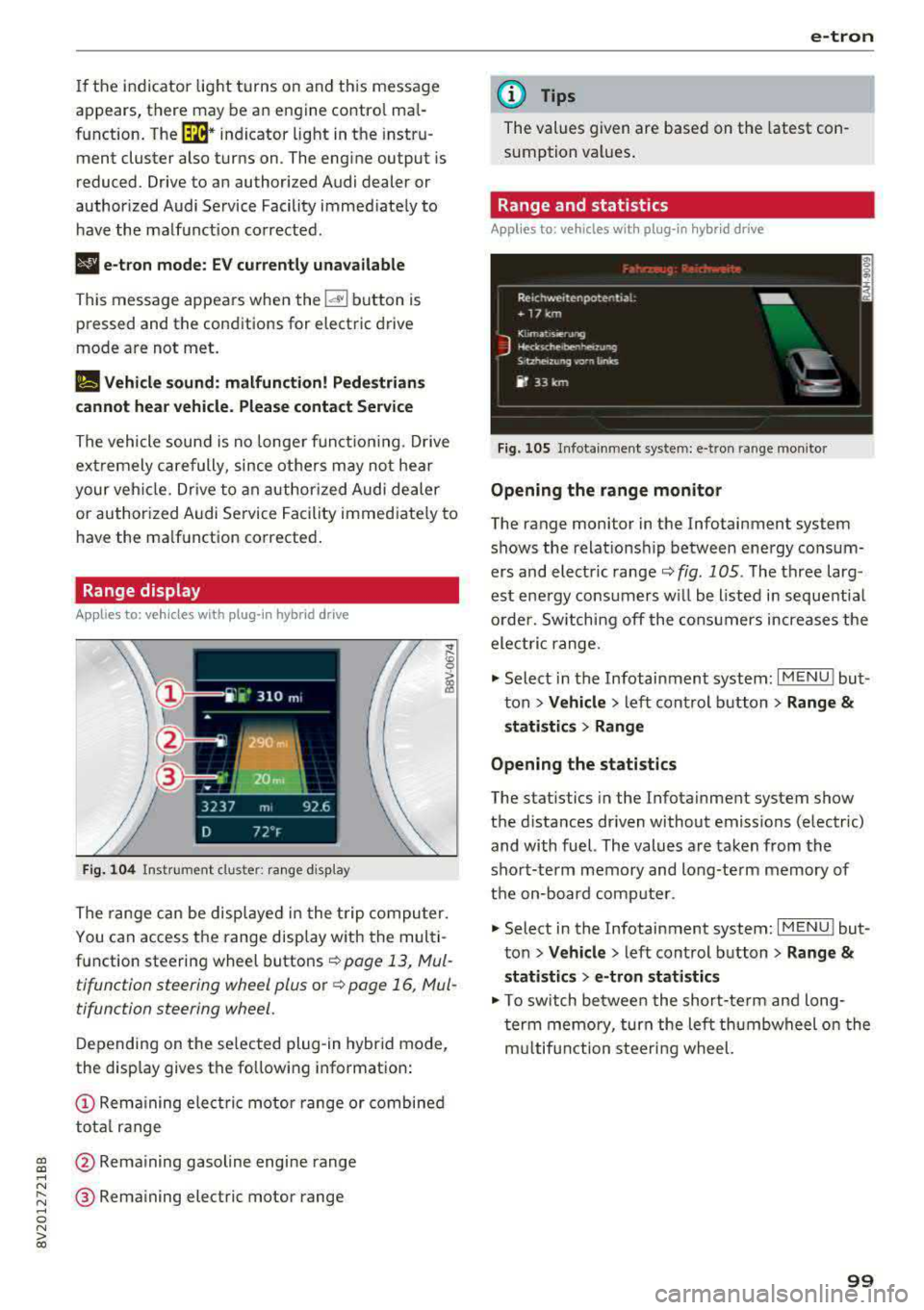
Range display
Applies to: vehicles with plug-in hybrid drive
Fig. 104 Inst rument cl uster: ra nge d is p lay
The range c an be displ aye d in t he t rip co mputer.
You can access the range disp lay with the mul ti
function steering wheel buttons
r::!') page 13, Mul
tifunction steering wheel plus o r
r::!') page 16, Mul
tifunction steering wheel.
D epen ding on t he se lected plug -in hybrid mode,
the display gives t he fo llowing informat ion:
(D Re mai ning ele ctric mo tor range or combined
to tal range
@ Rema ining gasol ine engine rang e
® Remaining electric motor range
e-tron
(D Tips
The values given are base d on the latest con
sumption val ues .
Range and statistics
Applies to: vehicles with plug-in hybrid drive
Fig. 105 In fotainme nt system: e-tro n range mo nito r
Opening the range monitor
The range monitor in the Infotainment system
s h ows the relat ions hip between ene rgy co nsu m
ers and elect ric ranger::!')
fig. 105 . The three larg
est ene rgy cons umers w ill be listed i n se que ntial
o rder. Sw itching off the co nsu mers increases the
ele ctri c range .
.,. Select i n the Infotainment system: I MENU ! but
t on
> Vehicle > left con trol button > Range &
statistics > Range
Opening the statistics
The stat istics in the Infota inment system show
t h e d istances dr iven without emiss ions (electric)
and with fuel. The values a re ta ken from the
sho rt-term memory and long-te rm memory of
t h e on-bo ard com puter.
.,. Select in the Infotainment system: I MENU! but
t on
> Vehicle > left control b utton > Range &
statistics > e-tron statistics
.,. To switch be twee n the short-te rm an d long
t er m memo ry, tur n the left th umbwheel o n the
m ultifun ction steeri ng wheel.
99
Page 102 of 400
e-tron
Setting plug -in hybrid drive modes
Applies to: vehicles with plug -in hybrid drive
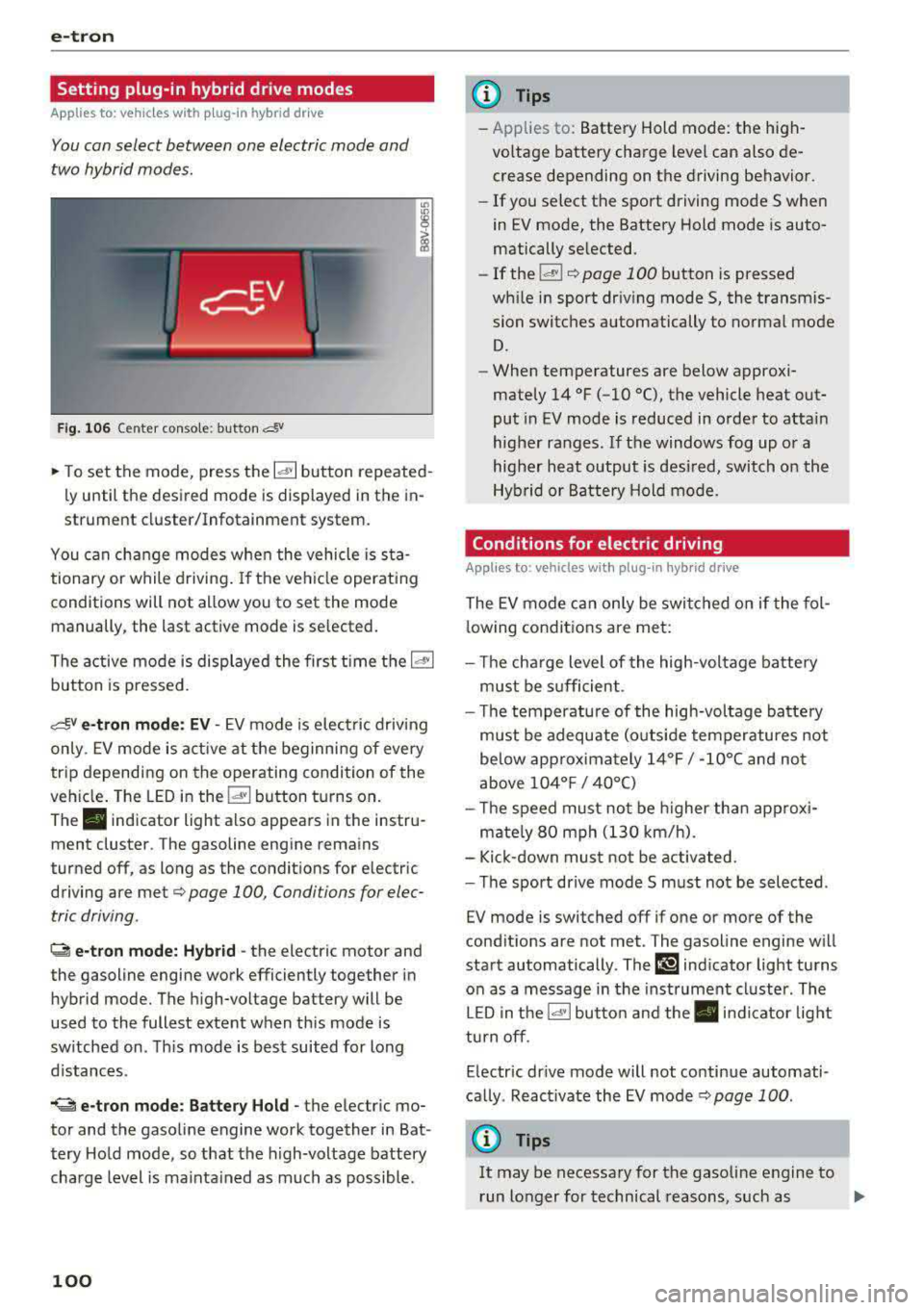
You con select between one electric mode and
two hybrid modes .
Fig. 10 6 Center conso le: button &
"' "'
i (0
~ To set the mode, press the ld' I button repeated
ly until the desired mode is displayed in the in
strument cluster/Infotainment system.
You can change modes whe n the vehicle is s ta
tionary or while driving . If the ve hicle operat ing
conditions will not allow you to set the mode
manually, the last active mode is selected.
The active mode is displayed the first t ime t he
ld• I
button is pressed.
av e -tron mode : EV -EV mode is elec tric dr iv ing
only. EV mode is active at the beginning of every
tr ip depending on the operating condition of the
veh icle . The LED in the
lal button turns on.
The . indicator light also appears in the instru
ment cluster. The gasoline engine remains
turned off, as long as the condit ions for electric
driving are met
c:;, page 100 , Conditions for elec
tric driving .
~ e-tron mode: Hybrid -the electric motor and
the gasoline engine work efficiently together in
hybrid mode. The high-voltage battery will be
used to the fullest extent when th is mode is
sw itched on . Th is mode is bes t suited for long
d istances .
.. ~ e-tron mode : Battery Hold -the electric mo
tor and the gasoli ne engine work together in Bat
tery Hold mode, so that the high-voltage battery
charg e level is ma inta ined as much as possible .
100
@ Tips
-Applies to: Battery Hold mode : the high
voltage battery charge level can also de crease depending on the driving behavior.
- If you select the sport driving mode S whe n
in EV mode, the Battery Hold mode is auto
matically se lected.
- If
the !& ! c:;, page 100 button is pressed
wh ile i n sport driv ing mode S, the transm is
sion switches automatically to normal mode
D.
- When temperatures are below approxi
mately
14 °F ( -10 °(), the vehicle heat out
put in EV mode is reduced in orde r to attai n
highe r ra nges. If the windows fog up o r a
highe r heat output is desi red, switch on the
Hyb rid or Battery Hold mode.
Conditions for electric driving
Applies to : vehicles with plug-in hybrid drive
The EV mode c an only be swi tc h ed o n if the fol
l owing condit ions are met:
- T he cha rge level of the high-vol tage batte ry
m ust be sufficient .
- Th e temperature of the hig h-vol tag e batte ry
m ust be adequate (o utside temper atures not
below app roxima tely
1 4 °F / -10°( an d no t
above
1 04° F / 40°()
- Th e speed must not be higher th an approxi-
mate ly
80 mph (13 0 km/h).
- Kick-down must no t be a ctivated.
- Th e sport drive mode S m ust no t be selected .
EV mode is switched off if one or more of the
cond it ions are not met . The gasoline engine w ill
start automatically . The
111 ind icator light turns
o n as a message in the instrument cl uster . The
L ED in t he
l.c! 'I bu tto n and the . in dicator lig ht
tu rn off.
E lectric dr ive mode will not co ntinue automati
ca lly . React ivate the EV mode
¢ pag e 100 .
(D Tips
It may be necessary for the gaso line e ngine to
r un lo nger for technical reasons, such as
..,.
Page 104 of 400
e-tron
Driving situations Conditions Vehicle behavior
- Reduce the vehicle speed by re- Fuel consumption can be reduced by
leasing the accelerator peda l and coasting .
not by braking.
-Use the S selector lever position A sporty driv ing style increases fuel con -
and tiptron ic mode sparingly . sumption .
- Do not run the gasoline engine The temperature of the gasoline engine
while the vehicle is parked to warm rises very s lowly and the fuel consump-
the eng ine. tion increases considerably.
-Use the rear w indow/exterior This conserves the energy in the h igh-volt -
Driving in cold weath- mirror defroster and the seat
heat-age battery so that it is availab le to run
ing sparing ly. the vehicle in electric mode.
er
-Park the veh icle in a ga rage over-
This reduces exposure of the high-voltage
night.
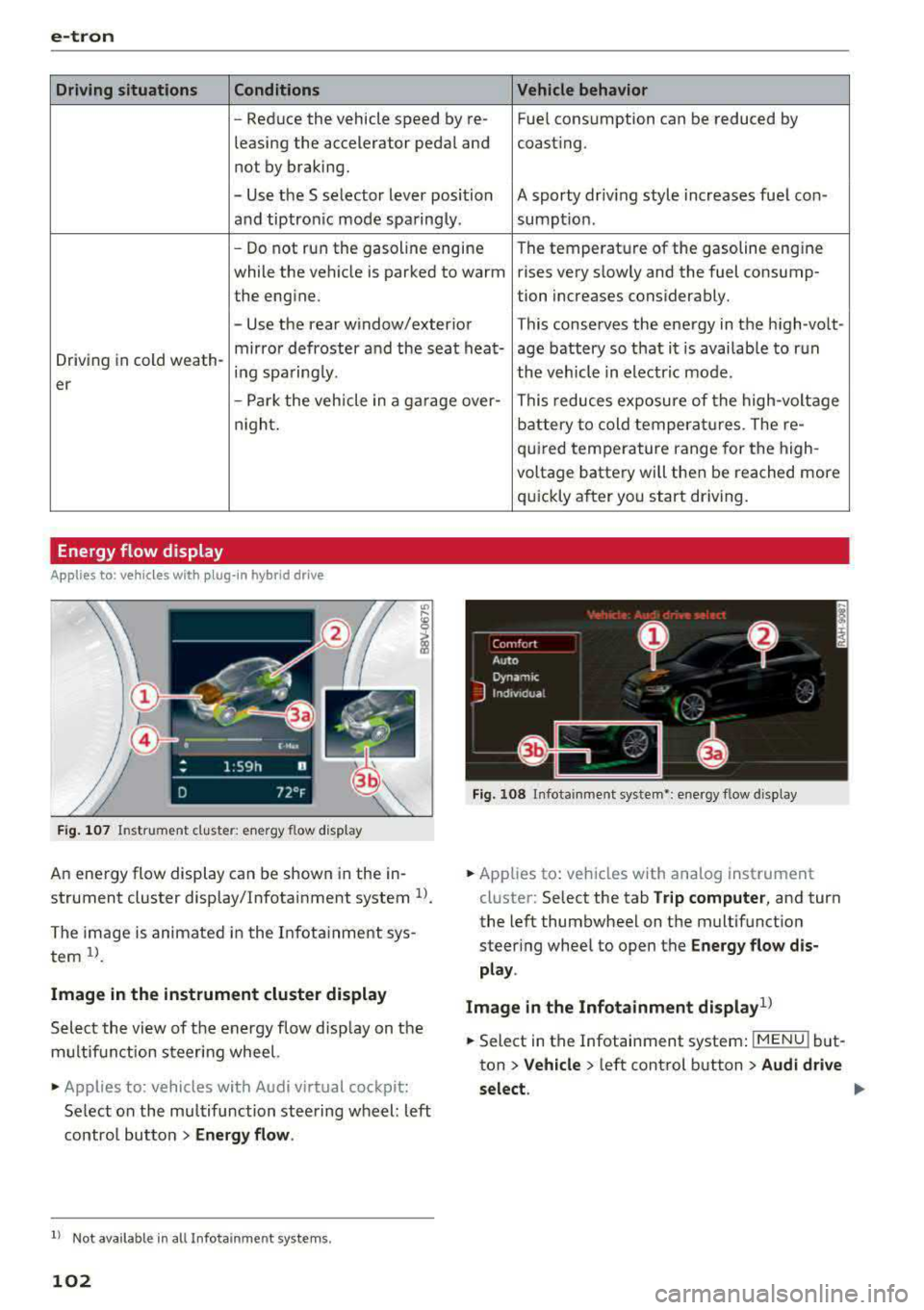
Energy flow display
Ap plies to : ve hicles w ith p lug- in hybr id drive
F ig . 107 In strument cluste r: energy flow display
An energy flow display can be shown in the in
strument cluster display/Infotainment system
U .
The image is animated in the Infotainment sys
tem
ll .
Image in the instrument cluster display
Select the view of the energy flow display on the
m ultifunction steering wheel.
• Applies to : vehicles with Audi v irtual cockpit :
Select on the multifunction steering wheel: left
contro l button
> Energy flow.
l) Not availa ble in a ll Infota inm en t systems .
102
battery to cold temperatures . The re-
quired temperature range for the high-
voltage battery will then be reached more
qu ickly after you start driving.
Fig. 108 Infota inment system•: ene rgy flow display
• Applies to: veh icles with ana log instrument
cluster: Select the tab
Trip computer, and turn
the left thumbwheel on the multifunction
steer ing wheel to open the
Energy flow dis
play .
Image in the Infotainment display
1>
• Select in the Infotainment system : IMENUj but
ton
> Vehicle > left control button > Audi drive
select .
Page 105 of 400
a, a, ..... N
" N ..... 0 N > 00
Component Color
@Gasoline engine Orange
Gray
@ High-voltage battery Green Green
(animated in the
Infotainment sys -
tern
a))
Gray
(§) Motion arrow Green
Orange
Green-orange
@ Motion ar row Green
•> Not availab le in all Infot ainmen t systems .
The power currently available in the e lectric drive
system is displayed when you open the energy
flow disp lay .
The bars are fi lled in with different co lors based
on the power
status @ Q fig. 107:
- White: electr ic power currently availab le
- Green: electric power currently being used
The more bars that are filled in the E-max section
@ , the longer the maximum power can be utiliz
ed. The bars turn off in the E-max section when
the maximum power can no longer be utilized.
When the drive power is greatly reduced, the
drive mode will automatically switch to using the
gasoline engine.
The availability of power is genera lly restricted
under the following conditions:
- T he temperature of the high-voltage battery is
very co ld or very hot.
- The high-vo ltage battery charge level is low.
The power availability is not visible if the
Ii] indi
cator light turns on.
(D Tips
High power ava ilability is necessary, for exam
ple, when needing to accelerate quickly while
in electric driving mode to pass another vehi
cle.
e-tron
Me aning
The gasoline engine is running
The gasoline engine is off High -voltage battery charge level
The high-voltage battery is charging
The vehicle is not in drive ready mode Electric driving
Driving w ith the gasoline engine
Driving with the gasoline engine and electric
mo-
tor (boost)
Recuperation
Vehicle tool kit and tire mobility kit
App lies to: vehicles wit h pl ug-in hy brid drive
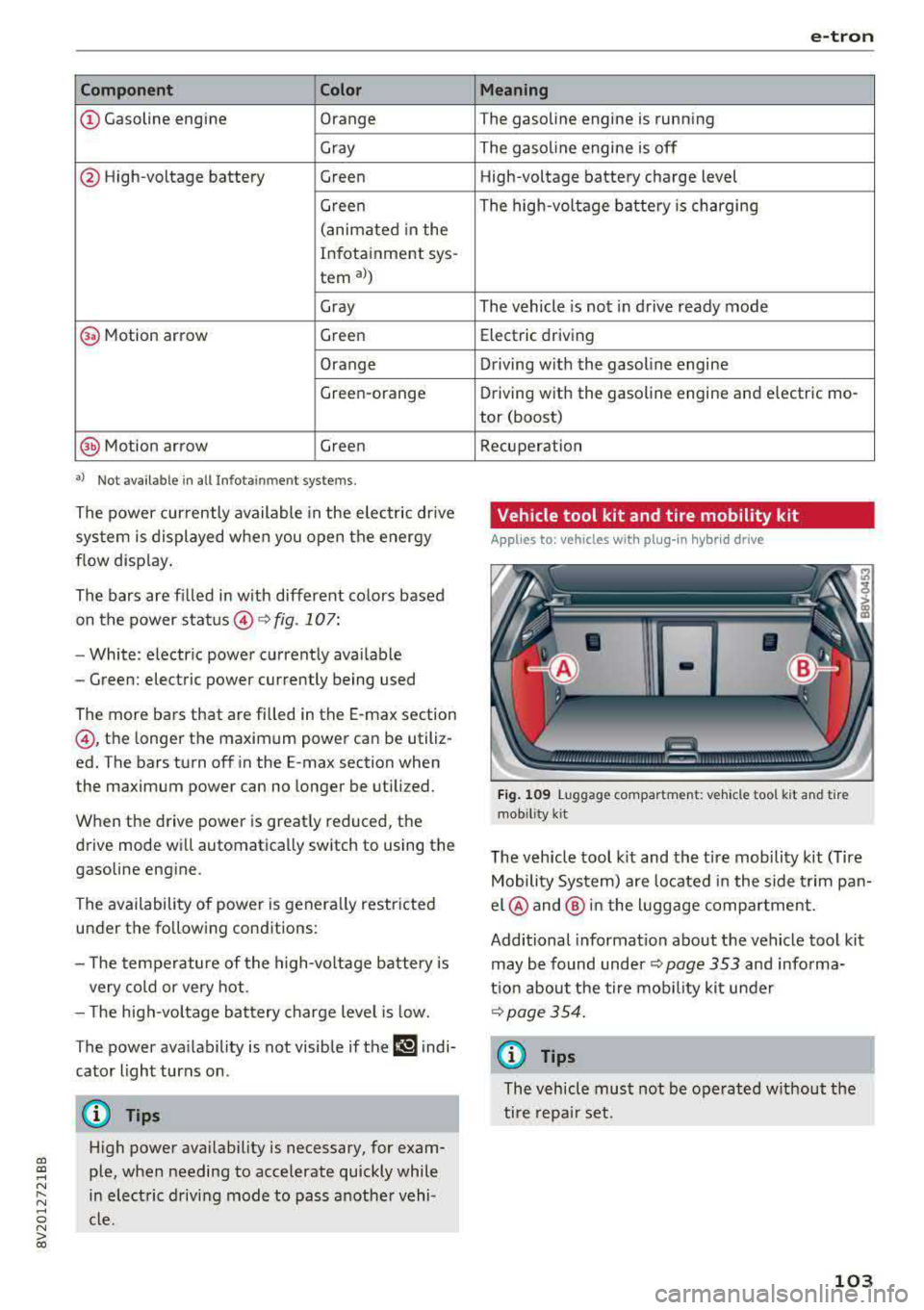
Fig . 1 09 Luggage compartment: veh icle too l kit and tire
mob ility
k it
The veh icle tool k it and the tire mobility kit (Tire
Mobility System) are located i n the side t rim pan
el @ and @ in the l uggage compartment.
Additional information about the vehicle tool kit may be found under ¢
page 353 and informa
tion about the tire mob ility kit under
~page 354.
(f) Tips
The vehicle must not be operated w ithout the
tire repa ir set.
103
Page 118 of 400
e-tron
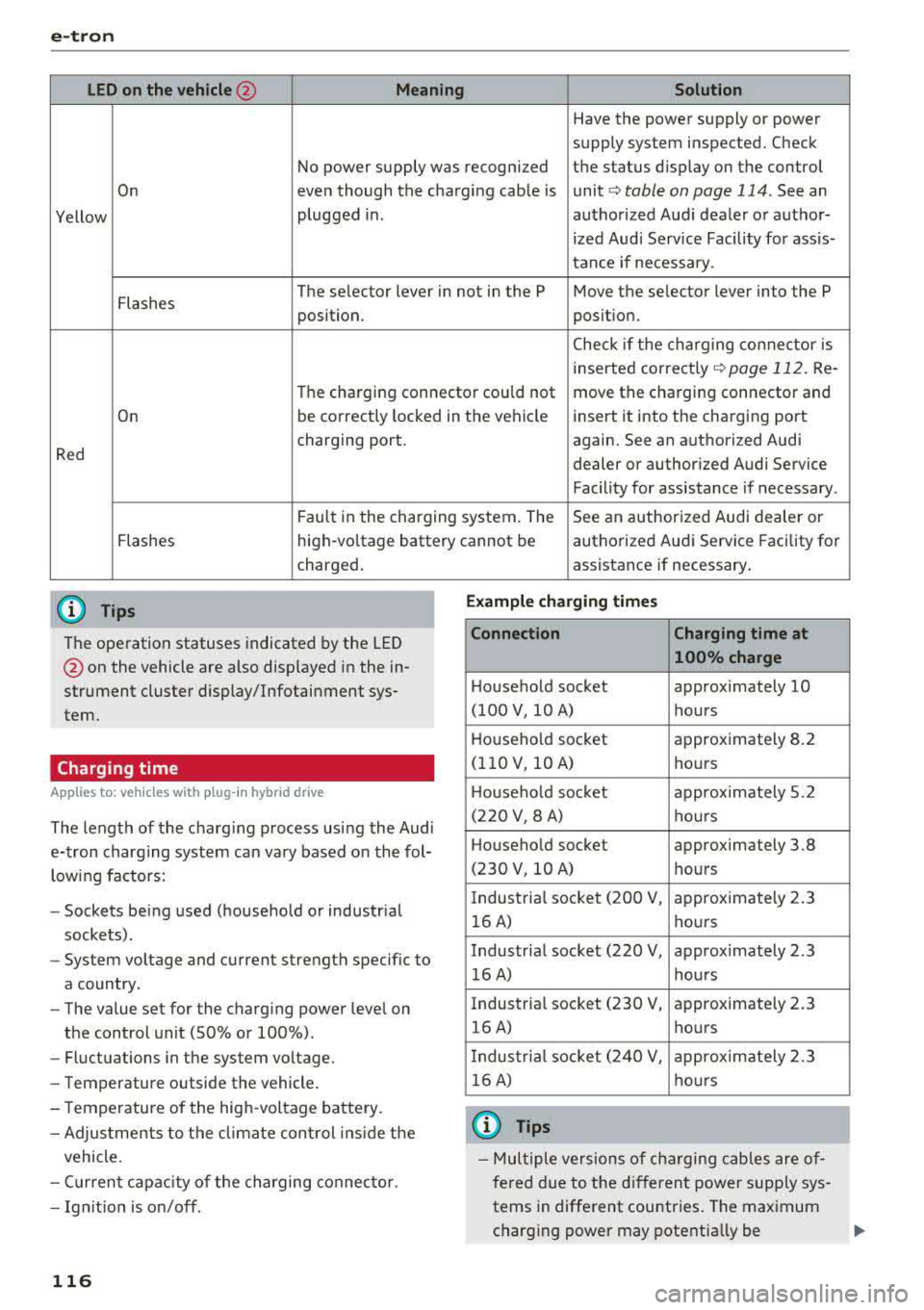
LED on the vehicle@ Meaning Solution
Have the power supply or power
supply system inspected. Check
No power supply was recognized the status d isplay on the control
On even though the charging cable is unit
c::> table on page 114. See an
Yellow plugged in.
authorized Audi dealer or author-
ized Audi Serv ice Facility for assis-
tance if necessary.
Flashes The se
lector lever in not in the P Move the selector lever into the P
position. position.
Check if the charging conne ctor is
inserted correct ly
c::> page 112. Re-
The charging connector cou ld not move the charging connector and
On be correctly locked
in the vehicle insert it into the charging port
Red charging port.
again. See an authorized Audi
dealer or author ized Audi Service
Facility for assistance if necessary.
Fau lt in the charging system. The See an authorized Audi dealer or
Flashes high-voltage battery cannot be authorized Audi Service Facility for
charged.
(D Tips
The operation statuses indicated by the LED
@ on the vehicle are also disp layed in the in
strument cluster display/Infotainment sys
tem.
Charging time
Applies to: vehicles with plug-in hybrid drive
The length of the charg ing process using the Audi
e-tron charging system can vary based o n the fol
lowing factors:
- Sockets be ing used (household or industr ial
sockets) .
- System voltage and current strength specif ic to
a country.
- The value set for the charg ing power leve l on
the control unit (SO% or 100%).
- Fluctuations in the system voltage.
- Temperature outside the vehicle.
- Temperature of the high -voltage battery.
- Adjustments to the climate cont rol ins ide the
vehicle.
- Current capac ity of the charging connector.
- Ign it ion is on/off.
116
assistance if necessary.
Example ch arging time s
Connection Charging time at
100% charge
Household socket approximately 10
(100 V, 10 A) hours
Househo ld socket approximately 8 .2
(1 10 V, 10 A) hours
H ouseho ld socket approx imately 5.2
(220 V, 8 A) hours
Househo ld socket approximately 3.8
(230 V, 10 A) hours
I ndustria l socket (200 V,
approximately 2 .3
16 A) hours
Industrial socket (220 V, approximately 2.3
16 A) hours
Industria l socket (230 V,
approximately 2.3
16 A) hours
I ndustria l socket (240 V, approx imately 2.3
16 A) hours
(D Tips
-Mul tiple versions of cha rging cables are of
fered due to the d ifferent power supply sys
tems in different countries . The maximum
charging power may potentially be