infotainment AUDI A3 SEDAN 2017 Owner's Manual
[x] Cancel search | Manufacturer: AUDI, Model Year: 2017, Model line: A3 SEDAN, Model: AUDI A3 SEDAN 2017Pages: 400, PDF Size: 67.32 MB
Page 121 of 400
Setting the timer
Appl ies to: ve hicles with p lug -in hybrid drive
By setting the depa rture time, you dete rm ine
when yo ur vehicle shou ld reach the desi red tem
pe rature . You can set the time r in the auxiliary air
conditioning menu in the Infotainment system.
Auxiliary climate control : setting th e timer
• Select: I MENU I button > Veh icl e> left control
button >
Auxiliar y A/C > right cont rol b utton>
Program tim er.
• Set the time and the date .
• Press the I BACK I button.
• Confirm the setting with the control knob to ac-
tivate the timer. A
..f appears in the box.
When you reprogram a timer, the next calendar
day is automatica lly entered in the Infotainment
system . To activate the auxiliary climate control
for the next day, confirm the
setting( ../ in the In
fotainment system).
Error me ssag es
l;c1 -The hig h-voltage battery charge level is too
low to heat/air condition the vehicle using only
e lectric power.
I f one of the fo llow ing symbols appears in the
d isp lay, then you cannot switch on the auxiliary
climate cont rol:
,...c -T here is a system ma lf u nction.
Bu -The fuel level is too low .
(D Tips
-You can set the t imer a maximum of seven
days in advance.
- You can operate the climate control in the
vehicle interior when the high-vo ltage bat
tery is charging using the charging timer
9 page 112 . The climate control output de
pends on the powe r socket capac ity.
- Make su re the time and date match in the
Infotainment system settings so that the
timer can function
p roper ly ~ page 241 .
~ -The aux ilia ry climate control can continue to ....
~ run after the depart ure t ime is reached.
N .... 0 N > 00
e-tron
Cleaning/maintenance
information
Appl ies to : vehicles wi th plug-in hybrid drive
When was hing your vehicle with a pressure wash
er, always follow the operat ing instruct ions pro
vided with the pressure washer . This is especially
i mportant in regard to the pressu re and spray ing
distance. Do not dire ct cleaning spray at the
charg ing unit in the rad iator g rille or at t he
charg ing dock*/charging cl ip *. Keep a d istance of
a t least 16 in (40 cm) .
Do not remove snow and ice with a pressure
washer .
Never use cone nozzles or high pressure nozzles .
The water temperature must not be above 60
°C.
Remove contaminants on the Audi e -tron system
with a dry towel.
Remove contaminants on the charging do ck*/
charg ing clip* wi th a wet towel dampened w ith
alcohol-free clean ing solution .
A WARNING ~
-Never immerse t he Audi e-tron charging
system and connecto rs in water.
- The A udi e -tron charging system must on ly
be cleaned when the control unit is com
p letely disconnected from the power supp ly
and from the vehicle.
(D Note
To dec rease the risk of discoloration, never
clean the c harging doc k*/charging clip * with
harsh cleaning sol utions or so lutions that
contain alcoho l.
119
Page 125 of 400
a, a, ..... N
" N ..... 0 N > 00
Assistance systems Electronic speed limiter
Applies to: vehicles with electronic speed lim iter
Your vehicle may be factory equipped with tires
that are rated for a maximum speed of 130 mph
(210 km/h). This is less than the maximum speed
of your vehicle. To reduce the risk of sudden tire
failure and loss of control if the vehicle is operat
ed at excessive speeds, your vehicle also has an
electronic speed lim iter . The electronic speed
limiter prevents your vehicle from going faster
than the tir e speed rating. For more information
¢page 335.
If the engine control unit receives faulty vehicle
road speed s ignals, the Malfunction Indicator
L amp (MIL)
II! will illuminate . If this occurs,
contact the nearest authorized Audi dealer for
assistance .
& WARNING
Always observe the posted speed limits and
adjust your speed to suit prevailing road, traf
fic and weather conditions. Never drive your
vehicle faster than the max imum speed rat ing
of the tires installed.
Speed warning system
Applies to: vehicles with speed warning system
The speed warning system helps you to stay be
low a specified maximum speed that can be set,
changed or deleted in the Infotainment system .
The speed warning system warns you if you are
exceeding the maximum speed that you have set.
A warning tone will sound as soon as your speed
exceeds the stored value slightly . The
101 (USA
models) /
[01 (Canada mode ls) indicator light
and the corresponding message appear in the in
strument cluster display at the same time. The
[OJ (USA models)/ (•j (Canada models) indicato r
light and the message turn
off when the vehicle
speed drops below the stored maximum speed.
Setting a threshold is recommended if you would
like to be reminded when you reach a certain
maximum speed. Situations where you may want
to do so include driving in a country with a gener-
Assistance systems
al speed limit or if there is a specified maximum
speed for winter tires.
Setting the warning threshold
• Select in the Infotainment system: I MENU ! but
ton
> Vehicle > left control b utton > Driver as
sistance
> Speed warning > Manual.
(0 Tips
Regardless of the speed warning system, you
shou ld always monitor your speed using the
speedometer and make sure you are following
the lega l speed limit.
Cruise control system
Switching on
Applies to: vehicles wit h cruise control system
The cruise control system makes it possible to
drive at a constant speed starting at 15 mph (20kmlh) .
0
f
~
0
Fig. 127 Operat ing lever: cruise control system
i;:i N 0 > ... m
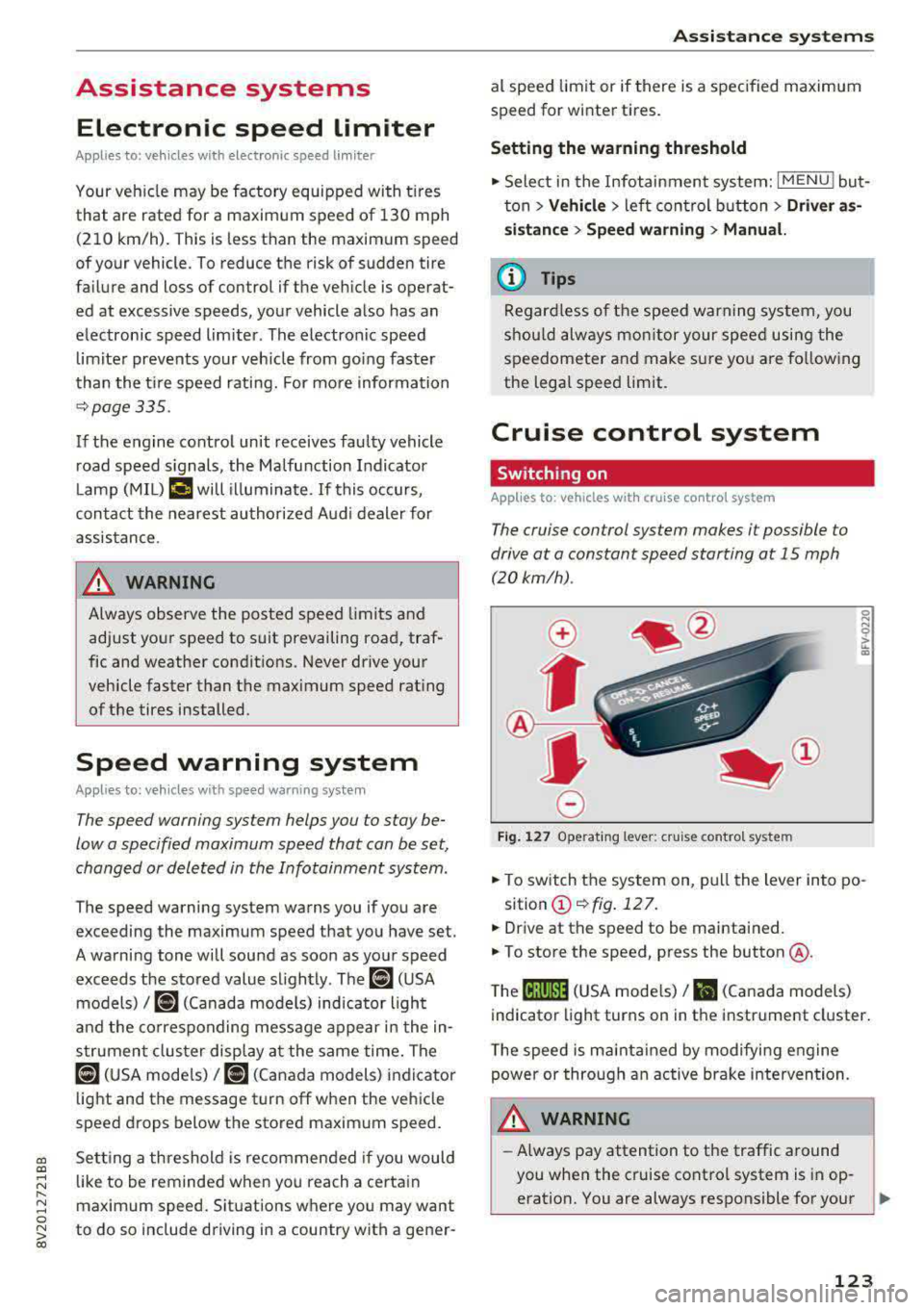
• To switch the system on, pull the lever into po-
sition
(D ¢fig . 127.
• Drive at the speed to be maintained.
.. To store the speed, press the button @.
T he
(ij;jl)~1i (USA mode ls)/ Bl (Canada models)
indicator light turns on in the instrument cluster.
T he speed is maintained by modifying engine
power or through an active brake intervention.
.i\, WARNING
-Always pay attention to the traffic around
-
you when the cruise control system is in op
eration. You are always responsible for your
..,
123
Page 134 of 400
Ass is tance sy stems
Setting the driving program
Applies to: ve hicles w ith Audi adaptive cruise co ntro l
Depending on the se lected dr iv ing program and
d istance, driving behav ior when accelerating w il l
vary from dynamic to com fortable.
Setting the driv ing pro gram on vehicles
without dri ve s ele ct *
• Se lect in the Infotainment system : I MENU I but
ton
> Vehi cle > left contro l bu tton > Driver a s
s is ta nc e
> Audi adapt iv e cr uise contr ol > Dr iv
i ng p rogram
> Com fort , Standard or Dynami c.
Setting the driv ing mode on vehicles w ith
d riv e se le ct*
Refer to ~ page 144.
@ Tips
Your sett ings are automa tically stored and as
signed to the remote control key being used.
Driver intervention request
A pp lies to: ve hicles with Audi adaptive cruis e co ntrol
F ig . 138 Instrument cluster: request for drive r interven
t io n
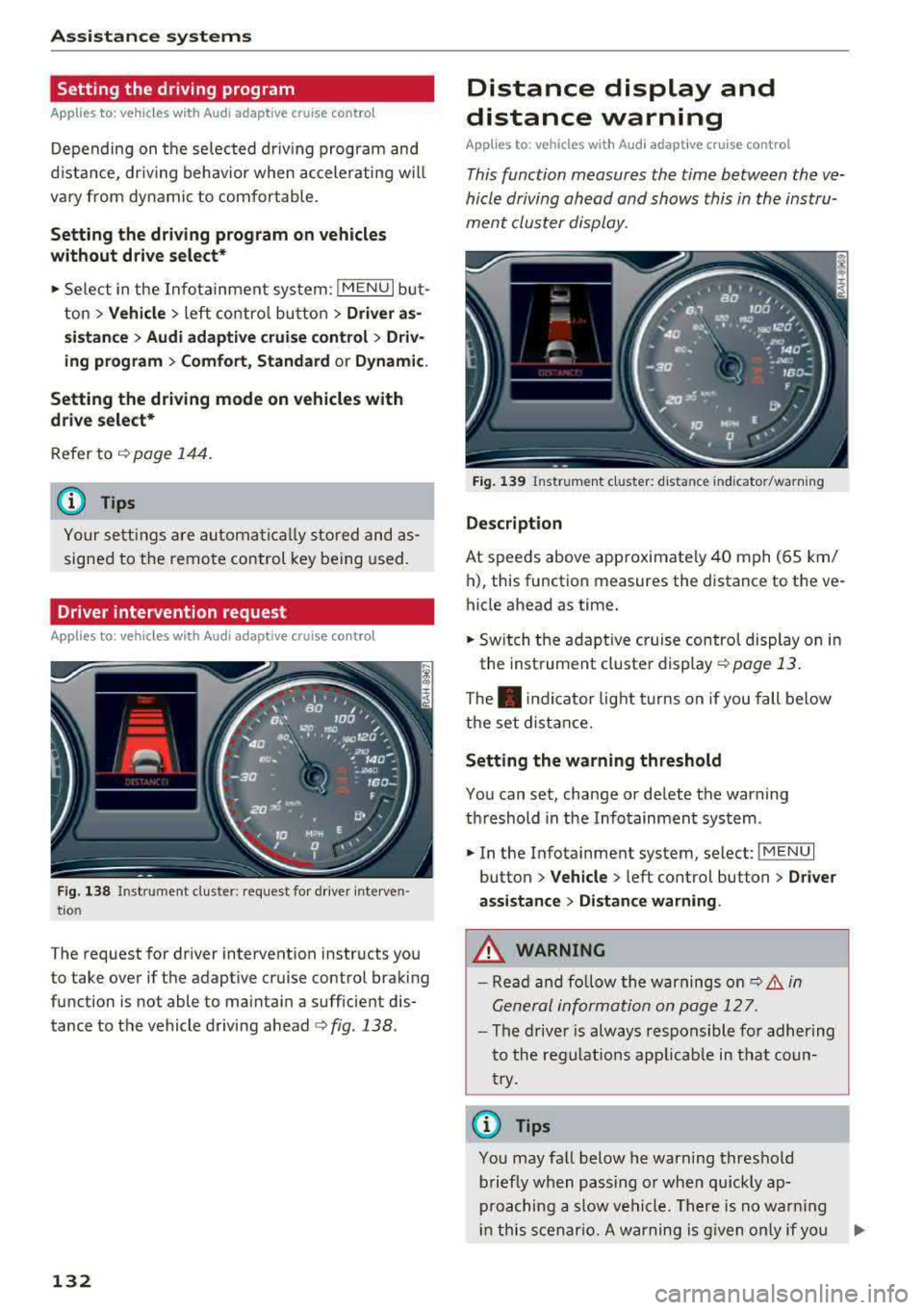
The request for driver intervention instructs you
to take over if the adaptive cruise control braking
function is not able to maintain a sufficient dis
tance to the vehicle driving
ahead ¢ fig. 138.
132
Distance display and
distance warning
App lies to : vehicles wit h Audi ada ptive c ru ise con trol
This function measures the time between the ve
hicle driving ahead and shows this in the instru
ment cluster display.
Fig . 139 Instrument cluster: dista nce indicato r/warning
D es cript ion
At speeds above approximately 40 mph (65 km/
h), this function measures the distance to the ve
hicle ahead as time.
• Switch the adaptive cruise control display on in
the instrument cluster
display ~ page 13.
The . indicator light t urns on if you fall below
the set distance.
Sett ing the w arnin g thre shold
You can set, change or delete the warning
threshold in the Infotainment system.
• In the Infotainment system, select: I MENU I
button > Vehicle > left control button > Driver
assis ta nc e > Di st a nc e wa rning.
,& WARNING
-Read and fo llow the warnings on q .&. in
General information on page 127.
- The driver is always responsible fo r adher ing
to the regulat ions app licab le in tha t coun
try.
(D Tips
You may fa ll below he warning threshold
briefly when passing o r when qu ickly ap
proaching a slow vehicle. There is no warn ing
in this scenar io. A warning is g iven only if you
Page 138 of 400
Assistance systems
by this. Have an authorized Audi dealer or au
thorized Audi Service Facility check their func
tion.
(D Tips
- You can cancel the braking with increasing
force that is initiated by the system by brak
ing yourself, by accelerating noticeably or
by swerving.
- Certain pre sense front functions switch off
when ESC is switched off (sport mode) or
when driving in reverse.
- If you restrict or switch off the ESC, the pre
sense also switches itself off ¢
page 152.
Settings in the Infotainment system
Applies to: vehicles with Audi pre sense front/Audi adaptive
cruise control
~ Select in the Infotainment system: I MENU I but
ton
> Vehicle > left control button > Driver as
sistance
> Audi pre sense.
System -
the pre sense functions can be switched
on/off.
If the system is switched off, it switches on again
automatically once the ignition is switched on
again.
Prewarning -the early warning can be switched
off permanently or the pre sense front warning
point can be set
(Early/Medium/Late).
Messages
Applies to: vehicles with Audi pre sense
IIJ Audi pre sense: malfunction! Please contact
Service
This message appears when the pre sense func
tion is affected. For example, this could be
caused by a faulty sensor. If the message stays
on, drive immediately to an authorized Audi deal
er or authorized Audi Service Facility to have the
malfunction corrected.
IIJ Audi pre sense currently restricted. Restrict
ed sensor vision due to surroundings.
This message appears if the sensor view is ob
structed, for example by leaves, snow, heavy
136
spray or dirt. Clean the sensor if necessary
¢page 127, fig. 129.
II] Audi pre sense: currently restricted
This message appears if the ESC is restricted or
switched off, for example .
II] Audi pre sense: currently restricted. See
owner's manual
This message appears when there is a temporary
failure in a subsystem, such as the ESC. If this
message appears repeatedly, drive to an author
ized Audi dealer or authorized Audi Service Facili
ty to have the malfunction corrected .
fl] Audi pre sense: emergency braking system
off
This message appears if the pre sense functions
are switched off through the Infotainment sys
tem or if the system is not ready.
Audi active lane assist
Description
Applies to: vehicles with Audi active lane assist
Active lane assist (lane departure warning) de
tects lane marker lines within the limits of the
system using a camera in the windshield. If you
are approaching a detected lane marker line and
it appears likely that you will leave the lane, the
system will warn you with corrective steering.
You can override this steering at any time. If you pass over a line, the steering wheel will vibrate
lightly. In order for this warning vibration to oc
cur, it must first be switched on in the Infotain
ment system. Active lane assist is ready for oper
ation when the lane marker line is detected on at
least one side of the vehicle.
The system is designed for driving on express
ways and highways and therefore only activates
at speeds above approximately 40 mph (65 km/
h).
Applies to: vehicles with Audi side assist
If you activate a turn signal when active lane as
sist is ready and it classifies a lane change as crit
ical because of vehicles traveling alongside you or
approaching you, there will be noticeable
.,.
Page 141 of 400
a, a, ... N
" N ..... 0 N > 00
This message appears if you are not steering by
yourself . Active lane assist is activated, but is not
ready to give warning
Setting the vibration warning
Ap plies to: ve hicles with Audi active lane assist
You con adjust individual Audi active lone assist
settings in the Infotainment system .
.,. Select in the Infotainment system: !MENUI but
ton
> Vehicle > left control button > Driver a s
sistance > Audi active lane assist.
Vibration warning
You can switch the additional vibration warning
in the steering wheel on or off.
_& WARNING ,..__
With the vibration warning switched off,
there will also be no visual warning in the in
strument cluster display when crossing a lane
marker line.
(D Tips
Your settings are automatically sto red and as
signed to the remote contro l key being used.
Audi side assist
Description
Applies to: vehicles with Audi side assist
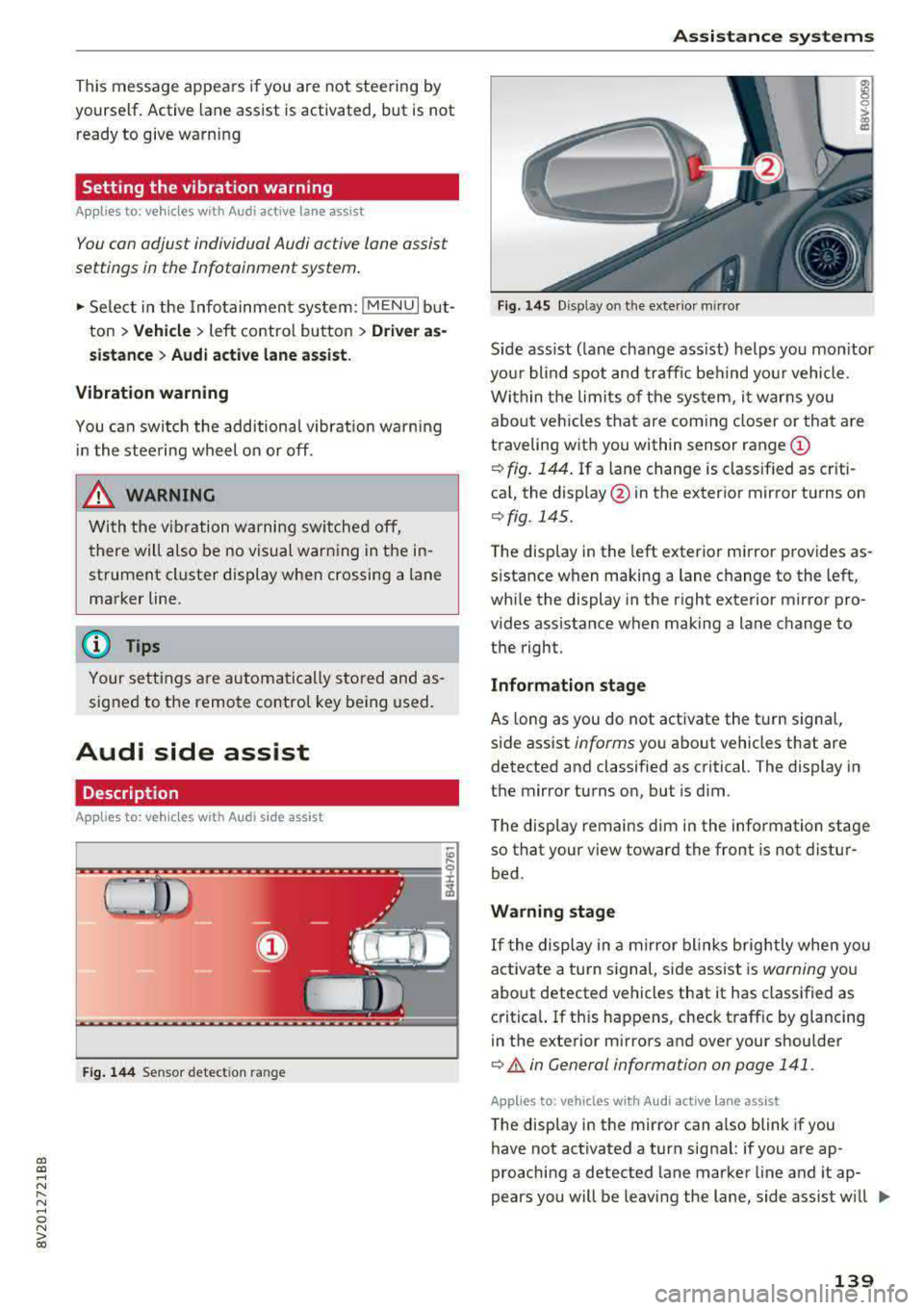
Fig. 144 Sensor detect ion ran ge
Assistance systems
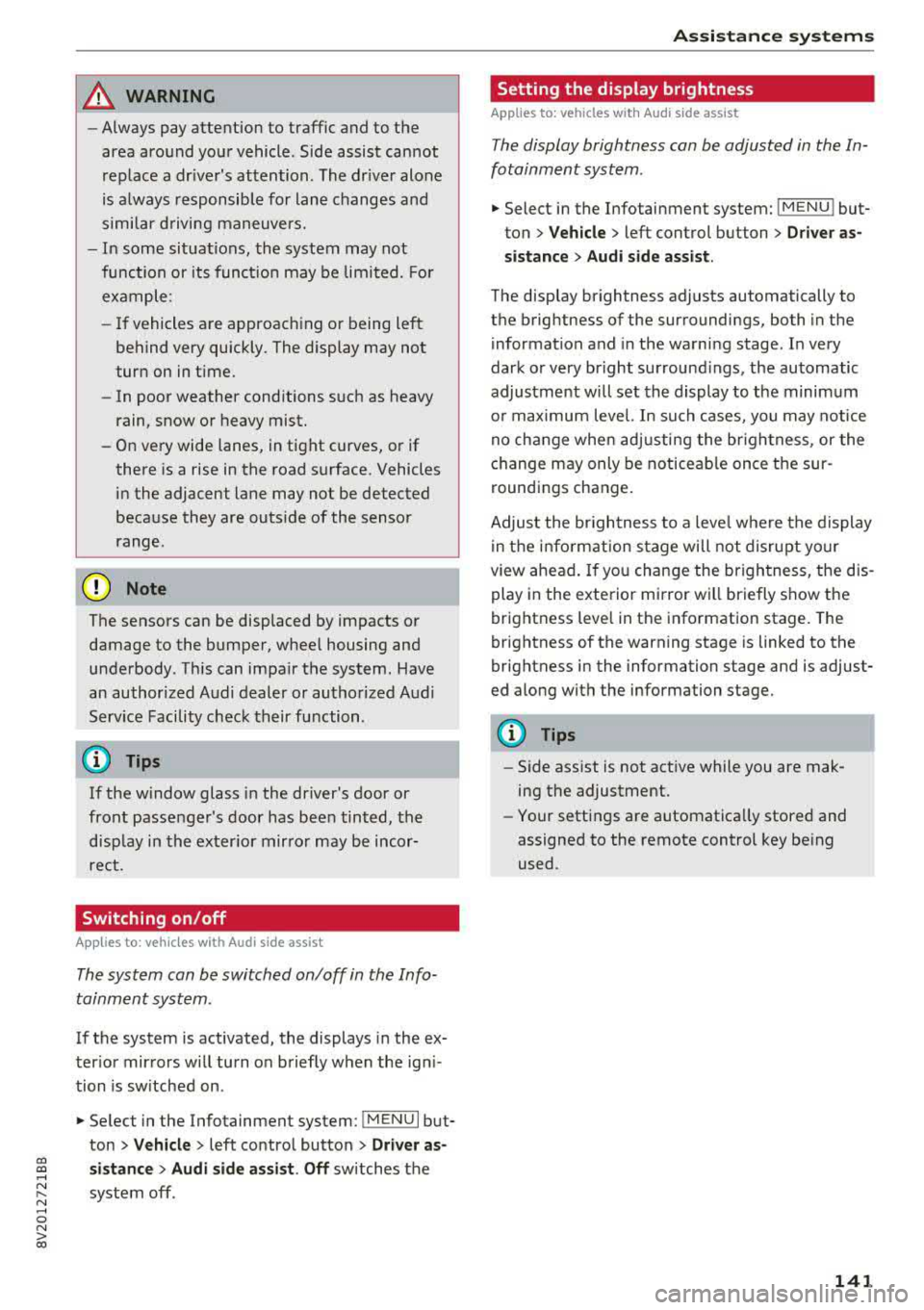
Fig. 145 Disp lay on t he exterio r m irr or
ffl 0 0
> (X)
"'
Sid e assist (lane change ass ist) helps you mon itor
your blind spot and traffic behind yo ur vehicle .
Within the limits of the system, it warns you
about vehicles that are com ing closer or that are
traveling with you within sensor range
(D
¢ fig. 144. If a lane change is classified as criti
cal, the display @in the exterior mirror turns on
¢ fig . 145.
The display in the left exterior mirror provides as
s istance when making a lane change to the left,
while the display in the right exterio r mir ror pro
vides assistan ce when making a lane change to
the righ t.
Information stage
As long as you do not activate the tu rn signal,
side assist
informs yo u about vehicles that are
detected and classified as critical. The display in
the mirror turns on, but is dim .
The display remains dim in the information stage
so that your view toward the front is not distur
bed.
Warning stage
If the display in a mirror blinks brightly when you
activate a turn signal, side assist is
warning you
about detected vehicles that it has classified as
critical. If this happens, check traff ic by glancing
in the exterior m irrors and over your shoulder
¢ & in General information on page 141 .
Applies to: vehicles with Audi act ive lane ass ist
The display in the mirror can also blink if you
have not activated a turn signal: if you are ap
proaching a detected lane marker line and it ap
pears you will be leaving the lane, side assist w ill
liJl,,
139
Page 143 of 400
CXl CXl .... N r--N .... 0 N > 00
A WARNING 1=
- Always pay attention to traffic and to the
area around your vehicle. Side assist cannot
replace a dr iver's attention. The dr iver alone
is always responsible for lane changes and
similar driving maneuvers.
- In some situat ions, the system may not
function or its funct io n may be limited. For
example:
- If vehicles are approaching or being left
behind very quickly. The display may not
turn on in time.
- In poor weather conditions such as heavy
rain, snow or heavy mist.
- On very wide lanes, in tight curves, or if
there is a rise in the road surface. Vehicles
in the adjacent lane may not be detected
because they are outside of the sensor
range.
(D Note
The sensors can be displaced by impacts or
damage to the bumper, wheel housing and
underbody. Th is can impa ir the system. Have
an authorized Audi dealer or authorized Audi
Serv ice Facility check their function .
(Di Tips
If the window glass in the driver's door or
front passenger's door has been tinted, the
disp lay in the exterior mirror may be incor
rect.
Switching on/off
A ppl ies to: ve hicles with Audi side assis t
The system can be switched on/off in the Info
tainment system.
-
If the system is activated, the displays in the ex
terior mirrors will turn on briefly when the ign i
tion is sw itched on .
.,. Select in the Infotainment system: !MENUI but
ton
> Vehicle > left control button > Driver as
sistance
> Audi side assist . Off switches the
system off.
Assistance systems
Setting the display brightness
Applies to : vehicles wi th Audi side ass ist
The display brightness can be adjusted in the In
fotainment system .
.. Select in the Infotainment system: I MENU! but
ton
> Veh icle > left control button > Driver as
sistance
> Audi side assist .
The display brightness adjusts automatically to
the brightness of the surroundings, both in the
information and in the warning stage. In very
dark or very bright surround ings, the automatic
adjustment will set the display to the minimum
or max imum level. In such cases, you may notice
no change when adjusting the brightness, or the
change may only be noticeab le once the sur
roundings change.
Adjust the br ightness to a level where the display
in the information stage will not disrupt yo ur
view ahead. If you change the brightness, the dis
play in the exterior mirror will briefly show the
brightness level in the information stage. The
brightness of the warning stage is linked to the
brightness in the information stage and is adjust
ed along with the information stage.
Q') Tips
- Side ass ist is not act ive while you are mak
ing the adjustment.
- Your settings are automatically stored and
assigned to the remote control key being
used.
141
Page 144 of 400
Ass is tance sy stems
Rear cross-traffic assist
Applies to: ve hicles w ith rear cross -traff ic ass ist
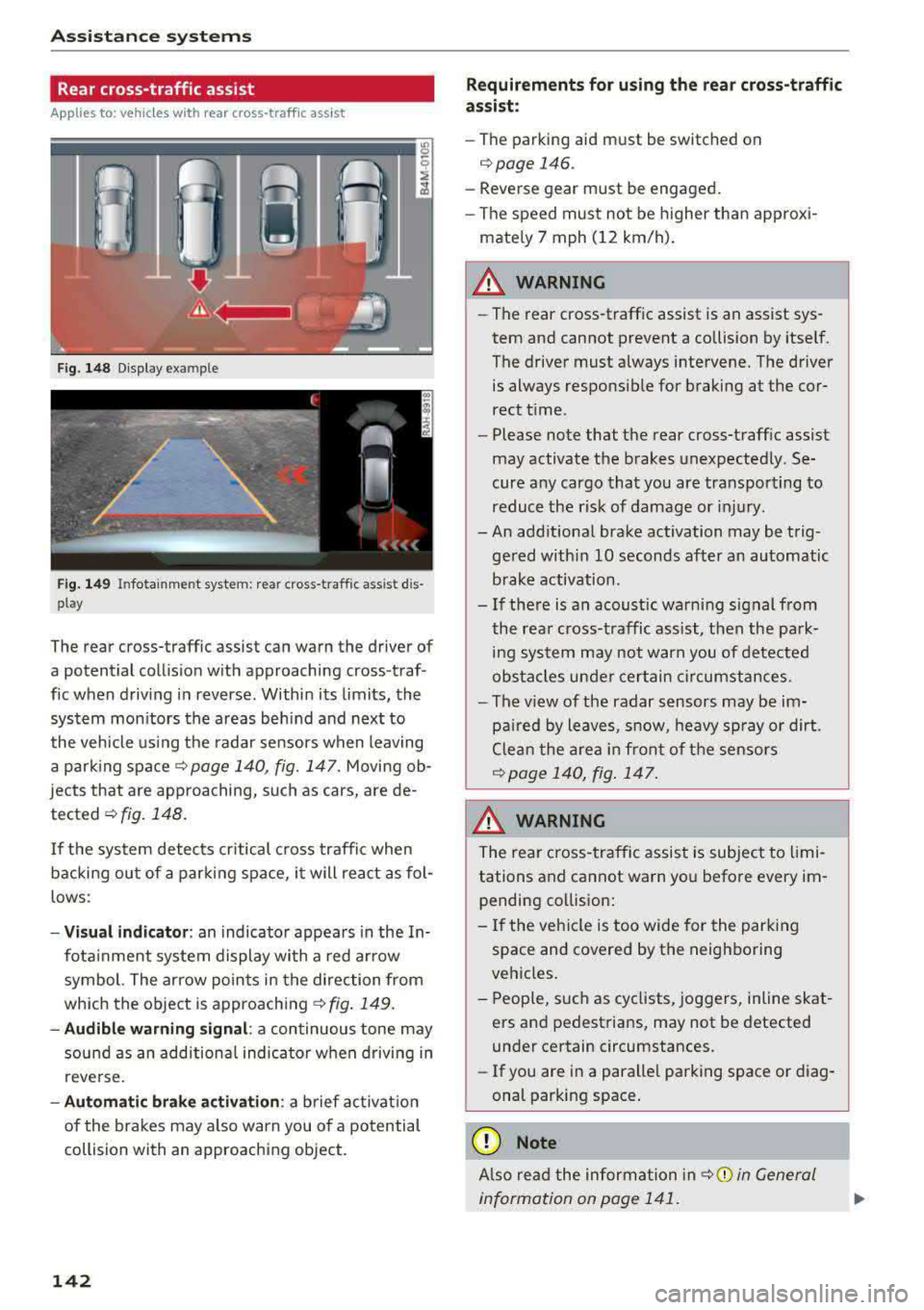
F ig. 148 D isp lay example
F ig. 149 Infotainment system: rear cross-traffic assist dis
play
The rear cross-traffic assist can warn the driver of
a potential collis ion with approaching cross-traf
fic when driving in reverse. Within its limits, the
system mon itors the areas beh ind and next to
the vehicle using the radar sensors when leaving
a park ing spa cer::!.>
page 140, fig. 147. Moving ob
jects that are approaching, such as cars, are de
tected
r::!.>fig. 148.
If the system detects cr itical c ross traffic when
backing ou t of a par king space, it will rea ct as fol
lows:
- Vi sual indicator : an indicator appea rs in the In
fota inment system display wi th a red arrow
symbol. The ar row po ints in the direction from
which the object is approach ing
r::!.> fig . 149.
- Audible warning signal : a continuous tone may
sound as an addition al indicator when driving in
reve rse.
- Automatic brak e activation : a brief act ivat io n
of the brakes may a lso warn you of a potential
collision with an approaching object.
142
Requir ements for using the r ear cross -traffic
as sist :
-The parking aid m ust be switched on
c>page 146.
-Reverse gear must be engaged.
- The speed must not be higher than approxi -
mate ly 7 mph (12 km/h) .
A WARNING
-The rear cross-t raffic assist is an assist sys
tem and cannot prevent a collision by itself.
The driver must always intervene. The driver is always responsib le for braking at the cor
rect t ime.
- Please note that the rear cross-traff ic assist
may activate the brakes unexpected ly. Se
cure any cargo that you are transpo rting to
reduce the r isk of damage or injury.
- An add itiona l brake activation may be trig
ge red w ithi n
10 seconds after an automatic
brake activation.
- If there is an acoust ic warning signal from
the rea r cross-traffic assist, t hen the park
ing sys tem may not warn you of detected
obs ta cl es u nde r certain circumstances.
- The v iew of the radar sensors may be im
pa ired by leaves, sn ow, heavy sp ray or dirt.
Clea n the area in fron t of t he sensors
r::!.> page 140, fig . 147.
A WARNING
T he rear cross- traffic assist is subject to limi
tations and cannot warn yo u before every im
pending co llision:
- If the veh icle is too wide for the park ing
space and covered by the neighboring
veh icles.
- People, such as cyclists, joggers, in line skat
ers a nd pedest rians, may not be detected
under certain circumstances.
- If you are in a paralle l parking s pace or d iag
onal park ing space .
(D Note
Also read the information in r::!.> 0 in General
information on page 1 41.
Page 146 of 400
Assistance systems
Suspension control (Audi magnetic ride)*
Suspension cont rol uses senso rs to recor d info r
mat io n regarding steering moveme nts, br aking
an d accelerat ion operat ions by the drive r, road
surface, d riving speed, and load. With Audi drive
select you can adjust the s uspension contro l to
sporty (dynamic), comfortable (comfort) or bal
anced (auto) .
Steering
The stee ring adapts in te rms of stee ring assis
tance. The re are differe nt modes
c::> page 144.
Indirect steering that moves easily as in com fort
mode is especially su ited to long drives on a high
way . The dynamic mode p rovides sporty, d irect
s teer ing .
For ve hicles w ith progressive steering * the steer
ing performance is more agi le.
Audi adaptive light*
The illumination on curves in ada ptive lig ht is
a d apted to the selected mode.
Audi adaptive cruise control*
The behavior when a ccele ra ting can be adjus ted
fr om com fort able to sporty, depe nding on the
d rive select mode . Ad aptive cru ise cont rol a lso
res ponds to the driving behavior of the veh icle
ahead in a mo re conse rvative o r spo rty manner .
(D Tips
- In so me mode ls, t he maxim um vehicle
speed can on ly be reache d in the auto an d
d ynam ic modes .
- T he S selec to r l eve r posit ion autom atically
e n gages if t he dynam ic mode is selecte d.
Adjusting the Individual mode
· Selecting the driving mode
Applies to: vehicles wit h Audi drive select
You con choose between comfort, auto , dynamic
and individual* .
> a) m
Fig. 150 Ce nte r co nsole: d rive se lect b utt on
.,. Press the tJi~a c::> fig . 150 button repea tedly unt il
the desired mode is disp layed in the instrument
cl uste r/Infotainment system . Or
.,. In the In fota inment system, se lect: I MEN U I
button > Vehicle > left cont rol button > Audi
drive select .
.,. Select and confirm t he des ired se tting.
You can c hange the driv ing mode whe n the vehi
cle is stationary or while driving. If traff ic per
mits, afte r changing modes, briefly take your
foot off t he acc elerator pedal so t hat the recently
se lected mo de is also act ivated fo r th e e ngine .
Comfort -prov ides a comfort-or iented vehicle
setup a nd is s uited fo r long drives o n highways .
Auto -provides an overa ll comfortab le yet dy
namic dr iv ing feel and is suited for everyday use.
Dynamic -gives the drive r a sporty driving fee l
and is suited to a spo rty driving style.
Individual * -c::> page 1 44.
_& WARNING ~
Pay att entio n to traffi c when ope rating t he
dr ive select to redu ce the r is k of an accident .
Yo u con adjust the vehicle settings to y our personal preferences .
.. Se lect: IM ENU I button> Vehicle > Audi drive
select > Individual >
right cont rol but ton .
144
After yo u have closed t he sett ings, yo u w ill auto
matically drive i n t he
Individual * mod e.
Page 148 of 400
Parking systems
Parking systems
General information
A ppl ies to: ve hicles w ith parking system plus/rearview cam
era
Depending on your vehicle's equipment , various
parking aids will help you when parking and ma
neuvering.
The
parking system plus assists you when park
ing by audibly and visually indicating objects de
tected
in front of and behind the vehicle
¢page 147.
The rearview camera shows the area behind the
vehicle in the Infotainment system display. This display assists you when you are cross or parallel parking. The parking system plus functions are
also available ¢
page 148.
A WARNING
-
-Always look for traffic and check the area
around your vehicle by looking at it directly
as well. The parking system cannot replace
the driver's attention. The driver is always
responsible when entering or leaving a park
ing space and during similar maneuvers .
-Please note that some surfaces, such as
clothing, are not detected by the system .
-Sensors and cameras have blind spots in
which people and objects cannot be detect
ed . Be especially cautious of small children
and animals .
-Always pay attention to the area around the
vehicle -us ing the rearview mirror, too.
-The sensors can be displaced by impacts or
damage to the radiator grille, bumper,
wheel housing and the underbody . The park
ing system may be impaired as a result.
Have an authorized Audi dealer or author
ized Audi Service Facility check their func
tion .
(D Note
-Some objects are not detected or displayed
by the system under certain circumstances:
-objects such as barrier chains, trailer draw
bars, vertical poles or fences
146
-objects above the sensors such as wall ex
tensions
-objects with certain surfaces or structures
such as chain link fences or powder snow
-If you continue driving closer to a low ob
ject, it may disappear from the sensor range. Note that you will no longer be
warned about this obstacle.
-Keep enough distance from the curb to re
duce the risk of damage to the rims.
(D Tips
-T he system may provide a warning even
though there are no obstacles in the cover age area in some situations, such as:
-certain road surfaces or when there is tall
grass .
-external ultrasonic sources such as from
cleaning vehicles.
-in heavy rain, snow, or thick vehicle ex
haust.
-We recommend that you practice parking in
a traffic-free location or parking lot to be
come familiar with the system . When doing
this, there shou ld be good light and weath
er conditions.
-You can change the volume and pitch of the
signals as well as the display¢
page 150.
-What appears in the infotainment display is
somewhat time-delayed .
-The sensors must be kept clean and free of
snow and ice for the parking aid to operate .
Page 151 of 400
a, a, ..... N
" N ..... 0 N > 00
-Only use the rearview camera to assist you if
it shows a good, clear p icture. For examp le,
the image may be affected by the sun sh in
ing into the lens, dirt on the lens, or if there
is a malfunction.
- Use the rearview camera only if the luggage
compartment lid is completely closed . If the
luggage compartment l id is open the orien
tation lines and blue su rfaces are hidden .
Make su re any objects you may have mount
ed on the luggage compar tme nt lid do not
block the rearview camera.
- T he came ra lens enlarges and distorts the
field of v is ion. The object appea rs both al
tered and inaccurate on the screen.
- In cert ain situations, people or objec ts in
the display appear closer or farther away:
- For objects that do not touch the ground,
such as the bumper of a parked vehicle, a
tra iler hitch or the rear of a truck . Do not
use the orientation lines in this case.
- If driven from a level surface onto an in
cline , or a downward slope.
- If driven toward protrud ing objects .
- If the veh icle is carry ing too much load in
the rear.
(D Note
- Always read and follow the applicable warn
i ngs
<* 0 in General information on
page 146 .
-The orange-colored orientatio n lines in the
Infotainment display show the veh icle path
based on the steering wheel angle. The
front of the vehicle swings out more than
the rear of the veh icle. Ma inta in p lenty of
distance so that an exterio r mirror or a cor
ner of the veh icle does not co llide with any
obstacles.
Switching on /off
Appl ies to: ve hicles with rearv iew camera
Switching on
• S hift into reverse , or
• Press the P' 1! bu tton in the center console
~ page 147 , fig. 152 . A short confirmat ion
Parking systems
tone sounds and the LED in the button turns
on.
Switching off
• Dr ive faste r th an 6 mp h (10 km/h), o r
• Press the p, q! button, or
• Switch t he ignit ion off .
(0 Tips
- The visu al display in the righ t part of the
display sho uld help you de te ct the c riti cal
vehicle area .
- Yo u can ch ange the vol ume o f the signa ls
and the display ¢
page 150.
Perpendicular par king
Applies to: veh icles w ith rearv iew camera
This view may be used when parking in a garage
or in a parking space.
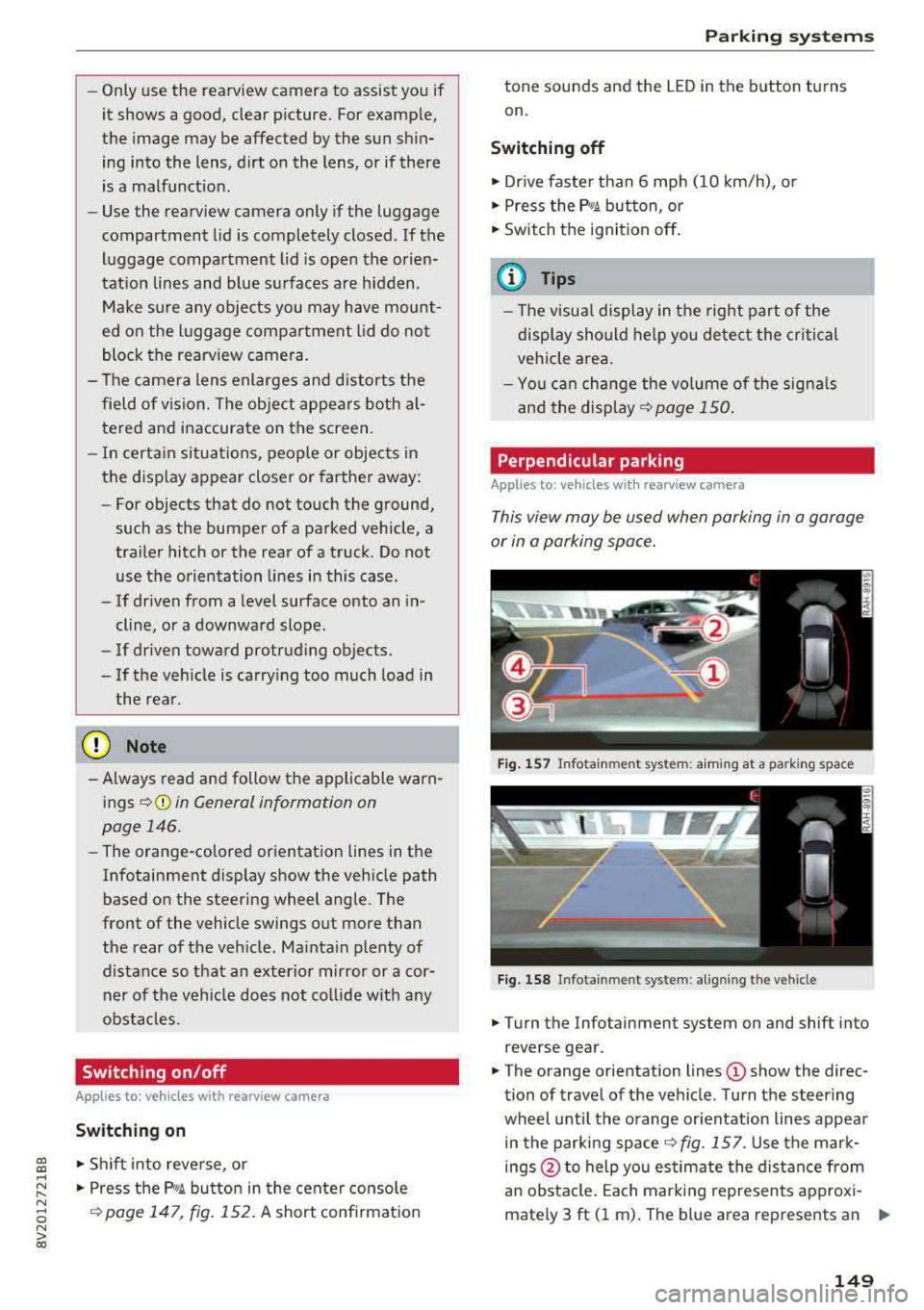
Fi g. 157 In fota inme nt sys tem: a im ing at a par king space
Fig . 1 58 In fotai nment syste m: alig ning t he vehicl e
.. Turn the Infotainment system on and shift into
reverse gear .
• The orange orientation lines (D show the direc
tion of travel of the vehicle . Turn the steering
wheel unti l the orange or ientation lines appea r
in the parking
space ~ fig. 157. Use the mar k
ings @to help you es timate the distance from
an obsta cle. Each marking represents approxi
mately 3 ft (1 m) . The b lue area represents an
.,..
149