ESP AUDI A3 SEDAN 2017 Service Manual
[x] Cancel search | Manufacturer: AUDI, Model Year: 2017, Model line: A3 SEDAN, Model: AUDI A3 SEDAN 2017Pages: 400, PDF Size: 67.32 MB
Page 178 of 400
Voice recognition system
desired command after the external speech di
alog begins.
~ Continuing/resuming the dialog: the system
remains ready to use for a short time after end
ing the dialog. You can start a new external dia
log during this time. Press the
10.I button if
needed, and say a new command .
Or: select
and confirm
Resume on the MMI control panel.
~ Switching off: press and hold the~ button .
Or: select and confirm Cancel on the MMI con
trol panel.
a) Tips
- There are no voice guidance* prompts when
a dialog is active.
- This function depends on the cell phone
used. You can obtain more information
from your cell phone service provider or
from your cell phone user guide.
- AUDI AG simply provides access to control
your cell phone with voice operation and
does not take any responsibility for the con
tents and commands within the external
voice control.
176
Page 189 of 400
CXl CXl .... N ,.__
N .... 0 N > 00
cell phone. Audi recommends editing cell
p hone contacts d irectly in the ce ll phone .
- Only the con ta cts in the lo ca l M MI memory
ca n be ed ite d or de leted .
Importing and exporting contacts
Applies to: veh icles with telephone
Contac ts in vCard forma t (. v cf) can be impor ted
in to the directory or exported .
Requ irement: an SD car d mus t be inser ted in one
of the SD c ard
readers *¢ page 223 , a USB stor
a ge devi ce mu st b e connec ted to t he Au di music
inte rface *¢ pa ge 228, or the requirements for
Au di connect Infotainment se rvices * m ust be
met ¢ page 190.
.,. Sele ct: I M ENU I but ton >Telephone > left con
t ro l butto n >
Directory .
... Se lect : rig ht contro l button > Directory set
tings .
- Importing contacts from a storage device :
se
l ect and co nfirm
Import contacts > SD card 1 /
SD card 2 or USB device 1 /USB device 2
> de
sired contacts
> Start import .
- Exporting contacts to a storage device :
select
and confirm
Export contacts > SD card 1 /SD
card 2 or USB device 1 /USB device 2
> desired
contacts
> Start export .
- Selecting all contacts at once to import/e x
port :
select and conf irm Import contacts /Ex
port contacts > SD card 1 /SD card 2
or USB de
vice 1 /USB device 2 > All > Start import /Start
export .
0) Tips
-Always rea d the c hapter ¢ pag e 196, Audi
conn ect (Infotainm ent) g eneral informa
t ion.
- Fo r additional in forma tion on the myAud i
a ccoun t, v is it
www.audiusa.com/myaudi.
- The im po rt ed contac ts are stored i n the lo
ca l memory o f the directory.
l) Depe nds on th e co nnect ed cell p ho ne.
Telephone
- A m aximum of 1,0 00 con tacts can be im
p orted . Yo u can check the directory memory
capaci ty at any t i me
¢ page 1 88.
- Never save im portant data on memo ry ca rds
or USB storage devices . A udi is not responsi
ble for damaged o r lost files and media.
- Contacts t hat were down lo ad ed from a ce ll
phone canno t be e xported .
- The re sho uld b e no ot her files o r fo lders o n
the stora ge medium containi ng the contacts
t o be im port ed.
Additional settings
Telephone settings
Applies to: vehicles with telephone
.,. Sele ct: ! ME NUI butto n> Telephone > right con-
t rol butt on >
Telephone settings .
Call options*
Call forwarding :
you can switch the forwarding
of incom ing ca lls to yo ur voicemai l o r to ano ther
phone nu mber on a nd off. Y ou ca n che ck if t he
funct ion is act ivated or deactivated w it h Check
status .
Call waiting :
you are alerted to an incom ing call
dur ing a pho ne c all whe n the func tion is swit ched
on ~-You ca n che ck if the func tion is acti vated
o r d eacti vate d wi th
Check status.
Send own telephone number :
sending your
phone nu mber wi th an out going c all can b e acti
va ted and de activate d. Wi th t he
Network-de
pendent
se tting , the se tting li ste d in the con
t ract w it h t he ce ll phone service p rovider is used.
T he sett ings on ly app ly to the
Telephone men u in
the MMI. Please note that the set tings o n your
ce ll phone w ill apply after disconnecting the
B luetoot h connection. You can c heck if t he f unc
t ion is activated or deactivated with
Check sta
tus .
Ringtone and volume settings
1>
U sing the Mute telephone function, you can
switch the r ingtone p layback through the M MI
speaker on and off. You can play the r ingtones
187
Page 193 of 400
a, co ..... N
" N ..... 0
.. Confirm your entry with OK.
Then you can open your personal sett ings from
your myA udi account in your vehicle.
@ Tips
You can receive your myAud i PIN if you have
set up a myA udi account. For additional infor
mat ion, see
my.audi usa.com .
Opening Audi connect
(Infotainment)
A ppl ies to: ve hicles with Audi co nnect (Infota inment)
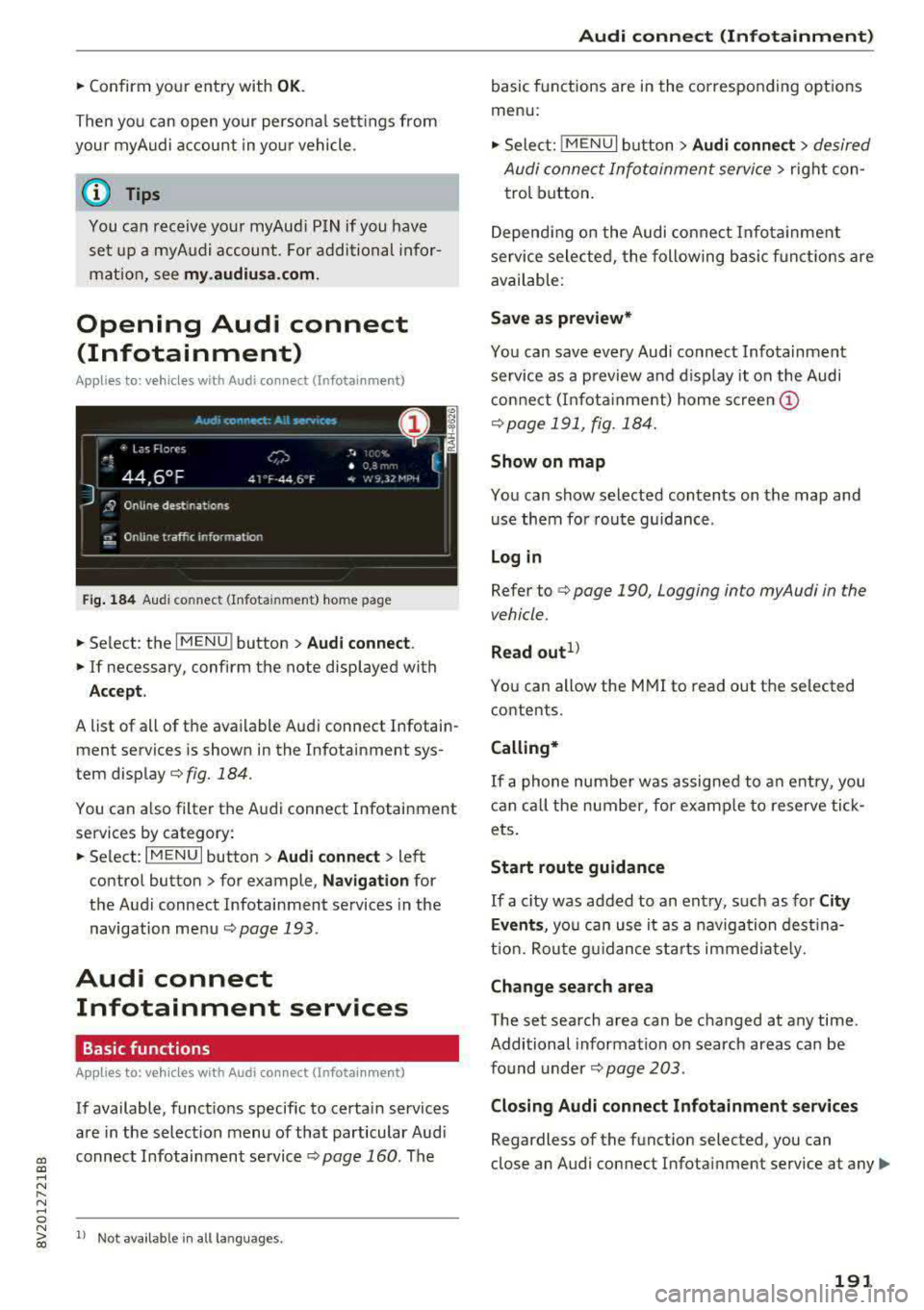
Fig . 184 Aud i co nnect (Infota inment) home page
.. Select: the I MENU ! button > Audi connect .
.. If necessary, confirm the note displayed with
Acce p t.
A list of all of the available Audi connect Infotain
ment services is shown in the Infotainment sys
tem
display¢ fig. 184 .
You can a lso filter the Audi connect Infotainment
services by category:
.. Select : I MENU I button > Audi connect > left
contro l button
> for example, N avi gat ion for
the Audi connect Infotainment services in the
navigation
menu ¢ page 193 .
Audi connect
Infotainment services
Basic functions
Ap plies to: ve hicles w ith Audi co nnect (Infot ainment)
If available, funct ions specific to certain services
are in the select ion menu of that particular Aud i
connect Infotainment
service ¢ page 160. The
N ~ 1> Not availab le in all la nguages.
Audi conne ct (Inf otainment )
basic functions are in the corresponding options
menu:
,. Select: ! MENUI button> Audi connect > desired
Audi connect Infotainment service>
right con
trol button.
Depend ing on the Audi conne ct Infota inment
service selected, the following basic funct ions are
available :
Save as prev iew*
You can save every Aud i connect Infotainment
service as a preview and d isplay it on the Audi
connect (I nfota inment) home
s c ree n@
¢ page 191 , fig . 184.
Show on map
You can show selected contents on the map and
use them for route gu idance .
Lo g in
Refer to ¢ page 190, Logging into myAudi in the
vehicle .
Read out1>
You can allow the MMI to read out the selected
contents.
Calling*
If a phone number was assigned to an e ntry, you
can call the number, for examp le to reserve tick
ets.
Start route guidance
If a c ity was added to an ent ry, such as for C ity
Ev ent s,
yo u can use it as a navigation dest ina
t ion. Rou te g uidance sta rts immed iately.
Change sea rch area
The set search area can be changed at any time.
Additional information on search areas can be
found
under ¢ page 203 .
Closin g Audi connect Infotainment ser vices
Regardless of the funct ion selected, you can
close an Audi connect Infotainment service at any
Ill>
191
Page 195 of 400
CXl CXl .... N r--N .... 0 N > 00
Different functions are available depending on
the Twitter category you have selected:
- New twe et: you can post a new tweet using
pre-made temp lates or using myAudi tem
plates that you have created yourse lf .
- Refr es h: the selected Tw itter function is re
freshed.
- Favori te: mark a Tweet as favo rite to show you
l ik ed it.
- Retw eet: you can quote a Tweet to share it with
others.
(j) Tips
- Other settings such as account, language,
Tweet security and location settings
cannot
be changed in the MMI. These changes must
be made on the Twitter website .
- You can only connect
one Twitter account
wi th you r myAudi account.
- Audi connect (Infotainment) makes it possi
ble to access Tw itter. Permanen t ava ilability
cannot be guaranteed, because that de
pends on Twitter.
Travel (travel guide)
Applies to: vehicles with Audi connect (Infotainmen t)
You can use the Audi MMI connect opp to store
points of interest on your mobile device (such as
a smartphone) and then use them for route
guidance in the MMI .
Requirement:
The
A udi MM I connect app must be installed and
open on your mobile device .
You must be logged i nto your myAud i account in
the
A udi MMI conn ect app and you must have se
l ected your vehicle.
The Wi-Fi funct ion on your mobile device and on
the MMI must be switched on.
The MMI must be connected to the network.
.,. Press: I MENU I button > Audi conne ct > left con-
t ro l button
> Inf ormati on category > Tra ve l.
Afte r opening the travel guide, travel tips in yo ur
a rea will be displayed incl uding c urrent rat ings as
well as the correspond ing category.
Audi c onn ect ( Inf ota inm ent )
.,. Press the le ft control button to change the cat
egory (such as bars nearby) .
A WARNING
= -
-It is only safe to use tablets, laptops, mo
b ile dev ices and other similar devices when
the vehicle is stationary because, like all loose objects, they co uld be thrown around
the inside of the vehicle in a crash and cause
serious inju ries. Store these types of devices
securely while d riving.
- Do not use any wireless devices on the front
seats within range of the airbags while dr iv
ing. Also read the warnings in the chapte r
¢ page 271, Front airbags.
(D Tips
-Units of measurement, language settings
and time are shown in the Infotainment sys
tem display based on how they were set in
the system settings
¢ page 241.
Audi connect (Infotainment) in navigation
Applies to: vehicles with navigation system and Audi connect
(Infotainment)
.,. Select : !MENUI button> A udi conn ect > left
control button >
Na vig atio n.
The following Audi connect Infotainment services
are currently ava ilable:
- Navigation with
online m ap vie w and Street
Vi ew
¢ page 212.
- Point of Intere st (POI) on line sea rch with
v oi ce re cognit ion
(such as restaurants): plan
route guidance using the MMI contro l pane l
¢ page 203 and the voice recogn ition system
¢ page 170 .
-Set up destinations in your MMI using your
myAu di account or onl in e map vie w
¢page 212 .
-On line traff ic informat ion : receive up-to-the
m inute traffic informat ion about acc idents,
road construction and other inc idents
¢ page 215 .
-Map update: import navigation map updates
direct ly to your veh icle using an SD card or as
an online update
¢ page 213.
193
Page 197 of 400
CXl CXl .... N r--N .... 0 N > 00
Wi-Fi hotspot
Applies to: vehicles with Wi-Fi hotspot
You con use the MMI as a Wi-Fi hotspot to con
nect up to eight Wi-Fi devices to the Internet. While driving, restricted use of unsecured, light,
small wireless devices is only possible from the
rear of the vehicle.
Requirement: the ignition must be switched on.
• Select: I MENU I button > Tele ph one> right con-
trol button >
Wi -F i s ettin gs.
The follow ing settings can be modified:
Wi-Fi
The MMI Wi-F i hotspot is deactivated at the fac
tory . Switch the Wi-Fi hotspot to
H otsp ot before
establishing a connection between your vehicle
and your W i- Fi dev ice.
- On : the MMI Wi-Fi hotspot is active and visible
to other devices . You can connect your Wi-Fi
device with the MMI.
- Off: the MMI W i-F i hotspot is deactivated . An
I n ternet connection fo r Wi-Fi devices is not
poss ible.
_& WARNING
- T o reduce the risk of an accident, use the
Audi connect In fotainment services with a
Wi-Fi hotspot only in the rear seat when the
vehicle is in motion, or on ly when the vehi
cle is stationary.
- It is only safe to use tab lets, laptops, mo
bile devices and other similar devices when
the vehicle is stationary because, like all loose objects, they could be thrown around
the ins ide of the vehicle in a crash and cause
serious injur ies. Store these types of devices
securely while driving.
- Do not use any w ireless devices on the front
seats w ith in range of the a irbags while driv
ing. Also read the warn ings in the chapter
~page 271, Front airbags.
- As the driver, do not allow usage of the Wi
Fi hotspot to dist ract you from driving, as
this could increase the risk of an accident .
-
Audi conn ect ( Inf ota inm ent )
(D Note
-Under some conditions, certain mobile devi
ces and operating systems may automati
cally switch from your vehicle's Wi-Fi hot
spot to the device's mobile data connection.
In that event , standard text and data usage
rates would apply wh ile the device's mobile
data connection is in use. Please refer to
documentation provided by your mobile de
vice's manufacture and your data carrier for details, related terms and privacy state
ment.
- You a re responsib le for all precautions tak
en for data protection, anti -virus protection
and protection against loss of data on mo
bile devices that are used to access the In
ternet through the Wi-Fi hotspot.
(D Tips
- In vehicles without Audi connect (Infotain
ment)*, the use of the Wi-Fi hotspot is only
possible for the W i-Fi audio player*. A data
connect ion to the Internet cannot be estab
lished.
- For add itional information about the Audi
connect Infotainment services, visit
ww w.a udiusa.c o m /aud iconn ect .
Configuring the data
connection
Applies to: vehicles with Audi connect (Infotainment)
The data connection for Audi connect Infotain
ment services is pre-configured at the factory.
However, if a configuration should be necessary,
you con adjust the following settings.
• Select: ! MENU I button> right control button>
Connecti on manag er.
• Select: right control button > Online setti ngs >
Data c onnec tion setting s.
Using the Data co nnection settin gs menu, you
can set when an Internet connection should be
made . T he Internet connection disconnects auto
matically once the requested Audi connect Info
tainment service no longer requires any data.
The following options can be selected:
195
Page 199 of 400
CXl CXl .... N r--N .... 0 N > 00
platform is available for to you to activate
additional Audi connect Infotainment serv
i ces and to transfer data to your vehicle,
among other services. A one-time registra
tion is required to establish a connection to
your vehicle. For this purpose, AUDI AG col lects, processes, transmits and uses your re
quired personal informat ion as required for
you to use the se rvices provided by AUDI
AG. Your information is not distributed to
third parties . Us ing your ce ll phone w ith
your myAudi platform allows you to trans
mit data for your Audi connect Infotain
ment services functions to your vehicle and
you can allow specific veh icle data to be
transm itted from your vehicle.
- By act ivat ing special information services
that are part of your Audi connect (Infotain ment) portfolio, you can use these funct ions
directly in your veh icle by enter ing data to
confirm your ident ity (to use social net
works, fo r example). To do this, the identifi
cation information you prov ided is forwa rd
ed with the reques t to the respect ive service
provider. Then you can access your personal
content using a secure connection. This con
tent is displayed in the vehicle for your use.
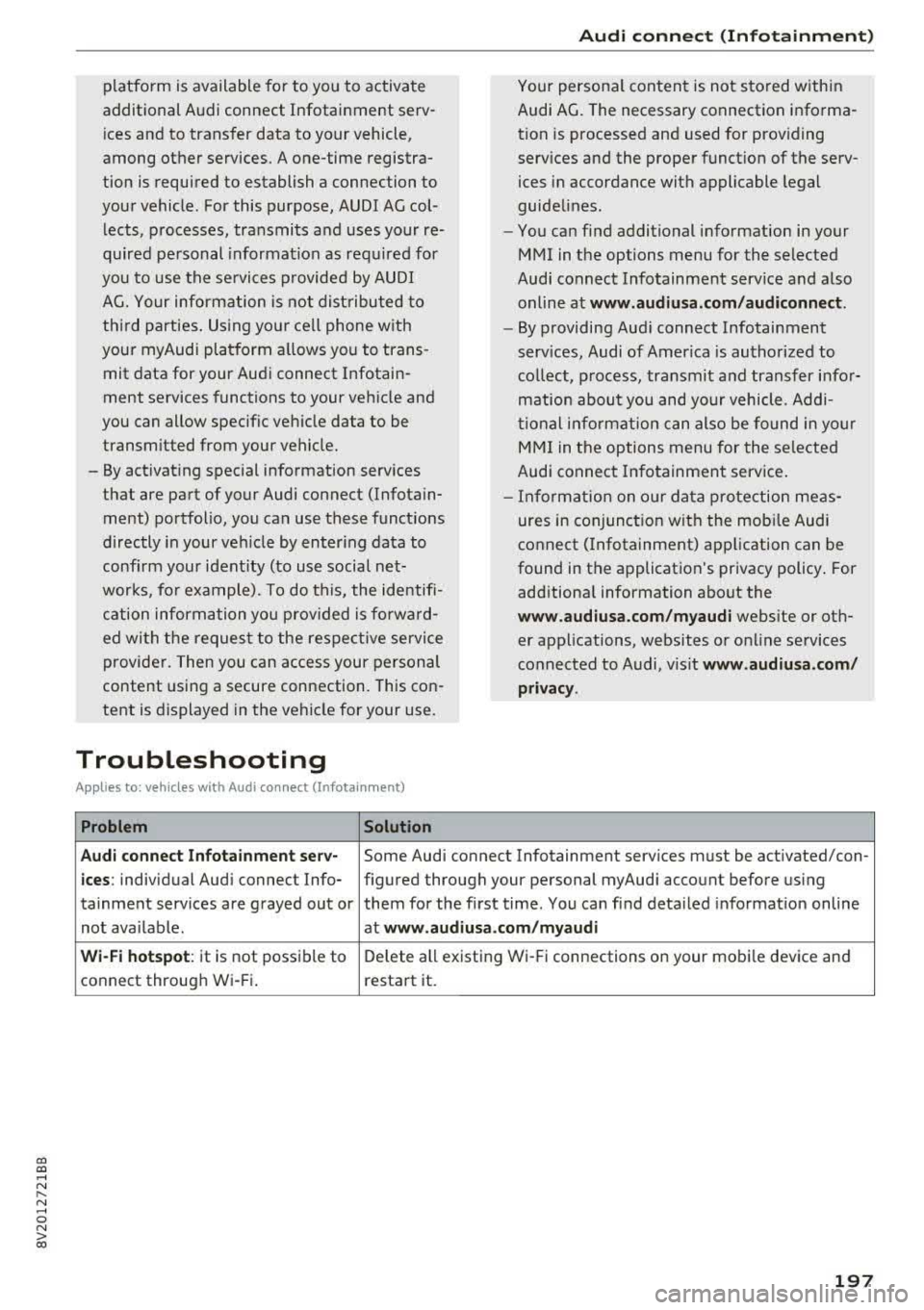
Troubleshooting
Appl ies to: vehicles with Audi connect (Infotainment)
Problem Solution Audi c
onn ect ( Inf ota inm ent )
Your personal content is not stored within
Audi AG. The necessary connection informa
tion is processed and used for prov iding
serv ices and the proper funct ion of the serv
ices in accordance with applicable legal
guidelines.
- You can find additional information in your
MMI in the options menu for the selected
Audi connect Infotainment service and a lso
online at
www .audiusa.com /audiconn ect .
- By providing Aud i connect Infotainment
serv ices, Audi of America is authorized to
collect, process, transmit and transfer infor
mation about you and your vehicle. Addi
tional info rmation can also be found in yo ur
MMI in the options menu for the selected
Audi connect Infotainment service .
- Informat ion on o ur data protection meas
ures in conjunction with the mobi le Audi
connect (Infotainment) app lication can be
found in the application's privacy policy . For
additional information about the
ww w.audiusa .com /m yau di webs ite or oth
er applications, websites or on line services
connected to Audi, v is it
www.audiusa .com /
privacy .
Aud i connect Infot ainment ser v-
Some Audi connect Infotainment services must be act ivated/con-
ic es : individual Aud i connect Info- figured through your personal myAudi account before us ing
tainment serv ices are grayed out or them for the first time . You can find deta iled informat ion on line
not ava ilable. at
www.audiu sa.com /m ya udi
Wi-Fi hot spot :
it is not possible to Delete all existing Wi-Fi connections on your mobi le device and
connect throug h Wi- Fi. restart it.
197
Page 206 of 400
Navig ation
-Se arching for onl ine d estination s in a specific
categor y:
select and confirm Se lect catego ry.
Se lect and confirm a category, such as Rest au
r a nts .
Find which search areas are available under
¢ page 203, Point of interest search.
You can sea rch fo r on line dest ina tions using the
voice recognition system
¢ table on page 173.
{I) Tips
Always read t he chapte r¢ page 196, Audi
c onnect (Infotainment) general informa tion.
Accessing destinations from myAudi
account
A pp lies to: ve hicles w ith naviga tion sys tem and Audi co nn ect
(I nfota inmen t)
Import individual destinations from your myAudi
account into the
MMI.
Requirement:
The requirements for Audi connect (Infotain ment) must be met
¢ page 190.
You must have a registered myAudi account at
my.aud iusa.com . You must have a vehicle as
signed to your myAudi acco unt and you must
have stored one or more destinations .
~ Press the I NAV/MAPI button repeatedly until
the
Enter de stin ation menu is displayed
¢ page 200, fig. 185.
~ Se lect: left control button > m yAudi cont act s.
~ If necessary, enter your myAudi user data or
your myAud i PIN¢
page 190 . The contacts
stored in myAudi are d isp layed .
-Select and confirm a contact .
-Select and confirm a private or business desti -
nation.
- Se lect and confirm
Start route guidance .
(D Tips
-You only need to enter the myAud i user data
one time .
-You can receive your myA udi PIN if you have
set up a myAudi account.
204
- Additiona l information can be found under
www.audiu sa .com /audiconnect .
Entering a destination using geo
coordinates
App lies to : vehicles wit h navigat ion syste m
~ Press the I NAV/MAPI button repeatedly until
the
Enter dest inat ion me nu is displayed
¢ page 200, fig . 185 .
~ Sele ct: left control button > Geographi cal coor ·
dinate s.
-Select latitud e/longitude .
-Press the contro l knob to set the individual val -
ues .
- Turn the control knob to the left/right to
change the selected va lue.
- Select and confirm
Start route guidance .
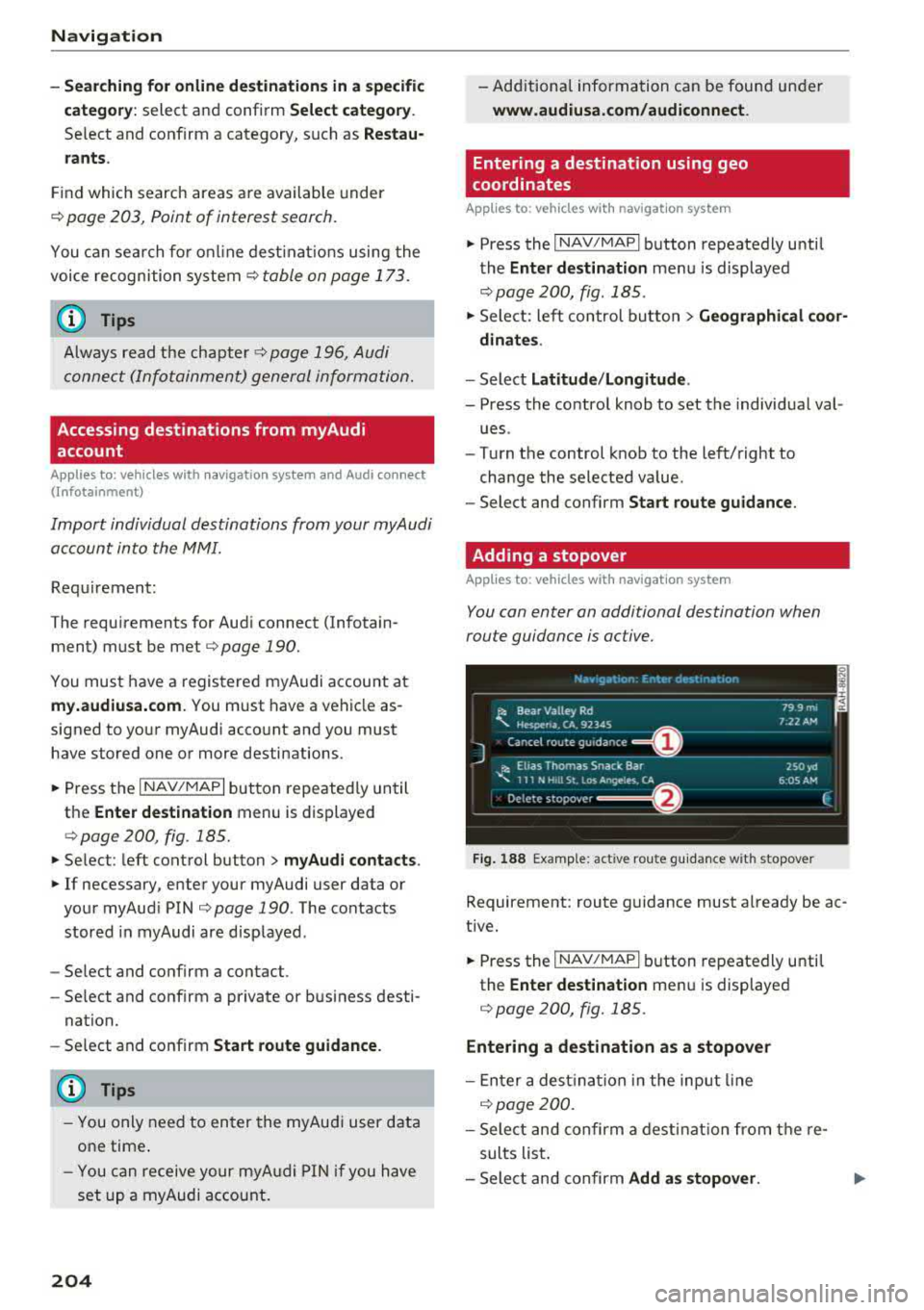
Adding a stopover
App lies to : vehicles wit h naviga tion syste m
You con enter an additional destination when
route guidance is active.
Nac,,gat1on Er.tcr de'iot1r.ar.1on ~-
---------== = ==----,:.-jl: Bear Valley Rd 79 9 mi
'-,. Hesperia. CA, 9234S 7:22 AM
Cancel route gu idance ______ _
::, Elias Thomas Snack Bar
-..;: 111 N Hill St. Los Angeles. CA
De lete stopovc-r ====~ If}
J 250yd
6:05 AM
Fig. 188 Examp le: act ive route g uidance w it h stopover
Requirement: route guidance must already be ac
tive.
~ Press the I NAV/MAPI b utton repeatedly unti l
the
Ente r dest ination me nu is displayed
¢ page 200, fig. 185.
Entering a destination as a stopover
-En ter a des tina tion in the input line
q poge 200 .
-Select and confirm a desti nat ion from the re
sults list .
-Select and confirm Add as stopo ver . jll,,
Page 212 of 400
Navig ation
-T urn the control knob to the left or to the right .
You can also zoom in and out on the map using
the MM I touch control pad*
¢ page 162. Or :
turn the left thumbwheel on the mu ltifunction
steering wheel* ¢
page 13.
Tu rning th e cro ssha irs on /off
-Switching th e cros shair s on : press the con trol
knob in the map view
¢ fig. 193.
-Switching th e crosshair s off : press the I BACKI
button.
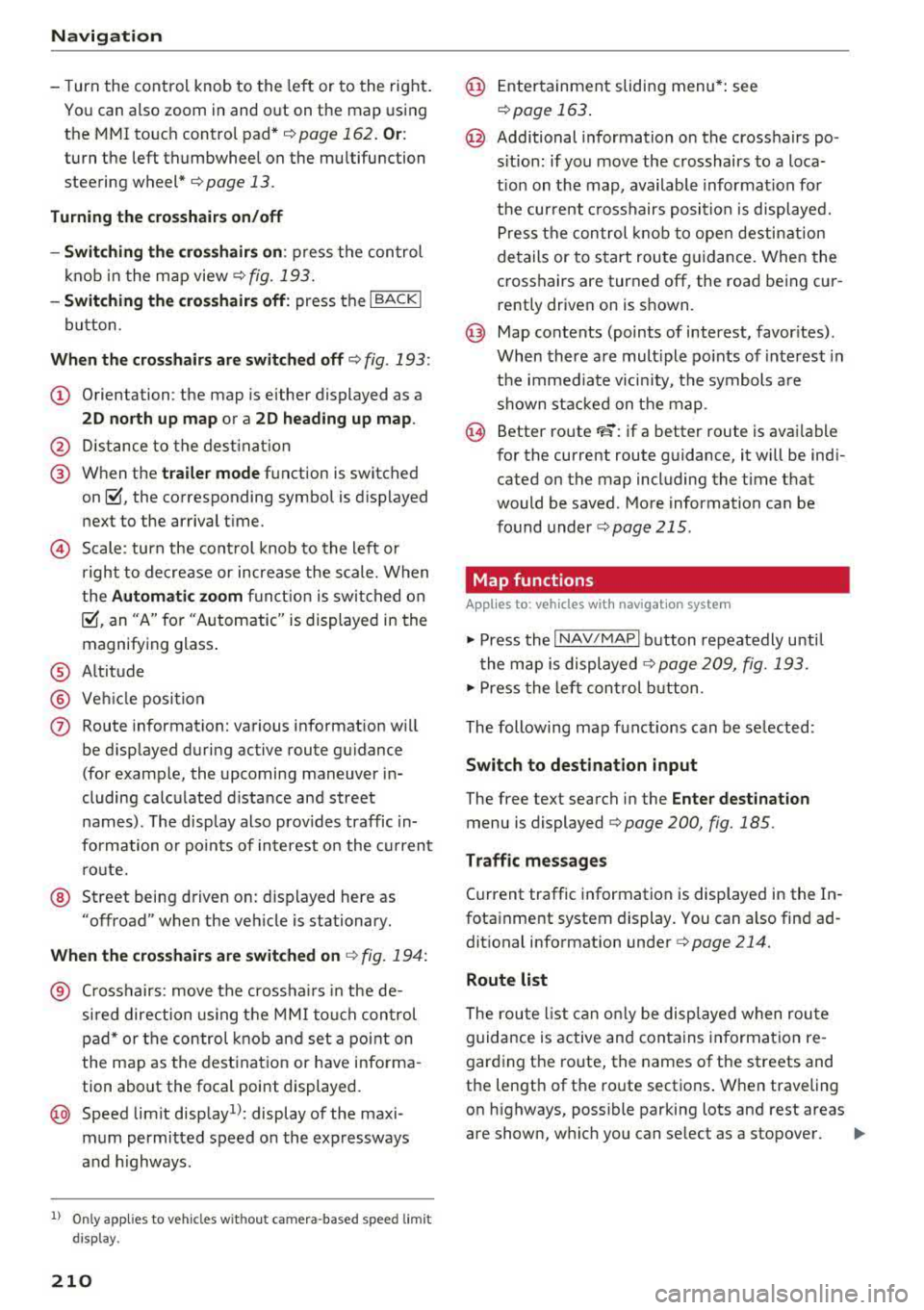
Wh en th e crossha ir s are switch ed off ¢ fig. 193:
(D Orientation : the map is either displayed as a
2 D nor th up map or a 2D hea ding up map .
@ Distance to the dest inat ion
@ When the tr aile r m ode function is switched
on~. the corresponding symbol is displayed
next to the arrival t ime.
© Scale: turn the cont rol knob to the left or
right to decrease or increase the scale. When
the
Autom atic zoom fu nct ion is swi tched on
~, an "A" for "Automatic" is displayed in the
magnifying glass .
® Altitude
® Vehicle position
(J) Route information: various information wi ll
be d isp layed during active route guidance
(for example, the upcoming maneuver in
cluding calculated d istance and street
names) . The display also prov ides traffic in
formation o r points of interest o n the c urrent
ro ute.
@ Street being driven on: displayed here as
"offroad" when the veh icle is stationary.
Whe n the c rosshairs are switched on ¢ fig. 194 :
® Crosshairs: move the crossha irs in the de
sired direction using the MMI touch control
pad* or the control knob and set a point on
the map as the destination or have informa
tion about the focal point displayed.
@ Speed limit disp lay1l: display of the maxi
mum permitted speed o n the expressways
and h ighways .
l) O nly app lies to ve hicl es w ithout camer a-based speed limi t
dis play .
210
@ Ente rtainment sliding menu*: see
r::!) page 163 .
@ Additional information on the crosshairs po
s itio n: if you move the crosshairs to a loca
t ion on the map, available information for
the cur rent c rosshairs position is displayed.
Press the control k nob to open destination
details or to s tart route guidance. When the
crosshairs are turned off, the road being cur
rently driven on is s hown .
@ Map contents (points of interest, favor ites) .
When there are mult iple po ints of interest in
the immediate vicin ity, the symbols are
shown stacked on the map .
@ Better route FS: if a better route is avai lable
for the current route guidance, it will be ind i
cated on the map including the time that
would be saved . More information ca n be
found under
¢ page 215 .
Map functions
App lies to: vehicles with navigat ion system
.,. Press the I NAV/MAPI button repeatedly unti l
the map is displayed
¢ page 209, fig. 193.
.,. Press the left con trol b utton .
The following map funct ions can be se lected:
Switch to destin ation input
The free text search in the Enter de stination
menu is displayed Q page 200, fig. 185.
T raffic me ssage s
Current traffic information is displayed in the In
fotainment system display. You can also find ad
dit ional information under
Q page 214.
Route list
The route l ist can on ly be displayed when route
guidance is active and contains information re
garding the ro ute, the names of the streets and
the length of the route sections . When traveling
on highways, possible parking lots and rest areas
are shown, which you can se lect as a stopover.
Page 224 of 400
Media
Media
Introduction
There are various media drives and connections
avai lab le in the MMI. For example, you can p lay
aud io/video* fi les from the Jukebox* or connect
your mob ile dev ice to the Aud i m usic interface *
and operate it through the MMI.
Notes
General information
Media and format restrictions :
the MMI (includ
in g the SD card reade r and the USB storage de
vice co nnect ion *) was tested w ith a var iety of
products and media on the market. However,
there may be cases where ind iv idual devices or
media and audio/video files" may not be recog
n ized, may play o nly w ith restr ictions or may not
p lay a t all.
Dig ital Rights Management : please note that
t he audio/v ideo" files are subject to copyright
protection .
The media drives do not p lay f iles that a re pro
tected by OR M and that are ident ified with the
symbo l
!'.TI.
Data secu rity : never store im portant data on SD
cards, the Ju kebox *, CDs/DVDs o r mobile devices.
Aud i AG is not responsib le for damaged or lost
fi les and media .
Loading times : th e mo re files/fo lde rs/ play lists
that are on a sto rage medium, the longer it will
take to load the audio/video* files . Audi recom
mends us ing storage media tha t on ly conta in au
d io/video files* . T o decrease the t ime it takes to
load audio/v ideo f iles*, crea te subfo lders ( fo r ex
a m ple , fo r th e a rt ist o r album). The loading time
will also increa se whe n importing fi les.
Additional information : when playing, audio
fil es are automatically displayed with any add i
tional informa tion that is s to red (such as the ar
tis t, track and al bum cover).
If this in forma tio n is
no t a vai lable o n the storage mediu m, t he MMI
wi ll check the Gr ace no te met adata database .
222
However, in some cases, the additional in forma
tion may not be dis played.
Restri cted functionality : reset the Media set
tings
t o the facto ry de fault se ttings i f func tional
i ty is res tric ted
¢ page 2 42.
If functionality is restr icte d, reset the Jukebox*
to t he fa ctory defa ult se tt in gs ¢ page 242.
For informa tion abo ut the propert ies of s upport
ed med ia and fi le formats, see
¢ page 235 .
W Note
Always fo llow the information fo und in c::> (D in
W i- Fi hotspot on page 195 .
CD/DVD operation
CD /DVD and format restrictions :
th e f unct iona li
ty o f indivi dual sto rage media m ay be limi ted due
to t he v ariety of b lank C Ds/DV Ds av a ila b le and
t h e v arious cap acities. Audio CDs or video DV Ds
with copy protection, CDs/D VDs that do not con
form to the standard and mult isess ion CDs may
hav e limit ed playback or may not play at all. Audi
r ecommends finali zing the recording process
whe n creat ing mult isess ion CDs . Mult isess ion is
not supported for DVDs .
Using CDs/DVDs, the CD dr ive or the DVD drive :
to ensure correct, hig h-q uality playback and to
prevent damage to the dr ive or disc read ing er
r ors, always store CDs/DVDs in a protec tive
s leeve and do no t expose them to direct s unlight .
Do
not u se:
- Damaged, dirty or sc ratched CDs/DVDs
- Single CDs/DVDs (3 in diameter)
- CD/DVDs that a re not roun d
- CDs/DV Ds w ith labe ls
- Protec tive rings
- Clean ing CDs
Thermal protection switch : CD/DVD playback
may be temporarily unavailable if o utside tem
p eratures a re extremely hot or co ld. A t hermal
pro tect io n sw itch is insta lled t o protect the C D/
DVD and t he laser.
Laser devices : las er devices a re divide d into safe -
ty classes 1 to 4 in accordance with DI N IE C 76
.,..
Page 230 of 400
Media
-Do not u se any wireless devices on the fro nt
seats within range of the airba gs w hile driv
ing. Also read and follow the warnings in
r=> page 271, Fro nt airbags.
CD Note
- Always follow the information found in ¢ 0
in Wi-Fi hotspot on page 195 .
-Please note that there generally are add i
tiona l costs when using an online media
service account, especially when it is used i nternationally.
{!) Tips
-Depending on the Internet connection and
network traff ic, a connection loss can occur
during p layback of on line media serv ices.
-Online media and Internet radio usage de
pends on the serv ice avai lability of the third
party provider.
- Audi AG simply makes the access to on line
media serv ices possible t hrough the MMI
and does not take any respons ibility for the
contents of the onli ne med ia serv ices .
-Always read the chapter r:> page 196, Audi
connect (Infotainment) general informa tion.
-Depending on the mobile device used, the re
may be interr uptions du ring media playback
and when using the
Audi MMI connect app.
T o avoi d inter ruption s when usi ng a mob ile
device, do no t loc k t he s creen on you r mo
bi le dev ice a nd keep the
Audi MMI connect
app in the foreground .
- Co ntact an a utho rized Audi dea le r or a u
thorized Audi Service Facili ty for additional
informat ion about on line media .
228
Multimedia connections
USB adapter for Audi music interface
You can connect your mobile devices (such as a
smartphone or
MP3 player) to the Audi music in
terface and charge them using a special USB
adapter .
®-
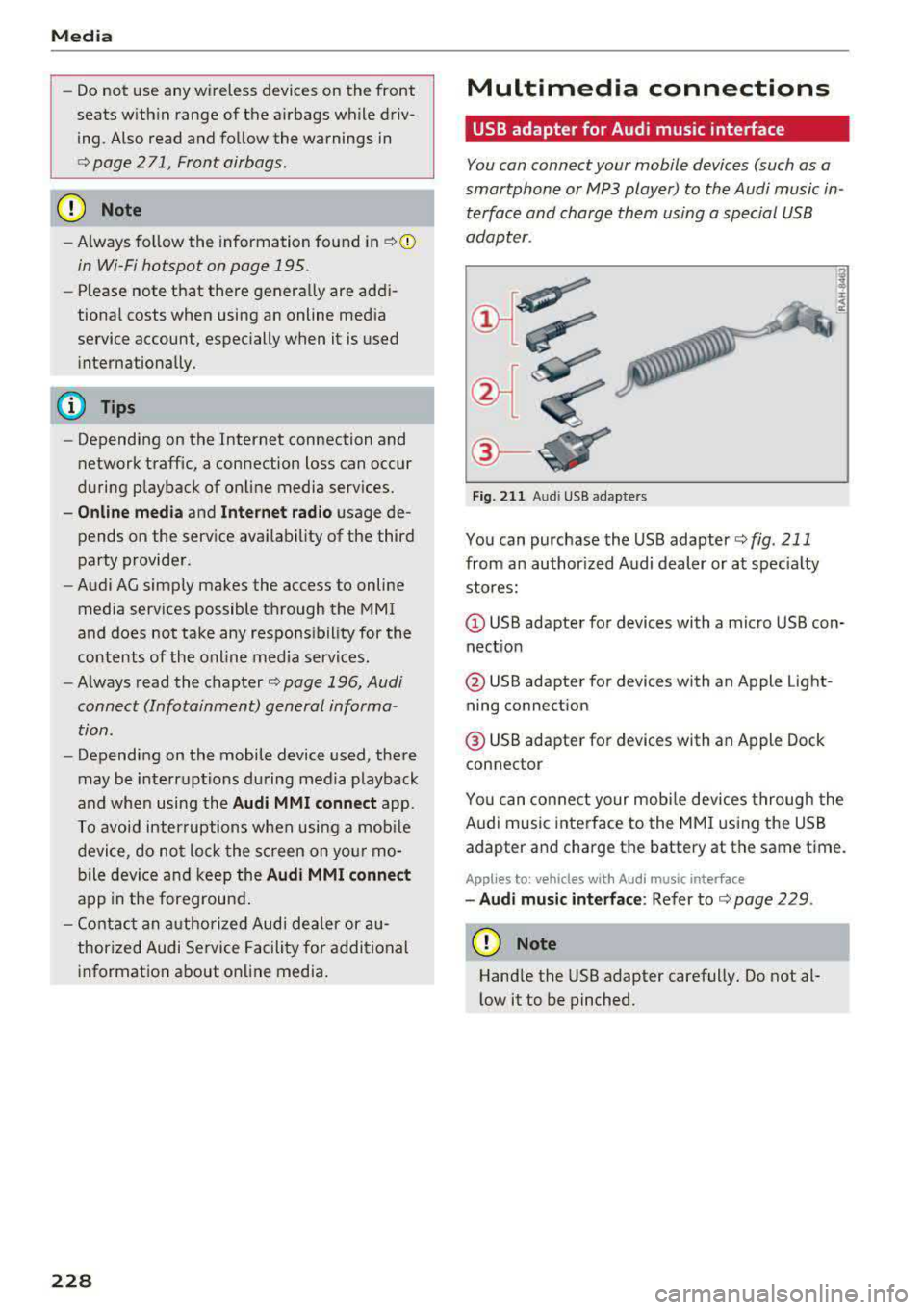
Fig. 2 11 Audi USB adapters
You can purchase the USB adapter ¢ fig . 211
from an author ized Audi dealer or at spec ia lty
stores:
Q) USB adapter for devices with a micro USB con
nect ion
@ USB adapter for devices with an Apple Light
ning connect ion
@ USB adapte r for devices with an Apple Dock
connector
You can conne ct your mob ile dev ices throug h the
Audi music interface to the MM I using the USB
adapter and charge the battery at the same time.
Applies to: vehicles wit h Aud i music interface
-Audi musi c interface : Refer to¢ page 229.
CD Note
Handle the USB adapter carefully. Do not al
l ow it to be pinched .