wheel AUDI A3 SEDAN 2017 Workshop Manual
[x] Cancel search | Manufacturer: AUDI, Model Year: 2017, Model line: A3 SEDAN, Model: AUDI A3 SEDAN 2017Pages: 400, PDF Size: 67.32 MB
Page 156 of 400
Intelligent Technology
- Never let the vehicle roll while the engine is
stopped beca use this increases the risk of an
acc ident.
@ Note
- Never let the brakes "rub" by pressing the
pedal light ly when bra king is not actually
necessary. This causes the brakes to over
h eat and inc reases bra king d istance and
causes wear .
- Befo re dr iv ing on a long stretch w ith steep
s lopes, red uce your speed a nd shift to the
next lower gear This makes use of t he en
g ine bra king effect a nd relieves the b rakes.
If you need to bra ke a dd it iona lly, bra ke in
in te rv a ls and no t conti nuou sly.
@ Tips
- If the brake booste r is no t wo rking , you
must pr ess the brake pedal wi th much more
f orc e th an norma l.
- If you re trofit you r vehicle with a front spoil
e r, whee l cove rs o r similar ite ms, m ake sure
that the air flow to the front wheels is not
i n te rrupt ed. Ot he rw ise the bra ke sys tem
ca n become too hot.
Electromechanical
steering
The electromechanical steering supports the
driver's steering movements.
Powe r steering adapts electronically based on
the vehicle speed.
Indicator lights and messages
• Do not dr ive vehicle: steering defective
If thi s in dicator light t urns o n and stays o n and
this message appears, t he power s teer ing may
h a ve fa iled.
Stop the veh icle in a safe locat io n as soon as pos
sib le. Do
not continue driving. See an author ized
Aud i deale r or auth o riz ed Au di Serv ice F acility fo r
assis tance.
l~ij Steering: malfunction! You can continue
driving
154 I
f the indica to r li gh t turns on, the s teering w hee l
may be more difficult to move or more sens itive
t h an usua l. The steer ing whee l may a lso be at an
angle when driving straight.
Drive slowly to an a uth o rized Audi dea ler or au
thorized Audi Serv ice Facility to have the mal
funct ion corrected .
(D Tips
If t h e . or £-y.ij in dicator light on ly s tays on
fo r a short time, yo u may continue driving.
All wheel drive (quattro)
App lies to : vehicles wi th all w heel drive
In oil wheel drive, oil four wheels ore powered .
General information
In all wheel drive, the dr iv ing power is divided be
tween all fou r whee ls . This happens autom atic al
l y depending on yo ur driv ing beh avior as we ll as
the cur rent road conditions . Also see
c:> page 151, Electronic Stabilization Control
(ESC).
The all whee l drive concep t is designed for high
engine power. Yo ur vehicle is exce ptiona lly pow
erfu l and has excellent driving cha racteristics
both under normal driving conditions and on
snow and ice. A lways read and follow safety pre
cautions
c:> .&. .
Winter t ires
By using all whee l drive, your veh icle has goo d
forward motion with standard tires in winter con
dit ions. However, using w inter or all season t ires
o n
all four wheels in the winter is recommended,
because th is w ill imp rove the
braking effect .
Snow chains
If there are s now chain laws, snow cha ins m ust
also be used on veh icles with all wheel drive
c:> page 342, Snow chains.
Replacing tires
Fo r vehicles wi th a ll w hee l drive, o nly wheels wi th
the same rol ling circ umfe rence sho uld be used .
Avoid using tires with different tread depths
c:> page 335, New tires or wheels. IJI>
Page 157 of 400
CXl CXl .... N ,.__
N .... 0 N > 00
Offroad vehicle?
Your Audi is not an offroad vehicle -th ere is not
enough ground clearance . For this reason, avoid
d ifficult terrain.
& WARNING
- Also, in vehicles with all wheel drive, adapt
your driv ing style to the current road and
traff ic conditions. Do not let the increased
safety provided tempt you into taking risks,
because th is increases the r isk of an acci
dent .
-The braking ability of your veh icle is limited
to the tract ion of the wheels . In this way, it
is not diffe rent from a two whee l dr ive vehi
cl e. Do not be tempted to accelerate to a
high speed when the road is slippe ry, be
cause this increases the risk of an accident.
-Note that on wet streets, the front wheels
c an "hyd roplane" if dr iving at speeds that
are too high . Unlike front whee l drive
vehicles, the eng ine does not rev higher su d
denly when the vehicle begins hyd roplaning .
For this reason, adapt your speed to the
road conditions to reduce the risk of an acc i
dent .
Energy management
The starting ability is optimized
The energy management system manages the
electrical energy distribution and optimizes the
availability of electrical energy for starting the
engine .
When a ve hicl e w ith a co nventional energy sys
tem is not d riven for a long time, the vehicle bat
tery is dra ined by equipment (for example, the
immobilizer). In certain circumstances, there
could may not be enough energy to start the en
g ine.
Your veh icle is equipped with an inte lligent ene r
gy managemen t system for d istr ibuting electrici
ty. This significantly improves the starting ability
and inc reases t he vehicle battery life.
Intellig ent Technology
The ene rgy management system Is made up o f
battery diagnosi s, idling cu rrent management ,
and dynamic energy management .
Battery diagnosis
T he battery diagnos is determines the vehicle ba t
te ry c harge level. The sensors de termine the bat
te ry vo ltage, the batte ry cu rrent, and the batte ry
temperat ure. The cur rent charge level and the
performa nee of the vehicle battery a re deter
mined based on this.
Idling current management
T he idling cur rent management decreases the
energy used while parked . With the engine
switched off, it ma nages the energy distribution
to the d ifferent e lectr ica l components . Data from
the battery d iagnosis is taken into account for
th is.
Depending on the vehicle battery charge level,
electr ical eq uipment is switched
off one item af
ter the other to prevent the vehicle battery from dra ining and to ma intain the starting ab ility .
Dynamic energy manag ement
While driving, dynamic ene rgy management dis
t ributes the appropr iate amo unt of energy to the
electrical eq uipment. It contro ls the battery
charge level so that the amount of energy is not
greater than the amount being generated in or
der to maintain an optimal vehicle battery charge
level.
(D Tips
-Energy management cannot overcome the
laws of physics . Note that the charge level
and length of the veh icle bat tery life are
li m ited.
-Whe n the sta rting ability is endangered, the
i•) i n dicator light t urns on r=v pag e 29.
What you should know
Maintaining the starting ability is the highest
priority .
A lot of stress is placed on the veh icle battery
whe n driving short distances, during city driving,
..,.
155
Page 160 of 400
Multi Media Interface
Multi Media Interface
Traffic safety information
Aud i recommends performing certa in Infotain
ment system functions, such as entering a desti
nation, only when the vehicle is stationary . Al
ways be p repared to stop opera ting the Info tain
ment system i n the interest of your safety and
t he safe ty of other road users.
_& WARNING
Only use the In fotain ment sys tem w hen tra f
fic con ditions permit and always in a way that
allows you to ma inta in complete control ove r
your vehicle.
@ Tips
Cer tain functi ons are no t avail ab le wh ile driv
ing .
Introduction
The Multi Media Interface , or MMI for short,
combines various
systems for communication ,
navigation* and entertainment in your Audi . You
can operate the MMI using the MMI control pan
el, the multifunction steering wheel or the voice
recognition system* .
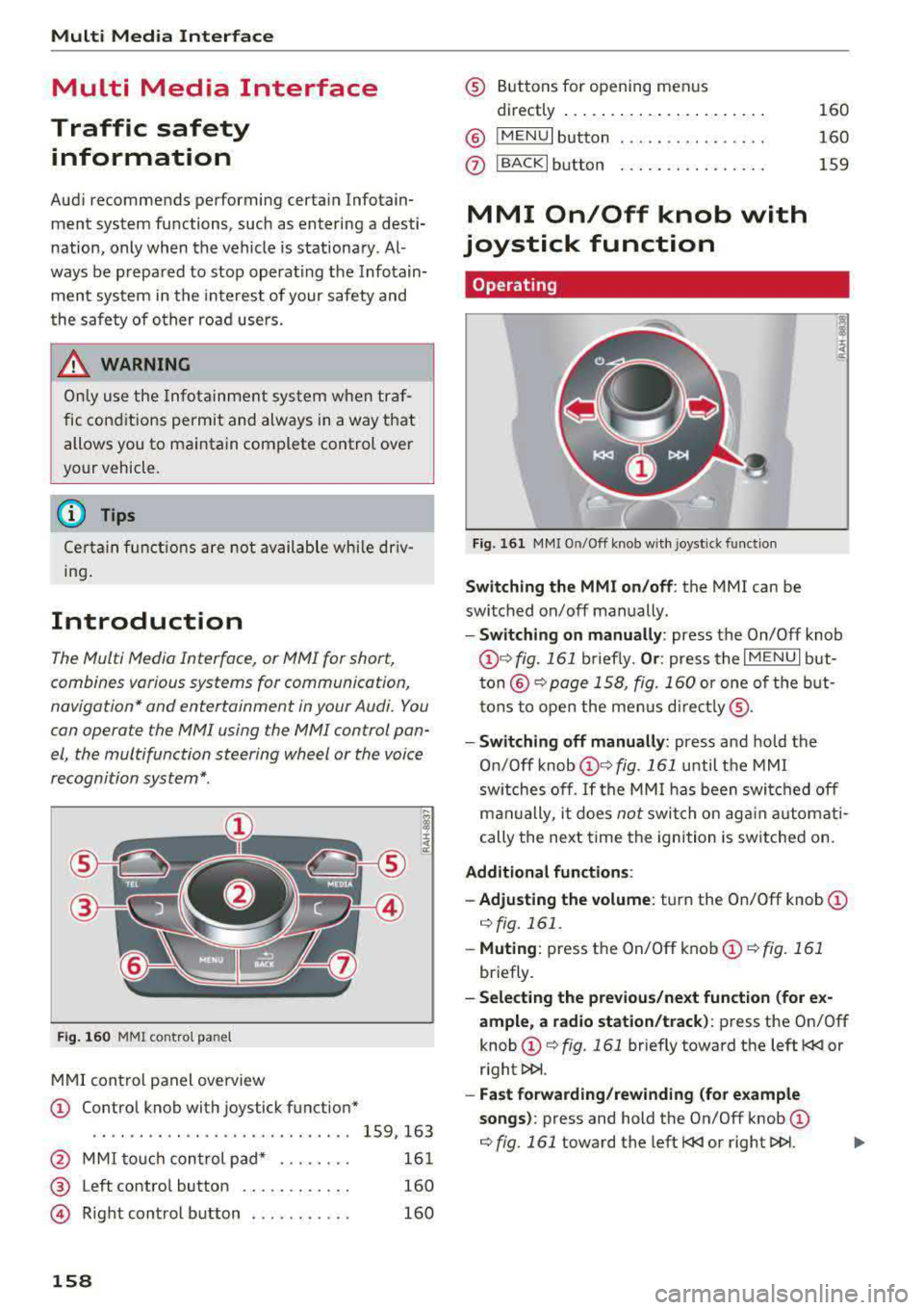
Fig. 16 0 MMI co ntro l panel
M MI cont rol panel overview
CD Contro l knob with joystick function"
. . . . . . . . . . . . . . . . . . . . . . . . . . . . 159, 163
@ MMI to uch con trol pad * . . . . . . . . 161
@ Left contro l button . . . . . . . . . . . . 160
@ R ight cont rol b utton . . . . . . . . . . . 160
158
® Buttons fo r opening men us
directly .... . .. .. .. .... .. .... .
@ IMENU I button
(J) I BACK I button . .. .. .... .. ... . .
MMI On/Off knob with
joystick function
Operating
Fig . 161 MM I On/Off k nob w ith joys tick f unctio n
Switching the MMI on /off : the MMI can be
swi tched on/off man ually. 160
160
159
- Switching on manually : press the On/Off knob
CD ¢ fig. 161 briefly. Or : press the I M ENU I but
ton @ ¢ page 1 58, fig. 160 or one of t he bu t
t ons to ope n the me nus d irectl y® ·
-Switch ing off manually : press and hold the
O n/Off knob
CD ¢ fig. 161 until t he M MI
sw itches off .
If the MM I has been swi tch ed off
m an ually, i t does
not swi tch on ag ai n au tomati
cally the ne xt time the ignition is sw itched on.
Additional function s:
- Adjusting the volume :
turn the On/Off knob CD
¢fig. 161 .
-Muting : press the On/Off knob CD¢ fig. 1 61
briefly.
- Selecting the previous/ne xt function (for ex
ample , a r adio station/t rack) :
press the On/Off
knob
CD ¢ fig. 161 briefly toward the left l
l>!>i .
-Fast forwarding /rewinding (fo r example
songs) :
press and hold the On/Off knob CD
¢ fig. 161 toward the left l
Page 177 of 400
CXl CXl .... N r--N .... 0 N > 00
Voice recognition system
Radio
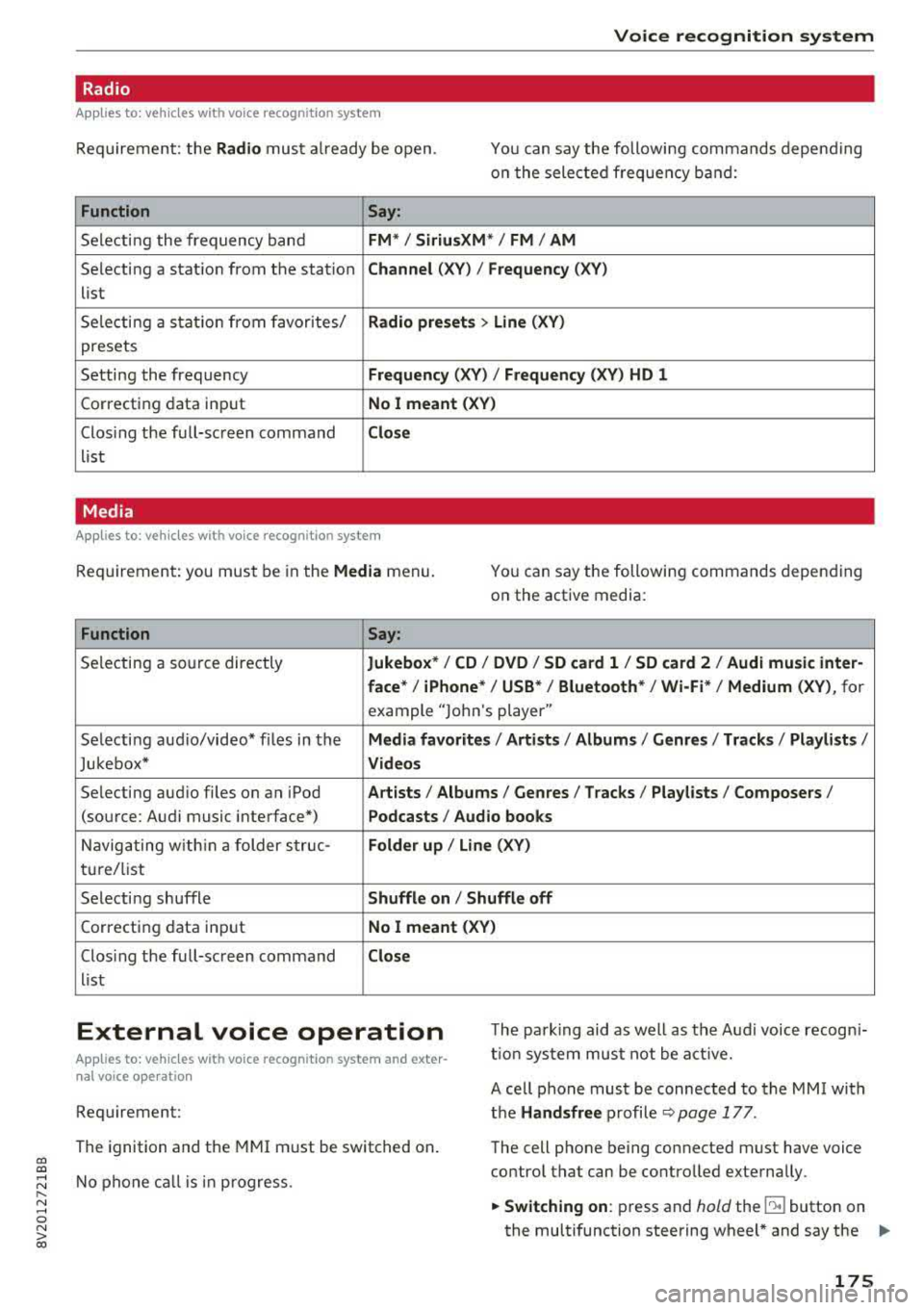
Applies to: vehicles with voice recognition system
Requ ireme nt: the Radio must a lready be open. You can say the followi ng commands depend ing
o n t he sele cted frequen cy b and:
Function Say:
Sele cti ng the frequency ba nd FM */ SiriusXM * / FM / AM
Selecting a stat ion from the station Channel (XV ) / Frequency (XV)
list
S ele cti ng a s tat io n from favorites/
Radio prese ts > Line (XV)
presets
Setting the frequency
Frequency (XV) I Frequency (XV) HD 1
Correcting data inp ut No I meant (XV )
Closing the full-sc reen command Close
list
Media
Applies to: vehicles with voice recognitio n system
Re qui reme nt: you mus t be in the Media menu.
You can say the following commands depen ding
on the active media:
Function Say:
Selectin g a so urce directly Jukebox* / CD / DVD / SD card 1 / SD card 2 / Audi music inter-
face *
I iPhone* / USB * / Bluetooth* / Wi-Fi * / Medium (XV) , for
example "Jolhn 's player"
Selecti ng aud io/video * fi les in the
Media favorites / Artists / Albums / Genres / Track s/ Playlists /
Jukebox* Videos
Selecting aud io files on an iPod A rt ists / Albums / Genres / Tracks / Playlists /Composers /
(source: Audi music interface*) Podcasts / Audio books
Naviga ting w ith in a folder s truc -Folder up / Line (XV)
tu re/list
Selecti ng shuffle
Shuffle on I Shuffle off
C orrecting data inp ut No I meant (XV)
Clos ing the fu ll-sc reen command Close
list
External voice operation T he pa rk ing aid as well as the A ud i voice r ecogn i
t io n sys te m must not be a ctive.
Applies to: vehicles with voice recognition system and exter
nal voice operation
Requirement:
The ignition and the MMI m ust be switched on.
N o phone call is in progress . A cell phone must be connected to the MMI with
the Handsfree p rofile ~ pag e 177.
The cell p hone be ing connected must have voice
contro l that can be contro lled exte rna lly.
.,. Switching on : press and hold the lei.I button on
the multifunction steering wheel * and say the
liJJ,,
175
Page 212 of 400
Navig ation
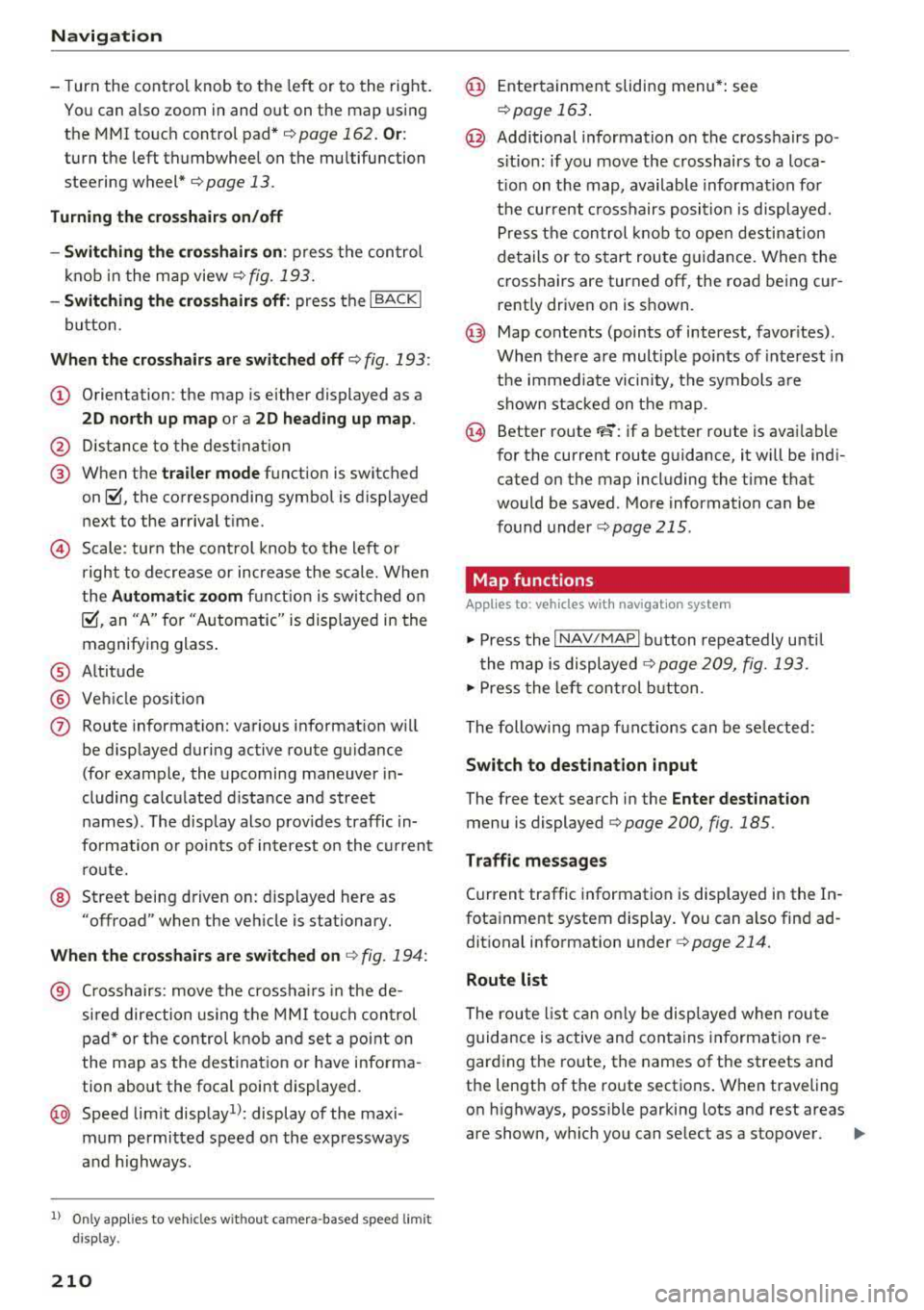
-T urn the control knob to the left or to the right .
You can also zoom in and out on the map using
the MM I touch control pad*
¢ page 162. Or :
turn the left thumbwheel on the mu ltifunction
steering wheel* ¢
page 13.
Tu rning th e cro ssha irs on /off
-Switching th e cros shair s on : press the con trol
knob in the map view
¢ fig. 193.
-Switching th e crosshair s off : press the I BACKI
button.
Wh en th e crossha ir s are switch ed off ¢ fig. 193:
(D Orientation : the map is either displayed as a
2 D nor th up map or a 2D hea ding up map .
@ Distance to the dest inat ion
@ When the tr aile r m ode function is switched
on~. the corresponding symbol is displayed
next to the arrival t ime.
© Scale: turn the cont rol knob to the left or
right to decrease or increase the scale. When
the
Autom atic zoom fu nct ion is swi tched on
~, an "A" for "Automatic" is displayed in the
magnifying glass .
® Altitude
® Vehicle position
(J) Route information: various information wi ll
be d isp layed during active route guidance
(for example, the upcoming maneuver in
cluding calculated d istance and street
names) . The display also prov ides traffic in
formation o r points of interest o n the c urrent
ro ute.
@ Street being driven on: displayed here as
"offroad" when the veh icle is stationary.
Whe n the c rosshairs are switched on ¢ fig. 194 :
® Crosshairs: move the crossha irs in the de
sired direction using the MMI touch control
pad* or the control knob and set a point on
the map as the destination or have informa
tion about the focal point displayed.
@ Speed limit disp lay1l: display of the maxi
mum permitted speed o n the expressways
and h ighways .
l) O nly app lies to ve hicl es w ithout camer a-based speed limi t
dis play .
210
@ Ente rtainment sliding menu*: see
r::!) page 163 .
@ Additional information on the crosshairs po
s itio n: if you move the crosshairs to a loca
t ion on the map, available information for
the cur rent c rosshairs position is displayed.
Press the control k nob to open destination
details or to s tart route guidance. When the
crosshairs are turned off, the road being cur
rently driven on is s hown .
@ Map contents (points of interest, favor ites) .
When there are mult iple po ints of interest in
the immediate vicin ity, the symbols are
shown stacked on the map .
@ Better route FS: if a better route is avai lable
for the current route guidance, it will be ind i
cated on the map including the time that
would be saved . More information ca n be
found under
¢ page 215 .
Map functions
App lies to: vehicles with navigat ion system
.,. Press the I NAV/MAPI button repeatedly unti l
the map is displayed
¢ page 209, fig. 193.
.,. Press the left con trol b utton .
The following map funct ions can be se lected:
Switch to destin ation input
The free text search in the Enter de stination
menu is displayed Q page 200, fig. 185.
T raffic me ssage s
Current traffic information is displayed in the In
fotainment system display. You can also find ad
dit ional information under
Q page 214.
Route list
The route l ist can on ly be displayed when route
guidance is active and contains information re
garding the ro ute, the names of the streets and
the length of the route sections . When traveling
on highways, possible parking lots and rest areas
are shown, which you can se lect as a stopover.
Page 250 of 400
Driving safety
• Make sure to use the right child restraint cor
rectly to protect children
c::> page 292, Child
saf ety .
• Sit properly in your seat and make sure that
your passengers do the same
c::> page 61, Fron t
seats .
• Fasten your safety belt and wear it properly . Al
so instruct your passengers to fasten their safe
ty belts properly
c::> page 258 .
What impairs driving safety?
Safe driving is directly related to the condition of
the vehicle, the driver as well as the driver 's abili
ty to concentrate on the road without being dis
tracted .
The driver is responsible for the safety of the ve
hicle and all of its occupants. If your ability to
drive is impaired, safety risks for everybody in the
veh icle increase and you also become a hazard to
everyone else on the road
c::> ,&. . Therefore :
• Do not let yourself be distracted by passengers
or by using a cellular telephone .
• NEVER drive when your driv ing ability is im
pa ired (by med ications, alcohol, drugs, etc .).
• Observ e all traffic laws, rules of the road and
speed limits and plain common sense .
• ALWAYS adjust your speed to road, traffic and
weather conditions .
• Take frequent breaks on long trips . Do not drive
for more than two hours at a stretch .
• Do NOT drive when you are tired, under pres
sure or when you are stressed .
.&, WARNING
Impaired driving safety increases the risk of
serious personal injury and death whenever a
vehicle is being used.
248
.
Correct passenger
seating positions
Proper seating position for the driver
The proper driver seating position is important
for safe, relaxed driving.
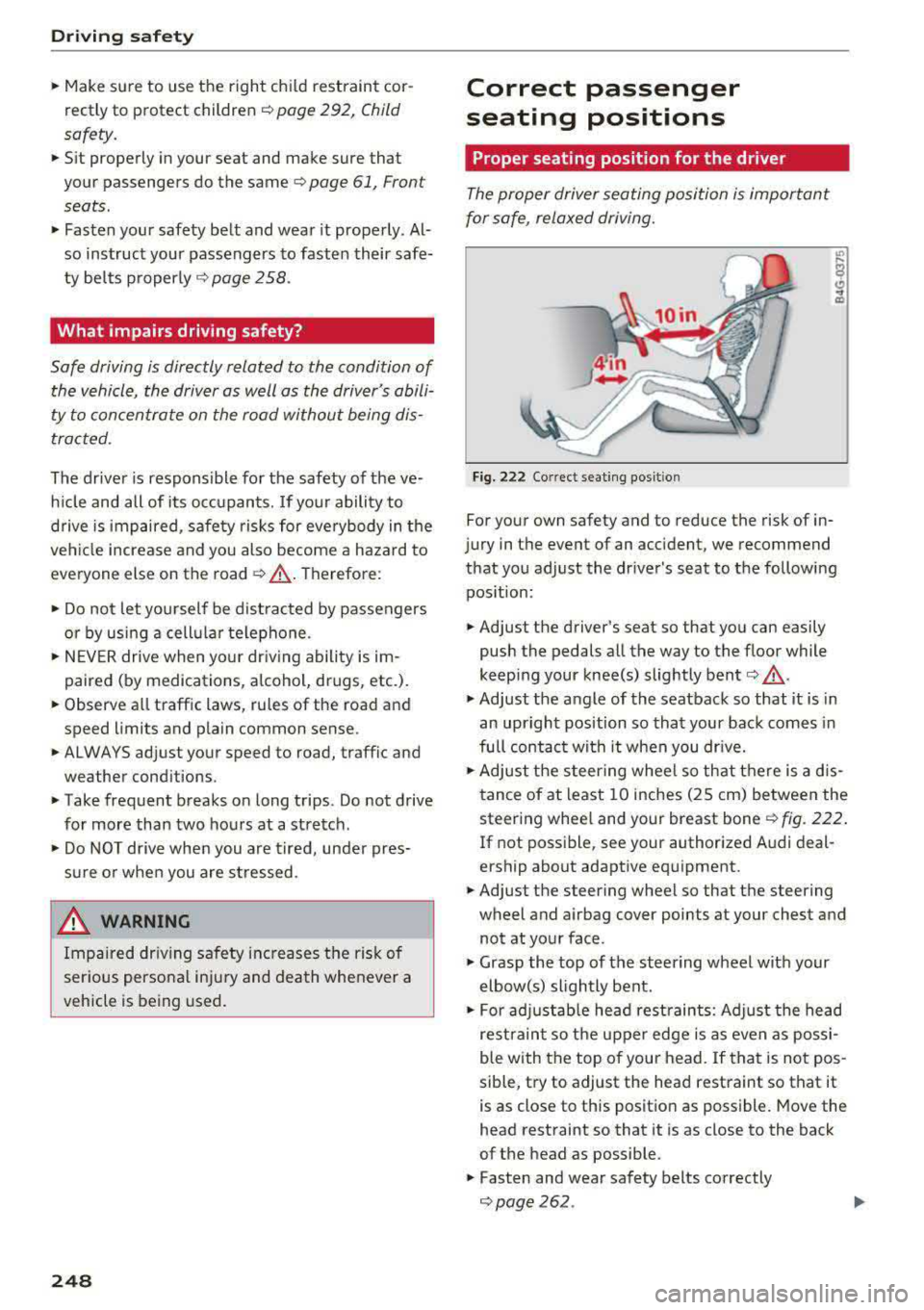
Fig. 222 Correct seating pos it ion
For your own safety and to reduce the risk of in
jury in the event of an ac cident, we recommend
that you adjust the driver's seat to the following position :
• Adjust the driver's seat so that you can easily
push the pedals all the way to the floo r while
keeping your knee(s) slightly bent
c:> .&_ .
• Adjust the angle of the seatback so that it is in
an upright position so that your back comes in
full contact with it when you dr ive.
• Adjust the steering wheel so that there is a d is
tance of at least 10 inches (25 cm) between the
steering wheel and your breast bone
r::!) fig. 222.
If not possible, see your authorized Audi deal
e rship about adaptive equipment.
• Adjust the steering wheel so that the steering
wheel and airbag cover points at your chest and
not at your face .
• Grasp the top of the steering wheel with your
elbow(s) slightly bent.
• For adjustable head restraints: Adjust the head
restraint so the upper edge is as even as possi
ble with the top of your head. If that is not pos
sible, try to adjust the head restraint so that it
is as close to this position as possible. Move the
head restraint so that it is as close to the back
of the head as possible .
• Fasten and wear safety belts correctly
c::> page 262 . .,.
Page 251 of 400
CXl CXl .... N ,.__
N .... 0 N > 00
~ Always keep both feet in the footwell so that
you are in control of the vehicle at all times.
F or detailed information on how to adjust the
driver's seat, see
¢ page 61.
A WARNING
Drivers who are unbelted, out of position or
too close to the airbag can be seriously in
jured by an airbag as it unfolds. To help re
duce the risk of serious personal injury:
-Always adjust the driver's seat and the
steering wheel so that there are at least
10 inches (25 cm) between your breastbone
and the steering wheel.
-Always adjust the driver's seat and the
steering wheel so that there are at least
4 inches (10 cm) between the knees and the
lower part of the instrument panel.
-Always hold the steering wheel on the out
side of the steering wheel rim with your
hands at the 9 o'clock and 3 o'clock posi
tions to help reduce the risk of personal in
jury if the driver's airbag inflates.
-Never hold the steer ing wheel at the
12 o'clock posit ion or with your hands at
other positions inside the steering wheel
rim or on the steering wheel hub. Holding
the steering wheel the wrong way can cause
serious injuries to the hands, arms and head if the driver 's airbag inflates.
-Pointing the steering wheel toward your
face decreases the ability of the supplemen
tal driver's airbag to protect you in a colli sion.
-Always sit in an upright position and never lean against or place any part of your body
too close to the area where the airbags are
located.
-Before driving, always adjust the front seats
properly and make sure that all passengers
are properly restrained.
-For adjustable head restraints: before driv
ing, always also adjust the head restraints
properly .
-Never adjust the seats while the vehicle is
moving. Your seat may move unexpectedly
and you could lose control of the vehicle.
-
Driving safety
-Never drive with the backrest reclined or
tilted far back! The farther the backrests are
tilted back, the greater the risk of injury due
to incorrect positioning of the safety belt
and improper seating position.
-Children must always ride in child safety
seats
c::;, page 292. Special precautions ap
ply when installing a child safety seat on the
front passenger seat
c::;, page 267.
Proper seating position for the front
passenger
The proper front passenger seating position is
important for safe, relaxed driving.
For your own safety and to reduce the risk of in
jury in the event of an accident, we recommend
that you adjust the seat for the front passenger
to the fol lowing position:
~ Adjust the angle of the seatback so that it is in
an upright position and your back comes in full
contact with it whenever the vehicle is moving.
~ For adjustable head restraints: adjust the head
restraint so the upper edge is as even as possi
ble with the top of your head. If that is not pos
sible, try to adjust the head restraint so that it is as close to this position as possible
c::;, page 63. Move the head restraint so that it is
as close to the back of the head as possible .
~ Keep both feet flat on the floor in front of the
front passenger seat.
~ Fasten and wear safety belts correctly
c::;, page 2 62 .
For detailed information on how to adjust the
front passenger's seat, see
c::;, page 61 .
A WARNING
Front seat passengers who are unbe lted, out
of position or too close to the airbag can be
seriously injured or killed by the airbag as it
unfolds . To help reduce the risk of serious
personal injury:
-Passengers must always sit in an upright po
sition and never lean against or place any pa rt of their body too close to the area
where the airbags are located.
.,,.
249
Page 269 of 400
CXl CXl .... N ,.__
N .... 0 N > 00
Airbag system
Important information
Importance of wearing safety belts and
sitting properly
Airbags are only supplemental restraints. For
airbags to do their job, occupants must always
properly wear their safety belts and be in a prop er seating position.
For your safety and the safety of your passen
gers, before driving off, always :
.,. Adjust the driver's seat and steering wheel
properly
9 page 248,
.,. Adjust the front passenger's seat properly
¢page 249,
.,. Wear safety belts properly ¢ page 261,
.,. Always properly use the proper child restraint
to protect children ¢
page 292.
In a collision, airbags must inflate within the
blink of an eye and with considerable force. The
supplemental airbags can cause injuries if the
driver or the front seat passenger is not seated
properly. Therefore in order to help the airbag to
do its job, it is important, both as a driver and as
a passenger to sit properly at all times.
By keeping room between your body and the
steering wheel and the front of the passenger
compartment, the airbag can inflate fully and
completely and provide supplemental protection in certain frontal
collisions ¢ page 248, Correct
passenger seating positions .
For details on the
operation of the seat adjustment controls
¢page 61.
It's especially important that children are proper
ly restrained
¢page 292.
There is a lot that the driver and the passengers
can and must do to help the individual safety fea
tures installed in your Audi work together as a
system.
Proper seating position is important so that the
front airbag on the driver side can do its job. If
you have a physical impairment or condition that prevents you from sitting properly on the driver
seat with the safety belt properly fastened and
Airbag system
reaching the pedals, or if you have concerns with
regard to the function or operation of the Ad
vanced Airbag System, please contact your au
thori zed Audi dealer or qualified workshop, or
call Audi Customer Relations at 1-800-822-2834
for possible modifications to your vehicle.
When the airbag system deploys, a gas generator
will fill the airbags, break open the padded cov ers, and inflate between the steering wheel and
the driver and between the instrument panel and
the front passenger. The airbags will deflate im
mediately after deployment so that the front oc
cupants can see through the windshield again
without interruption.
All of this takes place in the blink of an eye, so
fast that many people don't even realize that the airbags have deployed. The airbags also inflate
with a great deal of force and nothing should be
in their way when they deploy. Front airbags in
combination with properly worn safety belts slow
down and limit the occupant's forward move
ment . Together they help to prevent the driver
and front seat passenger from hitting parts of
the inside of the vehicle while reducing the forces
acting on the occupant during the crash . In this
way they help to reduce the risk of injury to the
head and upper body in the crash. Airbags do not
protect the arms or the lower parts of the body.
Both front airbags will not inflate in all frontal
collisions . The triggering of the airbag system de
pends on the vehicle deceleration rate caused by
the collision and registered by the electronic con
trol unit . If this rate is below the reference value
programmed into the control unit, the airbags
will not be triggered, even though the car may be badly damaged as a result of the collision. Vehi
cle damage, repair costs or even the lack of vehi
cle damage is not necessarily an indication of
whether an airbag should inflate or not.
Since the circumstances will vary considerably between one collision and another, it is not possi
ble to define a range of vehicle speeds that will
cover every possible kind and angle of impact
that will always trigger the airbags . Important
factors include, for example, the nature (hard or
soft) of the object which the car hits, the angle of
impact, vehicle speed , etc. The front airbags will
II>
267
Page 270 of 400
Airbag syste m
also not inflate in s ide or rear collisions, or in
ro ll-overs.
Al wa ys rememb er: Airbags will deploy only once,
and on ly in ce rtain k inds of coll is ions. Yo ur safety
be lts are always there to offer protection in those
situations in which airbags are not supposed to
dep loy, or when they have already deployed; for
examp le, when your vehicle str ikes or is struck by
another vehicle after the first coll is ion.
This is just one of the reasons why an airbag is a
supp lementary restraint and is not a substitute
for a safety belt. The a irbag system works most
effect ively when used with the safety belts.
Therefore, always properly wear your safety belts
r=;, page 258.
A WARNING
Sitting too close to the steering wheel o r in
st rument panel will decrease the effective
ness of the airbags and will inc rease the risk
of personal injury in a co llision.
- Never sit closer than 10 inches (25 cm) to
the steering wheel or instrument panel.
- If you cannot si t mo re than 10 inches
(25 cm) from the steering wheel, invest i
gate whether adaptive equipment may be
available to help yo u reach the pedals and
increase your seating distance from the
steering wheel.
- All veh icle occupants and especially children
must be restrained properly whenever riding
in a vehicle. An unrestrained or improperly
restra ined child could be injured by striking
the interior or by being ejected from the ve
hicle during a sudden maneuver or impact.
An unrestrained or imp roperly restrained
child is also at greate r risk of inju ry or death
through contact with an inflating airbag.
- If you are unrestrained, leaning fo rwa rd, s it
t ing s ideways or o ut o f pos ition in any way,
yo ur risk of in ju ry is much h igher.
- Yo u will also receive serious injuries and
c ould even be killed if you are up aga inst the
air bag or too close to it when it inflates
-
even with an Advanced Airbag.
2 6 8
-
- To reduce the ris k of i njury when an a irbag
inflates, always wea r safety belts properly
r=;, page 262, Safety belts.
- Always make certa in that children age 12 or
younger always ride in the rear seat. If chil
dren are not properly restrained, they may be severely injured or killed when an airbag
inflates.
- Never let ch ildren ride unrestra ined or im
properly restrained in the vehicle. Ad just the
front seats properly.
- Never ride with the back rest recl ined .
- Always sit as far as possible from the steer-
ing wheel or the instrument panel
r=;, page 248.
- Always sit upright w ith your back against
the backrest of your seat .
- Never p lace your feet on the instrument
panel or on the seat. Always keep both feet
on the floor in front of the seat to help pre
vent serious injur ies to the legs and hips if
the airbag inflates.
- Never recl ine the front passenger's seat to
transpo rt objects . Items can also move in to
the area of the s ide a irbag or the front air
bag du ring brak ing o r in a sudden maneu
ver. Obje cts nea r the airbags can become
projecti les and cause injury when an airbag
inflates.
A WARNING
A irbags that have deployed in a crash must be
replaced.
- Use on ly original equipment airbags ap
proved by Audi and installed by a trained
technician who has the necessary tools and
diagnostic equipment to properly replace
any airbag in your vehicle and assure system
effectiveness in a crash.
- Never perm it salvaged or recycled airbags to
be installed in your vehicle.
Child restraints on the front seat - some
important things to know
.,. Be s ure to read the impo rtant info rmat ion and
heed the WARN INGS for important deta ils
.,.
Page 273 of 400
a, a, ..... N
" N ..... 0 N > 00
-An improper ly installed ch ild restraint can
interfere with the airbag as it deploys and
seriously injure or even kill the child
-even
with an Advanced Airbag System.
- Always carefu lly follow the manufacturer 's
instructions provided w ith the child safety
seat or carrier.
- Always make sure that there is nothing on
the front passenger seat that w ill cause the
capacit ive passenger detection system in
the seat to signa l to the Airbag System that
the seat is occupied by a person when it is
not, or to signa l tha t it is occ upied by some
one who is heavier than the person actua lly
sitting on the seat . The presence of addi
tional objects could cause the passenger
front airbag to be turned on when it shou ld
be off, or could cause the airbag to work in a
way that is different from the way it would have worked without the object on the seat .
Front airbags
Description of front airbags
The airbag system can provide supplemental
protection to properly restrained front seat occu
pants.
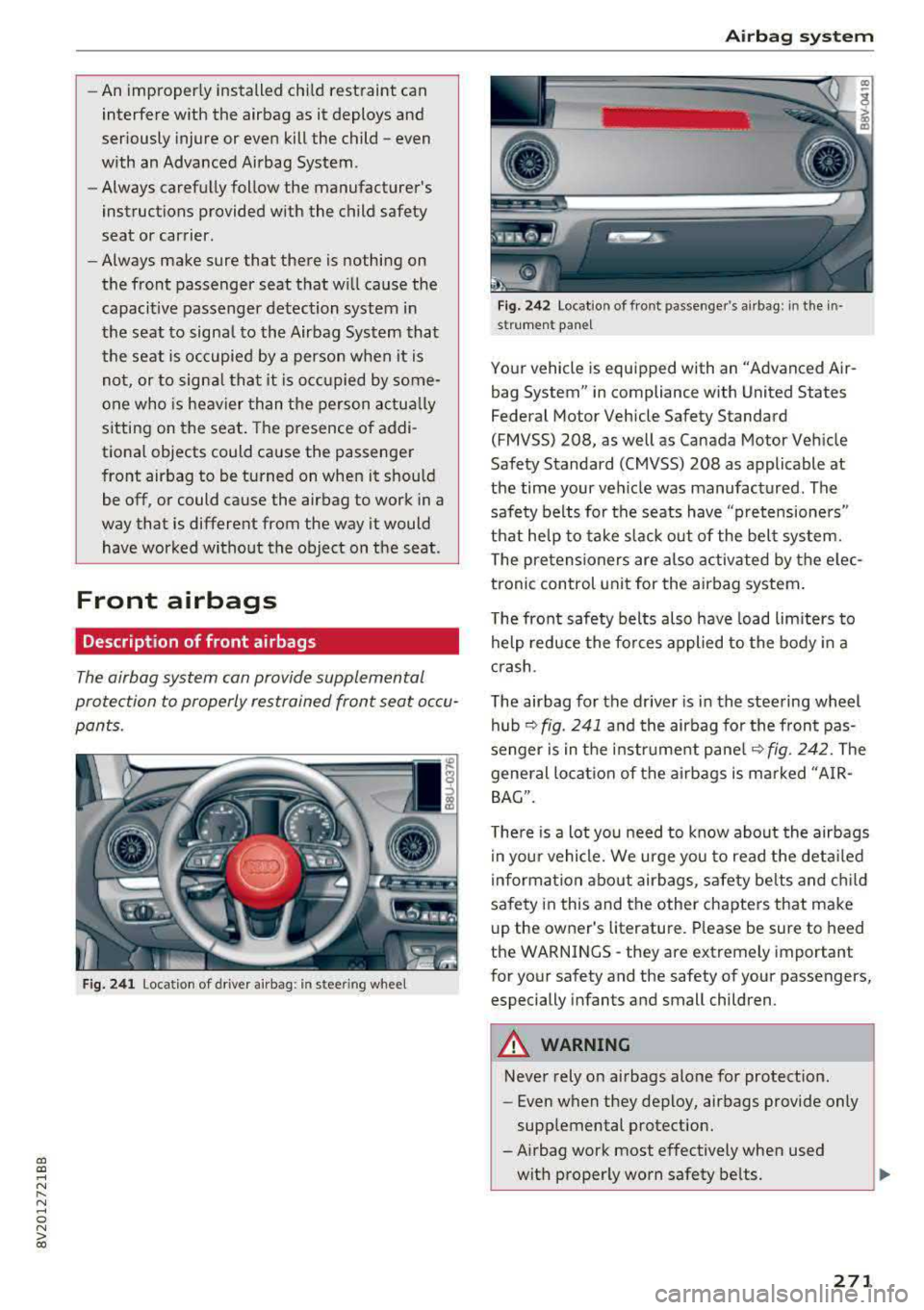
Fig. 2 41 Location of driver airbag: in ste.e ring wheel
Airb ag sys tem
Fig. 242 Location of front passenger's airbag: in the in
st rument pane l
Your vehicle is equipped with an "Advanced Air
bag System" in compliance with United States
Federal Motor Vehicle Safety Standard
(FMVSS) 208, as well as Canada Motor Veh icle
Safety Standard (CMVSS) 208 as applicable at
the time your veh icle was manufactured. The
safe ty belts fo r the seats have "pretensioners"
that help to take slack out of the bel t system.
T he pretensioners are also activated by the e lec
tronic control unit for the airbag system .
The front safety belts also have load limiters to
help reduce the fo rces applied to the body in a
c rash .
The airbag for the driver is in the steering wheel
hub
¢ fig. 241 a nd the airbag for the front pas
senger is in the instrument pane l
~fig. 242. The
general lo cation of the airbags is marked "A IR
BAG".
There is a lot you need to know about the airbags i n your vehicle. We urge you to read the deta iled
information about airbags, safety be lts and c hild
safety in this and the other chapters that make
u p the owner's literatu re . Please be sure to heed
the WARNINGS
-they are extremely important
for your safety and the safety of your passengers, especially infants and small children.
A WARNING
Never rely on airbags alone for protect ion.
- Even when they deploy, airbags provide only
supplemental protection.
-Airbag work most effectively when used
with properly worn safety be lts .
271