towing AUDI A3 SEDAN 2017 Owners Manual
[x] Cancel search | Manufacturer: AUDI, Model Year: 2017, Model line: A3 SEDAN, Model: AUDI A3 SEDAN 2017Pages: 400, PDF Size: 67.32 MB
Page 4 of 400
Table of content s
About this Owne r's Manual . .. .. .
6
Cockpi t ... .. ............... .... .. . 8
Cockpit overview . . . . . . . . . . . . . . . . . 8
Controls at a glance . . . . . . . . . . . . . . . . . . 8
Instrument cluster . . . . . . . . . . . . . . . . . . . 10
Mu ltifunction steering wheel plus . . . . . . 13
Mu ltifunction steering wheel . . . . . . . . . . 16
Driver information system . . . . . . . . . . . . . 17
On Board Diagnostic System (OBD) . . . . . 23
Indicato r lights . . . . . . . . . . . . . . . . . . . . . 24
Start ing and dr iving . . . . . . . . . . . . . 34
Opening and closing . . . . . . . . . . . . . 34
Central lock ing . . . . . . . . . . . . . . . . . . . . . . 34
L uggage compartment lid . . . . . . . . . . . . . 39
Ch ild safety lock . . . . . . . . . . . . . . . . . . . . . 41
Power w indows . . . . . . . . . . . . . . . . . . . . . 41
Panorama glass roof . . . . . . . . . . . . . . . . . 43
Power top . . . . . . . . . . . . . . . . . . . . . . . . 44
Automatic power top . . . . . . . . . . . . . . . . . 4 4
Wind deflector . . . . . . . . . . . . . . . . . . . . . . 47
Power top emergency operation . . . . . . . . 48
Lights and Vision .. ..... ... .. .. .. .
Exterior lighting ... .. ...... ... .. .. .. .
Interior lighting ... ........... .... .. .
V1s1on ... .. .. ... ............ .... .. .
W indshield wipers ............... ... .
Dig ital compass ........... ...... ... . 51
5 1
54
55
57
59
Seats and storage . . . . . . . . . . . . . . . . 61
General information . . . . . . . . . . . . . . . . . 61
Front seats . . . . . . . . . . . . . . . . . . . . . . . . . 61
H ead restra ints . . . . . . . . . . . . . . . . . . . . . 63
So ckets . . . . . . . . . . . . . . . . . . . . . . . . . . . . 64
S to ring . . . . . . . . . . . . . . . . . . . . . . . . . . . . 65
L uggage compar tment . . . . . . . . . . . . . . . 66
R oof rack . . . . . . . . . . . . . . . . . . . . . . . . . . 68
Warm and cold . . . . . . . . . . . . . . . . . . . 70
Climate control system . . . . . . . . . . . . . . . 70
Driving . . . . . . . . . . . . . . . . . . . . . . . . . . . . 74
General in formation . . . . . . . . . . . . . . . . . 74
Steering . . . . . . . . . . . . . . . . . . . . . . . . . . . 76
2
Starting and stopping the eng ine
(vehicles with an ignition lock) . . . . . . . . . 77
Start ing and stopping the eng ine
(vehicles with conven ience key) . . . . . . . . 78
Messages . . . . . . . . . . . . . . . . . . . . . . . . . . 80
Start ing the engine whe n there is a
malfunction . . . . . . . . . . . . . . . . . . . . . . . . 81
Start/Stop system . . . . . . . . . . . . . . . . . . . 81
El ectromechanical parking brake . . . . . . . 83
Start ing from a stop . . . . . . . . . . . . . . . . . 8S
Automa tic transmission . . . . . . . . . . . . . . 8S
e-tron ...... .. .. .. .. .. ........... .. 94
P lu g- in hybrid drive . . . . . . . . . . . . . . . . . . 94
Re fueling . . . . . . . . . . . . . . . . . . . . . . . . . . lOS
Charging . . . . . . . . . . . . . . . . . . . . . . . . . . . 106
Charging at pub lic charging stations . . . . 108
Charging the battery with the Aud i e-tron
charg ing system . . . . . . . . . . . . . . . . . . . . . 108
Ind icator lights and messages ......... 117
Charg ing unit cover emergency release . . 118
Climate contro l . . . . . . . . . . . . . . . . . . . . . 118
Cleaning/ma intenance information 119
Trailer towing . . . . . . . . . . . . . . . . . . . . 120
D rivi ng with a tra ile r .. ... ........... .
T ra ile r t owing information .......... . .
D . . nver assi
stance .. ... ... .... ... . .
Assis tance systems ............ . .
El ectron ic speed limite r ............. . .
Speed warning system ... .. .. .... ... . . 120
1 2 1
123
123
1 23
123
Cruise control system . . . . . . . . . . . . . . . . 123
Lap timer . . . . . . . . . . . . . . . . . . . . . . . . . . 125
Audi adaptive cruise contro l . . . . . . . . . . . 126
Distance disp lay and distance warning . . . 132
Messages . . . . . . . . . . . . . . . . . . . . . . . . . . 133
Audi pre sense . . . . . . . . . . . . . . . . . . . . . . 133
Audi pre sense basic . . . . . . . . . . . . . . . . . . 134
Audi pre sense front . . . . . . . . . . . . . . . . . 134
Messages . . . . . . . . . . . . . . . . . . . . . . . . . . 136
Audi active lane assist . . . . . . . . . . . . . . . . 136
Audi s ide ass ist . . . . . . . . . . . . . . . . . . . . . 139
Audi drive select . . . . . . . . . . . . . . . . . . . . . 143
Parking systems . . . . . . . . . . . . . . . . . 146
Genera l information . . . . . . . . . . . . . . . . . 146
Parking system plus . . . . . . . . . . . . . . . . . . 147
Page 7 of 400
CXl CXl .... N ,.__
N .... 0 N > 00
Fuses and bulbs . . . . . . . . . . . . . . . . . . 364
F uses .. .. .. .. .. .. .. .... ... .. .. .... . 364
Bulbs .. .. .. .. .. ... . .... ... .. .. .. .. . 366
Emergency situations . . . . . . . . . . . . 368
G ene ral . . . . . . . . . . . . . . . . . . . . . . . . . . . . 368
St art ing by pu shing o r tow ing . . . . . . . . . . 368
S tar ting w it h jumpe r cables . . . . . . . . . . . 368
Using jump start cables . . . . . . . . . . . . . . . 369
Towing w ith a tow tr uck . . . . . . . . . . . . . . 370
Ra is ing the veh icle . . . . . . . . . . . . . . . . . . . 372
Technical data and accessories . . 374
Technical data . . . . . . . . . . . . . . . . . . . . 374
Ve hicl e data . . . . . . . . . . . . . . . . . . . . . . . . 374
N otes about tec hnica l data . . . . . . . . . . . . 374
We igh ts . . . . . . . . . . . . . . . . . . . . . . . . . . . 374
Di mensions ... .. ... . .... ... .. .. .... . 375
Capac it ies . . . . . . . . . . . . . . . . . . . . . . . . . . 375
Gasoline engin es . . . . . . . . . . . . . . . . . . . . 375
Consumer information ... .. .... . 378
Warran ty cov erag es . . . . . . . . . . . . . . . . . . 378
Operat ing you r veh icle outs ide the U .S.A.
o r Can ada . . . . . . . . . . . . . . . . . . . . . . . . . . 378
Aud i Se rv ic e Repa ir Ma nu als and
Literature . . . . . . . . . . . . . . . . . . . . . . . . . . 37 8
M aintenance .................... ... . 378
Acc esso ries and technical changes . . . . . . 380
D eclarat io n of Complia nce,
T elecommun ic a tion and Elect ronic
Sys tems . . . . . . . . . . . . . . . . . . . . . . . . . . . 38 1
Index ... .. .. .... ...... ..... .. .. .. . 38 2
Table of contents
5
Page 46 of 400
Power top
Power top
Automatic power top
General information
Applies to: veh icles with power top
The power top opens and closes automatically.
When open, the power top is stored complete ly
in the power top compartmen t. The power top
can be opened or closed at speeds up to 30 mph
(SO km/h).
Under normal conditions, the powe r top is wind
and waterproof. In rare cases, small droplets of
water may form under extreme weather condi
tions such as torrential or prolonged rain. That is norma l and no cause for concern .
Follow the care instruct ions to keep the power
top free of leaks and to maintain its appearance
¢ page 347, Care and cleaning. Also observe the
following:
-Open and stow the power top only when it is
clean and dry. Sharp-edged dirt particles ca n
cause damage to the rear window and the pow
er top . Stowing the power top when it is damp
can create imprints in it, and if it is left that
way for long periods of time, mildew and other
damage can form .
- Do not leave the power top open for severa l
weeks or the creases in it may become discol
ored.
- Remove ice and snow before opening the power
top. Do not use any sharp edged objects to re
move ice and snow or the power top could be
scratched or damaged . The rear window may be
cleared with a standard ice scraper.
- Do not open the power top when the tempera
ture is be low 32 °F (0 °C) . The fabric in the
power top loses elasticity in sub- zero tempera
tures.
44
Opening /closing the power top
Applies to: vehicles with power top
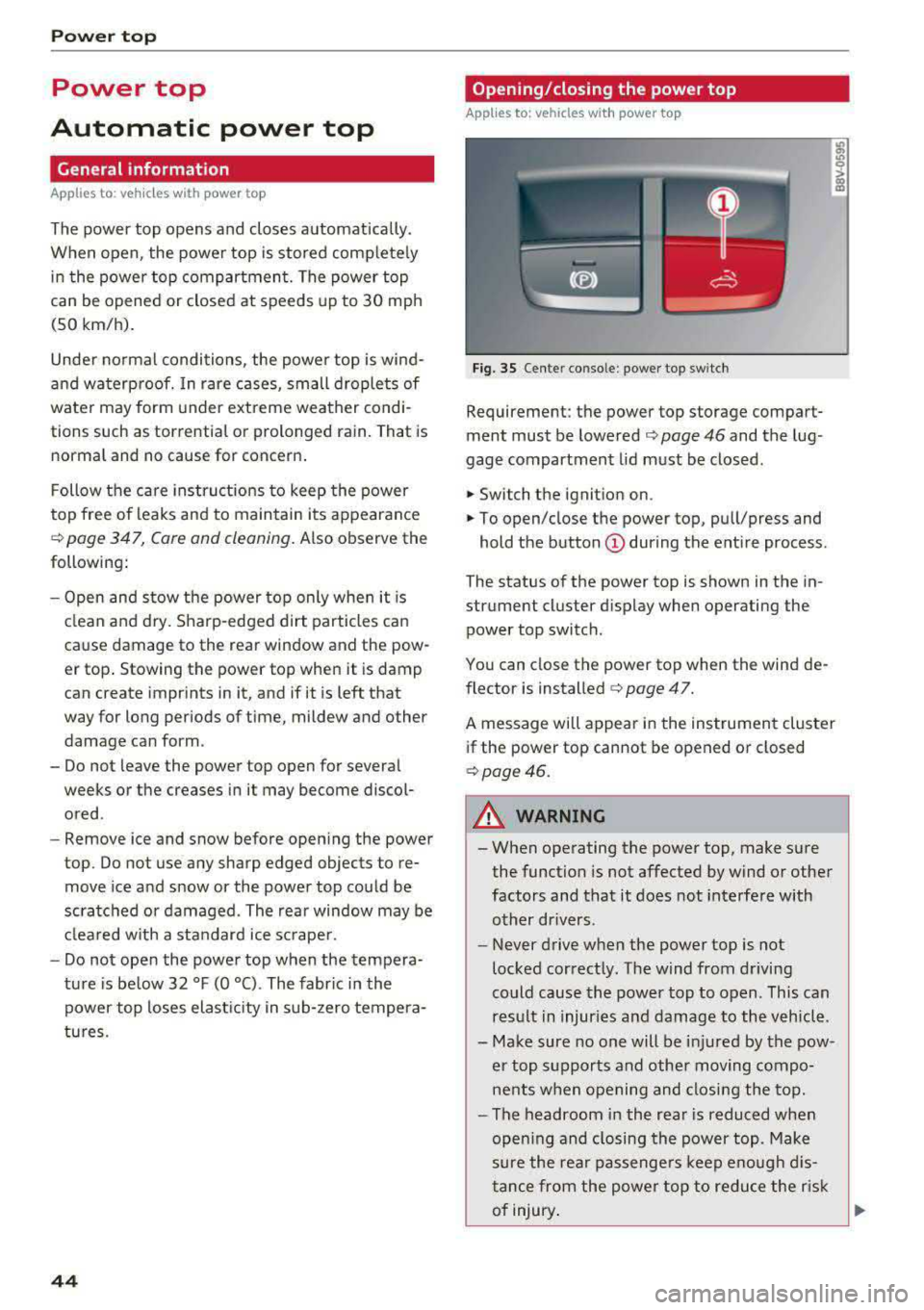
Fig. 35 Cente r conso le : power top sw itch
Requirement: the power top storage compart
ment must be lowered
¢ page 46 and the lug
gage compartment lid must be closed .
.,. Switch the ignition on .
.,. To open/close the power top, pull/press and
hold the button
(D during the ent ire process .
The status of the power top is shown in the in
strument cluster d isplay when operating the
power top switch .
You can close the power top when the wind de
flector is
installed ¢ page 47.
A message will appear in the instrument cluster
if the power top cannot be opened or closed
¢page 46.
A WARNING
-- When operating the power top, make sure
the function is not affected by wind or other
factors and that it does not interfe re with
other drivers.
- Never drive when the power top is not
locked correctly. The wind from driving
could cause the power top to open. This can
res ult in injuries and damage to the vehicle .
- Make sure no one will be injured by the pow
er top supports and other moving compo
nents when opening and closing the top.
- The headroom in the rea r is reduced when
open ing and closing the power top . Make
sure the rea r passenge rs keep enou gh dis
tance from the powe r top to reduce the risk
of injury .
Ill>-
Page 86 of 400
Driving
"'To start driving and release the parking brake
automatically, press the accelerator pedal as
usual.
In addition to releasing the parking brake auto
matically, other convenience and safety functions
are available when you start driving
¢ page 85,
Starting from a stop.
Preventing the automatic parking brake
release
The vehicle could begin rolling unintentionally,
dep ending on the hill or if towing a trailer.
"'To prevent the parking brake from releasing au
tomatically, pull and hold
the®> switch and
press the accelerator pedal. The parking brake
remains set and prevents the vehicle from roll
ing backward.
"'You can release the(®) switch again once you
are sure that you are giving enough driving
force to the wheels by pressing the accelerator pedal.
Emergency braking function
You can use the emergency braking function in an emergency situation, or if the standard brake op
eration malfunctions or is disabled .
"'Pull and hold the(®) switch.
"' As soon as you release the ®> switch or acceler-
ate, the braking stops .
Pulling and holding
the®> switch while driving
the vehicle activates the emergency braking func
tion . The vehicle is braked at all four wheels by
activating the hydraulic brake system. The brak ing effect is similar to heavy
braking ¢,&. .
To reduce the risk of activating the emergency
braking by mistake, a warning tone (bu zzer)
sounds when
the(®) switch is pulled. Emergency
braking stops as soon as
the(®) switch is released
or the accelerator pedal is pressed .
Parking
"' Press the brake pedal to stop the vehicle.
"'Pull the®> switch to set the parking brake.
"'Place the selector lever in the P position.
"'Turn the engine off ¢,&. .
84
"'Turn the steering wheel when parking on in
clines so that the wheels will roll into the curb
if the vehicle starts moving.
A WARNING
- Do not press the accelerator pedal inadver
tently if a gear is selected when the vehicle
is stationary and the engine is running . Oth
erwise, the vehicle will start to move imme
diately and this could result in an accident.
- Emergency braking should only be used in
an emergency, when the normal brake pedal has failed or the brake pedal is obstructed.
During emergency braking, your vehicle will
brake similar to heavy braking. ESC and the
associated components (ABS, ASR, EDL)
cannot overcome the laws of physics. In cor
ners and when road or weather conditions
are bad, a full brake application can cause
the vehicle to skid or the rear end to swerve,
which increases the risk of an accident.
- If the power supply fails, you cannot set the
parking brake if it is released . In this case,
park the vehicle on level ground and secure
it by placing the selector lever in the P posi
tion. See an authorized Audi dealer or au
thorized Audi Service Facility for assistance.
-Always take the vehicle key with you when
leaving your vehicle, even for a short period
of time . This applies particularly when chil
dren remain in the vehicle. Otherwise chil
dren could start the engine, release the
parking brake or operate electrical equip
ment such as power windows, which in
creases the risk of an accident.
- No one should remain in the vehicle when it
is locked - especially children. Locked doors
make it more difficult for emergency work
ers to get into the vehicle, which puts lives
at risk .
(D Tips
When stopping at a traffic signal or stopping
in city traffic, you can set the parking brake
manually . The vehicle does not have to be
held with the brake pedal. The parking brake
eliminates the tendency to creep when a se lector lever position is engaged . As soon as
Page 90 of 400
Driving
Driving tips
Applies to: ve hicles w ith a utomat ic tra nsm iss io ns
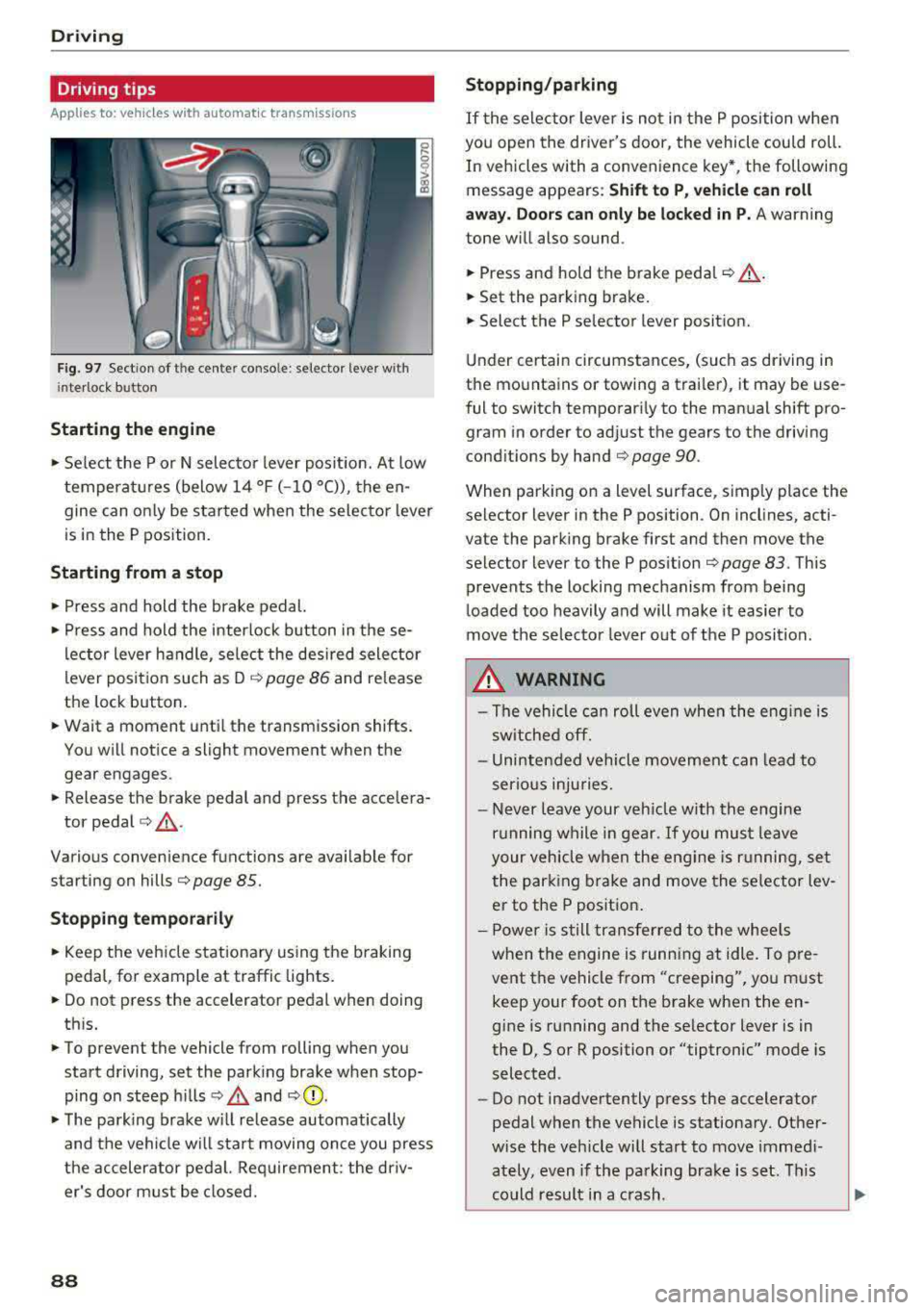
Fig. 97 Sect ion of the cente r conso le : se lector lever w ith
i nte rlock button
Starting the engine
• Se lect the P or N selec to r l ever posit ion. At low
temperat ures (below
14 °F (- 10 °C)), the en
gine can on ly be star ted when the selector lever
is in the P position.
Starting from a stop
• Press and hold the brake pedal.
• Press and hold the interlock button in these
l ector lever handle, se lect the des ired selector
lever posit io n such as D
c::> page 86 and release
the lock button.
• Wait a moment unti l the transmission shifts.
You w ill notice a slight movement when the
gear engages.
• Release the brake pedal and press the accelera-
tor pedal
c::> ,& .
Various convenience functions are ava ilab le for
starting on hills
c:::> page 85.
Stopping temporarily
• Keep the veh icle stationary using the b raking
peda l, for example at traffic lights.
• Do not press the accelerator pedal when doing
th is.
• To prevent the vehicle from rolling when you
start driving, set the park ing brake when stop
ping on steep hills
c::> .& and c::> 0.
• The park ing brake w ill release automatically
and t he veh icle wi ll sta rt moving on ce you press
the accelerator pedal. Req uirement: the driv
er's door m ust be closed.
88
Stopping/parking
If the sele ctor lever is not in the P position w hen
you open the driver's door, the vehicle cou ld roll.
In vehicles with a conven ience key *, the following
message appears:
Shift to P , vehicle can roll
away . Doors can only be locked in P.
A warning
tone w ill also sound.
• Press and hold the brake peda l c::> A.
• Set the parking brake.
• Select the P selector lever posit ion.
U nder certai n circumstances, (such as driving in
t h e mountains or towing a trai ler), it may be use
ful to switch temporar ily to the manual shift pro
gram in order to ad just the gears to the driving
cond it ions by hand
c:::> page 90.
When park ing o n a level sur face, s imply place the
se lector lever in the P position . On inclines, acti
vate the parking brake first and then move the
selector lever to the P pos ition
c:::> page 83 . This
prevents the locking mechanism from being
loaded too heavily and will make it easier to
move the selec tor lever o ut of the P posi tion.
.&_ WARNING
- The vehicle can ro ll even whe n the engi ne is
sw itche d off.
- Unin ten ded vehicle movement can lead to
s e rio us inju ries.
- Never leav e your ve hicle w ith th e engine
r u nning w hile in gear.
If you mus t leave
your veh icle when the eng ine is r unning, se t
the par king brake and move the se lector lev
er to the P position .
- P owe r is s till tran sfer red to the whee ls
when t he engine is runn ing at idle. To pre
vent the vehicle f rom "creeping", yo u m ust
keep your foot on t he brake when the en
gine is running and the se lector lever is in
the D, So r R position or "tiptronic" mode is
selected.
- Do not inadvertently press the accelerator
pedal when the vehicle is stationa ry. Ot her
w ise the veh icle will start to move immed i
ately, even if the parking b ra ke is set. T his
c o uld result in a c rash.
Page 91 of 400
CXl CXl .... N ,.__
N .... 0 N > 00
-Do not press the accelerator pedal when
changing the selector lever position while
the vehicle is stationary and the engine is running.
-Never engage the R or P selector level posi
tions while driving. It could cause a crash.
-Before driving down a steep slope, reduce
your speed and shift into a lower gear with
"tiptronic" .
-Do not ride the brakes or press the brake
pedal too often or too long when driving
downhill. Constant braking causes the
brakes to overheat and substantially re
duces braking performance, increases brak
ing distance or causes complete failure of
the brake system.
-If you must stop on an incline, always hold
the vehicle in place with the foot brake or
parking brake to prevent it from rolling
back.
-Never hold the vehicle on an incline with a
slipping clutch. The clutch opens automati
cally when it becomes too hot from the
overload.
The@] indicator light turns on
and a message appears
Q page 91 when
the clutch is overloaded.
(D Note
-When stopping on an incline, do not try to
hold the vehicle in place by pressing the ac
celerator pedal while a driving gear is se
lected. This can cause the automatic trans
mission to overheat and can damage it. Set
the parking brake or press the brake pedal
to prevent the vehicle from rolling.
- Allowing the vehicle to roll when the engine
is stopped while the selector lever is in the
N posit ion will damage the automatic trans
mission, because it is not lubricated under
those circumstances
Qpage 370, Towing
with a tow truck.
-The transmission can overheat and be dam
aged under certain driving and traffic condi
tions such as frequent starts, creeping for a
long time, or stop-and-go traffic. When the
mJ or. indicator light turns on, stop the
vehicle at the next opportunity and let the
transmission cool
Qpage 91.
Driving
{!) Tips
For safety reasons, the parking brake only re
leases automatically when the driver's door is
closed.
Hill descent control
App lies to : vehicles wi th automatic transmissions
The hill descent control system assists the driver
when driving down hills.
Hill descent control is activated when the selec
tor lever is in the D or 5 position and you press
the brake pedal. The transmission automatically
selects a gear that is suitable for the hill. Hill de
scent control tries to maintain the speed ach ieved at the time of braking, within physical and
technical limitations .
If may still be necessary to
adjust the speed with the brakes. Because hill de
scent control cannot shift down farther than 3rd
gear, it may be necessary to shift into tiptronic
mode in very steep areas. In this case, shift into
2nd or 1st gear in tiptronic mode to use the en
gine's braking force to relieve the brakes.
Hill descent control switches off once the hill lev
els out or you press the accelerator pedal.
On vehicles with a cruise control system*
Q page 123, hi ll descent control is also activated
when the speed is set.
Hill descent control cannot overcome physical
limitations, so it may not be able to maintain
a constant speed under all conditions. A lways
be ready to app ly the brakes.
89
Page 122 of 400
Trailer towing
Trailer towing
Driving with a trailer
General information
Your Audi was designed primarily for passenger
transportation.
If you plan to tow a trailer, please remember that
the additional load will affect durability, econo
my and performance.
Trailer towing not on ly places more stress on the
ve hicle, it also ca lls for more concentration from
the dr iver.
F or this reason, always follow the operating and
driving instructions provided and use common
sense.
Technical requirements
Trailer hitch
Use a weight-carrying hitch conforming to the
gross tra iler weight. The hitch must be suitab le
for your veh icle and tra iler and must be mounted
securely on the vehicle's chassis at a technically
sound
locat ion . Use on ly a trailer hitch with a re
movable ba ll mount . Always che ck with the t rail
er hitch man ufac tur er to make s ure t hat you are
using the co rrect hi tc h.
Do not use a bumper hitch.
The hitch must be installed in such a way that it
does not interfere with the impact -absorbing
bumper system. No mod ificat ions should be
made to the vehicle exhaust and b rake systems .
Fr om t ime to t ime, che ck tha t all hitch mo unti ng
bol ts rem ain securely f aste ned.
W hen you are not tow ing a tra iler, remove the
tra ile r hitc h ba ll mount . This prevents the hit ch
from caus ing damage s hou ld your veh icle be
s truck from be hind
c> ,&. .
Trailer brakes
If your trailer is equipped with a brak ing system,
check to be su re that it conforms to all regula
tions .
120
The t rai ler hydraulic bra ke system must not be
directly connected to the vehicle's hydraulic
bra ke system.
Safety chains
A lways use s afety chains between you r vehi cle
and t he tra ile r.
Trailer lights
Traile r lights must meet all regula tions . B e s ure
to check w ith your Aud i dea le r fo r cor rect wir ing,
switches and relays .
Mirrors
If you are unable to see t he traffic behind you us
i ng t he regular outs ide mir rors, then yo u
must in
stall extended mirro rs . It is impo rtant that you
always have clear vision to the rear.
&, WARNING
Afte r remov ing the tr ailer hi tch, do not s to re
i t i n yo ur vehicle. In case o f su d den braking,
the hitch could fly fo rwa rd and injure you or
your passengers .
Operating instructions
Maximum trailer weight
A tra iler f or yo ur vehicle is lim ite d to a typical
class 1 or class 2 trailer.
Trailer load distribution
Be sure the load in the t rai le r i s he ld se curely in
pla ce to p revent i t from shi fting forward, bac k
ward or si deways.
Never allow a passenger to ride in a trailer c> &.
in Driving instructions on page 121.
Engine cooling system
Towing a tra iler makes the engine work harder. It
is important that the cooling system's perform
ance is up to the additional load . Make sure tha t
the coo ling system has enoug h flu id.
Tire pressure
When towing a trailer, inf late the tires of your
vehicle to the tire pressure listed under "Full load" on the label
c> page 336. Inflate trailer
Page 123 of 400
CXl CXl .... N ,.__
N .... 0 N > 00
tires to trailer and tire manufacturers' specifica
tions.
Lights
Check to make sure both vehicle and trailer lights
are working p roperly.
Safety chains
Be sure trailer safety chains are properly connect
ed from the tra iler to the hitch on the vehicle.
Leave enough slack in the chains to permit turn
in g corners . When you install safety cha ins, ma ke
sure they w ill not drag on the road when yo u are
driving .
The chains shou ld cross under the trailer tongue
to prevent it from dropping in case of separat ion
from the hitch.
Driving instructions
Driving with a trailer always requires extra care
and consideration.
Weight distribution
Towing a loaded trailer w ith an empty car results
in a highly unstable distribution of weight . If this
cannot be avo ided, drive at very low speeds only
to avoid the risk of losing steering control.
A "balanced" rig is easier to operate and control.
This means that the tow vehicle should be loaded
to the extent possible and permissible, while
keep ing the tra iler as light as possib le under the
circumstances. Whenever possib le, t ransfer
some cargo to the luggage compartment of the
tow vehicle whi le observing tongue load require
ments and vehicle loading considerations .
Speed
The higher the speed, the more difficult it be
comes for the driver to control the rig. Do not
drive at the maximum permissible speed. Reduce
your speed even more if load, weather or wind
conditions are unfavorable
-particu larly when
going downhill.
Reduce vehicle speed
immediately if the trailer
shows the s lightest sign of swaying .
Do not try
to stop the swaying by accelerating.
Tra iler towing
Observe speed limits. In some a reas, speeds for
vehicles towing trailers are lower than for regular
vehicles .
Always apply brakes early. When driving down
hill, shift into a lower gear to use the engine
braking effect to slow the vehicle. Use of the
brakes alone can cause them to overheat and fa il.
Coolant temperature
T he coo lant tempe rature gauge ~ page 11 must
be observed carefully . The coolant temperature
can increase if you drive on long inclines in a low
gear at high engine speeds. Reduce your speed
immediately if the LEDs in the top part of the dis
play turn on.
For more information about indicator lights, re
fer
to . ~page 28.
A WARNING ,-
Anyone not properly restrained in a moving
vehicle is at a much greater risk in an acci
dent. Never let anyone ride in your car who is
not properly wearing the restraints provided
by Aud i.
Trailer towing
information
Important to know
Your vehicle handles differently when towing a
trailer because of the addit ional weight and dif
ferent weight distribution . Safety, performance
and economy will g reatly depend on how careful
ly you load your trailer and operate yo ur rig.
Before you actually tow your trailer, pract ice
turning, stopping and backing up in an area away
from traffic. Keep practic ing until you have be
come complete ly familiar w ith the way your vehi
cle-trailer combination behaves and responds.
Backing up is difficult and requires practice.
Backing up with a t railer genera lly requires steer
i ng action opposite to that when backing up your
vehicle without a tra iler.
Maintain a greater distance between your vehicle
and the one in front of you. You will need more
.,,.
121
Page 124 of 400
Trailer towing
room to stop . To compensate fo r the trai ler, you
will need a larger than normal turning radius.
When pass ing, remembe r that you cannot accel
erate as fast as you norma lly would because of
the added load. Make s ure yo u have eno ugh room
to pass . After passing, allow plenty of room for
your tra ile r before chang ing lanes again.
Avoid jer ky s tar ts, sharp turns or rap id lane
changes .
{D) Tips
- Do not tow a trailer during t he b reak-in per i
od of yo ur vehicle.
- If you tow a trailer, your Aud i may require
more frequent m ain tenance d ue to the ex
tra load
r:!) page 3 78.
Parking on a slope
Do not park on a slope with a trailer. If it cannot
be avoided, do so only
a~er doing the following:
When parking:
.,. Apply the foot b rake .
.. Have someone place chocks under both t he ve
hicle and the trai le r wheels .
.. With chocks i n place, slowly release the brakes
u nt il the whee l cho cks absorb the load .
.. T urn the wheels towards the curb .
.. Apply the parking brake .
.. Select the P selector lever position.
When restarting after parking:
.,. Apply the foo t bra ke .
.. Start the engi ne .
.. Se lect the D/S selector lever position .
.. Release the parking brake and slowly pull out
and away from the wheel chocks .
.. Stop and have someone retrieve the wheel
chocks.
(D Tips
If you move the se lector lever of the a utomat
ic transm ission to P before apply ing t he park
ing brake and before block ing the wheels, you
may have to use more fo rce later to move the
lever ou t of the P position .
122
Page 142 of 400
Assistance systems
warn you about detected vehicles that it has clas
sified as critical.
@ Tips
You can adjust the brightness on of the dis
play on the rearview mirror¢
page 141.
General information
App lies to: ve hicles w ith Audi side assist
@
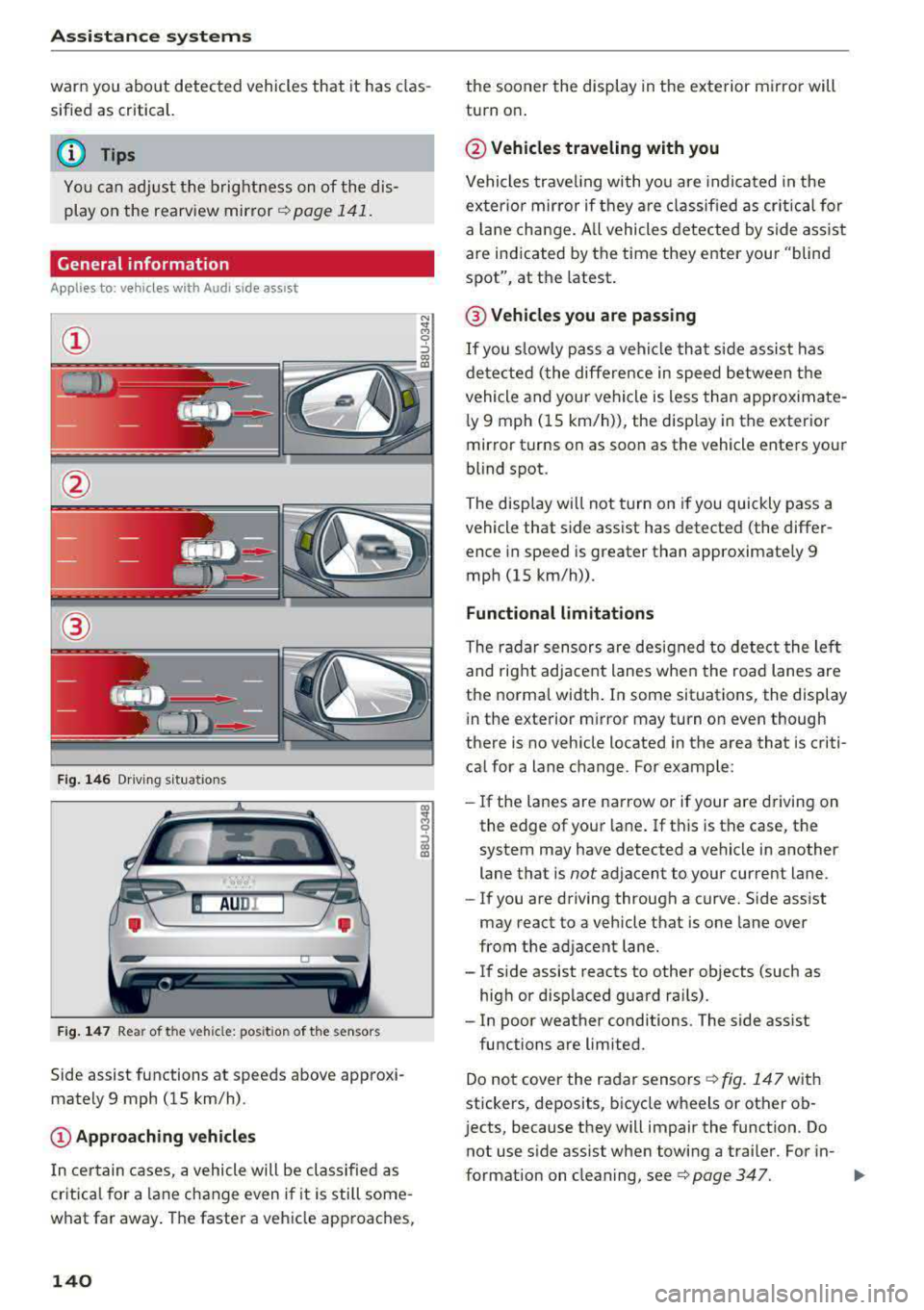
Fig. 146 Driving s it u ations
Fig. 147 Rear of the veh icle: pos it ion of the sensors
Side assist functions at speeds above approxi
mately 9 mph (15 km/h) .
@Approaching vehicles
In certain cases, a vehicle will be classified as
critical for a lane change even i f it is still some
what far away. The faster a vehicle approaches,
140
the sooner the display in the exterior mirror will
turn on .
@Vehicles traveling with you
Vehicles traveling with you are indicated in the
exter ior mirror if they are classified as critical for
a lan e change . All vehicles detected by side assist
are indicated by the time they enter your "blind
spot", at the latest .
@ Vehicles you are passing
If you slow ly pass a vehi cle that side assist has
detected (the differe nce in speed between the
vehicle and your vehicle is less than approximate
l y 9 mph (15 km/h)), the disp lay in the exterior
mirror turns on as soon as the vehicle enters your
blind spot.
The display wi ll not turn on if you quickly pass a
vehicle that side assist has detected (the differ ence in speed is greater than approximate ly 9
mph (15 km/h)) .
Functional limitations
The radar sensors are designed to detect the lef t
and right adjacent lanes when the road lanes are
the normal width . In some situations, the display
in the exterior m irror may turn on even though
there is no vehicle located in the area that is criti
ca l for a lane change. For example:
- If the lanes are narrow or if your
are dr ivin g on
the edge of your lane. If this is the case, the
system may have detected a vehicle in another
lane that is
not adjacent to your cur rent lane.
- If you are driving through a curve. Side ass ist
may react to a vehicle that is one lane over
from the adjacent lane.
- If side assist reacts to other objects (such as
high or displaced guard ra ils).
- In poor weather conditions. The side ass ist
functions are limited.
Do not cover the radar
sensors ¢ fig. 147 with
stickers, deposits, bicycle wheels or other ob
j ects, because they will impair the function. Do
not use s ide assist when towing a trai ler. For in-
format ion on cleaning,
see ¢ page 347. .,..