wheel AUDI A3 SEDAN 2018 Owners Manual
[x] Cancel search | Manufacturer: AUDI, Model Year: 2018, Model line: A3 SEDAN, Model: AUDI A3 SEDAN 2018Pages: 404, PDF Size: 62.3 MB
Page 370 of 404
Emergency assistance
-Pull th e revers ible blade from the sc rew driv
e r before you use the he xag onal socket in
the handle t o turn the w heel bo lts .
- W hen mounting ti res w ith
unidirectional
tread design
make sure the t read pattern is
po inted the r igh t way
c> page 36 8.
-The wheel bolts should be clea n and easy to
turn . C heck for di rt and c orros io n on t he
mating surfaces o f both the wheel an d the
hu b. Remove all dirt from t hese surfaces be
fo re r emo untin g the wheel.
Tires with unidirectional tread design
Tires with unidirectional tread design must be
mount ed with th eir tread pattern pointed in the
right direction .
Using a spare tire with a tread pattern
intended for use in a specific direction
W hen using a spare ti re with a tread patte rn in
tended fo r use in a spec ific d ir e ction, please note
t he following:
- The direct ion of rotat io n is marked by an a rrow
o n the side of the tire.
- If the spare tire has to be installed in the incor
r ect d irection, use the spare tire only tempora
r ily s ince the t ire w ill not be ab le to achieve its
o pti mum p erf ormance c harac ter istics wi th re
gard to a quaplaning, noise and wea r.
- We recommen d that you pay particular atten
t ion to this fac t during wet weathe r and that
yo u adju st yo ur spe ed to match roa d condi
tio ns.
- Replace t he flat t ire with a new one and have i t
in stall ed on yo ur vehicle as soon as possible to
r e stor e th e han dling adv antage s of a un id ir e c
ti on al ti re.
Notes on wheel changing
Please read the info rmation c> page 33 7 if you
are going to use a spare tire which is different
from the tires on yo ur vehicle .
Afte r you change a tire:
-Check the tire pressure on the spare immedi
ately after installation.
368
- Have the wheel bolt tightening torque
checked with a torque wrench as soon as pos
sible by your authorized Audi dealer or a
qualified service station.
- With steel and alloy wheel rims, the wheel
bolts are correctly tightened at a torque of
90 ft lbs (120 Nm).
- If you notice that the wheel bolts are corroded
and difficult to turn while changing a tire ,
they should be replaced before you check the
tightening torque .
- Replace the flat tire with a new one and have
it installed on your vehicle as soon as possi
ble. Remount the wheel cover.
Until then, drive with extra care and at reduced
speeds.
A WARNING
- If you are goi ng t o equip yo ur vehicle with
t ires or r ims which diffe r from those which
wer e fac to ry install ed, th en be su re to read
t he infor matio n
c> pag e 33 7.
- Always mak e sure th e damag ed wheel or
e ve n a fl at tire and th e jack and to ol kit ar e
pr op erl y se cure d in t he l uggage com part
me nt a nd are no t loos e in the pass eng er
c omp artment.
- In a n ac cide nt or sudde n maneuver they
co uld fly forw ard, i njuring a nyon e in the ve
h icle.
- Alway s store damage d wheel, j ack a nd too ls
secure ly in the lu g gage compa rt ment. O th
erwise, in an a cci den t or sudden maneuve r
they cou ld fly forwar d, cau sing injury to pas
sen gers in the veh icle.
-
Page 371 of 404
LL co ..... N
" N ..... 0 N > co
Spare tire
General information
Applies to: vehicles with space-saving spare tire (compact
spare tire)
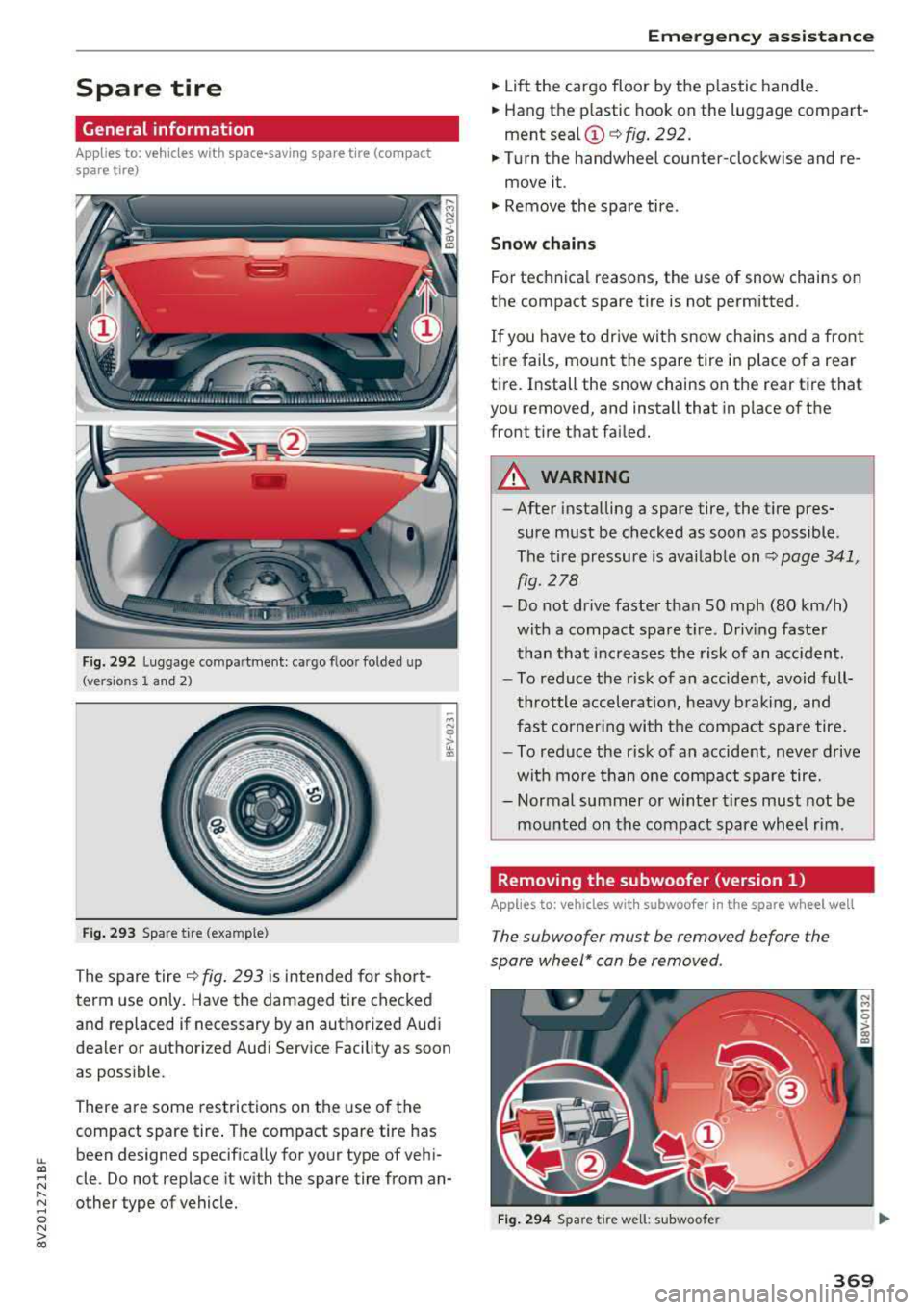
Fig. 292 Luggage co mpa rtment: cargo floo r fo lded up
(versio ns 1 and 2 )
F ig. 293 Spare tire (exa mple)
The spare tire ~ fig. 293 is intended for short
term use only . Have the damaged tire checked
and replaced if necessary by an authorized Audi
dealer or authori zed Audi Service Facility as soon
as possible.
There are some restrictions on the use of the
compact spare tire . The compact spare tire has
been designed specifically for your type of vehi
cle . Do not replace it with the spare tire from an
other type of vehicle.
Emergency assistance
" Lift the cargo floor by the p lastic handle.
" Hang the p lastic hook on the luggage compart
ment sea l
(D ~ fig. 292 .
"Turn the handwheel counter-clockwise and re-
move it .
"Remove the spare tire .
Snow chains
For technical reasons, the use of snow chains on
the compact spare tire is not permitted.
If you have to drive wi th snow chains and a front
tire fails, mount the spare tire in place of a rear
tire. Install the snow chains on the rear tire that
you removed, and install that in place of the
front t ire th at failed.
A WARNING
--
- After installing a spare tire, the t ire pres
sure must be checked as soon as possible.
The tire pressure is available on
~ page 341,
fig . 278
- Do not drive faste r than SO mph (80 km/h)
with a compact spare t ire. Driving faster
than that increases the risk of an accident.
- To reduce the r isk of an accident, avoid full
throttle accelerat ion, heavy braking, and
fast cornering with the compact spare tire.
- To reduce the r isk of an accident, neve r drive
with more than one compact spare tire.
- Normal summer or winter t ires must not be
mounted on the compact spare wheel rim .
Removing the subwoofer (version 1)
Applies to: vehicles with subwoofer in the spare wheel well
The subwoofer mus t be removed before the
spare wheel* can be removed .
Fig. 294 Spare tire well: subwoofe r
369
Page 372 of 404
Emergency assistance
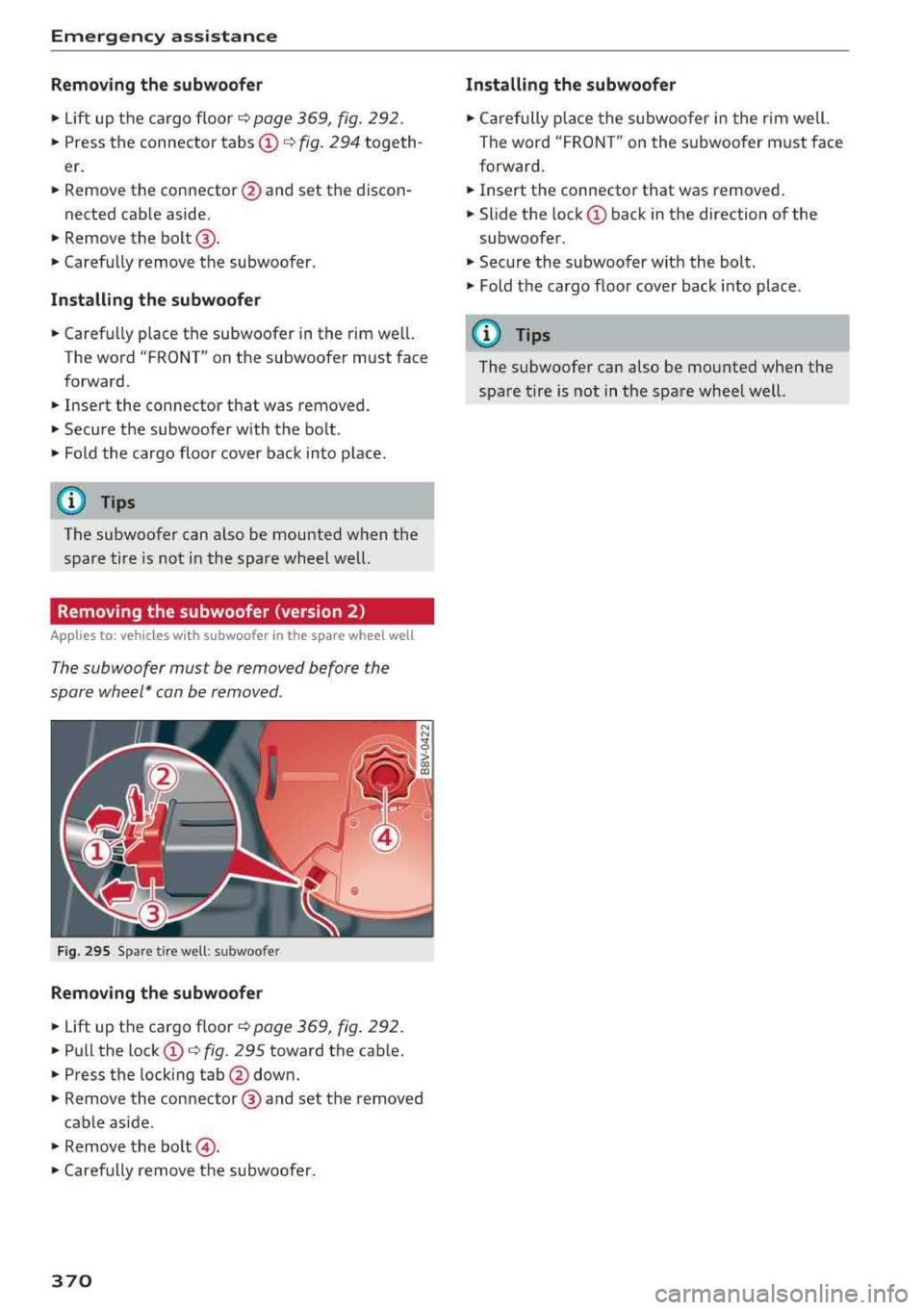
Removing the subwoofer
• Lift up the cargo floor ¢ page 369, fig. 292 .
• Press the connector tabs @¢ fig. 294 togeth
er.
• Remove the connector @and set the discon-
nected cab le aside.
• Remove the bo lt @ .
• Carefu lly remove t he subwoofer .
Installing the subwoofe r
• Carefully place the subwoofer in the rim we ll.
The word
"FRONT" on the subwoofer must face
f orward.
• Inse rt the connector that was removed .
• Secure the subwoofer with the bolt .
• Fold the cargo floo r cover bac k into p lace.
(D Tips
The subwoofer can also be mounted w hen t he
spare tire is not in the spare wheel well.
Removing the subwoofer (version 2)
Applies to: vehicles w ith s ubwoofer in the spare wheel well
The subwoofer must be removed before the
spare wheel* can be removed .
Fig . 295 Spare t ire well : su bwoofer
Remov ing the subwoofer
• Lift up the cargo floor ¢ page 369 , fig . 292 .
• Pull the lock (D ¢ fig. 295 toward the cab le.
• Press t he lock ing tab @down.
• Remove the connector @and set the removed
cable aside .
• Remove the bolt @.
• Caref ull y remove t he subwoofer.
370
Installing the subwoofer
• C arefully p lace the s ubwoofer i n the r im well.
The word "F RONT" on the s ubwoofer m ust face
forward .
• Insert the connecto r that was removed .
• Slide the lock (D back in the direction of the
subwoofe r.
• Secure the subwoo fer wit h the bolt.
• Fold the cargo floor cover back into place .
(D Tips
The subwoofer can also be mounted when the
spare t ire is not in the spa re whee l wel l.
Page 374 of 404
Fuses and bulbs
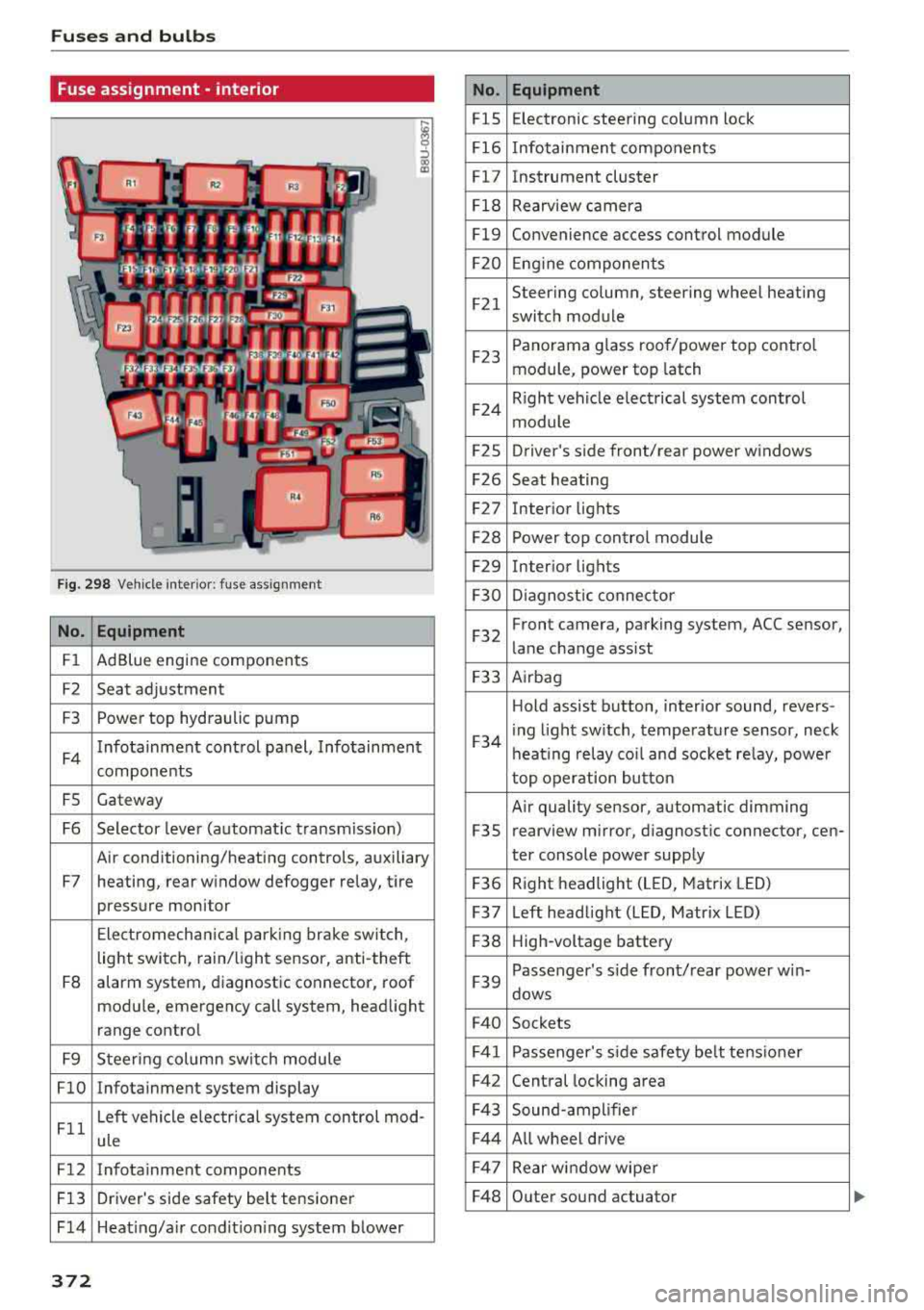
Fuse ass ignment - interior
ij
::, CX) ID
F ig. 298 Vehicle interior: fuse assignment
No. Equipment
Fl Ad Blue engine components
F2 Seat adjustment
F3 Power top hydraulic pump
F4 Infotainment control panel,
Infotainment
components
FS Gateway
F6 Selector lever (automat ic transm iss ion)
Air conditioning/heating controls, auxiliary
F7 heating, rear window defogger relay, tire pressure monitor
Electromechan ical park ing brake switch,
light switch, rain/light sensor, anti-theft
F8 alarm system,
diagnostic connector, roof
module, emergency call system, head light
range control
F9 Steering col umn sw itch module
FlO Infotainment system display
Fll Left vehicle electrica
l system control mod-
ule
F12 Infotainment components
F13 Driver's side safety belt tensioner
F 14 Heat ing/a ir condit ion ing system blower
372
No . Equipment
FlS Electronic
steering column lock
F16 Infotainment components
Fl7 Instrument cluster
Fl8 Rearview camera
Fl9 Convenience access control module
F20 Engine components
F21 Steering column, steering wheel heating
switch module
F23 Panorama glass
roof/power top control
module, power top latch
F24 R
ight vehicle electrical system control
module
F2S Driver
's side front/rear power windows
F26 Seat heating
F27 Interior
lights
F28 Power top control module
F29 Interior lights
F30 Diagnostic connector
F32 Front camera, parking
system, ACC sensor,
lane change assist
F33 Airbag
Hold assist button, interior sound, revers-
F34 i
ng light sw itch, temperature sensor, neck
heating relay coil and socket relay, power
top operation button
Air quality sensor, automatic dimming
F3S rearview
mirror, diagnostic connector, cen-
ter console power supply
F36 Right
headlight (LED, Matrix LED)
F37 Left headlight (LED, Matrix LED)
F38 High-voltage battery
F39 Passenger
's side front/rear power w in-
dows
F40 Sockets
F41 Passenger's sid e safe ty be lt tens ioner
F42 Central locking area
F43 Sound-amplifier
F44 All wheel drive
F47 Rear window wiper
F48 Outer sound actuator
Page 380 of 404
Emergency situations
9. Route the jump sta rt cables so they cannot
get caught in the moving parts in the engine
compartment.
Starting the engine
10. First start the engine in the vehicle g iving the
charge and let it run at idle.
11. Now start the engine in the vehicle with the
drained vehicle battery and wait two to three
minutes until it "runs smoothly" .
12.
If the engine does not start, stop the starting
procedure after 10 seconds and then repeat
it after approximately 30 seconds .
13 . In the vehicle that is being jump started,
switch the heater fan and rear w indow de
froster on to reduce any voltage peaks that may occur when disconnecting the jumper
cab les. The headlights must be switched
off.
14. While the engines a re running, remove the
cables in
reverse order from the way they
were installed, as described in ¢
page 3 76.
Make sure the cables do not get caught in
moving engine components.
15 . Close the cap on the positive term inal.
16 . Sw itch the heater fan and rear w indow de
froster
off.
Read and follow: ¢ .&. in Preparation on
page 375
and ¢ (D in Preparation on page 375 .
@ Tips
-Make sure that the connected positive ter
minal clamps have sufficient contact with
metal.
- The vehicle battery in your vehicle vents to
the outs ide so the battery gases drain out of
the veh icle .
Towing with a tow truck
General hint s
Your Audi requires special handling for towing.
The follow ing information is to be used by com
mercial tow truck operators who know how to op
erate the ir equipment safely.
-Never tow your Audi. Towing will cause dam
age to the engine and transmission .
378
-Never wrap the safety chains or winch cables
around the brake lines .
- To prevent unnecessary damage , your Audi
must be transported with a flatbed truck.
- To load the vehicle on to the flatbed, use the
towing loop found in the vehicle tools and at
tach to the front or rear anchorage
¢page 378 and ¢page 379.
A WARNING
A vehicle being towed is not safe for passen
gers . Never allow anyone to ride in a vehicle
being towed, for any reason.
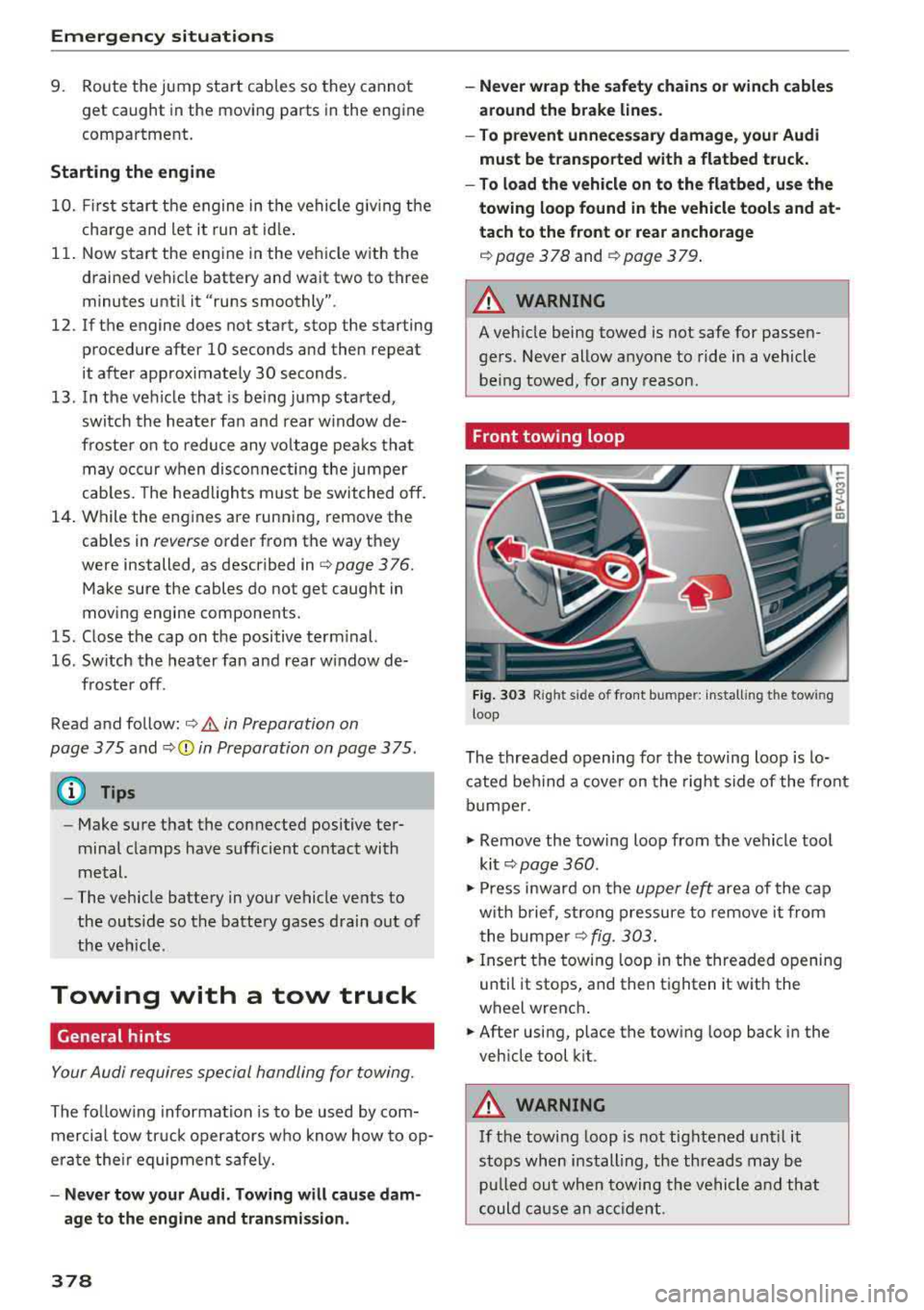
Front towing loop
Fig. 303 Rig ht s ide o f front b umper: install ing the tow ing
loop
The threaded opening for the towing loop is lo
cated behind a
cover on the right side of the front
bumper .
.,,. Remove the towing loop from the vehicle tool
kit ¢
page 360 .
.,,. Press inward on the upper le~ area of the cap
with brief, strong pressure to remove it from
the bumper
¢fig. 303 .
.,,. Insert the towing loop in the threaded opening
until it stops, and then tighten it with the
wheel wrench .
.,,. After using, place the towing loop back in the
vehicle tool kit .
A WARNING
If the towing loop is not tightened until it
stops when installing, the threads may be pulled out when towing the vehicle and that
could cause an accident .
-
Page 381 of 404
LL co .... N
" N .... 0 N > co
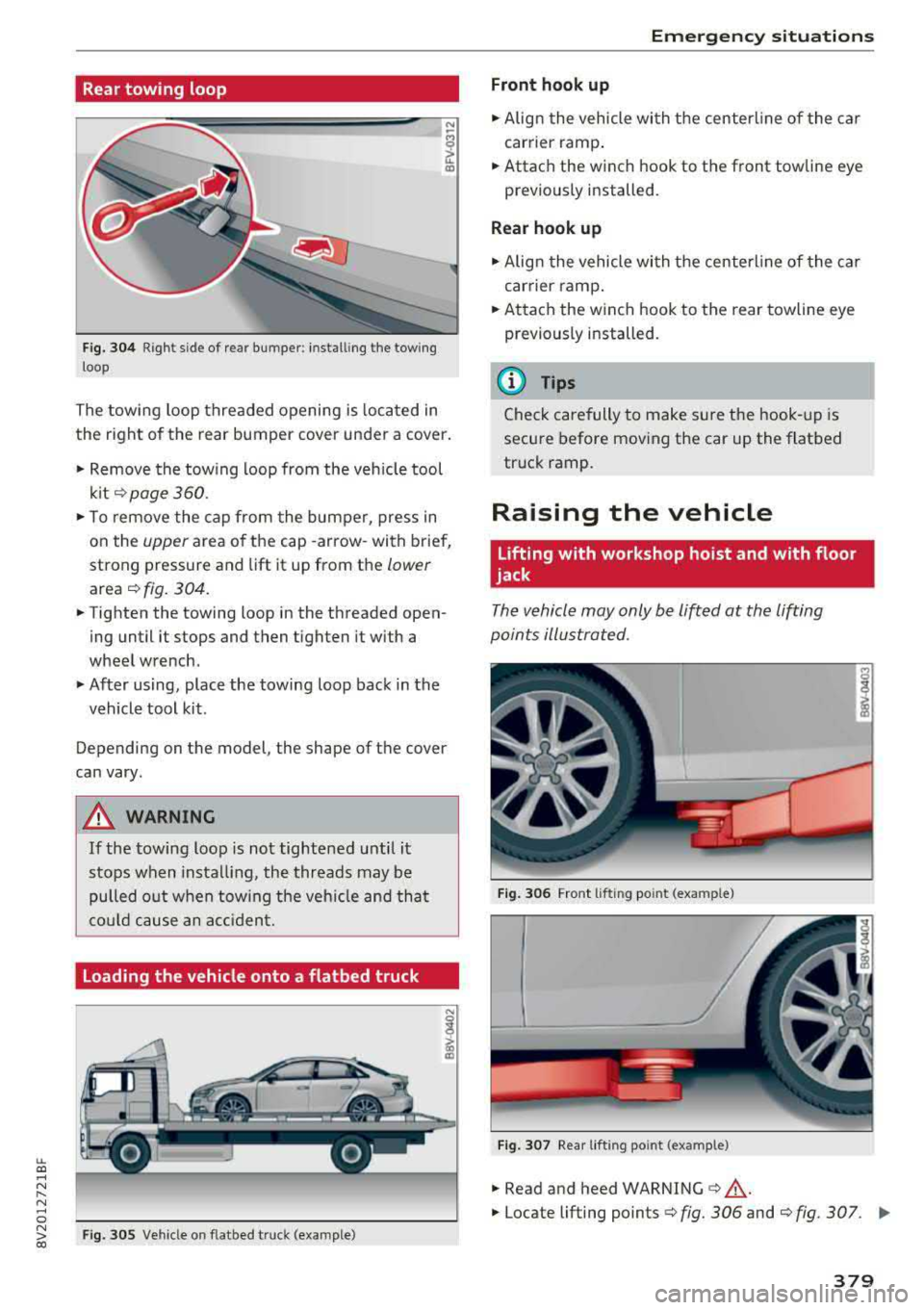
Rear towing loop
Fig. 304 Right side of rear bumper: installing the towing
loop
The towing loop threaded opening is located in
the right of the rear bumper cover under a cover.
.. Remove the towing loop from the vehicle tool
kit¢ page 360.
.. To remove the cap from the bumper, press in
on the
upper area of the cap -arrow-with brief,
strong pressure and lift it up from the
lower
area ¢ fig. 304.
.. Tighten the towing loop in the threaded open
ing until it stops and then tighten it with a
wheel wrench .
.. After using, place the towing loop back in the
vehicle tool kit .
Depending on the model, the shape of the cover
can vary .
& WARNING
If the towing loop is not tightened until it
stops when installing, the threads may be
pulled out when towing the vehicle and that
could cause an accident.
Loading the vehicle onto a flatbed truck
Fig. 305 Vehicle on flatbed t ruck (example)
Emergency situations
Front hook up
.. Align the vehicle with the centerline of the car
carrier ramp .
.. Attach the winch hook to the front towline eye
previously installed .
Rear hook up
.. Align the vehicle with the centerline of the car
carrier ramp .
.. Attach the winch hook to the rear towline eye
previously installed.
(D Tips
Check carefully to make sure the hook-up is
secure before moving the car up the flatbed
truck ramp .
Raising the vehicle
Lifting with workshop hoist and with floor
jack
The vehicle may only be lifted at the lifting
points illustrated .
Fig. 306 Front lifting po int (exa mple)
Fig. 307 Rear lifting point (exa mple)
" Read and heed WARNING ¢&, .
.. Locate lifting points ¢ fig. 306 and ¢ fig. 307. ..,
379
Page 384 of 404
Technical data
Capacities
Fuel tank, front wheel drive
Fuel tank, all wheel drive
Plug-in hybrid drive fuel tank
Windshield washer system
Windshield and headlight washer system*
Windshield and headlight washer system*,
S models
Windshield and headlight washer system*,
RS model.s
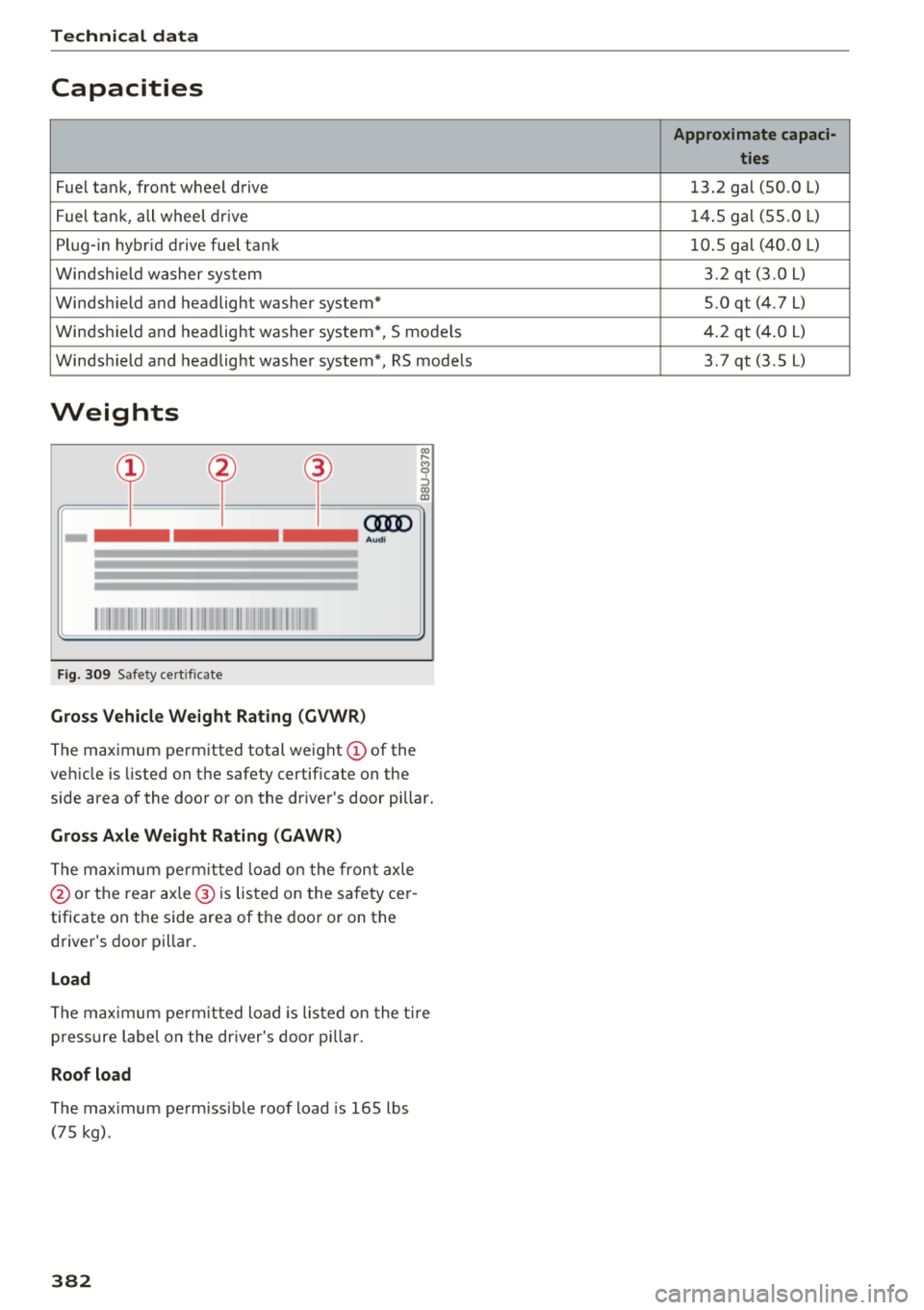
Weights
"'
~=Cf)== ~== ~= ~~ ~i
=I= = I= = I= c:m>
-
Aud i
Fig. 309 Safety cert ificate
Gross Vehicle Weight Rating (GVWR)
The maximum permitted total weight (D of the
vehicle is listed on the safety certificate on the
side area of the door or on the driver's door pillar.
Gross Axle Weight Rating (GAWR)
The maximum permitt ed load on the front axle
@ or the rear ax le ® is listed on the safety cer
tificate on the side area of the door or on the
driver's door pillar.
Load
The maximum permitt ed load is listed on the tir e
p ressure labe l on the driver's door pillar .
Roof load
The max imum perm issible roof load is 165 lbs
(75 kg).
382
Approximate capaci- ties
13.2 gal (50.0 L)
14.5 gal (55.0
L)
10.5 gal (40.0 L)
3.2 qt (3.0 L)
5.0 qt (4.7 L)
4.2 qt (4.0
L)
3.7 qt (3.5 L)
Page 386 of 404
Consum er Info rmation
today's automobi les, have steadi ly red uced the
scope of maintenance and repairs which can be
carried out by veh icle owners.
Al so , sa fet y and
en vironmental
concerns place very strict limits
on the nature of repairs and adjustments to en
g ine and transmission parts w hich an owner can
perform .
Maintenance, adjustments and repairs usually re
qu ire special tools, testing devices and other
equ ipment available to specially trained work
shop personnel in order to assure proper per
forma nce, re liab ility and safety of the ve hicle and
its many systems .
Improper maintenance, adjustments and repairs
can impair the operation and reliab il ity of your
ve hicle and eve n void your vehicle warra nty .
Therefo re, proof of se rvicing in accordance w ith
the m aintenance schedule may be a condition fo r
up hold ing a possible wa rranty claim made wi thin
the warranty pe riod.
Above all, ope rational safety can be adversely af
fected, c re ating unnecessa ry risks fo r you and
your passengers.
I f in doubt about any servicing, have it done by
your author ized Audi dealer or any other prope rly
eq uipped and qualified workshop . We strongly
urge yo u to g ive your author ized Audi dealer the
opportunity to perform a ll scheduled mainte
nance and necessary repairs. Your dealer has the
facilities, origina l parts and tra ined specialists to
keep your veh icle running properly.
Performing limit ed maint enanc e yourself
The fo llowing pages describe a limited number of
procedures whic h can be performed on your ve hi
cle with ordinary tools, should the need arise and
tra ined personnel be unava ilable. Before per
forming any of these procedures, always thor
ough ly read all of the app licab le text and carefu l
ly follow the instructions g iven . Always rigorously
observe the
W ARNINGS prov ided .
Befo re yo u check an ything in the engine com
partment , alway s read and h eed all WARNINGS
c> .&. and c> page 318 .
384
A WARNING
-Ser ious personal injury may occur as a result
of improperly performed maintenance, ad
justments or repairs .
- Always be extreme ly careful when work ing
on the vehicle . Always follow commonly ac
cepted safety practices and general com mon sense. Never r is k personal in jury.
- Do not attempt any of the maintenance,
checks or repairs described on the following pages if you are not fu lly fam il iar with these
or other procedu res with respect to the ve
hicle, or are uncertain how to proceed.
- Do not do any work wi thout the prope r tools
and eq uipmen t. H ave the necessary wo rk
done by your authorized Audi dealer or an
other properly equipped and qualified work
shop.
- The engine compartment of any motor vehi
cle is a potentially hazardous area . Never
reach into the area around or touch the radi
ator fan. It is temperature controlled and
can switch on suddenly - even when the en
gine is off . The radiato r fan switches on au
tomatically when the coolant reaches a cer
tain tempe rature and w ill cont inue to run
until the coolant temperature d rops.
- Always sw itch off the ignition before anyone
gets under the vehicle.
- Always support your vehicle with safety
stands if it is necessary to work underneath
the vehicle. The jack supp lied with the veh i
cle is no t adequate fo r th is pu rpose and
could collapse causing serious personal in
jury .
- If you must wor k unde rneath the vehicle
w ith the wheels on the g round, always make
sure the vehicle is on level ground, that the
wheels a re always sec urely blocked and that
the engine cannot be started.
- Always make sure the transmission se lector
lever (automatic t ransm iss ion) is in P (Park
position) and the pa rk b rake is applied .
Ill>
Page 389 of 404
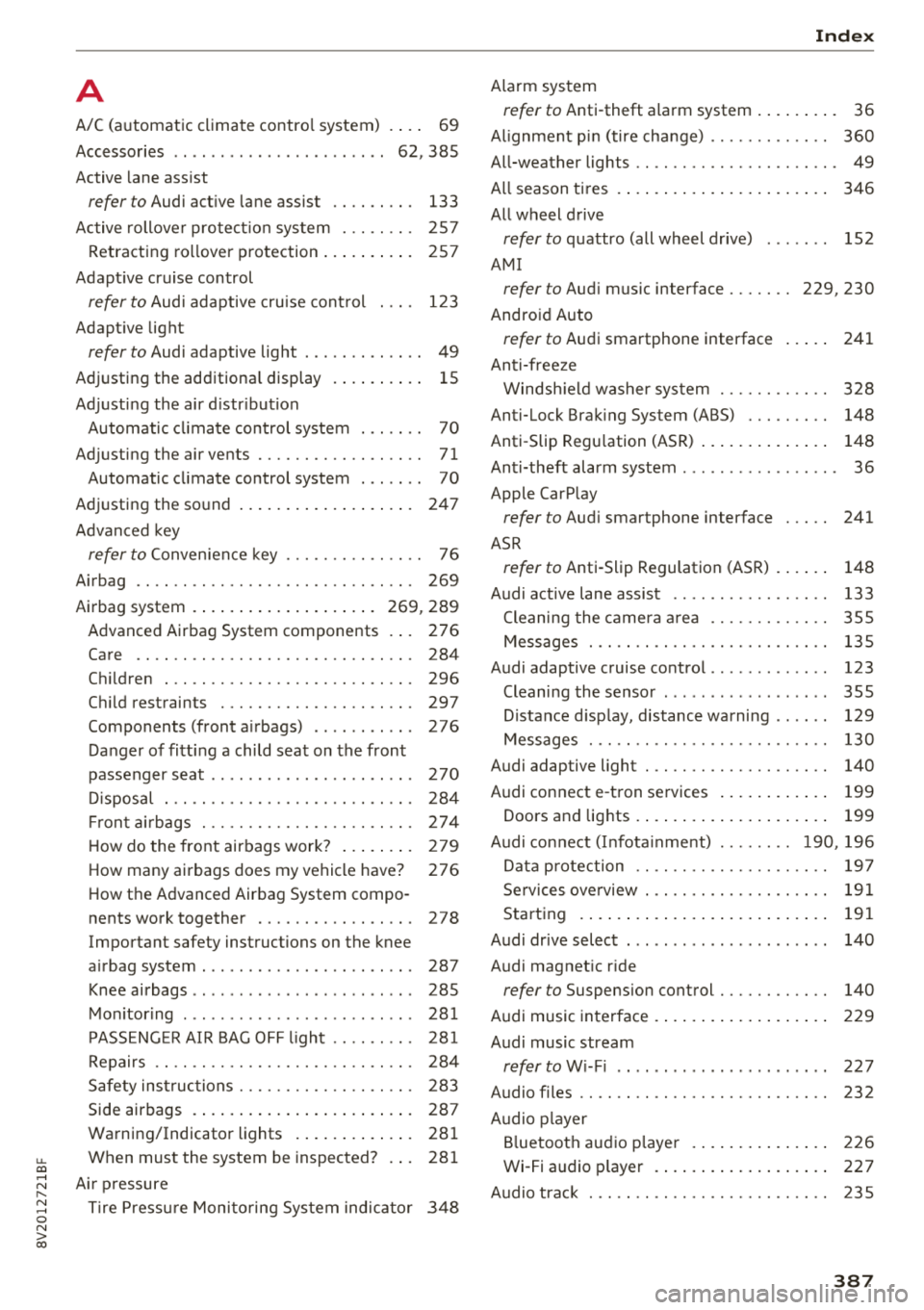
u. 00 .-< N l' N .-< 0 N > 00
A
A/C (automatic climate control system)
Accessories
. . .. ................ ...
Active lane assist ..
.. 69
62 ,385
refer to Audi active lane assist . . . . . . . . . 133
Active rollover protection system . . . . . . . . 257
Retracting rollover protection . . . . . . . . . . 257
Adapt ive cruise control
refer to Audi adaptive cruise control . . . . 123
Adaptive light
refer to Audi adaptive light . . . . . . . . . . . . . 49
Adjusting the additiona l display . . . . . . . . . . 15
Adjusting the air d istr ibut ion
Automatic climate control system . . . . . . . 70
Adjusting the air vents . . . . . . . . . . . . . . . . . . 71
Automatic climate control system . . . . . . . 70
Adjusting the sound . . . . . . . . . . . . . . . . . . . 247
Advanced key
refer to Convenience key . . . . . . . . . . . . . . . 76
Airbag .. .. .. .. ............... .. .. .. . 269
Airbag system . . . . . . . . . . . . . . . . . . . . 269, 289
Advanced Airbag System components . . . 276
Care . . . . . . . . . . . . . . . . . . . . . . . . . . . . . . 284
Children
Child restraints 296
297
Components (front airbags) . . . . . . . . . . . 276
Danger of fitting a child seat on the front
passenger seat . . . . . . . . . . . . . . . . . . . . . .
2 70
Disposal . . . . . . . . . . . . . . . . . . . . . . . . . . . 284
Fr ont airbags . . . . . . . . . . . . . . . . . . . . . . . 274
How do the front airbags work? . . . . . . . . 279
How many airbags does my vehicle have? 276
How the Advanc ed Airbag System compo-
nents wo rk together . . . . . . . . . . . . . . . . . 278
Important safety instructions on the knee
airbag system . . . . . . . . . . . . . . . . . . . . . . . 287
Knee airbags . . . . . . . . . . . . . . . . . . . . . . . . 285
Monitoring . . . . . . . . . . . . . . . . . . . . . . . . . 281
PASSENGER AIR BAG OFF light . . . . . . . . . 281
Repairs . . . . . . . . . . . . . . . . . . . . . . . . . . . . 284
Safety instructions . . . . . . . . . . . . . . . . . . . 283
Side airbags . . . . . . . . . . . . . . . . . . . . . . . . 287
Warning/Indicator lights . . . . . . . . . . . . . 281
Wh en must the system be inspected? . . . 281
Air pressure
Tire Pressure Monitoring System indicator 348
Index
Alarm system
refer to Anti-theft alarm system . . . . . . . . . 36
Al ignment pin (tire change) . . . . . . . . . . . . . 360
All-weather lights . . . . . . . . . . . . . . . . . . . . . . 49
All season tires . . . . . . . . . . . . . . . . . . . . . . . 346
All wheel drive
refer to quattro (all wheel drive) . . . . . . . 152
AMI
refer to Audi music interface . . . . . . . 229, 230
Android Auto
refer to Audi smartphone interface 241
Anti-freeze Windshield washer system . . . . . . . . . . . . 328
Anti-Lock Braking Sys tem (ABS) . . . . . . . . . 148
Anti-Slip Regu lation (ASR) . . . . . . . . . . . . . . 148
Anti-theft alarm system . . . . . . . . . . . . . . . . . 36
Apple CarP lay
refer to Audi sm artphone interface . . . . . 241
ASR
refer to Anti-Slip Regulation (ASR) . . . . . . 148
Audi active lane assist Cleaning the camera area
Messages ... .. .. .. ............... . .
Audi adaptive cruise control ............ .
Cleaning the sensor ................. .
Distance display, distance warning .. .. . .
Messages ... .. .. .. ............. .. . .
Audi adap tive light ... ............... . .
Audi connect e-tron services
............
Doors and lights .... ................ . 133
355
135
123
355 129
130
140
199
199
Audi connect (Infotainment) ........ 190, 196
Data protection . . . . . . . . . . . . . . . . . . . . . 197
Services overview . . . . . . . . . . . . . . . . . . . . 191
Starting . . . . . . . . . . . . . . . . . . . . . . . . . . . 191
Audi drive select . . . . . . . . . . . . . . . . . . . . . . 140
Audi magnetic ride
refer to Suspension control . . . . . . . . . . . . 140
Audi music interface . . . . . . . . . . . . . . . . . . . 229
Audi music stream
refer to Wi-Fi . . . . . . . . . . . . . . . . . . . . . . . 227
Audio files . . . . . . . . . . . . . . . . . . . . . . . . . . . 232
Audio player
Bluetooth audio player . . . . . . . . . . . . . . . 226
Wi-Fi audio p lay er . . . . . . . . . . . . . . . . . . . 227
Audio track 235
387
Page 390 of 404
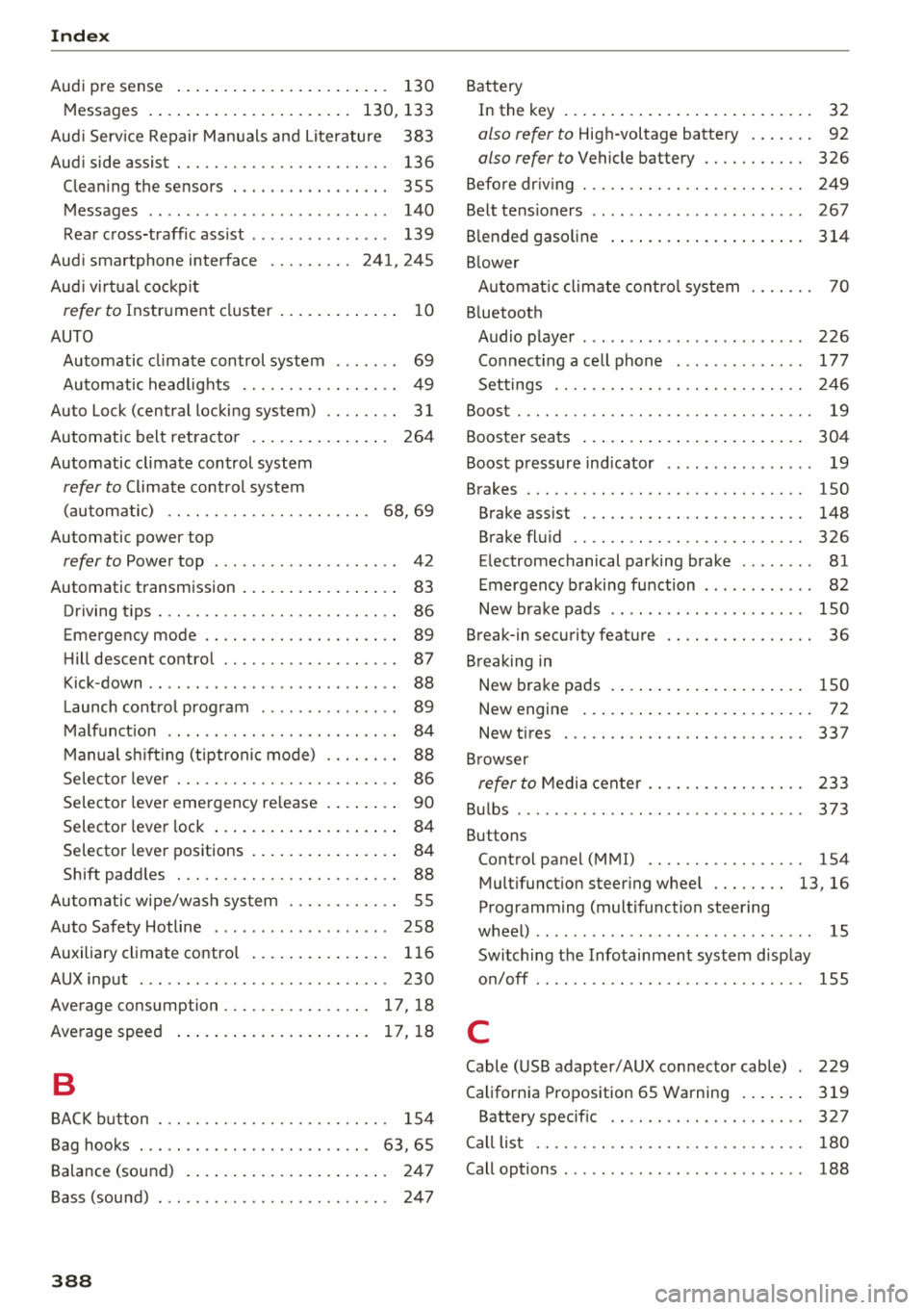
Index
Audi pre sense . . . . . . . . . . . . . . . . . . . . . . . 130
Messages . . . . . . . . . . . . . . . . . . . . . . 130, 133
Aud i Service Repair Manuals and Literature 383
Audi side assist . . . . . . . . . . . . . . . . . . . . . . . 136
Cleaning the sensors . . . . . . . . . . . . . . . . . 355
Messages . . . . . . . . . . . . . . . . . . . . . . . . . . 140
Rear cross-traffic assist . . . . . . . . . . . . . . . 139
Audi smartphone interface . . . . . . . . . 241, 245
Aud i virtual cockp it
refer to Instrument cluster . . . . . . . . . . . . . 10
AUTO
Automatic climate control system . . . . . . .
69
Automatic headlights . . . . . . . . . . . . . . . . . 49
Auto Lock (centr al locking system) . . . . . . . . 31
Automatic belt retractor . . . . . . . . . . . . . . . 264
Automatic climate control system
refer to Climate control system
(automatic) . . . . . . . . . . . . . . . . . . . . . .
68, 69
Automatic power top
refer to Power top . . . . . . . . . . . . . . . . . . . . 42
Automatic transmission . . . . . . . . . . . . . . . . . 83
Driving tips . . . . . . . . . . . . . . . . . . . . . . . . . . 86
Emergency mode . . . . . . . . . . . . . . . . . . . . . 89
Hill descent control . . . . . . . . . . . . . . . . . . . 87
Kick -down . . . . . . . . . . . . . . . . . . . . . . . . . . .
88
Launch control program . . . . . . . . . . . . . . . 89
Malfunction . . . . . . . . . . . . . . . . . . . . . . . . . 84
Manual shift ing (tiptronic mode) . . . . . . . . 88
Selector lever . . . . . . . . . . . . . . . . . . . . . . . . 86
Selector lever emergency re lease . . . . . . . . 90
Selector lever lock . . . . . . . . . . . . . . . . . . . . 84
Selector lever positions . . . . . . . . . . . . . . . . 84
Shift padd les . . . . . . . . . . . . . . . . . . . . . . . . 88
Automatic wipe/wash system . . . . . . . . . . . . 55
Auto Safety Hotline . . . . . . . . . . . . . . . . . . .
258
Auxiliary climate contro l . . . . . . . . . . . . . . . 116
AUX input . . . . . . . . . . . . . . . . . . . . . . . . . . . 230
Average consumption ........... .... . 17, 18
Average speed . . . . . . . . . . . . . . . . . . . . . 17, 18
B
BACK button . . . . . . . . . . . . . . . . . . . . . . . . . 154
Bag hooks . . . . . . . . . . . . . . . . . . . . . . . . .
63, 65
Balance (sound) . . . . . . . . . . . . . . . . . . . . . . 247
Bass (sound) . . . . . . . . . . . . . . . . . . . . . . . . . 247
388
Battery
In the key . . . . . . . . . . . . . . . . . . . . . . . . . . .
32
also refer to High-voltage battery . . . . . . . 92
also refer to Vehicle battery . . . . . . . . . . . 326
Before driv ing . . . . . . . . . . . . . . . . . . . . . . . . 249
Belt tensioners . . . . . . . . . . . . . . . . . . . . . . . 267
Blended gasoline . . . . . . . . . . . . . . . . . . . . . 314
Blower
Automat ic climate control system . . . . . . .
70
Bluetooth
Audio player . . . . . . . . . . . . . . . . . . . . . . . .
226
Connecting a cell phone . . . . . . . . . . . . . . 177
Settings . . . . . . . . . . . . . . . . . . . . . . . . . . . 246
Boost . . . . . . . . . . . . . . . . . . . . . . . . . . . . . . . . 19
Booster seats . . . . . . . . . . . . . . . . . . . . . . . . 304
Boost pressure indicator . . . . . . . . . . . . . . . . 19
Brakes . . . . . . . . . . . . . . . . . . . . . . . . . . . . . . 150
Brake assist . . . . . . . . . . . . . . . . . . . . . . . . 148
Brake fluid . . . . . . . . . . . . . . . . . . . . . . . . . 326
Electromechanical parking brake . . . . . . . . 81
Emergency braking function . . . . . . . . . . . . 82
New brake pads . . . . . . . . . . . . . . . . . . . . . 150
Break-in security feature . . . . . . . . . . . . . . . . 36
Breaking in
New brake pads . . . . . . . . . . . . . . . . . . . . .
150
New engine . . . . . . . . . . . . . . . . . . . . . . . . . 72
New tires . .... .. .. .. ............. .. 337
Browser
refer to Media center . . . . . . . . . . . . . . . . . 233
Bulbs . . . . . . . . . . . . . . . . . . . . . . . . . . . . . . . 373
Buttons
Control panel (MMI) . . . . . . . . . . . . . . . . .
154
Multifunction steering wheel . . . . . . . . 13, 16
Programming (multifunction steering
wheel) . . . . . . . . . . . . . . . . . . . . . . . . . . . . . . 15
Switching the Infotainment system display
on/off . . . . . . . . . . . . . . . . . . . . . . . . . . . . .
155
C
Cable (USB adapter/AUX connector cable) 229
California Proposition 65 Warning . . . . . . . 319
Battery specific . . . . . . . . . . . . . . . . . . . . . 327
Call list . . . . . . . . . . . . . . . . . . . . . . . . . . . . . 180
Call options . . . . . . . . . . . . . . . . . . . . . . . . . . 188