wheel AUDI A3 SEDAN 2018 User Guide
[x] Cancel search | Manufacturer: AUDI, Model Year: 2018, Model line: A3 SEDAN, Model: AUDI A3 SEDAN 2018Pages: 404, PDF Size: 62.3 MB
Page 21 of 404
u. 00 .-< N l' N .-< 0 N > 00
-Lon g-term memory fJ
- En gine o il temper ature*
The sho rt-term memo ry co llects driving informa
tion from the t ime the ignition is sw itched on un
til it is switched off. If yo u cont inue dr iv ing wi th
in two ho urs after sw itching the ign ition off, t he
new val ues a re in clu ded when calculat ing the cur
rent trip information .
Unlike the s hort-term memo ry , the long -te rm
memory is not e rased a utoma tically. Yo u ca n se
l ect the time period fo r eval uat ing trip informa
tion yo urself .
(D Tips
The date, time of d ay and time and d ate fo r
mat can be set in the Infotainment system
r::!) page 2 43 .
Efficiency program
Applies to: vehicles with efficiency program
Resetting values to zero
~ T o reset the va lues in t he respective memory to
zero, press and hold the left thumbwhee l on
the m ultif unct ion steer ing whee l for one sec
ond.
The efficiency program can help you to use less
f u el. It evaluates driving informat ion in reference
to fuel consumption and shows other equipment i n fluencing consumption. Economy t ips provide
adv ice for efficient driving .
T he efficiency program receives distance and con
sumpt ion data from the short-term memory. If
the data in the effic iency program is deleted, the
va lues in the s hort -term memory are also reset .
T he fo llow ing additional displays may be availa
b le in the efficiency program, depending on vehi
cle equipment:
- Other equipment : other equipment that is cur
rently affecting fue l consumption is listed in
the efficiency program. The d isp lay shows up to
t h ree other equipment items. The equipmen t
us ing the most power is listed first . If more
than three items us ing power are switched on,
the equ ipment that is currently using the most
Coc kpit o ver view
powe r is d isp layed. A chart also shows you the
current total of all other consumers.
- Economy tip s: in ce rtain s ituations, economy
tips appea r automatically for a s hort time in
the efficiency prog ram . If you follow these
economy tips, you can reduce yo ur vehicle's fue l
consumption. To turn an economy message off immed iate ly after it appears, press any button
on the multifunct io n steer ing wheel.
Engine oil temperature display and boost
indicator
Applies to: vehicles with engine oil temperature display/boost
indicator
Engine oil temperature ind icator
Applies to: vehicles with analog instrumen t cl uste r
The eng ine o il temperature is o nly show n in the
lap timer display
<:!) page 122 .
Applies to: vehicles with Audi virtual cockpit
The engine oi l temperat ure is on ly shown i n the
enhanced view or in the sport
view* ¢ page 14.
When eng ine o il temperatures are low, the dis
play--- °F (--- °C) appea rs in the instr ument clus
te r.
The eng ine has reached its operating tempera
ture whe n the eng ine oil temperat ure is between
176 °F (80 °C) and 248 °F (120 °C) unde r no rma l
driv ing cond it ions. The e ng in e o il tempe rature
may be hig he r i f t here is heavy engine load and
high tempe ra tures o utsid e. This is no t a cause fo r
conce rn as long as
the .¢ page 25 or Ell
¢ page 28 indicator lights do not t urn on.
Boost indicator
Applies to: vehicles with Audi virtual cockpit
The boost ind ic a tor is o nly show n in t he en
hanced view or in the spo rt view*
r::!) page 14.
The current engine load (meaning the current
boost pressure) is ind icated by a bar.
19
Page 22 of 404
Cockpit overv ie w
Shift light indicator
Applies to: vehicles with shift light indicator
The s hift lig ht ind icator informs t he d river when
t he rpm limit is reached .
Accessing the shift light indicator
Requirement: tiptron ic mode must be act ivated
c:> page88 .
.-Se lect the sport view c:> page 14. The sh ift light
indicator is d ispl ayed with green , yellow and
red ranges in the upper areas of the tachome
ter .
The s hift lig ht indicator w ill blink red when ap
proaching the engine speed lim it. Shift to the
next h ighest gear at the right time .
Sport displays
Applies to: vehicles with Audi virtual cockpit and sport dis
plays
Depending on the vehicle equ ipment, the sport
d isp lays may i nclude the G-meter, the engine da
ta and the tire p ressure mo nitoring system .
Accessing the sport displays
.-Open the first vehicle functions tab using the
I 4 1>1 button on the multifunction steering
whee l.
.- Se lect o n the multifunction stee ring wheel: left
contro l butto n >
Sport display s .
.- T urn the left thumbwheel on the mult ifunct ion
stee ring wheel u ntil the des ired sport display
appea rs in the ins trumen t cluste r.
G meter*
The G meter displays the longitudina l and latera l
acceleration . Th e max imum values that are
reached are sto red and d isp layed when the vehi
cle is s tat io nary.
.- To reset the stored values, se lect on the multi
funct io n steer ing wheel: r ight control b utton>
Reset value s.
Engine data*
The engine data displays the cur rent power and
torque.
20
Tire Pressure Monitoring System*
The tire press ure monitor ing sys tem d isp lays the
cu rrent tire press ures and tempe ra tu re. Also see
c:> page 350 , Tire pressure monitoring system.
Indicator lights
Description
The ind icator lights in the instrument clus ter
blink or tur n on. They ind icate fu nctions or mal
func tions.
Messages may appear w ith some indicator ligh ts .
A war ning s ignal will sound at the same time .
The ind icator lights and messages in the inst ru
ment clus ter d isp lay can be cove red by ot he r dis
plays . You can have these d isp laye d again in the
driver information system by opening the second
Vehicle tab (messages) using the
14 1>I b utton o n
the m ultif unction steering whee l. If there a re
severa l ma lfunctions, you can display them one
at a t ime us ing the thumbw heel.
Some indicator lights in the display can disp lay in
severa l co lors.
Lt Central indicator light
If the . or Q indicator light turns on, check
the instr ument cluster d isp lay for more informa
tion .
Applies to: vehicles with monoch rome display
If a message appears toget her with a central in
dicator light . or
d. the cen tra l ind icator light
will indicate the priority of the warning . If a
wh ite ind icator light also appea rs , the cen tra l in
dica tor light w ill have its ow n colo r. Fo r example ,
if ll appea rs togethe r with . , read the descr ip
t ion
for • .
Overview
Some indicator lights t urn on briefly as a f unction
c h eck w hen you switch the ignition on. These sys
tems a re marked with a ./ in the fo llow ing tab les.
If one of these ind icator lights does not turn on,
there is a malfunct io n in that sys tem.
IIJJ,,
Page 30 of 404
Cockpit overv ie w
Drive s low ly to an authorized A udi dealer or au
thorized Audi Service Facility to have the engine
checked.
EPC Engine control
Applies to: vehicles with gasoline engines
If the ~ indicator light turns on if there is a
malfunct io n in the engine control.
Drive s low ly to an authorized Audi dealer or au
thor ized Audi Service Facility to have the engine
checked.
! ?' Engine speed limitation
Applies to: vehicles with engine speed limitation
(II M ax imum engine sp eed: XXXX rpm
The engine speed is automatica lly limited to the
speed d isplayed in the instrument cluster. Th is
protects the engine from overheating.
The engine speed limitation deactivates once the
engine is no longer in the critical temperature range and you have released the acce lerator ped
al once.
If the engine speed limitation was activated by
an engine contro l ma lfunction, the
II or ~ in
d icator light also turns on. Make sure the eng ine
speed does not go above the speed displayed, for
example when downsh ift ing . Drive to an author
ized Aud i dealer or authorized Aud i Serv ice Fac ili
ty immediately to have t he malfunct ion correct
ed.
'!=:?' ., Engine oil level (MIN)
Applies to: vehicles with oil level warning
Ill Check oil level
You may continue d riving for the t ime be ing .
C heck the engine oil leve l as soon as possib le
¢ page 321.
-If the engine oil level is too low, add engine o il
¢ page 322 , Checking the engine oil level .
-If the engine oil level is correct and the indica
tor light st ill turns on, drive at low eng ine
speed to an authorized Aud i dealer o r autho r
ized Audi Se rvice Facility.
28
tact Service
The sensor to check the eng ine o il level has
failed . D rive to an author ized Audi dealer or au
t h orized Aud i Serv ice Facility immediately to have
t h e malfunct ion cor re cted.
(Llj) Note
Refer to the descr ipt ion in the Owne r's Man
u a l
¢ page 322, Checking the engine oil lev
el.
ju Tank system
Vehicles with p lug -in hybrid dr ive *: ¢ page 103.
ll'J Pleas e refuel
The first t ime the indicator light turns on and the
message appears, there are approx imately 1.8
gallons
(7 liters) of fuel in the tank o n front
whee l dr ive vehicles, or app roxi mately
2. 2 ga l
l ons
(8.5 lite rs) of f uel in the ta nk on a ll wheel
d rive ve hicles.
ll') Please refuel immediatel y
If the indicato r light turns on the message ap
pears, the fuel tank is a lmost empty . Refue l the
vehicle immediately .
ll') Tank system: malfunction! Please cont act
Ser vice
There is a ma lfunction in the f uel tank system .
D rive to an au thor ized A udi dealer or au tho riz ed
Audi Se rvice Fa cility immed iate ly to have the
malfunction correc ted.
(D Tips
F o r more info rmation on f ueli ng, see
¢ page 315.
,. Washer fluid level
If the C·w$ indicator light turns on, the washer flu
id is almost out. Fill the washer fl uid for the
winds hield washer system and the headlight
..,.
Page 48 of 404
Power top
-Be careful when installing so you do not
pinch your fingers.
-Pay attention to the traffic when insta lling
the wind def lector. Install the w ind deflec
tor from the s ide of the vehicle that is away
from traffic.
(D Note
Do not lean against the veh icle when insta l
ling the wind deflector. Hard objects and dec
orations on clothing such as belt buckles can
scratch the pa int.
@ Tips
-The wind deflector works best when a ll of
the w indows are rolled up wh ile driving.
-Only store the wind deflector in the storage
bag * when it is dry.
Power top emergency
operation
General information
Applies to: veh icles with power top
The power top can be closed manually if there is
a malfunction.
.,. Set the parking brake.
.,. Open all windows.
,.. Switch the ignition of f .
.. Pu ll the button @ for approximately 10 to
15 seconds to reduce the p ressure in the power
top
hydraulics ¢ page 42, fig. 32.
Only close the power top manua lly in an emer
gency . Have a second person assist . Drive to an
authorized Audi dealer or author ized Audi Service
Facility immediately to have the malfunction cor
rected.
A WARNING
-There is a r isk of pinching the hands or othe r
people during all of the powe r top emergen
cy operat ion steps .
-Make sure a ll windows are lowered during
emergency operation.
46
-Do not reach into the power top supports
or other mov ing components.
-Never drive when the power top is not
locked correct ly. The wind from driving
could cause the power top to open. This can
result in injur ies and damage to the vehicle .
(D Tips
The power top storage compartment lid is not l atched after the emergency operat ion is
complete. Dr ive to an authorized Audi dealer
or authorized Audi Service Facility immediate ly to have the malfu nction corrected.
Step 1: Release the power top storage
compartment
lid
Applies to: vehicles with power top
Fig . 3 8 Rear sea ts fo lded fo rwar d: release l oop fo r the
pow er top storag e compartm en t lid
Fi g. 39 Openin g the side covers
.. Open the luggage compartment lid .
.. Fold the rear seat backrests forward
¢ page 65 .
.. Remove the wheel wrench from the vehicle too l
kit.
.,. Close the luggage compartment lid . ..,.
Page 49 of 404
LL co ..... N
" N ..... 0 N > co
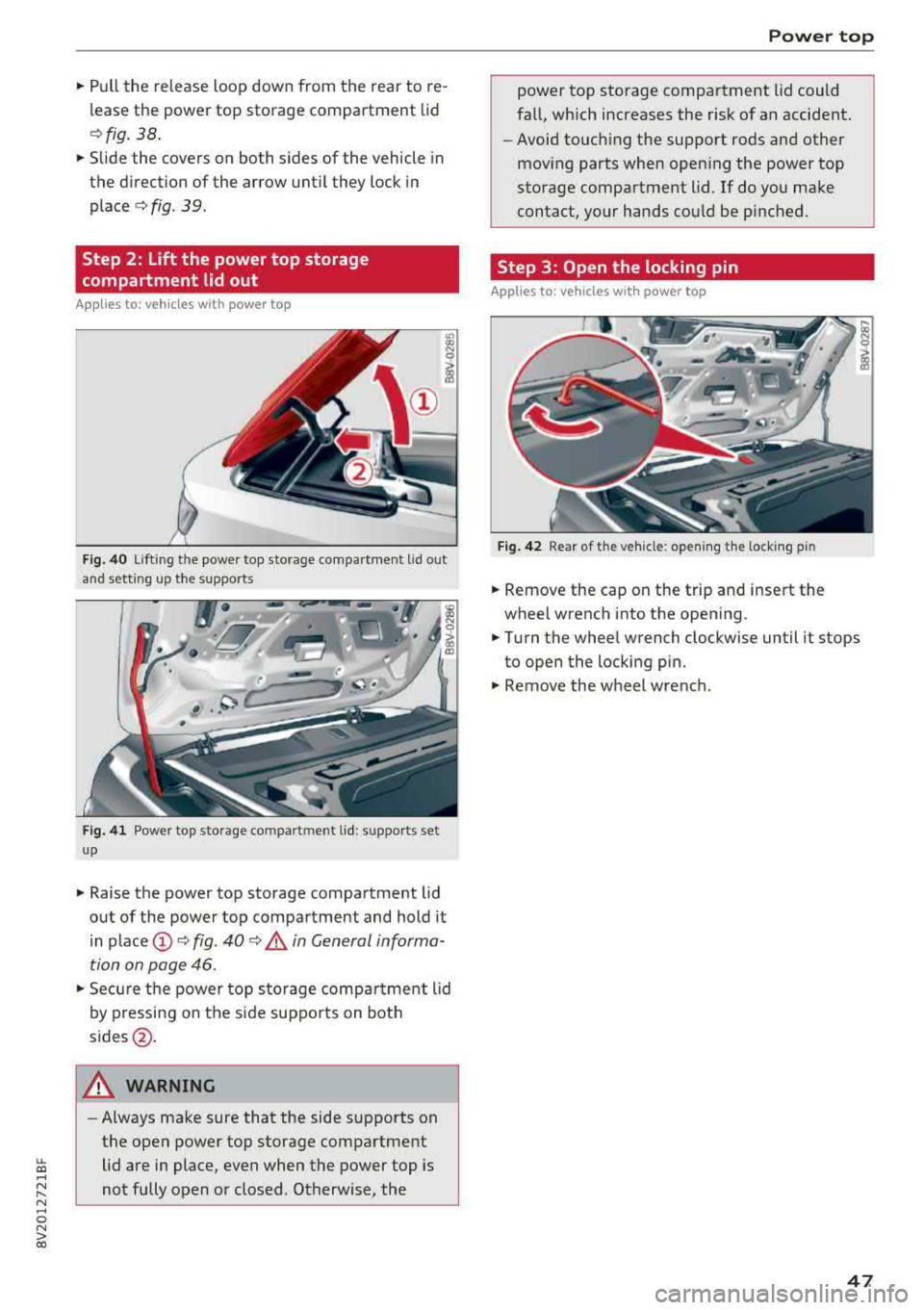
"' Pull the release loop down from the rear to re
lease the power top storage compartment lid
c:>fig. 38.
"'Slide the covers on both sides of the vehicle in
the direction of the arrow until they lock in
place
c:> fig. 39.
Step 2: Lift the power top storage
compartment lid out
Applies to: vehicles with power top
Fig. 40 Lift ing t he powe r top sto rage compa rtment L id out
and setting up the supports
Fig. 41 Power top s torag e com pa rtm ent lid : suppor ts se t
u p
"' Raise the power top storage compartment lid
out of the powe r top compartment and hold it
in
place @ c:> fig. 40 c:> A in General informa
tion on page 46.
"'Secure the power top storage compa rtment lid
by pressing on the side suppo rts on both
sides @.
A WARNING
-Always make sure that the side supports on
the open power top storage compartment lid are in place, even when the power top is
not fully open or closed . Otherwise, the
Power top
power top storage compartment lid could
fall, which increases the r isk of an accident.
- Avoid touching the support rods and other
moving parts when opening the power top
storage compartment lid . If do you make
contact, your hands could be pinched.
Step 3: Open the locking pin
Applies to: vehicles with power top
Fig. 42 Rear of th e vehicle : open ing the lock ing p in
"' Remove the cap on the trip and insert the
wheel wrench into the opening .
"'Turn the wheel wrench clockwise until it stops
to open the locking pin.
"' Remove the wheel wrench .
47
Page 50 of 404
Power top
Step 4: Close the power top
Applies to: ve hicles w ith power top
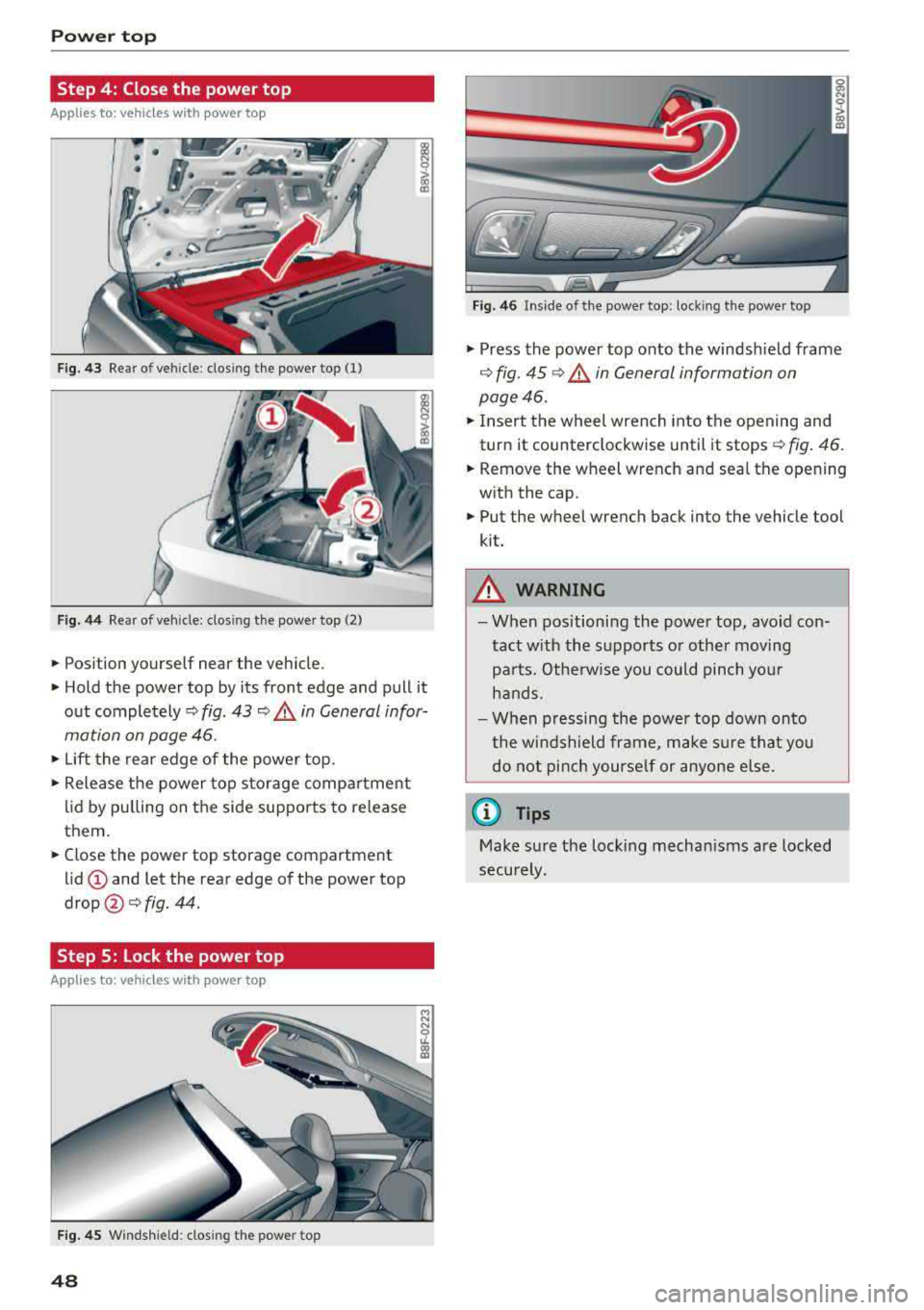
Fig . 43 Rear of vehicle: closing the power top (1)
Fig. 44 Rear of vehicle: clos ing the power top (2)
• Position yourself near the vehicle .
• Hold the power top by its front edge and pull it
out
completely ¢ fig. 43 ¢&. in General infor
mation on page 46.
• Lift the rear edge of the power top.
• Release the power top storage compartment
lid by pulling on the side supports to release
them.
• Close the power top storage compartment
lid(!) and let the rear edge of the power top
drop@¢fig. 44.
Step 5: Lock the power top
Appl ies to: ve hicles w ith power top
Fig. 45 Windshield: closing the powe r top
48
Fig. 46 Inside of the power top: locking the power top
• Press the power top onto the windshield frame
¢ fig. 45 ¢&. in General information on
page 46.
• Insert the wheel wrench into the opening and
turn it counterclockwise until it stops
¢ fig. 46.
• Remove the wheel wrench and seal the opening
with the cap.
• Put the wheel wrench back into the vehicle tool
kit.
_& WARNING
- When positioning the power top, avoid con
tact with the supports or other moving
parts. Otherwise you could pinch your
hands.
- When pressing the power top down onto
the windshield frame, make sure that you do not pinch yourself or anyone else.
(D Tips
Make sure the locking mechanisms are locked
securely.
Page 61 of 404
LL co .... N
" N .... 0 N > co
Seats and storage
General information
A WARNING
Refer to the chapter Driving Safely
~ page 249, Driving safety for important in
formation, tips, suggestions and warnings that you should read and follow for your own
safety and the safety of your passengers.
Front seats
Manual seat adjustment
Applies to vehicles with manual adjustable seats
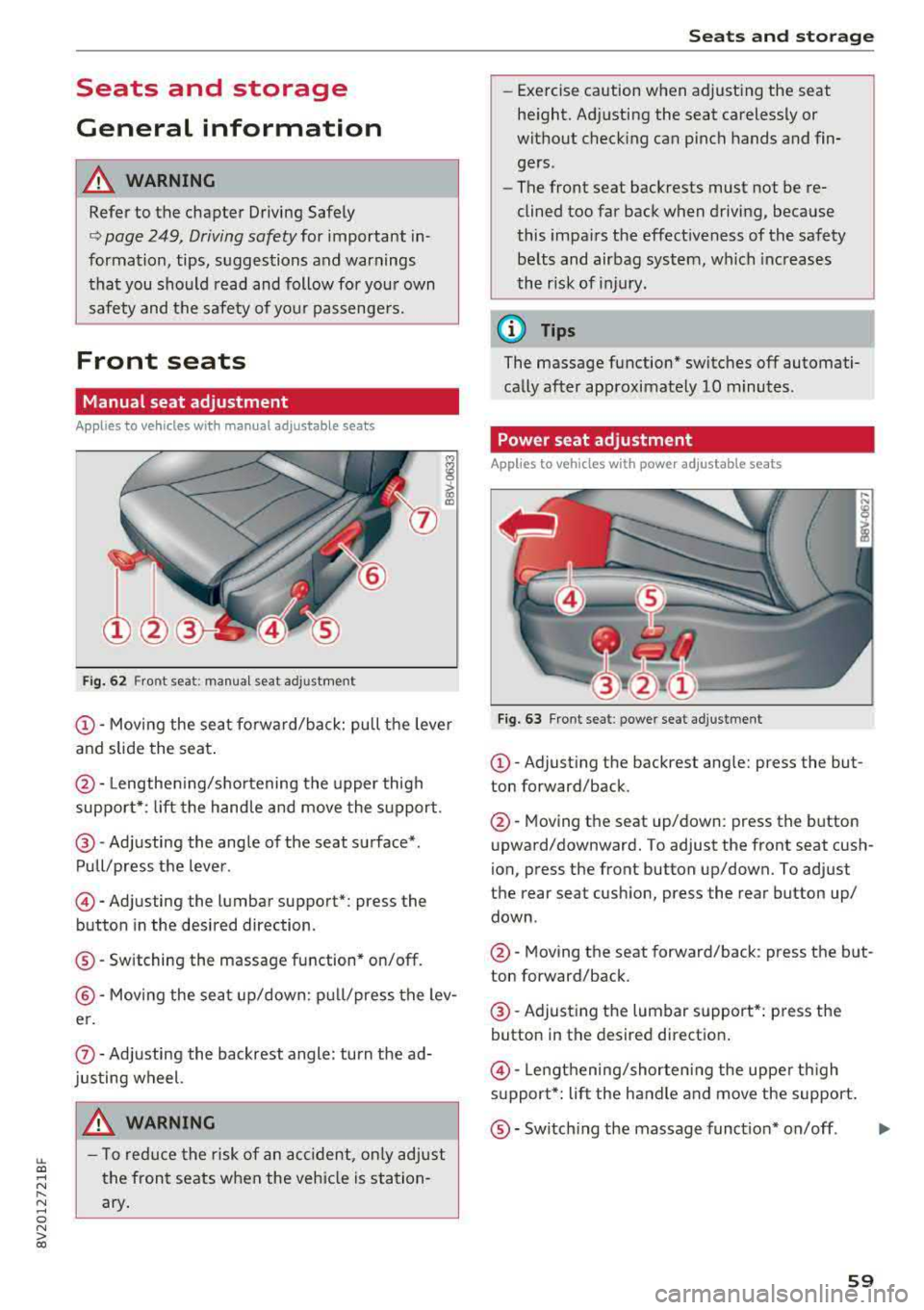
Fig. 62 Fro nt seat: manual seat ad justment
@ -Moving the seat fo rward/back: pu ll the leve r
and slide the seat .
@-Lengthen ing/shortening the upper thigh
support* : lift the handle and move the support.
@-Adjusting the angle of the seat surface* .
Pull/press the lever .
©-Adjusting the lumbar support* : press the
button in the desired direction .
®-Switching the massage function* on/off .
@-Moving the seat up/down: pull/press the lev
er.
(J) -Adjusting the backrest angle : turn the ad
justing wheel.
A WARNING
- T o reduce the risk of an accident , only adjust
the front seats when the vehicle is station
ary.
Seats and storage
-Exercise caution when adjusting the seat
height. Adjusting the seat carelessly or
without checking can pinch hands and fin
gers .
- The front seat backrests must not be re
clined too far back when driving, because
this impairs the effectiveness of the safety
be lts and airbag system, which increases
the risk of injury.
(D Tips
The massage function* switches off automati
cally after approximately 10 minutes .
Power seat adjustment
Applies to vehicles w it h power adjustab le seats
Fig. 63 Front se at: p ower seat adj ustmen t
@-Adjust ing the backrest ang le: press the but
ton forward/back .
@-Moving the seat up/down: press the button
upward/downward. To adjust the front seat cush
ion, press the front button up/down. To adjust
the rear seat cushion, press the rear button up/
down .
@-Moving the seat forward/back : press the but
ton forward/back .
@-Adjusting the lumbar support*: press the
button in the desired direction .
©-Lengthening/shorten ing the uppe r th igh
s u pport*: lift the handle and move the support.
®-Switch ing the massage funct ion* on/off .
59
...
Page 73 of 404
LL co .... N
" N .... 0 N > co
_& WARNING
-You should not use the recirculation mode
for an extended period of time, because no
fresh a ir is drawn in and the windows can
fog when coo ling mode is sw itched off. This
increases the risk of an accident .
-Individuals with reduced sensitivity to pain
o r temperature could develop burns when
using the seat heating function. To reduce
the risk of injury, these indiv iduals should
not use seat heating.
(D Note
To avoid damage to the heat ing elements in
the seats, do not kneel on the seats or place
heavy loads on a small area of the seat.
@ Tips
-The setting for the seat heating on the driv
er's side is ass igned to the key that is in use .
-If the front passenger's seat heating is
turned on, it will not turn on again automat
icall y if more than 10 minutes have passed
between switching the ign ition off and
switching it on again.
Adjusting the air vents
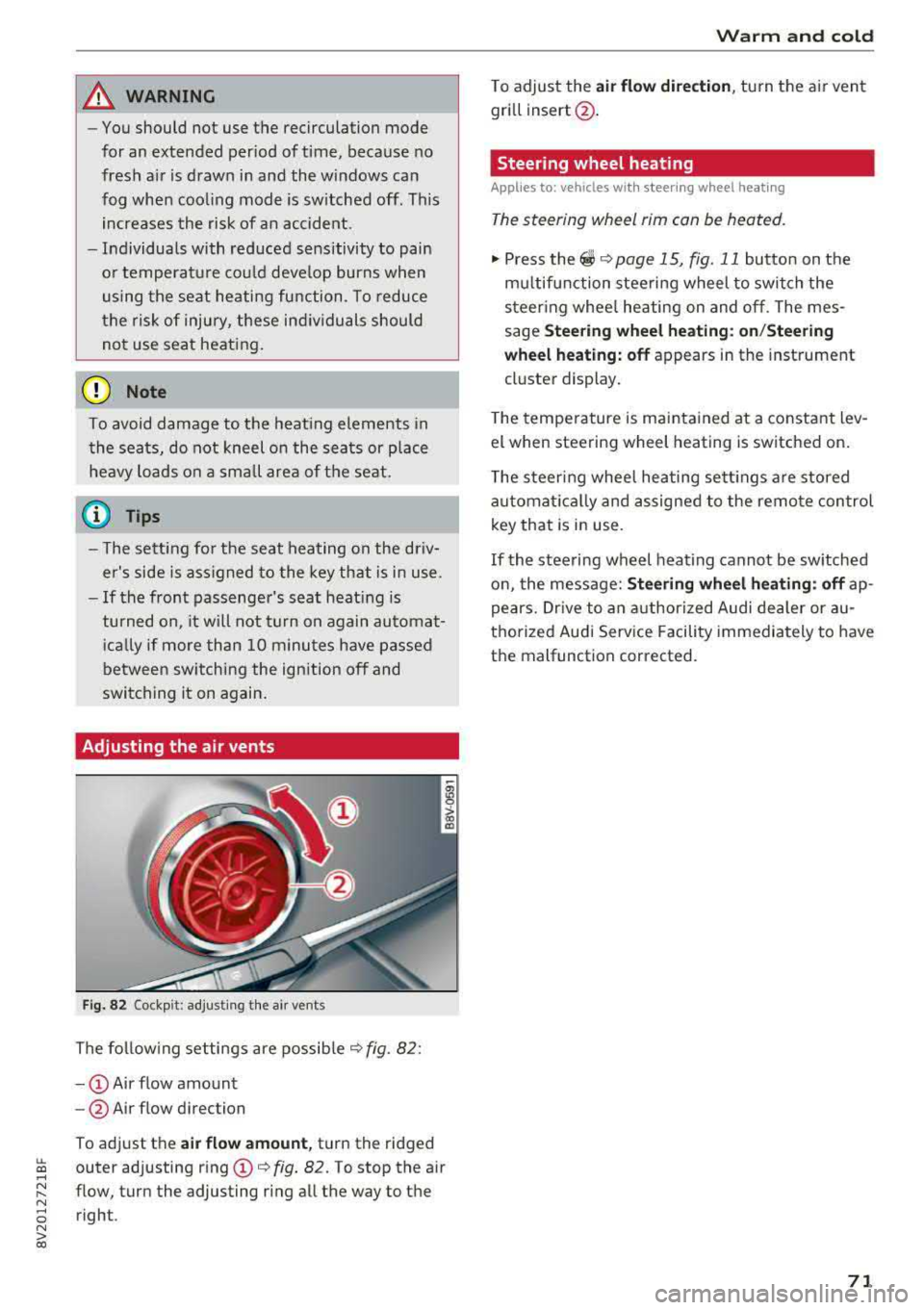
Fig. 82 Cockp it: adjust ing the a ir vents
The following settings are possible ¢ fig. 82 :
-CD Air flow amount
- @ Air flow direction
To adjust the
air flow amount, turn the ridged
outer adjusting ring
CD ¢ fig. 82. To stop the air
flow, turn the adjusting ring all the way to the right .
Warm and cold
To adjust the air flow dire ction , turn the air vent
gri ll insert @.
Steering wheel heating
Applies to: veh icles w ith steering whee l heating
The steering wheel rim can be heated.
"' Press the ~ ¢ page 15, fig. 11 button on the
mu ltifunction steering wheel to switch the
steering whee l heating on and off. The mes
sage
Steering wheel heating: on/Steering
wheel heating: off
appears in the instrument
cluster display.
T he temperature is maintained at a constant lev
el when steering wheel heating is switched on .
The steering wheel heating sett ings are stored
automat ically and assigned to the remote control
key that is in use .
If the steering wheel heating cannot be switched
on, the message:
Steering wheel heating : off ap
pears. Drive to an authorized Audi dealer or au
thorized Audi Service Facility immediately to have
the malfunction corrected.
71
Page 76 of 404
Driving
When not being used, a roof rack should be re
moved to decrease the wind resistance of the ve
hicle. This will save you approximately 12% fuel
at speeds from 62
-75 mph (100 -120 km/h).
Save energy
The engine drives the generator, which generates
electricity; the fuel consumption also increases
with the demand for electricity. Therefore, switch
electrical equipment
off when you no longer
need it. Examples of equipment that uses a lot of
energy are air blowers at a high setting, the rear
window defogger and seat heating* .
(D Note
-Do not leave engine idling unattended after
starting. If warning lights should come on
to indicate improper operation, they would
go unheeded. Extended idling also produces
heat, which could result in overheating or
other damage to the vehicle or other prop erty.
- Have your vehicle maintained properly and
in accordance with the service recommenda
tions in your Warranty
& Maintenance book
let . Lack of proper maintenance as well as
improper use of the vehicle will impair the
function of the emission control system and
could lead to damage.
- Do not alter or remove any component of
the Emission Control System unless ap
proved by the manufacturer.
- Do not alter or remove any device, such as
heat shields, switches, ignition wires,
valves, which are designed to protect your
vehicle's Emission Control System and other
important vehicle components.
@ Tips
The consumpt ion estimates as published by
ENVIRONMENTAL PROTECTION AGENCY
(EPA) and Transport Canada may not corre
spond to your actual consumption on the
road, which will vary depending upon vehicle
load and speed, road and weather conditions,
trip length, etc.
74
Steering
Adjusting the steering wheel position
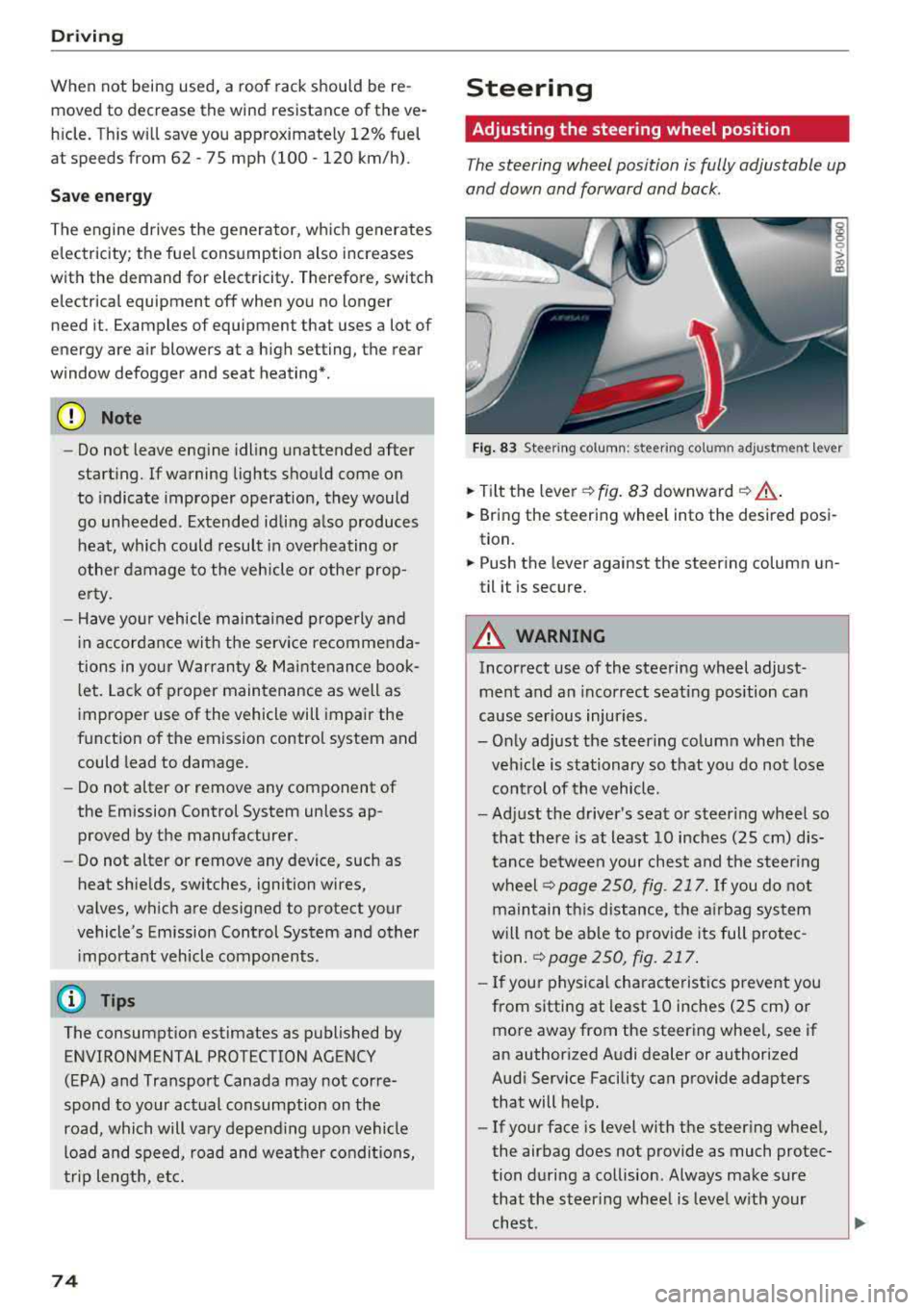
The steering wheel position is fully adjustable up
and down and forward and back.
Fig . 83 Steering column : steering column adjustment lever
.. Tilt the lever -c> fig. 83 downward¢ ,&..
.. Bring the steering wheel into the desired posi
tion.
.. Push the lever against the steering column un
til it is secure.
A WARNING
Incorrect use of the steering wheel adjust
ment and an incorrect seating position can
cause serious injuries.
- Only adjust the steering column when the veh icle is stationary so that you do not lose
control of the vehicle.
-
-Adjust the driver's seat or steer ing wheel so
that there is at least 10 inches
(25 cm) dis
tance between your chest and the steering
wheelr::!>page250, fig. 217. If you do not
maintain this distance, the airbag system
will not be able to provide its full protec tion.
c:> page 250, fig. 217.
- If your physical characteristics prevent you
from sitting at least 10 inches
(25 cm) or
more away from the steering wheel, see if
an authorized Audi dealer or authorized
Audi Service Facility can provide adapters that will help.
- If your face is level with the steering wheel,
the airbag does not provide as much protec
tion during a collision. Always make sure
that the steering wheel is level with your
chest.
Page 77 of 404
-Always hold the steering whee l with your
hands in the 9 o'clock and 3 o'clock posi
tions to reduce the risk of injury if the airbag
deploys.
- Never hold the steer ing wheel in the 12
o'clock position or with both hands on the
rim or the center of the steer ing wheel.
Holding the steering wheel incorrectly s ig
nificantly increases the risk of in jury to the
hands, arms and head if t he a irbag dep loys.
Starting and stopping
the engine (vehicles with an ignition lock)
Starting the engine
A pp lies to: ve hicles with ignitio n lock
The ignition is switched on and the engine start
ed with the key in the ignition .
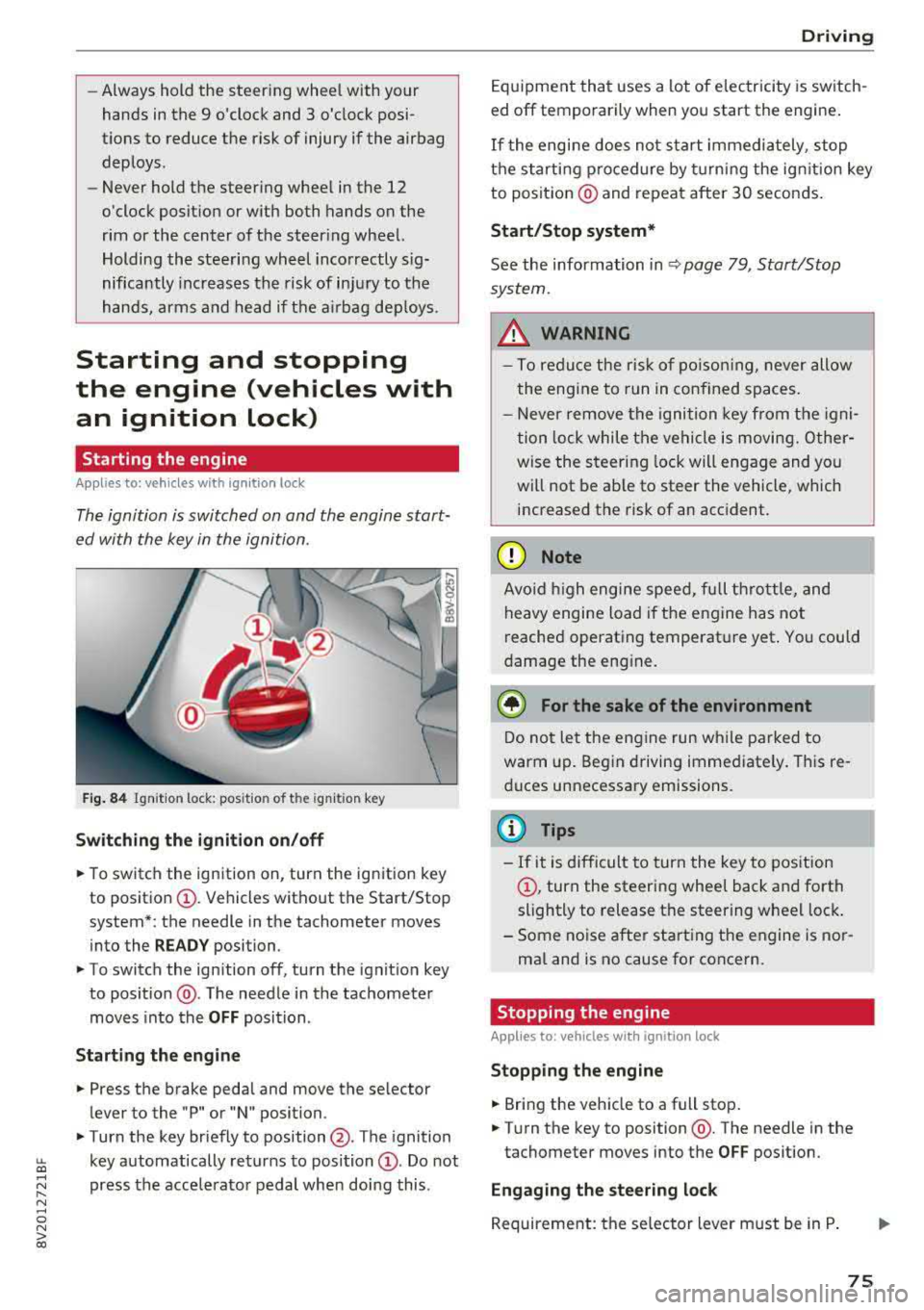
Fig. 84 Ignit io n lock: posit io n of the ignit io n key
Switching the ignition on /off
• To switch the ign ition on, turn the ign ition key
to posit io n
CI) . Vehicles without the Start/Stop
system*: the needle in the tachometer moves
into the
READY position.
• To switch the ign ition off, turn the ignit io n key
to posit ion @. The needle in the tachometer
moves into the
OFF position .
Starting the engine
• Press the brake pedal and move the se lector
lever to the "P" or "N" position.
• Turn the key briefly to position @. The ignition
~ key automatically returns to position CI) . Do not
~ press the acce lerato r pedal when doing this .
N ..... 0 N > co
Drivi ng
Equipment that uses a lot of e lectricity is switch
ed off temporarily when you start the engine .
If the engi ne does not start immediately , stop
the starting p rocedure by turning the ign it ion key
to posit ion @ and repeat after 30 seconds .
Start/Stop system*
See the information in Q page 79 , Start/Stop
system.
_&. WARNING
- T o redu ce the r is k of po iso ning, never allow
t he engi ne to run in confined sp aces.
- Never remove the ignition key from the ig ni
t ion lock while the vehicle is moving. Other
wise the steer ing lock will engage and yo u
will not be ab le to steer the vehicle, which
increased the risk of an acc ident.
(D Note
Avo id high engine s peed, fu ll th rottle, and
heavy engine load i f th e e ngine has not
reached operating temperat ure yet . You could
damage the eng ine .
@ For the sake of the environment
Do not let the engine run w hile parked to
warm up. Beg in driving immediate ly . Th is re
d uces unnecessary emissions.
@ Tips
- If it is d ifficult to turn the key to pos ition
CI) , turn the steering wheel back and forth
slightly to release t he steering whee l lock .
- S ome noise after start ing the e ngine is no r
ma l and is no cause for co ncern.
Stopping the engine
Applies to: vehicles wi th ignition lock
Stopping the engine
• Bring the vehicle to a full stop .
• Turn the key to position @. The needle in the
tachometer moves into the
OFF pos ition.
Engaging the steering lock
Requireme nt: the se lector lever must be in P .
75