engine AUDI A3 SEDAN 2018 Workshop Manual
[x] Cancel search | Manufacturer: AUDI, Model Year: 2018, Model line: A3 SEDAN, Model: AUDI A3 SEDAN 2018Pages: 404, PDF Size: 62.3 MB
Page 121 of 404
Outside mirrors
If yo u cannot see the traffic behind the tra iler
with the standard exterior mirrors, then you
must attach additiona l exterior mirrors . Adj ust
them so you have a sufficient visibility behind
you .
Exterior lighting
Follow the legal regulat ions regard ing the light
ing equipment on your trailer . Contact an author
ized Audi dealer or authorized Audi Service Facili
ty for more information.
Before starting to drive, check all lighti ng equip
ment on the hitched trailer.
The headlight range contro l adjusts automatical
l y to the light range of the headl ights.
Safety chains
Make sure the safety chains are correctly applied
when pull ing a trailer . The chains should hang
enough so that the trailer can dr ive around
curves. However, they must not touch the
g ro und .
(D Tips
-Use chocks whe n parking on incl ines if the
trailer is load ed.
- We recommend also hav ing the veh icle in
spected between the inspect ion intervals if
you are towing a trailer frequently.
- Avo id driving with a trailer during the vehi
cle break- in period .
Driving with a trailer
Driving with a trailer requires extra caution.
Speed
Adhere to the legal speed limits. Follow the legal
regulations specific to the country.
As the speed increases, the driving stability of
the trai ler decreases. Therefore you should not
exceed the maximum legal speed limit when
u. there are unfavorable road, weather and/or wind 00
~ conditions . This especially applies when driving
~ downhill.
0 N > 00
Trailer towing
You m ust always reduce your speed as soon as
you notice even the slightest swinging motion of
the tra iler. Never try to "stra ighten out" the tra il
er by acce lerating.
T he weight distribution is very poor if the vehicle
is empty and the trai ler is loaded . However if you
must drive under these circumstances, then dr ive
especially slowly .
Brakes
Brake in a timely manner. Downshift before driv
ing down hill so that t he engine can assist with
braking ~.&. .
When using a trailer w it h overrun brakes, first
brake gently then quickly. This reduces the r isk of
jerking while braking if the trailer wheels lock up .
Engine coolant temperature
Pay attention specifically to the coo lant tempera
ture display when there are high outside temper
a tur es, and when driving on long inclines
~page 11. Shift to a hig her gear in a timely man
ner .
A WARNING
= -
Constant braking causes the brakes to over-
heat and substantially reduces braking per
formance, increases braking distance or caus
es complete failure of the brake system.
119
Page 122 of 404
Ass is tance sy stem s
Assistance systems
Speed warning system
Description
Applies to: veh icles with speed warning system
The speed warning system helps you to stay be
low a specified maximum speed that can be set,
changed or deleted in the Infotainment system.
The speed warning system warns you if you are
exceeding the maximum speed that you have set .
A warni ng tone will sound as soon as your speed
exceeds the sto red value slight ly. The
[OJ (USA
models) ;[;] (Canada models) indica to r li gh t and
the co rresponding message appear in the inst ru
ment cluster display at the same time. The
[C]
(USA models)/ [ej (Canada mode ls) indicator
light and the message turn off w hen the vehicle
speed drops below the stored maximum speed .
Sett ing a threshold is recommended if you would
like to be reminded when yo u reach a certa in
maximum speed . Situations where you may want
to do so include driving in a country with a ge ner
al speed limit or if there is a specified maximum
speed for winter tires.
Setting the warning thr eshold
.. Select in the Infotainment sys tem : IMENUI but
ton
> Vehicle > left contro l button > Driver a s
sistance
> S peed warning > Manual.
@ Tips
Regardless of the speed warning system, you
should always monitor yo ur speed using the
speedometer and make sure you are following
the legal speed limit.
120
Cruise control system
Switching on
Applies to: vehicles with cruise control system
The cruise control system makes it possible to
drive at a constant speed starting at 15 mph (20km/h) .
0
f
~
0
Fig . 1 21 Ope rat ing lev er : cru ise co ntrol sys te m
0
"' N
~ CD
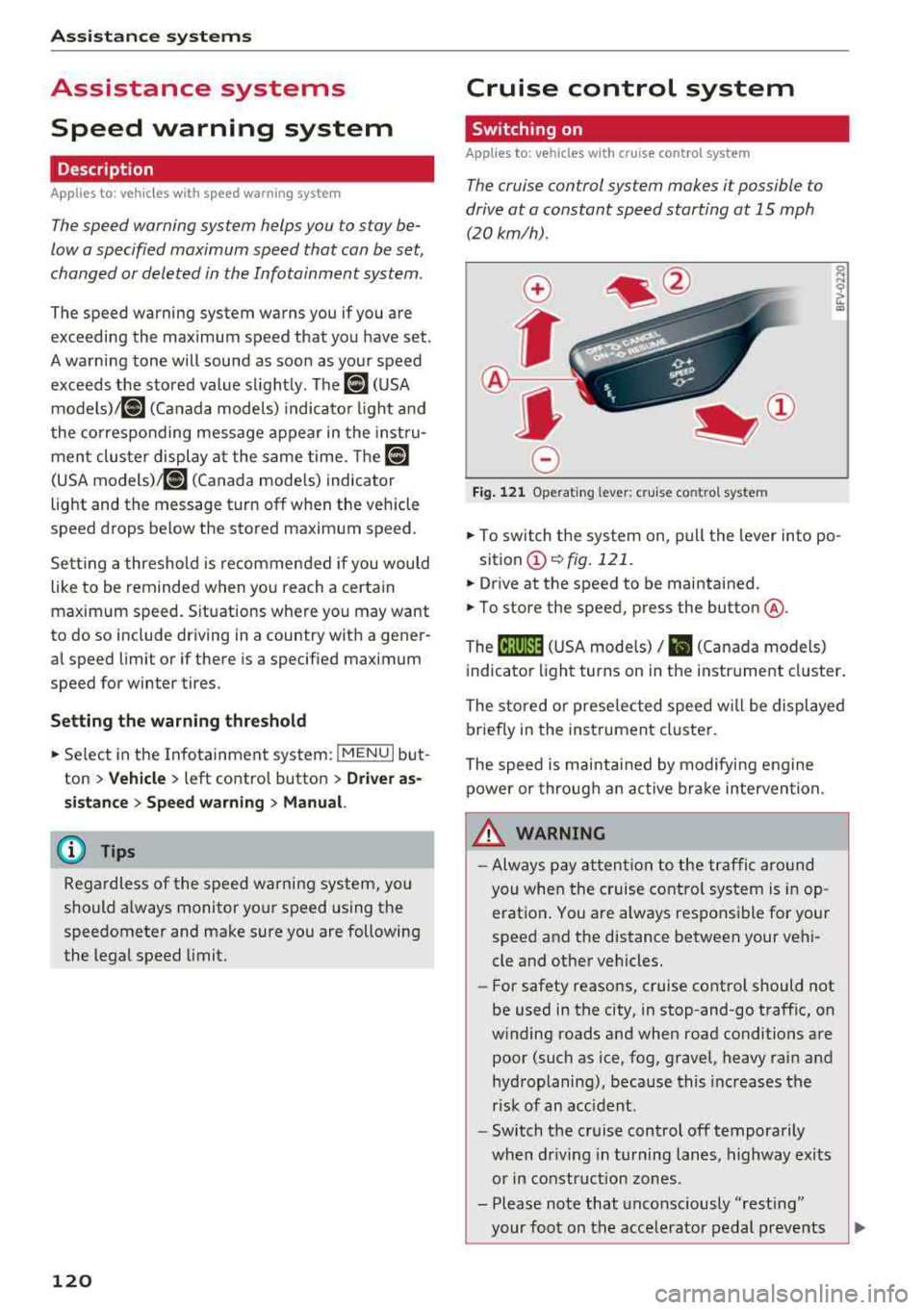
.. To switch t he system on, pull the lever into po -
sition
CD ¢ fig. 121 .
.. Drive at the speed to be maintained .
.. To store the speed, press the button @.
The
[ij;(l)~1j ( U SA mode ls) / 51 (Canada models)
indicator light turns on in the instr ument cluster .
The stored or prese lec ted speed w ill be displayed
briefly in the instrument cluster .
The speed is mainta ined by modifyi ng engine
power or through an active bra ke intervention.
&_ WARNING
- Always pay at ten tion to the traffic a ro und
you whe n the cruise contro l system is in op
erat ion . You are always respons ible fo r your
speed and the distance between your vehi
cle and other vehicles.
-For safety reaso ns, cruise cont rol should not
be used in the city, in stop-and-go traff ic, on
w inding roads and when road conditions are
poor (such as ice, fog, gravel, heavy rai n and
hydroplaning), because this increases the
r isk of an accident.
-Switch t he cr uise control off temporarily
when dr iv ing in turning lanes, highway exits
or in construction zones .
- Please note that unconsciously
"rest ing"
your foot on the accelerator pedal prevents
-
Page 142 of 404
Assistance systems
-The rear cross-traffic assist will not provide
alerts if the veh icle is in a paralle l parking
space or an angled parking space.
(LlJ Note
Also read the information in <=:>@ in General
information on page 138 .
(D Tips
-You can cancel the automa tic brake activa
tion with increasing braking force if you ap
ply the brakes yourse lf or accelerate consid
erab ly.
- In some situations, rear cross-traffic assist
may warn you even if there is no cross traffic
i n a critical area, for example when backing
i nto a parking space or maneuver ing.
- The rear cross-traffic assist also switches off when you switch off the ESC.
- The system is not available when towing a
trailer.
Messages
A pp lies to: ve hicles w ith Audi side assis t
If the side assist sw itches off automatically, a
message appears in the instrument cluster dis
play.
@j Aud i side assist: malfunction! Please contact
Service
The system cannot guarantee that it wi ll detect
veh icles correctly and it has switched off. The
sensors have been moved or are faulty. Have the
system checked by an authorized Audi dealer or
author ized Audi Service Facility soon .
(ij Audi side assist: currently unavailable. No
sensor view
(ij Audi side assist: currently unavailable. Sen
sor vision restricted due to surroundings. See
owner 's manual
The radar sensor vis ion is impaired . Do not cover
the area in front of the sensors with bike wheels,
stickers, dirt or other objects. C lean the area in
front of the sensors, if necessary
c> page 13 7,
fig . 141.
140
(ij Audi side assist: currently unavailable
Sid e assist cannot be switched on at this time be
cause there is a malfunction (for ex am ple, the
battery charge level may be too low).
@j Audi side assist: unavailable in towing mode
(ij Audi side assist: unavailable in towing mode
Side assist switches off automatically after a
short time when a factory-insta lled trai ler hitch
i s connected to the electr ica l connector on the
trailer. There is no guarantee the system will
switch off when using a retrofitted trailer hitch .
Do not use side assist when tow ing a tra iler .
[I! Rear parking aid : obstacle detection restrict
ed
The rear cross-traffic assist is not available . Ei
ther t he ESC is switched off, or the radar sensors
may be covered by a bike rack, stickers, leaves,
snow or other objects. Switc h the ESC on, or
clean the area in front of the sensors if necessary
<=:>page 137 , fig . 141. If th is message continues
to be displayed, dr ive immed iate ly to an author
iz ed Audi dealer or authorized Audi Se rvice Facili
ty to have the malfunction repaired.
Audi drive select
Introduction
App lies to : vehicles wi th Audi drive se lec t
Audi drive select makes it poss ible to experience
different types of vehicle settings in one vehicle.
The dr iver can select from three modes,
Comfort ,
Auto
and Dynamic , using the ~.'/:.1 button in the
center console or by using the Infotainment sys
tem. This allo ws you to switch between a sporty
and a comfo rtable driving mode, for example. In
the
Individual* mode, the settings can be adjust
ed to your personal preferences . This makes it
possible to comb ine settings such as a sporty en
gine setting with light steering.
Description
Applies to: vehicles wit h Audi drive se lect
The vehicle setup in each mode depends on the
vehicle 's features. However, the engine and
steering are a lways affected .
Page 143 of 404
u. 00 .-< N l' N .-< 0 N > 00
Engine and automatic transmission
D epending on the mode, the eng ine and auto
mat ic transmission * respond more quickly or in a
more balanced manner to accelerator pedal
movements . In the sporty dynamic mode, the
transmission shifts at higher speed ranges.
Suspen sion control (Audi magnetic ride) *
The s uspension contro l uses sensors to reco rd in
formation regarding steering movements, brak
ing and acce leration operations by the driver, as
well as information abo ut th e road s urface, driv
ing speed, and load. With Audi dr ive select you
can adjust the suspens ion control to sporty (dy
namic), comfortable (comfort) or balanced (au
to) .
Steering
T he steering adapts in terms of steering assis
tance. There are different modes
¢ page 142 .
Indirect steering that moves easily as in comfort
mode is especia lly su ited to long drives on a high
way . The dynam ic mode p rovides sporty, d irect
steer ing .
For vehicles w ith progressive steering* the steer
in g performance is more ag ile .
Audi adapt ive light *
The i llumination on curves in adaptive light is
adapted to the se lected mode.
Audi adaptive cruise control*
The behav ior when a cce le ra ting can be adjus ted
from com fortab le to sporty, depending on the
drive select mode . Adaptive cr uise control a lso
r e sponds to the driving behavior of the ve hicle
ahead in a more conservative or sporty manner.
(D Tips
- In some models, the maximum vehicle
speed can only be reached in the auto and
dynam ic modes.
A ss istance systems
- The "S " sele ctor leve r position au tomatically
engages if the dynamic mode is selected.
Selecting the driving mode
Applies to: vehicles with Audi drive select
You con choose between comfort, auto, dynamic
and individual* .
Fig. 144 Ce nter co nso le: dri ve se lect button
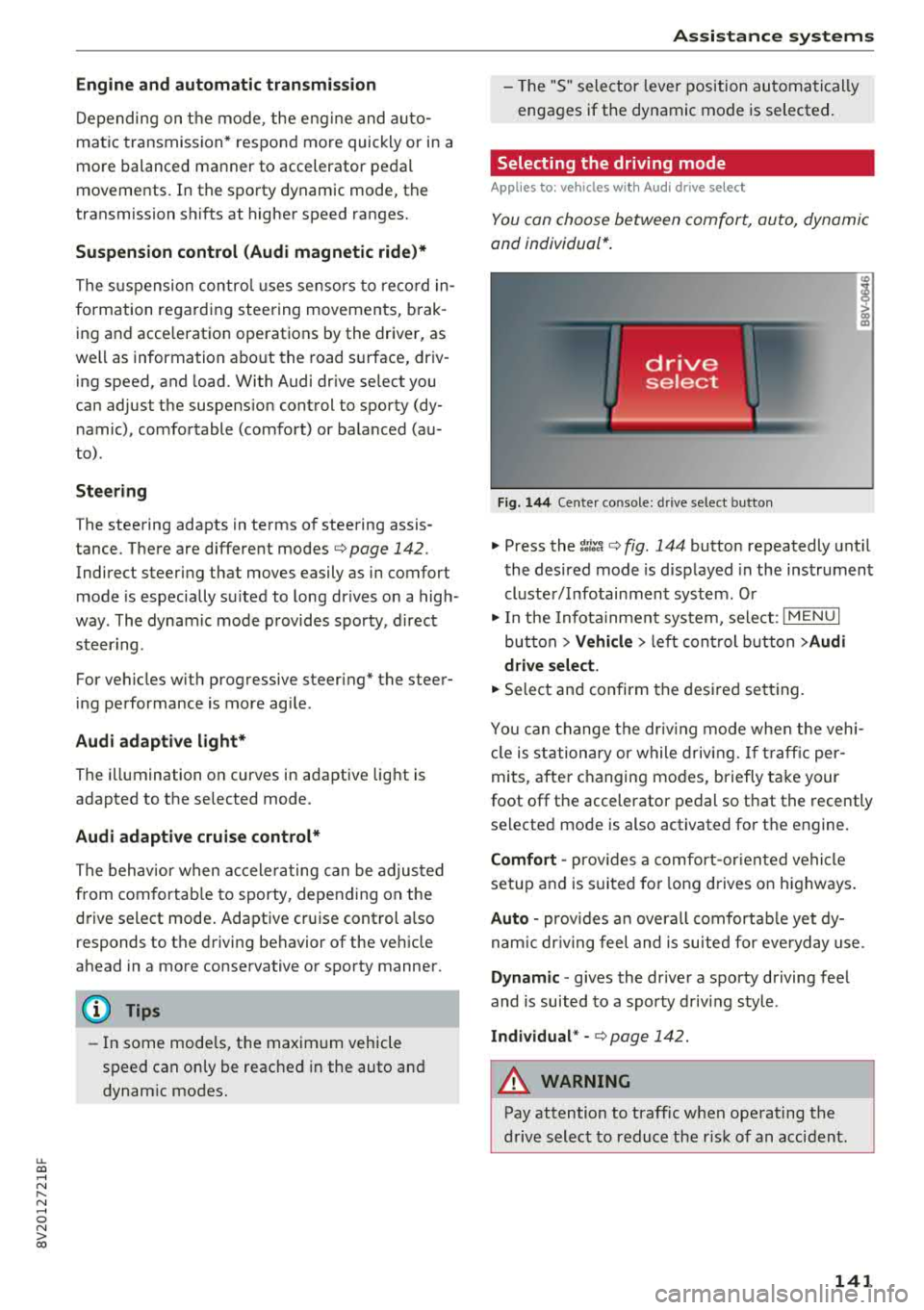
"' Press the ~:i;~ ¢ fig . 144 button repeatedly unt il
the desired mode is d isp layed in the instrument
cluste r/ Infotainment system . Or
"' In the Infota inment system, selec t: I M ENU I
bu tton > Vehicl e > left cont rol b utt on > Audi
dri ve select .
"'Select and confirm the desired se tting.
Yo u can change the dr iv ing mode when the veh i
cl e is stationary or while drivin g. If t raff ic per
mi ts, after c hanging mo des, briefly ta ke your
foot off t he accelerator pedal so that the recently
selected mode is also activated fo r th e engine.
Comfort -prov ides a co mfort -or iented vehicle
setup a nd is s uited for long d rives on h ighways .
Auto -provides a n overa ll comfortab le yet dy
nam ic dr iv ing feel and is suited for eve ryday use.
Dynamic
-g ives the drive r a sporty driving fee l
and is suited to a spo rty d riving style .
Individual * -¢ page 142.
A WARNING
--
Pay attention to traffic when ope rating the
drive select to reduce the r is k of an accident .
141
Page 144 of 404
Assistance systems
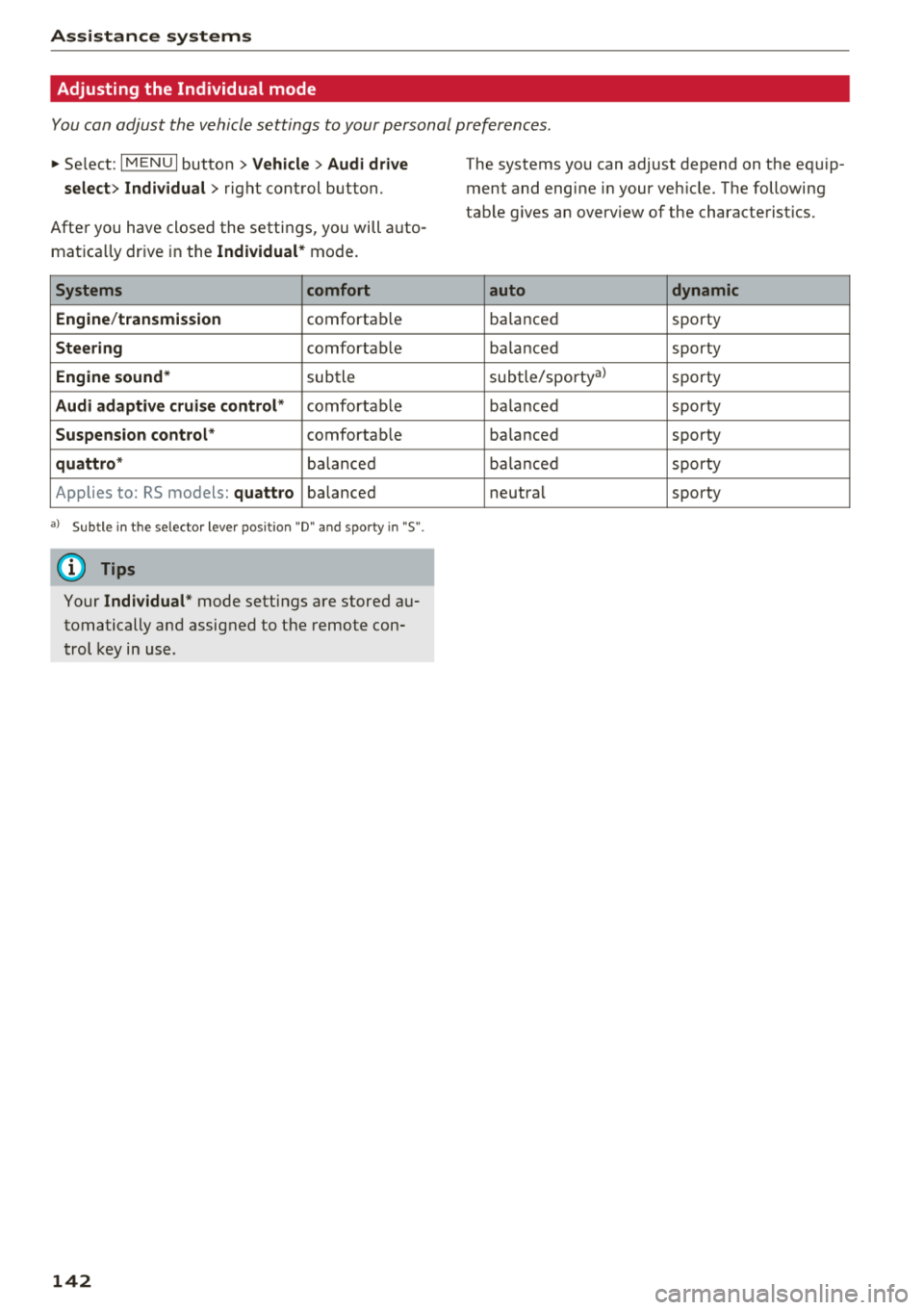
Adjusting the Individual mode
You can adjust the vehicle settings to your personal preferences.
~ Select: I MENU I button >Vehicle> Audi drive
select> Individual >
right control button.
After you have closed the settings, you will auto
mat ica lly dr ive in the
Individual * mode.
Systems comfort
Engine /transmission
comfortab le
Steering comfortab le
Engine sound* subtle
Audi adaptive cruise control* comfortable
Suspension control* comfortable
quattro * balanced
Applies to: RS models:
quattro balanced
a) Subtle in t he selector lever position "D" and sporty in "S".
(0 Tips
Your Individual * mode settings are stored au
tomatically and assigned to the remote con
trol key in use.
142
The systems you can adjust depend on the equip
ment and engine in your veh icle. The following
table g ives an overview of the characterist ics.
auto dynamic
ba
lanced sporty
ba lanced sporty
subtle/sportyal sporty
ba lanced sporty
ba lanced sporty
ba lanc ed sporty
neutral sporty
Page 146 of 404
Parking aid
Sensors are located in the front and rear bump
ers . If these detect an obstacle, audible and visu
al signals warn you.
M ake sure the sensors are not covered by stick
ers, deposits or any other obstructions as it may
impair the function of the system. For informa
tion on cleaning, see
~ page 354.
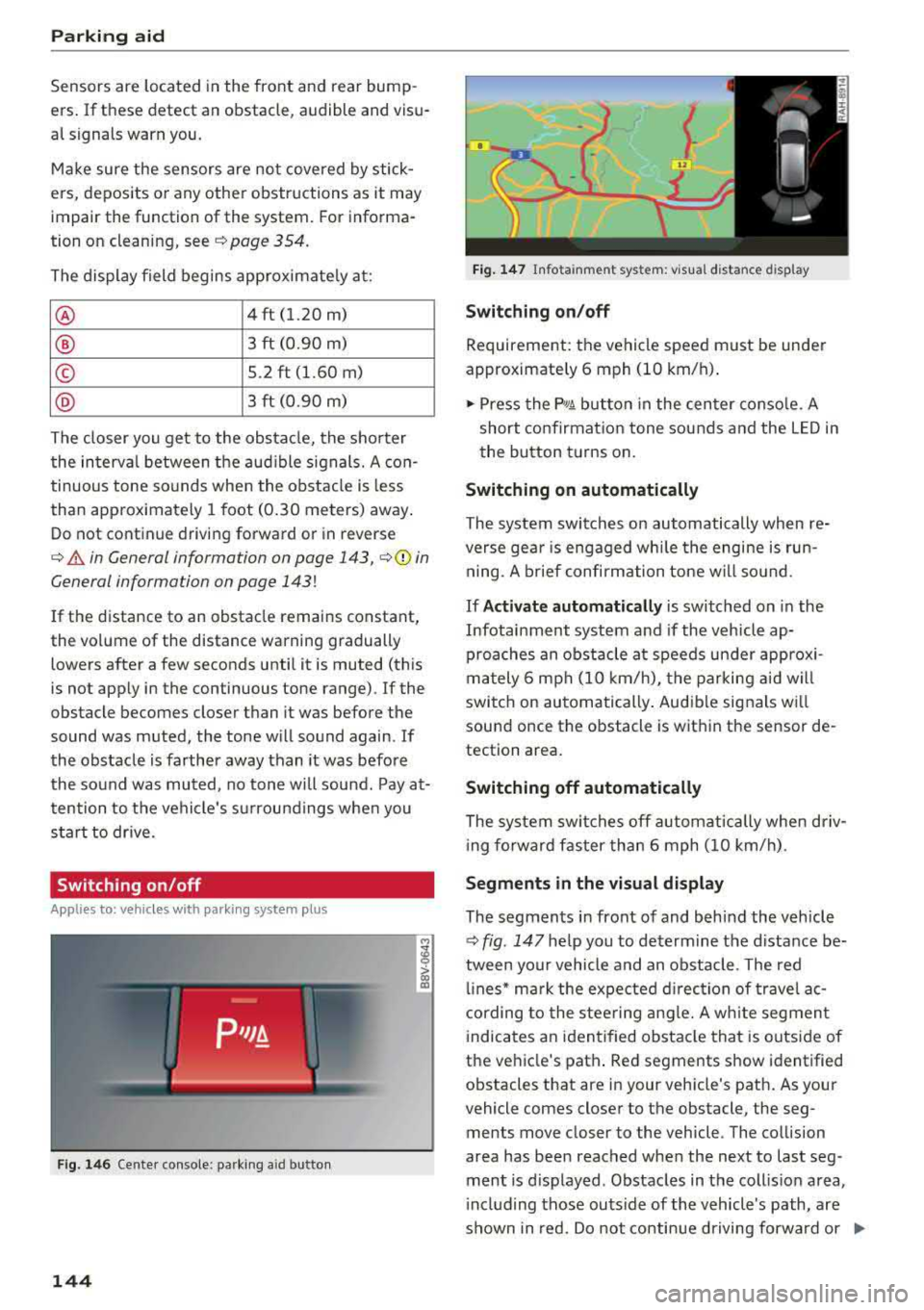
The display field begins approximate ly a t:
® 4 ft (1.20 m)
® 3 ft (0.90 m)
© S.2 ft (l.60 m)
@ 3 ft (0.90 m)
The closer you get to the obstacle, the shorter
the interva l between the audible signals. A con
tinuous tone sounds when the obstacle is less
than approximately 1 foot (0.30 meters) away .
Do not continue driving forward or in reverse
¢.&. in General information on page 143, ¢0 in
General information on page
143!
If the distance to an obstacle remains constant,
the vol ume of the distance warning gradually
lowers after a few seconds until it is muted (this
is not apply in the continuous tone range).
If the
obstacle becomes closer than it was before the
sound was muted, the tone w ill sound again. If
the obstacle is farther away than it was before
the sound was muted, no tone will sound. Pay at
tention to the vehicle's su rroundings whe n you
start to drive.
Switching on /off
A pplies to: ve hicles w ith pa rking system p lus
F ig. 146 Center console: p-.irk in g aid button
144
M ;g 0
> co ID
l
Fig. 147 Infota inment system: v isua l distance d isplay
Switching on/off
Requirement: the vehicle speed must be under
approximately 6 mph (10 km/h) .
.. Press the p,q~ button in the center console. A
short confirmation tone sounds and the LED in
the button turns on.
Switching on automatically
The system switches on automatically when re
verse gea r is engaged wh ile the engine is run
ning. A brief confirmation tone will so und .
If Activate automatically is switched on in the
Infotainment system and if the vehicle ap
proaches an obstacle at speeds under approxi
mately 6 mph (10 km/h), the parking aid will
switch on automatically . Audible signals wi ll
sound once the obstacle is within the sensor de
tection area.
Switching off automatically
The system switches off automatically when driv
i ng fo rward faster than 6 mph (10 km/h).
Segments in the visual display
The segments in front of and behind the vehicle
~ fig. 147 he lp you to determine the distance be
tween yo ur vehicle and an obstacle . The red
lin es* mark the expected direction of travel ac
cording to the steering angle. A white segment
indicates an identified obstacle that is outside of
the vehicle's path . Red segments show identified
obstacles that are in your veh icle's path. As your
vehicle comes closer to the obstacle, the seg
ments move closer to the vehicle . The collision
area has been reached when the ne xt to last seg
ment is d isplayed . Obstacles in the coll is ion area,
i nclud ing those outside of the vehicle's path, are
shown in red. Do not continue driving forward or
..,.
Page 148 of 404
Parking aid
-Only use the rearview camera to assist you if
it shows a good, clear picture. For example,
the image may be affected by the sun shin
ing into the lens, d irt on the lens, or if there
is a malfunction .
- Use the rearview camera only if the luggage
compartment lid is completely closed . If the
luggage compartment lid is open the orien
tation lines and blue surfaces are hidden .
Make su re any objects you may have mount
ed on the luggage compa rtment lid do not
block the rearview camera.
- T he came ra lens enlarges and distorts the
field of v is ion. Th e object appears both al
tered and inaccurate on the screen.
- In certai n situations, people or objects in
the d isplay appear closer or farthe r away:
- For objects that do not touch the ground,
such as the bumper of a parked vehicle, a
trailer hitch or the rear of a truck . Do not
use the orientation lines in this case .
- If driven from a level surface onto an in
cline, o r a downward slope.
- If driven toward protrud ing objects.
- If the veh icle is carry ing too much load in
the rear.
- Always read and follow the applicable warn
ings ¢(!) in General information on
page 143 .
-The orange-colored orientation lines in the
Infotainment display show the vehicle path
based on the steering wheel angle . The
front of the vehicle swings out more than
the rear of the veh icle. Mainta in plenty of
distance so that an exterio r mirror or a cor
ner of the vehicle does not co llide w ith any
obstacles.
Switching on/off
Applies to : veh icles with rearview camera
Switching on/off
Requirement: the veh icle speed must be under
approximately 6 mph (10 km/h) .
146
.,. Press the p, .//~ button in the center console. A
short confirmation tone sounds and the LED in the button turns on.
Switching on automatically
The system switches on automatically when re
verse gear is engaged wh ile the engine is run
ning.
Switching off automatically
The system switches off automatically when driv i ng fo rward faster than 6 mph ( 10 km/h).
(0 Tips
- The visua l display* in the right sect ion of the
display should help you de tect the critical
vehicle area.
- You can change the volume of the signa ls
and the
display ¢ page 147.
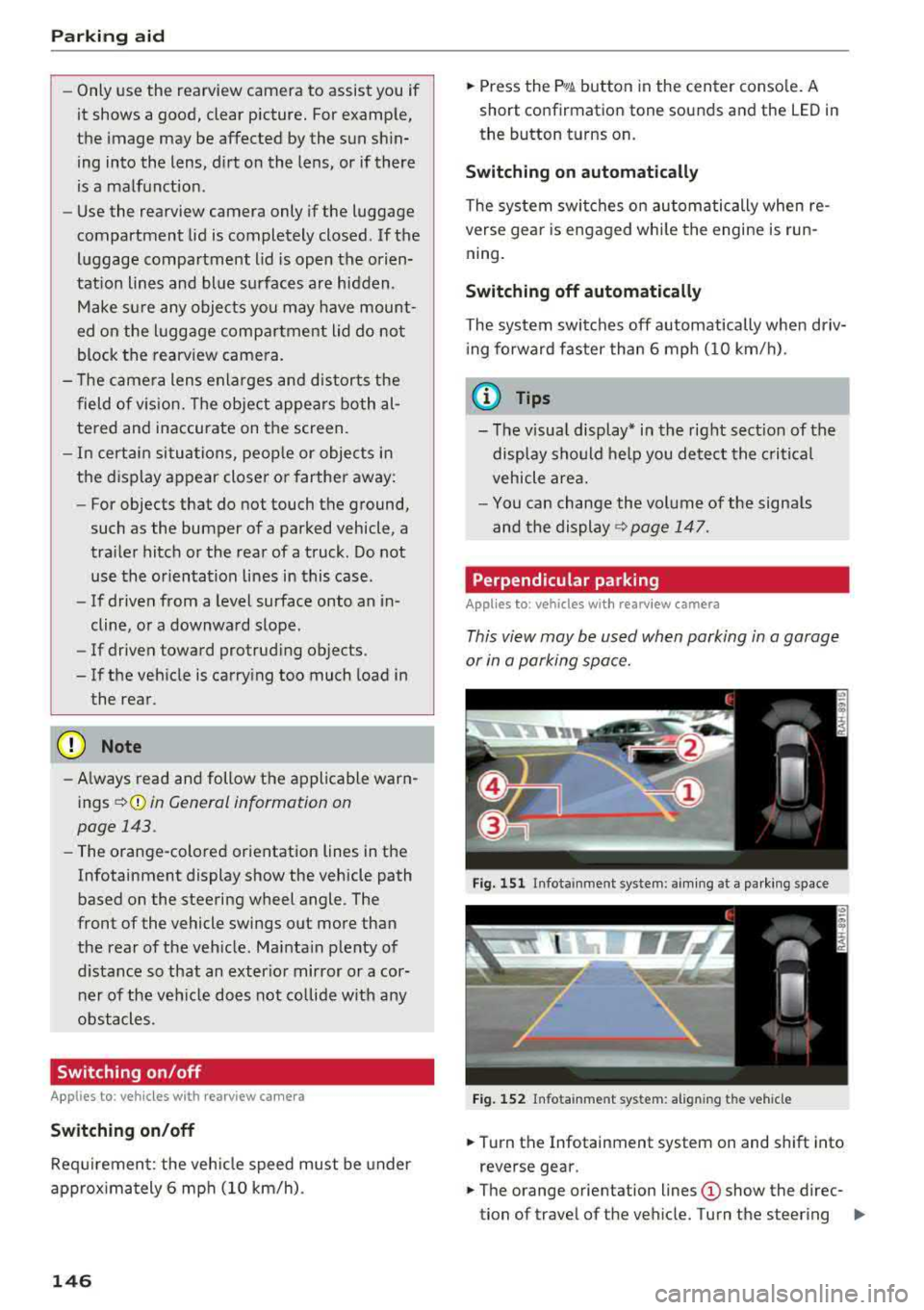
Perpendicular parking
Applies to: vehicles with rearview camera
This view may be used when parking in a garage
or in a parking space.
Fig. 151 Infota inment system: aim ing at a parki ng space
Fig. 152 Infota inm ent sys tem: al ign ing the vehicle
.,. Turn the Infotainment system on and shift into
reverse gear.
.,. The orange orientation lines (D show the direc
tion of travel of the vehicle. Turn the steering
..,.
Page 151 of 404
u. 00 .-< N l' N .-< 0 N > 00
Intelligent Technology
-Press the accelerator pedal carefully when
accelerating on even, slippery surfaces such
as ice and snow. The drive wheels can spin
even when these control systems are instal
led and this can affect dr iv in g stab ility and
increase the risk of a collision. condition. Different tire
sizes can lead to a
reduction in engine power.
- You may hear noises when the systems de
scribed are working .
(D Tips
-The ABS and ASR only function correctly
when all four wheels have a s imilar wear
Switching on/off
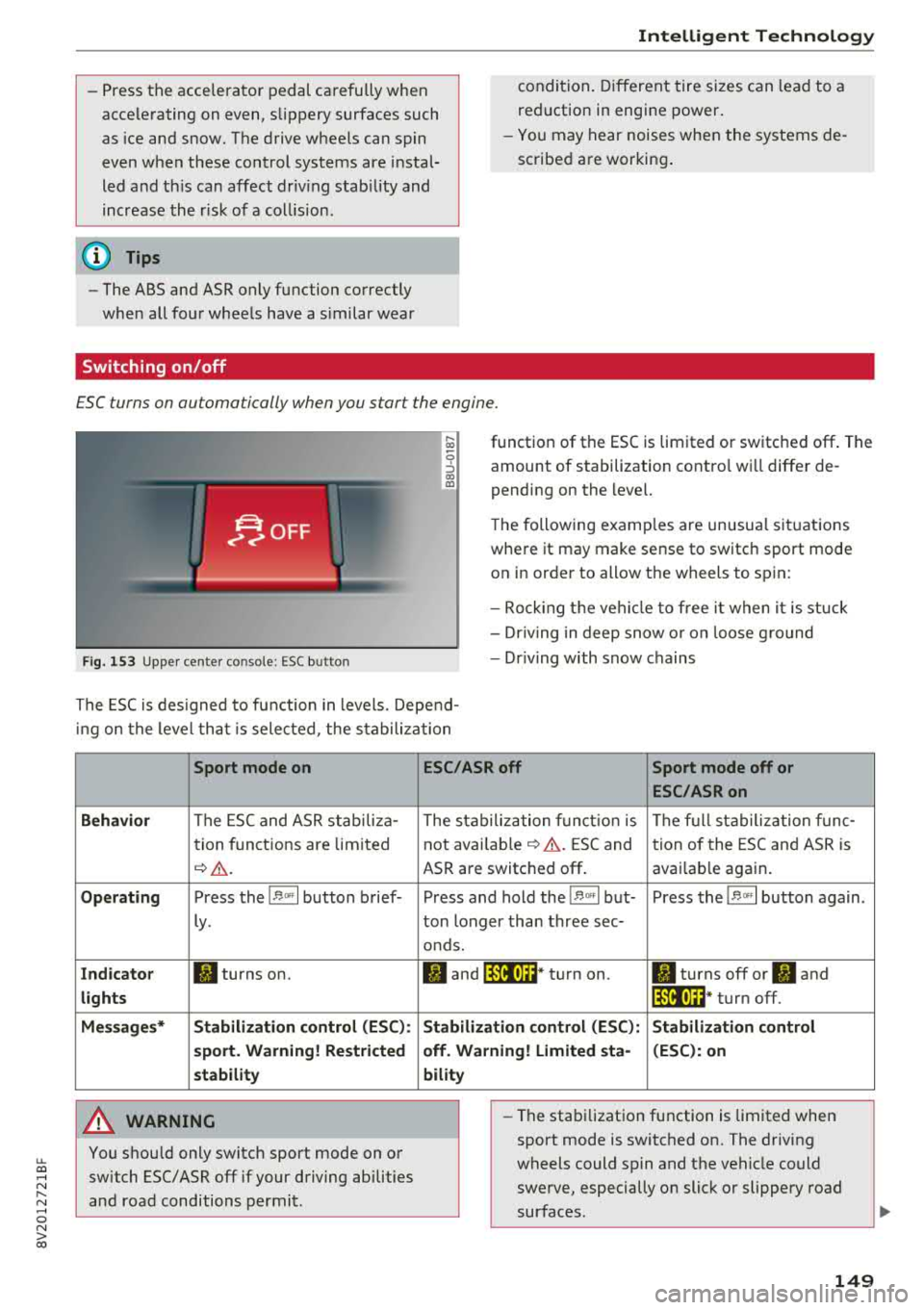
ESC turns on automatically when you start the engine.
F ig. 153 Upper center console: ESC button
function of the ESC is limited or switched off. The
amount of stabilization contro l wi ll differ de
pending on the level.
The following examp les are unusua l situations
where it may make sense to switch sport mode on in order to allow the wheels to spin:
- Rocking the vehicle to free it when it is stuck
- Dr iving in deep snow o r on loose g round
- Dr iving with snow chains
The ESC is designed to function in levels. Depend
ing on the level that is selected , the stabilization
Sport mode on
Behavior
The ESC and ASR stab iliza-
tion functions are limited
~ &..
Operating Press the 11> .. , I button brief-
ly .
Indicator II turns on.
lights
Messages* Stabilization control (ESC):
sport. Warning! Restricted
stability
A WARNING
You should only switch sport mode on or switch ESC/ ASR
off if your driving abilities
and road conditions permit.
ESC/ASR off Sport mode off or
ESC/ASRon
The stabilization function is The full stabilization func-
not
avai lab le~ A . ESC and tion of the ESC and ASR is
ASR are switched off . availab le again.
Press and hold the
! 1> °',1 but- Press the 11> .. , I button again .
ton longer than three sec-
onds.
II and lfil•)~~* turn on. II turns off or II and
lfil•)~~ * turn off.
Stabilization control (ESC): Stabilization control
off. Warning! Limited sta- (ESC): on
bility
-
- The stabilization function is limited when
sport mode is switched on. The driving
wheels could spin and the vehicle could swerve, especially on slick or slippery road
surfaces .
149
Page 153 of 404
u. 00 .-< N l' N .-< 0 N > 00
Brake booster
The brake booster amplifies the pressu re yo u ap
p ly to the brake pedal. It only operates while the
engine is running or when the ignition is switched
on (plug-in hybrid drive*) .
A WARNING
- Only apply the brakes for the purpose of
cleaning the brake system when road and
traff ic conditions permit. You must not en
danger other road users. This increases the
r isk of an accident .
-
-Never let the vehicle roll while the engine is
stopped because this increases the risk of an
acc ident.
- Depend ing on the veh icle equipment, the
brake pedal may be pulled downward when
the vehicle automatically initiates b rak ing.
- Never place objects in the driver's footwell.
An object could end up in the area around
the pedals and prevent you from using
them. You wo uld not be able to use the ped
als if sudden driving or braking mane uvers
were needed, which increases the risk of an
accident.
- Only use floor mats that do not obstruct the
area around the pedals and that can be se
curely fastened in the footwe lls.
- T o reduce the risk of injury, do not place
your foot under the brake pedal.
(Llj) Note
-Never let the brakes "rub" by pressing the
pedal lightly when braking is not actually
necessary. This causes the brakes to over
heat and increases braking distance and
causes wear.
- Before driving on a long stretch with steep
slopes, reduce your speed and shift to the
next lower gear This makes use of the en
gine braking effect and relieves the brakes.
If you need to brake add it ionally, brake in
i ntervals and not cont inuously.
Intelligent Technology
(D Tips
- If the brake booster is not working, you
must press the brake pedal with much more
force than normal.
- If you retrofit your vehicle with a front spoi l
er, wheel covers or simi lar items, make sure
that the air flow to the front wheels is not
interrupted. Otherwise the brake system
can become too hot.
Electromechanical
steering
The electromechanical steering supports the
driver's steering movements.
Power steering adapts electronically based on
the ve hicle speed.
Indicator lights and messages
• Do not drive vehicle: steering defective
If this indicator light turns on and stays on and
th is message appears, the power steering may
have failed .
Stop the vehicle in a safe location as soon as pos
s ible. Do
not cont inue driving. See an authorized
Audi dealer or authorized Audi Service Fac ility for
ass istance .
l;r-ij Steering: system fault! You can continue
driving
If the indicator light turns on, the steering wheel
may be more difficult to move or more sensitive
than usual. The steering whee l may also be at an
angle when driving straight.
Drive slowly to an authorized Audi dea ler or au
thorized Audi Service Facility to have the mal
function corrected.
(D Tips
If the. or 'Tij indicator light on ly stays on
for a short time, you may continue driving .
151
Page 154 of 404
Intelligent Technology
All wheel drive (quattro)
Applies to: vehicles with all wheel drive
In oil wheel drive, oil four wheels ore powered.
General information
In all wheel drive, the driving power is divided be
tween all four wheels. This happens automatical
ly depending on your driving behavior as well as
the current road conditions. Also see
c:> page 148, Electronic Stabilization Control
(ESC) .
The a ll wheel drive concept is designed for high
engine power. Your vehicle is exceptionally pow
erful and has excellent driving characteristics
both under normal driving conditions and on
snow and ice. Always read and follow safety pre
cautions
c:> & .
Winter tires
By using all wheel drive, your vehicle has good
forward motion with standard tires in winter con
ditions. However, using winter or all season tires
on
oil four wheels in the winter is recommended,
because this will improve the
broking effect.
Snow chains
If there are snow chain laws, snow chains must
also be used on vehicles with all wheel drive
c:> page 346, Snow chains.
Replacing tires
For vehicles with all wheel drive, only whee ls with
the same rolling circumference shou ld be used.
Avoid using tires with different tread depths
c:> page 33 7, New tires or wheels.
Offroad vehicle?
Your Audi is not an offroad vehicle -there is not
enough ground clearance. For this reason, avoid
difficult terrain.
A WARNING
-Also, in vehicles with a ll wheel drive, adapt
your driv ing style to the current road and
traff ic conditions. Do not let the increased
safety provided tempt you into taking risks,
152
because this increases the risk of an acci
dent.
- The braking ability of your vehicle is limited
to the traction of the whee ls. In this way, it
is not different from a two wheel drive vehi
cle. Do not be tempted to accelerate to a high speed when the road is slippery, be
cause this increases the risk of an accident.
- Note that on wet streets, the front wheels
can "hydroplane" if driv ing at speeds that
are too high . Unlike front wheel drive
vehicles, the engine does not rev higher sud
denly when the vehicle begins hydrop laning .
Fo r this reason, adapt your speed to the
road conditions to reduce the risk of an acci
dent.
Energy management
Your vehicle is equipped with an intelligent ener
gy management system for distributing electrici
ty. Thi s significantly improves the starting ability
and increases the vehicle battery life.
(D Tips
-If you drive short distances frequently, the
vehicle battery may not charge enough
whi le driving. As a result, convenience func
t ions for electrical equipment may be tem
porarily unavailable.
- The vehicle battery w ill gradually drain if
the vehicle is not driven for long per iods of
t ime, or if electrical equipmen t is used
when the engine is not running. To ensure
that the vehicle can still be started, the
electrical equipment will be reduced or
switched off.
Notice about data
recorded by the Event
Data Recorder and
vehicle control modules
Event Data Recorder
This vehicle is equipped with an Event Data Re-
corder (EDR). The ma in purpose of an EDR is to
.,.