hill hold AUDI A3 SEDAN 2018 Owners Manual
[x] Cancel search | Manufacturer: AUDI, Model Year: 2018, Model line: A3 SEDAN, Model: AUDI A3 SEDAN 2018Pages: 404, PDF Size: 62.3 MB
Page 20 of 404
Cockpit overview
Resetting values to zero
Requirement: the Fuel consumption, Short-term
memory or Long-term memory
display must be
selected.
.,. T o reset the values in t he respect ive memory to
zero, press and hold the left thumbwheel on
the multif unction steering whee l for one sec
ond. Or
.,. On the multifunction steering whee l, select:
the right control button
> Reset values* .
The following displays are available, depending
on vehicle equipment:
- Date and
time r=> page 243
-Plug-in hybr id drive : range r=> page 97
-Average consumpt io n
- Short-term memory overview
- Long-term memory overview
- Energy consumers
r=> page 18
-Driver assistance r=> page 120
The sh o rt -term memo ry collects driving informa
tion from the time the ignit ion is switched on un
t il it is switched off. If yo u continue driv in g with
in two hours aft er switching the ignition off, the
new values are included when calcu lating the cur
rent trip information.
Unlike the short-term memory , the long-term
memory is not erased automatica lly. Yo u can se
lect the time period for evaluating trip informa
tion yourself.
Fuel consumption
The current fuel consumpt ion can be shown us
ing a bar graph
r=> fig. 14. The average consump
tion stored in the short-term memory is also dis
p layed . If the bar is green, your vehicle is saving
fue l through the following function:
-Recuperation : electrical energy can be stored in
the vehicle battery when the vehicle is coasting
or driving downhill. The bar will move toward
0.
Energy consumers*
The Energy consumers view lists other equip
men t that is currently affecting fuel consump
tion. The display shows up to t hree energy con -
18
sumers. The eq uipment using the most power is
li sted first . If more than three items using power
are switched on, the eq uipment that is c urrent ly
using the most power is displayed. A chart also
shows you the current tota l of a ll other consum
ers .
Q) Tips
The date, time of day and time and date for
mat can be set in the Infota inment system
r=> page 2 43.
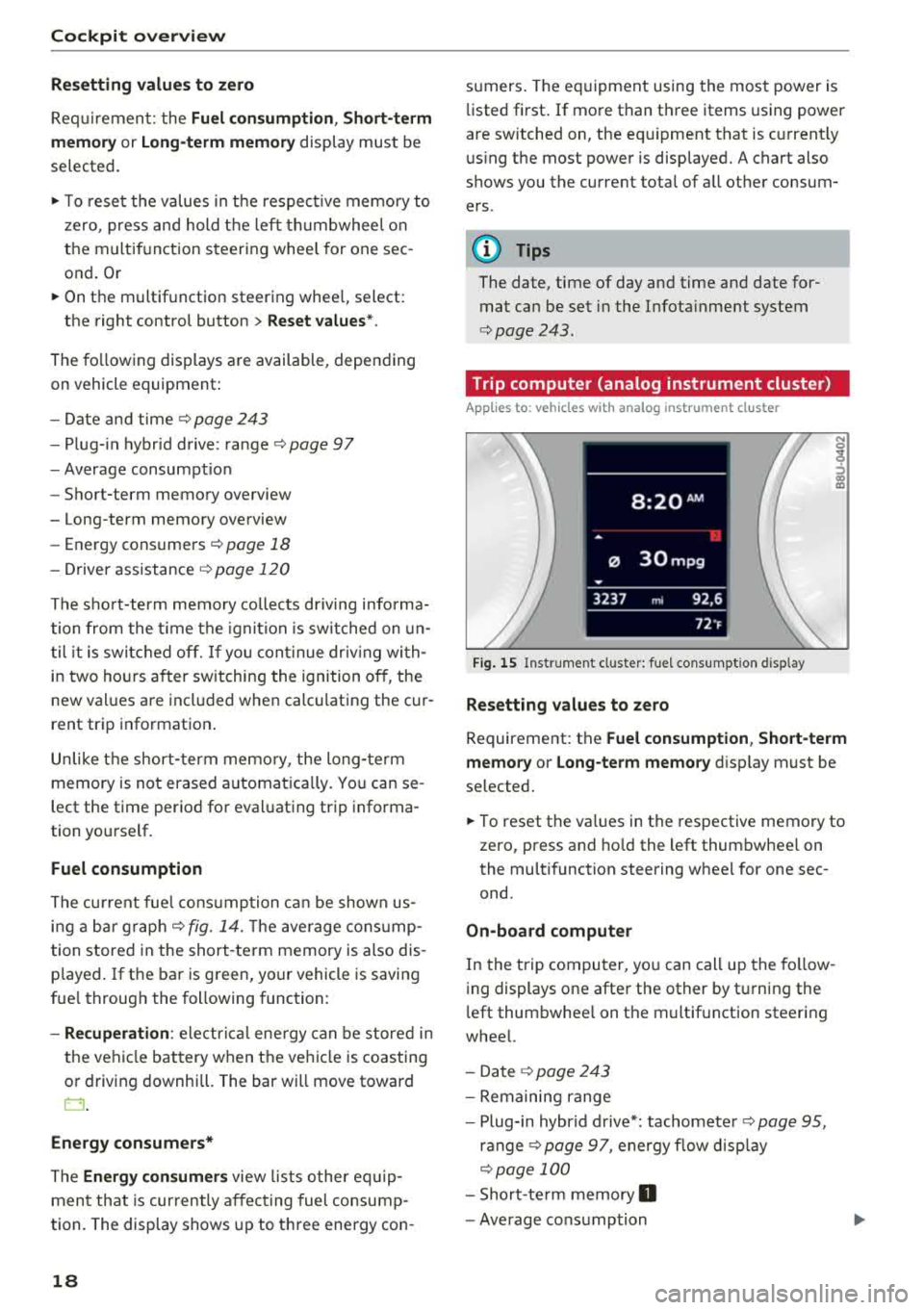
Trip computer (analog instrument cluster)
Applies to: vehicles wit h analog inst rument cl uster
Fig. 15 Instrument cl uster: fuel consumpt ion d isp lay
Resetting values to zero
N 0
9
ffl
Requirement: the Fuel consumption , Short-term
memory or Long-term memory
display must be
selected.
.,. To reset the va lues in the respective memory to
zero, press and hold the left thumbwheel on
the multifunction steering wheel for one sec
ond.
On-board computer
In the trip computer, you can call up the follow
ing displays one after the other by t urning the
l eft thumbwhee l on the multifunction steering
wheel.
- Date
r=> page 243
-Remaining range
- Plug-in hybr id drive*: tachomete r
r=> page 95,
ranger=> page 97, energy flow display
r=>page 100
-Short-te rm memory 0
-Average consumption
Page 23 of 404
u. 00 .-< N l' N .-< 0 N > 00
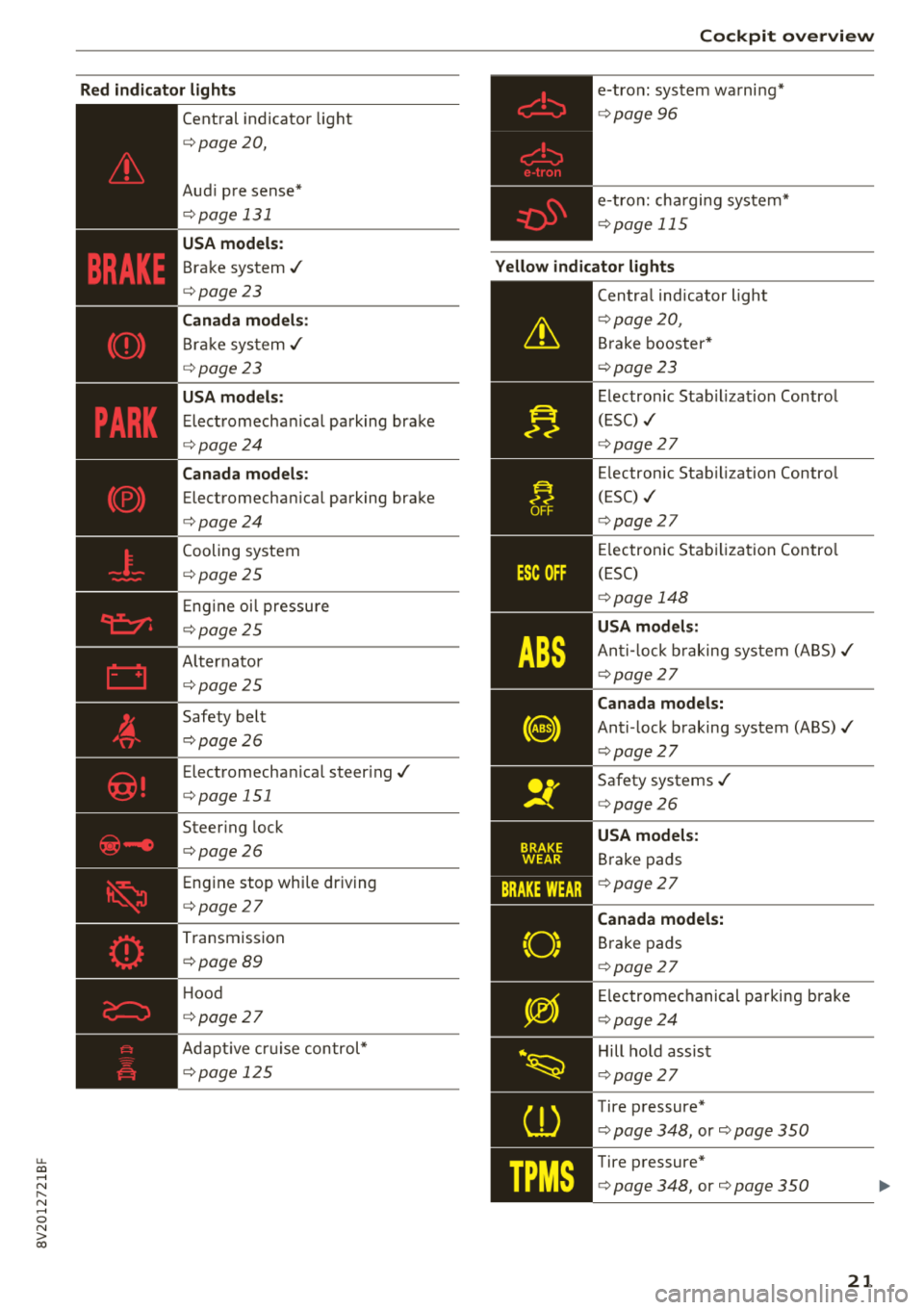
Red indicator light s
--------------
Central indicator light
c>page20,
Aud i pre sense*
c>page 131
USA models :
Brake system ./
c>page23
Canada mod els:
Br ak e sys tem ./
c> page23
USA models :
Elect romechan ical park ing brake
c> page24
Canada models :
Electromechanical parking brake
c>page24
Cooling system
c>page 25
Eng ine oi l pressu re
c>page 25
A lternator
c>page 25
Safety belt
c> page26
Electromecha nical steer ing./
c> page 151
Steer ing lock
c>page26
Engine stop whi le driving
c> page27
Transmission
c>page 89
Hood
c> page27
Adapt ive cr uise control*
c>page 125
Coc kpit o ver view
e-tron: system wa rni ng*
c> page 96
e-tron: charging system*
c> page 115
Yellow indicator lights
--------------Centra l ind icator light
c> page 20 ,
Brake booster*
c> page 23
Electron ic Stab il izat ion Control
(ESC)
./
c> page 27
Electronic Stab ilization Contro l
(ESC)
./
c> page 27
Electronic Stab iliza tion Contro l
(ESC)
c> page 148
USA models :
An ti-l ock b raking system (ABS) ./
c>page 27
Canada model s:
Anti -lock braking system (ABS)./
c> page 27
Safety systems ./
c>page 26
USA models:
Brake pads
c>page 27
Canada model s:
Brake pads
c> page 27
Electromechanical parking brake
c> page 24
Hill hold assist
c>page 27
Tire pressure*
c> page 348, or c> page 350
Tire pressure*
c> page 348, or c> page 350
21
Page 25 of 404
u. 00 .-< N l' N .-< 0 N > 00
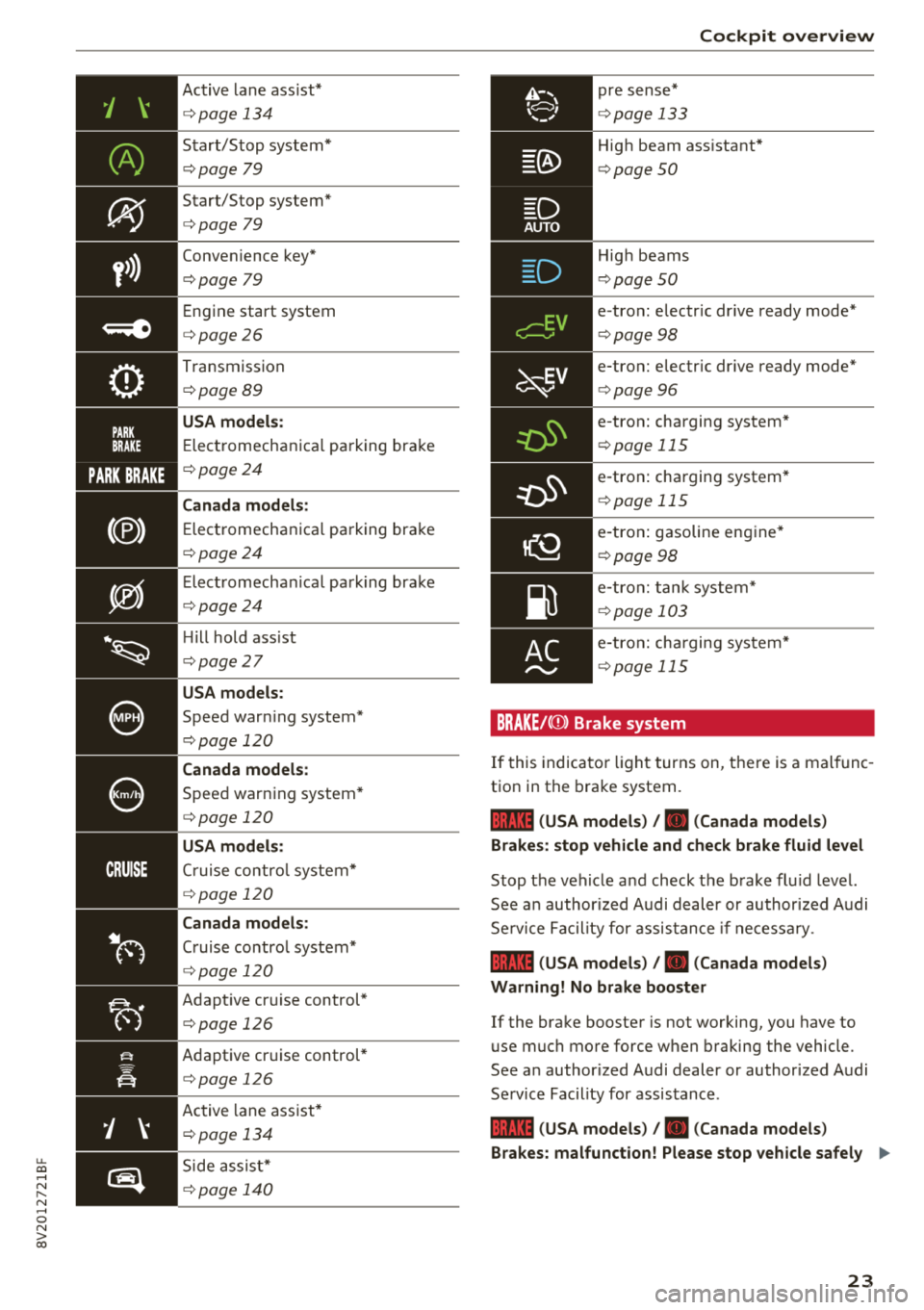
Active lane assist*
c:> page 134
Start/Stop system*
c:>page 79
Start/Stop system*
c:> page 79
Convenience key*
c:> page 79
Engine start system
c:> page 26
Transmission
c:> page 89
USA m odels :
Electromechanica l parking brake
c:> page 24
Canada models :
Electromechanica l parking brake
c:> page 24
Elect romechan ical park ing brake
c:> page 24
Hill hold ass ist
c:> page 27
USA models :
Speed warning system*
c:> page 120
Canada models :
Speed warning system *
c:> page 120
USA models:
Cruise control system*
c:> page 120
Canada mod els :
Cruise control system*
c:> page 120
Adapt ive cruise control*
c:> page 126
Adaptive cr uise control*
c:> page 126
Ac tive lane ass ist*
c:> page 134
Side assist*
c:>page 140
~v
pre sense*
c:>page 133
Coc kpit o ver view
High beam ass istant*
c:> page 50
High beams
c:> page 50
e-tron: electric dr ive ready mode*
c:> page 98
e-tron: electric dr ive ready mode*
c:> page 96
e-tron: charging system*
c:> page 115
e -tron: charging system*
c:> page 115
e-tron: gasoline eng ine*
c:> page 98
e-tron: tank system*
c:> page 103
e-tron: charging system*
c:>page 115
BRAKE/((D) Brake system
If this indica tor light tur ns on, t here is a malf unc
tion in the brake system .
1111 (USA models) /. (Canada model s)
Brakes : stop vehicle and ch eck brake fluid level
Stop the veh icle a nd check t he brake fl uid level.
See a n author ized Audi dealer or author ized Audi
Se rvice Facility for assis tance if ne cessa ry.
1111 (USA model s) /. (Canada model s)
Warning! No brake booster
If the brake booste r is not working, you have to
use much more force w hen braking the vehicle.
See a n author ized Audi dealer or authorized Audi
Service Facility for assistance .
1111 (USA models ) /. (Canada models )
Brakes: malfunction! Please stop vehicle safel y
..,_
23
Page 29 of 404
u. 00 .-< N l' N .-< 0 N > 00
There is a malfunction in the eng ine start ing sys
tem .
Dri ve to an autho rized Aud i dea le r o r a uth o rized
Aud i Serv ice Fac ility immedia tely to have t he
mal funct ion corrected.
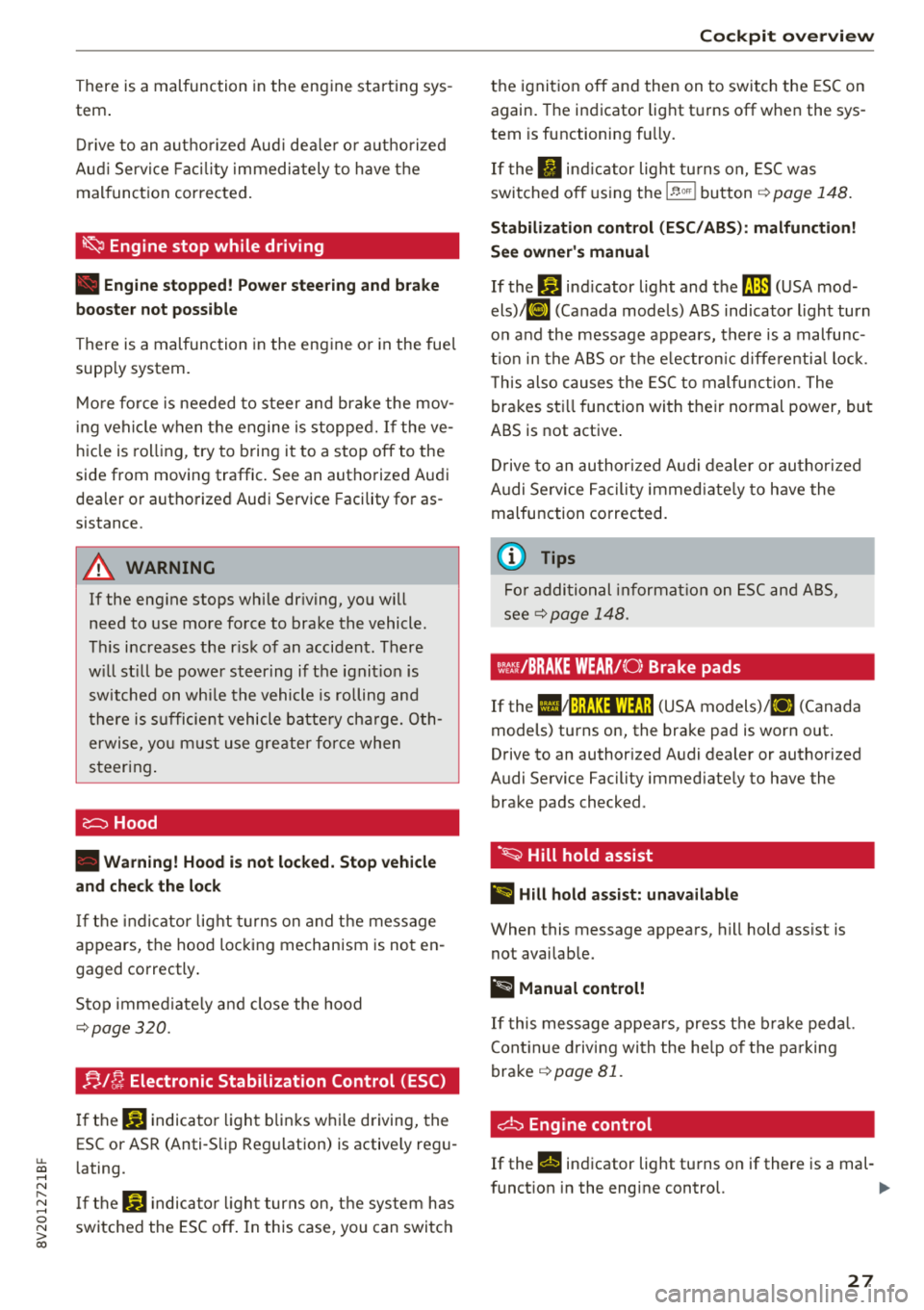
~ Engine stop while driving
• Engine stopped! Power stee ring and b rake
boo ster not possible
There is a malfunction in the eng ine or in the fue l
supp ly system.
M ore fo rce is needed to s teer and bra ke the mov
in g vehi cle when the engine is stopped. If the ve
hi cle is roll ing , try to bring it to a stop off to the
side from moving traffic. See an authorized Audi
dea ler or authorized Audi Service Facility for as
sistance .
A WARNING -
If the eng ine stops whi le dr iv ing, yo u will
need to use more fo rce to brake the vehicle.
Th is increases the r isk of an accident . There
w ill still be power steer ing if t he ignit io n is
sw itched on wh ile the vehicle is rolling an d
t here is s ufficie nt vehicle batte ry c har ge. Oth
erwise, yo u m ust use g re ate r fo rce when
steer in g.
~ Hood
• Warning! Hood is not locked. Stop vehicle
and check the lock
I f t he in dicator lig ht tur ns on and t he message
appears, the hood loc king mechanism is no t en
gaged correctly .
Stop immed iate ly a nd close the hood
q page 320.
B l~ Electronic Stabilization Control (ESC)
If the G) indicato r light b lin ks w hile driving, the
ESC or AS R (Anti -S lip Regu lation) is active ly reg u
l ating.
I f t he
G) indica to r li ght turns on, the sys tem has
switched the ESC off . In this case, you can switc h
Cockpit o ver view
the ignit ion off and then on to switch the ESC on
again. The indicator light t urns off whe n the sys
tem is functioning fu lly.
If the II ind ic a tor light tu rns on, ESC was
switched o ff using t he
1~ 00'1 b utton ¢ page 148.
Stabilization con trol (ESC /ABS ): malfunction!
S ee owner's manual
If the If] ind icator light and the llB (USA mod
els) ;tlJ (Canada mode ls) ABS indicator light turn
o n and the message appears, there is a malfunc
t io n in the A BS o r th e e lectron ic diffe re nti al loc k.
T his also causes the ES C to malfunc tion . The
brakes st ill function with t he ir normal power, but
ABS is not active .
Dr ive to an author ized A udi dealer or au tho riz ed
A udi Se rvice Faci lity immed iate ly to h ave the
malfunction corrected.
(D Tips
F o r a ddi tio na l in format io n on E SC an d ABS,
see
qpage 148.
Wt:: /BRAKE WEAR/( 0: Brake pads
If the IIJ~:);f;131WfJ;! (USA models)/ [I] (Canada
models) turns on, the bra ke pad is worn out .
Drive to an authorized A udi dealer or authorized
Audi Se rvice Facility immed iate ly to have the
brake pads checked .
·~ Hill hold assist
II Hill hold a ssist: unavailable
When this message appea rs, hill hold ass ist is
not avai lab le.
@ t.ilanual control!
If t his message appea rs, press t he bra ke peda l.
Cont in ue driv ing wi th the he lp of t he parking
brake
q page 81.
d:::i Engine control
If the II indicator light tu rns on if there is a mal -
f unct ion in the engine control.
Iii"
27
Page 84 of 404
Drivin g
~ To start driving and re lease the parking brake
automatica lly, press the acce lerator pedal as
usua l.
I n addition to re leasing the par king brake auto
matica lly, other convenience and sa fety functions
are available when you start driving
r=;, poge 83,
Starting from a stop.
Pre venting th e automatic parking bra ke
r el eas e
The vehicle could begin ro lling unintentiona lly,
dep ending on the hill or if towing a trailer .
~ To preve nt the parking b rake from releasing au
tomatica lly, pull and hold the
®l switch and
press the acce lerator pedal. The parking brake
remains set and pr events the vehicle from ro ll
ing backward.
~ You can re lease the(®) switch again once you
are sure that you are g iv ing enough dr iv ing
force to the wheels by pressing the accelerator pedal.
Emergenc y bra king function
You can use the emergency brak ing funct ion in an
emergency situation, or if the standard brake op
eration malfunctions or is disabled .
~ Pull and hold the(®) switch.
~ As soon as you release the (®) switch or acceler-
ate, the brak ing stops .
Pu lling and holding
the(®) switch while driving
the vehicle activates the emergency braking f unc
tion . The vehicle is braked at all four wheels by
activating the hydraulic brake system. The brak
ing effect is s imilar to heavy braking
r=;, .,&. .
To reduce the risk of activating the emergency
braking by mistake, a warn ing tone (bu zzer)
sounds when the
®l swi tch is pulled. Emergency
braking stops as soon as the
®l switch is released
or the accelerato r pedal is pressed .
Parking
~ Press the brake peda l to stop the vehicle.
~ Pull the C® switch to set the parking brake.
~ Place the selector lever in the P pos ition.
~ T urn the eng ine off r=;, .,&. .
82
~ Turn the steering w hee l when parking on in
clines so that the w heels wi ll roll into the curb
if the vehicle starts moving .
A WARNING
- Do not press the acce lerator pedal inadver
tently if a gear is selected when the vehicle
is stationary and the eng ine is running . Oth
erwise, the vehicle will start to move imme
d iate ly and this could resul t in an accident.
- Emerge ncy brak ing should only be used in
a n emergency, when the norma l bra ke pedal
has fa iled or the bra ke peda l is obstr ucted.
D ur ing eme rgency bra king, you r vehicle w ill
brake s imilar to he avy braking. ESC and the
associated components (ABS, AS R, EDL)
cannot overcome the laws of physics.
Around curves and when road or weather
conditions a re bad, a full brake applicat ion
can cause the veh icle to skid or the rear end
to swerve, wh ich increases the risk of an ac
cide nt.
- If the power supply fails, you cannot set the
parking brake if it is released. In this case,
pa rk the veh icle on leve l ground and secure
it by p lac ing the sele cto r leve r in the P pos i
tion. See an au thor ized A udi dealer or au
thor ized A udi Se rvi ce Fa cility for assis tan ce.
- I f you leave the vehi cle, sw itch the ignition
off and take the veh icle key wi th yo u. Thi s
app lies pa rticular ly when children remain in
the vehicle. Otherwise, chi ld ren co uld start
the engine, release the parking brake or op
erate e lectr ica l equipment s uch as power
w indows, wh ich increases the r isk of an acci
dent.
- No one, especially c hildren, should rema in
in the vehicle when it is locked. Locked
doors make it more difficu lt for emergency
workers to get into the vehicle, which puts
lives at ris k.
(D Tips
When stopp ing at a traff ic signa l or stopp ing
i n city traffic, you can set the park ing brake
manually . The veh icle does not have to be
h eld with the brake pedal. The par king b rake
e liminates t he tendency to creep when a
Page 85 of 404
selector lever position is engaged. As soon as
you press the accelerator pedal, the parking brake releases automatically and your vehicle
starts to move
¢ page 83.
(D Tips
- Occasional noises when the parking brake is
set and re leased are normal and are not a
cause for concern.
- The parking brake goes through a self-test
cycle at regular intervals when the vehicle is
stopped. Any noises associated with this are normal.
- If there is a power failure, the parking brake will not set if it is released, and it will not
release if it is
set¢&. See an authorized
Audi dealer or authorized Audi Service Fa
cility for assistance .
Starting from a stop
Various convenience and safety functions may be
available when the vehicle begins driving, de
pending on vehicle equipment.
Starting on hills with the parking brake set
Requirement: the driver's door must be closed.
~ To start driving comfortably when on a hill, set
the parking brake and begin driving as usual.
The braking force of the parking brake does not release automatically until the wheels build up
enough driving force .
Starting on hills with hill hold assist
Hill hold assist makes it easier to start on hills.
Requirement: the driver's door must be closed
and the engine must be running.
~ To activate hill hold assist, press and hold the
brake pedal for several seconds. The vehicle
must be in an uphill direction of travel.
After releasing the brake pedal, the braking pow
er is maintained for a brief
moment ¢.&. to pre
vent the vehicle from rolling back when starting.
::li During this time, you can eas ily beg in to move .-<
~ your vehicle.
N .-< 0 N > 00
Driving
A WARNING ,-
Applies to: ve hicles with h ill ho ld assist
- If you do not begin driving immediately or
the engine stalls after releasing the brake
pedal, your veh icle may begin to roll back
ward. Press the brake pedal or set the park
ing brake immediately.
- The intelligent technology of hill hold assist
cannot overcome the limitations imposed by
natural physical laws. The increased comfort
offered by hill hold assist should not cause
you to take safety risks.
- Hill hold assist cannot hold the vehicle in
place on all hills (for example, if the ground
is slippery or icy).
- To reduce the risk of an accident, always
make sure the vehicle is situated safely
while stationary.
Automatic transmission
Introduction
Applies to: vehicles with automatic transmiss ions
T he automatic transmission is controlled elec
tronically . Upshifting and downshifting occur au
tomatically.
When a
moderate driving style is used, the
transm ission selects the most economica l dr iv ing
mode. The transmission upshifts at a lower RPM
and downshifts at a higher RPM to improve fuel
efficiency.
In the "S" selector lever position, the transm is
sion switches to a sporty mode after a kick-down
or when the driver uses a
sporty driving style
characterized by quick accelerator pedal move
ments, heavy acce leration, frequent changes in
speed and traveling at the maximum speed.
If desired, the driver can also select the gears
manually (tiptronic mode) ¢ page 88, Manual
shifting (tiptronic mode).
The S tronic is a dual-clutch transmission. Power
is transferred using two clutches that work inde
pendently from one another. They replace the
torque converter used in conventional automatic
.,.
83
Page 88 of 404
Driving
- If the vehicle sti ll does not move in the de
sired direction, there is a system malfunc
tion. See an authorized Audi dealer or au
thori zed Audi Service Facility for assistance
to have the system checked.
(D Tips
Plug -in hybrid drive* : the transmission
switches automatically to the normal mode
" D" if the
l.,,f' I button ¢ page 98 is pressed
while i n sport mode "S" .
Driving tips
Applies to: ve hicles with a utomat ic transmissions
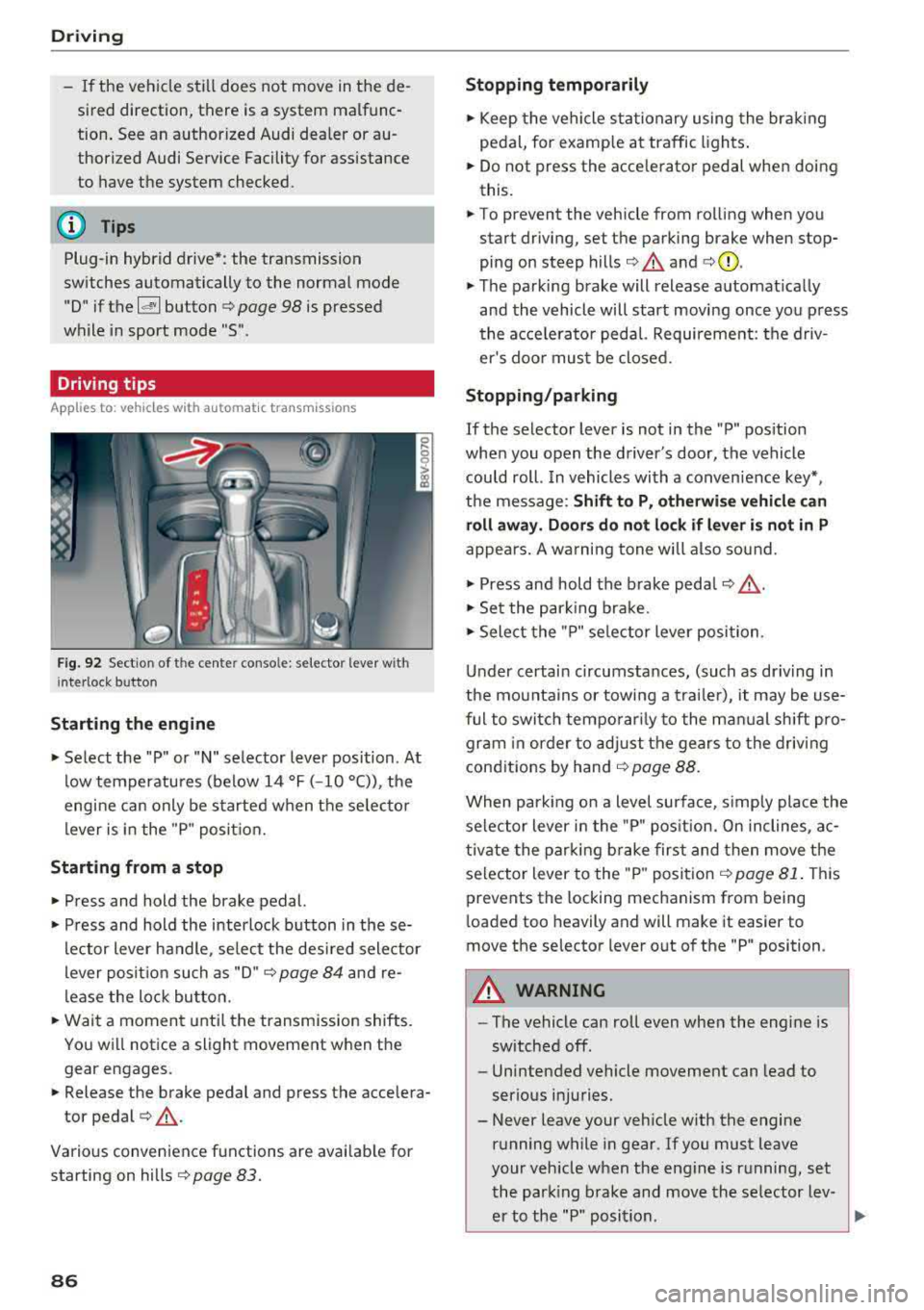
F ig . 9 2 Sect io n of the cente r co nso le: se le cto r lever w it h
i nte rlock butto n
Starting the engine
• Select the "P" or "N" selector lever position . At
low temperatu res (be low 14 °F ( -10 °C)), the
engine can only be started when t he se lec to r
l ever is in the "P " posit io n.
Starting from a stop
• Press and hold the brake pedal.
• Press and hold the interlock button in these
lector lever handle, se lect the des ired sele ctor
lever posit io n such as "D" ¢
page 84 and re
lease the loc k bu tton.
• Wait a moment unti l the transmission shifts.
Yo u w ill not ice a slight movement when the
gear engages.
• Release the brake pedal and press the accelera
tor
pedal ¢,&. .
Various convenience functions are avai lab le for
starting on hills ¢
page 83.
86
Stopping temporarily
• Keep the vehicle st ationary using the bra kin g
peda l, for examp le a t traffic ligh ts.
• Do not press the acce le rato r pedal when doing
this.
• To prevent the vehicle from rolling when you start driving, set the pa rking brake when stop
ping on steep
hills ¢.&. and ¢(Q).
• The parking brake will release a utomat ica lly
and the vehicle will start moving once yo u press
the acce le rato r pedal. Requirement: the d riv
er's doo r mus t be closed.
Stopping/parking
If the selector lever is not in the "P" pos ition
whe n you open the d river's door, the vehicle
could roll. In vehicles with a conven ience key *,
the message :
Shift to P, otherwise vehicle can
roll away. Door s do not lock if lever is not in P
appe ars . A wa rning tone wi ll also sound.
• Press and hold the brake peda l¢ ,&. .
• Set t he par king brake.
• Select the "P" se lector lever posi tion .
Un der certai n circumstances, (such as dr iving in
the mo unta ins or towi ng a trailer), it may be use
ful to switch temporar ily to the m an ual shift pro
gr am in or der to ad ju st t he gears to the driv ing
cond it ions by hand ¢
page 88.
When parking on a level surface, s imp ly place the
se le ct or lever i n the "P" pos ition. On inclines, a c
tivate the par king b rake first and then move the
se lector lever to the "P " posit ion ¢
page 81. Thi s
prevents the locking mechanism from being
l oaded too heavily and will make it easier to
move the selector lever out of the "P" position.
A WARNING
- The vehicle can roll even whe n the engi ne is
sw itched off .
- Unintended vehicle movement can lead to
serio us injuries.
- Never leave your veh icle with the engine
r u nning while in gear. If you must leave
your veh icle when the eng ine is r unning, set
t he par king brake and move the se lecto r lev
er to the "P " posi tion .
Page 89 of 404
u. 00 .-< N l' N .-< 0 N > 00
-Power is still transferred to the wheels
when the engine is running at idle. To pre
vent the vehicle from "creeping", you must keep your foot on the brake when the en
gine is running and the selector lever is in
the "D", "S" or "R" position or "tiptronic"
mode is selected.
- Do not inadvertently press the accelerator
peda l when the vehicle is stopped if a gear is
engaged. Otherwise the risk of an accident
increases because the vehicle will start to
move immediately, even if the parking brake
is set.
- To reduce the risk of an accident, do not
press the acce lerator pedal when changing
the selector lever position while the vehicle is stationary and the engine is running.
- Never engage the "R" or "P" selector leve l
positions while driving. It could cause a
crash.
- Before driving down a steep slope, reduce
your speed and shift into a lower gear with
"ti ptron i c".
- Do not ride the brakes or press the brake
pedal too often or too long when driving
downhill. Constant braking causes the
brakes to overheat and substantially re
duces braking performance, increases brak
ing distance or causes complete failure of
the brake system.
- If you must stop on an incline, always hold
the vehicle in p lace with the foot brake or
park ing brake to prevent it from rolling
back.
- Never hold the veh icle on an incline with a
sl ip ping clutch. The clutch opens automati
cally when it becomes too hot from the
overload. The
ml indicator light turns on
and a message appears
¢ page 89 when
the clutch is over loaded .
{LlJ) Note
- When stopping on an incline, do not try to
ho ld the vehicle in place by pressing the ac
ce lerator pedal while a driving gear is se
l ected. This can cause the automatic trans
mission to overheat and can damage it. Set
Driving
the parking brake or press the brake pedal
to prevent the vehicle from rolling.
- Allowing the vehicle to roll when the engine
is stopped while the selector lever is in the
"N" position will damage the automatic
transmission, because it is not lubricated
under those circumstances
¢ page 3 78,
Towing with a tow truck.
- The transmission can overheat and be dam
aged under certain driving and traffic condi
tions such as frequent starts, creeping for a
long time, or stop-and-go traffic. When the
ml or. indicator light turns on, stop the
vehicle at the next opportunity and let the
transmission cool¢
page 89.
(D Tips
For safety reasons, the park ing brake only re
l eases automatically when the driver's door is
closed.
Hill descent control
App lies to : vehicles wi th automatic transmiss ions
The hill descent control system assists the driver
when driving down hills.
Hill descent control is act ivated when the selec
tor lever is in the "D" or "S" posit ion and you
press the b rake pedal. The transmission auto
matically se lects a gear that is suitab le for the
hill. Hill descent contro l tries to ma inta in the
speed achieved at the time of braking, within
physical and technica l limitations. If may still be
necessary to adjust the speed with the brakes.
Because hill descent control cannot shift down
farther than 3rd gear, it may be necessary to
shift into tiptronic mode in very steep areas . In
th is case, shift into 2nd or 1st gear in t iptronic
mode to use the engine's braking force to rel ieve
the brakes.
Hill descent control switches
off once the hill lev
els out or you press the accelerator pedal.
On vehicles with a cruise control system*
¢ page 120, hill descent control is also activated
when the speed is set .
.,,.
87
Page 90 of 404
Driving
& WARNING
Hill descent control cannot overcome phys ical
limitations, so it may not be able to maintain
a constant speed under all condit ions. Always
be ready to apply the brakes .
Manual shifting (tiptronic mode)
Applies to: vehicles with automatic transmissions
The tiptronic mode allows the driver to shift the
gears manually.
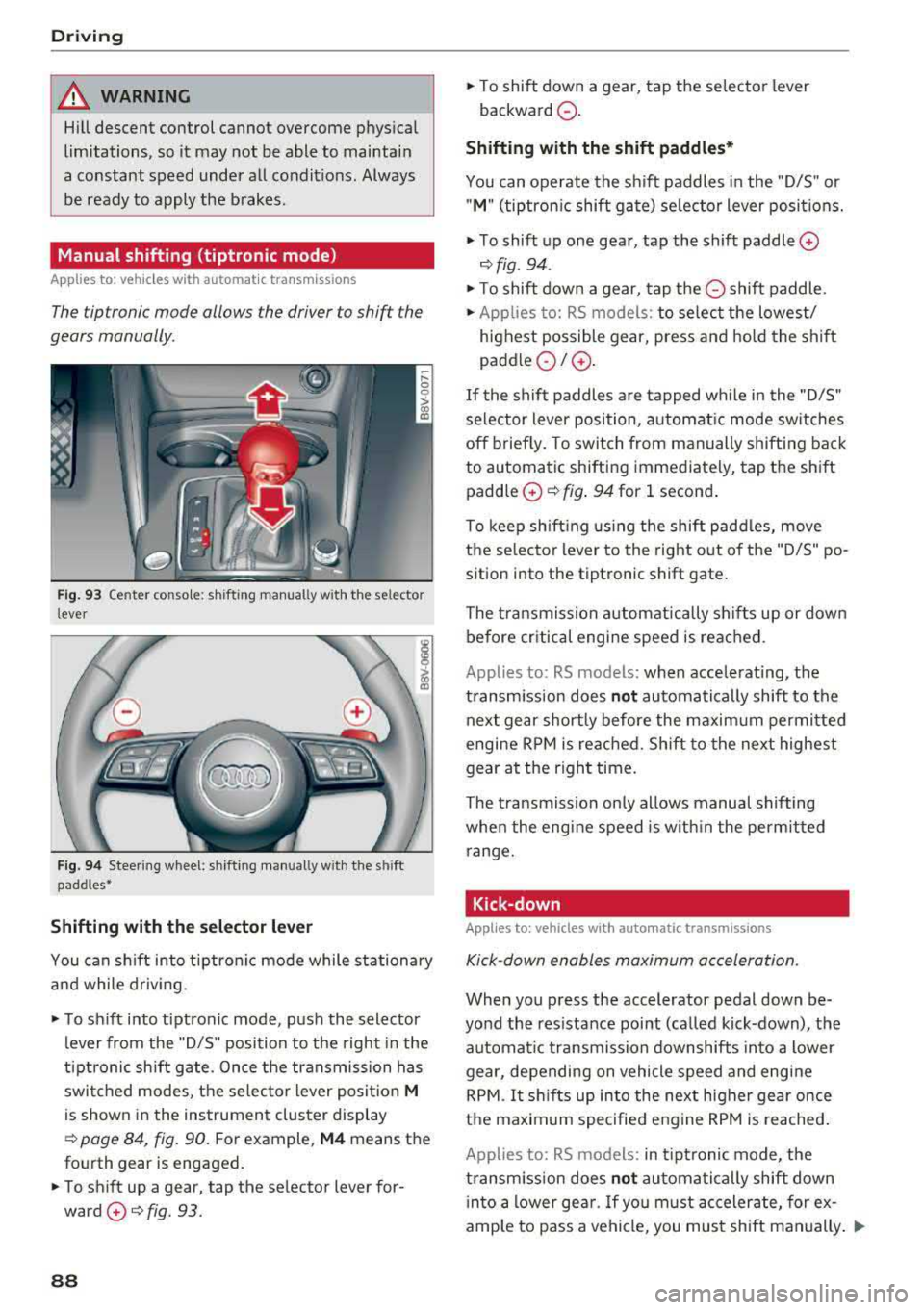
F ig. 9 3 Center conso le : shifting manually w ith the se lector
l ever
F ig . 94 Steering wheel: shifting manual ly w it h the s hift
paddles*
Shifting with the selector lever
You can sh ift into tiptro nic mode while stationary
a nd while driv ing.
• To s hift into tiptronic mode, p ush the selector
lever from the "D/S" position to the right in the
t ip tr onic sh ift gate . Once the transmission has
swi tched modes, t he se lec tor lever posi tion
M
is shown in the instrumen t clus ter display
¢ page 84, fig. 90. For example, M4 means the
fo urth gear is engaged.
• To shift up a gear, tap the se lector lever for
ward
0 ¢ fig. 93 .
88
• To shift down a gear, tap the selecto r lever
backward
0 -
Shifting with the shift paddles*
You can operate the s hift paddles in the "D/S" or
" M " (tiptro nic shift ga te) se lec tor lever posi tions.
• To shift up one gear, tap the shift paddle 0
¢fig . 94.
• To shift down a gear, tap the 0 shift paddle.
• Applies to: RS models: to select the lowest/
highest possi ble gear, press and hold the sh if t
paddle
0 10 .
If the shift paddles a re tapped wh ile in the "D/S"
selector lever position, a utomat ic mode sw itches
off briefly . To swit ch from manually shift ing bac k
to automatic shifting immediate ly, tap t he shift
padd le
0 ¢ fig . 94 for 1 second .
To keep sh ift ing using the shift padd les, move
the selec to r l ever to the right o ut o f th e "D/S" po
sition into the tiptronic shift gate .
The tra nsmission a utomatically sh ifts up or dow n
before cr itical engine speed is reac hed.
Applies to: RS models: when accelerating, the
transm iss ion does
not au tomatically shift to the
next gear short ly before the maxim um permitted
engine RP M is re ached. Shift to the next highest
gear at the right time.
The tra nsmission on ly allows manual shifting
whe n the engine speed is w ith in the perm itted
r a nge.
Kick-down
Applies to: vehicles with automatic transmissions
Kick-down enables maximum acceleration.
When you p ress the accelerator pedal down be
yo nd the res istance point (called kick-down), the
automat ic transmission downshifts into a lower
gear, depending on vehicle s peed and engine
RPM .
It shifts up into the next higher gear once
t h e maximum specified engine RPM is reached .
Applies to: RS models: in tipt ronic mode, the
transm iss ion does
not automa tic ally shift down
i nto a lower ge ar. If yo u m ust accelera te, for ex
ample to pass a vehi cle, you mus t sh ift manually .
..,.
Page 123 of 404
u. 00 .-< N l' N .-< 0 N > 00
the cruise control from braking. This is be
cause p ressing the acce lerato r pedal over
rides the cruise contro l system.
- If a brake system ma lf u nction such as over
heating occurs when the cruise contro l sys
tem is switched on , the braking function in
the system may be switched off . The rest of
the cr uise control system f unctions remain
act ive as long as
the @;(i)~14 (USA models) /
lll (Can ada models) indicato r light is o n.
@ Note
Before driving downhill a long distance on a
s teep hill, decrease yo ur speed and select a
lower gear. This makes use of the eng ine
b rak ing effect and re lieves the bra kes.
(D Tips
The b rake ligh ts turn on w hen the brakes a re
act ivated .
Changing the speed
Applies to: vehicles with cruise control system
"'T o inc rease o r decrease the speed in incre
ments,
tap t he lever in the 0 10 d irec tion
Q page 12 0, fig. 1 21 .
.. To increase or decrease the speed quickly, hold
the leve r in the 0 / 0 di rect io n until t he de
s ired speed is reached.
Overriding the speed
Applies to: vehicles with cruise control system
You can press the accelerator pedal to increase
your speed, for example if you want to pass someo ne. The s peed yo u set ea rlier will resume
as soo n as yo u release the accelerator pedal.
H owever, if you are driving cons iderably faster
tha n the stored s peed for a long period of time,
the c ruise cont rol system will tempora rily switch
off.
Th e@;(l)~i4 (USA models) 1B (Canada mod
e ls) indica to r li ght in the ins trumen t cluste r
turns off and t he stored s peed is main taine d.
A ss istance systems
Preselecting a speed
Applies to: vehicles with cruise control system
You can pre-select your desired speed when the
vehicle is stationary .
"'Switch the ignit ion on.
"' Pull the lever into pos ition (D Q page 120 ,
fig . 121 .
.. To increase or decrease the speed, tap the lever
in the
0 10 d irection .
This function makes it possible, for example, to
save the speed you want before driving on the highway . Once on the highway, activate the
cr uise co ntro l system by p ulling the lever towa rd
t h e position
(D .
Switching off
Applies to: vehicles with cruise control system
Deactivating temporarily
"' Press the br ake pe dal, or
"' Press the lever into position @(not clicked in to
p lace)
Qpage 1 2 0, fig. 1 21, or
Switching off completely
"' Press the lever into pos ition @(clicked into
p lace), o r
"'Swi tch the ignit ion off.
T he speed you stored will be ma intained if the
cr uise co ntro l has been switche d off tempora rily.
T o resume the sto red speed, re lease the br ake
ped al and pull the lever to posi tion
(D .
Switch ing the ignition off w ill erase the stored
speed.
Switching off automatically
[~;(1)~14 ( USA models )/EI (Canada models )
Crui se control syst em: currently unavailable .
Se e owner's manual
The cruise cont rol system was automatically
turned off because the system has detected a
malfu nction th at is impa iring the c ruise control
func tion. Try switching the cruise contro l system
o n aga in later .
.,.
121