door AUDI A4 2008 B8 / 4.G Service Manual
[x] Cancel search | Manufacturer: AUDI, Model Year: 2008, Model line: A4, Model: AUDI A4 2008 B8 / 4.GPages: 342, PDF Size: 13.14 MB
Page 151 of 342
Audi side assist149
Controls
Safety
Driving tips
General maintenance
Self-help
Technical data
Audi side assistLane change assist featureApplies to vehicles: with side assistDescription
The side assist function assists the driver when changing
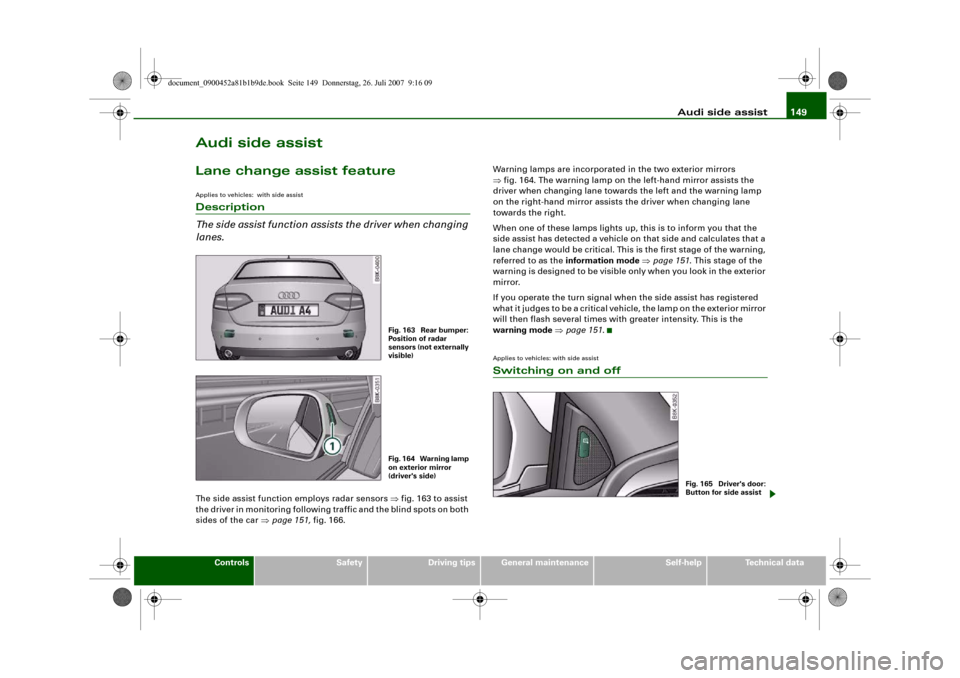
lanes.The side assist function employs radar sensors ⇒fig. 163 to assist
the driver in monitoring following traffic and the blind spots on both
sides of the car ⇒page 151, fig. 166.Warning lamps are incorporated in the two exterior mirrors
⇒fig. 164. The warning lamp on the left-hand mirror assists the
driver when changing lane towards the left and the warning lamp
on the right-hand mirror assists the driver when changing lane
towards the right.
When one of these lamps lights up, this is to inform you that the
side assist has detected a vehicle on that side and calculates that a
lane change would be critical. This is the first stage of the warning,
referred to as the information mode ⇒page 151. This stage of the
warning is designed to be visible only when you look in the exterior
mirror.
If you operate the turn signal when the side assist has registered
what it judges to be a critical vehicle, the lamp on the exterior mirror
will then flash several times with greater intensity. This is the
warning mode ⇒page 151.
Applies to vehicles: with side assistSwitching on and off
Fig. 163 Rear bumper:
Position of radar
sensors (not externally
visible)Fig. 164 Warning lamp
on exterior mirror
(driver's side)
Fig. 165 Driver's door:
Button for side assist
document_0900452a81b1b9de.book Seite 149 Donnerstag, 26. Juli 2007 9:16 09
Page 181 of 342

HomeLink179
Controls
Safety
Driving tips
General maintenance
Self-help
Technical data
HomeLinkUniversal transmitterApplies to vehicles: with HomeLinkDescription
The HomeLink universal transmitter can be programmed
to replace the hand-held controls of devices already in
use.HomeLink allows you to conveniently activate garage doors, estate
gates, security systems, home or office lighting and other electric
devices by means of control buttons inside your car.
HomeLink can replace up to three hand-held transmitters operating
existing devices on your property with a single universal trans-
mitter. This will be possible for most transmitters which control the
drive units for a garage door or external gates, etc. You can
programme the individual hand-held transmitters for your remote
control at or near the centre of the radiator grille. This is where the
control unit is located.
To be able to control systems with HomeLink, you need to perform
initial programming on the HomeLink transmitter first. If systems
fail to respond after the initial programming, check whether these
systems work with a "rolling code" (variable security code)
⇒page 180.
WARNING
When you are programming the HomeLink universal transmitter,
make sure that no persons or objects are close to the devices
receiving the transmitter signals. If a gate or door is inadvertently
set into motion during programming, persons might be injured or
other damage caused by moving parts.
Note
•
For additional information on HomeLink
® and/or products
compatible with HomeLink
®, please call the toll-free HomeLink
®
hotline (0) 08000466 35465 or alternatively +49 (0) 6838 907 277, or
visit the HomeLink
® website at: www.homelink.com
•
HomeLink
® is a registered trademark of Johnson Controls.
Applies to vehicles: with HomeLinkProgramming the universal transmitter
The HomeLink unit is programmed at the radiator grille.
Fig. 197 Operating
unit in headlinerFig. 198 Radiator grille
document_0900452a81b1b9de.book Seite 179 Donnerstag, 26. Juli 2007 9:16 09
Page 182 of 342
HomeLink 180
At the operating unit
1. Switch on the ignition (do not start the engine).
2. Press and hold down the two outer HomeLink buttons
⇒page 179, fig. 197 until the indicator diode
⇒page 179, fig. 197 begins to flash after about
20 seconds. This procedure will delete the standard
factory settings and does not need to be repeated when
programming the other buttons.
3. Press the particular HomeLink button which you would
like to program.
4. Wait until the diode begins to flash. The HomeLink
module now remains in training mode for 5 minutes.
5. Now step in front of your vehicle with the original hand-
held transmitter for the garage door opener or any other
device you wish to assign to the HomeLink control
button.
At the radiator grille
6. Hold the original hand-held transmitter at or near the
centre of your car's radiator grille ⇒page 179, fig. 198.
7. Press the activator button on the original hand-held
transmitter.
8. As you do so, watch the turn signals on your vehicle.
HomeLink confirms successful programming by flashing
all four turn signals three times.
9. If the turn signals fail to flash three times, repeat the
procedure with the transmitter held at a different
distance from the radiator grille.
The proper distance between the hand-held transmitter and the
HomeLink module at the radiator grille depends on the system you
want to train. It may require several attempts.
The turn signals will flash once if the time limit for the programming
mode has been exceeded. In this case the programming procedure
needs to be performed again. Repeat the sequence at the operating
unit starting with step 3.
The programming instructions above also apply to the other control
buttons. Start with step 3 if you wish to proceed and program the
other two buttons.
If the garage door or other devices still fail to be activated with the
HomeLink control buttons after programming is completed, it is
possible that these systems might be working with a rolling code
instead of the normal fixed security code. If this is the case, a rolling
code programming is required in addition to the steps described
above. ⇒page 180Applies to vehicles: with HomeLinkRolling code programming
Some devices require rolling code programming of the
HomeLink universal transmitter.Identifying a rolling code
– Press the already programmed HomeLink button again
and hold it down.
–Watch HomeLink diode ⇒page 179, fig. 197. If the
diode starts flashing rapidly and turns into a constant
light after about 2 seconds, this indicates that the device
you wish to operate (e.g. a garage door opener) is
equipped with a rolling code.
– Program the rolling code as follows:
AA
AA
AA
document_0900452a81b1b9de.book Seite 180 Donnerstag, 26. Juli 2007 9:16 09
Page 183 of 342
HomeLink181
Controls
Safety
Driving tips
General maintenance
Self-help
Technical data
Activating the garage door opener drive unit
– Locate the programming button on the garage door
drive. The exact location and colour of the button may
vary depending on the type of garage door opener.
– Press the programming button on the door drive unit
(this will normally cause a “programming mode indicator
lamp” on the unit to light up). You now have about 30
seconds to start and complete the programming of the
HomeLink control button on the operating unit.
Programming at the operating unit in the
headliner
– Press and release the already programmed HomeLink
button.
– Press the HomeLink button again to complete rolling
code programming.After programming at the operating unit in the headliner, the
garage door opener should recognize the HomeLink signal and
respond when the HomeLink button is pressed. Now the other
control buttons can be programmed as required.
Note
•
Having a second person assist you makes programming of the
rolling code easier and faster. For some makes of garage door
openers the HomeLink button may have to be pressed a third time
to complete the training sequence.
•
If you encounter problems programming the rolling code you
may find helpful information in the operating instructions of the
garage door opener or other device you wish to operate.
Applies to vehicles: with HomeLinkOperating HomeLink
The programmed devices are activated by means of the
HomeLink control buttons in the headliner.– Make sure that the ignition is on.
– Press the programmed HomeLink button ⇒page 179,
fig. 197. The device assigned to that button (e.g. garage
door) will be activated.The HomeLink indicator diode ⇒page 179, fig. 197 will light up
when you press the button.Applies to vehicles: with HomeLinkErasing the button programming
You can erase the complete HomeLink programming by
pressing the two outer buttons.– Switch on the ignition (do not start the engine).
– Press and hold down the two outer buttons until the indi-
cator diode starts to flash ⇒page 179, fig. 197.
– Then release the buttons.After the programming of the HomeLink buttons has been erased,
the system will return to the training mode and is ready to be re-
programmed at any time.
Note
•
Programmed buttons cannot be erased individually.
•
For security reasons it is advisable to erase the programming of
the HomeLink buttons prior to selling your vehicle.
document_0900452a81b1b9de.book Seite 181 Donnerstag, 26. Juli 2007 9:16 09
Page 184 of 342
HomeLink 182Applies to vehicles: with HomeLinkRe-programming a button
A HomeLink button can be re-programmed individually
without affecting the other button allocations.At the operating unit in the headliner
– Press and hold down the selected button until the indi-
cator diode ⇒page 179, fig. 197 starts flashing slowly.
At the radiator grille
–Hold the original hand-held transmitter for the garage
door opener or other device directly in front of the radi-
ator grille of your vehicle (at or near the centre)
⇒page 179, fig. 198. The exact distance depends on the
system that you want to program.
– Press the button on the original hand-held transmitter
for the garage door opener or other device.
– As you do so, watch the turn signals on your vehicle.
HomeLink confirms successful programming by flashing
all four turn signals three times.
– If the turn signals fail to flash three times, repeat the
procedure with the transmitter held at a different
distance from the radiator grille.When the turn signals have flashed three times, this means the
device previously stored in HomeLink has been erased and the new
system programmed in its place. To activate the new system, press
the HomeLink button that has just been re-programmed.
Note
It may require several attempts before programming is successful.
When programming a new device, keep the button pressed for at least 15 seconds before trying again with the transmitter in a
different position. Keep watching the turn signals during that
time.
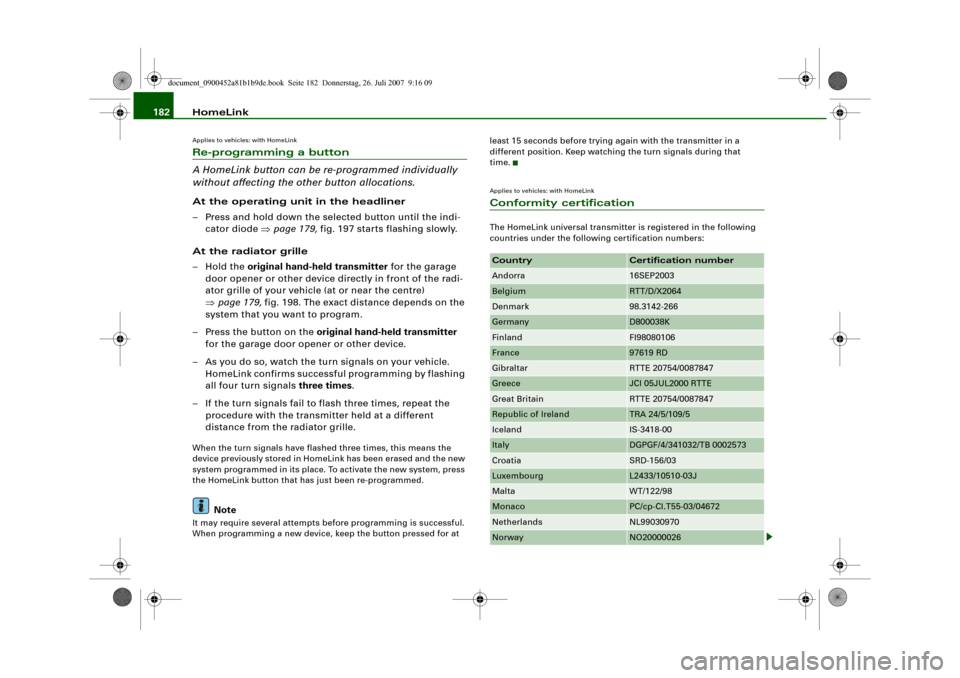
Applies to vehicles: with HomeLinkConformity certificationThe HomeLink universal transmitter is registered in the following
countries under the following certification numbers:Country
Certification number
Andorra
16SEP2003
Belgium
RTT/D/X2064
Denmark
98.3142-266
Germany
D800038K
Finland
FI98080106
France
97619 RD
Gibraltar
RTTE 20754/0087847
Greece
JCI 05JUL2000 RTTE
Great Britain
RTTE 20754/0087847
Republic of Ireland
TRA 24/5/109/5
Iceland
IS-3418-00
Italy
DGPGF/4/341032/TB 0002573
Croatia
SRD-156/03
Luxembourg
L2433/10510-03J
Malta
WT/122/98
Monaco
PC/cp-CI.T55-03/04672
Netherlands
NL99030970
Norway
NO20000026
document_0900452a81b1b9de.book Seite 182 Donnerstag, 26. Juli 2007 9:16 09
Page 195 of 342
Safe driving193
Controls
Safety
Driving tips
General maintenance
Self-help
Technical data inside. In this case the child would be unable to get out of the
vehicle without help. This could have fatal consequences.
•
Never allow children to play in or around the vehicle. Always
close and lock the boot lid and all the doors when you leave the
vehicle.
•
Never let passengers ride in the luggage compartment. All
occupants must be properly restrained by the seat belts at all
times ⇒page 194.Note
•
Air circulation in the vehicle helps reduce fogging of the
windows. Used air escapes through ventilation slots in the rear of
the vehicle. Make sure that these ventilation slots are not
obstructed.
•
Suitable belts for securing loads to the fastening rings* are
commercially available.
Applies to vehicles: with fastening ringsFastening rings
Unsecured loads are a hazard to all vehicle occupants.There are fastening rings in the luggage compartment
which can be used to secure luggage and other objects
⇒page 79.
– Use the fastening rings to secure items safely in the
luggage compartment ⇒ in “Loading the luggage
compartment” on page 79.During a collision or an accident, even small and light objects can
possess so much energy that they can cause very severe injuries.
The amount of this “kinetic energy” depends on the speed of the vehicle and the weight of the object. The most significant factor,
however, is the speed of the vehicle.
An example: An object weighing 4.5 kg is lying unsecured in the
vehicle. During a frontal collision at a speed of 50 km/h, this object
generates a force corresponding to 20 times its weight. That means
that the effective weight of the object increases to about 90 kg. You
can imagine the severity of the injuries which might be sustained if
this “projectile” strikes an occupant as it flies through the
passenger compartment.
WARNING
If items of luggage or other objects are secured to the fastening
rings with inappropriate or damaged retaining cords, injuries
could result in the event of sudden braking or a collision.•
To prevent pieces of luggage or other objects from flying
forward, always use appropriate retaining cords which are prop-
erly secured to the fastening rings.
•
Never secure a child seat on the fastening rings.
WARNING (continued)
document_0900452a81b1b9de.book Seite 193 Donnerstag, 26. Juli 2007 9:16 09
Page 207 of 342
Airbag system205
Controls
Safety
Driving tips
General maintenance
Self-help
Technical data
Side airbagsDescription of side airbags
The airbag system is not a substitute for the seat belts.The side airbags are located in the backrest padding of the front
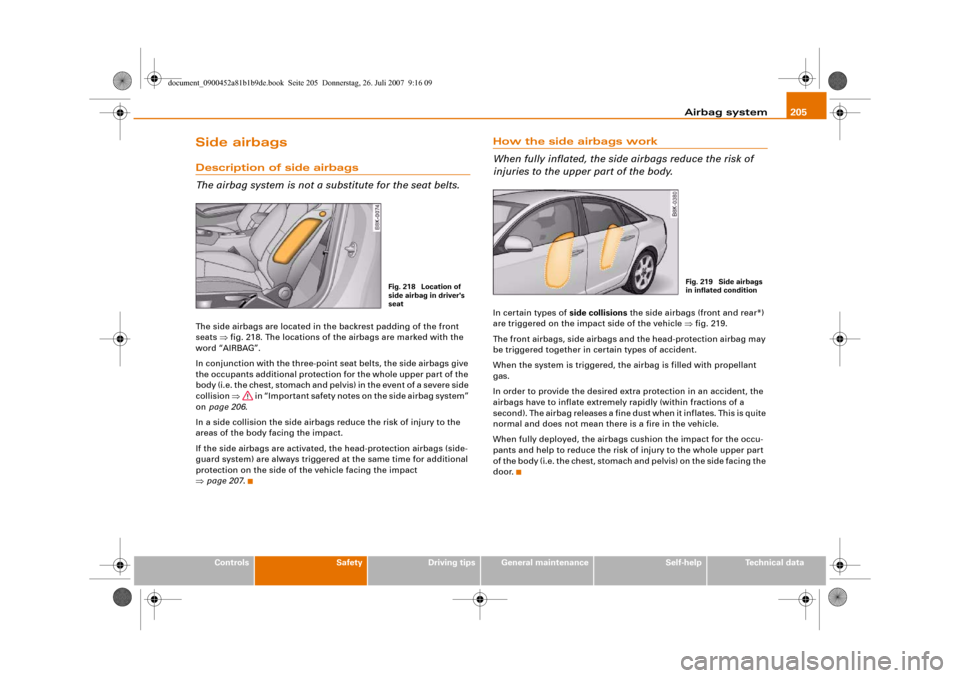
seats ⇒fig. 218. The locations of the airbags are marked with the
word “AIRBAG”.
In conjunction with the three-point seat belts, the side airbags give
the occupants additional protection for the whole upper part of the
body (i.e. the chest, stomach and pelvis) in the event of a severe side
collision ⇒ in “Important safety notes on the side airbag system”
on page 206.
In a side collision the side airbags reduce the risk of injury to the
areas of the body facing the impact.
If the side airbags are activated, the head-protection airbags (side-
guard system) are always triggered at the same time for additional
protection on the side of the vehicle facing the impact
⇒page 207.
How the side airbags work
When fully inflated, the side airbags reduce the risk of
injuries to the upper part of the body.In certain types of side collisions the side airbags (front and rear*)
are triggered on the impact side of the vehicle ⇒fig. 219.
The front airbags, side airbags and the head-protection airbag may
be triggered together in certain types of accident.
When the system is triggered, the airbag is filled with propellant
gas.
In order to provide the desired extra protection in an accident, the
airbags have to inflate extremely rapidly (within fractions of a
second). The airbag releases a fine dust when it inflates. This is quite
normal and does not mean there is a fire in the vehicle.
When fully deployed, the airbags cushion the impact for the occu-
pants and help to reduce the risk of injury to the whole upper part
of the body (i.e. the chest, stomach and pelvis) on the side facing the
door.
Fig. 218 Location of
side airbag in driver's
seat
Fig. 219 Side airbags
in inflated condition
document_0900452a81b1b9de.book Seite 205 Donnerstag, 26. Juli 2007 9:16 09
Page 208 of 342
Airbag system 206Important safety notes on the side airbag system
There are a number of safety points concerning the airbag
system which you should remember. This will help to
reduce the risk of injury in an accident.
WARNING
•
If you do not wear a seat belt, if you lean forward, or are not
seated correctly while the vehicle is in motion, you are at greater
risk of injury should the side airbags on the front seats or the outer
rear seats* be triggered in an accident. This applies particularly to
children if they are not properly protected by a child restraint
system ⇒page 212, “Important notes on side airbags and child
safety”.
•
If children are not seated correctly, they are at greater risk of
injury in an accident. This is particularly the case if the child is
travelling on the front passenger's seat and the airbag system is
triggered. This could result in serious or potentially fatal injury
⇒page 210, “Child safety”.
•
It is also important not to attach any accessories (such as cup
holders) to the doors. This would impair the protection offered by
the side airbags (front and rear*).
•
The sensors for the airbags are located in the front doors. You
must therefore not make any modifications to the doors or door
trim (e.g. retrofitting loudspeakers), as this could impair the func-
tion of the side airbags. Any damage to the front doors could lead
to faults in the system. Repairs or any other work on the front
doors must therefore always be carried out by a qualified work-
shop.
•
The built-in coat hooks should only be used for lightweight
clothing. Do not leave any heavy or sharp-edged objects in the
pockets.
•
Do not apply excessive force to the sides of the backrests (such
as hard knocks or kicks), as this could damage parts of the system.
The side airbags could then fail to operate when required.
•
If you intend to fit protective covers over the seats, these must
be of the specific type approved for use on Audi seats with side
airbags. Conventional seat covers would obstruct the side airbag
when it inflates out of the backrest, and seriously reduce the
airbag's effectiveness.
•
Any damage to the original seat upholstery or around the
seams of the side airbag units must be repaired immediately by a
qualified workshop.
•
Any work involving the side airbag system or removal and
installation of the airbag components for other repairs (such as
repairs to the seats) must always be performed by a qualified
workshop. Otherwise the airbag system may fail to work
properly.WARNING (continued)
document_0900452a81b1b9de.book Seite 206 Donnerstag, 26. Juli 2007 9:16 09
Page 209 of 342
Airbag system207
Controls
Safety
Driving tips
General maintenance
Self-help
Technical data
Head-protection airbags (sideguard)Description of head-protection airbags
The head-protection airbags work together with the side
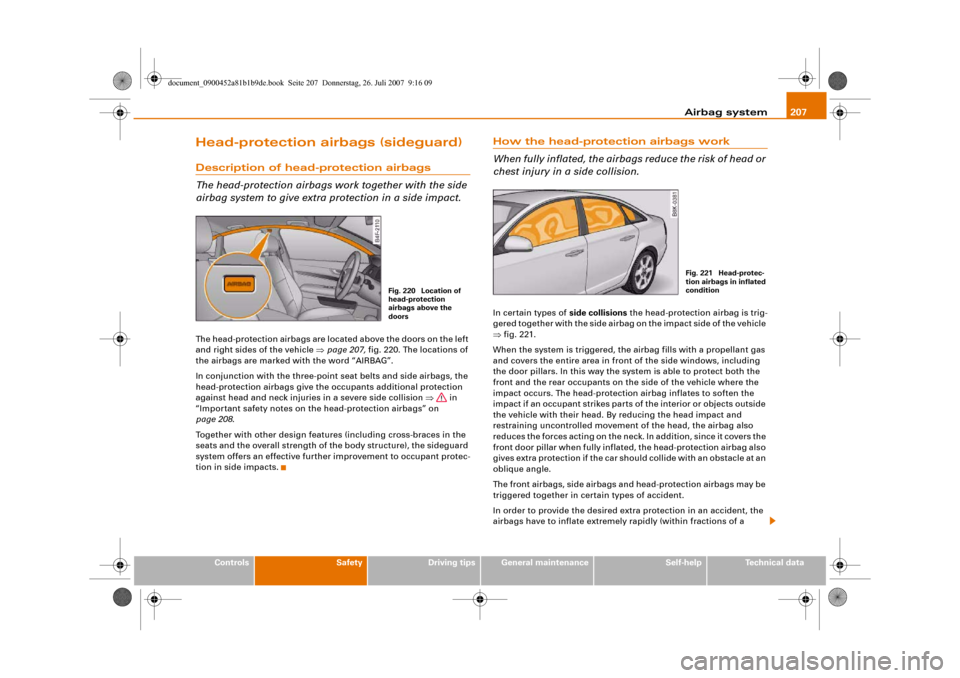
airbag system to give extra protection in a side impact.The head-protection airbags are located above the doors on the left
and right sides of the vehicle ⇒page 207, fig. 220. The locations of
the airbags are marked with the word “AIRBAG”.
In conjunction with the three-point seat belts and side airbags, the
head-protection airbags give the occupants additional protection
against head and neck injuries in a severe side collision ⇒ in
“Important safety notes on the head-protection airbags” on
page 208.
Together with other design features (including cross-braces in the
seats and the overall strength of the body structure), the sideguard
system offers an effective further improvement to occupant protec-
tion in side impacts.
How the head-protection airbags work
When fully inflated, the airbags reduce the risk of head or
chest injury in a side collision.In certain types of side collisions the head-protection airbag is trig-
gered together with the side airbag on the impact side of the vehicle
⇒fig. 221.
When the system is triggered, the airbag fills with a propellant gas
and covers the entire area in front of the side windows, including
the door pillars. In this way the system is able to protect both the
front and the rear occupants on the side of the vehicle where the
impact occurs. The head-protection airbag inflates to soften the
impact if an occupant strikes parts of the interior or objects outside
the vehicle with their head. By reducing the head impact and
restraining uncontrolled movement of the head, the airbag also
reduces the forces acting on the neck. In addition, since it covers the
front door pillar when fully inflated, the head-protection airbag also
gives extra protection if the car should collide with an obstacle at an
oblique angle.
The front airbags, side airbags and head-protection airbags may be
triggered together in certain types of accident.
In order to provide the desired extra protection in an accident, the
airbags have to inflate extremely rapidly (within fractions of a
Fig. 220 Location of
head-protection
airbags above the
doors
Fig. 221 Head-protec-
tion airbags in inflated
condition
document_0900452a81b1b9de.book Seite 207 Donnerstag, 26. Juli 2007 9:16 09
Page 210 of 342
Airbag system 208second). The airbag releases a fine dust when it inflates. This is quite
normal and does not mean there is a fire in the vehicle.Important safety notes on the head-protection airbags
There are a number of safety points concerning the airbag
system which you should remember. This will help to
reduce the risk of injury in an accident.
WARNING
•
It is important to ensure that the area around the openings for
the head-protection airbags remains unobstructed at all times, so
that the airbags can inflate properly if needed.
•
The built-in coat hooks should only be used for lightweight
clothing. Do not leave any heavy or sharp-edged objects in the
pockets. When using the coat hooks, do not hang the clothes on
coat hangers.
•
The space between the passengers and the head-protection
airbags must never be occupied by children, other passengers or
pets. Passengers should never lean out or put a hand or arm out of
the window while the vehicle is in motion.
•
Do not move the sun visors out to cover the side windows if
there is anything attached to them (such as pens or a remote
control for the garage door). These objects could cause injury if the
head-protection airbag is triggered.
•
The sensors for the airbags are located in the front doors. You
must therefore not make any modifications to the doors or door
trim (e.g. retrofitting loudspeakers), as this could impair the func-
tion of the side airbags. Any damage to the front doors could lead
to faults in the system. Repairs or any other work on the front
doors must therefore always be carried out by a qualified work-
shop.
•
Where sun blinds are fitted on the rear doors, these must not
obstruct or impair the airbags in any way.
•
If unsuitable accessories are installed near the head-protection
airbag, the protection afforded by the airbag can be seriously
impaired if the system is triggered. When the head-protection
airbag opens, parts of these accessories could be thrown into the
vehicle and injure passengers ⇒page 277.
•
Any work involving the head-protection airbags, or removal
and installation of the airbag components for other repairs (such
as repairs to the roof liner), must always be performed by a quali-
fied workshop. Otherwise the airbag system may fail to work
properly.
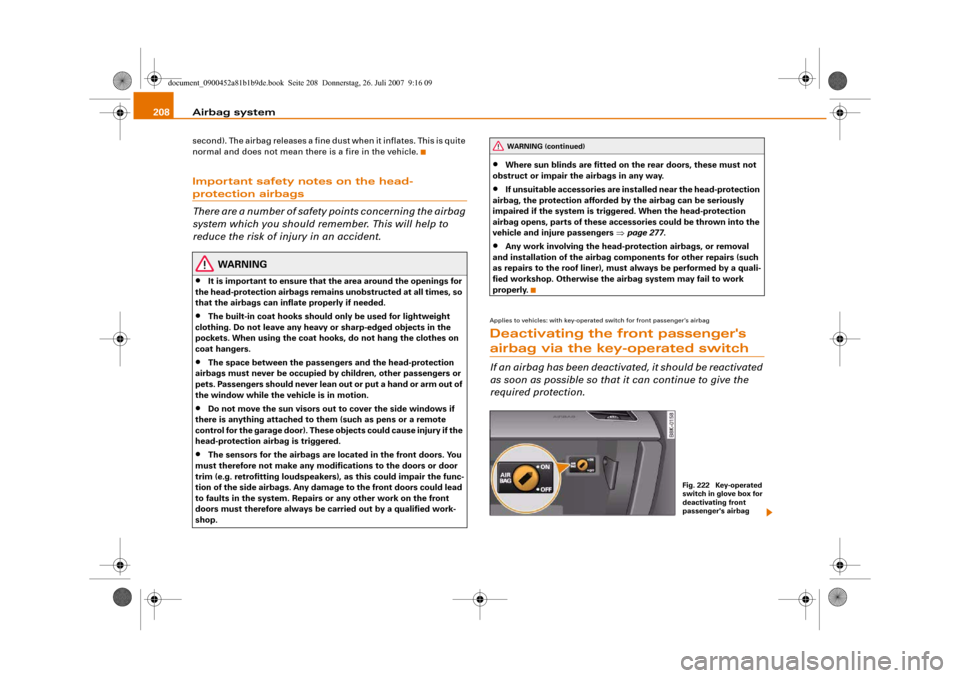
Applies to vehicles: with key-operated switch for front passenger's airbagDeactivating the front passenger's airbag via the key-operated switchIf an airbag has been deactivated, it should be reactivated
as soon as possible so that it can continue to give the
required protection.
WARNING (continued)
Fig. 222 Key-operated
switch in glove box for
deactivating front
passenger's airbag
document_0900452a81b1b9de.book Seite 208 Donnerstag, 26. Juli 2007 9:16 09