mmi AUDI A4 2013 Owners Manual
[x] Cancel search | Manufacturer: AUDI, Model Year: 2013, Model line: A4, Model: AUDI A4 2013Pages: 302, PDF Size: 75.61 MB
Page 11 of 302
CD
@
®
©
®
®
(j)
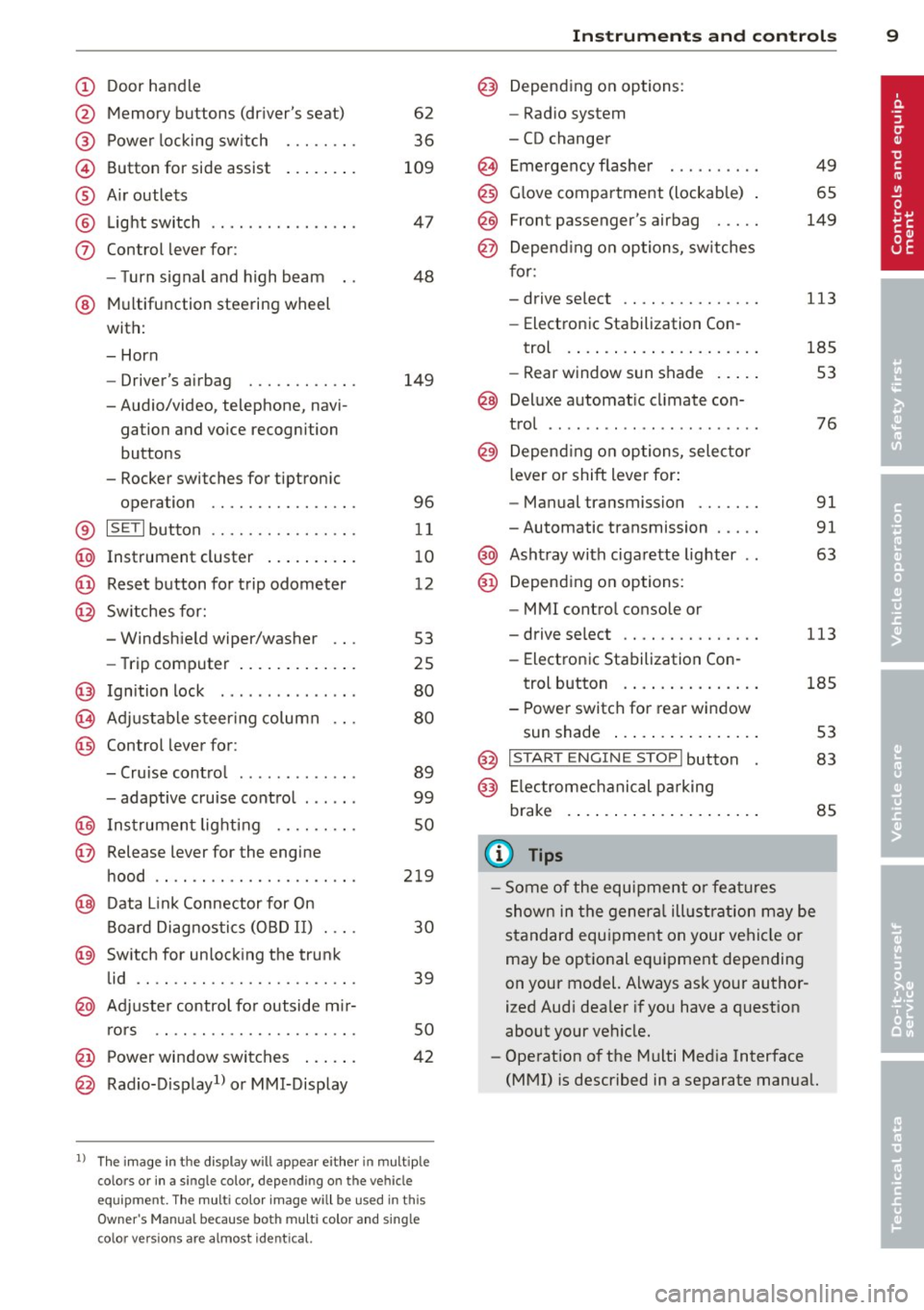
Door handle
Memory buttons (dr iver's seat)
Power locking sw itch
Button for side ass ist
A ir outlets
L ight switch
Control lever for :
- T urn signal and high beam
@ Multifunction steering wheel
with:
- Horn
- Driver's airbag
- Audio/video, telephone, navi-
gation and vo ice recognition
buttons
- Rocker switches for tiptron ic
opera tion ........... .... .
® ISET I button ...... ..... .... .
@ Instrument cluster .. ... .. .. .
@ Reset button for trip odometer
@ Sw itches for:
- Windsh ield wiper/washer
- Trip computer ..... ... .. .. .
@ Ignition lock ............. . .
(8) Adjustable s teer ing column
@ Control lever for :
- Cruise contro l ......... ... .
- adaptive cruise contro l .... . .
@ Ins trumen t lighting .... .. .. .
@ Release lever for the engine
hood .. .. .. .. ........... .. .
@ Data L ink Connector for On
B oard Diag nostics (OBD II) . .. .
@ Sw itch for unlock ing the trunk
lid .. .. .. ................. .
@ Adjuster control fo r outside m ir-
r ors .. .. .. .. ........... .. .
@ Power window switches ... .. .
@ Rad io-Display1l or MMI-Display
62
36
109
4 7
48
149
96
11
10
12
53
25
80
80
89
99
so
219
30
39
50
42
l) T he image in t he d is pl ay will app ear e it h er in mu lt iple
c o lor s or in a singl e co lor , de pen din g o n th e vehicl e
e q ui pment. T he m ulti co lo r im age w ill b e used i n this
O w ner's M anual becau se bo th mu lt i co lo r and si ng le
c o lor ver sio ns are almos t ide ntic al.
In strument s and control s 9
@) Depend ing on options:
- Rad io system
- CD changer
Emergency flashe r
G love compartment (lockab le)
Front passenger's airbag .....
Depend ing o n op tions, sw itches
f or: 49
65
149
- drive select .. .. .......... .
113
- Electronic Stabilization Con-
trol . ... .. .. .. . .. ... .... .
- Rear window sun shade .. .. . 185
53
@ Deluxe automat ic cl imate con-
trol ...... .. .... .......... .
@) Depending on options, selecto r
lever or shift lever for :
- Manual transmission ...... .
- Automatic transmission .... .
@ Asht ray with ciga rette lighter
@ Depend ing on options:
- MMI contro l console or
76
91
91
63
- drive select . . . . . . . . . . . . . . . 113
- Electronic Stabilizat ion Con-
trol button . . . . . . . . . . . . . . . 185
- Power switch for rear window sun shade . . . . . . . . . . . . . . . . 53
@ I STA RT ENGI NE STOPI button 83
@) Electromec hanical p arking
brake . . . . . . . . . . . . . . . . . . . . . 85
(D Tips
-Some of the equipment o r fea tures
show n in the gener al illustration m ay be
standard equ ipment on your vehicle or
may be optional eq uipment depending
on your model. Always as k your author
ized Aud i dea ler if you have a quest ion
about your ve hicle.
- Operat ion of the Multi Med ia Interface
(MMI) is described in a separate manua l.
Page 14 of 302
12 Instruments and warning/indicator lights
disabled. It is also important to notify your in
surance company about the loss .
Setting the speed warning
By pressing the I SETI button br iefly, you can
set threshold 1 of the speed warning while
you are dr iv ing
~ page 88. By mainta ining
pressure on the ISETI button, you de lete the
warning threshold.
Digital clock with date display and
Odometer
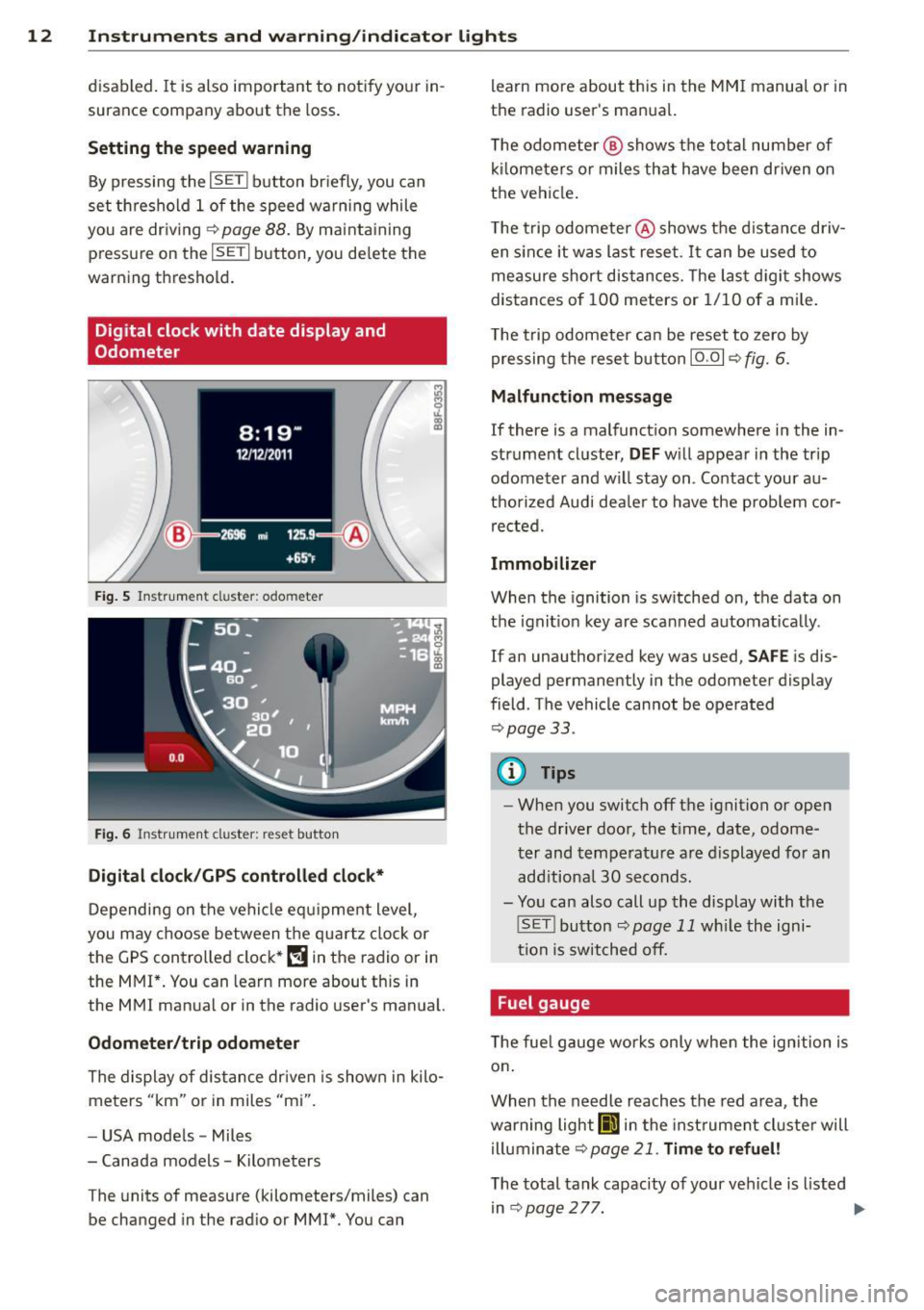
Fig. 5 Instrument cl uster: odo meter
Fig. 6 Instrum ent cl uster : re se t button
Digital clock/GPS controlled clock*
Depending on the vehicle equ ipment level,
you may choose between the quartz clock or
the
GPS controlled clock* (!j in the radio or in
the MMI*. You can learn more about th is in
the MMI manual or in the radio user's manual.
Odometer /trip odometer
The display of distance dr iven is shown in kilo
meters "km" or in miles "mi".
- USA mode ls - Miles
- Canada models - Kilometers
T he units of measure (kilometers/miles) can
be changed in the radio or
MMI*. You can learn more about this in the MM
I manual or in
the radio user's manual.
T he odometer @ shows the total number of
kilometers or miles that have been driven on
the vehicle .
The trip odometer @shows the distance driv
en since it was last reset .
It can be used to
measure short distances. The last digit shows
distances of
100 meters or 1/10 of a mile.
T he trip odometer can be reset to zero by
pressing the reset button IO .OI
~ fig. 6.
Malfunction message
If there is a malfunction somewhere in the in
strument cluster,
DEF will appear in the trip
odometer and w il l stay on . Contact your au
thorized Audi dea le r to have the prob lem cor
rected.
Immobilizer
When the ignition is switched on, the data on
t h e ignition key are scanned automat ically .
If an unauthor iz ed key was used,
SAFE is dis
played permanently in the odometer display
field . The vehicle cannot be operated
~ page 33.
(D Tips
-When you switch off the ignition or open
the-driver door, the t ime, date, odome
ter and temperature are displayed for an
add itiona l
30 seconds.
- You can also call up the display with the
! SET !button
~page 11 while the igni
tion is switched off.
· Fuel gauge
T he fue l gauge works only when the ignition is
on .
When the needle reaches the red area, the
warning light
Ii] in the instr ument cluster will
illuminate
Qpage 21. Time to refuel!
The total tank capacity of your vehicle is listed
in~page277. .,,.
Page 28 of 302
26 Driver in formation d isplay
¢fig . 10 . The data from the single -trip mem
ory (memory leve l 1) is being displayed if a
D
appears in the display . If a II is shown, then
the data from the total -trip memory is being
d isplayed (memory leve l 2). The fuel pump
nozzle
iii indicates the efficiency program*
¢ page 27.
Single-tr ip m emory (Trip computer 1 )
The single-trip memory stores the trip infor
mat ion from the time the ignition is turned o n
until it is turned off. If the trip is continued
w ithin 2 hours from the t ime the ignition was
turned off, the new data will be included in
the calcu lation of the current trip i nfo rma
tion .
If the t rip is inte rrupted fo r more than 2
hours the memory is reset automati ca lly.
Total -trip memory (Trip computer 2)
Unlike the sing le-trip memory, the tota l- tr ip
memory is not reset automatically . Th is per
mits you to evaluate your d riving data for the
enti re pe riod be tween manual rese ts.
Efficiency program*
The effic iency program can help you to use
less fuel ¢
page 2 7.
Operation
App lies to vehicles: with trip computer
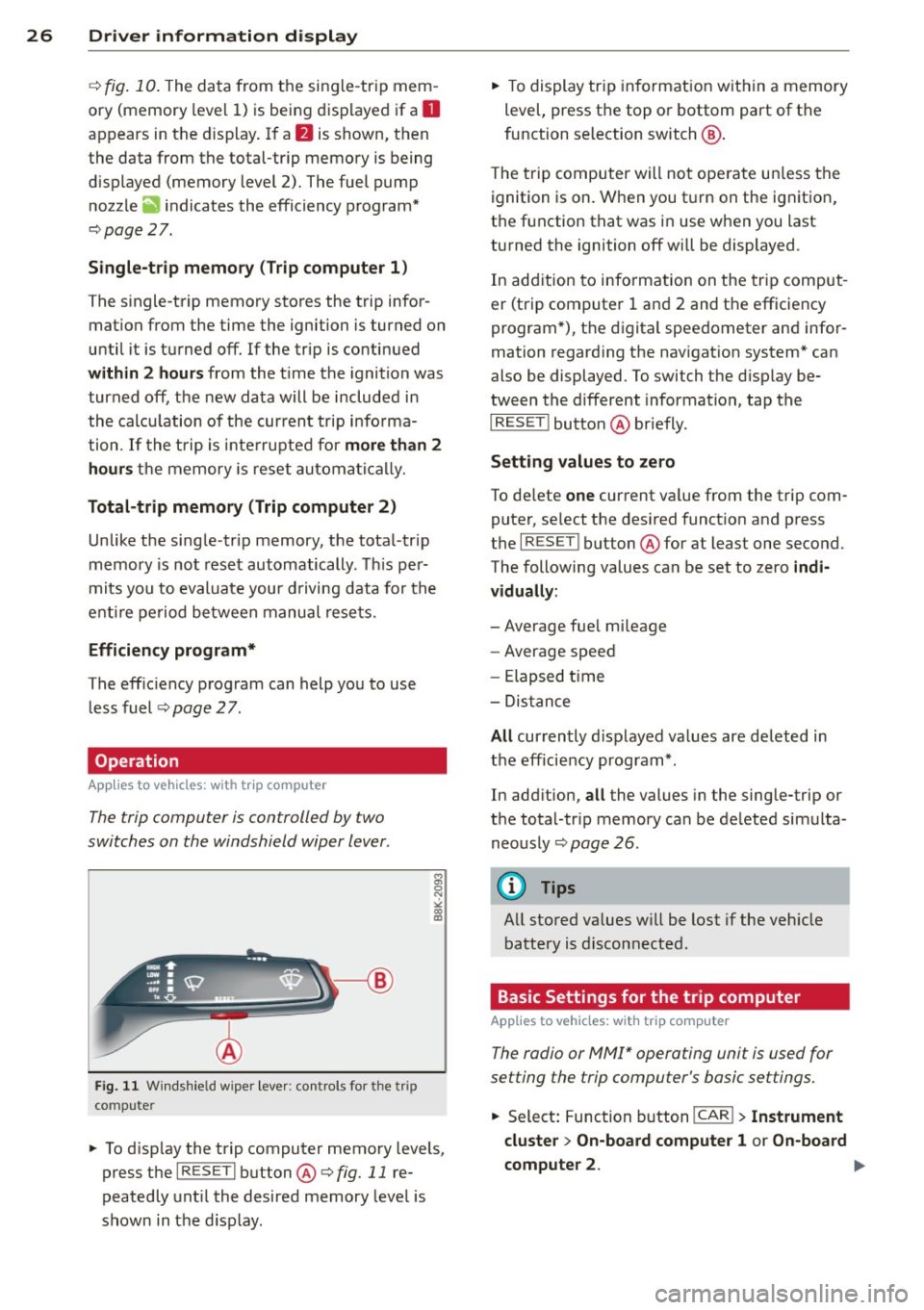
The trip computer is controlled by two
switches on the windshield wiper lever .
Fig. 11 W indsh ie ld wipe r leve r: co ntrols for the tri p
co mpute r
M
"' 0 N
"' co a:,
~ To d isp lay the trip computer memory levels ,
press the
I RES ET I button @¢ fig. 11 re
peatedly unt il the desired memory leve l is
shown in the d isplay .
~ To display tr ip in format ion wit hin a memory
level, press the top or bottom part of the
function se lection switch @.
T he trip computer will not ope rate un less the
ignition is on. W hen you t urn on the ignition,
the function that was in use when you last
turned the ignition off will be displayed .
In add ition to info rmation on the trip comput
er (trip computer 1 and 2 and the efficiency
program *), t he digital spee dometer and infor
mation regard ing the nav igat ion system* can
also be displayed. To switch the d isp lay be
tween the different information, tap the
I RESET ! button@ briefly.
Sett ing values to zero
To de lete one current va lue from the trip com
puter, se lect the des ired funct ion and press
t h e
I RES ET I button @for at least one second.
The following values can be set to zero
indi
vidually :
- Average fue l mi leage
- Average speed
- Elapsed t ime
- Dis tance
All cur rently d isplayed va lues are deleted in
the eff iciency program*.
In add it ion,
all the values in the single-trip or
the total-tr ip memory can be de leted simulta
neously ¢
page 26.
(D Tips
All stored va lues w ill be lost if the veh icle
battery is discon nected .
Basic Settings for the trip computer
Applies to vehicles: with trip computer
The radio or MMI* operating unit is used for
setting the trip computer's basic settings.
~ Select: Function b utton ICAR ! > Instrument
cluster > On -board computer 1 or On-board
computer 2 . .,.
Page 31 of 302
Fuel economy messages
Applies to vehicles: with trip computer w ith efficiency
program
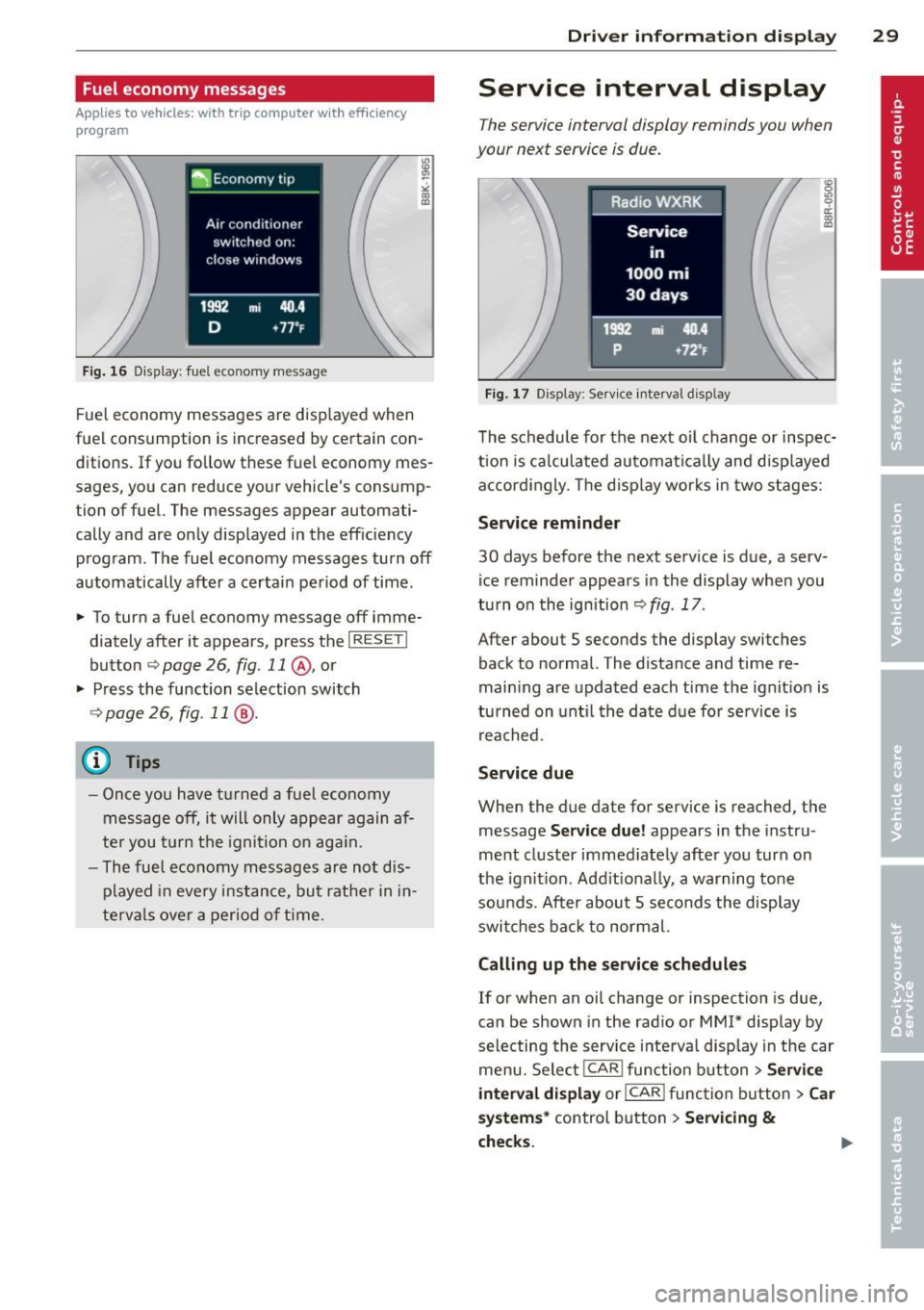
Fig . 16 Display: fuel eco nomy me ssage
F ue l economy messages are disp layed when
fuel consumption is increased by certa in con
ditions. If you follow th ese fu el economy mes
sages, you can reduce your vehicle's consump
tion of fuel. The messages appear automati
cally and are only displayed in the eff ic iency
program . The fuel economy messages turn off
automatically after a certain period of time .
• To turn a fuel economy message off imme
diately after it appear s, press the
I RES ET I
button ¢ page 26, fig . 11 @ , or
• Press the function selection switch
¢ page 26, fig. 11 @ .
(D Tips
- Once you have turned a fuel economy
message off, it will only appear again af
te r you turn the ignition on aga in.
- The fuel economy messages are not dis
played in every instance, but rathe r in in
te rva ls over a period of time .
Driver inform ation di spl ay 29
Service interval display
The service interval display reminds you when
your next service is due .
Fig. 17 Disp lay: Se rvice i nterval d is pl ay
The schedule for the next oi l change or inspec
tion is ca lculated automatica lly and disp layed
accord ingly. The d isp lay works in two stages:
Service reminde r
30 days before the next service is due, a serv
ice reminder appears in the display whe n you
turn on the ignition ¢
fig. 17 .
After about S seconds the display switches
back to normal. The distance and time re
main ing are updated each time the ignit ion is
tu rned on unt il th e date due for service is
reached.
Service due
When the due da te for service is reached , the
message
Ser vice due! appears in the in stru
ment cluster immed iately after you turn on
the ignit ion. Add it iona lly, a warning tone
sou nds . After about S seconds the disp lay
switches bac k to normal.
Calling up the service schedule s
If or when an oil change or inspection is due,
can be shown in the rad io or
MMI* disp lay by
selecting the service interva l display in the car
menu. Select !CAR ! func tion button>
Servic e
interval d ispl ay
o r! CAR ! function button> C ar
sys te m s*
control button > Serv icing &
check s.
Page 34 of 302
32 Openin g and clo sing
Opening and closing
Power locking system
General description
The power locking system locks or unlocks all
doors and the rear lid simultaneously.
You can lock and unlock the vehicle centrally.
You have the following choices:
- Remote master key~
page 35,
-Door handles with convenience key*
~page 36,
-Lock cy linder at the dr iver's door
~ page 38, or
- Power loc king switch inside
~ page 36.
Automatic l ocking
The automatic locking feature locks all the ve
h icle doors and the rear lid when you drive
faster than 9 mph ( 15 km/h) .
The car is unlocked again once the ignition key is removed. In addition, the veh icle can be un
locked if the opening function in the power
lock ing system switch or at one of the door
leve rs is actuated. The Auto Loc k function can
be turned on and off in the rad io or
MMI*
~ page 37.
Addit ionally, in the event of a crash with a ir
bag deployment the doors are automatically
un locked to allow access to the veh icle.
Selective unlocking
When you lock the vehicle, the power locking
system w ill lock the doors and the rear lid .
When unlocking, you can set in the rad io or
MMI* whether
only the dr iver's door or the
enti re ve hicle should be unlocked
~ page 37.
Anti -th eft alarm warning system
If the anti-theft alarm warning system de
tects a break- in into the vehicle, acoust ic and
visua l wa rning signals are triggered.
The anti -theft warn ing system is act ivated au
tomatically when you lock the vehicle .
It is de
activated when u nlocking using the remote key, with the mechanica
l key, and when yo u
switch on the ignition.
T he alarm a lso t urns off when t he a la rm cycle
has expired.
Turn signals
When you u nlock the veh icle, the turn s ignals
flash twice , when you lock it once . If they do
not flash, one of the doo rs, the luggage com
partment lid or the hood is not locked or the
ignition is s till sw itched on.
Unint entionally locking yourself out
In the follow ing cases there safegua rds to
prevent you lock ing you r remote master key in
the vehicle:
- The vehicle does not lock w ith the power
lock ing switch ~
page 36 if the drive r's
door is open .
- On veh ides with convenience key*, if the
most recently used master key is in the lug
gage compa rtment, the rear lid is automat i
cally un locked again after it is closed.
Do not lock your veh icle w ith the remote mas
ter key or convenience key* unt il all doors and
the rea r lid a re closed . In this way you avoid
locking yourself out accidentally .
_& WARNING
-
-When you leave the veh icle, alw ays re
move the ignition key and take it with
you . This will prevent passengers (chil
dren, for example) from acc identally be
ing locked in the vehicle should they acci
dentally press the power locking switch in the front doors .
- Do not leave ch ildren inside the vehicle
unsuperv ised. In an emergency it would
be imposs ible to open the doors from
the o utside without the key .
(D Tips
- In the event of a crash with airbag de
ployment all locked doors will be auto
matically unlocked to give access to the
vehicle occupants from the outside.
Page 37 of 302
@ For the sake of the environment
Dispose of dead batteries properly so as
not to pollute the environment.
@ Tips
The replacement battery must be the
same specification as the original.
Emergency unlocking of the ignition key
In the event of malfunctions in the electrical
system, it may happen that you cannot re move the ignition key .
• Remove the mechanical key<:? page 34.
• Lock the vehicle using the mechanical key
<:?page 38.
• Have the e lectrica l system inspected by an
authori zed Audi dealership .
Locking and unlocking the vehicle with
the remote control
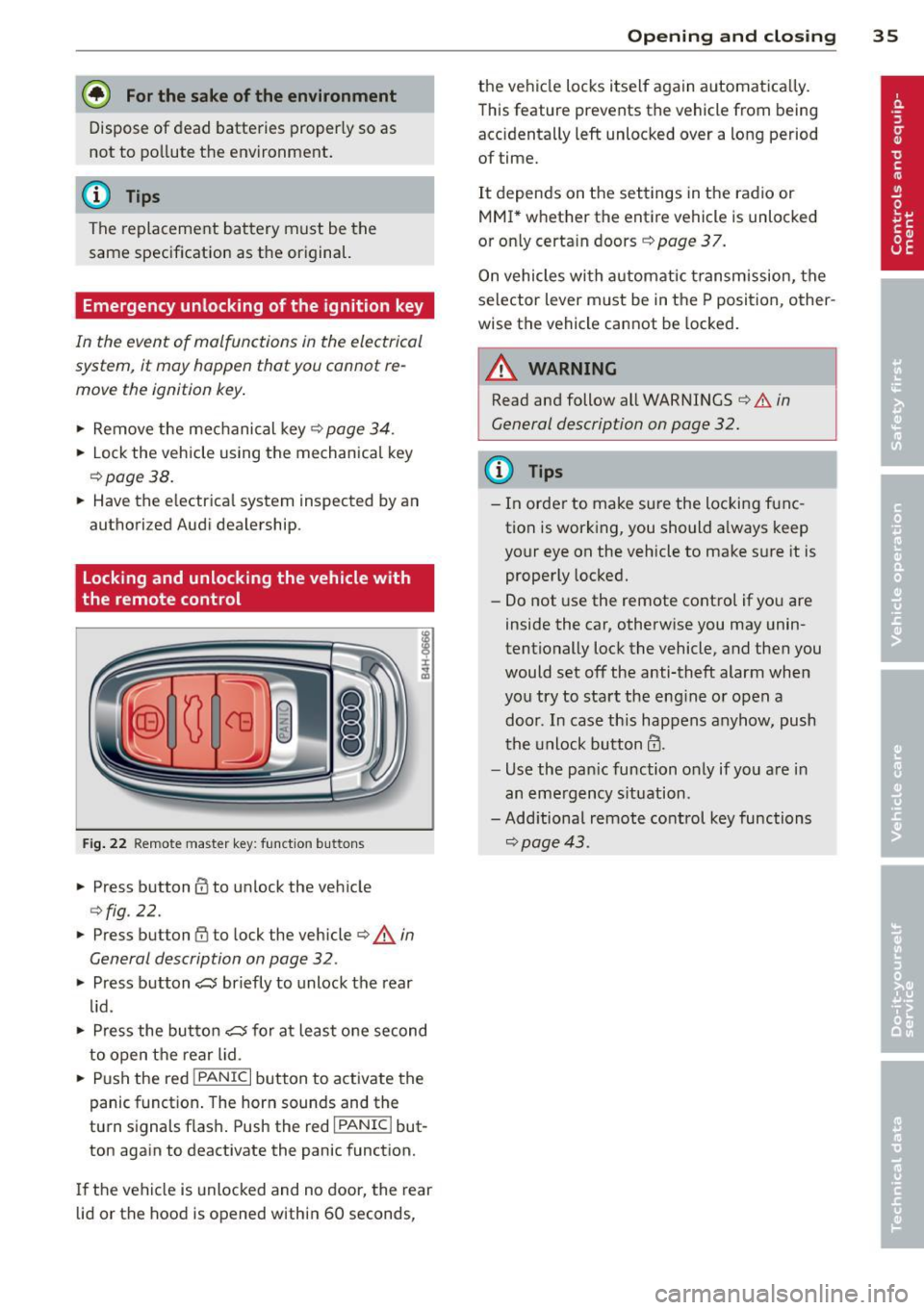
Fig. 22 Remote master key: function but tons
• Press button @to unlock the vehicle
Qfig . 22.
• Press button fij to lock the vehicle QA in
General description on page
32 .
• Press button ,c:;5 briefly to unlock the rear
lid .
• Press the button
,c:;5 for at least one second
to open the rear lid .
• Push the red
I PANIC I button to activate the
panic function. The horn sounds and the
turn s ignals flash . Push the red
I PANIC ! but
ton again to deactivate the panic function.
If the vehicle is unlocked and no door, the rear
lid or the hood is opened within 60 seconds,
Opening and closing 35
the vehicle locks itself again automat ica lly.
This feature prevents the vehicle from being
accidentally left unlocked over a long period of time.
It depends on the settings in the radio or
MMI* whether the entire vehicle is unlocked
or only certain doors <:?
page 37.
On vehicles with automatic transmission, the
selector lever must be in the P position, other
wise the vehicle cannot be locked.
A WARNING
Read and follow all WARNINGS ¢.&. in
General description on page
32.
(D Tips
- In order to make sure the locking func
tion is working, you should a lways keep
your eye on the vehicle to make sure it is properly locked.
- Do not use the remote control if you are
inside the car, otherwise you may unin
tentionally lock the vehicle, and then you
would set off the anti-theft alarm when
you try to start the eng ine or open a
door . In case this happens anyhow, push
t he unlock button@.
- Use the pan ic function only if you are in
an emergency s ituation.
-Add itional remote control key functions
¢page 43 .
Page 38 of 302
36 Opening and clo sing
locking and unlocking with convenience
key
Appl ies t o vehicles : wit h convenience key
The doors ond the rear lid can be unlocked
and locked without operating the master key.
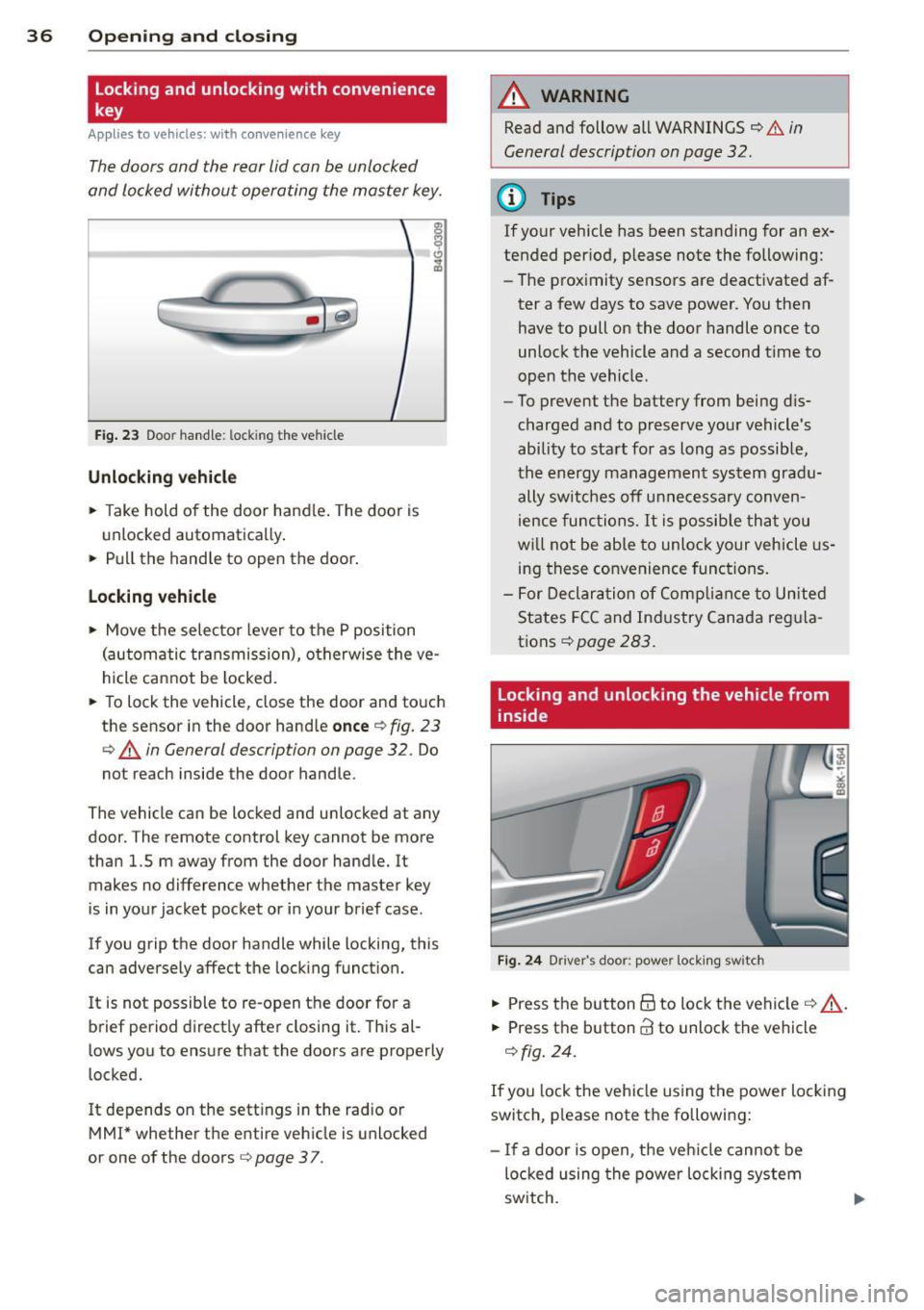
Fig . 23 Door hand le: lock ing the v ehi cle
Unlocking vehicl e
.. Take hold of the door hand le . The door is
unlocked automatically .
.. Pull the handle to open th e door .
locking vehicle
.. Move the selecto r lever to the P position
(au tomatic transmission), o therwise the ve
hicle cannot be locked.
.. To lock the veh icle , close the door and to uch
the sensor in th e door hand le
once ¢ fig. 23
c:> A in General description on page 32. Do
not reach inside the door handle .
The vehicle ca n be locked and unlocked at any
doo r. T he remote control key cannot be more
t han 1.5 m away from the door hand le. It
makes no difference whether the m aster key
is in your jacket pocket or i n your brief ca se .
If you grip the door handle while lo cking, th is
can adversely affect the lock ing funct ion.
I t is not possible to re-open the door for a
brief period direct ly after closing it. This al
l ows you to ensure that the doors are properly
locked.
I t depends on the sett ings in the radio or
MMI* whether the e ntire vehicle is unlocked
or one of the doors
c:> page 3 7 .
A WARNING
-
Read and follow all WARNINGS c:> .&. in
General description on page
32 .
(D Tips
If your vehicle has been standing for an ex
tended per iod, please note the following:
- The prox imity sensors are deactivated af-
ter a few days to save power. You then
have to pull on the door handle once to
unlock the vehicle and a second t ime to
open the vehicle .
- To prevent the battery from being d is
charged and to preserve your vehicle 's
ability to start for as long as possib le,
the energy managemen t system gra du
ally switches off u nnecessa ry c onven
ience func tions.
It is possib le th at you
w ill not be able to unloc k your vehicle us
ing these convenience func tions.
- F or Declar ation of Complian ce to Unite d
States FC C and Ind ustry Canada reg ula
tions
¢ page 283.
locking and unlocking the vehicle from
inside
Fi g. 24 Drive r's doo r: pow er lock ing sw it c h
.. Press the b utton B to lock the vehicle c::> ,& .
.. Press the button @ to unlock the vehicle
¢ fig. 24.
If you lock the veh icle using the power loc king
switch, p lease note the followi ng:
- I f a door is open, the veh icle canno t be
loc ked u sing the power loc king system
sw itch.
Page 42 of 302
40 Opening and closing
Power opening/closing rear lid
Applies to vehicles: wit h au tom atic rear lid op erat ion
The open position can be adjusted.
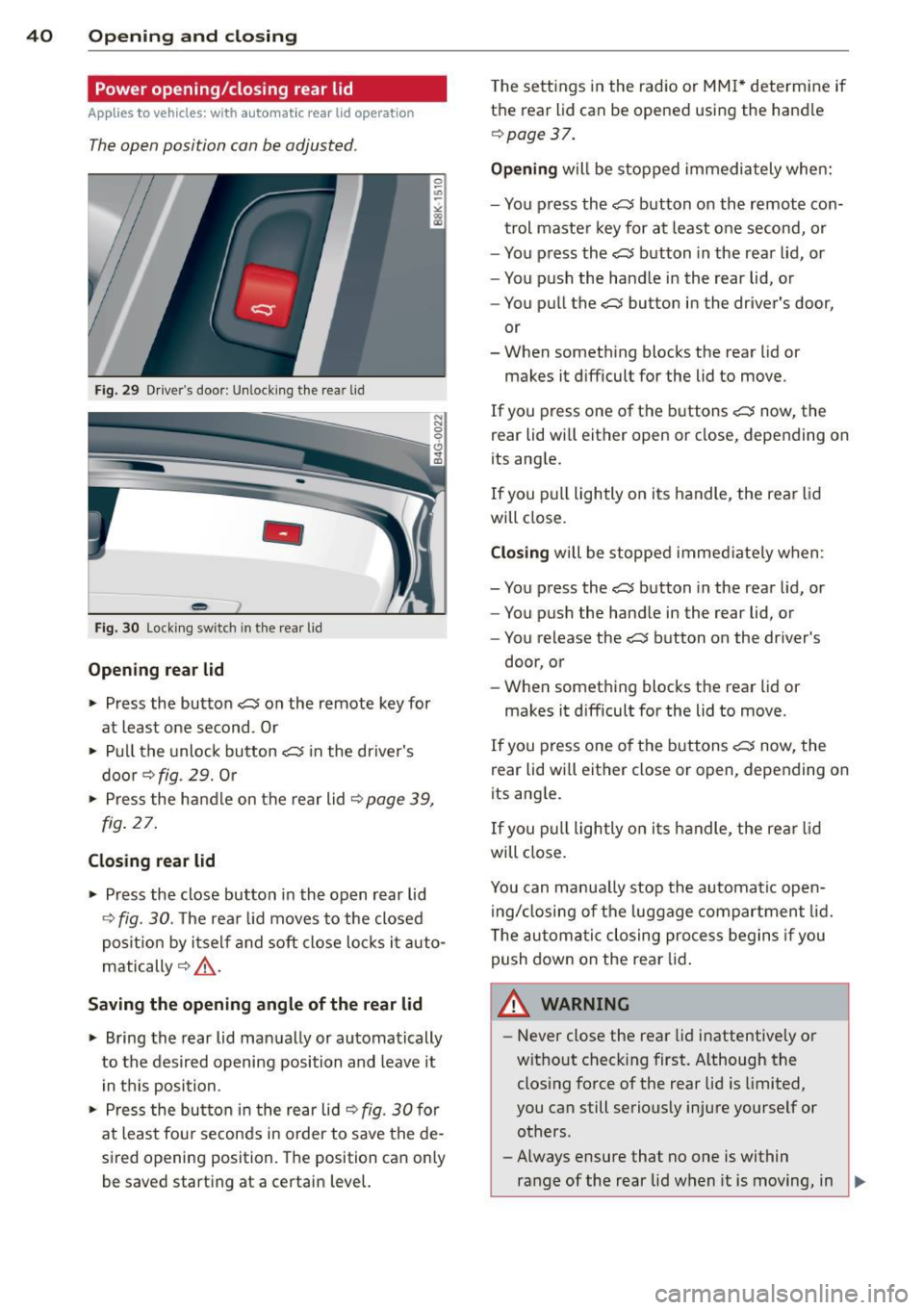
Fig . 29 Drive r's door: Unlock ing the rear lid
-
Fig. 30 Locking switch in the rear lid
Opening rear lid
~ Press the button C$ on the remote key for
at least one second . Or
~ Pull the unlock button C$ in the driver's
door
r::::> fig. 29. Or
~ Press the handle on the rear lid r:::;, page 39,
fig. 27.
Closing rear lid
~ Press the close button in the open rear lid
r::::> fig. 30. The rear lid moves to the closed
position by itself and soft close locks it auto
matically
r:::;, ,&. .
Saving the opening angle of the rear lid
~ Bring the rear lid manually or automatically
to the desired opening position and leave it
in this position.
~ Press the button in the rear lid r:::;, fig. 30 for
at least fou r seconds in order to save the de
sired opening position. The position can only
be saved start ing at a certain level. T
he sett ings in the radio or MMI* determine if
the rear lid can be opened using the handle
r::::>page 37.
Opening will be stopped immediately when:
- You press the
C$ button on the remote con-
trol master key for at least one second, or
- You press the
C$ button in the rear lid, or
- You push the handle in the rear lid, or
- You pull the
C$ button in the driver's door,
or
- When something blocks the rear lid or
makes it difficult for the lid to move.
If you press one of the buttons
C$ now, the
rear lid will either open or close, depending on
its angle.
If you pull lightly on its handle, the rear lid
will close.
Closing will be stopped immediately when :
- You press the
C$ button in the rear lid, or
- You push the handle in the rear lid, or
- You release the
C$ button on the driver's
door, or
- When something blocks the rear lid or
makes it difficult for the lid to move.
If you press one of the buttons
C$ now, the
rear lid wi ll either close or open, depending on
its ang le.
If you pull lightly on its h andle, the rear lid
will close.
You can manua lly stop the automatic open
ing/closing of the luggage compartment lid.
T he automatic closing process begins if you
push down on the rear lid.
A WARNING ,..___
-Never close the rear lid inattentive ly or
without check ing first. Although the
closing force of the rear lid is limited,
you can still seriously injure yourself or others.
- Always ensure that no one is within
range of the rear lid when it is moving, in
~
Page 49 of 302
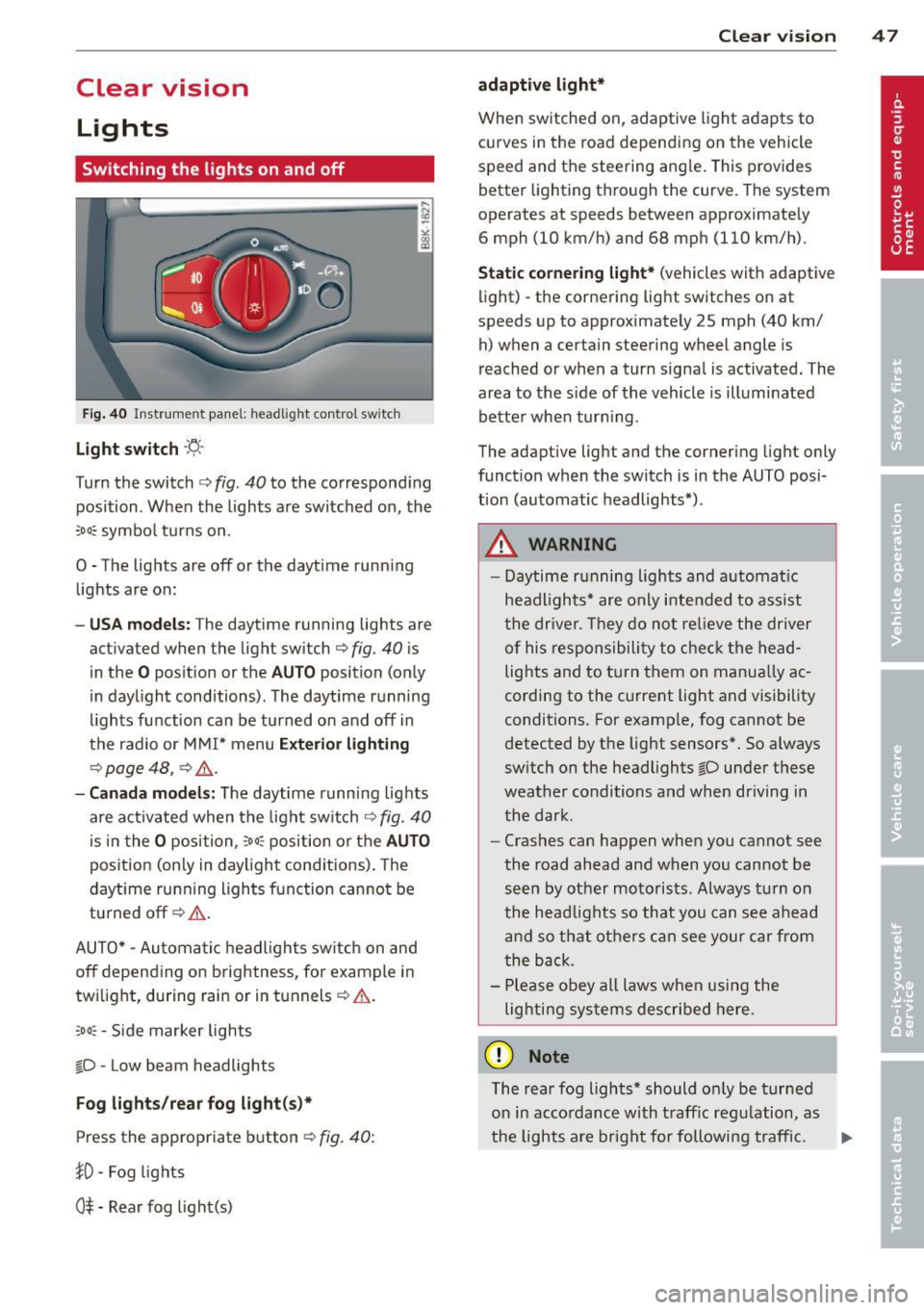
Clear vision Lights
Switching the lights on and off
F ig . 40 Instrument pane l: headlight control switch
Light switch ·'t/,·
Turn the switch c> fig . 40 to the correspond ing
position . When the lights are switched on, the
:oo: symbol turns on.
0 • The lights are off or the dayt ime running
lights are on:
- USA mod els : The daytime running lights are
activated when the light sw itch
c> fig . 40 is
in the
O position or the AUTO position (only
in daylight conditions) . The daytime running
lights function can be turned on and off in
the radio or MMI* menu
E xteri or li ghtin g
¢ page 48 , c> &_.
-Ca nad a mod els: The daytime runn ing lights
are activated when the light sw itch
¢ fig . 40
is in the O position, :oo : position or the AUTO
posit ion (only in daylight conditions). The
daytime running lights function cannot be
turned off¢&. .
AUTO* -Automatic headlights switch on and
off depending on b rightness, for example in
tw ilight, during rain or in tunnels¢,& .
:oo: -Side marker lights
~D -Low beam headlights
Fog light s/rea r fog ligh t(s)*
Press the appropriate button c> fig. 40:
1D -Fog lights
0$ -Rear fog light(s)
Clear vi sion 4 7
adaptive light*
When switched on, adaptive ligh t adap ts to
curves in the road depend ing on the vehicle
speed and the steering ang le. This provides
better lighting through the curve. The system
operates at speeds between approximately 6 mph (10 km/h) and 68 mph (110 km/h).
St atic corner ing light * (vehicles with adaptive
light) -the cornering light switches on at
speeds up to approximately 25 mph (40 km/ h) when a certain steering wheel angle is
reached or when a turn signal is activated. The
area to the s ide of the vehicle is illuminated
better whe n turn ing .
The adaptive light and the cornering light only
function when the switch is in the AUTO posi
tion (automatic headlights*) .
A WARNING
-Daytime running lights and automatic
headlights* are only intended to ass ist
the driver . T hey do no t re lieve the driver
of his responsibility to chec k the head
lights and to t urn them on manua lly ac
cording to the current light and visibility
conditions. For examp le, fog cannot be
detected by the light sensors*. So a lways
switch on the headlights
~D under these
weather conditions and when driving in
the dark .
- Crashes can happen when you cannot see
the road ahead and when you cannot be
seen by other motorists. Always turn on
the head lights so that you can see ahead
and so that others can see your car from
the back.
- Please obey all laws when using the
lig hting sys tems described here.
(D Note
The rear fog lights* should on ly be turned
on in accordance with t raff ic regulation, as
the lights are bright for following traffic. ..,.
Page 50 of 302

48 Clear vis ion
@ Tips
- The light sensor* for headlight control is
located in the rear view m irror mount.
You should therefore not apply any st ick
ers to the windsh ield in this area in order
to prevent malfunctions or failures.
- Some exterior lighting functions can be
adjusted
c> page 48.
- When you remove your key from the igni
tion while the vehicle's lights are turned
on, a buzzer sounds as long as the driv
er's door is open .
- In cool or damp weather, the ins ide of
the headlights, turn signals and tail lights can fog over due to the tempera
ture difference between the inside and
outside. They will clea r shor tly after
switching them on. This does not affect
the service life of the lighting.
- In the even t of a light sensor malfunc
tion, the driver is no tified in the instru
ment cluster disp lay ¢
page 22.
Turn signals and high beam lever
The lever operates the turn signals , the high
b eams and th e headlight flash er.
Fig . 4 1 Tu rn s ig na l an d h ig h beam leve r
Turn sign als ¢i ¢
The turn signals activate when you move the
l ever into a turn s ignal pos ition when the ign i
tion is switched on.
(D -right turn signal
@-left tur n signa l
The turn s ignal blinks three times if you just
tap the lever .
High be ams and headlight flasher [D
Move the lever to the correspon ding posit io n:
@ -high beams on
@ -high beams off o r headligh t fla sher
The indicator light
II in the i nstr ument clus
ter turns on .
Notes on thes e features
- The turn signals on ly work w ith the ign ition
t ur ned on. The indicator lights
B or II in
t he instrument cluster also blink.
- After you have turned a co rner, the tu rn s ig
na l switches off au toma tically .
- The
high beam works on ly w hen the head
lights a re o n. The indicator light
II in the
instrument cluster illuminates when the
high beams are on .
- The
headlight flasher works o nly as long as
you ho ld the lever -even if the re a re no
lights switched on . The ind icator light
II i n
the instrument cluster illum inates when you
use the headlight flasher.
A WARNING
--
Do not use the h igh beam or headlight
flashe r if you know that these could blind
oncom ing traffic.
Adjusting exterior lighting
The functions ore selected in the radio or
MMI" .
.,. Select: I CAR ! function button > Ext erio r
light ing .
Or
.,. Select: !CAR I function button > Car sys
tem s*
contro l button > Ve hicle settings >
Ext eri or lighting .
Coming home (light when leav ing car }* ,
L e aving home (light when unlocking car)*
The coming home function illuminates the
area around the vehicle when the ignition is
switched off and the dr ive r's door is opened .
Depend ing on vehicle equ ipment, the function
can be switched on and off or the length of
time the lights remain on* can be ad justed . ..,_