change time AUDI A4 2017 Owner's Manual
[x] Cancel search | Manufacturer: AUDI, Model Year: 2017, Model line: A4, Model: AUDI A4 2017Pages: 386, PDF Size: 96.32 MB
Page 187 of 386

Messages
Applies to: vehicl es wit h Aud i connect emergency ca ll and
service
II Em ergency call function : malfunction ! Re
s tri cted functionalit y. Please contact Service
If the indicator lig ht turns on and the message
appears, you can only make an emergency call
with restricted funct ion. For example, you cannot
call the emergency call center, but data may st ill
be transmitted under certa in circumstances/
D rive to an autho rized Aud i deale r o r a uthorized
Aud i Service Facility immediately to have t he
mal funct ion correcte d.
B Emergency call function : malfun ction! Fun c
tion unavailabl e. Plea se contact Serv ice
If the indicator light turns on and the message
appears, you cannot make an emergency call.
Drive to an authorized Aud i dea le r or authorized
Aud i Service Fac ility immediately to have the
malfunc tion cor rected.
Online roadside
assistance
Description
Appl ies to: veh icles with Audi connect emergency ca ll and
service
You can request help if you are in an accident or
breakdown situation us ing on line roadside ass is
tance
1> . A roads ide ass istance call is a comb ina
tion of data transmission and a phone call. The data transmission from your vehicle fo rwards im
portant information to the A udi service center,
such as the vehicle and position data.
1l The ava ilability of the services offered depends on the
country and may change over time.
Audi c onn ect emergency call and ser vic e
Calling online roadside assistance
Applies to: vehicles with A udi connect emergency call and
se rvic e
The roadside assistance call can be made two
different ways.
Fig . 1 68 Front headliner: roads ide assistance button
Calling roadside assistance manually
"' Press the button @ c:;, fig. 168 . The LED in the
button turns red . Roadside ass istance is ca lled .
"' If the button @ is pressed ac cidentally, the n
press the bu tton aga in. Or
"' Select and confirm
Cance l o r End call in the In-
fotainment system.
Automatic roadside assistance
A minor accident is detected by the vehicle elec
t rical system. You have the option of select ing
be twee n
Call online roads ide assist an ce or Call
emergenc y numb er.
"' Select one of the options and confirm it by
pressing the control knob.
(D Tips
If the roadside assistance ca ll is canceled due
to a poor connection, then the call must be
made aga in.
185
Page 189 of 386

Navigation
Accessing navigation
A pp lies to: ve hicles with naviga tion system
The navigation system directs you to your desti
nation, around traffic incidents and on alterna
tive routes, if desired.
Fig. 169 Example: Enter destination menu
.. Press the I NAV/MAPI button.
After opening the Navigation menu for the first
time, the
Enter dest inati on menu is displayed in
the Infotainment system display with the follow
ing information:
(D I nput field for free text search 187
@ Home address . . . . . . . . . . . . . . . . 189
@ Last dest inat ions . . . . . . . . . . . . . . 188
@ Stored favorites . . . . . . . . . . . . . . . 189
As soon as yo u select an entry from the list (de
pending on the vehicle equipment), the corre
sponding destination d isplays as a map preview*
@ r::!>fig .169.
If yo u have connec ted a ce ll phone to the MMI,
your di rectory contacts will also be listed if they
have navigation data assigned to them.
The
Fav orites @¢ fig. 169 menu item as well as
the directory/contacts are only shown in the
En
t er des tinati on
menu if you have ente red one or
more characters using the input field.
Swi tching betwe en d estinati on entr y and th e
m ap :
- Press the I NAV/MAPI button repeated ly until
the map is d isplayed .
Or: select the left contro l
button
> S wi tch to map . Na
vigat ion
A WARNING
--The demands of traffic require your full at-
tention. Always read the chapter
q page 236, Driving safety.
- Obey all traffic laws when driving.
- The route calculated by the navigation sys-
tem is a recommendation for reaching your
destination. Obey traffic lights, stopp ing re
strictions, one-way streets, lane change re
strictions, etc.
(D Note
- If the driving directions conflict with traffic
laws, obey the traffic laws.
- Adjust the volume of the navigation system
so signals from outside the vehicle, such as
police and fire sirens, can be heard clearly at
all times .
(j) Tips
-Snow and obstruct ions on the GPS antenna
or interference caused by trees and large
buildings can impair satell ite recept ion and
affect the system's ability to dete rm ine the
vehicle pos it ion. Several deactivated or mal
functioning satell ites can also inter rupt GPS
recept ion and affect the system 's abili ty to
determine the vehicle position.
- Because street names somet imes change,
the names stored in the MMI may in rare cases differ from the actual street name.
Entering a destination
Free text search for destinations
App lies to: vehicles wit h nav igat ion system
With the free text search you can enter the navi
gation destination data all at once in any order
using the MMI touch control pad* or the speller
(for example, 20 Elm Street Chicago). Likewise,
you can search for points of interest, contacts, previous destinations or favorites to navigate to
the desired address.
Press the I NAV/MAPI repeatedly unt il the En ter
d es tination
menu is displayed~ page 187,
fig. 169.
1 8 7
Page 220 of 386

Media
(i)
®
Wi-Fi audio player *
Onl ine media " .. .... ....... .. . 2 13
214
- Playing audio/video file s: select a source in the
Media menu > Category (such as Art ists > Al
bum> Track) .
-Moving one level up in the folder structure :
press the I BACKI button. Or: select and confirm
Folde r up .
- Selecting the previous or next track/chapter*
1>: press the On/Off knob on the MMI co ntro l
pane l br iefly to the left
l
- Fast-forwarding and rew inding audio/video
files* :
press and hold the On/Off knob on the
M MI control pane l to the left
l
a longe r time.
- Pausing or resum ing playback : press the On/
Off knob on the MMI contro l pane l br iefly .
(D Tips
- You can scro ll thr ough long lists quick ly by
turning the contro l knob quic kly. Th e scroll
i ng s peed depends on t he nu mb er of list en
tries.
- Fo r safety reasons, the vi deo image is only
di splayed wh en the vehicle is stationary. On
l y th e sou nd from the v ideo plays w hile dr iv
in g.
Media center
Various categories for selecting audio/video
files* ar e available in th e media center .
Fig . 19 8 Exa mple : USB st ick catego ries
1l Depe ndin g o n the DVD , thi s may not be pos sib le du rin g
p la y ba ck.
218
Fig. 199 Examp le: USB st ic k cat egor ies
.,. Press the IM EDIA I button. Press t he left cont ro l
button unti l t h e sources overv iew is disp layed .
Select and confirm the des ired so urce .
(D Active source
The act ive source is hi gh lig hted . D epending on
the connected device o r online media serv ice *,
the active so urce symbol
(D may change . As an
example , a USB stick is s hown
c> fig . 198 con
nected to the Aud i m us ic interface*.
Depend ing o n the active source, yo u can select
audio/video f iles* from the fo llow ing catego ries
and add them to the playlist:
@ Favorites
The Favorites cat egory app ears if at least one e n
t ry is sto re d in t he favo rit e s lis t. R efer to
c:> p age 220, Favorites .
@Artists
All a va ila ble arti sts are displ aye d. Sele ct and c on
fir m an art ist , an album and t hen a trac k.
@ Albums
All availab le a lbums are dis played . Se lect and
conf irm an albu m a nd th en a track.
® Genres
All avai lab le genres are disp layed . Select and
conf irm a ge nre (s uch as
Pop ), an art ist, an al
bum and then a song.
@ Track s
All avai lab le t racks a re displayed . Select and con
firm a track .
..
Page 227 of 386

<( a, .... N ,....
N .... 0 0
3 a,
Problem
Audi music interface :
the porta-
ble audio device is not recognized
as a source.
Audi music interface : the audio
playback through the iPod/
iPhone/iPad is malfunctioning.
Audi music interface : contents
that are changed on a mobile de-
vice connected to the Audi music
interface are not displayed in the
media center ..
AUX input: there is stat ic when
connecting and disconnecting the
AUX connection cable.
Bluetooth audio player* /Wi-Fi
audio player *:
aud io playback in-
terference.
Jukebox*: tracks on the imported
playlist are grayed out.
Jukebox*: i mported tracks cannot
be played or found.
Wi-Fi audio player *: multiple de-
vices are connected to the Wi-Fi
hotspot. A media player (such as a
smartphone) appears as the
source and cannot be changed.
Online media *: connection failed
between the MMI and the
Audi
MMI connect
app.
Wi-Fi audio player* /Online me-
dia *:
audio playback interference.
Media
Solution
For many ce ll phones or mobile devices, playback is not possible
when the battery level is too low (less than 5% of its capacity).
The mobile de-vice will only be recognized as a source in the MMI
after connecting if the battery charge is sufficient.
The
Bluetooth audio player f unction is switched on. Switch this
function off
c:> page 231 when you a re not using the Bluetooth
audio player.
Reset the Media settings to the facto ry defau lt settings
c:>page 230.
When connecting a nd disconnecting, the External audio player
source is already selected. Before connecting or disconnecting the
mobile device, either mute the device (refer to
c:> page 233) or
sw itch to a different audio source (for example
c:> page 204, Open-
ing the radio function).
Only one interface should be act ively used at a time to ensure
problem-free playback.
When importing playlists, a ll of the fi les themselves must be im-
ported.
If yo u cannot find impor ted tracks in the media center, they may
not be supported. Only copy supported files
c:> page 223 to the
Jukebox.
Close the
Audi MMI connect app on the connected dev ices (for ex-
ample, smartphones) that are not being used as the Wi-Fi audio
p laye r*. Likewise, close the UPnP server apps or the media pe rm is-
sions on the integrated UPnP/DLNA server. Connect the desired
device as a Wi-Fi audio pla yer*
c:> page 213.
To establish a connection to the MMI, the MMI connection switch
must be switched on in the
Audi MMI connect app status screen.
Malfunctions can occur during audio playback if the
Hotspot and
client a)
c:> page 177 Wi-Fi mode setting was selected. For p layback
without interference, Audi recommends the
Hotspot setting for
Wi-Fi mode.
225
Page 229 of 386

<( a, .... N ,....
N .... 0 0
3 a,
Audi smartphone interface
Setup
App lies to: ve hicles with Audi smartpho ne interface
You can connect your smartphone to the MMI us
ing the Audi smartphone interface . Certain con
tent on your smartphone is adapted to the Info
tainment system display while driving and can
be operated through the MMI control panel.
Requir ement:
The vehicle must be stat ionary and the ignition
must be switched on .
iPhone generation 5 or higher with Lightning
connector and iOS 7.1.2 operating system or h igher
O r:
Smartphone with Android Auto app and Android
5 .0 Loll ipop operating system or higher
.,. Connect your smar tphone to the Audi music in
te rface
c;, page 215 using a USB adapter
¢page 215, fig. 194 .
.. Se lect and confirm A cti vate Apple CarPl ay or
Acti vate And roid Auto no w.
.. Follow the system instruct ions .
.,. Pay attention to any add itional system prompts
on your smartphone if applicable.
If you chose not to use Apple CarP lay or Andro id
Auto when connecting your smartphone for the
first time, you can start the Audi smartphone in
terface later on using the connection ma nager.
.. Se lect: I
MENU I button > Audi smartphone in-
terfa ce
> Change to conn ecti on manager .
.. Connect your smar tphone to the Audi music in
terface using a USB adapter
c;,page 215,
fig . 194.
Aud i smartphon e int erfac e
.. In the Connection manage r¢ page 230, you
can select your smartphone under
Aud i sm art
phone
in the list of devices already connected
c;,page 231 .
.. Follow the system instructions.
(D Tips
- The functions that can be used depend on
the operating system version and the soft
ware version of the app being used.
- If the connected smartphone has voice con trol, you can operate your smartphone using
the external voice recognition system
c;,page 159.
-The menu language shown in the MMI is
based on the settings in your smartphone.
- The time d isplayed in the MMI is based on
the settings in your smartphone.
- Severa l MMI functions are not availab le
w hen Apple CarPlay or Andro id Auto is ac
tive .
- When the Apple CarPlay connection is ac
tive,
Tag th is song for iTun es* is not ava ila
ble ,;;;) page 205 .
Operating
Opening a menu
Apple CarPl ay :
you can go back to the Apple Car
Play main menu regardless of the selected menu
item by pressing and holding the !BACKI button .
Android Auto : to go back to the Andro id Auto
menu bar, push the control knob down.
Opening a menu item
Se lect and confirm a menu item us ing the M MI
contro l pane l.
227
Page 231 of 386

System settings
Setting the date and
time
You can set the clock time manually or using the
CPS* .
.,. Select : I MENU I button> Settings> left control
button >
MMI settings> Date & time .
.,. Or :
select the IM ENU I button > Vehicle > left
control button >
Vehicle settings > Date &
time .
Automatic setting
When this function is switched on~' the time
and date are automatically set .
Time
Requirement: the Automatic setting must be
sw itched off.
Press the control knob. You can set the
Time
manually by turning and pressing the control
knob.
Date
Requirement: the Automatic setting must be
switched off.
Press the control knob . You can set the
Date
manually by turning and press ing the cont rol
knob.
Time zone
When selecting the appropriate time zone, a
sampling of countr ies in this zone will be listed .
Automatic time zone*
When this function is switched on~' the time
will automatically adjust to the corresponding
time zone.
Automatic daylight saving time*
When this function is switched on~' the time
will automatically switch to daylight saving time .
<( Time format a, ....
~ If you select 24h, the clock will display, for ex-N
8 ample, 13 :00 . If you select AM/PM , the clock 0
~ will disp lay, for examp le, 1:00 PM .
System settings
Date format
If you se lect DD.MM .YYYY , the date will display,
f or example , as
31.12.2015. If you select MM/
DD/YYYY ,
the date will disp lay, for examp le, as
12/31/2015 . If you select YYYY·MM·DD, the
date will disp lay, for example, as
2015-12-31.
MMI settings
.,. Select: !MENU I button> Settings > left control
button >
MMI settings.
Language
You can change the display language as well as
the language for the voice guidance* and voice
recognition system*.
T he number of languages available depends on
the market .
Units of measurement
The following units can be selected :
-Speed (mph or km/h)
- Distance (miles or kilometers)
-Temperature (°For °C)
- Fuel consumption (L/100km, mpg (US), mpg
(UK) or km/l)
- Volume (lite rs , gallons)
Tool tips
When this funct ion is switched on~, your MMI
shows you tips for input. The frequency of how
often it displays decreases with time. You can
switch the function off at any time.
Speech dialog system
Applies to: vehicles with voice recognition system
Command display: when this function is switch
ed on~, the MMI will show you the possible
commands for voice input in the respect ive
menu . You can sw itch the funct ion off at any
time .
Short dialog : when this function is sw itched on
~' a shorter form of the prompts is used . You
can switch the function off at any t ime .
Volume: you can adjust the volume of the
prompts by turning the control knob .
229
Page 235 of 386
<( a, .... N ,....
N .... 0 0
3 a,
Sound settings
The sound distribution and volume of the MMI
can be adjusted individually. The settings depend
on vehicle equipment.
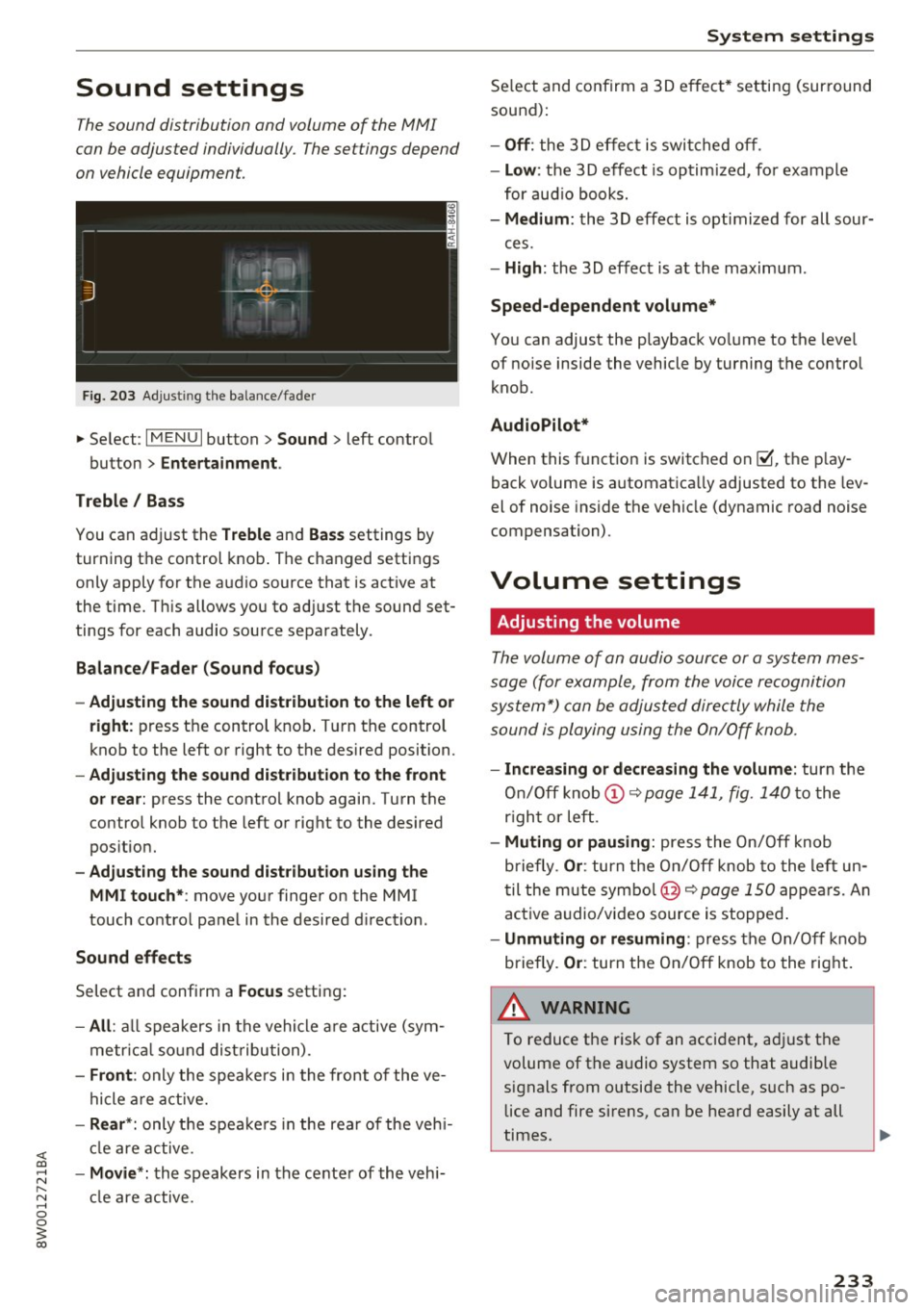
F ig . 203 Adjust ing the balance/fade r
... Se lect : I MENU I button> Sound > left contro l
button >
Entertainment .
Treble / Bass
You can adjust the Treble and Bas s settings by
turning the control knob . The changed settings
only apply for the a udio source that is act ive at
the t ime. T his allows you to ad just the sound set
tings for each audio source separately .
Balance/Fade r (Sound focus )
- Adjusting the sound dist ribution to the left or
right :
press t he control knob . T ur n the control
knob to the left or right to the desired position.
- Adjusting the sound d ist ribution to the front
or rea r:
press the contro l knob again. Turn t he
contro l knob to the left o r right to the desired
pos itio n.
- Adjusting the sound d istribution using the
MMI touch* :
move your finger on the MMI
touch co ntro l panel in the desired d irection .
Sound effects
Select and confirm a Focus setting:
-All : all speakers in the vehi cle a re active (sym
metr ic al sound dist ribu tion) .
-Front : only the speakers i n the front of the ve
hicle are active.
-Rear *: only t he spea ke rs in the rea r of the veh i
cl e are active.
- Movie *: th e speak ers in the cente r of the vehi
cl e are active.
System settings
Se lect and confirm a 3D e ffect * settin g (surround
sound):
- Off : the 3 D effect is swit ched off .
-Low : the 3D effect is optim ized, fo r example
for aud io books.
- Medium : the 3D effect is optimized for all sour-
ces.
- High : the 3D effect is at the maximum .
Speed-dependent volume*
You can adjust the playback vo lume to the leve l
of noise inside the vehicle by turning the control
knob.
AudioPilot *
When this function is switched on@', the p lay
back volume is automatica lly adjusted to the lev
el of noise inside the vehicle (dynamic road noise
compensation).
Volume settings
Adjusting the volume
The volume of an audio source or a system mes
sage (for e xample, from the voice recognition
s ys tem") can be adjusted directly while the
sound is playing using the On/Off knob.
- Increasing or decreasing the volume : turn the
On/Off knob
(D ~ page 1 41, fig. 1 40 to the
r igh t or left.
- Muting or pausing : press the On/Off knob
briefly .
Or: turn the O n/Off knob to the left un
t il the m ute symbo l@ ~
page 150 appe ars. An
ac tive a udio/v ideo source is stopped .
-Unmuting or re suming : press the On/O ff knob
briefly.
Or : turn the On/Off knob to the right .
A WARNING
-
To reduce the risk of an acci dent, a djust the
volume of the a udio system so that audible
signals from outside the vehicle, s uch as po
lice and fire sirens, can be heard easily at all
times.
233
Page 281 of 386

<( a, .... N ,....
N .... 0 0
3 a,
on all the time whenever the ignition is
switched on.
- If the
PASSENGER AIR BAG OFF~. light
does not come on and stay on, immediate
ly install the forward-facing child seat in a
rear seating position and have the airbag
system inspected by your authorized Aud i
dealer.
- Always buckle the child seat firmly in
place even if a ch ild is not sitt ing in it. A
loose child seat can fly around during a
sudden stop o r in a collision.
-Always read and heed all WARNINGS whenever using a child restraint in a vehi
cle ~
page 245, Safety belts,~ page 253,
Airbag system
and ~ page 2 77, Impor
tant information .
@ Tips
Always replace ch ild restraints that were in
stalled in a vehicle dur ing a crash. Damage to
a child restraint that is not visib le co uld cause
it to fail in anothe r collision situation .
Advanced front airbag system and children
Your vehicle is equipped with an "Advanced Air
bag System" in compliance with United States
Federal Motor Vehicle Safety Standard (FMVSS)
208, as well as Canada Motor Vehicle Safety
Standard (CMVSS) 208 as applicable at the time
your veh icle was manufactured.
The Advanced Airbag system in your vehicle has
been certified to meet the "low-risk" require
ments for 3-and 6-year old children on the pas
senger side and small adults on the driver side.
The low risk deployment crite ria are intended to
reduce the risk of injury through inte raction with
the airbag that can occur, for examp le, by being
too close to the steering whee l and instrument
panel when the airbag inflates . In addition, the
system has been certified to comply with the
"suppression" req uirements of the Safety Stand
ard, to turn off the front airbag for infants up to
12 months who are restra ined on the front pas
senger seat in child restraints that are listed in
the Standard .
Child safety
Even though your vehicle is equipped with an Ad
vanced Airbag system, all chi ldren, especially
those 12 years and younger, should always ride in the back seat properly restrained for their age
and size. The airbag on the passenger side makes
the front seat a potentia lly dangerous place for a
child to ride . The front seat is not the safest place
for a ch ild in a forward-fac ing ch ild safety seat .
It
can be a very dangerous place fo r an infant o r a
la rger ch ild i n a rea rwa rd-facing seat .
T he veh icle 's Advanced Airbag System has a ca
pacit ive passenger detection system in the front
passenge r seat cushion that can detect the p res
ence of a baby or a ch ild in a child restra int sys
tem on this seat .
The capacitive passenger detection system reg is
te rs the changes that result in an electrical field
when a child, a ch ild restraint, and a baby b lan ket
are on the front passenger seat. The change in
the measured capacitance due to the presence of
a chi ld, a child restraint, and a baby blanket on
the front passenger seat is related to the child
restra int system resting on the seat. The meas
ured capacitance of a child restraint system var
ies depend ing on the type of system and specific
make and model.
The electrical capac itance of the various types,
makes, and models of child restraints specif ied
by the U .S.National Highway Traff ic Safety Ad
min istrat ion (NHTSA) in the relevant safety
standard are stored in the Advanced Airbag Sys
tem contro l unit together with the capacitances
typ ica l of infants and a 1-year old child. When a
child restraint is used on the front passenger
seat with a typical 1 year-old infant, the Ad
vanced Airbag System compares the capacitance
measured by the capacitive passenger detection
system with the data stored in the electronic con
trol unit .
Child restraints and Advanced Airbags
Regardless of the ch ild restraint that you use,
make sure that it has been certified to meet Safe
ty Standards and has been ce rt ified by its manu
fact urer for use w ith an airbag . Always be su re
that the child restraint is properly installed at
llo-
279
Page 308 of 386
Checking and Filling
-If you notice that the hood is not latched
wh ile you are dr iv ing, stop immediately and
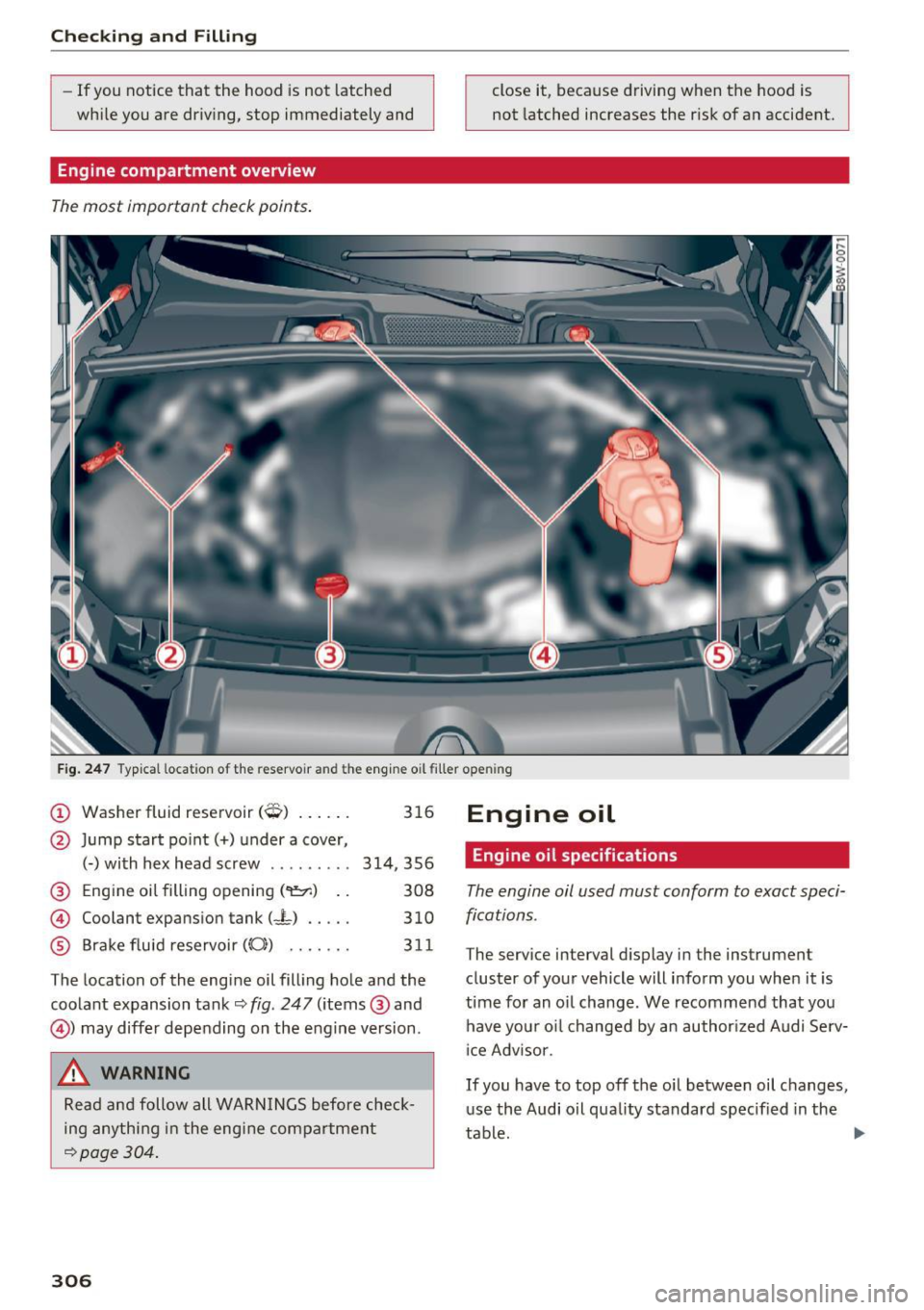
Engine compartment overview
The most important check points .
close it, because driving when the hood is
not latched increases the r isk of an accident.
F ig. 247 Ty pical lo ca tion of th e reservoir a nd the engine o il filler op ening
@ Washer fluid reservoir (0) . . . . . . 316
@ Jump start po int( +) under a cover,
(-) with hex head screw . ...... .. 314,356
@ Eng ine oil filling opening
(
® Brake fluid reservoir (0)) . . . . . . . 31 1
The location of the engine oil filling hole and the coo lant expansion tank~
fig. 247 (items @and
@) may differ depending on the engine version .
A WARNING
Read and follow all WARNINGS before check
ing anything in the eng ine compartment
~ page 304.
306
Engine oil
Engine oil specifications
The engine oil used must conform to exact speci
fications .
The serv ice interval d isplay in the instrument
cluster of your vehicle will inform you when it is
time for an o il change. We recommend that you
have you r oil changed by an author ized Audi Se rv
i ce Adv isor.
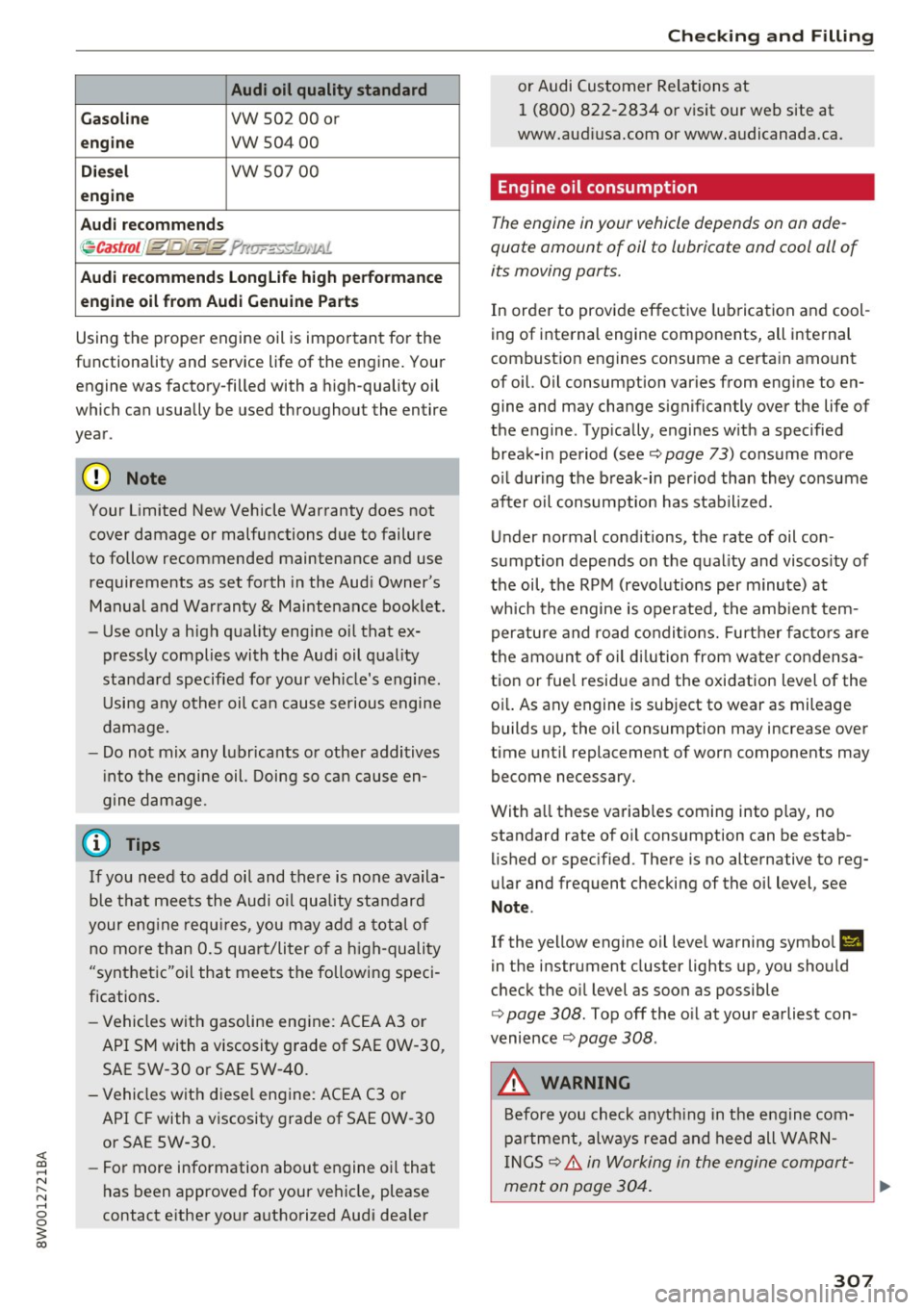
If you have to top off the oil between oil changes, u se the Audi oil quality standard specif ied in the
tab~.
~
Page 309 of 386
<( a, .... N ,....
N .... 0 0
3 a,
Audi oil quality standard
Gas oline
VW 502 00 or
engi ne vw 504 00
Diesel vw 507 00
eng ine
A udi recomm ends
~ Castrot /jglQ,Y j;-11Jt ?rtwF«J.o,.11-J.
Audi recomm ends Longlife high perf orma nce
engine oil from Aud i Genuine Parts
Using the proper engine oil is important for the
functionality and service life of the eng ine. Your
engine was factory-filled with a high-quality oil
which can usually be used throughout the entire
year.
(D Note
Your Limited New Vehicle Warranty does not
cover damage or malfunctions due to failure
to follow recommended maintenance and use
requirements as set forth in the Aud i Owner's
Manual and Warranty
& Maintenance booklet .
- Use only a high quality eng ine oil that ex-
pressly complies with the Aud i oil quality
standard specified for your vehicle's engine .
U si ng a ny other oil can cause serious engine
damage.
- Do not mix any lubr icants or othe r additives
i nto the engine oil. Doing so can cause en
gine damage.
If you need to add oil and there is none availa
ble that meets the Audi o il quality standard
your eng ine requ ires, you may add a tota l of
no more than 0 .5 qua rt/liter of a h igh-quality
"synthetic"oil that meets the following speci
fications.
- Vehicles with gasoline engine: AC EA A3 or
API SM with a viscosity grade of SAE OW-30,
SAE SW-30 or SAE 5W-40.
- Vehicles with diesel engine: ACEA C3 or API CF with a viscosity grade of SAE OW-30
or SAE 5W-30.
- For more information about engine oil that
has been approved for your vehicle, please
contact either your authorized Audi dea ler
Ch eck ing and Filling
or Audi Customer Relations at
1 (800) 822-2834 or visit our web site at
www.aud iusa .com or www .a udicanada .ca.
Engine oil consumption
The engine in your vehicle depends on on ade
quate amount of oil to lubricate and cool all of
its moving ports.
In order to provide effective lubrication and cool
ing of internal engine components, all internal
combust ion eng ines consume a certa in amount
of oil. Oil consumption varies from eng ine to en
gine and may change s ignificantly over the life of
the engine. Typ ically, engines w ith a specified
break-in period (see
c::> page 73) consume more
o il during the break-in per iod than they consume
after oil consumpt ion has stabil ized.
Under normal cond itions, the rate of oil con
sumption depends on the quality and viscos ity of
the oil, the RPM (revolutions per minute) at
which the engine is operated, the amb ient tem
peratu re and road co ndit ions. Furt her fac to rs a re
the amo unt of oil di lution from wate r condensa
tion or fuel residue and the oxidation level of the oi l. As any engine is subject to wear as mileage
builds up, the oil consumption may increase over
time unt il replacement of worn components may
become necessary.
With a ll these variab les coming into play, no
standard rate of oil consumption can be estab
lished or spec ified . There is no alternative to reg
ular and frequent checking of the oi l level, see
Not e.
If the yellow engine oil level warning symbo l El
in the instrument cluster lights up, you should
check the oil level as soon as possible
c::> page 308 . Top off the o il at your earliest con
venience
c::> page 308 .
A WARNING
Before you check anyt hing in the engine com
partment, always read and heed all WARN
IN GS
c::> .&. in Working in the engine compart-
ment on page 304. ..,_
307