Scr AUDI A4 2018 Owner's Manual
[x] Cancel search | Manufacturer: AUDI, Model Year: 2018, Model line: A4, Model: AUDI A4 2018Pages: 403, PDF Size: 66.81 MB
Page 120 of 403

Assistance systems
Distance indicator and
distance warning
Description
Applies to: vehicles with Aud i adapt ive cruise control
F ig. 12 1 In stru ment cl uste r: dis tance indica tor/wa rning
At speeds above 40 mph (65 km/h), this funct ion
measures the time betwee n the vehicle driv ing
ahead and s hows th is in the instrument cl uster
d isp lay¢ fig. 121 .
You can set a warning t hreshold between 0 .6 and
3.0 seconds . The. indicator light t urns on if
you fall be low the set d is tance.
Switching the distance indicator/warning on
and off
.. In the Infotainment system, selec t: I MENU !
button > Vehicle > left contro l button > Driver
assistance > Distance warning.
A WARNING
-Read an d follow th e warn ings on ¢.&. in
Gen eral inf orma tion on page 1 09.
-The driv er is always r espons ib le for a dhering
to the regulations applicable in that co un
t ry .
{!) Tips
You may fall below he warn ing t hreshold
briefly whe n pass ing or when quickly ap
proac hing a s low veh icle . T h er e is no wa rning
in this scen ario . A warn ing is gi ve n only if you
f al l b elow the war ning thr eshold f or an ex
t en ded pe rio d o f tim e.
118
Messages
Appl ies to: vehicles with Audi adaptive cruise control
ii ACC with traffic jam assist: unavailable . See
owner's manual
The sy stem cannot gu aran tee t hat i t will dete ct
vehicle s cor re ctl y an d it h as sw itched
off . The ra
dar sensors have shifted or are fau lty . D rive to an
aut ho rize d Audi dea ler o r a uth orized Audi Service
Facility immed iate ly to have the malfunct ion cor
r ected .
ii ACC with traffic jam assist: currently un
available. See owner's manual
This mes sage ap pears if the ada ptive cruise con
t ro l canno t be activ ated, for example i f th e hood
is ope n.
ti ACC with traffic jam assist : currently un
available. Sensor vision restricted due to sur roundings. See owner 's manual
This message ap pears if the radar se nsor v iew is
obstr ucted, for e xamp le by leaves, snow, heavy
s p ra y or dirt . Cle an the
se nso rs ¢ pa ge 1 09,
fi g. 108 .
ill ACC with traffic jam assist: currently un
available. Grade too steep
T he road exceeds the maxim um poss ible g rade
for saf e operation . The systems cannot be sw itch
ed o n.
ill ACC with traffic jam assist: only available in
D, Sor M
Se lect t he D/S or M se lector lever position.
flJ ACC: available from 1st gear up
Manua l transmiss io n: ada ptive cr uise con trol
works in 1s t gear an d higher.
ti ACC: clutch pedal pressed
Manua l transmiss io n: pressing the clutc h pedal
l onger inte rrupts the cont rol.
IIJ ACC: note engine speed
Manu al transmissio n: this message appea rs if t he
d rive r ha s not shift ed up or down in t ime when
t he a dap tive cr uise co ntrol is b raking o r accele r-
at ing , ca usi ng the ve hicle to excee d or to not
.,.
Page 122 of 403
Assistance systems
This message appears if you would like to switch
the system on and there is a stationary object di
rectly in front of your veh icle.
Door open
The system is not ava ilable when the door is
open.
Audi pre sense
Introduction
A pp lies to: ve hicles w ith Audi p re se nse
W ithin the limits of the system, the pre sense
functions can initiate measures in particularly
dangerous situations to protect the veh icle pas
sengers and other road users .
- Due to the interlinking of various vehicle sys
tems, crit ical dr iving s ituations can be detected
by
pre sense basic and measures for preventa
tive occupant protection are can be initiated .
- The
pre sense front system uses the data from
the adapt ive cruise control* radar sensors and
the camera to calculate the probab ility of a col
li sion. Withi n the limits of the system, an im
pending collision with vehicles can be dete cted
in both urban and rural speed ranges. In this
case, the system warns the driver visually,
acoustically and with a jerk on the brakes if nec
essary. If needed, it can initiate a partial or full
deceleration to reduce the co llision speed or to
avo id the collision under certain c ircumstances .
In conjunct ion with pre sense basic/rear, the
front safety belts are also revers ibly tensioned
when needed . The pre sense front is also active
whe n adapt ive cruise control* is swit ched off.
- Pre sense rear contains pre sense basic func
tions. It uses the data from the side assist* ra
dar sensors and calculates within the limits of
the system the probab ility of a rear end coll i
s ion with the vehicle behind you. Pre sense rear
is also active when side assist* is switched off.
- Within the limits of the system,
pre sense city
uses the camera data and can detect an im
pending collision with vehicles and pedestrians.
In this case, the system warns the driver visual
ly, acoustically and with a jerk on the brakes if
necessary. If needed, it can initiate a full decel
eration to reduce the collision speed or to avoid
120
the collision under certa in circumstances . In
conjunction with pre sense basic/rear, the front
safety belts are also reversibly tensioned when
needed .
A WARNING
-
Read the general information inc> & in Gen-
eral information on page 109,
c> & in Gener
al information on page 130.
(D Tips
- Certain pre sense funct ions sw itch off when
dr iving in reverse.
- The pre sense functions may not be availa
ble if there is a malfunct ion in the ESC sys
tem or the a irbag control module.
- Note that the reversible belt tensioner on
the front passenger's side deactivates when
the front passenger's airbag is deactivated .
- Switch the pre sense off when you are not
using public streets or when loading the ve
hicle onto a vehicle carrier, tra in, sh ip or
other type of transportation. This can pre
vent an undesired intervention from
the pre
sense system.
Audi pre sense basic
Description
App lies to : vehicles wi th Audi pre sense basic
The pre sense bas ic functions are activated at a
speed of approx imately 20 mph (30 km/h) or
higher .
The following functions can be triggered under certain condit ions w ith in the lim its of the sys
tem:
- Tensioning of the safety belts (for examp le,
during heavy brak ing): the front safety belts
have reversib le be lt tens ioners. If a collision
does not occur, the safety belts loosen slightly
and are ready to trigger again.
- Closing the windows and sunroof* .
-
Page 123 of 403

-Activating the emergency flashers l).
The message Audi pre sense . ¢ page 121,
fig. 122 will warn you abo ut the danger.
Aud i drive select*: the trigger t imes are adjusted
depending on the mode selected.
Audi pre sense front
Description
Applies to: veh icles with Audi adaptive cruise control
Within the limits of the system, pre sense front
can warn you of impending collisions and initiate
the corresponding braking maneuvers or the sup porting measures when avoiding a collision .
If detected in time, the system can rank the dan
gerous situation as critical if a vehicle driving
ahead brakes suddenly, if your own vehicle is ap
proaching a significantly slower vehicle at high
speed or when there is an oncoming vehicle dur
in g a turning maneuver .
If detection is not possible, then pre sense front
does not react .
Warnings
Applies to: ve hicles with Audi adaptive cruise control
Fig. 122 In strument cluste r: approac h warning
General information
The system recognizes various dangerous situa
tions . The
early warning occurs if:
-a vehicle driving ahead brakes suddenly,
-your own vehicle approaches a significantly
a s lower vehicle or stationary vehicle in the direc-co
;::; tion of travel. ,....
N .... 0 0
3 1) This is not availa ble in some co untrie s. co
Assistance systems
When this warning occurs, it may only be possi
ble to avoid a collision by swerving or braking
strongly. The message
Audi pre sense.
¢ fig. 122 and a warning tone will warn you
about the danger .
If you do not react enough or not at all to a dan
gerous situation that was detected by the sys
tem, pre sense front provides assistance by ap plying the brakes .
If a collision is imminent, the system will first
provide an
acute warning by braking sharply. You
will also warned by an indicator in the instrument
cluster
display¢ fig. 122. If you do not react to
the acute warning, pre sense front can brake with i ncreasing fo rce within the limits of the
system
1>. This reduces the vehicle speed in the
event of a collision. At low vehicle speeds, pre
sense front can in itiate a complete deceleration
shortly before a collision with a vehicle driving
ahead
l). If pre sense front determines that you
are not braking strongly enough when a collision
is imminent, it can increase the braking force.
T he following functions trigger in conjunction
with pre sense basic/rear at corresponding vehi
cle speeds:
-Reversible tensioning of the front safety belts.
-Closing the windows and sunroof* .
-Inflating the side bolsters* on the seat back-
rest .
Audi drive select*: depending on the mode se lected, the reversible belt tensioner, the closing
of the w indows and sunroof*, and the inflating of
the side bolsters* on the seat backrest may not be active.
Evasive steering support
Evasive steering support helps you to steer the
vehicle around an obstacle in a critical situation .
If you avo id an obstacle after the acute warning,
then the evasive steer ing support ass ists you by
applying slight stee ring adjustment to correct
.,.
121
Page 124 of 403

Ass is tan ce sys tems
your steering whee l ang le as long as you are ac
tively steering. Evasive steering support is availa
b le at speeds between approximately 20 mph
(30 km/h) and 90 mph (150 km/h).
Tu rn assist
When start ing to drive and up to speeds of maxi
mum
6 mph (10 km/h), the turn assist uses a
braking intervention to prevent your vehicle from
colliding with an oncoming vehicle when turning
left or right (available in certain countries). The
braking intervent ion causes your vehicle to stay
in its lane.
A WARNING
-Pre sense front cannot overcome the laws of
physics.
It is a system des igned to assist and
it cannot prevent a collision in every circum
stance. The driver must always i ntervene.
T he driver is always responsib le for braking
at the correct time. Do not let the increased
safety provided tempt you into taking risks .
This could increase your risk of a collision.
- The system can deploy incorrectly due to
system-specific limits .
- Please note that the sensors and the camera
do not always detect all objects or lane
markings. This increases the risk of an acci
dent.
- Pre sense front does not react to people, an
imals or ob jects that are crossing the veh i
cle's path or that are difficu lt to
detect¢ .&.
in General information on page 109.
-Reflective objects such as guard rails or the
entrance to a tunnel, heavy rain and ice can
affect the fu nction of the radar sensors and
the system's ability to detect a coll is ion risk .
(D Note
The sensors can be displaced by impacts or
damage to the bumper, whee l housing and
underbody. Pre sense front can be impa ired
by this. Have an authorized Aud i dealer or au
thorized Audi Service Fac ility check their func
tion.
l ) Th is is not availab le in some countr ies.
122
(D Tips
- You can cancel the braking with increas ing
force that is initiated by the system by bra k
ing yourself, by acce lerating not iceably or
by swerving.
- Keep in mind that pre sense front can brake
unexpectedly. Always secure any cargo or
objects that you are transporting to reduce
the risk of damage or injury.
- Specific pre sense front functions switch off
when the ESC is restricted or sw itched off
¢ page 147 or the hill ho ld assist" is
switched on
¢ page 148 .
Audi pre sense rear
Description
Applies to : vehicles wi th Aud i s ide ass ist
If the risk of a co llision with a vehicle ahead is de
tected, the follow ing funct ions can be triggered:
- Reversible tensioning of the front safety belts
at the corresponding speeds .
- Closing the windows
and sunroof*.
- Infla ting the side bo ls ters* on the seat back-
rest.
- Ac tivat ing the emergency flashers with in -
creased frequency
l l.
The message Audi pr e sense. ¢ page 121,
fig. 122
will warn you about the danger.
Audi drive select": the function is not active de
pending on the mode selected.
A WARNING
- To reduce the r isk of an accident, please
no te t hat the s ide assist* radar sensors do
no t always dete ct every object.
-
- Pre sense rear does not react to people, ani
mals or objects that a re c ross ing the vehi
cle 's path o r that are d ifficult to detec t.
- Ref lective objects such as gua rd ra ils, heavy
rain and i ce can impair the func tion of the
radar sensors an d the abili ty to detect a col
lision risk.
Page 125 of 403

a co .... N ,....
N .... 0 0
3 co
(D Note
The radar sensors can be displaced by impacts
or damage to the bumper, wheel housing and
underbody. Pre sense rear can be impaired by
this. Have an authorized Audi dealer or au
thorized Audi Service Facility check their func
tion .
(D Tips
-The pre sense rear functions switch off
when towing a trailer .
- The pre sense rear functions may also
switch off if there is a malfunction in the
side assist* system.
Audi pre sense city
Description
Applies to: vehicles with Audi pre sense city
Within the limits of the system, pre sense city
can warn you of impending collisions with
vehicles and pedestrians and initiate the applica
ble braking maneuver if needed. Pre sense city is
active at speeds of approximately 6 mph (10 km/ h) and higher.
A pedestrian warning can occur at speeds up to
50 mph (85 km/h), and vehicle warnings can oc
cur at speeds up to 155 mph (250 km/h) . A pre
sense city braking maneuver is poss ible at speeds
up to 50 mph (85 km/h).
Warnings
Applies to: vehicles with Audi pre sense city
The system recognizes various dangerous s itua
tions. The
early warning occurs if:
- a vehicle driving ahead brakes suddenly,
- your own vehicle approaches a significantly
slower vehicle or stationary veh icle in the direc
t ion of travel.
- a pedestrian is standing in the lane or is moving
i nto the lane .
When this warning occurs, it may only be possi ble to avoid a collision by swerving or braking
strongly. The message
Audi pre sense .
Assistance systems
¢page 121, fig. 122 and a warning tone will
warn you about the danger.
Additionally, a jerk on the brakes may occur as an
acute warning when there is an imp ending colli
sion . If you do not react to the acute warning, pre
sense city can brake to the point of complete de
celeration within the limits of the system . T his
reduces the vehicle speed in the event of a colli
sion. The message
Audi pre sense . also ap
pears.
The following functions are triggered in conjunc
tion with pre sense basic/rear:
- Reversible tensioning of the front safety belts.
- Closing the windows and sunroof* .
- Inflating the side bolsters* on the seat back-
rest.
Audi drive select*: the function is not act ive de
pending on the mode selected.
A WARNING
- Pre sense city cannot overcome the laws of
physics.
It is a system designed to assist and
it cannot prevent a coll is ion in every circum
stance. The driver must always intervene.
The driver is always responsible for braking
at the correct time. Do not let the increased
safety provided tempt you into taking risks.
This could increase your risk of a collision.
- The system can dep loy incorrectly due to
system-specific limits.
- To reduce the risk of an accident, please
note that the camera does not always detect
every object.
- Pre sense city does not react to anima ls,
crossing or oncoming vehicles, objects such
as bars, railings or railcars, and objects that
are difficult to
detect ¢ A in General infor
mation on page 109 .
-In trailer mode, the braking behavior of the
tra iler can be d ifferent than usual during au
tomatic braking.
A WARNING
-Pre sense city may be restricted or not availa-
ble in the following example situations:
- in heavy fog, ra in, spray or snow
~
123
Page 127 of 403

a co .... N ,....
N .... 0 0
3 co
This message appears if the ESC is restricted or
switched off, for examp le .
Ill Aud i pre sen se : curren tly re stri cted . See
o wner 's manu al
This message appears when there is a temporary
fa ilu re in a subsystem, such as the ESC. If th is
message appea rs repeated ly, dr ive to an a uthor
ized A udi dealer or authorized Audi Service Fac ili
ty to have the malfunction corrected.
Ill Aud i pre sen se: e merg enc y braking syste m
off
This message appears if the pre sense functions
are switched off through the Infotainment sys
tem or if the system is not ready .
Audi active lane assist
Description
Applies to: ve hicles wit h Aud i act ive lane ass ist
Active lane assist (lane departure warning) de
tects lane marker lines within the limits of the
system using a camera in the windshield . If you
are approach ing a detected lane marker line and
it appears likely that you will leave the lane, the
system w ill wa rn you w it h corre ct ive steer ing .
You can overr ide th is steering at any time . If yo u
pass over a line, the steer ing whee l wi ll vibrate
lightly. In order for this warning vibration to oc
cur, it must first be switched on in the Infotain
ment system. Active lane assist is ready for oper
ation when the lane marker line is detected on at least one side of the vehicle.
The system is designed for driving on express
ways and highways and therefore only activates at speeds above approximately 40 mph (6S km/
h).
Applies to: vehicles with side assist: if you acti
vate a turn signal when active lane assist is ready
and it classif ies a lane change as critical because
of vehicles traveling alongside you or approach ing you, there w ill be not iceable correct ive steer
i ng shortly before you leave the lane . This will at
tempt to keep your veh icle in the la ne.
Applies to: vehicles w ithout s ide ass ist : the ready
system does not warn you if you activate a turn
A ss ista nce sys te m s
signal before crossing the lane marker line. In
t h is case, it assumes that you are changing lanes
intentionally .
Applies to: vehicles wi th adap tive c ruise contro l:
there is no corrective steering or warnings if the
system recognizes a distinct passing maneuver .
If the condit ions are met, traffic jam ass ist
switches on at speeds under approximately
40 mph (65 km/h)
qpage 116.
A WARNING
=
- The system warns the driver that the vehicle
is leaving the lane using corrective steering.
The driver is always responsible fo r keeping
the vehicle within the lane.
- The system can help you keep the vehicle in
the lane, but it does not drive by itself. Al
ways keep your hands on the stee ring
wheel.
- Cor rective stee ring may not occur in certain
situations, such as during heavy b raking.
- There may be cases whe re the camera does
not recognize all lane marker lines. Cor rec
tive steering can only take place on the s ide
of the vehicle where lane marker lines are
detected.
- Other road structu res or objects could poss i
b ly be identified unintentionally as lane
marker lines . As a result, corrective steering
may be unexpected or may not occur.
- The camera view can be restricted, for ex
ample by vehicles driving ahead or by rain,
snow, heavy spray or light shining into the
camera. Th is can result in active lane ass ist
not detecting the lane marker lines or de
tect ing them incorrectly .
- In certain s ituations where visibility is low,
the vehicle may switch from an "early" to
"late" steering correct ion.
- Under certain condit ions such as ruts in the
road, an inclined roadway or crosswinds, the
correct ive steer ing alo ne may not be enough
to keep the vehicle in the middle of the lane .
- For safety reasons, act ive lane assist must
not be used when there are poor road and/
or weather conditions such as slippery roads, fog, gravel, heavy rain, snow and the
125
Page 130 of 403

Assistance systems
There is a temporary malfunction that may pre
vent the active lane assist from switching on. Try
sw itch ing the active lane assist on again later.
rl! Audi active lane assist: Please take over
steering!
This message appears if you are not steering by
yourse lf. Ac tive lane assist is activated, but is not
ready to give wa rning
& WARNING
Note that messages may be delayed or not
displayed on vehicles with accessories mount
ed on the steering whee l, s uch as a steering
wheel spinner knob. Always keep your hands
on the steer ing wheel.
Adjusting the steering time and vibration
warning
Applies to: veh icles with Audi active lane assist
You con adjust individual active lone assist set
tings in the Infotainment system .
-
.,. Select in the Infotainment system: IMENUI but
ton
> Vehicle > left contro l button > Driver as
sistance > Audi active lane assist .
Steering time
Early :
in this setting, the corrective steer ing hap
pens continuously to help keep the vehicle in the
center of the lane.
late : in this setting, the system provides correc
tive steering just before a wheel goes over a de
tected lane marker line.
Vibration warning
You can switch the additional vibration warning
in the steering wheel on or off.
WARNING
With the vibration warning switched off,
there will also be no visual warning in the in
strument cluster display when crossing a lane
marker line.
128
@ Tips
In certain ma rkets: your settings are stored
automat ically and assigned to the remote
control key in use.
Audi side assist
Description
Applies to: vehicles with Audi side assist
Fig. 127 Sensor detection range
Fig . 128 D isplay on the exterior mirror
Side assist (lane change ass ist) helps you mon itor
your blind spot and traffic behind yo ur vehicle.
Within the limits of the system, i t warns you
about veh icles that are coming closer or that are
traveling with you within sensor range
(D
¢ fig. 12 7. If a lane change is classified as criti
ca l, the display @in the exterior mirror turns on
¢fig. 128.
The display in the left exterior mirror provides as
sistance when making a lane change to the left,
while the display in the right exterior mirror pro
vides assistance when making a lane change to
the right.
Information stage
As long as you do not activate the turn signal,
side assist
informs yo u about vehicles that are
Page 136 of 403

Assistance systems
Description
Applies to: vehicl es w ith Aud i drive select
The follow ing systems, among other things, are
influenced by drive select:
Engine and automatic transmission*
Depending on the mode, the engine and auto
mat ic transmission* respond more quickly or in a
mo re balanced manner to accelerator pedal
movements . In the sporty
Dynamic mode , the
transmission shifts at highe r speed ranges.
Suspension control*
The suspension control* uses sensors to record
information regard ing steering movements ,
braking and acceleration operations by the driv
er , road surface, driving speed, and load. This
makes it possible to adapt damping to the driv
ing situation nearly in rea l time. With drive se
lect, you can adjust the suspension control to
sporty
( Dynamic ), comfortab le ( Comfort ) or bal
anced
( Auto ).
Steering
The power steering adapts. Indi rect s teer ing that
moves easily as in
Comfort mode is especia lly
suited to long drives on highways . The
Dynamic
mode provides sporty , direct steering.
The following applies to vehicles with dynamic
steering* : the steering ratio changes based on
vehicle speed in order to maintain optimum
steer ing effort for the driver at all times . This
sets the steering to be less sensitive at higher
speeds in order to prov ide improved vehicle con
trol. At reduced speeds, steering is more direct in
order to keep the steering effort as min imal as
possible when the driver is maneuvering the vehi
cle. At low and average speeds, dynamic steer
ing* additionally provides more responsive steer
ing performance.
Sport differential*
As a component of the all wheel drive system
(quattro)
~ page 1 SO, the sport differential dis
tributes the driving power to the rear axle de
pending on the situation. The distribution of
power varies depending on the selected mode
134
from moderate (Comfort ) to sporty (Dynamic ).
The goal is a high level of agility and ability to ac
ce lerate on curves . The vehicle is very respons ive
to steering.
Adaptive cruise control (ACC)*
The behavior when accelerating can be adjusted
from comfortable to sporty, depending on the
drive select mode. Adaptive cruise control also
responds to the driving behavior of the vehicle
ahead in a more conservative or sporty manner.
Engine sound*
The engine sound adapts to the current mode
and can be subtle to sporty.
@ Tips
The S selector lever position automatically en
gages when the
Dynamic mode is selected .
Selecting the driving mode
Applies to: vehicles with Audi drive se lect
Fig. 135 Center co nsole: controls for drive se lect
.,. Press the left or right a rrow key ~ fig. 135 until
the desired mode appears in the instrument
cluster/ Infotainment system disp lay. Or
.,. Select in the Infotainment system: IMENU j but-
ton
> Vehicle > Audi drive select.
.,. Select and confirm the desired setting.
You can change the driving mode when the vehi
cle is stationary or while driving. If traffic per
mits, after changing modes, briefly take your
foot off the accelerator pedal so that the recently
selected mode is also activated for the engine.
.,.
Page 139 of 403

Rear parking system
Description
Applies to: vehicles with rear parking system
The rear parking system is an audible parking
aid .
Descr iption
There is a sensor in the rear bumper cover. If
these detect an obstacle, audible signals warn
you .
Make sure the sensors are not covered by stick
ers, deposits or any other obstructions as it may
impair the function of the system . For informa
tion on cleaning, see
c::;,page 354 .
The range at which the sensors begin to measure
is approximately:
side 3 ft (0 .90 m)
rear
center 5.2
ft (1.60 m)
The closer you get to the obstacle, the shorter
the interval between the audible signals . A con
tinuous tone sounds when the obstacle is less
than approximately 1 foot (0.30 meters) away. Do not continue backing up
c::;, &. in General infor
ma tion on page 136,
c::;, (D in General information
on page
136!
If the distance to an obstacle remains constant,
the volume of the distance warning gradually lowers after a few seconds until it is muted (this
is not apply in the continuous tone range). If the
obstacle becomes closer than it was before the
sound was muted, the tone will sound again . If
the obstacle is father away than it was before the
sound was muted, no tone w ill sound . Pay atten
tion to the vehicle's surroundings when you start
to drive.
Activating
The rear parking assist activates automatically
when the reverse gear is engaged. A brief confir
mat ion tone will sound.
Parking systems
Parking aid plus
Description
Applies to: veh icles w ith park ing system plus
Parking system plus provides audio and visual
signals when parking.
Fig. 136 Illust rat io n:
Sensors are located in the front and rear bump
ers. If these detect an obstacle, audib le and visu
al signals warn you.
Make sure the sensors are not covered by stick
ers, deposits or any other obstructions as it may
impair the function of the system. For informa
tion on cleaning, see
c::;, page 354.
The display field begins approximately at:
® 4 ft (1.20 m)
® 3 ft (0 .90 m)
© 5.2 ft (1.60 m)
@ 3 ft (0.90 m)
T he close r you get to the obstacle , the shorter
the interval between the audible signals . A con
tinuous tone sounds when the obstacle is less
than approximately 1 foot (0.30 meters) away.
Do not continue driving forward or in reverse
c::;, &. in General information on page 136, c::;,(i) in
General information on page
136!
If the distance to an obstacle remains constant ,
the volume of the distance warning gradually
l owers after a few seconds until it is muted (this
is not apply in the continuous tone range).
If the
obstacle becomes closer than it was before the
sound was muted , the tone will sound aga in . If
the obstacle is father away than it was before the
.,_
137
Page 141 of 403
Cl al ..... N
" N ..... 0 0
~ al
General information
Appl ies to: ve hicles with rearview ca mera
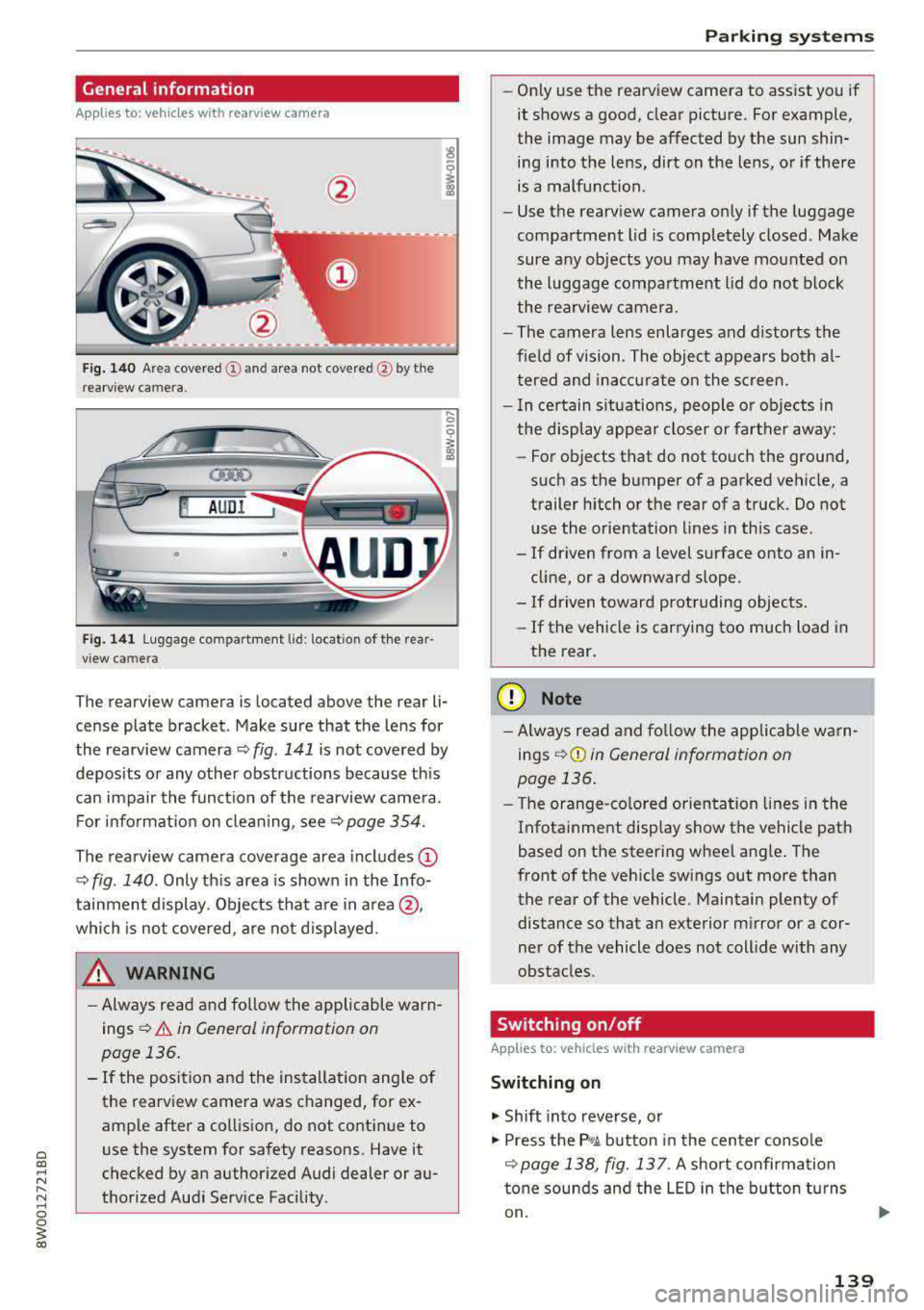
Fig . 140 Area covered (D and area not covered @by the
rea rv iew camera.
@ AUDI
•
Fig. 141 Luggage compartment lid: locatio n of the rear
view camera
..... 0
i
The rearview camera is located above the rear li
cense plate bracket. Make sure that the lens for
the rearview camera
~ fig. 141 is not covered by
deposits or any other obstructions because this
can impair the function of the rearview camera.
For information on cleaning, see<=>
page 354.
The rearview camera coverage area includes (D
~ fig. 140 . Only this area is shown in the Info
tainment display. Objects that are in area @,
which is not covered, are not displayed.
A WARNING
-Always read and follow the applicable warn
ings
<=> A in General information on
page 136.
- If the position and the installation angle of
the rearview camera was changed, for ex
ample after a collision, do not continue to
use the system for safety reasons. Have it
checked by an authorized Audi dealer or au
thorized Audi Service Facility .
Parking systems
-Only use the rearview camera to assist you if
it shows a good, clear picture. For example,
the image may be affected by the sun shin
ing into the lens, dirt on the lens, or if there
is a malfunction.
- Use the rearview camera only if the luggage
compartment lid is completely closed. Make
sure any objects you may have mounted on
the luggage compartment lid do not block
the rearview camera.
- The camera lens enlarges and distorts the
field of vision. The object appears both al
tered and inaccurate on the screen.
- In certain situations, people or objects in
the display appear closer or farther away:
- For objects that do not touch the ground,
such as the bumper of a parked vehicle, a
trailer hitch or the rear of a truck. Do not
use the orientation lines in this case .
- If driven from a level surface onto an in
cline, or a downward slope .
- If driven toward protruding objects.
- If the vehicle is carrying too much load in
the rear.
(D Note
-Always read and follow the applicable warn
ings
r::!> (D in General information on
page 136.
- The orange-colored orientation lines in the
Infotainment display show the vehicle path
based on the steering wheel angle. The
front of the vehicle swings out more than
the rear of the vehicle. Maintain plenty of distance so that an exterior mirror or a cor
ner of the vehicle does not collide with any
obstacles.
Switching on/off
App lies to : vehicles wi th rearv iew camera
Switching on
.. Shift into reverse, or
.. Press the P, qA button in the center console
r::!> page 138, fig. 13 7. A short confirmation
tone sounds and the LED in the button turns
on.
139