Scr AUDI A4 2018 Workshop Manual
[x] Cancel search | Manufacturer: AUDI, Model Year: 2018, Model line: A4, Model: AUDI A4 2018Pages: 403, PDF Size: 66.81 MB
Page 227 of 403
Radio
The following settings can be selected, depend
ing on the band that is selected :
Station names (FM)
Varia ble:
sc roll ing text transmitted by the FM
s ta tions is shown in the Infotainment system dis
p lay .
Fixed : scrolling text transm itted by the FM sta
tions is no t sh own in the Infota inment system
d isp lay. On ly the cu rrent sect io n of the scro lling
text is disp layed.
FM /AM HD Radio*
You can sw itch HD Rad io recept ion on o r off .
Station sorting (Siriu sXM*)
You can set the station sorting for SiriusXM sta
tion lists* by:
- Channel number: the stations are sorted in as
cending order according to their station num
ber.
- Channel name : the stations are listed in a lpha
betica l order.
- First category, then channel number : the sta
tions are sorted by their category and then by
their channe l numbers.
- First category, then channel name : the sta
tions are sorted by their category and then by
their channe l names.
Category filter (SiriusXM* )
The stations shown in the s ta tion lis t can be fi l
tered by your pe rsonal prefe rences and by pro
gram type. The program categories that yo u can
select depend on what is offered by yo ur provid
er. Select the
All catego ries option to deactivate
all filter options and display all ava ilable stations
i n the satellite station list.
Troubleshooting
Problem Solution Show "Now Playing" screen
When
the fun ct io n is switched on~ and the st a
tions or presets list is open, the display w ill
switch to the
Show "Now Playing " screen view
after approximate ly five
seconds ~ page 224. De
pending on avai lab ility, information abo ut the
set stat ion (such as stat ion name, artist and sta
tion logo) is displayed in this v iew .
Prefe rred picture vi ew*
You can set your preferred screen view for the
Show "Now Playing " screen ~ page 224.
-Station logo : the st ation logo is displayed, de
pending on ava ilability .
-Cover art : the album cove r is d isplayed if availa -
ble.
Gracenote online database *
Requirement: the MMI must be co nnected to the
Intern et. Th e
Cover art option m ust be selected
~ page 226, Pr eferred picture vi ew *.
When the funct io n is switched on~, the alb um
cover or genre cover for the song that is p lay ing
i s loaded from the Gracenote online da tabase,
depe nd ing on ava ilability.
Subscription status (SiriusXM }*
This opt io n is available when your subscr ipt io n is
about to expire or has already expired . The expi
r ation date for your license is displayed .
Call to SiriusXM *: the contact info rmation for
you r sate llite radio provider is d isplayed . To call
you r sate llite rad io provider using the MMI, press
Call to Siriu sXM*.
A station with poo r reception is no longer Store the stat ion as a preset in advance . Access the p re-
displayed in the station l ist once you sets using the presets
list~ page 225.
swit ch to a d ifferen t sta tion.
226
Page 228 of 403
a co .... N ,....
N .... 0 0
3 co
Media
Introduction
There are various media drives and connections
avai lable in the MMI. For example, you can play
audio/video* fi les from the Jukebox* or connect
your mobile device to the Audi mus ic interface*
and operate it through the MMI.
Notes
General information
Media and format restrictions:
the MMI (includ
ing the SD card reader and the USB storage
de
vice connection*) was tested with a variety of
products and media on the market. However,
there may be cases where individual devices or
media and audio/video files* may not be recog
nized, may play only w ith restrictions, or may not
play at al l.
Digital Rights Management: please note that
the audio/video* files are subject to copyright
protection .
The media drives do not play fi les that are pro
tected by ORM and that are ident ified with the
symbol
l'.D.
Data security: never store important data on SD
cards, the Jukebox*, CDs/DVDs or mobile devices.
Audi AG is not responsible for damaged or lost
files and media.
Loading times : the more files/fo lders/play lists
that are on a storage medium, the longer it will
take to load the audio/video* files. Audi recom
mends using storage media that only contain
au
dio/video files*. To decrease the t i me it takes to
load audio/v ideo files*, create subfolders (for
ex
ample, fo r the art ist or album). The loading time
will also increase when importing fi les.
Additional information : when playing, audio
files are automatically displayed w ith any add i
tional information that is stored (such as the
ar
tist, track and album cover). If this information is
not available o n the storage medium, the MMI
will check the Grace note metadata database .
Media
However, in some cases, the additional informa
tion may not be displayed.
Restricted functionality : reset the Media set
tings
t o the factory default settings if functional
ity is restr icted
¢ page 249.
If functionality is restricted, reset the Jukebox*
to the factory default settings ¢ page 249.
For information about the properties of support
ed media and fi le formats, see
¢page 242 .
(D Note
Always follow the information found in ¢ @ in
Wi-Fi hotspot on page 194.
CD/DVD operation
CD /DVD and format restrictions :
the functiona li
ty of individ ual storage media may be limited due
to the variety of b lank CDs/DVDs available and
the various capacities. Audio CDs or video DVDs
with copy protection, CDs/DVDs that do not con
form to the standard and multi session CDs may
have limited playback or may not play at a ll. Audi
recommends finaliz ing the recording process
when creat ing mult isess ion CDs. Mult isess ion is
not supported for DVDs.
Using CDs/DVDs, the CD dr ive or the DVD drive :
to ensure correct, high-quality playback and to
prevent damage to the dr ive or disc read ing
er
rors, always store CDs/DVDs in a protective
s leeve and do not expose them to direct sunlight.
Do
not u se:
- Damaged, dirty or scratched CDs/DVDs
- Single CDs/DVDs with 3 in (8 cm) d iameter
- CD/DVDs that are not round
- CDs/DVDs with labe ls
- Protective rings
- Clean ing CDs
Thermal protection switch: CD/DVD playback
may be temporarily unavailable if outside tem
peratures are extremely hot or cold. A thermal
protect io n sw itch is insta lled to p rotect the CD/
DVD and the laser.
Laser devices : laser devices are divided into safe-
ty classes 1 to 4 in accordance with DIN IEC 76
.,._
227
Page 234 of 403
-Do not use any wireless devices on the front
seats within range of the airbags while driv
ing. Also read and follow the warnings in
c::> page 275, Front airbags.
CJ) Note
- Always follow the information found in c::>0
in Wi-Fi hotspot on page 194.
- Please note that there genera lly are addi
tional costs when using an online media
service account, especially when it is used internationally .
@ Tips
-Depending on the Internet connection and
network traffic, a connection loss can occur
during playback of on line media services.
-Online media and Internet radio usage de
pends on the service availability of the third
party provider.
- Audi AG simply makes the access to on line
media services possible through the MMI
and does not take any responsibility for the
contents of the on line media services.
- Always read the chapter
c::> page 195, Audi
connect (Infotainment) general informa
tion.
- Depending on the mobile device used, there
may be interruptions during media playback
and when using the
Audi MMI connect app.
To avoid interruptions when using a mobile
device, do not lock the screen on your mo
bile device and keep the
Audi MMI connect
app in the foreground .
- Contact an authorized Audi dealer or au
thorized Audi Service Facility for additional
information about online media.
Media
Multimedia connections
USB adapter for Audi music interface
You can connect your mobile devices (such as a
smartphone or
MP3 player) to the Audi music in
terface and charge them using a special
USB
adapter .
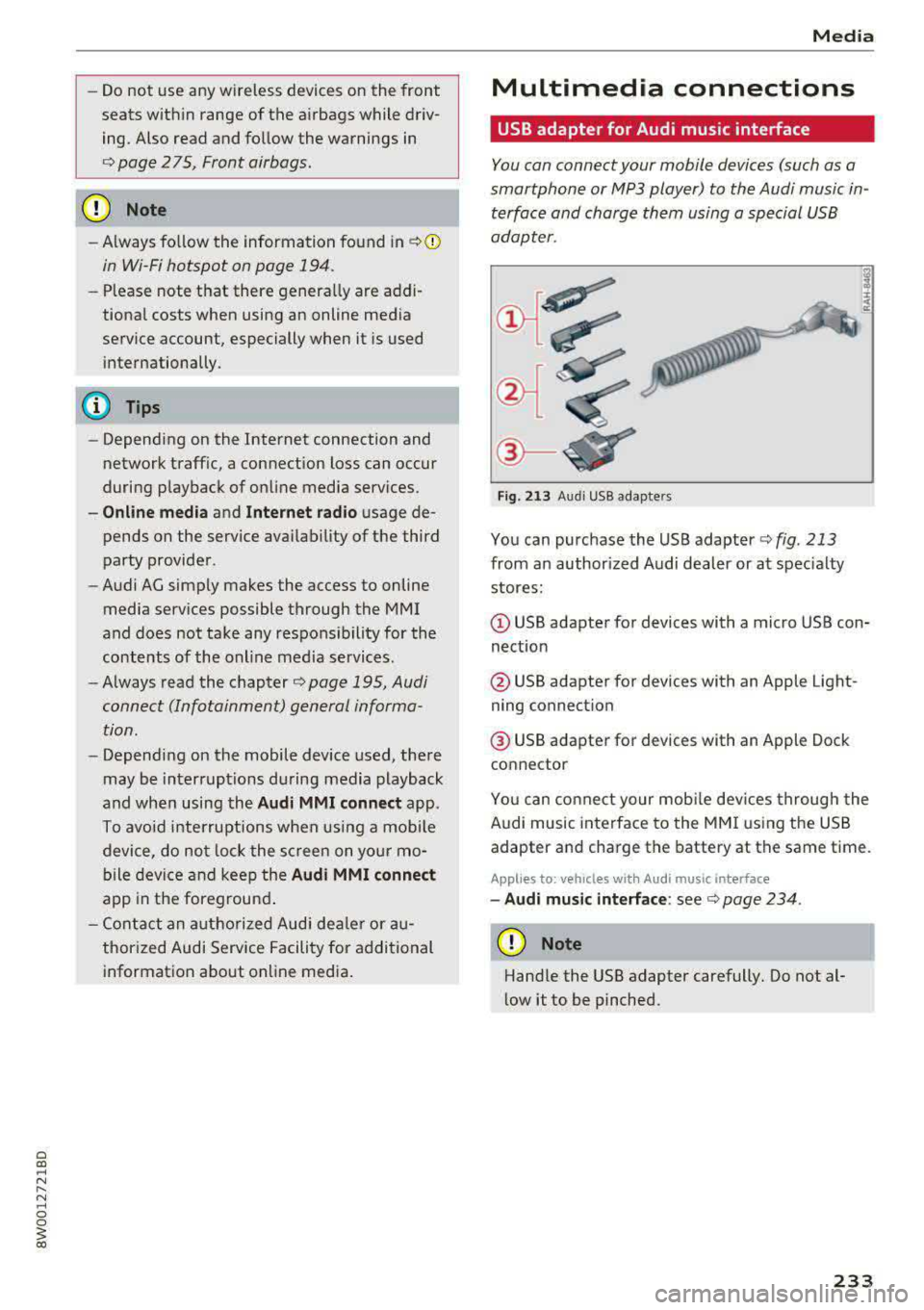
Fig. 213 Audi USB adap ters
You can purchase the USB adapter c::> fig. 213
from an author ized Audi dealer or at specialty
stores:
(D USB adapter for devices with a micro USB con
nection
@ USB adapter for devices with an Apple Light
ning connect ion
@ USB adapter for devices with an Apple Dock
connector
You can connect your mobile dev ices through the
Audi music interface to the MMI using the USB
adapter and charge the battery at the same time.
Applies to : veh icles w it h Aud i music interface
- Audi music interface: see c::> page 234.
(D Note
Handle the USB adapter carefully. Do not al
low it to be pinched.
233
Page 237 of 403
Media
Playing media
Accessing media
You can start and operate various media
through the
MMI control panel.
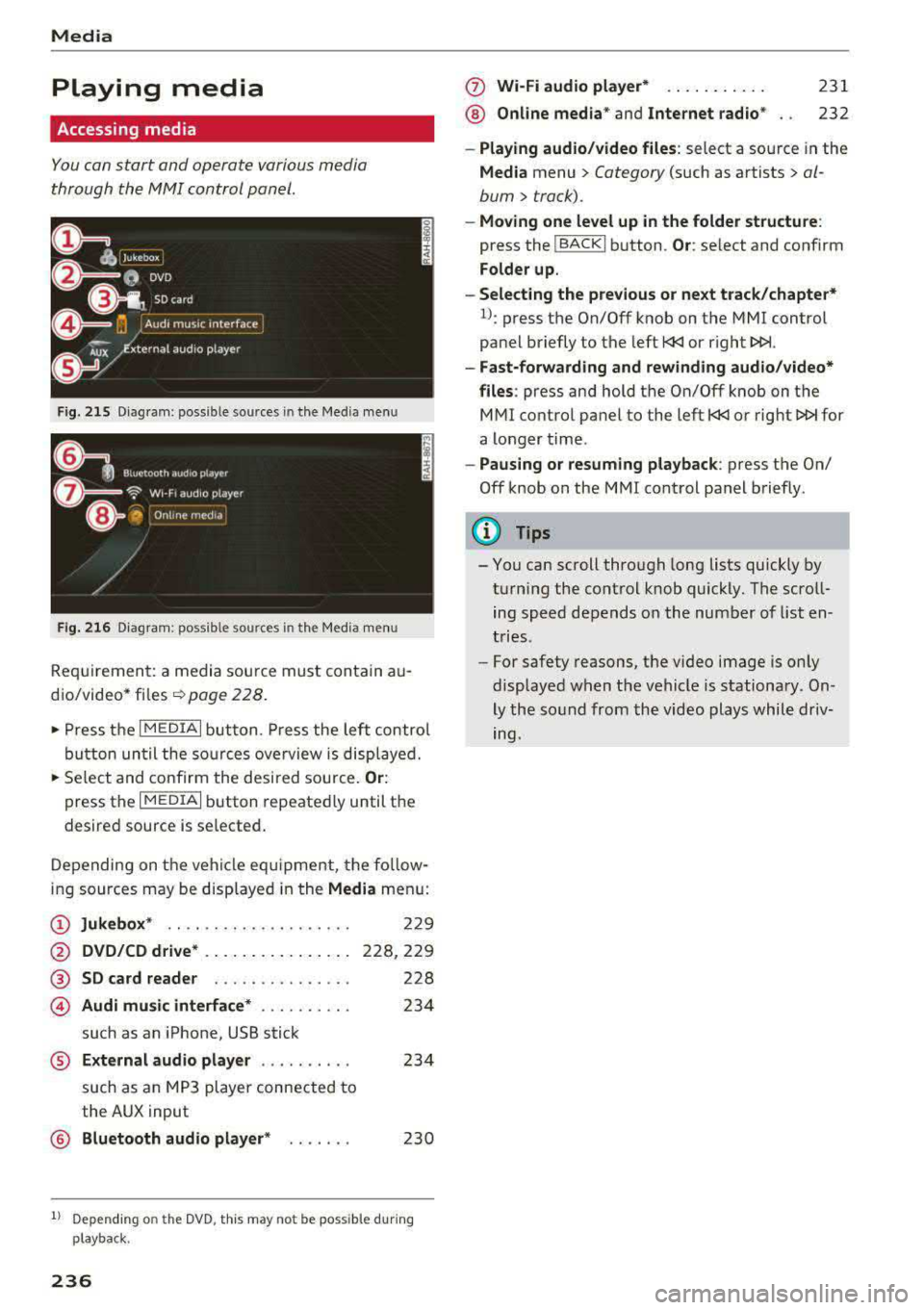
F ig . 215 D ia gr am : p oss ible sources in th e M ed ia m enu
F ig. 216 D iag ra m : possible sources in th e M edi a me nu
Re qu ir emen t: a media sou rce must contain a u
d io/video*
fi les -=> page 228.
• Press t he I M EDIAi bu tton. Press the left co ntro l
b utton until the so urces ove rview is disp layed.
• Se lect and confirm the desi red sou rce. Or :
press th e I M ED IAi b utton repeate dly until the
desired source is selected .
D epending on the ve hicle eq uipme nt, t he fo llow
i ng sources may be disp laye d in the
Media men u:
(D Jukebox * .. .... ........ ..... .
@ DVD/CD drive * .. .. .. .... .. ... .
@ SD card reader ... ..... .. ... . .
© Audi music interface * .. ..... .. .
such as an iPhone, USB stick
229
228,2 29
228
23 4
® External audio player . . . . . . . . . . 234
such as an MP3 player connected to
the AUX input
@ Bluetooth aud io player * . . . . . . . 230
1l Depe ndin g on the DVD , thi s may not be possible du rin g
p laybac k.
236
(f) Wi-Fi audio player* ... .. . .... .
® Online media* and Internet radio *
231
232
-Playing audio /video files : select a source in the
Media menu > Category (such as artists > al
bum
> track).
- Moving one level up in the folder structure :
press the !BACKI b utton . Or: select and confirm
Folder up.
-Selecting the previous or next track/chapter*
1l: press the On/Off knob on the MMI control
pa nel briefly to the left
l
-Fast-forwarding and rewinding audio /video*
files :
press and hold th e On/Off knob on the
M Ml control panel to the left
l
a longer time .
-Pausing or resuming playback : press th e On/
Off knob on the MMI cont rol panel b riefly.
(D Tips
- Yo u can scroll through long lists quickly by
t u rning the control knob quickly. T he scro ll
ing speed depends o n the num ber of list en
t ries.
- For safety reas ons, the video image is only
display ed w hen t he vehicl e is stationa ry . On
ly the so und from the vid eo plays whil e driv
ing.
Page 241 of 403
Media
Change pl aying po sition
Tu rn the control knob to the left o r to the right .
Or: move your finger across the MMI to uch con
trol pad* from left to r ight .
Shuffle1
)
W ith the funct io n sw itched on~ . all files in the
p laylist a re played and show n in random orde r.
Repeat t rack1
l
When the function is switched on~ . the current
track repeats.
Repe at*
Req uirement: an iPod/ iPhone* must be selected
as the media source in the Aud i mu sic interface
¢ page 236, Accessing media.
- Trac k: th e current track will be rep eat ed .
- Folder : the tracks in the current folder are re -
peated contin uously in a loop.
- Off : the f un ct ion is swi tched off .
Back to 'Pla yback'
The options men u is closed. The track currently
p laying appears in the playlist .
Play similar music*
The track currently p lay ing is qu ic kly analy zed
(such as art ists, gen res, mood, beat) and a smart
playlist with s imilar tracks is shown .
Play mo re ...
A smart playlist is show n based on th e track cur
r ently p laying. You c an se lect between a playlist
with more tracks
b y this a rti st, from thi s album
or of this g en re .
Copy to ju keb ox*
See ¢ pag e 229, Adding files to the Jukebox.
Set a s ringtone*2
)
Requ irement: a cell phone must be connected to
the MMI. The track currently playing m ust be in
the Jukebo x*
¢ page 229 .
l) The fun ctio n auto matic ally sw itche s off when th e sour ce
is changed .
2> This fun ction is not a vai lable for all cell phon es.
240 The selected track will be
used as the ringtone
for incoming calls .
Gracenote online databa se *
Requirement: the MMI must be connected to t he
Interne t.
Depend ing on availab ility, var ious information
will load about the track current ly playing when
t hi s function is switc hed
on~-
Favori te s
See¢ page 239.
Addition al opt ion s
Requirement: the vehicle m ust be stationary and
a video fi le* or a DVD* must be playing .
Parental control*
Playback of video DVDs can be restr icted using
parenta l cont rol.
Ente r the passwo rd for parental control. Pass
word set at the factory: 1234. You have the fol
l owing opt ions:
- Prot ection lev el: select and confirm the protec
tion level (for example, Level S) . Eight different
content rat ing levels can be set for parental
cont rol.
If you se t the paren tal control level at
Level 5, all DVDs from level 1-5 c an be pl ayed.
Video DVDs with a higher level will not play . Se
lect
No re striction to remove all of the restr ic
tions .
-Change password : edit the c urrent password .
Switch to full screen
The video image is displayed. Tu rn the contro l
k nob to d isplay the playlist.
Or : press the I BAC KI
button.
Replay v ideo l)
When this function is switched on~' the current
video will replay .
.,._
Page 242 of 403
a co .... N ,....
N .... 0 0
3 co
Show DVD menu
The DVD main menu opens in t he Infotainment
system display.
- Sele cting a m enu it em : select and confirm a
menu item.
O r: move your finger on the M MI
touch contro l pad* and press the control knob.
Aud io track1
)
You can manually set the audio track (language
and audio format). The language and aud io for
mat options depend on the video DVD.
Subtitle sl)
You can set subtit les for playback manually. The
l anguages available depend on the DVD.
A sp ect
Aud i recommends the Automat ic setting for the
picture format. You can set the picture format
depending on the active file or source (for exam
p le video file*, DVD*).
Picture for- Description
mat
Automatic
The MMI detects the picture for-
mat of the source and d isplays the
image in the optimum ratio . B lack
ba rs may appea r on the sides of
the display, depending on the
source format and the Info tain-
ment system d isp lay that is instal-
l ed .
Zoom The image is enlarged to fill the
ent ire Infota inment system d is-
p lay. Switch the function off if t he
image is distorted.
l ) Depe ndi ng o n the DVD, t his may not be poss ib le dur ing
playback .
Media
Picture for- Description
mat
Cinem a-
Use this setting for fil ms in cinema
scope format 21:9. Black bars are shown
in the upper and lower edges of the
Infotainment system display .
Original The image is disp layed in the ratio
of the source format . Select this
opt ion if the image is distorted or a
section of the image is cut off
when
Auto is selected .
4:3 T he image is f ixed i n the 4:3 pie -
ture format . Black bars are shown
on the sides of the Infotainment
system display.
16 :9 The image is fixed i n the 16:9 p ie-
t ur e format. Blac k ba rs are shown
in the upper and lower edges of the
Infotainment system display.
(D Tips
- Not all video DVDs have parenta l cont ro l.
- The p rotection levels for the
Parental con-
trol
are based on the US s tandards from the
Motion Picture Association of America
(MPAA) . Note that the age levels for video
DVDs in European countr ies may di ffer.
- Password ent ry for
Parental control will be
locked for approx imately one m inute if you
enter the incorrect password th ree t imes in
a row. The password can on ly be reset by an
authorized Audi dealer.
241
Page 255 of 403
Driving sa fe ty
Driving safety
Basics
Safe driving habits
Please remember -safe ty first!
The individua l safety features of your vehicle can
work together as a system to help protect you
and your passengers in a wide range of accidents.
These features cannot work as a system if they
are not always correctly adjusted and correctly
used .
This chapter contains important informat ion,
tips, instruct ions and warn ings that you need to
read and observe for your own safety, the safety
of your passengers and others . We have summar
ized here what you need to know about safety
be lts , a ir bags, child restra ints as well as child
safety. Yo ur sa fe ty is for us
priority number 1 . Al
ways observe the information and wa rnings in
this section - for your own safety as well as that
of your passengers.
The informa tion in this section applies to all
model ve rsions of your vehicle . Some of the fea
tures described in th is sections may be standard
equipment on some models, or may be optional
equ ipment on others. If you are not sure, ask
your author ized Audi dealer.
A WARNING
- Always make sure that you follow the in
structions and heed the WARNINGS in th is
manual. It is in your inte rest and i n the in
te res t of your passengers .
- Always keep all of the Owner 's L iterature
man uals in yo ur Audi when you lend o r sell
yo ur vehicle so that this importan t info rma
t ion w ill always be availab le to the dr iver
and passenge rs.
- Alw ays keep t he Owner 's L ite ra tu re han dy
so that you can find i t easi ly if yo u have
questions .
254
· Important things to do before driving
Safety is everybody 's job! Vehicle and occupant
safety always depends on the informed and care
ful driver .
For your safety and the safety of your passen
gers,
before driving always:
.. Make sure that a ll lights and signals are operat
ing correctly .
.. Make sure tha t the tire pressure is correct .
.. Make sure that all windows are clean and afford
good vis ibility to the outs ide .
.,. Sec ure all luggage and othe r items ca refully
¢ page 259 .
.,. Mak e sure tha t noth ing ca n interfere with the
pedals .
.. Adjust front seat, head restraint and mirrors
correctly for your height.
.. Applies to: adjustable head restraints: Instruct
passengers to adjust the head restraints ac
cording to the ir height .
.. Make sure to use the rig ht child restraint cor
rectly to protect
chi ldren ~ page 295 , Child
safety.
.,. Si t properly in yo ur seat a nd make su re t hat
your passengers do the same ¢
page 65, Front
seats.
.. Fasten your safety belt and wear it properly . Al
so instruct your passenge rs to fasten thei r sa fe
ty belts properly ¢
page 263.
What impairs driving safety?
Safe driving is directly related to the condition of
the vehicle , the driver as well as the driver's abili
ty to concentra te on the road withou t being dis
tracted.
The driver is responsib le for the sa fety of the ve
hicle and a ll of its occupants . If your ability to
drive is impa ired, safety risks for everybody in the
vehicle increase and you a lso become a hazard to
everyone else on the road ¢
,&.. There fore:
.. Do not let yourse lf be distracted by passengers
or by using a cellular telephone .
.. NEVER dr ive whe n your driving ab ility is im -
paired (by med ications, alcohol, drugs, e tc.) .
..,.
Page 266 of 403
Never rely on airbags alone for protection. Even
when they deploy, airbags provide on ly additional
protection. Airbags are not supposed to dep loy in
all kinds of accidents. A lthough your Audi is
equipped with airbags, all vehicle occupants, in
cluding the dr iver, must wear safety belts cor
rectly in order to minimize the risk of severe in
jury or death in a crash .
Remember too, that airbags will deploy only
once and that your safety belts are always there
to offer protect ion in those accidents in w hich
a ir bags are not supposed to deploy or when they
have already deployed. Unbelted occupants can
also be thrown o ut of the vehicle where even
more severe or fatal injur ies can occur.
It is also important for the rear passengers to
wear safety belts correctly . Unbelted passengers
in the rear seats endanger not only themse lves
but also the driver and other passengers
¢ fig. 231. In a frontal collision they will be
thrown forward violently, where they can hit and
injure the driver and/or front seat passenger .
Safety belts protect
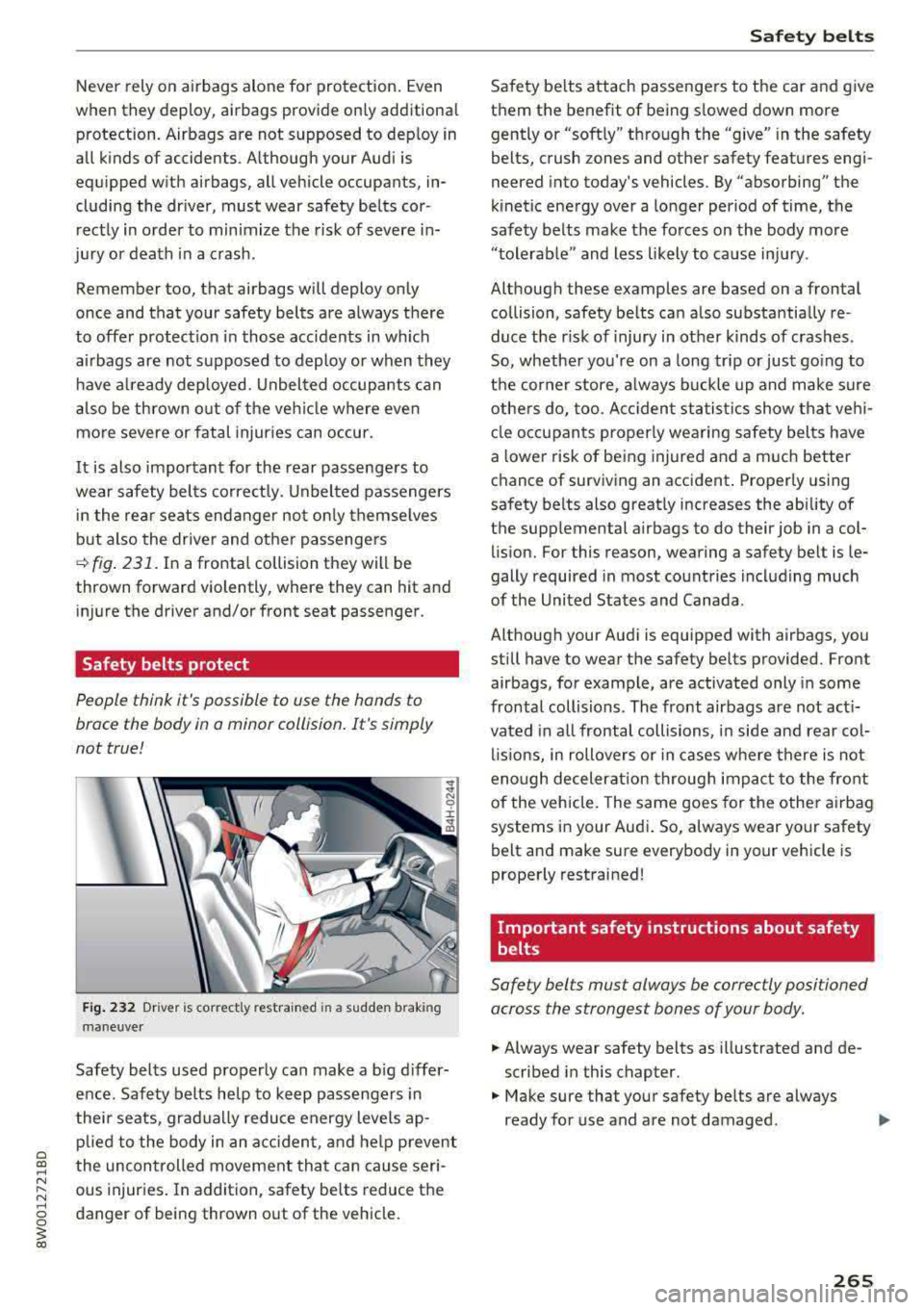
People think it's possible to use the hands to
brace the body in a minor collision . It 's simply
not true!
Fig. 232 Driver is correct ly restra ined in a sudden b rak ing
maneuver
Safety belts used properly can make a big differ
ence. Safety belts he lp to keep passengers in
thei r seats, gradually reduce energy leve ls ap
plied to the body in an acciden t, and help prevent
the uncontrolled movement that can cause seri
ous injuries. In addition, safety belts reduce the
danger of being thrown out of the vehicle.
Safety belts
Safety belts attach passengers to the car and give
them the benefit of being slowed down more
gently or "softly" through the
"give" i n the safety
belts, crush zones and other safety features engi
neered into today's vehicles. By "absorbing" the
kinetic ene rgy over a longer period of time, the
safety belts make the forces on the body more
"tolerab le" and less likely to ca use injury .
Although these examples are based on a frontal collision, safety be lts can also substantially re
duce the r isk of injury in other k inds of crashes.
So, whether you're on a long trip or just go ing to
the corner store, always buckle up and make sure
others do, too. Acciden t statist ics show that vehi
cle occupants properly wearing safety belts have
a lower risk of being injured and a much better
chance of surviving an accident . Properly using
safety belts also greatly increases the ability of
the supp lemental airbags to do their job in a col
lision. For this reason, wearing a safety belt is le
gally required in most count ries including much
of the United States and Canada .
Although your Aud i is equipped with airbags, you
still have to wear the safety belts provided. Front
airbags, for example, are activated only in some
frontal collisions. The front airbags are not act i
vated in all frontal collisions, in side and rear col
lisions , in rollovers or in cases where there is not
enough deceleration through impact to the front
of the vehicle. The same goes for the other air bag
systems in your Audi . So, always wear your safety
belt and make sure everybody in your vehicle is
properly restrained!
Important safety instructions about safety
belts
Safety belts must always be correctly positioned
across the strongest bones of your body.
.,. Always wear safety belts as illustrated and de
scribed in this chapter.
.,. Make sure that your safety belts are always
ready for use and are not damaged.
265
Page 271 of 403
Safety belt s
- The relevant safety requirements must be
observed when the vehicle or components
of the system are scrapped. A qualif ied
dealership is familiar with these regulations
and will be p leased to pass on the informa
tion to you .
Service and disposal of safety belt preten
sioner
The safety be lt pretens ioners are pa rts of the
safety belts on your Audi. Installing, removing,
servicing or repair ing of belt pretensioners can
damage the safety belt system and prevent it
from wo rking co rrectly in a collision .
There are some important things yo u have to
know to make sure that the effectiveness of the
syst em will not be impaired and that discarded
components do not cause injury or pollute the
env ironment.
A WARNING
Improper care, serv icing and repair proce
dures can increase the r isk of personal injury
and death by preventing a safety belt preten
sioner from activating when needed or acti
vating it unexpectedly :
- The pyrotechnic safety belt pretensioners
can on ly be act ivated once.
If pyrotechnic
safety belt pretensioners have been activat ed, the system must be rep laced .
- Never repair, adjust , or change any parts of
the safety be lt system.
- Safety belt systems in cl ud ing safety be lt
pretens ioners cannot be repaired. Special
procedures are req uired for removal, insta l
lation and disposal of this system.
- For any wor k on the safety belt system, we
strongly recommend that you see your au
tho rized Audi dea ler or q ualified technician
who has an Audi approved repair manual ,
training and spec ial equ ipment necessary.
@ For the sake of the environment
Undep loyed airbag modu les and pretension
ers might be classified as Perch lorate Materi
al -specia l handling may apply, see
www.dtsc .ca.gov/hazardouswaste/perchlo-
270
r ate. When the vehicle or parts of the re
straint system including airbag modu les safe
ty belts with pretensioners are scrapped, all
applicable laws and regulations must be ob
served. Your authorized Audi dealer is familiar
with these requirements and we recommend
that you have your dealer perform this service
for you .
Page 275 of 403
Airbag syste m
the electronic control unit¢ page 283, PASSEN
GER AIR BAG
OFF~; ON@ light.
A lways remember, a child safety seat or infant
carrier installed on the front seat may be struck
and knocked out of position by the rapid ly inflat
ing passenger's airbag in a fronta l co llision. The
airbag cou ld greatly reduce the effect iveness of
the child restraint and even seriously injure the
child during inflation.
For this reason, and because the back seat is the
safest place for ch ildren
-when properly restra in
ed according to the ir age and size
-we strong ly
recommend that children always sit in the back
seat ¢ page 295, Child safety.
A WARNING
A child in a rearward-facing child safety seat
installed on the front passenger seat w ill be
ser iously injured and can be killed if the fron t
airbag infla tes
-even w ith an Advanced Ai rbag
System.
- T he inflating a irbag w ill hit the child safety
seat or infant carrier with great force and
will smash the chi ld safety seat and child
against the backrest, center armrest, door
or roof.
- Always install rear -facing child safety seats
on the rear seat .
- If you must install a rearward facing ch ild
safety seat on the front passenger seat be
cause of exceptiona l circumstances and the
PA SSENGER AIR BAG OFF ~; light does not
come on and stay on, immed iately install
the rear-fac ing ch ild safety seat in a rear
seat ing pos ition and have the airbag system
inspected by your authorized Audi dea ler.
- Forward-facing ch ild safety seats installed
on the front passenger's seat may interfere
with the deployment of the airbag and ca use serio us pe rsonal injury to the child.
A WARNING
If, in except ional circumstances, you must i n
stall a forward -facing chi ld res train t on the
front passenger's seat:
- Alw ays make sure the forward-facing seat
has been designed and ce rt ified by its man-
274
ufacturer for use on a front seat with a pas
senger front and side airbag.
- Never put the forward-facing child restraint
up against or very near the instrument pan
el.
- Always move the front passenger seat to
the highest posit ion in the up and down ad
justment range and move it back to the
rearmost posit ion in the seat's fore and aft
ad justment range, as far away from the a ir
bag as poss ible, before installing the for
ward-facing chi ld restraint.
- Always make sure that the safety be lt upper
anchorage is behind the ch ild rest raint and
not next to o r in front of the child rest raint
so th at the safety be lt will be p roperly posi
tioned.
- Ma ke sure that the
PASSENGER AIR BAG
OFF
~; light comes on and stays on all the
time wheneve r the ign it ion is switched on .
A WARNING
To reduce the risk of serious injury, make sure
that the PASSENGER AIR BAG OFF~; light
will be disp layed whenever a ch ild restraint is
installed on the front passenger seat and the
ignit ion is switched on.
- If the
PASSENGER AIR BAG OFF ~; light
does not stay on, perform the checks descri
bed
¢ page 283, Monitoring the Advanced
Airbag System.
- Take the child restra int off the front passen
ger seat and install it properly at one of the rear seat positions if the
PASSENGER AIR
BAG
OFF ~ light does not stay on .
- Have the airbag system inspected by your author ized Audi dealer immed iate ly.
- Always carefully follow instructions from
child restraint manufacturers when instal
ling child restra ints.
A WARNING
If, in exceptional ci rcumstances, you must in
stall a forward or rearward-fac ing child re-
stra int on the fron t passenger's seat:
..,.