Scr AUDI A4 2018 Manual Online
[x] Cancel search | Manufacturer: AUDI, Model Year: 2018, Model line: A4, Model: AUDI A4 2018Pages: 403, PDF Size: 66.81 MB
Page 370 of 403
Fuses and bulbs
Fuses
Replacing fuses
A fuse that has blown will have metal strips tha t
have burned through .
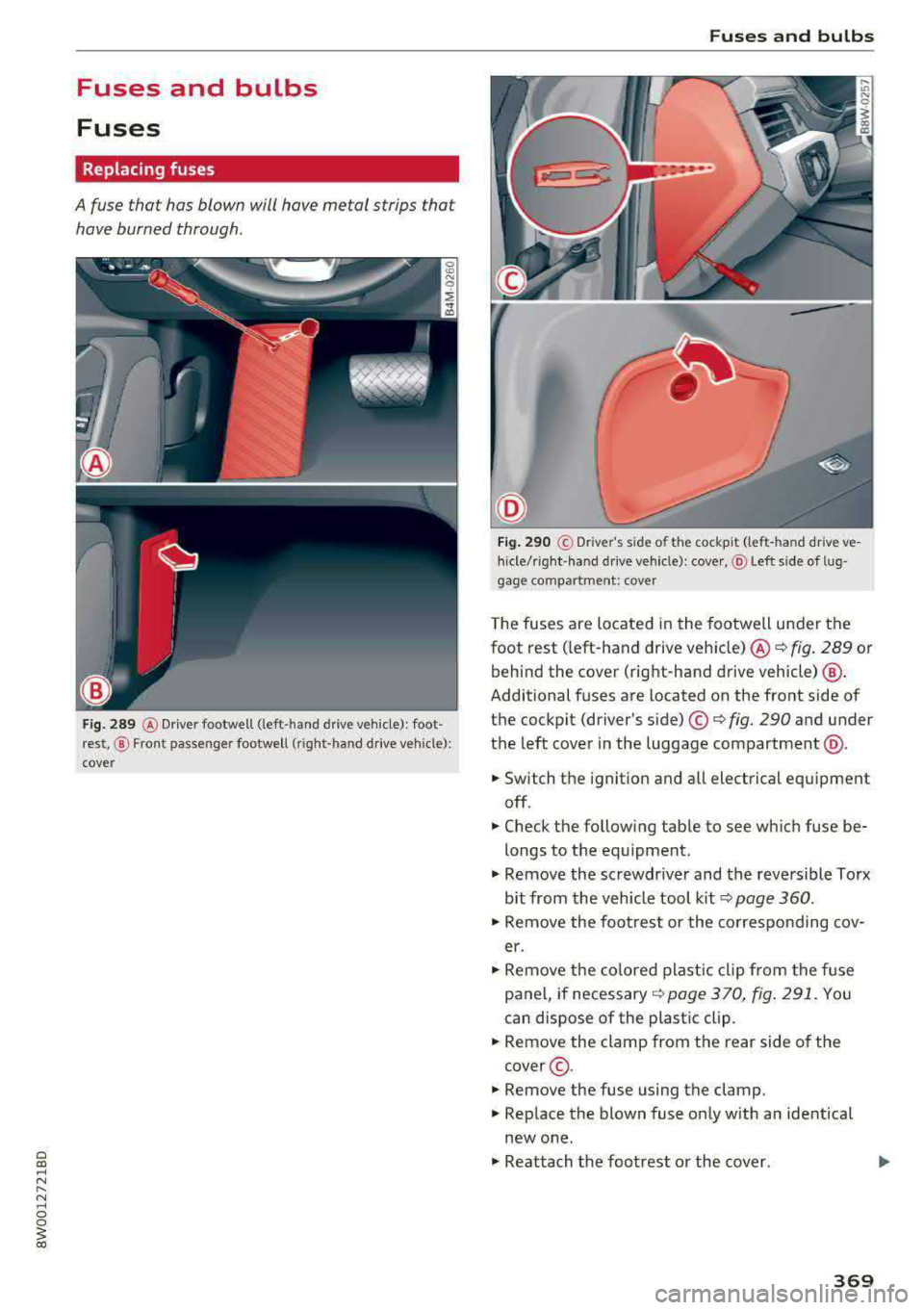
Fig. 289 @ Driver footwell (left -hand drive vehicle) : foot
res t,@ Front passe nge r footwell (right -hand drive vehicle ):
cove r
Fuses and bulbs
Fig. 290 © Driver's s ide o f the cockp it (left- han d drive ve
hicle/r ight -h and drive vehicle): cove r, @ Left side of lu g·
gage compartment: cove r
The fuses are located in the footwell under the
foot rest (left-hand drive
vehicle)@¢ fig. 289 or
behind the cover (right-hand drive vehicle) @.
Additional fuses are located on the front side of
the cockpit (driver's
side) ©¢ fig. 290 and under
the left cover in the luggage compartment @.
.. Switch the ignition and all electrical equipment
off.
"Check the following table to see wh ich fuse be·
longs to the equipment.
" Remove the screwdriver and the reversible Torx
bit from the vehicle tool
kit ¢ page 360 .
.. Remove the foot rest or the corresponding cov
er.
" Remove the colored plastic clip from the fuse
panel, if
necessary ¢ page 370, fig . 291. You
can dispose of the plast ic clip .
.. Remove the clamp from the rear side of the
cover @.
" Remove the fuse using the clamp .
" Replace the blown fuse only with an identical
new one .
" Reattach the footrest or the cover .
369
Page 376 of 403

@ Tips
The discharged battery must be properly con
nected to the vehicle's electrical system .
When jump starting or charg ing the battery,
never connect the negative ground cable to
the battery negative post because the battery
manager system must be able to detect the
battery's state of charge. Always connect the
negative ground cable to the negative ground
post of the battery manager control unit.
Using the jump start
cable
Both jump start cables must be connected in the
correct order!
Fig. 295 Engine compartment: connec tors for jump start
cables and a charger
Fig. 296 Ju mp starting us ing a battery in another vehicle:
@ -providing current, @-drained
The procedure described below for connecting
jumper cables is intended to prov ide a jump start
for your vehicle .
Vehicle with discharged battery
•Turnoff lights and accessories, move the auto
matic transmission* selecto r lever to N (Neu
tral) or P (Par k), and set the park ing brake.
Emergency situations
Connecting the positive cable (red) to the
positive terminal
• Open the red cover on the positive terminal
c:>fig. 295 .
1. Secure one end of the positive cable (red) to
the jump start pin
c:> fig. 296 (D (pin under
the red cover = "posit ive") on the vehicle that
needs to be started @.
2. Secure the other end of the positive cable
(red) to the positive termina l@ on the
bat
tery provid ing the current @.
Connecting the negative cable (black) to the
negative terminal
3. Secure one end of the negative cable (black)
to the nega tive term inal @ on the battery
that is providing the current @.
4. Secure the other end of the negative cable
(black) to the jump start
pin @ (hex head pin
= "negative") on the vehicle that needs to be
started @.
Starting the engine
• Start the engine on the vehicle providing the
jump start @and let it run at idle.
• Now start the engine on the vehicle with the
drained battery @.
• If the engine does not start, stop the starting
procedure after 10 seconds and then repeat it
after approx imately 30 seconds.
• Remove the cables when the engines are run
ning. Remove them in reverse order from the
way they were installed.
• Close the red cover on the positive terminal.
T he battery is vented to the outside to prevent
gases from enter ing the vehicle interior . Make
sure that the jumper clamps are well connected
with their
metal parts in full contact with the
battery terminals.
_& WARNING
-To avoid serious personal injury and damage to the vehicle, heed all warnings and instruc
tions of the jumper cable manufacturer. If in
doubt, call for road service.
-Jumper cables must be long enough so that
the vehicles do not touch .
..,_
375
Page 377 of 403
Emergency situations
-When connecting jumper cables, make sure
that they cannot get caught in any moving
parts in the engine compartment.
-Do not bend over the batteries -danger of
chemical burns!
-The battery cell locking screws must be
tightened securely.
-Before you check anything in the engine
compartment, always read and heed all
WARNINGS
c> page 323.
(D Note
Improper hook-up of jumper cables can ruin
the generator.
- Always connect POSITIVE(+) to POSITIVE
(+), and NEGATIVE(-) to NEGATIVE(-)
ground post of the battery manager control
unit.
- Check that all screw p lugs on the battery
cells are screwed in firmly. If not, tighten
plugs prior to connect ing clamp on negative
battery terminal.
-Please note that the procedure for connect
i ng a jumper cable as described above ap
plies specifically to the case of your vehicle
being jump started . When you are giving a
ju mp start to another vehicle, do
not con
nect the negative (-) cable to the negative
(-) terminal on the discharged batte ry @
c> fig. 296. Instead, securely connect the
negative( -) cab le to either a solid metal
component that is firm ly bolted to the en
gine block or to the engine block itself. If
the battery that is being charged does not
vent to the outside, escap ing battery gas
could ignite and explode!
Towing with a tow truck
General hints
Your Audi requires special handling for towing.
The following information is to be used by com
mercial tow truck operators who know how to op
erate the ir equipment safely.
-Never tow your Audi, towing will cause dam
age to the engine and transmission.
376
-Never wrap the safety chains or winch cables
around the brake lines .
- To prevent unnecessary damage, your Audi
must be transported with a flat bed truck .
- To load the vehicle on to the flat bed, use the
towing loop found in the vehicle tools and at
tach to the front or rear anchorage
i:>page 376 and i:>page 377 .
A WARNING
A vehicle being towed is not safe for passen
gers. Never allow anyone to ride in a vehicle
being towed, for any reason.
Front towing loop
Only install the front towing loop when it is
needed.
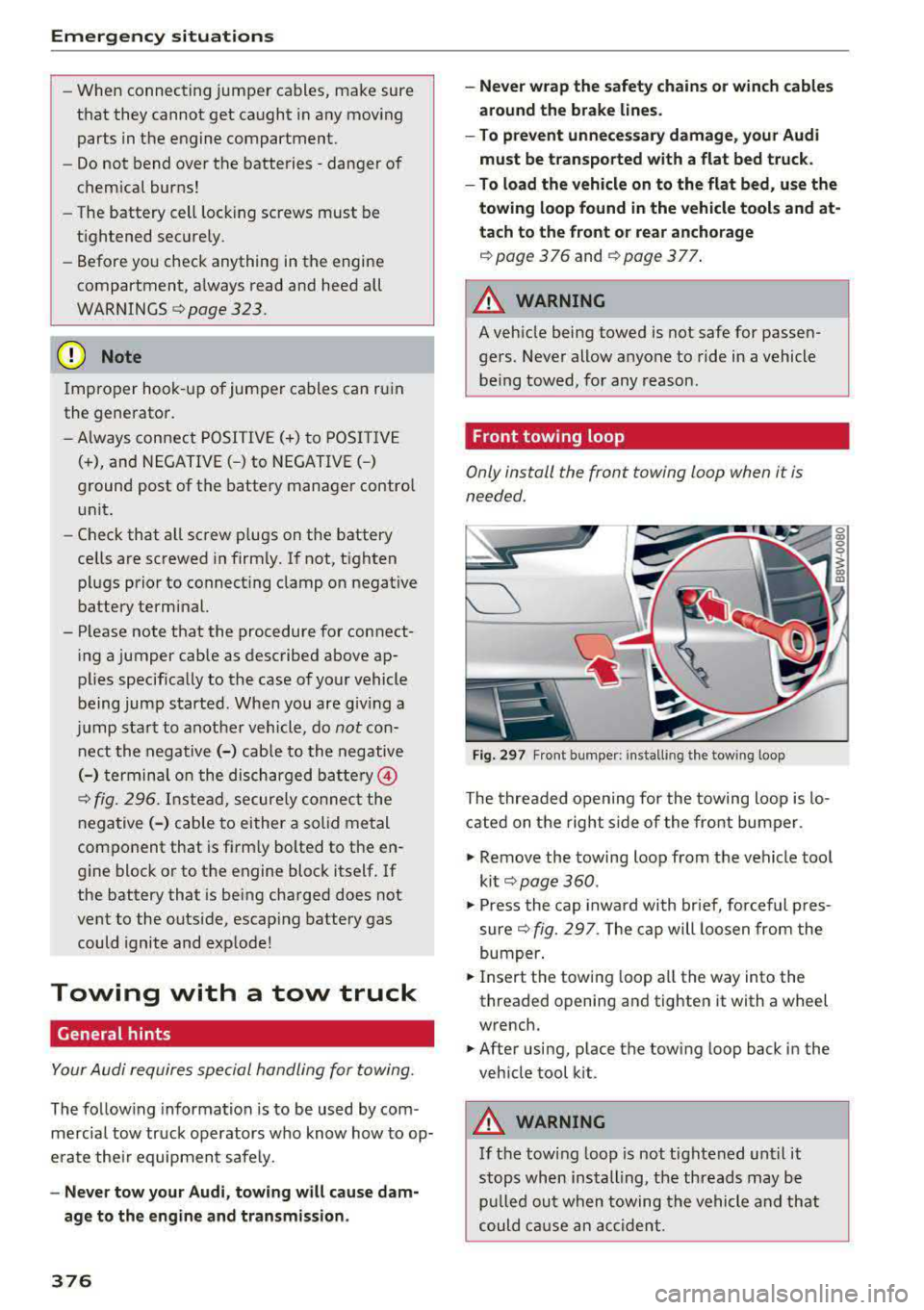
Fig. 297 F ront bumper: installing the towing loop
The threaded opening for the towing loop is lo
cated on the right s ide of the front bumper.
.,. Remove the towing loop from the vehicle too l
ki t
c> page 360 .
.,. Press the cap inward with brief, forceful p res
sure
c> fig. 297 . The cap will loosen from the
bumper .
.,. Insert the towi ng loop all the way into the
threaded opening and tighten it with a wheel
wrench.
.,. After using, place the towing loop back in the
vehicle tool kit .
A WARNING
If the towing loop is not tightened until it
stops when installing, the threads may be
pulled out when towing the vehicle and that
could cause an accident.
-
Page 385 of 403
Consumer Info rmation
today's a utomo biles, have steadily reduced the
scope of maintenance and repairs which can be
carried out by veh icle owners.
Also , sa fet y and
en vironmental
concerns place very strict limits
on the nature of repairs and adjustmen ts to en
g ine and transmission parts wh ich an owner can
perform .
Maintenance, adjustments and repairs usually re
qu ire special tools, testing devices and other
equ ipment available to specially trained work
shop personnel in order to assure proper per
forma nce, re liability and safety of the veh icle and
its many systems .
Improper maintenance, adjustments and repairs
can impair the operation and reliab ility of your
ve hicle and eve n void your vehicle warranty .
Therefo re, proof of se rvicing in a ccordance w ith
the m aintenance sched ule may be a condition for
up ho ld ing a possible wa rranty claim made within
the wa rranty pe riod.
Above all , ope rational safety can be adversely af
fected, cre ating unne cessa ry risks fo r you and
your passengers.
I f in doubt about any servicing, have it done by
your author ized Audi dealer or any other properly
eq uipped and qualified workshop . We strongly
urge you to g ive your author ized Audi dealer the
opportunity to perform a ll scheduled mainte
nance and necessa ry repairs. Your dealer has the
facilities, origina l parts and tra ined specialists to
keep your veh icle runn ing prope rly.
Performing limited maintenance yourself
The fo llow ing pages describe a limited number of
procedures whic h can be performed on your vehi
cle with ordinary tools, should the need arise and
tra ined personnel be unava ilable. Before per
forming any of these procedures, always thor
ough ly read all of the app licab le text and carefu l
ly follow the instructions g iven . A lways rigorously
observe the
WARNINGS prov ided .
Befo re yo u check anything in the engine com
partment, always read and heed all WARNINGS
c::> & and c::> & in Working in the engine compart
ment on page 323 .
384
A WARNING
-
-Ser ious personal in jury may occur as a result
of imp roperly performed maintenance, ad
justments or repairs .
- Always be extreme ly careful when work ing
on the vehicle . Always follow commonly ac
cepted safety practices and general com mon sense. Never r is k personal in jury.
- Do not attempt any of the mainte nance,
checks or repairs described on the following pages if you are no t fu lly fam iliar with these
or other proce dures with respect to the ve
hicle, o r are uncert ain how to p ro ceed.
- Do not do any work wi thout the prope r tools
a nd equi pmen t. H ave the necess ary wo rk
done by your authorized Au di dealer or an
other properly equipped and qualified work
shop.
- The engine compartment of any motor veh i
cle is a potentially hazardous area . Never
reach into the a rea around or touch the radi
ator fan. It is temperature controlled and
can switch on suddenly - even when the en
gine is off and the ignition key has been re
moved. The rad iator fan switches on auto
mat ica lly when the coolant reaches a certain
temperature and will con tinue to ru n until
the coolant temperat ure drops.
- Always remove the igni tion key before any
one gets u nder the vehicle.
- Always support your vehicle with safety
stands if it is necessary to work underneath
the vehicle. The ja ck* s upplied w ith the vehi
cle is no t ad equate fo r thi s pu rpose and
could collapse causing se rious personal in
jury .
- If you must wor k underne ath the vehicle
with the wheels on t he ground, always make
sure the vehicle is on level ground, that the
wheels a re always sec urely blocked and that
the engine cannot be started.
- Always make sure the transmission se lector
lever (automatic t ransm iss ion) is in P (Park
position) and the park b rake is applied.
Page 386 of 403
a co .... N ,....
N .... 0 0
3 co
@ For the sake of the environment
-Changing the engine settings wi ll adversely
affect emission leve ls. Th is is detrimental to
the env ironment and increases fuel con
sumption.
- Always observe environmental regu lations
when disposing of old engine o il, used brake
flu id, d irty engine coolant, spent batteries
or worn out tires .
- Undeployed airbag modules and pretension
ers might be classified as Perchlorate Mate
rial -spec ial handling may apply, see
www .dtsc.ca.gov/hazardouswaste/perchlo
rat e. When the vehicle or pa rts of the re
straint system including airbag modules
safety be lts with pretens ioners are scrap
ped, a ll applicab le laws and regulations
must be observed. Your a uthorized Audi
dealer is familiar with these requirements
and we recommend that you have your deal er perform this service for you.
Accessories and
technical changes
Additional accessories and parts
replacement
Always consult on authori zed Audi dealer before
purchasing accessories.
Audi vehicles that are constructed w ith advanced
materials like Steel/Aluminum (Hybrid construc
tion), Aluminum (Audi Space Frame), and/or Alu minum/Carbon Fiber (Ultra Advanced Light
We ight Materials) are as unique as the ir drivers .
Therefore, the ava ilability of certain parts needed
for repair , restoration , or reconstruction wi ll be
restricted , or parts will be unava ilable, if the ve
hicle is not repaired at an a uthorized Audi colli
sion repair facility. This includes but is not limit
ed to structura l parts which require specialized
training and equipment to restore their crash
worthiness back to the original NHTSA and IIHS performance.
Your vehicle incorporates the latest safety design
features ensuring a high standard of active and
passive safety.
Consumer Inf ormation
This safety could be compromised by non-ap
proved changes to the vehicle. For this reason, if
parts have to be rep laced, please observe the fol
lowing points when install ing additional accesso
ries:
Approved Audi accessories and genuine Audi parts are avai lab le from authorized Aud i dea lers.
T hese dea le rs also have the necessa ry facilities,
tools and trained specialists to install the parts
and accessories properly .
A WARNING
-Using the wrong spare parts or using non-ap-
proved accessories can cause damage to the
vehicle and serious personal injury.
- Use on ly accessories expressly approved by
Aud i and genuine Audi spare parts
- These parts and accessor ies have been spe
cially designed to be used on your vehicle.
- Do not use license plate brackets in the
front area that are different from the one
installed at the factory, or add additional
li
cense plate brackets.
- Never install accessor ies such as telephone
cradles or beverage holders on airbag covers
or w ith in the airbag deployment zones . Do
ing so will increase the risk of injury if a ir
bags are triggered in an accident!
- Before you check anyth ing in the engine
compartment, always read and heed all
WARNINGS
9poge 323.
(D Note
- If items other than genu ine Audi spare
parts, add -on equipment and accessory
items are used or if repair work is not per
formed according to specified methods, this
can result in seve re damage to your vehi
cle's engine and body (such as corrosion)
and adversely affect your vehicle's warranty.
- If emergency repa irs must be performed
elsewhere, have the vehicle exam ined by an
authorized Audi dealer as soon as possib le .
- The manufacturer cannot be held liable for
damage which occurs due to failure to com
ply with these stipulations .
385
Page 394 of 403

K
Key....... .. .. ................ ..... .. 38
Key not recognized . . . . . . . . . . . . . . . . . . .
85
Key replacement . . . . . . . . . . . . . . . . . . . . . 38
Mechanical key . . . . . . . . . . . . . . . . . . . .
38, 39
Replacing the battery . . . . . . . . . . . . . . . . . 39
Unlocking/locking . . . . . . . . . . . . . . . . . 40, 42
Vehicle code . . . . . . . . . . . . . . . . . . . . . . . . . 38
Kick-down (automatic transmission) . . . . . . .
95
Knee airbags . . . . . . . . . . . . . . . . . . . . . . . . . 287
Description . . . . . . . . . . . . . . . . . . . . . . . . . 287
How they work . . . . . . . . . . . . . . . . . . . . . . 288
Important safety instruct ions . . . . . . . . . . 289
L
Lane assist
refer to Audi active lane assist . . . . . . . . . 125
Lap timer . . . . . . . . . . . . . . . . . . . . . . . . . . . . 106
Evaluating . . . . . . . . . . . . . . . . . . . . . . . . . 106
Starting . . . . . . . . . . . . . . . . . . . . . . . . . . . 106
LATCH · · · · · . .... ............. .. .. .. . 309
Descr iption . . . . . . . . . . . . . . . . . . . . . . . . . 310
Install ing a child restraint ............ . 311
Location
· · . .. ..... ....... ... .. .. .. . 310
Mounting and releasing the anchorage
hook
. . .. .. .... ............. .. .. .. . 311
Launch control program . . . . . . . . . . . . . . . . . 95
Leather care/cleaning . . . . . . . . . . . . . . . . . 357
Left contro l button ............. .. .. .. .. 14
License agreement (MMI) . . . . . . . . . . . . . .
253
Lifting points (vehicle jack) ....... ..... . 364
Light/rain sensor
Headlights . . . . . . . . . . . . . . . . . . . . . . . . . .
54
Interval mode (w ipers) . . . . . . . . . . . . . . . . 60
Light functions . . . . . . . . . . . . . . . . . . . . . . . . 54
High beam assistant
55
Instrument illum ination . . . . . . . . . . . . . . . 58
Interior lighting . . . . . . . . . . . . . . . . . . . . . . 57
Lighting
Exterior
· · · · · · · · · · · · · · · · · · · · · · . .. .. .. 54
Interior . . . . . . . . . . . . . . . . . . . . . . . . . . . . . 5 7
Lights
~ Headlight range control system . . . . . . . . . 54
;::; Listening to mus ic ,....
8 refer to Media .. ............. .. . 227 , 236
3 Loading the luggage compartment . . . . . . . 259
Locking/unlocking
By remote control . . . . . . . . . . . . . . . . . . . . 40
With the centra l locking switch . . . . . . . . .
41
With the convenience key . . . . . . . . . . . . . . 40
With the lock cylinder . . . . . . . . . . . . . . . . .
42
Low beam headlights . . . . . . . . . . . . . . . . . . . 54
Luggage compartment . . . . . . . . . . . . . . . . . . 70
Cover..... .. .. .. .. ............. .. .. . 70
Pass-through . . . . . . . . . . . . . . . . . . . . . . . . 73
Socket.. .. .. .. . ............ .... .. .. . 68
Storing cargo correctly . . . . . . . . . . . . . . . 259
Tie-downs . . . . . . . . . . . . . . . . . . . . . . . . . . . 73
Val et parking function . . . . . . . . . . . . . . . . . 51
also refer to Loading the luggage compart-
ment ..... .. .. .. ................. ..
259
Luggage compartment lid . . . . . . . . . . . . . . . 43
Emergency release . . . . . . . . . . . . . . . . . . . . 47
Lumbar support . . . . . . . . . . . . . . . . . . . . . . . 65
M
Maintenance . . . . . . . . . . . . . . . . . . . . . . . . . 383
Maintenanc e intervals . . . . . . . . . . . . . . . . . 333
Making an emergency call . . . . . . . . . . . . . . 180
Malfunc tion indicator lamp (MIL) . . . . . . . . . 24
Map
Display
219
Operating . . . . . . . . . . . . . . . . . . . . . . . . . . 214
Settings . . . . . . . . . . . . . . . . . . . . . . . . . . . 215
Update . .. .. .. .. ............... .. ..
204
Mapupdate ... .. .. .................. . 217
Mechanical key . . . . . . . . . . . . . . . . . . . . . 38, 39
Media ... .. .. .. .. ............... 227, 236
Drives · · · · .. .. .. .. ....... ........ .. 228
Supported formats . . . . . . . . . . . . . . . . . . 242
Media center .. .. .. .. ............... .. 237
Memory buttons
refer to Shortcut keys . . . . . . . . . . . . 155, 162
Memory capa city
D. ,rectory . . . . . . . . . . . . . . . . . . . . . . . . . . . 185
Jukebox . . . . . . . . . . . . . . . . . . . . . . . . . . . . 229
Memory card SD card reader (MMI) . . . . . . . . . . . . . . . . .
228
Supported types/formats . . . . . . . . . . . . . 242
Memory function . . . . . . . . . . . . . . . . . . . . . . 67
MENU button
· · · · · · · · · · · · ·........ ... 155
393
Page 398 of 403
a co .... N ,....
N .... 0 0
3 co
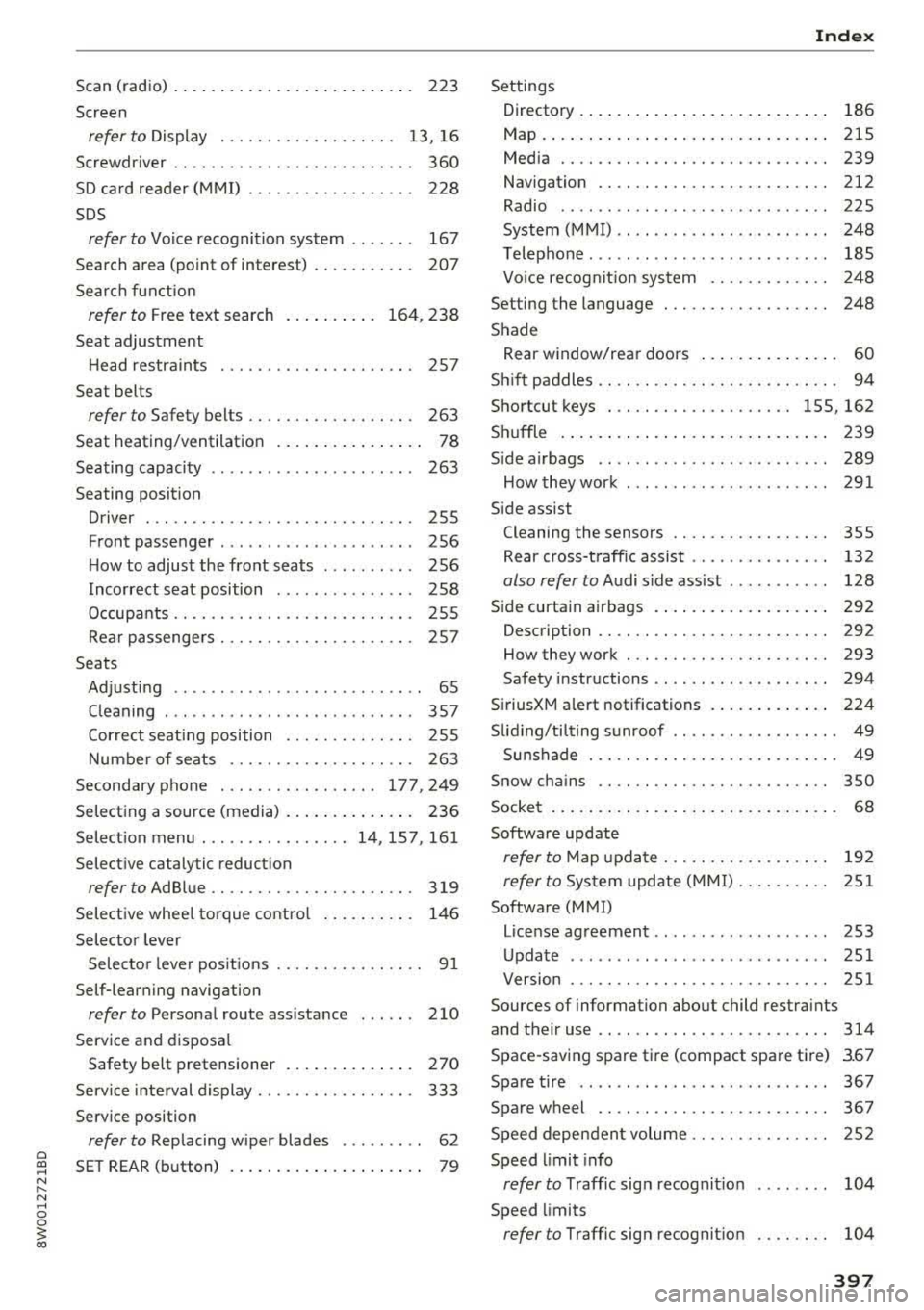
Scan (radio) . . . . . . . . . . . . . . . . . . . . . . . . . . 223
Screen
refer to Display . . . . . . . . . . . . . . . . . . . 13, 16
Screwdriver . . . . . . . . . . . . . . . . . . . . . . . . . . 360
SD card reader
(MMI)
SDS
refer to Voice recognition system ...... .
Search area (point of interest) .... .. .... .
Search function 228
167
207
refer to Free text search
Seat adjustment 164,238
Head restraints . . . . . . . . . . . . . . . . . . . . . 257
Sea t belts
refer to Safety bel ts . . . . . . . . . . . . . . . . . . 263
Seat heating/ventilation . . . . . . . . . . . . . . . . 78
Seating capacity . . . . . . . . . . . . . . . . . . . . . . 263
Seating position Driver
... .. .. ............... .. .. .. .
Front passenger ................. ... .
How to adjust the front seats .... ... .. .
Incorrect seat position ............. . .
Occupants .. .. ............... .. .... . 255
256
256
258
255
Rear passengers . . . . . . . . . . . . . . . . . . . . . 257
Seats Adjusting . . . . . . . . . . . . . . . . . . . . . . . . . . . 65
Cleaning . . . . . . . . . . . . . . . . . . . . . . . . . . . 357
Correct seating position . . . . . . . . . . . . . . 255
Number of seats . . . . . . . . . . . . . . . . . . . . 263
Secondary phone . . . . . . . . . . . . . . . . . 177, 249
Selecting a source (media) . . . . . . . . . . . . . . 236
Selection menu . ... .. ..... ... .. 14 , 157 , 161
Selective ca talytic reduction
refer to AdBlue ............... .. .. .. . 319
Selective whee l torque control . . . . . . . . . . 146
Selector lever
Selector lever posit ions . . . . . . . . . . . . . . . . 91
Self-learning navigation
refer to Personal route ass istance . . . . . . 210
Serv ice and disposa l
Safety belt pretensioner . . . . . . . . . . . . . . 270
Service interval display . . . . . . . . . . . . . . . . . 333
Servi ce position
refer to Replacing wiper blades . . . . . . . . . 62
SE T REAR (button) . . . . . . . . . . . . . . . . . . . . . 79
Index
Settings
Directory ... ... .. .. ................ .
Map ....... ... .. .. ................ .
Media
Navigation .... .. .. .... ....... .... . .
Radio
....... ... .. .................
System (MMI) .. .. .. ...... ....... .. . . 186
21S
239
212
2 25
248
Telephone . . . . . . . . . . . . . . . . . . . . . . . . . . 185
Vo ice recognit ion system ... ... ... .. . .
Set ting the language . ....... ........ . .
Shad e 248
248
Rear window/rear doors . . . . . . . . . . . . . . . 60
Sh ift paddles . . . . . . . . . . . . . . . . . . . . . . . . . . 94
Shor tcut keys . . . . . . . . . . . . . . . . . . . . 155 , 162
Shuffle . . . . . . . . . . . . . . . . . . . . . . . . . . . . . 239
Side airbags . . . . . . . . . . . . . . . . . . . . . . . . . 289
How they work . . . . . . . . . . . . . . . . . . . . . . 291
Side assist Cleaning the sensors 355
Rear cross-traffic assist . . . . . . . . . . . . . . . 132
also refer to Audi side assist . . . . . . . . . . . 128
Side curtain airbags . . . . . . . . . . . . . . . . . . . 292
Description . . . . . . . . . . . . . . . . . . . . . . . . . 292
How they work . . . . . . . . . . . . . . . . . . . . . . 293
Safety instructions . . . . . . . . . . . . . . . . . . . 294
SiriusXM alert notifications . . . . . . . . . . . . . 224
Sliding/tilting sunroof . . . . . . . . . . . . . . . . . . 49
Sunshade . . . . . . . . . . . . . . . . . . . . . . . . . . . 49
Snow chains . . . . . . . . . . . . . . . . . . . . . . . . . 350
Socket . . . . . . . . . . . . . . . . . . . . . . . . . . . . . . .
68
Software update
refer to Map update . . . . . . . . . . . . . . . . . . 192
refer to System update (MMI) .. .. .. .. .. 251
Softw are (MMI)
License agreement . . . . . . . . . . . . . . . . . . . 253
Update .......... .... ........... ... 251
Version 251
Sou rces of info rmation about child restraints
and their use . . . . . . . . . . . . . . . . . . . . . . . . . 314
Space-saving spare tire (compact spare tire) 3.67
Spare tire . . . . . . . . . . . . . . . . . . . . . . . . . . . 367
Spare wheel . . . . . . . . . . . . . . . . . . . . . . . . . 367
Speed dependent volume. . . . . . . . . . . . . . . 252
Speed limit info
refer to Traffic sign recognition
Speed limits
refer to Traffic sign re cognition 104
104
397