infotainment AUDI A4 2018 Workshop Manual
[x] Cancel search | Manufacturer: AUDI, Model Year: 2018, Model line: A4, Model: AUDI A4 2018Pages: 403, PDF Size: 66.81 MB
Page 187 of 403
a co .... N ,....
N .... 0 0
3 co
cell phone. Audi recommends editing cell
p hone contacts d irectly in the ce ll phone .
- Only the con ta cts in the lo ca l M MI memory
ca n be ed ite d or de leted .
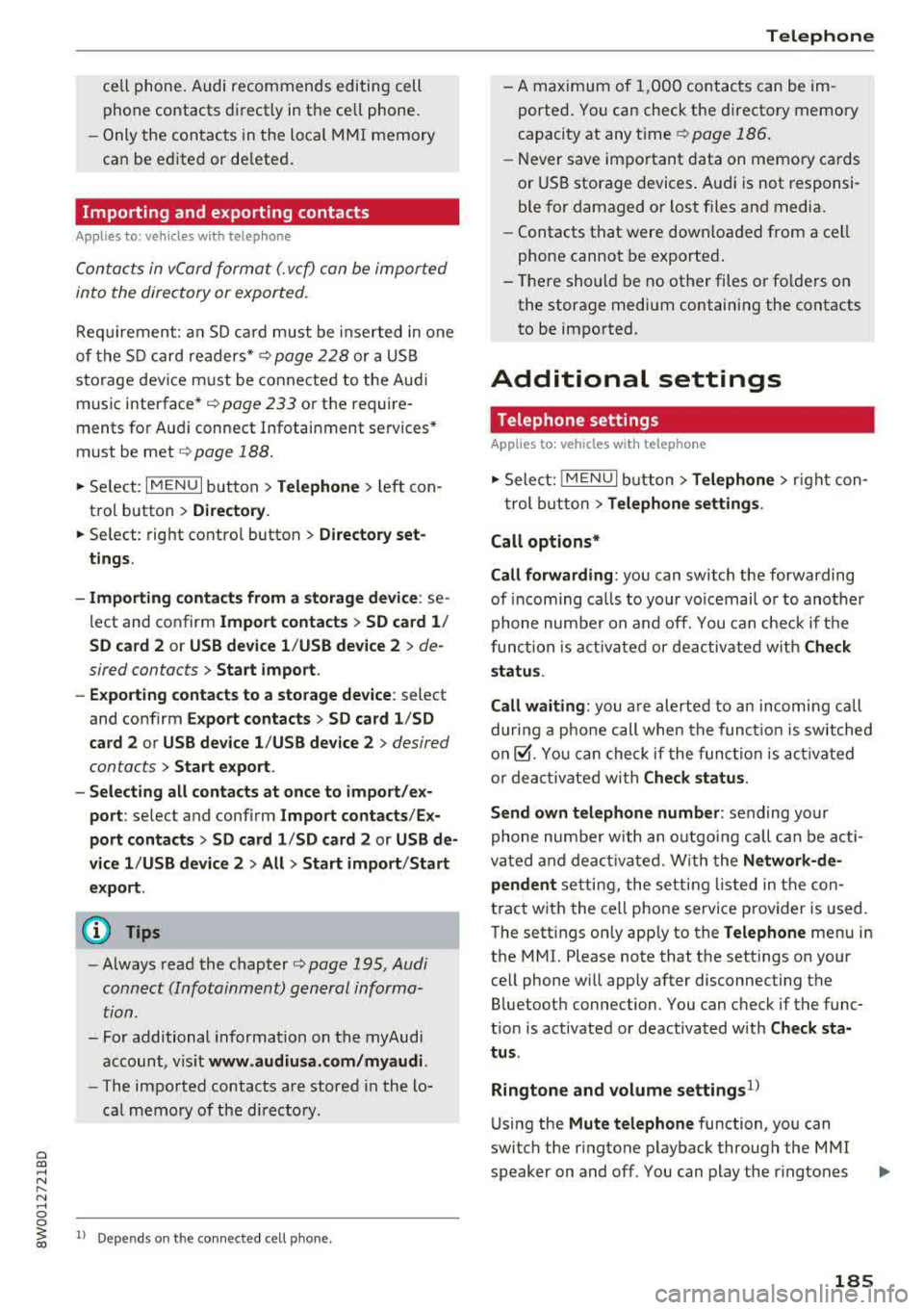
Importing and exporting contacts
Applies to: veh icles with telephone
Contac ts in vCard forma t (. v cf) can be impor ted
in to the directory or exported .
Requ irement: an SD car d mus t be inser ted in one
of the SD c ard readers *
¢ page 228 or a USB
sto rage dev ice m ust be conne cte d to the Aud i
m usic interface* ¢
page 233 or the require
ments for A udi connect Infotainment se rvices*
must be met
¢ page 188.
.,. Select: I M ENU I but ton > Telephone > left con
t ro l butto n >
Directory .
... Se lect : rig ht contro l button > Di rectory set
tings .
- Importing contacts from a storage device :
se
l ect and co nfirm
Import contacts > SD card 1 /
SD card 2 or USB device 1 /USB device 2
> de
sired contacts
> Start import .
- Exporting contacts to a storage device :
select
and confirm
Export contacts > SD card 1 /SD
card 2 or USB device 1 /USB device 2
> desired
contacts
> Start export .
- Selecting all contacts at once to import/e x
port :
select and conf irm Import contacts /Ex
port contacts > SD card 1 /SD card 2 or USB de
vice 1 /USB device 2 >All > Start import /Start
export .
0) Tips
-Always read the chapte r¢ page 195, Audi
conn ect (Infotainm ent) g eneral informa
tion.
- Fo r additional in format io n on the myAudi
account, v is it
www.audiusa.com/myaudi.
- The im po rt ed contacts are stored i n the lo
ca l memory o f the di rectory.
l) Depe nds on th e co nnect ed cell p ho ne.
Telephone
- A m aximum of 1,0 00 cont acts can be im
ported . Yo u can check the directory memory
capacity at any t i me ¢
page 1 86.
- Never save im portant data on memo ry ca rds
or USB storage devices . A udi is not responsi
ble for damaged o r lost files and media.
- Contacts t hat were downloa ded from a ce ll
phone cannot be e xported .
- The re sho uld be no ot her files o r fo lders o n
the stora ge medium containin g the contacts
t o be impo rted.
Additional settings
Telephone settings
Applies to: vehicles with telephone
.,. Sele ct: ! M EN UI bu tton> Telephone > right con-
t rol button >
Telephone settings .
Call options*
Call forwarding :
you can switch the forwarding
of incom ing ca lls to yo ur voicemai l o r to ano ther
phone nu mber on a nd off. You c an chec k if t he
funct ion i~ act ivated or deactivated w it h Check
status .
Call waiting :
you are alerted to an incoming call
dur ing a pho ne c all when the func tion i s swit ched
o n ~-You ca n che ck if the func tio n is acti vated
o r d eacti vate d wi th
Check status .
Send own telephone number :
sending your
phone num ber wit h an o utgo ing ca ll can b e acti
va ted and dea ct ivate d. W it h t he
Network-de·
pendent
se tting , the se tting li ste d in the con
t ract w it h t he ce ll phone service p rovider is used.
T he sett ings on ly app ly to the
Telephone men u in
the MMI. Please note that the settings on your
ce ll phone w ill apply after disconnecting the
B luetoot h connection. You can c heck if the f unc
t ion is activated or deactivated with
Check sta
tus .
Ringtone and volume settings
1>
U sing the Mute telephone function, you can
switch the r ingtone p layback through the M MI
speaker on and off. You can play the r ingtones
185
Page 190 of 403
Audi connect (Infotainm ent )
Audi connect
(Infotainment)
Introduction
Applies to vehicles with Audi connect (Infotainment)
With Audi connect Infotainment services, on line
information is transmitted directly to the vehicle
and then integrated .
A WARNING
To reduce the risk of an accident, only use
Audi connect Infotainment services when
road and traffic cond itions permit. A lways
read and fo llow the notes in
9page 155,
Traffic safety information.
Setup
Requirements for Audi connect
(Infotainment)
Applies to vehicles with Audi connect (Infota inment)
The data connection fo r Audi connect Infota in
ment services is made thro ugh an embedded SIM
card (eS IM card) that is equipped in the veh icle.
The fo llow ing requ irements must be met to use
the embedded SI M card:
- You have already registered at
www .audiu sa.com /my audi and ass igned ave
hicle.
- You have also already logged in to your myAudi
account under
Audi conn ect plan for the em
bedded SIM ca rd and accepted the terms of use
given there. For add it iona l info rmation, co ntact
an a uth orized Aud i de aler or a uthorized Audi
Service Facility .
Then you r Audi co nnect Infota inment services are
activated and can be used in your veh icle.
(D Tips
- After the free subscription has ended or the
data volume has been used up, data pac kets
ca n be purchased for the use of Audi con
nect Infot ainment serv ices. Yo u can find a d
dit ional info rmation about fees and pur
chasing at
www .audiusa .com /myaudi.
188
-Read this chapter before operating
~ page 195, Audi connect (Infotainment)
general information.
Configuration through myAudi
Audi connect (Infotainment) configuration
Applies to vehicles with Aud i connect (Infotainment)
Some Audi connect Infotainment services must
be configured through your personal myAudi ac
count before using them for the first time.
-If you do not have a persona l myAud i acco unt
yet, you can register online at
www.audiusa.com /m yaudi .
-Add your vehicle to your my Audi account.
- Activate/configure the A ud i connect (Infotain -
ment) services you would like for your veh icle in
your myAudi account.
-For some Audi connect Infotainment services,
you may also have to enter your myAudi user
data or your myAudi PIN when accessing serv
ices in the MMI to connect your vehicle to
myAudi.
For detailed information on configuration, visit
www.audiu sa.com /m yaudi .
Logging into myAudi in the vehicle
Applies to vehicles with Audi connect (Infotainment)
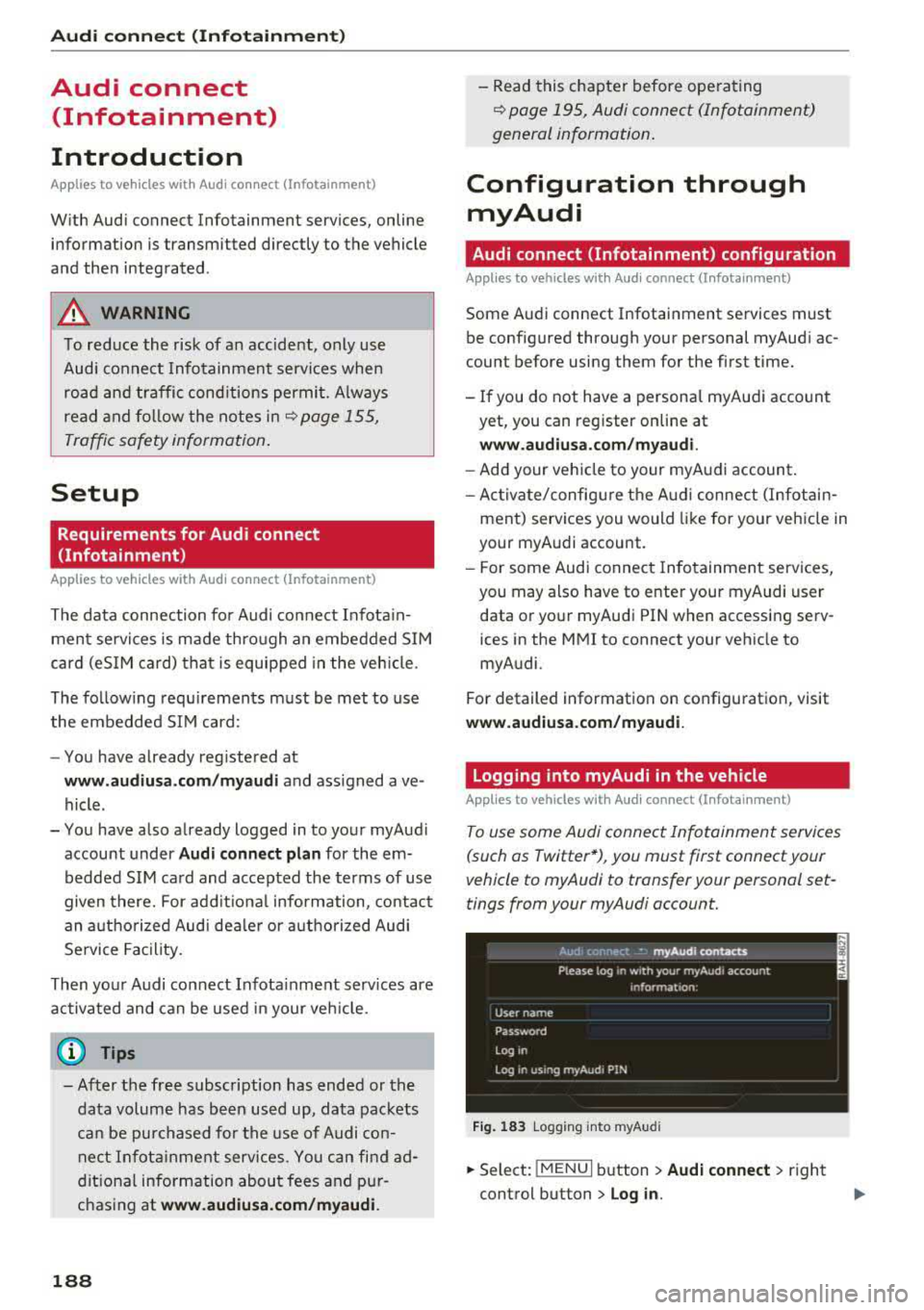
To use some Audi connect Infotainment services
(such as Twitter*), you must first connect your
vehicle to myAudi to transfer your personal set
tings from your myAudi account.
Fig . 1 83 Logging into myA udi
... Select: !MENUI b utton> Audi conne ct > right
control button >
Log in.
Page 191 of 403
.. Enter your myAudi user data. Or : enter your
eight-digit myAudi PIN .
.. Confirm your entry with OK.
Then yo u can open your persona l sett ings from
your my Audi account in your vehicle .
(D Tips
You can receive your my Audi P IN if you have
set up a myA udi account. For addi tional in for
mat io n, see
www.audiu sa.com /myaudi.
Opening Audi connect
(Infotainment)
Applies to vehicles with Audi connect (Infotainment)
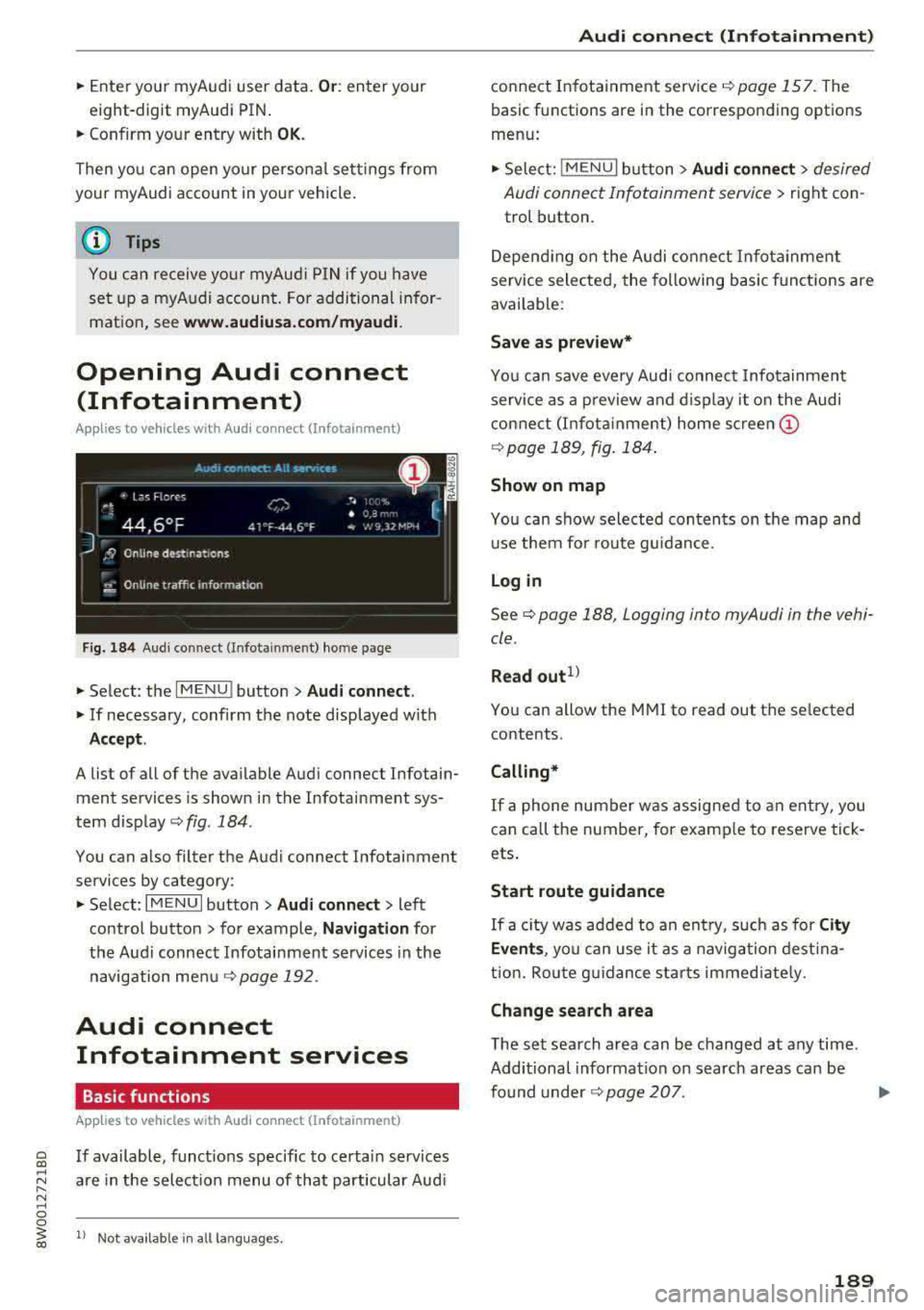
F ig. 184 Aud i co nn ect (Infot ainmen t) home page
.. Select : the I MENU ! button> Audi connect .
.. If necessary, confirm the note displayed with
Accept .
A list of all of the ava ilable Audi connect Infotain
ment services is shown in the Infotainment sys
tem disp lay
c::;, fig. 184 .
You can a lso filter the Audi connect Infotainment
services by category:
.. Select : I MENU I button > Audi connect > left
contro l button> for example,
Na vig ation for
the Audi connect Infotainment services in the
navigation me nu
r::!) page 192.
Audi connect
Infotainment services
Basic functions
App lies to vehicles with Audi connect (Infotainment)
~ If available, funct ions specific to certa in services
~ "' are in the selection menu of that particular Aud i ...... N ~ 0 0
~ 1> Not availab le in all la n guag es.
Audi conne ct (Inf otainment )
connect Infotainment service r=!)page 157. The
basic functions are in the corresponding options
menu:
.. Sele ct: !MENU I button> Audi con nect > desired
Audi connect Infotainment service>
right con
trol button .
Depend ing on the Audi co nnect Infota inment
se rvice sele cted, the following basic f unct ions are
available :
Save as prev iew*
Yo u can save every Audi connec t Infotainmen t
se rvice as a preview a nd d isplay it on the Audi
connect (I nfota inme nt) home
scr een @
r=!)page 189, fig . 184 .
Show on map
You can show selected contents on the map and use them fo r route g uidance.
Login
See c::;, page 188 , Logging in to myAudi in the vehi
cle .
Read out1l
You can allow the MMI to read out t he se lected
contents .
Calling*
If a phone number was assigned to an entry , you
can call the number, for examp le to reserve tick
ets.
Start route guidance
If a c ity was added to an ent ry, such as for City
Event s,
you can use it as a nav igation dest ina
t io n. Rou te g uidance sta rts immed iate ly .
Change search area
The set search area can be changed at any time .
Additional information on search areas can be
fo und
under ¢ page 207 .
189
Page 192 of 403
Audi connect (Infotainment)
Closing Audi connect Infotainment services
Regardless of the fu nction se lected, you c an
close an Aud i connect Infotainmen t se rvice at any
time and ret urn to the home screen¢
page 189,
fig. 184 .
Parking information
App lies to veh icles with Aud i co nn ect (Infotainment)
Information on parking locations and fees in the
selected search area (for example
Nearby ) .
.,. Select and confirm Park ing information .
You can use the rig ht cont rol but ton to sort the
pa rking loc ations
By distance or By availability.
Travel information
Applies to veh icles with Audi co nnect (Infotainment)
Information on att ractions in the selected search
area .
.,. Select and confirm Travel information .
.,. Select an d confirm an attraction to display the
details .
Fuel prices
Appli es to veh icles with Audi co nnect (Infotainment)
Information on gas stations with the lowest fue l
prices for your vehicle in the selected search area .
.,. Select and confirm F uel prices.
You can use the rig ht cont ro l button to sort the
f u e l pri ces
By price or By distance .
1l Service in preparat ion at t he t ime of print ing. Ca n add lat
e r or is only availab le in certa in regio ns.
190
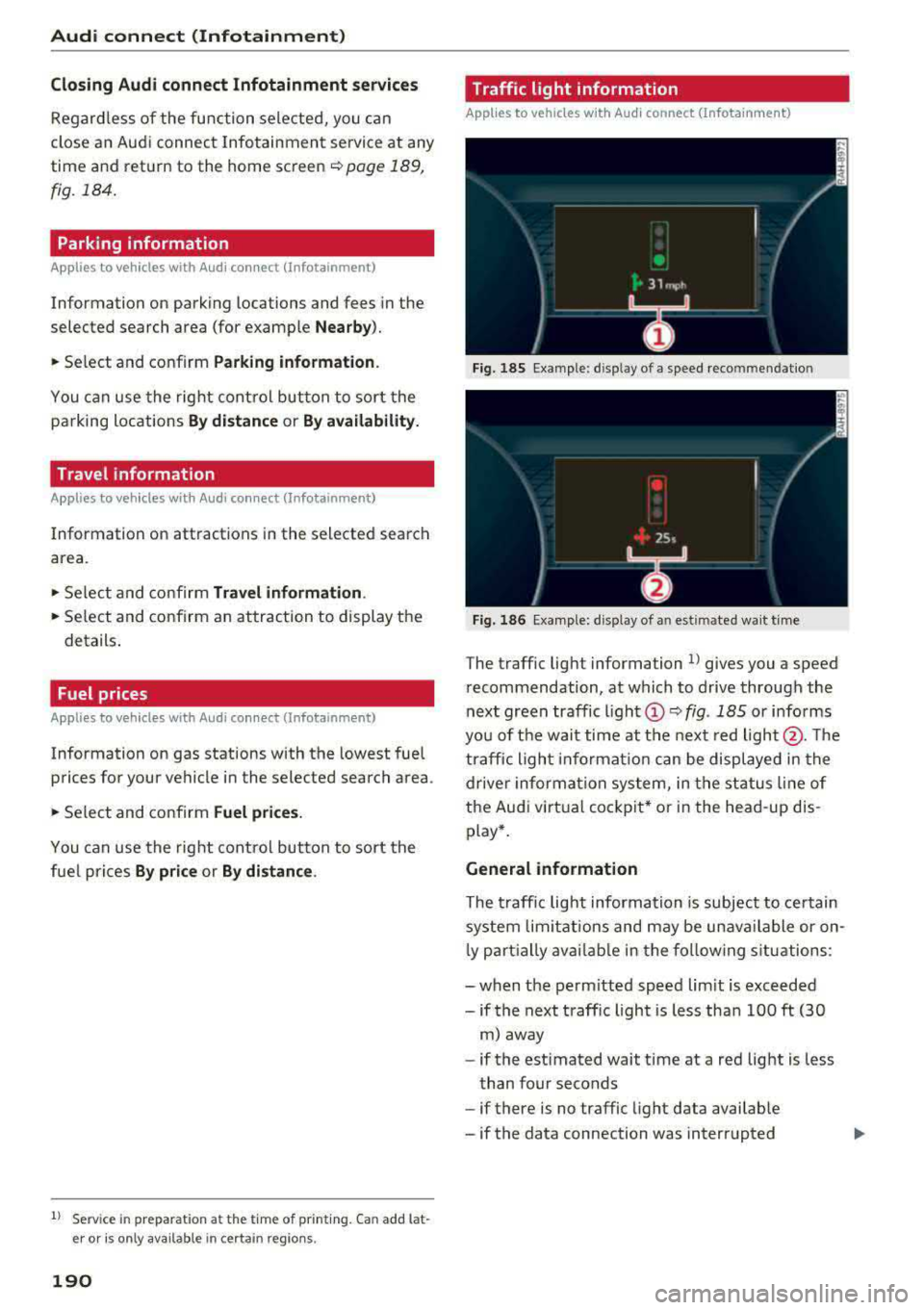
Traffic light information
App lies to vehicles w it h Au di connect (I nfo tainme nt)
Fi g. 185 Examp le : display of a speed recommenda tion
Fig . 186 Examp le: display of an estimated wa it t im e
The t raffic light information l) g ives you a speed
r ecommendation, at which to drive through the
next green traffic
li gh t@ ~ fig. 185 or informs
yo u of t he wai t time at the next red light @. Th e
tr affic ligh t info rm ati on ca n be displ aye d in the
dr ive r in forma tio n sy stem, in t he sta tus line of
the Audi virt ua l coc kp it* or in the he ad-up dis
p lay *.
General information
The traff ic lig ht inform ation is subject to ce rtain
sy stem lim itation s and may be un avail able or on
l y part ially ava ilable in the fo llow ing s itu ations:
- when t he pe rm itted speed lim it is exceeded
-if the next t raffic light is less tha n 100 ft (30
m) away
- if the estimated wait time at a red lig ht is less
t han four seconds
- if there is no traffic light data avai lab le
- if the data connection was interrupted
Page 193 of 403
a co .... N ,....
N .... 0 0
3 co
-when the camera-based t raffic sign recogni
t ion* is malf unct ioning
¢ page 104
-when there are warnings from the camera-
based traffic sign recognit ion*
Switching traffic light information on and
off
-Se lect : I MENU I button > Audi connect > Tr affi c
li g ht inf orm ati on >
On(~) or Off (0 ).
A WARNING
-
-When traffic light information is shown, a l
so always pay attention to the traffic situa
t ion, the distance to other vehicles and the
area around the vehicle. The driver is always
responsible for assessing the traff ic situa
t ion .
-Always adapt your speed to the current
weather, road and traff ic conditions . The
displayed informat ion must never cause you
to ignore legal traffic regulations and pose a
safety risk.
-Regardless of the traffic light informat ion,
yo u should always monitor your speed using
the speedometer and make su re you are ad
hering to the legal speed limit .
-The traffic light information does not adjust
yo ur vehicle's speed to the speed recom
mendat ion shown in the display.
(D Tips
-Traffic light information is not yet ava ilable
i n a ll cit ies and is not nationwide .
-Units of measurement and language set
tings are displayed based on how they were
set in the MMI system se tt ings
¢ page 248 .
-Alw ays read the chapter r:¢> page 195, Audi
connect (Infotainment) general informa
tion .
Weather
Applies to vehicles with Audi connect (Infotainment)
Information on current weather conditions as
well as weather fo recasts for the selected search
a rea .
Audi c onn ect ( Inf ota inm ent )
.. Select and confirm Weather .
You can also disp lay the cu rrent weather condi
tio ns on the map , fo r example .
.. Select: left control button > on entry.
Flight information
Applies to vehicles with Audi connect (Infotainment)
Information on flights and current arrival/depar
ture times in the selected search area .
.. Select and confirm Flight inform ation .
City events
Applies to vehicles with Audi connect (Infotainment)
Info rmation on events in vario us categories in
the desired search area .
.. Select City E vent s > left cont rol button > cate
gory.
Online news
Applies to vehicles with Audi connect (Infotainment)
You can check the c urrent headlines of your fa
vo rite publications in th e MMI.
Requirement: yo ur myAud i accoun t must be sub
sc ribed to newsfeeds and your veh icle must be
connected to myAudi
r::¢> page 188.
.. Select: !M ENUI button> Audi conn ect> Online
new s>
desired newsfeed > a headline .
(i) Tips
If you have not s ubsc ribed to any pe rsonal
newsfeeds in your myAudi account, pre-con
figured newsfeeds will be displayed.
Twitter
Applies to vehicles with Audi connect (Infotainment)
You can access the most important functions in
your Twitter account through your MMI.
Requirement:
You must have connec ted your myAudi ac coun t
with Tw itter. You can find additional information
for this on line at
www .audiu sa. com /myaudi. ..,
191
Page 194 of 403
Audi connect (Infotainment)
You must have connected your vehicle with
myAudi
¢ page 188.
.,. Se lect: I MENU I button> Audi connect> Twitter
> left contro l button > desired function (for ex
amp le,
Trends ).
The following categories can be selected in the
Twitter menu:
- My tweets : News Feed and the Tweets you have
posted are listed.
- Home: the Tweets for everyone you follow are
displayed .
-Trends: topics on Twitter that are currently
popular within a country .
Different functions are available depending on
the Twitter category you have selected:
- New tweet : you can post a new tweet using
pre-made templates or using myAudi tem
plates that you have created yourself.
- Refresh : the selected Twitter function is re
freshed.
- Favorite: set a Tweet as favorite to show you
liked it.
-Retweet : you can quote a Tweet to share it with
others.
(D Tips
- Other settings such as account, language,
Tweet security and location settings
cannot
be changed in the MMI. These changes must
be made on the Twitter website.
- You can only connect
one Twitter account
with your myAudi account.
- Audi connect (Infotainment) makes it possi
ble to access Tw itter . Permanent avai lability
cannot be guaranteed, because that de
pends on Twitter.
Travel (travel guide)
Ap plies to veh icles with Audi co nnect (Infotainment)
You can use the Audi MMI connect opp to store
points of interest on your mobile device (such as
a smartphone) and then use them for route
guidance in the
MMI.
Requirement:
192
The Audi MMI connect app must be installed and
open on your mobi le device .
You must be logged into your myAudi account in
the
Audi MMI connect app and you must have se
l ected your vehicle.
The Wi-Fi function on your mobile device and on
the
MMI must be switched on.
The
MMI must be connected to the network .
"'Press: !MENU ! button> Audi connect> left con-
trol button >
Information category > Travel.
After opening the travel guide, trave l tips in your
area wi ll be displayed including current ratings as
well as the corresponding category .
"' Press the left control button to change the cat
egory (such as bars nearby).
A WARNING
-
-It is o nly safe to use tablets, laptops, mo
bi le devices and other similar devices when
the vehicle is stationary because, like all
loose objects, they could be thrown around
the inside of the vehicle in a crash and cause
serious injuries. Store these types of devices
secure ly while driving.
- Do not use any wire less devices on the front
seats within range of the airbags while driv
ing. Also read the warnings in the chapter
¢ page 275, Front airbags .
Q) Note
Always fo llow the information found in ¢@ in
Wi-Fi hotspot on page 194.
(D Tips
Units of measurement, language settings and
time are shown in the Infotainment system
display based on how they were set in the
MMI system settings ¢ page 248.
Audi connect (Infotainment) in navigation
App lies to : vehicles wit h a navigation system and Audi co n·
nec t (In fo ta inm ent)
... Select: !MENUI button> Audi connect > left
control button >
Navigation .
Page 195 of 403
a co .... N ,....
N .... 0 0
3 co
The follow ing Audi connect In fota inment services
are current ly available:
- Naviga tion wi th
online map view an d Street
View ¢ page 216.
-Point of Interest (POI) online search with
voi ce re cognition
(such as res taur ants): plan
rou te g uidance using t he M MI con trol panel
¢ page 208 and the voice recognition system
¢ page 168 .
-Set up des tina tions i n your M MI using yo ur
myAudi account or online map view
¢page 216 .
-Online traffic information : receive up-to -the
minute traffic info rmation about accidents,
road constr uction and other incidents
¢ page 220.
- Map update : import navigation map updates
directly to yo ur vehicle using an SD ca rd or as
an on line
update ¢ page 218.
(D Tips
-Fo r the map update A udi connect Infotain
ment service via SD card, check the current
software vers ion in your vehicle and t hen
check
www .audiusa.com/myaudi to see if a
newe r version is ava ilable. You can a lso have
t h e new navigation da ta insta lled by an Audi
dealer , w hich can be done for an add itio nal
c ha rge.
- Y ou can also find addi tiona l info rmation
abo ut the
map update onl ine a t
www.audiusa .com/myaudi .
Audi connect (Infotainment) on the phone
Applies to vehicles with Audi connect (Infotainment)
~ Se lect : I MENU I button > Audi connect > left
contro l button >
Communication .
The follow ing A udi con nect In fot ainm ent service s
a re cu rrent ly availab le:
- Stor ing contacts on yo ur computer using yo ur
myAudi Account and load ing the con ta cts in to
t h e M MI
direct ory ¢ page 185.
Audi connect (Infotainment)
Audi connect (Infotainment) in Media
menu
Applies to vehicles with Audi connect {Infota inment}
~ Sele ct : iME NUI button> Audi connect > right
control button >
Entertainment.
- Online media and Internet radio :
offers acce ss
t o d ifferent online media se rvices as well as I n
ternet radio an d ope ration th ro u gh the MMI us
ing the
Audi MMI connect app ¢ page 232.
Applies to: vehicles with Wi·Fi audio player
- Wi-Fi audio player : you can access the med ia
cen ter through a Wi-Fi connec ted med ia p layer
(su ch as a smartp hone)
¢ page 231.
_&. WARNING
It is only safe to use table ts, l aptops , m obile
d evi ces and other simila r devices whe n the ve
hicl e is stationary beca use, like a ll loose ob
j ects, they could be thrown aroun d the inside
of the vehicle in a crash an d cause serious in
jur ies. Store these types of devices sec urely
while driv ing .
(D Note
Always fo llow the information fo und in ¢ 0 in
Wi-Fi hotspot on page 194 .
(D Tips
-Also see the cha pter ¢ page 195, Audi con
nect (Infotainment) general information .
- For more in forma tion on the Wi -Fi a ud io
p layer a nd sup ported devices, contact an
authorized A udi dealer or authorized Audi
Service Facility.
Additional options
Applies to vehicles with Audi connect (Infotainment}
~ Select: ! M EN UI button> Audi connect > right
cont rol button .
The following options a re available in the Aud i
connect Infota inment serv ices overv iew :
Log in*
See ¢ page 188, Logging into myAudi in the vehi -
de. ~
193
Page 196 of 403
a co .... N ,....
N .... 0 0
3 co
Configuring the data
connection
Applies to vehicles with Aud i connect (Infotainment)
The data connection for Audi connect Infotain·
ment services is pre-configured at the factory .
However , if a configuration should be necessary,
you can adjust the following settings .
.,. Select: I MENU I button > right control button>
Connection manager .
.,. Select: right control button > Online settings>
Data connection settings .
Using the Data connection settings menu, you
can set when an Internet connection should be
made . T he Internet connect ion disconnects auto
matica lly on ce the requested Audi connect Info
tainment service no longer requires any data.
The fol low ing settings can be selected:
Audi connect (MMI)
With the Audi connect (MMI) f unction, you can
Allow or Deny the use of Audi connect Infotain ·
ment services if the connection is set to No re·
quest or With request .
Wi-Fi devices*
Using the Wi-Fi devices function, you can Allow
or Deny a connection to the In ternet.
A WARNING
-As the driver, do not allow usage of the Wi
Fi hotspot to distract you from driving, as
this could increase the risk of an accident.
-It is only safe to use tablets, laptops, mo·
bile devices and other s imilar dev ices when
the vehicle is stationary because, like all
loose objects, they could be thrown around
the inside of the vehicle in a crash and cause
serious injuries . Store these types of devices
securely whi le driving.
-Do not use any wireless devices on the front
seats within range of the airbags while driv·
ing. Also read the warnings in the chapter
t::> page 275, Front airbags.
Audi connect (Infotainment)
(D Note
Always fo llow the information found in ~0 in
Wi-Fi hotspot on page 194.
Audi connect (Infotainment) general
information
Audi connect Infotainment services
Applies to vehicles wit h Aud i connect (Infota inment)
@ Tips
-You can only use services supported by Aud i
connect (Infotainment) if you have the
op·
tional MMI Navigation plus equipment w ith
MMI touch* and Audi connect (Infotain
ment).
-Use of the L TE* mobile network standard is
not available in every country. Contact an
authorized Audi dealer or authorized Audi
Service Facility or your cell phone service
provider for additional information.
-Usage of Audi connect Infotainment serv
ices depends on the ava ilability of services
through third party providers.
-Audi connect Infotainment services are only
availab le within the cell phone network cov
erage from your cell phone service provider.
-Audi connect Infotainment services are
available in the USA. Audi connect Infotain·
ment services are currently not availab le in
Canada or in Mexico.
- Also read the information in the chapter
t::> page 175, Telephone.
- Availability, scope, providers, screen display
and costs of services may vary depending on
the country, model, model year, end device
and rates. For add itional information, v is it
www.audiusa.com .
-An initial registration/activation on the
myAudi platform at
www.audiusa.com/
myaudi
is requ ired to use individual serv
ices . You can contact an authorized Audi
dealer or Aud i connect (Infotainment) cus
tomer service at (87 7) SOS-AUDI (2834) to
195
Page 197 of 403
Audi connect (Infotainment)
receive information on options for expand
ing your usage and any costs that may re
sult.
- The Audi connect Infotainment services are
a Wi-Fi/Internet-based system . If the sys
tem does not function correctly even
though all of the requirements are met, please try again later or contact Audi con
nect customer service at 877-505-AUDI
(2834).
- For detailed information on Audi connect
(Infotainment) and the Terms of Use, refer
to
www.audiusa.com .
Data protection
App lies to veh icles with Audi connect (Infotainment)
(D Tips
- You can find additional information in your
MMI in the options menu for the selected
Audi connect Infotainment service and also
on line at
www.audiusa.com.
- Your privacy is important to us.
-AUDI AG collects, processes, shares
and
transmits your personal information in ac
cordance with legal regulations in order to
ensure proper function and availability of
the individual Audi connect Infotainment
services. You can view the complete, current
and valid Audi connect data protection poli
cy in your MMI. The myAudi platform is
available for to you to activate additional
Audi connect Infotainment services and to
transfer data to your vehicle, among other
services. A one-time registration is required
to establish a connection to your vehicle.
For this purpose, AUDI AG collects, process
es, transmits and uses your required per
sonal information as required for you to use
the services provided by AUDI AG. Your in
formation is not distributed to third parties .
Using your cell phone with your myAudi
196
platform allows you to transmit data for
your Audi connect Infotainment services
functions to your vehicle and you can allow
specific vehicle data to be transmitted from
your vehicle.
- By activating special information services
that are part of your Audi connect portfolio,
you can use these functions directly in your
vehicle by entering data to confirm your identity (to use social networks, for exam
ple) . To do this, the identification informa
tion you provided is forwarded with the re
quest to the respective service provider.
T hen you can access your personal content
using a secure connection. This content is
displayed in the vehicle for your use. Your
personal content is not stored within Audi
AG. The necessary connection information is processed and used for providing services
and the proper function of the services in
accordance with applicable legal guidelines.
- You can find additional information in your MMI in the options menu for the selected
Audi connect Infotainment service and also
online at
www.audiusa.com.
- By providing Audi connect Infotainment
services, Audi of America is authorized to
collect , process, transmit and transfer infor
mation about you and your vehicle. Addi
tional information can also be found in your
MMI in the options menu for the selected
Audi connect Infotainment service.
- Information on our data protection meas ures in conjunction with the mobile Audi
connect (Infotainment) application can be
found in the application's privacy policy. For additional information about the
www.audiusa.com/myaudi website or oth
er applications, websites or online services
connected to Audi, visit
www.audiusa.com/
privacy .
Page 198 of 403
a co .... N ,....
N .... 0 0
3 co
Audi connect (Infotainment)
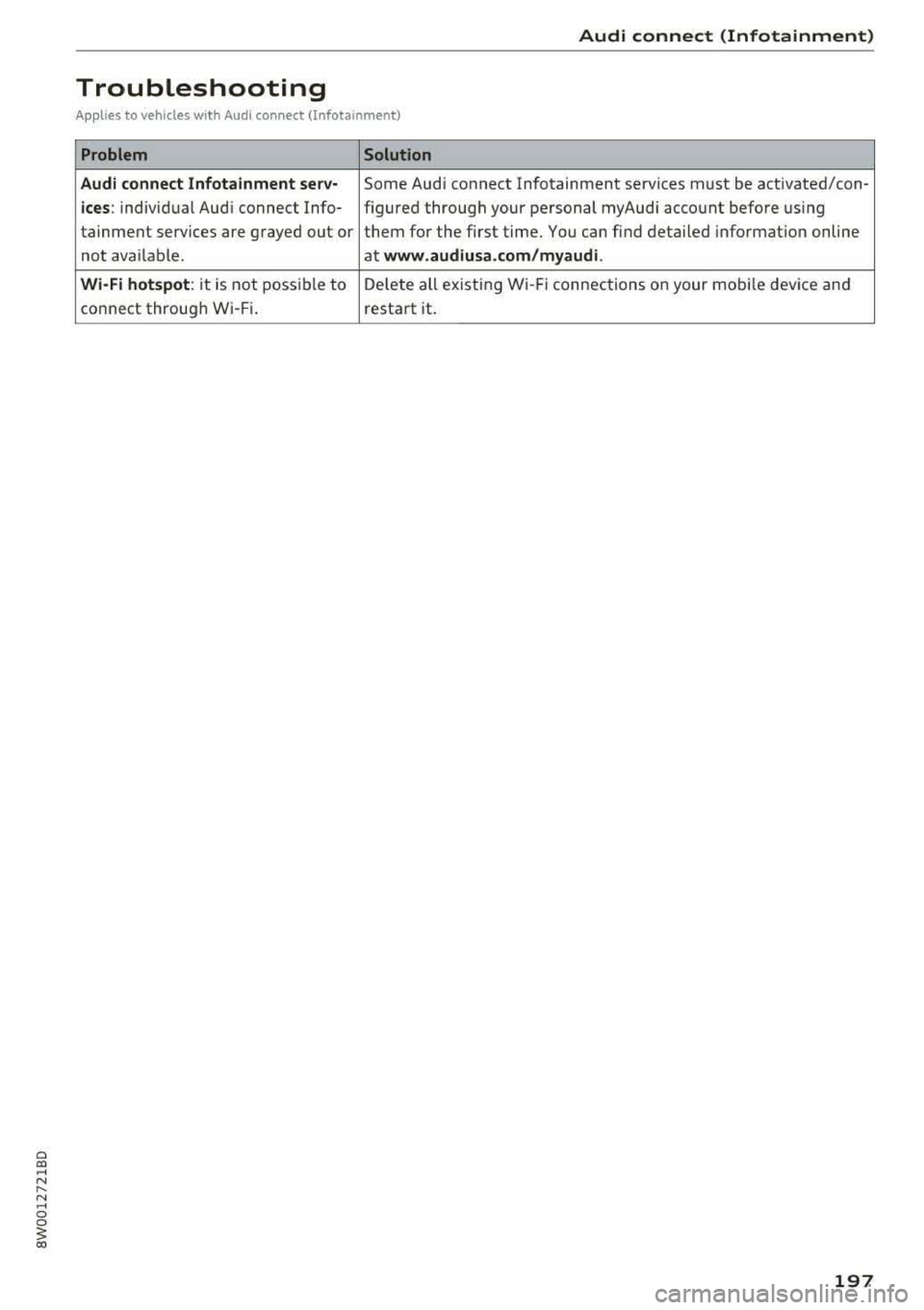
Troubleshooting
Applies to vehicles with Audi connect (Infotainment)
Problem Solution
Audi connect Infotainment serv-
Some Aud i connect Infotainment services m ust be act ivated/con -
ices: individual Aud i connect Info- figured thro ugh your personal myAudi account before us ing
tainment serv ices are grayed out or them for the first time. You can find deta iled informat ion on line
not ava ilable. at
www.audiu sa .com /myaudi.
Wi-Fi hotspot :
it is not possible to De
lete all existing Wi -Fi connections on your mobi le device and
co nnect throug h W i-Fi. restart it.
197