Control AUDI A4 2018 Repair Manual
[x] Cancel search | Manufacturer: AUDI, Model Year: 2018, Model line: A4, Model: AUDI A4 2018Pages: 403, PDF Size: 66.81 MB
Page 107 of 403

-Under some circumstances, traffic sign rec
ognition may not detect traffic s igns cor
rectly or detect them at all. As a result, the
system may not display the correct speed
limit or any speed limit.
- Traffic sign recognition does not adapt your
vehicle's speed to match the speed
limit!
-The display in the instrument cluster is
based on the units of measurement used for
speed in that country. As a result, the d is
play
50 in the instrument cluster can mean
either km/h o r mph, depending on the coun
try .
Operation
Applies to: ve hicles with camera-based traffic sign recogni
tio n
Fig . 106 In strument cluste r: add it iona l display
Accessing traffic sign recognition
• Select: the first tab > Traffic signs.
Setting a speed warning
You can set a warn ing threshold down to 10 mph
(lS km/h). The traffic sign fo r the current detect
ed speed limit w ill blink in the display if you ex
ceed the set threshold .
• Select in the Infotainment system: !MENUI but
ton
> Vehicle > left control button > Driver as
sistance
> Speed warning > Traffic sign based
warning.
Additional display
If a v iew other than the traffic sign recognition is
selected in the ins trument cluster display, the
speed limit will be shown in another display
co fig. 106 . The current applicable speed limit will
Assistance systems
be shown there, if possible within the limits of
the system.
(D Tips
- An additional indicator appea rs in the head
up display* .
- Your speed warning settings are stored au
tomatically and assigned to the remote con
trol key in use.
Messages
Appl ies to: vehicles with camera-based traff ic sig n recog ni·
tio n
f!ji Traffic sign recognition : currently unavaila
ble . Camera view restricted due to surroundings
Function currently unavailable. Camera view re
stricted due to surroundings
This message appears if the camera's visual field
is covered
<:::>page 104, fig . 105. The system w ill
switch itself off.
f!ji Traffic sign recognition: currently restricted.
See owner's manual
This message appears if there is a malfunction in
the navigation system, for examp le. The speed
limit display is limited, which increases the risk
of an incorrect d isplay .
lj Traffic sign based speed warning: currently
unavailable. See owner's manual
There is no warning when the set th reshold is ex
ceeded.
No traffic sign information available
There is no valid navigation data and do speed
li mits were detected . Or there is a recommended
speed but the re is not a speed limit (for examp le
driv ing on and off the expressway).
Malfunction! See owner's manual
The system cannot guarantee correct function
and is switched
off. See an authorized Audi deal
er or authorized Audi Service Facility for assis
tance .
Function not available in this country
105
Page 108 of 403

Assistance systems
The vehicle is in a country where the function is
not available.
Lap timer
Introduction
App lies to: ve hicles w ith la p timer
You can measure and analyze lap times with the
lap timer in the display.
Opening the lap timer
~ Open the first Vehicle tab (trip computer) using
the
l
wheel.
~ Select on the multifunction steering wheel: left
control button
> Lap times.
Operating the lap timer
~ On the multifunction steering wheel, turn the
left thumbwheel
(J) <=> page 13 until the desired
menu item is displayed in the instrument clus
ter .
~ Press the left thumbwheel to confirm the selec
tion.
_& WARNING
Your focus should always be on driving your
vehicle safely. As the drive r, you have com
plete responsibility for safety in traffic. Only
use the functions s uch as the lap timer in such
a way that you always maintain comp lete con
trol over your vehicle in all traffic situations.
@ Tips
You can retrieve information from the trip
computer while the lap timer stopwatch is running.
Lap times and timing
A ppl ies to: ve hicles w ith la p timer
Requirement: the lap timer must be open
<=> page 106.
Timing laps
~ To start timing manually, se lect Start lap 1 in
the menu.
106
~ T o start timing automatically as soon as you
begin to drive, select
Start lap 1 by driving off
or Start by driving off i n the menu.
~ To measure the lap time, select New lap in the
menu. This starts timing the next lap at the
same time.
After completing a lap, the difference between
the last lap and the previous best lap time will be
indicated with
a"-" or" +".
Pausing timing and displaying a split time
~ To insert a pause m, select Pause in the menu.
~ To resume timing, select Resume in the menu.
~ To display a split time, select Split time in the
menu. The split
time (~] appears for approxi
mately 10 seconds in the instrument cluster.
The timing of the current lap continues.
Resetting timing
~ Using the multifunction steering wheel, select
Reset times in the menu.
(D Tips
- A maximum of 99 lap times can be meas
ured.
-If timing is paused, you can continue it later
even if you switch the ignition
off.
-Saved lap times cannot be individually de
leted from the total results.
-The saved lap timer values w ill remain after
switching the ignition
off.
Lap statistics
App lies to: vehicles wi th lap t imer
Displaying lap statistics
You can display the number of laps driven, the
fastest lap" +", the slowest
lap" -", and the aver
age time
"0" in the instrument cluster.
~ On the multifunction steering wheel, select the
left control button
> Lap statistics or Statis·
tics.
~ Turn the thumbwheel down or up to d isplay the
individual lap times.
~ To return to the lap timing that was begun,
press the left thumbwheel.
Page 109 of 403

a co .... N ,....
N .... 0 0
3 co
Resetting lap statistics
"'On the mult ifunction steering whee l, select:
the right contro l button
> Reset statistics .
(D) Tips
The lap statistics list the lap times for the last
30 laps. The fastest and slowest lap time out
of up to 99 measured laps are also displayed .
Predictive efficiency
assist
Descript ion
Applies to: vehicles with predictive efficiency assist
General information
The pred ictive eff ic iency assist helps the driver to
d rive w ith anticipation and therefore helps to
save fuel. The system accesses predictive trip da
ta (including speed limits, inclines and the radius
of curves) from the navigation system*. Informa
tion from the camera-based traff ic sign recogni
tion* is also applied to recognize traffic signs
r;;:;ipage 104.
The messages displayed depend on the naviga
tion data* being up-to-date and the correct iden
tification by the traffic sign recognition*.
When adaptive cruise contro l* is switched off,
the predictive efficiency assist only provides noti
fications without controlled interventions. When
adaptive cruise control* is switched on, the sys
tem responds to upcoming situations automati
cally.
Vehicles with adaptive cruise control*
Refer to predictive control c> page 115.
Indicator in the instrument cluster display
Predictive messages appea r in the instr ument
cluster display to show the driver the appropriate
time to coast when a situation ahead requires
you to drive at a lower speed.
The messages are only shown if the cr uise control
system* or adaptive cruise control* is switched
off .
Assistance systems
An additional indicator appears in the head-up
display* .
Symbol Meaning
Remove your foot from the acceler -
"
ator pedal to slow down, because
there is a situation ahead that re- quires a lower speed.
If you see Driver assistance in the instrument
cluster disp lay, the following symbols will indi
cate which situation the system is currently re
acting to.
Symbol Meaning
MPH
USA models:
Speed limit
km/h
Canada models:
speed limiter
_J!L Intersection
1:1
w
Traffic circle
If there are multiple s ituations, then these situa
tions w ill appear in order in the display.
.&, WARNING ~ -
Pay attention to traffic and the area around
your vehicle when the efficiency assist is
switched on. The driver is always respons ible
for assessing the traffic situation.
(D Tips
- The wording of the message may vary de
pending on the driving mode set in drive se
lect* c> page 133 and the current selector
lever position (automatic transmiss ion*).
No messages are displayed when in the S
selector lever position or in
Dynamic mode.
- When a route is planned using the naviga
tion system*, then the message feed is based on this route. Without route guid
ance, the system uses an assumed route fo r
the message feed.
- There will not be a message for every s itua
tion ahead, for example if there is not
enough distance remaining to react to the
situation.
107
Page 110 of 403

Assistance systems
-No messages are displayed when at speeds
under
20 mph (30 km/h) .
Settings in the Infotainment system
Appl ies to: ve hicles w ith predi ctive e fficiency assis t
~ In the Infotainment system, select: IMENUI
button > Vehicle > left control button > Driver
ass istance
> Eff icie ncy assist .
Predictive messages are shown when this f unc
tion is sw itched on.
(D Tips
No predictive messages are shown on vehicles
w ithout a navigation system .
Audi adaptive cruise
control
Description
A ppl ie s to: ve hicles w ith Audi adaptive cruise co ntro l
Fig. 107 Detect ion range
The adaptive cruise control system is a combina
tion of speed and distance regulation.
It assists
the dr iver by both regulating the speed and
maintaining a distance to the vehicle driving
ahead, within the limits of the system . If the sys
tem detects a vehicle driving ahead, the adaptive
cru ise control can brake and acce lerate your vehi
cle. This increases driving comfort dur ing long
tr ips on highways and in stop-and -go traff ic (au
tomatic transmission*).
What can adaptive cruise control do?
The adaptive cruise contro l system uses video, ra
dar, ultrasound and navigation data. Veh icles
108
driving ahead can be recognized up to 650 feet
(200 m) away.
P red ictive functions offer the driver additional
comfort and contribute to the reduction in fue l
consumption and CO2 emiss ions
r:!> page 115.
On open roads with no traffic , it functions like a
c ruise control system. The stored speed is main
tained . When approaching a vehicle driving
ahead, the adaptive cruise contro l system auto
matically brakes to match that vehicle's speed
and then maintains the set distance . As soon as
the system does not detect a vehicle dr iving
ahead, adaptive cruise control accelerates up to
the stored speed.
App lies to: vehicles wit h auto matic transmissions
In stop-and-go traffic, adaptive cruise control can
brake until the veh icle is stationary and then can
also start driving again automat ically under cer
ta in cond itions
r:!> page 112 .
In traffic jams or s top-and-go traffic, traffic jam
ass ist can ass ist the driver
r:!> page 116.
Which functions can be controlled?
When you switch adapt ive cru ise control on, you
can set the current speed as the "contro l speed"
r:!> page 110, Switching on/off.
When dr iving, you can stop cruise control
c:>page 113 or change the speed c::;,page 112 at
any time .
You can also set the distance to the vehicle driv i ng ahead and set the driving mode of the adap
tive cru ise cont rol
c::;, page 113 .
Page 111 of 403

General information
Appl ies to: ve hicles with Audi adaptive cruise contro l
Fig. 108 Fro nt of the vehicle: sensors and video camera
The areas with the radar and ultrasonic sensors
and the video camera
c:> fig . 108 must not be cov
ered by stickers, deposits or any other objects, because this can inte rfere with the adaptive
cr uise control funct ion. For information on clean
ing, see
c:> page 354 . The same app lies for any
modifications made in the front area.
In some d riving situations, the adaptive cru ise
control funct ion is restr icted:
- Vehicles can only be detected when they are within the sensor detection zones
c:> page 108,
fig. 107.
- The system has a limited abil ity to detect
vehicles that are a short distance ahead, off to
the side of your vehicle or moving into your
lane .
- Objects that are difficult to detect such as mo
torcycles, vehicles with high ground clearan ce
or an overhanging load are detected late or not dete cted at all.
- When driving through curves
c:> page 110 .
-When the vehicle is stat ionary c:> page 110.
..&, WARNING
Always pay attent ion to the traffic aro und you
when adap tive cruise contro l is swi tched o n.
As the driver, you are s till responsible for your
own speed and the distance to other vehicles .
The adaptive cruise control is used to assist
you. The driver must a lways take action to
avoid a collision. The driver is a lways responsi
ble for brak ing at the correct time.
A ss is ta nce syst ems
-For safety reasons, do not use adaptive
cru ise control when the road surface is in
poor condition and/or in bad weather condi
tions (such as ice, fog, gravel, heavy rain and
hydroplaning). Using the system under
these conditions increases the r isk of an ac
cident.
- Sw itch adaptive cruise control off tempora
rily when dr iv ing in turning lanes, on ex
p ressway ex its (except if predictive con trol
is switched on) or in const ruct ion zones.
This prevents the vehicle from acce lerating
to the stored speed when in these situa
tions.
- The adaptive cruise contro l system will not
brake by itself if you put your foot on the ac
celerator pedal. Doing so can override the
speed and distance regulation.
- When approaching stationary obstacles
such as stopped traffic, adaptive cruise con
trol will respond with limited function.
- Adaptive cr uise control does not respond to
peop le, animals, or crossing or oncoming
objects.
- The funct ion of the radar sensors can be af
fected by reflective objects such as guard rails, the entrance to a tunnel, heavy rain or
ice.
(D Note
The sensors can be displaced by impacts or
damage to the bumper, wheel housing and underbody. This can impair the adaptive
cruise control. Have an authorized Audi dealer
or authorized Audi Service Facility check
the ir
f u nct ion.
(D Tips
For an explanation on conformity with the
FCC regulations in the United States and the
Industry Canada regu lations, see
c:> page 38 6.
109
Page 112 of 403

Assistance systems
In curves
Applies to: vehicles w ith Audi adaptive cruise co ntro l
Fig. 109 Example: dr iv ing into a curve
When driving into a curve ¢ fig. 109 and out of a
curve, the adaptive cru ise control may react to a
veh icle in the neighboring lane and apply the
brakes. You can prevent that by pressing the ac
celerator pedal briefly.
Stationary vehicle s
Applies to: ve hicles with Audi adaptive cruise co ntro l
F ig . 110 Example: veh icle c hanging lanes and stationa ry
ve hicle
Within the limits of the system, adaptive cruise
control can react to stationary vehicles
¢
fig. 110, as long as you are driving slower than
30 mph (SO km/h) and the system class ifies the
possible passing maneuver as low. For example,
if a vehicle that was already detected
@ turns or
changes lanes, the adaptive cruise contro l reacts
to the stat iona ry vehicle ahead of
it @ .
110
Veh icles with manual transmission
App lies to : vehicles wit h Audi adapt ive cruise control and
manual t ra n smi ssio n
The adaptive cru ise control is available from 1st
gear through 6th gear in the normal speed
range.
When the adaptive cruise contro l is turned on,
you must press the clutch to shift gears (as usu
al). When sh ift ing normally or when pressing the
clutch, the adaptive cruise control remains
turned on.
After you have engaged the gear, you do
not
need to press the gas pedal. The adaptive cru ise
contro l accelerates automat ically if necessary .
If you press down on the clutch for too long or
shift/couple improper ly, the adaptive cruise con
trol may turn off automatically .
Switching on/off
Applies to: vehicles with A ud i adapt ive cruise control
Fig. 111 Ope rating leve r: sw itching on and off
Fig. 112 Instrument cl uste r: adapt ive cr uise cont ro l
You can set any speed between 20 and 95 mph
(30 and 150 km/h).
.,._
Page 113 of 403

a co .... N ,....
N .... 0 0
3 co
In d ic at or ligh ts and messages in the instr ument
cluster display inform you about the current sit
uation and setting.
A n ad dit iona l in di ca tor appears in the head -up
d isp lay*.
Switching adaptive cruise control on
" Pull the lever toward you in to posi tion @
¢fig. 111.
Storing the speed and activating regulation
" To store the cu rrent speed , press the ISET ! but
ton
¢ fig . 111 . The stored speed is shown in the
speedomete r in the LED
line @ and appears
br iefly i n the status
line @¢fig . 112 .
"Applies to: vehicles with automat ic transmis
s ion: To acti va te the cont ro l when st ation ary,
also press the bra ke peda l.
Switching adaptive cruise control off
" Push the lever away from you in to posi tion @
u nti l it clicks into place. The message ACC:
off
appears.
@ Indicator lights
fll-Adaptive cru ise con trol is switched on . No
ve hicles are detected ahead. The stored speed is
m ain tained .
•-A vehicle d rivi ng a head was detected. The
adapt ive cr uise control system regulates the
speed and distance to the veh icle dr iv ing ahea d
a n d accelerates/brakes automatically .
• - Automatic transmission: adaptive cruise
control must be sw itched on . A veh icle was de
tec ted ahead . Yo ur vehicle is s tat io nary and w ill
n ot sta rt driving au tomatically .
tii-Automatic transmission : adaptive cruise
control must be sw itched on . No vehicles were
detected ahead . Your veh icle is stationary a nd
w ill no t start dr iv ing automa tica lly .
• -The automatic braking is not enough to
maintain a sufficient distance to a veh icle dr iv ing
ahead . You must
in tervene ¢ page 114, Driver
intervention request .
Assistance systems
© Instrument cluster display
If the Driver assistance di spl ay is not shown in
t h e instr ument cluster d isp lay, you can open it
u sing the m ultif unct ion steering whee l buttons
¢ page 13.
Ba sed on the gr aphic dis pla y, you can dete rmine
i f th e sys tem is maintain ing a d istance to the ve
hicle d riving ahead a nd what t hat distance is .
No vehicle -no vehicle was detec ted dr iv ing
ahe ad.
Silver vehicle -a vehicle was detected driving
ahea d.
Red veh icle -request for drive r interve ntion
¢ page 114.
The five distance bars on the gauge © represent
t h e set distance (refer
to ¢ page 113 for infor
mation o n how to change the d ista nce). If you
fall be low the selected d ista nce, the distance
bars become red from the bo ttom upwa rd.
.&, WARNING
Applies to: vehicles w ith automatic transm is
sion: If you pre ss t he
I SET ! butt on whe n driv
i ng at speeds below 20 mp h (30 km /h) , the
ve hicle accelerates au toma tic ally up to 20
mph ( 30 km/h), which is the m inimum speed
that can be set.
@ Tips
- If you swit ch the ig nitio n or the ad ap tive
c ruise cont rol sys tem o ff, the set s peed is
erased fo r safety reasons .
- The e lec troni c sta biliz ation control ( ESC)
and the an ti- slip -regul ation (AS R) are auto
matically switc hed on when t he adaptive
cruise cont rol is switched on.
111
Page 114 of 403

Assistance systems
Changing the speed
Applies to: vehicles w ith Audi adaptive cruise co ntro l
0
f
' 0
Fig. 113 Operat ing lever : c h ang ing the speed
.,. To increase/decrease the speed in 1 mph (1
km/h) increments, br iefly
tap the lever toward
010 c:> fig . 113 to the first level.
.,. To inc rease/decrease the speed in 5 mph
(5 km/h or 10 km/h) increments, br iefly
tap
the leve r toward 0 10 to the second level.
.,. To increase or decrease the speed quickly, hold
the lever towards 0 10 u p to the fi rst or sec
ond level until the red
LED @ reaches the de
s ir ed speed
c:> poge 110, fig. 112 .
You can a lso preselect the speed when adaptive
cruise control is not active by moving the lever in
the desired d irection
0 10 . Activate the previ
ously selected speed by pulling the lever into po
sition
(D c:>poge 110, fig. 111 .
After each change, the new stored speed appears
briefly in the status line
c:;, poge 110, fig. 112 @.
When adaptive cruise control is active, the ill in
dicator light turns on and when adaptive cruise
control is not active, the
ll'J indicator light turns
on . In the Audi virtual cockpit*, the
II indicator
light turns on instead.
l) Thi s is not ava ilab le in som e coun tri es .
112
Dr iving in stop-and-go traffic
App lies to : vehicles wit h Audi adapt ive cruise control and au
tomatic transmiss ion
Fig. 114 Instrument cl uster: safe start monitor
The adaptive cru ise control system also assists
you in stop-and-go traffic . If a vehicle driving
ahead stops, your vehicle will brake and stay at a
stop w ithin the limits of the system.
.,. To resume driving with adaptive cruise control,
tap the accelerator pedal or
.,. Pull the lever toward you into position@
c:>page 113, fig. 115.
Starting to drive with adaptive cruise
control
1 )
As long as the message ACC: automatic go dis
plays and the vehicle dr iv ing ahead s tarts to
move, your vehicle will start driving
c:> ,&. Yo u can
activate
ACC: automatic go again for a short
time by pulling the lever to position@.
Fo r safety reasons, your vehicle w ill only start to
drive automatically if:
- the drive r's safety belt is fastened
-all doors and the hood are closed
- your vehicle is not stationary for more than
three minutes
Safe start monitor
If an obstacle is detected when you start driving,
you w ill be alerted to the danger by
the . indi
cator light and the image in the instrument clus
ter display
c:> fig. 114 c::> .&. . An audio signal will
also sound . Your vehicle will drive more slowly
when starting. This may also happen in some sit -
uations when the re is no apparent obstacle.
.,..
Page 115 of 403

-Press the brake pedal to slow your vehicle
down.
A WARNING
If the message ACC: automatic go1> appears,
your vehicle will start driving even if there is an obstacle between your vehicle and the ve
hicle driv ing ahead. This increases the risk of
an acc ident .
{!) Tips
If adaptive cruise control is active and your
vehicle does not start driving even though the
message
ACC: automatic go1 l appears, you
can start driving by tapping the accelerator
pedal.
Interrupting cruise control
A pplies to: ve hicles with Audi adaptive cruise contro l
Fig. 115 Selector lever
Requirement: adaptive cruise control must be
switched on.
Overriding cruise control
.. To accelerate manually, pull the lever toward
you into position @and hold it there or press
the accelerator pedal. The message
ACC: over
ride
appears .
.. To resume cruise control, release the lever or
take your foot off the acce lerator pedal.
Canceling cruise control while driving
.. Move the lever into position @. The message
ACC: standby appears . Or
.. Press the brake pedal.
ll Th is is not ava ilab le in some coun tries.
Assistance systems
.. To resume the stored speed, move the lever in-
to position @.
Automatic transmission: canceling cruise
control when stopped
.. Push the lever away from you into position @.
The message
ACC: standby appears.
.. To resume cruise control, press the brake peda l
and pull the lever toward you into position @.
A WARNING
It is dangerous to activate cruise control and
resume the stored speed when the current
road, traffic or weather cond itions do not per
mit this . This increases the risk of an accident.
Setting the distance
App lies to: vehicles wit h Audi adapt ive cr uise control
,
0
Fig. 116 Operating lever: setting the distance
.,. Tap the switch to display the current set dis
tance
qfig . 116.
.,. To increase or reduce the d istance in incre
ments, tap the switch upward/downward
again. The distance between the two vehicles
w ill change in the instrument cluster display.
When approaching a vehicle driving ahead, the
adaptive cruise control system brakes to match
that vehicle's speed and then adjusts to the set
distance. If the vehicle driving ahead accelerates,
then the adaptive cruise control will a lso acce ler
ate up to the speed that you have set .
T he higher the speed, the greater the distance
¢.& .The Distance 3 setting is recommended .
113
Page 116 of 403
Ass is tance sy stems
That is equal to the general recommendation of
"half the speed shown on the speedometer" .
The distances provided are specified val ues. De
pending on the d riving si tuat ion and how the ve
hicle ahead is driving, the actual distance may be
mo re or less than these target distances.
If you change the time gaps, the new ly set value
appears br iefly in the instrument clus ter display
II for example, for Di stance 3. T his only occurs
if the
Dr iver a ssistance display is not current ly
shown in the display
r:!:> page 110, fig. 112.
Distance 1 : this setting corresponds to a d istance
of 92 feet (28 meters) when traveling at 62 mp h
(100 km/h), or a time distance of 1 second.
Distan ce 2 : this setting co rresponds to a d istance
of 118 feet (36 meters) when traveling at 62
mph (100 km/h), or a time distance of 1.3 sec
onds.
Distan ce 3 : this setting corresponds to a d istance
of 164 feet (SO meters) when traveling at 62
mph (100 km/h), or a time distance of 1.8 sec
onds.
Distan ce 4 : this setting co rresponds to a d istance
of 219 feet (67 meters) w hen t raveling a t 62
mph (100 km/h), or a time distance of 2 .4 sec
onds.
Distan ce 5 : this setting co rresponds to a d ista nce
of 328 feet (100 me ters) when traveling at 62
mph (100 km/h), or a time distance of 3 .6 sec
onds.
A WARNING
When setting the distance, the driver is re sponsible for adhering to any applicab le legal
regulat ions.
(D Tips
- Depending on the selected driving mode in
drive select* and the set distance , the driv
i ng behavior will vary from dynamic to com
fortable when accelerating
¢ page 134.
- Distance 3 is set automatically each time
you switch the ignit ion on. If you would like
to set another d istance as the default set
ting, you can have the
adaptiv e cruis e con-
114 trot
menu enabled by an authorized Aud
i
dea ler or authorized Audi Service Facility .
- Your settings are a utomat ica lly stored and
assigned to the remote control key being
used.
Setting the driving program
Applies to: vehicles with Aud i adaptive cru ise control
Depend ing on the selected driving program and
distance, driving behavior when accelerating will
vary from dynam ic to comfortable .
Setting the driv ing program on vehicle s
without drive select*
.,. Select in the Infotainment system: IMENU j but
ton
> Veh icle > left control button > Driver as
si stance
> Audi adapti ve crui se control > Dr iv
ing program > Comfort, Standard or Dynamic .
Setting the d riving mode on veh icles w ith
drive sel ect*
See r:!:> page 134.
@ Tips
Your settings are automatically stored and as
signed to the remote control key being used.
Driver intervention request
App lies to : vehicles with Aud i adapt ive cru ise control
F ig . 117 In strument cl uster: request for d river interven·
t ion
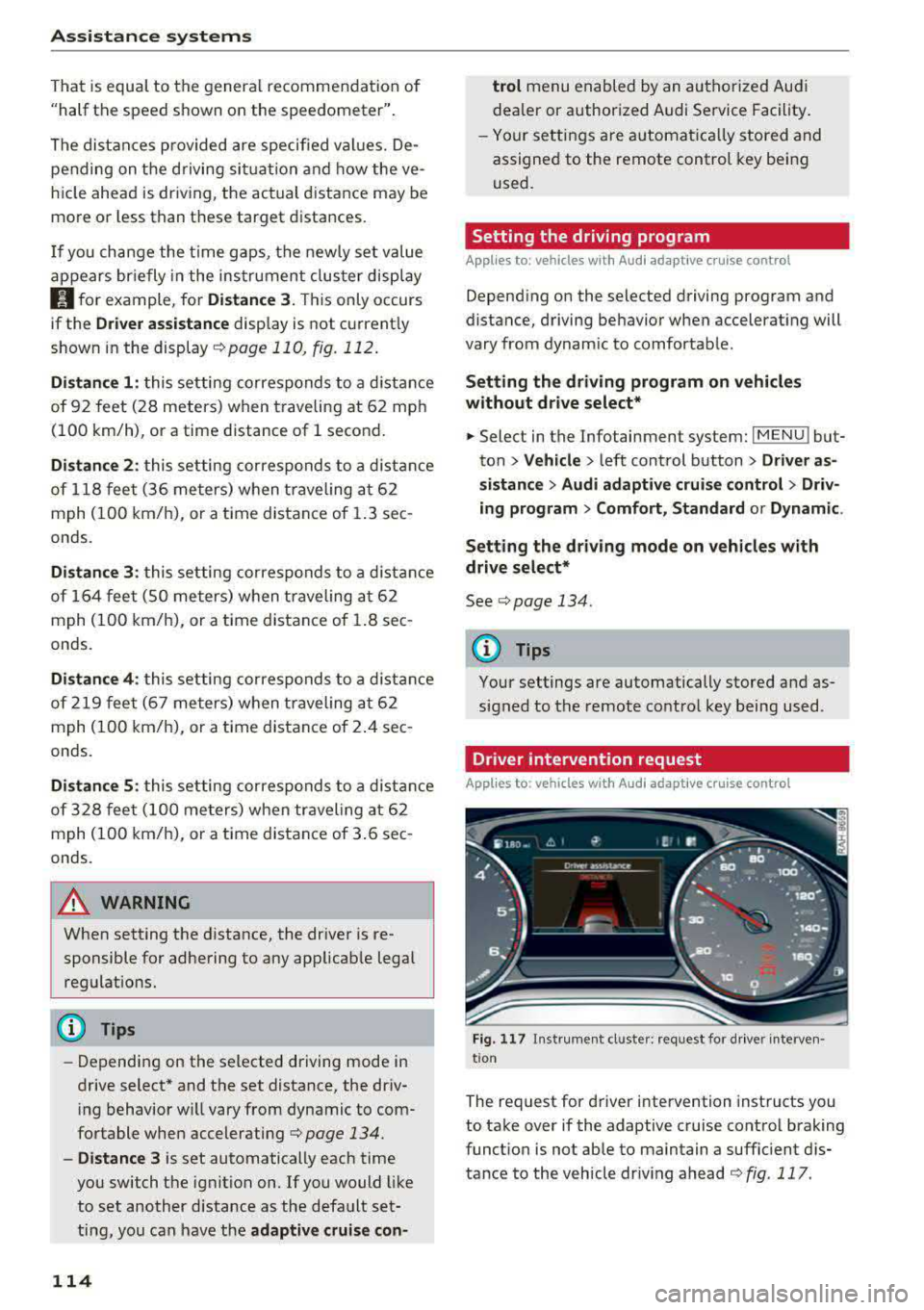
The request for d river intervention instructs you
to take over if the adaptive cruise control braking
funct ion is not able to maintain a suffic ient d is
tance to the vehicle dr iv ing ahead
r:!:> fig. 117 .