Control AUDI A4 2018 Manual Online
[x] Cancel search | Manufacturer: AUDI, Model Year: 2018, Model line: A4, Model: AUDI A4 2018Pages: 403, PDF Size: 66.81 MB
Page 133 of 403

brightness level in the information stage. The
brightness of the warning stage is linked to the
brightness in the informat ion stage and is ad just
ed along with the information stage.
(D Tips
- Side assist is not active whi le you are mak
i ng the ad justment.
- Your settings are automatically stored and
assigned to the remote control key being
used.
Exit warning
App lies to: ve hicles with exit warning system
Fig . 131 Examp le display
F ig . 132 Door: warning strip
When the vehicle is stationary, the ex it warning
system warns the passengers of a possib le colli
sion when opening the door. Within the limits of
the system, the system monitors the areas be h ind and next to the vehicle using the radar sen
sors
c.> page 129, fig . 130 . Mov ing objects that
are approach ing from be hind, such as cars, are
detected
c.> fig. 131.
When you open the door, the warning str ip on
the affected door blinks
c.> fig . 132 if another
road user is detected and the s ituation is classi
fied as critical. The display in the exterior m irror
A ss is ta nce syst ems
on the affected side flashes at the same time. If
the door is already open and another road user is detected and the situation is classified as cr itical,
then the corresponding disp lays turn on.
A WARNING
- Always pay attention to traffic and to the
area around your vehicle. The ex it warn ing
system does not replace the attention of the
passengers. The veh icle passengers are al
ways responsible for opening the doo rs and
exit ing the veh icle.
- The exit warning system ca n be ava ilable for
up to app roximately three minutes after un
lo cki ng the veh icle and opening the door as
well as a fter switching off the ignition. Then
the system switches off with a brief flashing
of the displays .
- The exit warning system cannot notify you of every approaching object or person, such
as joggers or pedestrians.
A WARNING
-
The exit warning system is subject to limita-
tions and cannot warn you before every im
pending collis ion:
- If the veh icle is too wide for the parking
space and covered by the neighboring
veh icles.
- Approaching objects or peop le such as cy
clists or skateboarders may not be detected
under certain circumstances.
- The system does not react to stat ionary ob
jects.
- The v iew of the radar sensors may be im
pa ired by leaves, snow, heavy spray or dirt .
Clean the area in front of the sensors
c.>page 129, fig. 130.
(D Note
Also read the information in c.> (D in General
information on page 130.
@ Tips
- The exit warning system is switched on and
off through the s ide ass ist
c.> page 130.
131
Page 136 of 403

Assistance systems
Description
Applies to: vehicl es w ith Aud i drive select
The follow ing systems, among other things, are
influenced by drive select:
Engine and automatic transmission*
Depending on the mode, the engine and auto
mat ic transmission* respond more quickly or in a
mo re balanced manner to accelerator pedal
movements . In the sporty
Dynamic mode , the
transmission shifts at highe r speed ranges.
Suspension control*
The suspension control* uses sensors to record
information regard ing steering movements ,
braking and acceleration operations by the driv
er , road surface, driving speed, and load. This
makes it possible to adapt damping to the driv
ing situation nearly in rea l time. With drive se
lect, you can adjust the suspension control to
sporty
( Dynamic ), comfortab le ( Comfort ) or bal
anced
( Auto ).
Steering
The power steering adapts. Indi rect s teer ing that
moves easily as in
Comfort mode is especia lly
suited to long drives on highways . The
Dynamic
mode provides sporty , direct steering.
The following applies to vehicles with dynamic
steering* : the steering ratio changes based on
vehicle speed in order to maintain optimum
steer ing effort for the driver at all times . This
sets the steering to be less sensitive at higher
speeds in order to prov ide improved vehicle con
trol. At reduced speeds, steering is more direct in
order to keep the steering effort as min imal as
possible when the driver is maneuvering the vehi
cle. At low and average speeds, dynamic steer
ing* additionally provides more responsive steer
ing performance.
Sport differential*
As a component of the all wheel drive system
(quattro)
~ page 1 SO, the sport differential dis
tributes the driving power to the rear axle de
pending on the situation. The distribution of
power varies depending on the selected mode
134
from moderate (Comfort ) to sporty (Dynamic ).
The goal is a high level of agility and ability to ac
ce lerate on curves . The vehicle is very respons ive
to steering.
Adaptive cruise control (ACC)*
The behavior when accelerating can be adjusted
from comfortable to sporty, depending on the
drive select mode. Adaptive cruise control also
responds to the driving behavior of the vehicle
ahead in a more conservative or sporty manner.
Engine sound*
The engine sound adapts to the current mode
and can be subtle to sporty.
@ Tips
The S selector lever position automatically en
gages when the
Dynamic mode is selected .
Selecting the driving mode
Applies to: vehicles with Audi drive se lect
Fig. 135 Center co nsole: controls for drive se lect
.,. Press the left or right a rrow key ~ fig. 135 until
the desired mode appears in the instrument
cluster/ Infotainment system disp lay. Or
.,. Select in the Infotainment system: IMENU j but-
ton
> Vehicle > Audi drive select.
.,. Select and confirm the desired setting.
You can change the driving mode when the vehi
cle is stationary or while driving. If traffic per
mits, after changing modes, briefly take your
foot off the accelerator pedal so that the recently
selected mode is also activated for the engine.
.,.
Page 137 of 403
a co .... N ,....
N .... 0 0
3 co
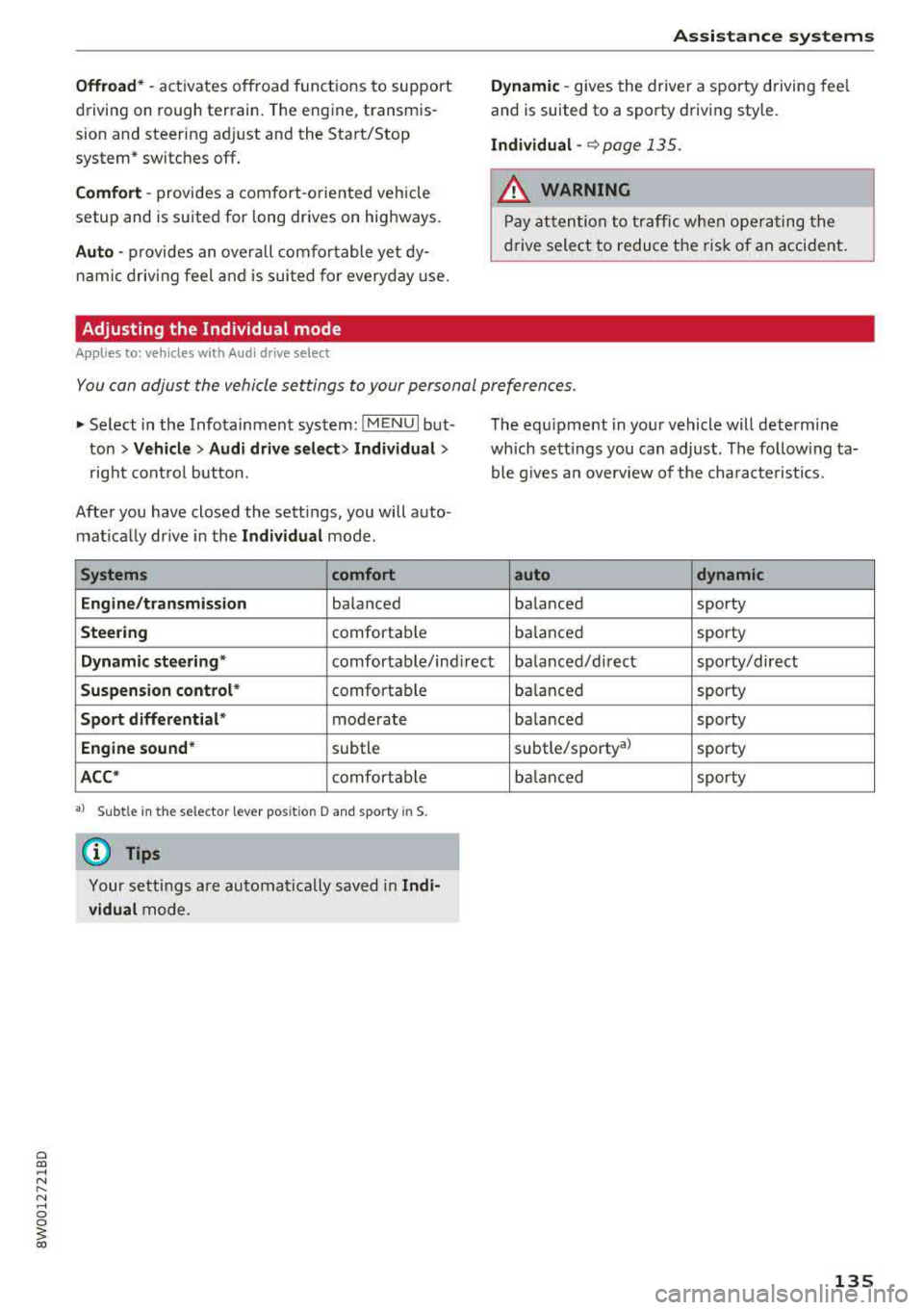
Offroad* -act ivates offroad funct ions to support
driving on rough terrain. The engine, transmis
sion and steer ing adjust and the Start/Stop
system* switches
off.
Comfort -provides a com fort -oriented ve hicle
setup and is suited for long drives on highways.
Auto -provides an ove rall comfor table yet dy
n a mic driv ing feel and is sui ted fo r every day use.
Adjusting the Individual mode
Applies to: vehicles with Audi drive select
Assistance systems
Dynamic -gives the driver a sporty driving fee l
and is suited to a s porty driving style.
Individual -c::> page 135.
.8_ WARNING
Pay att ention to tra ffic w hen ope rating the
dr ive select to reduce the r is k of an acci dent .
You can adjust the vehicle settings to your personal preferences .
.,. Select in the Info tainment sys tem: !M ENUI but
ton
> Vehicle > Audi drive select > Individual >
rig ht cont ro l button.
Afte r you have closed the sett ings, you will a uto
mat ica lly dr ive in the
Individual mode .
Systems comfort
Engine /transmission
ba lanced
Steering comfortab le T
he equ ipment in you r vehicle will determ ine
which se tt ings you can adjust. The fo llow ing ta
ble g ives an overv iew of t he cha ra ct eris tics.
auto dynamic
balanced sporty
ba lance d sporty
Dynamic steering " comfortable/ind irec t balanced/ direct sporty/direct
Suspension control * comfortable
Sport differential * moderate
Engine sound * subtle
ACC* comfortab le
a) Subtle in th e selector lever pos it ion D an d sporty in S.
@ Tips
Yo ur se ttin gs a re automa tically saved in Indi
vidual
m ode . ba
lance d sporty
ba la nced sporty
subtle/sporty al sporty
ba lanced sporty
135
Page 144 of 403
Parking systems
Switching on
.. Shift into reverse , or
.. Press the P 1JJA button in the center console
c::> fig. 146 . A short conf irmation tone sounds
and the LED in the button turns on .
Selecting the mode
.. Turn the con trol knob to the symbol fo r the de
s ir ed
mode @thr ough @¢ fig. 147 and press
the control knob .
Switching off
.. Drive faster than 6 mph (10 km/h) , or
.. Press the P1#A button, or
.. Switch the ignition off .
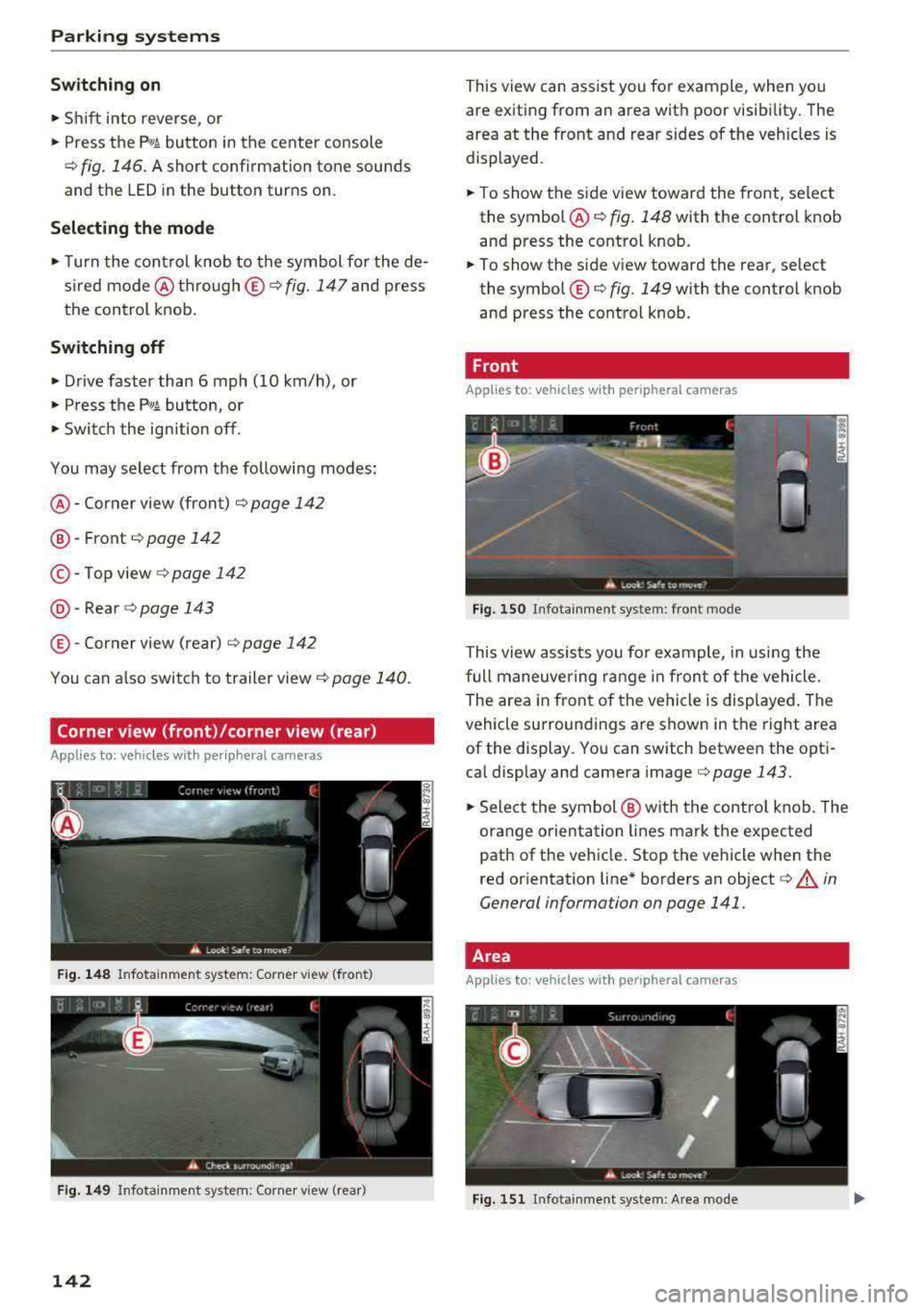
You may select from the following modes:
@ -Corner view (front) ¢ page 142
@-Front ¢ page 142
©-Top view ¢page 142
@ -Rear c::> page 143
© -Corner view (rear) ¢ page 142
You can also sw itch to trailer view¢ page 140.
Corner view (front)/corner view (rear)
Applies to: veh icles w ith per ip heral cameras
F ig . 148 In fotainme nt system: Corner view (front)
F ig . 149 Infotainment sys tem: Corner view (rear)
142
This view can assist you fo r example, when you
are exiting from an area with poor visibility. The
area at the front and rear sides of the veh icles is
displayed.
.. To show the side view toward the front, select
the symbol @
c::> fig. 148 with the control knob
and press the control knob .
.. To show the side view toward the rear, select
the symbol ©
c::> fig. 149 with the control knob
and press the control knob .
Front
Applies to: vehicles with peripheral cameras
Fig. 150 Infota inment sys tem: front mode
This view assists you fo r example, in using the
full maneuvering range in front of the vehicle.
The area in front of the vehicle is displayed . The
vehicle surround ings are shown in the right area
of the display. You can switch between the opti
cal display and camera
image ¢ page 143 .
.. Select the symbol @ with the control knob. The
orange orientation lines mark the expected
path of the vehicle. Stop the vehicle when the
red orientation line* borders an object
c::> .&. in
General information on page 141 .
Area
Applies to: vehicles with peripheral ca meras
Fig. 151 In fota inment system: Area mode
Page 145 of 403
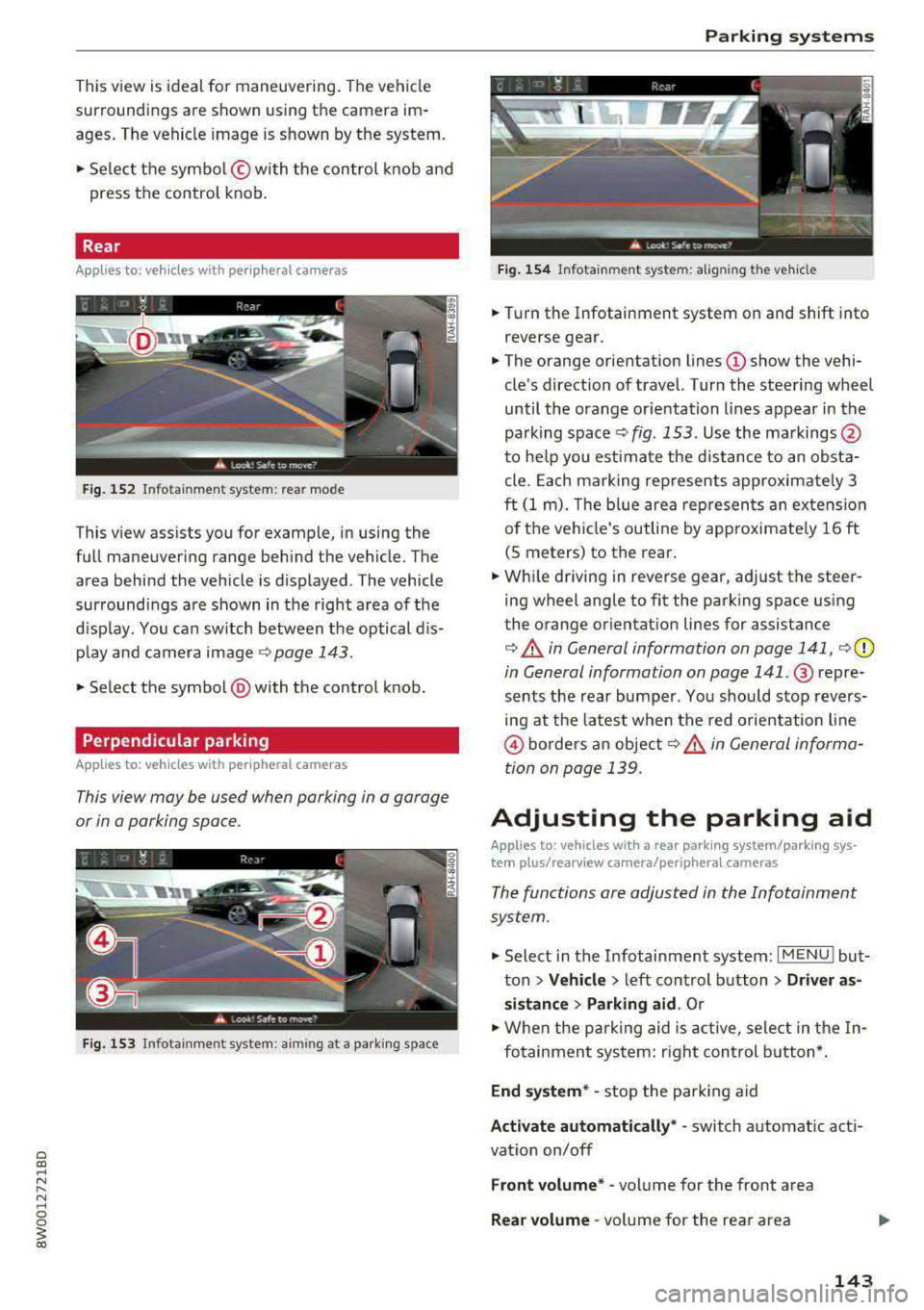
This view is ideal for maneuvering. The vehicle
surroundings are shown using the camera im
ages . T he vehicle image is shown by the system .
... Select the symbol © with the control knob and
press the control knob.
Rear
Applies to: vehicles with peripheral came ras
F ig. 152 In fot ainm en t system : rear mo de
T his v iew assists you for example, in us ing the
full maneuvering range behind the vehicle. The
area behind the vehicle is displayed. The vehicle
surroundings are shown in the right area of the
display. You can switch between t he optical dis
play and camera image
¢page 143.
... Select the symbol @with the control knob.
Perpendicular parking
Applies to: vehicles with peripheral cameras
This view may be used when parking in a garage
or in a parking space .
Fig. 153 In fot ainm ent system : aiming a t a park ing s pace
Parking systems
Fig. 154 Infotain m ent sys te m: alig nin g the vehi cle
... Turn the Infotainment system on and shift into
r everse gear .
... The orange orientation lines (D show the vehi
cle's direction of travel. Turn the steering wheel
until the orange orientation lines appear in the
pa rking
space ¢ fig. 153 . Use the markings @
to help you estimate the d istance to an obsta
cle. Each marking represents approximately 3
ft (1 m). The b lue area represen ts an extension
of the vehicle's outline by approximate ly 16 ft
(5 meters) to the rear.
... While driving in reverse gear, adj ust the steer
ing wheel angle to fit the park ing space using
the orange or ientation lines for assistance
¢ &. in General information on page 141, ¢(D
in General information on page 141 .@ repre
sents the rear bumper . You shou ld stop revers
ing at the latest when the red orientation line
@ borders an object¢&. in General informa
tion on page 139.
Adjusting the parking aid
Applies to: vehicles with a rear parking system/parking sys
tem plus/ rearview camera/per iphe ra l cameras
The functions are adjusted in the Infotainment
system .
.,. Select in the Infotainment system: I MENU ! but
ton
> Vehicle > left control button > Driver as
sistance > Parking aid .
Or
.,. When the parking aid is active, select in the In-
fotainment system: r ight control button*.
End system* -stop the parking aid
Activate automatically * -switch automatic act i
vat io n on/off
Front volume* -volume for the front area
Rear volume -volume for the rear area
143
Page 146 of 403

Parking sy stem s
Enterta inment fade r -the volume o f the audio/
video source is lowered when the parking system
is turned on
The newly selected level is demons trated briefly
by the sound generator.
Vi ew * -switch betwee n an optical d isplay
( Graphi c) and camera image (C amera ) in the
right section of the disp lay.
Trail er view * -show trailer view
*Auto. front /rear camera ch ange * -the view be
h ind the veh icle
( R ear mode) is displayed auto
mat ically when you shift into reverse gear. The
view in front of the vehicle
( Front mode) is d is
p layed automatically when you shift into the for
ward gea rs. When first activat ing in a forward
gear with the
P,, 1A button, the front s ide v iew is
d isp layed
( Corner view (front) mode).
I f you do not set the../, the view behind the vehi
cle
( Rear mode) is a lways d isplayed and it does
not swi tch to the
Front mode when a forward
gear is se lected.
(D Tips
- Seve ral menus can be accessed w it h t he
right contro l butto n only whe n the park ing
aid is active.
- T he settings for volume and automatic act i
vation* are au tomatically sto red and as
signed to the remote control key being
used .
Error messages
Appl ies to: ve hicles w ith a rea r parking sys te m /pa rking sys
tem plus/rearv iew camera/p eripheral ca meras
Ill Rear park a ssis t: malfunction! Obstacles
c anno t be d etec ted
Ill Front park assist: m alfunction! Obstacle s
cannot be d ete cted
Ill Park a ssist: mal function! Obstacles cannot
be d ete cted
When one of these messages appears, there is a
system ma lf u nction. The LED in the
P11.A. button al
so blinks when switching it on. The relevant mes-
144 sage on
ly appears again when you manually acti
vate the parking aid with the button.
[II Rear parking aid: ob stacl e detection re str ict
ed
The rear c ross-traffic ass ist* ¢ page 132, Rear
cross-traffic assist
i s no t available. Either the ESC
i s sw itched off, or the rada r senso rs may be cov
ered by a bike rack, stickers, leaves, snow or oth
er objects . Switch the ESC on, or clean the area in
front of the sensors if necessary ¢
page 129,
fig . 130.
If this message cont inues to be d is
played, drive immed iate ly to an authori zed Audi
dealer or authorized Audi Service F acility to have
the malfunct ion repaired .
Parking sy stem plu s*
If a sensor or speaker is faulty, the 94 symbo l
will appea r in front of/behind the vehicle in the
Infotainment system d isplay. If a rear sensor is
faulty, only obstacles that are in areas @and @
are
shown ¢ page 137, fig . 136 . If a front sensor
i s faulty, o nly obstacles that are in a reas © and
@ are shown .
Peripheral cameras*
There is a system malfunction if the% symbol
appears and the corresponding area of the dis
play is shown in black . The camera is not working
i n th is area .
Drive to an authori zed Audi dealer or authori zed
Audi Service Facility immed iate ly to have the
malfu nction corrected.
Trailer hitch
App lies to : vehicles wi th a rear park ing system/ parking sys
t e m plus/ rea rview ca mera /pe riph eral cameras and traile r
hi tc h
When the trailer socket is i n use, the parking sys
tem rear se nsors are not a ct ivated when you sh ift
into reverse gear or when you press the
? #A but
ton. This resu lts in the following restrictions .
Rear parking system*
There is no distan ce warning .
Page 148 of 403
Intelligent Technology
Intelligent Technology
Electronic stabilization
control (ESC)
Description
Elect ronic stabilization control (ESC) supports
driver safety.
It red uces the risk of slipping and
improves driving stability. ESC detects crit ica l sit
uations such as when the vehicle is oversteering
and understeering or the wheels are spinning.
The vehicle is stabilized by applying the brakes or reducing eng ine torq ue. When the ESC engages,
the hJ ind icator light blinks in the instrument
cluste r.
The fo llow ing systems are integrated in the ESC:
Ant i-loc k bra king system (ABS)
ABS prevents the whee ls from locking when brak
ing. The vehicle can sti ll be steered even during
hard brak ing. Apply steady pressure to the brake
pedal. Do not pump the pedal. A puls ing in the
brake pedal indicates that the system is acting to
stabilize the vehicle .
Brake assist system
The brake assist system can decrease brak ing dis
tance . It increases braking power when the driver
presses the brake pedal quick ly in emergency sit
uations . You must press and hold the b rake pedal
until the dangerous situat io n is over . In veh icles
with adapt ive cr uise control*, the bra ke assist
sys tem is more sensitive if the d ista nce detec ted
t o the vehicle dr iv ing ahead is too small.
Anti -Slip Regulation (ASR )
ASR reduces eng ine power when the drive wheels
begin sp inning a nd adapts the force to the road
conditions . This makes it easie r to start, acceler
a te and dr ive up h ills.
Electron ic differenti al lock (EDL )
The EDL applies the brakes to a wheel that starts
spinning and transfers the drive power to the
other driving wheel or wheels ( if the veh icle is
eq uipped w ith all whee l dr ive*) . T his function is
not available at higher speeds.
146 In extreme cases,
ED L automat ically switches off
to keep the brake on the braked wheel from over heating. The veh icle is still working correct ly. ED L
will switch on again automatically when condi
tions have returned to normal.
Steering r ecommendat ion
The ESC he lps to stabilize the vehicle by changing
the steering torque.
In veh icles with dynamic s teer ing*, ESC a lso
helps to stab ilize the steering in cr it ica l situa
tions.
Selective wheel torque control
Se lective whee l torque cont rol is used when d riv
i ng on curves. The front whee l on the inside of
t h e curve or both whee ls on the i nside of the
curve are braked se lectively as needed. This al
l ows more precise driving in curves.
Automatic post -collision b raking system
The "automat ic post-collis io n braking system"
can help to reduce the risk of sliding and of addi
tiona l collisions after an acc ident. If the a irbag
contro l modu le detects a collision, the ve hicle is
braked by the ESC.
The veh icle does not bra ke automatically if:
-the dr iver presses the accelerator pedal, or
-the ESC, the brake system or the veh icle electri-
cal system are not functioning.
&_ WARNING
-The ESC and its integrated systems cannot overcome the lim its imposed by natura l
phys ica l laws. This is espec ially important
on sl ippery or wet roads. If the systems be
gin acting to stabilize your vehicle, you
should immediately alter your speed to match the road and traffic conditions. Do
not let the increased safety provided tempt
you into taking risks. This could increase
your r isk of a coll is ion.
-Please note the r isk of a coll is ion increases
when dr iv ing fast, especially through curves
and on slippery or wet roads, and when dr iv
ing too close to objects ahead . The ESC and
its integrated systems cannot always
Page 149 of 403
a co .... N ,....
N .... 0 0
3 co
prevent collisions -the re is still a risk of ac
c idents!
- Press the accelerator pedal ca refully when
accelerating on smooth, slippery surfaces
such as ice and snow. The dr ive wheels can
spin even when these control systems are
installed and th is can affect driving stability
and increase the r isk of a coll is ion.
Switching on/off
Intellig ent Technology
{!) Tips
- The ABS and ASR only funct ion correct ly
when all four wheels have a sim ilar wear
condition. Different tire sizes can lead to a
reduction in engine power.
- You may hear noises when the systems de
scribed are working.
£SC turns on automatically when you start the engine.
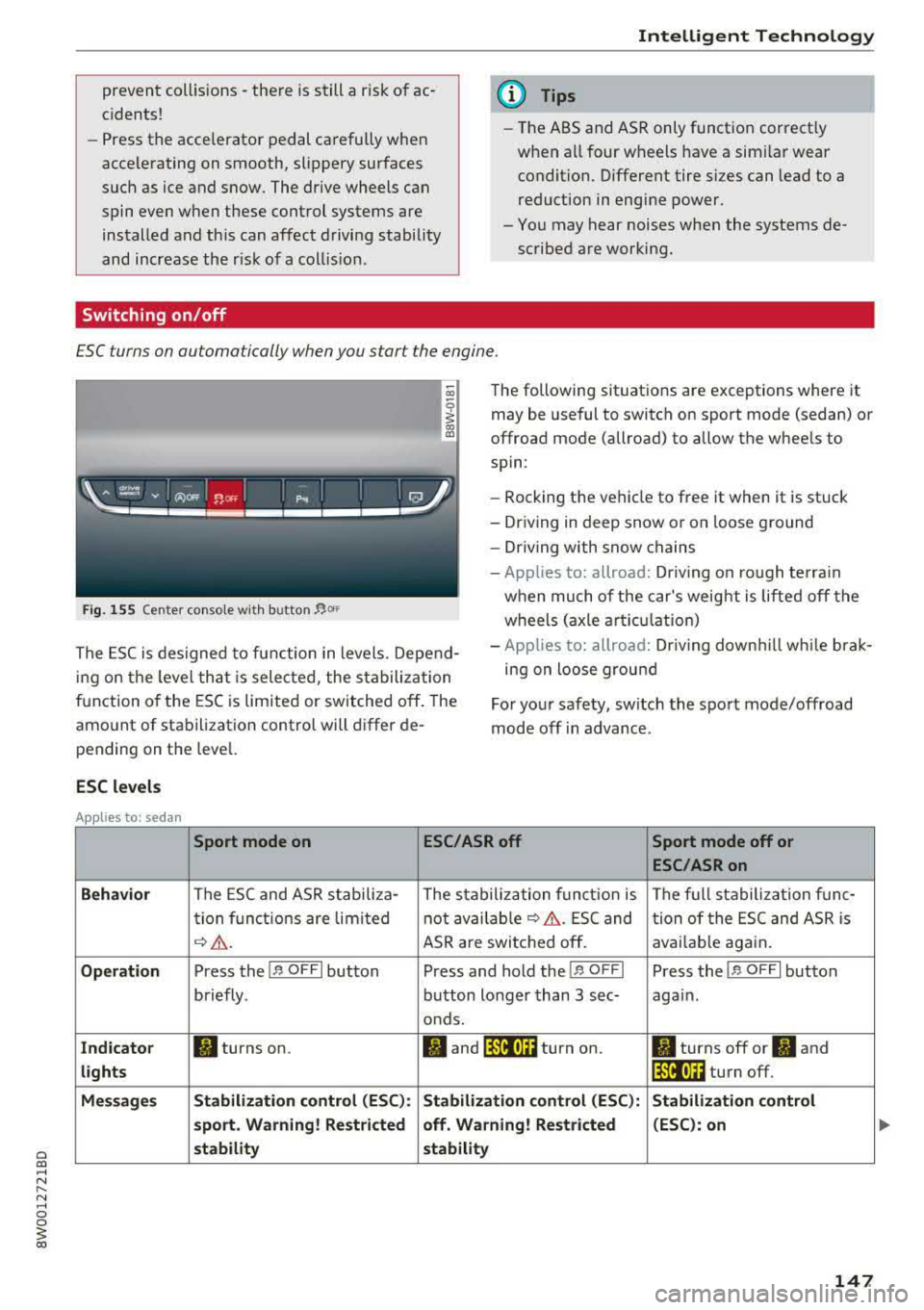
Fig. 1 55 Cente r co nso le w it h b utton~ °"
The following sit uat ions are exceptions where it
may be useful to switch on sport mode (sedan) or
offroad mode (allroad) to allow the whee ls to
spin :
- Rocking the vehicle to free it when it is stuck
- Dr iving in deep snow or on loose ground
- Dr iving with snow chains
- App lies to: allroad: Driv ing on ro ugh te rra in
when much of the car's weig ht i s l ifte d off the
wheels ( axle articul at ion)
The ESC is designed to fu nction in levels. Depe nd
i ng o n the level that is selected , the s tabilization
f u nction o f the ESC is limited or switched off. The
amo unt of stabilization control will d iffer de
pending on t he leve l. -
App lies to: allroad: Driv ing down hill while brak
ing on loose grou nd
Fo r yo ur safety, switch the spo rt mode/offroad
mode off in advance.
ESC levels
Applies to: sedan
Sport mode on ESC/ASR off Sport mode off or
ESC /ASRon
Behavior
The ESC and ASR stab ili za- The stabilization f unct io n is The f ull stabiliza tion f un c-
t ion f un ct ions are lim ited not avai
lab le
¢ &. . ES C and
tion of the ESC and ASR is
¢ &. . ASR are swi tched off . avai
lab le aga in.
Op eration Press the !.r, O FFI button P ress and hold the j.r, O FFI Press the j.r, O FFI button
briefly . button longer than 3 sec- aga in .
o nds.
Ind icato r II turns on. fl and jf'll•)~~ turn on. II turns off or II and
lights lf'll•U~ turn off.
Me ssages Stabilization contro
l (ESC ):
Stabilization control (ESC ): Stabilization control
s port . Warning! Restricted off. Warning! Restricted (ESC
): on
stability stability
147
Page 150 of 403
Intelligent Technology
Applies to: allroad
Offroad mode on
ESC/ASR off Offroad mode off or
ESC /ASR on
Beha vior
T he ESC and ASR stabiliza -The stabi lization f unction is The f ull stabilization tune -
tion functions are limited not available
¢ .&. . ESC and tion of the ESC and ASR is
¢ & . ASR are sw itched off . available aga in .
Operation Press the l~ m l button b rief- Press an d ho ld the l~ "'' I but- Press the l~ "" I button again .
ly. ton longer than three sec-
onds.
Indicator II turns on. Iii and lf'tii•)H turn on. II turns off or II and
light s li'tii•)H turn off .
Message s Stabilization cont
rol (ESC ): Stabiliza tion control (ESC ): Stabilization cont rol (ESC ):
offroad . Warning! Redu ced off . Warning! Restricted
on
s tability stability
A WARNING
You should only switch sport/offroad mode
on or switch ESC/ASR off if you r drivi ng abili
ties and road cond it ions permit .
- The stabilization function is lim ited w hen
sport mode/offroad mode is swi tched on.
T he driving w heels could sp in and the veh i
cl e could swerve, especi ally o n slick or slip
pery road sur faces.
- T here is no vehicle sta biliz at ion when ESC/
ASR a re swi tched off.
Hill descent assist
Applies to: allroad
Hill descent assist makes it possible to drive
down a hill at a constant speed.
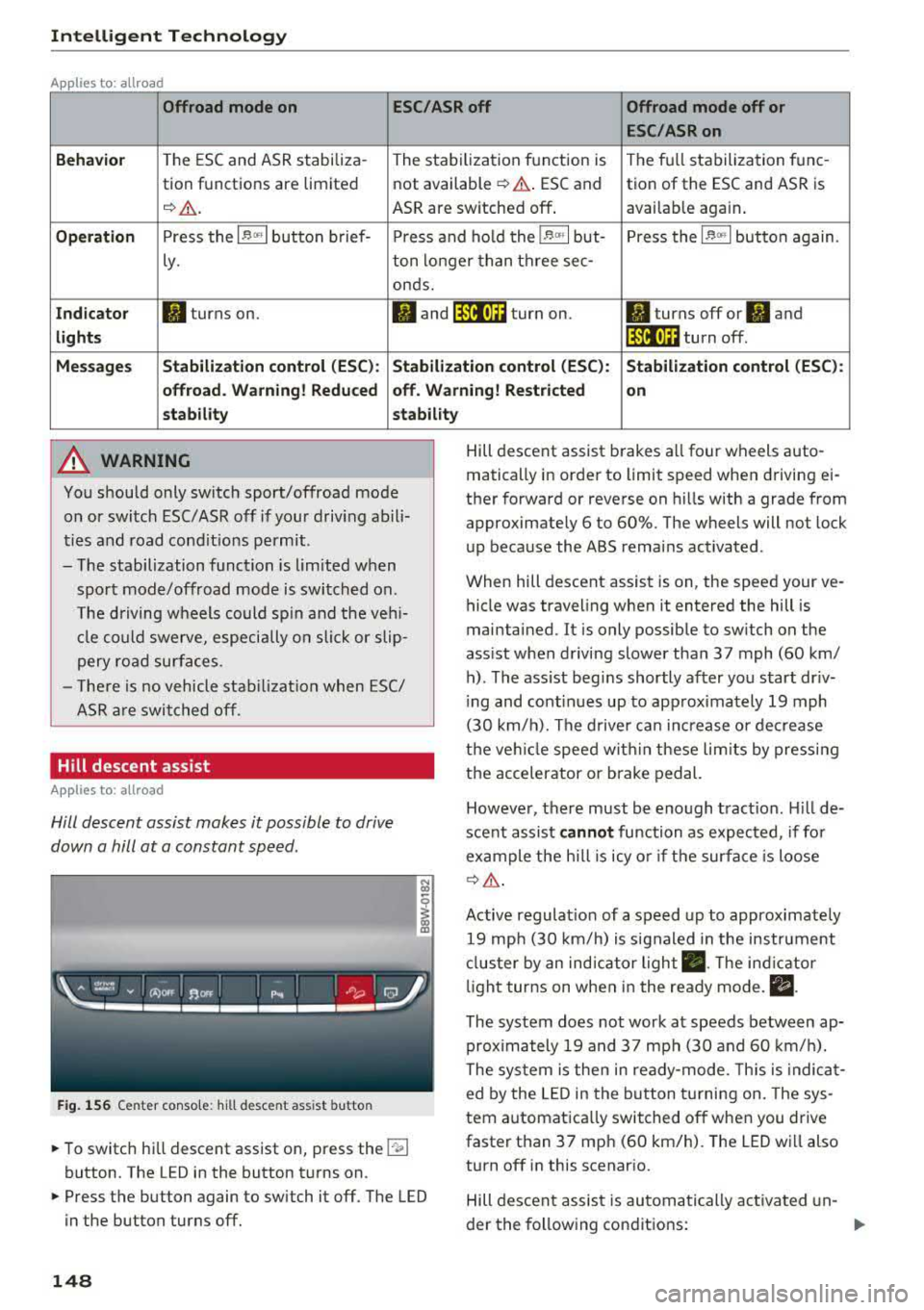
F ig. 1 56 Center co nso le: hil l desce nt ass ist button
~ To switc h hill descent assist on, press the !"~I
button. The LED in the button t urns on.
~ Press the button again to switch it off. The LED
in the button turns off.
148
Hill descent assist brakes a ll four wheels auto
matically in order to limit speed when d riving ei
ther forward or reverse on hills with a grade from
approximately 6 to 60%. The wheels will not lock
u p because the ABS remains activated.
When hill descent assist is on, the speed your ve
hicle was traveling when it entered the hill is
maintained. It is only possib le to sw itch on the
ass ist when driving slower tha n 37 mph (60 km/
h) . The ass ist beg ins shortly af ter you start dr iv
i ng and cont inues up to app roxima tely 19 mph
(30 km/h). The d rive r ca n in crease o r de crease
t h e ve hicle spee d wit hin these lim its by press ing
t h e accelerator or brake pedal.
However, there must be enough t ract ion . Hill de
sce nt assist
cannot function as e xpec ted, if fo r
ex ample the h ill is icy o r if t he surface is loose
¢ &.
Active regulat io n of a speed up to approximate ly
19 mp h (30 km/h) is s ignaled in the instr ument
cl us ter by an ind ic a tor light
• . The in dica tor
li gh t tur ns on when i n the ready mode.
II.
The system does not work at speeds between ap
prox imately 19 and 37 mph (30 and 60 km/ h).
The system is the n in ready-mode. This is indica t
ed by the L ED in the b utton t urnin g on. The sys
tem a utomatica lly switched o ff when you drive
faster than 37 mph (60 km/h). The LED w ill also
turn off in this scenar io.
Hill descen t assis t is au tomatically ac tiva ted un-
der the fo llowing cond itions:
.,.
Page 153 of 403
a co .... N ,....
N .... 0 0
3 co
Also see¢ page 146, Electronic stabilization
control (ESC) .
The all-wheel drive system dist ributes the d riving
power var iably to the front and rear axle. It works
together with selective whee l torque cont rol,
which activates when driving through curves
c:> page 146. With the sport differentia l*, power
d istribution to the rear wheels is variable and can
be adjusted using the dr ive select
c:> page 134.
The all wheel drive concept is designed for high
engine power. Your ve hicle is exceptionally pow
erful and has excellent driving characterist ics
both under norma l dr iving condit ions and on
snow and ice . Always read and fo llow safety pre
cautions
c:> .&. .
Winter t ires
By us ing all wheel drive, yo ur vehicle has good
forward motion with standard tires in w inte r con
d itions. However, using winter or all season tires
on
all four wheels in the winter is recommended ,
because this will improve the
braking effec t.
Snow chains
If there are snow chain laws, snow chains must
also be used on vehicles with all wheel drive
c:> page 350, Snow chains .
Replacing tire s
For vehicles with all whee l drive, only whee ls with
the same ro lling circumference s hou ld be used.
Avoid using tires w ith different tread depths
c:> page 341, New tires or wheels.
Offroad vehicle?
The ground clearance is too low on some mode ls
to drive on rough terrain. Therefore, avoid off road trips.
A WARNING
-Also, in vehicles with a ll w heel d rive, adapt
your dr iv ing style to the current road and
t raff ic conditions . Do not let the increased
safety provided tempt you into tak ing risks,
because t his increases the r is k of an acci
dent .
Intellig ent Technology
- The braking ab ility o f your vehicle is limited
to the traction of the wheels. In this way, it
is not different from a two wheel drive vehi
cle . Do not be tempted to accelerate to a
h igh speed whe n the road is sli ppery, be
cause this i ncreases the risk of an accident.
- No te that o n wet streets, the fron t wheels
can "hydrop la ne" if dr iv ing at speeds that
are too high. Unlik e front wheel d rive
veh icles, the engine does not rev h ig her sud
denly when the vehicle begins hydrop laning.
F orthisre ason,ad aptyo urspeedto the
road conditions to re duce the risk of an acci
dent .
Energy management
The starting ability is optimized
The energy management system manages the
electrical energy distribution and optimizes the
availability of electrical energy for starting the
engine .
When a vehicle with a conventional energy sys
tem is not drive n for a long time, the ve hicle bat
te ry is d rained by equipment (for example, t he
immob ilizer). In certa in circ ums tances , there
c ou ld m ay no t be eno ugh e nergy to start the en
gine.
You r vehicle is equi pped with an in tell igent ener
gy manageme nt system fo r dist ributing electrici
ty. This sig nifican tly improves the start ing ability
and in cre ase s t he vehicle battery life.
The ene rgy ma nagement system Is made up of
battery diagnosi s, idling current management ,
and dynamic energy management .
Battery diagnosis
The battery diagnos is determines the vehicle bat
te ry c harge level. The sensors determine the bat
te ry vo ltage, the batte ry cu rrent, and the batte ry
temperat ure. The current c ha rge level and t he
perfo rman ce of the vehicle battery a re de ter-
mine d base d on this.
..,.
151