warning AUDI A4 AVANT 2008 Owners Manual
[x] Cancel search | Manufacturer: AUDI, Model Year: 2008, Model line: A4 AVANT, Model: AUDI A4 AVANT 2008Pages: 368, PDF Size: 46.19 MB
Page 147 of 368
_______________________________________________________ T:...:.; ra::.:.. n:.:s:.: m
:..:.:.:.: is::::s::.:.: io::.:.. n:__JIIII
Select R only when the vehicle is at a full stop and the engine is
running at idle
speed.~ & in "Driving the 6 -speed automatic trans
mission" on
page 143.
Before you move the selector lever to R, press both, the button in the
handle of the selector lever
and the brake peda l at the same time.
When the ignition is on, the backup lights i lluminate when the
selector lever is moved into R.
N -Neutral
Shift to this position for standing with brakes applied ~ page 145.
When the vehicle is stationary or at speeds below 3 mph (5 km/h),
you must always apply the footbrake before and while moving the
lever out of
N.
D -Normal driving position for forward
Position Dis for norma l city and highway driving. It ranges from zero
to top speed and all six gears automatically shift, depending on
engine load, driving speed and automatically selected shift
programs.
When the vehicle is stationary or at speeds below 3 mph (5 km/h),
you must always apply the foot brake before and whi le moving the
lever out of
N to D or S.
In certain circumstances it may be advantageous to temporarily
switch to the manual shift program to manually se lect gear ratios to
match specific driving
conditions~ page 147.
S -Sport position
Selec t this position for sportier performance. In this position, the
eng ine wi ll not upshift as soon, allowing the vehic le to use the
increased power avai lable at higher engine speeds to achieve live
lier acceleration.
Before you move the selector lever from
D to S, press the button in
the handle of the selector lever.
Controls and equip
ment
LJ}. WARNING
• Always read and heed WARNINGS ~ & in "D riving the 6-speed
automatic transmission" on
page 143.
0 Note
Coasting downhill with the transmission in N and the engine not
operating will result in damage to the automatic transmission and
possibly the catalytic converter. •
Applie s to vehicles: wi th G·sp eed automatic tra nsm iss ion
Automatic Shift Lock (ASL )
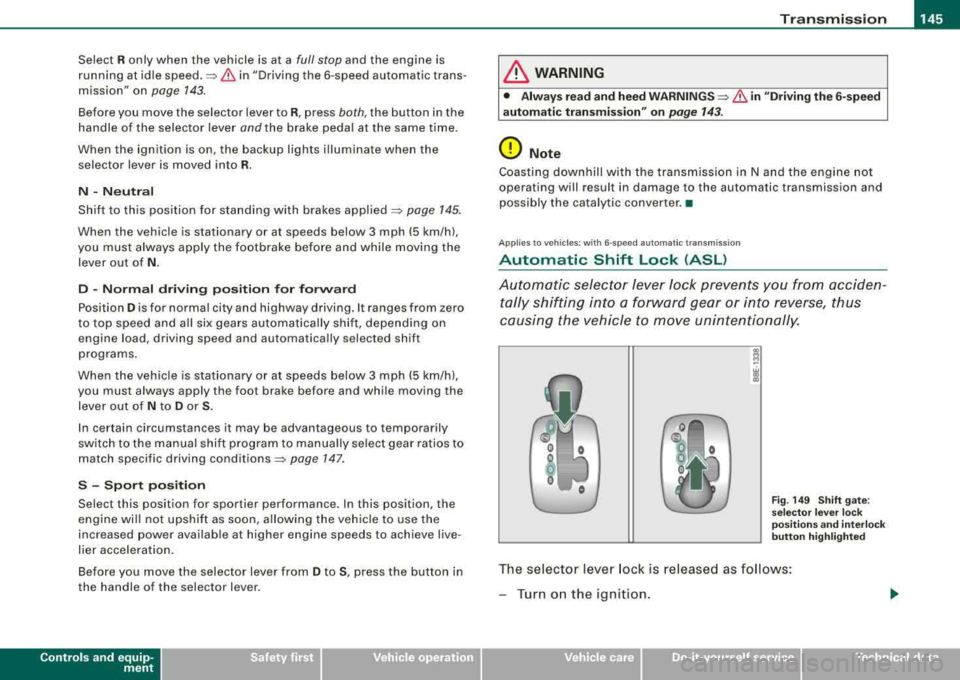
Automatic selector lever lock prevents you from acciden
tally shifting into a forward gear or into reverse , thus
causing the vehicle to move unintentionally.
Fig. 149 Shift gate:
selector lever lock
positions and interlock
button highlighted
The selector lever lock is re lease d as follows:
-Turn on the ignition .
irechnical data
Page 148 of 368
___ T
_ r_a _ n_ s_m _ i_s _s _i_o _n ______________________________________________________ _
- Step on the brake pedal. At the same time press and hold
the lock button -green
st ub-=> page 145, fig. 1 49 w it h
your t humb until you have moved the se lector leve r to
the desired posit ion.
Au toma tic selec tor le ver lo ck (IS,
The se lector lever is locked in the P and N positions when the igni
t io n is turned on .
When the selector lever is in the
P or N positions, the message
When station ary app ly footbr ake while sele ct ing ge ar
appears on the instrument c luster display on vehicles equipped
with the Driver Information System as a reminder to the driver. I
addition, the symbo l
53 will light up on the shift gate at the base of
the selector lever.
A time delay e lement prevents the se lector lever from locking when
it is moved through the
N position (going from R to D ). The locking
element will lock the selector lever if the lever is left in N (Neutral)
for more than approximate ly 1 seco nd, without the brake peda l
being pressed.
At speeds above about 3 mph (5 km/h) the Automatic Shift Lock is automatically deactivated in the
N position .
The button needs to be pressed to shift from
D to S to avoid unnec
essari ly high fuel consump tion in the
Sport mode.
Int erlock button
The lock button on t he se lector lever preve nts the lever from bei ng
accidentally shifted into certain positions. Pressing this button
deactivates the selector leve r lock.
Depending on the direction of shift, the se lector lever locks at
different positions. The positions are highlighted in the il lustration
above~ page 145, fig. 149 .
Ignition ke y sa fe ty int erlo ck
The key cannot be removed from the ignition un less the selector
lever is in the P park position.
When the ignition key is removed, the selector lever will be locked
i n the
P position. •
Applies to vehicles : with 6-speed automatic transmiss ion
Kick-down
T he kick-down feature allows the vehicle to generate
maximum acceleration.
When you press the accelerator pedal beyond the resistance point
that is reached at fu ll thrott le, the transmiss ion w ill se lect a lower
gear ratio based on the vehicle speed and engine RPM . T he engine
RPM w ill be contro lled to produce maximum veh ic le acce leration as
long as you keep pressing the accelerator peda l beyond this resis
t ance point.
& WARNING
Be c are ful when u sing the ki ck-down on slippery ro ads. R apid
a cc elerat ion m ay ca use skidd ing .
•
Ap plies t o vehic les : with 6-s pee d auto mat ic tran smi ssi on
Dynamic Shift Program (DSP)
The automatic transmission is electronically controlled.
The transm ission is self adapting and wi ll automatically se lect the
best shift program suited to the driving conditions and driving style.
The transmission wil l se lect one of the
e conomy programs when
you drive at a steady speed or a gradually changing speeds without heavy acce leration. This achieves optimum fuel efficiency, with early
upshifting and delayed downshifting.
~
Page 153 of 368
Transmission -
-----------------'
& WARNING
• Unintended veh icle mo vement can cause serious injury .
-When the selector lever is in a driving position, the vehicle
m ay creep , even at idle speed . Therefore do not relea se the
parking brake o r foot brake until you are read y to move ,
becau se power is transmitted to the wheel s as soon a s a
dri ving position is eng aged .
-Do not accelerate while selecting a driving position . At this
time the engine must be at idle speed so that undue stress is
not placed on the clutche s in the transmission.
-Remember: - even when stopped briefly with the automatic
tr ansmission in
" D" , "S " or "R ", engine power i s being t rans
mitted to the wheels. Your vehicle could
" creep " forward or
b ackward . When stopped , keep the brake pedal fully depressed
and use the p ark ing brake if necessary to keep the veh icle from
rolling .
-If the selector lever is un intentionally moved into N wh ile you
are driving , take your foot off the accelerator pedal and wait for
the eng ine to return to idle speed before selecting a driving
position.
-Never shift into " R " or "P " when the vehicle is in mot ion .
-Never get out of the dr iver 's seat when the engine is running.
-If you must get out of the vehicle , move the selector lever
se curely into the P position and apply the park ing bra ke firmly .
-If the engine must remain running, never have any driving
position engaged when che cking under the hood . Make sure
the selector lever has se curely engaged and is lo cked in
"P "
with the parking brake firmly set :::::, page 265 , "Eng ine
compartment ". Otherwise , any increase in engine speed may
set the vehicle in motion , even with the park ing brake
applied. •
Controls and equip
ment
Ap plies to ve hicles : wi th m ultit r on ic ™ Co ntin uo usly V ariab le Tr ansmissio n ICVT I
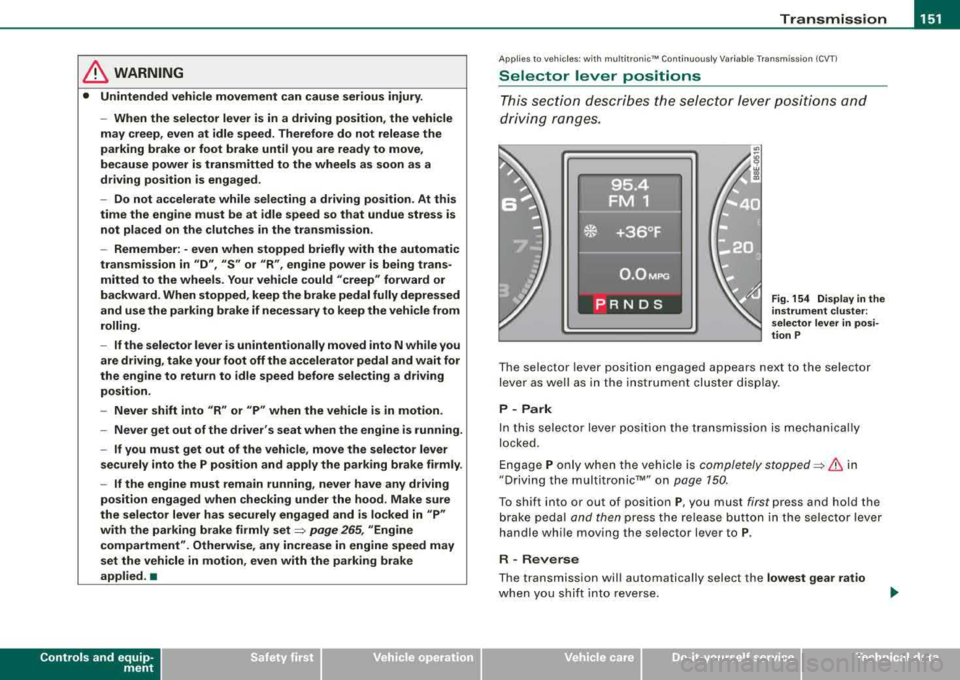
Selector lever positions
Th is sec tio n describes the selector le ver posi tions and
driving ranges.
Fig . 154 Display in the
in strument clu ste r:
s elec tor lever in p osi
tion P
T he selector lever posit ion engaged appears next to the selector
lever as well as in the inst rumen t cluster dis play .
P - Park
In this selector lever posit ion the transmission is mechanica lly
locked .
E ngage P only w hen the vehicle is completely
stopped:::::, & in
"Driving the multi tronic™" on page 150.
T o shift into or out of posit ion P, you must first press and hold the
brake pedal and then press the release button in the selector lever
handle whi le moving the selec tor lever to P.
R -Rever se
The transmission wil l automatically select the lowest gear ratio
when you sh if t in to reverse .
irechnical data
Page 154 of 368
-
Transmission
----------------
Select R only when the vehicle is at a full stop and the engine is
running at idle
speed~ & in "Driving the multitronic™" on
page 750.
Before you move the selector lever to R, press both, the button in the
handle of the selector lever
and the brake pedal at the same time.
When the ignition is on, the backup lights illuminate when the selector lever is moved into R.
N -Neutral
Shift to this position for standing with brakes applied ~ page 152.
When the vehicle is stationary or at speeds below 3 mph (5 km/h),
you must always apply the footbrake before and while moving the
lever out of
N .
Do not use N for coasting downhill.
D -Normal driving position for forward
Depending on the load on the engine, vehicle speed and the
dynamic control program, the transmission will select the
optimal
gear ratio.
In certain circumstances it may be advantageous to temporarily
switch to the manual shift program to manually select gear ratios to
match specific driving
conditions ~ page 154.
When the vehicle is stationary or at speeds below 3 mph (5 km/h),
you must always apply the footbrake before and while moving the
lever to
D out of N.
S -Sport position
Select this position for sportier performance. In this position, the
transmission will not upshift as soon, allowing the vehicle to use
the increased power available at higher engine speeds to achieve livelier acceleration.
Before you move the selector lever from
D to S, press the button in
the handle of the selector lever. When the vehicle is stationary or at speeds below 3 mph (5 km/h),
you must always apply the foot brake before and while moving the
lever to
S out of N.
& WARNING
Read and follow all WARNINGS ~ & in "Driving the multitronic™"
on
page 150.
0 Note
Coasting downhill with the transmission in N and the engine not
operating will result in damage to the automatic transmission and
possibly the catalytic converter. •
Applies to vehi cles : wi th mu ltitroni c'" Continuous ly Variable Transm ission (CVT )
Automatic Shift Lock (ASL )
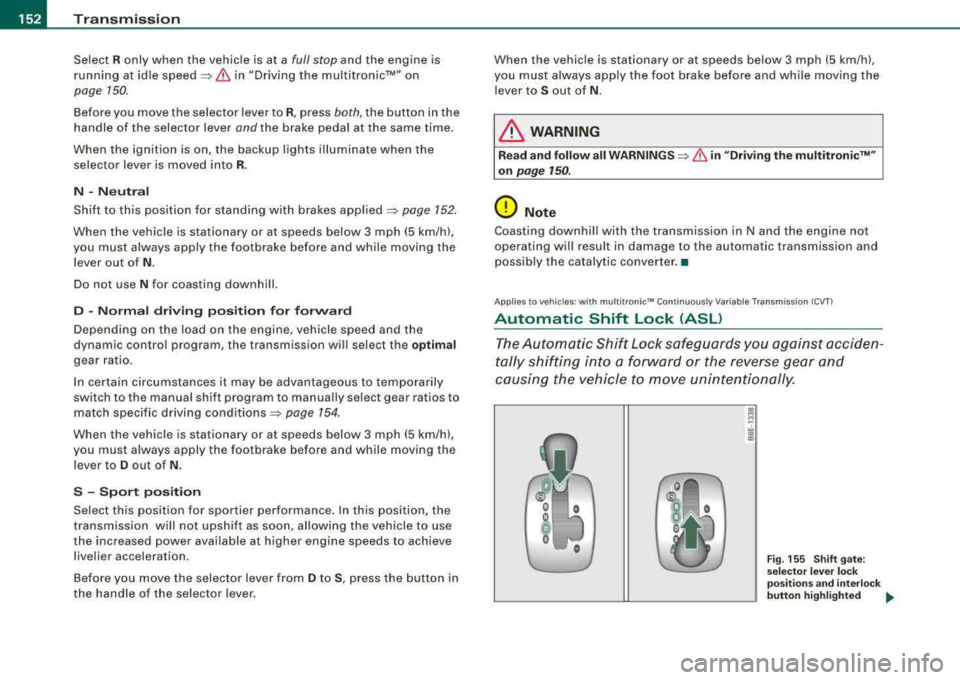
The Automatic Shift Lock safeguards you against acciden
tally shifting into a forward or the reverse gear and
causing the vehicle to move unintentionally.
~ M -w a, .,
Fig. 155 Shift gate:
selector lever lock
positions and interlock
button highlighted
..
Page 155 of 368
Transmis sio n -
----------------
The selector lever lock is released as fo llows:
- Turn t he ignition on.
- Step on the brake pedal.
At the some time press and hold
the inter lock button on the side of the gear selector knob
=> page 145, f ig. 149 with your thumb until you have
moved the selector lever to the desi red position.
A uto mat ic se lec to r l eve r lock C\S)
The se lector lever is locked in the P and N posi tions when the igni
tion is turned on.
When the selector lever is in the
P or N pos itions , th e m essage
When statio nary appl y footbrak e while sel ecting gear
appears on the instrument c luster disp lay on vehicles equipped
with the Driver Informatio n System as a reminder to the driver . The
symbo l
Cs» will a lso light up on the shi ft gate at the base of the
selector lever.
In additio n, the symbo l for the automatic selector level lock with
light up in th e shift ga te .
A time delay e lement prevents the selecto r lever from loc king when
it is moved through the
N position (going from R to Dl. The locking
e lement will lock the selector lever if the lever is left in
N (Neutral)
for more than approx imately one second , without the brake peda l
being pressed.
At speeds above abou t 3 mph (5 km/h) the Automatic Shift Lock is
automatically deactivated in the
N position.
The button needs to be pressed to sh ift from
D to S to avoid unnec
essari ly high fuel consumption in the
S po rt mode .
Interlock but ton
The lock button on the selec tor lever prevents the lever from be ing
accidentally shifted into certain pos it ions . Pressing this button
deactivates the selector lever
lock=> page 152 , fig. 155.
Controls and equip
ment
Igniti on key sa fe ty int erlo ck
The key cannot be removed from the ignition un less the se lector
lever is in the
P park posi tion . When the ignition key is removed , the
selector lever wil l be locked in the
P posit ion. •
Applies t o ve hic les: w it h m ultitron ic™ C ontin uo usly Var iab le Tra nsmiss ion (CVTl
Kick-down
The kick -d own feature allows the veh icle to generate
maximum acceler ati on.
When you press the accelerator peda l beyond the resistance point
that is reached at ful l throttle, the trans mission wi ll select a lower
gea r ratio based on vehicle speed and engine RPM . The engine RPM
wil l be control led to produce max imum veh ic le acceleration as long
as you continue to press the acce lerator pedal beyond this resis
tance point .
& WARNING
Be careful when u sing the kic k-down f eature on slipp ery ro ad s.
R apid acceler ation m ay cause the vehicle to skid . •
A pplies to v ehicles: w ith mult it ro nic™ Con tinuo usly Var iab le Tra nsmiss ion (CV Tl
Dynamic shift program (DSP)
The multitronic™ transmission is electronically
controlled.
The transmiss ion se lec ts the appropr ia te gear rat io (upshifts and
downshifts) automatically based on preset driving programs .
However, you can also manua lly select a s hift program (tiptronic ®
f eature)
=> page 154 .
The transmission will select on e of th e econom y programs when
you drive at a s teady speed or a gradually changing speeds without
~
Page 159 of 368
________________________________________________ ___:H....:..::: o:..:.m .:....:..:: e::L:.:. i.:....:n :.:..:k :..::® ::__ffllll
Homelink®
Universal radio frequency remote
control
Applies to vehicles: with Homelink® universal radio frequency remote cont ro l
How it works
The HomeLink® universal remote control can be
programmed with the hand held transmitters of the equip
ment you want to activate from inside your car.
The Homelink® system is capable of operating up to three different
remote contro lled devices from inside your vehicle using the
Homelink ® universa l radio frequency remote control.
The system lear ns t he rad io frequency codes of handheld transmit
ters used to operate garage doors, estate gates, home or outdoor
l ighting systems, and other devices 1
l.
The original handhe ld transmitters allocated to the remote
control led devices maintain their ab ility to activate these devices
and can be sti ll be used .
The Homelink® system has a nonvolati le memory, so that all
program ming will be retained after the vehicle battery has
completely discharged or been disconnected .
Before y ou can use the Homelink® universa l remote cont rol to
operate radio -frequency remote controlled devices, you wi ll first
need to program the Ho melink® transmitter.
ll Fo r the sake of readabil ity, a ga rage door opene r is always referred to in this
descr iption.
Controls and equip
ment • I I • • I
& WARNING
• Never use the Homelin kl!!I Universal Tran smitter with any
garage door opener that does have not the s afet y stop and reverse
feature a s required by federal s afety standard s. This include s any
garage door opener m odel manufa ctured before April 1 , 19 82.
• A garage door open er whi ch cannot detect an object , sign aling
the door to stop and rever se does not meet current federal s afet y
s tandard s. Using a garage door opene r without these feature s
in creases r isk of seriou s injury or de ath.
0 Note
When you program the Homelink® system, you are wel l advised to
turn off the garage door opener. A garage door opener whic h is
continuously triggered into action during programming may over
strain and damage its elect ric mot or, -an o verheated motor is a fire
hazard!
[ i ] Tips
• The Homelink® Universa l Remote Control will not affect your
equipment's current safety standard.
• The radio frequencies that are authorized for the country in
which the vehicle was sold are used. These frequencies may differ
in other countries.
• For addi tiona l informat ion cal l to ll-free 1 (800) 355 -3515 or look
up the website on the Internet for detai led instructions:
www .homelink .com •
Page 161 of 368
___________________________________________________ H_ o_m_ e_ L_ i_ n _ k_ ®_~IJII
Ph ase 2:
pro gra mming th e bump er mounted transmitter
7. P oint the original remote control at the bumper below the
left
h eadlig ht => page 158, fig. 160.
8. Hold the remote control at a d istance between 0-12 in.
(0 -30 cm) to the bumper (use the shortest distance
possible).
9. Press and hold the activation button on the remote contro l (see garage door opener operating instructions)
=> page 159, "Canadian programming".
1 0 . Watch the emergency flashers on your ve hicle. Once
programming is successfu lly completed, the emergency
flashers will flash
three tim es (after about 15-60
seconds). You can now release the button on the remote
control.
-To program the two remaining buttons, repeat steps 4 to 9
with the remote control units for the devices you wish to
operate .
The required distance between the hand held transmitter and the
Homelink ® trans mitter depends on the device whose signals you
are learning . It may require several attempts at varying distances
unt il programm ing is successful.
If the 5 minute time limit is exceeded, programming will stop imme
diate ly . The
em erg ency fla sher s will flash one tim e to indicate that
this has occurred.
In this case, you wil l need to reprogram the system. Repeat the
process start ing with
Pha se 1 : programming the o verhead keypad.
If the emergency flashers do not flash three times (after about 15-
60 seconds), programming was not successful. In this case, repeat
Ph ase 2: pro gr amming the bump er mount ed tr an smitte r.
Controls and equip
ment
If programming fai ls in Ca nada, you may have to perform an alter
nate action at step 8
only => page 159, "Canadian programming" .
Perform al l other steps as described above .
& WARNING
• Fo r sa fet y re as on s never rel eas e th e parki ng br ak e o r start the
engin e while an yone i s standing in front of the v ehi cle .
• A g ara ge door or an es ta te gate m ay s ometim es be set in
motion wh en the Homelink ® univer sal remote control i s being
progr ammed . T o avo id possible i njur ies or p ropert y dama ge,
plea se alway s make ab solutely cer tain that no per son s or object s
are l ocated in the r ange of mot ion of an y eq uipm ent being oper
a ted.
0 Note
When you program the Homelink® sys tem, you are wel l advised to
turn off the garage door opener . A garage door opener which is
continuously triggered into action during programming may over
strain and damage its electric motor
-an overheated motor is a f ire
hazard!
[ i ] Tip s
As soon as the Homelink® system is programmed to work with your
garage door opener, two additiona l remote contro lled devices can
be trained on the two remaining transmitter channels. •
Applies to vehic les: with Homel in k® un iversal ra d io frequency remote control
Canadian programming
Remote con trol units for Canadian garage door openers
may require one different programming step.
Remote contro l units for Canadian garage door openers are set to
stop transmitting radio frequency signa ls after two seconds . If this .,._
Page 168 of 368
___ D_ r_ i_v _in -= g'- S
_ a_f _e _lY.,_ ______________________________________________ _
Driving Safely
General notes
Safe driving habits
Please remember -safety first!
This chapter contains important information, tips, suggestions and
warnings that you need to read and observe for your own safety, the safety of your passengers and others. We have summarized here
what you need to know about safety belts, airbags, child restraints as well as child safety. Your safety is for us
priority number 1. Always
observe the information and warnings in this section
-for your own
safety as well as that of your passengers.
The information in this section applies to all model versions of your
vehicle. Some of the features described in this sections may be
standard equipment on some models, or may be optional equip
ment on others. If you are not sure, ask your authorized Audi dealer .
& WARNING
• Always make sure that you follow the suggestions and heed
the WARNINGS in this Manual. It is in your interest and in the interest of your passengers.
• Always keep the complete Owner's Literature in your Audi
when you lend or sell your vehicle so that this important informa
tion will always be available to the driver and passengers.
• Always keep the Owner's literature handy so that you can find
it easily if you have questions. •
Safety equipment
The safety features are part of the occupant restraint
system and work together to help reduce the risk of injury
in a wide variety of accident situations.
Your safety and the safety of your passengers should not be left to
chance. Advances in technology have made a variety of features
available to help reduce the risk of injury in an accident. The
following is a listing of just a few of the safety features in your Audi:
• sophisticated safety belts for driver and all passenger seating
positions,
• safety belt pre-tensioners for the outboard seating positions,
• safety belt height adjustment systems for the front seats,
• front airbags,
• side airbags in the front seats and outer rear seats* ,
• side curtain airbags (SIDEGUARD),
• special LATCH anchorages for child restraints,
• head restraints for each seating position,
• adjustable steering column.
These individual safety features can work together as a system to
help protect you and your passengers in a wide range of accidents.
These features cannot work as a system if they are not always prop
erly adjusted and properly used .
Safety is everybody's responsibility! •
Page 169 of 368
________________________________________________ D_r_iv _ i
_ n..; g::;_ S_ a_ fe---' ly'-----"'
Important things to do before driving
Safety is everybody's job! Vehicle and occupant safety
always depends on the informed and careful driver.
For your safety and the safety of your passengers, before
driving always:
- Make sure that all lights and signals are operat ing
correctly.
- Make sure that the tire pressure is correct.
- Make sure that all windows are clean and afford good
visibility to the outside.
- Secure all luggage and other items
carefully=> page 122.
-Make sure that nothing can interfere with the pedals.
- Adjust front seat, head restraint and mirrors correctly for your height .
- Instruct passengers to adjust the head restraints
according to their height.
- Make sure to use the right child restraint correctly to
protect
children => page 210, "Child Safety".
- Sit properly in your seat and make sure that your passen
gers do the
same => page 95, "General recommenda
tions".
- Fasten your safety belt and wear it properly. Also instruct
your passengers to fasten their safety belts properly
=> page 176. •
Controls and equip
ment Safety first
Vehicle operation
What impairs driving safety?
Safe driving is directly related to the condition of the
vehicle, the driver as well as the driver's ability to concen
trate on the road without being distracted.
The driver is responsible for the safety of the vehicle and all
of its occupants. If your ability to drive is impaired, safety
risks for everybody in the vehicle increase and you also
become a hazard to everyone else on the road
=>& .There
fore:
Do not let yourself be distracted by passengers or by
using a cellular telephone .
NEVER drive when your driving ability is impaired (by
medications, alcohol, drugs, etc.).
- Observe all traffic laws, rules of the road and speed limits
and plain common sense .
- ALWAYS adjust your speed to road, traffic and weather
conditions.
- Take frequent breaks on long trips. Do not drive for more
than two hours at a stretch.
- Do NOT drive when you are tired, under pressure or when
you are stressed .
& WARNING
Impaired driving safety increases the risk of serious personal
injury and death whenever a vehicle is being used. •
Vehicle care Do-it-yourself service Technical data
Page 171 of 368
________________________________________________ D_r_iv _ i
_ n..; g::;_ S_ a_ fe---' ly'---__ lfflJI
& WARNING
Drivers who are unbelted, out of position or too close to the airbag
can be seriously injured by an airbag as it unfolds. To help reduce
the risk of serious personal injury:
• Always adjust the driver's seat and the steering wheel so that
there are at least 10 inches (25 cm) between your breastbone and
the steering wheel.
• Always hold the steering wheel on the outside of the steering
wheel rim with your hands at the 9 o'clock and 3 o'clock positions
to help reduce the risk of personal injury if the driver's airbag
inflates.
• Never hold the steering wheel at the 12 o'clock position or with
your hands at other positions inside the steering wheel rim or on
the steering wheel hub. Holding the steering wheel the wrong way
can cause serious injuries to the hands, arms and head if the
driver's airbag inflates
• Pointing the steering wheel toward your face decreases the
ability of the supplemental driver's airbag to protect you in a colli
sion.
• Always sit in an upright position and never lean against or
place any part of your body too close to the area where the airbags
are located.
• Before driving, always adjust the front seats and head
restraints properly and make sure that all passengers are properly
restrained.
• Never adjust the seats while the vehicle is moving . Your seat
may move unexpectedly and you could lose control of the vehicle.
• Never drive with the backrest reclined or tilted far back! The
farther the backrests are tilted back, the greater the risk of injury due to incorrect positioning of the safety belt and improper
seating position.
• Children must always ride in child safety seats
~ page 210.
Special precautions apply when installing a child safety seat on
the front passenger seat
~ page 187 . •
Controls and equip ment Safety first
Vehicle operation
Proper seating position for the front
passenger
The proper front passenger seating position is important
for safe, relaxed driving.
For your own safety and to reduce the risk of injury in the
event of an accident, we recommend that you adjust the
seat for the front passenger to the following position:
- Move the front passenger seat back as far as possible.
There must be a minimum of 10 inches (25 cm) between
the breastbone and the instrument
panel=> &.
-Adjust the angle of the seatback so that it is in an upright
position and your back comes in full contact with it
whenever the vehicle is moving.
- Adjust the head restraint so that the upper edge is as
even with the top of your head as possible but not lower
than eye level and so that it is as close to the back of your
head as
possible => page 171.
-Keep both feet flat on the floor in front of the front
passenger seat.
- Fasten and wear safety belts
correctly=> page 181.
For detailed information on how to adjust the front passenger's
seat, see
~ page 95.
& WARNING
Front seat passengers who are unbelted, out of position or too
close to the airbag can be seriously injured or killed by the airbag
as it unfolds. To help reduce the risk of serious personal injury:
.,,
Vehicle care Do-it-yourself service Technical data