wheel AUDI A4 AVANT 2008 User Guide
[x] Cancel search | Manufacturer: AUDI, Model Year: 2008, Model line: A4 AVANT, Model: AUDI A4 AVANT 2008Pages: 368, PDF Size: 46.19 MB
Page 52 of 368
Driver inf orma tion di spl ay
-Push the I RESET I button.
-Push in the upper (lower) protrusion on the function
se lector switch
@ to select the Sto re pre ssure s option
~ page 49, fig. 41.
Following each intentional change in specified pressures , tire pres
sures must be resaved .
Af ter the pressures are saved, the tire pressure monitoring system
measures the current tire pressures and saves them as the new
specified pressures .
[ i] Tips
• The tire pressure is shown on the tire pressure label. On USA
vehic les, the tire pressure label is located on the driver's side 8-
pillar. On Canada vehicles, the tire pressure labe l is located either on
the driver's side 8 -pillar or inside the fuel filler flap . The tire pressure
label lists the recommended cold tire inflation pressures for the
vehicle at its maximum capacity weight and the tires that were on
your vehicle at the time it was manufactured. For recommended tire
pressures for normal load cond itions, please see chapter
~ page 297.
• The tire pressure monitoring system he lps the driver to keep an
eye on tire pressures. But the driver stil l has the responsibility for
mainta ining the correct tire pressure. •
Applies to vehic les : w it h tir e press ure m onit oring sys te m
Changing a wheel
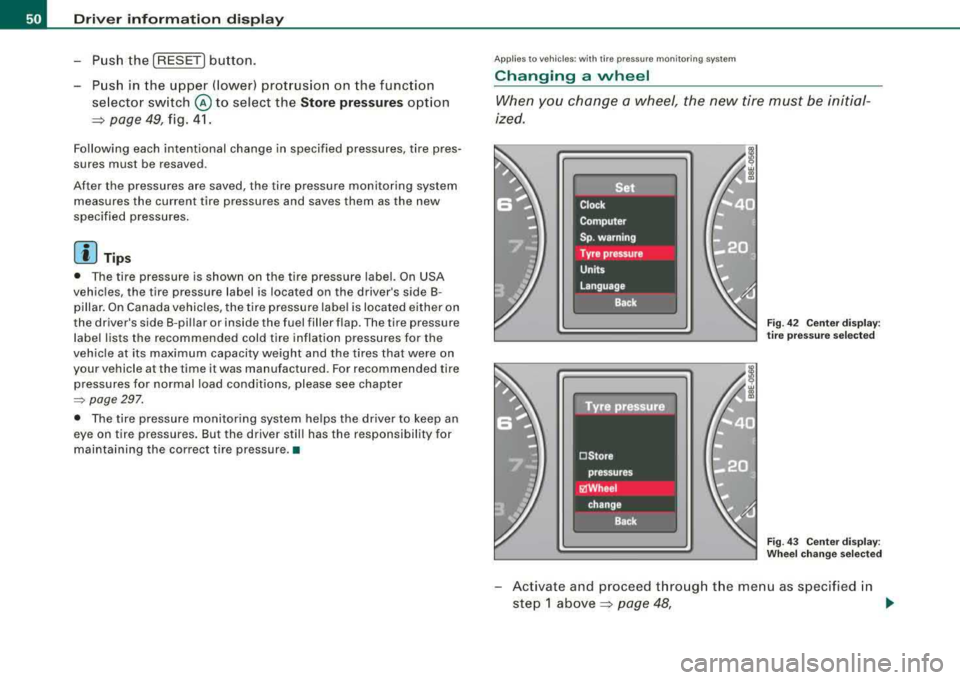
When you change a wheel, the new tire mus t be initial
ized.
Fi g. 4 2 C enter display :
t ir e pr ess ure se lected
Fig . 4 3 Ce nter displa y:
W heel ch ang e se lecte d
-Act ivate and proceed through the menu as specified in
step 1
above~ page 48, .,
Page 53 of 368

-select Whe el ch ange in the Tir e pr ess ure menu.
Programming is necessary:
• aft e r rotating th e wh eels on the vehicle,
• if whee ls with new wheel sensors are used .
Your tire change is incomplet e if you do no t access the Driver Infor
mation System menu, and select and confirm
Wh eel ch ang e. You
mus t do this each time to change a tire. The procedure can take up
to 20 minutes driving time. During this time, the sensors are read
justing to the new wheel/tire combination, and the new pressures are stored .
During the learning phase, the tire pressure monitoring system is
not availabl e.•
App lies to veh ic les: w ith tir e p ressure monitor in g sys tern
Malfunctions
A ma/function can have various causes.
F ig . 44 D isplay:
Syste m malfun ction
If the warning light in the instrument cluster flashes for approxi
mately one minute and then remains continuously illuminated and
Controls and equip
ment
Dri ver inf orma tio n di spl ay
additional ly the => fig. 44 symbol appears in the display, the
tire pressure monitoring system is not available . This can have
various causes.
• If the message appears at the end of the learning phase, the
system cannot recognize the wheels insta lled on the vehicle . This
can be because one or more wheels without a wheel sensor were
installed .
• A wheel sensor or other component may have failed.
• The system has detected more than 4 wheels in the vehicle, for
example while driving beneath another car with tire pressure moni
toring system .
• A tire was changed but
the => page 50, "Changing a wheel"
procedure was not activated
=> page 50.
• Audi replacement parts were not used .
• If snow chains are being used , system function can be compro
mised due to the shie lding properties of the chains .
• The tire pressure monitoring system may not be available
because of a radio malfunction .
• Transmitters with the same frequency , such as radio head
phones in the vehicle or radio equipment, can cause a temporary
dis ruption of the system through excessive el ectromagn etic fie lds.
• Try to find the cause of the interference, and then perform the
=> page 50, "Changing a wheel" procedure one more time . If this not
e liminate the prob lem , contact your authorized Audi dea ler for
assistance .
• Do not use commercially available tire sealants. Otherwise , the
electrica l components of the tire pressure monitoring system will
no longer work properly and the sensor for the tire pressure moni
toring system will have to be replac ed by a qualified workshop. •
Technical data
Page 77 of 368
& WARNING
Never use daytime running lights to see where you are going . They
are not bright enough and will not let you see far enough ahead for
safety , espe cially at dusk or when it is dark . Be aware of changes
in outside light conditions when you are driving and respond by
switching on your lo w beams
io.
0 Note
• With the light switch at the O or :oo, position , only your front fog
lights remain turned on when it turns dark outside . Even though
your instruments appear well lit, the road ahead of you is not. The light pattern provided by fog lights alone is not sufficient for safe
driving in poor light or darkness. Therefore:
• Always be aware of changes in outside light conditions while
you are driving. Respond in time to fading daylight by turning the
light switch to position
io (or "AUTO" if your car is equipped with
th is featu re)
to turn on your headlights .•
Controls and equip
ment
Clear vision
App lies to veh ic les: w ith adaptive ligh t
Adaptive light
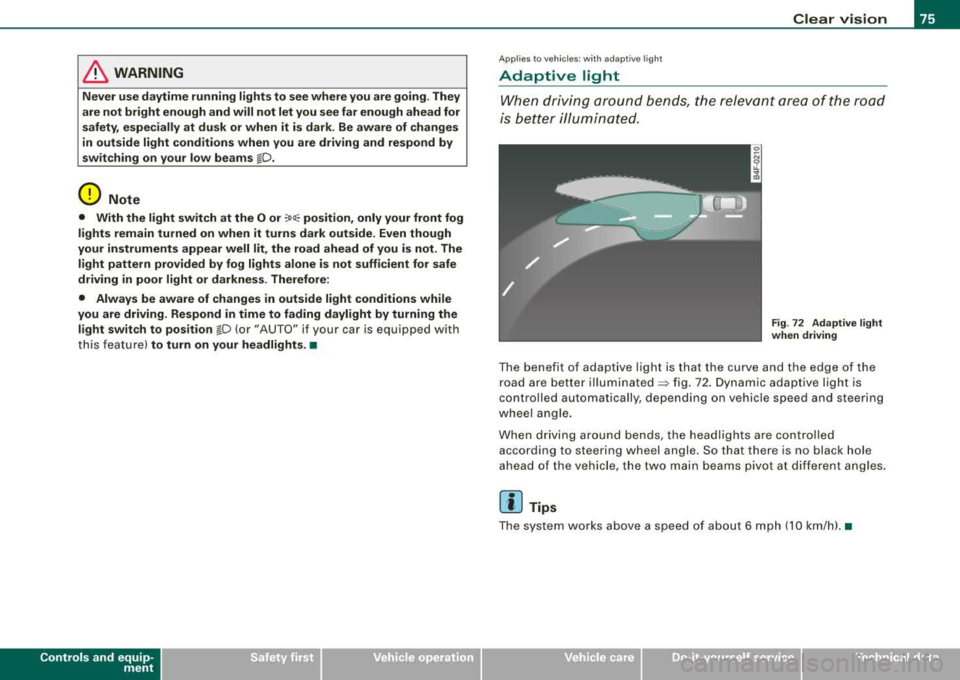
W he n driv ing around bends , the relevan t area of t he road
is bett er illumi nated .
Fig. 72 Ad aptiv e light
when driving
T he benefit of adapt ive light is that the curve and the edge of the
r oad a re be tter
il lu mina te d ~ fig. 72 . D yn ami c ada ptive ligh t is
controlled automatically, depending on vehicle speed and steering
whee l a ng le .
W hen driv ing arou nd bends, the headl ights a re co ntrolled
according to steering wheel angle. So that there is no black hole
a he ad of the vehi cle, the tw o main be ams pivot a t differ ent a ng le s.
[ i] Tips
Th e s ystem works abov e a sp eed o f about 6 mph (10 km /h ). •
Page 82 of 368
Clear vision
• your vehicle is being towed by a tow truck or if you a re towing
another vehicle behind you. •
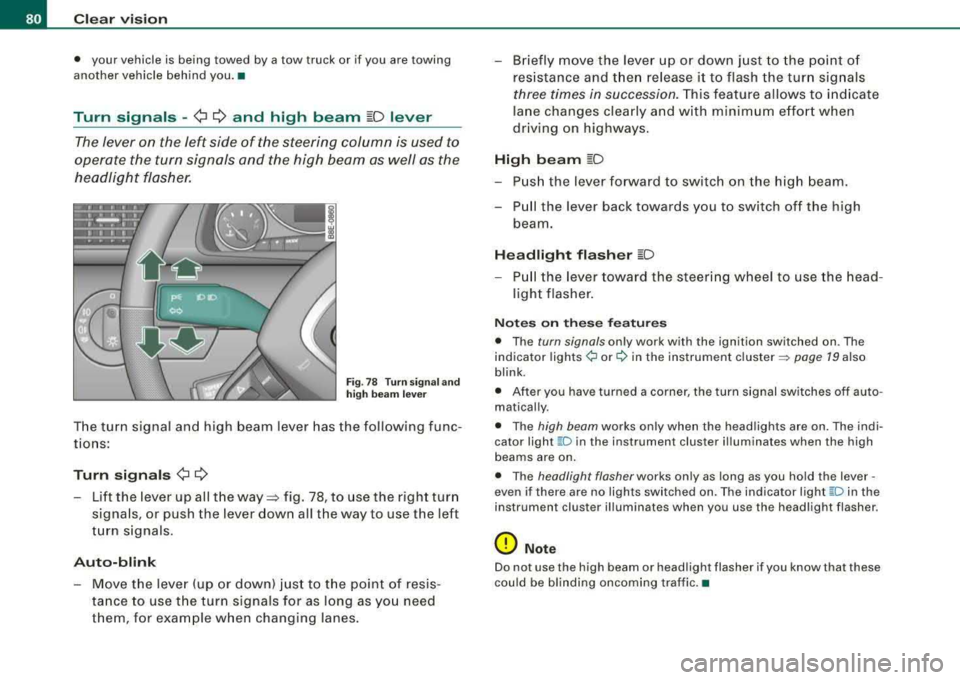
Turn signals -¢ ¢ and high beam ~D lever
The lever on the left side of the steering column is used to
operate the turn signals and the high beam as well as the
headlight flasher.
Fig. 78 Turn signa l and
high beam lever
The turn signal and high beam lever has the following func
tions:
Turn signals ¢ ¢
-Lift the lever up all the way~ fig. 78, to use the right turn
signals, or push the lever down all the way to use the left
turn signals .
Auto-blink
-Move the lever (up or down) just to the point of resis
tance to use the turn signals for as long as you need
them , for example when changing lanes.
-Briefly move the lever up or down just to the point of
resistance and t hen release it to flash the turn signals
three times in succession. This feature allows to indicate
lane changes clearly and with minimum effort when
driving on highways.
High beam ~D
-Push the lever forward to switch on the high beam.
-Pull the lever back towards you to switch off the high
beam.
Headlight flasher ~D
-P ull the lever toward the steering wheel to use the head
light flasher .
Notes on these features
• The turn signals only work with the ignition switched on . The
indicator
lights ¢ or¢ in the instrument cluster => page 19 also
blink .
• After you have turned a corner, the turn signal switches off auto
matically .
• The high beam works only when the head lights are on . The indi
cator light
~ D in the instrument clus ter illuminates when the high
beams are on.
• The headlight flasher works only as long as you hold the lever -
even if there are no lights switched on. The indicator light
~Din the
instrument cluster illuminates when you use the headlight flasher .
0 Note
Do not use the high beam or headlight flasher if you know that these
could be blinding oncoming traffic. •
Page 97 of 368
Seats and storage
General recommendations
Why is your seat adjustment so important? The safety belts and the airbag system can only provide
maximum protection if the front seats are correctly
adjusted.
There are several different ways you can adjust the driver's seat and
the front passenger's seat so that it conforms to your body size. It is
especially important that the seat be adjusted properly so that:
• you can easily and quickly reach all the switches and controls in
the instrument panel
• your body is properly supported thus reducing physical stress
and fatigue
• the safety belts and Airbag system can offer maximum protec
tion=> page 187
In the following chapters, you will see exactly how you can best
adjust your seats.
There are special regulations and instructions for installing a child
safety seat on the front passenger's seat. Always heed the informa
tion regarding child safety provided
in => page 210, "Child Safety".
& WARNING
Incorrect seating position of the driver and all other passengers
can result in serious personal injury.
• Always keep your feet on the floor when the vehicle is in motion
- never put your feet on top of the instrument panel, out of the
window or on top of the seat cushion! This applies especially to
the passengers. If your seating position is incorrect you increase
the risk of injury in the case of sudden braking or an accident. If
Controls and equip
ment
Seats and storage
& WARNING (continued)
the airbag inflates and the seating position is incorrect this could
result in personal injury or even death.
• It is important for both the driver and front passenger to keep
a distance of at least 10 inches (25
cml between themselves and
the steering wheel and/or instrument panel. If you're sitting any closer than this, the airbag system can protect you properly. In
addition to this, the front seats and head restraints must be
adjusted to your body height so that they can give you maximum
protection.
• Always try to keep as much distance as possible between your
self and the steering wheel or instrument panel.
• Do not adjust the driver's or front passenger's seat while the
vehicle is moving . Your seat may move unexpectedly, causing
sudden loss of vehicle control and personal injury.
If you adjust
your seat while the vehicle is moving, you are out of position. •
Driver's seat
The correct seat position is important for safe and relaxed
driving.
We recommend that you adjust the driver's seat in the
following manner:
-Adjust the seat in fore and aft direction so that you can
easily push the pedals to the floor while keeping your
knee slightly
bent:=> & in "Why is your seat adjustment
so important?".
-Adjust the seatback so that when you sit with your back
against the seatback, you can still grasp the top of the
steering wheel.
...,
Page 99 of 368
Adjusting the lumbar support*
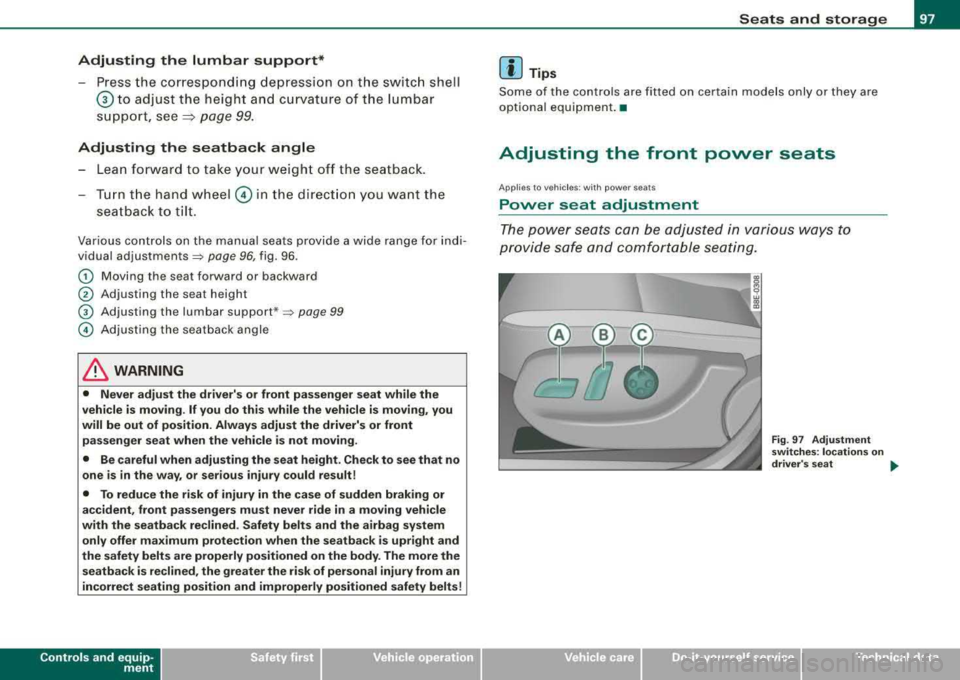
-Press the corresponding depression on the switch shell
© to adjust the height and curvature of the lumbar
support, see
~ page 99.
Adjusting the seatback angle
- Lean forward to take your weight off the seatback.
- Turn the hand wheel © in the direction you want the
seatback to tilt.
Various controls on the manual seats provide a wide range for indi
vidual
adjustments~ page 96, fig. 96 .
G) Moving the seat forward or backward
0 Adjusting the seat h eight
© Adjusting the lumbar support *~ page 99
© Adjusting the seatback angle
& WARNING
• Never adjust the driver's or front passenger seat while the
vehicle is moving. If you do this while the vehicle is moving, you
will be out of position. Always adjust the driver's or front
passenger seat when the vehicle is not moving.
• Be careful when adjusting the seat height. Check to see that no
one is in the way, or serious injury could result!
• To reduce the risk of injury in the case of sudden braking or
accident, front passengers must never ride in a moving vehicle
with the seatback reclined. Safety belts and the airbag system
only offer maximum protection when the seatback is upright and
the safety belts are properly positioned on the body. The more the
seatback is reclined, the greater the risk of personal injury from an
incorrect seating position and improperly positioned safety belts!
Controls and equip
ment
Seats and storage
[ i] Tips
Some of the controls are fitted on certain models only or they are
optional equipment. •
Adjusting the front power seats
Applies to veh ic les: w ith power se ats
Power seat adjustment
The power seats can be adjusted in various ways to
provide safe and comfortable seating .
Fig. 97 Adjustment
switches : locations on
driver 's seat
...
irechnical data
Page 133 of 368
Warm and cold -
-----------------'
Air outl ets
-. .. ~.
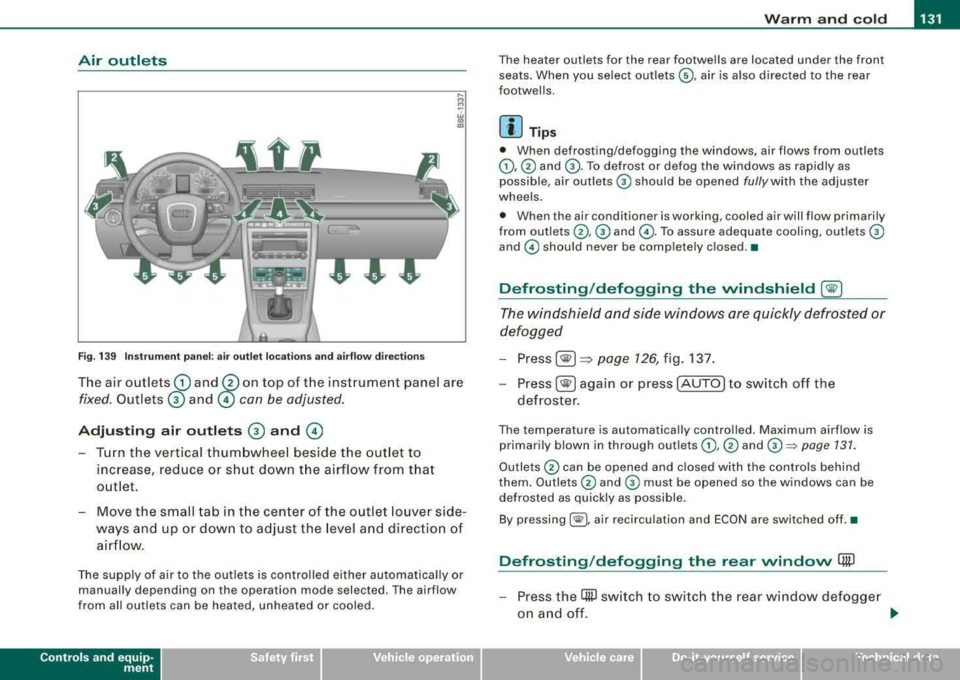
Fig. 1 39 Instr umen t pan el: air outlet locat ions and a irflow direc tion s
The air outlets G) and 0 on top of t he instrument panel are
fixed. Outlets 0 and © con be adjusted.
Adjusting air outlets 0 and ©
- Turn the vertical thumbwheel beside the out let to
increase, reduce or shut down t he airflow from that
o utlet .
- Move the sm all tab in t he cen ter of the o utle t lo uver side
ways and up or dow n to adj ust the level and directio n of
air flow.
The supp ly of air to the outlets is contro lled eit her automatical ly or
manually depending on the operation mode selected. The airflow
from all outlets can be heated, unheated or coo led .
Controls and equip
ment
The heater outlets for the rear footwe lls are located under the front
seats. When you select outlets ©, air is also directed to the rear
footwel ls.
[ i ] Tip s
• When defrosting/defogging the windows, air flows from outlets
G),@ and G) . To defrost or defog the windows as rapidly as
possible , air outlets
G) should be opened fully with the adjuster
whee ls .
• When the air conditioner is working, cooled air will flow primarily
from
ou tlets @, G) and @. To assure adequa te cooling, out lets G)
and © should never be completely closed .•
Defrosting /defogging the windshield [@)
The windshield and side windows are quickly defrosted or
defogged
- Press [® I=> page 126, fig. 137.
-
Press[ ®] ag ain or press [AUTO] to switch off the
defroster .
The temperature is automatically contro lled. Maximum airflow is
primarily b lown in through out lets
G) , @ and G):::) page 131 .
Outlets @ can be opened and c losed with the controls behind
them. Outlets
@ and G) must be opened so the windows can be
defrosted as quickly as possible.
By pressing[ @), air recirculation and ECON are switched off .•
Defrosting /defogging the rear window Qii)
- Press the (ffi) switch to swi tc h the rear wind ow d efo gge r
o n an d off.
.,_
Technical data
Page 135 of 368
Warm and cold -
-----------------'
Use the thumbwheels in the center conso le ::::::, page 132,
fig. 140 to turn on and adjust front seat heating. An infinite
range of pos itions are possible.
Driv er's s eat
Roll the thumbwheel G) from pos ition ( 0 ) upward in
order to activate the heating elements .
- Select the desired temperature setting from posit ions 1
through 6 .
Front pass eng er's se at
- Roll the thumbwheel 0 from pos ition ( 0 ) upward in
order to activate t he heating e lements .
When the heating element is activated, the numbers on the thumb
wheel will illum inate .
0 Note
To preven t possible damage to the hea ting elemen ts, do not kneel
on the seats or apply a heavy load to relative ly small areas of the
sea t.•
Controls and equip
ment
A pp lies to veh ic les: w ith e lectrically heated rea r seats
Electrically heated rear seats
The seat cushions and seat backs of the two outer rear
seats can be heated electrically .
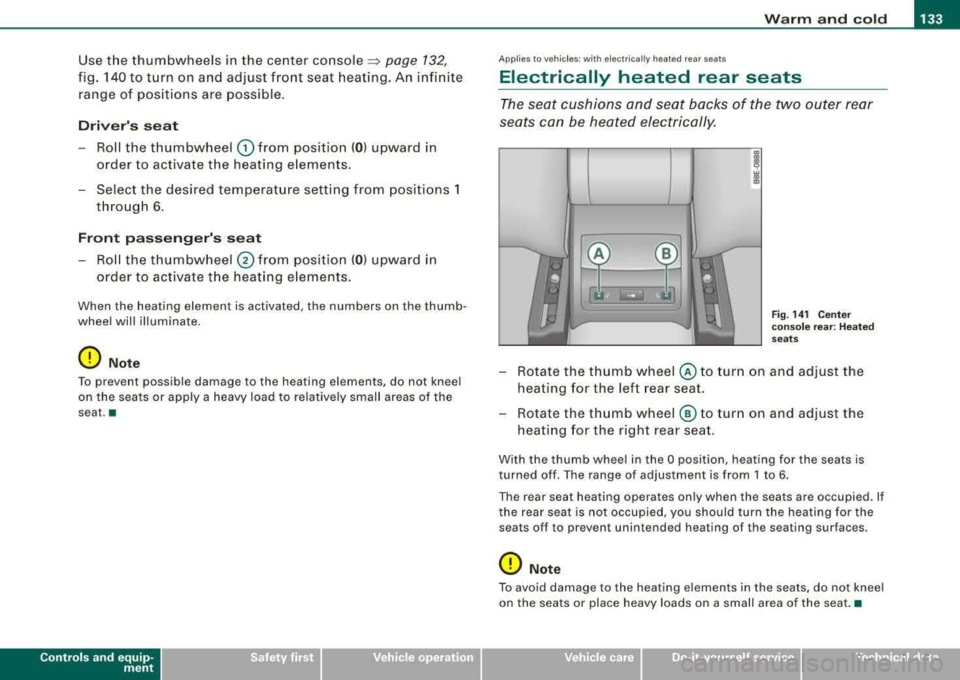
Fig. 14 1 C enter
co nso le re ar: H ea ted
seats
- Rotate the thumb wheel © to turn on and adjust the
heating for the left rear seat.
- Rotate the thumb wheel ® to turn on and adjust the
heating for the right rear seat .
With the thumb wheel in the O position, heating for the sea ts is
turned off . The range of adjustment is from 1 to 6.
Th e re ar seat heating operat es only when the seats ar e occupied. I f
the rear seat is not occupied, you should turn the heating for the
sea ts o ff t o preven t unint ended heating of th e seating surfac es.
0 Note
To avoid damage to the heating elemen ts in the sea ts, do not kneel
on the seats or place heavy loads on a small area of the seat .•
irechnical data
Page 136 of 368
___ O_ n_ t
_ h_ e_ ro_ a_d __________________________________________________ _
On the road
Steering
Adjusting the steering wheel column
The height and reach of the steering wheel can be
adjusted.
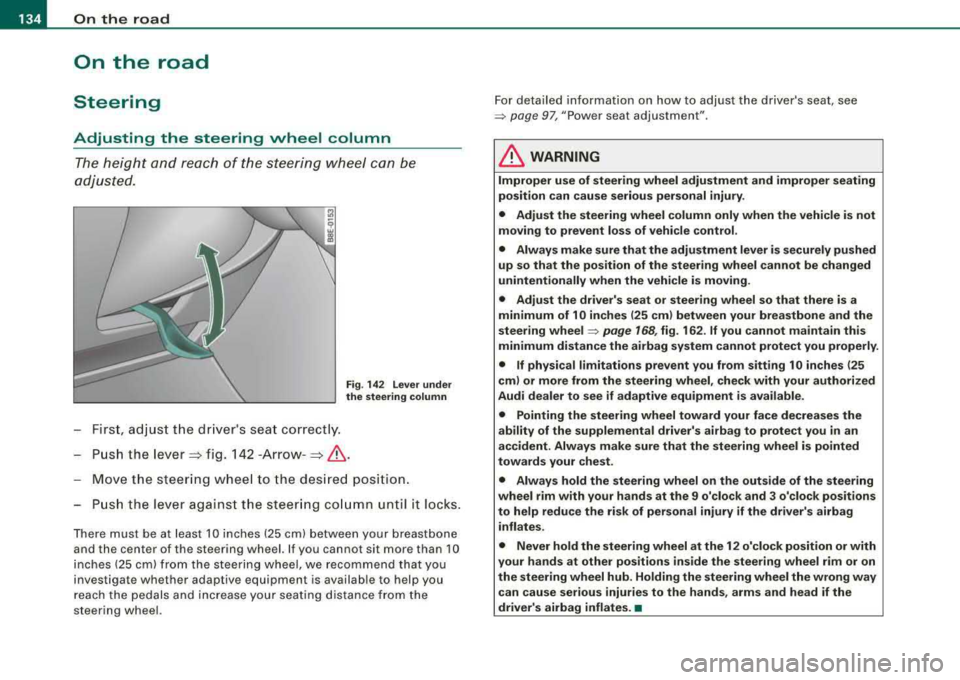
Fig . 142 Lever under
the steering column
First, adjust the driver's seat correctly.
- Push the
lever => fig. 142 -Arrow- =>& .
Move the steering wheel to the desired position.
- Push the lever against the steering column unt il it locks.
There must be at least 10 inches (25 cm) between your breastbone
and the center of the steering wheel. If you cannot sit more than 10
inches (25 cm) from the steering wheel,
we recommend that you
investigate whether adaptive equipment is available to help you
reach the pedals and increase your seating distance from the
steering wheel. For detailed information on how to adjust the driver's seat, see
=> page 97, "Power seat adjustment"
.
& WARNING
Improper use of steering wheel adjustment and improper seating
position can cause serious personal injury .
• Adjust the steering wheel column only when the vehicle is not
moving to prevent loss of vehicle control.
• Always make sure that the adjustment lever is securely pushed
up so that the position of the steering wheel cannot be changed
unintentionally when the vehicle is moving.
• Adjust the driver's seat or steering wheel so that there is a
minimum of 10 inches (25 cm) between your breastbone and the
steering
wheel ~ page 168, fig. 162. If you cannot maintain this
minimum distance the airbag system cannot protect you properly.
• If physical limitations prevent you from sitting 10 inches (25
cm) or more from the steering wheel, check with your authorized
Audi dealer to see if adaptive equipment is available.
• Pointing the steering wheel toward your face decreases the
ability of the supplemental driver's airbag to protect you in an
accident. Always make sure that the steering wheel is pointed
towards your chest .
• Always hold the steering wheel on the outside of the steering
wheel rim with your hands at the 9 o'clock and 3 o'clock positions
to help reduce the risk of personal injury if the driver's airbag inflates.
• Never hold the steering wheel at the 12 o'clock position or with
your hands at other positions inside the steering wheel rim or on
the steering wheel hub. Holding the steering wheel the wrong way
can cause serious injuries to the hands, arms and head if the
driver's airbag inflates.
•
Page 137 of 368
On the road -
-----------------'
Power steering
Power steering makes it easier to steer the vehicle when
the engine is running.
If the engine is not running the power steering does not work and
you will find it more difficult to turn the steering wheel.
Whenever the steering wheel is turned all the way to the left or right
a lo t of stress is placed on the power steering pu mp. When this
happens you will hear a noise coming from the power steering
pump .
0 Note
Never hold the steering wheel turned all the way to the left or right
longer than 15 seconds when the en gine is running -damage to
the power steering system is likely! •
Controls and equip
ment
Ignition lock and ignition switch
Ignition lock
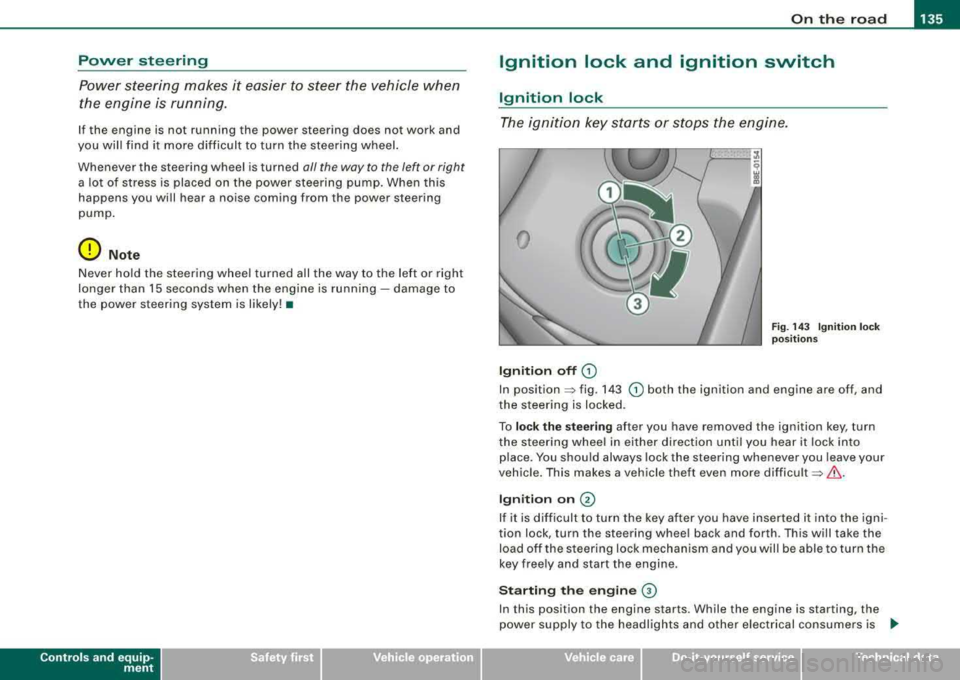
T he ignition key starts or stops the engine .
0
Ignition off G)
Fig . 14 3 Ignition lock
pos it io ns
In position => fig. 143 G) both the ignition and engine are off, and
the steering is locked.
To
lo ck the stee ring after you have removed the ignition key, turn
the steering wheel in either direction un til you hear it lock in to
place. You shou ld always lock the steering whenever you leave your
vehicle. This makes a vehicle theft even more
difficult =>& .
Ign iti on on @
If it is d iff icult to turn the key after you have inserte d it into the igni
tion lock, turn the steering whee l back and forth . This will take the
load off the s teering lock mechanism and you will be able to turn the
key free ly and start the engine.
Starting the engine ©
In this position the engine starts. While the engine is starting, the
power supply to the headlights and other e lectrical consumers is
.,
Technical data