brake light AUDI A4 AVANT 2008 Owner's Manual
[x] Cancel search | Manufacturer: AUDI, Model Year: 2008, Model line: A4 AVANT, Model: AUDI A4 AVANT 2008Pages: 368, PDF Size: 46.19 MB
Page 155 of 368
Transmis sio n -
----------------
The selector lever lock is released as fo llows:
- Turn t he ignition on.
- Step on the brake pedal.
At the some time press and hold
the inter lock button on the side of the gear selector knob
=> page 145, f ig. 149 with your thumb until you have
moved the selector lever to the desi red position.
A uto mat ic se lec to r l eve r lock C\S)
The se lector lever is locked in the P and N posi tions when the igni
tion is turned on.
When the selector lever is in the
P or N pos itions , th e m essage
When statio nary appl y footbrak e while sel ecting gear
appears on the instrument c luster disp lay on vehicles equipped
with the Driver Informatio n System as a reminder to the driver . The
symbo l
Cs» will a lso light up on the shi ft gate at the base of the
selector lever.
In additio n, the symbo l for the automatic selector level lock with
light up in th e shift ga te .
A time delay e lement prevents the selecto r lever from loc king when
it is moved through the
N position (going from R to Dl. The locking
e lement will lock the selector lever if the lever is left in
N (Neutral)
for more than approx imately one second , without the brake peda l
being pressed.
At speeds above abou t 3 mph (5 km/h) the Automatic Shift Lock is
automatically deactivated in the
N position.
The button needs to be pressed to sh ift from
D to S to avoid unnec
essari ly high fuel consumption in the
S po rt mode .
Interlock but ton
The lock button on the selec tor lever prevents the lever from be ing
accidentally shifted into certain pos it ions . Pressing this button
deactivates the selector lever
lock=> page 152 , fig. 155.
Controls and equip
ment
Igniti on key sa fe ty int erlo ck
The key cannot be removed from the ignition un less the se lector
lever is in the
P park posi tion . When the ignition key is removed , the
selector lever wil l be locked in the
P posit ion. •
Applies t o ve hic les: w it h m ultitron ic™ C ontin uo usly Var iab le Tra nsmiss ion (CVTl
Kick-down
The kick -d own feature allows the veh icle to generate
maximum acceler ati on.
When you press the accelerator peda l beyond the resistance point
that is reached at ful l throttle, the trans mission wi ll select a lower
gea r ratio based on vehicle speed and engine RPM . The engine RPM
wil l be control led to produce max imum veh ic le acceleration as long
as you continue to press the acce lerator pedal beyond this resis
tance point .
& WARNING
Be careful when u sing the kic k-down f eature on slipp ery ro ad s.
R apid acceler ation m ay cause the vehicle to skid . •
A pplies to v ehicles: w ith mult it ro nic™ Con tinuo usly Var iab le Tra nsmiss ion (CV Tl
Dynamic shift program (DSP)
The multitronic™ transmission is electronically
controlled.
The transmiss ion se lec ts the appropr ia te gear rat io (upshifts and
downshifts) automatically based on preset driving programs .
However, you can also manua lly select a s hift program (tiptronic ®
f eature)
=> page 154 .
The transmission will select on e of th e econom y programs when
you drive at a s teady speed or a gradually changing speeds without
~
Page 156 of 368
___ T_ ra_ n_ s_ m_ is_ s_ io_ n _____________________________________________________ _
heavy acceleration. This gives best fuel efficiency, with early
upshifting and delayed downshifting.
The transmission will automatically select the
sporty shift programs
when you drive at higher speeds, or with heavy acceleration and
frequently changing speeds. Upshifts are delayed to make full use
of engine power. Downshifting takes place at higher engine speeds
than in the economy programs.
The selection of the most suitable shift program is a continuous,
automatic process. The driver can a lso make the transmission
switch to a sporty program by
quickly pressing down the gas pedal.
This causes the transmission to shift down into a lower gear ratio
and makes quick acceleration possible (to pass another vehicle) You
do not need to press the gas pedal into the kickdown range. After
the transmission has upshifted, the original program is selected
according to your driving style .
An additiona l shift program allows the automatic transmission to
select the proper gear for uphill and downhill gradients.
This prevents the transmission from shifting up and down unneces
sari ly on hills. The transmission will shift down to a lower gear ratio
when the driver presses the brake pedal on a downhill gradient. This
makes use of the braking effect of the engine without the need to
shift down manually .
If you are driving in hills and mountains, the transmission will
continuously adjust the gear ratio to the road grade. If you press the
brake pedal when driving downhill, the transmission will downshift
automatically . This increases the braking effect of the engine.
If the cruise control is on when you are traveling downhill, the trans
mission will automatical ly select a lower gear ratio in order to main
tain the set vehicle speed . This will cause the engine speed to
increase. •
Applies to vehi cles : wi th mu ltit roni c™ Con tinu ousl y V ariabl e Tra nsmi ssio n lC VT I
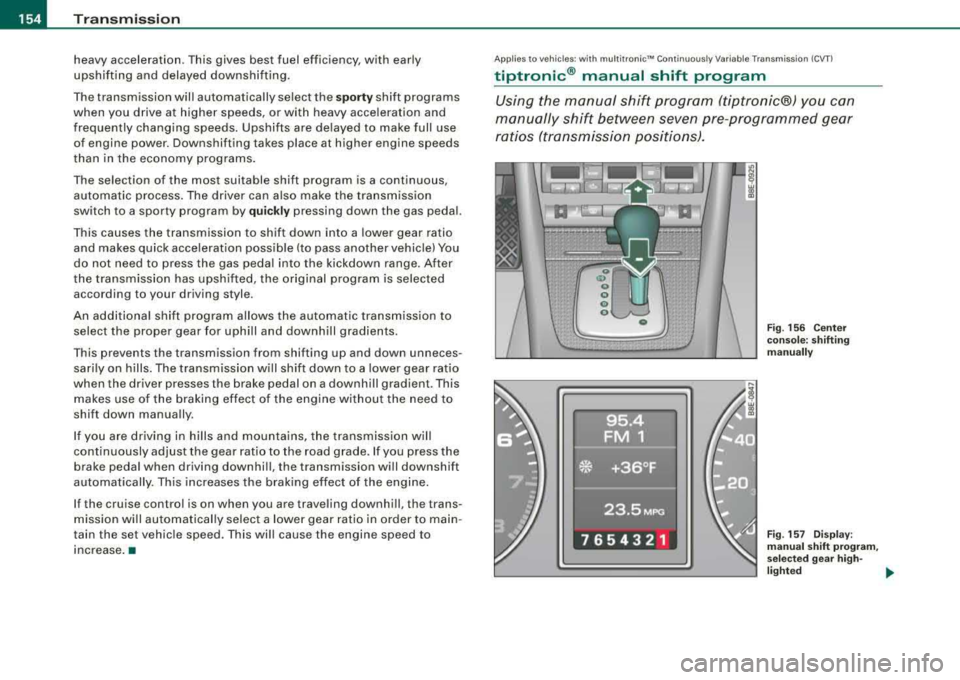
tiptronic ® manual shift program
Using the manual shift program (tiptronic®) you can
manually shift between seven pre-programmed gear
ratios (tran smission positions).
Fig. 156 Center
console: shifting
manually
Fig . 157 Display:
manual shift program,
se lecte d gear high -
lighted ~
Page 160 of 368
___ H_ o_ m_ e_L_ i_n _k_ ® __________________________________________________ _
Applies to vehicles: with Home link® univer sal rad io frequency remote contro l
Programming the HomeLink ® Universal
Remote Control
The Homelink® Universal Remote Control is programmed
in two phases: inside the vehicle at the overhead keypad
and outside the vehicle at the front bumper.
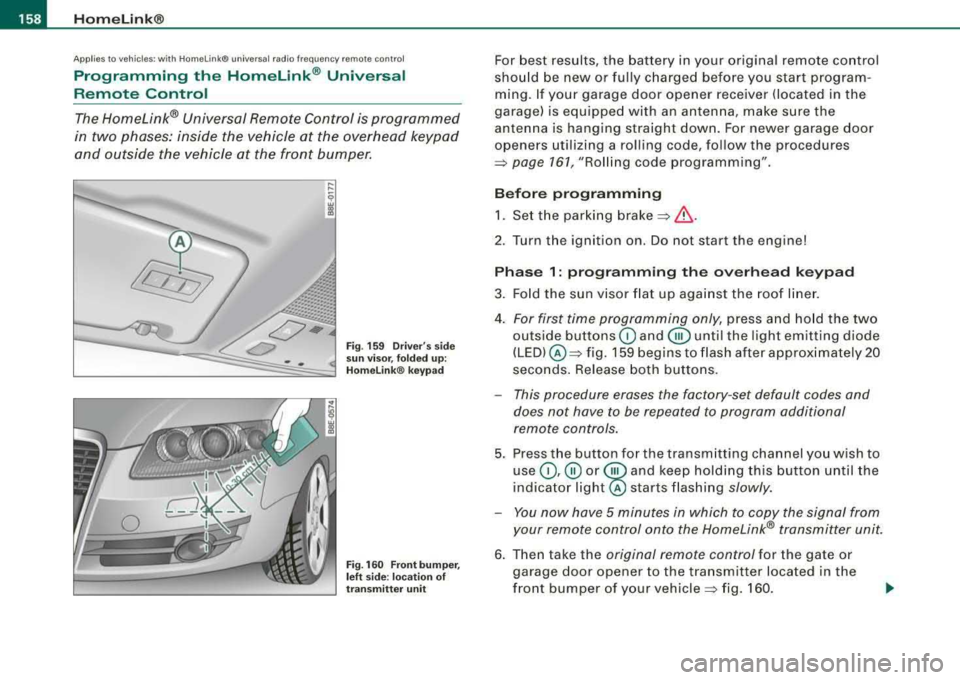
Fig . 159 Driver's side
sun visor, folded up:
Homelink ® keypad
Fig. 160 Front bumper,
left side : location of
transmitter unit
For best results, the battery in your original remote control
should be new or fully charged before you start program
ming. If your garage door opener receiver (located in the
garage) is equipped with an antenna, make sure the
antenna is hanging straight down. For newer garage door
openers utilizing a rolling code, follow the procedures
=> page 161, "Rolling code programming" .
Before programming 1. Set the parking
brake =>& .
2. Tur n the ignition on. Do not start the engine!
Phase 1: programming the overhead keypad
3. Fold the sun visor flat up against the roof liner.
4.
For first time programming only, press and hold the two
outside buttons
G) and @until the light emitting diode
(LED) @=> fig. 159 begins to flash after approximately 20
seconds. Release both buttons.
- This procedure erases the factory -set default codes and
does not have to be repeated to program additional
remote controls.
5. Press the button for the transmitting channel you wish to
use
G) ,@ or @ and keep holding this button until the
indica tor
light@ starts flashing slowly.
- You now have 5 minutes in which to copy the signal from
your remote control onto the Homelink® transmitter unit.
6. Then take the original remote control for the gate or
garage door opener to the transmitter located in the
front bumper of your
vehicle => fig. 160.
Page 163 of 368
_________________________________________________ H_ o_m _ e_L _i_n _k _® __ ftllll
Identifying a rolling code:
-Press the button for the programmed transmitter
channel again and hold it down.
- If the light emitting
diode @=> page 160 , fig. 161 first
flashes quickly and then remains lit after 2 seconds, the
garage door opener is using a rolling code.
•
A pplies to vehicle s: w it h H omelin k® u niv ers al radio fr equ enc y remot e con tro l
Rolling code programming
A rolling code is programmed in two phases: at the
garage door opener motor and inside the vehicle at the
overhead keypad.
Phase 1:
programming the garage door opener motor
1. Make sure that your vehicle is located within operat ing
range of the remote controlled garage door opener.
2. Locate the set button (teach button) on the garage door
opener motor (refer to the operating instructions for the
garage door opener).
3. Press the set button (teach button) on the garage door
opener motor.
Phase 2: programming the overhead keypad
4. Set the parking brake.
5. Turn the ignition on. Do not start the engine!
6. On the overhead keypad press the button for the previ
ously programmed transmitter channel.
7. Press this button a
second time in order to finish the
rolling code programming.
Controls and equip
ment The vehicle should be
located no further than 15 ft (5 m) from the
remote controlled garage door opener to remain within the average
signal range o f mos t remote con trolled systems.
Refer to the garage door opener operating instructions to locate the
set button (t each button) on the garage door opener motor .
After the keypad has been programmed, the g arage door opener
should recognize the radio frequency s ignal from the Homelink ®
Universal Remote Control and respond to signals from it.
[ i] Tips
Having a second person assist you makes programming of the
rolling code easier and faster . For some makes of garage door
op eners t he Homelink ® button may have to b e press ed a third time
to complete the teaching sequence. •
Applies to vehic le s: w it h Hom elink® univ ers al ra dio fr eque ncy remote c ontro l
Erasing the programming of the Homelink ®
universal remote control
When you erase the programming, the programming on
all three of the transmitter channels with be lost!
1. Set the parking brake.
2. Turn the ignition on. Do not start the engine!
3. Hold down both outside buttons
Ci) and @=> page 160,
fig. 161 simultaneously, until the diode begins to flash
(after about 20 seconds).
4. Release both buttons immediately. The programming on
all three transmitter channels is now erased.
.,_
Page 239 of 368
_________________________________________ ___:l:.:.. n !.!t ~e :.:.11 :.!.ig ~e :.:..n !.!t :... t::.: e::.: c~ h:..:.:..,: n~o =.!l~o ~g Lly '.,_ _l!III
speed of the vehicle about its vertica l axis, the lateral acce leration
ac ting on the veh ic le, the brake pressure and the s teering ang le a re
a ll measured .
The direction in which the driver wishes to travel is determined with
the aid of the steering angle and veh icle speed and is continua lly
compared with the actual behavior of the vehicle. If the two do not
match, -for example, when the vehicle starts hydrop la ning on a
wet road -
, ESP will au tomatical ly brake the appropria te wheel to
correct the problem .
The vehicle is then stabi lized by the forces acting on the whee l
during braking . If the vehicle is
oversteering (r ea r tends to skid out
of the turn), t he brakes are main ly app lied on the whee l that is on
the outside of the curve . In the case of a vehicle that is
understeering
(tendency to s lide out of the curve) , the bra kes are applied at the
rear whee l that is on the inside of the curve. An acoustic signal indi
cates when ESP brake appl ication cuts in
=> & .
The system operates across the entire speed range in combination
wi th the ABS system
~ page 240. If the Ant i- Lock Brake Sys te m
(ABS) malfunctions, the ESP wi ll be out of act ion as well.
Ac tivat ion
When you turn on the engine, ESP will automatica lly be activated
and will perfo rm a self -test.
You can activate a deactivated ESP or deact ivated ASR as requ ired
by pressing the
=> page 236, fig. 199 button.
D eac tiva tion
Norma lly, the ESP should always be on .
When necessary, you can deact ivate Anti -Slip Regulat ion (ASR) or
the Electronic Stabilization Program (ESP) by pressing the button
=> page 236, fig. 199 .
• Dea ctivating A SR: Tap briefly on the ESP button . In certain excep
t iona l situations (e .g. driving wit h tire chains or a t a forced pace
around a track), the Anti-S lip Regu lation (ASR) can be deactivated
Controls and equip
ment Safety first Vehicle operation
=> page
238 . The ESP check light flashes . T ap the ESP button again
t o r eact ivate ASR. The ESP check light g oes out .
• Deactiv ating ESP : Press the ESP button for more than 3 seconds .
W ith ESP deactivated, the ESP check ligh t illum inates cons tant ly .
Press the ESP button again to reactivate ESP . The ESP check light
g o es out .
& WARNING
The Electronic Stabilization Program i s neve rthele ss subject to the
laws of physi cs . It is part icularly important to pa y attent ion to thi s
fact on we t and slippery roads . It is therefore important that you
always adapt your driving to the condit ion of the road and traffic
c onditions. Do not allow the inc reased safety provided by the Elec
tronic Stabiliz ation Program sy stem to lull you into a ccepting
additional safety ri sk s.
• Plea se note that when ESP or ASR is dea ctivated , the drive
wheels can spin on icy and slippery roads and the vehicle can
break a way -da nger of skidding! •
Electronic differential lock (EDL)
The elec tr o nic differen tial l ock mon itors t he r ota tion al
speed of the drive wheels .
Gener al not es
The elec tronic d if f erential l ock (EDU helps the ca r to start mov ing,
accelerate and c limb a grad ient on surfaces providing poor or
a lmost n o grip. W ithout EDL, th is w ould be difficult, if no t impos
sib le.
How the system works
The EDL operates automatical ly. It monitors the rotational speed of
the drive whee ls on an ax le with the he lp of t he ABS senso rs
=> page 2 40 . If a noticeable difference in rotational speed between
the drive wheels on one axle is de tected (e .g. on sl ippery grou nd
on .,,.
Vehicle care Do-it-yourself service Technical data
Page 240 of 368

-Intelligent technology
------~----- ~~--------------------------------------
one side), the spinning wheel is braked, thereby transferring power
to the other drive wheel or wheels (all- wheel drivel. This is done up
to a speed of about 60 mph (100 km/h). Noises from the brake
system signal that wheel spin is being control led.
Driving off
When driving off, always be sure to keep road conditions in mind as
you accelerate. If one drive wheel spins because it is on a surface
with less grip, gradual ly increase the pressure on the accelerator
pedal until the car starts to move. The wheel less able to transfer
power spins.
Overheating of brakes
To prevent the disc brake of the braked wheel from overheating if
subjected to excessive loads, the EDL cuts out temporarily. The
veh ic le remains operational and behaves in the same way as a
vehic le without EDL.
As soon as the brake has cooled down, EDL switches on again auto
matically.
& WARNING
• When accelerating on slippery surfaces, such as on ice or snow,
always be careful when depressing the accelerator pedal. Even
with the EDL working, the drive wheels can spin and reduce your
ability to control your car . - Risk of crash!
• The increased safety afforded by EDL does not mean that you
ca n take safety risks. Always adapt your driving style to the road
conditions and traffic situation.
[ i ] Tips
If a fault occurs in the ABS, the EDL is also not functioning. This is
indicated by the ABS warning
light => page 21. •
Anti-Slip Regulation System (ASR)
The Anti-Slip Regulation System prevents the driven
wheels from spinning when the car is accelerating.
General notes
The Anti-Slip Regulation System (ASR) is integrated in the electronic
stabilization program (ESP) . When the vehicle starts up and acceler
ates, the wheels are prevented from sp inning by adjus tin g the
engine power to match the amount of grip availab le from the road
surface.
How the system works
ASR performs automatical ly, i.e . w ithout the driver's intervention.
With the aid of the ABS
sensors=> page 240, ASR monitors the
speed of the driven wheels. If the wheels start to spin, the engine
power is reduced automatically until the tires find enough grip to
lock onto the road surface. The system is active across the entire
speed range.
The ASR works in conjunction with the ABS. If a malfunction shou ld
occur in the ABS, the ASR will also be out of act ion.
Activation
The ESP is automatica lly activated when the eng ine is started, and
it performs a self-test. You can activate a deactivated ASR, if
requ ired, by pressing
t h e=> page 236, fig . 199 button .
Deactivation
You can deactivate the ASR, if required, by pressing the button (for
less than 3
seconds) => page 236, fig. 199. With the ASR deactivated,
the ESP check light flashes,
see=> page 22.
Normally, the ESP shou ld always be on, however, it may be advanta
geous to turn off the system in certai n special cases when some
degree of wheel spin is desired such as :
• when driving with snow chains
Page 242 of 368

llffl.___l_n _t _e _ll _ig =- e_n _ t_ te_ c_h _n_ o_ lo-'g'"'-=- y ___________________________________________ _
&, WARNING (continued )
• Before des cending a steep grade , reduce speed and shift trans
mi ssion into a lo wer gear or lower driving po sition . Do not ride the
brake s or hold the pedal down too long or too often . This could
cau se the brake s to get hot and dimini sh braking efficiency .
• Do not ride the brakes by resting your foot on the ped al when
you do not intend to brake. This may cause the brakes to overheat, premature wear and in creased stopping distan ce.
• Under certain climati c and operating conditions such a s
passing through water, driving in heavy rain or after washing the
v ehicle , the effectiveness of the brakes can be reduced . In winter ,
ice can a ccumulate on the brake pads , linings , discs and drums .
Cautiously apply brakes for a te st. Brakes will dry and ice coating s
will be cleaned off after a few cautious brake applicat ions .
• Driving for an extended period of time on salt-co vered roads
without using your brakes can also affect braking effi ciency . Clean
off accumulated salt coating from brake discs and pads with a few
c autious brake appli cations .
• If you damage the front spoiler , or if you install a different
spoiler , be sure the air flow to the front brakes is not obstructed .
Otherwise the brake system could overheat reducing the effective
ness of the entire brake system .
• Failure of one brake circuit will impair the braking capability
resulting in an increased stopping distance . Avo id driving the
vehicle and have it towed to the nearest Audi dealer or qualified
workshop .•
Brake booster
T he brake booster add s ex tra braking power.
The bra ke booster works wit h vacuum pressure which is created
only whe n th e e ng in e is
runn ing=> &,.
& WARNING
• Never let the vehi cle roll to a stop with the engine shut off .
• If the brake booster is not working , for example when towing
your vehicle , or because the brake booster has somehow been
damaged, the brake pedal must be pre ssed considerably harder to
make up for the lack of booster assistance . •
Functioning of Anti-Lock Brake System (ABS)
A BS preven ts th e wh eels fr om lock ing up und er b rak ing.
T he ABS contributes effectively to vehicle contro l since it prevents
th e w heels from
lo cki ng w he n t he brakes a re a ppli ed. T h is mea ns
that the vehicle remains steerable and is less likely to skid.
With ABS you do not need to pump the brake . Just hold the brake
pedal down .
However, do not expect that the ABS shortens braking distance
u nder all circum sta nces. Whe n driving o n gravel or on newly fa lle n
snow on top of icy surfaces, braking distance may be even longer,
t herefore, under these ci rcums tances, it is espec ial ly i mpo rtant th at
you driv e slowly and with great care.
How the ABS system works
An automatic check is made when a speed of about 4 mph (6 km/h)
i s r eac hed . Wh en th is happe ns, a pumpi ng noi se can be hea rd.
I f a n indiv idual wheel be gins to rotat e too slowly i n relation to
vehic le speed and tends to lock, the ABS automatical ly reduces
brake pressur e to prevent tha t whee l from loc king .
Th is a utomatic adjustment process wi ll cause a
slight vibration of
t he brake peda l a nd s om e noi ses t o a lert y ou th at ve hicle spee d
must be adapted to existing road and traffic conditions. _..
Page 243 of 368

____________________________________________ ln_t_ e_ l_ li _,..g "- e_ n
_ t_t_e _c_ h_ n_o _l_o _....g ,_,y'-----'IJIII
& WARNING
Although the ABS is very effective, always remember that braking
capability is limited by tire traction. Always adjust your driving
speed according to the road and traffic conditions. Do not let the
extra safety afforded by the ABS tempt you into taking extra risks.
The ABS cannot overcome the laws of physics.
[ i] Tips
• If ABS is not functioning properly, a warning light will come on.
See~ page 21.
• If a fault occurs in the ABS , the EDL is also not functioning. This
is indicated by the ABS warning light. •
Brake assistant
The brake assistant is designed to achieve the optimum
braking effect.
The brake assistant helps to increase the effective braking power
and thus to achieve a shorter stopping distance . If the driver
presses the brake pedal very quickly, the brake assistant automati
cally boosts the braking force to the maximum level, up to the point
where the anti-lock brake function (ABS) intervenes to stop the
wheels from locking. You should then keep the brake pedal pressed
until the vehicle has braked to the required speed. The brake assis
tant switches itself off as soon as you release the brake pedal.
The brake assistant will not be operative if there is a malfunction in
the ABS.
Controls and equip
ment Safety first
Vehicle operation
& WARNING
Please remember that the accident risk always increases if you
drive too fast, especially in corners or on a slippery road, or if you
follow the vehicle ahead of you too closely. An increased accident
risk cannot be compensated even by the brake assistant, so
always maintain a safe speed. •
Servotronic® -advanced power
steering system
The power steering systems uses the power of the
running engine to allow precise steering with little effort. Your Audi is equipped with the electronically controlled
Servotronic® advanced power steering system. It adjusts
the degree of steering assistance to the roadspeed.
The advanced Servotronic ® power steering system senses the road
speed and electronically adjusts power assistance to provide
comfortable and safe steering response exactly matched to the
vehicle speed .
Power steering will not work if the engine is off. As a result, the
steering wheel will be hard to turn.
The power steering fluid level is checked during the scheduled
maintenance services.
0 Note
If there is an electronic malfunction, servotronic will still function
like a conventional power steering system, providing a constant
steering support force that is no longer proportionate to the vehicle
speed . This is most noticeable when turning the steering wheel at
low speeds (for example when parking), -more effort will be
required than usual.
.,.
Vehicle care Do-it-yourself service Technical data
Page 247 of 368
______________________________________________ D_ ri_v _ i_ n _, g..,_ a_ n_d _ e_ n_ v_i_r o_ n_m_ e_ n_t _____ ffllll
- Lack of proper maintenance as wel l as improper use of the
vehic le wi ll impair the func tion of the emission control system
and cou ld lead to damage .
<£> For the sake of the envir onm ent
Even when the Emission Control System is operating properly, the
exhaust gas can have a su lfur -like exhaust gas sme ll under some
operat ing states . Th is depends on the sulfur content of the fuel
being used. Using a different brand of fue l may he lp, or fil ling the
tank with lead -free super grade gasol ine. •
Avoid damaging the vehicle
When you are driving on poor roads, or over curbs, steep ramps,
e tc., make certain that low- lying parts such as spoilers and exhaust
system parts do not bottom out and get damaged.
This is especial ly true for vehicles with low -s lung chassis (sports
chassis)* and ful ly loaded vehicles .•
Operate your vehicle economically
and minimize pollution
General
Y o ur personal style of driving will determine the economy
of your vehicle, as well as exhaust and noise levels.
Fuel economy, env ironmental impact, and wear on your engine,
brakes and t ires largely depend on three factors :
• your personal driving sty le
• operat ing cond it ions
• technica l limitat ions
Controls and equip
ment Safety first Vehicle operation
If you anticipate what you need to do next and drive economica
lly,
you can easily cut your fuel consumptio n by 10 -15 percent . This
section wil l give you some tips on how you can help the environ
ment and your pocketboo k.
[ i ] Tips
The cons umption estimates as pub lished by ENV IRO NM EN TAL
PRO TECTION AGENCY (EPA) and Transport Canada may not corre
spond to your actua l consumption on the road, which wi ll vary
depending upon veh icle load and speed, road and weather condi
tions, trip length, etc. •
Drive smoothly and keep a lookout ahead
Vehicles use the most fuel when they ore accelerating .
-Avoid unnecess ary accelerating and brak ing.
Vehic les use the most fue l when they are accelerating . If you ant ici
pate what is going to happen ne xt, you wi ll need to brake less and,
thus , acce lerate less. Let the vehicle coast whenever poss ib le -for
examp le when you see that the next traffic light is red. •
Avoid full throttle
Driving at moderate speeds saves fuel and improves your
mileage.
- Try and keep we ll below your car 's max imum speed.
Acce lerating gent ly reduces fue l consump tion , engine wear, and
does no t disturb the environme nt.
Fue l consumption, exhaust emissions and engine noise increase
disproportionately at h ig h speeds . If you drive at approx imate ly
three quarters of top speed, fuel consumpt ion wil l be reduced by _,,,
Vehicle care Do-it-yourself service Technical data
Page 250 of 368

lllffl.___T_ r_a _il _e_ r_ t_o _vv_ i_ n """g"'- ---------------------------------------------------
Trailer towing
Driving with a trailer
General information
Your Audi was designed primarily for passenger transpor
tation.
If you plan to tow a trailer, please remember t hat the add it ional load
wi ll affect durability, economy and performance.
Trailer towing not only p laces more stress on the veh icle, it a lso ca lls
for more concentration from the driver.
For th is reasons, always fo llow the operating and dr iving instruc
t ions provided and use common sense. •
Technical requirements
Trailer hit ch
Use a weight -carrying hitch conforming to the gross trailer weight.
The hitc h must be suitab le for your veh ic le and tra iler and must be
mounted securely on the vehicle's chassis at a technically sound
l ocation. Use only a tra iler hitch with removable bal l mount. A lways
check with the trai ler hitch manufacturer to make sure that you are
using t he correct hitch .
Do not use a bumper hit ch .
The hitch must be installed in such a way that it does not interfere
with the impact-absorb ing bumper system . No mod ifications
shou ld be made to the vehicle exhaust and brake systems. From
time to time, check that all hitch mount ing bo lts re main securely
fastened.
When you are not towing a trai ler, remove the trailer hit c h ball
mount. Th is prevents the hitch from causing damage s hou ld your
vehic le be struck from
behind ~& .
Tire pre ssure
When towing a trailer, inf late the tires of your vehic le to the cold tire
pressure listed under "Full load" on the s ticker on the right door
jamb . Inflate trai ler tires to tra iler and tire manufacturers' specifica
t ions.
Lights
T he head ligh t settings shou ld be checked with the trailer at tached
before driving off. Have the head lights adjusted as necessary so
t hat you can see t he road ahead bu t not bl ind oncom ing traffic.
Check to make sure both vehicle and trailer lights are working prop
e rly .
Engine cool ing sy stem
Towing a t railer makes the eng ine work ha rder. It is imp ortant tha t
the cooling system's performance stands up to the additiona l
strain. Make sure that the coo ling system has enoug h fluid.
Traile r br ake s
If your tra ile r i s eq uipped wi th a braki ng system, check to be s ure
that it conforms to al l regu lations .
T he tra iler hydraulic brake system must no t be direct ly connected to
the vehic le's hydrau lic brake system .
Safety chains
Be sure trailer safety chains are properly connected from the trai ler
t o the h itch on the vehicle. Leave enough s lack in t he chains to
permit turning corners. When you install safety chains, make sure
they will not drag on the road when you are driving.
T he chains shou ld cross under t he trailer tongue to prevent it from
dropping in case of separation from the hitch. _,,,