ECO mode AUDI A4 CABRIOLET 2009 User Guide
[x] Cancel search | Manufacturer: AUDI, Model Year: 2009, Model line: A4 CABRIOLET, Model: AUDI A4 CABRIOLET 2009Pages: 340, PDF Size: 77.32 MB
Page 84 of 340
Clear vision
inst rument panel ill umination will automaticall y become dimmer
a s the daylight fades away and eventually will go out completely
when out side l ight i s very low . Thi s is to remind you , the dri ver , to
s witch on the headlights befor e it g ets too dark.
• Canada model s: instrument panel illumination will stay bright
re gardles s of the intensity of ambient light . Alway s be aware of
c hange s in outside light cond itions while you are d riv ing . Resp ond
in time to f ading dayl ight by turning the ligh t switch to po sit ion
io
(or "AUTO" if your car is equipped with this feature) to turn on your
he adl ights . •
Ap plie s to vehic le s: wi th x eno n hea dlig ht s
Xenon headlights
After s tarting the engine, the xenon headligh ts are automatically
adjusted to the load and angle of the vehicle (for example, during
acce leration and brak ing) . This prevents oncoming tra ffic from
experienc ing unnecessa ry glare from your head lights .
If the system is not operating properly, a warning sy mbol in the
Auto -Check Contro l is displayed:::::,
page 34. •
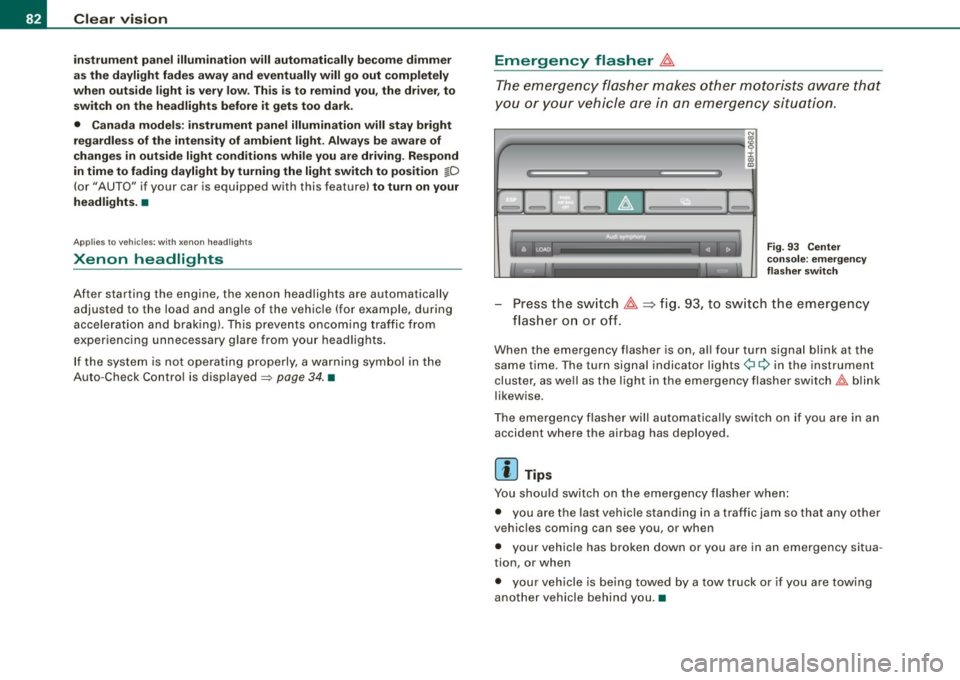
Emergency flasher &.
The emergency flasher makes other mot orists aw are that
y o u or your vehicle are in an emergency situation.
1Jia---------------...,i ij ::c .,
"'
-
Fig. 9 3 Ce nter
cons ole: e mergen cy
fla sher swit ch
Press the sw itch ~~fig . 93, to sw itch the emergency
fl ash er o n or o ff.
When the emergency flasher is on, al l four turn signa l blink at the
same time . The turn signal indicator lights¢¢ in the instrument
cluster, as we ll as the light in the emergency flasher sw itch
t!:;,,. b link
likewise .
The emergency flasher will automatica lly switch on if you are in an
accident where the airbag has deployed .
[ i ] Tips
You should switch on the emergency flasher when :
• you are the last vehicle stand ing in a t raffic jam so that any other
veh ic les coming can see you , or when
• your vehic le has broken down or you are in an emergency situa
tion, or when
• your veh ic le is being towed by a tow truck or if you are towing
another vehicle behind you .•
Page 87 of 340
Wiper and washer system
r.-·.
Windshield wiper ~
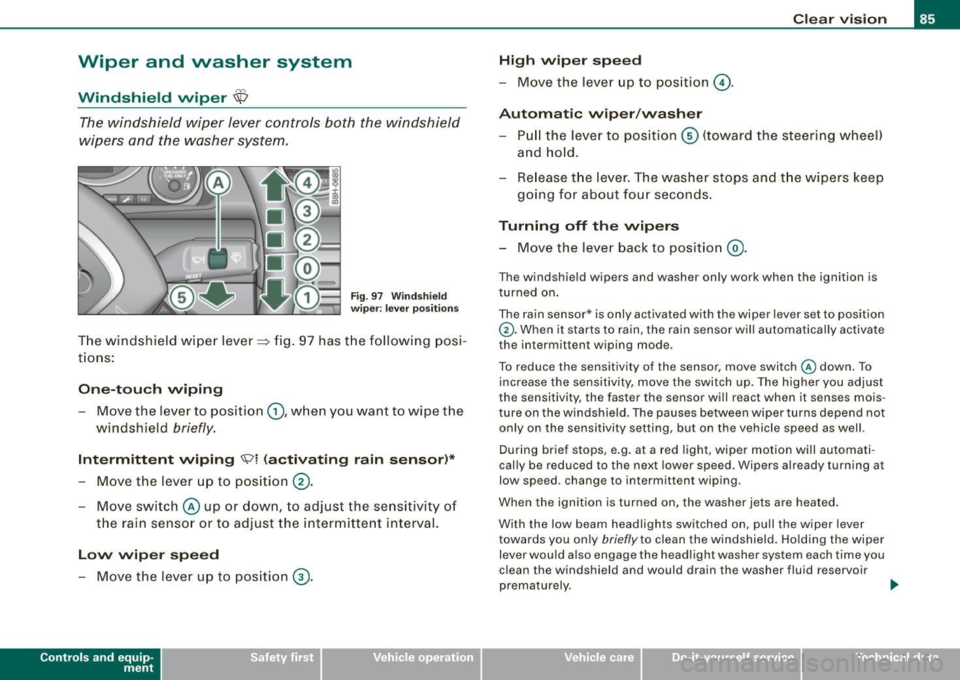
The windshield wiper lever controls both the windshield
w ipers and the washer system.
Fig. 9 7 W ind sh ie ld
wip er: leve r posi tion s
The windshield w iper lever=> fig. 97 has t he following posi
t io ns:
On e-tou ch wiping
- Move the lever to position G), whe n you want to wipe the
windshield
briefly .
Intermittent wiping ~l (activating rain sensor )*
- Move the lever up to position 0 -
- Move swit ch @ up or down, to adjust the se nsitivity of
the rain senso r or to adjust the intermitte nt interval.
Low wip er speed
- Move the lever up to pos ition ® ·
Contro ls and eq uip
ment
Cle ar v ision
High wiper sp eed
-Move the lever up to position @.
Automatic wiper /washer
- Pull the lever to pos iti on © (toward the steering w heel)
and ho ld.
Re lease t he lev er. The washer stops and t he wipers keep
going for about fou r seconds.
Turning off the wipers
- Move the lever back to position @ .
The windshie ld wipers and washer on ly work when the ignition is
turned on .
The rain sensor* is only activated with the wiper lever set to position
G). When it starts to rain, the rain sensor will automatically activate
the intermittent wiping mode .
To reduce the sensitivity of the sensor ,
move switch @down . To
increase the sensitivity, move the switch up. The highe r you adjust
the sensitivity, the faster the sensor wi ll react when it senses mois
ture on the windshield. The pauses between wiper turns depend not
only on the sensitivity setting, but on the vehicle speed as well.
During brief stops, e.g. at a red light, wiper motion will automati
cal ly be reduced to the next lower speed. Wipers already turning at
low speed. change to intermittent wiping.
When the ignition is turned on, the washer jets a re heated .
With the low beam headlights switched on, pull the wiper
lever
towards you only briefly to clean the windshield. Ho lding the wiper
lever would also engage the headlight washer system each time you
clean the windshield and would drain the washer fluid reservoir
prematurely. ..
~ehicle care irechnical data
Page 93 of 340
[ i J Tips
To avoid inaccurate directions, do not allow any remote controls,
electrical systems, or metal parts close to the mirror.•
Applies to vehicles: wi th digita l compass
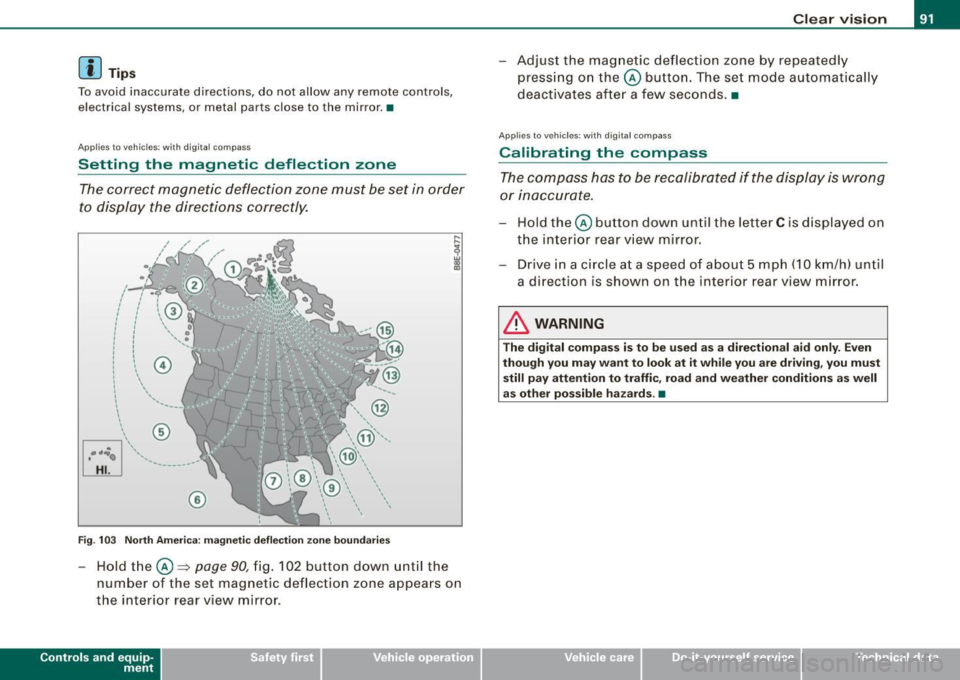
Setting the magnetic deflection zone
The correct magnetic deflection zone must be set in order
to display the directions correctly.
@
©
Fig . 103 North America: magnetic deflection zone boundaries
-Hold the © ~ page 90, fig. 102 button down until the
number of the set magnetic deflection zone appears on
the interior rear view mirror .
Controls and eq uip
ment
Clear vision
Adjust the magnetic deflection zone by repeatedly
pressing on the© button. The set mode automatically
deactivates after a few seconds. •
Applies to veh icles: with digi tal co mpass
Calibrating the compass
The compass has to be recalibrated if the display is wrong
or inaccurate.
Hold the© button down until the letter C is displayed on
the interior rear view mirror.
Drive in a circle at a speed of about 5 mph (10 km/h) until
a direction is shown on the interior rear view mirror.
& WARNING
The digital compass is to be used as a directional aid only. Even
though you may want to look at it while you are driving, you must
still pay attention to traffic, road and weather conditions as well
as other possible hazards . •
~ehicle care irechnical data
Page 110 of 340
• .___S_ e_a _ t_ s_ a_ n_ d_ s_t _o _r_ a...; g==- e ________________________________________________ _
CD chan ger*
The CD changer for the Sound System is located on the lef t side in
the glove compartmen t.
& WARNING
T o redu ce the ris k of per so na l injur y in an acci dent or sudd en stop ,
a lways keep the g love compartment clo sed while driv ing .
[ i ] Tips
As soon as you lock your vehicle from the outside via remote control
o r the d river's doo r lock , the glove compartment is also locked. •
App lies to veh icles : with Air ve ntilat ion in the glove compa rtm ent
Air ventilation in the glove compartment
Cooled air is vented into the glove compartment when
ever the air conditioner is on.
Fi g. 126 G love
com partm ent : air
v ent ilati on
Open the glove compartment=> page 107, fig. 125.
Open the door to the cooled section
=> fig . 126
Use the r otary sw itch to turn coo ling on or off.
The coo led section of the g love compartment only works when the
air conditioner is running. If the climate contro l system is in the
heating mode , we recommend that you turn off the coo led section
of the g love compartment.
[ i ] Tips
The "non -skid mat" in the refrigerated compartment may be
removed for cleaning. •
App lies to vehicles : wi th St ora ge c om part m ents
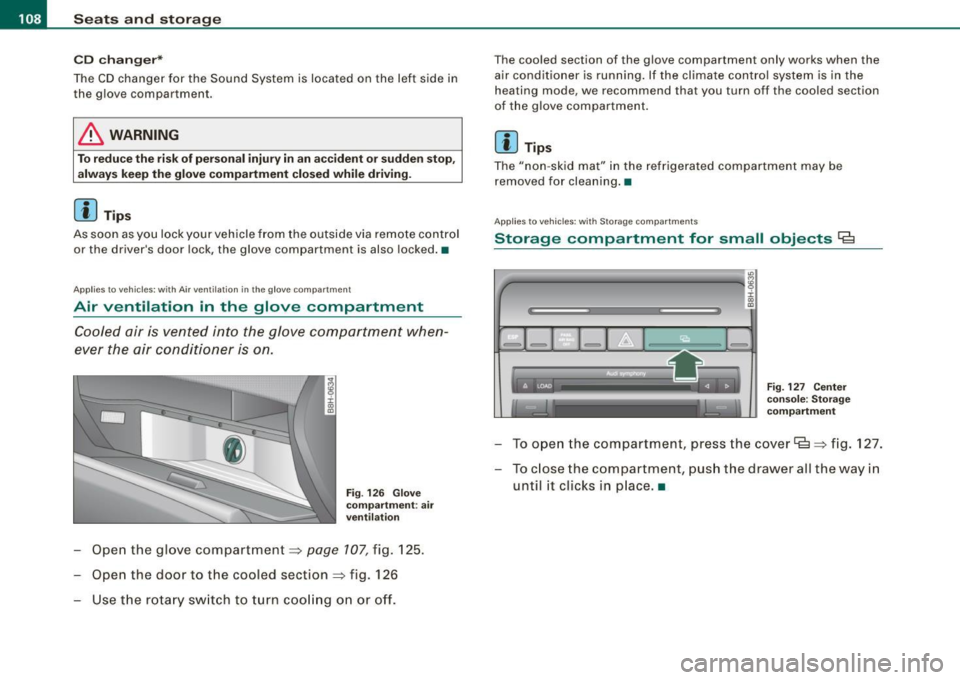
Storage compartment for small objects Ca
"'
4'--------------- -a!g :i: .,
"'
F ig. 127 Ce nter
console: S to ra g e
co mpartm ent
To ope n the compartment, press the cover Ce=> fig . 127.
- To c lose the compartment, push the drawer all the way in
until it c licks in p lace .•
Page 112 of 340
• .___w __ a _r _m _ a _n_d_ c_ o _ ld __________________________________________________ _
Warm and cold
Climate controls
Description
The air conditioner is fully automatic and is designed to
maintain a comfortable and uniform climate inside the
vehicle.
We recommend the following settings:
- Select and set a temperature between 64 °F (+22 °C) and
86 °F (+29 °C).
- Press the !AUTO
I button.
With this setting, you attain maximum comfort in the least amount
of time. Change this setting, as desired, to meet your personal
needs.
The climate controls are a combination of heating, ventilation and cooling systems, which automatically reduce humidity and cool the
air inside your vehicle.
The air temperature, air flow and air distribution are automatically regulated to achieve and maintain the desired passenger compart
ment temperature as quickly as possible.
The system automatically compensates for changes in the outside
temperature and for the intensity of the sunlight entering the
vehicle. We recommend you use the
Automatic mode=> page 112
for year -round comfort.
Please note the following:
Turn on the air conditioner to reduce humidity in the vehicle. This
also prevent the windows from fogging up. When the outside temperature is high and the air is very
humid,
condensation from the evaporator may drip under the vehicle. This
is normal and does not indicate a leak.
I f the outside temperature is low, the fan normally only switches to
a higher speed once the engine coolant has warmed up sufficiently.
The air conditioner temporarily switches off when you drive off from a standstill using full throttle to save engine power.
The compressor also switches off if the coolant temperature is too
high so that the engine can be adequately cooled under extreme
loads.
Air pollutants filter
The air pollutants filter (a combined particle filter and activated charcoal filter) reduces or eliminates outside air pollution (dust, or
pollen) from entering the vehicle.
The air pollutants filter must be changed at the intervals specified in your Warranty
& Maintenance booklet, so that the air conditioner
can properly work.
If you drive your vehicle in an area with high air pollution, the filter
may need to be changed more frequently than specified in your
Audi Warranty
& Maintenance booklet. If in doubt, ask your autho
rized Audi Service Advisor for advice.
Key coded settings
The air conditioner settings selected are automatically stored and
assigned to the key being used. When the vehicle is started, the air
conditioner automatically selects the settings assigned to that key.
These settings will differ depending if the roof is opened or closed.
This way every driver will maintain his/her own personal settings
and does not have to reset them manually.
~
Page 114 of 340
![AUDI A4 CABRIOLET 2009 User Guide -W
arm and cold --------------------
Button (s )
!AU TO)
88
(left and right)
§)
!ECON]
!OFF)
88
!in the center)
Fun cti on
Automatic operation
Temperature controls for
drivers](/img/6/57553/w960_57553-113.png "AUDI A4 CABRIOLET 2009 User Guide -W
arm and cold --------------------
Button (s )
!AU TO)
88
(left and right)
§)
!ECON]
!OFF)
88
!in the center)
Fun cti on
Automatic operation
Temperature controls for
drivers")
-W
arm and cold --------------------
Button (s )
!AU TO)
88
(left and right)
§)
!ECON]
!OFF)
88
!in the center)
Fun cti on
Automatic operation
Temperature controls for
driver's side and passenger side
Air recirculation
Switches off air conditioning
Switches off air conditioning (rather than using
@a)
Switches o ff the air reci rculation (rather than
using
I O FF])
Adjusts fan speed
Air directed to the windows
A ir directed to the footwells
Air from dashboard outlets
Windshie ld defroster/defogger
Rear window defroste r/defogger
The buttons
I -O J, IEJJ, and j-0,,J can be selected individually or in
combination .•
Automatic mode [AU TO]
The automatic mode is the standard setting for all
seas ons.
Swit ching on AUTO
- Set the temperature between 64 °F (+ 18 °C) and 86 °F
(+29 °C) . -
Press [AUTO
I=> page 111, fig. 130.
AUTO on ly works when you set the inside temperature between
64 °F (18 °C) and 86 ° F (29 °Cl. If you select a temperature be low
64 °F (18 °C),
LO will appear in the display. If you se lect a tempera
ture above 86 °F (29 °C),
H I wi ll appear in the display.
The system automatically compensates for changes in outside
temperature and for the intens ity of the sunlight.
[ i ] T ips
By keeping the !AUTO l button on the driver's side pressed for
severa l seconds, the temperature of the passenger side can be set
t o the tempera ture of the driver's side or vice versa . The new
temperature setting will be shown in the disp lay .•
Setting the temperature
Sep arate temperatures can be selected for the driver's
and front passenger side.
- Press the(:) button or t he G button under each display
=> page 111, fig. 130 until the desired temperature is
reached.
The selected temperature setting appears in the display above the
buttons .
By pressing both
! AUTO l buttons for severa l seconds, the tempera
ture on the passenger side can be set to the temperature of the
driver's side or v ice versa . The new temperature setting will be
shown in the display. The old temperature setting can be restored
by resett ing the display as required .•
Page 115 of 340
Warm and cold -------------------------------.J
Switching between Fahrenheit and
Centigrade
You can change the temperature display from °F (Fahren
heit) to
°C (Centigrade) and vice versa.
- Press and hold[~] and press the p lus button on the
driver's s ide temperature switch =>
page 111, fig. 130. •
Air recirculation [ <8?)
The air recirculation prevents exhaust fumes or other
pollution from entering the vehicle.
Switching on th e air re cir culation
- Press[ ~]=> page 777,fig.130 =>&
Switching off the air recirculation
- Press~ again, or
- press (AUTO], or
press[ @].
In the air recirculation mode , the air in the passenger compar tment
is recircula ted to p revent exhaust fumes and other pollution from
entering the vehicle . We recommend that you use the manua l air
recircula tion under the following conditions :
• when driving through tunnels
• in a traffic jam .
& WARNING
Do not use this setting for extended period s of time . The windo ws
c o uld fog up since no fresh air ca n enter the veh icle . If th e
Controls and equip
ment
& WAR NING (c onti nued)
wind ows fog up, pre ss th e air r ecirculat ion butt on a gai n immed i
atel y to s witch off the air re circula tion function or sel ect defro st. •
ECON [ECO N]
Using ECON helps save fuel
-Press [ECON] to switch on=> page 111 , fig. 130 .
- Press [ECON] o r pre ss [AUTO] to switch off.
In ECON mode the air condit ioner is shut off and heating and venti
lation are automat ically controlled. "ECON" translates "Economy"
s ince driving with the air conditioning compressor
disengaged
improves your mileage noticeably.
When operating in ECO N mode make sure the temperature inside
the vehicle is not lower than the outside temperature. The air is
neither cooled nor dehumidified, so there is a risk that the windows
can fog up. •
Switching the air conditioning on and off [ OFF ]
Switching the air conditioning off
- Press [ OFF] to tu rn the air condit ioner off a nd block
o utside a ir from entering the vehicle .
Switching the air conditioning on
- Press [ OFF] aga in (indicator light comes on aga in), or
- Press [AUTO], or
- Press one of the following butto ns: [ {)' ], [@ ]or
I -0, ].
Page 116 of 340
• .___w __ a _r _m _ a _n_d_ c_ o _ ld __________________________________________________ _
Moreover, the air conditioning switches on again whenever you
press the fan speed or temperature buttons.•
Automatic air recirculation [~I
If outside air is polluted, an air quality sensor in the
vehicle will automatically s witch on the air recirculation .
Switching on air recirculation
-Press [~ J:::::, page 777,fig.130.
Switching off air recir culation
Press~ again, or
- press [AUTO J, or
- press[ ~).
The automat ic air recirculat ion mode should nor mally be left
switched on at a ll times.
The system is ready to operate approximately 30 seconds afte r yo u
turn on the ignition or start the vehicle. Fresh air enters the vehicle only during this initialization period .
I f the
air quality sensor in the air conditioning sys tem detects
exhaust fumes in the outside air, the control unit wil l either pass the
incoming a ir through the pol lution filter, or automatically switch on
the air recirculation .
The air conditioning syste m wi ll aut omatically swi tch o n the ai r
recirculation if it senses that the outside air is very po lluted. At the
same time, it wil l not al low any outside air to ente r the vehic le until
the a ir quality has improved .
T he air recircula tion operates for a maximum of
12 minutes. If the
w indows s tart to fog up whi le the air rec ircula tion is on, press[@!.
Under certain operating conditions (for example, if 1@1 or
[ci;;,, I are
pressed) the air recircu lation automatically switches off . If "ECON" is pressed, or if the temperature is below
-8 °C, the air recirculation
will operate on ly for
12 sec onds. •
Adjusting the fan speed 8 0
The automaticall y selected fan speed can be increased or
de crease d.
D
D
=
D
:c
"' "'
D
D
F ig . 131 Fa n speed
butt ons a nd di splay
ind ication
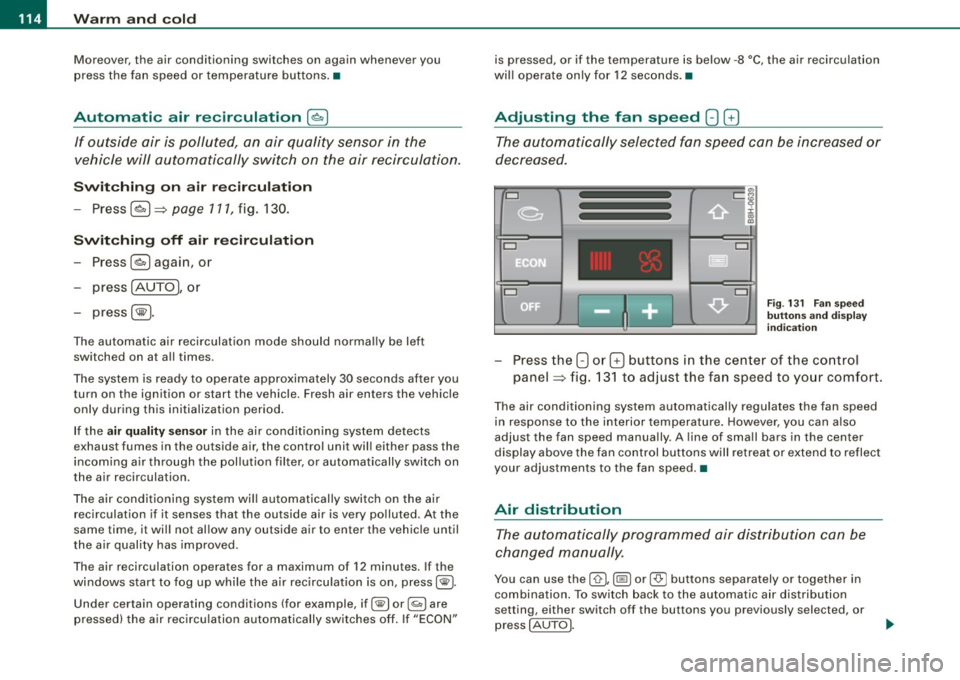
Press the 8 or G buttons in the center of the co ntrol
panel :::::, fig. 13 1 to adjust the fan speed to your comfort.
The air conditioning system automatical ly regulates the fan speed
in respo nse to the i nterior temperature . However, you can a ls o
adjust the fan speed manually . A line of sma ll bars in the center
display above the fan control but tons will retreat or ex tend to reflect
your adjustments to the fan speed .•
Air distribution
The aut omatically pr ogr am med air dis tribution ca n be
c ha nged m anu ally.
You can use the [ 0 I, (@ ] or [-0- J buttons separately or together in
combina tion . To swi tch back to the au tomatic air distribution
setting, either switch off the buttons you previously selected, or
press
[ AUTO J.
Page 122 of 340
• .___O_ n_ t_h _e _ r_o _a_ d __________________________________________________ _
Starting and stopping the engine
Starting the engine
The engine can only be started with your original Audi
key.
- Set the parking brake.
- Move the selector lever to the neutral position (automatic
transmission: selector lever in P or N)
=> &.
- On vehicles with manual transmission, fully depress the
clutch pedal.
- Turn the ignition key to position
0 => page 119, fig. 136
- do not depress the gas pedal when starting the engine!
- Let go of the key as soon as the engine starts.
A cold engine may at first be loud after it has been started. This is
due to the hydraulic valves building up the oil pressure. This normal
and no need for concern.
If the engine does not start immediately, stop trying after 10
seconds and then try to restart the engine about 30 seconds later.
What to do if the engine does not start
• ~ page 304, "Starting with jumper cables"
• ~ page 306, "Emergency towing with commercial tow truck".
& WARNING
Never start or let the engine run in a confined or enclosed area .
Exhaust fumes from the engine contain carbon monoxide, a color
less and odorless gas. Carbon monoxide can be fatal if inhaled.
• Never leave the engine idling unattended. An unattended
vehicle with a running engine poses a danger of personal injury or
theft.
0 Note
• Avoid high engine speeds, fast acceleration or heavy engine
loads while the engine is still cold. This could damage the engine.
• The engine cannot be started by pushing or towing the vehicle.
~ For the sake of the environment
To avoid unnecessary engine wear and to reduce exhaust emis
sions, do not let your vehicle stand and warm up. Be ready to drive
off immediately after starting your vehicle. Maintain moderate
speed until the engine is completely warm. Remember, the engine
performs best at operating temperature.•
Stopping the engine
- Turn the ignition key to position (D => page 119, fig. 136.
& WARNING
• Never turn off the engine until the vehicle has come to a
complete stop.
• The brake booster and servotronic only work when the engine
is running . With the ignition turned off, you have to apply more
force when steering or braking. Since you cannot steer and stop
normally, this can lead to accidents and serious injuries.
• The radiator fan can continue to run for up to 10 minutes even
after you have turned off the engine and removed the ignition key.
The radiator fan can also turn on again if the engine coolant heats
up because of intense sunlight or heat build-up
in the engine
compartment. _,.
Page 141 of 340

___________________________________________________ H_ o_m_ e_ L_ i_ n _ k_ ® ____ l'III
HomeLink®
Universal remote control
Ap plies to vehicles : with Home link ® unive rsa l remote cont ro l
General information
The Homelink® fea ture c an le arn u p to thr ee r ad io
frequency codes for mos t cu rrent transmi tters used for
operating gar age doors, es tate gates, home or ou tdoor
ligh tin g sy stems, an d other de vices .
You m ust first pr ogra m the Hom eLin k® trans mitte r befo re y ou can
use the system=> page 140, "Programm ing the HomeLink® tra ns
mi tter".
I n ord er to program the HomeLink® tra nsmitter fo r devices uti lizing
ro lling code, a second person on a ladder who can safe ly reach the
gara ge doo r ope ner moto r is r eco mmended. It is also necessa ry to
locate the "learn" button on your garage door opener motor . Refer
t o th e ope rati ng in stru ction s f or the opener, as the loca tion and
color of th is button may vary b y manufacturer.
Yo u ca n st ill u se the origina l re mote cont ro l f or the device a t any
tim e.
& WARNING
• Never use the Homelink'"' transmitter with any garage door
opener that does have not the safety stop and reverse feature as
required by federal safety standards . This includes any garage
door opener model manufactured before April 1 , 1982 .
• A garage door opener whi ch cannot detect an object , signaling
the door to stop and reverse does not meet current federal safety standards . Using a garage door opener without these features
increases risk of serious injury or death .
Controls and equip
ment
& WARNING (continued)
• For safety reasons never release the parking brake or start the
engine while anyone is standing in front of the vehicle .
• A garage door or an estate gate may sometimes be set
in
motion when the Homelink ® remote control is being
programmed . If the device is repeatedly activated , this can over
strain motor and damage its electrical components -an over
heated motor is a fire hazard!
• To avoid possible injuries or property damage , please always
make absolutely certain that no persons or objects are located in
the range of motion of any equipment being operated.
[ i ] Tips
• If you wou ld lik e m ore informa tion on H om eli nk®, wh ere to
purchase the HomeLink ® compatib le products, or would lik e to
p urc h ase the H omeLink® Hom e Ligh ting Package , p lease ca ll to ll
fre e: 1- 80 0-355 -3515.
• Fo r D ec lara tion of Co mplian ce to Unite d S tate s FCC and I ndustry
C anada regulat ions => page
320 . •