manual transmission AUDI A4 SEDAN 2013 User Guide
[x] Cancel search | Manufacturer: AUDI, Model Year: 2013, Model line: A4 SEDAN, Model: AUDI A4 SEDAN 2013Pages: 294, PDF Size: 73.71 MB
Page 88 of 294
86 Transmission
mo de. The instr ument cluster display shows
the selected driving mode .
I n the
normal m ode D, the transmission auto
mat ica lly selec ts the best gea r ratio .
It de
pends o n engine load, vehicle speed and the
dynamic control program ( DRP) .
Selec t the
sport mode S fo r spo rty drivi ng.
The vehicle makes full use of the engine's
power . S hifting is more not iceable when accel
erating.
When the ve hicle is stationary o r at speeds
be low 3 mph (S km/h), you must always apply
the foot brake before and while moving the lever to D/S out of N.
I n ce rtain circumstances i t may be advanta
geous to tempo rarily swi tch to the manual
shift p rogram to manually se lect gear ratios
to match specific driving conditions
c::> page88.
.&_ WARNING
Read and follow a ll WARNINGS c:> & in
Driving the automatic transmission on
page 84 .
(D Note
-
Coasting downhi ll with the transmission in
N and the e ngine not r unning w ill result in
damage to the automatic transmiss ion
and possibly the catalytic converte r.
(D Tips
On veh icles with Audi drive se lect *, you can
ad just the sporty shift characteristics in
the
Dynamic dr iving mode.Swill appear in
the instrumen t cluster display instead of
D .
Automatic Shift Lock {ASL)
Applies to vehicles: with multitronic or tiptro nic
The Automatic Shift Lock safeguards you
against accidentally shifting into a forward or the reverse gear and causing the vehicle to
move unintentionally.
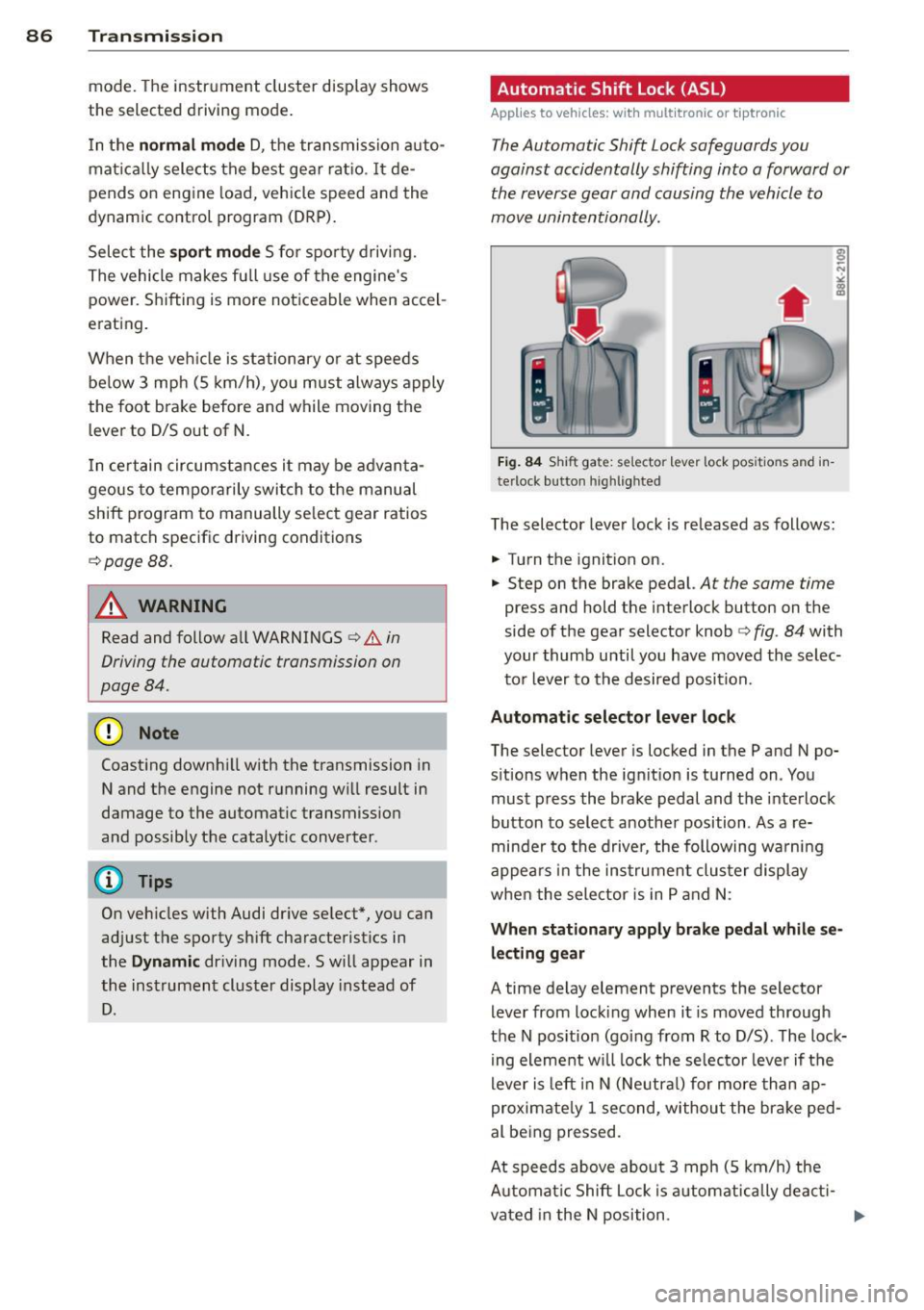
Fig. 84 Shi ft ga te: se lec tor le ve r lock pos itio ns a nd in
te rlock b utton highl ig hte d
The selector lever lock is re leased as follows:
.. Turn the ignition on .
.. Step on the brake pedal.
At the same time
press and hold the in terlock button on the
side of the gear selector knob
c:> fig . 84 with
your thumb until you have moved the selec
t o r lever to the desired position.
Automatic selector leve r lock
The selector lever is locked in the P and N po
s itions when the ign it io n is tu rned on. You
mus t press the brake pedal and the inte rlock
button to select another position . As a re
minde r to the drive r, the following wa rnin g
appe ars in the in strumen t clus ter di splay
when the selector is in P and N:
When stationary apply brak e pedal while se
lecting gear
A time delay element p revents the selector
lever from locking when it is moved through
the N pos ition (going from R to D/S) . T he lock
ing element w ill lock the selec to r lever if t he
lever is le ft in N (Ne utra l) for more th an ap
proximate ly 1 second, withou t the bra ke ped
al be ing pressed .
At speeds above abou t 3 mph (S km/h) the
A utomat ic Shift Lock i s automatica lly deac ti-
vated in the N position .
IJJ>-
Page 90 of 294
88 Transmission
Manual shift program
Applies to vehicles: with multitronic or tiptron ic
Using the manual shift program you can
manually select gears .
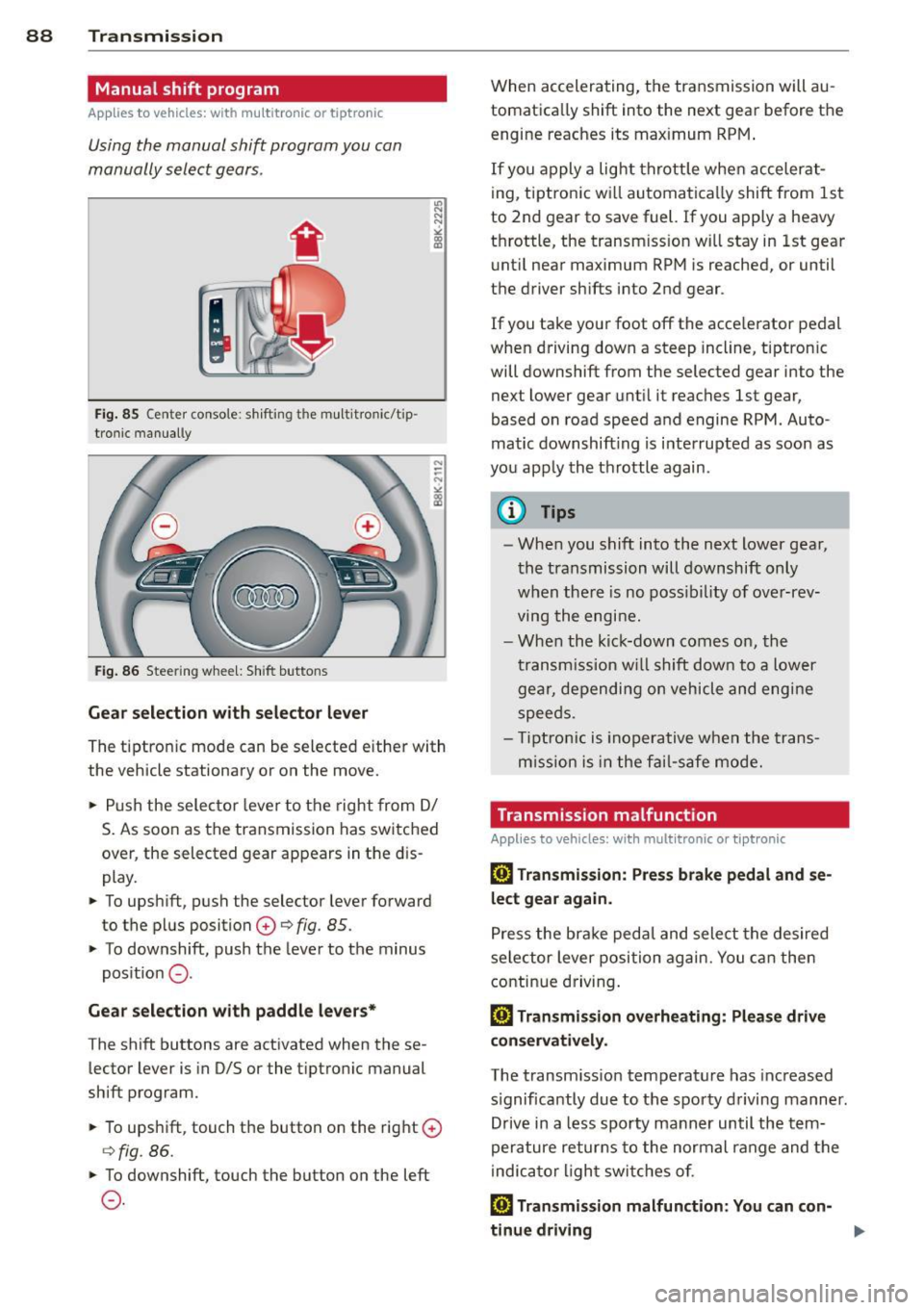
Fig. 85 Center console : shift ing t he multitro nic/t ip ·
tronic manual ly
Fig . 86 Steering wheel: Shift buttons
Gear selection with selector lever
"' N
N
~
" a> CD
The tiptronic mode can be selected either with
the vehicle stationary or on the move .
.,. Push the selector lever to the right from
DI
S. As soon as the transmission has switched
over , the selected gear appears in the dis
play.
.,. To upshift, push the selector lever forward
to the plus position
0 ¢ fig. 85 .
.,. To downshift, push the lever to the minus
position
0 -
Gear selection with paddle levers*
The shift buttons are activated when these
lector lever is in D/S or the tiptronic manual
shift program.
.,. To upshift, touch the button on the right
0
¢fig . 86.
.,. To downshift, touch the button on the left
0-
When accelerating, the transmission will au
tomatically shift into the next gear before the
engine reaches its maximum RPM .
If you apply a light throttle when accelerat
ing, tiptronic will automatically shift from 1st
to 2nd gear to save fuel. If you apply a heavy
throttle, the transm iss ion will stay in 1st gear
until near maximum RPM is reached, or until
the driver shifts into 2nd gear .
If you take your foot off the accelerator pedal
when driving down a steep incline, tiptronic
will downshift from the selected gear into the
next lower gear until it reaches 1st gear,
based on road speed and engine RPM . Auto ·
matic downshifting is interrupted as soon as
you apply the throttle again .
(D Tips
-When you shift into the next lower gear,
the transmission will downshift only
when there is no possibility of over-rev
ving the engine.
- When the kick-down comes on, the
transmission will shift down to a lower
gear, depending on vehicle and engine
speeds .
- Tiptronic is inoperative when the trans
m ission is in the fail-saf e mode.
Transmission malfunction
Applies to vehicles: with mult itronic or tiptronic
[O] Transmission: Press brake pedal and se
lect gear again .
Press the brake pedal and select the desired
selector lever position again. You can then
continue driving.
[O] Transmission overheating: Please drive
conservatively.
The transmission temperature has increased
s ignificantly due to the sporty driving manner.
Drive in a less sporty manner until the tern·
perature returns to the normal range and the
indicator light switches of.
[O] Transmission malfunction: You can con-
tinue driving ..,.
Page 91 of 294
There is a system malfunction in the transmis
sion. You may continue driving. Drive to your
authorized Audi dealer or qualified repair fa
cility soon to have the malfunction corrected.
[O] Transmission malfunction: Limited driv·
ing functionality
There is a system malfunction in the transmis
sion . The transmission is switching to emer
gency mode. This mode only shifts into cer
tain gears or will no longer shift at all. The en
gine may stall. Drive to your authorized Audi
dealer or qualified repair facility immediately
to have the malfunction corrected .
[O] Transmission malfunction: Stop vehicle
and shift to park.
Do not continue driving. Select the P selector
lever position and see your authorized Audi
dealer or qualified repair facility for assis
tance.
([) Note
If the transmission switches to emergency
mode, you should take the vehicle to an
authorized Audi dealership as soon as pos
sible to have the condition corrected.
Emergency release of the selector lever
Applies to vehicles: with multitronic or tiptro nic
If the vehicle's power supply foils, the selec
tor lever can be released in an emergency.
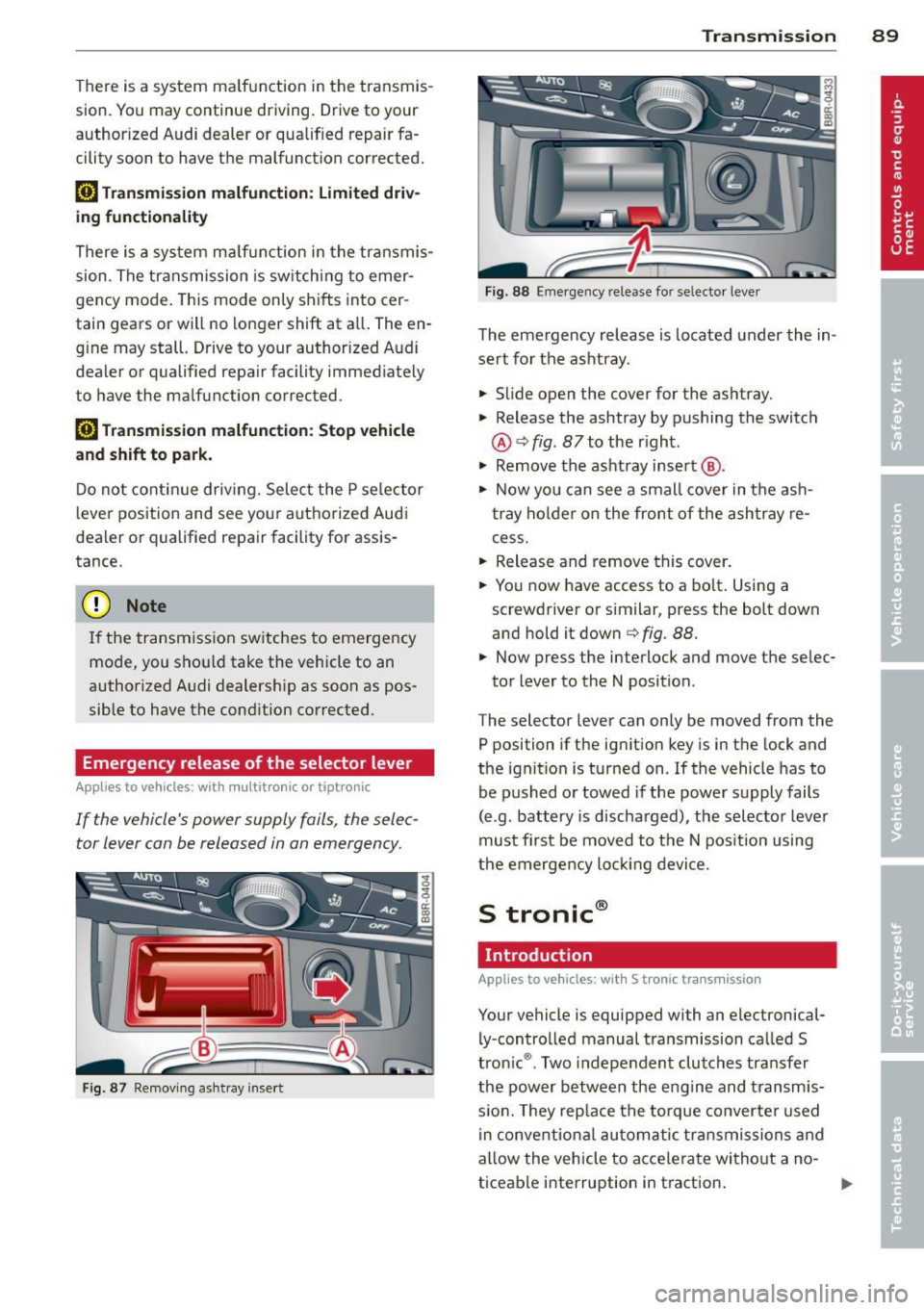
Fig . 87 Removing ashtray insert
Transmission 89
Fig . 88 Emerge ncy release fo r se lecto r lever
The emergency release is located under the in
sert for the ashtray.
.,. Slide open the cover for the ashtray.
.,. Release the ashtray by pushing the switch
@ ¢
fig. 87 to the right .
.,. Remove the ashtray insert @ .
.,. Now you can see a small cover in the ash
tray holder on the front of the ashtray re
cess .
.,. Release and remove this cover.
.,. You now have access to a bolt. Using a
screwdriver or similar, press the bolt down
and hold it down ¢
fig. 88.
.,. Now press the interlock and move the selec-
tor lever to the N position .
The selector lever can only be moved from the
P position if the ignition key is in the lock and
the ignition is turned on . If the vehicle has to
be pushed or towed if the power supply fails
(e .g . battery is discharged), the selector lever
must first be moved to the N position using
the emergency locking device.
S tronic®
Introduction
Applies to vehicles : with S tronic transmission
Your vehicle is equipped with an electronical
ly -controlled manual transmission called S
tronic ®. Two independent clutches transfer
the power between the engine and transmis
s ion. They rep lace the torque converter used
in conventional automatic transmissions and
allow the vehicle to accelerate without a no
ticeable interruption in traction.
Page 92 of 294
90 Transmi ssion
You can a lso shift the gears manually using
tiptron ic, if you like ¢page 93.
Selector lever positions
Appl ies to vehicles: with S tro nic t ransmission
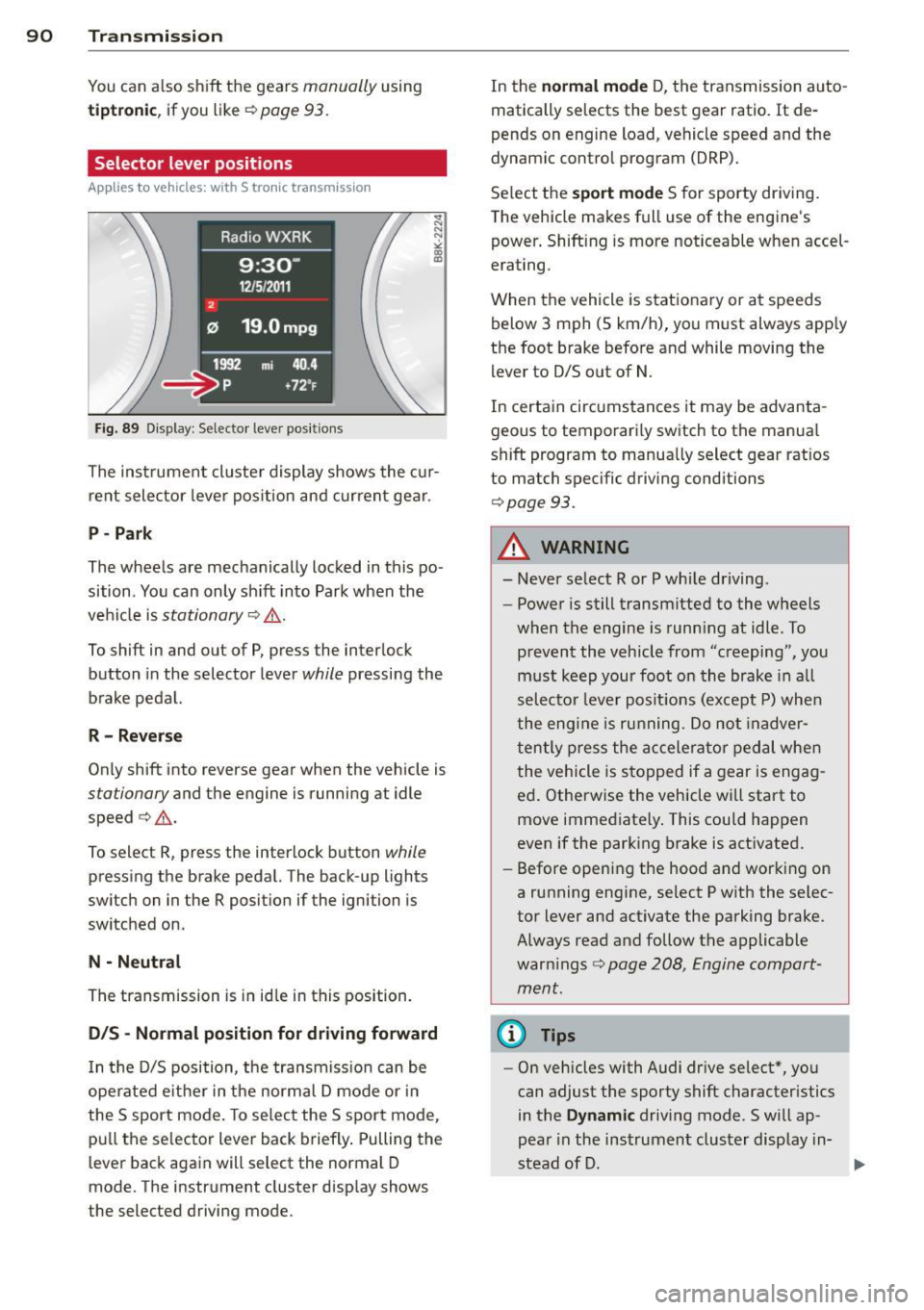
F ig . 89 Display : Selector lever posit io ns
The inst rument cluster display shows the cur
rent selector lever position and current gear .
P-Park
The wheels are mechanically locked in this po
sition . You can only sh ift into Park when the
vehicle is
stationary ¢,&. .
To shift in and out of P, press the inter lock
button in the selector lever
while pressing the
brake pedal.
R - Re verse
Only shift into reverse gear when the vehicle is
stationary and the engine is running at idle
speed ¢.&. .
To select R, press the interlock button
while
pressing the brake pedal. The back-up lights
switch on in the R posit ion if the ignition is
switched on.
N -N eutral
The transmission is in id le in this position.
0 /5 -Normal position for driving forward
In t he D/S position, the transmiss io n can be
ope rated e ither in the normal D mode or i n
the S sport mode . To select the S sport mode,
pu ll the se lector lever back brief ly . Pulling the
l ever back again will select the normal D
mode. The instrument cluster disp lay shows
the selected driving mode. In the
n
o rmal mode D, the transmission auto
matically selects the best gear ratio.
It de
pends on engine load, vehicle speed and the
dynamic contro l program (DRP).
Se lect the
s port m ode S for sporty driving.
T he vehicle makes full use of the engine's
power . Shift ing is more noticeable when accel
erating.
When the vehicle is stationary or at speeds below 3 mph (5 km/h), you must always app ly
the foot brake before and while moving the l ever to D/S out of N.
In certain circumstances it may be advanta
geous to temporari ly switch to the manua l
shift program to manua lly select gear ratios
to match specific driving conditions
¢ page 93.
A WARNING
-- Never select R or P whi le driving .
- Power is still transmitted to the wheels
when the engine is runn ing at idle . To
prevent the vehicle from "creeping", you
m ust keep your foot on the brake in a ll
selecto r lever posit ions (except P) whe n
the eng ine is ru nning. Do not inadver
t en tly press the a ccelera tor pedal when
the vehicle is s topped if a gear is engag
ed . Otherwise the vehicle will start to
move immediate ly . This could happen
even if the park ing brake is act ivated.
- Before opening the hood and working on
a running engine, select P w ith the selec
tor lever and activate the parking brake. Always read and follow the applicable
war nings
c>page 208, Engine compart
ment.
@ Tips
- On vehicles with Audi dr ive select* , yo u
can adjust the sporty shift character istics
in the
Dynami c driving mode.Swill ap-
pear in the ins trument cluster display in-
stead of D. ..,.
Page 101 of 294
Audi adaptive cru ise control and brakin g guar d 99
Vehicles with manual transmission
Applies to vehicles: with Audi adaptive cruise control
The adaptive c ruise control is avai lab le from
the 2nd gear through the 6th gea r in the cus
tomary RPM.
When the adapt ive cruise control is turned on,
you must p ress the clutch to shift gears (as
usual) . When sh ifting normally or when press
ing the cl utch, the adap tive c ruise control re
mains turned on.
Afte r you have engaged the gear, you do
not
need to press the gas peda l. The adaptive
cru ise control accelerates a utomat ica lly if nec
essary.
I f you press dow n on the clutch fo r too long or
shift/coup le improperly, the adaptive cruise
control may turn off automat ically.
{D) Tips
You cannot tu rn on the adapt ive cru ise
contro l during a sh ifting operation.
Audi adaptive cruise
control
Description
App lies to vehicles: with Audi adaptive cruise control
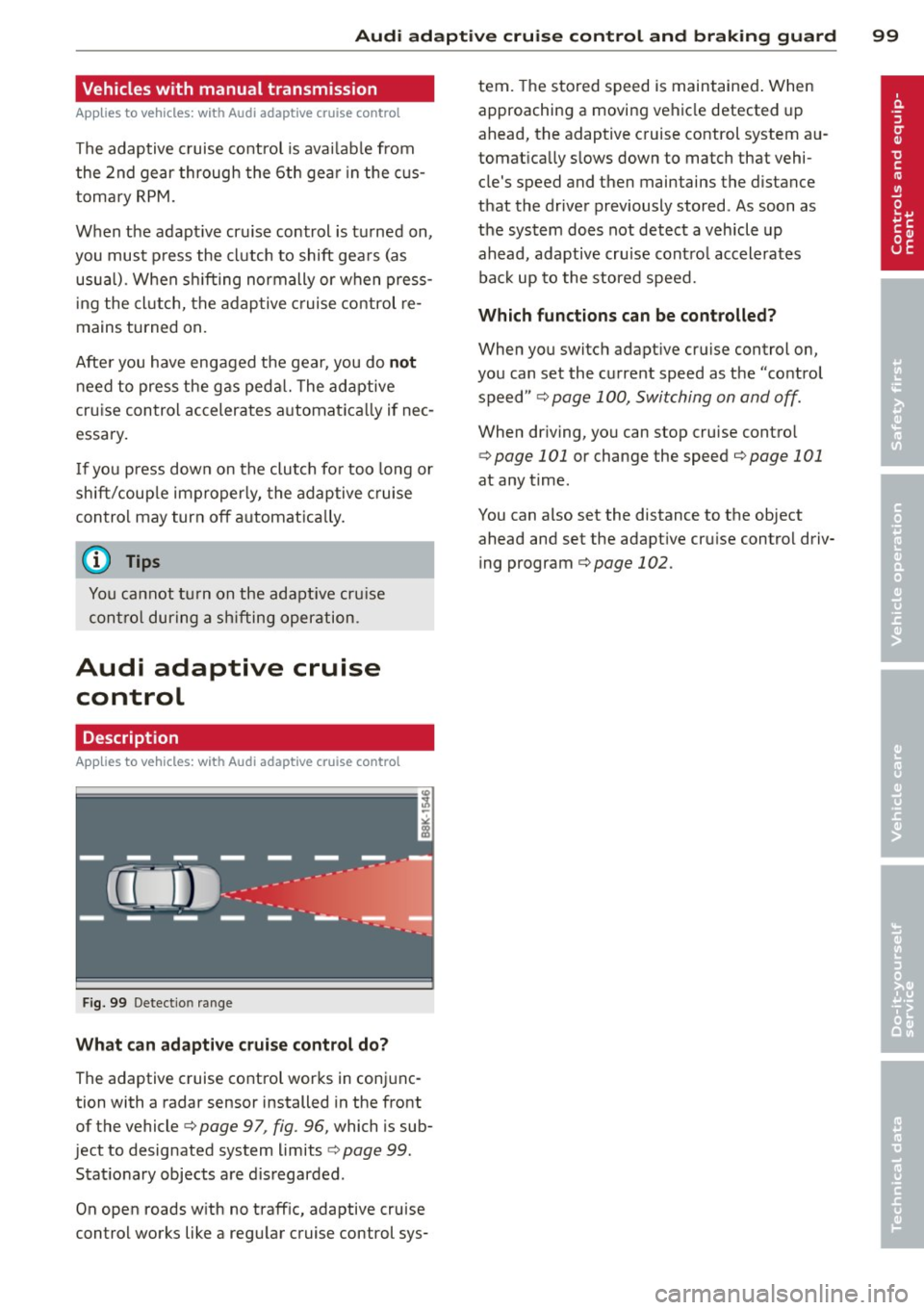
Fig . 99 Detectio n range
What c an adaptive cruise contr ol do ?
The adaptive cruise control works in conjunc
tion with a radar sensor installed in the front
of the vehicle¢
page 97 , fig. 96, which is sub
ject to designated system limits ¢
page 99.
Stationary objects are d is regarded .
On open roads w ith no traff ic, adaptive cruise
control works like a regu lar cruise control sys- tern.
The stored speed is maintained . When
approaching a moving vehicle detected up
ahead, the adaptive cruise control system au
tomat ica lly s lows down to match that vehi
cle's speed and then maintains the distance
that the driver previously stored . As soon as
the system does not detect a veh icle up
ahead, adaptive cru ise contro l accelerates
ba ck up to the stored speed.
Which fun ctions can be con trolled?
When you switch adapt ive cruise control on,
you can set the current speed as the "control
speed"
q page 100, Switching on and off.
When dr iving, you can stop cruise contro l
¢
page 101 or change the speed ¢ page 101
at any time.
You can also set the distance to the object
ahead and set the adapt ive cru ise contro l driv
ing program
¢page 102.
Page 107 of 294
Audi adaptive cruise control and braking guard 105
-If you switch the ASR/ESC off or the off
road mode on (allroad), Audi braking
guard switches off automatically
<=> page 186.
-Switch Audi braking guard off when you
are loading the vehicle onto a vehicle car
rier, train, ship or other type of transpor
tation. This can prevent undesired warn ings from the braking guard system .
Messages
Applies to vehicles: with Audi adaptive cruise co ntrol
Braking guard: Off
This driver message appears if the system is
turned off via the radio/MM I*. Otherwise, if
the system is turned off, the information ap
pears every time shortly after the start of the
trip.
Braking guard: Activated
This driver message appears if sharp brake
pressure was applied due to an acute warning.
•••
Three white dots appear if a setting cannot be
selected with the operating lever. For exam
ple, this happens if you want to raise/lower
the speed even though there was no previous
ly saved speed .
ACC: Deactivation
The driver message appears in vehicles with
manual transmission . If the clutch pedal was
pressed down for too long, the adaptive cruise
control turns off. A chime sounds as a remind
er.
ACC: Sensor blocked
This message appears if the sensor view is ob
structed, for example by leaves, snow, heavy
spray or dirt. Clean the sensor
<=>page 97,
fig. 96.
ACC: not available
The driver message appears if there is a mal
function. The adaptive cruise control turns off.
A chime sounds as a reminder. Have the sys- tern checked by an authorized Audi dealer or
authorized Audi Service
Facility.
ACC: unavailable
The driver message appears if, for example,
the brake temperature is too high . The adap
tive cruise control is temporarily unavailable.
A chime sounds as a reminder.
Engine speed!
This driver message appears in vehicles with
manual transmission if the driver had not up
shifted or downshifted in time while using
adaptive cruise control braking or accelerat ing, causing the vehicle to exceed or not reach
the permitted limit speed. The adaptive cruise
control turns off. A chime sounds as a remind
er .
Shift lever position!
Vehicles with an automatic transmission: the
driver message appears if the selector lever is
shifted to the N position . The adaptive cruise
control is not available while in this position .
Vehicles with manual transmission: the driver message appears for vehicles with manual
transmission if there is no forward gear en
gaged, meaning if the reverse gear or the 1st
gear is engaged or if the selector lever is in
the neutral position. The adaptive cruise con
trol is not available while in this position.
Stabilization control (ESC)
This message appears if the electronic stabili
zation control (ESC) is taking action to stabi
lize the vehicle. The adaptive cruise control
turns off . A chime sounds as a reminder.
Speed too low
This message appears if the current speed is
too low
to set or to maintain the desired
speed .
The speed being saved must be at least
20 mph (30 km/h). The cruise control is
turned off for speeds lower than 12 mph
(20 km/h). The adaptive cruise control re
mains turned on for speeds above 95 mph
(150 km/h) (override).
It will stabilize again at.,..
Page 200 of 294
198 Trailer towing
Trailer towing tips
Important to know
Your vehicle hand les different ly when tow ing
a trailer because of the addit ional weight and
different weight distribution . Safety, perform
ance and economy wi ll greatly depend on how
carefully you load your trailer and operate
your rig.
Before you actually tow your trailer, practice
turning, stopp ing and backing up in an area
away from traffic. Keep practicing until you have become completely familiar with the way
your veh icle-trailer combination behaves and
responds.
Backing up is difficult and requires practice.
Backing up with a trai ler generally requires
steering action opposite to that when backing
up your vehicle without a trailer.
Maintain a greater distance between your ve
hicle and the one in front of you. You will need
more room to stop. To compensate for the
trailer, you will need a larger than normal
turning radius .
When passing, remember that you cannot ac
celerate as fast as you normally would be
cause of the added load. Make sure you have
enough room to pass . After passing, allow
plenty of room for your tra iler before chang
in g lanes again.
Avoid jerky starts, sharp turns or rapid lane
changes.
(D Tips
- Do not tow a tra iler dur ing the break-in
period of your vehicle.
- If you tow a trailer, your Audi may re
quire more frequent maintenance due to
the extra load
q page 2 72.
Parking on a slope
Do not park on a slope with a trailer . If it can
not be avoided, do so only after doing the fol lowing :
When parking:
.. App ly the foot brake.
.. Have someone place chocks under both the
vehicle and the trailer wheels .
.,. With chocks in place, slowly release the
brakes until the wheel chocks absorb the
load.
.. Tur n the wheels towards the curb.
.. App ly the parking b rake.
.. Place an automatic transmission* in P, re
spectively a manual transmission in first or reverse gear.
When restarting after parking:
.. App ly the foot brake .
.. Start the engine.
.. Move the se lector lever to D/S, respectively
a manual transmission in first gear.
.. Release the parking brake and slow ly pu ll
out and away from the wheel chocks.
.. Stop and have someone retr ieve the wheel
chocks .
(D Tips
If you move the selector lever of the auto
matic transmission* to P before applying
the parking brake and before blocking the
whee ls, you may have to use more force
lat er to move the lever out of the P posi
tion.
Page 218 of 294
216 Checking and filling
-Apply the parking brake.
- Move selector lever of automatic trans- mission to "P" (Park); put manual trans
mission in Neutral.
- Always let the engine cool down. Hot
components will burn skin on contact.
- To reduce the risk of being burned, never
open the hood if you see or hear steam
or coolant escaping from the engine
compartment . Wait until no steam or
coolant can be seen or heard before care
fully opening the hood .
- Keep children away from the engine com
partment .
- Never spill fluids on hot engine compo
nents. They can cause a fire.
- Never touch the radiator fan. The auxili ary electric fan is temperature controlled
and can switch on suddenly.
- Never open the coolant reservoir cap when the engine is still warm. The cool
ant system is pressurized and hot cool
ant could spray out .
-Protect your face, hands and arm from
steam or hot engine coolant by placing a
thick rag over the cap when you open the coolant reservoir .
- Do not remove the engine cover under
any circumstances. This increases the
risk of burns.
- If work on the fuel system or the electri
cal system is necessary:
- Always disconnect the battery .
- Never smoke or work near heaters or
open flames. Fluids in the engine com
partment could start a fire.
- Keep an approved fire extinguisher im
mediately available.
- To avoid electrical shock and personal in
jury while the engine is running or being
started, never touch:
- Ignition cables
- Other components of the high voltage
electronic ignition system.
- If you must perform a check or repair with the engine running: -
First, fully apply the parking brake,
move selector lever of automatic trans
mission to "P" (Park); put manual
transmission in Neutral.
- Always use extreme caution to prevent
clothing, jewelry, or long hair from get
ting caught in the radiator fan, V-belts
or other moving parts, or from contact ing hot parts. Tie back hair before
starting, and do not wear clothing that
will hang or droop into the engine.
- Minimize exposure to emission and
chemical hazards~&, .
.&_ WARNING
California Proposition 65 Warning:
- Engine exhaust, some of its constituents,
and certain vehicle components contain
or emit chemicals known to the State of
California to cause cancer and birth de
fects and reproductive harm. In addition, certain fluids contained in vehicles and
certain products of component wear con
tain or emit chemicals known to the
State of California to cause cancer and
birth defects or other reproductive harm.
- Battery posts, terminals and related ac
cessories contain lead and lead com
pounds, chemicals known to the State of
California to cause cancer and reproduc
tive harms. Wash hands after handling.
(D Note
When adding fluids, always make sure that
they are poured into the proper container
or filler opening, otherwise serious dam
age to vehicle systems will occur.
@ For the sake of the environment
To detect leaks in time, inspect the vehicle
floor pan from underneath regularly . If
you see spots from oil or other vehicle flu ids, have your vehicle inspected by an au
thorized Audi dealer.
Page 276 of 294
274 Con sum er Inf ormation
-Always make sure the transmission se
lector lever (automatic transmiss ion) is
in "P" (Park position) or Neutral (manual
transmission) and the park brake is firm
ly applied.
@) For the s ake of the environment
-Changing the engine settings w ill ad
versely affect emission levels. This is det
rimental to the environment and increas
es fuel consumption .
- Always observe environmental regula
tions when disposing of old engine oil,
used brake fluid, dirty engine coolant,
spent batteries or worn out tires.
- Undeployed airbag modules and preten
s ioners might be classified as Perchlo
rate Material -spec ial handling may ap
ply, see www.dtsc.ca .gov/hazardous
waste/perch lorate. When the veh icle or
parts of the restraint system including
airbag modules safety belts with preten
sioners are scrapped, all app licable laws
and regulations must be observed . Your
authorized Audi dealer is familiar with
these requirements and we recommend
that you have your dealer perform this
serv ice for you .
Additional accessories,
modifications and
parts replacement
Additional accessories and parts
replacement
Always consult on authorized Audi dealer be
fore purchasing accessories.
Your veh icle inco rporates the latest safety de
sign featu res ensuring a high standard of ac
tive and passive safety.
This safety could be compromised by non-ap
proved changes to the veh icle. For this reason ,
if pa rts have to be replaced , please observe
the following points when installing addition
a l accessories: Approved Audi accessories and genuine Audi
parts are available from authorized Audi deal
ers.
T hese dea lers a lso have the necessary facili
ties, tools and trained specialists to install the parts and acc essories proper ly .
A WARNING
-Using the wrong spare parts or using non-
approved accessories can cause damage to
the veh icle and ser ious personal injury.
- Use on ly accessories express ly approved
by Audi and genuine Audi spare parts
- These parts and accessories have been
specially designed to be used on your ve
h icle .
- Never install accessories such as tele
phone crad les or beverage ho lders on a ir
bag covers or within the airbag deploy
ment zones . Do ing so will increase the
risk of injury if a irbags are triggered in an
accident!
- Before you check anything in the engine
compa rtment, always read and heed a ll
WARNINGS
9 page 208 .
(D Note
-If items other than genu ine Audi spare
parts, add-on equipment and accessory
items are used or if repair work is not
performed accord ing to specified meth
ods, this can resu lt in seve re damage to
your vehicle's eng ine and body (such as
corrosion) and adversely affect yo ur vehi
cle's warranty .
- If emergency repairs must be performed
elsewhere, have the vehicle examined by
an authorized Audi dealer as soon as
possible .
- The manufacturer cannot be held liable
for damage wh ich occ urs due to failure
to comply with these stipu lations.
Page 279 of 294
A
Accessories . . . . . . . . . . . . . . . . . . . . 60, 274
AC (automatic climate control) ... .. .. .. 69
adaptive cruise control Vehicles with manual transmission 99
Adaptive cruise control ...... .. .. .. .. .. 97
C leaning sensors/camera ... ... .. .. . 201
Messages .. ................ ... ... 105
Request for driver intervention . . . . . . . 103
Setting the driving program .. .. .. .. . 102
Adaptive dampers .......... .. .. .. .. . 111
Adaptive light ................ ... ... . 44
Adaptive Light (defective) ......... .. .. 22
Adding Engine coolant ........... .. .. .. .. .
Engine oil .. ................ ... .. .
Windshield washer fluid ......... .. .
Additional accessories
Additives 223
220
229
274
Engine oil .. ............. .... .. .. . 220
Adjustable steering column ... ... .. .. .. 72
Adjusting Air distribution (automatic climate con-
trol) . . . . . . . . . . . . . . . . . . . . . . . . . . . . . . 70
I nstrument illumination ... .. .. .. .. .. 47
Steering column .................... 72
Temperature (automatic climate control) 70
Airbag Warning/indicator lights ... .. .. .. .. .. 20
Airbag system . . . . . . . . . . . . . . . . . 144 , 161
Advanced Airbag System ....... ... .. 148
Advanced Airbag System components . 151
Care . .. ... . .... ... ..... ..... .. ... 157
Children . .. ............. .... .. .. . 166
Child restraints ........... .. .. .. ... 167
Components (front airbags) . . . . . . . . . 151
Danger of fitting a child safety seat on
the front passenger seat . . . . . . . . . . . . 145
Disposal . .. .. ........... .. .. .. ... 157
Front airbags . . . . . . . . . . . . . . . . 148, 149
How do the front airbags work? . . . . . . 153
How many airbags does my vehicle
have? 151
How the Advanced Airbag System com-
ponents work together .... .. .. .. .. . 152
Important things to know .. .. .. .. .. . 144
Index 277
Indicator light ..... ............... 155
Monitoring . ... .... ............... 155
PASSENGER AIR BAG OFF light ....... 155
Repairs ... .. .. .. ................. 157
Safety instructions ................. 157
Side airbags ..... .. ............... 159
Side curtain airbags .. .... .. .... .... 162
Weight-sensing mat ............... 166
When must the system be inspected? . 155
all-wheel drive .. .. ................. 189
Alloy wheels .. .... .. ............... 204
All wheel drive Winter tires . .. .. .... ........... .. 245
Anti-free ze
refer to Engine coolant system ... .. .. 222
Anti-lock braking system ............ . 184
Warning/indicator lights ............ . 19
Anti-slip regulation ................. 184
Anti-theft alarm warning system ... .. .. . 32
Anti-theft systems Electronic immobilizer ............... 38
Armrest .. .. .. .. .. .. . ... ...... ... .. . 56
Ashtray ...... .. .. .................. 59
Asterisk What does it mean when something is
marked with an asterisk? . . . . . . . . . . . . . . 6
Audi braking guard
refer to braking guard . ........... .. . 97
Audi drive select . . . . . . . . . . . . . . . . . . . . 111
Adaptive dampers .. .............. . 111
Description . . . . . . . . . . . . . . . . . . . . . . . 111
Dynamic steering . .... ......... .. .. 111
Setting the driving mode ........ .. .. 112
Sport differential . .... ............. 111
Audi Service Repair Manuals and Litera-
ture 272
AU TO
Automatic climate control . . . . . . . . . . . . 70
Automatic headlights . ...... ... .. .. . 44
Auto Lock ... ... .... ................ 32
Automatic belt retractor ............. 139
Automatic car wash
refer to Washing . .. ........... .... 200
Automatic climate control Air vents . . . . . . . . . . . . . . . . . . . . . . . . . . 70
Operation . . . . . . . . . . . . . . . . . . . . . . . . . 69
Setup ........ .. .. . ............... 71
•
•