ESP AUDI A4 SEDAN 2013 Owner's Manual
[x] Cancel search | Manufacturer: AUDI, Model Year: 2013, Model line: A4 SEDAN, Model: AUDI A4 SEDAN 2013Pages: 294, PDF Size: 73.71 MB
Page 83 of 294
.. Select : ICAR lfunction button> Car systems
control button > Driver assist > Speed
warning.
Warning thresho ld 2 can be set in the speed
range starting from 20 mph to 150 mph (30
km/h to 240 km/h). Settings can each be ad
justed in intervals of 6 mph (10 km/h).
Cruise control
Switching on
The cruise control system makes it possible to
drive at a constant speed starting at 20 mph (30 km/h).
®
f
®t
0
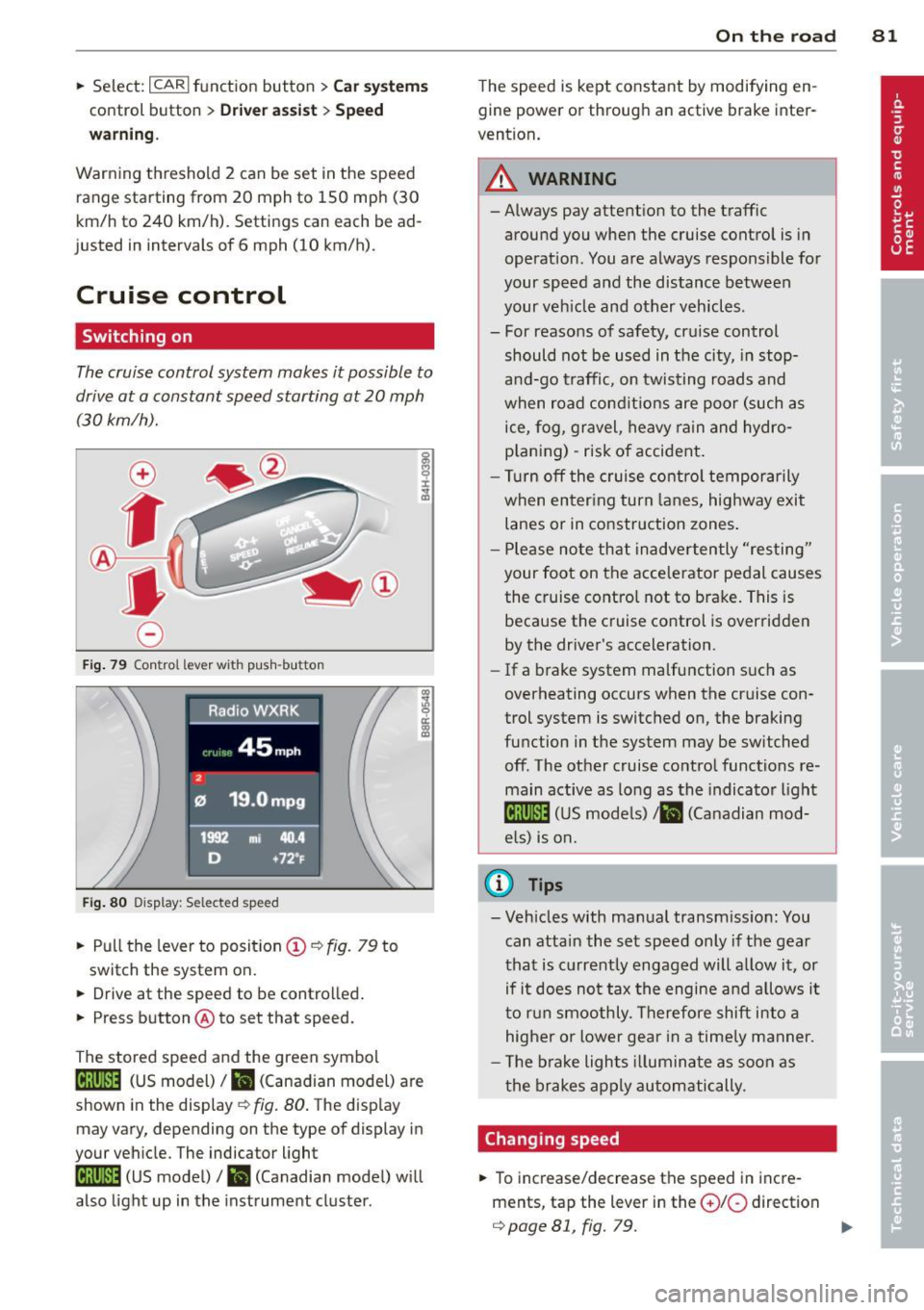
Fig. 79 Con tro l lev er w it h push-bu tton
Fig. 80 D isplay : S ele ct ed speed
.. Pull the lever to position (D ¢ fig. 79 to
switch the system on.
.. Drive at the speed to be controlled .
.. Press button @to set that speed.
The stored speed and the green symbol
[ij;jl)~i~ (US model)/ .. (Canadian model) are
shown in the display ¢ fig. 80. The display
may vary, depending on the type of display in
your vehicle. The indicator light
[ij;(l)~i~ (US model)/ B (Canadian model) w ill
also light up in the instrument cluster.
On the road 81
The speed is kept constant by modifying en
gine power or through an active brake inter
vention.
_& WARNING
- Always pay attent ion to the traffic
around you when the cruise control is in
operation. You are always responsible for
your speed and the distance between
your veh icle and other vehicles .
- For reasons of safety, cru ise control
should not be used in the city, in stop
and-go traffic, on twisting roads and
when road conditions are poor (such as
ice, fog, gravel, heavy rain and hydro
p lani ng) -risk of accident.
- Turn off the cruise control temporarily
when enter ing turn lanes, highway exit
lanes or in construction zones .
- Please note that inadvertently "resting"
your foot on the accelerator pedal causes
the cruise control not to brake. This is
because the cruise control is overridden
by the driver's acceleration .
-If a brake system malfunction such as
overheating occurs when the cruise con
trol system is switched on, the braking
function in the system may be switched off. The other cruise control functions re
main active as long as the indicato r light
lijj(l )~i~ (US models) li'I (Canadian mod
e ls ) is on.
@ Tips
-Veh icles with manual transmiss ion: You
can attain the set speed only if the gear
that is currently engaged will allow it, or
if it does not tax the engine and allows i t
to run smoothly. Therefore shift into a
higher or lower gear in a timely manner.
- The brake lights illuminate as soon as
the brakes apply automatically.
Changing speed
.. To increase/decrease the speed in incre
ments, tap the lever in the
0 10 direction
¢ page 81, fig. 79. Ill>
Page 85 of 294
Transmission Manual transmission
Gearshift lever
App lies to vehicles: with manu al transmission
The clutch pedal must be depressed all the
way before you can start the engine.
T he manua l transm ission in your Audi is
equ ipped w ith an
interlock-feature.
~ Depress the clutc h pedal all t he way .
~ Start the eng ine with the gea rshift lever in
Ne utral and the clutch peda l depressed.
(D Note
Always dep ress the clutch peda l fully when
chang ing gears . Do not hold the vehicle on
a hill with the clutch pedal partially de
pressed . This may cause p remature clutch
wear or damage .
@ Tips
-Resting your hand on the gearsh ift leve r
knob while driving will cause prematu re
w ear i n the t ransm ission.
- The back -up lights go on when you s hift
i nto Reverse w ith the igniti on o n.
Gearshift pattern (6-speed manual
transmission)
Applies to vehicles: with man ual transmission
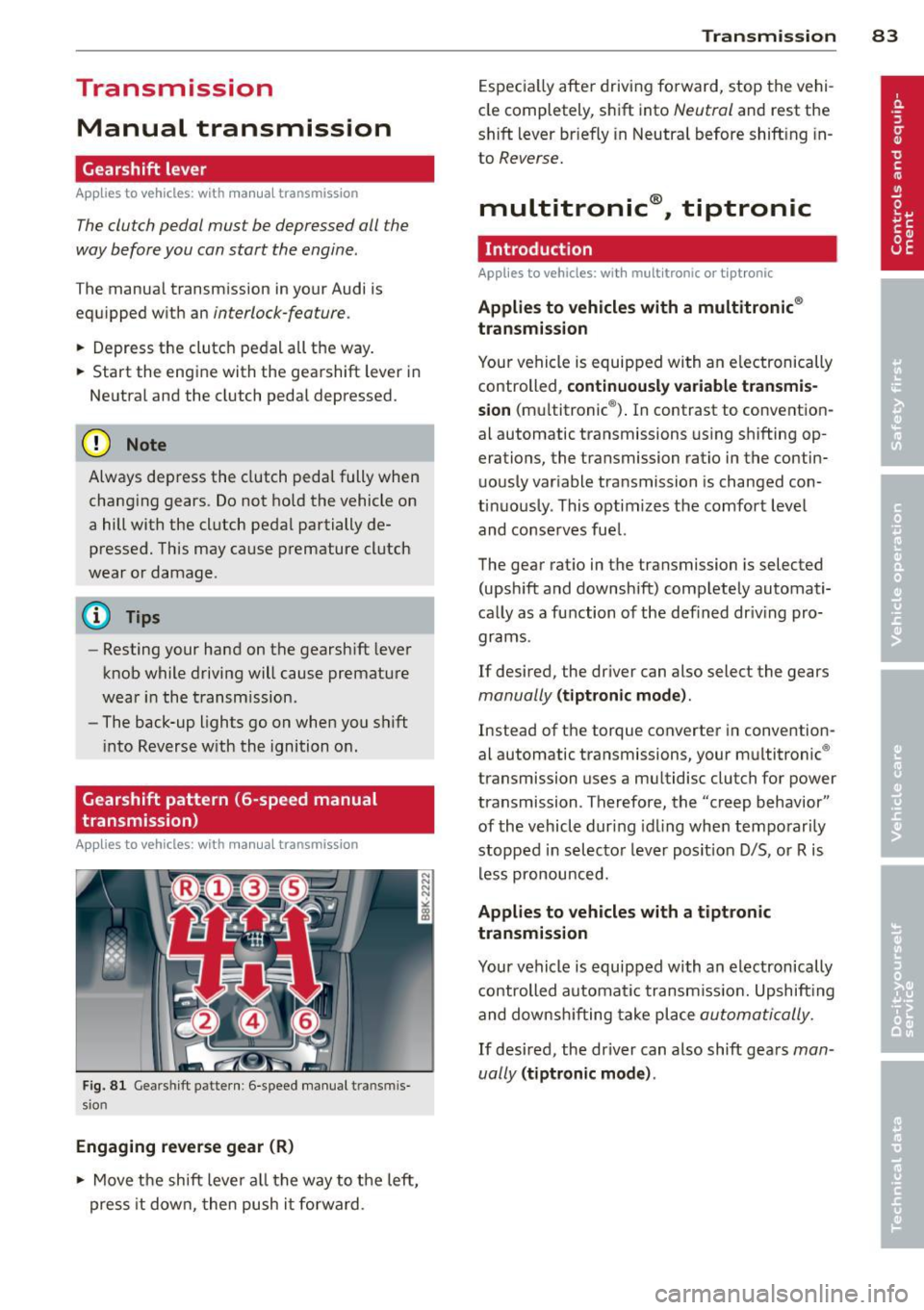
F ig . 8 1 Gears hift patte rn: 6 -speed manu al tran smi s
sio n
Engaging reverse gear (R)
~ Move t he sh ift leve r a ll the way to the left,
press it d ow n, then push it fo rward .
Transm ission 83
Espec ia lly afte r drivi ng fo rward, stop the vehi
cle completely, s hift into
Neutral and rest the
shift lever br iefly in Neutra l before shift ing in
to
Reverse .
multitronic ®, tiptronic
Introduction
App lies to vehicles: with multitronic or tiptr onic
Applies to vehicles with a multitronic ®
transmission
You r vehicle is equip ped wi th an e lectronically
controlled,
continuou sly variable transmis
sion (m ultitronic ®). In contrast to convention
al automatic transmissions us ing shifting op
erations, the transmission ratio in the contin uo usly var iable transmission is changed con
t in uously . This optimizes the comfort level
and conse rves fue l.
The gear rat io in the transmission is selected
(upsh ift and downshift) comp letely automati
ca lly as a function of the def ined dr iv ing pro
grams.
If desired, the driver can also select the gears
manually (t iptronic mode) .
Instead of the torque converter in convention
al automatic transmissi ons, your m ultitronic ®
transmission uses a mu ltidisc clutch for power
transmission . Therefore, the "creep behavior"
of the vehicle dur ing idling whe n temporar ily
st opped in selec to r l ever pos it ion D/S, or R is
l ess pronounced.
Applies to vehicles with a tiptronic
transmission
Your vehicle is equipped with an electronically
controlled automa tic transmiss io n. Upshift ing
and downsh ifting take place
automati cally.
If desired, the driver can also shift gears man
ually
( tiptronic mode ).
Page 96 of 294
94 Transmi ssion
When acce lerating, the transmiss ion will au
tomatically shift into the next gear before the
engine reaches its maximum RPM.
I f you apply a ligh t throttle when accelerat
ing, tiptronic will automatically shift from 1st
to 2nd gear to save fuel. If you app ly a heavy
thrott le, the transmission will stay in 1st gear
unti l near maximum RPM is reached, or unt il
the dr iver shifts into 2nd gear.
If you take your foot off the accelerator peda l
when dr iving down a steep incline, tiptronic
will downshift from the selected gear into the next lower gear until it reaches 1st gear,
based on road speed and eng ine RPM . Auto
mat ic downshifti ng is interrupted as soon as
you apply the th rottle aga in .
(D} Tips
- When you sh ift into the next lower gear,
the transmiss ion will downshift only
when there is no possibility of over-rev
v ing the engine.
- When the kick-down comes on, the
transmission will sh ift down to a lower
gear, depending on vehicle and engine
speeds.
- Tiptronic is inope rat ive when the t rans
mission is in the fail-sa fe mode.
Kick-down
A pp lies to vehicles: with S tro nic tr ansmiss ion
Kick-down enables maximum acceleration.
When you press the acce lerator pedal down
beyond the resistance po int, the automatic
transmission downshifts into a lower gear, de
pending on vehicle speed and engine RP M.
It
shifts up into the next h igher ge ar once the
max imum specified engine RPM is reached.
& WARNING
Please note that the wheels could spin on
slick or slippery roads when kick-down is
active.
Launch Control Program
App lies to vehicles : wit h S tronic tra nsmi ssio n
The Launch Control Program provides the
best acceleration possible when starting from
a stop .
Requirement: The engine must be at operat
ing temperature and the steering wheel must
not be t urned .
.. Press the
I~ OF F! button c::;, page 186 while
the engine is running. The
fl ind icator light
illuminates in the instrument cluster and
Traction control (ASR ): Off . Warning! Re
stricted stability
appea rs in the driver infor
mat io n system display .
.. Move the se lector lever to the D/S posit ion
or select the
d ynamic dr iv ing mode in Audi
drive select*
c::;, page 112 .
.. Press the brake peda l strongly with your left
foot and ho ld it down for at least one sec
ond.
.. At the same time, press the accelerator
pedal down complete ly w ith your r ight foot
until t he e ngine reaches and mainta ins a
h igh RP M.
.. Remove yo ur foot from the brake pedal
w ith in S seconds
c::;, A, .
& WARNING
-Always adapt your driving to the traffic
f low .
- On ly use the Launch Cont ro l Program
when road and traffic conditions a llow it
and other drivers w ill not be endangered
or annoyed by your driving and the vehi
cle's acceleration.
- Please note that the d riving wheels can
spin and the vehicle can break away
when ASR is switched off , especially
when the road is slippery .
- Once you have accelerated, you shou ld
sw itch the ASR back on by pressing the
lfl O FF ! button . .__ _____________ _J ...
Page 99 of 294
Audi adaptive cruise control and braking guard 97
Audi adaptive cruise
control and braking
guard
Introduction
App lies to vehicles: with Audi adaptive cruise co ntrol
The adaptive cruise control system assists the
driver by regu lating vehicle speed and helping
to maintain a set distance to the vehicle
ahead, within the limits of the system . If the
system detects a moving vehicle up ahead,
adaptive cruise control can brake and then ac
celerate your vehicle. This he lps to make driv
ing more comfortable on long highway
stretches.
The braking guard system can warn you about
an impending collision and initiate braking
maneuvers ¢
page 103.
Adaptive cruise control and braking guard
have technical limitations that you must
know , so please read this section carefully, un
derstand how the system works and use them properly at all times.
General information
General information
Applies to vehicles: with Audi adaptive cruise control
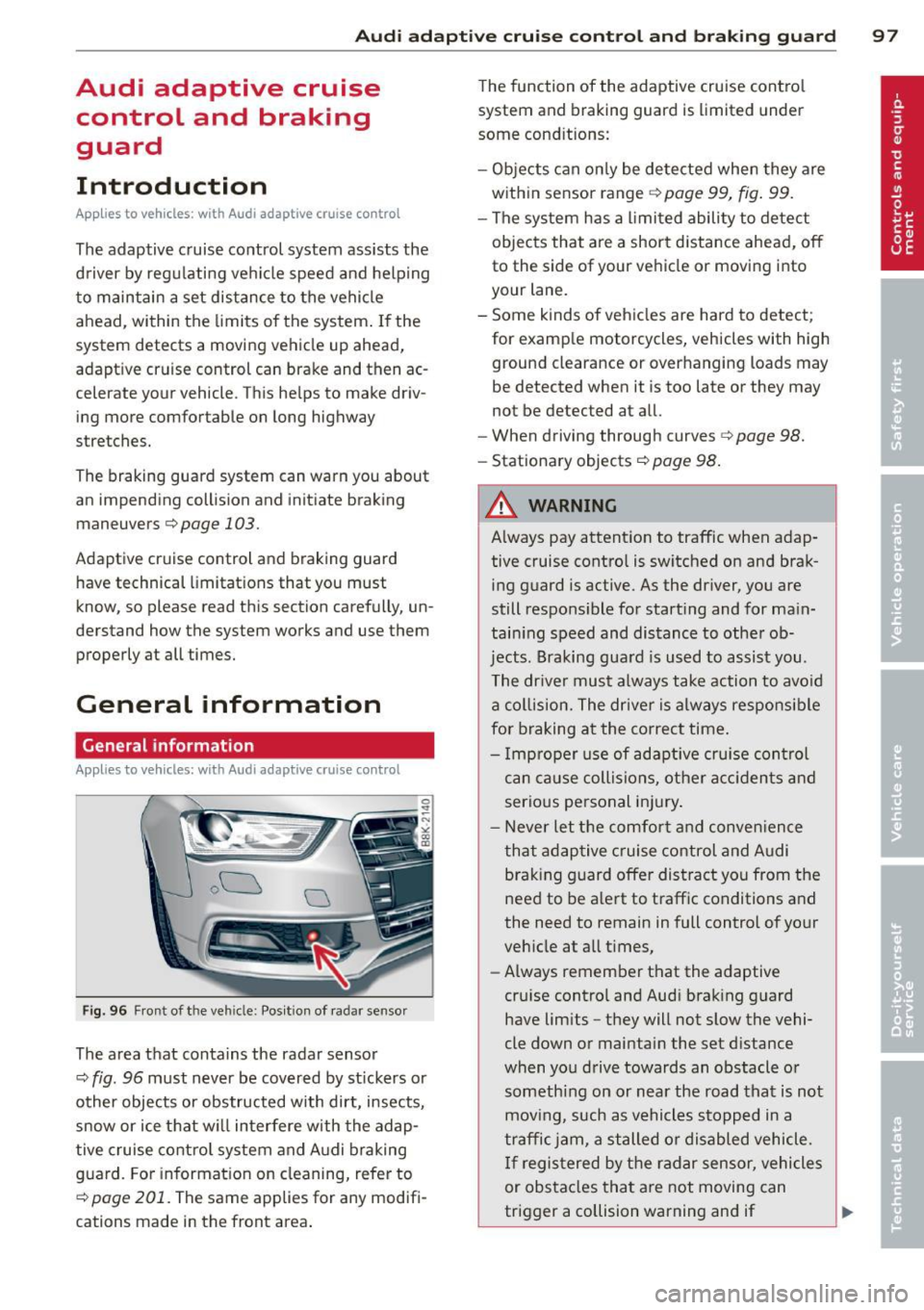
Fig. 96 Front of the veh icle: Pos ition of radar sensor
The area that contains the radar sensor
¢
fig. 96 must never be covered by st ickers or
other objects or obstructed with dirt, insects,
snow or ice that will interfere with the adap
tive cruise control system and Audi braking
guard. For information on cleaning, refer to
¢
page 201. The same applies for any modifi
cations made in the front area . The
function of the adaptive cruise contro l
system and braking guard is limited under
some cond itions:
- Objects can only be detected when they are
within sensor range
¢page 99, fig . 99.
-The system has a limited ability to detect
objects that are a short distance ahead, off
to the side of your vehicle or moving into
your lane.
- Some kinds of vehicles are hard to detect;
for examp le motorcycles, vehicles with high
ground clearance or overhanging loads may
be detected when it is too late or they may
not be detected at all.
- When driving through curves¢
page 98.
-Stationary objects¢ page 98.
A WARNING
-Always pay attention to traffic when adap-
tive cruise control is switched on and brak ing guard is active. As the dr iver, you are
still responsible for starting and for ma in
tain ing speed and distance to other ob
jects. Braking guard is used to assist you.
The driver must always take action to avoid
a collision. The driver is always responsible
for braking at the correct time.
- Improper use of adaptive cruise con trol
can caus e collisions, other accidents and
serious personal injury .
- Never let the comfort and convenience
that adaptive cruise control and Audi
braking guard offer distract you from the
need to be alert to traff ic conditions and
the need to remain in full control of yo ur
veh icle at a ll times,
- Always remember that the adaptive
cru ise contro l and Aud i brak ing guard
have lim its -they will not slow the vehi
cle down or maintain the set d istance
when you drive towards an obstacle o r
someth ing on or nea r the road that is not
moving, such as vehicles stopped in a
traffic jam, a stalled or disabled vehicle.
If registered by the radar sensor, vehicles
or obstacles that are not moving can
trigger a collision warning and if .,.
Page 100 of 294
98 Audi adaptive cruise control and braking guard
confirmed by the video camera, an acute
collision warning.
- For safety reasons, do not use adaptive
cruise control when driving on roads with
many curves, when the road surface is in
poor condition and/or in bad weather
(such as ice, fog, gravel, heavy rain and
hydroplaning). Using the system under
these conditions could result in a colli
sion.
- Switch adaptive cruise control off tempo
rarily when driving in turning lanes, on
expressway exits or in construction
zones. This prevents the vehicle from ac
celerating to the set speed when in these
situations.
- The adaptive cruise control system will
not brake by itself if you put your foot on
the accelerator pedal. Doing so can over
ride the speed and distance regulation.
- When approaching stationary objects
such as stopped traffic, adaptive cruise
control will not respond and braking
guard will have limited function.
- The adaptive cruise control system and
braking guard do not react to people, an
imals, objects crossing the road or on
coming objects .
- The function of the radar sensor can be
affected by reflective objects such as
guard rails, the entrance to a tunnel,
heavy rain or ice.
- Never follow a vehicle so closely that you cannot stop your vehicle safely. The
adaptive cruise control cannot slow or
brake the vehicle safely when you follow
another vehicle too closely . Always re
member that the automatic braking
function cannot bring the vehicle to a sudden or emergency stop under these
conditions.
- To prevent unintended operation, always
switch ACC
off when it is not being used.
{[) Note
The sensor can be displaced by impacts or
damage to the bumper, wheel housing and
underbody. That could affect the adaptive cruise control system and braking guard.
Have your authorized Audi dealer or au
thorized Audi Service Facility check their
function.
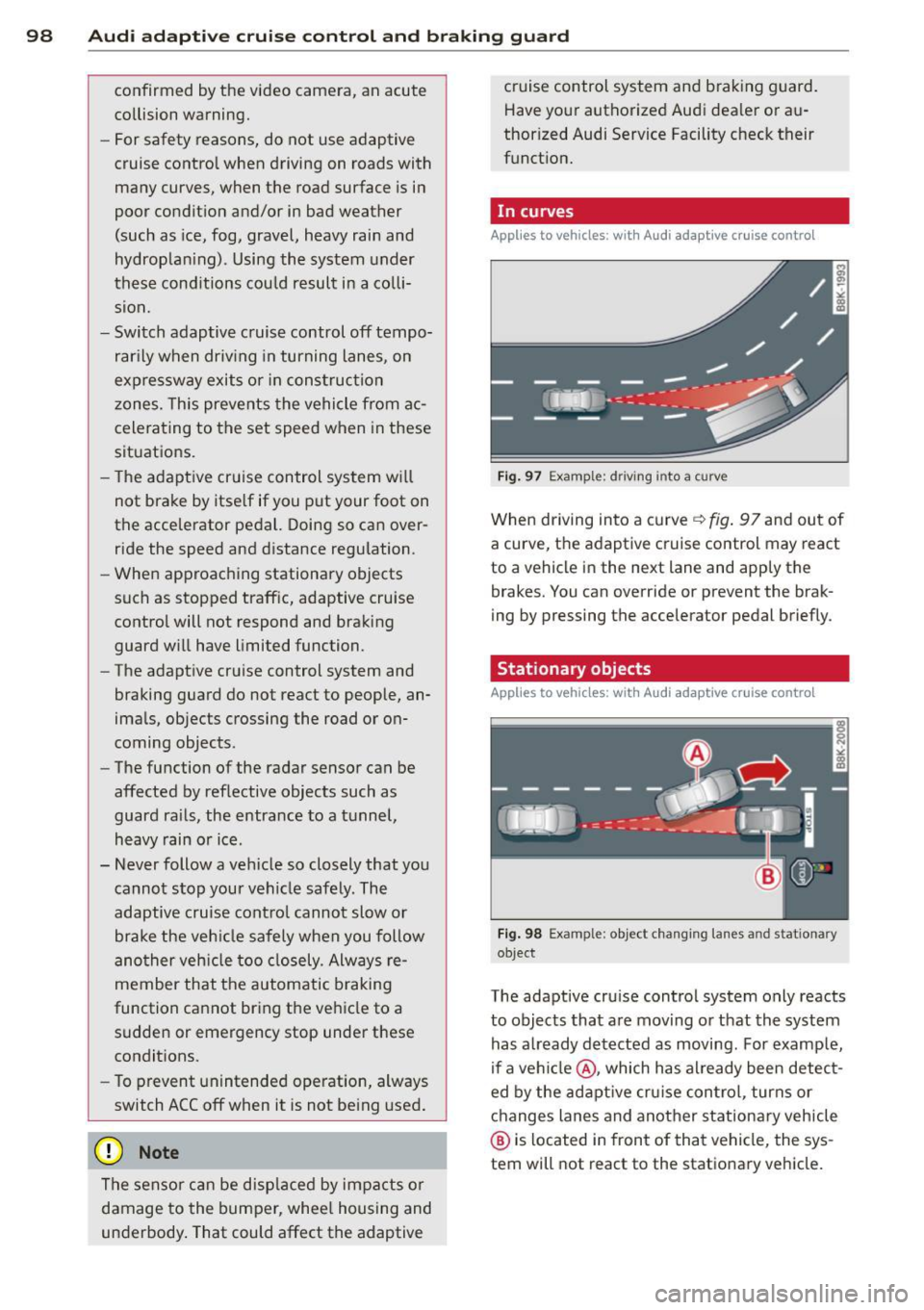
, In curves
App lies to vehicles: wi th Audi ada ptive c ruise contro l
Fig. 97 Example: d riving i nto a curve
When driving into a curve ~ fig. 97 and out of
a curve, the adaptive cruise control may react
to a vehicle in the next lane and apply the
brakes. You can override or prevent the brak
ing by pressing the accelerator pedal briefly.
Stationary objects
Applies to vehicles : wi th Audi adapt ive crui se contro l
Fig. 98 Example: object changing lanes a nd stat ionary
object
The adaptive cruise control system only reacts
to objects that are moving or that the system
has already detected as moving. For example,
if a vehicle @, which has already been detect
ed by the adaptive cruise control, turns or
changes lanes and another stationary vehicle
@ is located in front of that vehicle, the sys
tem will not react to the stationary vehicle.
Page 106 of 294
104 Audi adapti ve cruise control and br aking guard
- If a co llision is imminent, the system will
first provide an
acute warning by bri efly and
sharp ly app ly ing the brakes .
- If you do not react to the ac ute warning ,
braking guard can brake within the limits of
the system. This reduces the veh icle speed
in the event of a collis ion.
- At speeds under 20 mph (30 km/h), the sys
tem can in it iate a complete deceleration
s hortly before a collision .
1>.
- If the Audi braking guard senses that you
are not braking hard enough when a colli
sion is imminent, it can increase the braking
force .
Which functions can be contr oll ed ?
You can sw itch Audi braking g uard and the
distance/approach warning on or off in the ra
d io or MMI Qpage 104, Set tings in the ra
dio/MM!.
A WARNING
Lack of attention can cause col lisions, oth
er accidents and serious persona l injuries.
The Audi b raking guard is an assist system
and cannot prevent a collis ion by itself.
The driver must always intervene. The dr iv
er is always responsible for braking at the
correct time.
- Always pay close attention to traffic,
even when the Audi braking guard is
switched on. Be ready to intervene and
be ready to take comp lete control when
ever necessary. Always keep the safe and
legal distance between your vehicle and
vehicles up ahead .
- Audi braking guard works within limits
and w ill not respond outs ide the system
limits, for examp le when approaching a
stopped vehicle or stationary obstacle
(end of a traff ic jam or veh icle that has
broken down in traffic).
- Always remember that the radar s ensor
for the A udi braking guard works only
within defined detect ion and range limits
l ) Th is is not available in some c oun tries .
that may prevent the proper detection of
other veh icles.
- The radar sensor's function and range
can be reduced by rain, snow and heavy
spray. Moving veh icles up ahead may not
be prompt ly detected or may not be de
tected at all .
- Reflective surfaces including crash barri
ers or tunne l entrances may impair the
function of the radar sensor .
(D Tips
- You can cancel the braking that is in it iat
ed by the system by braking yourse lf, by
accelerating not iceably or by swerving .
- Audi braking guard error messages
Qpage 105.
- Keep in mind that brak ing guard can
brake unexpectedly. Always secure any
cargo or objects that you are transport
ing to reduce the risk of damage or in
jury .
Settings in the radio/MMI
Applies to vehicles: with Audi adaptive cruise control
., Sele ct: I CAR I func tion button > Car system s
contro l but ton > Driver a ssist> Audi brak
ing guard .
Or
., Select: !CAR ! function b utton > Aud i brak-
ing guard .
S ys tem -
Switch A udi braking guard On and
Off . When you switch the ignition on, the
message
Audi b raking guard off appears if
the system is switch ed off .
Ea rl y warnin g -The distance and approach
warnings in the display can be switched
O n/
Off .
(D Tips
-Yo ur settings are automatically stored
and assigned to the remote contro l key
being used at the times the settings are
made.
Page 109 of 294
Audi side assist Lane change assistant
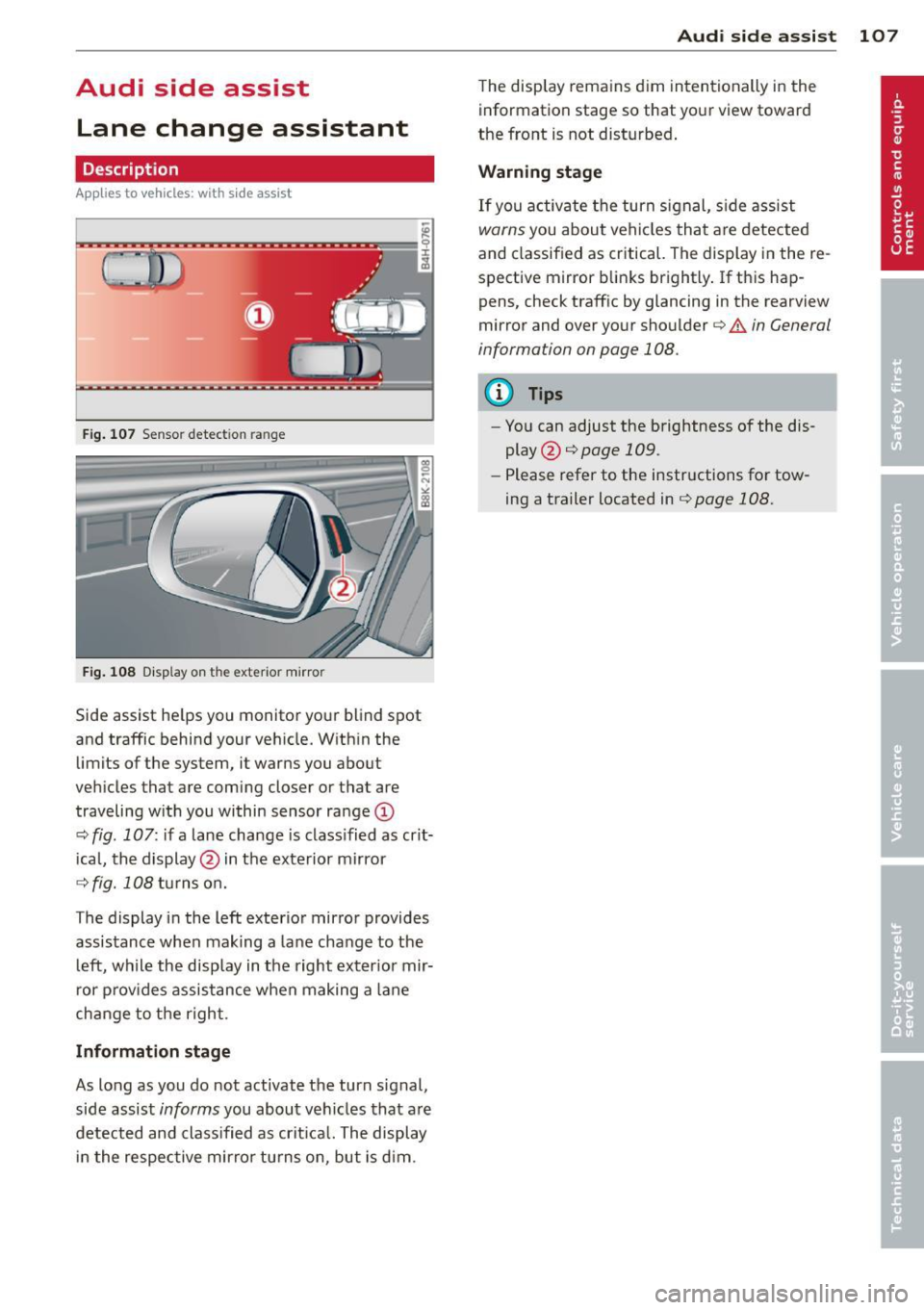
Description
Applies to vehicles: with s ide assist
Fig . 107 Sensor detection range
Fig. 108 Disp lay on the exterior mirror
Side assist he lps you monitor your blind spot
and traffic behind your veh icle. W ith in the
limits of the system, it warns you about
vehicles that are coming closer or that are
traveling w ith you within sensor ra nge
(D
c::, fig . 107: if a lane change is class ified as crit
ical, the display @ in the exterior mirror
c::> fig. 108 turns on.
The display in the left exterior mirror provides
assistance when making a lane change to the l eft, while the display in the right exter ior mir
r or p rov ides assistance when making a lane
change to the right.
Information stage
As long as you do not activate the turn signal,
side assist
informs you about vehicles that are
detected and class ified as crit ical. The display
i n the respective mirror turns o n, but is d im.
Aud i side assist 10 7
The display remains d im intentionally in the
information stage so that your view toward
the front is not disturbed .
Warning st age
If you activate the turn signal, s ide assist
warns you about veh icles that are detected
and classified as critical. The display in the re
spective mirror blinks brightly . If this hap
pens, check traff ic by glancing in the rearview
mirror and over your shoulder¢
A in General
information on page 108.
@ Tips
- You can adjust the brightness of the dis
play @¢
page 109.
-Please refer to the instructions for tow
ing a trailer located in¢
page 108.
Page 113 of 294
Audi drive select Driving settings
Introduction
App lies to vehicles: w it h drive se lect
Audi drive select provides the possibility to ex
perience different types of veh icle sett ings in
one vehicle. For instance, using the three
Comfort, Auto and Dynamic modes, the driv
er can switch from a sporty to a comfortab le
driving mode with the press of a button.
Addit ionally, in vehicles with MM I*, the vehi
cle setup for
Individual* mode can be cus
tomized by you. This makes it possib le to
combine settings such as a sporty engine tun
ing with comfortable steering.
A WARNING
Improper use of the Audi drive select can
cause collisions, other acc idents and seri
ous personal injury.
Description
Ap plies to vehicles: w it h drive se lect
The vehicle setup in each mode depends on
the vehicle's features. However, the engine,
automatic t ransmission* and steering are al
ways involved.
.
Engine and automatic transmission*
Depending on the mode, the engine and the
automatic transmission respond quicker or in
a more ba lanced manner to acce lerator pedal
movements. In the sporty dynamic mode, the
automatic transmission shifts at higher R PMs.
Steering
The steering adapts in terms of steering effort
and steering ratios . Indirect steer ing that
moves easily, like the stee ring in comfort
mode, is best su ited to long dr ives on a high
way. In contrast, dynamic mode prov ides
sporty, di rect steering .
The follow ing applies to vehicles with dynam ic
steer ing*: the stee ring ratio changes based on
ve hicl e speed in order to maintain optimum
Audi drive select 111
steering effort for the driver at all times. This
sets the steering to be less sensitive at higher
speeds in order to provide improved vehicle
control. At reduced speeds, however, steer ing
is more direct in order to keep the steering ef
fort as minimal as possible when the driver is
maneuveri ng the vehicle . At low and average
speeds, dynamic steering addit iona lly pro
vides more responsive steering pe rformance.
Adaptive dampers*
The adaptive dampers* use sensors to record
i nformation regarding steering movements,
braking and acceleration operations by the
drive r, road surface, driving speed, and load.
T his makes it possible to adapt damp ing to
the driving situation virtually i n rea l time.
Audi drive select also makes it possible to sat
isfy the desire for sporty s uspension (Dynam
ic) and comfortable suspension (Comfort)
without giv ing up balanced tuning (Auto).
Sport differential*
As a component of the all whee l dr ive system
(quattro ®)
q page 189, the sport differential*
distributes the driving power to the rear axle
depending on the situation . The distribution
of power var ies depending on the mode se
lected. The goal is a high level of agility and
ability to accelerate on curves . The ve hicle is
very respons ive to steering .
Adaptive cruise control*
The behavior when accelerating can be adjust
ed from comfortab le to sporty, depending on
the drive select mode. Adaptive cru ise control
also responds to the driving behavior of the
vehicle ahead in a more conservative or sporty
manner .
Engine sound*
The sound of the eng ine is adapted to the se
lected mode and ranges from subtle to sporty.
0) Tips
-In some models, the maximum vehicle
speed can only be reached in the
Auto
and Dynamic modes.
Page 117 of 294
_& WARNING
-Sensors have dead spaces in which ob
jects cannot be detected. Be especially
alert for small children and animals,
since they are not always detected by the
sensors.
- The acoustic park ing system is not a sub
st itute for the driver 's own caution and
alertness. Ultimate responsibi lity always
remains with the driver during parking
and simi lar maneuvers . Always watch
where you are driving.
- You should always adjust the volume and
frequency of the warning tones so that
yo u can easily hear the acoustic distance
warning even if the radio is p laying, the
air-cond itioner blower is on High or there
is a high level of outside noise .
- Check the settings whenever anyone
else has driven the vehicle before you.
(D Note
-Remember that low obstacles for which
a warn ing has already been issued may
"dive" below the system's sensing zone if
the vehicle is being backed up closer. In
this case, the warning sound shutting off
does
not in dicate that you have cleared
the obstacle . Instead, impact is immi
nent.
- Objects such as trailer hitches, chains,
narrow posts or fences covered by a th in
l ayer of paint may not always be detect
ed by the system. They can still damage
your vehicle without warning .
@ Tips
Keep the sensors in the rear bumper clean
and free of snow and ice so that the acous
tic parking assist system can function
properly.
Park assist 115
Adjusting the warn ing tones
Applies to vehicles: with parking system (rear)
The warning tones can be adjusted in the
MM!*.
.. Select: I CAR ! function button > Parking sys
tem .
Or
.. Select:
I CAR I function button > Car systems
contro l butto n > Driver assist > Parking aid .
- Rear volume -
rear sensor vo lume
- Rear frequency -rear sensor frequency
-Music volume while parking -when the
parking system is switched on, the volume
of the active audio source is lowered.
The newly adjusted value is briefly heard from
the signal generator. The settings are auto
matically stored and assigned to the master
key w ith remote control.
Parking system (rear,
with rear view camera)
Introduction
Applies to vehicles: with parking system (rear, wit h rear
view camera)
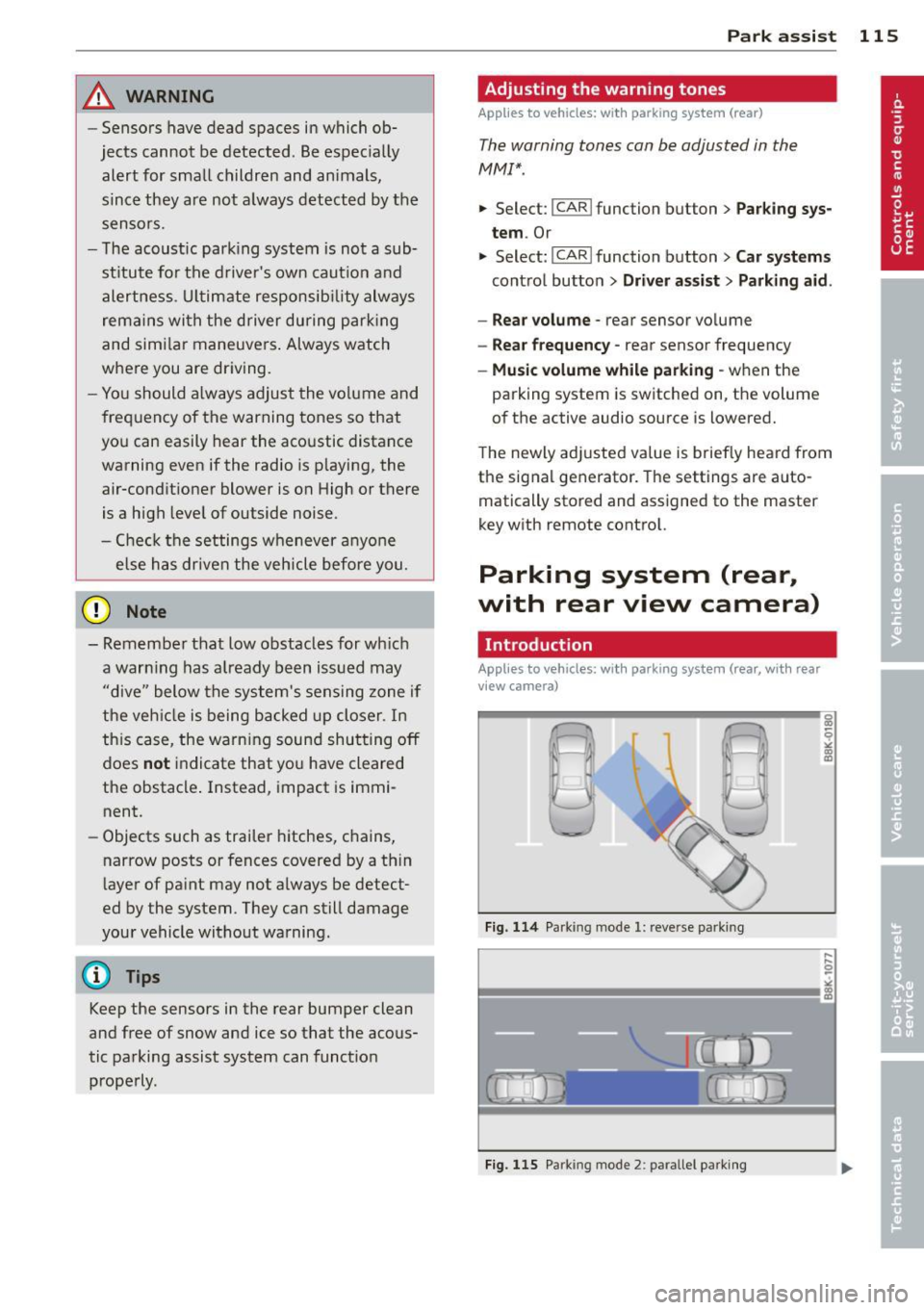
Fig . 114 Parking mode
1: reve rse parki ng
Fig . 115 Parking mode 2 : pa rallel parki ng
q
" "' CD
Page 119 of 294
The accuracy of the orientation lines and blue
surfaces diminis hes if:
- the rear view camera does not prov ide a re li
able image, for examp le, in poor vis ibility
conditions or if the lens is dirty,
- the image on the screen is not visible due to
sun g lare and reflection .
Caring for th e rear view came ra lens
The rear view camera is located above the rear
license plate b racket . Fo r the pa rking assist to
ope rate, the lens,=:,
fig. 117 must be kept
clean:
- Dampen the lens with a househo ld alcohol
based glass cleane r, and clean the lens with
a dry cloth
,=:, CD.
- Remove s now with a hand brush and ice
prefe rably with a de-icing spray
,=:, (D .
A WARNING
- T he pa rking aid cannot repla ce the dr iv
er's attention. The driver a lone is respon
sible for parking and similar driving ma
neuvers .
- Always keep your eyes on the vehicle's
su rroundings, using the rear view mirror
as well.
- Do not a llow yourse lf to be d istracted
from traffic by the rear view camera pic
tures.
- If the position and the installation ang le
of the camera has changed, fo r example,
after a rear end collision, do not continue
to use the system for safety reasons. Have it checked by a qua lified dealership.
(D Note
- Low obstacles already signaled by a
warning can disappear from the system's
detection range as they are approached
and will not continue to be signaled . Ob
jects such as barrier cha ins, trailer draw
bars, thin pa inted ve rtical po les o r fe n
ces may not be detected by t he system,
pos ing risk of damage.
- Never use warm or hot water to remove
s n ow or ice from the rear view camera
.
P ark a ssis t 11 7
lens -dange r of crack format ion on the
lens !
- When cleani ng the lens, never use prod
ucts that a re ab rasive.
Switching on/off
Applies to vehicles: with parking system (rear, with rear
view camera)
The rear view camera switches on automati
cally together with the acoustic park assist
when you put the vehicle in reverse.
Switching on
"' Put the veh icle in reverse gear, the acoust ic
parking system with rear view camera is ac
tivated automat ica lly. Act ivat ion of the
acoust ic par king system is confirmed by a
brief ac knowledgement sou nd.
Switching off
"' Drive faster than 9 mph (15 km/h) , or
"' take the vehicle out of reverse gear . The
acoust ic park ing system is immediate ly de
activated, and the rea r view came ra p icture
is deact ivated a utomat ically afte r a pe riod
o f abo ut 1 5 seconds , or
"' switch off the ignition.
T he de lay in deact ivat ing the came ra prov ides
an unin terrup ted view beh ind the ve hicle es
pe cially when mane uver ing in tig ht park ing
spaces and prevents the picture from t urning
off the every time you shift out of reverse .
If the wa rning mess age ap pears in the dis play
but not the rea r view came ra p icture, read and
confirm the warni ng message. The acoustic
distance signal is always active .
If you press a fu nction button on the M MI
control console, the rea r view came ra p icture
disappears . The rear view camera picture reap
pears the next time yo u pa rk.
Fur the r in forma tion on the warning mess age
and the MMI con tro l conso le can be found in
the MMI instruction book let.
Ill-