radio AUDI A4 SEDAN 2013 Owner's Manual
[x] Cancel search | Manufacturer: AUDI, Model Year: 2013, Model line: A4 SEDAN, Model: AUDI A4 SEDAN 2013Pages: 294, PDF Size: 73.71 MB
Page 107 of 294
Audi adaptive cruise control and braking guard 105
-If you switch the ASR/ESC off or the off
road mode on (allroad), Audi braking
guard switches off automatically
<=> page 186.
-Switch Audi braking guard off when you
are loading the vehicle onto a vehicle car
rier, train, ship or other type of transpor
tation. This can prevent undesired warn ings from the braking guard system .
Messages
Applies to vehicles: with Audi adaptive cruise co ntrol
Braking guard: Off
This driver message appears if the system is
turned off via the radio/MM I*. Otherwise, if
the system is turned off, the information ap
pears every time shortly after the start of the
trip.
Braking guard: Activated
This driver message appears if sharp brake
pressure was applied due to an acute warning.
•••
Three white dots appear if a setting cannot be
selected with the operating lever. For exam
ple, this happens if you want to raise/lower
the speed even though there was no previous
ly saved speed .
ACC: Deactivation
The driver message appears in vehicles with
manual transmission . If the clutch pedal was
pressed down for too long, the adaptive cruise
control turns off. A chime sounds as a remind
er.
ACC: Sensor blocked
This message appears if the sensor view is ob
structed, for example by leaves, snow, heavy
spray or dirt. Clean the sensor
<=>page 97,
fig. 96.
ACC: not available
The driver message appears if there is a mal
function. The adaptive cruise control turns off.
A chime sounds as a reminder. Have the sys- tern checked by an authorized Audi dealer or
authorized Audi Service
Facility.
ACC: unavailable
The driver message appears if, for example,
the brake temperature is too high . The adap
tive cruise control is temporarily unavailable.
A chime sounds as a reminder.
Engine speed!
This driver message appears in vehicles with
manual transmission if the driver had not up
shifted or downshifted in time while using
adaptive cruise control braking or accelerat ing, causing the vehicle to exceed or not reach
the permitted limit speed. The adaptive cruise
control turns off. A chime sounds as a remind
er .
Shift lever position!
Vehicles with an automatic transmission: the
driver message appears if the selector lever is
shifted to the N position . The adaptive cruise
control is not available while in this position .
Vehicles with manual transmission: the driver message appears for vehicles with manual
transmission if there is no forward gear en
gaged, meaning if the reverse gear or the 1st
gear is engaged or if the selector lever is in
the neutral position. The adaptive cruise con
trol is not available while in this position.
Stabilization control (ESC)
This message appears if the electronic stabili
zation control (ESC) is taking action to stabi
lize the vehicle. The adaptive cruise control
turns off . A chime sounds as a reminder.
Speed too low
This message appears if the current speed is
too low
to set or to maintain the desired
speed .
The speed being saved must be at least
20 mph (30 km/h). The cruise control is
turned off for speeds lower than 12 mph
(20 km/h). The adaptive cruise control re
mains turned on for speeds above 95 mph
(150 km/h) (override).
It will stabilize again at.,..
Page 111 of 294
-Improper reliance on the side assist sys
tem can cause collisions and serious
personal injury:
- Never rely only on side assist when
changing lanes.
- Always check rear view mirrors to make
sure that it is safe to change lanes.
- Side assist cannot detect all vehicles un
der all conditions- danger of accident!
- Please note that side assist indicates
there are approaching vehicles, or
vehicles in your blind spot, only after
your vehicle has reached a driving speed
of at least 19 mph (30 km/h).
- In certain situations, the system may not
function or its function may be limited.
For example:
- if vehicles are approaching or being left
behind very quickly. The display may
not turn on in time.
- in poor weather conditions such as
heavy rain, snow or heavy mist .
- on very wide lanes, in tight curves or if
there is a rise in the road surface .
Vehicles in the adjacent lane may not
be detected because they are outside
of the sensor range.
(D Note
The sensors can be displaced by impacts or
damage to the bumper, wheel housing and
underbody. This can affect the system .
Have your authorized Audi dealer or au
thorized Audi Service Facility check their
function.
(D Tips
- If the window glass in the driver's door
or front passenger's door has been tint
ed, the display in the exterior mirror may be misinterpreted.
- For Declaration of Compliance to United
States FCC and Industry Canada regula
tions
~page 275.
Audi side assist 109
Activating and deactivating
Applies to vehicles: mit side ass ist
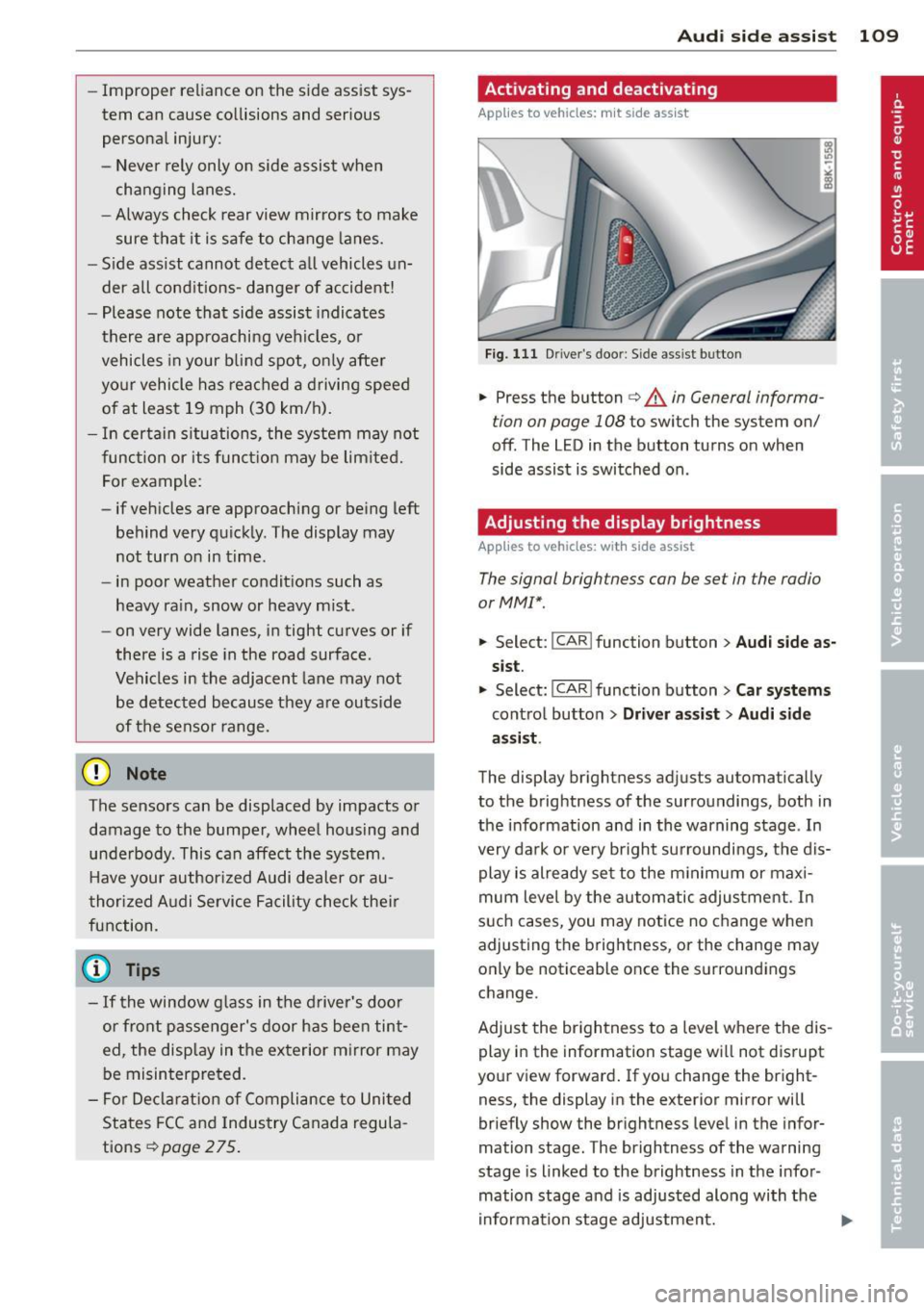
Fig. 111 D river 's doo r: Side assis t button
.,. Press the button c> .&. in General informa
tion on page 108
to switch the system on/
off . The LED in the button turns on when
side assist is switched on.
Adjusting the display brightness
Applies to vehicles: with side assist
The signal brightness can be set in the radio
orMMI* .
.,. Select: I CAR I function button > Audi side as
sist.
.,. Select: I CAR ! function button > Car systems
control button > Driver assist > Audi side
assist .
The display brightness adjusts automatically
to the brightness of the surroundings, both in
the information and in the warning stage . In
very dark or very bright surroundings, the dis play is already set to the minimum or maxi
mum level by the automatic adjustment. In
such cases, you may notice no change when
adjusting the brightness, or the change may
only be noticeable once the surroundings
change.
Adjust the brightness to a level where the dis
play in the information stage will not disrupt
your view forward. If you change the bright
ness, the display in the exterior mirror will
briefly show the brightness level in the infor
mation stage. The brightness of the warning
stage is linked to the brightness in the infor
mation stage and is adjusted along with the
information stage adjustment.
Page 117 of 294
_& WARNING
-Sensors have dead spaces in which ob
jects cannot be detected. Be especially
alert for small children and animals,
since they are not always detected by the
sensors.
- The acoustic park ing system is not a sub
st itute for the driver 's own caution and
alertness. Ultimate responsibi lity always
remains with the driver during parking
and simi lar maneuvers . Always watch
where you are driving.
- You should always adjust the volume and
frequency of the warning tones so that
yo u can easily hear the acoustic distance
warning even if the radio is p laying, the
air-cond itioner blower is on High or there
is a high level of outside noise .
- Check the settings whenever anyone
else has driven the vehicle before you.
(D Note
-Remember that low obstacles for which
a warn ing has already been issued may
"dive" below the system's sensing zone if
the vehicle is being backed up closer. In
this case, the warning sound shutting off
does
not in dicate that you have cleared
the obstacle . Instead, impact is immi
nent.
- Objects such as trailer hitches, chains,
narrow posts or fences covered by a th in
l ayer of paint may not always be detect
ed by the system. They can still damage
your vehicle without warning .
@ Tips
Keep the sensors in the rear bumper clean
and free of snow and ice so that the acous
tic parking assist system can function
properly.
Park assist 115
Adjusting the warn ing tones
Applies to vehicles: with parking system (rear)
The warning tones can be adjusted in the
MM!*.
.. Select: I CAR ! function button > Parking sys
tem .
Or
.. Select:
I CAR I function button > Car systems
contro l butto n > Driver assist > Parking aid .
- Rear volume -
rear sensor vo lume
- Rear frequency -rear sensor frequency
-Music volume while parking -when the
parking system is switched on, the volume
of the active audio source is lowered.
The newly adjusted value is briefly heard from
the signal generator. The settings are auto
matically stored and assigned to the master
key w ith remote control.
Parking system (rear,
with rear view camera)
Introduction
Applies to vehicles: with parking system (rear, wit h rear
view camera)
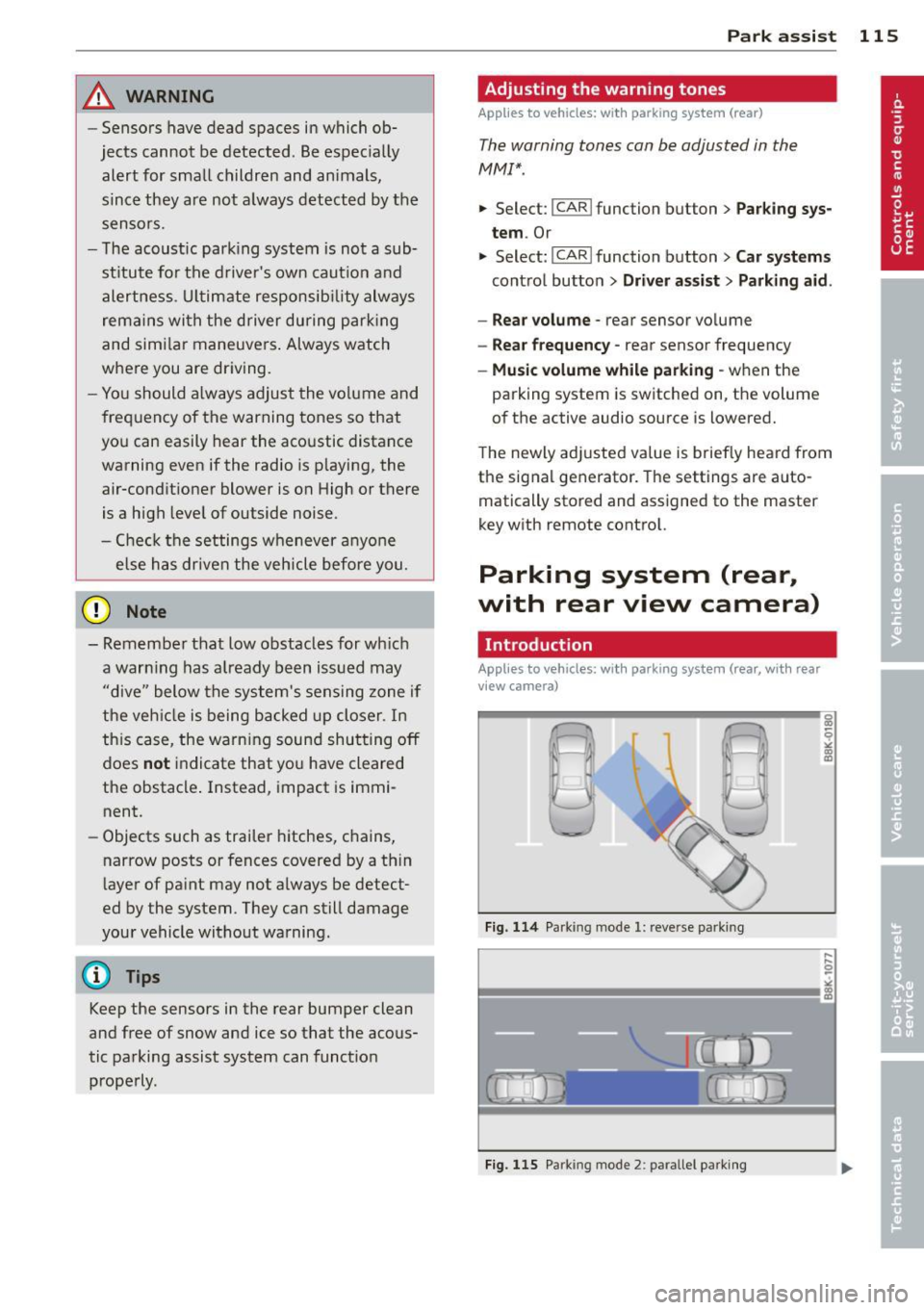
Fig . 114 Parking mode
1: reve rse parki ng
Fig . 115 Parking mode 2 : pa rallel parki ng
q
" "' CD
Page 122 of 294
120 Park assis t
In the MMI display, the d irection of travel
of the vehicle rear is represented depend ing on the steering wheel angle. The vehi
cle front sw ings out more than the ve hicle
rear. Maintain plenty of distance from an
obstacle so that your o utside mirror or a
corne r of your veh icle does not co llide with
any obs ta cl es -danger of ac cident!
@ Tips
The left or right orientation li nes and sur
faces wi ll be displayed, depending on the
t urn sig na l being used.
Adjusting the display and warning tones
A ppl ies to vehicles: with pa rk in g system (rear, with rea r
view ca mera )
The display and warning tones are adjusted in
the radio or MM!*.
"' Se lect:
I CARI f u nction button > Parking sys ·
tern .
Or
"' Se lect: ~I C~A~R~I funct ion button > Car systems
control button > Dr iver assist > Parking aid .
Display
- Off -when the parking system is switched
off, on ly aud ible signals are given .
-On -when t he parking system is switched
on, the pict ure from the rear view camera is
displayed.
Warning tone s
- Rear volume -
rear sensor volume
-Rear frequency -rear sensor frequency
-Music volum e while parking -when the
park ing system is switched on, the volume
of the act ive a udio source is lowered.
The new ly adjusted value is briefly heard from
the signal gene rator. The sett ings a re auto
mat ica lly stored and assigned to the remote
con trol key.
_& WARNING
- Alw ays m ake su re th at the volume and
freq uency of the warning tones is adjus t-
-
ed so that you can easily hear the acous
tic d istance signa l even if the radio is
playing, the air-cond it ioner blower is on
H igh or there is a hig h level of outside
noise.
- Check the settings w henever someone
else has driven the vehicle before you.
(D Tips
- The warn ing tones can also be adjusted
directly from the rear view camera im
age. Simply press the Settings* contro l
butto n.
- Changed settings are activated when
park ing ass ist is switc hed on aga in.
Error messages
App lies to vehicles: wit h parking system (rear, wit h rear
v iew camera)
If a warning tone is aud ible for about five sec
onds when you turn on the ignition, there is a
malfunction in the system . Have the problem
cor rected by your author ized Audi dealer.
Keep the senso rs in the rear bumpe r clean and
free from ice so that the acoustic park assist
system can function properly.
Page 124 of 294
122 Homelink®
Programming the transmitter (version
A)
Applies to vehicles: with Homelink
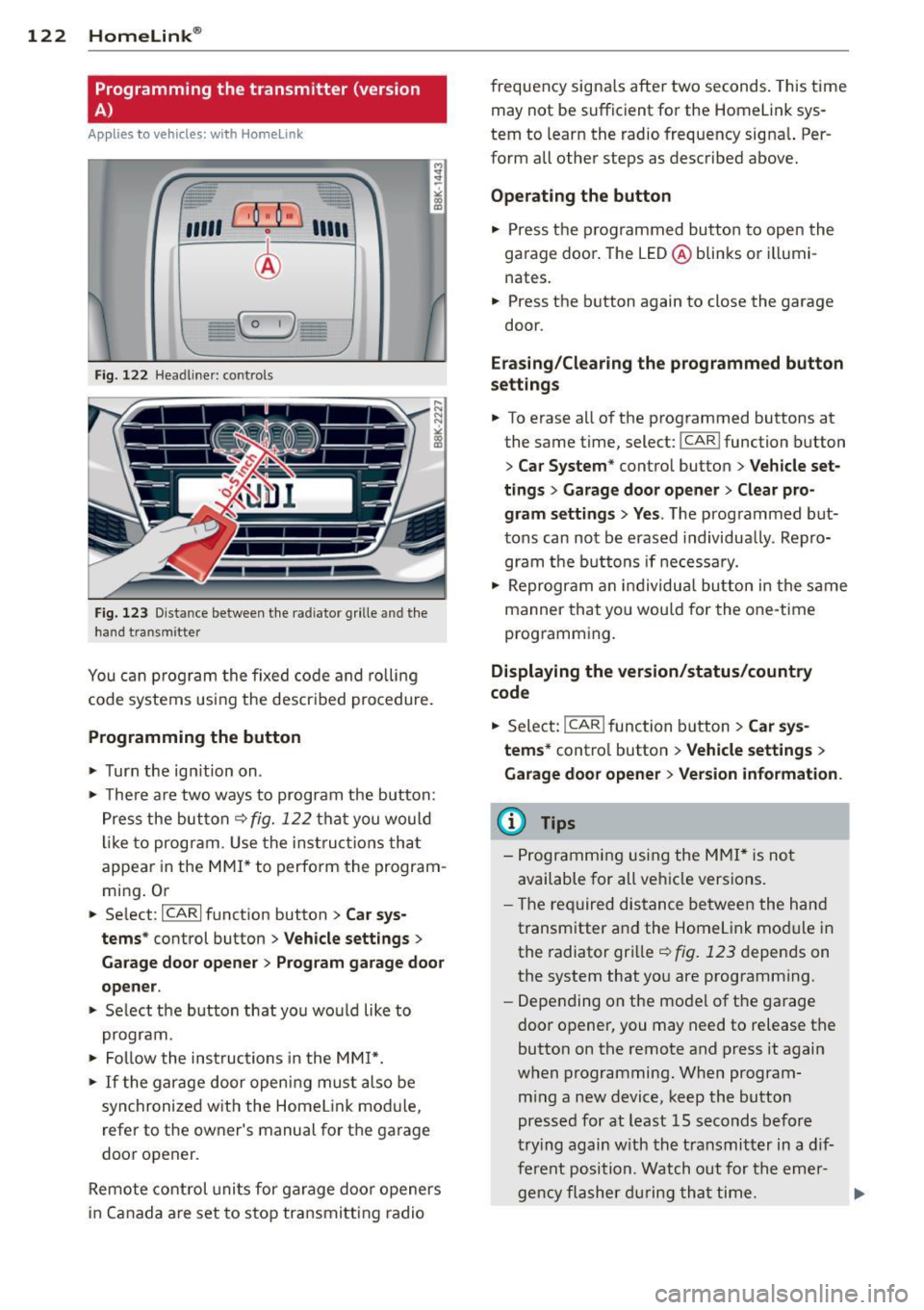
Fig. 122 Head line r: controls
Fig. 123 Dista nce between the radiator grille and the
hand transm itter
You can program the fixed code and rolling
code systems using the described procedure.
Programming the button
.,. Turn the ignition on .
.,. There are two ways to program the button:
Press the button
q fig. 122 that you would
like to program . Use the instructions that
appear in the MMI* to perform the program
ming. Or
.,. Select :
~IC~A~R~I function button > Car sys
tems*
control button > Vehicle settings>
Garage door opener> Program garage door
opener .
.,. Select the button that you would like to
program.
.,. Follow the instructions in the
MMI*.
.,. If the garage door opening must also be
synchronized with the Homelink module,
refer to the owner's manual for the garage
door opener.
Remote control units for garage door openers
in Canada are set to stop transmitting radio frequency
signals after two seconds. This time
may not be sufficient for the Homelink sys
tem to learn the radio frequency signal. Per
form all other steps as described above.
Operating the button
.,. Press the programmed button to open the
garage door. The LED@blinks or illumi
nates .
.,. Press the button again to close the garage
door.
Erasing/Clearing the programmed button
settings
.,. To erase all of the programmed buttons at
the same time, select:
I CAR ! function button
> Car System* control button > Vehicle set·
tings
> Garage door opener> Clear pro
gram settings> Yes .
The programmed but
tons can not be erased individually. Repro
gram the buttons if necessary .
.,. Reprogram an individual button in the same
manner that you would for the one-time
programming .
Displaying the version/status/country
code
.,. Select: !CAR ! function button> Car sys
tems*
control button > Vehicle settings >
Garage door opener > Version information .
@ Tips
- Programming using the MMI* is not
available for all vehicle versions.
- The required distance between the hand
transmitter and the Homelink module in
the radiator grille
q fig. 123 depends on
the system that you are programming .
- Depending on the model of the garage
door opener, you may need to release the
button on the remote and press it again
when programming. When program
ming a new device, keep the button
pressed for at least 15 seconds before
trying again with the transmitter in a dif
ferent position . Watch out for the emer-
gency flasher during that time. .,..
Page 125 of 294
-For security reasons, we recommend that
you clear the programmed buttons be
fore se lling the vehicle .
Programming the transmitter (version
B)
Applies to vehicles: with Home Link
,,,,, r ,o :O·,) ,,;;~
®
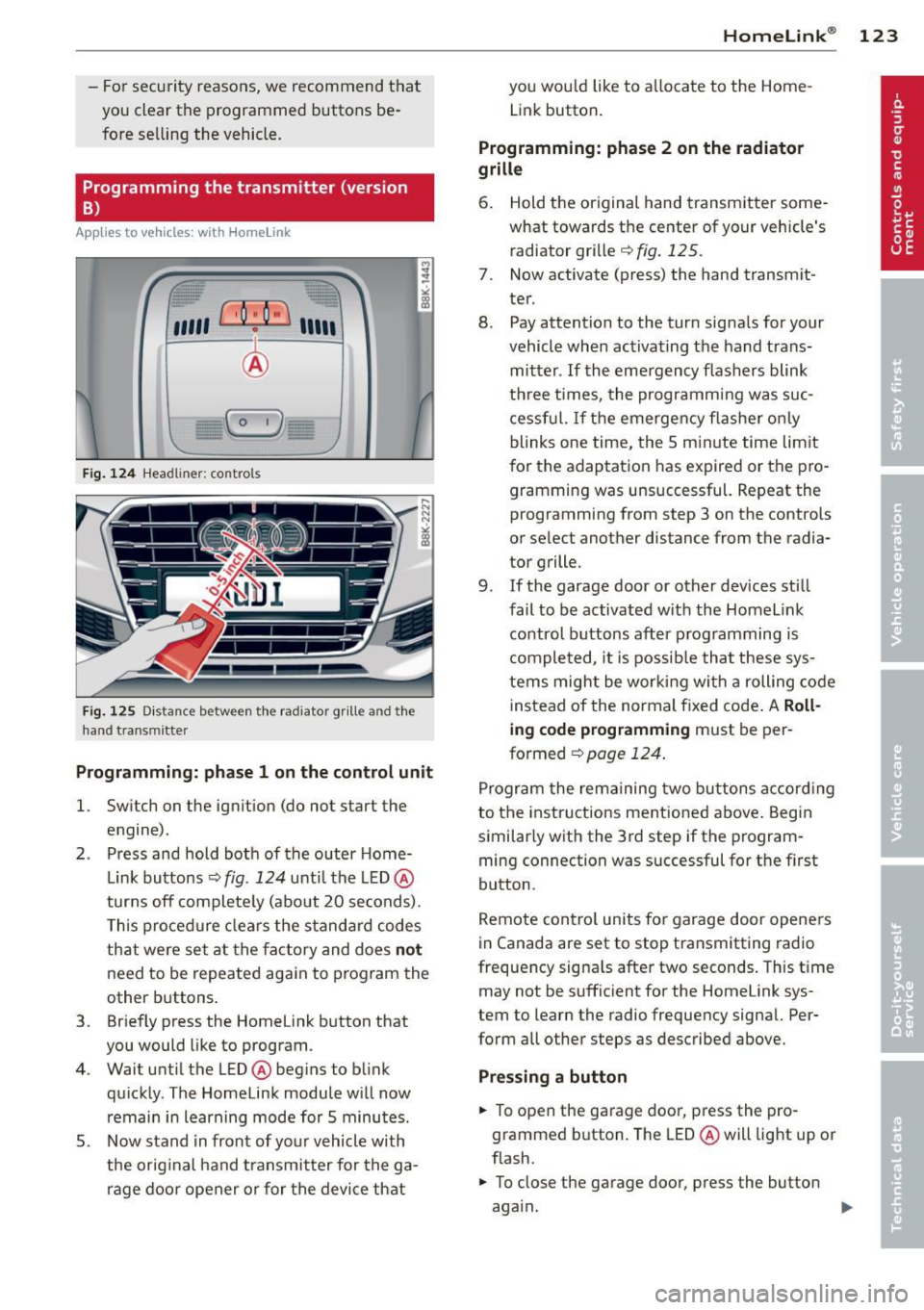
Fig. 124 Hea dli ner: c o n tro ls
Fig. 125 Dis ta n ce betw een th e radiato r gri lle a nd the
hand t rans mitte r
Programming: phase 1 on the control unit
l. Switch on the ignition (do not start the
engine) .
2 . Press and hold both of the outer Home
Link buttons ¢
fig. 124 unti l the LED @
turns off completely (about 20 seconds).
This procedure clears the standard codes
that were set at the factory and does
not
need to be repeated again to program the
other buttons .
3 . Briefly press the Homelink button that
you would like to program .
4. Wait until the LED @beg ins to blink
quickly . The Homelink module will now
remain in learning mode for 5 minutes.
5 . Now stand in front of your vehicle with
the original hand transmitter for the ga
rage door opener or for the device that
Homelink ® 123
you wou ld like to allocate to the Home
Link button .
Programming: phase 2 on the radiator
grille
6. Hold the or iginal hand transmitter some
what towards the center of your vehicle's radiator grille ¢
fig. 125.
7. Now activate (press) the hand transm it
ter.
8. Pay attention to the turn sig nals for your
vehicle when activating the hand trans
mitter .
If the emergency flashers blink
three times, the programm ing was suc
cessful. If the emergency flasher only
blinks one time, the 5 minute time lim it
for the adaptation has expired or the pro
gramming was unsuccessful. Repeat the
programming from step 3 on the controls
or se lect another distance from the radia
tor grille.
9. If the garage door or other devices still
fail to be activated with the Homelink control buttons after programming is
completed, it is possible that these sys
tems might be working with a roll ing code
instead of the normal fixed code . A
Roll
ing code programming must be per
formed ¢
page 124.
Program the remaining two buttons according
to the instructions ment ioned above . Begin
similarly with the 3rd step if the program
ming connection was successful for the f irst
button .
Remote contro l units for garage door openers
in Canada are set to stop transmitting radio
frequency signa ls after two seconds . This time
may not be sufficient for the Homelink sys
tem to learn the radio frequency signal. Per
form all other steps as described above.
Pressing a button
.,. To open the garage door, press the pro
grammed b utton. The LED @will light up or
flash.
.,. To close the garage door, press the button
aga in.
Page 160 of 294
158 Airb ag sys te m
There are some impor tant things you have to
know to make sure that the effectiveness of
the system will not be impa ired and t hat dis
carded components do not cause injury or pol
l ute t he e nvironm ent.
A WARNING
Improp er care, s ervicing a nd r epair proce
dures can increase t he risk of personal in
jury and death by preventing an airbag
from deploy ing when needed o r deploying
an airbag unexpectedly:
- Never cover, obstruct, or change the
steering wheel ho rn pad or airbag cover
or the instrument pane l or modify them
in any way.
- Never attach any objects such as cu
pholders or telephone mountings to the
surfaces covering the airbag units .
- F or cleaning the horn pad or instrumen t
pane l, use only a soft, dry cloth or one
moistened with plain water. Solvents or
cleaners co uld damage the airbag cover
or change the stiffness or strength of the
material so that the airbag cannot de
ploy and protect proper ly.
- Never repa ir, adjust, or change any parts
of the airbag system .
- All work on the steering wheel, instru
ment pane l, front seats or electrical sys
tem (including the installation of audio
equipment, cellular telephones and CB
radios, etc .) must be performed by a
qualified tech nician who has the t raining
and special equipment necessary.
- For any wor k on the ai rbag system, we
st rongly recommend that you see you r
au thori zed Audi dealer or qualified wo rk
shop .
- Never mod ify the front bumper or parts
of the veh icle body.
- Always make su re that the side airbag
can infla te wi tho ut interferen ce:
- Never insta ll seat covers or replace
ment upho lstery over the front seat
backs that have not been spec ifically
approved by Audi . -
Never use additional seat c ushions that
cover the areas where the side a irbags
inflate.
- Damage to the orig inal seat covers or
to the seam in the area of the side a ir
bag module must a lways be repaired
immediately by an author ized Audi
dealer .
- The airbag system can be activated only
once. After an airbag has inflated, it
m ust be replaced by an autho rized Aud i
dea le r o r qualified technician who has
the techni cal info rmation, training and
specia l equipment necessary.
- T he airbag system can be deployed only
once . After an airbag has been deployed,
it mus t be replaced with new replace
ment parts designed an d approved espe
cially fo r your A udi model version. Re
p lacement of complete airbag systems
or airbag components must be per
formed by qualified workshops on ly.
Make sure that any airbag serv ice action
is entered in your Audi Warranty
& Main
tenance booklet unde r
AIRBAG REPLAC E
M ENT RECORD .
-In accidents when an airbag is dep loyed,
the vehicle batte ry separates the alterna
tor and the star ter from the vehicle elec
tr ica l system fo r safe ty reasons w ith a
py rotechn ic circuit inte rrupter.
- Work on the pyrotechnic c ircuit inter
rupter must only be performed by a
qualified dea le r - risk of an accident!
- If the vehicle or the circuit interr upter
is scrapped, all applicable safety pre
cautions must be fo llowed.
@ For the sake of the environment
Undeployed airbag modules and preten
s ione rs might be classif ied as Perchlorate
Ma teria l -special handling may app ly, see
www.dtsc.ca .gov/hazardouswaste/per
ch lorate. W hen the veh icle or parts o f th e
r est rain t sys tem including airb ag modu les
s a fety be lts wi th pre tensioners are scrap
ped, all applicab le laws and regulations
must be observed. Your authorized Audi
1J1-
Page 193 of 294
With the engine turned off
If you listen to the radio, for example, with
the engine turned off or use other MMI func
tions, the battery is being discharged .
If starting capability is jeopardized due to en
ergy consumption, the following warning ap
pears in the MMI display :
Please start the engine soon or the system
will be turned off.
The warning indicates that the system will be
turned off automatically after 3 minutes . If
you wish to continue using the functions , you
have to start the engine.
With the engine running
Although electrical energy is generated when
the vehicle is being driven , the battery can be
come discharged . This happens mostly when
little energy is being generated and a great
deal consumed and the battery's state of
charge is not optimal.
To bring the energy balance back into equili brium, consumers which require especially
large amounts of energy are temporarily cut
back or switched off . Heating systems in par
ticular require a great deal of energy. If you
notice , for example , that the heated seats* or
the heated rear window are not heating, they
have been temporarily cut back or switched
off. These systems will be available again as
soon as the energy balance has been restored.
You will also notice that engine idle speed has
been increased slightly. This is normal and not
a cause for concern . By increasing engine idle
speed the additional energy required is gener
ated and the battery is charged.
Intelligent technology 191
•
•
Page 207 of 294
Your authorized Audi dealer can provide clean
ing products that have been tested and ap
proved for your vehicle .
Care of interior
Infotainment components
The Radio/MM!* display may be clea ned with
a soft cloth and commercially-availab le "LCD
cleaner" . The cloth should be coated lightly
when the cleaning solution when cleaning the
display .
The
MMI* controls must be cleaned first with
a brush so that dirt does not enter the un it or
enter between the buttons and the housing.
Then wiping the controls with a cloth damp
ened with dish detergent and water is recom
mended.
(D Note
- To avoid scratch ing the display, you
shou ld never clean it dry.
- To prevent damage, make s ure fl uids do
not enter the controls.
Aluminum trim
Use only neutral-pH products to remove spots
and depos its from alum inum surfaces.
Chrome care products and alkaline cleaners
will attack alum inum surfaces and can dam
age them ove r time.
A WARNING
Always read and heed all WARNINGS and
other information
r::> page 199.
Fabrics and fabric coverings
Fa brics and fabric coverings (e.g. seats, door
trim panels, etc.) should be cleaned at regular
intervals with a vacuum cleaner. This removes
surface dirt particles which could become em bedded in the fabr ic through use. Steam
cleaners should not be used, because the
steam tends to push the dirt deeper into the
fabric and lock it there.
Cleaning and protection 205
Normal cleaning
Generally, we recommend using a soft sponge
or a lint -free microfiber cloth to the clean fab
ric. Brushes shou ld only be used for carpets
and floor mats, since other fabric surfaces
could be harmed by brushes.
Normal sur face stains can be cleaned using a
commercially available foam cleaner . Spread
the foam on the s urface of the fabric with a
soft sponge and work it in gently. Do not satu
rate the fabric. Then pat the foam dry using
absorbent, dry cloths (e.g. m icrofiber cloth)
and vacuum it after it has dried completely.
Cleaning stains
Stains caused by beverages (e.g. coffee, fr uit
jui ce, etc.) can be treated with a mild deter
gent solution. Apply the detergent solution
with a sponge. In the case of stubborn stains,
a detergent paste can be applied directly to
the stain and worked into the fabric. After
wards, use copious amounts of clean water to
remove the remaining deterge nt. Apply the
water with a damp cloth or sponge and pat
the fabric dry with an absorbent, dry cloth.
Stains from choco late or makeup should have
detergent paste rubbed into them. After
wards, remove the soap with water (damp
sponge).
Alcohol can be used to treat stains from
grease, oil , lipstick or a ballpoint pen. Melted
grease or dye must be patted off using ab
sorbent materia l.
It may be necessary to re
treat the areas with detergent paste and wa
ter.
In the case of genera l soiling of the upho ls
tery and cover material, we recommend hiring
a specia list t hat has the equipment to clean
the seat covers and other fabr ic surfaces by
shampooing and spray extraction.
A WARNING
Always read and heed all WARNINGS and
the information
r::> page 199.
•
•
Page 222 of 294
220 Checking and filling
Checking the engine oil level
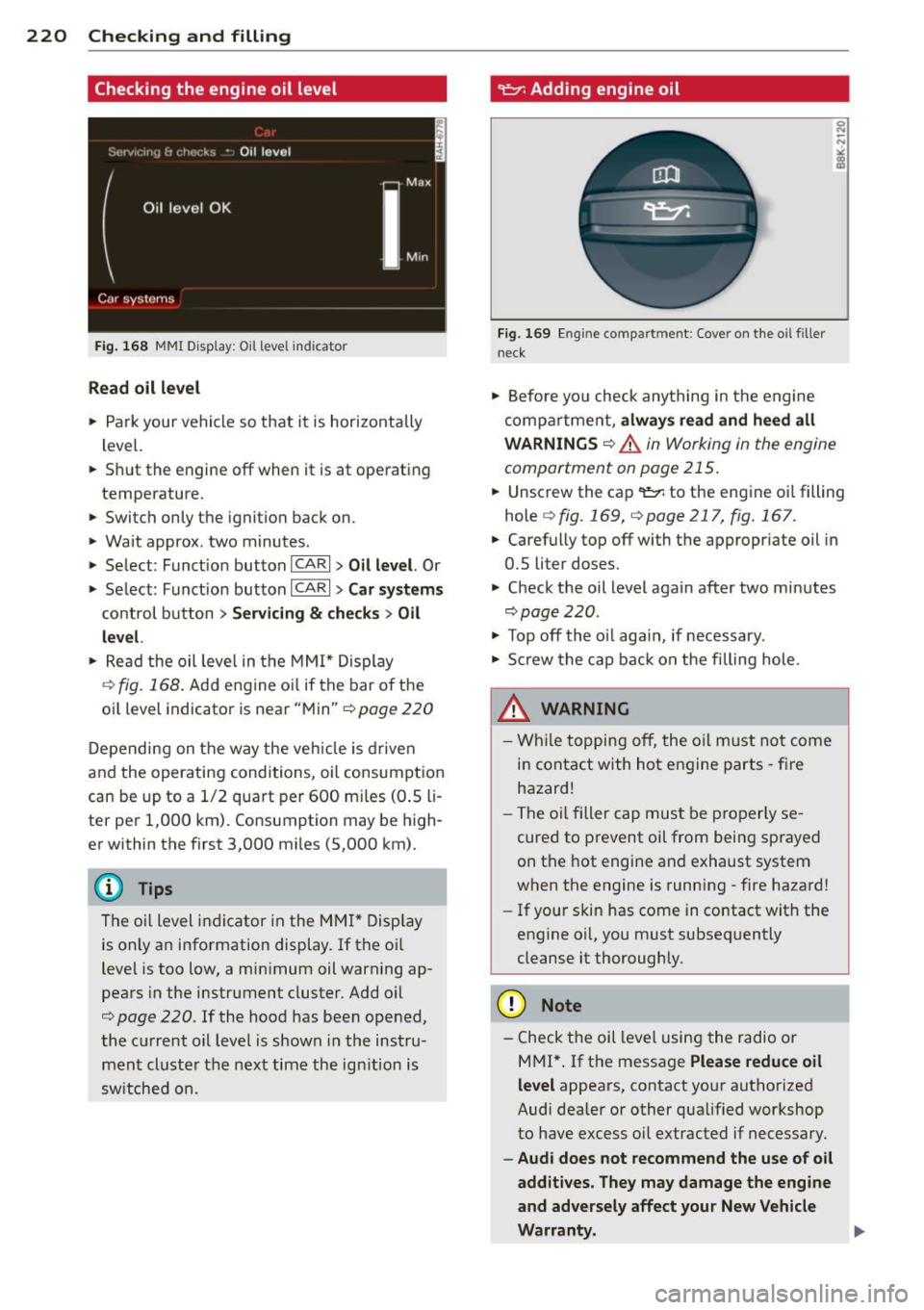
Fig . 168 MMI D isp lay : O il le ve l indic ator
Read oil level
• Park your vehicle so that it is horizontally
level.
.. Shut the engine off when it is at operating
temperature.
.. Switch only the ignition back on.
• Wait approx . two minutes .
> Select: Funct ion button ICARI > Oil level. Or
> Se lect : Funct ion button ICARI > Car systems
control button > Servicing & checks > Oil
level.
• Read the oil leve l in the MMI* Display
c::>fig. 168 . Add eng ine oi l if the bar o f the
oil level indicator is near "Min"
c::> page 220
Depending on the way the vehicle is driven
and the operating conditions, oil consumption
can be up to a 1/2 quart per 600 mi les (0 .5 li
ter per 1,000 km). Consumption may be high
er within the first 3,000 mi les (5 ,000 km).
The o il level indicator in the MMI* Display
is only an information display. If the o il
level is too low, a min imum oil warning ap
pears in the instrument cluster. Add o il
c::> page 220. If the hood has been opened,
the current oil level is shown in the instru
ment cluster the next time the ign ition is
switched on.
~ Adding engine oil
Fig. 169 En g in e compart ment: Cover on the oil filler
neck
• Before yo u check anything in the engine
compa rtme nt,
always read and heed all
WARNINGS
c::> .A in Working in the engine
compartment on page 215 .
.. Unscrew the cap
q fig . 169, qpage 217, fig. 167 .
.. Carefully top off with the appropriate oil in
0.5 liter doses.
.. Check the oil level again after two minutes
qpage220 .
• To p off the o il aga in, if necessary.
• Screw the cap back on the filling hole.
.8_ WARNING
- While topping off, the oil must not come
in contact with hot engine parts - fire
hazard!
- The oil filter cap must be properly se
cured to prevent oil from being sprayed
on the hot engine and exhaust system
when the engine is running - fire hazard!
- If your skin has come in contact with the
engine oi l, you must subsequently
cleanse it thoroughly.
(D Note
- Check the oil level using the radio or
M Ml*.
If the message Please reduce oil
level
appears, contact your authorized
Audi dealer or other qualified workshop
to have excess oil extracted if necessary.
- Audi does not recommend the use of oil
additives . They may damage the engine
and adversely affect your New Vehicle
Warranty. ..,