steering AUDI A5 CABRIOLET 2010 Owner's Manual
[x] Cancel search | Manufacturer: AUDI, Model Year: 2010, Model line: A5 CABRIOLET, Model: AUDI A5 CABRIOLET 2010Pages: 364, PDF Size: 86.51 MB
Page 162 of 364

ffl..__T_ r_a _n_ s_ m_ is_ s_io _ n ___________________________________________________ _
Fig. 163 Display:
manual shift progra m,
selec ted gear
Switching to manual shift program
- Push the selector lever to the right from D. As soon as the
transmission has switched over, the selected gear appears
in the display~ fig. 163.
To upshift
-Push the selector lever forward to the plus position
~ page 159, fig. 162 G).
To down shift
- Push the lever to the minus position Q.
When accelerating , the transmission will automatically shift into the
next higher gear before the engine reaches the maximum RPM.
Wh en accelerating, if you apply a light thrott le, the tiptronic ® will
automatically shift into the next higher gear to save fuel. If you apply
a heavy throttle, the transmission will stay in gear engaged until near
maximum RPM are reached, or until the driver manua lly shifts into a
higher gear.
If you take your foot off the accelerato r pedal when driving down a
steep incline , the tiptronic ® will downshift from the selected gear
into the next lower gear based on road speed and engine RPM. The
automatic downshifting is interrupted as soon as you apply throttle
again .
[I] Tips
• When you shift into the next lower gear, the engine w ill downshift
only when there is no possibility of over-revving .
• When the kick-down comes on, the transmission will sh ift down to
a lower gear depending on vehicle and engine speeds.
• The tiptronic ® is inoperative when the transmiss ion is in the fail
safe mode .•
Applies to vehicles: with mult itron ic ® Cont inuously Variable Transm ission (CV T)
Steering wheel with tiptronic ®
The shift buttons on the steering wheel allow the driver to
shift gears manually.
Fig . 164 Steering
w hee l: Shift buttons
- To downshift, touch the button on the left Q.
- To upshift, touch the button on the right G).
The shift buttons are activated when the selector lever is in D, Sor in
the manual shift program (tiptronic).
Of course, you can continue to use the manual shift program with the
selector lever on the center console . •
Page 170 of 364

ffl..__P_ a_r_ k_ a_ s_ s_ is_t ____________________________________________________ _
If the warning message appears in the display but not the rear-view
camera picture, read and confirm the warn ing message. The acous tic
distance s ignal is always active .
If you press a function button on the MMI control console, the rear
view camera picture disappears. T he rear-view camera picture reap
pears the next time you park .
Further information on the wa rning message and the MM I control
console can be found in the MMI instruction booklet.
(I) Tips
• The rear -view camera picture is available as soon as the MM I
Display or the MMI is switched on, or the start-up phase is completed.
• Keep the sensors in the rear bumper and the rear-view camera lens
clean and free of snow and ice, so that the parking system can work
properly . Please follow the additional notes on~
page 171. •
Applie s to veh icl es : wi th park ing syst em (r e a r) an d rear-vi ew cam era
Reverse Parking
Parking mode 1 can be used when parking in a garage or
parking space.
Fig.171 MMI D ispl ay :
Aimin g at a park in g
spot F
ig .172 MMI D isplay:
Ali gni ng the vehi cle
-Switch the MMI on and select the r everse gear .
- Turn the steering wheel until the orange orientation lines
(D appear in the parking spot=> fig . 171. Use the mark
ings @to help you estimate the distance from an
obstacle. Each marking corresponds to 3 ft (1 m). The blue area re presents an extension of the vehicle's outline
by approx imately 16 ft (5 m) to the rear.
- While driving in reverse gear, adjust the steering whee l
angle to fit the parking space with the aid of the orange
orie ntation lines=>
0. ® marks the rear b umper . You
should stop driving in reverse as soon as and no later than
when the red orientation line© abuts an object=>&!
& WARNING
• The r ear -view cam era d oes not show th e entire are a behind th e
v eh icle ~
page 166, fig. 169. Watch out especia lly f or sm all c hil
d ren and an imal s. The rear -view camera cannot alwa ys detect
them, posing risk o f an acc ident !
• Plea se not e that object s not tou ching the gro un d c an app ear to
be furthe r away than th ey re a lly are (for exampl e, th e bumpe r of
a parked vehi cle, a traile r hitch , or the rea r of a truck ). In thi s ca se, .,
Page 171 of 364

----------------------------------------------~P~a..!..r ~k :...:a:!.s~s!..:is~t ~_J-
& WARN ING (continued)
y ou sh oul d no t use th e help line s to help w ith pa rki ng, wh ic h
p os es dang er of an a ccident!
0 Note
• Low obstacles a lready s ignaled by a wa rning can disappear from
t he sys tem' s de tec tion range as they are approached and will no t
cont inue to be s ignaled. Objects such as bar rier chains, trailer draw
bars, thin pa inted vertical poles or fences may not be detected by the
system, posing risk of damage.
• In the MMI display, the direc tion of travel of the vehicle rear is
represented depend ing on the stee ring whee l angle. The vehicle front
swings out more than the vehicle rear . Maintain plenty of distance
from an obstacle so that your outs ide mirror or a corner of your
vehicle does not collide with any obstacles -danger of accident! •
Applies to veh icl es: wit h pa rk ing syst em (rear ) and re ar-v iew ca mer a
Parallel Parking
Use parking mode 2 to help you park on the edge of a
street.
Con tro ls a nd e quip
m en t
Fig.173 MMI Display :
b lu e s urface In th e
par king s lot
Vehicle OP-eration
Fig.174 MM I Dis pl ay:
Bl ue cur ve on t h cur b
The following steps apply only when there is no obstacl e
(such as a wall) near the parking spot. Otherw ise, please read
the "Tips o n Parking Next to Obstacles" .
- Activate the turn signal.
- Switch the MMI on and select the reverse gear. The
parking a id turns on and parking mode 1 appears on the
display.
- Position your vehicle parallel to the edge of the street,
approximately 1 meter from a parked vehicle.
- Press the
Mode ~ fig. 173 © control button on the MMI
control console . Parking mode 2 appears .
- Back up in reverse gear a nd alig n your veh icle so that the
blue area
0 borders on the rear end of the veh icle or on
the parking spot line . The blue area represents an exten
sion of the vehicle's out line by approximately 5 m to the
rear. The long side of the b lue area should be on the curb .
The entire blue area must fit into the park ing spot.
- Whi le the vehicle is stationary, turn the steering whee l to
the right as far as it will go . _.,
Vehicle care Do-it-yourselt service iTechnical data
Page 172 of 364

lffl!IL____:P:....::a:.:r..:k:..:::a::s:.:s::.:i~s:.:t :..._ _________________________________________________ _
- Back into the parking space until the blue curve touches
the curb~
page 169, fig . 174. Stop the vehic le .
- While the ve hicle is stationa ry, turn the steering whee l to
the left as far as i t will go.
- Continue to back up into the parking spot until the ve hicle
is parked parallel to the curb. ® mar ks the rear bumper.
You shou ld stop dr iving i n reverse as soon as and no later
than when the red orientation line
0 abuts a n object
~ & !Kee p an eye on the front of your vehicle wh ile doing
this ~0.
Parking next to obs tacles
When there is an obstacle (such as a wall) next to the parking spot,
c hoose a spo t w it h more space on the sides. Position the long side of
the blue area so that there is sufficient space from the curb. The area
must not be on the curb . You will a lso need to star t turning the
steering wheel much earlier. There should be a suff icie nt amount of
space between the c urb and the b lue c urve, and the b lue c urve
=> page 169, fig. 17 4 must not touch the curb .
& WARNING
• The rea r-v iew camera does not show the entire area behind the
vehicle =>
page 166, fig. 169 . Watch out e spe cially for small chil
dr en and animal s. The rear-view camera cannot alway s det ect
them, posing risk of an accident!
• Please note that objects not touch ing the ground can appear to
be further away than they really are (for example, the bumper of
a park ed vehicle, a trailer hit ch , or the rear of a truck) . In this case ,
you should not use the help lines to help with parking , which
po ses danger of an accid ent!
0 Note
In the MMI display, the d irection of t ravel of the vehicle rear is rep re
sented depending o n the steering wheel angle . The ve hicle front
swi ngs ou t mo re than the ve hicl e rea r. M aintain plenty of d istance
from an obstacle so that your outside mirror or a corner of your
veh icle does not collide w ith any obstacles - d anger of a ccident!
[ i ] Tips
Th e left or rig ht or ientation lines and surfaces w ill be displayed,
depending on the tur n signa l being used .•
A pp lies to veh icles: with par king system (rear) and r ear-view camera
Adjusting the display and warning tones
The display* and warning tones can be adjusted in the
radio or in the MM!*.
-Select : [CAR)> Parking system.
Display
• Off -when the parking system is switched off, only aud ible sig nals
are g iven.
• On -when the pa rking system is switched on , eithe r the visua l
display or the p ictu re from the rearview camera is displayed.
Warn ing tones
• Front volume -front sensor vo lume
• Front frequency -front sensor frequency
• Rear volume -rear senso r vo lume
• Rear frequency -rear sensor freq uency
• In-car ent ertainment fader -when the park ing system is sw itched
on, the volume of the active audio source is lowere d.
Th e newly adju ste d val ue is briefly he ard from the signal generato r . ..
Page 178 of 364
........ _D_ r_iv _i_ n .... g=-- S_ a_f _e _Ly :,.._ ______________________________________________ _
Driving Safely
General notes
Safe driving habits
Please remember -safety first!
Th is chapter contains important information, t ips, instructions and
warnings that you need to read an d observe fo r you r own safe ty, the
safety of you r passengers and others . We have summarized here
w hat you need to know about sa fety belts, airbags, child restra ints as
we ll as child safety . You r safety is for us
priority number 1. Always
observe the information and warnings in this section -for your own
safety as well as t hat of your passengers.
The informat ion in this section applies to all mode l versions of yo ur
veh icle . Some of the fe atures des cribed in this se ctions m ay be st an
dard equ ipment on some models, or may be optional eq uipment on
others. If you a re not sure, ask your a uth o rized Audi dealer.
& WARNING
• Always make sure that you follow the instructions and heed
the WARNINGS in th is Manual. It is in your interest and in the
intere st of your passengers.
• Always keep the complete Owner's Literatu re in your Audi
when you lend or sell your vehicle so that this important informa
tion will always be available to the driver and passengers .
• Always keep the Owner's literature handy so that you can find
it easily if you have questions . •
Safety equipment
The safety features are part of the occupant restraint
s y stem and wor k together to he lp reduce the ris k of injury
in a wide variety of accident situations.
Your sa fety and t he safety o f yo ur passenge rs shou ld no t be left to
chance . Adva nces in technology have made a variety of features avai l
a b le to help re duce the risk of injury in an a cc ident . The fo llow ing is a
list of jus t a few of the safety features in your Audi:
• sophisticated safety belts for driver and a ll passenger seating
p osi tion s,
• belt force limiters for the front seats,
• belt pr etensioners fo r th e sea ts,
• hea d restrain ts f or eac h se ating posi tion,
• front airbags,
• side airbags i n the fro nt s eats,
• special LATCH anchorages fo r chi ld restra in ts,
• adjustable steering co lumn.
T hese individual safety feat ures, can work together as a system to
he lp protect you and yo ur passengers in a wide range of accidents .
T hese feat ures cannot work as a system if they are not a lways
c o rrect ly adjusted and cor rect ly used .
Safety is everybody's responsibility! •
Page 180 of 364
___ D_ r_ i_ v _i_n _.g"-- S_ a_ f_ e__. LY.__ _____________________________________________ _
Proper occupant seating positions
Proper seating position for the driver
The proper driver seating position is important for safe,
relaxed driving.
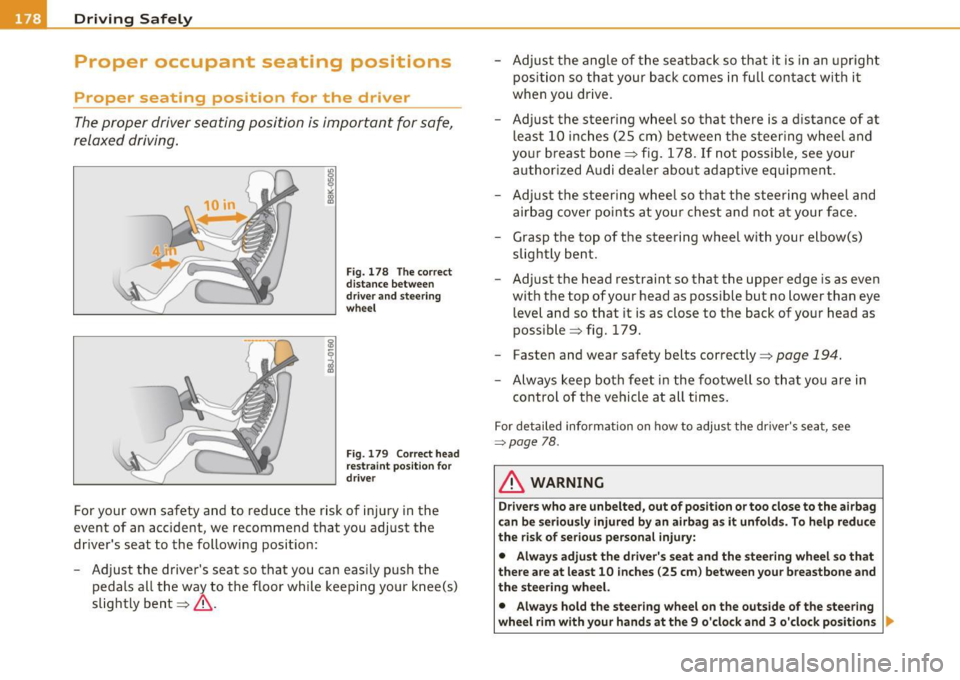
Fig. 178 The correct
distance between
driver and steering
wheel
Fig . 179 Correct head
restraint position for
driver
For your own safety and to reduce the risk of injury in the
event of an accident, we recommend that you adjust the
driver's seat to the following position:
- Adjust the driver's seat so that you can easily push the
pedals all the way to the floor while keeping your knee(s)
slightly bent==>& . -
Adjust the angle of the seatback so that it is in an upright
position so that your back comes in full contact with it
when you drive.
- Adjust the steering wheel so that there is a distance of at least 10 inches (25 cm) between the steering wheel and
your breast bone==> fig. 178. If not possible, see your
authorized Audi dealer about adaptive equipment .
- Adjust the steering wheel so that the steering wheel and airbag cover points at your chest and not at your face.
- Grasp the top of the steering wheel with your elbow(s) slightly bent.
- Adjust the head restraint so that the upper edge is as even
with the top of your head as possible but no lower than eye
level and so that it is as close to the back of your head as
possible ==> fig. 179.
- Fasten and wear safety belts correctly=>
page 194.
-Always keep both feet in the footwell so that you are in
control of the vehicle at all times.
For detailed information on how to adjust the driver's seat, see
~page 78 .
& WARNING
Drivers who are unbelted, out of position or too close to the airbag
can be seriously injured by an airbag as it unfolds. To help reduce
the risk of serious personal injury:
• Always adjust the driver's seat and the steering wheel so that
there are at least 10 inches (25 cm) between your breastbone and
the steering wheel.
• Always hold the steering wheel on the outside of the steering
wheel rim with your hands at the 9 o'clock and 3 o'clock positions
II,-
Page 181 of 364

______________________________________________ D_ ri_v _ i_n _,,g ,c.._ S_a_ f_ e_ l..:: y __ _
& WARNING (continued)
to help reduce the risk of personal injury if the driver's airbag
inflates.
• Never hold the steering wheel at the 12 o'clock position or with
your hands at other positions inside the steering wheel rim or on
the steering wheel hub. Holding the steering wheel the wrong way can cause serious injuries to the hands, arms and head if the
driver's airbag deploys.
• Pointing the steering wheel toward your face decreases the
ability of the supplemental driver's airbag to protect you in a colli·
sion.
• Always sit in an upright position and never lean against or
place any part of your body too close to the area where the airbags
are located.
• Before driving, always adjust the front seats and head
restraints properly and make sure that all passengers are properly
restrained.
• Never adjust the seats while the vehicle is moving. Your seat
may move unexpectedly and you could lose control of the vehicle.
• Never drive with the backrest reclined or tilted far back! The
farther the backrests are tilted back, the greater the risk of injury due to incorrect positioning of the safety belt and improper
seating position.
• Children must always ride in child safety seats~
page 222.
Special precautions apply when installing a child safety seat on
the front passenger seat
~ page 200. •
Controls and equip
ment Safety first Vehicle operation
Proper seating position for the front
passenger
The
proper front passenger seating position is important
for safe, relaxed driving.
For your own safety and to reduce the risk of injury in the
event of an accident, we recommend that you adjust the seat
for the front passenger to the following position:
- Move the front passenger seat back as far as possible.
There must be a minimum of 10 inches (25 cm) between
the breastbone and the instrument panel=>& .
- Adjust the angle of the seatback so that it is in an upright
position and your back comes in full contact with it when
ever the vehicle is moving .
- Adjust the head restraint so that the upper edge is as even
with the top of your head as possible but not lower than
eye level and so that it is as close to the back of your head
as possible.
- Keep both feet flat on the floor in front of the front
passenger seat.
- Fasten and wear safety belts correctly =:>
page 194.
For detailed information on how to adjust the front passenger's seat,
see ~
page 77.
& WARNING
Front seat passengers who are unbelted, out of position or too
close to the airbag can be seriously injured or killed by the airbag
as it unfolds. To help reduce the risk of serious personal injury: .,
Vehicle care Do-it-yourself service Technical data
Page 194 of 364
•--=S..:a :..:f..:e :..:t:= Y :....:: b:....:e:..: l:..: t :..::s _____________________________________________ _
Because the passengers of this vehicle are not using safety belts
=>
page 191, fig. 187, they will keep moving at the same speed the
vehicle was moving just before the crash, until something stops them
- here, the wall =>
page 191, fig. 188.
The same principles apply to people sitting in a vehicle that is
involved in a frontal collision. Even at city speeds of 20 to 30 mph (30
to 50 km/h), the forces acting on the body can reach one ton (2,000
lbs. or 1,000 kg) or more. At greater speeds, these forces are even
higher.
People who do not use safety belts are also not attached to their
vehicle. In a frontal collision they will also keep moving forward at
the speed their vehicle was travelling just before the crash. Of course,
the laws of physics don't just apply to frontal collisions, they deter
mine what happens in all kinds of accidents and collisions.•
What happens to occupants not wearing
safety belts?
In crashes unbelted occupants cannot stop themselves
from flying forward and being injured or killed. Always
wear your safety belts!
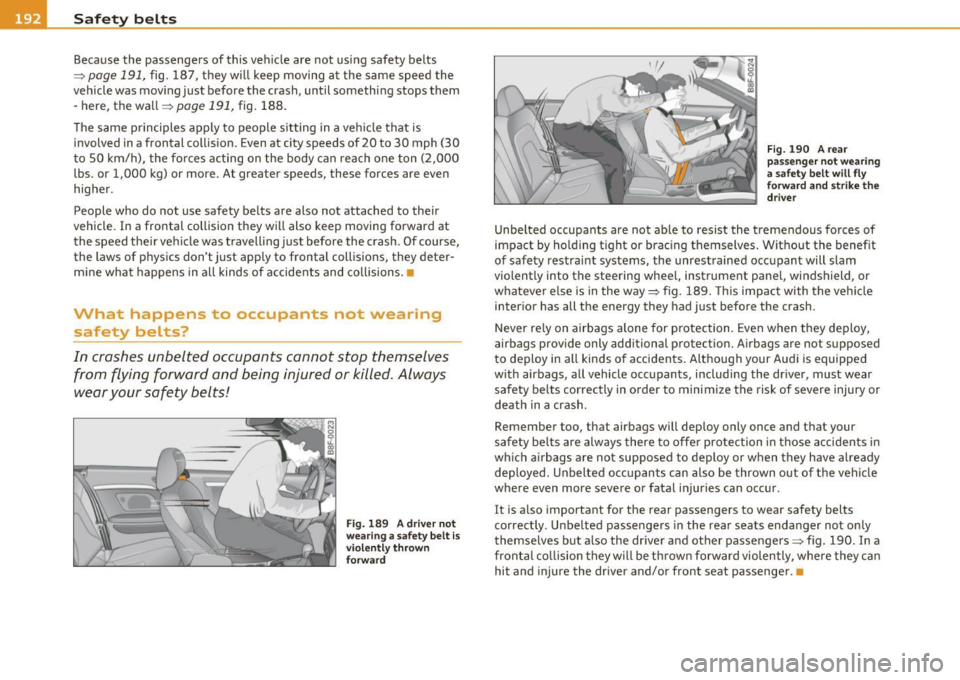
Fig. 189 A driver not
wearing a safety belt Is
violently thrown
forward Fig. 190 A
rear
passenger not wearing
a safety belt will fly
forward and strike the driver
Unbelted occupants are not able to resist the tremendous forces of
impact by holding tight or bracing themselves. Without the benefit
of safety restraint systems, the unrestrained occupant will slam
violently into the steering wheel, instrument panel, windshield, or
whatever else is in the way=> fig. 189. This impact with the vehicle
interior has all the energy they had just before the crash.
Never rely on airbags alone for protection. Even when they deploy,
airbags provide only additional protection. Airbags are not supposed
to deploy in all kinds of accidents. Although your Audi is equipped
with airbags, all vehicle occupants, including the driver, must wear safety belts correctly in order to minimize the risk of severe injury or
death in a crash.
Remember too, that airbags will deploy only once and that your
safety belts are always there to offer protection in those accidents in
which airbags are not supposed to deploy or when they have already
deployed. Unbelted occupants can also be thrown out of the vehicle
where even more severe or fatal injuries can occur.
It is also important for the rear passengers to wear safety belts
correctly . Unbelted passengers in the rear seats endanger not only
themselves but also the driver and other passengers=> fig. 190. In a
frontal collision they will be thrown forward violently, where they can
hit and injure the driver and/or front seat passenger. •
Page 202 of 364
........ _A_ i_rb _ a_,g,:;._ s_, y'- s_ t_e _m ________________________________________________ _
Airbag system
Important things to know
Importance of wearing safety belts and
sitting properly
Airbags are only supplemental restraints. For airbags to
do their job, occupants must always properly wear their
safety belts and be in a proper seating position.
For your safety and the safety of your passengers, before
driving off, always:
- Adjust the driver's seat and steering wheel properly
~ page 178,
-Adjust the front passenger's seat properly~ page 78,
-Wear safety belts properly~ page 193,
-Always properly use the proper child restraint to protect
children~
page 222.
In a collision airbags must inflate within the blink of an eye and with
considerable force. The supplemental airbags can cause injuries if the
driver or the front seat passenger is not seated properly. Therefore in
order to help the airbag to do its job, it is important, both as a driver
and as a passenger to sit properly at all times.
By keeping room between your body and the steering wheel and the
front of the passenger compartment, the airbag can inflate fully and
completely and provide supplemental protection in certain frontal
collisions =>
page 178, "Proper occupant seating positions". For
details on the operation of the seat adjustment controls=>
page 78.
It's especially important that children are properly restrained
=>page 222.
There is a lot that the driver and the passengers can and must do to
help the individual safety features installed in your Audi work
together as a system.
Proper seating position is important so that the front airbag on the
driver side can do its job. If you have a physical impairment or condi
tion that prevents you from sitting properly on the driver seat with
the safety belt properly fastened and reaching the pedals, special
modifications to your vehicle may be necessary .
Contact your authorized Audi dealer, or call Audi Customer Relations
at 1-800-822-2834.
When the airbag system deploys, a gas generator will fill the airbags, break open the padded covers, and inflate between the steering
wheel and the driver and between the instrument panel and the front passenger. The airbags will deflate immediately after deployment so
that the front occupants can see through the windshield again
without interruption.
All of this takes place in the blink of an eye, so fast that many people
don't even realize that the airbags have deployed. The airbags also
inflate with a great deal of force and nothing should be in their way
when they deploy . Front airbags in combination with properly worn
safety belts slow down and limit the occupant's forward movement.
Together they help to prevent the driver and front seat passenger
from hitting parts of the inside the vehicle while reducing the forces acting on the occupant during the crash. In this way they help to
reduce the risk of injury to the head and upper body in the crash.
Airbags do not protect the arms or the lower parts of the body.
Both front airbags will not inflate in all frontal collisions. The trig
gering of the airbag system depends on the vehicle deceleration rate
caused by the collision and registered by the electronic control unit .
If this rate is below the reference value programmed into the control
unit, the airbags will not be triggered, even though the car may be
badly damaged as a result of the collision. Vehicle damage, repair _,.
Page 203 of 364

_________________________________________________ A_ ir_ b_ a_,,g :;..__ s-=y '"- s_ t_ e_ m __ _
costs o r even t he lack of ve hicle damage is not necessarily an ind ica
t ion of w heth er an a irba g should inflat e or not.
It is not poss ible to define a range of ve hicle speeds t hat w ill cover
every possible k ind and a ngle of impact that will always trigger the
a ir bags, sin ce the cir cums ta nc es w ill vary con sid erab ly be twee n one
co llision and another . Important factors inclu de, for exam ple, the
n at ure (h ard or so ft ) of th e obje ct wh ich t he c ar hi ts, the an gle of
impact, vehicle speed, etc . T he front airbags w ill also not inflate in
s ide or rear co ll is io ns, or i n roll-o ve rs.
Always remember: Airbags w ill deploy only once, a nd only in certain
kinds of coll isions . Yo ur safety be lts are a lways there to offer protec
ti on in t hose situ ations i n w hich air bags are not s upposed to deploy,
or w hen they have alrea dy de ploye d; for examp le, w hen your ve hicle
st rike s or i s struc k by ano ther afte r the firs t collis io n .
T hi s is just one of the reasons w hy a n airbag is a s upplementary
res tra in t a nd i s no t a su bs titu te for a saf ety bel t. The air bag syste m
works most effective ly whe n used w ith the safety belts . Therefore,
always p rope rly wea r you r sa fety belts ~ page 19 0.
& WARNING
Sitting too close to the steering wheel or instrument panel will
decrease the effectiveness of the airbags and will increase the r isk
of personal injury in a collision.
• Never sit closer than 10 inches (25 cm ) to the steer ing wheel or
instrument panel.
• If you cannot sit more than 10 inches (25 cm ) from the
steering wheel, investigate whether adaptive equipment may be
available to help you reach the pedals and increase your seating
distance from the steering wheel.
• If you are unrestrained, leaning forward, sitting sideways or
out of pos ition in any way, your risk of injury is much higher.
• You will also receive serious injuries and could even be killed if
you are up against the airbag or too close to it when it inflates -
even with an Advanced Airbag .
Controls and equip
ment Safety first Vehicle operation
& WARNING
(co ntinued )
• To reduce the risk of injury when an airbag inflates, always
wear safety belts properly=>
page 194, "Safety belts ".
• Always make certain that children age 12 or younger always
ride in the rear seat. If children are not properly restrained, they
may be severely injured or killed when an airbag inflates.
• Never let children r ide unrestrained or improperly restrained in
the vehicle. Adjust the front seats properly .
• Never r ide with the backrest recl ined.
• Always sit as far as possible from the steering wheel or the
instrument panel=>
page 178.
• Always sit upright with your back against the backre st of your
seat .
• Never place your feet on the instrument panel or on the seat.
Always keep both feet on the floor in front of the seat to help
prevent serious injuries to the leg s and hips if the airbag inflates .
• Never recline the front passenger 's seat to transport objects .
Items can also move into the area of the side airbag or the front
airbag during braking or in a sudden maneuver. Objects near the
airbags can become projectiles and cause injury when an airbag
inflates .
& WARNING
Airbags that have deployed in a crash must be replaced.
• Use only original equ ipment airbags approved by Aud i and
installed by a trained technician who ha s the necessary tools and
diagnostic equipment to properly replace any airbag in your
vehicle and assure system effectiveness in a crash.
• Never permit salvaged or recycled airbags to be installed in
your vehicle. •
Vehicle care Do-it-yourself service Technical data