steering AUDI A5 CABRIOLET 2010 Owners Manual
[x] Cancel search | Manufacturer: AUDI, Model Year: 2010, Model line: A5 CABRIOLET, Model: AUDI A5 CABRIOLET 2010Pages: 364, PDF Size: 86.51 MB
Page 9 of 364
Instruments and controls
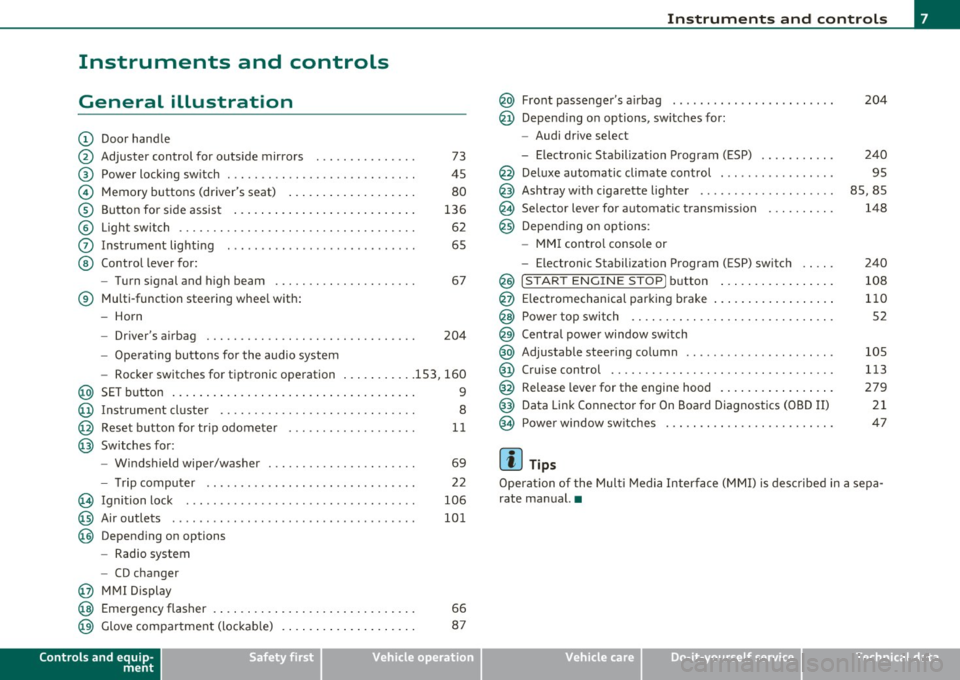
General illustration
(D Door handle
@ Adjuster control for outside mirrors . . . . . . . . . . . . . . . 73
@ Power locking switch . . . . . . . . . . . . . . . . . . . . . . . . . . . . 45
© Memory buttons (driver's seat) . . . . . . . . . . . . . . . . . . . 80
® Button for side assist . . . . . . . . . . . . . . . . . . . . . . . . . . . 136
© Light switch . . . . . . . . . . . . . . . . . . . . . . . . . . . . . . . . . . . 62
0 Instrument lighting . . . . . . . . . . . . . . . . . . . . . . . . . . . . 65
@ Control lever for:
- Turn signal and high beam . . . . . . . . . . . . . . . . . . . . . 67
® Multi-function steering wheel with:
- Horn
- Driver's airbag . . . . . . . . . . . . . . . . . . . . . . . . . . . . . . . 204
- Operating buttons for the audio system
- Rocker switches for tiptronic operation ... .. ...... 153, 160
@ SET button . . . . . . . . . . . . . . . . . . . . . . . . . . . . . . . . . . . . 9
@ Instrument cluster . . . . . . . . . . . . . . . . . . . . . . . . . . . . . 8
@ Reset button for trip odometer . . . . . . . . . . . . . . . . . . . 11
@ Switches for:
- Windshield wiper/washer . . . . . . . . . . . . . . . . . . . . . . 69
- Tr ip computer .. .......... . .. .... .. .. .... ... .
@ Ignition lock ..... .. .................. ... .. ... .
@ Air outlets ........... ... .. ..... ... ........... .
@ Depending on options
- Radio system
- CD changer
@ MMI Display
22
106
101
@ Emergency flasher . . . . . . . . . . . . . . . . . . . . . . . . . . . . . . 66
@ Glove compartment (lockab le) . . . . . . . . . . . . . . . . . . . . 87
Controls and equip
ment Safety first
Instruments and controls
@ Front passenger
's a irbag ..... .. .. .. . .. .. .. .. .. . .
@ Depending on options, sw itches for :
- Audi drive select
- Electronic Stabilization Program (ESP) ... . .... .. .
@ Deluxe automatic climate control . .. ............. .
@ Ashtray w ith cigarette lighter ........ .... .. .. .. . .
@ Se lector lever for automat ic transmission ....... .. .
@ Depending on options:
- MM I control conso le or
- Electronic Stabilization Program (ESP) switch .. .. .
@ !START ENGINE STOP] button ... ............. .
@ Electromechanical parking brake .............. ... .
@ Power top switch .. .. .. .. .. .. .. ....... ...... .. .
@ Central power window switch
@ Adjustable steering column ... ..... .... .. . ... ... .
@ Cruise control ......... ...... .. .. .. .. ......... .
@ Release lever for the engine hood ........ .. .... .. .
@ Data Link Connector for On Board Diagnostics (OBD II)
@ Power window switches ........................ .
[ i ] Tips
204
240
95
85,85
148
240 108
110 52
105
113
279
21
47
Operation of the Multi Media Interface (MMI) is described in a sepa
rate manual. •
Vehicle care Technical data
Page 14 of 364
Instruments and warning /indicator lights
Warning/indicator lights
Overview
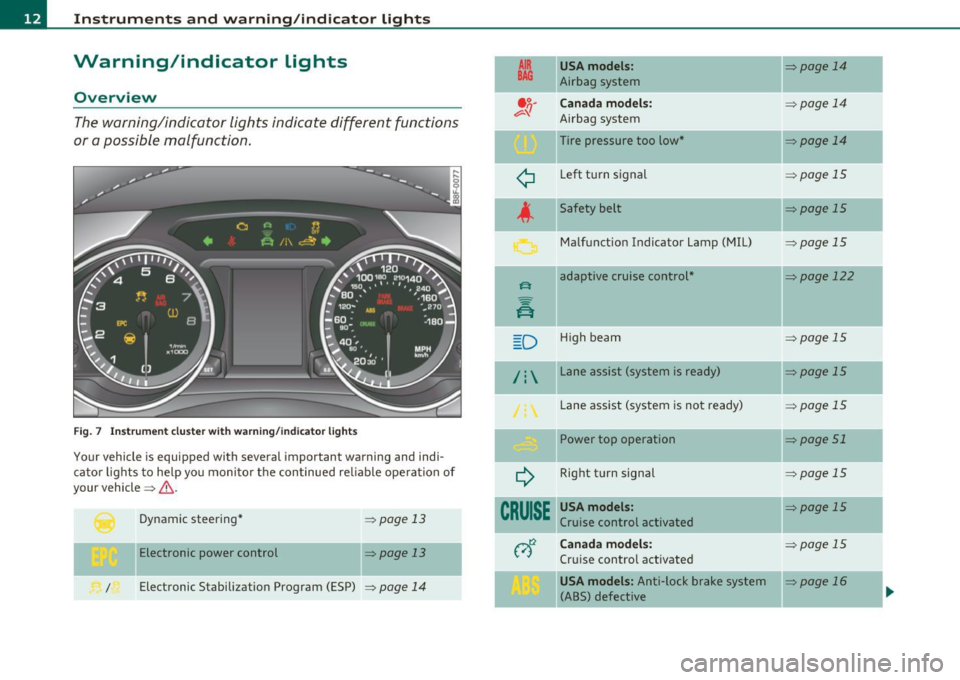
The warning/indicator lights indicate different functions
or a possible malfunction.
F ig . 7 Inst rum ent cluster with wa rning/in dicato r lig hts
Your vehicle is equipped with several important warning and indi
cato r lights to he lp yo u moni to r the continued re liable ope ration of
your vehicle=> &.
I
Dynamic steering *
Electronic power control => page 13
=> page 13
Electronic Stabilization
Program (ESP) => page 14
AIR
BAG
USA model s:
Airbag system
Canada model s:
Airbag system
Tire pressure too low *
Left t urn s ignal
Safety belt Ma lfunction Indicator Lamp (MIL)
adaptive cruise control*
D Hi gh beam
/ : Lane assist (system is ready)
Lane assist (system is not ready)
Power top operation
Right turn signal
CRUISE
USA models:
Cruise control activated
-
Canada model s:
Cruise contro l activated
=>page 14
=> page 1 4
=> page 14
=> page 15
=>page 15
=>page 15
=>page 122
=> page 15
:> page 15
=> page 15
=> page 51
=> page 15
=>page 15
=> page 15
USA models:
Anti-lock brake system => page 16
(ABS) defective
-
Page 15 of 364
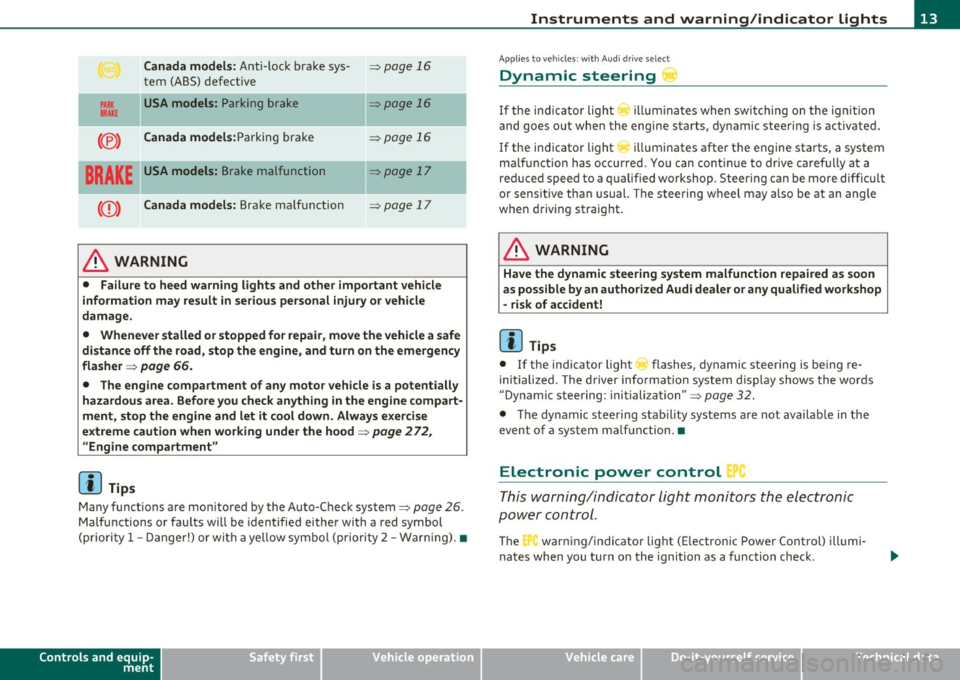
Canada models: Anti-lock brake sys-=>page 16
tern (ABS) defective
PARK USA models: Parking bra ke =>page 16
BRAKE
(® ) Canada model s:Parking br ake
=> page 16
--
BRAKE
USA models : Brake malfunction :::> page 17
Canada models: Bra ke malfunction
=> page 17
& WARNING
• Failure to heed warning lights and other important vehicle
information may result in serious per sonal injury or vehicle
damage.
• Whenever stalled or stopped for repair , move the vehicle a safe
di stance off the road, stop the engine, and turn on the emergency
flashe r
=> page 66.
• The engine compartment of any motor vehicle is a potentially
hazardous area . Before you check anything in the engine compart
ment, stop the engine and let it cool down . Always exercise
extreme caution when working under the hood =>
page 2 72,
" Engine compartment "
(I) Tips
Many funct ions a re mo nitored by the Auto-Check system=> page 26.
Ma lfunctions or faults w ill be identified either with a red symbol
(pr io rit y
1 -Dan ger!) or wi th a ye llow symbo l (priority 2 -War ning). •
Controls and equip
ment Safety first
Instruments and warning
/indicator lights
App lies to veh icles : w ith Aud i dr ive select
Dynamic steering
If the ind icator light() illumina te s w hen swi tching on t he ig nition
and goes ou t when the engine starts, dynamic steering is activated.
If the ind icator light
r ill uminates after the engine sta rts, a system
ma lfunct ion has occurred . Yo u can co ntinue to drive caref ully at a
re duced speed to a q ualified workshop. Steering can be more diffic ult
or sensit ive tha n usual. The stee ring w heel may a lso be at an angle
when driving straight.
& WARNING
Have the dynamic steering system malfunction repaired as soon
as possible by an author ized Audi d ealer or any qualified workshop
- risk of accident!
[ i ] Tips
• If the indicator light ~ flashes, dynamic stee ring is being re
initialized. The d river info rmation system display shows the words
"Dynamic steering : initialization" =>
page 32.
• The dy namic steering stab ility systems a re not availab le in the
event of a system ma lfunction .•
Electronic power control '
This warning/indicator Light monitors t he electronic
pow er control .
The C'., warning/indicator light (E lectronic Powe r Cont rol) illumi
nates when you turn o n the ignition as a function check .
Vehicle care Technical data
Page 30 of 364
Driver information display
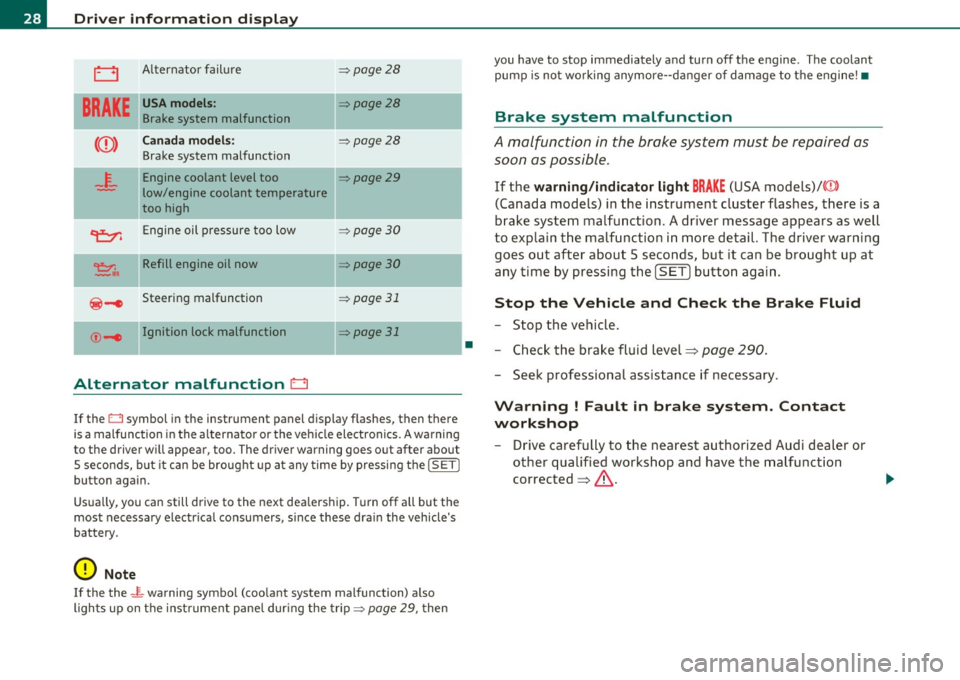
0 Alternator failure => page 28
BRAKE
USA models: ::::>page28
Brake system malfunction
Canada models: ::::>page28
Brake system malfunction
4.
Engine coolant level too ::::>page29
low/engine coolant temperature
too high
II
~ Engine oil pressure too low =:>page 30
~,. Refill engine oil now =:> page 30
@-e Steering malfunction => page 31
©-1 Ignition lock malfunction II=> page 31
Alternator malfunction D
If the O symbol in the instrument panel display flashes, then there
is a malfunction in the alt ernator or the vehicle electronics. A warning
to the driver will appear, too. The driver warning goes out after about
5 seconds, b ut it can be brought up at any time by pressing the
!SET I
button again.
Usually, you can still drive to the next dealership. T urn off all but the
most necessary e lectr ica l consumers, s ince these dra in the vehicle's
battery.
0 Note
If the the _ i,_ warning symbo l (coo lant system malfunction) a lso
lights up on the instrument panel during the trip::::>
page 29, then
•
you have to stop immediately and turn off the engine . The coolant
pump is not work ing anymore- -danger of damage to the engine! •
Brake system malfunction
A malfunction in the brake system must be repaired as
soon as possible .
If the warning/indicator light BRAKE (USA models)/ ((D)
(Canada models) in the instrument cluster flashes, there is a
brake system malfunction. A driver message appears as well
to explain the malfunction in more detail. The driver warning
goes out after about 5 seconds, but it can be brought up at
any time by pressing the
[SET ] button again.
Stop the Vehicle and Check the Brake Fluid
-Stop the vehicle.
- Check the brake fluid level=>
page 290.
-Seek professional assistance if necessary .
Warning ! Fault in brake system. Contact
workshop
- Drive carefully to the nearest authorized Audi dealer or
other qualified workshop and have the malfunction
corrected =>,& .
Page 33 of 364

Steering malfunction@-
If there is a malfunction in the electronic steering column
lock, the steering cannot be unlocked.
If the ~- symbol in the display blinks, there is a malfunction
in the electronic steering column lock . A driver message
appears as well to explain the malf unction in more detail.
The driver warning goes out after about 5 seconds, b ut it can
be brought up at any time by pressing the
[ SET] button
again.
Stop the vehicle and turn off the engine. Steering
defecti ve
- Obtain professional assistance .
- Do
not tow you r vehicle .
& WARNING
Your vehicle must not be towed in t he e vent of a malfun ctio n in
the e lec tronic ste ering column lo ck because it cannot b e steered
due t o the lo cked steering.
If it is t owed with the stee ring locked ,
t her e is th e risk of an ac cident.
(I) Tips
The symbo l's appearance m igh t be d ifferen t in some mode ls. •
Ignition lock malfunction@-
A malfunction in the ignition lock must be repaired imme
diately.
If the ©- symbol in the display blinks, there is a malfunct ion
in the electronic ignition lock . A driver message appears as
well to explain the malfunct ion in more deta il. The dr iver
Controls and equip
ment Safety first
Dri
ver information display
warning goes out after about 5 seconds, but it can be
brought up at any time by pressing the
(S ET] button aga in
Defective ignition switch Get it serviced!
- Do not turn the engine off.
- Drive immed iately to an author ized serv ice facility to have
the malfunct ion corrected.
If the re is a ma lf u nction in the e lectronic ignition lock , the ignit ion
cannot be tur ned off . Drive immediately to an authorized service
facility to have the cause of the ma lfunct ion corrected.
On vehicles with convenience key*, t he eng ine shou ld not be sw itched
off using the start/stop button because the engine cannot be started
again after the ignition has been swi tched o ff.
[ i ] Tips
Th e symbo l's appea ra nce m ight be different in some models. •
Yellow symbols
Ayellow symbol means WARNING.
-0)
9 a:
ill
Fig. 22 Displ ay:
Yello w warni ng
s ymb ol
Yellow symbols ind icate a prior ity 2 malfunction -Warning!
Vehicle care Technical data
Page 34 of 364
Driver information display
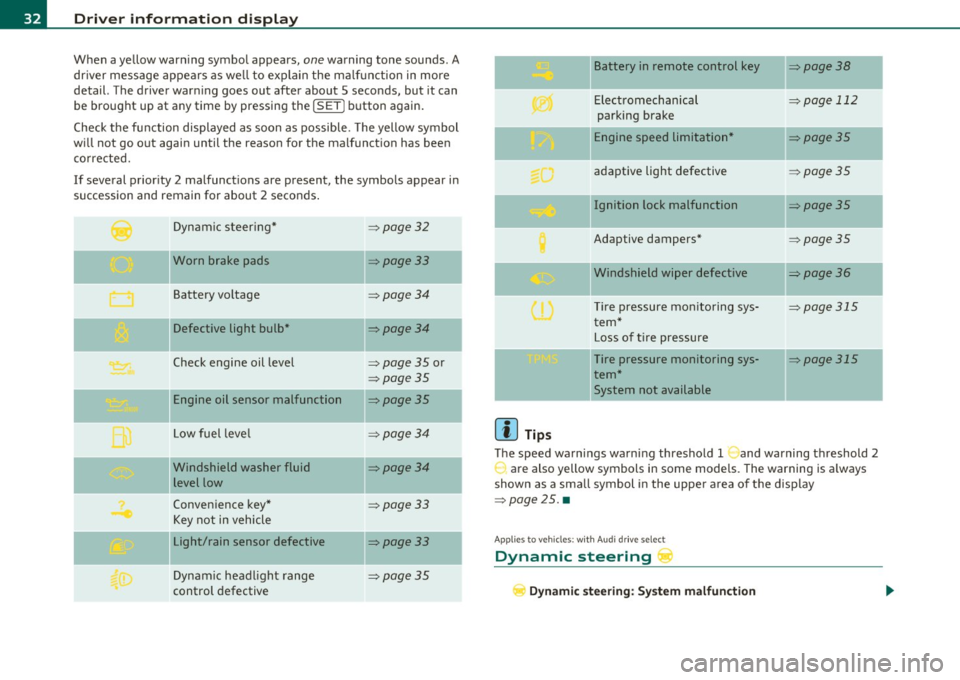
When a yellow warning symbol appears, one warning tone sounds. A
dr iver message appears as well to explain the ma lfunction in more
detail. The driver warning goes out after about 5 seconds, but it can
be brought up at any time by pressing the !SET] button again.
Check the function displayed as soon as possible. The yellow symbol
will not go out again until the reason for the malfunction has been
corrected.
If several priority 2 malfunctions are present, the symbols appear in
succession and remain for about 2 seconds .
Dynamic steer ing*
=:>page 32
'O' I I , Worn brake pads =:>page33
Battery vo ltage => page34
Defective light bulb* =>page34
Check engine oil level => page 35 or
=>page 35
Engine oil sensor malfunction =:>page35
--
Low fuel leve l =>page34
Windshield washer fluid =>page34
level low
Convenience key*
=>page 33
Key not in vehicle
Light/rain sensor defective
=:>page33
--
Dynamic headlight range => page 35
control defective
[{] Tips
Battery in remote control key
Electromechanical
parking brake
Engine speed limitation*
adaptive light defective
Ignition lock malfunction
Adaptive dampers*
Windshield wiper defective
T ire pressure monitoring sys
tem*
Loss of tire pressure
Tire pressure monitoring sys
tem* System not available
=>page 38
-
=> page 112
-
=>page 35
=> page 35
=> page 35
=>page 35
=>page 36
-
=> page 315
=> page 315
The speed warnings warning threshold 1 and warning threshold 2
are also yellow symbols in some models. The warning is a lways
shown as a small symbol in the uppe r area of the display
=>page 25. •
Appli es to vehicles : wit h Au di dr iv e se lec t
Dynamic steering r
Dynamic steering: System malfunction
Page 35 of 364

This driver message and the symbol,;;:;,. appear when a system
malfunction occurs during travel. You can continue to drive carefully
at a reduced speed to a qualified workshop. Steering can be more
difficult or sensitive than usual. The steering whee l can also be at an
angle when driving straight .
Dynamic steering: initialization
If this driver message appears and the indicator lightl, is flash ing on
the instrument panel, dynamic steering is being reinitialized . Once
you start the engine after this is finished, the steering wheel wi ll be
easy to move. Re -initializat ion might be necessary if the steering
wheel was moved hard to the left and right while the vehicle was not
moving. The display goes out as soon as initial izat io n is complete.
& WARNING
Have the dynamic steering system malfunction repaired as soon
as possible by an authorized Audi dealer or any qualified workshop
- risk of accident!
[I) Tips
The dynamic steer ing stability systems are not ava ilab le in the event
of a system ma lfunct ion .•
Ap plies to ve hicles : w it h c onven ien ce key
Key not in vehicle
Key not in vehicle
This reminder appears along with the symbol if the master key is
removed from the vehicle with the engine running. It is int ended to
remind you (e.g. when chang ing drivers) not to continue the journey
without the master key.
If the master key is no longer in the veh icle, you cannot sw itch off the
ignition after stopping the engine and you a lso cannot start the
engine again. You also cannot lock the veh icle from the outs ide .•
Controls and equip
ment Safety first
Driver information display
Light/rain sensor defective
·)
Automatic headlights/automatic wipers defective
If the symbol ill um inates , the light sensor has failed. For safety
reasons the low beams are turned o n permanently with the switch in
AUTO . However, you can continue to turn the lights on and off using
the light switch . In the case of a defect in the ra in sensor, the wind
shield wiper lever functions are still avai lable . Have the light/rain
sensor checked as soon as possib le by an autho rized Audi dealer. •
Worn brake pads ~
Brake pads!
If the warning light illuminates, immediately contact your authorized
Audi dealer or qualified workshop to have all brake pads inspected .
On USA mode ls the warning light comes on together with the
war ning light BRAKE . Both sets of b rake pads on an axle must always
be replaced at the same time.
& WARNING
Driving with bad brakes can cause a collision and serious personal
injury .
• If the warning light and the warning light
BRAKE1> with the
message Brake pads! comes on in the instrument cluster display,
immediately contact your authorized Audi dealer or qualified
workshop to have all brake pads checked or replaced if necessary. •
ll BRAKE : USA mode ls on ly
Vehicle care Technical data
Page 68 of 364

Clear vision
when outside light is very low . This is to r emind you , the driver , to
s witch on the headlight s before it get s too dark.
• Canada models : inst rument p anel illumin ation will stay br ight
regardles s of the inten sity of ambient light. Alw ay s be aware of
changes in outs ide light conditions wh ile you are driving. Respond
in time to fading daylight by turning the light switch to po sition
io
(or "AUTO" if your car is equipped with this feat ure) to turn on your
headlights .•
A ppli es to ve hicles : wit h xe non h eadlights
Xenon headlights
After starting the engine, the xenon head lights are automat ically
adjusted to the load and ang le of t he vehicle (for e xamp le, dur ing
acce leration and brak ing) . This prevents oncom ing traffic from expe
r ienc ing unnecessary headlight glare from yo ur xenon head lights.
If the sy ste m is not opera ting p roperly, a warning symbol in t he Auto
Check Control is displayed~
page 35. •
App lies to vehicles : w ith adapti ve lig ht
Adaptive Light
Wh en driving around bends, the relevant ar ea of the road
is better illuminated .
Fig . 68 Adaptive lig ht
w hen driving
The benefit of adaptive light is that the curve and the edge of the road
are better illum inate d~ fig. 68. Dyn am ic a daptive light is con trolled
automatically, depend ing on ve hicle speed and steering whee l angle .
When driving around bends, the headlights are contro lled accord ing
t o s teer ing whee l angle . So t hat there is no bla ck ho le ahea d of the
vehicle , the two ma in beams pivot at d ifferent angles.
[I] Tips
The system works above a speed of about 6 mph (10 km/h) .•
Emergency flashers A
T h e eme rgency flash ers m akes ot her mot ori st s a ware
that you or y our vehicle a re in an eme rgency situation.
Fig. 69 Eme rgenc y
fla she r sw itch
Pr ess the swi tch~ => fig. 69 to tu rn the eme rgenc y
flash ers on or of f.
When the e merge ncy flashers are on, all fou r turn sig nals blink at the
same t ime. The turn signal indicator lights¢¢ in the i nstr ument
cl uste r, as well as the ligh t in the eme rge ncy flasher switch ~ blink
likewise . The emergency flashers also wo rk when the ignition is
t urned off. .,_
Page 69 of 364

The emergency flashers will turn on automatically if you are in an acc ident where the airbag has deployed.
(I) Tips
You shou ld turn on th e emergency flashers when :
• you are the last vehicle standing in a traffic jam so that any other
vehicles com ing can see yo u, or when
• your vehicle has broken down or you are in an emergency situa
tion, or when
• your vehicle is being towed by a tow truck or if you are towing
ano ther vehicle behind you .•
Turn signals -¢ ¢ and high beam 1[D lever
The lever on the le~ side of the steering column is used to
operate the turn signals and the high beam as well as the
headlight flasher .
Fig. 70 Turn si gnal
an d hi gh beam leve r
The turn s ignal and high beam lever has the follow ing func
tions:
Con tro ls a nd e quip
m en t Vehicle
OP-eration
Clear vision
Turn signals
¢ ¢ (D @
- Push the lever up as far as it can go to turn on the right
turn signal or down to tu rn on the le ft turn signal
~ fig. 70.
- Move the lever br iefly until you meet resistance and
release it to flash three times.
- Move the lever (up or down) until you meet res istance a nd
hold it there to determine the flashing t ime for the turn
signals.
High beam ~D ®
- Push the lev er forward to switc h on the high beam .
- Pu ll the leve r back towards you to switch o ff the high
beam.
Headlight flasher ~D ©
- Pull the lever toward the steering wheel to use the head
light flasher.
Notes on these featu res
• Th e turn signals only work with the ign ition t urne d on. The ind i
cator lights ¢ or ¢ in the instrument cluster also blink.
• After you have t urned a corner, the tu rn signal switches off auto
matically.
• The
high beam works only when the head lights are on . The ind i
cator light ~Din the instrument cluster illuminates when the high
beams are on.
• T he
headlight flasher works only as long as you ho ld the lever -
even if there are no lights switched on . The ind icator light ~D in the
instrument cluster illuminates when you use the headlight flasher. _.,
Vehicle care Do-it-yourselt service iTechnical data
Page 79 of 364

Seats and storage
General recommendations
Why is your seat adjustment so important?
The safety belts and the airbag system can only provide
maximum protection if the front seats are correctly
adju sted.
Th ere a re various ways of adjusting t he front seats to provide safe and
comfortable support for the driver and the front passenger . Ad just
your seat properly so that :
• you can easily and quickly reach a ll the switc hes and contro ls in the
ins trumen t pa nel
• your body is properly supported thus reducing phys ica l stress and
fatigue
• the safety be lts and airbag system can offer maximum protection
=>
page 200 .
In the following sections, you w ill see exact ly how you can best ad just
your sea ts .
Th ere are special regulations a nd instr uctions for install ing a child
safety seat on the front passenger's sea t. Always follow the informa
tion regarding child safety p rovided in=>
page 222, "Child Safety ".
& WARNING
Incorrect seating posit ion of the dri ver and all other passengers
can result in seriou s personal injury.
• Always keep your feet on the floor when the vehicle is in
motion -never put your feet on top of the instrument panel, out
of the window o r on top of the seat cush ion. This applies especially
to the passengers.
If your seating po sition is incorrect, you
increase the ri sk of injury in the case of sudden braking or an acci-
Controls and equip
ment Safety first
Seats and storage
& WARNING
(con tinu ed)
dent . If the airbag inflates and the seating position is incorrect ,
this could result in per sonal injury or even death .
• It is important for both the dri ver and front passenger to keep
a distan ce of at least 10 inche s (25 cm) between themselves and
the steering wheel and /or instrument panel. If you 're sitting any
closer than this , the airbag system cannot protect you properly. In
addition, the front seats and head restraints must be adjusted to
your body height so that they can give you maximum protection .
• Always try to keep as much distance as possible between your
self and the steering wheel or instrument panel.
• Do not adjust the driver's or front passenger 's seat while the
vehicle is moving. You r seat may move unexpectedly , causing
sudden loss of vehicle control and personal injury . If you adjust
your seat while the vehicle is moving , you are out of position. •
Driver's seat
The correct seat position is important for saf e and
re lax ed driving.
W e recomme nd that you a djust the drive r's sea t in the
f ollowing man ner :
- Ad just the seat in fore and aft direction so that you can
easily pus h the pedals to the floor w hile keeping your
knees slightly bent=>
& in "Why is yo ur seat a djus tme nt
so importa nt?" .
- Adjust the seatback so that when yo u sit with yo ur back
agai nst t he seatback , you can st ill grasp t he top of the
steering w heel. ..,
Vehicle care Technical data