park assist AUDI A5 CABRIOLET 2013 User Guide
[x] Cancel search | Manufacturer: AUDI, Model Year: 2013, Model line: A5 CABRIOLET, Model: AUDI A5 CABRIOLET 2013Pages: 290, PDF Size: 72.35 MB
Page 91 of 290
temporarily to the manual shift program in or
der to adjust the gears to the driving condi
tions by hand
¢ page 90.
On slopes, activate the parking brake first and
then move the selector lever to the P position.
This prevents too much stress from being placed on the locking mechanism.
Vehicles with multitronic transmission : Your
vehicle is equipped with
hill hold assist allow
ing you to start while on an incline. The sys
tem is activated when the brake pedal is
pressed down and held
for a few seconds. The
brake p ressure will hold for a moment after
the brake pedal loosens to prevent the vehicle
from rolling backwards while starting up.
A WARNING
-The vehicle can also roll when the engine
is stopped.
- Unintended vehicle movement can cause
serious injury.
- Never leave your vehicle with the engine
running while in gear. If you must leave
your vehicle when the engine is running,
activate the parking brake and move the
selector lever to P.
- Power is still transmitted to the wheels
when the engine is running at idle. To
prevent the vehicle from "creeping", you
must keep your foot on the brake when
the engine is running and the selector
lever is in D/S or R or "tiptronic" mode is
selected.
- Do not press the accelerator pedal when
changing the selector lever position
while the vehicle is stationary and the
engine is running .
- Never shift into R or P while driving.
- Before driving down a steep slope, re-
duce your speed and shift into a lower
gear with "tiptronic".
- Do not ride the brakes or press the brake
pedal too often or too long when driving
down a hill. Constant braking causes the
brakes to overheat and substantially re
duces braking performance, increases
Transmission 89
braking distance or causes complete fail
ure of the brake system.
- To prevent the vehicle from rolling back
when stopping on inclines, always hold it
in place with the brake pedal or parking
brake.
- Never hold the vehicle on an incline with a slipping clutch. The clutch opens auto
matically when it becomes too hot from
the overload . An indicator lamo
[O] illu
minates and a driver message appears
¢ page 92 when the clutch is overload
ed.
- If the engine must remain running, never
have any driving position engaged when
checking under the hood . Make sure the
selector lever has securely engaged and
is locked in P with the parking brake set
¢ page 205, Engine compartment. Oth
erwise, any increase in engine speed may
set the vehicle in motion, even with the parking brake applied.
(D Note
- S tronic ®- and tiptronic transmission:
When stopping on an incline, do not try
to hold the vehicle in place by pressing
the accelerator pedal while a driving gear
is selected. This can cause the transmis
sion to overheat and can damage it. Acti
vate the parking brake or press the brake
pedal to prevent the vehicle from rolling .
- S tronic ®- and tiptronic transmission: Al
lowing the vehicle to roll when the en
gine is stopped and the selector lever is
in N will damage the transmission be
cause it is not lubricated under those cir
cumstances.
(D Tips
For safety reasons, the parking brake is re
leased automatically only when the driv
er's safety belt is engaged in the buckle.
Page 112 of 290
110 Park assist
Park assist
Parking system
Applies to vehicles: with pa rking system
Different park assist systems may be used for
parking or maneuvering, depending on the
vehicle's features.
Parking system (rear)*:
For the parking system (rear), the acoustic
park assist system is installed in the rear of
the vehicle
¢ page 110.
The rear parking assist system uses ultrason ic
sensors to determine the distance of the vehi
cle from a detected obstacle. There are a total
of four sensors located on the rear bumper
(two in the middle and two on the sides).
Parking system (rear, with rear view
camera)*:
For the parking system (rear, with rear view
camera),
the rear acoustic park assist system
is integrated in the rear of the vehicle and the
rear view camera is integrated in the rear lid
¢page 113.
The parking system (rear, with rear view cam
era)
uses ultrasonic sensors to determine the
distance of the vehicle from a detected obsta
cle . There are a total of four sensors located
on the rear bumper (two in the middle and
two on the sides).
Parking system (rear)
Rear acoustic park assist
App lies to vehicles: with parking system (rear)
The rear acoustic park assist warns you of ob
stacles or objects behind your car.
Description
The rear acoustic parking ass ist system deter
mines the distance of the vehicle from an ob
stacle using ultrasonic sensors. There are 4
sensors in the rear bumper.
The range at which the senso rs start to meas
ure is
about :
To the side 2 ft (0.60 m)
Center rear 5.2 ft (1.60 m)
Activation
Acoustic parking assist is activated automati
ca lly when
reverse gear is engaged. A brief
tone confirms that the system is activated.
Warning tones
Distance warning is given by warn ing tones
which are generated by the rear signal genera
tor. The volume and the pitch of the warning
tones can be adjusted in the MMI*
¢page 111.
Reversing
Distance warning when reversing starts when
an obstacle is detected in the range of the
parking assist system . As the distance de
creases, the time interval between the audible
tones becomes shorter.
When the distance is less than 1ft (0.30 m),
the tone becomes continuous. At this point
you should stop backing up .
Please note that low objects already signalled
by a warning can disappear from the system's
detection range and will not continue to be
signalled .
If the distance to an obstacle remains the
same, the volume of the distance warning is
gradua lly reduced after about 4 seconds (this
does not apply in the continous tone range).
Approaching another obstacle will resu lt in
the distance warning sounding at the normal
volume again.
Malfunctions in the system
If a warning tone is audible for about five sec
onds when you turn on the ignition , there is a
malfunction in the system. Have the problem
corrected by your authorized Audi dealer.
Keep the sensors in the rear bumper clean and
free from ice so that the acoustic park assist
system can function properly.
Page 113 of 290
_& WARNING
-Sensors have dead spaces in which ob
jects cannot be detected. Be especially
alert for small children and animals,
since they are not always detected by the
sensors.
- The acoustic park ing system is not a sub
st itute for the driver 's own caution and
alertness. Ultimate responsibi lity always
remains with the driver during parking
and simi lar maneuvers . Always watch
where you are driving.
- You should always adjust the volume and
frequency of the warning tones so that
yo u can easily hear the acoustic distance
warning even if the radio is p laying, the
air-cond itioner blower is on High or there
is a high level of outside noise .
- Check the settings whenever anyone
else has driven the vehicle before you.
(D Note
-Remember that low obstacles for which
a warn ing has already been issued may
"dive" below the system's sensing zone if
the vehicle is being backed up closer. In
this case, the warning sound shutting off
does
not in dicate that you have cleared
the obstacle . Instead, impact is immi
nent.
- Objects such as trailer hitches, chains,
narrow posts or fences covered by a th in
l ayer of paint may not always be detect
ed by the system. They can still damage
your vehicle without warning .
@ Tips
Keep the sensors in the rear bumper clean
and free of snow and ice so that the acous
tic parking assist system can function
properly.
Park assist 111
Adjusting the warning tones
Applies to vehicles: with parking system (rear)
The warning tones can be adjusted in the
MM!*.
.. Select: I CAR ! function button > Parking sys
tem .
Or
.. Select:
I CAR I function button > Car sys
tems *
control button > Driver assist > Park
ing aid .
- Rear volume -
rear sensor volume
-Rear frequency -rear sensor frequency
-Music volume while parking -when the
parking system is switched on, the volume
of the active audio source is lowered.
The newly ad justed value is briefly heard from
the signal generator. The settings are auto
matically stored and assigned to the master
key with remote control.
Parking system (rear,
with rear view camera)
Introduction
Applies to vehicles: with parking system (rear, with rear
v iew camera}
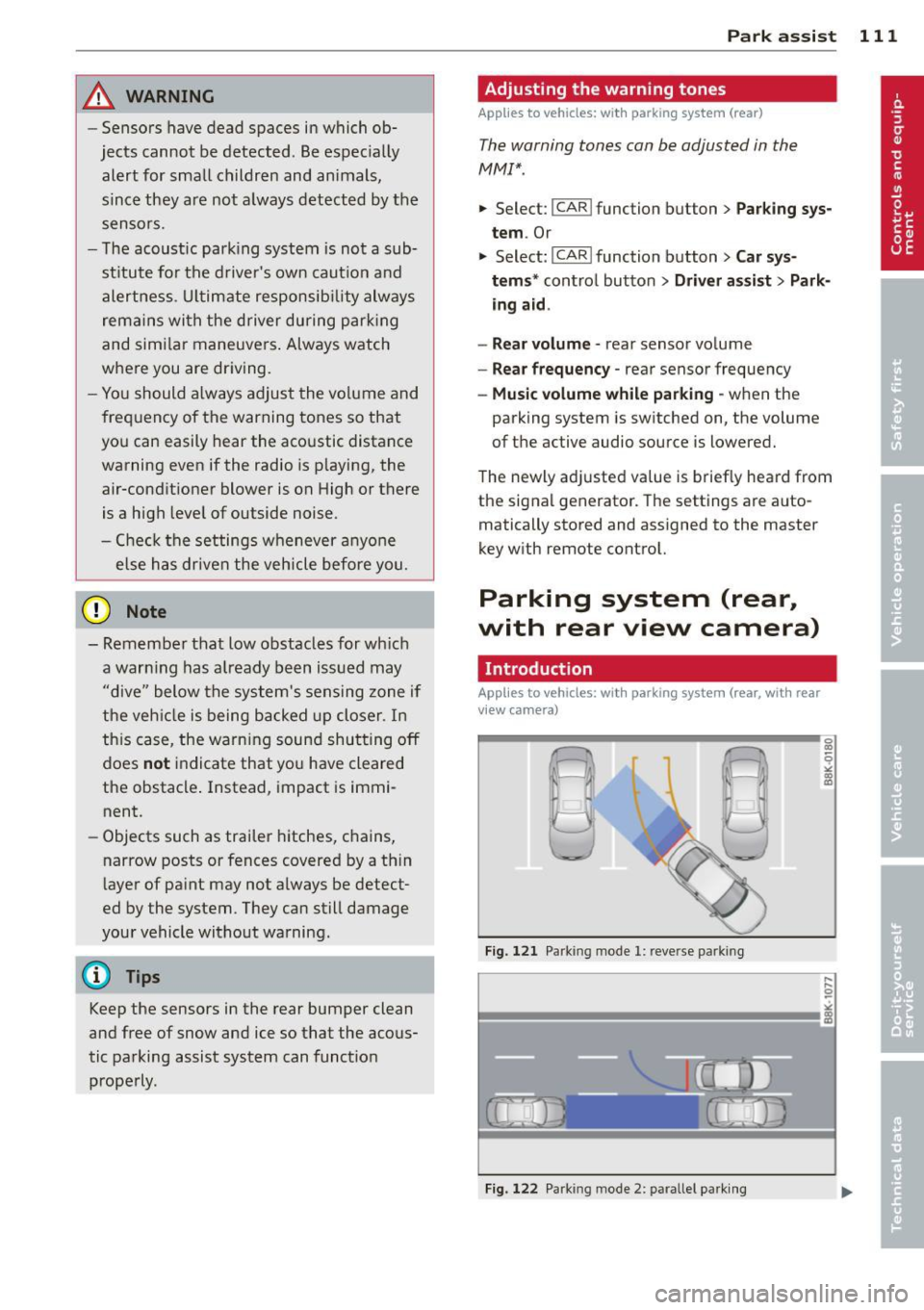
Fig. 121 Parking mode 1: reve rse park ing
Fig. 122 Park ing mode 2: parallel parking
Page 114 of 290
112 Park assist
Vehicles with the parking system are equipped
with a rear view camera in addition to the
acoustic parking system.
You can choose between two modes to assist
you with parking. For example, you can use
"parking mode 1" when parking in a parking
space or garage
c;;, fig . 121. When you want to
park parallel to the edge of the street, select
"parking mode 2" ¢fig .
122.
The rear acoustic park assist system is inte
grated in the rear of the vehicle and the rear
view camera is integrated in the rear lid
c;;, page 113.
A WARNING
- T he rear view camera has blind spots, in
wh ich objects cannot be detected . Be es
pecially careful to check for small chil
dren and animals before backing up.
Small children and animals will not al
ways be detected by the sensors.
General Information
Applies to vehicles: with parking system (rear, with rear
view camera)
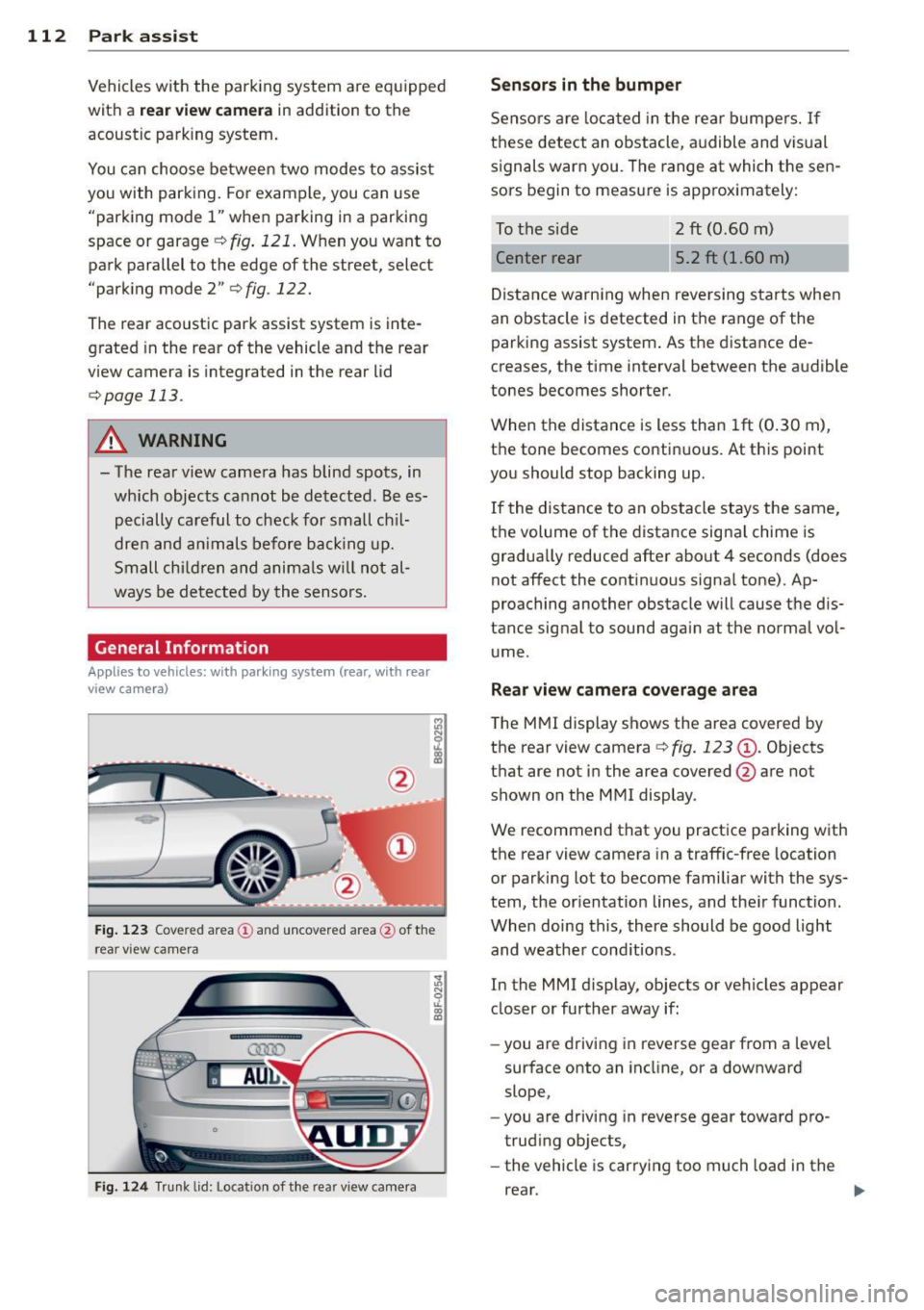
Fig. 123 Cove red area (!) and uncovered area @ of the
rea r view came ra
F ig. 124 Trun k lid : Location of the rear view camera
Sensors in the bumper
Sensors are loca ted in the rear bumpers. If
these detect an obstacle, audible and visual
signals warn you. The range at which the sen
sors begin to measure is approx imately:
To the side 2
ft (0.60 m)
Center rear 5.2 ft (1.60 m)
Distance warning when reversing starts when
an obstacle is detected in the range of the parking assist system . As the distance de
creases, the time interval between the audible
tones becomes shorter.
When the distance is less than 1ft (0.30 m),
the tone becomes continuous. At this point
you should stop backing up.
If the distance to an obstacle stays the same,
the volume of the distance signal chime is
gradually reduced after about 4 seconds (does
not affect the contin uous signa l tone) . Ap
proaching another obstacle will cause the dis
tance signal to sound again at the normal vol
ume.
Rear view camera coverage area
The MMI display shows the area covered by
the rear view camera
c:> fig. 123 (D . Objects
that are not in the area covered @are not
shown on the MMI display .
We recommend that you practice parking with
the rear view camera in a traffic-free location
or parking lot to become familiar with the sys
tem, the orientation lines, and the ir function.
When doing this, there should be good light
and weathe r cond itions.
In the MMI display, objects or vehicles appear
closer or further away if:
- you are driving in reverse gear from a leve l
surface onto an incline, or a downward
slope,
- you are driving in reverse gear toward pro
trud ing objects,
- the vehicle is carrying too much load in the
rear.
Page 115 of 290
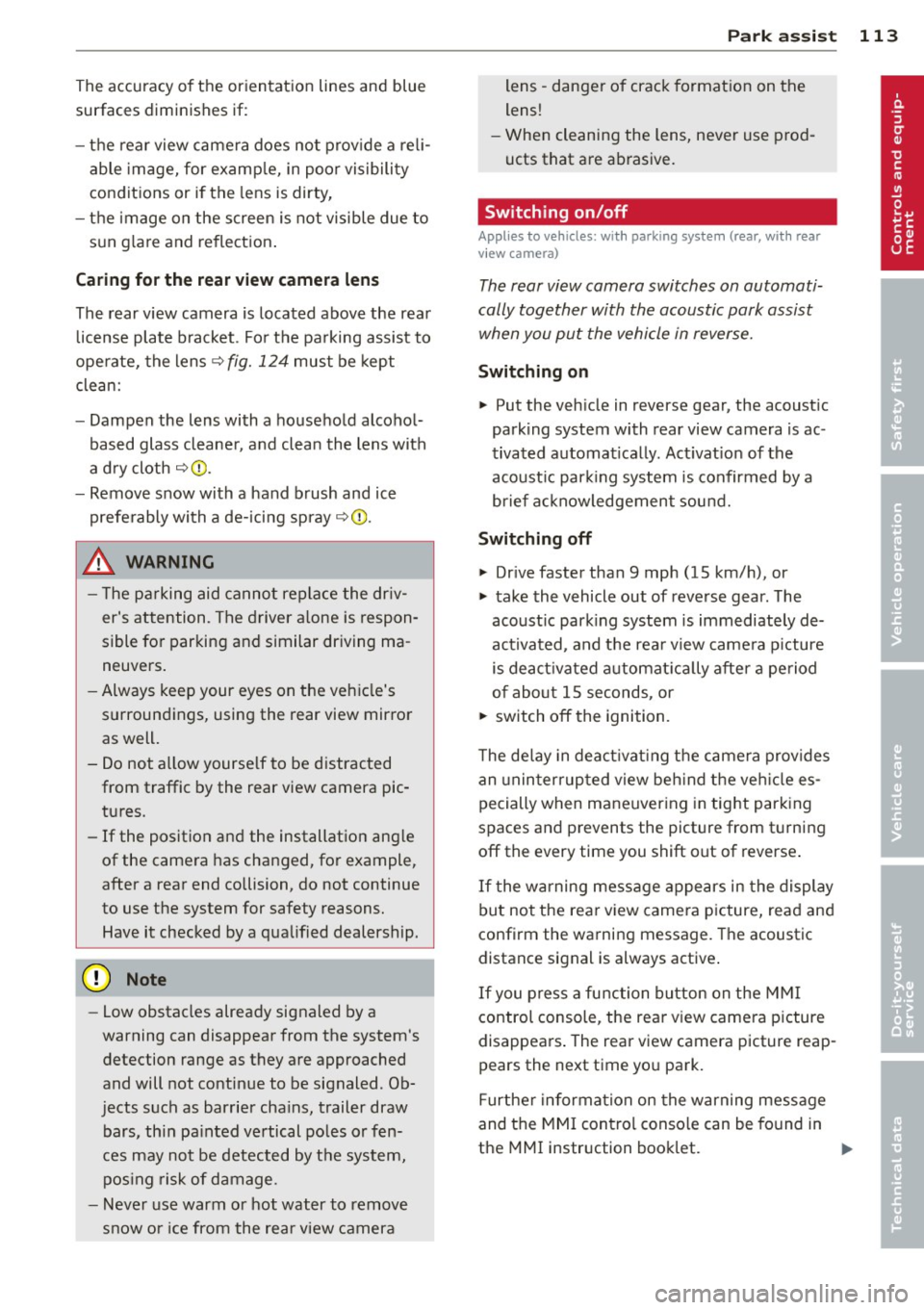
The accuracy of the orientation lines and blue
surfaces diminis hes if:
- the rear view camera does not prov ide a re li
able image, for examp le, in poor vis ibility
conditions or if the lens is dirty,
- the image on the screen is not visible due to
sun g lare and reflection .
Caring for th e rear view came ra lens
The rear view camera is located above the rear
license plate b racket . Fo r the pa rking assist to
ope rate, the lens,=:,
fig. 124 must be kept
clean:
- Dampen the lens with a househo ld alcohol
based glass cleane r, and clean the lens with
a dry cloth
,=:, CD.
- Remove s now with a hand brush and ice
prefe rably with a de-icing spray
,=:, (D .
A WARNING
- T he pa rking aid cannot repla ce the dr iv
er's attention. The driver a lone is respon
sible for parking and similar driving ma
neuvers .
- Always keep your eyes on the vehicle's
su rroundings, using the rear view mirror
as well.
- Do not a llow yourse lf to be d istracted
from traffic by the rear view camera pic
tures.
- If the position and the installation ang le
of the camera has changed, fo r example,
after a rear end collision, do not continue
to use the system for safety reasons. Have it checked by a qua lified dealership.
(D Note
- Low obstacles already signaled by a
warning can disappear from the system's
detection range as they are approached
and will not continue to be signaled . Ob
jects such as barrier cha ins, trailer draw
bars, thin pa inted ve rtical po les o r fe n
ces may not be detected by t he system,
pos ing risk of damage.
- Never use warm or hot water to remove
s n ow or ice from the rear view camera
.
P ark a ssis t 113
lens -dange r of crack format ion on the
lens !
- When cleani ng the lens, never use prod
ucts that a re ab rasive.
Switching on/off
Applies to vehicles: with parking system (rear, with rear
view camera)
The rear view camera switches on automati
cally together with the acoustic park assist
when you put the vehicle in reverse.
Switching on
"' Put the veh icle in reverse gear, the acoust ic
parking system with rear view camera is ac
tivated automat ica lly. Act ivat ion of the
acoust ic par king system is confirmed by a
brief ac knowledgement sou nd.
Switching off
"' Drive faster than 9 mph (15 km/h) , or
"' take the vehicle out of reverse gear . The
acoust ic park ing system is immediate ly de
activated, and the rea r view came ra p icture
is deact ivated a utomat ically afte r a pe riod
o f abo ut 1 5 seconds , or
"' switch off the ignition.
T he de lay in deact ivat ing the came ra prov ides
an unin terrup ted view beh ind the ve hicle es
pe cially when mane uver ing in tig ht park ing
spaces and prevents the picture from t urning
off the every time you shift out of reverse .
If the wa rning mess age ap pears in the dis play
but not the rea r view came ra p icture, read and
confirm the warni ng message. The acoustic
distance signal is always active .
If you press a fu nction button on the M MI
control console, the rea r view came ra p icture
disappears . The rear view camera picture reap
pears the next time yo u pa rk.
Fur the r in forma tion on the warning mess age
and the MMI con tro l conso le can be found in
the MMI instruction book let.
Ill-
Page 116 of 290
114 Park assist
@ Tips
-The rear view camera picture is available
as soon as the MMI Display or the MMI is
switched on, or the start-up phase is
completed.
- Keep the sensors in the rear bumper and
the rear view camera lens clean and free
of snow and ice, so that the parking sys
tem can work properly. Please follow the
additional notes on
~page 116.
Reverse Park ing
Appl ies to vehicles: with parking system (rear, wit h rear
view came ra)
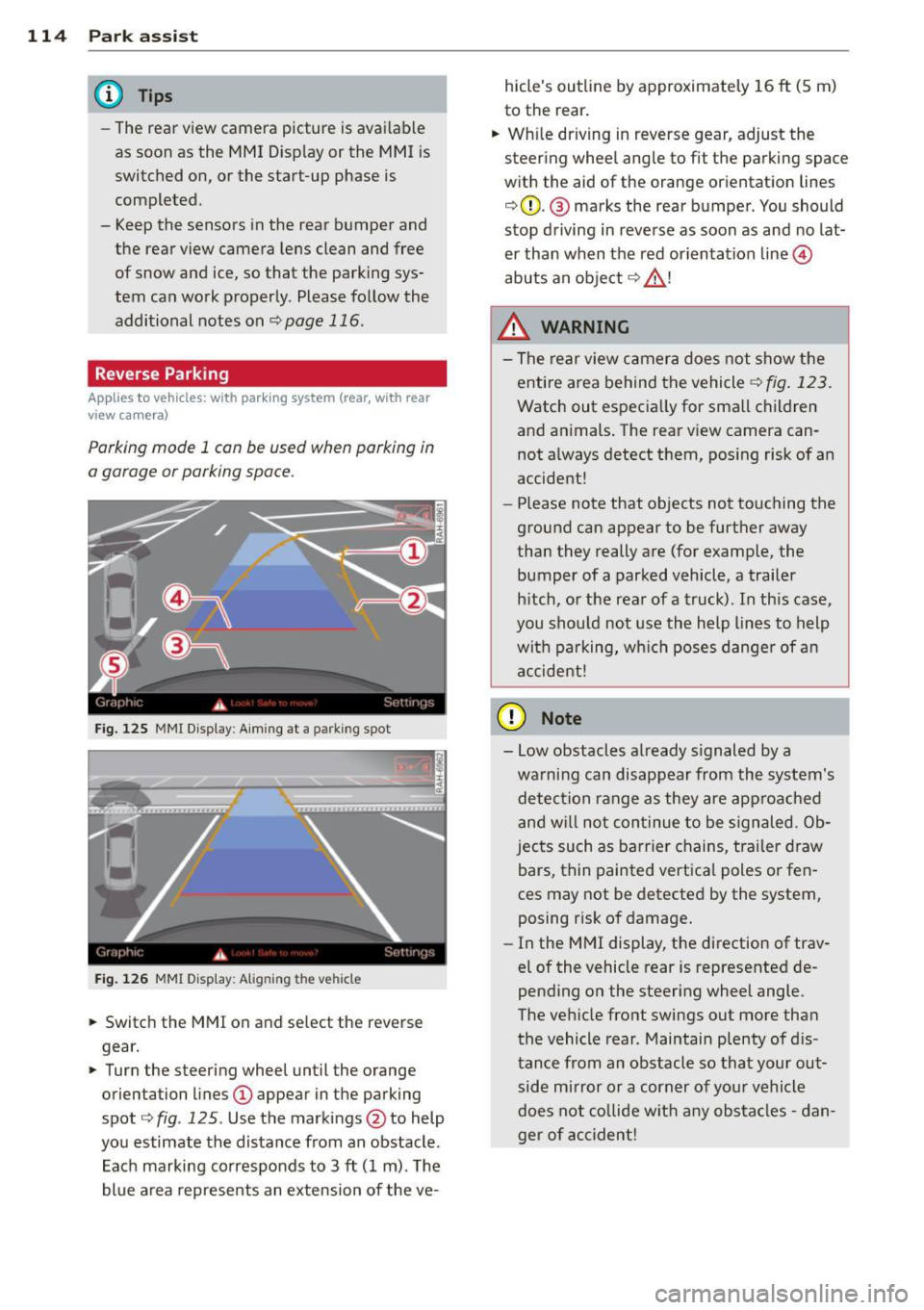
Parking mode 1 can be used when parking in
a garage or parking space.
Fig. 125 MMI Display : Aiming at a parking spot
Fig. 126 MMI Display: Alig ning the vehicle
"' Switch the MMI on and select the reverse
gear.
"' Turn the steering wheel until the orange
orientation lines
(D appear in the parking
spot ¢
fig. 125 . Use the markings @to help
you estimate the distance from an obstacle .
Each marking corresponds to 3
ft (1 m) . The
blue area represents an extension of the ve- hicle's outline by approximately
16
ft (5 m)
to the rear.
"' While driving in reverse gear, adjust the
steering wheel angle to fit the parking space
with the aid of the orange orientation lines
¢ 0 . @ marks the rear bumper . You should
stop driving in reverse as soon as and no lat
er than when the red orientation line©
abuts an object¢_&. !
_& WARNING
-The rear view camera does not show the
entire area behind the vehicle
¢ fig. 123.
Watch out especially for small children
and animals. The rear view camera can
not always detect them, posing risk of an
accident!
- Please note that objects not touching the
ground can appear to be further away
than they really are (for example, the
bumper of a parked vehicle, a trailer
hitch, or the rear of a truck). In this case,
you should not use the help lines to help
with parking, which poses danger of an
accident!
(D Note
- Low obstacles already signaled by a
warning can disappear from the system's detection range as they are approached
and will not continue to be signaled. Ob
jects such as barrier chains, trailer draw
bars, thin painted vertical poles or fen
ces may not be detected by the system,
posing risk of damage.
- In the MMI display, the direction of trav
el of the vehicle rear is represented de
pending on the steering wheel angle.
The vehicle front swings out more than
the vehicle rear . Maintain plenty of dis
tance from an obstacle so that your out side mirror or a corner of your vehicle
does not collide with any obstacles -dan
ger of accident!
Page 117 of 290
Parallel Parking
Applies to vehicles: with parking system (rear, with rear
view ca mera)
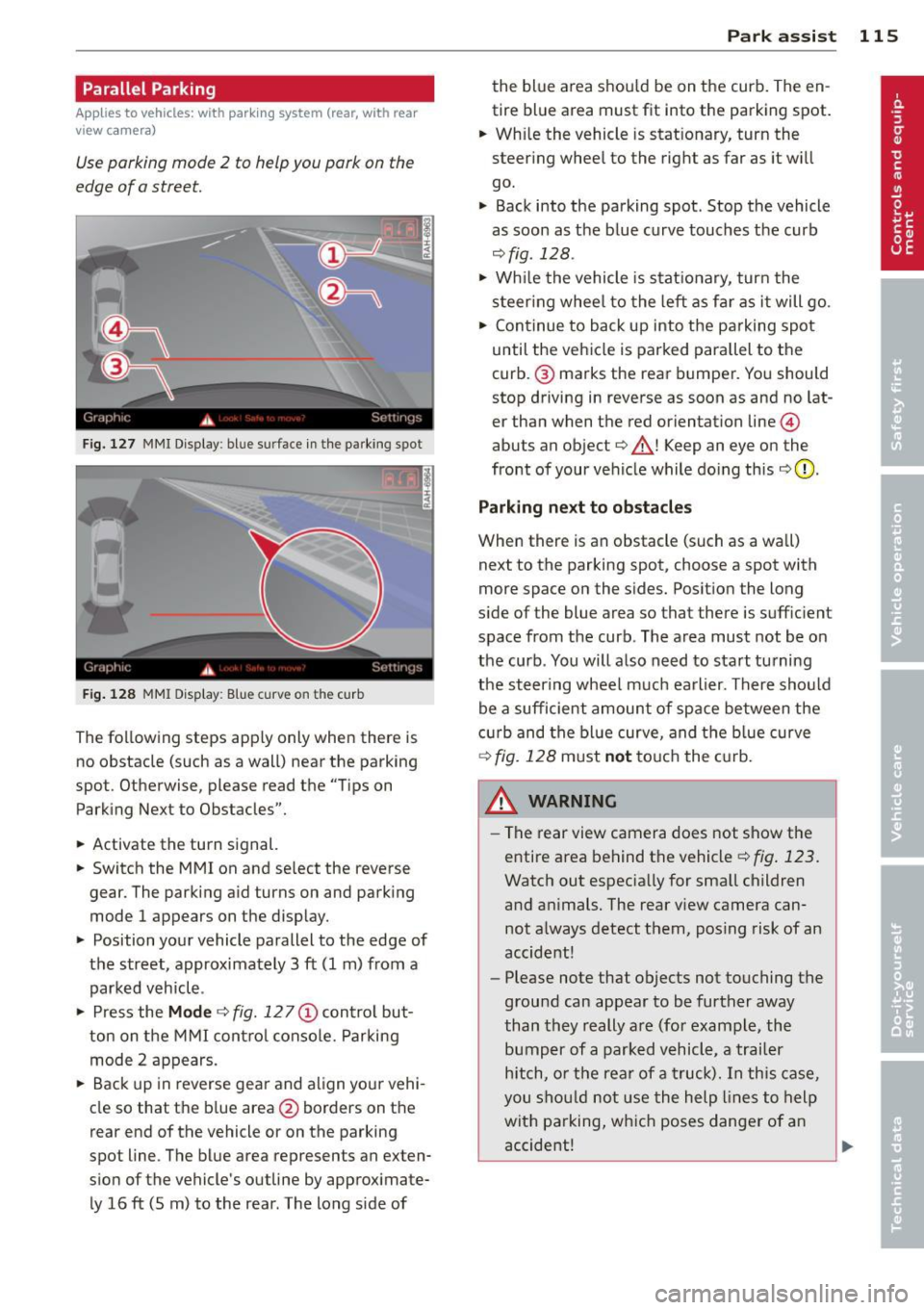
Use parking mode 2 to help you pork on the
edge of o street.
F ig. 127 MMI Display : bl ue s urface in the park ing spot
Fig. 128 MMI Display: Blue curve on t he cur b
The following steps app ly only when there is
no obstacle (such as a wall) near the parking
spot. Otherwise, please read the "Tips on
Parking Next to Obstacles".
• Activate the turn signal.
• Switch the MM I on and se lect the reverse
gear. The parking aid turns on and park ing
mode 1 appears on the display.
• Position your vehicle parallel to the edge of
the street, approximately 3 ft (1 m) from a parked vehicle .
• Press the
Mode c::> fig. 12 7 (D control but
ton on the MMI control console. Parking
mode 2 appears.
• Back up in reverse gear and align your vehi
cle so that the blue area
@ borders on the
rear end of the vehicle o r on the parking
spot line . The blue area represents an exten
s ion of the vehicle's outline by approximate
ly 16 ft (5 m) to the rear . The long s ide of
Park assist 115
the blue area shou ld be on the curb. The en
tire blue area must fit into the parking spot.
• Wh ile the vehicle is stat ionary, turn the
steer ing whee l to the right as far as it wi ll
go.
• Back into the parking spot . Stop the vehicle
as soon as the blue curve touches the curb
<::> fig . 128 .
• Wh ile the vehicle is stationary, turn the
steering wheel to the left as far as it will go.
• Continue to back up into the parking spot
until the vehicle is parked parallel to the
curb .@ marks the rear bumper. You should
stop driving in reverse as soon as and no lat
er than when the red orientat ion line @
abuts an object¢_& ! Keep an eye on the
front of your vehicle while doing this
c::> 0 .
Parking next to obstacles
When there is an obstacle (such as a wall)
next to the parking spot, choose a spot with
more space on the sides. Posit ion the long
s ide of the blue area so that there is suff ic ient
space from the curb. The area must not be on
the curb . You will also need to start tu rning
the steer ing wheel much earlier. There should
be a sufficient amount of space between the
c urb and the blue curve, and the blue curve
¢ fig. 128 must not touch the curb.
&_ WARNING
- The rear view camera does not show the
entire area behind the vehicle
c::> fig. 123.
Watch out especia lly for sma ll children
and an imals. The rear v iew camera can
not always detect them, posing risk of an
accident!
- Please note that objects not touching the
ground can appear to be further away
than they really are (for example, the
bumper of a parked vehicle, a trailer
hitch, or the rear of a truck). In this case,
you should not use the help lines to help
with parking, which poses danger of an
accident!
.__ _____________ _J ...
Page 118 of 290
116 Park assist
In the MMI display, the direction of travel
of the vehicle rear is represented depending on the steering wheel angle. The vehi
cle front swings out more than the vehicle
rear. Maintain plenty of distance from an
obstacle so that your outside mirror or a
corner of your vehicle does not collide with
any obstacles -danger of accident!
@ Tips
The left or right orientation lines and sur
faces will be displayed, depending on the turn signal being used.
Adjusting the display and warning tones
Applies to vehicles: with parking system (rear, with rear
view camera)
The display and warning tones are adjusted in
the radio or MM!*.
"' Select: I CARI function button > Parking sys·
tern.
Or
"' Select: ~I C~A~RI function button > Car sys
tems*
control button > Driver assist > Park·
ing aid.
Display
- Off -when the parking system is switched
off, only audible signals are given.
- On -when the parking system is switched
on, the picture from the rear view camera is
displayed.
Warning tones
- Rear volume -
rear sensor volume
-Rear frequency -rear sensor frequency
-Music volume while parking -when the
parking system is switched on, the volume
of the active audio source is lowered.
The newly adjusted value is briefly heard from
the signal generator. The settings are auto
matically stored and assigned to the remote
control key.
A WARNING
- Always make sure that the volume and
frequency of the warning tones is adjust
ed so that you can easily hear the acous
tic distance signal even if the radio is
playing, the air-conditioner blower is on
High or there is a high level of outside
noise.
- Check the settings whenever someone
else has driven the vehicle before you.
@ Tips
- The warning tones can also be adjusted
directly from the rear view camera im
age. Simply press the Settings* control
button.
- Changed settings are activated when
parking assist is switched on again.
Error messages
Applies to vehicles: with parking system (rear, with rear
view camera)
-
If a warning tone is audible for about five sec
onds when you turn on the ignition, there is a
malfunction in the system. Have the problem
corrected by your authorized Audi dealer.
Keep the sensors in the rear bumper clean and
free from ice so that the acoustic park assist system can function properly.
Page 258 of 290
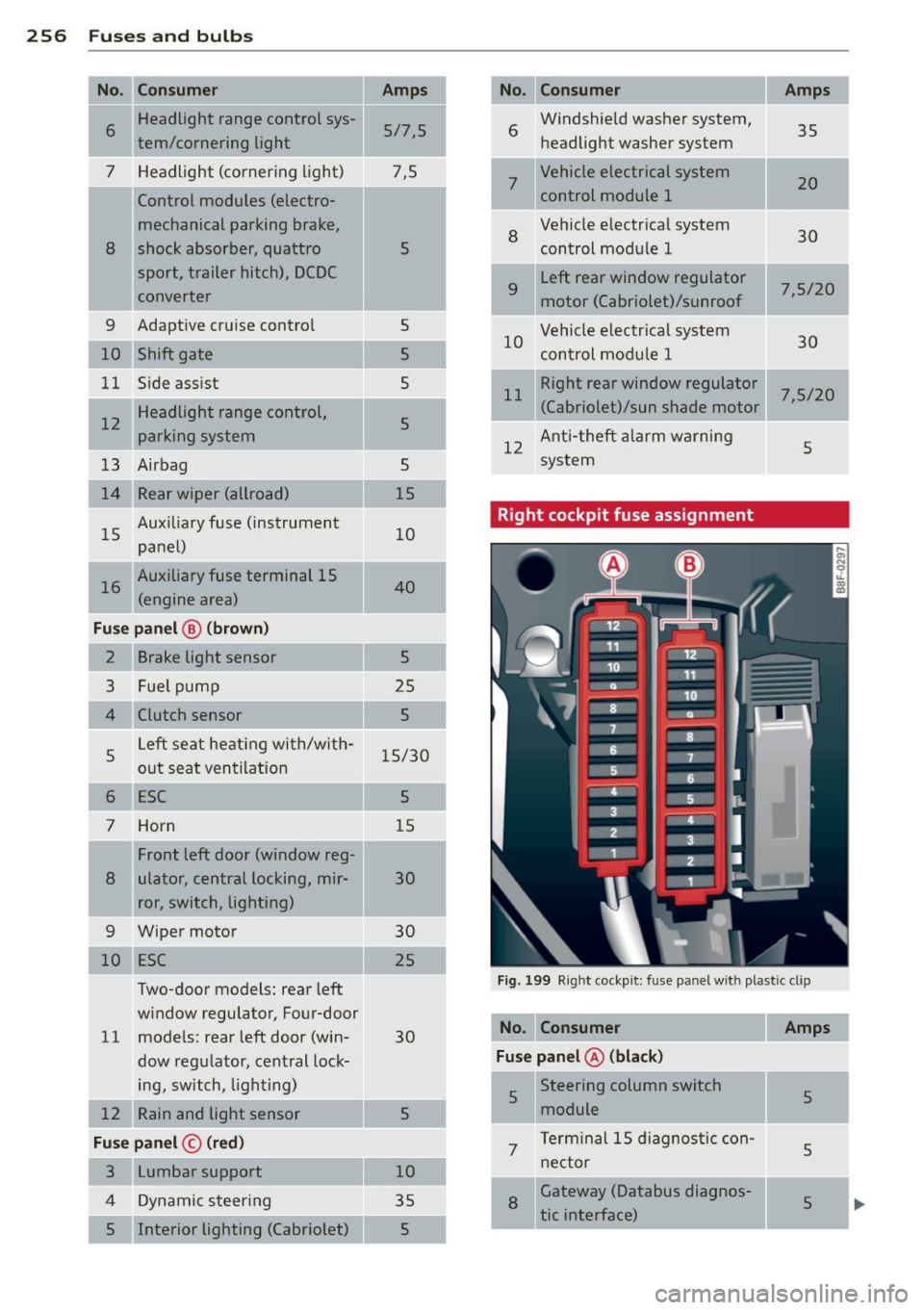
256 Fuses a nd bulb s
I
I
-No. Consumer
6 Headlight range control sys-
tern/cornering light
7 Headlight (cornering light) Control modules (electro-
mechanical parking brake,
8 shock absorber, quattro sport, trailer hitch), DCDC
converter
9 Adaptive cruise control
10 Shift gate
11 Side assist
1 2 Headlight range control,
parking system
13 Airbag
14 Rear wiper (allroad)
15 Aux
iliary fuse (instrument
panel)
1 6 Auxiliary fuse terminal 15
(engine area)
Fu se pa nel@ (brown)
2
3
4
5
6
7 Brake light sensor
Fuel pump
Clutch sensor
Left seat heating with/w ith
out seat ventilation
ESC
Horn
Front left door (window reg-
8 ulator, central locking, mir
ror, switch, lighting)
Two-door models: rear left
w indow regulator, Four-door
11 models: rear left door (win-
dow regulator, central lock-
ing, switch,
lighting)
12 Rain and light sensor
Fu se p ane l© (red)
3 Lumbar support
4 Dynamic steering
5 Interior lighting (Cabriolet)
Amps
5/7,5
7,5
5
s
5
5
5
5
15
10
40
5
25
5
-
15/30
5
15
30
30
25
30
5
10
35
5
No . Consumer
6
7
8
9
Windshield washer system,
headlight washer system
Vehicle electrical system
control module 1
Vehicle electr ical system
control module
1
Left rear window regulator
motor (Cabriolet)/sunroof
Amps
35
20
30
7,5/20
10 Vehicle e
lectr ical system
30
control module 1
11
Right rear window regulator
7,5/20 (Cabriolet)/sun shade motor
12 Anti-theft alarm warning
system 5
Right cockpit fuse assignment
Fig.
199 Right cockpit: fuse panel wit h plastic cl ip
No . Consume r Amps
F use panel@ (bl ac k)
5 Steering column switch
5
module
.. -.. -
7
Term inal 15 diagnos tic con-
nector
5
8 Gateway (Databus diagnos-
5
tic interface) ...
Page 279 of 290
Index 277
-----------------------------------.......
Cruise control
Changing speed . . . . . . . . . . . . . . . . . . . . 84
Presetting your speed ....... .. .. .. .. 85
Sw itching off . . . . . . . . . . . . . . . . . . . . . . 85
Sw itching on ....................... 84
Cruising range . . . . . . . . . . . . . . . . . . . . . . . 25
(upholde r .......................... 67
D
Data ...... ...................... .. 267
D ata recorder .. ... ..... ... .. .. .. ... 179
Date display . . . . . . . . . . . . . . . . . . . . . . . . 12
Daytime running lights . . . . . . . . . . . . 52, 53
D eclaration of comp liance
Adapt ive cruise control . ... .. .. .. .. . 272
Audi side assist ... .... ... .. .. .. .. . 272
Cell phone package ................ 272
Conve nience key .............. ..... 272
Electronic immobilizer .............. 272
H omelink ® universal remote control .. 272
Remote control key ........... .. .. . 272
Tire pressure mon itor ing system ..... 272
Defective light bulb warning . . . . . . . . . . . 21
D efrosting (windows) ................. 72
Determin ing correct load limit ........ 236
Digita l clock ... .. .. .... ... .. .. .. .... 12
Di gita l compass ..................... 59
Dimensions ........................ 266
D imming the rearview mirro r . . . . . . . . . . 56
Doors emergency locking ........ .... ...... 36
Driver information system
Open door or front lid warning . . . . . . . . 24
Outside temperature display .......... 24
Sound system display . . . . . . . . . . . . . . . 24
Driver seat
refer to Seating pos ition
122
D riving safe ly . . . . . . . . . . . . . . . . . . . . . . 121
Driving through water ............... 187
Driving time . . . . . . . . . . . . . . . . . . . . . . . . 25
D ust filte r
refer to Pollutan t filte r (au toma tic AC
system) .... ... .. ..... ... .. .. .. .... 70
Dynamic stee ring . . . . . . . . . . . . . . 107, 183
E
E85 ( Fuel) .. ...... ... .. .. ..... ... .. 2 08
Easy entry funct io n . . . . . . . . . . . . . . . . . . . 63
Efficiency program .................. . 27
Fuel economy messages . . . . . . . . . . . . . 27
Memory levels . . . . . . . . . . . . . . . . . . . . . 25
Other equipment ................... 27
E lectro -mechan ica l power assist ... .. .. 183
El ectromechanica l pa rking brake
E mergency bra king ................ . 82
Ind icator lig ht ..................... 80
Parking ... .. .. .... . ... ...... ... .. . 81
Re leas ing and closing .. ..... ... .. .. . 80
Starting assist ... .. .. .. .. .... ... .. . 81
Starting from rest .................. 81
Starting off w ith a trailer ............ . 82
Warning/ind icator lights ....... ... .. . 16
E lectronic differential lock (EDL) ... .. .. 179
Warning/indicator lights ..... ... .. .. . 19
El ec tronic immob ilizer . . . . . . . . . . . . 12, 3 7
E lectronic power control
(EPC) warning/ indicator light . . . . . . . . . 20
E lectronic speed limiter .. ..... ... .. .. . 29
El ectronic Stab ili zat ion Cont ro l (E SC) . .. 179
Wa rning/ind icator lights ............ . 19
Emerge ncy actuat io n
Doors ....... ... .. ................ 36
Ig nitio n key ...... ........... ...... 34
Emergency braking ................... 82
Emergency flashe r . . . . . . . . . . . . . . . . . . . 54
Warning/in dicator lights ..... ... .. .. . 23
Emergency key . . . . . . . . . . . . . . . . . . . . . . 32
Star ting engine . . . . . . . . . . . . . . . . . . . . 77
Emergency operation
Emergency brak ing funct ion (parking
brake) ... ... .. .. .. . .. ..... ........ 82
l uggage compartment l id . . . . . . . . . . . . 38
Power top . . . . . . . . . . . . . . . . . . . . . . . . . 4 7
Emergency starting ................. 259
Emerge ncy towing . ................. 261
Ene rgy ma nagement ................ 185
Battery power . . . . . . . . . . . . . . . . . . . . . 17
D rive r notification . . . . . . . . . . . . . . . . . . 17
Engine Compartment .. ................... 214
Coolant .......... ........... ..... 219
•
•