service AUDI A5 CABRIOLET 2013 User Guide
[x] Cancel search | Manufacturer: AUDI, Model Year: 2013, Model line: A5 CABRIOLET, Model: AUDI A5 CABRIOLET 2013Pages: 290, PDF Size: 72.35 MB
Page 42 of 290
40 Opening and clo sing
Convenience opening/closing
The windows can be opened and closed with
the mechanical key or the emergency key.
@
' ~-~
® '
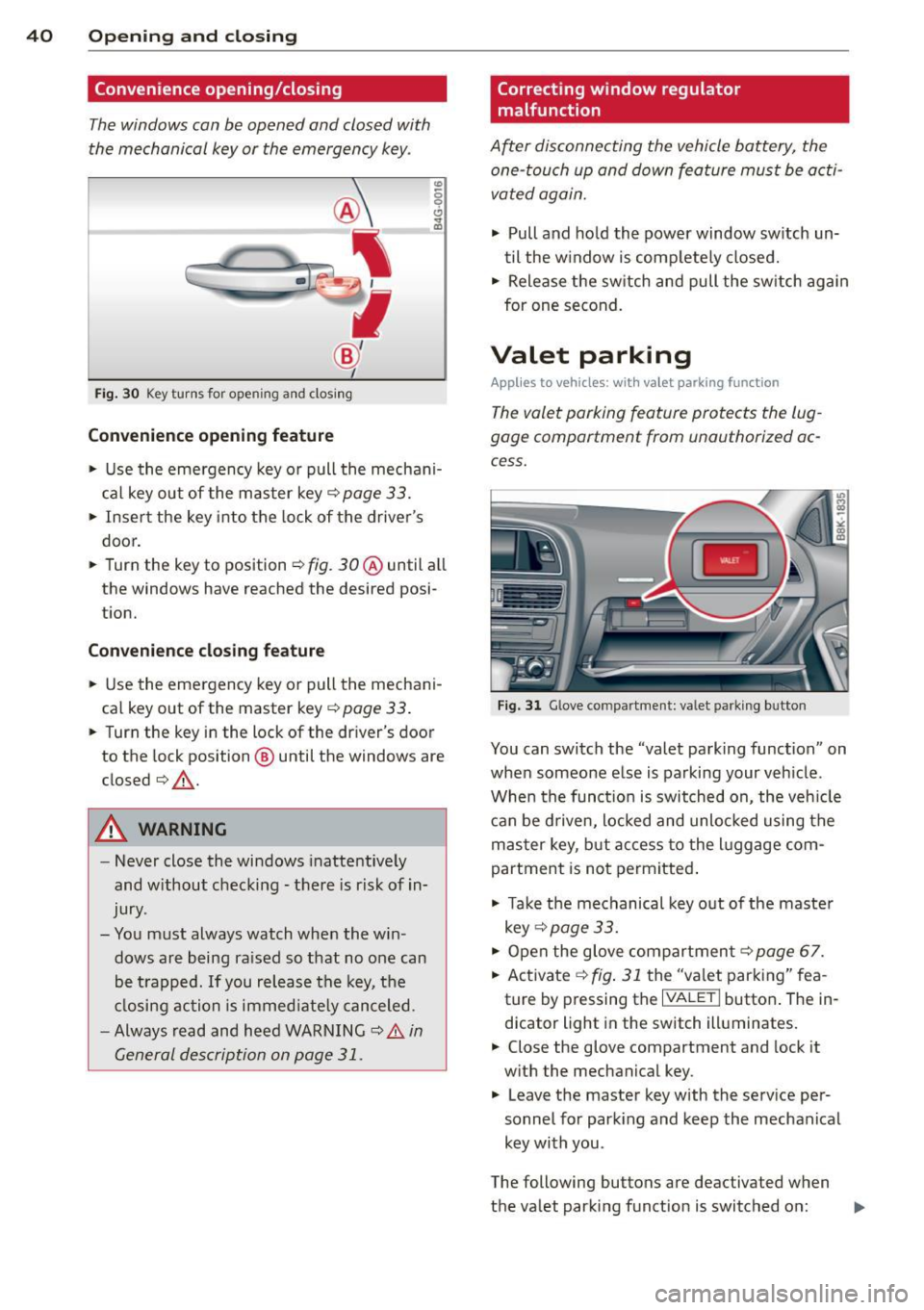
Fig . 30 Key turns for open ing a nd clos ing
Conv eni ence open ing fe ature
"' 0 0 0
" m
• Use the emergency key or pull the mechani
cal key out of the master key¢
page 33.
• Insert the key into the lock of the drive r's
door.
• Turn the key to position ¢
fig. 30@ until a ll
the windows have reached the desired posi
t ion.
Con venience clo sing f eature
• Use the eme rgency key or pull the mechani
cal key out of the master key¢
page 33 .
• Turn the key in the lock of the driver's door
to the lock position @ until the windows are
closed¢ &.
A WARNING
-Never close the windows inattentive ly
and w ithout checking -there is risk of in
jury.
- You must always watch when the win dows are being ra ised so that no one can
be t rapped. If you release the key, the
closing action is immed iate ly canceled.
- Always read and heed WARNING ¢
A in
General description on page
31 .
Correcting window regulator
malfunction
After disconnecting the vehicle battery, the
one-touch up and down feature must be activated again.
• Pull and ho ld the power window sw itch un
til the w indow is completely closed.
• Release the sw itch and pull the sw itch again
for one second.
Valet parking
Applies to vehicles: with va let parking function
The valet parking feature protects the lug
gage compartment from unauthorized ac
cess.
Fi g. 31 Glove compartment: valet parking button
You can switch the "valet parking function" on
when someone else is parking your veh icle .
When the funct io n is switched on, the veh icle
can be d riven, Locked and unlocked using the
master key, but access to the l uggage com
partment is not permitted .
• Take the mechanical key out of the maste r
key ¢
page 33.
• Open the glove compartment¢ page 67.
• Activate ¢
fig. 31 the "valet parking" fea
ture by pressing the
I VALET I butto n. The in
dicator light in the switch illuminates.
• Close the glove compartment and lock it
with the mechanical key .
• Leave the master key with the service per
sonnel for park ing and keep the mechanical
key with you .
The following buttons are deactivated when
the valet parking function is switched on: ..,_
Page 55 of 290
@ Tips
-The light sensor * for headl ight control is
l ocated in the rear view m irror mount.
You should therefore not apply any st ick
ers to the windsh ield in this area in order
to prevent malfunctions or failures .
- Some exterior lighting functions can be
ad justed
¢ page 53.
-When yo u remove you r key from the igni
tion w hile the vehicle's lights are turned
on, a buzzer sounds as long as the driv
er's door is open .
- In cool or damp weather, t he ins ide of
the headlights, turn signa ls and tail
li ghts can fog ove r due to the tem pera
ture diffe ren ce betwe en the inside and
outside. They will clear shor tly after
swi tching t hem on. This d oes not aff ect
the service life of the ligh ting.
- In the even t of a ligh t sensor malfunc
tion, the drive r is no tifie d in the inst ru
ment cluster disp lay ~
page 2 2.
Turn signals and high beam lever
The lever operates the turn signal s, the high
b eams and th e headlight flash er.
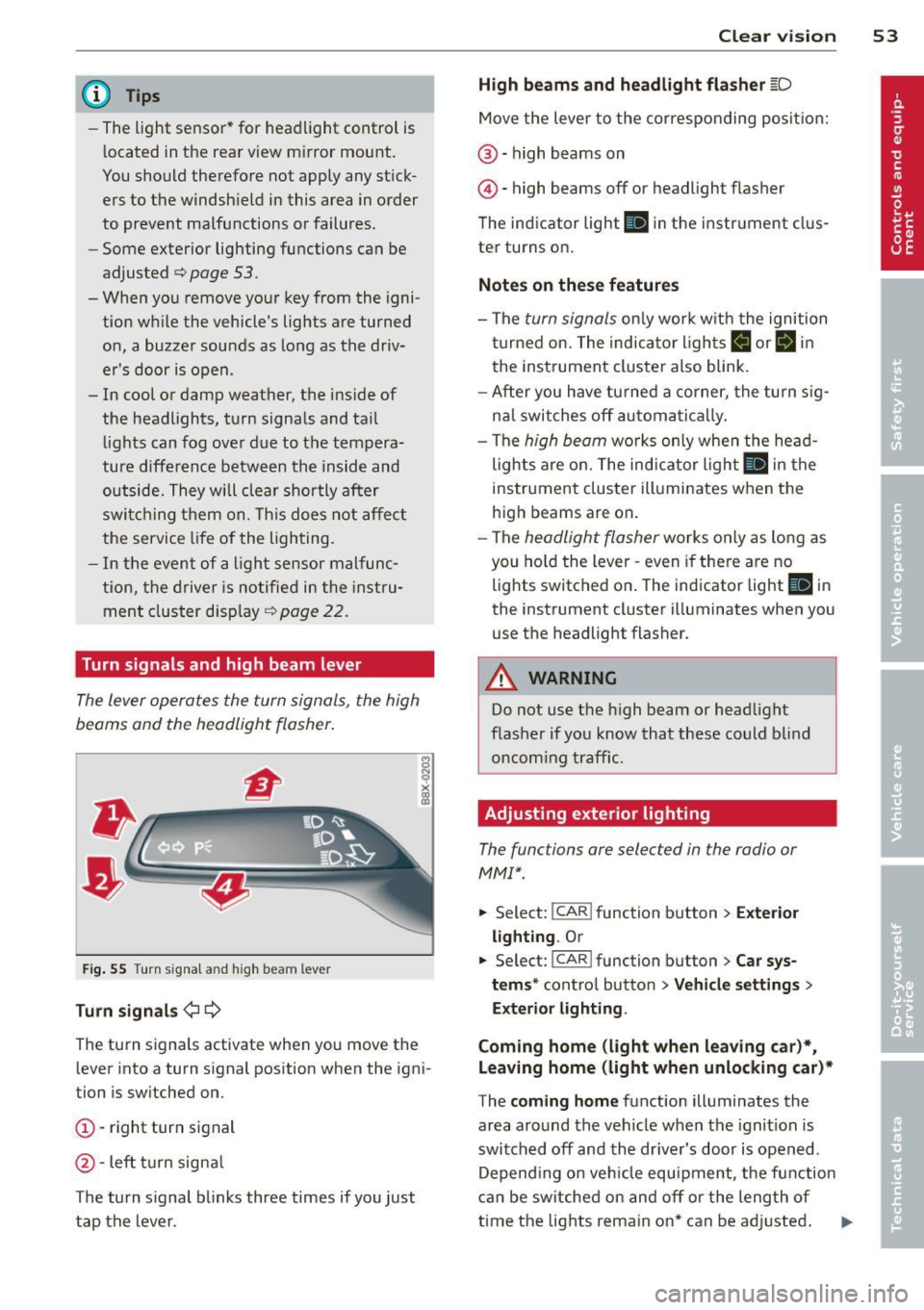
F ig. 55 Turn sig na l an d high beam leve r
Turn signals ¢i ¢
Th e turn s ignals activate when you move the
l ever into a turn s ignal position when the ign i
tion i s sw itched on.
(D -right turn signal
@ -Left turn signa l
T he turn s ignal b links three times if you just
tap the lever .
Clear vision 5 3
High beams and headlight flasher @:D
Move the lever to the corresponding posit io n:
@ -high beams on
@-high beams off or headlight flasher
T he ind icator light
II in the instr ument clus
ter turns on .
Notes on these features
-The turn signals on ly wor k w it h t he ignition
t urned on. The indica tor l igh ts
11 or II in
the instrument cluste r also blink .
- Aft er you have tu rned a corner, the turn s ig
na l swi tches off au tom atically .
- The
high beam wo rks only when the head
lights a re on. The indicator Ligh t. in the
i nstrumen t clus ter illuminates when the
high beams are on .
- The
headligh t flasher works on ly as long as
you ho ld the lev er -even if the re are no
lights switched o n. The ind icator light
Ill i n
the inst rument cluster illuminates when you
use the headlight flasher .
&_ WARNING
Do not use the high beam or head light
flasher if you kn ow that these could b lind
oncom ing traffic.
Adjusting exterior lighting
The functions are selec ted in the radio or
MM!* .
.. Select : I CAR! function b utton > Exter io r
light ing . Or
.. Select: I CAR I func tion button > Car sys
tems *
control button > Vehicle settings >
Exterior Lighting .
Coming home (light when leaving car )*,
Leaving home (light when unlocking car)*
T he coming home function illumi nates the
area around the vehicle when the ignition is
switched off and the dr iver's door is open ed.
Depend ing o n ve hicl e equ ipment, t he function
can be switched on and off or the length of
time the lig hts remain on* can be ad justed . .._
Page 60 of 290
58 Clear vis ion
Cleanin g the headlights* . The headlight wash
er system* op erates on ly when the headlights
a re on. If you move the lever to pos ition
® ·
the head lights are washed in intervals.
A WARNING
- The ra in sensor is only intended to assist
the driver . The dr iver is still responsible
for manually sw itching the w ipers on ac
co rding to the vis ibility conditions .
- The windshie ld may not be treated w it h
water-repe lling windshie ld coat ing
age nts. Unfavorable conditions, such as
wetness , darkness, low sun, can res ult in
incre ase d gla re. Wiper b lade ch atter is
also possible .
- P roperly fu nctioning windshie ld w iper
blades are required for a clear view and
sa fe dr iving
¢ page 58, Replacing
windshield wiper blades.
(D Note
- In the c ase of fro st, check whether the
winds hield wiper blad es are frozen to
the windshie ld. Switching on the wind
s h ield wipers can damage the wiper
blades!
- Prior to using a car wash, the win dshield
wipe r system must be switched
off (lever
i n position @). This helps to prevent un
i ntent ional sw itchi ng on and damage to
t h e windshie ld w iper system .
- The w indshield wipers are switched
off
when the ignition is turned off . Activate
the windshie ld w ipers afte r the ignit ion
i s sw itched back on by mov ing t he wind
s h ield wiper leve r to any pos it io n.
- Worn or dirty windsh ie ld w iper blades
r esult in streaking . T h is can affect the
r ain senso r* function . Ch eck your wind
s h ield wiper blades regularly.
- The was her fluid nozzles of the wind
s h ield washer system are heated at low
temper atures w hen the ignit ion i s on.
- When stop ping temporarily , (e.g. at a
traff ic light) the se t speed of the wi nd- shield wipers is automatically
reduced by
one s peed.
Replacing windshield wiper blades
Wiper blad es in good condition help k eep th e
windshield clear.
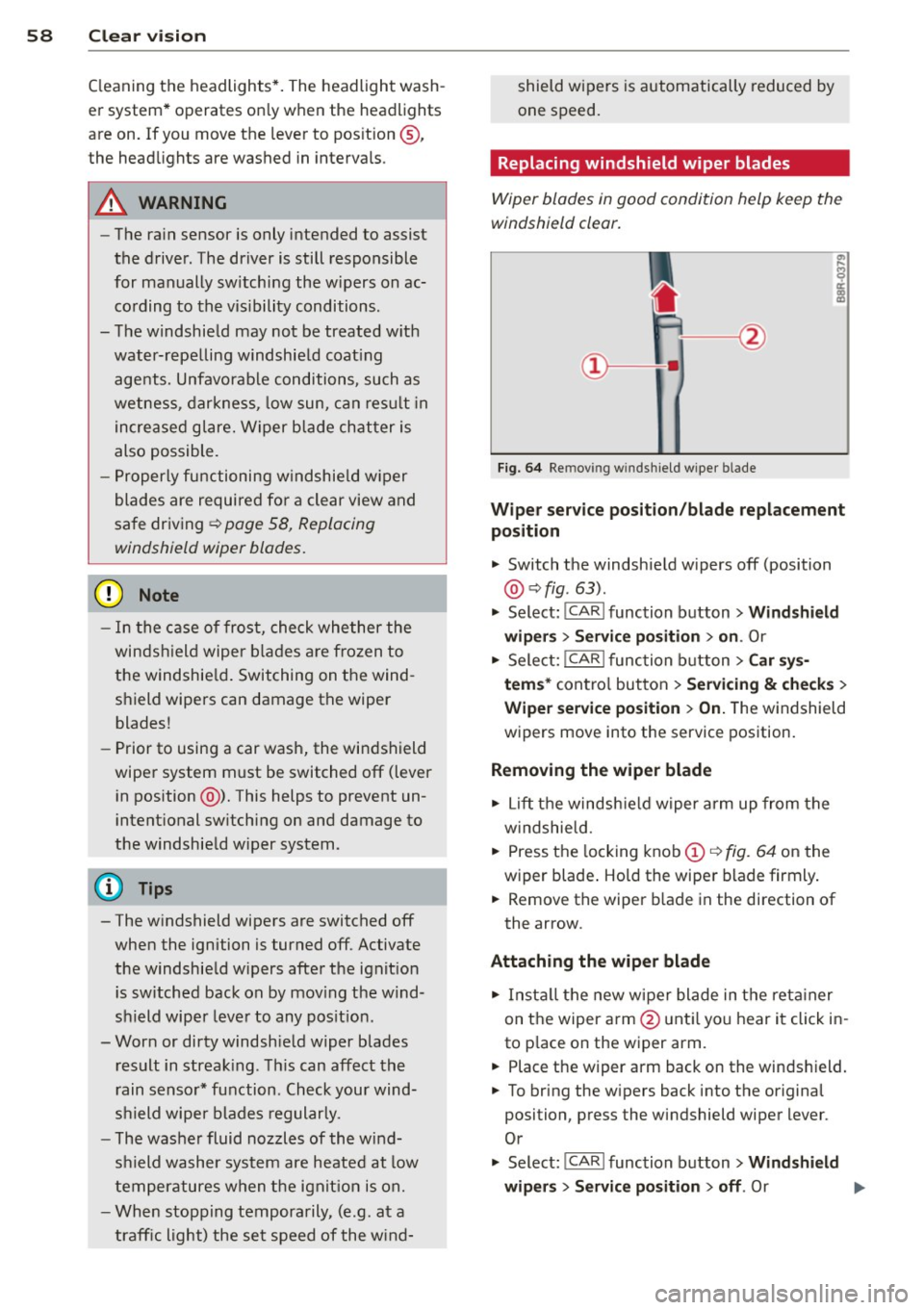
Fi g. 6 4 Re mov ing w indsh ie ld wipe r bl ade
Wiper service posit ion /blade replacement
position
" Switch the windsh ie ld w ipers off (position
@ ¢fig. 63).
" Select: !CAR ! function b utton> Wind shield
wip ers> Service po sition > on .
Or
" Select:
I CAR I func tion button > Car sy s
tem s*
con tro l but ton > Servicing & checks >
Wiper service po sition > On.T he windsh ield
w ipers move into the service pos ition.
Removing the wiper blade
" Lift t he windsh ie ld w iper a rm up from the
w indshie ld.
" Press the locking knob
(D c::> fig. 64 on the
wiper blade . Ho ld the wipe r blade firmly .
" Remove the wiper b lade in the direction of
the arrow .
Attaching the wiper blade
" In st all the new w ipe r blade in t he reta iner
on t he wiper a rm @ unt il yo u hear i t click in
to p lace on the wiper arm.
" Place the wiper arm back on the winds hield.
" To bring the w ipers back into the origina l
position, press the windshield wiper lever .
Or
" Select :
!CAR ! function button> Windshield
wipers
> Service position > off . Or
Page 61 of 290
.. Select : ICARlfunctio n button> Car sys
tems *
control button > Servicing & check s >
Wiper serv ice po sition > Off .
A WARNING
-If the windshield wipers smear the wind
shield, clean the w iper blades with w ind
shield washer fluid .
If the wiper blades
are extremely d irty, you can also clean
them w ith a soft sponge or cloth.
- For your safety, you should replace the
wiper blades once or twice a year . See
yo ur autho riz ed Aud i deale r for replace
ment blades.
(D Note
- The w indshield wiper blades must only
be replaced when in the serv ice position!
Otherwise, yo u ris k damaging the pai nt
on the hood or the windshield wiper mo
tor .
- You sho uld not move yo ur vehicle or
press the w indshie ld w iper lever when
the wiper arms are folded away from the
windshield . The windshield wipers would
move back into the ir origina l position
and could damage the hood and w ind
s h ield.
- To help prevent damage to the wiper sys
tem, always loosen blades which are fro
zen to the windsh ield befo re operat ing
wipers.
- To help prevent damage to wiper blades,
do not use gasoline, kerosene, pa int
th inner, or othe r solvents on or nea r the
wipe r blades.
- To help prevent damage to the wiper
arms or other compone nts, do not at
tempt to move the w ip ers by hand.
@ Tips
- Commerc ial hot waxes applied by auto
matic car washes affect the how eas ily
the g lass su rface can be cleaned .
- You can also use the service pos ition, for
example, if you want to protect the
windsh ield from ic ing by using a cover .
Clear vision 59
Digital compass
Switching the compass on and off
Applies to vehicles: with digital compass
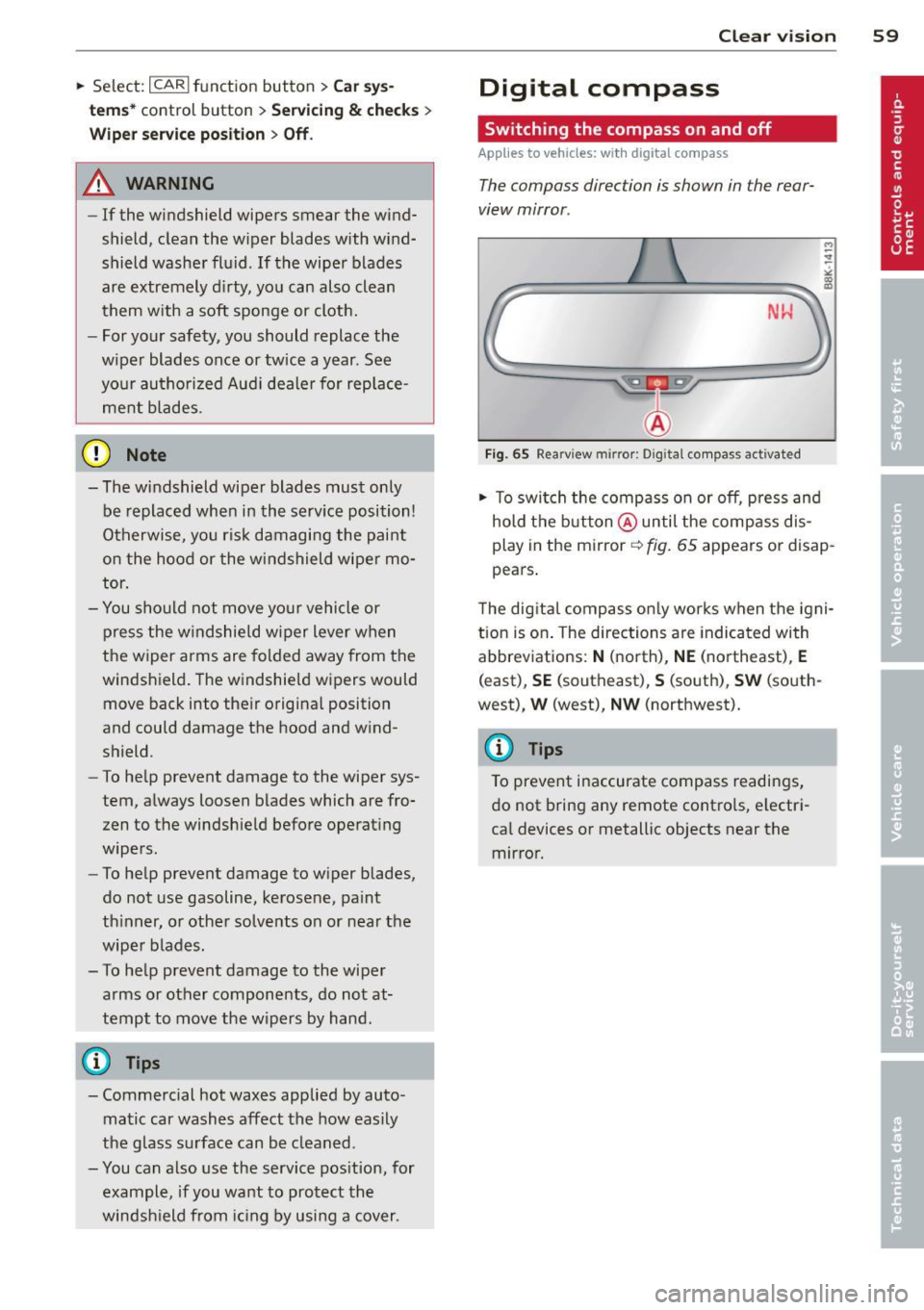
The compass direction is shown in the rear
view mirror .
NW
Fig. 65 Rearv iew mirro r: Digita l co mpass activated
.. To swi tch the compass on or off, p ress and
hold t he b utton @until the comp ass dis
play in the mirror~
fig. 65 appears or disap
pears .
T he dig ital compass o nly works when the igni
tion is on . The directions are indicated with
abbreviations:
N (north), NE (northeast), E
(east), SE (southeast), S (south), SW (so uth
west),
W (west), NW (northwest).
(D Tips
To prevent inaccurate compass readings ,
do not b ring any remote contro ls, electr i
ca l devices or metallic objects near the
mirror.
Page 72 of 290
70 Warm and cold
Warm and cold Climate controls
Description
The climate control system warms, cools and
adds humidity to the air in the vehicle interior.
It is the most effect ive when the windows and
sunroof are closed . If there is a build-up of
heat inside the vehicle, ventilation can help to
speed up the cooling process.
I n all heating mode functions except
defrost,
the blower on ly switches to a higher speed
once the engine coolant has reached a certain
temperature.
Condensat ion from the cooling system can
drip and form a puddle of water under the ve
hicle. This is normal and does not mean there
is a leak.
Pollutant filter
The pollutant filter removes pollutants s uch
as dust and pollen from the air.
The air pollutants filter must be changed at
the intervals spec ified in you r Warranty
&
Maintenance booklet, so that the air condi
tioner can properly work.
If you drive your vehicle in an area with h igh
a ir po llution, the fi lter may need to be
changed more frequently than specified in
your Aud i Wa rranty
& Ma intenance booklet. If
in doubt, ask your authorized Audi Service Ad
visor for advice .
Key coded settings
The climate control settings are automat ically
stored and assigned to the remote control key
that is in use. These settings are different
when the power top is open or closed .
A WARNING
Reduced visibility is dangerous and can
cause accidents. -
- For safe driving it is very important that
all windows be free of ice, snow and con
densation.
- Comp letely familiarize yourself with the
proper use and function of the heating
and ventilation system and especially how to defog and defrost the windows.
- Never use the windshield wiper/washer
system in freez ing weather unt il you
have warmed the windshield first, using
the heating and ventilation system. The
washer solution may freeze on the wind shie ld and reduce visib ility.
(D Note
- If you suspect that the air conditioner has been damaged, switch the system
off to avoid further damage and have it
inspected by a qualified dealership.
- Repairs to the Audi air conditioner re
quire special technical know ledge and
special tools. Contact an authorized Aud i
dea ler fo r assistance.
@ For the sake of the environment
By reducing the amount of fuel you use,
you also reduce the amount of pollutants
emitted into the air.
(D Tips
- Keep the air intake s lots (in fro nt of the
w indshield) free from ice, snow and de
bris in order to maintain the proper func
tion of the climate control system.
- The energy management system may
switch the seat heating* or rear window
defroster off temporarily . These systems
are available again as soon as the energy
balance has been restored.
- Air escapes through vents under the rear
window. When placing items of clothing
on the luggage compartment cover, en
sure that the openings are not covered.
Page 97 of 290
Audi adapt ive crui se c ontrol an d bra kin g guard 95
confirmed by the video camera, an acute
collision warning.
- For safety reasons, do not use adaptive
cruise control when driving on roads with
many curves, when the road surface is in
poor condition and/or in bad weather
(such as ice, fog, gravel, heavy rain and
hydroplan ing). Using the system under
these conditions cou ld result in a co lli
sion.
- Switch adaptive cruise control off tempo rar ily when driving in turning lanes, on
expressway exits or in cons truction
zones. This prevents the vehicle from ac celerating to the set speed when in these
situations.
- The adaptive cr uise control system wi ll
not brake by itse lf if you p ut your foot on
the accelerator pedal. Doing so can over
ride the speed and distance regulation .
- When approaching stationary objects
such as stopped traff ic, adaptive cruise
control will not respond and braking
guard w ill have limited function.
- The adaptive cruise control system and
braking guard do not react to people, an
ima ls, objects crossing the road or on
coming objects.
- The function of the radar sensor can be
affected by reflective objects such as
guard rails, the entrance to a tunnel,
heavy rain or ice.
- Never follow a ve hicle so closely that you
cannot stop your vehicle safely. The
adaptive cruise cont ro l cannot slow or
brake the veh icle safely when you follow
ano ther veh icle too closely. Alway s re
member that the automatic braking
function cannot bring the vehicle to a sudden or emergency stop under these
condit ions.
- To prevent unintended operation, always
switch ACC off when it is not being used.
(D Note
The sensor can be disp laced by impacts or
damage to the bumper, whee l housing and
underbody . That could affect the adaptive cruise control system and braking g
uard.
Have your authorized Audi dea ler o r au
thorized Audi Service Facility chec k their
funct ion.
In curves
App lies to vehicles: with A ud i ada ptive c ruise contro l
F ig . 1 04 Examp le: driv ing into a curve
When driving into a curve¢ fig. 104 and out
of a curve, the adaptive cru ise contro l may re
act to a vehicle in the next lane and app ly the
brakes. You can override or prevent the brak
ing by pressing the accelerator pedal briefly.
Stationary objects
App lies to vehicles: wit h Audi adapt ive cr uise contro l
F ig . 1 05 Examp le: objec t chang ing la ne s and station
a ry object
The adaptive cru ise control system only reacts
to objects that a re mov ing or that the system
has a lready detected as moving . For examp le,
if a ve hicl e@ , which has already been detec t
ed by the adaptive cru ise con trol , turns or
changes lanes and another stationa ry vehicle
@ is located in front of that vehicle, the sys
tem will not react to the stationary vehicle.
Page 103 of 290
Audi adaptive cru ise control and brakin g guar d 101
-Always remember that the radar sensor
for the braking guard works only within
defined detection and range limits that
may prevent the proper detection of oth
er vehicles.
- The radar sensor's function and range
can be reduced by rain, snow and heavy
spray. Moving vehicles up ahead may not be promptly detected or may not be de
tected at al l.
- Reflective surfaces includ ing crash barr i
ers or tunnel ent ran ces may impair the
function of the radar sensor.
- You can cance l the braking that is initiat
ed by the system by braking yourself, by
accelerating noticeab ly or by swerving.
- Bra king guard error messages
<> page 101.
-Keep in mind that braking guard can
brake unexpectedly . Always secure any
ca rgo or objects that you are transport
i ng to reduce the risk of d amage or in
ju ry.
Settings in the radio/MM!
Applies to vehicles: with Audi adaptive cruise co ntrol
~ Se lect: I CARI f unction button > Car sys
tems*
control button > Driver assist > Audi
braking guard .
Or
~ Select: ICARlf unct ion button> Audi brak -
ing guard .
System -
Switch Audi braking g uard On and
Off . When you switch the ignition on, the
message
Aud i braking guard off appears if
the system is sw itched off .
Early warning -The distance and app roac h
warn ings in the display can be switched
On /
Off .
(D Tips
-Your settings are automatically stored
and ass igned to the remote control key
being used at the t imes the settings are
made. -
If you switch the ASR/ESC off, braking
guard switches off automatically
<> page 181.
- Switch braking guard off when you a re
loading the vehicle onto a vehicle carrier,
train, ship or other type of transporta
t ion. This can prevent undesired warn
ings from the braking gua rd system.
Messages
App lies to vehicles : wit h Aud i adapt ive c ruise contro l
Braking guard : Off
This driver message appears if the system is
turned off via the radio/MMI *. Otherwise, if
the system is turned off, the informat ion ap
pears every t ime shortly after the start of the
trip.
B raking guard : Activated
T h is dr iver message appears if sharp b rake
pressure was applied due to an acu te warning.
•••
Three white dots appear if a sett ing cannot be
selected w ith the operating lever. For exam
ple, this happens if you want to raise/lower
the speed even though there was no previous
ly saved speed.
ACC: Sensor blocked
This message appears if the sensor v iew is ob
structed, for examp le by leaves, snow, heavy
spray or d i rt . Clean the sensor<>
fig. 103.
ACC: not available
T he driver mess age appears if there is a mal
f un ction. The adapt ive cr uise con tro l tu rns off.
A chime sounds as a reminder . Have the sys
tem checked by an authorized Audi dea ler or
authorized Aud i Service Fac ility.
ACC : unavailable
The dr iver message appears if, for example,
t h e b ra ke tempe rat ure is too hig h. T he adap
t ive cr uise cont ro l is temporar ily u nava ilable.
A ch ime sounds as a remin der .
Shift lever position!
Page 107 of 290
-Improper reliance on the side assist sys
tem can cause collisions and serious
personal injury:
- Never rely only on side assist when
changing lanes.
- Always check rear view mirrors to make
sure that it is safe to change lanes.
- Side assist cannot detect all vehicles un
der all conditions- danger of accident!
- Please note that side assist indicates
there are approaching vehicles, or
vehicles in your blind spot, only after
your vehicle has reached a driving speed
of at least 19 mph (30 km/h).
- In certain situations, the system may not
function or its function may be limited.
For example:
- if vehicles are approaching or being left
behind very quickly. The display may
not turn on in time.
- in poor weather conditions such as
heavy rain, snow or heavy mist .
- on very wide lanes, in tight curves or if
there is a rise in the road surface .
Vehicles in the adjacent lane may not
be detected because they are outside
of the sensor range.
(D Note
The sensors can be displaced by impacts or
damage to the bumper, wheel housing and
underbody. This can affect the system .
Have your authorized Audi dealer or au
thorized Audi Service Facility check their
function.
(D Tips
- If the window glass in the driver's door
or front passenger's door has been tint
ed, the display in the exterior mirror may be misinterpreted.
- For Declaration of Compliance to United
States FCC and Industry Canada regula
tions
~page 272.
Audi side assist 105
Activating and deactivating
Applies to vehicles : wi th Aud i side ass ist
Fig. 118 Driver 's doo r: Side assis t button
.,. Press the button c> .&. in General informa
tion on page 104
to switch the system on/
off . The LED in the button turns on when
side assist is switched on.
Adjusting the display brightness
App lies to vehicles: wit h Audi side ass ist
The signal brightness can be set in the radio
orMMI* .
.,. Select: I CAR I function button > Audi side as
sist.
.,. Select: I CAR ! function button > Car sys
tems*
control button > Driver assist > Audi
side assist .
The display brightness adjusts automatically
to the brightness of the surroundings, both in
the information and in the warning stage . In
very dark or very bright surroundings, the dis play is already set to the minimum or maxi
mum level by the automatic adjustment. In
such cases, you may notice no change when
adjusting the brightness, or the change may
only be noticeable once the surroundings
change.
Adjust the brightness to a level where the dis
play in the information stage will not disrupt
your view forward. If you change the bright
ness, the display in the exterior mirror will
briefly show the brightness level in the infor
mation stage. The brightness of the warning
stage is linked to the brightness in the infor
mation stage and is adjusted along with the
information stage adjustment.
Page 133 of 290
For safety reasons, rollover protection a lso de
p loys during front, side and rear collisions
above a certa in level of severity.
Retracting rollover protection
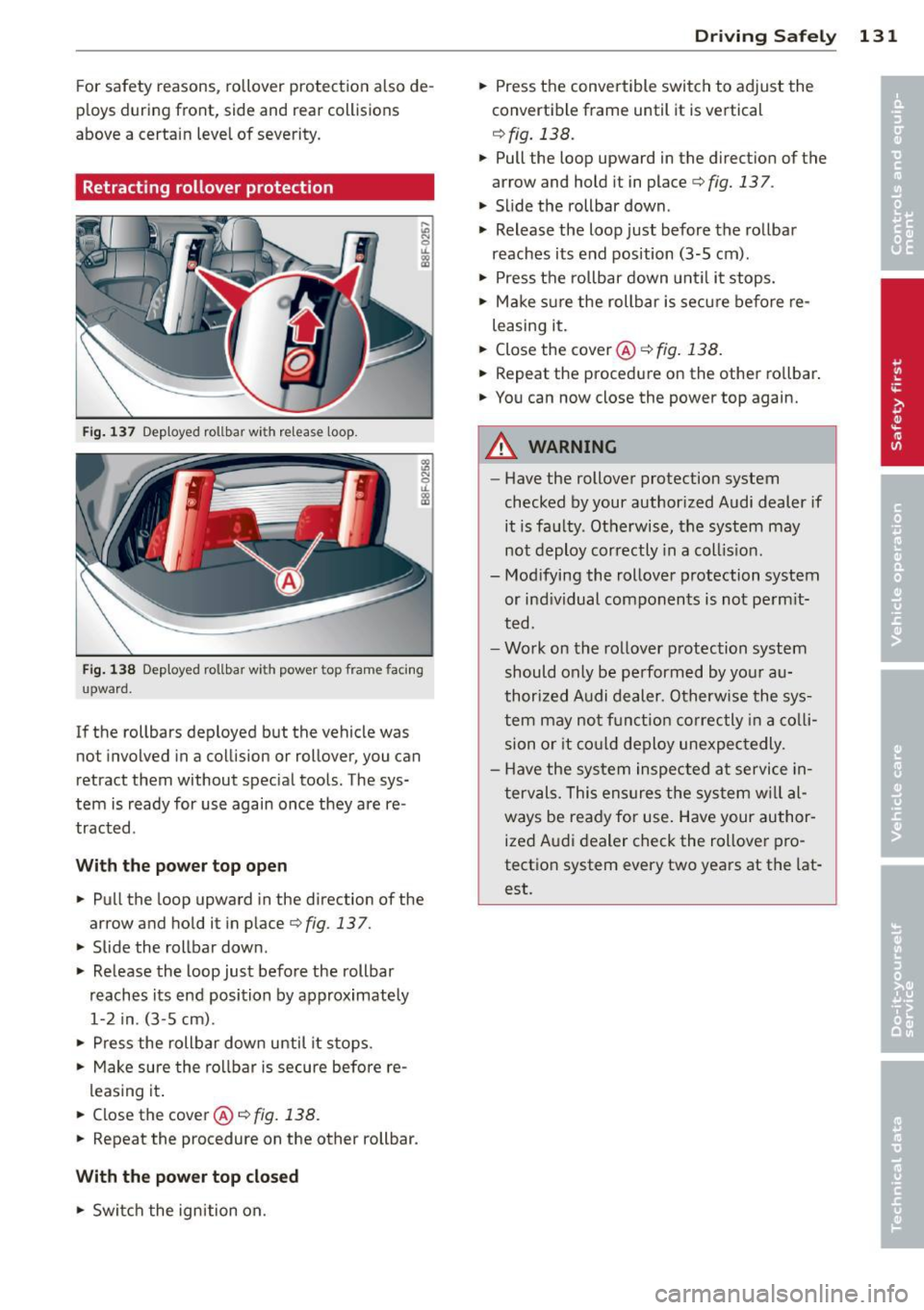
Fig . 137 Dep loyed rollbar with release loop.
Fig. 138 Deployed rollba r w ith power top frame facing
upward.
If the rollbars deployed but the vehicle was
not involved in a collision or rollover, you can
retract them without special tools. The sys
tem is ready for use again once they are re
tracted .
With the p owe r top ope n
"' Pull the loop upward in the direction of the
arrow and hold it in p lace
r=.> fig. 13 7.
"' Slide the rollbar down .
"' Release the loop just before the rollbar
reaches its end position by approximately 1-2 in. (3-5 cm).
"' Press the rollbar dow n until it stops.
"' Make sure the rollbar is secure before re-
leasing it .
"' Close the cover@i::>
fig. 138.
"' Repeat the procedure on the other rollbar.
With the power top closed
"' Swi tch the ignition on.
Dr ivin g Sa fely 131
"' Press the convertible switch to adjust the
convertible frame until it is vertical
r=.>fig. 138.
"' Pull the loop upward in the direction of the
arrow and hold it in placer=.>
fig. 137 .
"' Slide the rollbar down .
"' Release the loop just before the rollbar
reaches its end position (3-5 cm) .
"' Press the ro llbar down unti l it stops.
"' Make s ure the rollbar is sec ure before re-
leasing it.
"' Close the cover@~
fig. 138.
"' Repeat the procedure on the other rollbar .
"' You can now close the power top again.
A WARNING
-Have the rollover protection system
checked by your author ized Audi dealer if
it is fa ulty. Otherwise, the system may
not deploy correctly in a coll is ion.
- Modifying the rollover protection system
or ind ividual components is not perm it
ted.
- Work on the rollover protection system
should only be performed by your au
thorized Audi dealer. Otherwise the sys
tem may not f unction correctly in a co lli
sion or it co uld deploy unexpec tedly.
- Have the system inspected at service in
tervals. This ensures the system w ill al
ways be ready for use . Have your author
ized Audi dealer check the rollover pro
tection system every two years at the lat
est.
Page 140 of 290
138 Safet y belt s
A WARNING
Improperly positioned safety belts can
cause serious personal injury in an acci
dent .
- Expectant mothers must always wear the
lap portion of the safety belt as low as
poss ible across the pelv is and be low the
rounding of the abdome n.
- Always read and heed all WARNINGS and
other important information
Q &. in Fas
tening safety belts on page 136.
Unfastening safety belts
Unbuckle the safety belt with the red release
button only after the vehicle has stopped .
'lJJ
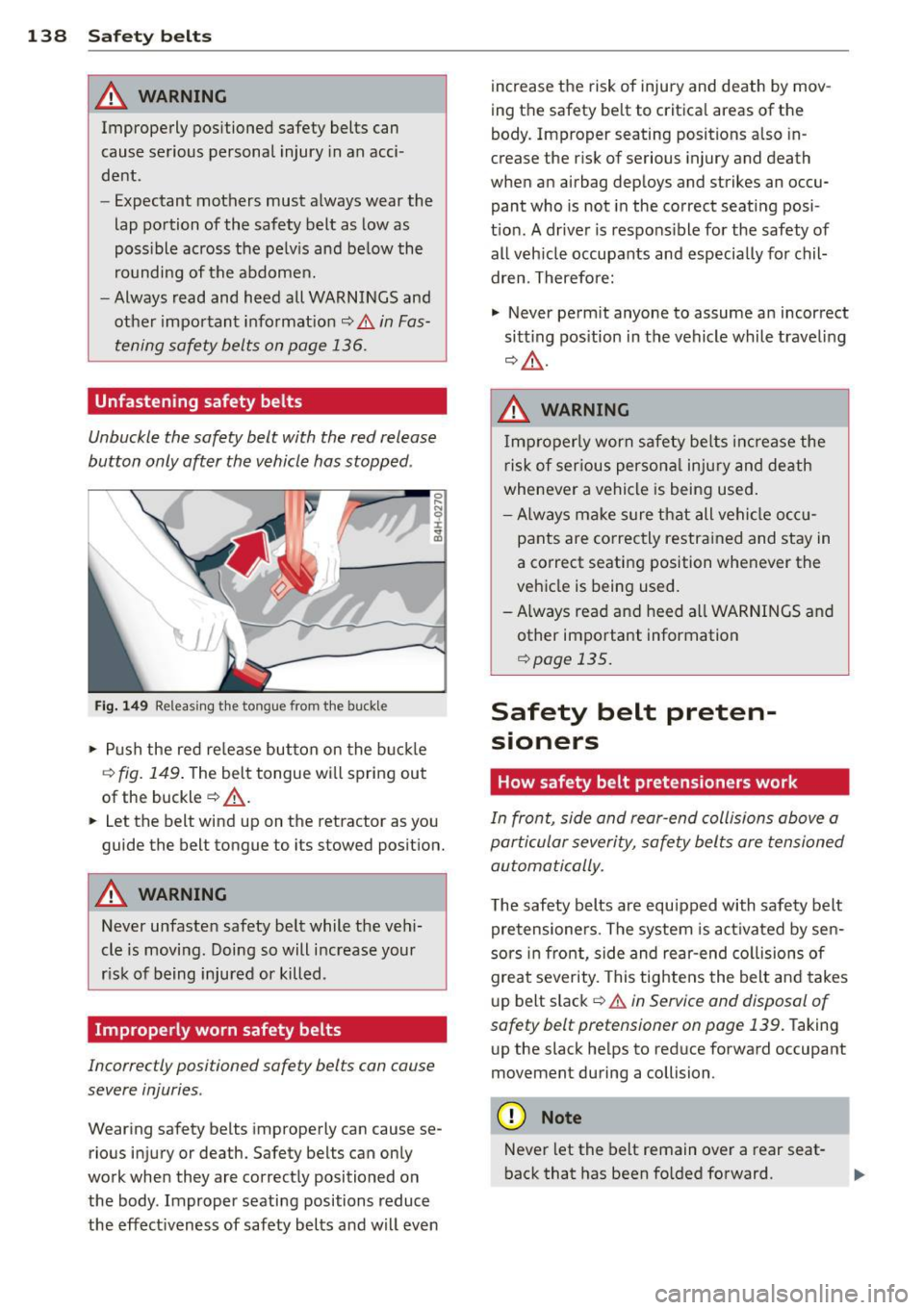
Fig. 149 Relea sing the to ngue from t he buckle
.. Push the red re lease but ton on the buck le
Q fig. 149 . The belt tongue wi ll spring out
of the buckle
Q .&_ .
.. Let the belt wind up on the retractor as you
guide the belt tongue to its stowed position.
A WARNING
Never unfasten safety belt while the veh i
cle is moving. Doing so will increase your
r isk of being injured or killed .
Improperly worn safety belts
Incorrectly positioned safety belts can cause
severe injuries .
Wearing safety belts improperly can cause se
rious injury or death. Safety belts can only
work when they are correctly positioned on the body . Improper seating positions reduce
the effectiveness of safety belts and wi ll
even
increase the risk of injury and death by mov
ing the safety be lt to critica l areas of the
body. Improper seating positions also in
crease the r isk of serious injury and death
when an airbag deploys and strikes an occu pant who is not in the correct seating posi
t ion. A driver is responsible for the safety of
all veh icle occupants and especially for chil
dren. Therefore:
.,. Never perm it anyone to assume an incorrect
sitt ing pos ition in the vehicle while traveling
Q A .
A WARNING
Improperly worn safety be lts inc rease the
risk of serious persona l inju ry and death
whenever a vehicle is being used.
- Always ma ke sure that all vehi cle o cc u
pants are correctly restra ined and stay in
a correct seating position whenever the
vehicle is being used.
- A lways read and heed all WARNINGS and
other important information
Q page 135.
Safety belt preten-
• s1oners
How safety belt pretensioners work
In front, side and rear-end collisions above a
particular severity, safety belts are tensioned
automatically.
The safety belts are equipped with safety belt
pretensioners. The system is activated by sen
sors in front, s ide and rear-end collisions of
great severity. This tightens the belt and takes
up belt slack
Q .&. in Service and disposal of
safety belt pretensioner on page 139.
Taking
up the slack he lps to reduce fo rward occupant
movement during a collision .
(D Note
Never let the belt remain over a rear seat
back that has been fo lded forward.