warning lights AUDI A5 CABRIOLET 2017 Owner's Manual
[x] Cancel search | Manufacturer: AUDI, Model Year: 2017, Model line: A5 CABRIOLET, Model: AUDI A5 CABRIOLET 2017Pages: 266, PDF Size: 66.64 MB
Page 76 of 266
Driving
Starting the engine
.,. Step on the b rake pedal and move the se lector
l ever to P o r N
¢ &, .
... Press on the r.l S::-:: T=- A,,., R ""T=-= E~ N":"'. G::- I ;-:N:-:-.:= E-;:Se:;T;=-;: O" P~I button
¢ fig.
90-the engine will start .
Switching the ignition on/off
If yo u wou ld like to switch the ign ition on with
ou t starting the eng ine, fo llow these steps:
.,. Press t he
I STAR T ENGIN E ST OPI button with
out
pressing the brake pedal.
.,. To switc h the ign ition off, press t he bu tton
again.
I f t he engine should not start immed iate ly, the
starting p rocess is a utomat ica lly stopped afte r a
short t ime. Repe at st arting procedu re .
When start ing the e ng ine, major elect rical loads
are switched off temporarily.
After a cold engine is started, there may be a b rief period of increased no ise beca use oil pres
sure must first bui ld up in the hydraulic valve ad
justers. This is no rmal a nd not a cause for con
cern.
.&, WARNING
- Never allow t he eng ine to run in confine d
spa ces -danger of asphyxiation.
- Never t urn off the engine until the vehi cle
has come to a comp lete stop.
- Always take the key wi th you w henever you
leave you r vehicle. Othe rw ise, the eng ine
c ould be sta rted o r ele ctrical eq uipment
s u ch as the power windows co uld be operat
ed. This can lead to se rious injury.
- Never leave children or pe rsons requiring as
sistance unattended i n the vehicle. The
doo rs can be loc ked using the remote trans
mitter, prevent ing people from escaping
from the vehicle on the ir own in the event of
an emergency . Depend ing o n the t ime of
year, peop le inside the vehicle can be ex
posed to very hig h or very low tempe ra-
t u r es.
74
-
(D Note
Avoid high engine rpm, full throttle and heavy
engine loads unti l the engine has reached op
e rating tempe rature -otherwise you risk en
gine damage.
@ For the sake of the environment
Do not let the eng ine run wh ile pa rked to
warm up. Beg in d riving immed iate ly. Th is re
duces unnecessary emissions.
(D Tips
- After starting a co ld eng ine, the re may be a
br ief per iod of increased noise because the
oil pressure must first build up in the hy
dra ulic valve adjusters . Th is is norma l and
not a cause for concern .
- If you leave the ve hicle w ith the ignition
switched on, the ig nition w ill switch off af
ter a ce rtain per iod of t ime . Please note that
elect rical equipment such as exte rior lights
w ill swi tch off as we ll when that happens.
Switching engine off
Applies to: vehicles with convenience key
.,. Br ing your vehi cle to a comple te stop .
.,. Move the se lector lever to the P or N position .
... Press the
I STAR T ENGINE S TOP I button
¢ page 73, fig. 90.
Steering lock
The steer ing locks when yo u turn the eng ine off
u sing t he
I S TART ENGI NE STOPI button and
open the driver's doo r. The locked steering he lps
prevent veh icle theft.
Emergency off
I f necessary, the eng ine can be switched off w ith
t h e se lec to r l ever in t he R or D/S posit ions. The
engine s tops if you press and hold the
I S T AR T EN GINE S TOP ! button at speeds be low
6 mph (10 km/ h) and press the brake pedal. .,,.
Page 78 of 266
Driving
Electromechanical
parking brake
Operation
The electromechanical parking brake replaces
the hand brake.
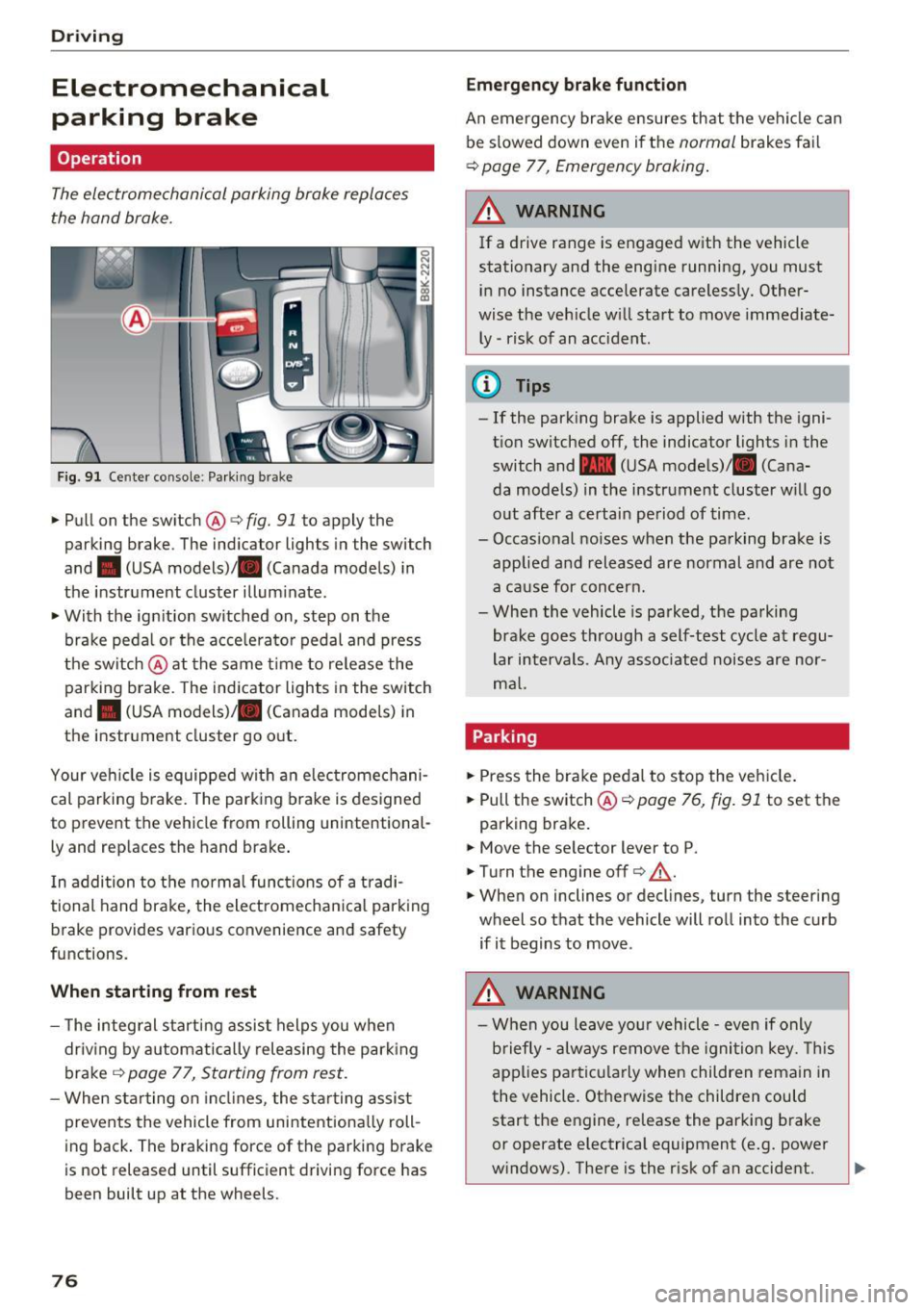
Fig. 91 Ce nter conso le: Park ing brak e
~Pullon the switch @c:>fig. 91 to apply the
parking brake . The ind icator lights in the switch
and . (USA
models) ;II (Canada models) in
the instr ument cluster illum inate.
~ With the ign ition switched on, step on the
brake peda l or the acce lerato r pedal and press
t he switch @at the same t ime to re lease the
parking brake . The indicator lights in the switch
and . (USA
models) ;II (Canada models) in
the instr ument cluster go o ut.
Your ve hicle is equipped wi th an elec tromechani
cal parking b rake. The park ing brake is designed
to prevent the vehicle from rolling un intent ional
ly and rep laces the hand brake .
I n addition to t he norma l func tions of a tradi
tional hand brake, the electromecha nica l park ing
b rake provides various convenience and safety
functions.
When starting from rest
- T he integ ral s tart ing assist helps you when
driv ing by a utomat ically releasing the park ing
brake ¢
page 77, Starting from rest .
-When starting on in cli nes, the sta rting assist
prevents the vehicle from unintentiona lly roll
ing back . The braking forc e of the park ing b rake
is not released until sufficient drivi ng force has
been built up at the wheels.
76
Emergency brake funct ion
An emergency bra ke ensures th at the vehicle can
be s lowed down even if t he
normal brakes fa il
c:> page 77, Emergency braking .
A WARNING
-
If a drive range is e ngaged w ith the vehicle
stationary and the engine running, you must
i n no instance accelerate careless ly. Other
wise the veh icle w ill start to move immediate
ly -risk of an accident.
(D Tips
- If the park ing brake is applied with the igni
t ion switched off, the indicator lights in the
switch and -(USA mode ls)/ . (Cana
da models) in the instrument cluster w ill go
o ut after a certai n pe riod of time.
- Occasional noises when the pa rking brake is
applie d and released are normal and are not
a ca use for conc ern.
- Whe n the vehicle is parked, the parking
brake goes through a self-test cycle at regu
lar intervals. Any associated noise s are nor
m al.
Parking
~ Press the bra ke peda l to stop the ve hicle.
~ Pull the switch@¢ page 76, fig. 91 to set the
parking bra ke .
~ Move the se lector lever to P.
~ T urn the engine off¢.&,. .
~ When on inclines or decl ines, turn the steer ing
wheel so that the vehicle will ro ll into the curb
if it begins to move .
.&_ WARNING
-W hen you leave yo ur vehicle -even if only
b riefly- always re move t he igni tion key. This
app lies p art ic ula rly when children remain in
the vehicle. Ot herwise the children could
start the e ngine, re lease the parking brake
or operate electrica l equipment (e .g. power
w indows) . The re is the r isk of an accident.
Page 81 of 266
a:,
a:,
...... N
l'
N
...... 0
0
LL co
The maximum speed rema ins stored until it is
chang ed by press ing the
!SE Ti button again brief
l y or unt il it is deleted by a lengthy push on the
button .
Speed warning 2: setting a speed limit
The radio or MM!* control unit is used to set,
change or delete w arning threshold
2 .
• Se lect : I CAR I function button> Instrument
cluster
> Speed warning . Or
• Se lect: I CAR i funct ion button > C ar sy stem s*
contro l button > Dri ver a ssist > Speed wa rning .
Warning threshold 2 can be set in the speed
range start ing from 20 mph to 150 mph (30 km/
h to 240 km/h) . Settings can each be ad justed in
intervals of 5 mph (10 km/h).
Cruise control system
Switching on
The cruise control system makes it possible to
drive at a constant speed starting at
20 mph (30
km/h).
0
f
~
0
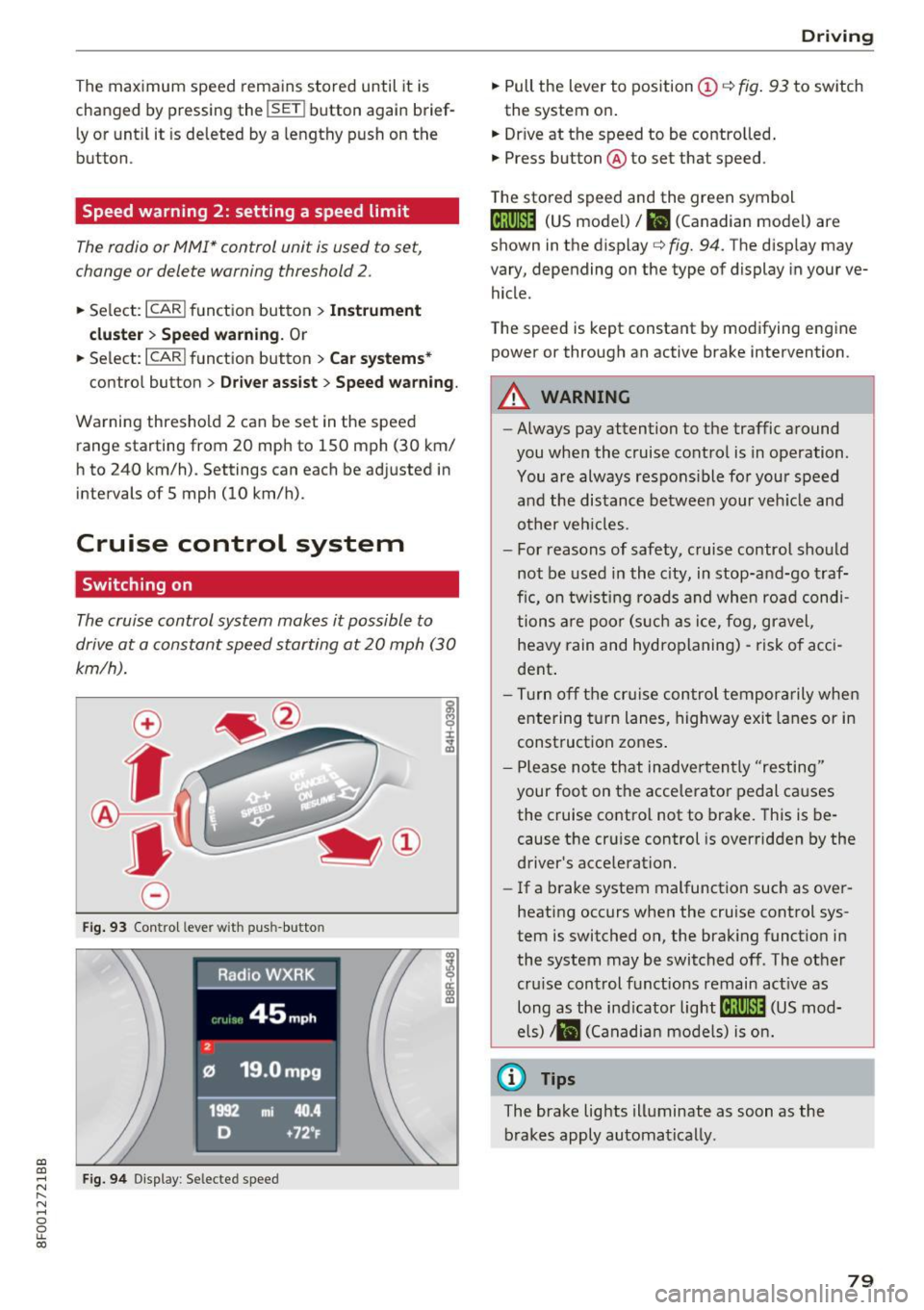
F ig . 93 Co ntrol leve r wit h pus h-butto n
Fig. 9 4 Disp lay : Se lecte d speed
D rivi ng
• Pull the lever to position (D c::> fig . 93 to sw itch
the system on .
• Dr ive at the speed to be contro lled .
• Press button @to set that speed .
T he sto red speed and the green symbol
@;\1)~14 (US mode l)/ El (Canadian model) are
shown in the display
c::> fig. 94. The d isp lay may
vary, depending on the type of display in you r ve
hicle .
The speed is kept constant by modifying engine power or through an act ive brake intervention .
_& WARNING
-Always pay attention to the traffic a round
you when the cruise contro l is in operation.
You are always respons ible fo r your speed
a nd the distance betwee n your ve hicle and
other veh icles.
- For reasons of safety, c ruise control sho uld
not be used in the c ity, in stop-an d-go t raf
fic, on tw ist ing roads and whe n roa d condi
tions a re poo r (s uch as ice, f og, gravel,
heavy rain and hydroplaning) -ris k of a cci
dent .
- Tu rn off the cr uise con trol te mpor arily whe n
e ntering t urn lanes, highway exit lanes or in
construct ion zones .
- P lease no te th at inadve rten tly "resting"
your foot on the acce lerator pedal causes
the cruise control not to brake. This is be
cause the cr uise control is overridden by the
driver's acce leration.
- If a b rake system malfunction such as ove r
heating occurs when the cruise control sys
tem is switched on, the brak ing funct io n in
the system may be switched of f. The other
cru ise control functions remain act ive as
long as the ind icator
light @;\1)~14 (US mod
e ls)
,ii (Ca nadian mo dels) is on .
@ Tips
The brake lights illuminate as soon as the
brakes apply automa tically.
79
Page 93 of 266

a:,
a:,
...... N
" N ...... 0
0
LL co
Audi ada pti ve c ruise contr ol and br akin g gu ard
tachometer @and is also shown briefly in the
display @¢
fig. 10 7.
Switching Audi adapti ve c ru is e control off
~ Push the lever away from you into position @
un til it clicks into place. The message
AC C off
appea rs.
@ Indic ator lights
II -Adapt ive cru ise control is switched on . No
vehicles are detected up ahead . T he stored speed
is ma inta ined .
• -A moving vehicle is detected up ahead . T he
adapt ive cruise control system regulates the
speed and distance to the moving vehicle ahead
and accelerates/brakes automatically.
• -When automatic braking is not able to keep
enough d ista nce to a previo usly detected moving
vehicle up ahead, you must take contro l and
brake ¢
page 93, Request for driver interven
tion .
© Displa y
If adaptive cruise control is not shown in the dis
play, you can call it up with the
I RES ET I button
¢ page 21.
Based on the symbols in the display, you can de
termine if the system is ma inta ining a distance to
the vehicle ahead and what that distance is .
N o v ehicl e -No vehicle ahead was detected.
W hite vehi cle -A veh icle ahead was detected .
Red vehi cle -Prompt for the driver to take action
¢ page 93.
Both arr ow s on the sc ale © indicate the distance
to the veh icle ahead. No arrow appears when the
vehicle is on an open road and there is no object
ahead .
If an object is detected ahead, the arrow
moves on the scale.
The green zone on the scale shows the stored dis
tance . For informa tion on changing the stored
d ista nce, refer to ¢
page 92. If the distance se
lected is too close or may soon become too close,
the arrows move into the red zone on th e scale .
A WARNING
Improper use of the adaptive cruise control
can cause collisions, other accidents and seri
ous personal injuries .
- Press ing the
ISETI button when driving at
speeds below 20 mph (30 km/h) , will auto
matica lly acce lerate the veh icle to 20 mph
(30 km/h), wh ic h is the minimum speed
that c an be set.
a) Tips
- If you switch the ignition or the adaptive
cruise control off, the set speed is erased
from the system memory .
- The electronic stabilization control (ESC)
and the anti-slip-regulation (ASR) are auto
matically turned on when the adaptive
cruise control is t urned on . Both systems
cannot be turned off if the adaptive cru ise
control is turned on.
Changing the speed
Appl ies to: vehicles wi th Audi ada ptive c ruise con trol
0
f
•
0
Fi g. 108 Se lector leve r: c han gin g the speed
~ To increase or reduce the speed in increments,
ta p the lever up or down.
~ To increase or reduce the speed q uickly, h o ld
the lev er up or down until the red LED @ reach
es the des ir e d speed
¢ pag e 90, fig. 107.
Following any changes , the new stored speed will
be displayed briefly in the display@¢
page 90,
fig. 107 .
91
Page 113 of 266
a:,
a:,
,....,
N r--. N ,....,
0
0
LL 00
Driving safety
Basics
Safe driving habits
Please remember -safety first!
This chapter contains important information,
tips, instructions and warnings that you need to read and observe for your own safety, the safety
of your passengers and others . We have summar
ized here what you need to know about safety
belts, airbags, child restraints as well as child
safety. Your safety is for us
priority number 1. Al
ways observe the information and warnings in
this section - for your own safety as well as that
of your passengers.
The information in this section applies to all
model versions of your vehicle. Some of the fea
tures described in this sections may be standard
equipment on some models, or may be optional
equipment on others. If you are not sure, ask
your authorized Audi dealer.
A WARNING
- Always make sure that you follow the in
structions and heed the WARNINGS in this
Manual. It is in your interest and in the in
terest of your passengers .
-
-Always keep the complete Owner's Litera
ture in your Audi when you lend or sell your
vehicle so that this important information
will always be available to the driver and passengers.
-Always keep the Owner's literature handy so
that you can find it easily if you have ques
tions.
Safety equipment
The safety features are part of the occupant re
straint system and work together to help reduce the risk of injury in a wide variety of accident sit
uations.
Your safety and the safety of your passengers
should not be left to chance. Advances in tech
nology have made a variety of features available
to help reduce the risk of injury in an accident.
Driving safety
The following is a list of just a few of the safety
features in your Audi:
- sophisticated safety belts for driver and all pas-
senger seating positions,
- belt force limiters for the front seats,
- belt pretensioners for the seats,
- head restraints for each seating position,
- front airbags,
- side airbags in the front seats,
- special LATCH anchorages for child restraints,
- adjustable steering column.
These individual safety features, can work to gether as a system to help protect you and your
passengers in a wide range of accidents. These
features cannot work as a system if they are not
always correctly adjusted and correctly used.
Safety is everybody's responsibility!
Important things to do before driving
Safety is everybody 's job! Vehicle and occupant
safety always depends on the informed and care
f1,1/ driver.
For your safety and the safety of your passen
gers,
before driving always:
.,. Make sure that all lights and signals are operat
ing correctly .
.,. Make sure that the tire pressure is correct .
.,. Make sure that all windows are clean and afford
good visibility to the outside.
.,. Secure all luggage and other items carefully
qpage 62.
.,. Make sure that nothing can interfere with the
pedals.
.,. Adjust front seat, head restraint and mirrors
correctly for your height .
.,. Instruct passengers to adjust the head re
straints according to their height.
.,. Make sure to use the right child restraint cor
rectly to protect children
¢ page 150, Child
safety.
.,. Sit properly in your seat and make sure that
your passengers do the same
q page 57, Seats
and storage.
Ill>
111
Page 170 of 266
Intelligent Technology
-Always acce le rate with special care on even,
smoot h surfaces such as those that are wet
o r covered with ice and s now. The dr ive
wheels can s pin even with these ass istance
systems that cannot always h elp to reduce
t h e risk of loss of v ehicle con trol. t
ir es. Diff eren t tire si zes c an lead to a red uc
t ion in en gine power .
- Y ou may hear noises whe n the sys tem s de
sc ribe d are working .
{D) Tips
-ABS and ASR on ly work co rrectly whe n all
fo ur whee ls are e quipped w ith ide ntica l
Switching on/off
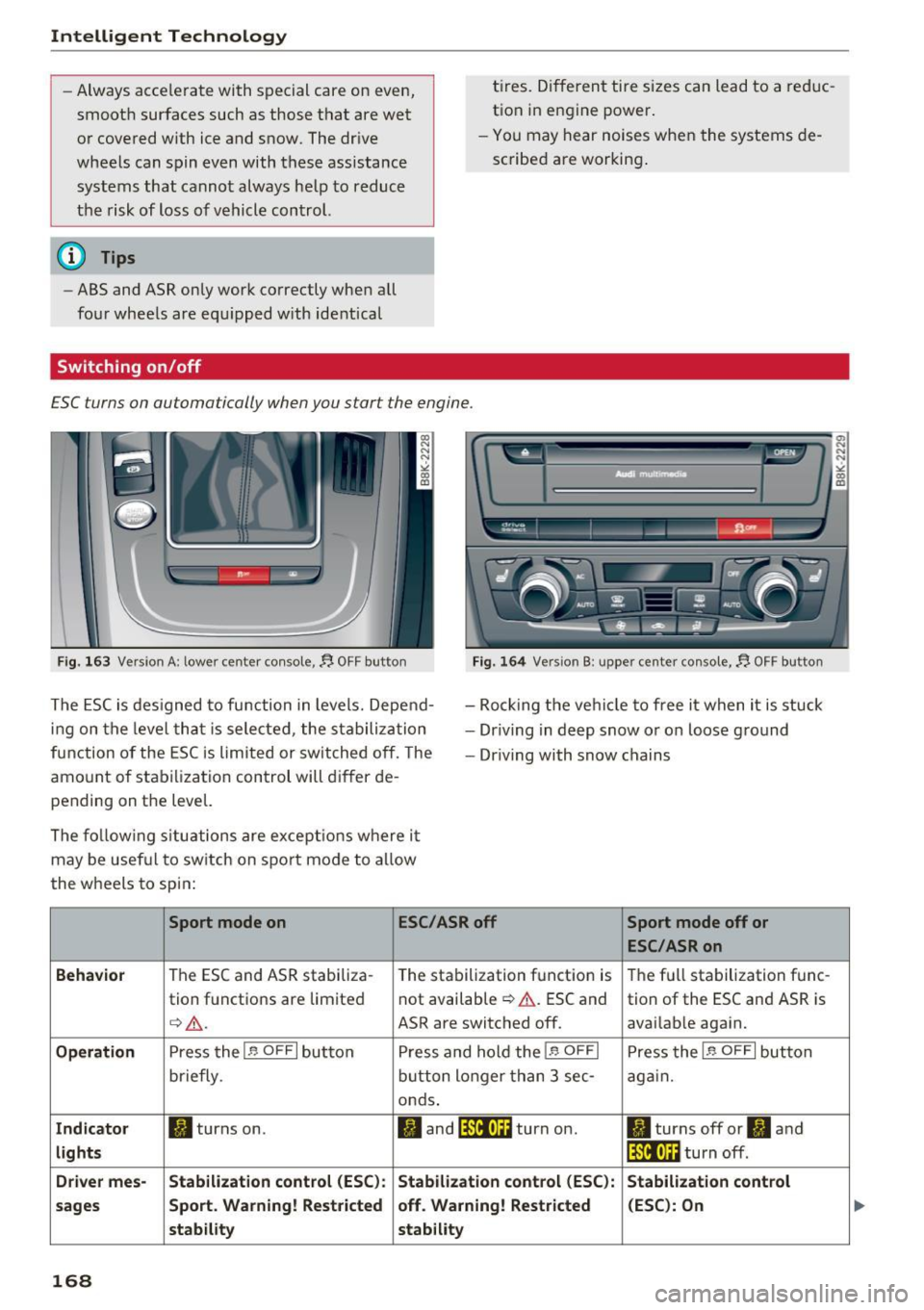
£SC turns on automatically when you start the engine .
Fig . 163 Versio n A: lower cente r co nso le,~ OFF button Fig. 164 Version B : upper center co nso le, ~ OFF button
T he ESC is des igned to function in leve ls. Depe nd
i ng on t he level th at i s sele cted, the s tabili zation
f unc tion of the E SC is limited or sw itched off. The
amo unt of stabi liza tio n con trol will d iffer de
pendi ng on the level. -
Roc king the ve hicle to free it w hen i t is stuck
- Dr iving in d eep snow or o n loose g ro und
- Dr iving with snow chains
Th e fo llo wing s itu ations are ex cep tion s where i t
may be usef ul to sw itch on s po rt mo de to allow
the wheels to spin:
Sport mode on ESC/ASR off
Behavior
T he ESC and ASR stabiliza -
The sta bilization funct ion is
tion f unct io ns are limite d not available
¢ &
. ES C and
¢ &. . ASR are switched off.
Operation Press the I.$ OFF I b utton P re ss and hol d the l.$ OF FI
briefly . button longer than 3 sec-
onds .
Indicator II turns on. Iii and lf111•)H turn on.
lights
Driver mes- Stabilization control (ESC ): Stabilization control (ESC ):
sages Sport. Warning! Restricted off . Warning! Restricted
stab ility stability
168
Sport mode off or
ESC /ASR on
T he f ull stabilization func -
tion of the ESC an d ASR is
avai lab le aga in.
Press the I.$ OFF I but ton
a g ai n.
II turns off or II and
lf11ft)H turn off .
Stabilization control
(ESC ): On
N N ><'. 00
Page 173 of 266
a:,
a:,
...... N r--. N ...... 0
0
LL 00
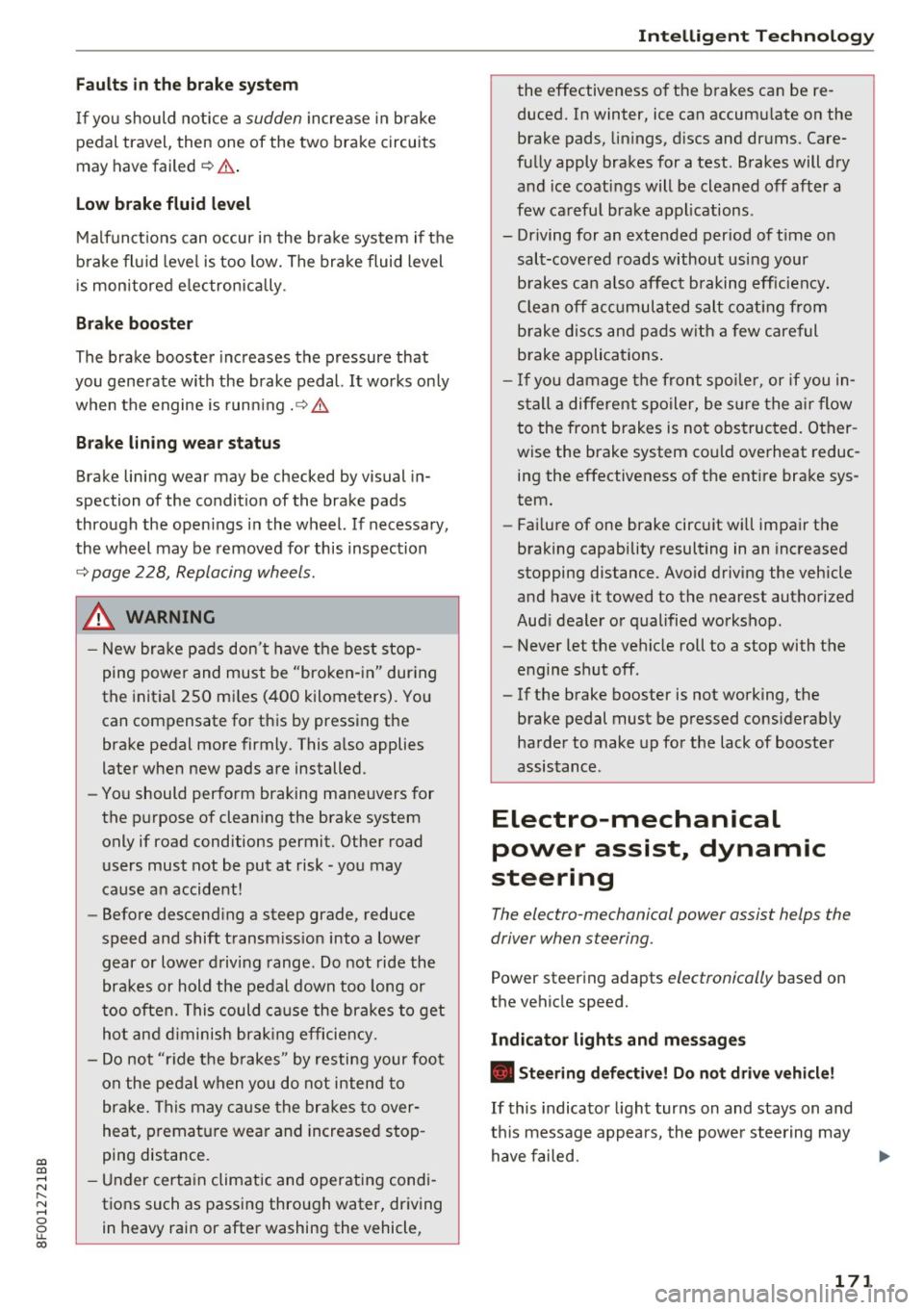
Fa ults in the brake system
If yo u should notice a sudden increase i n brake
pedal travel, then one of the two brake circuits
may have failed
¢ .&. .
Low brake fluid level
Malf unct ions can occur in the bra ke system if the
b rake fl uid leve l is too low. The brake fluid level
i s monitored e lectronica lly .
Bra ke booste r
The brake booster increases the pressure that
you generate with the brake pedal.
It works on ly
when the engine is run ning
.¢ .&.
Bra ke lining we ar status
Brake lining wear may be checked by visual in
spection of the condition of the brake pads
through the open ings in the wheel. If necessary,
the wheel may be removed for this inspection
¢ page 228, Replacing wheels.
A WARNING
- New bra ke pads don't have the best stop
ping power and must be "bro ken- in" dur ing
the init ia l 250 m iles (400 kilometers). Yo u
can compensate for th is by press ing the
brake pedal more firmly. This a lso applies
later when new pads are installed.
- Yo u should perfo rm braking maneuvers for
the p urpose of clean ing the brake system
only if road conditions permit. Other road
users must not be put at risk -you may
cause an accident!
- Before descending a steep grade, reduce
speed and shift t ransm iss ion into a lower
gear or lowe r driving range. Do not ride the
brakes or hold the pedal down too long or
too often. This could ca use the brakes to get
hot and diminish brak ing efficie ncy.
- Do not "r ide t he b rakes" by resting your foot
on the pe dal when yo u do not inten d to
bra ke. This may cause the bra kes to over
heat, premat ure wear and increased stop
ping distance.
- Under certa in climatic and operating condi
tio ns such as passing thro ugh water, driving
in heavy rain or after washing the vehicle,
Intellig ent Technology
the effectiveness o f the brakes can be re
duced. In winter, ice can accum ulate on the
brake pads, lin ings, d iscs and drums . Care
fu lly apply brakes for a test . Brakes will dry
and ice coat ings will be cleaned off after a
few ca refu l brake applications .
- Driving for an extended period of t ime on
salt-covered roads without usi ng your
b rakes can also affect braking eff iciency.
Clea n off acc umul ated salt coat ing from
b rake discs an d pa ds w ith a few careful
b rake appli cat ions .
- I f you d amage the front spoile r, or if you in
s t all a different spoiler, be s ure the a ir flow
to the front brakes is not obstruc ted. Other
wise the brake system could overheat reduc ing the effectiveness of t he ent ire bra ke sys
tem.
- Fai lure of one brake circuit w ill impa ir the
braking capability resulting in an increased
stopping distance . Avoid driving the vehicle
and have it towed to the nearest authorized
Aud i dealer or qualified workshop.
- Never let the vehicle roll to a stop with the
engine shut off.
- If the brake booster is not working, the
brake pedal must be pressed cons iderab ly
ha rder to make up fo r the lack of booste r
assis tance .
Electro-mechanical
power assist, dynamic
steering
The electro-mechanical power assist helps the
driver when steering.
Power steer ing adapts electronically based on
the vehicle speed.
Indicator lights and messages
• Steering defe ctive! Do not drive vehicle!
If this indicato r light turns on and stays on and
t hi s message appears, the powe r steering may
have failed.
171
Page 181 of 266

Trailer towing Driving with a trailer
General information
Your Audi was designed primarily for passenger
transportation .
If you plan to tow a trailer, please remember that
the additional load will affect durability, econo
my and performance.
Trailer towing not only places more stress on the
vehicle, it also calls for more concentration from
the driver.
For this reason, always follow the operating and
driving instructions provided and use common
sense.
Technical requirements
Trailer hitch
Use a weight-carrying hitch conforming to the
gross trailer weight. The hitch must be suitable
for your vehicle and trailer and must be mounted
securely on the vehicle's chassis at a technically
sound
location . Use only a trailer hitch with a re
movable ball mount . Always check with the trail
er hitch manufacturer to make sure that you are
using the correct hitch.
Do not use a bumper hitch.
The hitch must be installed in such a way that it
does not interfere with the impact -absorbing
bumper system . No modifications should be
made to the vehicle exhaust and brake systems .
From time to time, check that all hitch mounting
bo lts remain securely fastened.
When you are not towing a trailer,
remove the
tra iler hitch ball mount . This prevents the hitch
from causing damage shou ld your vehicle be
struck from beh ind ¢
,&. .
Trailer brakes
If your trailer is equipped with a braking system,
gi check to be sure that it conforms to all regula-......
~ tions . N ...... 0
0
LL 00
Trailer towing
The trailer hydraulic brake system must not be
directly connected to the vehicle's hydraulic
brake system ¢.&. .
Safety chains
Always use safety chains between your vehicle
and the trailer.
Trailer lights
T ra iler lights must meet all regulations . Be sure
to check w ith your author ized Audi dealer for cor
rect wiring, switches, and relays.
Mirrors
If you are unable to see the traffic behind you us
ing the regular outside mirrors, then you
must in
stall extended mirrors. It is important that you
always have clear vision to the rear.
,8. WARNING
-If a tra iler has electr ical brakes please note
that these bra kes are not activated by the
factory-fitted control unit -risk of accident!
- After removing the trailer hitch, do not
store it in your vehicle. In case of sudden
braking, the hitch could fly forward and in
jure you or your passengers.
Operating instructions
Maximum trailer weight
A trailer for your vehicle is limited to a typical
class 1 or class 2 trailer.
Trailer load distribution
Be sure the load in the trailer is held sec ure ly in
place to prevent it from shifting forward, back
ward or sideways.
Never allow a passenger to ride in a trailer¢.&.
in Driving instructions on page 180.
Engine cooling system
Towing a trailer makes the engine work harder . It
is important that the cooling system's perform
ance is up to the additional load . Make sure that
the cool ing system has enough fluid. .,..
179
Page 182 of 266
Trailer towing
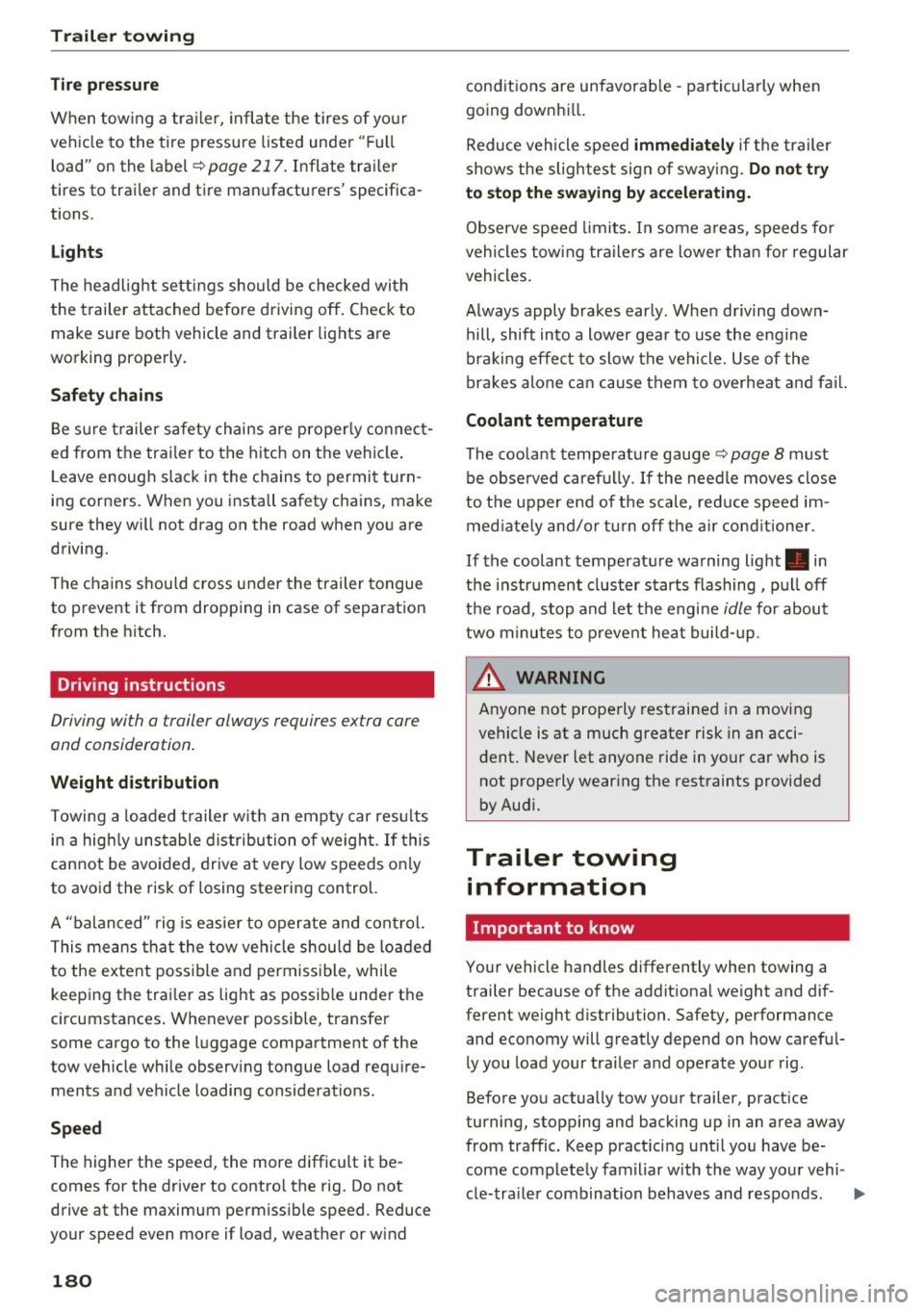
Tire pr essure
When tow ing a tra iler, inflate the tires of yo ur
veh icle to the tire pressure listed under " Fu ll
load" on the label ¢
page 217. Inflate trai ler
tires to trai ler and tire manufacturers' specifica
tions.
Lights
The headlight settings should be chec ked with
the trailer attached before driving off . Check to
make sure both vehicle and trailer lights are
working properly.
Safety chains
Be s ure t railer safety chains are properly connect
ed from the trailer to the hitch on the vehicle .
L eave enough slack in the chains to permit turn
ing corners. When you install safety chains, make
sure they wi ll not drag on the road when you are
driving.
The chains shou ld cross under the trailer tongue
to prevent it from dropping in case of separation
from the hitch.
Driving instructions
Driving with a trailer always requires extra care
and consideration .
Weight distribution
Towing a loaded trailer with an empty car res ults
in a high ly unstable distribution of weight . If this
cannot be avo ided, drive at very low speeds on ly
to avoid the risk of losing steering control.
A "balanced" rig is easie r to operate and cont rol.
This means that the tow vehicle should be loaded
to the extent possible and permissible, while keeping the trai ler as light as possib le under the
circumstances . Whenever possible, transfer
some cargo to the luggage compartment of the
tow vehicle while observ ing tongue load requ ire
ments and vehicle loading considerat ions .
Spe ed
The higher the speed, the more difficult it be
comes for the driver to contro l the rig. Do not
drive at the maximum permiss ible speed. Reduce
your speed even more if load, weather or w ind
180
conditions are unfavorab le -particularly when
going downhi ll.
Reduce vehicle speed
immediate ly if the trailer
shows the slightest sign of sway ing.
Do not try
to st op the swaying by accele rating.
Observe speed limits. In some a reas, speeds fo r
vehicles towing tra ilers are lower tha n for regular
vehicles.
A lways apply brakes ear ly . When driving down
hill, shift into a lower gea r to use the engine
braki ng effect to slow the vehicle. Use of the
brakes alone ca n cause them to overheat and fa il.
Coolant temperature
The coolant temperature gauge¢ page 8 must
be observed carefully. If the needle moves close
to the upper end of the scale, reduce speed im
med iate ly and/or tu rn off the a ir cond itioner .
If the coolant temperatu re warning light . in
the instrument cluster starts flashing, p ull off
the road, stop and let the engine
idle for about
two minu tes to p revent heat build-up .
.&, WARNING
Anyone not properly res trained in a moving
vehicle is at a much greater risk in an acci
dent . Never let anyone ride in your car who is
not properly wear ing the restraints provided
by Aud i.
Trailer towing
information
Important to know
-
Your vehicle handles differently when towing a
trailer because of the addit iona l weight and dif
ferent weight distribution. Safety, performance
and economy will greatly depend on how careful
ly you load your tra iler and operate your rig.
Before you actually tow your trailer, pract ice
turning, stopping and backing up in an area away
from traffic. Keep pract icing u nti l you have be
come completely fam iliar w ith the way your vehi-
cle-tra ile r combination behaves and respo nds . .,.
Page 187 of 266
a:,
a:,
...... N r--. N ...... 0
0
LL 00
Care and cleaning
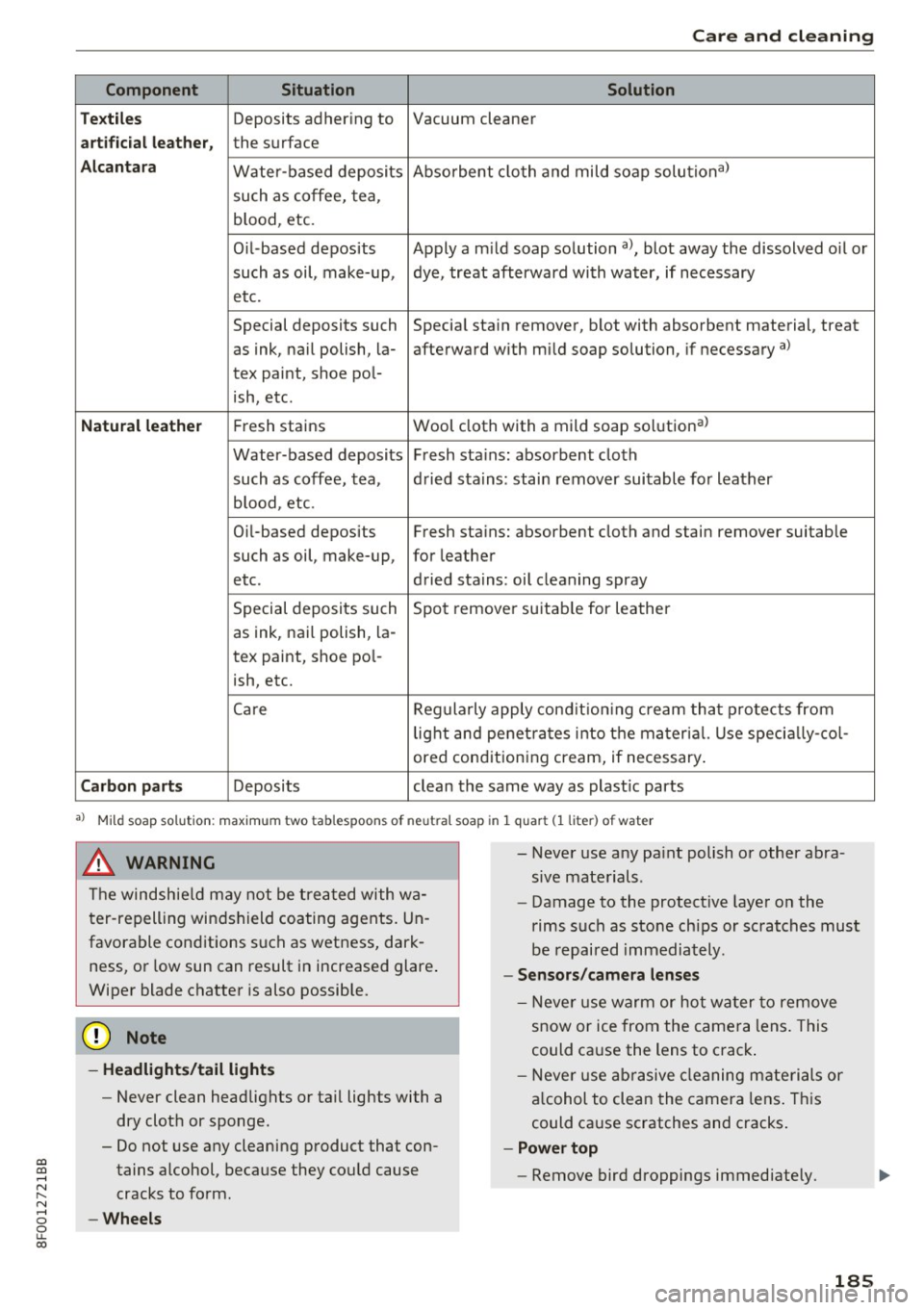
Component Situation Solution
T ex til es
Deposits adhering to Vacuum cleaner
art ifici al leat her, the surface
A lcan tara Water-based deposits Absorbent
cloth and mild soap solutiona>
such as coffee, tea,
b lood, etc.
Oil -based deposits Apply a m ild soap solution
a), blot away the dissolved o il or
such as oil, make-up, dye, treat afterward with water, if necessary
etc.
Special deposits such Special stain
remover, blot with absorbent material, treat
as ink, nail polish, la- afterward with mild soap solution, if necessary
a)
tex paint, shoe pol-
ish, etc.
Natu ral le ath er Fresh stains Wool cloth with a mild soap solution a)
Water-based deposits Fresh stains: absorbent cloth
such as coffee, tea, dried stains: stain
remover suitable for leather
b lood , etc.
Oi [-based deposits Fresh stains: absorbent cloth and stain
remover suitable
such as oil, make-up, for leather
etc. dried stains: oil cleaning spray
Special deposits such Spot remove r suitab le for leather
as ink, nail polish, la-
tex paint, shoe pol-
ish, etc.
Care Regularly apply condit ion ing c ream that protects from
lig ht and penet rates into the material. Use specia lly-co l-
ored conditioning cream, if necessary .
Carbon part s Deposits clean the same way as plast ic parts
a) Mi ld soap solution: maximum two tablespoons of neutral soap in 1 q uart (1 liter) of water
.8, WARNING
The windshield may not be trea ted with wa
ter-repelling windshield coating agents. Un
favorable cond itions such as wetness, dark
ness, or low sun can result in increased glare.
Wiper blade chatter is also possible.
@ Note
- Headlight s/tail li ght s
-Never clean headlights or tail lights with a
dry cloth or sponge.
- Do not use any cleaning product that con
tains alcohol, because they could cause
cracks to form.
- Whe els
-
- Never use any pa int polish or other abra
sive materials .
- Damage to the protect ive layer on the
rims such as stone chips or scratches must
be repaired immediately .
-Sen sor s/cam era l enses
- Neve r use warm or hot water to remove
snow or ice from the camera lens . This
could cause the lens to crack .
- Neve r use ab rasive cleaning materials or
a lcohol to clean the camera lens. This
could cause scratches and cracks .
-Powe r top
- Remove bird droppings immediately .
185