brake light AUDI A5 COUPE 2010 Owner's Manual
[x] Cancel search | Manufacturer: AUDI, Model Year: 2010, Model line: A5 COUPE, Model: AUDI A5 COUPE 2010Pages: 360, PDF Size: 84.39 MB
Page 129 of 360

_____________________________________________ A_d_ a __,_ p_t_iv _ e_ c_r _u _is _ e_ c _ o_n_ t_ r_ o _ l __ !II
Ap plies to vehic les: with adapt ive cruise cont rol
System status indicator
The text messages and symbols shown in this area of the
display are not displayed perm anently.
T ime in ter va ls (s uch a s c::;, __ __ c::;, }
Fig . 132 System
sta tus i ndicator
The different symbols for the time intervals appear if you change the
settings ::::> fig. 132 .
The text message ... (three whi te dots) appears if a setting cannot be
implemented with the operating lever . The following are possib le
reasons :
• If you pull the control lever towards you to resume speed but no
requested speed was set .
• If you push the lever up to increase (or down to reduce) speed
when no speed has been set previously .
• I f you push the lever up to increase (or down to reduce) speed
and this speed is outside the range from 20 to 95 mph (Canada
models : 30 to 150 km/h) .
ACC functi onal it y limited
The text message ACC fun ctio na lit y lim ited appears when the ACC
system does not detect any objects over an extended time period.
For the time being, the distance to vehicles up ahead is not being
Controls and equip
ment
controlled . The ACC system is not switched off, so increased alert
ness is required. The following may be reasons for the text message
ACC Functiona lly limited:
• The ACC sensor is dirty. The ACC system is not reacting, or is not
react ing correctly, to veh ic les traveling ahead.
• I t is possible that you are driving on a road with very light traffic
without anything at the side of the road (e.g. guard rai ls, traffic
signs, trees). As soon as a vehicle is detected by the system again,
it returns to its control range and the text message disappears .
The ACC sensor is located in the right front trim grille::::>
page 118,
fig. 122 . If there is a loss of operation due to heavy contamination,
this area should cleaned to restore proper operation .
ACC not available
The text message ACC not available appears , for example, if the
temperature of the brakes is excessive. Adaptive cruise control is
temporarily not availab le . A warning tone sounds as a reminder .
ACC not a vailable !
The text message ACC not ava ila ble! appears in the event of a
malfunction . Adaptive cru ise control is turned off . A warning tone
sounds as a reminder. Have the system inspected by a qua lified
dea lership .
ACC sensor blo cked !
The text message ACC s ensor blocked ! appears when the ACC
system can no longer guarantee safe detection of objects. Adaptive
cruise control is turned off . A warning tone sounds as a reminder.
To decide whether it is necessary to switch off the ACC (ACC sensor
b locked
!) or if it is only a temporary condition (ACC F unctionally
limited), the system wi ll a lso takes into consideration the outside
temperature and/or the windshield wiper operation.
The ACC senso r is dirty or b locked (e .g . leaves, snow).
The sensor should be cleaned to restore proper sensor function
::::>
page 118, fig. 122 .
I • •
Page 131 of 360
_______________________________________________ A_ d_ a ---=- p_t_ i_v _e_ c_ r_ u_ i_ s _e_ c_ o_ n_t_ r _o _ l __ llJIII
• A red vehicle is shown in the instrument cluster disp lay
~ page 128, fig. 133 .
• T he text DISTANCE! appears in the status line.
• The indicator light in the Instrument cluster blinks red.
• A warning tone sounds.
[ i] Tip s
• I f the adaptive cruise control initiates braking, the hydraulic
brake system is under pressure. Therefore, the brake peda l distance
is shorter and the pedal "feels" harder.
• Adaptive cruise control is switched off after pressing the foot
brake . The speed saved up this point can be resumed.
• To resume the saved speed, release the brake pedal and press
the control lever~
page 122, "Turning adaptive cruise control off
temporarily".
• I f you use the accelerator t o go faster than the speed of the
object ahead of you, the
dri ver inter vention prompt will not be
accompanied by a wa rning signal.
• I f the speed you previously set is exceeded, the indicator light in
the speed ometer will switch off .•
Controls and equip
ment
App lies to vehic les: with adaptive crui se cont rol
MMI settings
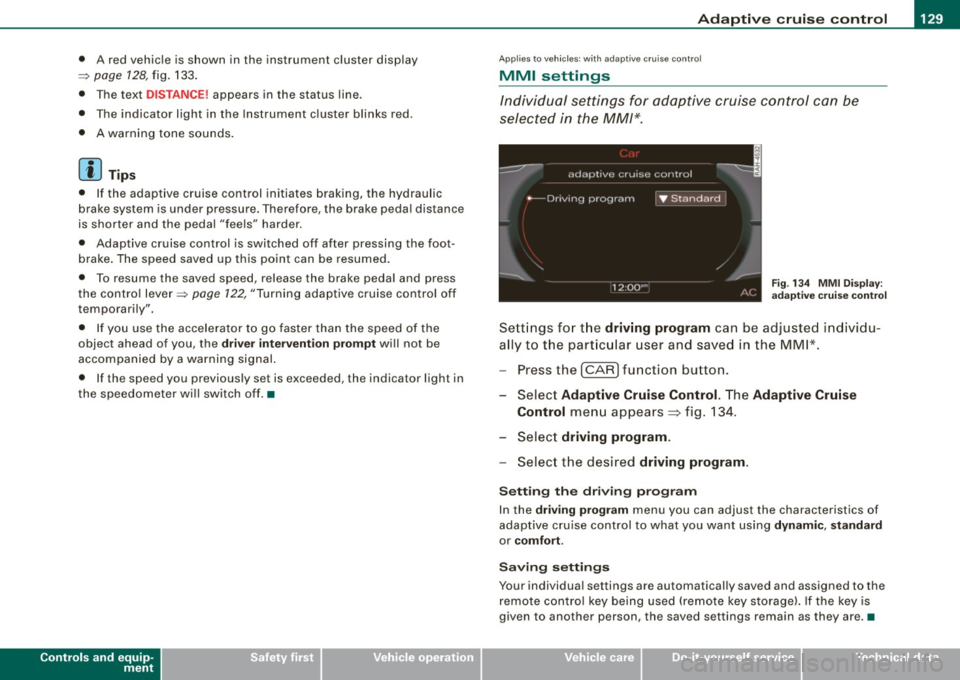
Individual settings for adaptive cruise control can be
selected in the
MM/*.
F ig . 134 MMI Di spl ay:
adapt ive cruise control
Sett ings fo r th e driving program can be adjusted individu
a lly t o th e part ic ul ar user and save d in the MM I* .
- Press the
I CAR] function button.
- Select
Adaptive Cruise Control . The Adaptive Cruise
Control
men u appears => fig. 134.
Selec t
driving program .
Select the desired driving program .
Setting the dri ving program
In the driv ing program menu you can adjust the characteristics of
adaptive cruise control to what you want using
dynamic , standard
or comfort .
Sav ing setting s
Your individual settings are automatically saved and assigned to the
re mote contro l key being used (remote key storage). If the key is
given to another person, the saved settings remain as they are .•
I • •
Page 152 of 360
• ..__T_ r_a _n_ s_ m_ is_ s_i o _ n ______________________________________________________ _
Before you move the selector lever to R, press both the button in the
handle of the selector lever
and the brake pedal at the same time .
When the ignition is on , the backup lights illumina te when the
selector lever is moved into R.
N -N eutr al
The transmission is in neutral in this position. Shift to this position
for standing with the brakes applied=:>
page 150.
When the vehicle is stationary or at speeds below 3 mph (5 km/h) ,
you must always apply the footbrake before and while moving the lever out of
N .
D -N or mal pos itio n fo r d rivi ng forward
Posi tion Dis for normal city and highway driving . It ranges from zero
to top speed and all gears shift automatically, depending on engine load , driv ing spe ed and automa tically selected shift programs .
When the vehicle is s tationary or at speeds below 3 mph (5 km/h).
you must always apply the foot brake befo re and while moving the
lever to
D ou t of N.
In certain circumstances it may be advantageous to temporarily
switch to the manual shift program to manually select gear ratios to
match specific driving conditions=:>
page 152.
S -Sp o rt posit io n*
Select this pos ition for sportier performance. In this position, the
transmission will not upshift as soon , allowing the vehicle to use the
increased power available at higher engine speeds to achieve live
lier acceleration.
When the vehicle is stationary or at speeds below 3 mph (5 km/h) ,
you must always apply the foot brake befo re and while moving the
lever to
S out of N.
& WARNING
R ea d and foll ow all WARNIN GS =:> & in "Dri vin g th e a utom atic
tr an smi ssion " on
pag e 148.
0 Note
Coasting downhill with the transmission in N and the engine not
running will result in damage to the automa tic transmission and
possibly the catalytic converter. •
Applies t o ve hicl es: wit h automa tic trans mis si on
Automatic Shift Lock (ASL )
The Automatic Shift Lock safeguards you against acciden
tally shifting into a forward or the reverse gear and
causing the vehicle to move unintentionally.
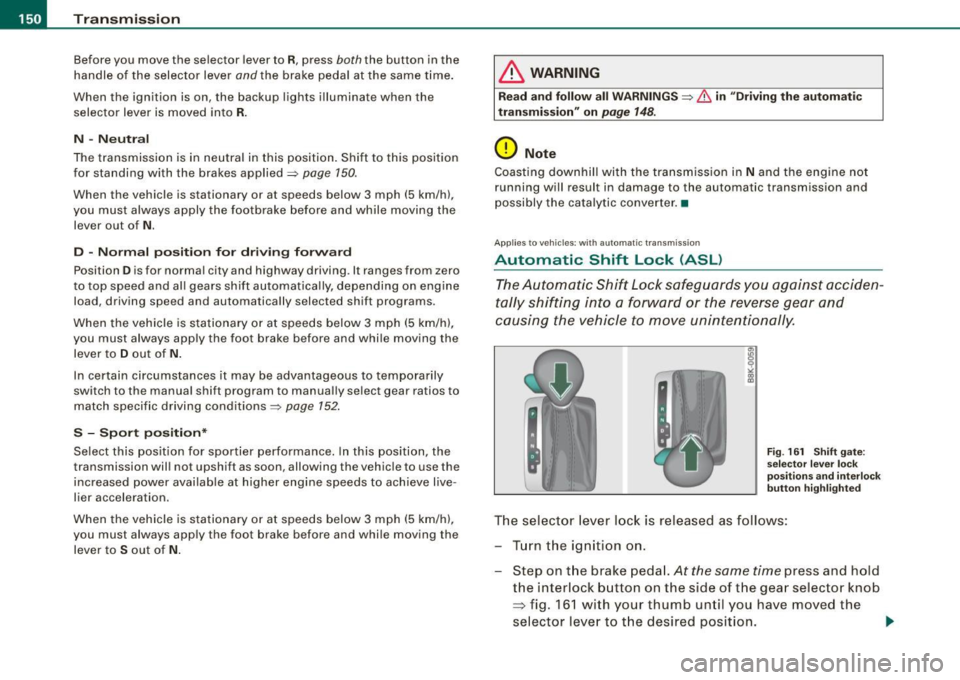
F ig . 16 1 Shift gate:
se lector le ver loc k
posit ions a nd int erl ock
butt on hi gh ligh ted
The selector lever l ock is released as follows :
Turn the ignit ion on .
Step on the brake peda l.
At the same time press and hold
the interlock button on the s ide of the gear selector knob
=> fig. 161 w ith your thumb until you have moved the
selector lever to t he desired position.
~
Page 153 of 360
Tra ns mi ssio n -
----------------
Aut omat ic selec to r l ever lock
The se lector lever is locked in the P and N positions when the igni
tion is turned on. To move the lever from these positions the driver
must depress the brake pedal. As a reminder to the driver, the
follow ing warning appears in the instrument cluster display when
the selector is in
P and N:
W hen sta tio nary app ly footbrake while selecting g ear
A time delay e lement prevents the selector lever from locking when
it is moved through the
N position (going from R to Dl. The locking
e lement will lock the selector lever if the lever is left in N (Neutral)
for more than approximately 1 second, without the brake peda l
being pressed.
At speeds above about 3 mph (5 km/h) the Automatic Shift Lock is
automatically deactivated in the
N position .
Interlock butt on
The lock button on the selector lever prevents the lever from being
accidentally shifted into certain positions. Pressing this button
deactivates the selector lever lock. Depending on the direction of
the shift, the selector lever locks at different positions. The positions
are highlighted in the illustration =>
page 150, fig. 161.
Igniti on key sa fe ty in te rlo ck
The key cannot be removed from the ignition unless the selector
lever is in the
P park position. When the ignition key is removed, the
selector lever wil l be locked in the
P position. •
Applies to vehicles : with automatic transm iss ion
Kick-down
The kick-down feature allows the vehicle to generate
maximum acceleration .
When you press the acce lerator pedal beyond the resistance point
that is reached at ful l throttle, the transmission wi ll select a lower
gear ratio based on vehic le speed and engine RPM. The engine RPM
Controls and equip
ment
wi ll be controlled to produce maximum vehic le acceleration as long
as you continue to press the accelerator pedal beyond this resis
tance point .
& WARNING
Be care ful whe n usi ng the kick -dow n fe atur e on slipp ery ro ads .
R apid acc eleration may cau se th e v ehicle to skid . •
App lies to vehicles : with automat ic transm ission
Dynamic shift program (DSP)
The aut omatic transmission is electronically controlled.
The transmission is se lf adapting and will a ut oma tica lly se lect the
best shift program suited to the driving conditions and driving style.
The transmission will select one of the
eco nom y programs when
you drive at a steady speed or a g radually changing speed without
heavy acceleration. This achieves optimum fuel efficiency, with early
upshifting and delayed downshifting.
The transmission will automatically select the
s p ort y shift programs
when you drive at higher speeds, or with heavy acceleration and
frequent ly changing speeds . Upshifts are delayed to make full use
of engine power . Downshifting takes place at higher engine speeds
than in the economy programs .
The se lect ion of the most su itable shift program is a continuous,
automatic process. The driver can also make the transmission
sw itch to a sporty program by
quick ly pressing down the gas peda l.
This causes the transmission to shift down to a lower gear to
achieve rapid acceleration, e.g. for quickly passing another vehicle .
You do not need to press the gas pedal into the kick-down range.
After the transm ission has upshifted, the original program is
selected accord ing to your driving sty le.
An additiona l shift program allows the automatic transmission to
select the proper gear for uph ill and downhi ll gradients. ..,.
I • •
Page 154 of 360
-Tr
ansmi ssio n
..__ ______________ _
This keeps the transmission from shifting up and down unneces
sari ly on hills. The transmission will shift down to a lower gear when
the driver presses the brake pedal on a downhi ll gradient. This
makes use of the braking effect of the engine without the need to
shift down manually. •
Applies to vehi cles: with aut om ati c transmi ssio n
Manual shift program
Using the manual shift program you can manually select
gears.
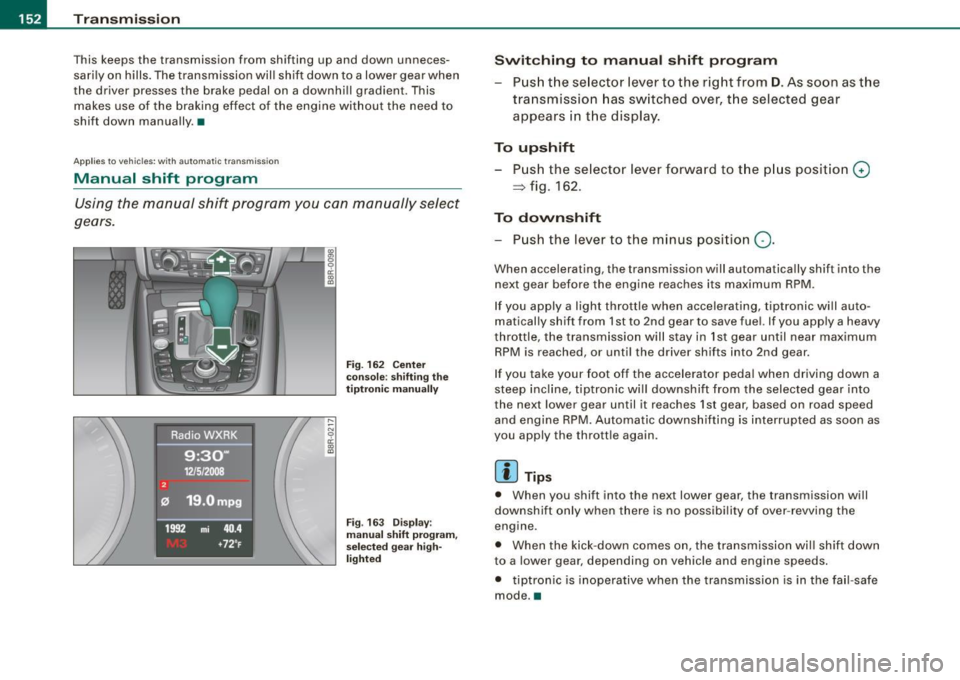
F ig . 162 Ce nter
conso le : sh if ting the
t iptr oni c man ually
Fig . 163 Disp lay:
m anua l shi ft p rogra m ,
selected gear hig h
li g ht ed
Swit chin g to m anu al s hift pr ogr am
Push the se lector lever to the right from D . As soon as the
transmission has switched over, the selected gear
appears in the display .
To upshift
Push the selector lever forward to the p lus position G)
~ fig . 162.
To dovvnshift
- Push the lever to the minus position Q.
When accelerating , the transmission will automatically shift into the
next gear before the engine reaches its maximum RPM .
If you apply a light throttle when accelerating, tiptronic wi ll au to
matically shift from 1st to 2nd gear to save fuel. If you apply a heavy
throttle, the transmission will s tay in 1st gear until near maximum
RPM is reached, or unti l the driver shif ts into 2nd gear.
If you take your foot off the accelerator peda l when driving down a
steep inc line, tiptronic wi ll downshift from the selected gear into
the neX1 lower gear until it reaches 1st gear, based on road speed
and engine RPM. Automatic downshifting is interrupted as soon as
you apply the thrott le again .
[ i ] Tips
• When you shift into the next lower gear, the transmission will
downshift only when there is no possibi lity of over -revving the
engine .
• When the kick-down comes on , the transmission wil l shift down
to a lower gear , depending on vehicle and engine speeds .
• tiptron ic is inoperative when the transmission is in the fa il-safe
mode. •
Page 167 of 360
___________________________________________________ H_ o_m _ e_ L_ i_ n _k_ @_R _ __.1111
Applies to vehicles: with Homelin k® un iversal remote contro l
Programming the Homelink ® transmitter
The transmitter is programmed in two phases. For rolling
code transmitters, a third phase is also necessary.
,,,,, r, o: o "'' '''"
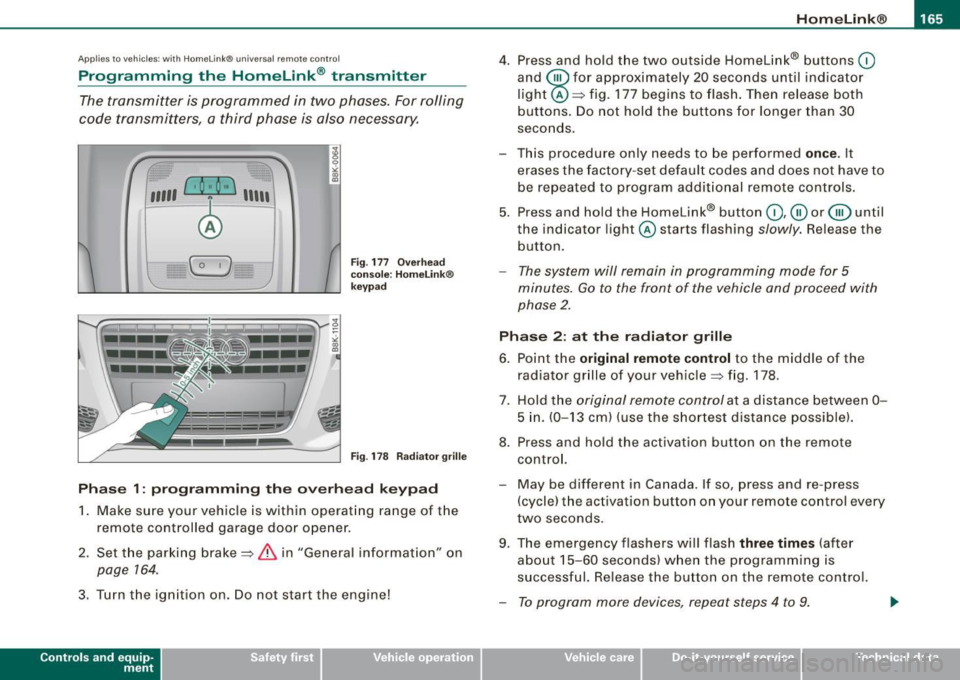
Fig . 177 Overhead
console: HomeLink ®
keypad
Fig . 178 Radiator grille
Phase 1: programming the overhead keypad
1. Make sure your vehicle is within operating range of the
remote controlled garage door opener.
2. Set the parking brake==>
& in "General information" on
page 764.
3. Turn the ignition on. Do not start the engine!
Contro ls and eq uip
ment
4. Press and hold the two outside Homelink® buttons 0
and @for approximately 20 seconds until indicator
light@==> fig. 177 begins to flash. Then release both
buttons. Do not hold the buttons for longer than
30
seconds.
- This procedure only needs to be performed
once . It
erases the factory-set default codes and does not have to
be repeated to program additional remote controls.
5. Press and hold the Homelink® button
0,@ or@ until
the indicator light @starts flashing slowly. Release the
button.
- The system will remain in programming mode for 5
minutes.
Go to the front of the vehicle and proceed with
phase 2.
Phase 2: at the radiator grille
6. Point the
original remote control to the middle of the
radiator grille of your vehicle==> fig. 178.
7. Hold the original remote control at a distance between
0-
5 in. (0-13 cm) (use the shortest distance possible).
8. Press and hold the activation button on the remote control.
- May be different in Canada . If so, press and re -press
(cycle) the activation button on your remote control every
two seconds.
9. The emergency flashers will flash
three times (after
about
15 -60 seconds) when the programming is
successful. Release the button on the remote control.
- To program more devices, repeat steps 4 to 9.
Vehicle care I I irechnical data
Page 237 of 360

The system operates across the entire speed range in combination
with the ABS system. If the Anti -Lock Brake System (ABS) ma lfunc
tions, the ESP wil l also shut down .
How the system works
The Anti -Lock Brake System (ABS), Electronic Differential Lock (EDU
and the Anti -Slip Regulation System (ASR) are integrated in the elec
tronic stabilization program. In addition to the data provided by
th ese functions, the ESP control unit requires additional measure
ment data provided by high performance sensors . The rotational
speed of the vehicle about its vertica l axis, vehicle acceleration in
the fore-and-aft and lateral directions , the brake pressure, and the
steering angle are all measured.
The direction in which the driver wishes to travel is determined with
the aid of the steering angle and vehicle speed and is continua lly
compared with the actual behavior of the vehicle. If the two do not
match, for example, when the vehicle starts hydrop laning on a wet
road, ESP will automatically brake the appropriate whee l to correct
the prob lem.
The vehicle is then stabi lized by the forces acting on the whee l
during braking. If the vehicle is
oversteering (the vehicle turns too
sharply and the rear wheels slide toward th e ou tside of a curve), the
brakes are main ly app lied on the wheel that is on the outside of the
curve . In the case of a vehicle that is
understeering (the vehicle does
not turn sharply enough and pushes out of a curve), the brakes are
applied as needed on the wheel that is on the inside of the curve or
additional ly on the other wheels. An acoustic signal indicates when
ESP brake app lication cuts in=>&.
T he system operates across the entire speed range in combination
with the ABS system =>
page 238. If the Anti-Lock Brake System
(ABS) malfunctions, the ESP will be out of action as well.
Activating
When you turn on the engine, ESP will automatica lly be activated
and will perform a se lf-test. As soon as the test is comp leted, the
system is in norma l operating mode.
Controls and equip
ment Safety first Vehicle operation
Intelligent technology
You
can activate a deactivated ESP or deactivated ESP/ASR if
required by pressing the::::>
page 234, fig. 215 ::::> page 234, fig. 214
button . When they are activated, the message
ESP /ASR on appears
briefly in the display .
Deactivating
The ESP should normally be activated al l the time. If necessary, you
can deactivate Anti -Slip Regu lation (ASR) or the Electronic Stabiliza
tion Program (ESP) by pressing the button=>
page 234, fig. 215.
• Deactivating ASR: Tap the button . In certain exceptional situa
tions (e .g. driving with tire chains), the Anti-Slip Regulation (ASR)
can be deactivated =>
page 236. The message ASR off appears in the
display as we ll.
• Deact ivating ESP/ASR Press the button for more than 3 seconds.
With the ESP/ASR deactivated, the indicator light comes on, see
=>
page 13. The message ESP switched off appears in the disp lay as
we ll.
& WARNING
The Electronic Stabilization Program is nevertheless subject to the
laws of physics . It is particularly important to pay attention to this
fact on wet and slippery roads. It is therefore important that you
always adapt your driving to the condition of the road and traffic
conditions. Do not allow the increased safety provided by the Elec
tronic Stabilization Program system to lull you into accepting
additional safety risks. •
Electronic differential lock (EDL)
---------
The electronic differential lock monitors the rotational
speed of the drive wheels.
General notes
The electronic differential lock (EDU helps the car to start moving,
acc elerate and c limb a gradient on surfaces providing poor or
Vehicle care Do-it-yourself service Technical data
Page 238 of 360

ll}JI Intelligent technology
---""'------------ ....::....:...:~---------------------------
almost no grip. Without EDL, this would be difficult, if not impos
sible.
How the system works
The EDL operates automatically. It monitors the rotational speed of
wheels with the help of the ABS sensors=:,
page 238 . If a noticeable
slip is detected at the wheels (e.g. on slippery ground on one side),
the spinning wheels are braked and power is transferred to the
other wheels. This is done up to a speed of about 60 mph (100 km/h).
Noises from the brake system signal that wheel spin is being
controlled.
Driving off
When driving off, always be sure to keep road conditions in mind as
you accelerate. If one drive wheel spins because it is on a surface
with less grip, apply
plenty of throttle until the car starts to move.
Overheating of brakes
To prevent the disc brake of the braked wheel from overheating if
subjected to excessive loads on this wheel, the EDL cuts out tempo rarily. The vehicle remains operational and behaves in the same way
as a vehicle without EDL.
As soon as the brake has cooled down, EDL switches on again auto
matically.
& WARNING
• When accelerating on slippery surfaces, such as on ice or snow,
always be careful when depressing the accelerator pedal. Even
with the EDL working, the drive wheels can spin and reduce your ability to control your car. Risk of crash!
• The increased safety afforded by EDL does not mean that you
can take safety risks. Always adapt your driving style to the road
conditions and traffic situation.
[ i] Tips
If a fault occurs in the ABS, the EDL is also not functioning . This is
indicated by the ABS warning light=:,
page 15. •
Anti-Slip Regulation System (ASR)
The Anti-Slip Regulation System prevents the driven
wheels from spinning when the car is accelerating.
General notes
The Anti-Slip Regulation System (ASR) is integrated in the electronic
stabilization program (ESP) . When the vehicle starts up and acceler
ates, the wheels are prevented from spinning by adjusting the
engine power to match the amount of grip available from the road
surface.
How the system works
ASR performs automatically , i.e. without the driver's intervention .
With the aid of the ABS sensors=:,
page 238, ASR monitors the
speed of the driven wheels. If the wheels start to spin, engine torque
is reduced automatically until the tires find enough grip to lock onto
the road surface. The system is active across the entire speed range.
The ASR works in conjunction with the ABS. If a malfunction should
occur in the ABS, the ASR will also be out of action.
Activating
The ESP is automatically activated when the engine is started and it
performs a self-test . You can activate a deactivated ASR if required
by pressing the=:,
page 234, fig. 215 button. When it is activated,
the message
ESP/ASR on appears briefly in the display.
Deactivating
You can deactivate the ASR if required by pressing the button (for
less than 3 seconds) =:,
page 234, fig. 215. With the ASR deactivated,
the ESP check light comes on, see=:,
page 13. The message ASR off ._
Page 241 of 360

How the ABS system works
An au tomatic check is made when a speed of about 12 mph (20
km/h) is reached. When this happens, a pumping no ise can be
heard .
I f an individua l wheel begins to ro tate too s low ly in relation to
vehic le speed and tends to lock, the ABS automatical ly reduces
b rake pressure t o preven t tha t whee l from locking.
This automatic adjustment process wil l cause a
slight vibration of
t he brake peda l and some noises to ale rt you tha t veh ic le sp eed
must be adapted to existing road and traffic conditions.
in. WARNING
Although the ABS is very effe ctive , always remember that braking
c apability is limited by tire traction. Always adjust your driving
speed a ccording to the road and traffi c conditions. Do not let the
extra safety afforded by the ABS tempt you into taking extra risks.
The ABS c annot overcome the laws of physics .
[ i J Tips
• I f ABS is not functioning properly, a warning l ight wil l come on .
See
~ page 15.
• I f a fau lt occurs in the ABS, the EDL is also not funct ioning. This
is indicated by the ABS warning light .
Brake assist
Brake assist is designed to achieve the optimum brakin g
effect.
B rake a ssist hel ps to in crease the eff ective b raking powe r an d t hus
to achieve a shorter stopping distance. If the driver presses the
br ake pe dal ve ry q uickl y, br ake a ss is t auto matically boo sts t he
braking force to the maximum lev el, up to the point where the anti
lock b ra ke function (ABS) intervenes to stop the wheels from
Controls and equip
ment Safety first Vehicle operation
Intelligent technology
locking
. You shou ld then keep the brake pedal pressed until the
ve hic le has braked to the required spee d. Brake assist swi tches itse lf
off as soon as you release the brake pedal.
in. WARNING
Please remember that the accident r isk always increases if you
drive too fast , espe cially in corners or on a slippery road , or if you
follow the vehicle ahead of you too closely. Increa sed risk of an
accident cannot be compensated for even by brake as sist , so
always maintain a safe speed .•
Servotronic® -advanced power
steering system
The pow er st eer in g systems uses th e po we r of t he
run nin g eng ine to a llow prec ise s tee ring with lit tle eff ort.
The advanced S ervotronic ® power steering system senses the road
s p eed and electr onically a djusts power assis tance t o provide
comfortab le and safe steering response exactly matched to the
ve hicle speed .
Power steering wi ll n ot work if the eng ine is off. As a result, the
steering whee l wil l be hard to turn.
Th e power s teering flu id leve l is check ed during the sc hed uled
maintenance services .
0 Note
If there is an electronic ma lfunction, servotronic wi ll still function
like a conventi onal power s teer ing sys te m , pr ovi ding a constan t
steering support force that is no longer proportionate to the vehicle
speed. This is mo st noticeable when tu rning t he steering whee l at
low speeds {for examp le when parking), -more effort wi ll be
r equired than usual.
~
Vehicle care Do-it-yourself service Technical data
Page 248 of 360
![AUDI A5 COUPE 2010 Owners Manual ___ D_ r_ iv _i_ n- g"""- a_ n_d_ e_ n _ v_i_r _ o _n_ m_ e_ n_t _____________________________________________ _
[ i ] Tip s
The consumption estimates as published by ENVIRONMENTAL
PROTECT](/img/6/57582/w960_57582-247.png "AUDI A5 COUPE 2010 Owners Manual ___ D_ r_ iv _i_ n- g\"\"\"- a_ n_d_ e_ n _ v_i_r _ o _n_ m_ e_ n_t _____________________________________________ _
[ i ] Tip s
The consumption estimates as published by ENVIRONMENTAL
PROTECT")
___ D_ r_ iv _i_ n-' g"'""'- a_ n_d_ e_ n _ v_i_r _ o _n_ m_ e_ n_t _____________________________________________ _
[ i ] Tip s
The consumption estimates as published by ENVIRONMENTAL
PROTECTION AGENCY (EPA) and Transport Canada may not corre
spond to your actua l consumption on the road, which wi ll vary
depending upon vehic le load and speed, road and weather condi
tions, trip length, etc .•
Drive smoothly and keep a tookout ahead
Vehicles use the most fuel when they are accelerating.
- Avoid unnecessary accelerating and brak ing.
Vehicles use the most fuel when they are accelerating . If you antici
pate what is going to happen next, you will need to brake less and,
thus, accelerate less. Let the vehicle coast whenever possible -for
examp le when you see that the next traffic ligh t is red .
Avoid full thrott e
Driving at moderate speeds saves fuel and improves your
mileage.
- Try and keep we ll below your car's maximum speed.
Acce lerating gently reduces fuel consumption, engine wear, and
does not disturb the environment .
Fuel consumption, exhaust emissions and engine noise increase
disproportionately at high speeds. If you drive at approximate ly
three quarters of top speed, fuel consumption will be reduced by
one half. Never drive faster than the posted speed limit and weather
conditions permit. •
Reducing unnecessary idling
Even when your car is just idling it burns up fuel.
- Shut the engine off when you are not driving the vehicle.
-Do not warm up the vehicle by letting the eng ine run at
idle.
It makes sense to shut off the engine in traffic jams, when waiting
for trains to pass at rai lroad crossings, or at traffic lights that have
long waits on red. Turning the engine off for just 30-40 seconds
saves more fuel than is burned starting the engine again .
It takes a long time for the engine to warm up fully when it is
running at idle. However, wear and noxious emissions are especially
high when the engine is warming up. So you should drive away as
soon as you start the engine and avoid running at high rpms while
the engine is sti ll warm ing up .
0 Note
Do not leave engine idling unattended after starting. If warning
lights should come on to indicate improper operation, they would
go unheeded . Extended id ling a lso produces heat, which could
resu lt in overheating or other damage to the vehicle or other
property .•
Regular maintenance
A badly tuned engine unnecessarily wastes a lot of fuel.
- Have your vehicle serviced at regular intervals.
By having your vehicle regularly serviced by an authorized Audi
dea ler helps to ensure that it runs properly and economically. The
condition of your vehicle not only affects its safety and abi lity to
hold its value, it also affects
f ue l co nsu mpti on.
C hec k your o il e ach tim e y ou fill your ta nk.