service AUDI A5 COUPE 2011 User Guide
[x] Cancel search | Manufacturer: AUDI, Model Year: 2011, Model line: A5 COUPE, Model: AUDI A5 COUPE 2011Pages: 362, PDF Size: 84.88 MB
Page 31 of 362

On-Board Diagnostic system (OBD)
Malfunction Indicator Lamp (MIL)
The Malfunction Indicator Lamp (MIL) in the instrument cluster
~ page 14, fig. 7 is part of the On-Board Diagnostic (OBD II) system.
The warn ing/ind icator light illuminates when the ignition is switched
on and goes out after the engine starts and the idle has stabilized.
This indicat es that the MIL is working properly.
If the light does not go out after the engine is started, or illuminates
while you are driving, a malfunction may exist in the engine system.
If the light illuminates, the catalytic co nverter could be damaged.
Continue driving
with reduced power (avoiding sustained high
speeds and/or rapid accelerations) and have the condition corrected.
Contact your authorized Audi dealer .
If the light illuminates, the electronic speed limiter may also be
malfunctioning. For more information~
page 29, "Electronic speed
limiter".
An improperly closed fuel filler cap may also cause the MIL light to
illuminate ~
page 271. •
On-Board Diagnostics
Contro ls a nd e quip
m en t
Fig. 22 Location of
Data Link Connector (DLC)
Vehicle OP-eration
Driver information display
On-Board Diagnostics monitors the components of your emission
control system . Each monitored component in your engine system
has been assigned a code. In case of a malfunction, the component
will be identified and the fault stored as a code in the control module
memory .
The MIL light may also illuminate if there is a leak in the on-board fue l
vapor recovery system. If the light illuminates after a refueling, stop
the vehicle and make sure the fuel filler cap is properly closed
=;, page 271 .
In order to make an accurate diagnosis, the stored data can only be
displayed using specia l diagnostic equipment (generic scan too l for
OBD).
In order to connect the special diagnostic equipment, push the plug
into the Data Link Connector (DLC). The DLC is located to the right of
the hood release=;, fig. 22.
Your authorized Aud i dealer or qualified workshop can interpret the
code and perform the necessary repair. •
Electronic speed limiter
Your vehicle may be factory equ ipped with tires that are rated for a
maximum speed of 130 mph (210 km/h). This is less than the
maximum speed of your vehicle. To reduce the risk of sudden tire
failure and loss of contro l if the vehicle is operated at excessive
speeds, your vehicle also has an electronic speed limite r. The elec
tronic speed limiter prevents your vehicle from going faster than the
tire speed rating . For more information =;,
page 303.
If the engine control unit receives faulty vehicle road speed signals,
the Malfunction Indicator Lamp (MIL) will illuminate . If this
occurs, contact the nearest authorized Audi dealer for ass istance. .,,_
Vehicle care Do-it-yourselt service iTechnical data
Page 37 of 362
& WARNING
• If your vehicle should break down for mechan ical or oth er
rea sons , park at a safe di stan ce fr om moving traffi c, turn off the
e ngine and turn on the hazard warning lights=>
page 62, "Emer
gency flashers A".
• Never open the hood if you s ee or hear steam or coolant
esc aping from the engine compartment -you ri sk being scalded.
Wa it until you can no longer see or hear steam or coolant
escaping.
• The engine compartment of any vehicle is a dangerou s area .
Before you perform any work in the engine compartment, turn of
the engine and allow it to cool. Follow the warning sti ckers
=> page 267 , "Engine compartment ".
0 Note
Do not cont in ue dr iving if the J_ symbol ill uminates. There is a
ma lfunct io n in the engine coo ling system -yo u could damage your
engine .•
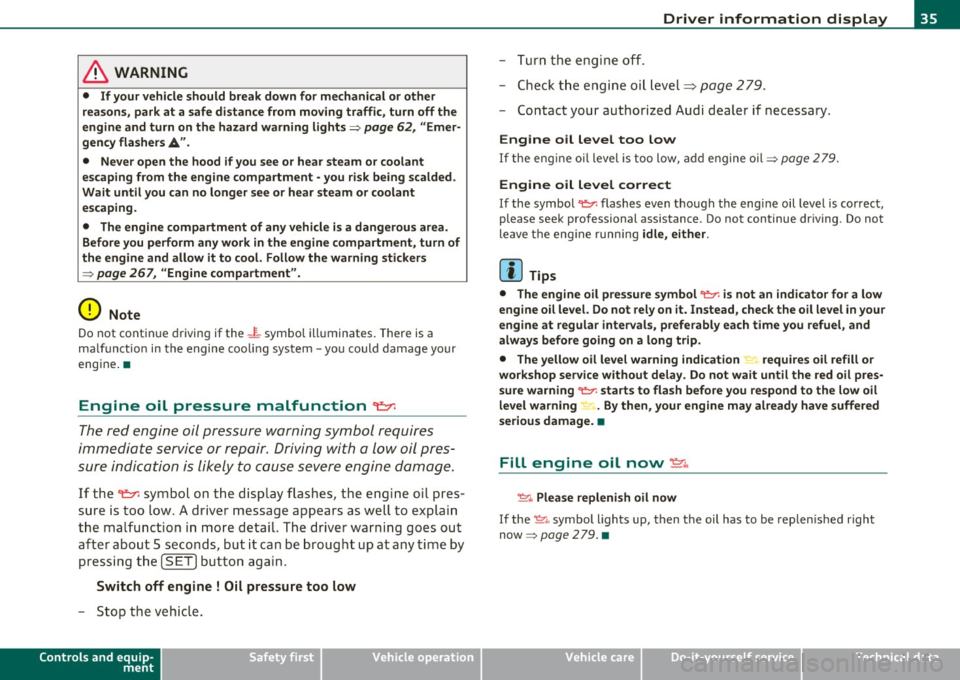
Engine oil pressure malfunction ~
The red e ngi ne oil pressure warni ng symbol requires
immediate servic e or repair. Driving with a low oil pres
sur e indication is likely to caus e severe engine damage.
If the ~ symbol on t he disp lay flashes , the engi ne oil pres
s u re is too low . A dr iver message appears as we ll to explain
t h e ma lfun ction in mo re detail. The driver wa rning goes out
a fte r about 5 seco nds, but it can be brought up at any tim e by
press ing t he
[SET] but ton aga in .
Switch off engine ! Oil pressure too low
- Sto p the veh icle .
Controls and equip
ment Safety first
Driver information display
- Tu rn the engine off .
- Check t he eng ine oi l level=>
page 279 .
-Contact your authorized Aud i dea ler if necessa ry.
Engine oil level too low
If the eng ine oil leve l is too low, add e ngine oil=> page 2 79.
Engine oil level correct
If the symbo l~ flashes even though the engi ne oil level is cor rect,
please seek professional assistance. Do not continue driv ing. Do not
leave t he eng ine runn ing
idle, either .
[I) Tips
• The engine oil pres sure symbol ~ is not an indi cator for a low
engine oil level. Do not rely on it . Instead , check the oil level in your
engine at regular intervals , preferably each time you refuel, and
always before going on a long trip.
• The yellow oil level warning indication.,.... requires oil refill or
workshop service without delay. Do not wait until the red oil pres
s ure warning ~ starts to flash before you re spond to the low oil
level warning . By then, your engine may already have suffered
serious damage. •
Fill engine oil now~
~-Plea se replenish oil now
If the ~ .. symbo l lights up, then t he oil has to be replen is hed right
now =>
page 279. •
Vehicle care Technical data
Page 38 of 362

Driver information display
Steering malfunction @-
If there is a malfunction in the electronic steering column
lock, the steering cannot be unlocked.
If the @- symbol in the display blinks, there is a malfunction
in the electronic steering column lock. A driver message
appears as well to explain the malfunction in more detail.
The driver warning goes out after about 5 seconds, but it can
be brought up at any time by pressing the
[SET] button
again.
Stop the vehicle and turn off the engine. Steering
defective
- Obtain professional assistance .
- Do
not tow your vehicle.
& WARNING
Your vehicle must not be towed in the event of a malfunction in
the electronic steering column lock because it cannot be steered
due to the locked steering. If it is towed with the steering locked,
there i s the ri sk of an accident.
W Tips
The symbo l's appearance might be different in some models.•
Ignition Lock malfunction©-
A malfunction in the ignition lock must be repaired imme
diately.
If the ©- symbol in the display blinks, there is a malfunction
in the electronic ignit ion lock . A driver message appears as
well to explain the malfunct ion in more detail. The driver warning goes out after about 5 seconds, but
it can be
brought up at any time by pressing the
!SET] button again
Defective ignition switch Get it serviced!
-Do not turn the engine off .
- Drive immed iately to an authorized service facility to have
the malfunction corrected.
If there is a malfunction in the electronic ignition lock, the ignition
cannot be turned off . Drive immediately to an authorized serv ice
facility to have the cause of the ma lfunction corrected.
On vehicles w ith convenience key*, the engine sho uld not be switched
off using the start/stop but ton because the engine cannot be started
again after the ignit ion has been switched off.
[ i ] Tips
Th e symbo l's appearance might be d ifferent in some models. •
Yellow symbols
Ayellow symbol means WARNING.
-en
9 a: gi
Fig. 26 Display:
Yellow warning
symbol
Yellow symbols indicate a priority 2 malfunction -Warning!
Page 44 of 362
Opening and closing
Opening and closing
Keys
Key set
B
Fig. 27 Key se t
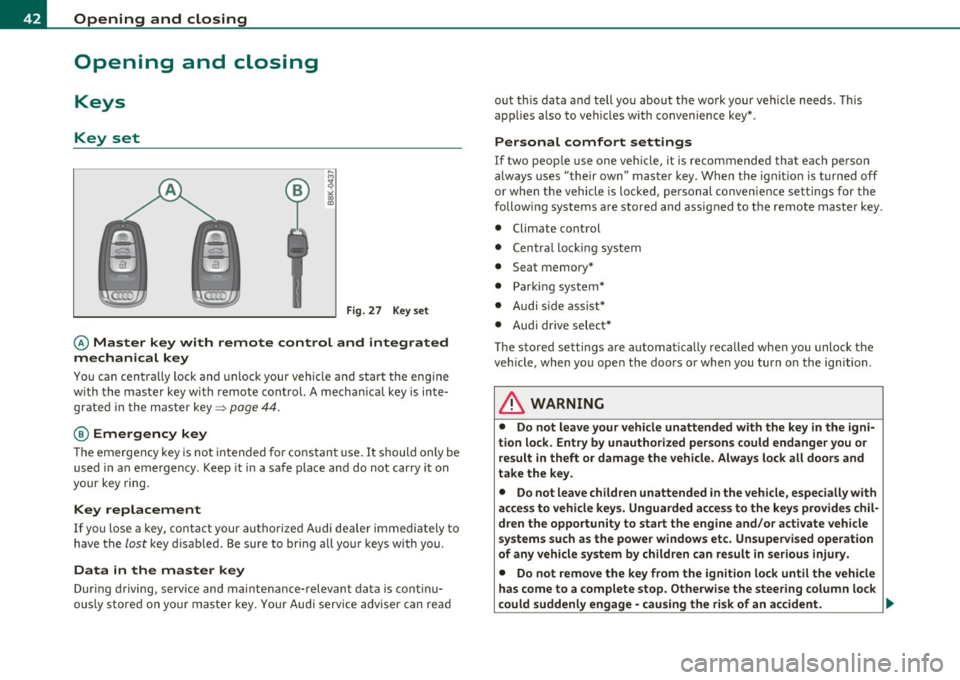
© Master key with remote control and integrated
mechanical key
You can centra lly lock and un lock your vehicle and start the engine
w ith the master key w ith remote cont ro l. A mecha nica l key is inte
grated in the master key=>
page 44.
@ Emergency key
The emergency key is not intended for constan t use. It should on ly be
used in an emergency. Keep it in a safe place and do not car ry it on
your key ring.
Key replacement
If you lose a key, cont act your autho riz e d Audi de aler immedia tely to
have the
lost key d isab led . Be sure to bri ng all your keys with you .
Data in the master key
During d riving, service and mai ntenance-relevant data is cont in u
ously s tore d on yo ur ma ster key. Your Audi service adviser can re ad out this data a
nd tell you about th e wo rk your ve hicle needs . T his
applies also to vehicles with convenience key* .
Personal comfort settings
If two peop le use one vehicle, it is recommended that each person
always uses "their ow n" mas ter key . When t he ignition is t urne d off
or when the vehicle is locked, pe rsonal convenience settings for the
followi ng systems a re stored and assig ned to the remote maste r key .
• Climate control
• Centra l lo cki ng sy stem
• Seat memory*
• Parki ng system *
• Audi s ide ass ist*
• Audi dr ive select *
Th e s tored se ttings a re au toma ticall y recalled when you unlock t he
veh icle, when yo u ope n the doo rs o r whe n you turn on the ign ition.
& WARNING
• Do not leave your vehicle unattended with the key in the igni
tion lo ck . Entry by unauthorized per sons could endanger you or
result in theft or damage the vehicle. Always lock all doors and
take the key.
• Do not leave children unattended in the vehicle, especially with
acce ss to vehicle key s. Unguarded acce ss to the keys provides chil
d ren the opportunity to start the engine and/or activate vehicle
system s such as the power windows et c. Un supervised operation
of any vehicle system by children can result in serious injury .
• Do not remove the key from the ignition lock until the vehicle
has come to a complete stop. Otherwise the steer ing column lock
could suddenly engage -cau sing the ri sk of an accident.
~
Page 45 of 362
![AUDI A5 COUPE 2011 User Guide (]] Tips
• The operation of the remote control key can be temporarily
disrupted by interference from transmitters in the vicinity of the
vehicle wo rking in the same frequen](/img/6/57583/w960_57583-44.png "AUDI A5 COUPE 2011 User Guide (]] Tips
• The operation of the remote control key can be temporarily
disrupted by interference from transmitters in the vicinity of the
vehicle wo rking in the same frequen")
(]] Tips
• The operation of the remote control key can be temporarily
disrupted by interference from transmitters in the vicinity of the
vehicle wo rking in the same frequency range (e.g. a cell phone, rad io
equipment) .
• If you open the dr ive r's doo r with the key left in the ignit ion lo ck,
a ch ime will sound . This is your reminder to remove the key and lock
the doo r.
• For security reasons, replacement keys are only available from
Audi dealers.
• For Declaration of Complia nce to United States FCC and Industry
Canada regulations=>
page 343 . •
Check Light in the master key
The check li ght in the master key provides inform ation
about different conditions.
!
lJl
Fig. 2 8 Che ck lig ht in
t h e maste r key
The check light comes on brief ly once when a button is p ressed, and
during an "inquiry" by the convenience key system.
Con tro ls a nd e quip
m en t Vehicle
OP-eration
Opening and closing
If the check light does not come o n, the batte ry is dead and has to be
rep laced. In addi tion, when the batte ry is dead the • sym bol appears
in the instrument cluster d isp lay as well as the message :
Please change ke y batte ry
Battery replacement => page 43. •
Master key battery replacement
..
Fig . 2 9 R em ote
m aste r ke y: Rem ovin g
th e m ech anic al ke y
Fig. 30 Remot e
m as ter k ey: Rem oving
t he batte ry hol der
We recommend having the battery changed by an authorized
Audi dealer. However, if you wish to rep lace the dead battery
yourse lf, proceed as follows :
- P ress the release button©=> fig. 29.
~
Vehicle care Do-it-yourselt service iTechnical data
Page 47 of 362
Starting the vehicle with the emergency
key
I,; N 9
" :g
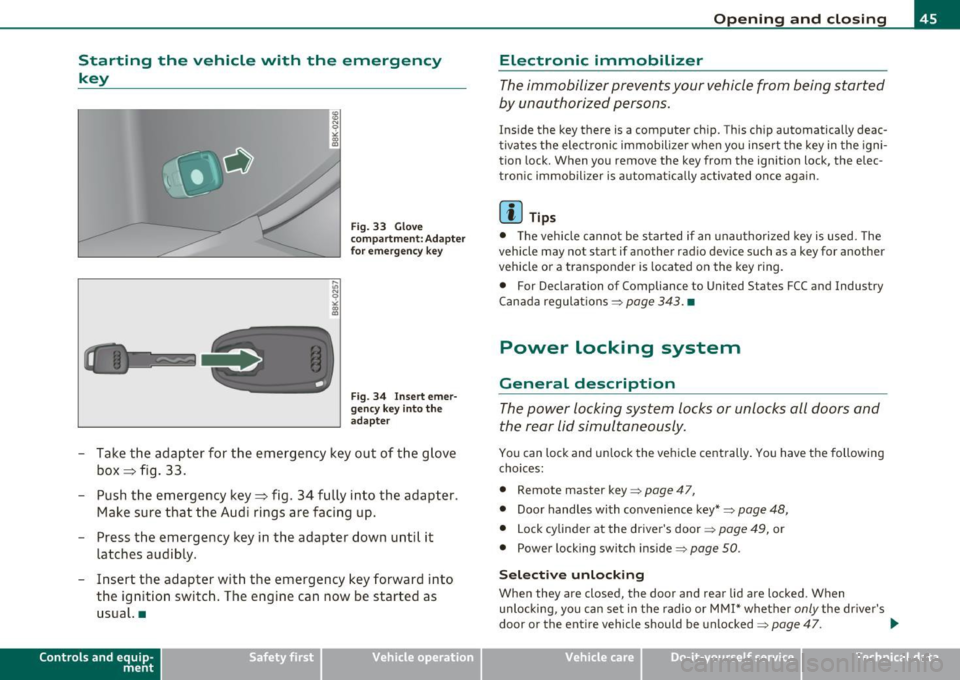
Fig. 33 Glove
compartment: Adapter
fo r emergency key
Fig. 34 Inser t emer
gency key i nto the
adapter
- Take the adapter for the emergency key out of the glove
box ~ fig . 33.
- Push the emergency key~ fig. 34 fully into the adapter.
Make sure that the Audi rings are facing up.
- Press the emergency key in the adapter down until it
latches audibly.
- Insert the adapter with the emergency key forward into the ign ition switch. The engine can now be started as
usual. •
Contro ls a nd e quip
m en t Vehicle
OP-eration
Opening and closing
Electronic immobilizer
The immobilizer prevents your vehicle from being started
by unauthorized persons.
Ins ide the key there is a computer chip. This ch ip automatically deac
tivates the elect ronic immobilizer when yo u insert the key in the igni
tion lock. When you remove the key from the ignition lock, the elec
tronic immobilizer is automat ica lly activated once aga in .
[ i ] Tips
• T he vehicle cannot be started if an unauthorized key is used. The
vehicle may no t start if another rad io dev ice such as a key for another
vehicle or a transponder is located on the key ring .
• For Declarat ion of Compliance to Uni ted S tates FCC and Industry
Canada regula tions =>
page 343 . •
Power locking system
General description
The power locking system locks or unlocks all doors and
the rear Lid simultaneously .
You can lock and unlock the ve hicle cent rally . You have the following
choices:
• Remote maste r key =>
page 47,
• Door handles with convenience key*=> page 48,
• Lock cylinder at the drive r's door => page 49, or
• Power locking swit ch inside =>
page 50.
Sele ct ive unl ocking
When they a re closed, the door and rear lid a re locked . Wh en
unlocking, you can set in the radio or MMI* whether
only the dr ive r's
door or the entire veh icle should be unlocked=>
page 47. .,_
Vehicle care Do-it-yourselt service iTechnical data
Page 49 of 362
Setting power locking
The driver can determine the functions for power locking
in the radio or fv1fv1I*.
In the Central locking menu you can decide which doors
should be unlocked when opening the vehicle.
- Select: [ CAR] function button> Central locking.
For example, if you switch the item Unlocking single door On, the
passenger's door is no longer included in the power locking system,
and will not be unlocked by pressing the unlock button on the master
key remote control.
You can continue to unlock all the doors and the rear lid as before .
Press the opening button on the master key twice .
In addition to this, the
Auto locking can be switched on and off.
When locking the vehicle, all doors and the trunk lid are locked auto
matically.
If you switch Trunk lid/tailgate On, then the handle on the rear lid
~ page 51, fig. 42 is locked. In this case the rea r lid can be opened
with the button
cs on the master key~ fig. 35 or with the unlocking
button in the driver's door~
page 51, fig. 41.
When you select
Confirmation tone On, a confirmation tone sounds
when you lock the vehicle .•
Con tro ls a nd e quip
m en t Vehicle
OP-eration
Opening and closing
Unlocking and locking the vehicle with the
remote control
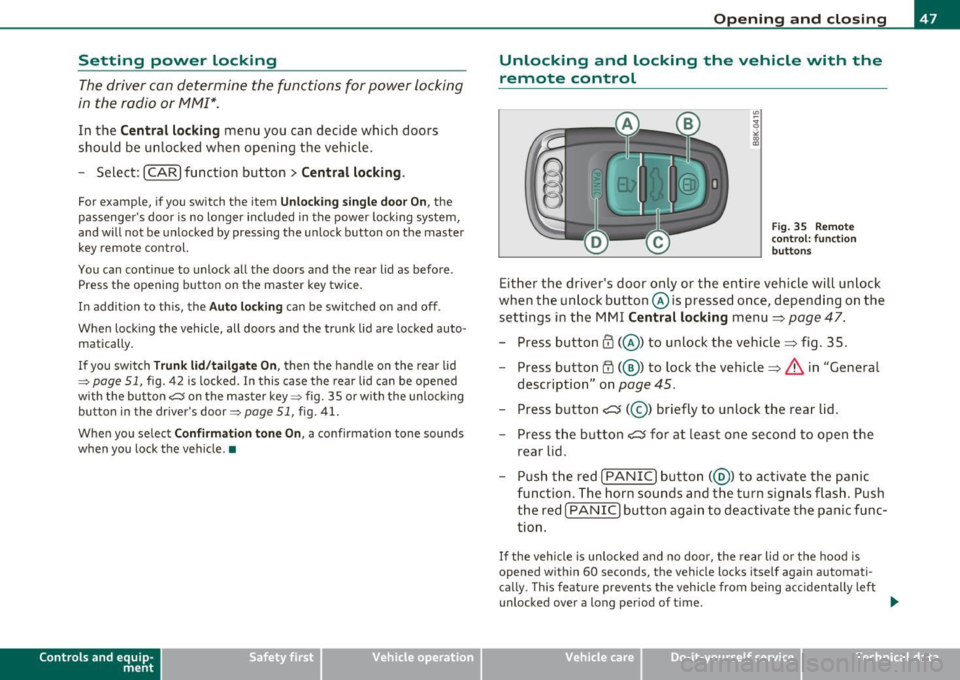
Fig. 35 Remote
control: function
buttons
Either the driver's door only or the entire vehicle will unlock
when the unlock button @is pressed once, depending on the
settings in the MMI Central locking menu =>
page 47.
- Press button@(@ ) to unlock the vehicle=> fig. 35 .
- Press button
1'.D (@ ) to lock the vehicle=> & in "General
description" on
page 45.
- Press button C::J (@ ) briefly to unlock the rear lid.
- Press the button
C::J for at least one second to open the
rear lid.
- Push the red !PANIC] button( @) to activate the panic
function. The horn sounds and the turn signals flash. Push
the red [ PANIC] button again to deactivate the panic func
tion.
If the vehicle is unlocked and no door, the rear lid or the hood is
opened within 60 seconds, the vehicle locks itself again automati
cally. This feature prevents the vehicle from being accidentally left
unlocked over a long period of time. .,,_
Vehicle care Do-it-yourselt service Technical data
Page 53 of 362

Emergency locking of the passenger's door
If the power locking system fails (power failure), you will need to lock the passenger door separately.
! a,
Fig. 40 Emergency
locking of the
passenger's door
An emergency locking mechanism is integrated in the edge of
the passenger's door (only visible when the door is open).
- Take the mechanical key out of the master key::::,
page 44.
-Open the door.
- Pull the protective cover out of the hole::::, fig. 40.
- Insert the mechanical key into the inner slot and turn it to
the right as far as it can go .
After you close the door, you will no longer be able to open it from the
outside . The door can be opened from the inside by pulling once on
the door handle .•
Con tro ls a nd e quip
m en t Vehicle
OP-eration
Opening and closing
Opening and closing rear lid/trunk
lid
Opening the rear lid
Fig. 41 Driver's door:
remote rear lid release
Fig. 42 Position of
handle in the rear lid
- Press the middle button ?::Jon the remote control master
key for at least one second, or
- Pull the release button ?::Jin the driver's door::::, fig . 41.
The rear lid unlocks and opens , or
- Press the handle on the rear lid::::, fig. 42. ..,_
Vehicle care Do-it-yourselt service iTechnical data
Page 55 of 362

Power windows
Controls
The driver can operate the window regulator for the
driver's door with the left switch and the window regu
lator for the passenger's door with the right switch.
Fig. 44 Driver's door:
power window
switches
If the respective switch is pushed or pulled the window will
open or close. The power window switches have a
two-posi
tion function:
Opening the windows
- Push the switch to the first stop and hold it there until the
window has lowered to the desired position .
- Push the switch briefly to the
second stop : the window
will automatically open all the way .
Closing the windows
-Pull the switch up to the first stop and hold it there until
the window has risen to the desired position.
- Pull the switch quickly to the
second position: the window
will automatically close all the way.
Con tro ls a nd e quip
m en t Vehicle
OP-eration
Opening and closing
& WARNING
• Do not leave children unattended in the vehicle, especially with
access to vehicle keys. Unsupervised use of the keys can result in
starting of the engine and use of vehicle systems such as power
windows, etc. which could result in serious injury.
• Remember -you can still open or close the power windows for
about ten minutes after the ignition is switched off. Only when
either of the doors are opened are the power windows switched
off.
• Be careful when closing the windows. Check to see that no one
is in the way, or serious injury could result!
• Always remove the ignition key whenever you leave your
vehicle.
• If you lock your vehicle from the outside, no one, especially
children, should remain in the vehicle.
• Do not stick anything on the windows or the windshield that
may interfere with the driver 's field of vision.
(I) Tips
• When you open the doors, the windows automatically lower about
10mm.
• After the ignition has been switched off, the windows can still be
opened o r closed for about 10 minutes. The window regulato rs are
not switched until the driver's or passenger's door is opened. •
Vehicle care Do-it-yourselt service iTechnical data
Page 57 of 362

Valet parking
Through the "valet parking" feature the luggage
compartment of your vehicle is secured from unautho
rized access during the valet parking service.
Fig. 46 Valet parking
button
With "valet parking " activated, the rear lid cannot be opened.
- Take the mechanical key out of the master key=>
page 44.
- Open the glove box=> page 93 and activate => fig. 46 the
"valet parking" feature by pressing the
[VALET) button.
The indicator light in the switch illuminates .
- Close the glove box and lock it with the mechanical key.
- Lock both rear seatbacks with the mechanical key =>
page 86.
- Lock the luggage compartment pass-through with the
mechanical key=>
page 87.
-Leave the master key with the service personnel for
parking and keep the mechanical key with you .
When the "valet parking" feature is activated:
• the unlocking button for the rear lid
<::::::5 in the driver's door is inac
tive
Con tro ls a nd e quip
m en t Vehicle
OP-eration
Opening and closing
• the button <::::::5 on the master key is inactive
• the opening handle in the rear lid is inactive .
The vehicle can be driven and locked and unlocked with the master key. Access to the luggage compartment is blocked.•
Panoramic tilting sunroof
Tilting and closing
,,,,, OJ?1 11111
Fig. 47 Section of
headliner: Switch for
panoramic tilting
sunroof
- To tilt the panoramic tilting sunroof, press the switch briefly.
- To close the panoramic tilting sunroof, pull the switch briefly.
- To set an intermediate position, press/pull the switch
until the roof reaches the desired position .
After the ignition is switched off, you can still operate the Panorama
for about 10 minutes . As soon as the driver's or passenger's door is
opened, the switch is inoperative.
Sun blind
The sun blind can be opened and closed manually in any position.
Vehicle care Do-it-yourselt service iTechnical data